

Programvare for innkommende callsentre hjelper support- og salgsteamene dine med å håndtere innkommende samtaler effektivt, gi raske løsninger og opprettholde kundeinteraksjoner av høy kvalitet. De beste plattformene hjelper deg med å håndtere samtalevolum, dirigere henvendelser og forbedre den generelle opplevelsen for innringere.
Hvis agentene dine må håndtere for mange verktøy eller går glipp av samtaler i perioder med stor pågang, er det på tide å tenke gjennom teknologistakken på nytt. Den riktige programvaren effektiviserer ikke bare arbeidsflytene, men gir også agentene konteksten og verktøyene de trenger for å løse problemer i løpet av den første samtalen.
Jeg har evaluert disse verktøyene for innkommende callsentre basert på ytelse i virkeligheten: samtaledirigering, CRM-integrasjoner, rapportering og hvor godt de støtter en smidig og personlig kundereise for innringeren.
Hva er programvare for innkommende callsentre?
Programvare for innkommende callsentre er en plattform som håndterer og effektiviserer innkommende kundesamtaler for support- og serviceteam. Den dirigerer samtaler intelligent, støtter agentenes arbeidsflyter og hjelper kontaktsentre med å levere raske og konsekvente svar fra ett sentralisert system.
Why Trust Our Software Recommendations
6,700+
Reviews
20
Industry experts
16+
Evaluation factors
14
Years
Our team has been testing and reviewing software since 2012. As CX leaders ourselves, we know how difficult—and important—it is to choose the right software.
For this guide, we evaluated tools using hands-on testing and independent research, scoring tools using our selection criteria.
Our reviews reflect our human editorial judgment, not a sales pitch.
 Gui DrusinaCreative Director
 Tim FisherVP of AI
Sammenligningstabell for programvare for innkommende callsentre
| Tool | Best For | Trial Info | Price | ||
|---|---|---|---|---|---|
| 1 | Best for intelligent call routing | Free demo available | From $15/user/month (billed annually) | Website | |
| 2 | Best with 250+ native integrations | Free trial available | From $30/license/month (billed annually) | Website | |
| 3 | Best with real-time behavioral guidance | Free demo available | Pricing upon request | Website | |
| 4 | Best for omnichannel support | Free demo available | From $30/user/month (billed annually) | Website | |
| 5 | Best for rapid global number provisioning | 14-day free trial | From $25/user/month (billed annually) | Website | |
| 6 | Best for extensive CRM & business app integrations | Free demo available | From $25/month (billed annually) | Website | |
| 7 | Best for quick cloud-based phone deployment | Free demo available | Pricing upon request | Website | |
| 8 | Best for secure, compliance-ready call management | Free demo available | From $79/month | Website | |
| 9 | Best with industry-specific AI agents | Free demo available | Pricing upon request | Website | |
| 10 | Best with cross-channel conversation orchestration | Free plan available | Pricing upon request | Website |


Oversikt over de 20 beste programvarene for innkommende callsentre
Her er en kort beskrivelse av hver programvare for innkommende callsentre, med verktøyets beste bruksområde, noen bemerkelsesverdige funksjoner og skjermbilder som gir et innblikk i brukergrensesnittet.
 Best for intelligent call routing
- Free demo available
- From $15/user/month (billed annually)
Visit WebsiteCustomer Rating:4.5/5
Nextiva One puts all your communication channels in one place Nextiva is a dynamic communication platform designed to enhance how businesses connect with their customers. It's tailored to support inbound call center operations by providing a suite of tools that facilitate efficient and meaningful customer interactions.
Why I Picked Nextiva: I picked Nextiva as a top choice for inbound call center software because of its intelligent call routing feature. This ensures calls are directed to the most suitable agent, which can improve customer satisfaction by resolving issues more quickly. Additionally, the call recording and sentiment analysis features are invaluable for monitoring performance and gaining insights into customer experiences.
Another reason Nextiva stands out is its robust reporting and analytics capabilities. These tools help you understand call trends and make data-driven decisions to improve your service. Automatic call distribution minimizes wait times, which can enhance your team's efficiency and boost customer satisfaction.
Standout Features & Integrations:
Features include real-time dashboards that give managers immediate insights into performance metrics, helping them make on-the-fly adjustments. The journey orchestration feature personalizes customer interactions, which can lead to faster issue resolution. Smart automations reduce repetitive tasks, allowing your team to focus on more complex customer needs.
Integrations include Salesforce, HubSpot, Slack, Microsoft Teams, Zendesk, Jira, monday.com, Twilio, Jotform, Lawmatics, ActiveCampaign, and Pipedrive.
Pros and Cons
Pros:
- Ability to receive voicemails via email is appreciated by users
- Automatic call distribution and intelligent routing
- Users often praise the clear and reliable call quality
Cons:
- Issues with the mobile app's reliability
- There are limitations with certain third-party integrations
 Best with 250+ native integrations
- Free trial available
- From $30/license/month (billed annually)
Visit WebsiteCustomer Rating:4.3/5
Get an overview of your call activity and a score based on customer satisfaction. Aircall is a cloud-based business phone and inbound call center platform that combines ACD, IVR, call queuing, real-time monitoring, AI-powered call handling, and deep CRM integrations into a single softphone-driven system.
Who Is Aircall Best For?
Aircall suits small to mid-market support and sales teams that run their inbound operations inside a CRM or helpdesk and need their phone system to work natively within that existing stack.
Why I Picked Aircall
Aircall earns its spot on my shortlist because no other inbound call center tool does CRM-native telephony as cleanly. I love how a HubSpot or Salesforce record surfaces automatically the moment a call comes in, so agents answer with full context before saying a word. The bi-directional sync auto-logs every call, outcome, and tag without agents manually updating the CRM. I also rely on the embedded Salesforce CTI softphone, which means agents handle inbound calls entirely inside their existing workspace without switching tabs.
Aircall Key Features
- AI voice agent: Automatically handles overflow inbound calls and resolves routine customer requests with contextual handoff to live agents.
- Multi-level IVR builder: Lets you design multi-step call menus using an intuitive visual interface and DTMF input.
- Analytics+ module: Provides unlimited call history, advanced filtering, real-time dashboards, and drill-down analytics for inbound queues and agents.
- Call monitoring modes: Supervisors can listen, whisper, or barge into live calls for QA and real-time coaching.
Aircall Integrations
Aircall offers over 250 native integrations, including Salesforce, HubSpot, Zendesk, Intercom, Slack, Microsoft Teams, Freshdesk, Pipedrive, Zoho CRM, and Shopify. An API is available for custom integrations.
Pros and Cons
Pros:
- CRM screen-pop on every inbound call
- Live call monitoring with supervisor whisper
- Quick setup with no IT dependency
Cons:
- Reporting depth lags dedicated CCaaS platforms
- No native workforce management or scheduling
 Best with real-time behavioral guidance
- Free demo available
- Pricing upon request
Visit WebsiteCustomer Rating:5/5
Cresta offers real-time Agent Assist that surfaces AI-generated answers and smart suggested responses to help inbound call center agents handle customer inquiries faster. Cresta is an AI-powered inbound call center software platform that delivers live conversation analysis, agent assistance, automation, and quality management within a single solution.
Who Is Cresta Best For?
Cresta is built for enterprise contact center teams that want to use AI to drive agent performance and operational consistency at scale.
Why I Picked Cresta
I picked Cresta as one of the best because I use its real-time behavioral guidance to surface coaching prompts and tailored scripts while calls happen, and the platform automatically analyzes live conversations to recommend next-best actions and unlock quality improvements.
Cresta Key Features
- Automated quality management: AI reviews and scores customer interactions for compliance and performance.
- Omnichannel support: Handles voice, chat, and email interactions within a unified platform.
- Knowledge surfacing: Surfaces relevant documents and answers for agents during live conversations.
- After-call workflow automation: Automatically generates call summaries and next steps after every interaction.
Cresta Integrations
Cresta offers native integrations with Salesforce, Zendesk, ServiceNow, Twilio, Genesys, NICE, Five9, Amazon Connect, Slack, and Microsoft Teams. An API is available for custom integrations.
Pros and Cons
Pros:
- Advanced AI surface insights for supervisors
- Automated call quality monitoring and scoring
- Real-time coaching during live customer interactions
Cons:
- Not tailored for small business deployments
- Lacks transparent third-party user reviews
Learn more about Cresta: Best for omnichannel support
- Free demo available
- From $30/user/month (billed annually)
Visit WebsiteCustomer Rating:5/5
View inbound call analytics and agent performance in a centralized dashboard. For those seeking an inbound call center solution, RingCentral Contact Center integrates AI-driven insights and omnichannel communication. This cloud-based platform is ideal for businesses aiming to elevate customer service, offering features like intelligent call routing and real-time analytics. By supporting multiple communication channels, RingCentral ensures your team can engage effectively with customers, addressing challenges in customer interactions and agent productivity.
Why I Picked RingCentral Contact Center
I picked RingCentral Contact Center because it excels in providing a comprehensive omnichannel support experience, crucial for modern inbound call centers. With its ability to connect across voice and over 20 digital channels, your team can easily manage interactions whether customers reach out via social media, email, or phone. The integration of AI-powered virtual agents not only enhances customer satisfaction by providing instant responses but also aids in reducing response times. Additionally, the platform's open APIs allow you to seamlessly integrate with existing CRM systems, ensuring that your agents have the tools needed to provide personalized and effective service.
RingCentral Contact Center Key Features
In addition to its strong omnichannel support, RingCentral Contact Center offers a range of features that enhance your inbound call center operations.
- Intelligent Routing: This feature directs calls and messages to the most suitable agents based on customer needs and agent skills, ensuring efficient handling of inquiries.
- Automation: Leverage virtual assistants and self-service options to manage interactions and reduce agent workload, allowing your team to focus on more complex tasks.
- Workforce Management: Utilize tools for scheduling, performance tracking, and agent support to enhance operational efficiency and ensure your team is always prepared.
- Customer Profile Merging: Equip your agents with a comprehensive view of past interactions by merging customer profiles, enabling personalized and informed customer service.
RingCentral Contact Center Integrations
Integrations include Salesforce, HubSpot, Zendesk, Microsoft Teams, Slack, Zoho CRM, ServiceNow, Google Workspace, Microsoft 365, and Oracle.
Pros and Cons
Pros:
- Offers real-time call monitoring to enhance service quality
- Includes smart routing for efficient customer-issue resolution
- Offers AI-powered sentiment analysis for better customer insights
Cons:
- Not all desired integrations may be available natively
- Limited support for specific desk phone models
Learn more about RingCentral Contact Center: Best for rapid global number provisioning
- 14-day free trial
- From $25/user/month (billed annually)
Visit WebsiteCustomer Rating:4.4/5
Monitor the performance of each agent and the team as a whole with the software's reporting dashboard. CloudTalk is a cloud-based inbound call center platform that combines AI-powered IVR, skills-based routing, queue management, live monitoring, and CRM integrations across a global phone number network spanning 160+ countries.
Who Is CloudTalk Best For?
CloudTalk is a strong fit for SMB and mid-market support and sales teams that need a quick-to-deploy, cloud-native phone system without the overhead of legacy contact center infrastructure.
Why I Picked CloudTalk
CloudTalk earns its spot on my shortlist because of how fast you can stand up a local inbound presence wherever your customers are. Provisioning a local number in one of 160+ countries takes minutes, not weeks, which means I can route inbound calls through a local number in Germany, Brazil, or Japan ahead of a new market launch without filing paperwork or waiting on carriers. Pair that with the Visual Call Flow Designer and AI Voice Agents covering 60+ languages, and inbound coverage scales without adding headcount.
CloudTalk Key Features
- Live agent monitoring and coaching: Supervisors can listen, whisper, or barge into live calls for real-time quality assurance.
- Skill-based and condition-based routing: Calls are automatically routed to the most appropriate available agents based on customizable rules.
- CRM and helpdesk integrations: Native integrations connect inbound calls with CRM and ticketing platforms for automatic context syncing.
- Real-time and historical reporting: Dashboards and wallboards provide live and historical insights into call volume, agent status, and queue performance.
CloudTalk Integrations
CloudTalk offers 100+ native integrations, including HubSpot, Salesforce, Zendesk, Pipedrive, Intercom, Zoho CRM, Freshdesk, Microsoft 365, Google Workspace, Slack, and Zapier. An API is also available for custom integrations.
Pros and Cons
Pros:
- Visual flow designer simplifies complex IVR builds
- AI Voice Agents deflect inbound volume automatically
- Instant local number setup in 160+ countries
Cons:
- Analytics customization limited versus enterprise CCaaS rivals
- Call quality drops reported in some regions
 Best for extensive CRM & business app integrations
- Free demo available
- From $25/month (billed annually)
Visit WebsiteCustomer Rating:4.8/5
Get a live overview of all agents’ performance. Squaretalk is a cloud contact center platform that combines ACD, IVR, intelligent call routing, inbound queue management, real-time monitoring, and omnichannel messaging across voice, WhatsApp, email, and SMS.
Who Is Squaretalk Best For?
Squaretalk is a strong fit for SMB and mid-market customer support teams and BPO operations that need a scalable, CRM-connected inbound call center without complex infrastructure.
Why I Picked Squaretalk
I picked Squaretalk as one of the best because its CRM connectivity goes well beyond a basic click-to-dial button. Native integrations with Salesforce, HubSpot, Zendesk, and Pipedrive surface full caller context the moment an inbound call connects. I particularly like the AI call summarization feature, which auto-logs a structured summary into the CRM record after every interaction, with no manual input required from agents.
Squaretalk Key Features
- Visual IVR call flow builder: Configure multi-level menus and routing logic with a drag-and-drop interface.
- Queue callback functionality: Let callers request callbacks instead of waiting on hold in busy inbound queues.
- Whisper and barge monitoring: Supervisors can silently coach agents or join live calls for quality assurance.
- Omnichannel agent inbox: Handle inbound voice, WhatsApp, email, SMS, and chat conversations in a single workspace.
Squaretalk Integrations
Squaretalk offers native integrations with Salesforce, HubSpot, Zoho CRM, Zendesk, Pipedrive, Freshdesk, and Microsoft Dynamics 365. An API is available for custom integrations.
Pros and Cons
Pros:
- AI call summarization auto-logs after each interaction
- Omnichannel inbox covers voice, SMS, and WhatsApp
- Strong CRM connectivity with native screen pops
Cons:
- Setup complexity increases with multi-queue configurations
- Reporting customization options are relatively limited
Learn more about Squaretalk: Best for quick cloud-based phone deployment
- Free demo available
- Pricing upon request
Visit WebsiteCustomer Rating:4.4/5
Get a visual overview of how the system will route calls to your team. GoTo Connect is a cloud-based phone system and contact center platform that combines ACD, skills-based call routing, IVR, omnichannel queue management, call recording, live agent monitoring, and CRM integrations in one unified interface.
Who Is GoToConnect Best For?
GoTo Connect suits small to mid-sized businesses that need a full-featured inbound call center stood up quickly, without a large IT team managing the rollout.
Why I Picked GoToConnect
GoTo Connect earns its spot on my shortlist because the Contact Center tier can go live in as little as one day, which is genuinely rare at this feature depth. I like that the visual dial plan editor lets me configure unlimited auto attendants, call queues, and routing rules without writing a single line of code. Skills-based routing, position announcements, and auto queue callback are all active from day one, not buried behind a lengthy implementation project.
GoToConnect Key Features
- Omnichannel inbox: Agents manage inbound calls, chats, SMS, and social messages from one unified workspace.
- Live supervisor dashboard: Supervisors monitor agent status, queue activity, and service levels in real time.
- AI-powered chat analysis: Conversation analytics identify trends and sentiment in live chat interactions automatically.
- Real-time call monitoring: Supervisors can listen, whisper, or barge in on active calls for quality and coaching.
GoToConnect Integrations
GoTo Connect offers native integrations with Salesforce, HubSpot, Zendesk, ServiceNow, Microsoft Teams, Google Workspace, and Outlook. An API is available for custom integrations.
Pros and Cons
Pros:
- Omnichannel queue management across voice and digital
- Visual dial plan editor simplifies IVR setup
- Fast deployment with minimal IT involvement
Cons:
- Limited workforce management versus dedicated CCaaS platforms
- Advanced analytics require higher-tier plans
Learn more about GoToConnect: Best for secure, compliance-ready call management
- Free demo available
- From $79/month
Visit WebsiteCustomer Rating:4.5/5
Get all the information customer service, marketing, and sales teams need in one place. CTM is a cloud-based inbound call management platform that combines call tracking, ACD routing, IVR menus, conversation intelligence, and compliance controls like HIPAA and PCI redaction in a single system.
Who Is CTM Best For?
CTM is a strong fit for teams in regulated industries like healthcare, legal, and financial services that need compliant call handling built into their inbound operations.
Why I Picked CTM
CTM earns its spot as one of the best on my shortlist because it builds compliance directly into the call flow rather than bolting it on after. I particularly like the automatic redaction feature, which strips sensitive data like credit card numbers and SSNs from call transcripts in real time. I also rely on its encrypted call recordings and SAML SSO, alongside HIPAA and PCI certifications that are baked into the platform itself.
CTM Key Features
- Smart Router: Dynamically directs inbound calls to agents based on custom if/then rules and real-time agent status.
- Multi-level IVR menus: Lets callers self-serve or reach specialized queues using customizable voice or keypad input trees.
- Real-time agent performance dashboards: Supervisors can monitor agent status, call duration, and queue health live.
- Native CRM integrations: Connects directly with Salesforce, HubSpot, Zoho, and others to automatically sync call data and contact details.
CTM Integrations
CTM offers native integrations with Salesforce, HubSpot, Microsoft Dynamics 365, Pipedrive, Zoho CRM, and Zendesk. It also provides an API for custom integrations.
Pros and Cons
Pros:
- Conversation intelligence for inbound call quality
- Live call whisper and barge capabilities
- Built-in HIPAA and PCI compliance controls
Cons:
- Omnichannel support lags dedicated CCaaS platforms
- No built-in workforce management or scheduling
Learn more about CTM (formerly CallTrackingMetrics): Best with industry-specific AI agents
- Free demo available
- Pricing upon request
Visit WebsiteCustomer Rating:4.4/5
Talkdesk offers a unified agent experience with its workspace interface Talkdesk is a cloud contact center platform that combines AI-powered call routing, IVR, real-time dashboards, workforce management, and industry-specific automation into a single inbound and omnichannel solution.
Who Is Talkdesk Best For?
Talkdesk is a strong fit for mid-market and enterprise support teams in regulated or service-heavy industries like healthcare, financial services, retail, and insurance.
Why I Picked Talkdesk
Talkdesk earns its spot on my shortlist because no other platform ships purpose-built AI agents for specific verticals at this depth. I love how Autopilot, deployed in a healthcare context, can autonomously handle appointment routing or insurance verification without touching a live agent queue. On top of that, Talkdesk Navigator reads caller intent through natural conversation, making routing decisions that a rules-based IVR can't replicate.
Talkdesk Key Features
- Studio IVR designer: Build multi-level, drag-and-drop voice menus with DTMF and speech recognition.
- Workforce management suite: Forecast call volume, schedule agents, and monitor adherence with built-in WFM tools.
- Omnichannel digital engagement: Manage inbound voice, chat, SMS, social, and email interactions from a unified workspace.
- Real-time monitoring and coaching: Track live agent activity and join calls for listen, whisper, or barge-in supervision.
Talkdesk Integrations
Talkdesk offers native integrations with Salesforce, HubSpot, Zendesk, Microsoft Teams, ServiceNow, Slack, Zoom, Microsoft 365, and Oracle Service Cloud. An API is available for custom integrations.
Pros and Cons
Pros:
- Native workforce management includes built-in forecasting
- AI-powered routing adapts to live caller intent
- Pre-built AI agents for regulated industries
Cons:
- Custom reporting options are limited out of the box
- Initial admin configuration requires significant technical effort
Learn more about Talkdesk: 10Best with cross-channel conversation orchestration
Twilio
- Free plan available
- Pricing upon request
Visit WebsiteCustomer Rating:4.4/5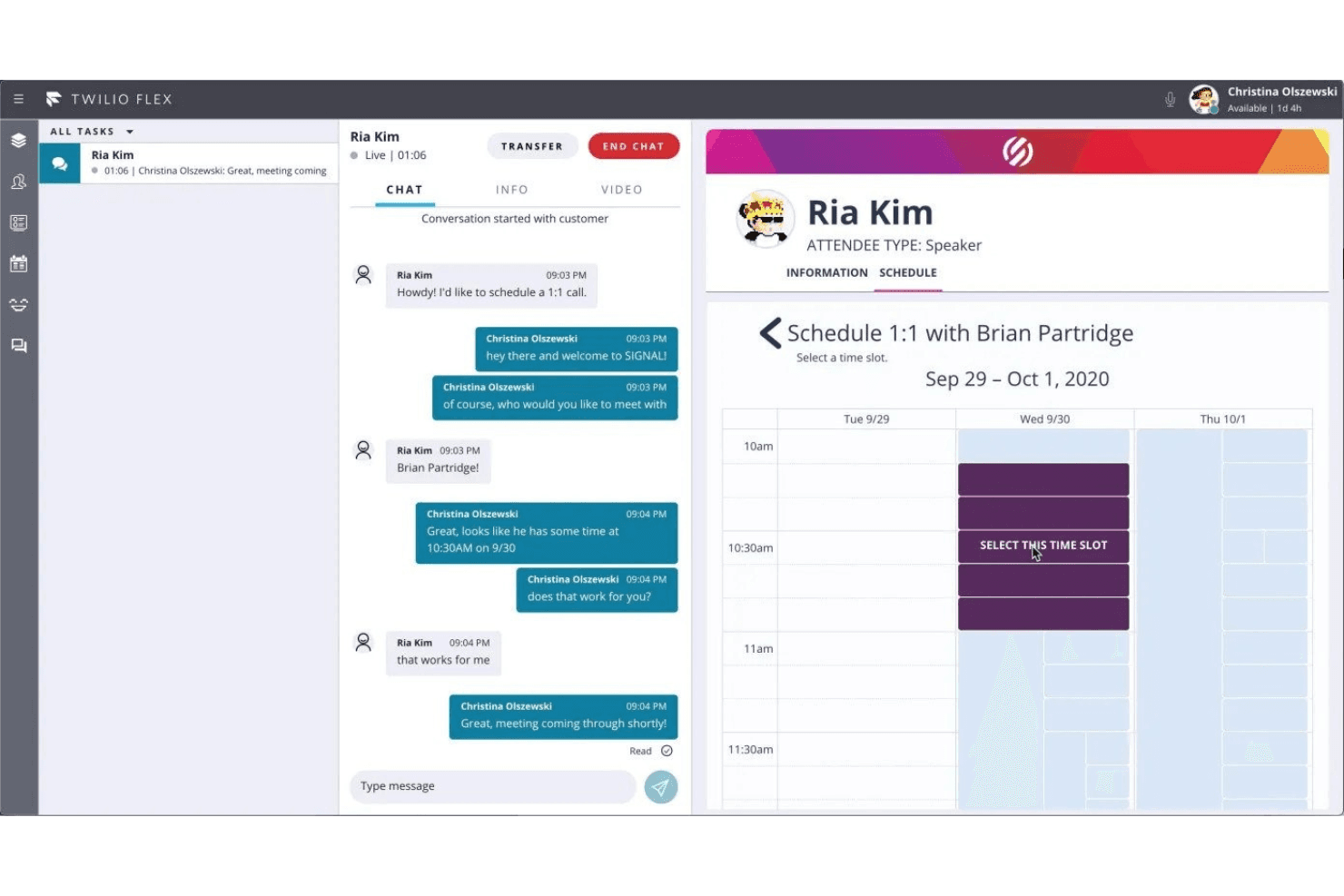
Use the platform to monitor all conversations, including call schedules. Twilio Flex is a programmable cloud contact center platform that handles inbound call routing, IVR, omnichannel queuing, real-time agent monitoring, and AI-driven conversation orchestration across voice, SMS, WhatsApp, and chat.
Who Is Twilio Best For?
Twilio Flex is a strong fit for mid-market and enterprise teams that have in-house developer resources and need a fully customizable contact center they can build around their existing stack.
Why I Picked Twilio
I picked Twilio as one of the best because of how it handles the moment an AI agent needs to escalate to a human. Conversation Orchestrator and Conversation Relay work together so that when a caller's intent exceeds what self-service can resolve, the handoff carries full conversation context directly into the agent desktop. Agent Copilot then surfaces relevant responses and automates post-call wrap-up in real time, so agents stay focused on the conversation rather than scrambling for notes mid-call.
Twilio Key Features
- Multi-channel agent desktop: Agents handle inbound calls, SMS, WhatsApp, and chat from a single unified interface.
- Visual IVR builder: Drag-and-drop tools in Twilio Studio let teams design and launch custom IVR flows without coding.
- Automated call recording: Flex records inbound customer calls automatically, with secure access and playback for QA review.
- Real-time analytics dashboard: Supervisors can instantly view real-time call volume, queue status, and agent activity through configurable dashboards.
Twilio Integrations
Twilio Flex offers native integrations with Salesforce, Zendesk, Shopify, Google Dialogflow, Calabrio ONE, and Segment. An API is available for custom integrations.
Pros and Cons
Pros:
- Scales easily across distributed remote agent teams
- AI-powered agent assist during live calls
- Highly customizable call routing and IVR workflows
Cons:
- Setup complexity slows initial deployment timelines
- Requires developer resources to configure and maintain
Learn more about Twilio:
Annen programvare for virtuelle callsentre
- 11DialpadBest with no-code AI agent creation and automation
- 12Zoho VoiceBest for SMBs with global calling needs
- 13ConvosoBest AI contact center technology
- 14Five9Best for AI-powered tools
- 15Bitrix24Best for omnichannel communication
- 16Zendesk SuiteBest comprehensive call center platform
- 17Salesforce Service Cloud VoiceBest for customer insights
- 18Kixie PowercallBest for managing remote team calls
- 19CallToolsBest for real-time monitoring
- 20LiveAgentBest for customizable IVR menus
- 213CXBest for remote customer service teams
- 22RingCentralBest for optimizing customer service teams.
- 23HubSpot Service HubBest for implementing data from the Hubspot CRM to prioritize calls.
- 24FreshdeskBest for call routing to the right team member.
- 25LiveVoxBest for effective engagement strategies on communication channels
- 26PanTerra NetworksBest for 99.999% call center uptime and reliability.
- 27ZadarmaBest for a complete cloud-based telephone system.
- 28FastcallBest for businesses that rely on Salesforce.
- 29EtollfreeBest for superior local and toll-free numbers.
- 30Newfies-DialerBest for CRM integration.
How I Evaluate Inbound Call Center Software
I split my evaluation into two layers: the baseline requirements—IVR, ACD, queue management—a tool must meet to qualify, and the differentiators that distinguish one platform from another.
Core Functionality (Table Stakes For This List)
When I'm selecting tools for my list, I rank each one on a scale from 0 (does not offer the functionality) to 5 (excels in this area) for each core functionality listed below. Then, I calculate the tool's total score into a percentage. Each tool needs to achieve a minimum total score of 65% to be considered for inclusion.
- ACD & Call Routing: I evaluate how flexibly each tool distributes calls—whether it supports skills-based routing, priority tiers, and conditions like language preference or VIP status.
- IVR Menu Builder: A good IVR builder lets you design multi-level menus visually. I look for drag-and-drop editors, speech recognition, and dynamic data lookups.
- Inbound Queue Management: I check for callback options, overflow rules, and wait-time announcements—the features that keep callers from hanging up during high-volume periods.
- Real-Time & Historical Reporting: Live dashboards showing queue depth and agent status matter as much as historical reports. I look for both, plus the ability to customize KPIs.
- Call Recording & Monitoring: Beyond basic recording, I evaluate whether supervisors can listen, whisper, and barge into live calls for coaching and quality assurance.
- CRM/Helpdesk Integration: Screen pops that surface caller history from tools like Salesforce, HubSpot, or Zendesk save agents from asking customers to repeat themselves.
Once I have a list of tools that meet the criteria, I consider what sets each platform apart.
Differentiating Factors (What Sets Vendors Apart)
Here's how I compare and contrast different vendors:
Standout Features
Workforce management tools make a real difference when you're staffing for unpredictable inbound volume—I look for built-in forecasting and schedule adherence tracking. AI agent assist is another differentiator I evaluate closely, since real-time suggestions and knowledge surfacing during live calls can shorten handle times. I also check whether a platform offers self-service voicebots that resolve common inquiries like order status or appointment confirmations without routing to an agent at all.
Beyond Features
Compliance matters a lot in this space—teams handling payments or health-related calls need PCI-DSS or HIPAA coverage, so I check each vendor's certifications and encryption standards. Telephony flexibility is another factor I evaluate, particularly whether a platform supports BYOC or SIP trunking for teams that want to keep existing carrier contracts. I also consider how quickly a platform can go live, since some vendors offer prebuilt IVR templates and guided onboarding that cut deployment from months to weeks.
Slik velger du programvare for innkommende callsentre
Det er lett å gå seg vill i lange funksjonslister og kompliserte prismodeller. For å hjelpe deg med å holde fokus mens du går gjennom den unike prosessen med å velge programvare, får du her en sjekkliste over faktorer du bør ha i mente:
| Faktor | Hva bør du vurdere? |
|---|---|
| FaktorSkalerbarhet | Hva bør du vurdere?Vil programvaren vokse sammen med virksomheten din? Vurder om den kan håndtere flere samtaler eller brukere etter hvert som teamet ditt vokser. Se etter løsninger som tilbyr fleksible abonnementer og støtter vekst. |
| FaktorIntegrasjoner | Hva bør du vurdere?Kan den kobles til de eksisterende verktøyene dine? Sørg for at programvaren integreres sømløst med CRM-systemet, brukerstøttesystemet eller andre viktige systemer for å effektivisere arbeidsflytene. |
| FaktorTilpasningsmuligheter | Hva bør du vurdere?Dekker den dine spesifikke behov? Kontroller om du kan tilpasse programvaren til prosessene og preferansene dine. Unngå rigide systemer som begrenser tilpasningsmulighetene. |
| FaktorBrukervennlighet | Hva bør du vurdere?Er den brukervennlig for teamet ditt? Velg intuitive grensesnitt som krever minimalt med opplæring. Kompliserte systemer kan føre til frustrasjon og ineffektivitet. |
| FaktorImplementering og innføring | Hva bør du vurdere?Hvor lang tid vil oppsettet ta? Vurder tiden og ressursene som kreves for å implementere løsningen og lære opp teamet ditt. Se etter leverandører som tilbyr god støtte i denne fasen. |
| FaktorKostnad | Hva bør du vurdere?Passer den inn i budsjettet ditt? Sammenlign prismodeller, inkludert skjulte gebyrer eller abonnementer på ulike nivåer. Sørg for at du får valuta for pengene uten å bruke for mye. |
| FaktorSikkerhetstiltak | Hva bør du vurdere?Hvordan beskytter den dataene dine? Kontroller programvarens krypteringsstandarder og samsvar med personvernregler for å beskytte sensitiv informasjon. |
| FaktorTilgjengelig support | Hva bør du vurdere?Er hjelp tilgjengelig når du trenger det? Kontroller om leverandøren tilbyr support døgnet rundt eller dedikerte kundeansvarlige som kan løse problemer raskt og sørge for at driften går smidig. |
Funksjoner i programvare for innkommende callsentre
Når du velger programvare for innkommende callsentre, bør du se etter følgende viktige funksjoner:
- Automatisk samtalefordeling: Denne funksjonen sørger for at innkommende samtaler rutes til riktig agent basert på ferdigheter, tilgjengelighet og innringerens behov. Den hjelper deg med å redusere ventetiden og koble innringere til personen som er best egnet til å hjelpe.
- Interaktivt talesvar: IVR-systemer ønsker innringere velkommen med en meny med alternativer, slik at de kan finne veien til riktig avdeling eller ressurs. Dette sparer ikke bare teamet ditt for tid, men gjør det også mulig for innringerne å få svar raskt – uten behov for menneskelig hjelp ved rutinespørsmål.
- Samtaleopptak: Med samtaleopptak kan du ta opp alle samtaler for senere gjennomgang. Dette hjelper deg med å forbedre kundeservicen, lære opp teamet og løse tvister med et pålitelig opptak som referanse.
- Analyse og rapportering i sanntid: Få tilgang til oversikter og rapporter som viser samtalevolum, agentenes prestasjoner, ventetider og mer. Dette lar deg oppdage trender, håndtere flaskehalser og veilede teamet for bedre resultater.
- CRM-integrasjon: Koble kundesenterprogramvaren til systemet for kunderelasjonshåndtering. Når en samtale kommer inn, ser du opplysninger om innringeren, historikk og notater – slik at du kan hilse på hver kunde som en gammel venn.
- Samtaleovervåking og hviskecoaching: Lytt til pågående samtaler og gi agenter tilbakemeldinger eller råd (uten at kunden hører det). Det er som å ha en trener på sidelinjen som hjelper agentene med å håndtere vanskelige situasjoner og utvikle ferdighetene sine.
- Støtte for flere kanaler: Gå utover telefonsamtaler ved å håndtere chatter, e-poster eller tekstmeldinger fra samme plattform. Du kan møte kundene i kanalen de foretrekker, og holde alle samtaler organisert.
- Samtalekø: Når alle agentene er opptatt, går ikke innringerne tapt eller blir ignorert. Samtalekøen setter dem i kø, spiller av ventemeldinger eller musikk og holder dem informert om ventetiden, slik at ingen føler seg glemt.
- Samtalenotater og merking: Agenter kan legge til tilpassede notater og merker for hver samtale. Dette gjør det enklere å følge opp utfallet av samtaler, eskalere saker og følge opp løfter som er gitt til kundene.
Vanlige AI-funksjoner i programvare for inngående kundesenter
I tillegg til standardfunksjonene i programvare for inngående kundesentre som er nevnt ovenfor, tar mange av disse løsningene i bruk kunstig intelligens med funksjoner som:
- AI-basert samtaleruting: Algoritmer analyserer kundedata og samtalekontekst for å koble hver innringer til den best kvalifiserte agenten, noe som forbedrer løsningshastigheten og kundetilfredsheten.
- Intelligente virtuelle assistenter: AI-drevne roboter kan svare på rutinespørsmål, behandle enkle forespørsler og veilede innringere gjennom menyer – slik at agentene dine får mer tid til komplekse problemer.
- Sentimentanalyse i sanntid: AI vurderer tonen og ordene som brukes i en samtale, og markerer innringere som er frustrerte eller forvirrede, slik at du kan gripe inn proaktivt og snu situasjonen.
- AI-drevet kvalitetskontroll: Kunstig intelligens gjennomgår automatisk samtaler for å kontrollere samsvar, tone og overholdelse av manus – og fremhever muligheter for veiledning og sikrer høye standarder.
- Prediktiv analyse: AI oppdager mønstre i innringernes atferd, forutsier travle perioder og hjelper deg med å optimalisere bemanningen for å levere konsekvent responsiv service.
Fordeler med programvare for inngående kundesentre
Implementering av programvare for inngående kundesentre gir flere fordeler for teamet og virksomheten din. Her er noen av fordelene du kan se frem til:
- Forbedret kundeopplevelse: Programvare for kundesentre bidrar til å håndtere og rute samtaler effektivt, slik at kundene raskt blir koblet til riktig agent.
- Bedre samarbeid i teamet: Integrasjon med CRM-systemer gjør det mulig å dele kundeinformasjon sømløst mellom teammedlemmer, noe som forbedrer kommunikasjonen og tjenesteleveransen.
- Økt effektivitet: Automatisk samtalefordeling og funksjoner for interaktivt talesvar (IVR) reduserer ventetiden og frigjør agenter slik at de kan håndtere mer komplekse henvendelser.
- Analyse i sanntid: Tilgang til samtaledata og resultatmålinger hjelper ledere med å ta informerte beslutninger for å optimalisere driften og forbedre tjenestekvaliteten.
- Skalerbarhet: Programvaren kan enkelt håndtere økende samtalevolum, slik at virksomheter kan utvide kundestøttekapasiteten uten omfattende endringer i infrastrukturen.
- Kostnadsbesparelser: Ved å automatisere rutineoppgaver og optimalisere ressursfordelingen kan programvare for inngående kundesentre redusere driftskostnadene.
- Fleksibilitet: Funksjoner for ekstern tilgang gjør det mulig for agenter å arbeide hvor som helst, og gir virksomheter en fleksibel bemanningsmulighet.
Kostnader og priser for programvare for inngående kundesentre
Valg av programvare for innkommende callsentre krever en forståelse av de ulike prismodellene og abonnementene som er tilgjengelige. Kostnadene varierer basert på funksjoner, teamstørrelse, tillegg og mer. Tabellen nedenfor oppsummerer vanlige abonnementer, gjennomsnittsprisene deres og typiske funksjoner som er inkludert i programvareløsninger for innkommende callsentre:
Sammenligningstabell for programvare til innkommende callsentre
| Abonnementstype | Gjennomsnittspris | Vanlige funksjoner |
|---|---|---|
| AbonnementstypeGratisabonnement | Gjennomsnittspris$0 | Vanlige funksjonerGrunnleggende samtalehåndtering, begrenset rapportering og støtte fra fellesskapet. |
| AbonnementstypePersonlig abonnement | Gjennomsnittspris$10-$30/bruker/måned | Vanlige funksjonerSamtaleruting, telefonsvarer, grunnleggende analyse og e-poststøtte. |
| AbonnementstypeBedriftsabonnement | Gjennomsnittspris$40-$70/bruker/måned | Vanlige funksjonerAvansert rapportering, CRM-integrasjon, samtaleopptak og kundestøtte døgnet rundt. |
| AbonnementstypeVirksomhetsabonnement | Gjennomsnittspris$100+/bruker/måned | Vanlige funksjonerEgendefinerbart dashbord, dedikert kundeansvarlig, API-tilgang og førsteklasses kundestøtte. |
Andre spør også
Her er svarene på noen av de vanligste spørsmålene om programvare for innkommende kundesentre.
Finnes det gratis programvare for innkommende kundesentre?
Ja, du kan finne programvare for kundesentre med gratis abonnementer eller prøveperioder, selv om disse alternativene ofte har begrensninger på antall agentplasser, minutter eller avanserte funksjoner. Leverandører som Freshdesk, Bitrix24 og CloudTalk tilbyr abonnementer på nybegynnernivå eller demoperioder, slik at du kan vurdere om plattformen dekker behovene dine. Gratisabonnementer inkluderer vanligvis grunnleggende samtalehåndtering, enkel IVR og begrenset rapportering.
Etter hvert som teamet ditt vokser eller behovene blir mer komplekse, for eksempel hvis du trenger avansert analyse, CRM-integrasjoner eller funksjoner for samsvar med regelverk, må du sannsynligvis oppgradere til et betalt abonnement. Test flere alternativer for å finne ut hvilken gratisversjon som best støtter den daglige driften av kundesenteret, før du binder deg til et abonnement.
Hva er ferdighetsbasert ruting?
Ferdighetsbasert ruting er en funksjon i de fleste moderne systemer for innkommende kundesentre som automatisk kobler innkommende samtaler til agenten som er best egnet til å håndtere kundens problem, basert på erfaring, språkferdigheter eller produktkunnskap. Hvis en kunde for eksempel trenger teknisk støtte på spansk, viderekobler systemet samtalen til en person som både har de nødvendige språkferdighetene og evnene til feilsøking.
Implementering av ferdighetsbasert ruting reduserer antallet samtaleoverføringer, forkorter ventetiden og fører til færre frustrerte kunder. Det hjelper deg med å utnytte teamets kompetanse mer effektivt, noe som gir høyere andel løste henvendelser ved første kontakt og bedre kundetilfredshet totalt sett. Når du vurderer programvarealternativer, bør du undersøke hvor enkelt det er å konfigurere egendefinerte rutingsregler og oppdatere agentprofiler etter hvert som virksomheten utvikler seg.
Hvordan kan jeg forbedre andelen saker som løses ved første kontakt ved hjelp av programvare for innkommende kundesentre?
For å øke andelen saker som løses ved første kontakt (FCR), bør du bruke programvare med smart samtaleruting, samlet kundehistorikk og kontekstbaserte verktøy for samtalemanus. Sørg for at agentene har umiddelbar tilgang til tidligere interaksjoner, produktveiledninger og vanlige spørsmål om feilsøking via en integrert kunnskapsbase. Bruk samtaleopptak og analyseinstrumentbord for å identifisere mønstre i samtaler som ikke ble løst, og tilby målrettet veiledning.
Proaktive funksjoner som overvåking i sanntid og agent hvisking hjelper ledere med å veilede samtaler uten å forstyrre kundeopplevelsen. Gi regelmessige tilbakemeldinger, legg til rette for enkle eskaleringer og opprett et arkiv over vanlige problemer, slik at teamet kan løse flere henvendelser ved første forsøk. Når FCR prioriteres i medarbeidersamtaler, oppmuntres agentene til å fokusere på å løse kundeproblemene med én gang.
Hvilke integrasjoner bør jeg prioritere for programvare for innkommende kundesentre?
Prioriter integrasjoner som tetter datagapene mellom kundesenteret og resten av virksomheten. Koble kundesenterplattformen til CRM-systemet ditt (Salesforce, HubSpot, Zoho), slik at agentene alltid har oppdatert kundeinformasjon. Integrasjoner med brukerstøttesystemer (Zendesk, ServiceNow) effektiviserer saksbehandling og sporing av henvendelser. Se etter tillegg for omnikanal som lar teamet håndtere e-post, direktechat og meldinger i sosiale medier fra det samme instrumentbordet, slik at all kommunikasjon samles. Hvis kundesenteret ditt er metrikkbasert, bør du koble til analyseverktøy for egendefinert rapportering og programvare for arbeidsstyring for å optimalisere bemanningen. De riktige integrasjonene reduserer manuell registrering, hindrer kontekstbytte og gir deg innsyn i sanntid på tvers av alle kontaktpunkter.
Hvordan måler jeg agentenes prestasjoner med verktøy for innkommende kundesentre?
Agentenes prestasjoner måles best gjennom en kombinasjon av kvantitative og kvalitative måleverdier, som alle enkelt kan spores i moderne programvare for innkommende kundesentre. Fokuser på gjennomsnittlig behandlingstid, andel saker løst ved første kontakt, servicenivå og kundetilfredshet (CSAT) som de viktigste KPI-ene. De fleste plattformer tilbyr instrumentbord i sanntid der du kan overvåke disse tallene, slik at du raskt kan gi tilbakemeldinger og korrigere kursen. Gå regelmessig gjennom samtaleopptak for veiledning, og anerkjenn de beste medarbeiderne i teammøter for å styrke motivasjonen. Undersøk samtalelogger for å finne hyppige flaskehalser eller tapte muligheter. Fastsett referanseverdier knyttet til forretningsresultater, og gi agentene resultatkort eller instrumentbord slik at de kan følge fremgangen sin og ta ansvar for egen utvikling.
Hva er forskjellen mellom programvare for innkommende og utgående kundesentre?
Programvare for innkommende kundesentre er utviklet for å håndtere innkommende henvendelser – kundestøtte, spørsmål eller ordrebehandling – og tilbyr funksjoner som interaktivt talesvar (IVR), ferdighetsbasert ruting, håndtering av ventekøer og saksoppfølging. Programvare for utgående kundesentre fokuserer på utgående samtaler og brukes ofte til salg, generering av potensielle kunder eller kampanjer for kundeoppfølging. Utgående plattformer inkluderer funksjoner som prediktiv oppringing, samtalemanus og kampanjesporing.
Noen løsninger er «kombinerte», men som leder for et kundesenter bør du sørge for at programvaren du velger, legger vekt på innkommende funksjoner som er relevante for teamets arbeidsflyt, for eksempel rapportering i sanntid og CRM-integrasjon, fremfor bare verktøy for omfattende utgående samtaler.
Hvordan bør jeg gå frem for å skalere kundesenteret med skybasert programvare?
Skalering med skybasert programvare for kundesentre gir deg fleksibilitet til å legge til agenter, åpne nye lokasjoner eller gå over til fjernarbeid uten store innledende IT-investeringer.
- Begynn med å velge en leverandør som er kjent for pålitelig oppetid, solide verktøy for brukeradministrasjon og transparente priser.
- Etter hvert som teamet vokser, gjør skyløsninger det mulig å ta imot nye agenter fra hvor som helst, med umiddelbar tilgang til delte ressurser og samtalemanus.
- Du kan utvide dekningen i perioder med høy belastning, rulle ut oppdateringer og integrere nye kommunikasjonskanaler som nettchat, uten å forstyrre tjenesten.
- Bruk funksjoner for optimalisering av arbeidsstyrken til nøyaktig prognostisering og bemanningsplanlegging.
- Til slutt bør du bruke innebygd analyse til å overvåke prestasjonene og justere etter hvert som du vokser, slik at plattformen fortsetter å være i tråd med virksomhetens mål i utvikling.