

Programvare for bestilling av fleksible arbeidsplasser i større virksomheter lar deg automatisere og administrere bestillinger av arbeidsplasser på tvers av store organisasjoner. Dette optimaliserer kontorbruk og gir teamene enkel tilgang til arbeidsplasser, samtidig som logistikken holdes under kontroll. Hvis du er på utkikk etter den rette plattformen, trenger du funksjoner som støtter vekst, muliggjør fleksibelt arbeid og gir tydelig innsikt i bruken – uten å føre til ekstra administrativt arbeid.
I denne veiledningen får du en oversikt over de beste verktøyene for bestilling av fleksible arbeidsplasser på virksomhetsnivå, slik at du kan skape en smartere og mer tilpasningsdyktig arbeidsplass i 2026.
Why Trust Our Software Recommendations
6,700+
Reviews
20
Industry experts
16+
Evaluation factors
14
Years
Our team has been testing and reviewing software since 2012. As CX leaders ourselves, we know how difficult—and important—it is to choose the right software.
For this guide, we evaluated tools using hands-on testing and independent research, scoring tools using our selection criteria.
Our reviews reflect our human editorial judgment, not a sales pitch.
 Gui DrusinaCreative Director
 Tim FisherVP of AI
Sammenligningstabell for programvare til bestilling av fleksible arbeidsplasser i større virksomheter
Tabellen nedenfor sammenligner prisdetaljene for mine utvalgte programmer for bestilling av fleksible arbeidsplasser i større virksomheter.
| Tool | Best For | Trial Info | Price | ||
|---|---|---|---|---|---|
| 1 | Best for customizable interactive floor plans | Free demo available | Pricing upon request | Website | |
| 2 | Best with integrated health and safety compliance | Free plan + free demo available | From $500/month | Website | |
| 3 | Best for intuitive desk assignment automation | Free demo available | From $5/bookable resource/month (billed annually) | Website | |
| 4 | Best for mobile-first desk reservations | 7-day free trial + free demo available | From $1.79/user/month (billed annually) | Website | |
| 5 | Best for powerful analytics on workspace usage | Free demo available | Pricing upon request | Website | |
| 6 | Best for native Microsoft Teams integration | Free demo available | From $99/month | Website | |
| 7 | Best for instant QR code desk check-in | 30-day free trial + free demo available | From $13.50/month (billed annually) | Website | |
| 8 | Best for hardware-integrated desk booking | 30-day free trial available | From $51/month | Website | |
| 9 | Best for configurable workspace permissions | Free demo available | Pricing upon request | Website | |
| 10 | Best for real-time occupancy monitoring | Free demo available | Pricing upon request | Website |


Anmeldelser av den beste programvaren for bestilling av fleksible arbeidsplasser i større virksomheter
Nedenfor finner du mine detaljerte sammendrag av den beste programvaren for bestilling av fleksible arbeidsplasser i større virksomheter som kom med på kortlisten min. Anmeldelsene mine gir en grundig gjennomgang av funksjonene, de beste bruksområdene og integrasjonene til hver plattform, slik at du kan finne den som passer best for deg.
 Best for customizable interactive floor plans
- Free demo available
- Pricing upon request
Visit WebsiteCustomer Rating:4.7/5
OfficeSpace offers customizable floor plans with desk assignments. OfficeSpace is a hybrid workplace management platform for enterprises that offers desk booking, interactive floor plan mapping, move management, usage analytics, and facility requests in one system.
Who Is OfficeSpace Best For?
OfficeSpace suits workplace experience teams in large enterprises that need to manage, update, and visualize complex floor plans across multiple global office locations.
Why I Picked OfficeSpace
OfficeSpace earns its spot on my shortlist because I rely on its interactive floor plans that I can fully customize for my locations and brand. I update zones, add social distancing, and assign room amenities directly on the floor plan every week.
OfficeSpace Key Features
- Desk booking with QR codes: Employees reserve, check in, and release desks by scanning QR codes.
- Move management tools: Manage, schedule, and track employee moves on a global scale.
- Automated desk assignment rules: Set custom logic to automatically assign desks based on user groups or protocols.
- Capacity and distancing controls: Configure capacity limits and spacing policies to comply with health guidelines.
OfficeSpace Integrations
OfficeSpace offers native integrations with Microsoft 365, Okta, Google Workspace, Slack, Cisco Webex, Brivo, ADP, Density, Oracle, Rippling, and more, and provides an API and webhooks for custom integrations.
Pros and Cons
Pros:
- Advanced move management for large-scale offices
- Real-time desk availability and occupancy tracking
- Customizable visual floor plans for each location
Cons:
- Mobile app UI feels somewhat outdated
- Some floor plan updates require admin intervention
Learn more about OfficeSpace: 2Best with integrated health and safety compliance
elia
- Free plan + free demo available
- From $500/month
Visit WebsiteCustomer Rating:4.7/5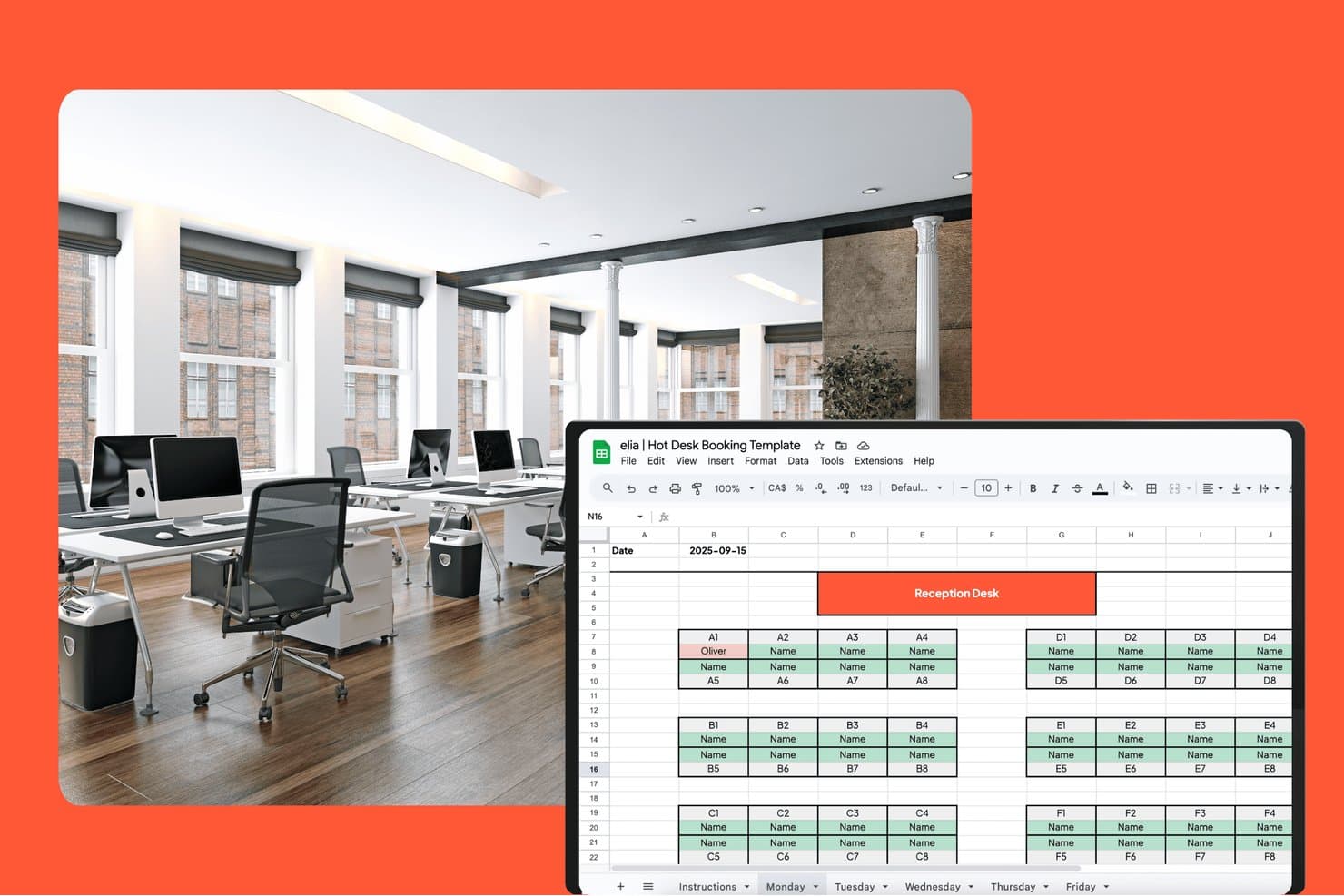
elia offers a Google Sheets-based hot desk booking template with a visual floor map layout showing desk assignments by zone for a selected date. elia is a modular workplace management platform that combines desk and meeting room booking, interactive floor plans, visitor management, occupancy analytics, and health and safety compliance tools in one system.
Who Is elia Best For?
elia suits workplace and facilities teams at mid-to-large organizations that manage hybrid offices and need built-in regulatory compliance alongside day-to-day space booking.
Why I Picked elia
I picked elia as one of the best because no other desk booking tool I've reviewed builds health and safety compliance into the core workflow the way it does. First responder tracking lets me see exactly who is on-site and where, in real time, which matters the moment something goes wrong. Incident reporting lives inside the same platform I use to manage bookings, so there's no switching between tools to log or review a workplace event.
elia Key Features
- Interactive floor plans: Employees can reserve desks and rooms directly from a visual floor map with filters for location and amenities.
- Neighborhood and team zones: Admins assign specific desk areas to teams or departments for easy coordination.
- Mobile app booking: Native iOS and Android apps let users book, check maps, or manage reservations from anywhere.
- Occupancy sensor integration: Real-time desk and room usage data flows in from connected sensor hardware.
elia Integrations
elia offers native integrations with Microsoft 365, Google Workspace, Google Calendar, Microsoft Teams, Outlook, and Slack. An API is available for custom integrations.
Pros and Cons
Pros:
- Automated visitor and first responder management
- Real-time occupancy tracking with sensors
- Built-in health and safety compliance features
Cons:
- Floor plans lack 3D or wayfinding options
- Limited third-party ecosystem connectivity
Learn more about elia: Best for intuitive desk assignment automation
- Free demo available
- From $5/bookable resource/month (billed annually)
Visit WebsiteCustomer Rating:4.8/5
Envoy offers automated desk assignments with attendance insights. Envoy is a workplace management platform for enterprise hot desk booking that elevates the employee experience by offering automated desk assignment, desk reservation, floor plan mapping, office analytics, visitor management, and employee scheduling.
Who Is Envoy Best For?
Envoy is a good fit for office managers and facilities teams in growing or large organizations that want to automate workspace coordination across multiple locations.
Why I Picked Envoy
I picked Envoy as one of the best because I use its desk assignment automation rules to match employees with available spots based on work schedules, office zones, or neighborhood preferences. I can visualize occupancy on real-time floor plans and set booking policies by team.
Envoy Key Features
- Interactive floor plans: Users can see desk availability and office zones visually.
- Mobile desk booking app: Employees reserve, check in, or release desks from their phones.
- Visitor management integration: Teams track, notify, and welcome office guests in one place.
- Desk amenities filter: Users can filter and reserve desks with specific equipment or features.
Envoy Integrations
Envoy offers 100+ integrations through its app directory, including Slack, Microsoft Teams, Google Calendar, Microsoft Outlook, Okta, Salesforce, Brivo, Kisi, Avigilon Alta, and DocuSign. It also connects with Zapier and provides an API for custom integrations.
Pros and Cons
Pros:
- Supports multi-location workspace management
- Interactive floor plans for workspace mapping
- Granular admin controls for large organizations
Cons:
- Mobile app sync lags for some users
- Advanced feature add-ons are expensive
Learn more about Envoy: Best for mobile-first desk reservations
- 7-day free trial + free demo available
- From $1.79/user/month (billed annually)
Visit WebsiteCustomer Rating:4.8/5
WorkInSync offers mobile-first desk booking and check-in tools. WorkInSync is an enterprise hot desk booking platform that offers mobile-driven desk reservations, space scheduling, floor plan visualization, health attestations, and visitor management for hybrid workplaces.
Who Is WorkInSync Best For?
WorkInSync is a great fit for facilities teams and corporate offices that need to prioritize mobile booking for their hybrid workforces.
Why I Picked WorkInSync
I picked WorkInSync as one of the best because I rely on its mobile-first reservation workflow to let my team book desks, check availability, and manage workplace attendance with just their phones. I use geofencing for auto check-in and quick QR code scans.
WorkInSync Key Features
- Interactive floor plans: Users can view and select specific desks and zones on a visual map.
- Occupancy analytics dashboard: Administrators see real-time usage, trends, and capacity reports for all workspaces.
- Multi-location management: Manage desk booking policies and inventory across multiple offices from a single system.
- Visitor management system: Register, track, and manage guest access and sign-ins within the platform.
WorkInSync Integrations
WorkInSync offers native integrations with Google Workspace, Microsoft Outlook, Cisco, Okta, OneLogin, SAP, Workday, Zoom, and more. An API is available for custom integrations.
Pros and Cons
Pros:
- Analytics dashboard for workspace utilization
- Visual floor plans for space selection
- Mobile check-in with geofencing and QR code
Cons:
- Web portal interface can lag occasionally
- Admin setup required for complex workflows
Learn more about WorkInSync: Best for powerful analytics on workspace usage
- Free demo available
- Pricing upon request
Visit WebsiteCustomer Rating:4.5/5
Robin offers workplace insights with desk and space usage metrics. Robin is an enterprise hot desk booking platform that centralizes workspace reservations, supports desk assignment management, enables neighborhood booking, and offers admin tools to oversee multi-location office environments.
Who Is Robin Best For?
Robin is a solid choice for workplace leaders at mid-sized or large companies who need detailed insights into how desks and office spaces are actually used.
Why I Picked Robin
I picked Robin as one of the best because I rely on its workspace analytics to break down detailed desk usage data by team, location, and day. I can easily spot office patterns and justify layout adjustments with real-time reporting dashboards.
Robin Key Features
- Interactive floor plans: Visual floor maps let users find and reserve desks in real time.
- Neighborhood booking: Group desks by team or function for flexible workspace assignment.
- Mobile desk booking app: Reserve, release, or check into desks from iOS and Android.
- Guest and visitor management: Register and track external visitors in the office.
Robin Integrations
Robin offers native integrations across the Microsoft ecosystem, including Microsoft Teams, Outlook, Exchange, Entra ID, Intune, and Microsoft 365, as well as Google Calendar and Google Workspace. It also integrates with Slack, Zoom, Okta, OneLogin, Rippling, and access control systems like Avigilon, Brivo, and Kisi. An API is available for custom integrations.
Pros and Cons
Pros:
- Multi-location workspace management within one platform
- Interactive floor plans for complex offices
- Granular desk-level admin permission controls
Cons:
- Some mobile users report slow sync
- Desk booking UI isn't fully intuitive
Learn more about Robin: Best for native Microsoft Teams integration
- Free demo available
- From $99/month
Visit WebsiteCustomer Rating:4.5/5
YAROOMS offers workspace booking directly within Microsoft Teams. YAROOMS is an enterprise hot desk booking software solution that provides advanced desk reservations, workspace resource management, visual floor plans, occupancy tracking, and centralized scheduling for workplace environments.
Who Is YAROOMS Best For?
YAROOMS is a strong match for organizations with a Microsoft Teams-driven workflow that want enterprise-level desk and room management.
Why I Picked YAROOMS
I picked YAROOMS as one of the best because I can book desks and rooms directly inside Microsoft Teams without switching platforms. I use its approvals and advanced permissions to control workspace access and keep all the booking activity synced with my Microsoft environment.
YAROOMS Key Features
- Interactive floor plans: Users select desks by clicking on dynamic office maps.
- Occupancy analytics: View live and historical desk usage data for optimization.
- Role-based access control: Set granular permissions by department or location.
- Visitor management system: Register and track office guests through the same platform.
YAROOMS Integrations
YAROOMS offers native integrations across the Microsoft ecosystem, including Microsoft Teams, Microsoft 365, Outlook, and Azure AD, along with Google Calendar, Google Meet, Slack, Zoom, MappedIn, and SAML 2.0 for SSO. A REST API is also available for custom integrations.
Pros and Cons
Pros:
- Built-in occupancy and resource usage analytics
- Visual office maps for workspace selection
- Desk and room bookings from Microsoft Teams
Cons:
- Mobile app features sometimes lag behind the web
- Per-user pricing scales up quickly
Learn more about YAROOMS: Best for instant QR code desk check-in
- 30-day free trial + free demo available
- From $13.50/month (billed annually)
Visit WebsiteCustomer Rating:4.7/5
Clearooms offers QR code desk check-in settings for attendance tracking. Clearooms is a workspace management platform for enterprises that offers desk and room booking, interactive floor plans, visitor management, calendar sync, and QR code-enabled check-in for shared office environments.
Who Is Clearooms Best For?
Clearooms fits facilities managers and admins who need a digital desk and meeting room booking platform with QR-based check-in for hybrid office environments.
Why I Picked Clearooms
I picked Clearooms because I can set up instant QR code desk check-in, so my team simply scans a desk’s code to reserve or check in on the spot. I use interactive floor plans and set booking rules to control who can book which desks.
Clearooms Key Features
- Visitor management: Allows reception staff to register and track all visitors entering the building.
- Calendar sync: Syncs desk bookings with Microsoft 365 and Google Calendar.
- Book on behalf: Admins can book desks or rooms on behalf of others.
- Custom roles and permissions: Lets admins set granular access controls for users and teams.
Clearooms Integrations
Clearooms has native integrations across the Microsoft ecosystem, and Jumpcloud, Okta, Slack, Salto, and more. An API is available for custom integrations.
Pros and Cons
Pros:
- Visual floor plan for desk selection
- Role-based access for admin control
- QR code check-in is built into every desk
Cons:
- No native visitor badge printing
- The mobile app can lag during peak check-in times
Learn more about Clearooms: 8Best for hardware-integrated desk booking
Joan
- 30-day free trial available
- From $51/month
Visit WebsiteCustomer Rating:4.5/5
Joan offers hardware-connected desk booking with live floor maps. Joan is an enterprise hot desk booking platform that provides digital workspace reservation, desk and room scheduling, hardware display integration, and workplace resource management.
Who Is Joan Best For?
Joan fits facilities teams and IT managers looking to coordinate office desk bookings with on-site hardware displays.
Why I Picked Joan
I picked Joan because I can connect custom e-paper desk displays directly to its desk booking platform, making reservations and check-ins visible at the desk. My team books, releases, and manages desks on the spot using Joan’s hardware integration.
Joan Key Features
- Mobile booking app: Employees can reserve desks and rooms from their smartphones.
- Calendar integration: Syncs with Outlook, Microsoft 365, or Google Calendar for direct booking.
- QR code check-in: Users confirm desk reservations by scanning a QR code at the desk.
- Analytics dashboard: Admins view workspace utilization and reservation reports in real time.
Joan Integrations
Joan offers native integrations across the Microsoft ecosystem, including Microsoft 365, Microsoft Teams, Outlook, Exchange, and Azure AD, along with Google Workspace, Google Calendar, Slack, Zoom, Cisco Webex, Okta, JumpCloud, and iCal. It also connects with Zapier and IFTTT, and has an API for custom integrations.
Pros and Cons
Pros:
- Mobile booking app with QR code check-in
- Real-time office and occupancy analytics
- Desk booking with dedicated e-paper hardware displays
Cons:
- Limited reporting customization options
- Setup requires proprietary hardware purchases
Learn more about Joan: Best for configurable workspace permissions
- Free demo available
- Pricing upon request

Eptura offers work request creation and work order tracking. Eptura is an enterprise desk booking solution and software platform that centralizes workspace reservations, supports organization-wide space management, and enables advanced permission controls for complex workplace environments.
Who Is Eptura Best For?
Eptura is a solid pick for large organizations or enterprises that need granular control over workspace access across multiple locations or departments.
Why I Picked Eptura
I picked Eptura as one of the best because I can set highly granular workspace permissions for different team members by location, department, or user group. This lets my team manage multi-floor, multi-tenant offices without worrying about unauthorized desk reservations.
Eptura Key Features
- Interactive floor plans: Visualize available and occupied desks across entire office layouts.
- Mobile reservations: Book, check in, or release desks directly from the Eptura mobile app.
- Desk sensor integration: Connect with hardware sensors to automate desk status updates.
- Reporting dashboard: Access detailed data on space utilization and desk booking trends.
Eptura Integrations
Eptura offers more than 30 native integrations, including the Microsoft ecosystem, Zoom, Salesforce, Dropbox, Azure, AWS, Power BI, and Slack. It integrates with Zapier, and an API is also available for custom integrations.
Pros and Cons
Pros:
- Supports multi-location workspace management
- Interactive floor plans for large offices
- Advanced desk-level permission controls
Cons:
- Customer service response is often slow
- The admin dashboard can feel overwhelming
Learn more about Eptura:

GoBright offers live desk and room status on interactive floor plans. GoBright is an enterprise hot desk booking platform that combines desk reservation, occupancy sensors, space management dashboards, and smart integrations to help facilities and workplace teams monitor and manage workspaces in real time.
Who Is GoBright Best For?
GoBright is a strong fit for facilities managers at large enterprises or multi-site organizations that need dynamic, sensor-driven desk booking and workspace monitoring.
Why I Picked GoBright
I picked GoBright as one of the best because I rely on its occupancy sensors to show live desk status and auto-release unused desks. I can monitor workspace use in real time from a central dashboard. My team manages on-the-fly bookings as headcount shifts.
GoBright Key Features
- Interactive floor plan maps: Users see available desks and spaces visually and reserve spots directly.
- Microsoft 365 and Google Workspace sync: Desk bookings integrate with users' existing calendars.
- Mobile app for desk booking: Employees can reserve, check in, or release desks from their phones.
- Customizable desk settings: Admins can set rules for booking hours, cleaning times, or department zones.
GoBright Integrations
GoBright offers native integrations with Microsoft 365, Outlook, Exchange, Google Workspace, Microsoft Teams, and Azure Active Directory.
Pros and Cons
Pros:
- Multiple office layouts supported for large organizations
- Automated desk release with sensor integration
- Real-time visibility of workspace occupancy
Cons:
- Occasional sync issues with mobile app bookings
- Lacks built-in visitor registration features
Learn more about GoBright:
Annen programvare for bestilling av fleksible arbeidsplasser i større virksomheter
Her er noen flere alternativer for programvare til bestilling av fleksible arbeidsplasser i større virksomheter som ikke kom med på kortlisten min, men som likevel er verdt å undersøke:
- 11Mapiq Best for optimizing office utilization insights
- 12SkeddaBest for advanced scheduling automation
- 13deskbirdBest for customizable booking experiences
- 14KadenceBest for hybrid workplace coordination
- 15TacticBest for floor plan visual selection
- 16ArchieBest for mobile-first desk management
- 17DibsidoBest for multilingual platform support
- 18Smartway2Best for automated booking workflows
- 19FlexwhereBest for instant QR code desk access
How I Evaluate Enterprise Hot Desk Booking Software
My evaluation has two layers: the core requirements—multi-site booking, SSO, floor maps—a tool must clear, and the differentiators that show how well it handles true enterprise scale.
Core Functionality (Table Stakes For This List)
When I'm selecting tools for my list, I rank each one on a scale from 0 (does not offer the functionality) to 5 (excels in this area) for each core functionality listed below. Then, I calculate the tool's total score into a percentage. Each tool needs to achieve a minimum total score of 65% to be considered for inclusion.
- Interactive Floor Maps: I check whether floor plans are clickable and dynamic, showing real-time desk availability, amenities, and teammate locations across multiple floors and buildings.
- Real-Time Booking Engine: Same-day, advance, and recurring reservations with check-in and auto-release are what I evaluate here, since no-show handling is a daily reality in hybrid offices.
- Enterprise Scalability & SSO: Each tool needs to support SSO/SAML, directory sync, and multi-site management so IT teams can deploy across dozens of global offices from one admin console.
- Calendar & Workplace Integrations: I look for two-way sync with Microsoft 365 and Google Workspace, plus native Slack or Teams bots that let employees book a desk without leaving their chat window.
- Space Utilization Analytics: Dashboards that surface occupancy rates, peak-day trends, and no-show percentages help workplace leaders right-size their real estate, so I evaluate reporting depth and exportability.
- Team & Neighborhood Management: The ability to assign desk zones by department and coordinate team days matters here, especially for CX teams that need to cluster on-site for collaborative sessions.
Once I have a list of tools that meet this criteria, I consider what sets each platform apart.
Differentiating Factors (What Sets Vendors Apart)
Here's how I compare and contrast different vendors:
Standout Features
IoT sensor integration is a major differentiator. Tools that pull data from under-desk sensors give workplace teams accurate occupancy numbers instead of relying on manual check-ins alone. I also evaluate whether a platform offers AI-powered desk recommendations that surface suggestions based on teammate schedules and past booking preferences. Beyond desks, I look for unified platforms covering meeting rooms, parking, and visitor management, since CX teams often coordinate on-site sessions that involve external guests.
Beyond Features
Enterprise security matters when desk booking data flows through SSO, HRIS, and access control systems. I check for SOC 2 Type II certification and data residency options, especially for organizations with offices across multiple regions. Implementation support is another factor I weigh heavily. Rolling out a new booking tool to thousands of hybrid employees requires CAD floor plan conversion and change management guidance. Pricing transparency also shapes my evaluation, since per-user and per-desk models scale very differently as headcounts fluctuate.
Slik velger du programvare for bestilling av fleksible arbeidsplasser i større virksomheter
Det er lett å gå seg vill i lange funksjonslister og kompliserte prisstrukturer. For å holde fokus mens du arbeider deg gjennom den unike prosessen med å velge programvare, får du her en sjekkliste over faktorer du bør ha i tankene:
| Faktor | Hva du bør vurdere |
|---|---|
| FaktorSkalerbarhet | Hva du bør vurdereStøtter plattformen dagens og fremtidens kontorstørrelse, vekstplaner og flere lokasjoner ved behov? |
| FaktorIntegrasjoner | Hva du bør vurdereKan den kobles til eksisterende kalendere, HR-systemer, identitetsstyring eller samarbeidsverktøy på en innebygd måte? |
| FaktorTilpasningsmuligheter | Hva du bør vurdereKan du konfigurere bestillingsregler, tillatelsessett og profilering for ulike avdelinger eller kontorløsninger? |
| FaktorBrukervennlighet | Hva du bør vurdereHvor raskt kan de ansatte lære å bruke den? Vil bestilling av arbeidsplasser, innsjekking og endringer passe sømløst inn i de daglige arbeidsflytene? |
| FaktorImplementering og opplæring | Hva du bør vurdereHvor lang tid tar det å konfigurere kontorløsningen, lære opp brukerne og komme fullt i gang etter signering? |
| FaktorKostnad | Hva du bør vurdereFinnes det gebyrer per bruker eller modul, oppsettskostnader eller krav om årlige avtaler? Hvordan samsvarer dette med budsjettet ditt? |
| FaktorSikkerhetstiltak | Hva du bør vurdereOmfatter løsningen GDPR, SSO og nødvendig personvern for ditt geografiske område og virksomhetens retningslinjer? |
| FaktorTilgjengelig kundestøtte | Hva du bør vurdereFår du tilgang til pålitelig kundestøtte i arbeidstiden i din region? Hvilke kanaler tilbys hvis det oppstår problemer? |
Hva er programvare for bestilling av fleksible arbeidsplasser i større virksomheter?
Programvare for bestilling av fleksible arbeidsplasser i større virksomheter er en digital plattform utviklet for at organisasjoner skal kunne administrere fleksible bestillinger av arbeidsplasser og fordeling av arbeidsområder i stor skala. Disse systemene lar ansatte reservere arbeidsplasser, se tilgjengelighet i sanntid og følge virksomhetens regler for bruk av arealer. De hjelper driftsteam med å optimalisere kontorløsninger, følge med på beleggsgrad og støtte hybride eller aktivitetsbaserte arbeidsmiljøer, samtidig som sikkerhet og administrativ kontroll opprettholdes.
Funksjoner i programvare for bestilling av fleksible arbeidsplasser i større virksomheter
Når du velger programvare for booking av fleksible arbeidsplasser for virksomheter, bør du se etter følgende viktige funksjoner:
- Portal for booking av arbeidsplasser: Gir et nett- eller mobilgrensesnitt der ansatte kan administrere booking av arbeidsplasser og reservere plasser basert på dato, klokkeslett og stedspreferanser.
- Interaktive plantegninger: Lar brukerne se kontorlokalene i detalj og velge tilgjengelige arbeidsplasser visuelt, i stedet for fra en statisk liste.
- Tilgjengelighet i sanntid: Oppdaterer statusen for arbeidsplasser og rom umiddelbart, slik at brukere og administratorer alltid ser de mest oppdaterte alternativene.
- Automatiserte bookingregler: Gjør det mulig for administratorer å angi begrensninger og retningslinjer for reservasjon av arbeidsplasser, for eksempel maksimal bookingvarighet, perioder for forhåndsbooking eller tilgang basert på avdeling.
- Kalenderintegrasjon: Synkroniserer reservasjoner med bedriftens kalendere, for eksempel Microsoft 365 eller Google Workspace, slik at bookingene vises sammen med andre avtaler.
- Innsjekking og utsjekking: Tilbyr funksjoner som QR-koder eller nærhetssensorer for å bekrefte bruk, redusere uteblivelser og automatisk frigjøre ubrukte arbeidsplasser.
- Analyse og rapportering: Registrerer utnyttelsen av arbeidsplasser, trender for beleggsgrad og bookinghistorikk for å gi grunnlag for planlegging av lokaler og beslutninger om eiendom.
- Rollebasert tilgangskontroll: Gjør det mulig å tildele ulike tillatelser til administratorer, teamledere og brukere, slik at virksomheter kan beskytte sensitive innstillinger og data.
- Besøkshåndtering: Integrerer registrering og sporing av gjester i prosessen for booking av arbeidsplasser, slik at resepsjonsteamet kjenner til forventede ankomster.
- Støtte for mobilapper: Tilbyr en app for booking, navigasjon og varsler på farten, og støtter ansatte som ikke alltid befinner seg ved arbeidsplassen sin.
Fordeler med programvare for booking av fleksible arbeidsplasser for virksomheter
Implementering av programvare for booking av fleksible arbeidsplasser for virksomheter gir flere fordeler for teamet og virksomheten din. Her er noen av fordelene du kan se frem til:
- Optimalisert utnyttelse av lokaler: Interaktive plantegninger og tilgjengelighet i sanntid hjelper deg med å optimalisere deling av arbeidsplasser, utnytte de eksisterende arbeidsplassene best mulig og unngå underutnyttede arbeidsområder.
- Støtte for hybridarbeid: Portaler for reservasjon av arbeidsplasser og automatiserte bookingregler gjør det mulig å tilrettelegge for ansatte som veksler mellom fjernarbeid og arbeid på kontoret.
- Enklere arbeidsplassopplevelse: Støtte for mobilapper, kalenderintegrasjoner og innsjekkingsfunksjoner gjør det enklere for ansatte å booke og finne arbeidsplasser raskt.
- Bedre datadrevne beslutninger: Funksjoner for rapportering og analyse gir driftsteam innsikt i trender for beleggsgrad og bidrar til fremtidig kontorplanlegging.
- Bedre administrativ kontroll: Rollebaserte tillatelser og automatiserte retningslinjer gjør det mulig å tilpasse tilgangen til arbeidsplasser etter virksomhetens behov og krav til etterlevelse.
- Færre uteblivelser og mindre sløsing med ressurser: Innsjekkings- og utsjekkingssystemer sikrer at reserverte plasser faktisk brukes, og frigjør arbeidsplasser som ikke blir benyttet.
- Bedre besøkshåndtering: Integrasjon av funksjoner for besøkshåndtering hjelper resepsjonspersonalet med å følge med på ankomster og gi besøkende en sømløs velkomst.
Kostnader og priser for programvare for booking av fleksible arbeidsplasser for virksomheter
Valg av programvare for booking av fleksible arbeidsplasser for virksomheter krever en forståelse av de ulike prismodellene og abonnementene som er tilgjengelige. Kostnadene varierer basert på funksjoner, teamstørrelse, tilleggstjenester og mer. Tabellen nedenfor oppsummerer vanlige abonnementer, gjennomsnittsprisene deres og typiske funksjoner som er inkludert i programvareløsninger for booking av fleksible arbeidsplasser for virksomheter:
Sammenligningstabell for abonnementer for programvare for booking av fleksible arbeidsplasser for virksomheter
| Abonnementstype | Gjennomsnittspris | Vanlige funksjoner |
|---|---|---|
| AbonnementstypeGratisabonnement | Gjennomsnittspris$0 | Vanlige funksjonerBook arbeidsplasser for et lite team, få tilgang til den grunnleggende bookingportalen og motta begrenset brukerstøtte. |
| AbonnementstypePersonlig abonnement | Gjennomsnittspris$5-$10/bruker/måned | Vanlige funksjonerIndividuell booking av arbeidsplasser, kalendersynkronisering, tilgang til mobilapp og enkel rapportering. |
| AbonnementstypeBedriftsabonnement | Gjennomsnittspris$10-$25/bruker/måned | Vanlige funksjonerInteraktive plantegninger, tilgjengelighet i sanntid, administratorkontroller, avansert analyse og prioritert brukerstøtte. |
| AbonnementstypeVirksomhetsabonnement | Gjennomsnittspris$20-$40/bruker/måned | Vanlige funksjonerTilpassede integrasjoner, rollebaserte tillatelser, besøkshåndtering, dedikert kundeansvarlig og SLA-støttet brukerstøtte. |
Vanlige spørsmål om programvare for bestilling av kontorplasser for virksomheter
Her er noen svar på vanlige spørsmål om programvare for bestilling av kontorplasser for virksomheter:
Hvordan håndterer programvare for bestilling av kontorplasser for virksomheter flere kontorlokasjoner?
Programvare for bestilling av kontorplasser for virksomheter støtter vanligvis lokasjonsadministrasjon, slik at du kan konfigurere og administrere plantegninger for flere bygninger eller campusområder i ett system. Dette gjør det mulig for ansatte å bestille plasser på et hvilket som helst sted basert på timeplanen og reisebehovene deres.
Kan programvare for bestilling av kontorplasser integreres med kalender- og kommunikasjonsverktøyene vi allerede bruker?
Ja, de fleste løsninger for virksomheter tilbyr integrasjoner med verktøy som Microsoft 365, Google Workspace og Slack. Disse integrasjonene bidrar til å synkronisere plassreservasjoner med teamkalendere og gjør planlegging synlig på tvers av systemene dere allerede bruker.
Er det mulig å automatisere bestillingsregler, for eksempel begrense hvor langt frem i tid man kan reservere?
Ja, administratorer kan vanligvis konfigurere bestillingsregler som begrenser hvor langt frem i tid plasser kan reserveres, sperrer bestemte dager eller håndhever regler som gjelder for bestemte avdelinger. Disse kontrollene bidrar til å tilpasse bruken av plasser til virksomhetens retningslinjer og unngå bestillingskonflikter.
Hvilke typer analyser er tilgjengelige i disse plattformene?
\u0026nbsp;
De fleste plattformene tilbyr analyser av plassutnyttelse, bestillingsfrekvens, tidspunkter med høyest belegg og tilgjengelighet av arealer. Denne innsikten hjelper drifts- og eiendomsteam med å optimalisere kontorløsninger og legge bedre planer for arbeidsplassen.
Hvordan støtter disse systemene hybride arbeidsmodeller?
Disse plattformene gjør det enkelt for hybridarbeidere å bestille plasser på dagene de er på kontoret. Med mulighet for gjentakende eller enkeltstående bestillinger og tilgjengelighet i sanntid kan de ansatte samordne timeplanene sine og sikre at en plass er klar når de kommer.