

Å drive en liten bedrift betyr ofte at man må fylle mange roller, spesielt når det gjelder kundestøtte. Du vil holde kundene fornøyde, men det kan være overveldende å håndtere henvendelser. Det er her brukerstøtteprogramvare kommer inn, og fungerer som en livline for teamet ditt ved å organisere og prioritere oppgaver.
Gjennom min erfaring som programvareanmelder har jeg sett hvordan de riktige verktøyene kan forvandle arbeidet med kundeopplevelsen. Jeg vil dele de beste alternativene for brukerstøtteprogramvare som jeg mener kan utgjøre en reell forskjell for bedriften din.
Du får innsikt i funksjoner, priser og hva som gjør hvert verktøy unikt. Denne veiledningen skal hjelpe deg med å velge den riktige løsningen for å gjøre støtten enklere og øke teamets effektivitet.
Why Trust Our Software Recommendations
6,700+
Reviews
20
Industry experts
16+
Evaluation factors
14
Years
Our team has been testing and reviewing software since 2012. As CX leaders ourselves, we know how difficult—and important—it is to choose the right software.
For this guide, we evaluated tools using hands-on testing and independent research, scoring tools using our selection criteria.
Our reviews reflect our human editorial judgment, not a sales pitch.
 Gui DrusinaCreative Director
 Tim FisherVP of AI
Sammenligningstabell for brukerstøtteprogramvare for små bedrifter
Denne sammenligningstabellen oppsummerer prisopplysningene for mine beste utvalg av brukerstøtteprogramvare for små bedrifter:
| Tool | Best For | Trial Info | Price | ||
|---|---|---|---|---|---|
| 1 | Best for automated troubleshooting suggestions | 30-day free trial available | From $209/month/technician (billed annually) | Website | |
| 2 | Best for fast, no-training setup | Free plan available | From $35/user/month | Website | |
| 3 | Best for IT service management | 21-day free trial + free demo available | From $149/technician/month (billed annually) | Website | |
| 4 | Best for AI-driven support automation | 14-day free trial | From $19/user/month (billed annually) | Website | |
| 5 | Best small business help desk software for multi-channel ticket support | 15-day free trial | Pricing upon request | Website | |
| 6 | Best for scheduling send times | Free plan available | From $25/user/month (billed annually) | Website | |
| 7 | Best for ecommerce unified inbox management | 14-day free trial + free demo available | From $39/user/month (billed annually) | Website | |
| 8 | Best for AI-driven ticket auto-resolution | Free plan available; 14-day free trial | From $16/user/month | Website | |
| 9 | Best for AI-driven ticket handling | Free plan + free demo available | From $150/month (billed annually) | Website | |
| 10 | Best for managing shared inboxes | 30-day free trial | From $24/user/month (billed annually) | Website |


Oversikt over de 20 beste brukerstøtteprogrammene for små bedrifter
Her er en kort beskrivelse av hvert brukerstøtteprogram for små bedrifter, med informasjon om hva hvert verktøy egner seg best til, de viktigste funksjonene samt noen fordeler og ulemper. Jeg har også inkludert skjermbilder for å gi deg et innblikk i brukergrensesnittet.
 Best for automated troubleshooting suggestions
- 30-day free trial available
- From $209/month/technician (billed annually)
Visit WebsiteCustomer Rating:4.5/5
Robin performing autonomous computer analysis to identify high memory usage and system performance issues in real time. Robin Autonomous IT is an AI-driven IT help desk agent built on the Atera platform that autonomously handles ticket intake, troubleshooting diagnostics, and issue resolution through natural language conversations across email, Slack, and Microsoft Teams.
Who Is Robin Autonomous IT Best For?
Robin Autonomous IT is a strong fit for small IT teams and MSPs that need to handle a high volume of internal IT support requests without adding more technician headcount.
Why I Picked Robin Autonomous IT
I've included Robin Autonomous IT in my top picks because its automated troubleshooting goes well beyond surfacing suggestions. When a ticket comes in, Robin analyzes the issue like a human technician, checks CPU and memory usage, tests DNS resolution, resets network adapters, and runs disk cleanup on its own. It also detects patterns across existing tickets and suggests new knowledge base articles and playbooks, which means your troubleshooting logic gets sharper over time without manual upkeep.
Robin Autonomous IT Key Features
- Multi-channel ticket intake: Employees can submit IT support requests through email, Microsoft Teams, Slack, or a self-service portal.
- Autonomous password reset: Robin handles password reset requests end-to-end without technician involvement, including identity verification steps.
- AI ticket categorization and routing: Incoming tickets are automatically categorized by issue type and routed to the right queue or technician.
- SLA tracking: Built-in SLA management monitors response and resolution time targets across all open tickets.
Robin Autonomous IT Integrations
Robin offers built-in integrations with identity providers like Google, Azure AD, and Okta, plus channels including Slack, Microsoft Teams, WhatsApp, and HubSpot. It also supports connectivity via MCP, custom API-based cloud actions, and Zapier.
Pros and Cons
Pros:
- AI drafts context-aware replies from history
- Per-technician pricing covers unlimited devices
- Resolves tickets autonomously at the endpoint
Cons:
- Popular non-AI feature requests remain unaddressed
- Reporting options limited on lower-tier plans
Learn more about Robin Autonomous IT: Best for fast, no-training setup
- Free plan available
- From $35/user/month
Visit WebsiteCustomer Rating:4.7/5
Hiver chat analytics can be viewed straight from Gmail. Hiver transforms Gmail into a shared help desk, giving small businesses and support teams a way to manage customer queries, assign emails, and track conversations without leaving their inbox.
Who Is Hiver Best For?
Hiver is a strong fit for small support teams that already run on Google Workspace and want a shared inbox without switching to a new platform.
Why I Picked Hiver
Hiver earns its spot on my shortlist because it's genuinely the fastest help desk to get off the ground—no new interface to learn, no migration headaches. Since it runs as a Chrome extension inside Gmail, my team was handling tickets from day one without a single training session. I particularly like the collision alerts feature, which flags when two agents are looking at the same email, so no one sends a duplicate reply. The automatic assignment rules also mean incoming queries get routed to the right person without anyone manually triaging the queue. For a small support team that can't afford downtime or a long ramp-up period, that combination is hard to beat.
Hiver Key Features
- Shared inbox: Manage customer emails from a single Gmail inbox that your whole support team can access and act on.
- Email notes: Leave internal comments on customer threads so teammates can share context without sending external replies.
- SLA alerts: Set response time targets and get notified when conversations are at risk of breaching those deadlines.
- Analytics dashboard: Track open conversations, response times, and team workload from a built-in reporting view.
Hiver Integrations
Integrations include Salesforce, HubSpot, Slack, QuickBooks, Okta, Jira, Asana, Shopify, NetSuite, and WhatsApp.
Pros and Cons
Pros:
- Strong internal collaboration features
- Customer support from real humans available 24/7 via chat or email, across all plans (including free one)
- AI-features embedded at all stages of customer support journey
Cons:
- Mobile experience isn’t as strong as the desktop one
- Compared to some other platforms, Hiver offers fewer third party integrations
Learn more about Hiver: Best for IT service management
- 21-day free trial + free demo available
- From $149/technician/month (billed annually)
Visit WebsiteCustomer Rating:4.6/5
SuperOps recommends AI-generated solutions to IT tickets directly within the service desk view. SuperOps is a cloud-based help desk platform built for small IT teams and managed service providers who need to manage tickets, automate workflows, and keep client information organized in one place.
Who Is SuperOps Best For?
SuperOps is a strong fit for small managed service providers and internal IT teams that handle multi-client support and need a unified platform for ticketing and service delivery.
Why I Picked SuperOps
SuperOps earns its spot on my shortlist because it's one of the few help desk platforms that genuinely bridges ticketing and IT service management in a single, unified system. I like how the service desk ties directly into asset and endpoint data, so when a ticket comes in, technicians already have device context without switching tools. The unified runbooks feature is particularly useful—you can convert your SOPs into automated, step-by-step processes that trigger on specific ticket types, which cuts resolution time on repeat issues. Monica AI also adds real value here by surfacing relevant fixes from similar past tickets right inside the active ticket view.
SuperOps Key Features
- SLA management: Set and track response and resolution time targets across tickets to keep service delivery on schedule.
- Client portal: Give end users a branded self-service portal to submit tickets, check status, and access knowledge base articles.
- Canned responses: Build a library of pre-written replies that technicians can insert into tickets to speed up common interactions.
- Reporting and analytics: Generate reports on ticket volume, technician performance, and SLA compliance to monitor team output.
SuperOps Integrations
Integrations include TeamViewer, Splashtop, ConnectWise Control, Xero, QuickBooks Online, Bitdefender, Webroot, Stripe, Entra ID, and Pax8.
Pros and Cons
Pros:
- Monica AI assists in ticket resolution by suggesting fixes
- Built-in time tracker ensures accurate logging of time spent on tickets
- Manages resource allocation and technician availability
Cons:
- Compared to competitors, SuperOps offers fewer third-party integrations
- While powerful, customization options can be complex to navigate
Learn more about SuperOps: Best for AI-driven support automation
- 14-day free trial
- From $19/user/month (billed annually)
Visit WebsiteCustomer Rating:4.4/5
Freshdesk provides a ticketing system that captures customer queries from various channels and presents them in an intuitive interface. Freshdesk is a cloud-based help desk platform designed for small businesses that need to manage customer inquiries across email, chat, phone, and social channels from one place.
Who Is Freshdesk Best For?
Freshdesk is a good fit for small support teams that need a straightforward, multichannel help desk without a steep learning curve or a large IT budget.
Why I Picked Freshdesk
Freshdesk is one of my top picks because I love how its Freddy AI suite handles repetitive, high-volume tasks that bog down small support teams. Freddy AI Agent uses pre-built agentic workflows to auto-resolve most incoming queries across chat, email, and messaging apps—and it goes live in minutes, which matters when you don't have a dedicated IT team to manage setup. I also rely on Freddy AI Copilot day-to-day: it suggests replies, summarizes conversations, and translates messages in real time, all inside the agent workspace, so there's no context-switching. For a small team handling a big ticket volume, this in-the-moment assistance noticeably improves response quality and speed.
Freshdesk Key Features
- Shared inbox: Consolidates customer emails from multiple support addresses into one queue so agents can triage and respond without switching between accounts.
- Skill-based ticket assignment: Routes incoming tickets to agents based on their specific expertise, so the right person handles each issue from the start.
- Knowledge base: Provides a multilingual self-service portal where customers can find answers to common questions without submitting a ticket.
- SLA policies: Sets response and resolution time targets by ticket priority, with automatic escalations when deadlines are at risk.
Freshdesk Integrations
Integrations include Slack, Microsoft Teams, Shopify, Salesforce, Jira, Playvox, and connector apps for custom integrations via API.
Pros and Cons
Pros:
- Designed to scale with growing businesses
- Offers continuous development of new features
- Easy-to-use interface
- Provides customizable features
- Easy-to-use interface
Cons:
- Limited flexibility for creating custom reports
- Pricing structure can be confusing
Learn more about Freshdesk: Best small business help desk software for multi-channel ticket support
- 15-day free trial
- Pricing upon request
Visit WebsiteCustomer Rating:4.4/5
Zoho Desk Ticket Peek allows agents to quickly see the customer’s support history. Zoho Desk is a cloud-based help desk platform for small businesses that manage customer support across multiple channels and streamline ticket resolution.
Who Is Zoho Desk Best For?
Zoho Desk is a great fit for small support teams that handle customer inquiries across email, chat, social media, and phone from a single platform.
Why I Picked Zoho Desk
Zoho Desk earns its spot on my shortlist because of how well it handles multi-channel ticket support in one place. I like that tickets from email, live chat, social media, and phone all land in a single queue, so my team isn't jumping between tools to track conversations. The channel-specific ticket views let us filter and prioritize by source, which helps when social tickets need faster turnaround than email. I also rely on the multi-channel SLA policies, which let me set different response time rules depending on where a ticket came from.
Zoho Desk Key Features
- AI assistant (Zia): Zia automatically tags incoming tickets, suggests relevant knowledge base articles to agents, and flags tickets with negative sentiment.
- Workflow automation: Set up rule-based automations to assign, escalate, or update tickets based on conditions like ticket source, priority, or customer type.
- Self-service portal: Build a branded help center with a knowledge base and community forums so customers can find answers without submitting a ticket.
- Reports and dashboards: Track ticket volume, agent performance, and response times using pre-built and customizable reports.
Zoho Desk Integrations
Integrations include Zoho CRM, Zoho Books, Zoho Analytics, Slack, Microsoft Teams, Jira, Trello, Shopify, Salesforce, and Google Workspace.
Pros and Cons
Pros:
- Customizable ticketing system
- Multichannel capabilities
- Detailed dashboard provides context
Cons:
- Steep learning curve
- Limited customization on some web forms
Learn more about Zoho Desk: Best for scheduling send times
- Free plan available
- From $25/user/month (billed annually)
Visit WebsiteCustomer Rating:4.5/5
Help Scout offers a comprehensive customer conversations platform. Help Scout gives small businesses and support teams a shared inbox, automation, and customer management tools to organize conversations, respond faster, and deliver a more personal customer experience.
Who Is Help Scout Best For?
Help Scout is a great fit for small support teams that need a straightforward, collaborative help desk without a steep learning curve.
Why I Picked Help Scout
Help Scout earns its spot on my shortlist because of how well its send later feature handles the reality of distributed support teams. I can draft a reply at any hour and schedule it to land in a customer's inbox at exactly the right time—whether that's their business hours, a follow-up window, or just a moment when they're more likely to respond. Paired with the snooze feature, which lets me set a reminder to revisit a conversation later, my team stays on top of pending threads without losing track of anything. For small teams juggling multiple time zones or working outside of 9-to-5 hours, these two features alone change how you manage your inbox day to day.
Help Scout Key Features
- Shared inbox: Route incoming emails to a shared team inbox where agents can assign, reply to, and collaborate on customer conversations.
- Saved replies: Store pre-written responses to common questions that agents can insert into replies with a single click.
- Customer profiles: View a customer's full conversation history and profile data alongside every support thread.
- Workflows: Set up automated rules to assign, tag, or prioritize conversations based on conditions like sender, subject, or keyword.
Help Scout Integrations
Integrations include Salesforce, Shopify, HubSpot, Jira, Slack, Stripe, Mailchimp, WhatsApp, FullStory, and WooCommerce.
Pros and Cons
Pros:
- Built-in AI tools for faster replies
- Comprehensive reporting and analytics
- Easy multi-channel message consolidation
Cons:
- Limited customization in lower tiers
- Some advanced features on higher plans
Learn more about Help Scout: Best for ecommerce unified inbox management
- 14-day free trial + free demo available
- From $39/user/month (billed annually)
Visit WebsiteCustomer Rating:4.4/5
eDesk centralizes marketplace, email, and order-related support messages into a single inbox. eDesk is a help desk platform built for e-commerce businesses and online retailers who need to manage customer conversations, orders, and support tickets across multiple sales channels from one place.
Who Is eDesk Best For?
eDesk is a strong fit for small ecommerce businesses selling across multiple marketplaces like Amazon, eBay, and Shopify who need a single place to handle all customer support.
Why I Picked eDesk
eDesk earns its spot on my shortlist because of how well its unified inbox handles the reality of selling across multiple e-commerce channels at once. I like that when a ticket comes in from Amazon, eBay, or Shopify, the inbox automatically pulls in the relevant order details, shipping status, and customer history right alongside the message—so my team isn't switching between tabs or logging into separate portals to piece together context. The AI ticket classification also does a lot of the organizational heavy lifting, automatically sorting and grouping incoming messages so nothing slips through. For a small team managing high message volumes across several storefronts, that kind of built-in structure makes a real operational difference.
eDesk Key Features
- SLA tracking: Monitors response time targets across channels so your team detects and addresses compliance gaps before they affect customers.
- AI chatbot: Answers common customer questions about orders, products, and shipping without agent involvement.
- CSAT reporting: Collects and surfaces customer satisfaction scores to measure support quality and identify where agent performance needs attention.
- Knowledge base: Publishes self-service help articles on your website to reduce incoming ticket volume.
eDesk Integrations
Integrations include Amazon, eBay, Shopify, Walmart, WooCommerce, BigCommerce, Magento, Facebook, Instagram, and Klaviyo.
Pros and Cons
Pros:
- Designed to handle high volumes of ecommerce inquiries
- AI-powered automations improve response efficiency
- Integrates rich order data for enhanced customer service
Cons:
- Reporting customization is limited for complex analysis
- Primarily built for ecommerce, less flexible for other industries
Learn more about eDesk: Best for AI-driven ticket auto-resolution
- Free plan available; 14-day free trial
- From $16/user/month
Visit WebsiteCustomer Rating:4.6/5
SparrowDesk uses AI-powered workflows to automate customer support responses. SparrowDesk is an AI-native help desk platform for small businesses that unifies email, live chat, WhatsApp, Facebook Messenger, and Slack into a single inbox, with built-in workflow automation, a self-service knowledge base, and autonomous ticket resolution.
Who Is SparrowDesk Best For?
SparrowDesk is a strong fit for small teams that want AI to handle routine tickets autonomously, freeing agents to focus on complex issues without growing headcount.
Why I Picked SparrowDesk
SparrowDesk earns its spot on my shortlist because its Zoona AI agent doesn't just draft replies, it fully resolves tickets without any agent involvement. I'm particularly impressed by how Zoona trains itself on real resolved conversations, spots knowledge gaps, and queues drafted articles for one-click approval. In practice, a three-person support team can handle ticket volumes that would otherwise require hiring, with users reporting 60–67% auto-resolution rates on routine requests.
SparrowDesk Key Features
- Omnichannel inbox: Routes tickets from email, live chat, WhatsApp, Facebook Messenger, and Slack into a single shared queue with unified workflow rules.
- CSAT surveys: Automatically sends customizable satisfaction surveys after every resolved ticket, with scores linked to individual conversations and segmentable by agent or channel.
- SLA policies: Lets you set response and resolution targets by priority, channel, or customer type, with business-hours-aware timers that pause and resume automatically.
- AI Copilot: Gives agents on escalated tickets AI-drafted replies, thread summaries, and next-step suggestions directly within the ticket view.
SparrowDesk Integrations
SparrowDesk offers native integrations with Gmail, Slack, WhatsApp, Facebook Messenger, HubSpot, Shopify, Notion, Jira, and Linear. It also provides a developer API and Zapier integration for custom connectivity.
Pros and Cons
Pros:
- Fast setup with clean, intuitive interface
- Self-service articles drafted from real conversations
- AI resolves most routine tickets autonomously
Cons:
- Advanced analytics only available on Enterprise
- AI Copilot charged as separate add-on
Learn more about SparrowDesk: Best for AI-driven ticket handling
- Free plan + free demo available
- From $150/month (billed annually)
Visit WebsiteCustomer Rating:4.5/5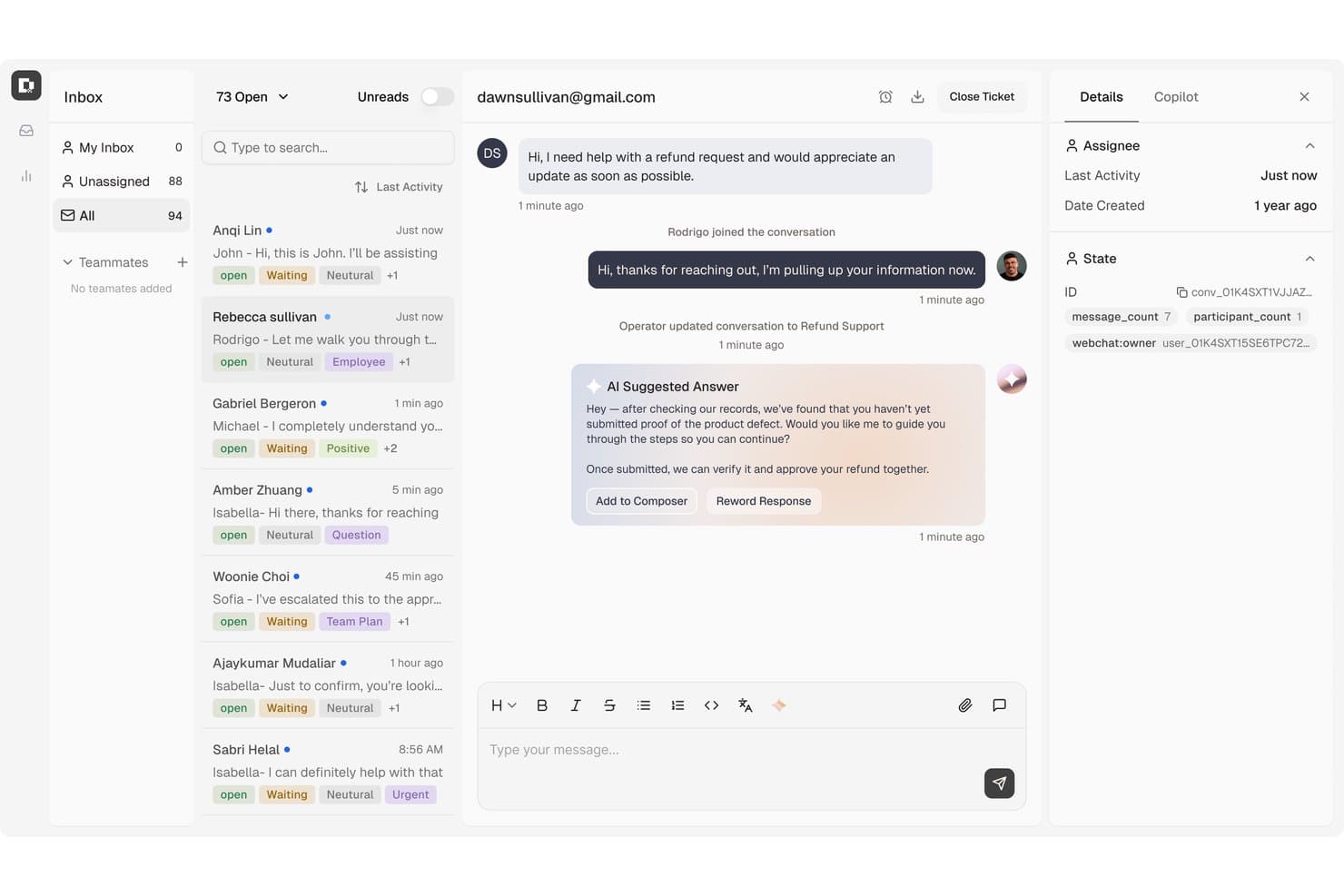
Botpress centralizes customer support tickets with AI-suggested replies. Botpress Desk is an AI-powered help desk that handles customer support tickets across L1, L2, and L3, with built-in automation, multi-channel intake, a self-service Help Center, and native connections to Zendesk and Intercom.
Who Is Botpress Best For?
Botpress Desk suits customer service teams that want AI to resolve tickets autonomously across multiple tiers without paying more as headcount grows.
Why I Picked Botpress
I've included Botpress in my top picks because it's one of the few help desk platforms that charges zero per-seat fees, so your support costs don't spike as you add agents. What I really like is how its AI handles tickets across L1, L2, and L3 autonomously, including multi-step workflows like issuing refunds or checking account status, without routing everything to a human. The built-in Help Center also lets AI reference published content mid-conversation, cutting repeat ticket volume at the source.
Botpress Key Features
- CSAT surveys: Sends localized customer satisfaction surveys after ticket resolution, with language-matched questions and rating labels.
- Conversation organization tools: Agents can apply priorities, tags, custom fields, snooze options, and threaded replies to manage tickets.
- Public Help Center: A branded, customer-facing knowledge base your team publishes and AI references live during support conversations.
- Zendesk and Intercom sync: Connects to your existing helpdesk so actions taken on either platform stay in sync without a full migration.
Botpress Integrations
Botpress Desk has native integrations with Zendesk and Intercom, helping small teams retain existing helpdesk data. Marketplace integrations include Slack, HubSpot, Shopify, Stripe, and WhatsApp; APIs support custom connections, and Zapier is available.
Pros and Cons
Pros:
- Help Center gives customers self-service answers
- Multi-step workflows handle refunds and account checks
- AI handles repetitive customer inquiries
Cons:
- Desk access requires a request
- Complex flows can be difficult to debug
Learn more about Botpress: 10Best for managing shared inboxes
Missive
- 30-day free trial
- From $24/user/month (billed annually)
Visit WebsiteCustomer Rating:4.8/5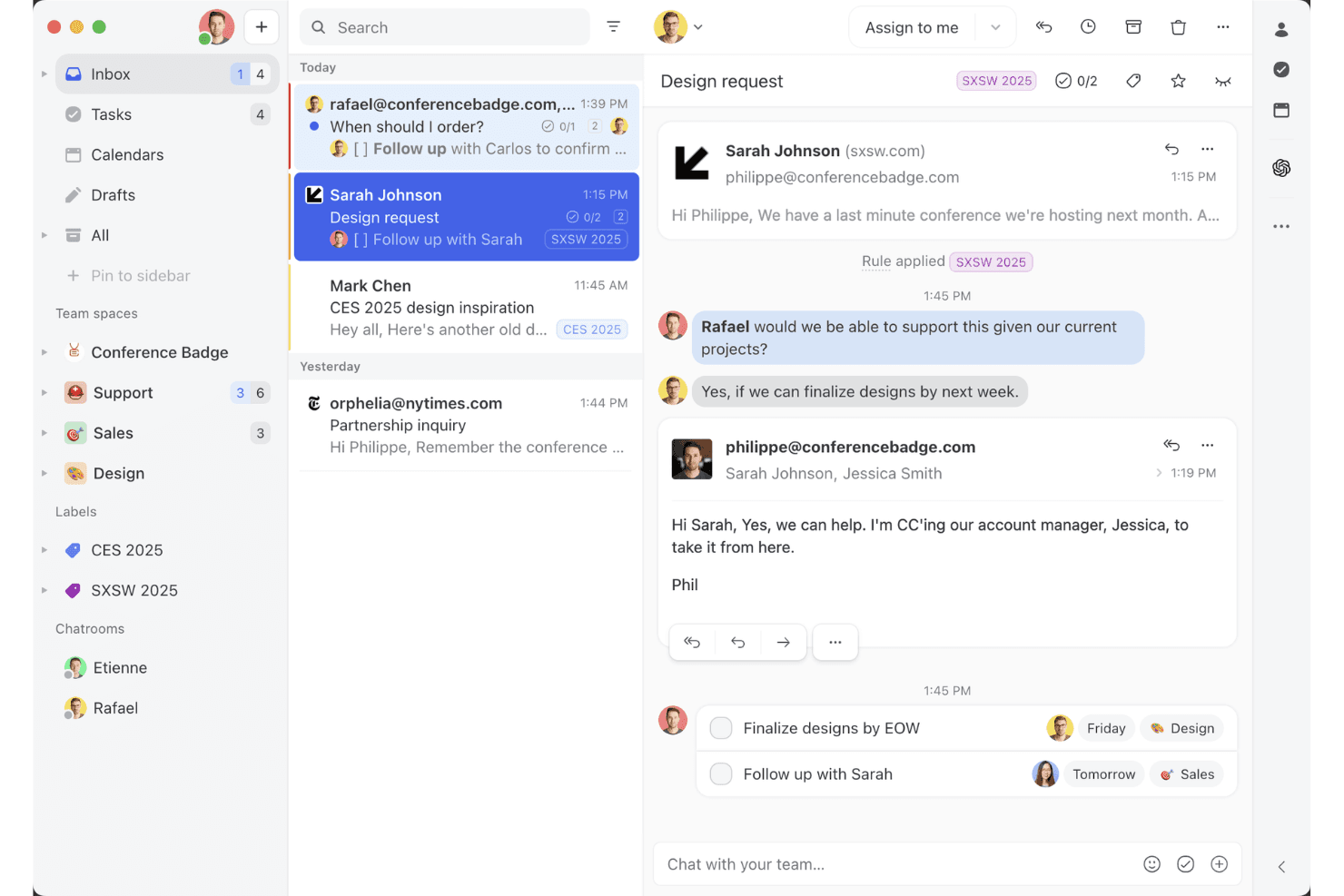
Missive’s shared inbox view shows how teams can collaborate on email threads, assign tasks, and manage client conversations in one workspace. Missive is a shared inbox and collaborative messaging platform that brings email, SMS, WhatsApp, Instagram DMs, and live chat into a single team workspace.
Who Is Missive Best For?
Missive is a great fit for small teams and solo founders who manage customer conversations across email, SMS, and social channels and need a shared inbox that multiple people can work in together.
Why I Picked Missive
Missive earns its spot on my shortlist because real-time collaborative drafting sets it apart from every other shared inbox tool I've tested. When two agents open the same conversation, they co-write the reply simultaneously, like a Google Doc, and collision detection blocks duplicate sends automatically. I also love that internal comment threads sit inline within the conversation, so my team can debate a tricky reply without cluttering the customer's inbox with accidental "reply all" messages.
Missive Key Features
- Multi-channel inbox: Consolidates email, SMS, WhatsApp, Instagram DMs, Facebook Messenger, and live chat into a single shared workspace.
- Automation rules engine: Supports up to 1,000 rules for auto-assignment, routing, labeling, and follow-up triggers on Productive and Business plans.
- AI reply drafting: Generates draft replies using full conversation context, with support for OpenAI, Anthropic, and Google Gemini via your own API key.
- Canned responses: Pre-built reply templates with variable fields let agents send consistent, personalized replies in seconds.
- Missive MCP Server: Connect external AI tools (like Claude or ChatGPT) to query help desk threads, check calendars, and draft replies—while keeping agent review required before sending.
Missive Integrations
Missive offers 25+ native integrations, including HubSpot, Salesforce, Shopify, Asana, ClickUp, Trello, and Aircall. Productive and Business plans include an open API, Zapier connectivity, and its new MCP Server (requires admin activation).
Pros and Cons
Pros:
- Mobile apps support full inbox management
- Multi-channel inbox on entry-level plan
- Real-time collaborative drafting for faster replies
Cons:
- No native CSAT or NPS surveys
- No built-in knowledge base for customers
Learn more about Missive:
Andre alternativer
Her er noen flere gode alternativer som ikke kom med på listen over den beste brukerstøtteprogramvaren for små bedrifter:
- 11ZendeskBest AI-powered help desk software for scaling businesses
- 12Agentforce Service (formerly Service Cloud)Best for AI-powered personalization
- 13TidioBest small business help desk software for live visitor tracking
- 14EngageBayBest small business help desk software for scalability
- 15HaloBest small business help desk software for customer self-service portals
- 16monday serviceBest for tracking and managing support queries
- 17GorgiasBest small business help desk software for monitoring agent performance
- 18FrontBest for automating repetitive tasks
- 19IssuetrakBest for omnichannel help desk support
- 20AvochatoBest small business help desk software for mobile functionality
How I Evaluate Help Desk Software
I split my evaluation into two layers: baseline capabilities every help desk needs—like ticket management and SLA enforcement—and the differentiators that set tools apart for specific CX teams.
Core Functionality (Table Stakes For This List)
When I'm selecting tools for my list, I rank each one on a scale from 0 (does not offer the functionality) to 5 (excels in this area) for each core functionality listed below. Then, I calculate the tool's total score into a percentage. Each tool needs to achieve a minimum total score of 75% to be considered for inclusion.
- Ticket Management System: I look at the full ticket lifecycle—creation, assignment, prioritization, tagging, and resolution—plus whether agents can merge, split, or link related tickets.
- Multi-Channel Support: Each tool should unify email, chat, phone, social, and web form inquiries in one inbox so agents aren't toggling between separate queues.
- Automation & Workflows: I evaluate whether routing rules, escalation triggers, and macros can handle real scenarios like auto-assigning billing tickets to a specialized team.
- Knowledge Base & Self-Service: A built-in help center with search, categorization, and public publishing matters—especially for deflecting common "how do I reset my password" tickets.
- Reporting & Analytics: Dashboards should cover core KPIs like first response time, resolution rate, and CSAT, with filtering by agent, team, or ticket category.
- SLA Management: I check whether you can set up SLA policies with business-hours rules and escalation alerts, like flagging tickets that approach a breach threshold.
Once I have a list of tools that meet the criteria, I consider what sets each platform apart.
Differentiating Factors (What Sets Vendors Apart)
Here's how I compare and contrast different vendors:
Standout Features
AI-powered features are a major differentiator. I check whether a tool can draft reply suggestions, summarize long threads, or surface relevant knowledge base articles mid-conversation. A customer context panel also matters—agents who can see prior tickets, account details, and purchase history alongside the active issue deliver more personal support. Built-in collaboration tools like side conversations and @mentions help agents loop in product or engineering teams without leaving the ticket.
Beyond Features
Integrations shape how well a help desk fits your existing stack. I evaluate whether a tool connects natively with CRMs like Salesforce or HubSpot, ecommerce platforms like Shopify, and team communication tools like Slack. Pricing structure also matters—per-agent models can get costly for growing teams, so I check whether vendors offer volume-based or tiered alternatives. Implementation speed is another factor I weigh, especially migration tools that let you import tickets and workflows from a previous platform without starting from scratch.
Slik velger du brukerstøtteprogramvare for små bedrifter
Det er lett å gå seg vill i lange funksjonslister og kompliserte prismodeller. For å hjelpe deg med å holde fokus mens du arbeider deg gjennom den unike prosessen med å velge programvare, får du her en sjekkliste over faktorer du bør ha i bakhodet:
| Faktor | Hva du bør vurdere |
|---|---|
| FaktorSkalerbarhet | Hva du bør vurdereKontroller at programvaren kan vokse sammen med bedriften din. Se etter alternativer som lar deg legge til brukere eller funksjoner etter hvert som behovene dine øker, uten større avbrudd. |
| FaktorIntegrasjoner | Hva du bør vurdereUndersøk om programvaren kan integreres med verktøy teamet ditt allerede bruker, for eksempel CRM-systemer, e-postplattformer eller sosiale medier, slik at alt holdes sammenkoblet. |
| FaktorTilpasningsmuligheter | Hva du bør vurdereVurder hvor mye du kan tilpasse programvaren til arbeidsflyten din. Fleksible innstillinger og alternativer kan gjøre den bedre egnet til dine unike behov. |
| FaktorBrukervennlighet | Hva du bør vurdereSe etter et intuitivt grensesnitt som teamet ditt kan bruke uten omfattende opplæring. Et brukervennlig design sparer tid og reduserer frustrasjon. |
| FaktorBudsjett | Hva du bør vurdereVurder de totale kostnadene, inkludert eventuelle skjulte gebyrer. Sammenlign funksjoner og prisnivåer for å sikre at du får best mulig verdi for investeringen. |
| FaktorSikkerhetstiltak | Hva du bør vurdereKontroller at programvaren følger bransjestandarder for databeskyttelse. Funksjoner som kryptering og tilgangskontroll er avgjørende for å beskytte informasjon. |
Trender innen brukerstøtteprogramvare for små bedrifter
I undersøkelsen min hentet jeg inn utallige produktoppdateringer, pressemeldinger og lanseringslogger fra ulike leverandører av brukerstøtteprogramvare for små bedrifter. Her er noen av de fremvoksende trendene jeg følger med på:
- AI-verktøy for brukerstøtte: 70 % av organisasjonene mener at AI vil forbedre kundeservicen deres betydelig. Flere verktøy integrerer AI for å analysere kundeinteraksjoner og gi handlingsrettet innsikt. Noen leverandører tilbyr for eksempel AI-drevet analyse for å fremheve vanlige problemer og foreslå løsninger.
- Selvbetjeningsportaler: Det er en økende tendens til å gi kundene flere selvbetjeningsmuligheter. Disse portalene lar brukerne finne svar på egen hånd, noe som reduserer belastningen på supportteamene. Leverandørene forbedrer dem med intuitive grensesnitt og omfattende kunnskapsbaser.
- Flerkanalsstøtte: Bedrifter forventes nå å håndtere kundeinteraksjoner sømløst på tvers av flere kanaler. Denne trenden innebærer at leverandørene tilbyr integrerte plattformer for å håndtere e-post, chatter, sosiale medier og mer fra ett enkelt kontrollpanel.
- Muligheter for fjernsupport: Ettersom fjernarbeid blir stadig vanligere, fokuserer brukerstøtteløsninger på funksjoner som støtter feilsøking på avstand. Dette omfatter verktøy for virtuell assistanse og ekstern skrivebordstilgang, slik at problemer kan løses effektivt uten fysisk tilstedeværelse.
- Datadrevet personalisering: Det blir stadig viktigere å tilpasse kundeopplevelsen ved hjelp av datainnsikt. Verktøy tilbyr nå funksjoner for å personalisere interaksjoner basert på tidligere atferd og preferanser, noe som øker brukertilfredsheten og lojaliteten.
Hva er brukerstøtteprogramvare for små bedrifter?
Brukerstøtteprogramvare for små bedrifter er et verktøy som er utviklet for å håndtere kundehenvendelser og supportforespørsler effektivt. Disse verktøyene brukes vanligvis av kundeservicemedarbeidere, IT-ansatte og eiere av små bedrifter for å forbedre kundetilfredsheten og effektivisere supportarbeidet.
Funksjoner for saksbehandling, selvbetjeningsportaler og flerkanalsstøtte bidrar til å organisere forespørsler, gi kundene større selvstendighet og håndtere interaksjoner på tvers av ulike kanaler. Alt i alt gir disse verktøyene bedrifter mulighet til å levere bedre og mer responsiv kundestøtte.
Funksjoner i brukerstøtteprogramvare for små bedrifter
Når du velger brukerstøtteprogramvare for små bedrifter, bør du se etter følgende viktige funksjoner:
- Saksbehandling: Organiserer kundehenvendelser i håndterbare saker, slik at teamet kan prioritere og løse problemer effektivt.
- Selvbetjeningsportaler: Gjør det mulig for kundene å finne svar på egen hånd, noe som reduserer arbeidsmengden for supportteamet og forbedrer responstidene.
- Flerkanalsstøtte: Gjør det mulig å håndtere kundeinteraksjoner på tvers av flere plattformer, som e-post, chat og sosiale medier, fra ett enkelt grensesnitt.
- AI-verktøy i brukerstøtten: Fra AI-dataanalyse og AI-chatboter til generativ AI-assistanse for medarbeidere – AI er et kraftig verktøy for å støtte kundeservicen.
- Muligheter for fjernsupport: Tilbyr verktøy som virtuell assistanse og ekstern skrivebordstilgang for å løse problemer effektivt for brukere som arbeider på avstand.
- Datadrevet personalisering: Tilpasser kundeinteraksjoner basert på tidligere atferd, noe som øker brukertilfredsheten og fremmer lojalitet.
- Tilpassbare kontrollpaneler: Lar teamene tilpasse grensesnittet etter sine spesifikke arbeidsflytbehov, noe som forbedrer brukervennligheten og effektiviteten.
- Integrasjon med CRM-systemer: Sikrer sømløs dataflyt mellom brukerstøtten og verktøyene for kunderelasjonshåndtering, noe som gir bedre kundeinnsikt.
- Rapportering og analyse: Gir detaljert innsikt i resultatmålinger, slik at teamene kan følge med på effektiviteten og identifisere områder som kan forbedres.
- Automatiseringsfunksjoner: Muligheter for å automatisere repetitive og tidkrevende oppgaver, slik at teamet får mer tid til kreativt og strategisk arbeid.
Brukerstøtteprogramvare: sikkerhets- og samsvarshensyn
Ved valg av brukerstøtteprogramvare er sikkerhet og samsvar avgjørende for å beskytte sensitive data og oppfylle bransjereguleringer. Her er noen viktige hensyn:
- Datakryptering: Sørg for at data er kryptert under overføring (SSL/TLS) og i hvile for å forhindre uautorisert tilgang.
- Tilgangskontroller: Bruk rollebaserte tillatelser og multifaktorautentisering (MFA) for å begrense tilgangen.
- Revisjonslogger: Oppretthold detaljerte logger over brukeraktiviteter for å spore endringer og oppdage sikkerhetshendelser.
- Samsvarsstandarder: Kontroller at virksomheten følger bransjeregler som GDPR, HIPAA eller ISO 27001, avhengig av virksomheten din.
- Sikkerhetskopiering og gjenoppretting av data: Regelmessige sikkerhetskopier og planer for katastrofegjenoppretting beskytter mot datatap.
- Sikre integrasjoner: Sørg for at integrasjoner med tredjeparter følger beste praksis for sikkerhet for å forhindre sårbarheter.
- Beskyttelse av brukernes personvern: Innfør retningslinjer for å beskytte kundedata og begrense unødvendig datainnsamling.
- Plan for håndtering av hendelser: Ha en strategi for å oppdage, rapportere og håndtere sikkerhetsbrudd på en effektiv måte.
Disse tiltakene bidrar til å holde brukerstøtten sikker, samtidig som de sikrer samsvar med juridiske krav og bransjekrav.
Fordeler med brukerstøtteprogramvare for små bedrifter
Implementering av brukerstøtteprogramvare for små bedrifter gir flere fordeler for teamet og virksomheten din. Her er noen av fordelene du kan se frem til:
- Forbedret effektivitet: Funksjoner for billettbehandling og automatisering hjelper teamet med å prioritere og løse problemer raskere, noe som sparer tid og ressurser.
- Økt kundetilfredshet: Selvbetjeningsportaler og omnikanalstøtte sørger for at kundene får rask og nøyaktig hjelp på plattformene de foretrekker.
- Datadrevne beslutninger: KI-drevet innsikt og rapporteringsverktøy gir verdifulle data som kan brukes til å forbedre støttestrategiene og tjenestekvaliteten.
- Kostnadsbesparelser: Effektiv håndtering av henvendelser og redusert arbeidsbelastning for brukerstøtteteam kan føre til lavere driftskostnader over tid.
- Økt fleksibilitet: Tilpassbare kontrollpaneler og integrasjon med CRM-systemer gjør det mulig for teamet å tilpasse programvaren til virksomhetens spesifikke behov.
- Bedre sikkerhet: Sikkerhetstiltak beskytter sensitive kundedata, sikrer samsvar med bransjestandarder og bygger tillit hos kundene dine.
- Skalerbarhet: Etter hvert som virksomheten vokser, sørger skalerbare løsninger for at brukerstøtteprogramvaren kan utvides i takt med behovene dine uten avbrudd.
Kostnader og priser for brukerstøtteprogramvare for små bedrifter
Når du velger brukerstøtteprogramvare for små bedrifter, må du ha en forståelse av de ulike prismodellene og abonnementene som er tilgjengelige. Kostnadene varierer basert på funksjoner, teamstørrelse, tillegg og mer. Tabellen nedenfor oppsummerer vanlige abonnementer, gjennomsnittsprisene deres og typiske funksjoner som er inkludert i løsninger for brukerstøtteprogramvare for små bedrifter:
Sammenligningstabell for abonnementer på brukerstøtteprogramvare for små bedrifter
| Abonnementstype | Gjennomsnittspris | Vanlige funksjoner |
|---|---|---|
| AbonnementstypeGratisabonnement | Gjennomsnittspris$0/user/month | Vanlige funksjonerGrunnleggende billettbehandling, e-poststøtte og begrenset rapportering. |
| AbonnementstypePersonlig abonnement | Gjennomsnittspris$5-$25/user/month | Vanlige funksjonerAvansert billettbehandling, selvbetjeningsportal og grunnleggende analyse. |
| AbonnementstypeBedriftsabonnement | Gjennomsnittspris$30-$60/user/month | Vanlige funksjonerStøtte i flere kanaler, automatiseringsverktøy og integrasjon med CRM-systemer. |
| AbonnementstypeVirksomhetsabonnement | Gjennomsnittspris$70-$120/user/month | Vanlige funksjonerTilpassbare kontrollpaneler, KI-drevet innsikt og forbedrede sikkerhetsfunksjoner. |