

Anmeldelse av Document360: Fordeler, ulemper, funksjoner og priser
Document360 gir teamet ditt intuitiv kunnskapsforvaltning og skiller seg ut med et brukervennlig grensesnitt og kontinuerlige funksjonsoppdateringer.

We review tools independently, and commissions help fund our testing. See our transparency policy, our methodology, or suggest a tool.
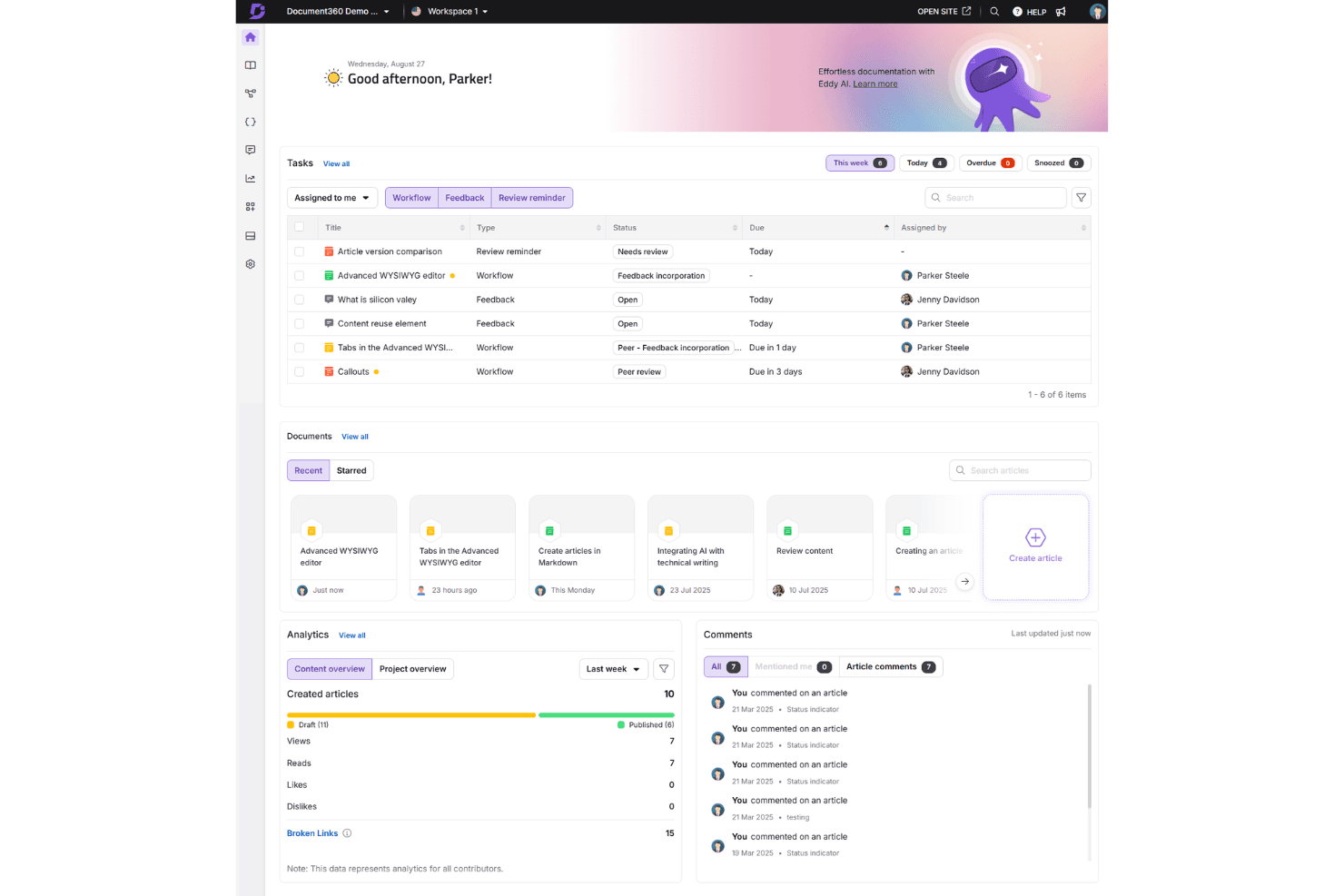
Document360 is a helpdesk knowledge base built for teams that need to create, organize, and publish documentation for customers and internal staff. If you've tried managing documentation inside a general collaboration tool like Confluence, you'll notice the difference quickly—Document360 keeps knowledge base creation as the core function, not a secondary feature buried inside a broader workspace. That focus shows up in things like structured category management, content versioning, and built-in analytics that tell you which articles are actually helping customers.
Document360 Evaluation Summary
4.7/5
- Pricing upon request
- Free demo available
Why Trust Our Software Recommendations
6,700+
Reviews
20
Industry experts
16+
Evaluation factors
14
Years
Our team has been testing and reviewing software since 2012. As CX leaders ourselves, we know how difficult—and important—it is to choose the right software.
For this guide, we evaluated tools using hands-on testing and independent research, scoring tools using our selection criteria.
Our reviews reflect our human editorial judgment, not a sales pitch.
 Gui DrusinaCreative Director
 Tim FisherVP of AI
Document360 Overview
In my opinion, Document360 excels as a Helpdesk Knowledge Base Software by offering a user-friendly interface and a strong feature set. It competes well with others by providing continuous updates and excellent ease of use. However, its value for money may not be as competitive for larger enterprises with complex needs. It suits small to medium-sized tech companies and startups looking for reliable knowledge management. If you're deciding on a tool, consider Document360 for its standout features and ease of onboarding, but weigh it against your specific budget and support needs based on user reviews and verified reviewer feedback.
Pros
- Intuitive and user-friendly interface with formatting options.
- Fully customizable knowledge base utilizing CSS and HTML.
- Frequent updates keep features fresh and relevant for your work.
Cons
- Search functionality lacks depth compared to competition.
- User management options for larger teams.
- Some users report that analytics features lack depth.
Is Document360 Right For Your Needs?
Who Would be a Good Fit for Document360?
Document360 is ideal for small to medium-sized tech startups and SaaS companies looking for a straightforward knowledge management tool and knowledge base platform. Your team will appreciate its intuitive user interface and the ability to customize the knowledge base to reflect your brand using markdown and formatting tools. Its frequent updates ensure you have access to current features that meet your evolving needs with versioning and version control. Its frequent updates ensure you have access to current features that meet your evolving needs with versioning and version control. If your team values ease of use and flexibility in managing information through docs, Document360 could be a great choice for your operations as a knowledge base platform and self-service solution.
- Tech StartupsDocument360 suits your startup with its easy setup, markdown editor, and intuitive navigation, helping your team manage knowledge efficiently from day one with technical documentation and API documentation capabilities.
- SaaS CompaniesYou can rely on Document360's customization options to align your knowledge base with your brand, enhancing client interactions through self-service portals and end-user resources for your software product.
- Customer Support TeamsYour support team will benefit from its simple interface, making it easier to access and share information quickly while deflecting support tickets and reducing support ticketing volume.
- Product Management TeamsDocument360 helps your team organize product documentation, keeping it accessible and up-to-date for all stakeholders using version control and versioning features.
- Remote TeamsWith Document360, remote teams can easily collaborate and access knowledge through workflows, ensuring everyone stays informed and connected across locations.
- IT DepartmentsYour IT department can utilize Document360's frequent updates and robust search function to manage technical documentation effectively with API documentation and docs for end users.
Who Would be a Bad Fit for Document360?
Document360 might not suit large enterprises with complex documentation needs or extensive user management requirements. Your team could find its search functionality lacking depth if your organization relies heavily on intricate searches using search engines. If you require detailed analytics, you might feel Document360's capabilities fall short. Companies that require advanced user permissions or highly detailed data insights may need to look elsewhere for a solution that meets their comprehensive needs beyond what this provider offers.
- Large EnterprisesYour large-scale operations may find Document360's user management and analytics capabilities insufficient for complex needs when multiple providers are involved.
- Financial InstitutionsFinancial institutions might require more advanced search and security features than Document360 offers for sensitive document management.
- Healthcare OrganizationsHealthcare organizations could need more robust compliance and data handling features than what's available on Document360 for technical documentation.
- Legal DepartmentsYour legal team might find Document360's search functionality inadequate for handling intricate legal documents and documents requiring complex methodologies.
- Manufacturing CompaniesManufacturing companies may require more detailed analytics and reporting than Document360 provides for their documentation processes, which tend to be extensive.
- Government AgenciesGovernment agencies often need higher security tiers and more extensive control over user permissions than Document360 currently supports for document management.
How We Test & Score Tools
We’ve spent years building, refining, and improving our software testing and scoring system. The rubric is designed to capture the nuances of software selection and what makes a tool effective, focusing on critical aspects of the decision-making process.
Below, you can see exactly how our testing and scoring works across seven criteria. It allows us to provide an unbiased evaluation of the software based on core functionality, standout features, ease of use, onboarding, customer support, integrations, customer reviews, and value for money.
Core Functionality (25% of final scoring)
The starting point of our evaluation is always the core functionality of the tool. Does it have the basic features and functions that a user would expect to see? Are any of those core features locked to higher-tiered pricing plans? At its core, we expect a tool to stand up against the baseline capabilities of its competitors.
Standout Features (25% of final scoring)
Next, we evaluate uncommon standout features that go above and beyond the core functionality typically found in tools of its kind. A high score reflects specialized or unique features that make the product faster, more efficient, or offer additional value to the user.
We also evaluate how easy it is to integrate with other tools typically found in the tech stack to expand the functionality and utility of the software. Tools offering plentiful native integrations, 3rd party connections, and API access to build custom integrations score best.
Ease of Use (10% of final scoring)
We consider how quick and easy it is to execute the tasks defined in the core functionality using the tool. High scoring software is well designed, intuitive to use, offers mobile apps, provides templates, and makes relatively complex tasks seem simple.
Onboarding (10% of final scoring)
We know how important rapid team adoption is for a new platform, so we evaluate how easy it is to learn and use a tool with minimal training. We evaluate how quickly a team member can get set up and start using the tool with no experience. High scoring solutions indicate little or no support is required.
Customer Support (10% of final scoring)
We review how quick and easy it is to get unstuck and find help by phone, live chat, or knowledge base. Tools and companies that provide real-time support score best, while chatbots score worst.
Customer Reviews (10% of final scoring)
Beyond our own testing and evaluation, we consider the net promoter score from current and past customers. We review their likelihood, given the option, to choose the tool again for the core functionality. A high scoring software reflects a high net promoter score from current or past customers.
Value for Money (10% of final scoring)
Lastly, in consideration of all the other criteria, we review the average price of entry level plans against the core features and consider the value of the other evaluation criteria. Software that delivers more, for less, will score higher.
Core Features
Knowledge Base Management: Document360 lets your team create, organize, and manage content easily through workflows, ensuring information is always accessible. Its intuitive user interface makes updating and categorizing articles a breeze with docs and markdown support.
Version Control: You can track changes with versioning and version control, reverting to previous versions if needed, and maintaining documentation accuracy. This feature helps prevent errors by keeping a history of changes for your docs.
Customizable Templates: Your team can use and modify templates to match your brand's style, ensuring consistency across documents with formatting options. This saves time and ensures a professional look using the markdown editor or WYSIWYG editor.
Search Functionality: Users can quickly find information with Document360's search function. Though the search functionality may lack depth for complex queries, it's designed to help you locate content efficiently using the search engine.
Analytics and Reports: Get insights into how your knowledge base is used with Document360's analytics, though some users might find it lacking in detail. This helps you understand what content is most valuable to end users.
Collaboration Tools: Your team members can collaborate in real-time through workflows, making it easy to work together on content creation and updates. This fosters teamwork and ensures everyone is on the same page.

Ease of Use
Document360 stands out for its user-friendly design and ease of use, making it easy for your team to navigate and manage content using the markdown editor or WYSIWYG editor. The intuitive user interface ensures that even new users can quickly get up to speed without a steep learning curve. Features like customizable templates, markdown support, formatting tools, and real-time collaboration simplify your work process. Compared to other software, Document360's ease of use is a strong point, allowing your team to focus on content rather than figuring out how to use the tool.
Integrations
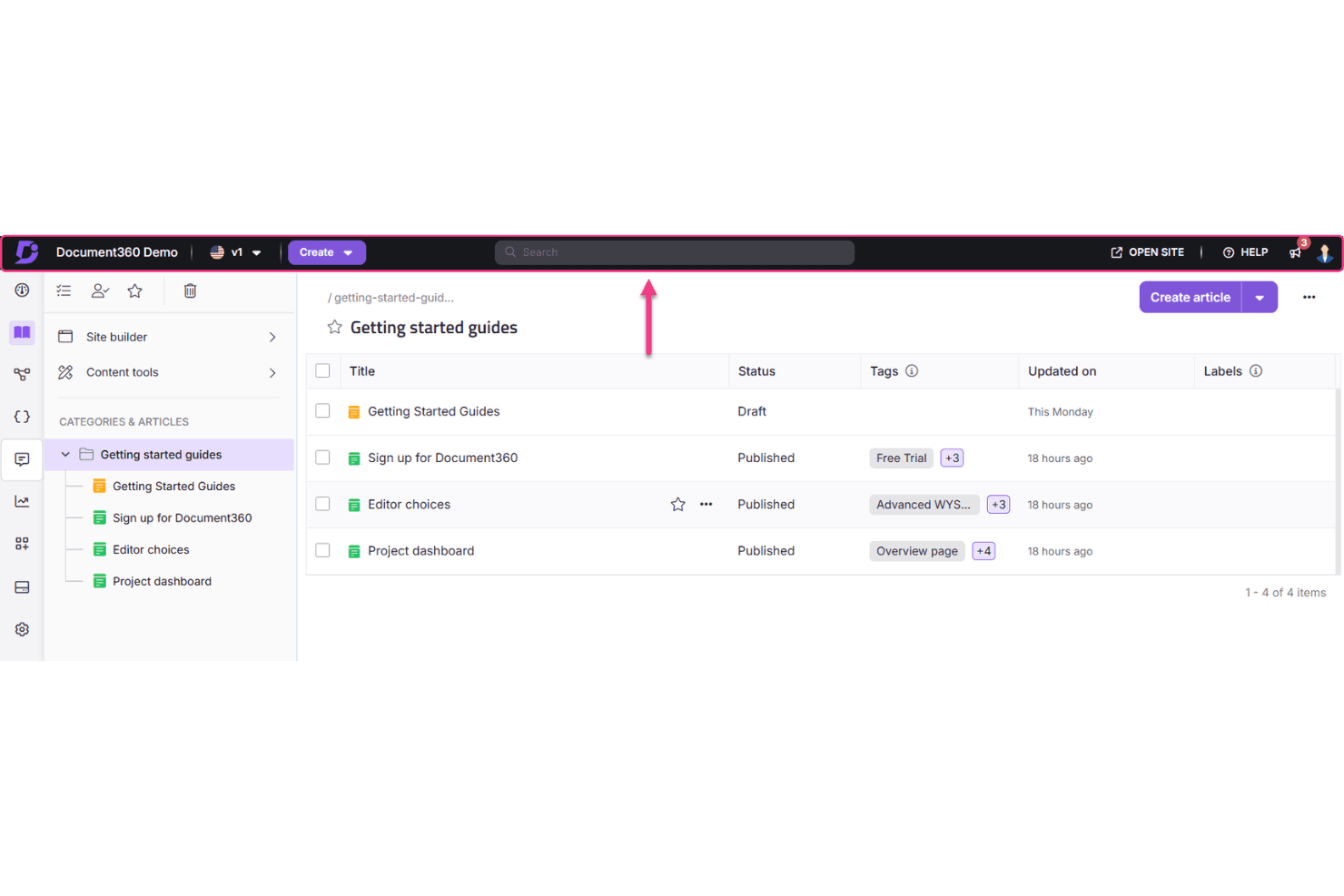
Document360 integrates with Zendesk, Intercom, Drift, Slack, Microsoft Teams, Crowdin, Google Analytics, Hotjar, Freshdesk, and Zapier, facilitating seamless workflows and automation across your tech stack.
Document360 also provides API support for API documentation and document management, allowing you to connect with third-party integration tools through the API for enhanced functionality and automation capabilities.
New Product Updates from Document360
 Opens new window
Document360 Adds Bulk Mirroring, Eddy AI Citations, and Unified SSO
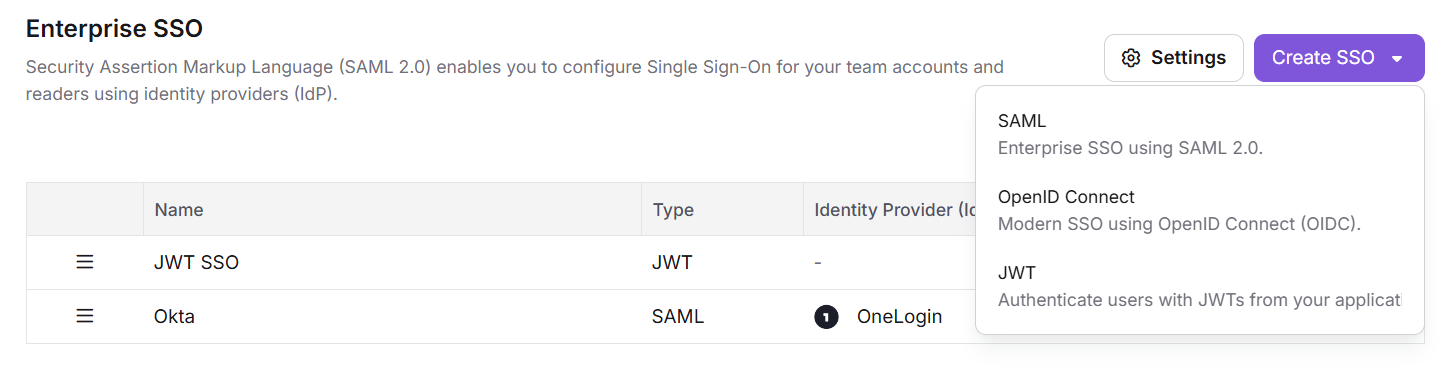
Document360 now lets teams mirror articles across workspaces, languages, and categories in bulk, while Eddy AI chatbot responses include source citations. Enterprise SSO setup also brings SAML, OpenID Connect, and JWT into one guided configuration experience. Highlights include:
- Bulk Article Mirroring: Mirror articles across workspaces, languages, and categories at scale.
- Eddy AI Citations: Add numbered source citations to chatbot responses.
- Source Previews: Preview cited public articles and review private-source references without exposing their content.
- Unified Enterprise SSO: Configure SAML, OpenID Connect, and JWT from one Enterprise SSO area.
- SSO Ordering: Reorder active sign-in methods to control how they appear on login pages.
- Scoped PDF Exports: Export an individual page category without automatically including child content.
- PDF Template Visibility: Choose which PDF templates readers can access from the knowledge base site.
Visit Document360’s official site for more details.
 Opens new window
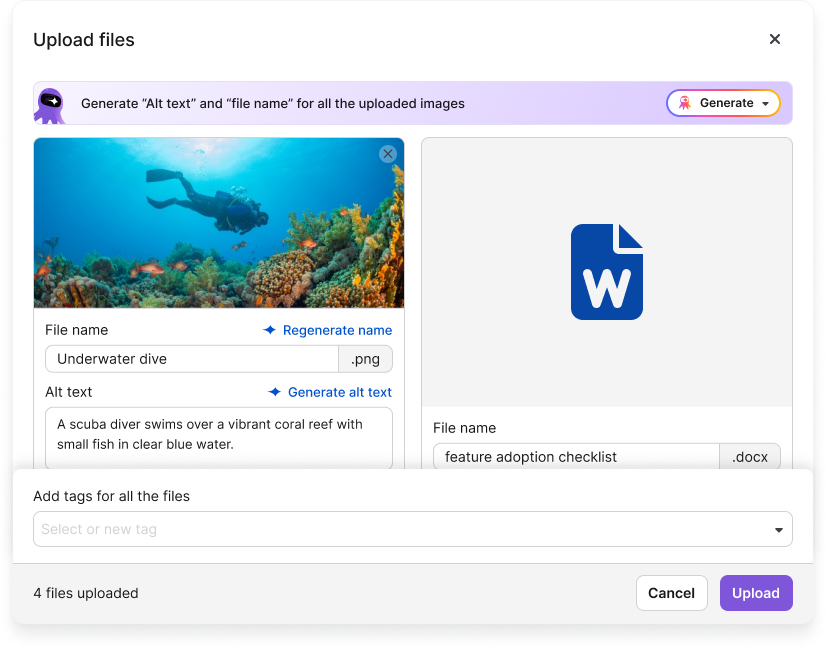
Document360 Adds Drive and Eddy AI Workflow Updates
Document360 adds file renaming without breaking references, configurable email ticket notifications from Eddy AI, and Drive image insertion or replacement in AI Capture. These updates reduce manual work across asset management, support workflows, and content creation. Highlights include:
- Drive File Renaming: Rename files without breaking references in articles, reuse blocks, or decision trees.
- Eddy AI Email Escalation: Send support ticket notifications by email with configurable recipients and subject prefixes.
- Contextual Ticket Prompts: Surface the Raise a ticket option when Eddy AI detects support-related requests.
- AI Capture Drive Images: Insert or replace step and overlay images directly from Drive.
- Image Validation: Check image resolution, size, and type before adding assets to AI Capture.
Visit Document360’s official site for more details.
 Opens new window
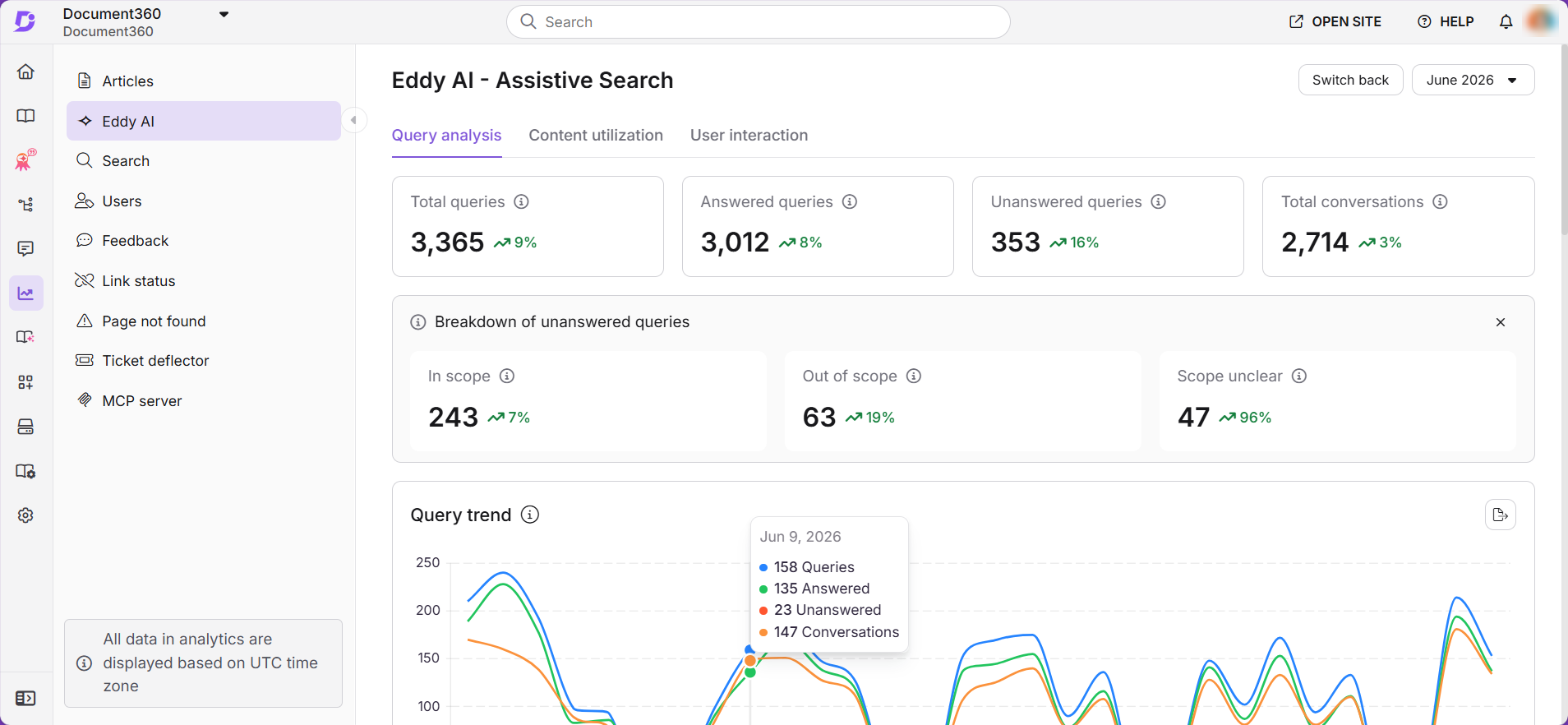
Document360 Expands Eddy AI Analytics and Feedback Management
Document360 now shows answered and unanswered Eddy AI queries, including reasons behind unanswered searches. Feedback Manager also separates customer communication from closure, while redesigned status icons make active drafts easier to identify. Highlights include:
- Advanced Eddy AI Analytics: Tracks answered and unanswered reader queries over time.
- Unanswered Query Reasons: Shows whether gaps come from missing content, out-of-scope questions, or interpretation issues.
- Feedback Resolution Controls: Lets teams respond to customers without automatically closing feedback.
- Bulk Feedback Actions: Makes closing multiple feedback items easier and supports reader notifications.
- Status Indicators: Uses clearer icons to identify published content with active drafts.
Visit Document360’s official site for more details.
 Opens new window
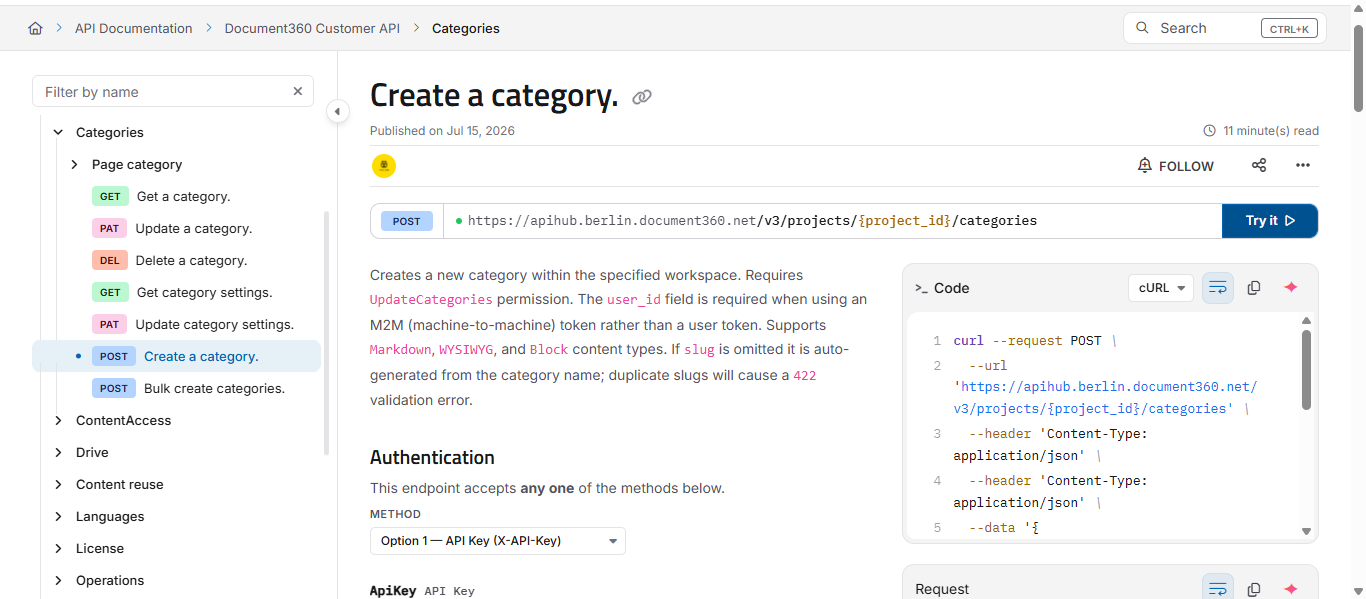
Document360 Revamps Its API Reference Experience
Document360 adds a three-pane API reference, rebuilt Try It! console, live validation, session variables, in-console authorization, and inline Eddy AI assistance. These updates give developers more tools to build and test API requests without leaving the reference page. Highlights include:
- Redesigned API Reference: Adds a three-pane layout for easier endpoint browsing and testing.
- Rebuilt Try It! Console: Lets developers configure requests and view live responses directly in the documentation.
- Live Schema Validation: Checks request payloads against endpoint schemas as users type.
- In-Console Authorization: Allows secured endpoints to be authorized directly from the API reference.
- Inline Eddy AI Help: Lets developers ask endpoint-specific questions without leaving the page.
Visit Document360’s official site for more details.
 Opens new window
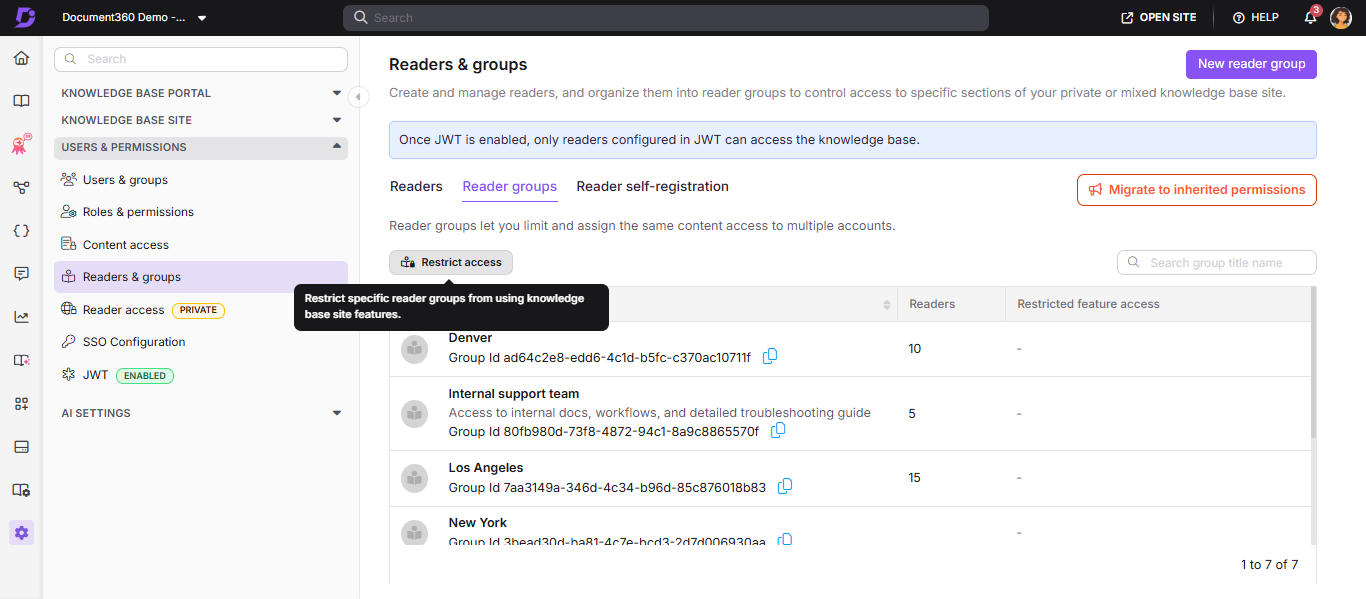
Document360 Adds API v3 and Eddy AI Access Controls
Document360 adds API v3 with expanded endpoints and permission-aware authorization, plus reader-group controls for specific Eddy AI features. These updates support more secure integrations while helping teams manage AI access across different user groups. Highlights include:
- API v3: Expands automation options across content, users, roles, reader access, drive, search, and analytics.
- OAuth 2.0 and Scoped API Keys: Adds permission-aware authorization for apps, integrations, and scripts.
- Eddy AI Access Controls: Lets teams restrict features such as Ask Eddy, AI summaries, related article recommendations, MCP server access, and Listen for selected reader groups.
Visit Document360’s official site for more details.
 Opens new window
Document360 Adds Smarter Publishing and Improved Help Exports
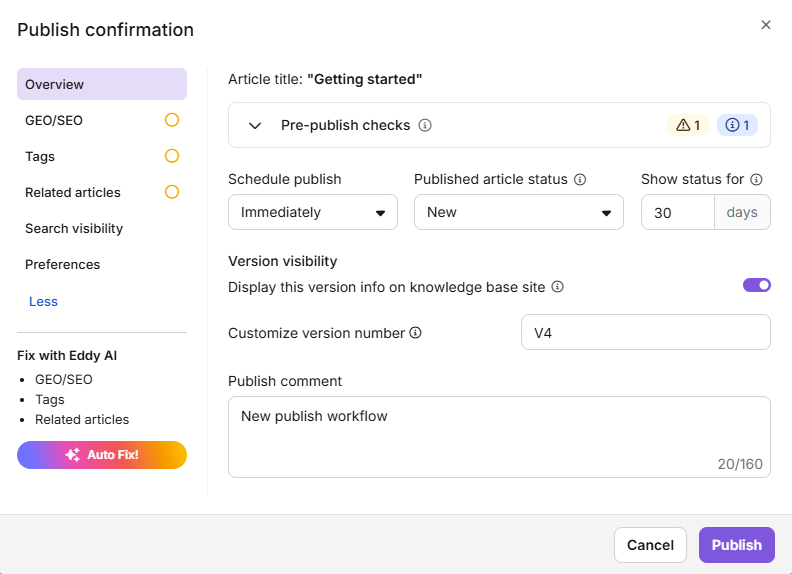
Document360 adds a redesigned Publish dialog with AI assistance and publishing checks, along with improved Offline and Web Help exports. These updates help teams review content before publishing and preserve more navigation, formatting, and content details in exported documentation. Highlights include:
- AI-Assisted Publish Dialog: Brings article metadata, publishing options, AI suggestions, scheduling, and advanced settings into one workflow.
- Pre-Publish Checks: Flags broken links, unresolved comments, and reader acknowledgement details before publishing.
- Improved Help Exports: Adds table of contents, breadcrumbs, previous/next navigation, consistent fonts, preserved glossary links, and offline code copying.
- RTL and Layout Support: Preserves right-to-left text direction, heading hierarchy, and image sizing in exported content.
Visit Document360’s official site for more details.
 Opens new window
Document360 Expands Find and Replace, PDF Exports, and AI Actions
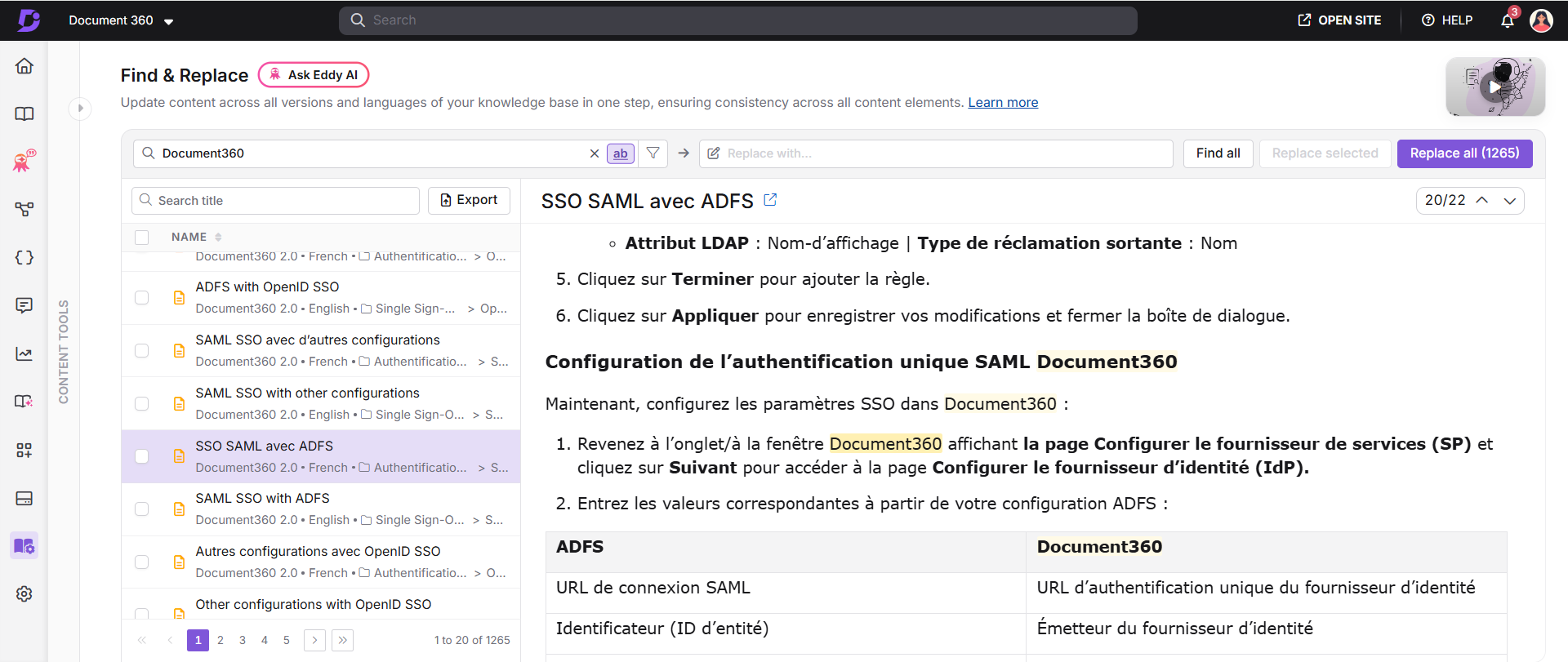
Document360 introduced updates across content management, exports, knowledge base navigation, and user provisioning. Teams can now update more content elements in bulk, control PDF section order, give readers faster access to article content in AI tools, and organize categories more clearly. Highlights include:
- Expanded Global Find & Replace: Search and replace content across variables, snippets, glossary definitions, article titles, hyperlinks, and URLs, with workspace and category filters.
- PDF Section Reordering: Rearrange the Terms & Conditions, Table of Contents, Content, and Version History sections in exported PDFs.
- New Article Actions: Copy an article as Markdown, view it as plain text, or open it directly in ChatGPT or Claude.
- Category Grouping: Turn top-level categories into always-expanded group headers so readers can see subcategories and articles more easily.
- SCIM Reviewer Provisioning: Use the
userTypeattribute to provision Reviewers directly from an identity provider.
Visit Document360’s official site for more details.
 Opens new window
Document360 Enhances Editors With Mermaid and Rich Text Formatting
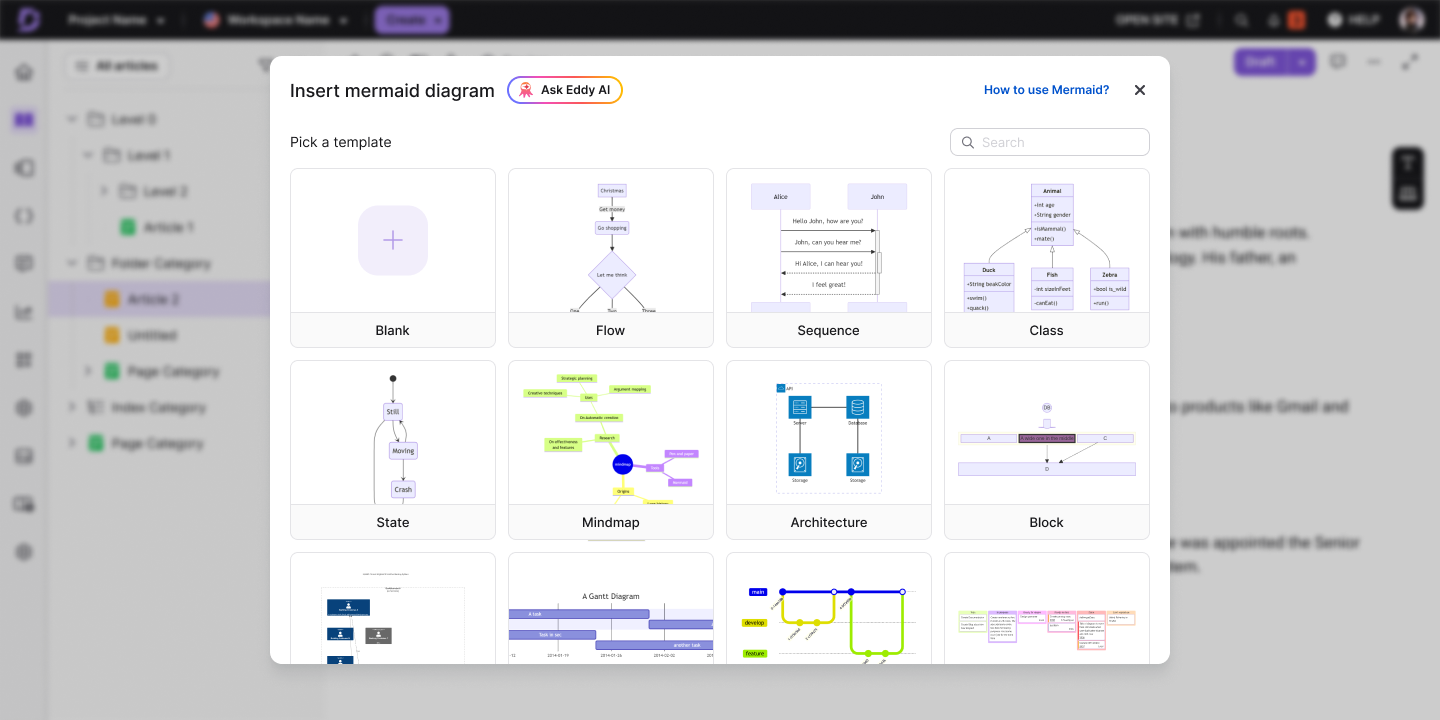
Document360 enhances its editing experience with built-in Mermaid diagrams and a mini Advanced WYSIWYG editor for API documentation. The updates help teams create, edit, and format technical documentation more efficiently from within Document360. Highlights include:
- Native Mermaid Diagrams: Create and edit Mermaid diagrams directly in the Advanced WYSIWYG editor.
- Advanced Diagram Editing: Choose from pre-built templates, preview diagrams live, and export them as PNG or SVG.
- Rich Text Formatting for API Descriptions: Format API endpoint descriptions with a mini Advanced WYSIWYG editor and slash commands.
Visit Document360's official site for more details.
 Opens new window
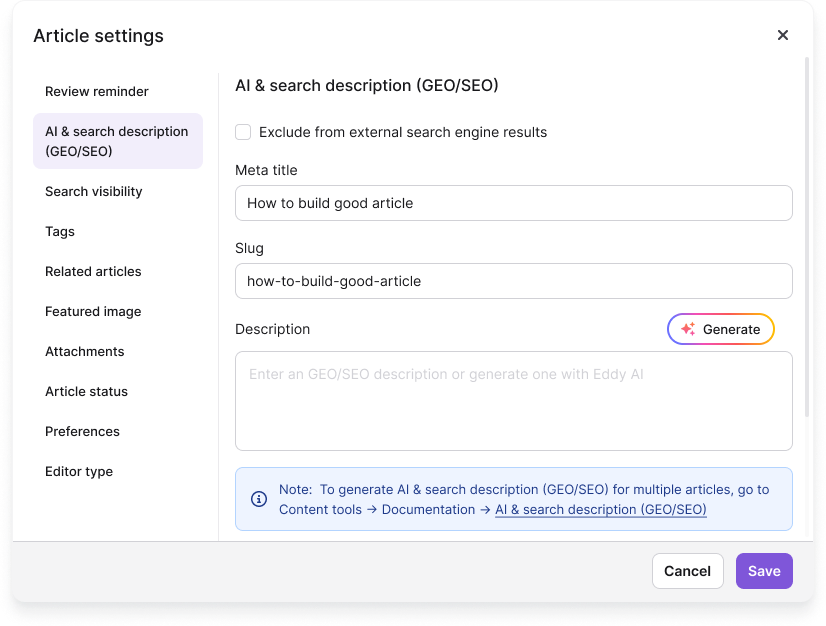
Document360 Adds Analytics Privacy Mode and Multilingual Carryover
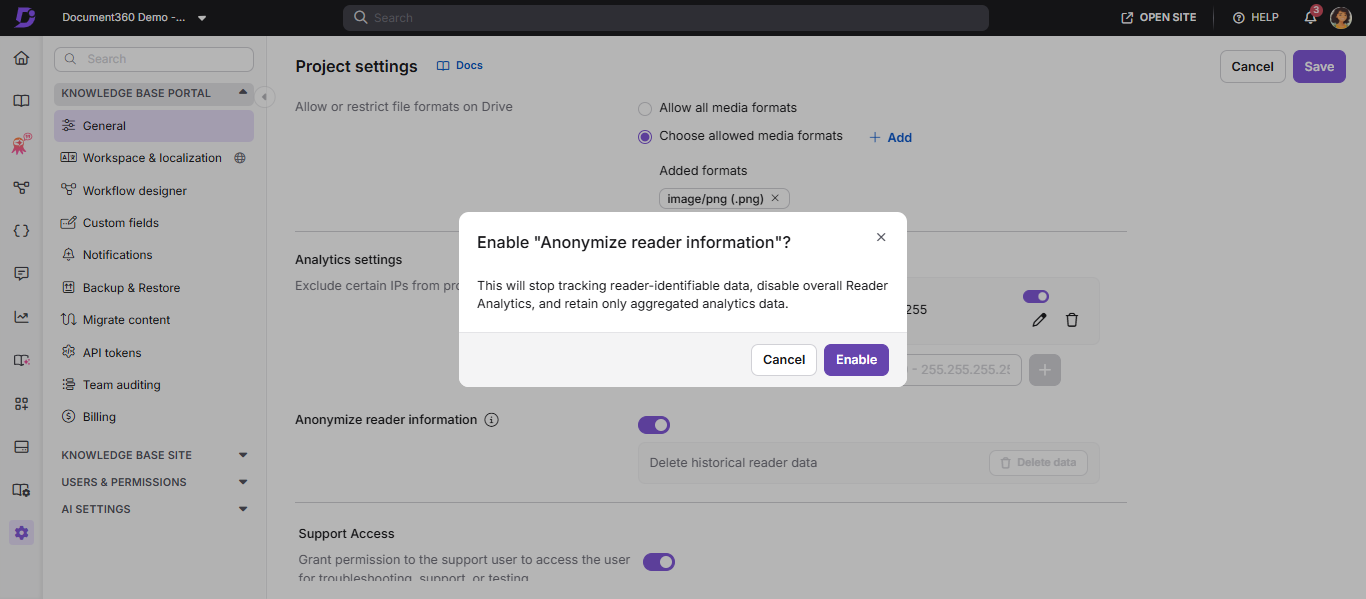
Document360 introduces analytics privacy mode and multilingual support for custom fields to improve knowledge base administration. The updates anonymize reader information for private projects and automatically carry over custom field values across language versions while keeping translations editable. Highlights include:
- Analytics Privacy Mode: Anonymizes reader information and disables reader-identifiable tracking for private projects.
- Historical Reader Data Management: Lets admins permanently delete previously collected reader data when needed.
- Multilingual Support for Custom Fields: Automatically carries over default-language custom field values to other language versions while allowing localized edits.
Visit Document360's official site for more details.
 Opens new window
Document360 Automatically Generates llms.txt for Knowledge Bases
Document360 introduces automatic llms.txt generation to improve AI discoverability for knowledge base content. The generated file helps AI assistants identify your documentation and reference the correct articles more reliably. Highlights include:
- Automatic llms.txt Generation: Creates an llms.txt file at the root of your knowledge base automatically.
- Improved AI Discoverability: Helps AI agents find and understand your documentation more accurately.
- Better Documentation Citations: Encourages AI assistants to retrieve and cite the correct knowledge base articles.
Visit Document360's official site for more details.
Document360 Specs
- API: Yes
- Chat: Yes
- Contact Management: Yes
- Contact Sharing: No
- Data Export: Yes
- Data Import: Yes
- Document Comparison: Yes
- Email Integration: Yes
- External Integrations: Yes
- File Sharing: Yes
- File Transfer: Yes
- History/Version Control: Yes
- Multi-User: Yes
- Notifications: Yes
- Project Management: Yes


