

Nettbasert helpdeskprogramvare hjelper støtte- og serviceteam med å administrere saker, automatisere arbeidsflyter og svare raskere. Disse verktøyene er utviklet for å samle kundekommunikasjonen på ett sted, redusere manuelt rutinearbeid og gi teamet konteksten det trenger for å løse problemer effektivt.
Jeg har testet og vurdert disse plattformene basert på automatisering, brukergrensesnitt, integrasjoner, skalerbarhet og støtte for forespørsler i flere kanaler. Denne veiledningen går gjennom den beste nettbaserte helpdeskprogramvaren for ulike teamstørrelser og servicemodeller, slik at serviceoppgaver ikke faller mellom stolene.
Hva er nettbasert helpdeskprogramvare?
Nettbasert helpdeskprogramvare er en plattform som hjelper støtteteam med å administrere, spore og løse kundeproblemer fra ett sted. Den samler kommunikasjonen, automatiserer arbeidsflyter for saker og brukes til å forbedre responstid, konsekvens og servicekvalitet på tvers av kanaler.
Hvorfor du kan stole på våre programvareanbefalinger
6,700+
Reviews
20
Industry experts
16+
Evaluation factors
14
Years
Teamet vårt har testet og anmeldt programvare siden 2012. Vi er selv CX-ledere, så vi vet hvor vanskelig og hvor viktig det er å velge riktig programvare.
I denne guiden har vi vurdert verktøyene gjennom praktisk testing og uavhengig research og gitt dem poeng ut fra våre utvelgelseskriterier.
Anmeldelsene våre bygger på vår egen redaksjonelle vurdering. De er ikke et salgsargument.
 Gui DrusinaCreative Director
 Tim FisherVP of AI
Sammendrag av den beste nettbaserte helpdeskprogramvaren
| Tool | Best For | Trial Info | Price | ||
|---|---|---|---|---|---|
| 1 | Best for call center support | 14-day free trial | From $19/user/month (billed annually) | Website | |
| 2 | Best for personalizing interactions with AI | Free trial available | From $75/user/month | Website | |
| 3 | Best for unifying chat and email | Free plan available; 14-day free trial | From $16/user/month | Website | |
| 4 | Best automated workflow builder | 15-day free trial | Pricing upon request | Website | |
| 5 | Best for unified ecommerce customer communications | 14-day free trial + free demo available | From $39/user/month (billed annually) | Website | |
| 6 | Best with guest access for external collaboration | 30-day free trial | From $24/user/month (billed annually) | Website | |
| 7 | Best for AI-powered customer service | Free plan available; 7-day free trial | From $24.17/month (billed annually) | Website | |
| 8 | Best for team collaboration | Free plan + free demo available | From $29/user/month | Website | |
| 9 | Best for AI-driven ticket management | 14-day free trial | From $9/seat/month (billed annually) | Website | |
| 10 | Best for customer interaction management | Free plan + free demo available | From $39.99/month | Website |


Oversikt over de 20 beste nettbaserte helpdeskprogrammene
Du kan bruke de enkle oversiktene over hvert verktøy nedenfor for å forstå hvordan hvert verktøy skiller seg ut fra annen nettbasert helpdeskprogramvare.
 Best for call center support
- 14-day free trial
- From $19/user/month (billed annually)
Visit WebsiteCustomer Rating:4.4/5
Track team performance and customer satisfaction with a customizable dashboard and reports. Freshdesk (a product of Freshworks Inc.) is an online help desk platform that can be used by organizations operating in a call center environment. It supports the handling of customer inquiries across multiple channels within a single system, helping teams manage conversations without switching between tools.
Why I picked Freshdesk: I picked Freshdesk for the set of tools it provides to support call center workflows. The platform includes a shared inbox, knowledge base tools, and chat functionality, which allow teams to manage incoming requests in one place. It also includes support for inbound calling, allowing agents to handle customer phone calls directly through the platform. For teams that rely on external systems, Freshdesk offers a broad range of integrations that can connect the help desk with existing workflows.
Freshdesk can be configured to fit different operational requirements and is used by teams of varying sizes. It includes Freddy AI, which can assist with automating ticket routing based on predefined rules, helping reduce manual sorting of incoming requests. Reporting and analytics tools provide visibility into support activity across channels, while social media integrations allow messages and mentions to be converted into support tickets.
Freshdesk Standout Features and Integrations
Features include a team inbox, agent collision detection, SLA management, ticket field suggestions, custom ticket statuses, team huddles, linked tickets, shared ownership, ticket dispatch, intelligent ticket assignment, and time triggered automation.
Integrations include Google Calendar, Slack, Mailchimp, Google Analytics, Office 365, Freshsales, Dropbox, HubSpot CRM, Microsoft Teams, Harvest, Zoho CRM, Pipedrive, Chargebee, 3CX, Asana, Magento, and Zapier.
Freshdesk offers a free plan for up to two agents for six months, with paid plans starting at $19 per user per month when billed annually. Select plans include a 14 day free trial.
Pros and Cons
Pros:
- Impressive automation capabilities
- Incredibly intuitive and user-friendly
- Excellent customer service email organization
Cons:
- Integrating with existing processes is tedious
- Some technical issues
Learn more about Freshdesk: Best for personalizing interactions with AI
- Free trial available
- From $75/user/month
Visit WebsiteCustomer Rating:4.4/5
Close cases quickly and keep customers happy by using automation and contextual recommendations. Salesforce Service Cloud helps businesses provide complete customer experiences by using artificial intelligence.
Why I picked Salesforce Service Cloud: The software uses artificial intelligence and process automation tools to help your agents eliminate repetitive tasks and focus on providing excellent support. The AI goes beyond helping your agents provide high-level customer service thanks to the AI tools such as chatbots and automatic triaging that reduces handle times. Salesforce Service Cloud’s AI also ensures agents with the right expertise handle specific customer queries.
Salesforce Service Cloud is suitable for organizations of all sizes across various industries that need tools to strengthen customer engagement. You can use the platform to provide personalized support to customers across multiple channels whenever needed. Salesforce Service Cloud also provides a drag-and-drop editor that allows you to build a self-service center to enable customers to help themselves.
Salesforce Service Cloud Standout Features and Integrations
Features include intelligent automation and workflows, case management, omnichannel routing, knowledge management, reporting and analytics, telephony and voice tools, customer service incident management, remote assistance, and real-time chat.
Integrations include Freshdesk, CloudTalk, Twilio, Brandwatch, Paligo, Mailchimp, HubSpot CRM, Trello, TeamViewer, Smartsheet, Klaviyo, Aircall, Gainsight, and Conversocial.
Salesforce Service Cloud costs from $25/user/month, billed annually. Salesforce Service Cloud offers a free 30-day trial for new subscribers.
Pros and Cons
Pros:
- Provides a unified view of interactions
- Effectively simplifies support procedures
- Adaptable to users’ needs
Cons:
- Requires additional training to use
- Challenging to set up
Learn more about Agentforce Service (formerly Service Cloud): Best for unifying chat and email
- Free plan available; 14-day free trial
- From $16/user/month
Visit WebsiteCustomer Rating:4.6/5
SparrowDesk shows agents a unified live chat queue while guiding customers through AI-assisted conversations in real time. SparrowDesk stands out as an AI-powered online help desk software tailored for businesses seeking to enhance their customer support operations. With its intuitive design and advanced features like AI Agents, it can automatically resolve a significant portion of customer inquiries, making it particularly appealing to companies aiming to streamline communication and increase productivity.
Why I Picked SparrowDesk
I picked SparrowDesk for its unique ability to integrate AI-driven solutions directly into the help desk environment. Its AI Agents can automatically resolve most of customer inquiries via chat and email, which directly addresses the need for efficiency in handling high volumes of customer interactions. The platform's omnichannel inbox ensures that your team can unify communications from multiple sources (chat and email) in one place, making it easier to maintain consistency and accuracy in customer responses. Additionally, features like AI-generated reply suggestions help your team provide quick and context-aware responses, further enhancing customer satisfaction.
SparrowDesk Key Features
In addition to its AI-driven capabilities, I also found several other features that make SparrowDesk a compelling choice for help desk software:
- Service Level Agreements (SLA): Establish clear response and resolution targets to ensure timely support.
- Business Hours Management: Define working hours to manage customer expectations and streamline ticket routing.
- Custom Views & Filters: Personalize agent views for better prioritization and management of conversations.
- Quick-Action Macros: Automate common tasks to save time and streamline workflows.
SparrowDesk Integrations
Native integrations are not currently listed by SparrowDesk.
Pros and Cons
Pros:
- AI agents designed to auto resolve many repetitive tickets
- Copilot features summarize long conversations inside the agent inbox
- No code workflow builder automates routing and notifications
Cons:
- Channels currently focus on email and live chat, not voice or social
- Limited native integrations could hinder seamless connectivity
Learn more about SparrowDesk: Best automated workflow builder
- 15-day free trial
- Pricing upon request
Visit WebsiteCustomer Rating:4.4/5
Create automated workflows for frequent customer requests, alleviating your team's manual workload and creating consistency. Zoho Desk is an online help desk software that supports omni-channel customer service operations and can centralize your email, social media, web chat, and voice calling in one place.
Why I picked Zoho Desk: This software offers a comprehensive feature set for help desk management, including self-service resources and team collaboration tools. But what really stands out about it is its capacity for automating your workflows. This allows you to standardize your support protocols, alleviate your team's manual workload, and onboard new agents quickly.
The workflow builder is a simple, drag-and-drop interface. You can set up specific actions and outcomes, dependent on specified conditions. Your team will have the same set of best practices to follow for common customer requests, saving them time and creating consistency in the customer experience.
Zoho Desk Standout Features and Integrations
Features include ticket management, auto-tag tickets, sentiment analysis, Zia notifications, Zia dashboard, reply assistant, self-service tools, CRM integration, custom functions, SDKs, marketplace and platform, APIs, reports and dashboards, time tracking, multi-brand help center, domain mapping, and user and access management.
Integrations include Twilio, RingCentral, Amazon Connect, Ozonetel, Exotel, Knowlarity, Jive, sipgate, JustCall, ringover, and other software options.
Zoho Desk costs from $20 per user, per month, and a 15-day free trial is available.
Pros and Cons
Pros:
- Mobile app for on-the-go access
- Customizable ticketing system
- Clean, intuitive interface, easy to navigate
Cons:
- Limited branding options for customer portals
- Limited reporting on lower tier plans
Learn more about Zoho Desk: Best for unified ecommerce customer communications
- 14-day free trial + free demo available
- From $39/user/month (billed annually)
Visit WebsiteCustomer Rating:4.4/5
eDesk shows ecommerce customer messages from multiple sales channels together. eDesk is designed for ecommerce businesses looking to enhance their customer support through advanced AI capabilities. By centralizing customer interactions across various channels, eDesk helps your team manage communications more effectively, enabling quicker response times and improved customer satisfaction. This tool is especially beneficial for businesses aiming to integrate their support operations with major marketplaces and convert inquiries into sales opportunities.
Why I Picked eDesk
I picked eDesk for its ability to unify customer communications across multiple platforms, which is crucial for ecommerce businesses with diverse sales channels. The AI automation features, such as categorization and sentiment analysis, help your team manage support tasks more efficiently. Furthermore, real-time reporting tools provide insights into performance metrics, enabling you to make informed decisions and improve service levels.
eDesk Key Features
In addition to unified ecommerce customer communications, eDesk offers:
- 24/7 Chatbot: Offers continuous support to your customers, ensuring their queries are addressed even outside business hours.
- Customer Feedback Tools: Gathers valuable insights from customers to help you improve your services and products.
- Team Collaboration: Facilitates internal communication with features like internal notes and workload management.
- Customizable Workflows: Allows you to set up automated processes tailored to your business needs, enhancing productivity.
eDesk Integrations
Integrations include Brightpearl, Klaviyo, ChannelAdvisor, StoreFeeder, VoloCommerce, Veeqo, Linnworks, ShipStation, Aftership, and an API is available for custom integrations.
Pros and Cons
Pros:
- Fast and helpful customer support responses
- Saved reply templates speed up customer responses
- AI-powered automations improve response efficiency
Cons:
- Primarily built for ecommerce, less flexible for other industries
- Reporting and analytics, while present, can be less customizable than more enterprise dashboards
Learn more about eDesk: Best with guest access for external collaboration
- 30-day free trial
- From $24/user/month (billed annually)
Visit WebsiteCustomer Rating:4.8/5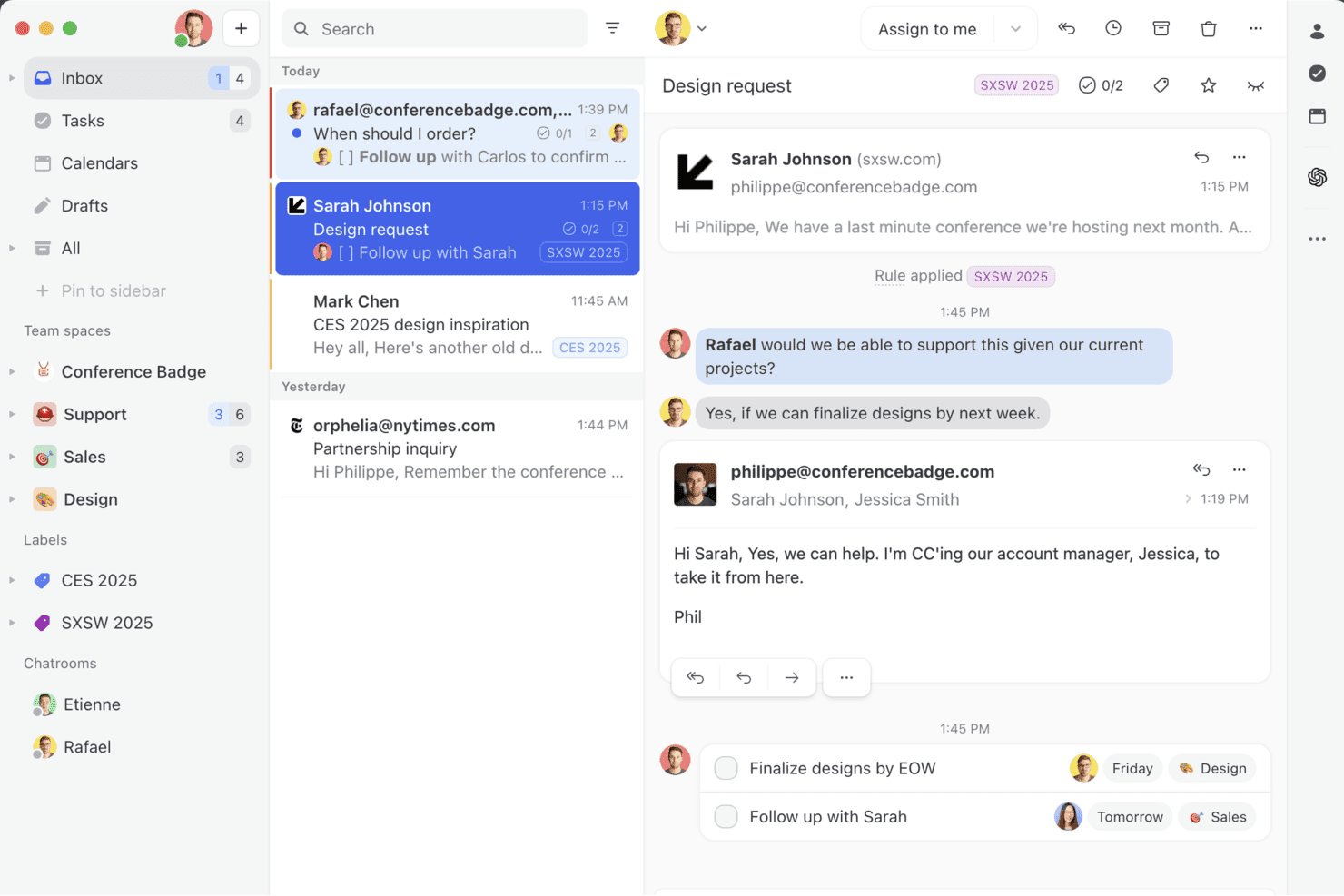
Missive brings your team email, chat, and tasks into one collaborative inbox—so you can manage conversations, assign teammates, and turn messages into action without leaving your inbox. Missive is a collaborative shared inbox platform that unifies email, SMS, WhatsApp, Instagram, Messenger, and live chat into one team workspace, with built-in conversation management, automation rules, and AI-assisted drafting.
Who Is Missive Best For?
Missive fits teams that regularly loop in external collaborators—like contractors, clients, or agency partners—on customer conversations without adding paid seats.
Why I Picked Missive
I've included Missive in my top picks because its guest access feature solves a real problem: looping in external collaborators like contractors or agency partners on live customer conversations without buying them a paid seat. I also like that its real-time collision detection shows exactly who's drafting a reply, so two agents never duplicate work on the same conversation. Pair that with internal threads attached to any conversation, and your team can resolve complex issues without cluttering the customer-facing thread.
Missive Key Features
- Omnichannel unified inbox: Consolidates email, SMS, WhatsApp, Instagram, Messenger, and live chat into a single shared team inbox.
- AI Rules engine: Automation rules that interpret message content and intent to auto-label, auto-draft, or escalate conversations without manual triggers.
- Canned responses with variables: Pre-built reply templates that dynamically insert contact or conversation details for faster, consistent responses.
- Conversation audit trail: A full log of every action taken on a conversation, giving team leads clear accountability across shared inboxes.
- Missive MCP Server: Connect external AI tools (like Claude or ChatGPT) to query online help desk threads, check calendars, and draft replies—while keeping agent review required before sending.g team leads clear accountability across shared inboxes.
Missive Integrations
Missive offers native integrations with HubSpot, Salesforce, Pipedrive, Shopify, Aircall, Twilio, Asana, Google Drive, and Dropbox. It also provides REST API and webhook access for custom integrations, supports Zapier, and includes its new MCP Server on Productive and Business plans (requires admin activation).
Pros and Cons
Pros:
- Real-time drafting and internal thread features
- Omnichannel inbox spans email, SMS, chat, social
- Guest access for external stakeholder collaboration
Cons:
- No dedicated SLA or CSAT features
- No customer-facing knowledge base included
Learn more about Missive: Best for AI-powered customer service
- Free plan available; 7-day free trial
- From $24.17/month (billed annually)
Visit WebsiteCustomer Rating:4.7/5
The Tidio AI Support dashboard displays analytics on conversations, resolution rates, and agent performance. Tidio is a platform designed to help teams manage customer support across chat, email, and social media in a single inbox. It’s built for fast setup and supports automation, multilingual communication, and analytics to improve how service teams prioritize and handle requests. Tidio is used by businesses of all sizes and supports over 120 integrations, including key platforms like Shopify, HubSpot, and Salesforce.
Why I picked Tidio: One of the features that stood out to me is the Lyro AI Agent. It can respond to repetitive customer questions, scan and triage incoming emails, and help route tickets without agent input. This can be especially helpful if your team handles a high volume of support requests and needs a way to reduce manual effort. Tidio also includes multilingual communication, so teams serving international customers can respond in up to 12 languages without relying on external translation tools.
Tidio Standout Features and Integrations
Features include canned responses, a customizable live chat widget, visitor tracking, mobile access for agents, and a collaborative inbox for team-based message handling. These features help teams stay organized and respond quickly while maintaining visibility into active conversations.
Integrations include Shopify, WordPress, WooCommerce, Mailchimp, HubSpot, Salesforce, Zendesk, Zapier, WhatsApp, Messenger, Instagram, and Google Analytics.
Pros and Cons
Pros:
- Quick to deploy with minimal setup
- Supports 12 languages for global teams
- Combines chat, email, and social channels in one inbox
Cons:
- Limited feature set on the free plan
- No phone support; live support limited to business hours
Learn more about Tidio: Best for team collaboration
- Free plan + free demo available
- From $29/user/month
Visit WebsiteCustomer Rating:4.6/5
HelpDesk’s ticket list view provides an overview of all customer support tickets in a company’s account. HelpDesk provides businesses with a robust feature set that enables teams to collaborate and become more efficient.
Why I picked HelpDesk: The platform provides your organization with a ready-to-use, out-of-the-box help desk platform that helps your teams collaborate effectively without overcomplicating things. HelpDesk offers ticket management tools that allow your agents to tag customer support tickets and group them based on common solutions, so your agents can work together and resolve customers’ inquiries. The software’s automation tools allow you to establish ticket routing rules that ensure customer tickets go to the right agent.
HelpDesk works well for startup businesses to enterprise-level organizations that need a platform to help them improve customer service. It uses a single dashboard to create tickets from requests from sources such as incoming emails, contact forms, live chat, and other channels. HelpDesk also provides features like automated task assignments, custom automated workflows, and canned responses to optimize response times.
HelpDesk Standout Features and Integrations
Features include AI text enhancements, custom fields, email templates, automated workflows, ticket management, bulk actions, canned responses, collision detection, ticket assignment, and reports and analytics.
Integrations include LivEchat, Zapier, Shopify, Jira, HubSpot, Salesforce, and GitHub.
HelpDesk costs from $34/user/month when paying monthly or $29/user/month when billed annually. HelpDesk offers a free 14-day trial for new subscribers.
Pros and Cons
Pros:
- Provides real-time reports and insights
- The user interface is very user-friendly
- Effectively tracks and follows up on requests
Cons:
- Some connection problems can occur
- Multiple email threads are messy
Learn more about HelpDesk: Best for AI-driven ticket management
- 14-day free trial
- From $9/seat/month (billed annually)
Visit WebsiteCustomer Rating:4.6/5
monday Service's dashboard provides a breakdown of tickets and other important metrics related to your help desk. monday Service is a platform designed to help organizations manage and track support queries, resolve issues, and analyze ticket metrics efficiently. It serves as a comprehensive hub for handling requests, providing status updates, and managing support resources.
Why I picked monday Service: One of its standout features is smart automation powered by AI, which helps enhance service operations from start to finish. This includes automatic ticket classification and smart ticket routing, ensuring that support tickets are directed to the appropriate team members without delay. The software also provides self-service customer experiences, enabling customers to resolve common issues on their own.
monday Service Standout Features and Integrations
Features include visual dashboards that provide real-time insights into ticket statuses, helping teams stay on top of performance metrics and improve response times. Additionally, monday Service supports knowledge base assistance for agents, giving them easy access to relevant information and solutions when addressing customer inquiries.
Integrations include Slack, Microsoft Teams, Zendesk, Jira, Salesforce, Google Workspace, GitHub, Zoom, Outlook, HubSpot, Trello, Dropbox, and OneDrive.
Pros and Cons
Pros:
- Asset management features
- Automated ticket routing
- Knowledge management capabilities
Cons:
- Full automation features require higher-tier subscriptions
- Limited report customization
Learn more about monday service: Best for customer interaction management
- Free plan + free demo available
- From $39.99/month
Visit WebsiteCustomer Rating:4.7/5
Monitor daily agent or team performance and identify what to improve. ProProfs Help Desk helps businesses focus on enhancing customer interactions so everyone has a positive experience.
Why I picked ProProfs Help Desk: The platform provides your business with customer interaction management capabilities that enable your agents to respond to customer queries, offer 24/7 assistance, and connect with them. ProProfs Help Desk helps your agents offer promptness, personalization, empathy, and assurance when interacting with customers. You can use the platform to get an overview of past customer interactions and activities so your agents can provide a personal touch to future conversations. For more effective customer interaction management, you can use ProProfs Help Desk’s team collaboration capabilities to help your agents work together and make customers happy.
ProProfs Help Desk works for organizations of all sizes that need a solution catered to the growing needs of customers within their industries. It’s a cloud-based ticketing system that is well known for its shared inbox feature, where your agents can access, view, and assign tickets to the right team member while working in a collaborative space. Your managers can use ProProfs Help Desk to prioritize, label, and mark tickets that require immediate attention.
ProProfs Help Desk Standout Features and Integrations
Features include shared inboxes, notification templates, customizable agent availability, ticket exporting, team management, ticket history, roles and permissions, internal chat, omnichannel support, SLA management, real-time chat support, and automated responses.
Integrations include Salesforce and Microsoft Dynamics CRM.
Pros and Cons
Pros:
- Easy-to-use interface
- Ensures excellent customer experiences
- Incredible customer support
Cons:
- No API is available
- A small number of integrations
Learn more about ProProfs Help Desk:
Andre alternativer
Her er noen flere alternativer som ikke kom med på listen over den beste nettbaserte helpdeskprogramvaren:
- 11IssuetrakBest for omnichannel ticket submission
- 12HubSpot Service HubBest CRM capabilities within a help desk platform
- 13FrontBest shared team inbox software
- 14FrontBest for automated routing and categorization
- 15SAAS FirstBest for AI-powered chatbots
- 16HiverBest for shared inbox management
- 17Document360Best for ticket deflection support
- 18NinjaOneBest for ticketing automation
- 19LiveAgentBest for simplicity
- 20Help ScoutBest all-in-one help desk software
How I Evaluate Online Help Desk Software
I split my evaluation into two layers: baseline criteria every tool must meet—ticket management, SLA tracking, multi-channel intake—and differentiators that separate one option from another.
Core Functionality (Table Stakes For This List)
When I'm selecting tools for my list, I rank each one on a scale from 0 (does not offer the functionality) to 5 (excels in this area) for each core functionality listed below. Then, I calculate the tool's total score into a percentage. Each tool needs to achieve a minimum total score of 75% to be considered for inclusion.
- Ticket Management: I look at the full ticket lifecycle—creation, assignment, prioritization, status tracking, and resolution—and whether agents can merge duplicates, split complex requests, or add custom fields to match real workflows.
- Multi-Channel Support: Every tool I evaluate should unify email, chat, web forms, social, and phone inquiries into a single queue so agents aren't toggling between platforms to respond to customers.
- Knowledge Base & Self-Service: I check whether the platform offers a public-facing help center with search, categories, and article management that customers can use to resolve common issues before submitting a ticket.
- Automation & Workflows: Routing rules, auto-assignment, escalation triggers, and macros are what I evaluate here—things like automatically tagging and assigning billing tickets to a specialized team based on subject line keywords.
- SLA Management & Reporting: I look for configurable SLA policies tied to response and resolution times, breach alerts, and dashboards that surface KPIs like first-reply time, ticket backlog, and CSAT scores.
- Agent Collaboration Tools: Features like internal notes, @mentions, collision detection, and shared ticket views matter here—especially for teams where a single customer issue might involve input from support, engineering, and operations.
Once I have a list of tools that meet this criteria, I consider what sets each platform apart.
Differentiating Factors (What Sets Vendors Apart)
Here's how I compare and contrast different vendors:
Standout Features
AI-powered assistance is a major differentiator—tools that draft replies, summarize long threads, or detect customer sentiment give agents a real edge during high-volume periods. I also evaluate whether a platform surfaces a customer context panel alongside the active ticket, pulling in past interactions and CRM data so agents aren't asking customers to repeat themselves. Live chat with built-in chatbots matters too, especially for teams handling pre-sale inquiries where a bot can qualify the request before routing it to the right agent.
Beyond Features
Integration ecosystem is one of the first things I check—a help desk that connects natively with your CRM, ecommerce platform, and Slack or MS Teams keeps agents from context-switching across tabs. I also evaluate how well a platform fits specific team structures, like whether it supports multi-brand portals for companies managing several product lines from one account. Pricing transparency matters too, particularly whether per-agent tiers scale reasonably as a support team grows from five agents to fifty without forcing a costly platform switch.
Slik velger du nettbasert helpdeskprogramvare
Det er lett å gå seg vill i lange funksjonslister og kompliserte prismodeller. For å hjelpe deg med å holde fokus mens du går gjennom den unike prosessen med å velge programvare, får du her en sjekkliste over faktorer du bør ha i tankene:
| Faktor | Hva bør du vurdere? |
|---|---|
| FaktorSkalerbarhet | Hva bør du vurdere?Kan programvaren vokse sammen med selskapet ditt? Vurder fremtidig ekspansjon og om verktøyet kan håndtere økt volum. |
| FaktorIntegrasjoner | Hva bør du vurdere?Fungerer den med de eksisterende verktøyene dine? Vurder kompatibiliteten med dagens systemer for å unngå forstyrrelser i arbeidsflyten. |
| FaktorTilpasningsmuligheter | Hva bør du vurdere?Kan du tilpasse den etter behovene dine? Vurder fleksibiliteten når det gjelder å tilpasse den til unike prosesser og merkevareprofilering. |
| FaktorBrukervennlighet | Hva bør du vurdere?Er den brukervennlig for teamet ditt? Se etter intuitive grensesnitt for å minimere opplæringstid og feil. |
| FaktorImplementering og innføring | Hva bør du vurdere?Hvor smidig er oppsettprosessen? Se etter omfattende støtte ved innføringen for å redusere nedetid under overgangen. |
| FaktorKostnad | Hva bør du vurdere?Er den innenfor budsjettet ditt? Sammenlign prismodeller og vurder skjulte kostnader som tillegg eller oppgraderinger. |
| FaktorSikkerhetstiltak | Hva bør du vurdere?Finnes det robuste beskyttelsestiltak? Bekreft at kravene til standarder for databeskyttelse, som GDPR eller HIPAA, overholdes. |
| FaktorTilgjengelig støtte | Hva bør du vurdere?Er hjelpen tilgjengelig når det trengs? Kontroller at leverandøren tilbyr pålitelig og rask støtte, helst døgnet rundt. |
Funksjoner i nettbasert helpdeskprogramvare
Når du velger nettbasert helpdeskprogramvare, bør du se etter følgende viktige funksjoner:
- Mobil tilgang: Sørger for at kundestøtteagenter kan administrere saker og svare på kundehenvendelser hvor som helst ved hjelp av mobile enheter.
- Sakshåndtering: Samler kundehenvendelser og problemer i ett enkelt system, slik at de kan spores og løses på en strukturert måte.
- Automatiserte arbeidsflyter: Effektiviserer repetitive oppgaver ved å automatisere prosesser, noe som forbedrer effektiviteten og reduserer manuelle feil.
- Støtte i flere kanaler: Gjør det mulig å håndtere kundeinteraksjoner på tvers av ulike kanaler, som e-post, chat, telefon og sosiale medier.
- Kunnskapsbase: Tilbyr en selvbetjeningsportal der kunder kan finne svar på vanlige spørsmål, noe som reduserer mengden kundestøttesaker.
- Analyse og rapportering: Gir innsikt i kundestøtteteamets resultater og kundetilfredshet gjennom detaljerte rapporter og dataanalyse.
- Integrasjonsmuligheter: Gjør det mulig å koble sømløst til andre verktøy og plattformer, noe som gir utvidet funksjonalitet og datasynkronisering.
- Tilpassbart grensesnitt: Gir mulighet til å tilpasse programvarens utseende og funksjonalitet etter virksomhetens spesifikke behov.
- Samarbeidsverktøy: Tilrettelegger for samarbeid mellom kundestøtteagenter ved å muliggjøre kommunikasjon og informasjonsdeling i plattformen.
- System for kundetilbakemeldinger: Samler inn og analyserer kundetilbakemeldinger for å forbedre tjenestekvaliteten og kundetilfredsheten.
Fordeler med nettbasert kundestøtteprogramvare
Implementering av nettbasert kundestøtteprogramvare gir flere fordeler for teamet og virksomheten din. Her er noen av fordelene du kan se frem til:
- Bedre sakshåndtering: Nettbasert kundestøtteprogramvare organiserer og prioriterer kundehenvendelser, slik at teamet enklere kan håndtere forespørsler effektivt.
- Raskere svartider: Automatiseringsfunksjoner gjør det mulig å svare raskere på kundehenvendelser, noe som reduserer ventetiden og øker kundetilfredsheten.
- Sentralisert kommunikasjon: Alle kundeinteraksjoner lagres på ett sted, slik at teamet har tilgang til hele konteksten for hver sak.
- Kundestøtte tilgjengelig døgnet rundt: Med nettbaserte kundestøtteverktøy kan teamet tilby støtte hele døgnet og hjelpe kunder når som helst.
- Forbedrede rapporteringsmuligheter: Innebygd analyse gir innsikt i kundeservicens resultater og hjelper deg med å identifisere områder som kan forbedres.
- Skalerbare kundestøttealternativer: Etter hvert som virksomheten vokser, kan nettbasert kundestøtteprogramvare enkelt håndtere flere brukere og et økt antall saker.
- Integrasjon med kunnskapsbase: Disse verktøyene har ofte en kunnskapsbasefunksjon som gjør det mulig for kunder å finne svar på vanlige spørsmål på egen hånd.
Kostnader og priser for nettbasert kundestøtteprogramvare
Ved valg av nettbasert kundestøtteprogramvare er det nødvendig å forstå de ulike prismodellene og abonnementene som er tilgjengelige. Kostnadene varierer basert på funksjoner, teamets størrelse, tillegg og mer. Tabellen nedenfor oppsummerer vanlige abonnementer, gjennomsnittsprisene deres og typiske funksjoner som er inkludert i nettbaserte kundestøtteløsninger:
Sammenligningstabell for nettbasert kundestøtteprogramvare
| Plantype | Gjennomsnittlig pris | Vanlige funksjoner |
|---|---|---|
| PlantypeGratisplan | Gjennomsnittlig pris$0/user/month | Vanlige funksjonerGrunnleggende saksbehandling, e-poststøtte og begrensede integrasjoner. |
| PlantypePersonlig plan | Gjennomsnittlig pris$5-$20/user/month | Vanlige funksjonerSakshåndtering, grunnleggende rapportering samt e-post- og chatstøtte. |
| PlantypeForretningsplan | Gjennomsnittlig pris$21-$50/user/month | Vanlige funksjonerAvansert rapportering, automatisering, støtte i flere kanaler og tilpasset merkevarebygging. |
| PlantypeVirksomhetsplan | Gjennomsnittlig pris$51-$100+/user/month | Vanlige funksjonerTilpassede arbeidsflyter, dedikert kundestøtte, avansert analyse og forbedret sikkerhet. |
Slik velger du den beste nettbaserte helpdesk-programvaren for teamet ditt
Implementering av en ny kundestøtteplattform vil være en betydelig investering for kundestøtteteamet, kundene og virksomheten din. Etter å ha lest denne listen over den beste nettbaserte helpdesk-programvaren vil du se at mange alternativer tilbyr de samme vanlige funksjonene. Likevel bør du alltid vurdere aspektene jeg listet opp ovenfor, som gjør dem unike til tross for disse likhetene.
Husk at kostnadene ved å ikke fokusere på å forbedre kundenes opplevelse av virksomheten din kan bli høye. Derfor vil det være en betydelig fordel for organisasjonen og kundene dine å ta seg tid til å ta velinformerte beslutninger.
Hva skjer videre?
Hvis du undersøker nettbasert helpdesk-programvare, kan du ta kontakt med en SoftwareSelect-rådgiver for gratis anbefalinger.
Du fyller ut et skjema og tar en kort prat der de går gjennom detaljene i behovene dine. Deretter får du en kortliste over programvare du kan vurdere. De vil også støtte deg gjennom hele kjøpsprosessen, inkludert prisforhandlinger.