

Shelf-anmeldelse: Fordele, ulemper, funktioner og priser
Shelf skiller sig ud med sit intuitive design og AI-drevne funktioner, hvilket gør det til et oplagt valg for teams, der søger effektiv administration af vidensbaser.

We review tools independently, and commissions help fund our testing. See our transparency policy, our methodology, or suggest a tool.
Shelf is a helpdesk knowledge base built for support teams that need agents to find accurate answers fast during live customer interactions. I'd choose it over something like Confluence if your priority is giving frontline agents quick, search-driven access to verified content, rather than managing a general documentation wiki that wasn't designed around support workflows in the first place.
Shelf Evaluation Summary

4.7/5
- Pricing upon request
- Free demo available
Why Trust Our Software Recommendations
6,700+
Reviews
20
Industry experts
16+
Evaluation factors
14
Years
Our team has been testing and reviewing software since 2012. As CX leaders ourselves, we know how difficult—and important—it is to choose the right software.
For this guide, we evaluated tools using hands-on testing and independent research, scoring tools using our selection criteria.
Our reviews reflect our human editorial judgment, not a sales pitch.
 Gui DrusinaCreative Director
 Tim FisherVP of AI
Shelf Overview
In my opinion, Shelf is a solid choice for teams that need an intuitive helpdesk knowledge base. It excels in key features and ease of use, making it a good fit for tech-savvy teams in fast-paced environments. While its onboarding could be smoother, its standout features like AI-driven search make up for it. Compared to competitors like Guru or Zendesk, Shelf offers better user satisfaction according to user reviews and feature utilization, but might not be the best for those on a tight budget. If you're looking for a tool that balances functionality and support team, Shelf is worth considering.
Pros
- Quickly find answers with Shelf's powerful search function capabilities.
- Intuitive, user-friendly interface.
- Version control features for access to the latest, most accurate content.
Cons
- Setup process for advanced permissions may be a bit time-consuming.
- Sharp learning curve with its advanced features, such as deep categorization rules.
- Occasional issues with content archiving and management.
Is Shelf Right For Your Needs?
Who Would be a Good Fit for Shelf?
Shelf is great for tech-savvy teams in fast-paced industries like SaaS and retail, where quick access to information is paramount. Your customer support department will find its machine learning driven search invaluable for reducing response times. Teams that appreciate customization will also benefit from Shelf's flexible setup, which you can tailor to fit your specific workflows. Its intuitive interface makes it easy for your team to navigate, even in high-pressure environments.
- Tech StartupsShelf helps your startup manage rapid growth by organizing information efficiently and ensuring smooth knowledge sharing between new and existing team members.
- Retail Support TeamsYour team can quickly find product details, handle seasonal surges, and respond to customer queries, enhancing service and customer satisfaction.
- Large EnterprisesShelf scales well, meeting the needs of large organizations with its robust content management system.
- Customer Service DepartmentsYour department benefits from quick information retrieval. Its real-time search capabilities provide immediate agent assistance, drastically cutting average handle time (AHT) in a high-volume call center environment, thereby improving customer satisfaction.
- IT HelpdesksShelf's AI-driven search aids your support team in resolving technical issues faster by instantly presenting accurate solutions from technical docs and wikis like Confluence.
- Knowledge Management RolesShelf's customization options let you structure knowledge bases to fit specific organizational needs, centralizing multiple sources (including Dropbox and Microsoft SharePoint files) into a single location.
Who Would be a Bad Fit for Shelf?
Shelf might not suit small businesses or teams with limited tech skills, as its advanced features could be overwhelming. If your team lacks the IT resources for a detailed onboarding process, you might struggle with Shelf's initial setup. Industries that require minimal customization might find Shelf's options excessive and not cost-effective. Additionally, if your customer support relies on immediate assistance, Shelf's occasional delays in support response might not meet your needs.
- Small BusinessesShelf's advanced features might be too complex for your small team to manage effectively, particularly if you lack dedicated IT resources. Organizations with fewer than 10 employees may find the platform over-engineered for their simple documentation needs.
- Non-Tech IndustriesIf your industry isn't tech-oriented and your team lacks digital literacy, Shelf's features could overwhelm your team despite its user-friendly design. Traditional industries with paper-based processes may face significant challenges when implementing a sophisticated cloud-based knowledge management platform.
- Low-Tech TeamsYour team might find Shelf's features and AI-powered capabilities challenging without strong technical skills or dedicated IT support for troubleshooting. Organizations with no experience in using cloud-based platforms will need to invest heavily in training personnel in handling complex document management systems such as Shelf.
- Budget-Conscious DepartmentsIf you're looking to cut costs, Shelf's pricing model and implementation requirements might not align with your financial goals.
- Simple OperationsFor operations that don't need extensive customization, complex workflows, or advanced AI features, Shelf's capabilities may be unnecessary.
- Immediate Support NeedsIf your team needs quick support responses, Shelf's occasional delays might hinder your efficiency.
How We Test & Score Tools
We’ve spent years building, refining, and improving our software testing and scoring system. The rubric is designed to capture the nuances of software selection and what makes a tool effective, focusing on critical aspects of the decision-making process.
Below, you can see exactly how our testing and scoring works across seven criteria. It allows us to provide an unbiased evaluation of the software based on core functionality, standout features, ease of use, onboarding, customer support, integrations, customer reviews, and value for money.
Core Functionality (25% of final scoring)
The starting point of our evaluation is always the core functionality of the tool. Does it have the basic features and functions that a user would expect to see? Are any of those core features locked to higher-tiered pricing plans? At its core, we expect a tool to stand up against the baseline capabilities of its competitors.
Standout Features (25% of final scoring)
Next, we evaluate uncommon standout features that go above and beyond the core functionality typically found in tools of its kind. A high score reflects specialized or unique features that make the product faster, more efficient, or offer additional value to the user.
We also evaluate how easy it is to integrate with other tools typically found in the tech stack to expand the functionality and utility of the software. Tools offering plentiful native integrations, 3rd party connections, and API access to build custom integrations score best.
Ease of Use (10% of final scoring)
We consider how quick and easy it is to execute the tasks defined in the core functionality using the tool. High scoring software is well designed, intuitive to use, offers mobile apps, provides templates, and makes relatively complex tasks seem simple.
Onboarding (10% of final scoring)
We know how important rapid team adoption is for a new platform, so we evaluate how easy it is to learn and use a tool with minimal training. We evaluate how quickly a team member can get set up and start using the tool with no experience. High scoring solutions indicate little or no support is required.
Customer Support (10% of final scoring)
We review how quick and easy it is to get unstuck and find help by phone, live chat, or knowledge base. Tools and companies that provide real-time support score best, while chatbots score worst.
Customer Reviews (10% of final scoring)
Beyond our own testing and evaluation, we consider the net promoter score from current and past customers. We review their likelihood, given the option, to choose the tool again for the core functionality. A high scoring software reflects a high net promoter score from current or past customers.
Value for Money (10% of final scoring)
Lastly, in consideration of all the other criteria, we review the average price of entry level plans against the core features and consider the value of the other evaluation criteria. Software that delivers more, for less, will score higher.
Core Features
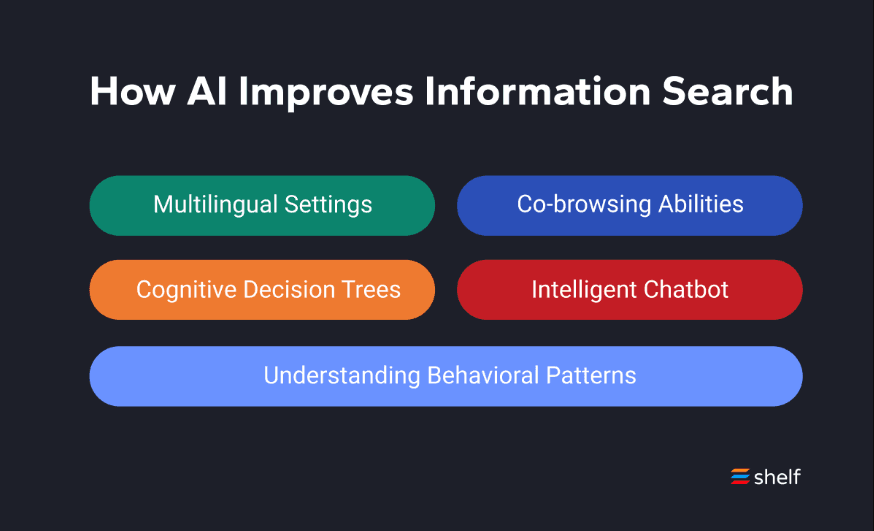
AI-Driven Search: This feature helps your team find information quickly by using artificial intelligence and machine learning to deliver relevant results through real-time processing. It stands out by leveraging natural language queries for intuitive discovery, reducing the time spent looking for answers.
Customizable Knowledge Base: You can tailor the knowledge base to fit the end user’s specific needs with flexible permissions, workflows, and categorization, offering flexibility in organization and presentation. This customization enhances how your team accesses and manages information.
User-Friendly Interface: Shelf's intuitive design makes it easy for your team to navigate and use daily with minimal training. You'll appreciate how straightforward it is to train new team members and maintain consistency across your organization.
Content Management: Easily organize, update, and manage your content to keep it current and useful through document management and version control. This feature ensures your team always has access to the latest information, with archiving for historical records and compliance.
Collaboration Tools: Your team can collaborate seamlessly on content creation and updates through real-time editing and notifications, improving teamwork and consistency. It helps maintain a cohesive knowledge base with built-in approval workflows and templates for standardization.
Analytics and Reporting: Gain insights into how your knowledge base is used with built-in analytics and metrics tracking. This data helps you optimize content and improve your team's efficiency.
Ease of Use
Shelf is user-friendly, thanks to its intuitive interface that makes navigation a breeze for your team. The straightforward design ensures that even new users can quickly get up to speed with minimal training. Compared to other software like Zandesk and Confluence, Shelf offers a smoother experience with its cloud-based architecture, though some users might find the initial setup slightly challenging without proper onboarding support and templates. The AI-driven search function further enhances usability by delivering quick and relevant results with real-time processing, saving your team time and effort. Overall, it balances powerful features with an accessible design, making it a strong choice for organizations prioritizing ease of use and user experience.

Integrations
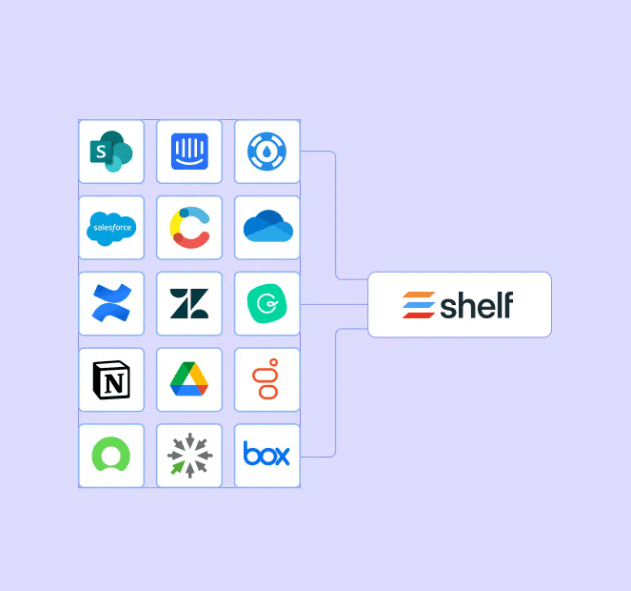
Shelf integrates with SharePoint, Salesforce, Confluence, Slack, Notion, ServiceNow, Intercom, Contentful, Zendesk, Google Drive, Dropbox, Microsoft OneDrive, and Box, providing comprehensive connectivity with enterprise tools.
Shelf also offers an API and connects with third-party integration tools, providing flexibility for custom solutions and seamless integration with existing workflows and CRM systems.
Shelf Specs
- API: Yes
- Chat: No
- Contact Management: No
- Contact Sharing: No
- Data Export: Yes
- Data Import: Yes
- Document Comparison: No
- Email Integration: Yes
- External Integrations: Yes
- File Sharing: Yes
- File Transfer: No
- History/Version Control: No
- Multi-User: Yes
- Notifications: Yes
- Project Management: No


