


monday CRM im Vergleich zu Zoho CRM: Vergleich & Expertenbewertungen für 2026

Wir bewerten Tools unabhängig; Provisionen helfen, unsere Tests zu finanzieren. Siehe unsere Transparenzrichtlinie und unsere Methodik.
monday CRM ist ein visueller, flexibler Arbeitsbereich, der Teams dabei unterstützt, Beziehungen, Geschäfte und interne Prozesse an einem Ort zu verwalten. Zoho CRM ist eine etablierte Plattform, die darauf ausgerichtet ist, Vertriebs-, Marketing- und Service-Kontaktpunkte entlang des gesamten Kundenlebenszyklus zu optimieren.
Im Vergleich zu monday CRM bietet Zoho CRM umfassendere Unternehmensfunktionen, während monday durch Benutzerfreundlichkeit und eine schnelle Einrichtung überzeugt. In diesem Artikel vergleiche ich die Tools direkt miteinander – ihre Funktionen, Vor- und Nachteile, Preise und ihre Eignung als Software für das Kundenbeziehungsmanagement (CRM) für Ihr Team.
monday CRM
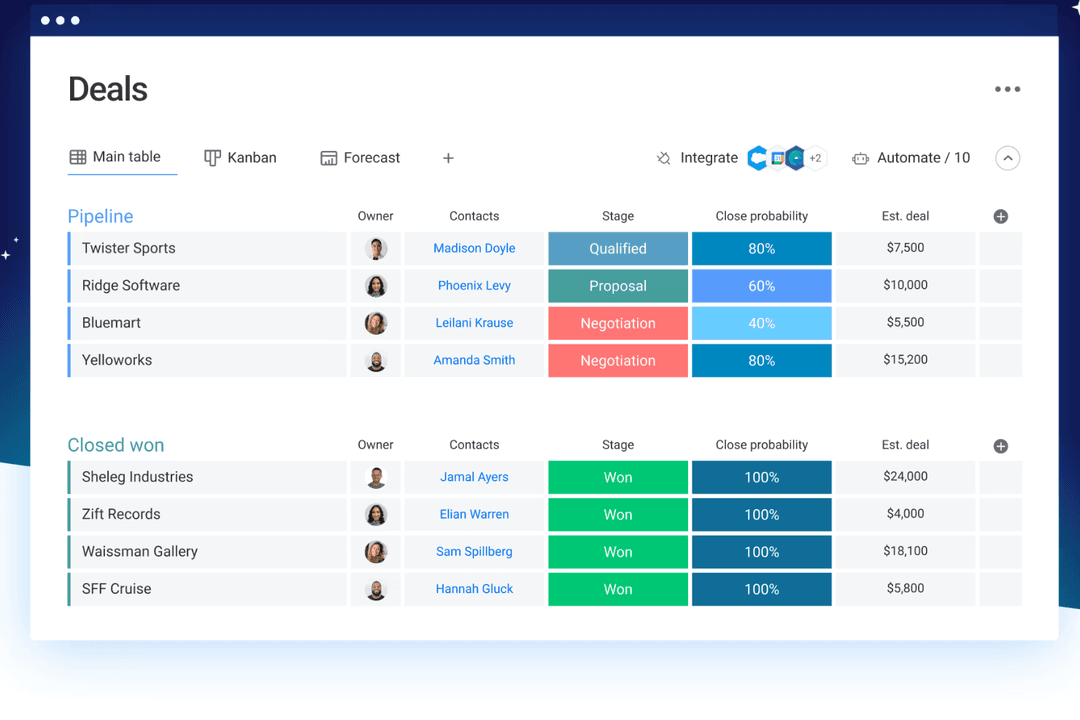
4.6/5
- 14-day free trial + free demo available
- From $12/seat/month (billed annually)
Zoho CRM

4.2/5
- 15-day free trial + free plan available
- From $14/user/month (billed annually)
Warum Sie unseren Software-Empfehlungen vertrauen können
6,700+
Reviews
20
Industry experts
16+
Evaluation factors
14
Years
Unser Team testet und bewertet Software seit 2012. Als CX-Führungskräfte selbst wissen wir, wie schwierig – und wichtig – es ist, die richtige Software auszuwählen.
Für diesen Leitfaden haben wir Tools mithilfe von praktischen Tests und unabhängiger Recherche bewertet und dabei unsere Bewertungskriterien angewendet.
Unsere Bewertungen spiegeln unser menschliches redaktionelles Urteilsvermögen wider, keine Verkaufsstrategie.
 Gui DrusinaCreative Director
 Tim FisherVP of AI
| monday CRM | Zoho CRM | |
|---|---|---|
| Free Trial | 14-day free trial + free demo available | 15-day free trial + free plan available |
| Pricing | From $12/seat/month (billed annually) | From $14/user/month (billed annually) |
monday CRM vs. Zoho CRM: Preise & versteckte Kosten
Die Preise von monday CRM basieren auf einem gestaffelten Modell pro Benutzer, wobei Kernfunktionen erst in höheren Tarifen verfügbar sind und zusätzliche Kosten für Automatisierungslimits, Benutzerplätze oder Premium-Support anfallen können. Auch die Preise von Zoho CRM basieren auf einem Modell pro Benutzer, enthalten in den günstigeren Tarifen jedoch mehr integrierte Funktionen. Erweiterte Analysen, Integrationen und Zusatzfunktionen können die Gesamtkosten dennoch erhöhen.
Um die passende Lösung auszuwählen, sollten Sie ermitteln, wie viele Benutzer Zugriff benötigen, welche Funktionen Sie im Alltag tatsächlich nutzen werden und in welchen Bereichen Sie voraussichtlich wachsen – insbesondere, wenn Sie Arbeitsabläufe aufbauen oder auf mehrere Teams ausweiten.
Mit den anpassbaren Boards von monday CRM können Sie Geschäfte, Aufgaben und Nachfassaktionen in einer visuellen Ansicht verwalten – praktisch, wenn Ihr Team Kundenarbeit und interne Abläufe im selben Bereich koordinieren muss.
Der integrierte KI-Assistent Zia von Zoho CRM eignet sich hervorragend, um Erkenntnisse zu Leads hervorzuheben oder nächste Schritte vorzuschlagen, insbesondere wenn Sie eine große Anzahl eingehender Leads verwalten. monday CRM hält die Bedienung einfach und flexibel, während Zoho stärker auf intelligente Automatisierung und Vertriebsinformationen setzt.
| monday CRM | Zoho CRM | |
|---|---|---|
| 2-Factor Authentication | No | Yes |
| API | Yes | Yes |
| Calendar Management | Yes | Yes |
| Call Tracking | No | Yes |
| Campaign Management | No | Yes |
| Click-to-Dial | No | Yes |
| Contact Management | Yes | Yes |
| Contact Sharing | No | Yes |
| Custom Data Forms | Yes | Yes |
| Customer Management | Yes | Yes |
| Dashboard | Yes | Yes |
| Data Export | Yes | Yes |
| Data Import | Yes | Yes |
| Data Visualization | Yes | Yes |
| Email Integration | Yes | Yes |
| External Integrations | Yes | Yes |
| File Sharing | Yes | Yes |
| File Transfer | Yes | Yes |
| Google Apps Integration | Yes | Yes |
| Lead Management | Yes | Yes |
| Lead Scoring | Yes | Yes |
| Marketing Automation | Yes | Yes |
| Mobile App | No | Yes |
| Multi-User | Yes | Yes |
| Notifications | Yes | Yes |
| Pipeline Management | Yes | Yes |
| Sales Automation | Yes | Yes |
| Scheduling | Yes | Yes |
| Social-Media Integration | Yes | Yes |
| Task Scheduling/Tracking | Yes | Yes |
| Third-Party Plugins/Add-Ons | Yes | Yes |
| Integration | monday CRM | Zoho CRM |
|---|---|---|
| IntegrationLinkedIn | monday CRM✅ | Zoho CRM❌ |
| IntegrationHubSpot | monday CRM✅ | Zoho CRM✅ |
| IntegrationSlack | monday CRM✅ | Zoho CRM✅ |
| IntegrationMicrosoft Teams | monday CRM✅ | Zoho CRM✅ |
| IntegrationGoogle Workspace | monday CRM✅ | Zoho CRM✅ |
| IntegrationSalesforce | monday CRM❌ | Zoho CRM✅ |
| IntegrationMailchimp | monday CRM✅ | Zoho CRM✅ |
| IntegrationQuickBooks | monday CRM❌ | Zoho CRM✅ |
| IntegrationAPI | monday CRM✅ | Zoho CRM✅ |
| IntegrationZapier | monday CRM✅ | Zoho CRM✅ |
Die Integration von monday CRM mit LinkedIn ermöglicht es Ihnen, Beiträge zu automatisieren und Interaktionen direkt über Ihr CRM zu verfolgen – ideal für Teams, die sich auf die Interaktion in sozialen Medien konzentrieren. Außerdem ist monday CRM nativ in das monday.com-Ökosystem integriert, einschließlich des Projektmanagement-Tools und von monday service. Die Salesforce-Integration von Zoho CRM eignet sich hervorragend für Teams, die ihre Vertriebsdaten synchronisieren oder nahtlos zu einer neuen CRM-Software wechseln möchten, sodass alle Kundeninteraktionen auf dem neuesten Stand bleiben.
Während monday CRM das Management sozialer Medien verbessert, überzeugt Zoho CRM durch eine umfassende Synchronisierung von Vertriebsdaten.
| Faktor | monday CRM | Zoho CRM |
|---|---|---|
| FaktorDatenverschlüsselung | monday CRMmonday CRM verwendet eine AES-256-Verschlüsselung, um Daten sowohl während der Übertragung als auch im Ruhezustand zu schützen. | Zoho CRMZoho CRM schützt Daten mit einer AES-256-Verschlüsselung und gewährleistet so Datenschutz und Sicherheit. |
| FaktorEinhaltung gesetzlicher Vorschriften | monday CRMmonday CRM erfüllt die DSGVO und andere internationale Standards. | Zoho CRMZoho CRM erfüllt die Anforderungen der DSGVO, des CCPA und anderer wichtiger Compliance-Vorgaben. |
| FaktorZuverlässigkeit | monday CRMmonday CRM garantiert eine Verfügbarkeit von 99.9 % und gewährleistet so einen kontinuierlichen Zugriff auf die Tools. | Zoho CRMZoho CRM bietet eine SLA mit einer Verfügbarkeit von 99.9 % und gewährleistet damit eine zuverlässige Dienstverfügbarkeit. |
monday CRM und Zoho CRM bieten beide robuste Sicherheits- und Compliance-Funktionen, aber Zoho CRM deckt ein breiteres Spektrum gesetzlicher Standards ab. Um den richtigen Anbieter auszuwählen, sollten Sie die spezifischen Compliance-Standards bewerten, die Ihr Team erfüllen muss, und Funktionen priorisieren, die den Datenschutz verbessern, beispielsweise Verschlüsselung und Verfügbarkeitsgarantien.
| Faktor | monday CRM | Zoho CRM |
|---|---|---|
| FaktorBenutzeroberfläche | monday CRMmonday CRM bietet eine optisch ansprechende und intuitive Drag-and-Drop-Oberfläche. | Zoho CRMFunktionsreich, aber unübersichtlicher und mit einer steileren Lernkurve. |
| FaktorOnboarding-Erfahrung | monday CRMInteraktive Tutorials, vorgefertigte Vorlagen und ein benutzerfreundlicher Einrichtungsprozess mit geführten Anleitungen. | Zoho CRMBietet Tutorials, ausführliche Anleitungen und persönliche Unterstützung bei der Einrichtung, benötigt aufgrund der Vielzahl an Funktionen und Optionen jedoch mehr Zeit für die Konfiguration. |
| FaktorKundensupport | monday CRMIn-App-Chat, E-Mail-Support, Wissensdatenbank und ein Hilfezentrum erleichtern das schnelle Finden von Antworten. | Zoho CRMDer Support erfolgt ticketbasiert, sofern Sie keinen Premium-Tarif nutzen. |
| FaktorAnpassungsmöglichkeiten | monday CRMHochgradig anpassbare Boards und Felder mit einfachen Steuerelementen der Benutzeroberfläche. | Zoho CRMUmfangreiche Anpassungsmöglichkeiten, allerdings dauert es länger, die Optionen zu finden und zu konfigurieren. |
| FaktorEinfachheit der Arbeitsabläufe | monday CRMAutomatisierungen lassen sich mit Logikblöcken ohne Programmieraufwand einfach einrichten. | Zoho CRMBietet leistungsstarke Automatisierungen, deren Einrichtung jedoch technischer wirkt. |
monday CRM wird für seine übersichtliche, intuitive Benutzeroberfläche und das einfache Onboarding gelobt und eignet sich daher ideal für alle, die eine unkomplizierte Navigation und eine mühelose Benutzererfahrung schätzen. Zoho CRM bietet zwar umfangreiche Anpassungsmöglichkeiten, kann für neue Benutzer jedoch überwältigend sein.
monday CRM
- You can build and adjust pipelines without needing technical help.
- It’s easy to track tasks, emails, and contact history in one place.
- Automation features save your team time on repetitive tasks and streamline daily work.
- It can feel overwhelming with too many features for new users.
- Reporting feels limited if your team needs deeper performance or trend analysis.
- You can't manage complex sales territories or multi-layered account hierarchies.
Zoho CRM
- You can customize workflows to fit your team's specific needs.
- Robust automation tools that save you time on repetitive tasks.
- Integration with other Zoho apps enhances your team's productivity.
- The user interface can feel cluttered and overwhelming for new users.
- Some users find the advanced features difficult to navigate without support.
- Customer support response times can be slower compared to competitors.
monday CRM
- Customer Support TeamsYou can track tickets, manage handoffs, and log follow-ups all in one easy-to-navigate board.
- Sales Operations TeamsYou can build lightweight sales pipelines and reporting without relying on complex CRM tools.
- Small BusinessesSetup is quick, and you won’t need IT to change your workflows or customize fields.
- Account ManagementIt helps your team stay on top of renewals, upsells, and check-ins without switching tools.
- SaaS CompaniesYou can manage leads, onboard customers, and monitor ongoing relationships without bloated features.
- Marketing AgenciesIt’s easy to track client requests, campaign status, and deliverables across multiple accounts.
Zoho CRM
- Small BusinessesZoho CRM offers scalability and customization, making it a great fit for growing small businesses.
- Retail Sales TeamsThe CRM's automation tools simplify sales processes, perfect for retail environments.
- Tech StartupsIts integration with other Zoho products makes it an all-in-one tool for dynamic and tech-focused teams.
- Marketing DepartmentsZoho CRM's workflow enhances marketing automation and lead generation.
- Customer Support TeamsWith its robust ticketing and support features, customer service teams can streamline responses.
- Consulting FirmsZoho CRM's customization and reporting features help consultants manage client interactions effectively.
Wer sollte monday CRM verwenden und wer Zoho CRM?
Meiner Meinung nach eignet sich monday CRM am besten für Service- und Vertriebsteams, die eine schnelle, visuelle und leicht anpassbare Lösung suchen – insbesondere, wenn sie den Vertrieb zusammen mit Projekten oder Kundenarbeit verwalten. Zoho CRM ist sinnvoller, wenn Sie umfangreiche Funktionen, weitreichende Anpassungsmöglichkeiten und eine engere Integration mit Finanz- oder Marketingtools benötigen.
monday CRM eignet sich für Start-ups, kleine Unternehmen und wachsende Teams, die Einfachheit und visuelle Klarheit schätzen. Zoho passt besser zu komplexen Organisationen, in denen Kontrolle und Skalierbarkeit wichtiger sind als Benutzerfreundlichkeit.
| monday CRM | Zoho CRM | |
|---|---|---|
| Automation | monday CRM Drag-and-drop automation for tasks and updates. | Zoho CRM Rule-based automation of repetitive tasks that supports advanced logic and AI-powered triggers. |
| Integrations | monday CRM Seamless integration with project tools like Slack, Zoom, and DocuSign. | Zoho CRM Strong for back-office tools like Xero, Google Ads, and finance apps. |
| Pricing Model | monday CRM Per-user pricing with limits based on plan tier and seats. | Zoho CRM Tiered structure with multiple plans for varied functionality. |
| Setup Time | monday CRM Quick to launch with templates and guided flows. | Zoho CRM Takes longer to configure due to deep feature sets and custom rules. |
| User Interface | monday CRM Visual and clean, with boards that are easy to customize and navigate. | Zoho CRM Dense and traditional, with more menus and a higher learning curve. |
| CRM Features | Both let you track leads, manage pipelines, and automate tasks—monday CRM focuses on visual workflows, Zoho on data depth. |
|---|---|
| Customizable Dashboards | Each CRM solution offers strong customization options—monday through flexible boards and fields, Zoho through modules and rule-based logic. |
| Multi-Channel Support | Both provide multi-channel support, allowing your team to engage with customers via email, chat, and more, though Zoho CRM includes phone support. |
| Reporting | Each provides dashboards to track deal flow and team performance—monday CRM with visual widgets, Zoho with advanced filters. |
| Third-Party Integrations | Both connect with major tools like Gmail, Slack, and HubSpot, helping your team sync data across platforms. Plus, both use APIs and Zapier to connect with third-party apps. |