

Reseña de Document360: ventajas, desventajas, características y precios
Document360 potencia a tu equipo con una gestión intuitiva del conocimiento, destacando por su interfaz fácil de usar y sus actualizaciones continuas de características.

Revisamos las herramientas de manera independiente, y las comisiones ayudan a financiar nuestras pruebas. Consulta nuestra política de transparencia, nuestra metodología o sugiere una herramienta.
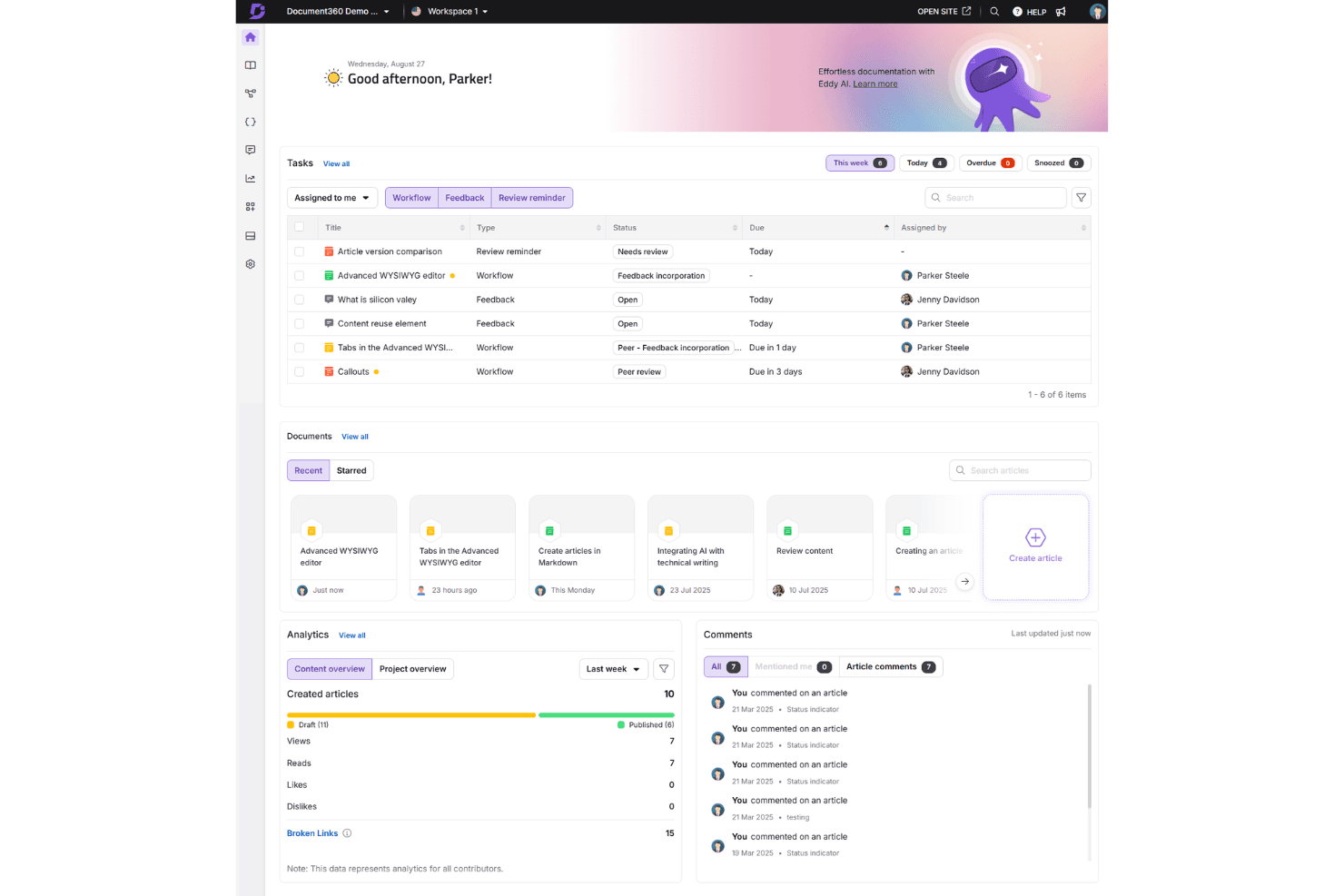
Document360 is a helpdesk knowledge base built for teams that need to create, organize, and publish documentation for customers and internal staff. If you've tried managing documentation inside a general collaboration tool like Confluence, you'll notice the difference quickly—Document360 keeps knowledge base creation as the core function, not a secondary feature buried inside a broader workspace. That focus shows up in things like structured category management, content versioning, and built-in analytics that tell you which articles are actually helping customers.
Document360 Evaluation Summary
4.7/5
- Pricing upon request
- Free demo available
Por qué confiar en nuestras recomendaciones de software
6,700+
Reviews
20
Industry experts
16+
Evaluation factors
14
Years
Nuestro equipo lleva probando y evaluando software desde 2012. Como líderes de CX, sabemos lo difícil —y lo importante— que es elegir el software adecuado.
Para esta guía, evaluamos las herramientas mediante pruebas prácticas e investigación independiente, puntuando las herramientas según nuestros criterios de selección.
Nuestras reseñas reflejan nuestro criterio editorial humano, no un discurso de ventas.
 Gui DrusinaCreative Director
 Tim FisherVP of AI
Document360 Overview
In my opinion, Document360 excels as a Helpdesk Knowledge Base Software by offering a user-friendly interface and a strong feature set. It competes well with others by providing continuous updates and excellent ease of use. However, its value for money may not be as competitive for larger enterprises with complex needs. It suits small to medium-sized tech companies and startups looking for reliable knowledge management. If you're deciding on a tool, consider Document360 for its standout features and ease of onboarding, but weigh it against your specific budget and support needs based on user reviews and verified reviewer feedback.
Pros
- Intuitive and user-friendly interface with formatting options.
- Fully customizable knowledge base utilizing CSS and HTML.
- Frequent updates keep features fresh and relevant for your work.
Cons
- Search functionality lacks depth compared to competition.
- User management options for larger teams.
- Some users report that analytics features lack depth.
Is Document360 Right For Your Needs?
Who Would be a Good Fit for Document360?
Document360 is ideal for small to medium-sized tech startups and SaaS companies looking for a straightforward knowledge management tool and knowledge base platform. Your team will appreciate its intuitive user interface and the ability to customize the knowledge base to reflect your brand using markdown and formatting tools. Its frequent updates ensure you have access to current features that meet your evolving needs with versioning and version control. Its frequent updates ensure you have access to current features that meet your evolving needs with versioning and version control. If your team values ease of use and flexibility in managing information through docs, Document360 could be a great choice for your operations as a knowledge base platform and self-service solution.
- Tech StartupsDocument360 suits your startup with its easy setup, markdown editor, and intuitive navigation, helping your team manage knowledge efficiently from day one with technical documentation and API documentation capabilities.
- SaaS CompaniesYou can rely on Document360's customization options to align your knowledge base with your brand, enhancing client interactions through self-service portals and end-user resources for your software product.
- Customer Support TeamsYour support team will benefit from its simple interface, making it easier to access and share information quickly while deflecting support tickets and reducing support ticketing volume.
- Product Management TeamsDocument360 helps your team organize product documentation, keeping it accessible and up-to-date for all stakeholders using version control and versioning features.
- Remote TeamsWith Document360, remote teams can easily collaborate and access knowledge through workflows, ensuring everyone stays informed and connected across locations.
- IT DepartmentsYour IT department can utilize Document360's frequent updates and robust search function to manage technical documentation effectively with API documentation and docs for end users.
Who Would be a Bad Fit for Document360?
Document360 might not suit large enterprises with complex documentation needs or extensive user management requirements. Your team could find its search functionality lacking depth if your organization relies heavily on intricate searches using search engines. If you require detailed analytics, you might feel Document360's capabilities fall short. Companies that require advanced user permissions or highly detailed data insights may need to look elsewhere for a solution that meets their comprehensive needs beyond what this provider offers.
- Large EnterprisesYour large-scale operations may find Document360's user management and analytics capabilities insufficient for complex needs when multiple providers are involved.
- Financial InstitutionsFinancial institutions might require more advanced search and security features than Document360 offers for sensitive document management.
- Healthcare OrganizationsHealthcare organizations could need more robust compliance and data handling features than what's available on Document360 for technical documentation.
- Legal DepartmentsYour legal team might find Document360's search functionality inadequate for handling intricate legal documents and documents requiring complex methodologies.
- Manufacturing CompaniesManufacturing companies may require more detailed analytics and reporting than Document360 provides for their documentation processes, which tend to be extensive.
- Government AgenciesGovernment agencies often need higher security tiers and more extensive control over user permissions than Document360 currently supports for document management.
Cómo Probamos y Evaluamos Herramientas
Hemos pasado años construyendo, refinando y perfeccionando nuestro sistema de evaluación y puntuación de software. La rúbrica está diseñada para capturar los matices de la selección de software y lo que hace que una herramienta sea eficaz, centrándose en los aspectos críticos del proceso de toma de decisiones. A continuación, puedes ver exactamente cómo funcionan nuestras pruebas y puntuaciones en siete criterios. Esto nos permite ofrecer una evaluación imparcial del software basada en funcionalidad principal, características destacadas, facilidad de uso, incorporación, soporte al cliente, integraciones, opiniones de clientes y la relación calidad-precio.
Funcionalidad Principal (25% de la puntuación final)
El punto de partida de nuestra evaluación siempre es la funcionalidad principal de la herramienta. ¿Tiene las funciones básicas que un usuario esperaría? ¿Alguna de esas funciones principales está bloqueada en planes de precios más altos? Consideramos que una herramienta debe estar a la par de las capacidades básicas de sus competidores.
Características Destacadas (25% de la puntuación final)
A continuación, evaluamos aquellas características poco comunes y destacadas que superan la funcionalidad principal típica de herramientas de ese tipo. Una puntuación alta refleja funciones especializadas o únicas que hacen que el producto sea más rápido, eficiente o que aporte un valor adicional al usuario. También evaluamos lo fácil que es integrar la herramienta con otras que típicamente se utilizan en el ecosistema tecnológico para ampliar la funcionalidad y utilidad del software. Las herramientas que ofrecen abundantes integraciones nativas, conexiones de terceros y acceso a API para integraciones personalizadas obtienen la mejor puntuación.
Facilidad de Uso (10% de la puntuación final)
Consideramos lo rápido y sencillo que es ejecutar las tareas definidas en la funcionalidad principal usando la herramienta. El software que puntúa alto está bien diseñado, es intuitivo, ofrece aplicaciones móviles, proporciona plantillas y hace que tareas relativamente complejas parezcan sencillas.
Incorporación (10% de la puntuación final)
Sabemos lo importante que es la rápida adopción del equipo en una nueva plataforma, así que evaluamos lo fácil que es aprender y usar una herramienta con poca formación. Evaluamos cuán rápido un miembro del equipo puede configurarse y comenzar a usar la herramienta sin experiencia. Las soluciones mejor puntuadas requieren poco o ningún soporte.
Soporte al Cliente (10% de la puntuación final)
Revisamos lo rápido y sencillo que es salir de un atasco y encontrar ayuda por teléfono, chat en vivo o una base de conocimientos. Las herramientas y empresas que brindan soporte en tiempo real obtienen la mejor puntuación, mientras que los chatbots obtienen la peor.
Opiniones de Clientes (10% de la puntuación final)
Más allá de nuestras propias pruebas, consideramos el puntaje neto del promotor de los clientes actuales y anteriores. Revisamos la probabilidad de que elijan la herramienta nuevamente para la funcionalidad principal. Un software con alta puntuación refleja un alto puntaje neto del promotor por parte de clientes actuales o anteriores.
Relación Calidad-Precio (10% de la puntuación final)
Por último, considerando todos los demás criterios, analizamos el precio promedio de los planes de nivel inicial frente a las funciones principales y valoramos el resto de los criterios de evaluación. El software que ofrece más por menos obtiene una mayor puntuación.
Core Features
Knowledge Base Management: Document360 lets your team create, organize, and manage content easily through workflows, ensuring information is always accessible. Its intuitive user interface makes updating and categorizing articles a breeze with docs and markdown support.
Version Control: You can track changes with versioning and version control, reverting to previous versions if needed, and maintaining documentation accuracy. This feature helps prevent errors by keeping a history of changes for your docs.
Customizable Templates: Your team can use and modify templates to match your brand's style, ensuring consistency across documents with formatting options. This saves time and ensures a professional look using the markdown editor or WYSIWYG editor.
Search Functionality: Users can quickly find information with Document360's search function. Though the search functionality may lack depth for complex queries, it's designed to help you locate content efficiently using the search engine.
Analytics and Reports: Get insights into how your knowledge base is used with Document360's analytics, though some users might find it lacking in detail. This helps you understand what content is most valuable to end users.
Collaboration Tools: Your team members can collaborate in real-time through workflows, making it easy to work together on content creation and updates. This fosters teamwork and ensures everyone is on the same page.

Ease of Use
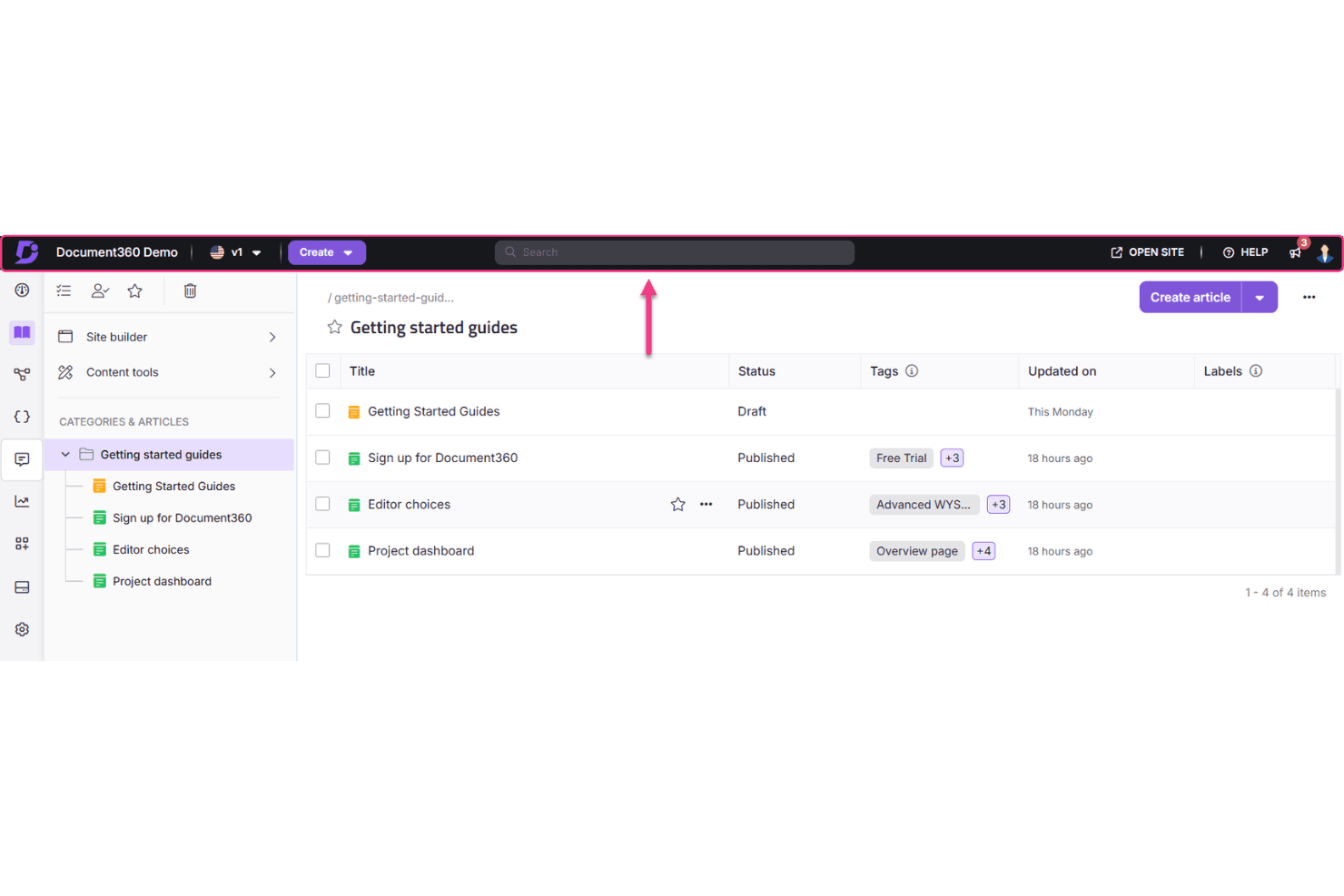
Document360 stands out for its user-friendly design and ease of use, making it easy for your team to navigate and manage content using the markdown editor or WYSIWYG editor. The intuitive user interface ensures that even new users can quickly get up to speed without a steep learning curve. Features like customizable templates, markdown support, formatting tools, and real-time collaboration simplify your work process. Compared to other software, Document360's ease of use is a strong point, allowing your team to focus on content rather than figuring out how to use the tool.
Integrations
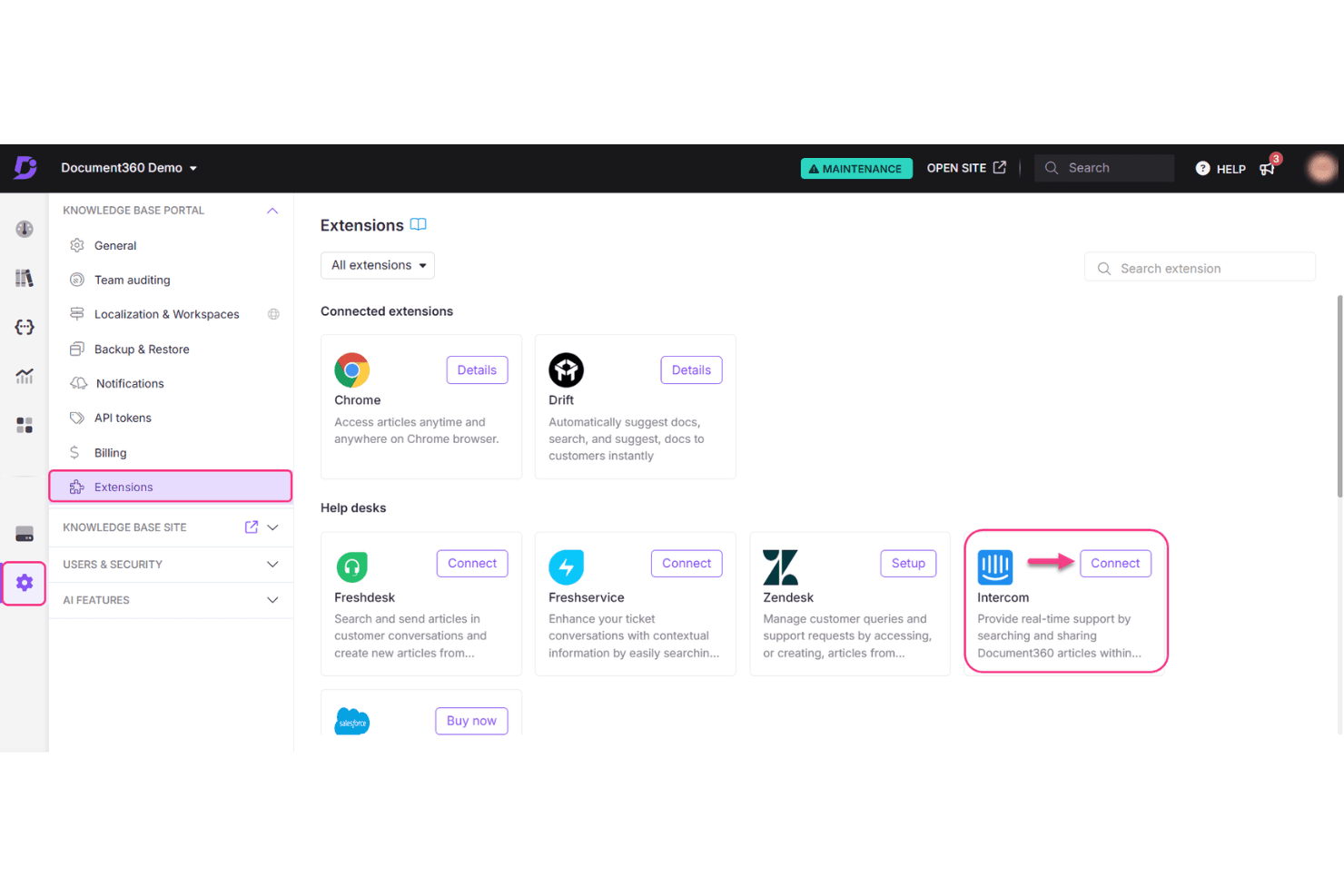
Document360 integrates with Zendesk, Intercom, Drift, Slack, Microsoft Teams, Crowdin, Google Analytics, Hotjar, Freshdesk, and Zapier, facilitating seamless workflows and automation across your tech stack.
Document360 also provides API support for API documentation and document management, allowing you to connect with third-party integration tools through the API for enhanced functionality and automation capabilities.
Document360 Specs
- API: Yes
- Chat: Yes
- Contact Management: Yes
- Contact Sharing: No
- Data Export: Yes
- Data Import: Yes
- Document Comparison: Yes
- Email Integration: Yes
- External Integrations: Yes
- File Sharing: Yes
- File Transfer: Yes
- History/Version Control: Yes
- Multi-User: Yes
- Notifications: Yes
- Project Management: Yes


