

Reseña de Pipedrive: ventajas, desventajas, funciones y precios
El CRM de Pipedrive destaca por la gestión visual del embudo de ventas y la automatización, lo que lo hace ideal para equipos de ventas y pequeñas empresas.

Revisamos las herramientas de manera independiente, y las comisiones ayudan a financiar nuestras pruebas. Consulta nuestra política de transparencia, nuestra metodología o sugiere una herramienta.
Pipedrive is a CRM software designed to help sales teams manage customer relationships and streamline the sales process. It's particularly beneficial for small to medium-sized businesses and startups that rely on tracking sales activities and managing contact data efficiently. Pipedrive offers a user-friendly interface that simplifies deal management and enhances sales productivity through automation and AI-powered features.
Pipedrive addresses common pain points such as disorganized sales pipelines and inefficient communication within sales teams. In this Pipedrive CRM review, I'll cover Pipedrive features, pros and cons, use cases, Pipedrive’s pricing, and more to help you decide if it meets your specific needs and goals.
Pipedrive CRM Evaluation Summary
4.5/5
- From $14/user/month (billed annually)
- 14-day free trial
Por qué confiar en nuestras recomendaciones de software
6,700+
Reviews
20
Industry experts
16+
Evaluation factors
14
Years
Nuestro equipo lleva probando y evaluando software desde 2012. Como líderes de CX, sabemos lo difícil —y lo importante— que es elegir el software adecuado.
Para esta guía, evaluamos las herramientas mediante pruebas prácticas e investigación independiente, puntuando las herramientas según nuestros criterios de selección.
Nuestras reseñas reflejan nuestro criterio editorial humano, no un discurso de ventas.
 Gui DrusinaCreative Director
 Tim FisherVP of AI
Pipedrive CRM Overview
In my opinion, Pipedrive stands out as a solid choice for CRM software and the best CRM consideration for sales teams. Its user-friendly interface and robust functionality make it a particularly appealing option for small businesses, startups, and medium-sized sales teams. Pipedrive CRM excels in automation,lead management, and pipeline management, outperforming many competitors with its seamless integrations and customization options.
The platform includes AI-powered features like an AI sales assistant, forecasting, email templates, web forms, notifications, and real-time dashboards. Key add-ons include LeadBooster (with chatbot and web visitors tracking), Smart Docs, Projects with Kanban boards, and Campaigns for email marketing.
Although it lacks some marketing automation functions compared to HubSpot, the platform's ease of use, drag-and-drop builder, and affordability make it a practical option for businesses looking to enhance their sales processes without breaking the bank.
Pros
- Visual pipeline and drag-and-drop interface.
- Drive sales through automation and real-time notifications.
- Automation features and workflows help save time on repetitive tasks
Cons
- Reporting tools are limited in scope unless you opt for higher-tier plans.
- Steep learning curve, particularly for workflows and custom fields.
- Mobile app prone to lagging according to user reports.
Is Pipedrive CRM Right For Your Needs?
Who Would be a Good Fit for Pipedrive CRM?
Pipedrive is a great choice for small businesses, startups, and medium-sized sales teams looking to manage their sales pipeline efficiently through CRM software. If your team values a straightforward interface that focuses on the sales process, Pipedrive offers customizable pipeline management stages and activity reminder automation tools, web forms for lead generation, and real-time dashboards. Businesses in industries like real estate or retail, where tracking leads through a visual pipeline and improving conversion rates is crucial, will find Pipedrive’s deal management, contact management, and reporting features particularly beneficial.
- Small BusinessesPipedrive's user-friendly interface, visual pipeline, and affordable pricing make it ideal for small businesses wanting to stay organized without breaking the bank.
- Sales TeamsWith its focus on sales pipeline management and sales process optimization, Pipedrive helps your team track deals, manage follow-ups, and track deals and close them efficiently through automation, real-time updates, and sales data analysis.
- Real EstateReal estate agents can benefit from Pipedrive's lead management, contact management, and follow-up reminders through notifications, email templates, and visual pipeline tracking, ensuring no potential buyer slips through the cracks.
- RetailRetail teams can use Pipedrive to manage supplier relationships and optimize their sales process with its customization options, custom fields, templates, and workflow automation capabilities.
- Marketing AgenciesMarketing teams will appreciate Pipedrive's integrations, allowing seamless collaboration with other platforms to manage through Zapier, API, and native connections to manage campaigns apart from CRM functions.
- FreelancersFreelancers can organize their client interactions and projects using Pipedrive's simple yet effective CRM functionalities, contact management, deal management, and basic project management features at affordable pricing.
Who Would be a Bad Fit for Pipedrive CRM?
Pipedrive isn't ideal for businesses that need extensive financial tracking, as it lacks budgeting and expense management features. If your team relies heavily on marketing automation like HubSpot offers, without add-ons you might find Pipedrive's options limiting. It's also not the best choice for organizations with complex project management needs. If you need in-depth advanced reporting, with custom dashboards beyond what pricing plans include, Pipedrive might not meet your expectations. Lastly, teams that require robust customer support over the phone may find Pipedrive's offerings fall short in the lower pricing plans, as the Growth plan only offers live chat support. Organizations heavily invested in Salesforce or HubSpot ecosystems might find switching challenging due to workflow differences.
- Financial ServicesPipedrive doesn't offer the financial tracking features with budgeting tools that are crucial for this industry’s comprehensive fiscal management needs.
Cómo Probamos y Evaluamos Herramientas
Hemos pasado años construyendo, refinando y perfeccionando nuestro sistema de evaluación y puntuación de software. La rúbrica está diseñada para capturar los matices de la selección de software y lo que hace que una herramienta sea eficaz, centrándose en los aspectos críticos del proceso de toma de decisiones. A continuación, puedes ver exactamente cómo funcionan nuestras pruebas y puntuaciones en siete criterios. Esto nos permite ofrecer una evaluación imparcial del software basada en funcionalidad principal, características destacadas, facilidad de uso, incorporación, soporte al cliente, integraciones, opiniones de clientes y la relación calidad-precio.
Funcionalidad Principal (25% de la puntuación final)
El punto de partida de nuestra evaluación siempre es la funcionalidad principal de la herramienta. ¿Tiene las funciones básicas que un usuario esperaría? ¿Alguna de esas funciones principales está bloqueada en planes de precios más altos? Consideramos que una herramienta debe estar a la par de las capacidades básicas de sus competidores.
Características Destacadas (25% de la puntuación final)
A continuación, evaluamos aquellas características poco comunes y destacadas que superan la funcionalidad principal típica de herramientas de ese tipo. Una puntuación alta refleja funciones especializadas o únicas que hacen que el producto sea más rápido, eficiente o que aporte un valor adicional al usuario. También evaluamos lo fácil que es integrar la herramienta con otras que típicamente se utilizan en el ecosistema tecnológico para ampliar la funcionalidad y utilidad del software. Las herramientas que ofrecen abundantes integraciones nativas, conexiones de terceros y acceso a API para integraciones personalizadas obtienen la mejor puntuación.
Facilidad de Uso (10% de la puntuación final)
Consideramos lo rápido y sencillo que es ejecutar las tareas definidas en la funcionalidad principal usando la herramienta. El software que puntúa alto está bien diseñado, es intuitivo, ofrece aplicaciones móviles, proporciona plantillas y hace que tareas relativamente complejas parezcan sencillas.
Incorporación (10% de la puntuación final)
Sabemos lo importante que es la rápida adopción del equipo en una nueva plataforma, así que evaluamos lo fácil que es aprender y usar una herramienta con poca formación. Evaluamos cuán rápido un miembro del equipo puede configurarse y comenzar a usar la herramienta sin experiencia. Las soluciones mejor puntuadas requieren poco o ningún soporte.
Soporte al Cliente (10% de la puntuación final)
Revisamos lo rápido y sencillo que es salir de un atasco y encontrar ayuda por teléfono, chat en vivo o una base de conocimientos. Las herramientas y empresas que brindan soporte en tiempo real obtienen la mejor puntuación, mientras que los chatbots obtienen la peor.
Opiniones de Clientes (10% de la puntuación final)
Más allá de nuestras propias pruebas, consideramos el puntaje neto del promotor de los clientes actuales y anteriores. Revisamos la probabilidad de que elijan la herramienta nuevamente para la funcionalidad principal. Un software con alta puntuación refleja un alto puntaje neto del promotor por parte de clientes actuales o anteriores.
Relación Calidad-Precio (10% de la puntuación final)
Por último, considerando todos los demás criterios, analizamos el precio promedio de los planes de nivel inicial frente a las funciones principales y valoramos el resto de los criterios de evaluación. El software que ofrece más por menos obtiene una mayor puntuación.
Core Features
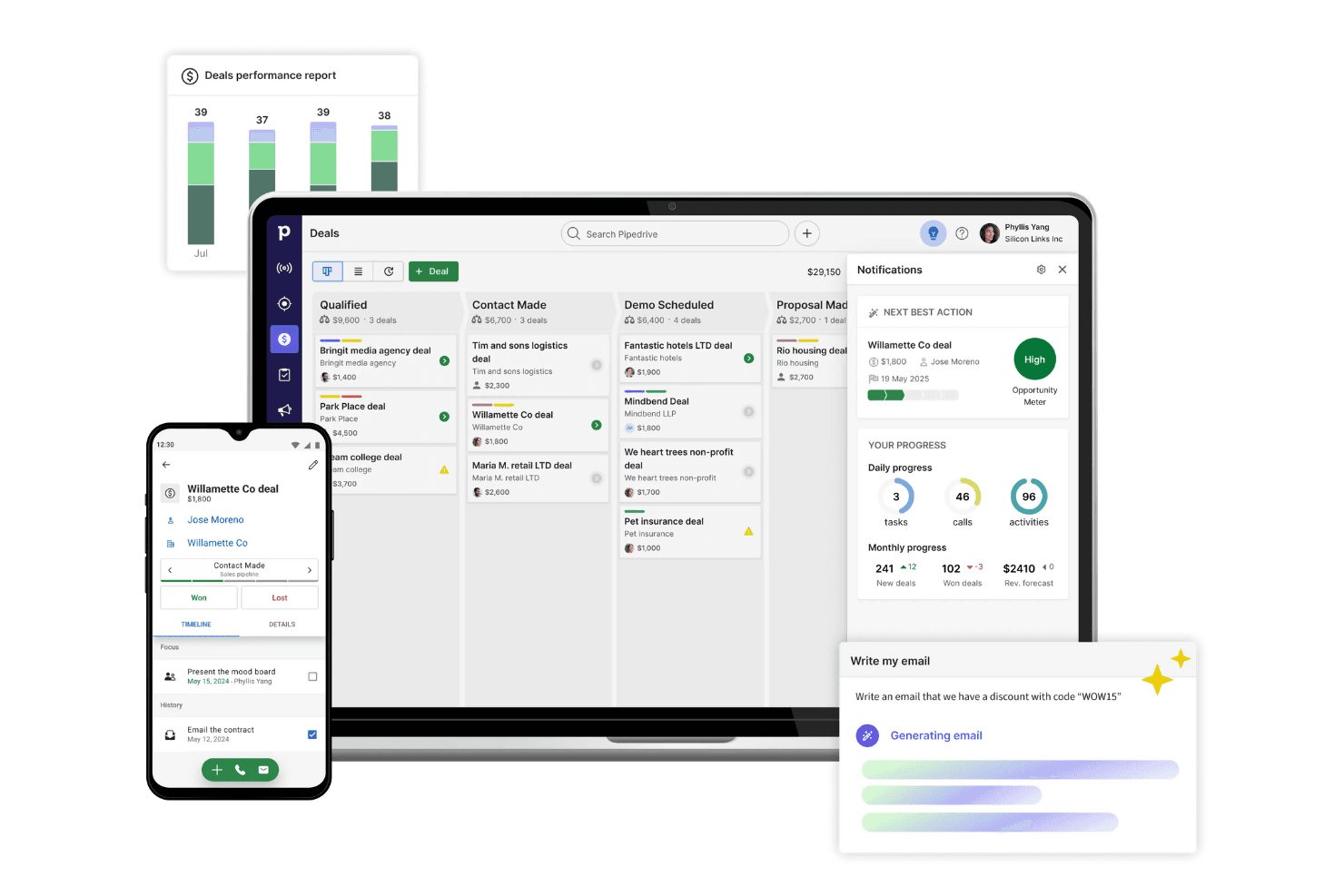
Visual Sales Pipeline: Pipedrive's visual sales pipelines helps you organize and track deals and activities with drag-and-drop functionality. Pipedrive offers custom fields, stage customization, and real-time updates to help sales teams track deals efficiently and systematically move them through the sales process.
Contact Management: Store and manage all contact data including leads, customers, and organizations. Track communication history, email sync with Gmail/Outlook, follow-up reminders through notifications, and relationship building activities that drive customer relationship success.
Sales Automation: Automate repetitive tasks and workflows with Pipedrive’s automation features. Create automation rules, use email templates, set up follow-ups and email reminders, schedule notifications, and build workflows that guide sales reps through your sales process consistently using templates and triggers.
Lead Management: Capture and organize leads efficiently with Pipedrive's lead management tools. You can prioritize leads based on their potential, ensuring your team focuses on the most promising opportunities.
Smart Docs: Create trackable quotes, proposals, and contracts with e-signatures. Smart Docs streamline document management and accelerate deal closure.
AI Sales Assistant: AI-powered recommendations provide tailored sales tips, suggest next steps, identify at-risk deals, and help salespeople prioritize activities. The AI sales assistant learns from sales data to improve performance.
Email Integration: Pipedrive integrates email directly into its platform, allowing you to send and receive emails without leaving the CRM. This feature keeps your communication organized and linked to the corresponding deals.
Reporting Dashboards: Create customizable dashboards to track key sales data, sales forecasting, and performance, and create custom reports. Real-time dashboards provide insights into sales pipeline health, conversion rates, and revenue projections.
Mobile Access: Pipedrive's mobile app for both iOS and Android ensures sales reps can manage deals, update contact data, log activities, access dashboards, and receive notifications whether in office or on the go.
Projects: The Projects add-on adds project management capabilities with Kanban boards, templates, task tracking, and automation to manage complex projects alongside your sales pipeline.

Ease of Use
Pipedrive is straightforward and intuitive, making it accessible for you and your team to hit the ground running. Its focus on delivering an intuitive user experience reduces the learning curve, allowing you to focus on managing customer relationships effectively through the visual pipeline. Users appreciate its drag-and-drop functionality for organizing sales pipelines, which simplifies tracking and managing deals. In addition, the Kanban-style board, dashboards, templates, and custom fields make navigation seamless. While some workflows and automation customizations may require time to master, the overall ease of use and clear layout make it the best CRM software for enhancing productivity in customer service operations. Plus, the mobile app extends this usability to iOS and Android devices.
Integrations
Pipedrive integrates with Zapier, Talkdesk, PandaDoc, Yesware, MailChimp, snapADDY, Ecquire, Niftyquoter, Google Apps, Gmail, and Drip. Native integrations include Slack, Microsoft Teams, Zoom, Trello, Asana, and QuickBooks.
Pipedrive also offers an API for integration with over 400 third-party tools through its marketplace, enabling businesses to connect easily with various applications.

Pipedrive CRM Specs
- 2-Factor Authentication: No
- API: Yes
- Calendar Management: Yes
- Call Tracking: Yes
- Campaign Management: No
- Click-to-Dial: Yes
- Contact Management: Yes
- Contact Sharing: Yes
- Custom Data Forms: No
- Customer Management: Yes
- Dashboard: Yes
- Data Export: Yes
- Data Import: Yes
- Data Visualization: Yes
- Email Integration: Yes
- External Integrations: Yes
- File Sharing: Yes
- File Transfer: Yes
- Google Apps Integration: Yes
- Lead Management: Yes
- Lead Scoring: Yes
- Marketing Automation: No
- Mobile App: Yes
- Multi-User: Yes
- Notifications: Yes
- Pipeline Management: Yes
- Sales Automation: Yes
- Scheduling: Yes
- Social-Media Integration: No
- Task Scheduling/Tracking: Yes
- Third-Party Plugins/Add-Ons: Yes


