


Unwrap contro Chattermill: confronto e recensioni di esperti per il 2026

Recensiamo gli strumenti in modo indipendente e le commissioni aiutano a finanziare i nostri test. Consulta la nostra politica di trasparenza, la nostra metodologia o suggerisci uno strumento.
Se stai confrontando Unwrap e Chattermill, è probabile che tu stia già raccogliendo molti feedback dei clienti, ma faccia fatica a trasformarli in informazioni chiare, utili e degne di essere utilizzate. Commenti grezzi, risposte ai sondaggi e ticket di assistenza si accumulano rapidamente, e scegliere la piattaforma sbagliata può significare avere più cruscotti, più configurazioni e risposte ancora poco chiare.
Questa guida analizza nel dettaglio il confronto tra Unwrap e Chattermill in quanto piattaforme di intelligence dei clienti, così puoi capire come ciascuna opzione affronta l'analisi dei feedback e decidere quale si adatta meglio al modo in cui il tuo team lavora e prende decisioni.
Unwrap

4.8/5
- Free demo available
- Pricing upon request
Chattermill

0/5
- Free demo available
- Pricing upon request
Perché fidarsi dei nostri consigli sui software
6,700+
Reviews
20
Industry experts
16+
Evaluation factors
14
Years
Il nostro team testa e recensisce software dal 2012. In quanto leader CX noi stessi, sappiamo quanto sia difficile — e importante — scegliere il software giusto.
Per questa guida, abbiamo valutato gli strumenti attraverso test pratici e ricerche indipendenti, assegnando un punteggio agli strumenti in base ai nostri criteri di selezione.
Le nostre recensioni riflettono il nostro giudizio editoriale umano, non un discorso di vendita.
 Gui DrusinaCreative Director
 Tim FisherVP of AI
| Unwrap | Chattermill | |
|---|---|---|
| Free Trial | Free demo available | Free demo available |
| Pricing | Pricing upon request | Pricing upon request |
Prezzi e costi nascosti di Unwrap e Chattermill
Unwrap utilizza prezzi personalizzati basati sul volume dei feedback e sulle integrazioni, non sul numero di utenti, e tutti i piani includono funzionalità come SSO, conformità al GDPR, accesso API, avvisi in tempo reale e rimozione dei dati personali identificabili. I costi possono aumentare con la crescita del volume dei feedback o delle fonti collegate.
Chattermill utilizza piani personalizzati a livelli, basati sulle fonti di dati e sulla profondità dell'analisi. I costi possono aumentare passando a livelli superiori o aggiungendo nuove fonti di dati.
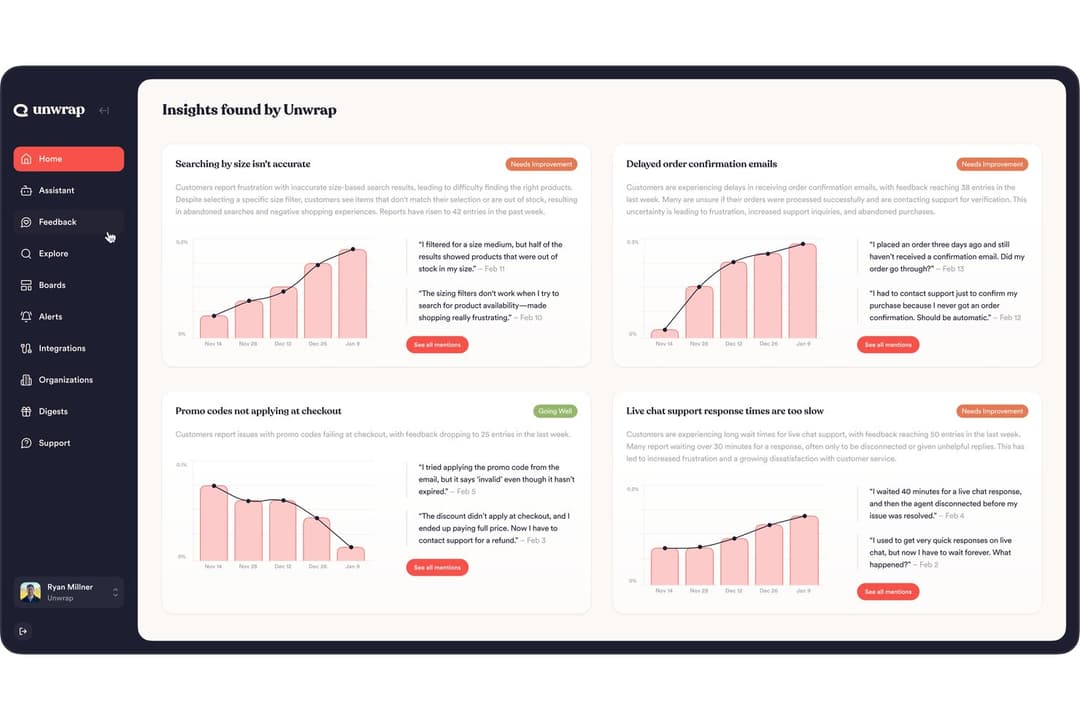
Unwrap si concentra sulla distribuzione rapida delle informazioni ai team. SupportIQ analizza le conversazioni dell’assistenza per mostrare quali soluzioni funzionano davvero, mentre il rilevamento proattivo delle tendenze individua automaticamente i problemi emergenti senza dover effettuare ricerche manuali. Inoltre, unifica i feedback provenienti da diversi canali con cruscotti, categorizzazione automatica, interrogazioni tramite IA e avvisi in tempo reale.
Chattermill è progettato attorno a programmi strutturati di Voce del cliente. La sua analisi dell’impatto collega i temi dei feedback alle metriche aziendali, mentre flussi di lavoro e avvisi aiutano i team a trasformare le informazioni in azioni in tutta l’organizzazione. Supporta inoltre feedback unificati provenienti da più canali, cruscotti e analisi del sentiment basata sull’IA per un’esplorazione più approfondita.
| Unwrap | Chattermill | |
|---|---|---|
| API | Yes | Yes |
| Contact Management | Yes | No |
| CRM Integration | Yes | Yes |
| Customer Management | Yes | Yes |
| Data Export | Yes | Yes |
| Data Import | Yes | Yes |
| Data Visualization | Yes | Yes |
| Google Apps Integration | Yes | No |
| Lead Management | No | Yes |
| Marketing Automation | Yes | No |
| Multi-User | Yes | Yes |
| Integrazione | Unwrap | Chattermill |
| Zendesk | ✅ | ✅ |
| Salesforce | ✅ | ✅ |
| Intercom | ✅ | ✅ |
| App Store Connect | ✅ | ✅ |
| Google Play | ✅ | ✅ |
| Trustpilot | ❌ | ✅ |
| Qualtrics | ✅ | ✅ |
| Slack | ✅ | ✅ |
| API | ✅ | ✅ |
| Zapier | ✅ | ✅ |
Unwrap e Chattermill supportano le stesse integrazioni principali per assistenza, CRM, feedback sui prodotti, sondaggi e strumenti interni, semplificando la centralizzazione dei feedback dei clienti provenienti da più fonti senza lacune nelle integrazioni.
| Fattore | Unwrap | Chattermill |
| Privacy dei dati | Offre la conformità al GDPR e la redazione automatica dei dati personali identificabili per proteggere le informazioni sensibili. | È conforme al GDPR e al CCPA ed è certificato SOC 2 Type II e ISO 27001 per la sicurezza aziendale. |
| Standard di conformità | Certificazione SOC 2 Type II e protezioni di livello enterprise. | Rispetta la norma ISO 27001:2022 e gli standard di sicurezza del settore. |
| Affidabilità | Utilizza controlli di sicurezza SOC 2 Type II per supportare un'analisi dei feedback sicura e scalabile. | Utilizza attività di monitoraggio documentate e controlli dell'ambiente per supportare un'elaborazione dei feedback affidabile su scala aziendale. |
In generale, sia Unwrap sia Chattermill soddisfano gli standard fondamentali di sicurezza e conformità, tra cui GDPR e SOC 2 Type II, mentre Chattermill possiede inoltre la certificazione ISO 27001.
| Fattore | Unwrap | Chattermill |
| Interfaccia utente | L'interfaccia utente è facile da navigare e curata visivamente, rendendo la piattaforma piacevole da usare. | L'interfaccia consente ai nuovi utenti di tutti i team di diventare rapidamente operativi. |
| Configurazione | Completa l'avvio della piattaforma con accesso completo a Unwrap in circa tre settimane. | Chattermill include uno specialista dedicato all'avvio con supporto individuale durante i primi 30 giorni. |
| Curva di apprendimento | L'integrazione è fluida e facile da adottare nell'uso quotidiano. | Semplifica la raccolta e l'interpretazione dei riscontri non strutturati. |
Unwrap è facile da navigare e offre un'esperienza di avvio fluida. Anche Chattermill è facile da usare per i nuovi utenti, grazie al supporto dedicato per l'avvio e agli strumenti per lavorare con riscontri non strutturati.
Unwrap
- Proactive insight discovery without manual tagging
- Early issue detection through alerts and trend monitoring
- Verifiable, traceable insights that link each theme back to the original feedback.
- Limited value for low feedback volume teams
- Takes longer to get started than instant sign-up alternatives
- Customization depth is intentionally limited
Chattermill
- Combines feedback from surveys, support, social, speech, and product sources.
- Support ongoing Voice of Customer initiatives across CX, support, and product teams.
- Enterprise-grade security and governance
- Configuring multiple data sources, dashboards, and taxonomies can require more time compared to lighter feedback tools.
- The breadth of features and analytics views may feel busy for teams.
- Pricing can increase as feedback volume grows, more data sources are added, or advanced analytics are required.
Unwrap
- Product ManagersUnwrap helps product managers identify recurring customer pain points and feature requests at scale, making roadmap prioritization easier and more evidence-based.
- Customer Experience (CX) TeamsCX teams use Unwrap to automatically surface trends and sentiment shifts across customer feedback, helping them address issues before they escalate.
- Support LeadershipSupport leaders rely on Unwrap to detect systemic issues from support tickets and reviews, allowing them to reduce repeat problems and improve service quality.
- Survey & Research TeamsUnwrap’s AI-powered surveys help research teams collect richer, more actionable qualitative feedback without increasing survey fatigue.
- Executives & Strategic LeadersExecutives use Unwrap to stay informed on customer sentiment and emerging issues through clear summaries instead of raw data dashboards.
- Enterprise OrganizationsLarge organizations benefit from Unwrap’s ability to analyze massive volumes of multi-channel feedback while supporting cross-team visibility and governance.
Chattermill
- Customer Experience (CX) TeamsChattermill works well for CX teams running structured Voice of Customer programs that track sentiment and themes across multiple feedback channels.
- Customer Support TeamsSupport teams use Chattermill to analyze large volumes of tickets and interactions to identify recurring issues and service gaps.
- Product TeamsProduct teams rely on Chattermill to unify feedback from surveys, support, and reviews to inform roadmap and prioritization decisions.
- Enterprise OrganizationsChattermill fits enterprises that need strong governance, role controls, and compliance while sharing insights across departments.
- Industry-Specific TeamsTeams in industries like retail, finance, travel, subscriptions, and utilities use Chattermill to monitor ongoing customer sentiment tied to operations.
- Teams Focused on Impact AnalysisChattermill is suited for teams that want to connect customer feedback insights to business outcomes through dashboards, workflows, and impact tracking.
Chi dovrebbe usare Unwrap e chi dovrebbe usare Chattermill?
Se vuoi che gli approfondimenti emergano rapidamente senza dover effettuare ricerche approfondite, Unwrap mette in evidenza funzionalità come SupportIQ e il rilevamento proattivo delle tendenze per portare all'attenzione i modelli importanti, supportando comunque pannelli di controllo e analisi più approfondite quando necessario.
Se gestisci i riscontri dei clienti come un programma strutturato e continuativo, Chattermill punta su pannelli di controllo, flussi di lavoro e analisi dell'impatto per aiutarti a organizzare gli approfondimenti nel tempo e ad agire su di essi tra i diversi team, supportando comunque l'analisi in tempo reale.
La scelta dipende semplicemente dal fatto che tu voglia che gli approfondimenti emergano automaticamente o preferisca lavorare in una configurazione più strutturata per organizzarli nel tempo.
| Unwrap | Chattermill | |
|---|---|---|
| Data Security | Unwrap Publicly lists GDPR compliance and SOC 2 Type II controls. | Chattermill Publicly lists GDPR, SOC 2 Type II, and ISO 27001:2022 certification. |
| Industry Positioning | Unwrap Positions itself broadly across use cases and teams without strong industry-specific framing. | Chattermill Explicitly markets solutions by industry, such as retail, finance, travel, subscriptions, and utilities. |
| Onboarding | Unwrap Offers guided onboarding designed to get teams operational quickly with minimal friction. | Chattermill Provides a dedicated onboarding specialist and structured setup, which can involve more configuration upfront. |
| Project Structure | Unwrap Optimized for fast insight consumption and action across teams with lighter configuration. | Chattermill Built to support long-running, structured Voice of Customer programs across multiple teams. |
| Real-Time Insights | Unwrap Prioritizes proactive alerts and surfaced trends to help teams act quickly on emerging issues. | Chattermill Emphasizes structured, AI-driven analysis across unified feedback sources to support deeper insight exploration. |
| Compliance | Both support GDPR compliance and enterprise security controls suitable for larger organizations. |
|---|---|
| Continuous Feedback | Both unify feedback from multiple sources, such as surveys, reviews, support tickets, and product feedback. |
| Cross-Platform Access | Both are designed for use by CX, product, support, and leadership teams to align around customer insights. |
| Feedback Analysis | Both platforms use AI to analyze large volumes of unstructured customer feedback and surface themes, trends, and sentiment. |
| Scalability | Both platforms are built to handle growing feedback volumes and scale alongside organizational needs. |