

En AI-plattform for kundeopplevelse er programvare som bruker kunstig intelligens til å automatisere, tilpasse og optimalisere kundeinteraksjoner på tvers av digitale kanaler. Hvis du leter etter den beste AI-plattformen for kundeopplevelse, ønsker du sannsynligvis å forbedre kvaliteten på kundestøtten, redusere manuelt arbeid og levere raskere og mer konsekvent service.
Med så mange tilgjengelige alternativer er det vanskelig å vite hvilke verktøy som faktisk passer teamets behov og kan integreres med de eksisterende arbeidsflytene deres.
Denne veiledningen gjennomgår de beste plattformene og fremhever deres unike funksjoner og styrker, slik at du trygt kan velge den riktige løsningen for å løfte kundeopplevelsen.
Why Trust Our Software Recommendations
6,700+
Reviews
20
Industry experts
16+
Evaluation factors
14
Years
Our team has been testing and reviewing software since 2012. As CX leaders ourselves, we know how difficult—and important—it is to choose the right software.
For this guide, we evaluated tools using hands-on testing and independent research, scoring tools using our selection criteria.
Our reviews reflect our human editorial judgment, not a sales pitch.
 Gui DrusinaCreative Director
 Tim FisherVP of AI
Sammenligningstabell for AI-plattformer for kundeopplevelse
Denne sammenligningstabellen oppsummerer prisdetaljene for mine beste utvalgte AI-plattformer for kundeopplevelse:
| Tool | Best For | Trial Info | Price | ||
|---|---|---|---|---|---|
| 1 | Best for fast AI-powered appointment booking | Free demo available | From $15/user/month (billed annually) | Website | |
| 2 | Best for AI-powered feedback categorization | Free demo available | Pricing upon request | Website | |
| 3 | Best for live agent coaching with AI insights | Free demo available | Pricing upon request | Website | |
| 4 | Best with role-based AI dashboards | 14-day free trial | Pricing upon request | Website | |
| 5 | Best with prebuilt feedback-to-action workflows | 7-day free trial | From $26.25/user/month (billed annually) | Website | |
| 6 | Best for marketplace app integrations | 14-day free trial | From $19/user/month (billed annually) | Website | |
| 7 | Best for whitelabel chatbot deployment | 7-day free trial + free plan + free demo available | From $32/month (billed annually) | Website | |
| 8 | Best with proactive support messaging tools | 14-day free trial and free demo available | From $19/user/month (billed annually) | Website | |
| 9 | Best with omnichannel engagement capabilities | Free demo available | From $110/agent/month (proactive AI extra) | Website | |
| 10 | Best for generative AI-driven support agents | Free demo available | Pricing upon request | Website |


Anmeldelser av AI-plattformer for kundeopplevelse
Nedenfor finner du mine detaljerte sammendrag av de beste AI-plattformene for kundeopplevelse som kom med på kortlisten min. Anmeldelsene mine gir en detaljert gjennomgang av funksjonene, egenskapene og integrasjonene til hver plattform, slik at du kan finne den beste for teamet ditt.
 Best for fast AI-powered appointment booking
- Free demo available
- From $15/user/month (billed annually)
Visit WebsiteCustomer Rating:4.5/5
Nextiva offers AI-powered customer sentiment insights, call transcription, and unified communication history within its customer experience platform. Nextiva is an AI-powered customer experience platform that unifies voice, chat, SMS, email, and social interactions while deploying autonomous AI agents to handle customer conversations, book appointments, and assist live agents across every channel.
Who Is Nextiva Best For?
Nextiva is a strong fit for small to mid-sized businesses in appointment-driven industries like healthcare, real estate, and retail that need 24/7 AI-powered customer engagement without a large support team.
Why I Picked Nextiva
I picked Nextiva as one of the best because XBert books appointments autonomously inside live voice and SMS conversations, pulling real-time availability from connected calendars like Google Calendar, Calendly, and Outlook. I also like that it confirms bookings and follows up via text without a human agent involved. An inbound call can end with a confirmed slot on the customer's calendar before they hang up.
Nextiva Key Features
- Unified omnichannel inbox: Manage voice, SMS, chat, email, and social conversations from a single centralized interface.
- AI-powered agent assist: Get AI-suggested responses, knowledge surfacing, and real-time sentiment flagging during live interactions.
- Journey orchestration tools: Build and automate personalized customer journeys triggered by behavior and interaction data.
- Native CRM and helpdesk integrations: Connect directly to Salesforce, HubSpot, Zendesk, and more to unify customer data for AI workflows.
Nextiva Integrations
Nextiva offers 30+ native integrations, including Salesforce, HubSpot, Zoho CRM, Zendesk, ServiceNow, Microsoft 365, Google Workspace, NetSuite, Pipedrive, and Calendly. An API is available for custom integrations.
Pros and Cons
Pros:
- AI agent assist works across all channels
- Unified inbox spans voice, SMS, chat, email
- XBert autonomously books appointments during live calls
Cons:
- Setup complexity increases for large enterprise deployments
- Advanced analytics lag behind dedicated VoC platforms
 Best for AI-powered feedback categorization
- Free demo available
- Pricing upon request
Visit WebsiteCustomer Rating:4.4/5
Chattermill's AI functionality clusters customer feedback into meaningful themes Chattermill brings AI-driven analysis to customer experience teams that need to make sense of feedback from multiple channels. The platform is designed for organizations that want to unify, categorize, and act on large volumes of customer input. If you’re looking to connect feedback to business outcomes and drive smarter decisions, Chattermill offers a focused solution.
Who Is Chattermill Best For?
Chattermill is a good fit for customer experience and insights teams at mid-sized to large organizations that need to analyze and act on feedback from multiple channels.
Why I Picked Chattermill
For teams that need to make sense of large volumes of customer feedback, Chattermill’s AI-powered feedback categorization stands out. I picked this platform because it uses machine learning to automatically group and tag feedback from surveys, reviews, and support tickets, making it much easier to spot trends and recurring issues. The platform’s natural language processing capabilities help surface themes and sentiment without manual sorting. This approach saves time and ensures that insights are both accurate and actionable for customer experience teams.
Chattermill Key Features
Some other features that make Chattermill useful for customer experience teams include:
- Customizable dashboards: Build dashboards tailored to your team’s specific metrics and reporting needs.
- Unified feedback collection: Collect and unify feedback from surveys, reviews, support tickets, and social media in one place.
- Collaboration tools: Share insights, tag team members, and add comments directly within the platform to keep everyone aligned.
- Automated alerts: Set up notifications for emerging trends or sudden changes in customer sentiment so you can respond quickly.
Chattermill Integrations
Integrations include Zendesk, Salesforce, Intercom, Qualtrics, SurveyMonkey, Trustpilot, Medallia, Dixa, Alchemer, and Slack.
Pros and Cons
Pros:
- Custom taxonomy builder for tailored analysis
- Links customer insights directly to business metrics
- Unifies support ticket and review insights
Cons:
- Lacks built-in survey creation tools
- Advanced analytics may require onboarding support
Learn more about Chattermill: Best for live agent coaching with AI insights
- Free demo available
- Pricing upon request
Visit WebsiteCustomer Rating:5/5
Cresta’s AI-powered platform for managing customer interactions with human and AI agents. Cresta unifies real-time agent coaching, AI-driven quality management, conversation intelligence, and autonomous virtual agents in one AI platform for contact centers.
Who is Cresta Best For?
Cresta works well for enterprise contact centers in industries such as financial services, insurance, and telecom that run large agent teams across voice and digital channels.
Why I Picked Cresta
I've included Cresta in my top picks because its live agent coaching goes well beyond surfacing scripts. During active calls, Cresta's behavioral guidance engine pushes real-time hints, reminders, and conversation-specific workflows directly to agents. I also like the Knowledge Agent, which monitors both what's being said and on-screen context to surface source-backed answers instantly, so agents don't have to pause a live call to search a knowledge base. Together, these features make live coaching feel less like oversight and more like a skilled co-pilot sitting next to every agent.
Cresta Key Features
- AI Agent: Deploy autonomous virtual agents that handle full customer conversations across voice, chat, and SMS without live agent involvement.
- Automated conversation summaries: Generate post-call summaries so agents spend less time on after-call wrap-up documentation.
- AI Analyst: Query conversation data using natural language to surface trends, topic patterns, and performance insights across your entire contact center.
- Opera AI orchestration engine: Build, configure, and fine-tune AI workflows and models using a no-code interface without relying on engineering resources.
Cresta Integrations
Cresta integrates with telephony and chat platforms like Five9, Amazon Connect, and Genesys; CRM and customer engagement systems including Salesforce and Zendesk; Twilio; marketing tools such as HubSpot and Marketo; and data platforms like Databricks. Cresta also connects with NICE and Talkdesk. An API allows for custom integrations, while Zapier support remains undocumented.
Pros and Cons
Pros:
- AI Analyst lets users query data in plain language
- Provides coaching prompts during live calls
- Scores all conversations without manual input
Cons:
- Transcription struggles with accented speech
- Knowledge assist misreads caller intent at times
Learn more about Cresta: Best with role-based AI dashboards
- 14-day free trial
- Pricing upon request
Visit WebsiteCustomer Rating:4.7/5
Zonka Feedback offers a Reputation Hub dashboard that displays customer reviews, key stats, average ratings, and review distribution across multiple locations. Zonka Feedback is an AI-powered feedback intelligence platform that unifies surveys, helpdesk tickets, live chat, and reviews into a single hub for thematic analysis, sentiment scoring, and generative AI-driven CX insights.
Who Is Zonka Feedback Best For?
Zonka Feedback suits CX analytics managers and insights teams at mid-market to enterprise companies that need to analyze large volumes of multi-source feedback across locations or business units.
Why I Picked Zonka Feedback
Zonka Feedback earns its spot on my shortlist because its role-based AI dashboards deliver tailored views to CXOs, department heads, and frontline agents without overlap or noise. I particularly like how Impact Analysis links specific feedback themes directly to NPS and CSAT scores, so my team can see which issues are actually moving the metrics. The Ask AI feature lets us query the entire feedback dataset in plain language, which cuts hours off root-cause investigations.
Zonka Feedback Key Features
- Omnichannel survey collection: Gather feedback through email, SMS, WhatsApp, web, in-app, kiosks, and offline surveys.
- Multilingual survey support: Design and launch surveys in multiple languages for diverse customer bases.
- Advanced survey targeting: Target feedback requests based on user segments, events, or behaviour triggers.
- Online reputation management: Monitor, request, and respond to reviews across Google, App Store, and Play Store.
Zonka Feedback Integrations
Zonka Feedback offers native integrations with Salesforce, HubSpot, Zendesk, Intercom, Freshdesk, HelpScout, Jira, Slack, Google Sheets, and Mailchimp. It also connects with Zapier and provides an API for custom integrations.
Pros and Cons
Pros:
- Collects feedback across 10+ channel types
- Detailed sentiment tied to feedback themes
- AI summaries surface patterns automatically
Cons:
- Predictive churn scoring is limited
- No native chatbot or voicebot capability
Learn more about Zonka Feedback: Best with prebuilt feedback-to-action workflows
- 7-day free trial
- From $26.25/user/month (billed annually)
Visit WebsiteCustomer Rating:4.4/5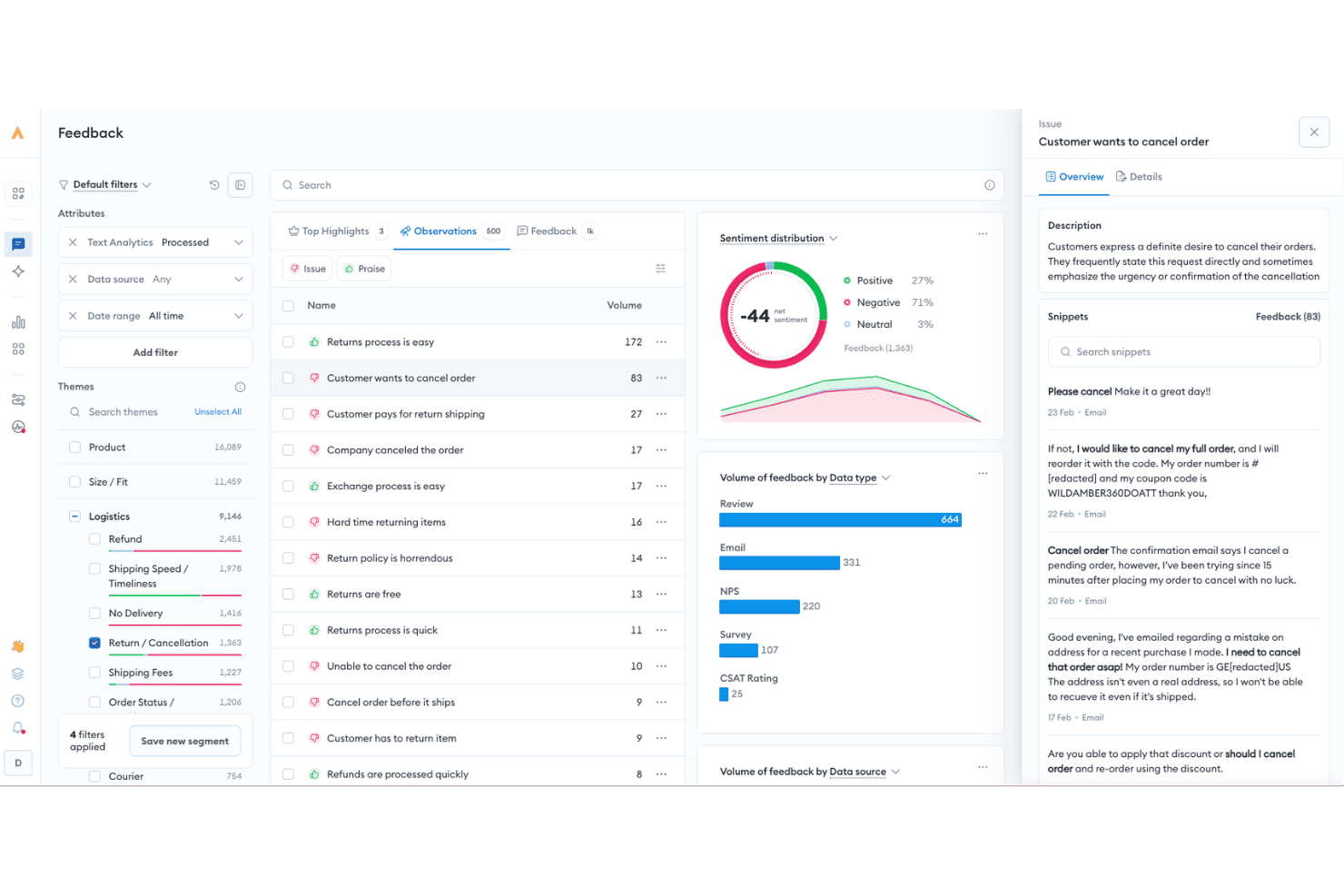
Alchemer uses AI to analyze customer feedback, identify recurring issues, and track sentiment across reviews, emails, surveys, and other sources. Alchemer is a voice-of-customer platform that combines omnichannel feedback collection, AI-powered sentiment and theme analysis, and automated feedback-to-action workflows across survey, in-app, digital, and review channels.
Who Is Alchemer Best For?
Alchemer is a strong fit for CX insights and analytics teams at mid-market to enterprise organizations that need to turn multi-source customer feedback into automated business actions.
Why I Picked Alchemer
I picked Alchemer as one of the best because of how tightly its workflow automation connects feedback signals to business actions. Alchemer Workflow triggers real-time surveys from key events, like a ticket close or a product return, then immediately pushes results into Salesforce, Zendesk, or another downstream tool. Alchemer Pulse then layers in AI sentiment and theme classification across that same data, surfacing what's actually driving dissatisfaction before it becomes a pattern.
Alchemer Key Features
- AI-powered text analysis: Automatically classifies open-ended feedback by themes, sentiment, and customer pain points across channels.
- 400+ prebuilt integrations: Connects with Salesforce, Zendesk, Braze, BigQuery, and more to enrich customer profiles and feedback data.
- Custom survey logic: Supports advanced skip logic, validation, and branching to target the right audience with tailored questions.
- Multilanguage & multi-brand support: Enables feedback programs across multiple brands and languages from a single platform.
Alchemer Integrations
Alchemer offers native integrations with Salesforce, Zendesk, Braze, Bloomreach, BigQuery, HubSpot, and Microsoft Teams, and connects with Zapier. An API is available for custom integrations.
Pros and Cons
Pros:
- Highly configurable survey logic and targeting
- AI theme detection across open-ended responses
- Strong automation from feedback to action
Cons:
- Reporting setup can be time-consuming
- Weaker conversational AI than dedicated platforms
Learn more about Alchemer: Best for marketplace app integrations
- 14-day free trial
- From $19/user/month (billed annually)
Visit WebsiteCustomer Rating:4.4/5
Freshdesk admin dashboard showing a list of configured event notifications, with status indicators, notification types, and a side panel. Freshdesk is an AI-powered customer support platform that combines omnichannel ticketing, Freddy AI automation, self-service portals, and a built-in knowledge base to help support teams manage customer interactions at scale.
Who Is Freshdesk Best For?
Freshdesk is a good fit for mid-size to enterprise support teams that handle high volumes of customer interactions across multiple channels.
Why I Picked Freshdesk
I've included Freshdesk in my top picks because its marketplace is one of the most developed I've seen in the customer support space. With 1,200+ apps available, you can connect tools like Jira, Slack, Shopify, and Salesforce directly into your support workspace. I especially like the Atlassian Jira Plus integration, which syncs Freshdesk tickets with Jira issues so engineering and support teams can track bugs without switching platforms.
Freshdesk Key Features
- Freddy AI agent: An AI agent that auto-resolves incoming customer queries across email and live chat without agent involvement.
- Omnichannel inbox: A unified workspace that pulls tickets from email, chat, WhatsApp, Instagram, and phone into one queue.
- SLA management: Configurable service level agreements with automatic escalation rules and deadline-based ticket prioritization.
- CSAT surveys: Built-in customer satisfaction surveys sent automatically after ticket resolution to collect feedback.
Freshdesk Integrations
Freshdesk offers 1,200+ marketplace integrations through the Freshworks Marketplace, including Slack, Microsoft Teams, Google Calendar, Salesforce, Atlassian Jira Plus, Shopify, and Google Analytics. It's available on Zapier and provides an API for custom integrations.
Pros and Cons
Pros:
- Prebuilt agentic workflows for vertical AI agents
- No automated merging of similar tickets
- Covers email, chat, phone, social, and web
Cons:
- Mobile app lacks advanced desktop features
- Custom reports require technical expertise or upgrades
Learn more about Freshdesk: Best for whitelabel chatbot deployment
- 7-day free trial + free plan + free demo available
- From $32/month (billed annually)
Visit WebsiteCustomer Rating:4.4/5
Chatbase helps businesses automate customer support with AI chatbots trained on their own content and systems. Chatbase is a conversational automation platform that helps businesses handle customer interactions without relying entirely on live agents. It enables teams to deploy chatbots trained on their own content and connect them to business systems so automated responses reflect current information. For companies looking to automate parts of the customer journey, Chatbase provides a flexible starting point.
Who Is Chatbase Best For?
Chatbase is well suited for CX and support teams at growing companies that want to automate repetitive customer inquiries while keeping responses connected to internal systems.
Why I Picked Chatbase
I picked Chatbase for its ability to connect chatbot conversations directly to business data through APIs and webhooks. This allows teams to automate answers that depend on changing information, such as order updates or account details. Instead of managing static scripts, teams can tie automated conversations to live data sources. That makes it easier to scale customer interactions without sacrificing accuracy.
Chatbase Key Features
- AI chatbot builder: Build and deploy chatbots trained on your own documents, URLs, and data.
- Live data connections: Sync responses with connected systems through APIs and webhooks.
- Cross-channel deployment: Publish chatbots on websites and supported messaging platforms.
- Interaction reporting: Review conversation logs and analyze chatbot usage trends.
Chatbase Integrations
Integrations include Slack, WhatsApp, Facebook Messenger, and automation platforms such as Make. API and webhook access allow connections to additional systems.
Pros and Cons
Pros:
- Enables branded deployments for agencies and partners
- Supports deployment across web and messaging apps
- Connects chatbot responses to live business data
Cons:
- Advanced integrations may require higher-tier plans
- Does not include built-in voice or telephony support
Learn more about Chatbase: Best with proactive support messaging tools
- 14-day free trial and free demo available
- From $19/user/month (billed annually)
Visit WebsiteCustomer Rating:4.4/5
Intercom unifies support, engagement, and AI automation in one platform. Intercom is an AI-powered customer experience platform designed for teams that want to unify support, engagement, and automation in one place. It’s a strong fit for SaaS companies, ecommerce brands, and digital businesses looking to manage customer conversations across web and mobile. Intercom helps teams handle high volumes of inquiries, automate repetitive tasks, and deliver more personalized support at scale.
Who Is Intercom Best For?
Intercom is a strong choice for SaaS and digital businesses that need to manage customer conversations and automate support at scale.
Why I Picked Intercom
I picked Intercom because it offers some of the most advanced proactive support messaging tools available in the AI customer experience platform space. The platform lets you set up targeted outbound messages, in-app notifications, and automated chat prompts based on user behavior and lifecycle stage. I also like that Intercom’s AI can trigger personalized messages to guide users, answer questions, or prevent churn before customers even reach out. These proactive capabilities help teams move beyond reactive support and create more engaging, timely customer experiences.
Intercom Key Features
Some other features that make Intercom valuable for AI customer experience teams include:
- AI-powered conversation routing: Automatically directs customer inquiries to the right team or agent based on topic and urgency.
- Help center builder: Lets you create and manage a self-serve knowledge base for customers to find answers on their own.
- Customizable bots: Allows you to design and deploy chatbots that handle common questions and tasks without human intervention.
- Conversation history and context: Gives agents full visibility into past interactions and customer data within every conversation.
Intercom Integrations
Integrations include HubSpot, Salesforce, Slack, Zendesk, Shopify, Mailchimp, Stripe, Pipedrive, Aircall, and Jira.
Pros and Cons
Pros:
- Fast time to value
- Easy AI agent handover
- Great proactive messaging
Cons:
- Ticketing is too basic
- Gets pricey very fast
 Best with omnichannel engagement capabilities
- Free demo available
- From $110/agent/month (proactive AI extra)
Visit WebsiteCustomer Rating:4.3/5
NICE CXone unifies voice and digital support for high-volume service teams. NICE CXone is a cloud-based customer experience platform designed for organizations that need to manage complex, high-volume customer interactions. It appeals to CX leaders and support teams in industries like retail, finance, and healthcare who want to unify digital and voice channels.
The platform helps businesses coordinate customer journeys, automate routine tasks, and maintain service quality across multiple touchpoints.
Who Is NICE CXone Best For?
NICE CXone is a strong fit for large enterprises and contact centers that need to manage customer engagement across multiple digital and voice channels.
Why I Picked NICE CXone
I picked NICE CXone because it brings together digital, voice, and social channels into a single platform, making it easier for teams to deliver consistent customer experiences. Its omnichannel routing ensures that customer inquiries are directed to the right agent, regardless of the channel they use.
I also appreciate the platform’s AI-powered analytics, which help teams monitor interactions and identify trends across all touchpoints. These capabilities make NICE CXone a strong choice for organizations that need to coordinate complex customer journeys and maintain high service standards.
NICE CXone Key Features
Some other features that make NICE CXone valuable for customer experience teams include:
- Workforce management tools: Schedule, forecast, and monitor agent performance to optimize staffing and productivity.
- Quality management suite: Evaluate agent interactions and provide targeted coaching with built-in quality assurance tools.
- Self-service automation: Deploy AI-powered virtual agents and chatbots to handle routine customer inquiries.
- Knowledge management system: Centralize and deliver up-to-date information to agents and customers through an integrated knowledge base.
NICE CXone Integrations
Integrations include Salesforce, Zendesk, Microsoft Dynamics, Oracle, ServiceNow, and HubSpot.
Pros and Cons
Pros:
- Robust compliance features
- Excellent AI workforce ops
- Huge enterprise scale
Cons:
- Needs heavy dev support
- UI feels overwhelming
Learn more about NiCE CXone: 10Best for generative AI-driven support agents
Sierra
- Free demo available
- Pricing upon request
Visit WebsiteCustomer Rating:4.8/5
Sierra automates complex support with generative AI for faster service. Sierra offers AI-powered support agents designed for businesses that want to automate complex customer interactions. It’s a strong fit for teams in ecommerce, SaaS, and digital services looking to deliver fast, accurate responses at scale. With its focus on generative AI, Sierra helps organizations handle nuanced queries and reduce manual workload for support teams.
Who Is Sierra Best For?
Sierra is a good fit for mid-sized to large customer support teams in ecommerce, SaaS, and digital-first industries seeking advanced AI-driven automation.
Why I Picked Sierra
What drew me to Sierra is its focus on generative AI-driven support agents that can handle complex, multi-turn conversations. Sierra’s agents use advanced language models to interpret customer intent, generate personalized responses, and resolve issues without human intervention.
I see this as especially valuable for organizations that want to automate high-volume support while still delivering nuanced, context-aware service. The platform’s ability to learn from past interactions and continuously improve its responses makes it a strong choice for teams prioritizing AI-powered customer experience.
Sierra Key Features
Some other features that make Sierra valuable for AI customer experience teams include:
- Omnichannel messaging support: Connects with channels like email, SMS, and chat to manage conversations in one place.
- Automated ticket escalation: Routes complex or unresolved issues to human agents based on predefined rules.
- Knowledge base integration: Pulls information from internal documentation to provide accurate, up-to-date answers.
- Conversation analytics dashboard: Tracks agent performance, customer sentiment, and conversation trends in real time.
Sierra Integrations
Integrations include Google Cloud, Databricks, Snowflake, Redis, AWS, and an API is available for custom integrations.
Pros and Cons
Pros:
- Brand voice customization
- Takes complex actions
- Deeply understands intent
Cons:
- High enterprise pricing
- Fewer legacy integrations
Learn more about Sierra:
Andre AI-plattformer for kundeopplevelse
Her er noen flere alternativer for AI-plattformer for kundeopplevelse som ikke kom med på kortlisten min, men som likevel er verdt å undersøke:
- 11ZendeskBest for integrated ticketing and help desk
- 12AdaBest for automating personalized customer interactions
- 13Yellow.aiBest for multilingual conversational automation
- 14QuidgetBest for AI-assisted chat response suggestions
- 15ForethoughtBest for AI-powered case resolution workflows
- 16Boost.aiBest for scalable virtual agent deployment
- 17DecagonBest with real-time customer journey insights
- 18Ultimate CXBest for workflow automation in support teams
- 19Crescendo.aiBest with AI-powered call analysis
- 20Salesforce Service Cloud EinsteinBest for native CRM AI integration
- 21HiverBest for teams managing shared email inboxes
- 22SprinklrBest with unified customer profiles
- 23DialpadBest with enterprise-grade integrations
- 24KustomerBest for customizable agentic AI workflows
- 25AssembledBest with AI-driven workforce management
- 26PylonBest for B2B support automation
- 27Konnect InsightsBest for 360° omnichannel analytics
- 28CSGBest for customer journey orchestration
How I Evaluate AI Customer Experience Platforms
Every tool here needs to deliver real AI value—like resolving tickets autonomously or surfacing churn risk before a renewal call, not just slapping a chatbot on a help page. I split my evaluation into core functionality a platform must have to make the list, and the differentiating factors that separate a good fit from a great one.
Core Functionality (Table Stakes For This List)
When I'm selecting tools for my list, I rank each one on a scale from 0 (does not offer the functionality) to 5 (excels in this area) for each core functionality listed below. Then, I calculate the tool's total score into a percentage. Each tool needs to achieve a minimum total score of 75% to be considered for inclusion.
- AI Conversational Automation: I check whether the platform's bots can handle multi-turn queries—like processing a return and suggesting a replacement—without handing off to a human.
- Omnichannel Engagement: Each tool should unify conversations across chat, email, voice, social, and SMS so agents see full context regardless of where a customer starts.
- AI-Driven Customer Insights: I look for AI that goes beyond basic dashboards to surface sentiment shifts, recurring complaint themes, or emerging friction points from interaction data.
- Agent Assist & Augmentation: Real-time AI suggestions matter here—things like surfacing relevant knowledge articles mid-conversation or auto-generating post-call summaries for agents.
- Personalization & Predictive Intelligence: The platform should use ML to anticipate customer needs, whether that's flagging churn risk ahead of a renewal or recommending next-best actions.
- Unified Customer Data & Integrations: I evaluate how well the platform pulls in data from CRMs, helpdesks, and other tools to build a single customer profile that powers its AI features.
Once I have a list of tools that meet this criteria, I consider what sets each platform apart.
Differentiating Factors (What Sets Vendors Apart)
Here's how I compare and contrast different vendors:
Standout Features
Generative AI copilots are a major differentiator—I look for platforms where agents get real-time draft replies and conversation summaries that cut wrap-up time after each interaction. Low-code AI builders also matter because they let CX teams spin up new bot workflows without waiting on engineering. I pay close attention to automated quality management too, since scoring 100% of interactions with AI is a leap beyond manually sampling a handful of calls each week.
Beyond Features
AI trust and governance is something I weigh heavily—I check whether platforms offer guardrails against hallucinations and let you control how customer data is used for model training. The integration ecosystem also shapes my evaluation, since a platform that connects natively to your CRM and CCaaS stack will deliver value far faster than one requiring custom builds. I also consider time-to-value, looking for prebuilt industry templates and pretrained models that shorten the path from deployment to measurable impact.
Slik velger du en AI-plattform for kundeopplevelse
Det er lett å gå seg vill i lange funksjonslister og komplekse prisstrukturer. For å hjelpe deg med å holde fokus mens du går gjennom den unike prosessen med å velge programvare, får du her en sjekkliste over faktorer du bør ha i bakhodet:
| Faktor | Hva du bør vurdere |
|---|---|
| FaktorSkalerbarhet | Hva du bør vurdereVil plattformen håndtere dagens og de forventede mengdene av kundestøtte etter hvert som virksomheten vokser? Vurder begrensninger for brukere, kanaler og data. |
| FaktorIntegrasjoner | Hva du bør vurdereKan verktøyet kobles direkte til CRM-, brukerstøtte-, analyse- og kommunikasjonsplattformene dine? Kontroller at det er kompatibelt med den eksisterende teknologistakken din. |
| FaktorTilpasningsmuligheter | Hva du bør vurdereKan du tilpasse arbeidsflyter, automatiseringer og AI-modeller til de unike prosessene og den unike terminologien din? Unngå rigide systemer som tvinger deg til å tilpasse deg. |
| FaktorBrukervennlighet | Hva du bør vurdereVil teamet ditt ta i bruk plattformen raskt? Se etter intuitiv navigasjon, tydelig merking og minimale opplæringskrav. |
| FaktorImplementering og oppstart | Hva du bør vurdereHvor lang tid vil det ta å komme i gang? Ta hensyn til støtte ved migrering, ressurser for oppstart og behovet for involvering fra IT-avdelingen. |
| FaktorKostnad | Hva du bør vurdereEr prisnivåene transparente og forutsigbare etter hvert som bruken øker? Vær oppmerksom på skjulte gebyrer, kostnader per interaksjon eller dyre tillegg. |
| FaktorSikkerhetstiltak | Hva du bør vurdereOppfyller plattformen standardene dine for personvern og datasikkerhet? Bekreft kryptering, tilgangskontroller og samsvarssertifiseringer. |
| FaktorTilgjengelig kundestøtte | Hva du bør vurdereHvilke kanaler og åpningstider for kundestøtte tilbys? Sørg for at du får hjelp når du trenger det, særlig under kritiske hendelser. |
Hva er AI-plattformer for kundeopplevelse?
En AI-plattform for kundeopplevelse er en programvareløsning som bruker kunstig intelligens til å automatisere, analysere og forbedre kundeinteraksjoner på tvers av digitale kanaler. Disse plattformene hjelper team med å håndtere supportforespørsler, tilpasse kommunikasjonen og få innsikt fra kundedata.
Ved å utnytte AI kan virksomheter gi raskere svar, forutsi kundenes behov og forbedre den samlede tilfredsheten for å skape kundelojalitet. Plattformen fungerer som en pålitelig medpilot, samtidig som den reduserer den manuelle arbeidsmengden for team som jobber med kundeopplevelse.
Funksjoner
Når du velger en AI-plattform for kundeopplevelse, bør du se etter følgende viktige funksjoner:
- AI-drevet ruting av supportsaker: Bruker maskinlæring til å tildele innkommende forespørsler til den best egnede medarbeideren eller det best egnede teamet, basert på ferdigheter, arbeidsbelastning og historiske data.
- Automatiserte chatboter: Gir umiddelbare svar på vanlige kundespørsmål og kan håndtere rutineoppgaver som ordresporing eller tilbakestilling av passord uten menneskelig innblanding.
- Sentimentanalyse: Analyserer kundemeldinger i sanntid for å oppdage tone, hast og tilfredshet, slik at teamene kan prioritere og tilpasse svarene.
- Anbefalinger fra kunnskapsbasen: Foreslår relevante hjelpeartikler eller ressurser til både medarbeidere og kunder under interaksjoner, noe som reduserer løsningstiden.
- Omnikanalstøtte: Samler samtaler fra e-post, chat, sosiale medier og meldingsapper i ett grensesnitt for samlet administrasjon.
- Prediktiv analyse: Identifiserer trender, forutser kundenes behov og fremhever potensielle problemer før de eskalerer, slik at virksomheten kan yte proaktiv service.
- Arbeidsflytautomatisering: Automatiserer repetitive oppgaver som oppfølginger, eskaleringer og utsending av undersøkelser for å øke effektiviteten og sikre jevn kvalitet.
- Tilpassbare instrumentpaneler: Gjør det mulig for brukere å visualisere nøkkeltall, følge med på teamets resultater og spore kundetilfredshet i sanntid.
- Integrasjonsmuligheter: Kobler seg til CRM-systemer, brukerstøttesystemer og andre forretningsverktøy for å sikre sømløs dataflyt og en helhetlig oversikt over kundereisen.
Fordeler
Implementering av en AI-plattform for kundeopplevelse gir flere fordeler for teamet og virksomheten din. Her er noen av fordelene du kan se frem til:
- Raskere svartider: Automatisert ruting av supportsaker og chatboter sørger for at kundene får umiddelbare svar og hjelp, selv i perioder med stor pågang.
- Personlig tilpassede kundeinteraksjoner: AI analyserer data og sentiment for å tilpasse svar og anbefalinger til hver enkelt kunde.
- Proaktiv tjenesteleveranse: Prediktiv analyse hjelper teamet med å identifisere og håndtere problemer før de eskalerer, noe som forbedrer kundetilfredsheten.
- Sentralisert kommunikasjon: Omnikanalstøtte samler alle kundesamtaler på ett sted, noe som gjør det enklere å administrere og følge opp interaksjoner.
- Redusert manuell arbeidsmengde: Arbeidsflytautomatisering og anbefalinger fra kunnskapsbasen minimerer repetitive oppgaver for teamet, slik at det frigjøres tid til komplekse problemer.
- Datadrevet beslutningstaking: Tilpassbare instrumentpaneler og analyser gir nyttig innsikt i kundetrender og teamets resultater.
- Skalerbar kundestøtte: AI-drevne verktøy gjør det mulig for virksomheten å håndtere større mengder interaksjoner uten at det går ut over kvalitet eller konsekvens.
Kostnader og priser
Valg av en AI-plattform for kundeopplevelse krever en forståelse av de ulike prismodellene og abonnementene som er tilgjengelige. Kostnadene varierer basert på funksjoner, teamets størrelse, tillegg og mer. Tabellen nedenfor oppsummerer vanlige abonnementer, gjennomsnittsprisene deres og typiske funksjoner som er inkludert i løsninger for AI-plattformer for kundeopplevelse:
Sammenligningstabell for abonnementer for AI-plattform for kundeopplevelse
| Plantype | Gjennomsnittspris | Vanlige funksjoner |
|---|---|---|
| PlantypeGratisabonnement | Gjennomsnittspris$0 | Vanlige funksjonerGrunnleggende billettsystem, begrenset chatbot-funksjonalitet, støtte i én kanal og grunnleggende analyse. |
| PlantypePersonlig abonnement | Gjennomsnittspris$25-$55/bruker/måned | Vanlige funksjonerStøtte i flere kanaler, AI-drevet ruting, grunnleggende automatisering og standardrapportering. |
| PlantypeBedriftsabonnement | Gjennomsnittspris$75-$120/bruker/måned | Vanlige funksjonerAvanserte chatboter, sentimentanalyse, arbeidsflytautomatisering, integrasjoner og tilpassbare dashbord. |
| PlantypeVirksomhetsabonnement | Gjennomsnittspris$150+/bruker/måned | Vanlige funksjonerPrediktiv analyse, omnikanaladministrasjon, avansert sikkerhet, dedikert støtte og verktøy for etterlevelse. |
Vanlige spørsmål om AI-plattformer for kundeopplevelser
Her er noen svar på vanlige spørsmål om AI-plattformer for kundeopplevelser:
Hvordan forbedrer en AI-plattform for kundeopplevelser produktiviteten i kundestøtteteamet?
AI-plattformer for kundeopplevelser automatiserer repetitive oppgaver som ruting av henvendelser, svar på vanlige spørsmål og forslag fra kunnskapsbasen. Dette lar kundestøtteteamene fokusere på komplekse problemer og reduserer tiden som brukes på manuelle prosesser, slik at teamene kan håndtere større volumer uten at det går på bekostning av kvaliteten.
Kan AI-plattformer for kundeopplevelser integreres med eksisterende CRM- eller brukerstøtteverktøy?
Ja, de fleste AI-plattformer for kundeopplevelser tilbyr integrasjoner med populære CRM-, brukerstøtte- og kommunikasjonsverktøy. Dette sørger for at kundedata forblir tilkoblet på tvers av systemer, og gjør det mulig for teamene å administrere interaksjoner fra ett enkelt grensesnitt.
Hvilke typer virksomheter har størst nytte av AI-plattformer for kundeopplevelser?
Virksomheter med store mengder kundeinteraksjoner, flere kundestøttekanaler eller behov for service døgnet rundt har størst nytte av dette. Plattformene er spesielt nyttige for team innen netthandel, SaaS, telekommunikasjon og finansielle tjenester som ønsker å skalere kundestøtten og tilpasse opplevelsene.
Finnes det personvernproblemer ved bruk av AI-plattformer for kundeopplevelser?
Ja, personvern er viktig ved bruk av AI-plattformer. Kontroller alltid kryptering, tilgangskontroller og overholdelse av regelverk som GDPR eller CCPA. Velg leverandører som er åpne om hvordan de håndterer data, og om sikkerhetsrutinene sine.
Hvor lang tid tar det å implementere en AI-plattform for kundeopplevelser?
Implementeringstiden varierer etter plattform og virksomhetens størrelse. Små team kan være i gang på noen få dager, mens større organisasjoner med komplekse arbeidsflyter eller integrasjoner kan trenge flere uker. Se etter ressurser for innføring og støtte ved migrering for å fremskynde prosessen.