Chatroboter for kundeservice kan avlaste kundestøtteteamene ved å svare på vanlige spørsmål, håndtere rutineforespørsler og gi kundene raskere kundestøtte døgnet rundt. Men det riktige verktøyet må redusere arbeidsbelastningen for kundebehandlerne – ikke skape flere eskaleringer som må håndteres.
Med utgangspunkt i over to tiår med erfaring fra utvikling av teknologiplattformer og ledelse av AI-operasjoner evaluerte jeg de beste chatbotene for kundeservice for å finne verktøyene som faktisk forbedrer kundestøtten for kunder og kundebehandlere.
Why Trust Our Software Recommendations
6,700+
Reviews
20
Industry experts
16+
Evaluation factors
14
Years
Our team has been testing and reviewing software since 2012. As CX leaders ourselves, we know how difficult—and important—it is to choose the right software.
For this guide, we evaluated tools using hands-on testing and independent research, scoring tools using our selection criteria.
Our reviews reflect our human editorial judgment, not a sales pitch.
 Gui DrusinaCreative Director
 Tim FisherVP of AI
Sammendrag: Beste chatroboter for kundeservice
Denne sammenligningstabellen oppsummerer prisdetaljene for mine utvalgte toppchatroboter for kundeservice, slik at du kan finne den beste løsningen for budsjettet og virksomhetens behov.
| Tool | Best For | Trial Info | Price | ||
|---|---|---|---|---|---|
| 1 | Best for AI automation in regulated industries | 30-day free trial | From $31/agent/month (billed annually) | Website | |
| 2 | Best for AI-trained ticket deflection at scale | Free plan + free demo available | From $150/month (billed annually) | Website | |
| 3 | Best for real-time agent coaching and guidance | Free demo available | Pricing upon request | Website | |
| 4 | Best for integration with existing helpdesks | 30-day free trial | From $199/month | Website | |
| 5 | Best for regulated financial services | Free demo available | Pricing upon request | Website | |
| 6 | Best with multi-agent AI for case resolution | Free plan available | From $0.09/interaction | Website | |
| 7 | Best for 24/7 ecommerce support | 14-day free trial + free demo available | From $39/user/month (billed annually) | Website | |
| 8 | Best for combining AI and human support | Free plan available | From $25/user/month (billed annually) | Website | |
| 9 | Best for multilingual support | 14-day free trial | From $19/user/month (billed annually) | Website | |
| 10 | Best for customizable AI agents | 14-day free trial | From $19/user/month (billed annually) | Website |


Anmeldelser av de beste chatbotene for kundeservice
Nedenfor finner du mine detaljerte sammendrag av de beste chatbotene for kundeservice som kom med på kortlisten. Anmeldelsene mine gir en grundig gjennomgang av de viktigste funksjonene, fordelene og ulempene, integrasjonene og ideelle bruksområdene for hvert verktøy, slik at du kan finne det beste for deg.
 Best for AI automation in regulated industries
- 30-day free trial
- From $31/agent/month (billed annually)
Visit WebsiteCustomer Rating:4.4/5
Comm100 unifies AI and live agent chat with real-time AI Copilot suggestions. Comm100 is a customer service chatbot and live chat platform that combines an AI Agent, omnichannel messaging, human handoff workflows, and a native knowledge base across 12+ digital and voice channels.
Who Is Comm100 Best For?
Comm100 is a strong fit for enterprise teams in healthcare, government, financial services, and higher education that need AI-driven chat automation with strict compliance and data sovereignty requirements.
Why I Picked Comm100
I picked Comm100 as one of the best because its anti-hallucination AI architecture is purpose-built for regulated industries where a wrong answer carries real compliance risk. The AI Agent answers only from verified knowledge sources, never its pre-trained model memory, which matters enormously in healthcare or financial services contexts. Its on-premises deployment option is also rare, letting government and banking teams run the full platform behind their own firewall.
Comm100 Key Features
- AI Agent: Uses natural language processing to answer customer questions based on connected knowledge sources.
- Custom actions: Configure the AI Agent to complete tasks during conversations, including booking appointments, checking balances, and triggering custom workflows.
- On-premises deployment: Supports on-premises deployment for organizations with specific data residency or regulatory requirements.
- Reporting dashboard: Track chatbot resolution rates, agent response times, and customer satisfaction scores from a centralized dashboard.
Comm100 Integrations
Comm100 offers native integrations with Salesforce, HubSpot, Microsoft Dynamics 365, Zendesk, ServiceNow, Google Drive, SharePoint Online, Confluence Cloud, Calendly, and Microsoft Bookings. It also provides a REST API, SDK, webhooks, and Zapier.
Pros and Cons
Pros:
- Supports Telegram, X, LINE, and WeChat
- Supports SOC 2 Type II, HIPAA, ISO 27001, and GDPR compliance
- Supports configurable tones and natural-language instructions
Cons:
- AI responses rely on the quality of connected knowledge sources
- Some users report challenges with CRM integrations
Learn more about Comm100: Best for AI-trained ticket deflection at scale
- Free plan + free demo available
- From $150/month (billed annually)
Visit WebsiteCustomer Rating:4.5/5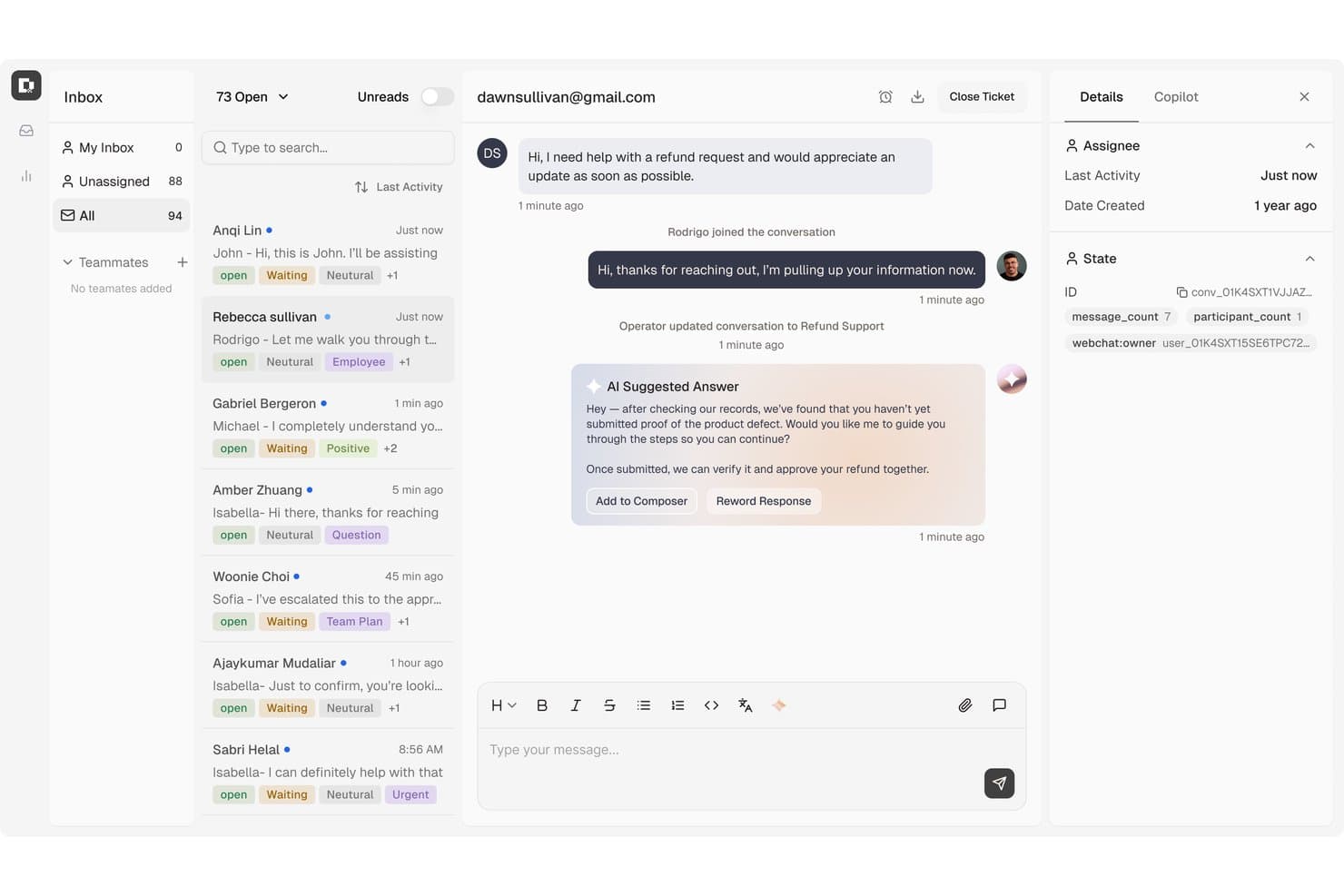
Botpress surfaces AI-suggested replies to speed up customer support responses. Botpress Desk is an AI-powered customer support helpdesk that handles ticket triage, L1/L2 resolution, human agent handoff, and omnichannel conversations across webchat, email, WhatsApp, and more.
Who Is Botpress Best For?
Botpress Desk is a strong fit for support teams managing high ticket volumes who want AI to handle L1/L2 resolution before a human ever gets involved.
Why I Picked Botpress
I've included Botpress in my top picks because it's built specifically around the idea that AI should resolve tickets before a human ever touches them. Its AI agents handle L1 and L2 tickets end-to-end, including refunds and live account lookups, and Botpress's own support data backs this up: across nearly 10,000 tickets, the AI fully resolved 86% with tools and 55% using the knowledge base alone. When escalation is necessary, Desk passes a pre-enriched ticket to Zendesk or Intercom with full conversation history attached.
Botpress Key Features
- Omnichannel conversation support: Desk handles customer conversations across webchat, email, WhatsApp, Slack, Discord, Telegram, Instagram, and Facebook Messenger from a single workspace.
- Capacity-based routing: AI automatically assigns incoming conversations to teams based on agent capacity and configured business hours.
- CSAT tracking and analytics: Desk tracks customer satisfaction scores, deflection rates, knowledge gaps, and AI-versus-human resolution metrics across your team.
- Generative AI copilot: Agents get real-time suggested replies and live knowledge base lookups while handling conversations.
Botpress Integrations
Botpress has native integrations with Zendesk and Intercom, plus documented HubSpot ticket actions. Its public Chat, Admin, Files, Tables, and Runtime APIs support custom integrations.
Pros and Cons
Pros:
- Context-rich escalation preserves customer history
- Visual flow design shapes support bots
- Tool-enabled AI handles complex support requests
Cons:
- Technical setup can challenge plug-and-play teams
- Desk access requires sales-assisted higher tiers
Learn more about Botpress: Best for real-time agent coaching and guidance
- Free demo available
- Pricing upon request
Visit WebsiteCustomer Rating:5/5
Cresta offers an AI chatbot that recalls previous customer searches and preferences to deliver personalized support. Cresta is a contact center AI platform that combines AI-powered virtual agents for automated customer conversations across voice, chat, and SMS with real-time agent assist and conversation intelligence tools.
Who Is Cresta Best For?
Cresta is a strong fit for enterprise contact centers seeking to deploy AI agents and coach human agents from a single platform.
Why I Picked Cresta
Cresta earns its spot as one of the best for real-time agent coaching and guidance because of how its Agent Assist product works during live interactions. It pushes contextual hints, compliance reminders, and next-best-action suggestions to agents mid-conversation, not after the fact. I also like its Knowledge Agent, which combines spoken conversation context with on-screen data to surface source-backed answers instantly. On top of that, AI-generated post-call summaries are fully customizable and generate automatically, cutting the time agents spend on after-call work.
Cresta Key Features
- Cresta AI Agent: AI-powered virtual agents handle customer conversations across voice, chat, and SMS with support for multi-step workflows.
- Opera AI orchestration: A no-code builder for designing, testing, and adjusting AI agent workflows without engineering support.
- AI Analyst: Allows you to query your full conversation data with plain-language questions to find trends and patterns.
- Auto QA scoring: Scores all customer interactions against your defined quality criteria.
Cresta Integrations
Cresta integrates with telephony and chat solutions like Five9, Amazon Connect, and Genesys, as well as CRM and customer engagement platforms such as Salesforce and Zendesk. It also connects with NICE CXone and Twilio. Additional integrations span marketing tools like HubSpot and Marketo and data platforms including Databricks. Cresta offers an API for custom integrations.
Pros and Cons
Pros:
- Smart Compose auto-completes agent replies during conversations
- Analyzes all interactions, not just random samples
- Live coaching prompts help mid-level agents improve
Cons:
- Built for enterprise teams, not smaller operations
- Knowledge assist suggestions often misread caller intent
Learn more about Cresta: Best for integration with existing helpdesks
- 30-day free trial
- From $199/month
Visit WebsiteCustomer Rating:4.5/5
My AskAI integrates with your existing helpdesk like HubSpot and has the feature to automatically notify a human agent and leave an internal comment when a user requests to speak to a person. My AskAI is an AI-powered customer service chatbot that sits on top of existing helpdesks like Zendesk, Intercom, and Freshdesk, resolving tickets from synced knowledge sources with automatic handoff to human agents.
Who Is My AskAI Best For?
It's a strong fit for small and mid-sized support teams that already run a helpdesk and want AI ticket deflection without switching platforms or hiring developers.
Why I Picked My AskAI
I picked My AskAI as one of the best because it layers directly onto your existing helpdesk rather than replacing it. On Zendesk or Intercom, it resolves tickets from your knowledge sources and cites every answer with a source reference. I also like the Knowledge Improvement Studio, which mines past tickets to identify gaps and generates new help content automatically. The AI Tasks feature handles actions like refunds or address changes through plain-language instructions.
My AskAI Key Features
- Slack and Teams integrations: Connects the AI agent to internal chat tools for employee Q&A.
- Automatic source citations: Every chatbot response references the original knowledge source for traceability.
- Multilingual language detection: Supports 95+ languages with automatic detection and localized responses.
- AI ticket tagging: Tags support tickets automatically using AI to help with categorization and reporting.
My AskAI Integrations
My AskAI offers native integrations with Zendesk, Intercom, Gorgias, Freshdesk, HubSpot, and Freshchat.
Pros and Cons
Pros:
- Identifies knowledge gaps from past tickets
- Cites sources in every AI response
- Deploys on existing helpdesks without rebuilding workflows
Cons:
- Analytics depth trails enterprise-focused competitors
- Limited omnichannel reach beyond web and email
Learn more about My AskAI: Best for regulated financial services
- Free demo available
- Pricing upon request

Gradient Labs offers an AI agents dashboard where you can deploy frontline and specialized chatbots for customer service tasks. Gradient Labs is an AI-native customer operations platform built specifically for financial services, running specialist agents that handle customer service, disputes, collections, onboarding, and KYC.
Who Is Gradient Labs Best For?
Gradient Labs is a strong fit for customer service teams in financial services, insurance, and lending who need an AI agent built around regulatory compliance.
Why I Picked Gradient Labs
I've included Gradient Labs in my top picks because it's one of the only customer service chatbot platforms built from the ground up for financial services compliance. I particularly like its dispute automation, where the agent gathers evidence, decides the outcome, escalates to a human for sign-off, and files the chargeback with the card scheme. The platform also ships with 20+ financial-services-specific guardrails on every conversation turn and covers global regulatory frameworks, including FCA Consumer Duty, Reg E, Reg Z, PSD2, and the EU AI Act.
Gradient Labs Key Features
- Omnichannel deployment: The AI agent handles customer inquiries across chat, email, voice, and SMS from a single configuration.
- Automated QA checks: Every conversation turn is reviewed against your defined procedures automatically.
- Compliance guardrails: Regulatory requirements like FCA, GDPR, and EU AI Act rules are enforced directly within the conversation flow.
- Human handoff: The agent escalates conversations to a live agent when it can't resolve an inquiry.
Gradient Labs Integrations
Gradient Labs offers native integrations with Intercom, Zendesk, Salesforce, Freshdesk, Twilio, RingCentral, Genesys, NICE, and LoanPro. An API is also available for custom integrations.
Pros and Cons
Pros:
- Outcome-based pricing per resolved query
- 20+ built-in compliance guardrails
- Handles multi-day, multi-turn conversations
Cons:
- No free trial or self-serve onboarding
- Built mainly for financial services companies
Learn more about Gradient Labs: Best with multi-agent AI for case resolution
- Free plan available
- From $0.09/interaction

Aissist offers a detailed subagents dashboard displaying session counts, traffic trends, resolution ratios, and NPS scores for each customer service chatbot agent. Aissist is an agentic AI customer service platform that deploys multi-agent "Digital Employees" to handle conversations, execute back-office tasks, and automate ticket resolution across email, chat, SMS, WhatsApp, and social media.
Who Is Aissist Best For?
It's a strong fit for ecommerce and SMB support teams that run high ticket volumes through helpdesks like Zendesk, Gorgias, or Intercom and want to automate resolution without adding headcount.
Why I Picked Aissist
Aissist earns its spot on my shortlist because its AgentMesh™ architecture assigns specialized sub-agents to billing, pre-sales, and technical queries separately, keeping responses accurate and domain-specific. I also like that it executes real work within the conversation: tagging tickets, updating records, and triggering escalations rather than just replying. In practice, a Shopify order dispute handled through Gorgias can be resolved start to finish without a human ever touching it.
Aissist Key Features
- Native helpdesk integrations: Connects directly with Zendesk, Intercom, HubSpot, Freshdesk, Front, and Gorgias for unified automation.
- Omnichannel message handling: Manages conversations across chat, email, SMS, WhatsApp, and major social media channels.
- Automatic language detection: Supports over 65 languages with real-time translation and native-language replies.
- Custom API and backend actions: Triggers order lookups, returns, and account updates in live chats using REST and GraphQL APIs.
Aissist Integrations
Aissist offers native integrations with Zendesk, Intercom, HubSpot, Freshdesk, Gorgias, Front, Salesforce, eDesk, Shopify, WooCommerce, and Magento. An API is available for custom integrations.
Pros and Cons
Pros:
- Supports 65+ languages without duplicate bot builds
- Sub-agents handle domain-specific queries accurately
- Resolves tickets fully without human agent input
Cons:
- Analytics reporting is limited compared to rivals
- Setup complexity increases with multi-agent configurations
Learn more about Aissist: Best for 24/7 ecommerce support
- 14-day free trial + free demo available
- From $39/user/month (billed annually)
Visit WebsiteCustomer Rating:4.4/5
eDesk chatbot answers customer questions and routes requests to support agents. eDesk is an ecommerce customer service platform that combines AI-powered chatbots, multichannel ticketing, and marketplace integrations for online support teams.
Who Is eDesk Best For?
eDesk is a strong fit for ecommerce businesses selling across multiple online marketplaces who need a centralized platform to manage customer support at scale.
Why I Picked eDesk
I picked eDesk as one of the best because of how purpose-built it is for ecommerce support around the clock. The chatbot connects directly to your order data, product catalog, and FAQs to give customers accurate, on-brand answers at any hour—without needing an agent online. I especially like the live translation feature, which means a customer shopping at midnight in a different time zone gets the same quality of response as someone reaching out during business hours. When a query does get too complex for the bot, it escalates to a human agent with the full conversation context already attached, so nothing gets lost in the handoff.
eDesk Key Features
- Smart inbox: A unified inbox that pulls in tickets from Amazon, eBay, Shopify, and 300+ channels, with order details and shipping info attached to each ticket automatically.
- AI ticket classification: Automatically sorts and tags incoming tickets by intent—returns, cancellations, order questions—so agents can prioritize and respond faster.
- SLA tracking: Monitors response time targets across all channels and surfaces at-risk tickets before deadlines are missed.
- Pre-sales support mailbox: A dedicated workspace for handling product questions from shoppers before they buy, pulling in inventory and pricing data to help agents close more sales.
eDesk Integrations
eDesk offers 200+ native integrations, including Amazon, eBay, Shopify, Walmart, BigCommerce, Magento, WooCommerce, Linnworks, ChannelAdvisor, Allegro, and Zapier. An API is available for custom integrations.
Pros and Cons
Pros:
- Designed to handle high volumes of ecommerce inquiries
- AI automations reduce repetitive support tasks
- Integrates rich order data for enhanced customer service
Cons:
- Reporting and analytics, while present, can be less customizable than more enterprise dashboards
- Primarily built for ecommerce, less flexible for other industries
Learn more about eDesk: Best for combining AI and human support
- Free plan available
- From $25/user/month (billed annually)
Visit WebsiteCustomer Rating:4.5/5
Help Scout’s dashboard displays shared inboxes across teams, centralizing customer conversations in one workspace. Help Scout is a customer service platform that combines AI-powered chatbots, live chat, shared inboxes, and a knowledge base to support online customer conversations.
Who Is Help Scout Best For?
Help Scout is a good fit for small to mid-sized businesses that want to handle customer support across chat, email, and self-service without managing overly complex tooling.
Why I Picked Help Scout
Help Scout earns its spot on my shortlist because of how naturally it blends AI automation with human support—without making customers feel like they're stuck in a bot loop. I really like the AI Answers feature, which helps resolve routine requests by pulling from your knowledge base and custom instructions. When AI can't handle a question, customers escalate to a live agent in a couple of clicks, feeding directly into the shared inbox. The Inbox Assistant also helps my team draft replies, summarize long threads, and adjust tone as needed, so agents stay sharp even during high-volume periods.
Help Scout Key Features
- Beacon widget: An embeddable chat widget you can place anywhere on your site or in-app to surface help articles, collect email inquiries, or start live chat conversations.
- Saved replies: Pre-written response templates that agents can pull up to answer common questions without writing from scratch each time.
- Customer profiles: Automatically populated contact records that display past conversations, account details, and data pulled in from connected apps.
- Reporting and analytics: Built-in reports tracking response time, handle time, conversation volume, and customer satisfaction scores across all channels.
Help Scout Integrations
Help Scout offers native integrations with Slack, HubSpot, Salesforce, Shopify, Mailchimp, Jira, and Google Workspace. It also connects with Zapier and provides an API for custom integrations.
Pros and Cons
Pros:
- Built-in knowledge base powers accurate automated replies
- Smooth handoff preserves conversation context for agents
- AI Answers resolves common tickets without agent involvement
Cons:
- AI effectiveness depends heavily on knowledge base quality
- Not a standalone chatbot outside Help Scout ecosystem
Learn more about Help Scout: Best for multilingual support
- 14-day free trial
- From $19/user/month (billed annually)
Visit WebsiteCustomer Rating:4.4/5
Build your chatbot with Freshdesk to automate routine inquiries. Freshdesk is a customer service platform that offers AI-powered chatbots, live chat, ticketing, and automation tools for managing online customer conversations across multiple channels.
Who Is Freshdesk Best For?
Freshdesk is a good fit for customer support teams at mid-sized to large companies that handle high volumes of inquiries across multiple languages and regions.
Why I Picked Freshdesk
I picked Freshdesk as one of the best because of how well it handles multilingual support across both its chatbot and knowledge base. Freddy AI Copilot translates conversations in real time directly inside the agent workspace, so your team can respond in a customer's language without switching tools or copying text into a translator. Freshdesk's knowledge base also supports multilingual content, so your self-service articles can be published in multiple languages and surfaced by the Freddy AI Agent during chat interactions. For teams supporting customers across different regions, that combination of live translation and localized self-service is difficult to replicate in a single platform.
Freshdesk Key Features
- Freddy AI Agent: An AI-powered bot that handles incoming customer questions automatically, resolving common issues without agent involvement.
- Ticket dispatch: Automatically routes incoming tickets to the right agent or team based on predefined rules and conditions.
- Skill-based ticket assignment: Assigns tickets to agents based on their specific skills, ensuring customers reach the most qualified person.
- Community forums: A built-in space where customers can post questions, share answers, and find solutions from other users.
Freshdesk Integrations
Freshdesk offers 1,000+ native integrations, including Slack, Salesforce, Shopify, Jira, Mailchimp, WhatsApp, Facebook Messenger, Microsoft Teams, Google Workspace, and Zoom. It also provides an API for custom integrations.
Pros and Cons
Pros:
- AI automation improves response times and reduces workload.
- Omnichannel support integrates various communication platforms.
- Customizable dashboards provide real-time support metrics.
Cons:
- Lacks integrated calling solutions, requiring separate tools.
- Emphasis on AI may not fit everyone's workflow style.
Learn more about Freshdesk: 10Best for customizable AI agents
Zendesk
- 14-day free trial
- From $19/user/month (billed annually)
Visit WebsiteCustomer Rating:4.3/5
Zendesk has a ticketing system for managing customer concerns efficiently. Zendesk is a customer service platform that offers AI-powered chatbots, automated ticketing, and omnichannel messaging for online support teams.
Who Is Zendesk Best For?
Zendesk is a strong fit for mid-size to enterprise support teams that need a scalable, AI-driven customer service solution across multiple digital channels.
Why I Picked Zendesk
Zendesk is a top choice because it gives you strong control over how your AI agents behave. I love that you can define custom personas, set AI reasoning guardrails, and connect agents to your own knowledge sources—so the bot your customers interact with feels like a natural extension of your brand, not a generic FAQ machine. The AI agent builder lets you describe goals in plain language rather than scripting rigid flows, which means I can handle complex, multi-step requests without building out decision trees. Built-in QA scoring covers 100% of AI agent interactions, so I can see where the agent is performing well and where it needs tuning.
Zendesk Key Features
- Omnichannel messaging: Manage customer conversations across web, mobile, WhatsApp, Facebook, and Instagram from a single agent workspace.
- Omnichannel routing: Automatically assign incoming tickets to the right agent based on availability, workload, and skills across all channels.
- AI Copilot: Provides human agents with real-time suggestions, context, and next-step recommendations directly within the agent workspace.
- Prebuilt analytics dashboards: Track ticket volume, agent performance, and customer trends out of the box without custom report setup.
Zendesk Integrations
Zendesk offers over 1,200 native integrations through its marketplace, including Slack, Shopify, Google Play Reviews, Trustpilot, Pipedrive, Sprout Social, Harvest, ChannelReply, and Guru. An API is available for custom integrations.
Learn more about Zendesk:
Andre chatroboter for kundeservice
Her er noen flere alternativer for chatroboter for kundeservice som ikke kom med på kortlisten min, men som likevel er verdt å sjekke ut:
- 11ChatbaseBest for handling complex customer queries
- 12SparrowDeskBest for AI-first ticket resolution
- 13WeavBest for customer experience data insights
- 14BirdeyeBest for capturing leads
- 15Zoho SalesIQBest for its easy-to-use interface
- 16TidioBest for it focus on generating sales
- 17TarsBest for ease of setup
- 18FrontBest with AI-powered ticket triage
- 19IntercomBest for simple customer interface
- 20KommunicateBest for balancing chatbots with the human touch
- 21CoSupport AIBest for faster, accurate, and secure customer support
- 22DriftBest for turning conversations into sales
- 23AcquireBest for for human-like automated chats
- 24LiveHelpNowBest for omnichannel customer support
- 25ActivechatBest for customer-centric brands
- 26CrescendoBest for automating compliance-sensitive support
- 27HelpshiftBest for rapid deployment
- 28GenesysBest for chatbots that span digital channels
- 29Quiq MessagingBest for integrating with bots from other platforms
- 30QuidgetBest for automating repetitive frontline support
- 31HiverBest for AI-driven chat automation
- 32FreshchatBest for scaling customer support on any channel
- 33KayakoBest for integrated website and mobile support
- 34Zendesk SellExcels at reducing repetitive work
- 35NetomiBest for dealing with spikes in support demand
- 36PodiumBest for local businesses
- 37KoreAutomates and streamlines customer journeys
How I Evaluate Chatbots for Customer Service
I split my evaluation into baseline requirements—like NLP quality and agent handoff—and differentiators that reveal which tools actually reduce ticket volume and scale with your support operation.
Core Functionality (Table Stakes For This List)
When I'm selecting tools for my list, I rank each one on a scale from 0 (does not offer the functionality) to 5 (excels in this area) for each core functionality listed below. Then, I calculate the tool's total score into a percentage. Each tool needs to achieve a minimum total score of 65% to be considered for inclusion.
- Conversational AI & NLP: I evaluate how well a bot understands varied phrasing—like a customer asking "where's my order" vs. "I haven't received my package"—and responds naturally.
- Omnichannel Deployment: Each tool should support deployment across channels customers actually use, such as website chat, WhatsApp, Facebook Messenger, SMS, and mobile apps.
- Human Agent Handoff: I look at whether conversations transfer to live agents with full context intact, so the customer doesn't have to repeat their issue after the bot reaches its limits.
- Knowledge Base Integration: The bot should pull answers from existing help center content or documentation, and I check whether it stays current as source material gets updated.
- CRM & Helpdesk Integrations: Connecting to platforms like Zendesk, Salesforce, or HubSpot matters here—I look for native integrations that let the bot read customer data and log interactions.
- Analytics & Reporting: I evaluate whether the platform tracks support-specific metrics like deflection rate, containment rate, and resolution time rather than just raw conversation volume.
Once I have a list of tools that meet the criteria, I consider what sets each platform apart.
Differentiating Factors (What Sets Vendors Apart)
Here's how I compare and contrast different vendors:
Standout Features
A no-code bot builder is a major differentiator—it lets support ops teams update conversation flows without filing a dev ticket every time a return policy changes. I also evaluate multilingual support, specifically whether the bot auto-detects language rather than forcing customers to choose one. Proactive messaging matters too. A bot that triggers a help prompt when a customer stalls on a checkout error page can resolve issues before they become tickets.
Beyond Features
Pricing structure matters a lot in this space. Some vendors charge per resolution, others per conversation or monthly active user—and that difference can shift your costs significantly as ticket volume grows. I also consider deployment speed, since a chatbot that takes months to train and launch delays the deflection gains your team is counting on. Security is another factor I check, especially SOC 2 and GDPR compliance, because these bots handle sensitive customer data like order details and account information daily.
Slik velger du en chatbot for kundeservice
Den beste chatboten for kundeservice avhenger av hva du trenger at den skal håndtere, hvor komplekse kundestøtteforespørslene dine er, og hvor kundene kontakter deg. Fokuser på disse faktorene når du sammenligner alternativene dine:
| Faktor | Hva du bør vurdere |
|---|---|
| FaktorKundestøttevolum | Hva du bør vurdereSe på hvor kundebehandlerne bruker mest tid. Hvis repetitive spørsmål utgjør en stor andel av sakene, bør du prioritere god automatisering av vanlige spørsmål og selvbetjening. |
| FaktorKundespørsmål | Hva du bør vurdereVurder hvor forutsigbare forespørslene er. Velg en enkel chatbot for rett frem vanlige spørsmål og en AI-chatrobot for varierte eller kontekstavhengige spørsmål. |
| FaktorKundestøttekanaler | Hva du bør vurdereFinn ut hvor kundene allerede tar kontakt. Velg en chatbot som støtter kanalene med høyest volum, fremfor den som har den lengste listen over kanaler. |
| FaktorIntegrasjoner | Hva du bør vurdereKontroller kompatibiliteten med kundestøttesystemet, CRM-systemet, kunnskapsbasen og andre systemer som chatboten må få tilgang til. |
| FaktorKundeopplevelse | Hva du bør vurdereTest verktøyene på kortlisten med ekte kundespørsmål. Velg et verktøy som svarer nøyaktig og gjør det enkelt å komme i kontakt med et menneske ved behov. |
| FaktorSuksessmålinger | Hva du bør vurdereDefiner hva du vil at chatboten skal forbedre, for eksempel løsningsgrad, svartider, saksmengde eller CSAT. Velg et verktøy som rapporterer på disse målingene. |
Nye AI-trender innen chatroboter for kundeservice
AI-chatroboter for kundeservice utvider mulighetene utover tradisjonelle vanlige spørsmål og skriptbaserte svar. Her er de viktigste endringene du bør følge med på:
- Menneskeliknende samtaler: Generativ kunstig intelligens gjør chatbot-svar mindre skriptbaserte og bedre til å forstå naturlig språk og kontekst.
- Mer enn grunnleggende vanlige spørsmål: Nyere chatboter med kunstig intelligens kan i økende grad håndtere forespørsler i flere trinn, for eksempel ved å sjekke en bestilling og starte en retur.
- Mer omfattende personalisering: Kunstig intelligens kan bruke kundehistorikk, kontodetaljer og tidligere samtaler til å gi svar som er spesifikke for hver kunde.
- Støtte for tale og visuelt innhold: Multimodal kunstig intelligens gjør det mulig for chatboter å forstå tale, bilder og dokumenter i tillegg til tekst.
- Proaktiv støtte: Kunstig intelligens kan bruke kundeaktivitet og andre signaler til å identifisere potensielle problemer og tilby hjelp før kunden tar kontakt.
- Uavhengige handlinger: Agentbasert kunstig intelligens begynner å gjøre det mulig for chatboter å utføre handlinger på tvers av tilkoblede systemer, for eksempel oppdatere en konto eller endre en bestilling.
Hva er en chatbot for kundeservice?
En chatbot for kundeservice er et verktøy som automatiserer svar på kundehenvendelser, tilbyr støtte døgnet rundt og håndterer rutinespørsmål. Kundeservicerepresentanter og supportteam bruker vanligvis disse verktøyene for å forbedre effektiviteten og svartidene. Funksjoner som automatiserte svar, interaksjon i sanntid og integrasjonsmuligheter bidrar til å håndtere store mengder forespørsler og forbedre kundetilfredsheten. Disse verktøyene sparer til syvende og sist tid og ressurser, samtidig som kundeopplevelsen forbedres.
Funksjoner
De beste chatbotene for kundeservice kombinerer automatisering med verktøy som hjelper kundene med å få nøyaktige svar og komme i kontakt med en kundebehandler ved behov. Viktige funksjoner omfatter:
- Automatiserte svar: Forhåndsdefinerte eller KI-genererte svar på kundespørsmål.
- Naturlig språkbehandling: Gjenkjenning av kundens hensikt og samtalespråk.
- Samtaleflyter: Forhåndsbygde veier for vanlige spørsmål, feilsøking, bestillinger, returer og andre forespørsler.
- Tilgang til kunnskapsbase: Henting av informasjon fra vanlige spørsmål, hjelpeartikler og dokumentasjon.
- Overføring til menneskelig kundebehandler: Overføring av samtaler fra chatboten til en kundebehandler.
- Samtalehistorikk: Lagring av tidligere meldinger og interaksjoner.
- Flerkanalstøtte: Implementering av chatboter på nettsteder, i apper og på meldingsplattformer.
- Flerspråklig støtte: Kundesamtaler på flere språk.
- Integrasjoner: Tilkoblinger til CRM-, brukerstøtte-, netthandels- og andre forretningssystemer.
- Analyse: Rapportering om samtaler, løsninger, eskaleringer og bruk av chatboten.
Fordeler
Implementering av en chatbot for kundeservice gir flere fordeler for teamet og virksomheten din. Her er noen av fordelene du kan se frem til:
- Økt effektivitet: Automatiserer rutinehenvendelser, slik at teamet ditt kan fokusere på komplekse oppgaver og redusere svartidene.
- Kostnadsbesparelser: Reduserer behovet for et stort supportteam ved å håndtere en betydelig mengde forespørsler automatisk.
- Forbedret kundetilfredshet: Tilbyr tilgjengelighet døgnet rundt, slik at kundene får rask støtte når de trenger det.
- Bedre datainnsikt: Gir analyser av kundeinteraksjoner og hjelper deg med å ta velinformerte beslutninger for å forbedre tjenesten.
- Større rekkevidde: Flerspråklig støtte gjør det mulig å betjene en mangfoldig kundebase og utvide tilstedeværelsen i markedet.
- Bedre håndtering av potensielle kunder: Funksjoner som poengsetting av potensielle kunder bidrar til å prioritere kunder med høy verdi og optimalisere salgsarbeidet.
- Jevn støttekvalitet: Sikrer ensartede svar og tjenestekvalitet i alle kundeinteraksjoner, slik at merkevarens omdømme opprettholdes.
Kostnader og priser
Ved valg av en chatbot for kundeservice er det nødvendig å forstå de ulike prismodellene og abonnementene som er tilgjengelige. Kostnadene varierer ut fra funksjoner, teamstørrelse, tilleggstjenester og mer. Tabellen nedenfor oppsummerer vanlige abonnementer, gjennomsnittsprisene deres og typiske funksjoner som er inkludert i løsninger med chatbot for kundeservice:
Sammenligningstabell for abonnementer for chatbot for kundeservice
| Plantype | Gjennomsnittlig pris | Vanlige funksjoner |
|---|---|---|
| PlantypeGratisabonnement | Gjennomsnittlig pris$0 | Vanlige funksjonerGrunnleggende chattefunksjoner, begrensede integrasjoner og standard brukerstøtte. |
| PlantypePersonlig abonnement | Gjennomsnittlig pris$5-$25/bruker/måned | Vanlige funksjonerAutomatiserte svar, grunnleggende analyse og brukerstøtte via e-post. |
| PlantypeBedriftsabonnement | Gjennomsnittlig pris$30-$75/bruker/måned | Vanlige funksjonerAvansert analyse, støtte for flere språk og CRM-integrasjoner. |
| PlantypeVirksomhetsabonnement | Gjennomsnittlig pris$100-$200/bruker/måned | Vanlige funksjonerTilpassbare arbeidsflyter, dedikert kundeansvarlig og prioritert brukerstøtte. |
Chatboter for kundeservice – vanlige spørsmål
Her er noen svar på vanlige spørsmål om chatboter for kundeservice:
Hva er forskjellen mellom chatboter og KI-agenter?
Chatboter samhandler først og fremst med kunder gjennom samtaler, svarer på spørsmål, samler inn informasjon og håndterer forhåndsdefinerte arbeidsflyter. KI-agenter kan gå et skritt videre ved å avgjøre hvilke handlinger som er nødvendige, og fullføre oppgaver i flere trinn på tvers av tilkoblede systemer.
En chatbot kan for eksempel forklare returvilkårene dine, mens en KI-agent kan sjekke bestillingen, bekrefte om kunden er kvalifisert og starte returen.
Må jeg bytte fra en tradisjonell chatbot til en KI-chatbot?
Ikke nødvendigvis. Mange chatbotplattformer legger allerede til KI-funksjoner, så du kan kanskje oppgradere det eksisterende oppsettet i stedet for å bytte verktøy helt.
Begynn med å undersøke hva den nåværende chatboten din kan gjøre. Vurder å ta i bruk KI-funksjonene eller bytte plattform hvis:
- Boten stopper opp ved uventede spørsmål: KI kan håndtere variasjoner i språket uten å være like avhengig av forhåndsdefinerte skript.
- Kundene trenger bedre samtaler: KI kan forstå kontekst og oppfølgingsspørsmål, slik at samhandlingene føles mindre rigide.
- Du vil automatisere mer enn vanlige spørsmål: Nyere KI-funksjoner kan bidra til å håndtere mer komplekse forespørsler og i noen tilfeller utføre handlinger på tvers av tilkoblede systemer.
- Du trenger bedre personalisering: KI kan bruke tilkoblede kundedata og samtalehistorikk til å tilpasse svarene.
Hvis den nåværende chatboten gjør jobben sin godt, trenger du ikke å erstatte den bare fordi KI-alternativer finnes. Sammenlign KI-funksjonene som er tilgjengelige på den nåværende plattformen, med problemene du faktisk prøver å løse, før du investerer i et nytt verktøy.
Kan chatboter for kundeservice integreres med CRM- og brukerstøtteprogramvare?
Ja. De fleste chatboter for kundeservice integreres med de eksisterende CRM- og brukerstøtteplattformene dine for å få tilgang til kundedata, opprette eller oppdatere saker og videreformidle samtalehistorikk til agenter. Sjekk om de viktigste verktøyene dine har innebygde integrasjoner, eller om de krever et API eller en tredjepartskobling.
Kan chatboter håndtere komplekse kundehenvendelser?
Nei, chatboter er vanligvis best på å håndtere rutinemessige og enkle henvendelser. For komplekse problemer er det best å ha et system der chatboten kan eskalere samtalen til en menneskelig agent. Du kan konfigurere utløsere som identifiserer når en henvendelse er utenfor chatbotens muligheter. Lær opp teamet i hvordan de skal overta og gi personlig hjelp ved behov.
Hvilke kundeservicekanaler kan chatboter støtte?
Chatboter for kundeservice kan støtte kanaler som nettsteder, mobilapper, WhatsApp, Facebook Messenger, SMS og andre meldingsplattformer. Hvilke kanaler som er tilgjengelige, varierer fra leverandør til leverandør. Prioriter derfor kanalene kundene dine allerede bruker, i stedet for å velge ut fra antallet kanaler alene.
Kan chatboter for kundeservice erstatte menneskelige agenter?
Ikke helt. Chatboter egner seg best til repetitive forespørsler med høyt volum, som vanlige spørsmål, oppdateringer om bestillinger og enkel feilsøking. Menneskelige agenter er fortsatt viktige ved komplekse, sensitive eller uvanlige problemer. Se derfor etter en chatbot som kan gjenkjenne når den må eskalere saken, og overføre kunden med kontekst.
Vanlige funksjoner i chatboter for kundeservice omfatter:
- Automatiserte svar: Forhåndsdefinerte eller KI-genererte svar på kundespørsmål.
- Naturlig språkbehandling: Gjenkjenning av kundens hensikt og samtalespråk.
- Samtaleflyter: Ferdigbygde forløp for vanlige spørsmål, feilsøking, bestillinger, returer og andre forespørsler.
- Tilgang til kunnskapsbase: Henting av informasjon fra vanlige spørsmål, hjelpeartikler og dokumentasjon.
- Overføring til menneskelig agent: Overføring av samtaler fra chatboten til en brukerstøtteagent.
- Samtalehistorikk: Lagring av tidligere meldinger og samhandlinger.
- Støtte for flere kanaler: Distribusjon av chatboten på nettsteder, i apper og på meldingsplattformer.
- Flerspråklig støtte: Kundesamtaler på flere språk.
- Integrasjoner: Koblinger til CRM, brukerstøtte, netthandel og andre forretningssystemer.
- Analyse: Rapportering om samtaler, løsninger, eskaleringer og chatbotbruk.
Hva skjer når en chatbot ikke kan svare på kundens spørsmål?
En godt utformet chatbot bør gjenkjenne når den ikke kan løse et problem, og automatisk eskalere det til en menneskelig agent. Ideelt sett videreformidler den samtalehistorikken og kundedetaljene, slik at agenten kan fortsette der chatboten slapp, i stedet for at kunden må begynne på nytt.
Når bør du eskalere fra chatbot til en menneskelig agent?
Eskaler når brukerne uttrykker frustrasjon, når problemet faller utenfor de vanlige scenarioene boten kan håndtere, eller når brukeren spesifikt ber om menneskelig hjelp.
Chatboter håndterer repetitive eller transaksjonsbaserte henvendelser godt, men komplekse eller følelsesladde problemer håndteres bedre av mennesker. Tydelige regler for overføring bidrar til smidig kundesamhandling.
Kan chatboter for kundeservice personalisere kundesamhandlinger?
Ja, forutsatt at de har tilgang til riktige kundedata. En chatbot som er koblet til CRM-systemet eller andre systemer, kan bruke detaljer som kontoinformasjon, kjøpshistorikk eller tidligere samhandlinger til å gi mer relevante svar. Personalisering bør likevel følge organisasjonens retningslinjer for personvern og datahåndtering.
Hvordan måler jeg ytelsen til en chatbot for kundeservice?
Følg med på målinger som viser om chatboten faktisk løser kundenes behov, ikke bare håndterer samtaler. Nyttige KPI-er omfatter løsningsgrad, eskaleringsgrad, kundetilfredshet (CSAT), svartid og inneslutningsgrad. Gå også gjennom mislykkede eller avbrutte samtaler – de kan avdekke mangler i botens kunnskap eller arbeidsflyter.