

The best AI chatbots for customer service automate support at scale—answering FAQs, reducing ticket volume, and freeing agents for complex issues. You want a chatbot to help you provide quick and consistent responses to simple customer queries, but you need to figure out which option delivers better outcomes for your customers and agents.
In this article, I leverage my CX experience to review and shortlist the best AI chatbots to help customer service teams work more effectively and offer customer support around the clock.
Why Trust Our Software Recommendations
6,700+
Reviews
20
Industry experts
16+
Evaluation factors
14
Years
Our team has been testing and reviewing software since 2012. As CX leaders ourselves, we know how difficult—and important—it is to choose the right software.
For this guide, we evaluated tools using hands-on testing and independent research, scoring tools using our selection criteria.
Our reviews reflect our human editorial judgment, not a sales pitch.
 Gui DrusinaCreative Director
 Tim FisherVP of AI
Comparison Table: AI Chatbots for Customer Service
This comparison table summarizes my top AI chatbots for customer service selections:
| Tool | Best For | Trial Info | Price | ||
|---|---|---|---|---|---|
| 1 | Best for AI-powered ticket triage | 14-day free trial | From $19/user/month (billed annually) | Website | |
| 2 | Best for building AI agents without a technical ceiling | Free plan + free demo available | From $150/month (billed annually) | Website | |
| 3 | Best for AI-powered agent guidance | Free demo available | Pricing upon request | Website | |
| 4 | Best for auto-resolution across channels | Free plan available; 14-day free trial | From $16/user/month | Website | |
| 5 | Best with agentic AI that automates workflows | Free plan available | From $0.09/interaction | Website | |
| 6 | Best for strict enterprise security compliance | Not available | Pricing upon request | Website | |
| 7 | Best for ecommerce support on Shopify brands | Free demo + 30-day free trial available | From $40/month | Website | |
| 8 | Best for enterprise-grade AI agent control | Free demo available | Pricing upon request | Website | |
| 9 | Best for major marketplace integration | 14-day free trial + free demo available | From $39/user/month (billed annually) | Website | |
| 10 | Best for AI-powered voice and call transcription | Free trial available | From $30/license/month (billed annually) | Website |


Best AI Chatbots for Customer Service Reviews
Here are my in-depth reviews of the 20 best AI chatbots for customer service that made it into my shortlist.
 Best for AI-powered ticket triage
- 14-day free trial
- From $19/user/month (billed annually)
Visit WebsiteCustomer Rating:4.4/5
Freshservice provides a centralized repository of information and solutions for common IT issues. Freshdesk is a customer service platform built for support teams in businesses of all sizes who want to automate conversations, resolve tickets faster, and deliver consistent experiences across chat, email, and social channels using AI-driven tools.
Who Is Freshdesk Best For?
Freshdesk is a good fit for growing support teams that handle high ticket volumes across multiple channels and need AI tools to keep response times and workloads manageable.
Why I Picked Freshdesk
Freshdesk earns its spot on my shortlist because of how well Freddy AI handles ticket triage automatically. I particularly like the auto-triage feature, which reads incoming tickets and fills in fields like priority, category, and type without any manual input from agents. Freddy AI Copilot prioritizes tickets by customer sentiment, so my team can spot which conversations need urgent attention. This lets agents spend less time sorting and more time resolving issues.
Freshdesk Key Features
- Freddy AI Agent: An AI bot that handles customer questions directly across chat and email channels without agent involvement.
- Skill-based ticket assignment: Automatically routes tickets to agents based on their specific skills and expertise.
- Freddy AI Insights: Generates reports on support trends, ticket patterns, and team performance to surface operational gaps.
- Knowledge base: A multilingual self-service portal where customers can find answers to common questions without contacting support.
Freshdesk Integrations
Integrations include Playvox, Slack, MS Teams, Shopify, Salesforce, Jira, Tata, Jupiter, Springer, and Workato.
Pros and Cons
Pros:
- Features a no-code conversational bot builder for easy deployment
- Robust automation features to reduce manual tasks
- Asset management capabilities
Cons:
- Advanced reporting features are seen as complex by some
- Freddy AI is a paid add-on feature
Learn more about Freshdesk: Best for building AI agents without a technical ceiling
- Free plan + free demo available
- From $150/month (billed annually)
Visit WebsiteCustomer Rating:4.5/5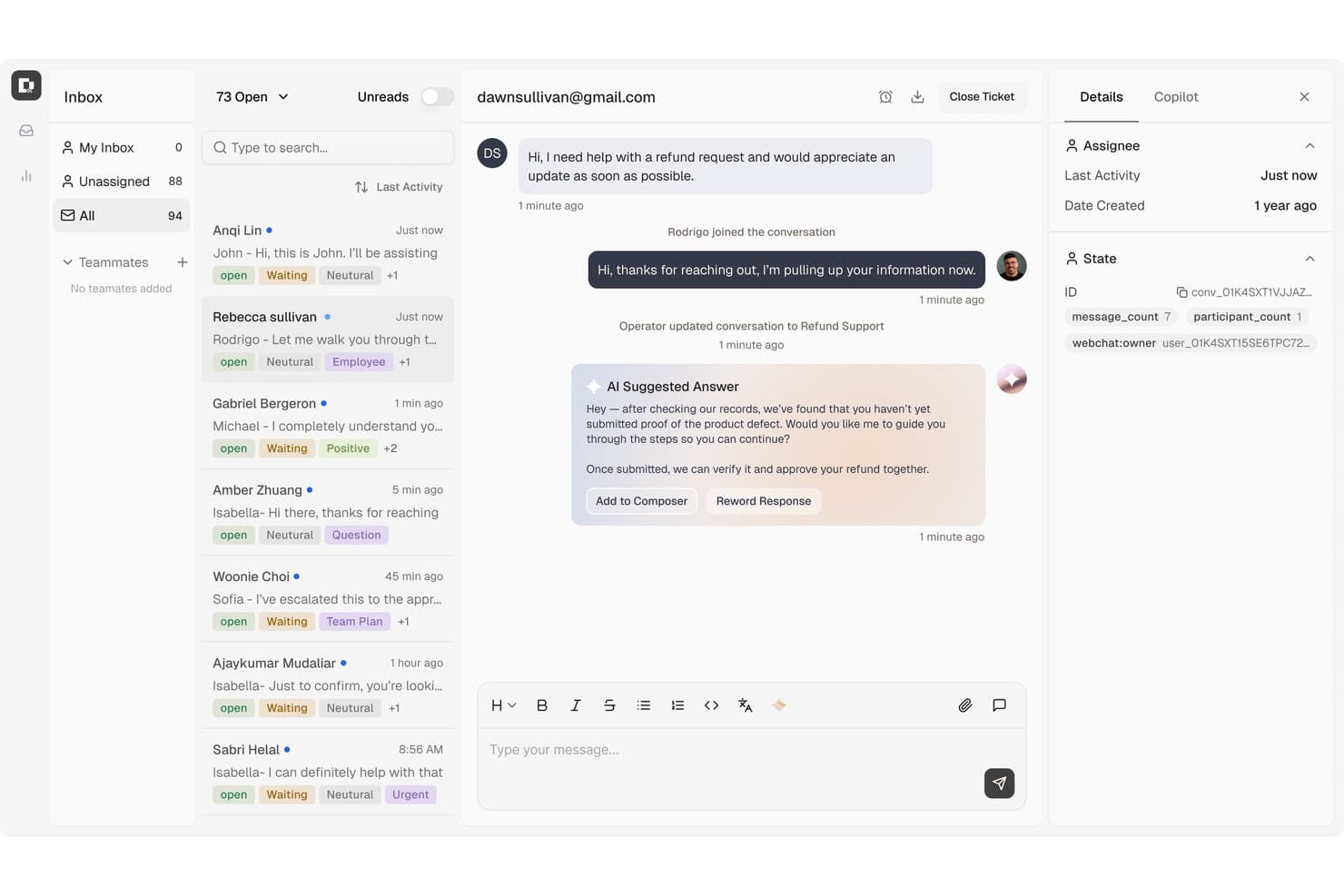
Botpress surfaces AI-suggested replies to speed up customer refund resolutions. Botpress is an AI-native customer support platform that combines a visual agent builder, an AI helpdesk, knowledge base integration, and omnichannel deployment across web, messaging, and voice channels.
Who Is Botpress Best For?
Botpress is a strong fit for technical teams and developers who want full control over how their customer support AI agents are built, customized, and extended.
Why I Picked Botpress
Botpress earns its spot on my shortlist because it genuinely has no ceiling on how complex or custom your support agent can get. I love that the Autonomous Node lets you configure exactly which knowledge bases, tools, workflows, and exit conditions the agent can access, so you're not wrestling with a black box when something goes wrong. The Inspect window shows you the agent's reasoning and tool calls in real time, which I've found invaluable for debugging misfires before they reach customers.
Botpress Key Features
- Autonomous Node: Configure exactly which tools, knowledge bases, and workflows an AI agent can access during a conversation.
- Botpress Desk ticket management: Organize support work with priorities, custom statuses, tags, custom fields, and threaded replies.
- Translator Agent: Automatically detect a user's language and translate messages across conversations using a configurable model.
- AI Actions: Connect to external systems so agents can issue refunds, retrieve order data, or update records within defined rules.
Botpress Integrations
Botpress has native integrations with Zendesk and Intercom, plus marketplace integrations for Shopify, BigCommerce, Magento, HubSpot, and Chatwoot. It also offers Chat, Admin, Files, Tables, and Runtime APIs, webhooks, and Zapier.
Pros and Cons
Pros:
- Reviewers praise visual bot-building controls
- Configurable workflows support complex service tasks
- Inspectable agent reasoning aids debugging
Cons:
- Advanced setups can require technical support
- Knowledge-base changes can alter chat results
Learn more about Botpress: Best for AI-powered agent guidance
- Free demo available
- Pricing upon request
Visit WebsiteCustomer Rating:5/5
Cresta uses AI to automate support and improve customer interactions. Cresta is an AI-powered customer service platform that combines autonomous AI agents, real-time agent assistance, and conversation intelligence to help organizations automate support and improve customer interactions across voice, chat, SMS, and digital channels.
Who Is Cresta Best For?
Cresta is best suited for enterprise and mid-market contact centers in industries such as financial services, insurance, telecommunications, and retail that manage large volumes of customer conversations and want to improve both automation and agent performance.
Why I Picked Cresta
I picked Cresta because it bridges the gap between AI automation and human support. While its AI agents can handle routine customer inquiries independently, the platform also provides real-time guidance to agents during live conversations. This allows organizations to automate repetitive requests while helping human agents deliver more consistent and accurate service when complex issues arise. I also like that Cresta combines conversation intelligence, quality management, and workflow automation into a single platform rather than requiring multiple point solutions.
Cresta Key Features
- AI Agent: Automates customer interactions across voice, chat, and messaging channels while handling common requests without agent intervention.
- Auto-summarization: Generates conversation summaries and notes automatically, reducing after-call work and administrative effort.
- Quality management: Evaluates customer interactions against predefined criteria and provides automated scoring insights at scale.
- Opera orchestration engine: Enables teams to build, manage, and optimize AI workflows and conversation paths through a no-code interface.
Cresta Integrations
Cresta integrates with Salesforce, ServiceNow, Microsoft Dynamics 365, Zendesk, Amazon Connect, Twilio, Five9, Genesys, NICE, HubSpot, Marketo, and Databricks. It also provides API access for custom integrations and enterprise workflow automation.
Pros and Cons
Pros:
- Automated quality management at scale
- Real-time guidance improves agent performance
- AI agents automate customer interactions
Cons:
- AI recommendations may require human oversight
- Best suited for larger organizations
Learn more about Cresta: Best for auto-resolution across channels
- Free plan available; 14-day free trial
- From $16/user/month
Visit WebsiteCustomer Rating:4.6/5
SparrowDesk's chatbot guides users with friendly, automated replies. SparrowDesk is an AI-powered customer service platform designed for support teams and businesses that want to automate responses, resolve queries faster, and manage conversations across multiple channels without sacrificing quality or consistency.
Who Is SparrowDesk Best For?
SparrowDesk is a good fit for mid-sized to enterprise support teams that handle high volumes of customer inquiries across multiple channels and need AI to resolve them automatically.
Why I Picked SparrowDesk
SparrowDesk earns its spot on my shortlist because of how well it handles auto-resolution across channels without requiring constant human intervention. I like that it uses AI to automatically close out common queries—things like order status, password resets, or account updates—across chat, email, and social in one unified flow. My team is able to set resolution rules per channel, so the bot doesn't just deflect tickets but actually closes them with a confirmed answer. That channel-specific control over automated resolution benefits high-volume support environments.
SparrowDesk Key Features
- AI intent detection: Identifies the purpose behind each customer message to route or respond with the right action automatically.
- Live agent handoff: Transfers conversations from the AI chatbot to a human agent when queries exceed the bot's resolution scope.
- Canned response library: Stores pre-approved replies that the AI can pull from to answer frequently asked questions consistently.
- Conversation analytics dashboard: Tracks chatbot performance metrics like resolution rate, response time, and escalation frequency.
SparrowDesk Integrations
Integrations include Attio, Zapier, SurveySparrow, HubSpot, and Okta.
Pros and Cons
Pros:
- Omnichannel inbox centralizes communication across platforms.
- Multilingual support caters to a global audience.
- AI Copilot assists agents with smart draft suggestions.
Cons:
- Limited native integrations could hinder seamless connectivity.
- Dependence on AI may not suit all customer service styles.
Learn more about SparrowDesk: Best with agentic AI that automates workflows
- Free plan available
- From $0.09/interaction
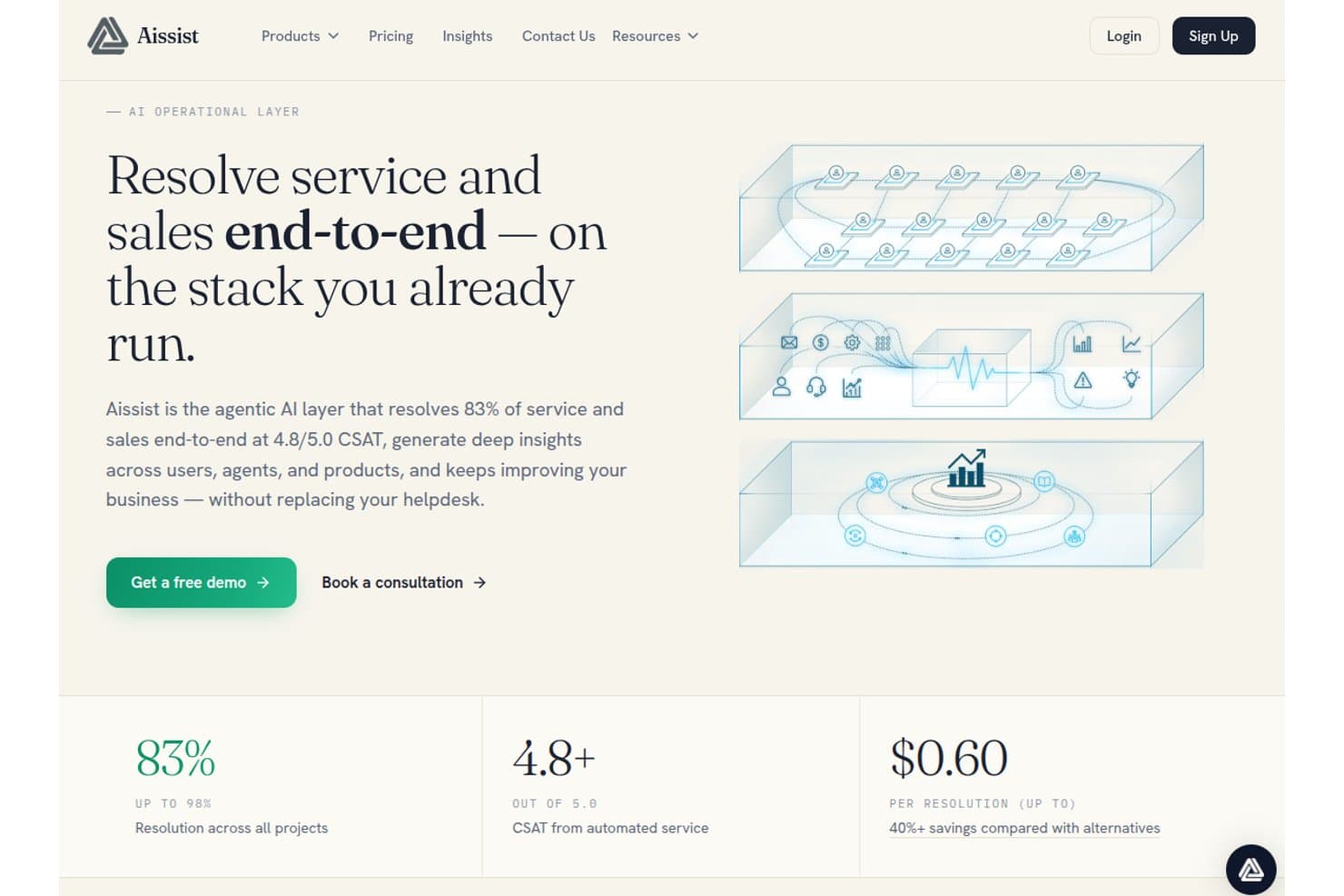
Aissist offers an agentic AI layer that resolves 83% of service and sales end-to-end at 4.8/5.0 CSAT for $0.60 per resolution. Aissist is a multi-agent AI platform for customer service teams that deploys digital AI agents to handle conversations, automate ticket workflows, and take action across helpdesks, CRMs, and messaging channels.
Who Is Aissist Best For?
Aissist suits support teams at growing businesses that need to automate high ticket volumes without replacing their existing helpdesk stack.
Why I Picked Aissist
I picked Aissist as one of the best because its AgentMesh multi-agent architecture goes further than typical chatbots. Where most bots answer a question and close the loop, Aissist's digital agents tag tickets, update records, and escalate cases in a single automated cycle. I particularly like the Evolve module, which detects patterns in live conversations and continuously tunes the AI's behavior without manual intervention.
Aissist Key Features
- Pulse analytics and reporting: Track key performance metrics, trends, and agent quality across all customer interactions.
- Multi-language support: Automatically detects and responds in over 65 languages for global coverage.
- Omnichannel conversation handling: Manages customer conversations across chat, email, WhatsApp, SMS, and social in one platform.
- Knowledge ingestion engine: Ingests company documents, past tickets, and support content for grounded, on-brand AI responses.
Aissist Integrations
Aissist offers native integrations with Zendesk, Intercom, Salesforce, Freshdesk, Gorgias, HubSpot, Kustomer, Front, Shopify, WooCommerce, and Magento, and provides an API for custom integrations.
Pros and Cons
Pros:
- Deploys across messaging, email, and chat simultaneously
- Continuously self-tunes from live conversation patterns
- AgentMesh handles multi-step workflows autonomously
Cons:
- Setup complexity increases with larger agent configurations
- Analytics dashboard lacks depth for enterprise teams
Learn more about Aissist: Best for strict enterprise security compliance
- Not available
- Pricing upon request
Visit WebsiteCustomer Rating:4.8/5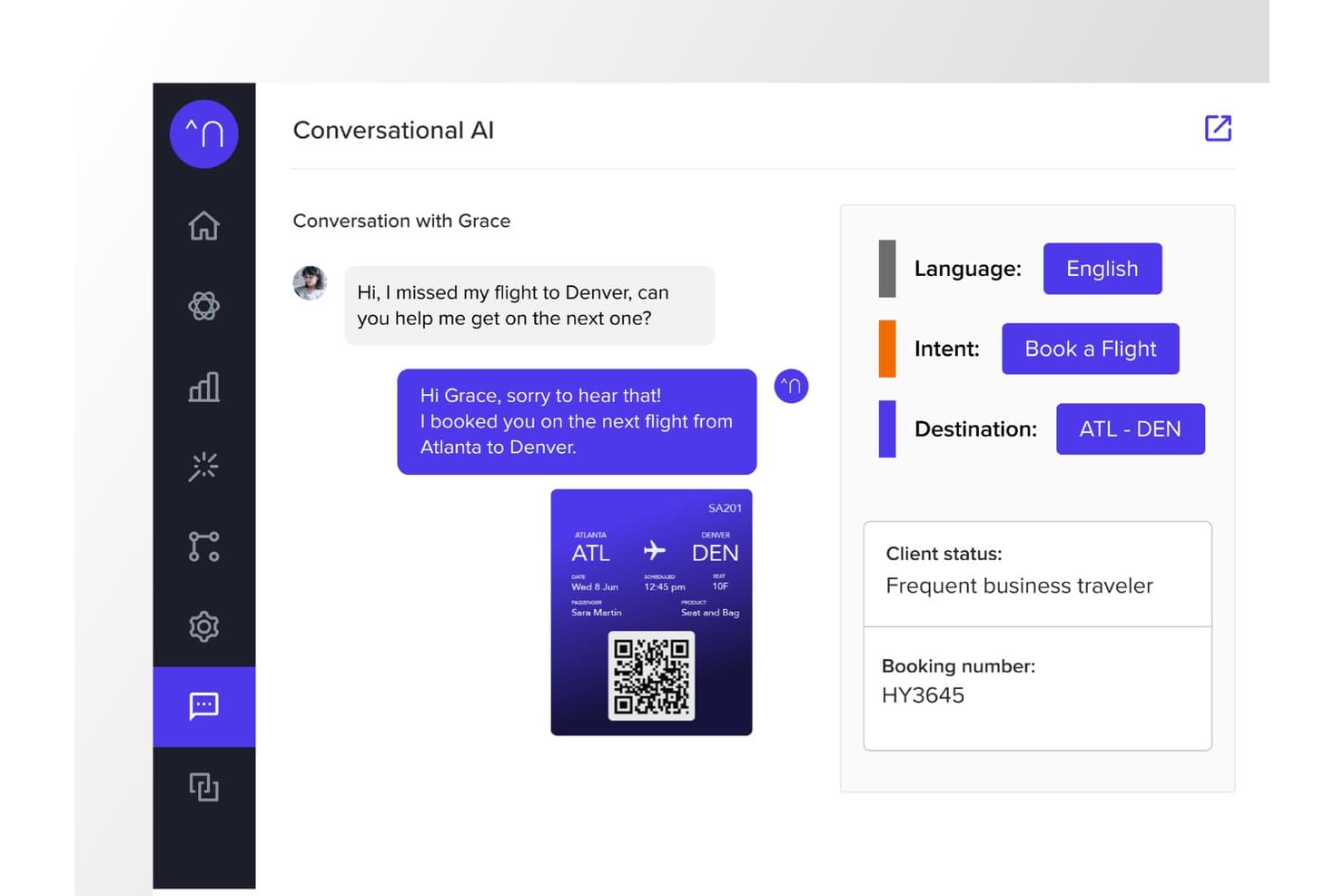
Netomi offers an AI-powered conversational interface that automatically detects customer intent, language, and destination to rebook missed flights in real time. Netomi is an enterprise agentic AI platform for customer service that combines autonomous AI agents, human agent co-pilot support, and omnichannel deployment across chat, email, voice, SMS, and messaging apps.
Who Is Netomi Best For?
Netomi is a strong fit for large enterprises in regulated industries like financial services, travel, insurance, and telecom that operate at high interaction volumes.
Why I Picked Netomi
I picked Netomi as one of the best because its security compliance credentials go well beyond a checkbox. The platform holds SOC 2 Type II, ISO 27001, HIPAA, and PCI DSS certifications, with governance controls built directly into the architecture. I particularly like its "sanctioned generative AI" approach: topic guardrails, prompt-injection defences, and duty-of-care controls run before every AI action, not as an afterthought added to a standard LLM.
Netomi Key Features
- Real-time multi-source knowledge ingestion: Ingests and synthesizes content from documents, URLs, files, and knowledge bases automatically.
- Omnichannel deployment: Delivers customer support across website, mobile app, email, SMS, and major messaging channels.
- Native helpdesk integrations: Connects with Zendesk, Salesforce, Kustomer, ServiceNow, Genesys, NICE, and other CX platforms out of the box.
- Confidence scoring with fallback logic: Assigns answer confidence levels and triggers customizable fallback workflows when certainty thresholds are not met.
Netomi Integrations
Netomi offers native integrations with Zendesk, Salesforce, Kustomer, ServiceNow, Genesys, NICE, Five9, Amazon Connect, Cisco, and LivePerson. An API is available for custom integrations.
Pros and Cons
Pros:
- Built-in topic guardrails prevent off-brand AI responses
- Autonomous AI agents handle complex multi-step resolutions
- Multi-certification compliance including HIPAA and PCI DSS
Cons:
- Limited self-serve onboarding without enterprise-level support
- Implementation complexity challenges smaller or mid-market teams
Learn more about Netomi: Best for ecommerce support on Shopify brands
- Free demo + 30-day free trial available
- From $40/month
Visit WebsiteCustomer Rating:4.6/5
Gorgias offers a customer support inbox with ticket details, customer profile, and AI-assisted responses in a unified helpdesk interface. Gorgias is an ecommerce-focused AI chatbot and helpdesk platform that combines a conversational AI agent, omnichannel inbox, and order management actions to handle customer support across chat, email, social, SMS, and WhatsApp.
Who Is Gorgias Best For?
Gorgias is a strong fit for mid-market ecommerce brands running on Shopify, BigCommerce, or Magento that need AI-powered customer support built around their store data.
Why I Picked Gorgias
Gorgias earns its spot on my shortlist because its AI Agent is trained specifically on ecommerce conversations, not generic support data. I love that it can cancel orders, apply discount codes, and manage subscriptions directly inside a chat thread, without switching tabs to a separate backend. The Shopping Assistant also engages shoppers proactively with personalized product recommendations, turning what would be a support interaction into an active sales moment.
Gorgias Key Features
- Omnichannel inbox: Manage email, chat, social, SMS, and WhatsApp support through a single unified workspace.
- Native ecommerce integrations: Connect directly with Shopify, BigCommerce, Magento, and WooCommerce for real-time order and customer data.
- Revenue attribution reporting: Track sales generated through customer service interactions and agent conversations.
- Automated ticket routing: Use intent and rules to automatically assign tickets to the right agent or escalation path.
Gorgias Integrations
Gorgias offers 300+ native integrations, including Shopify, BigCommerce, Magento, WooCommerce, Klaviyo, Yotpo, Attentive, Recharge, and Loop Returns. An API is available for custom integrations.
Pros and Cons
Pros:
- Proactive shopping assistant converts support into sales
- Handles order actions directly inside chat
- AI Agent resolves tickets without human input
Cons:
- Reporting lacks depth for non-revenue metrics
- Limited value outside ecommerce use cases
Learn more about Gorgias: 8Best for enterprise-grade AI agent control
Ada
- Free demo available
- Pricing upon request
Visit WebsiteCustomer Rating:4.7/5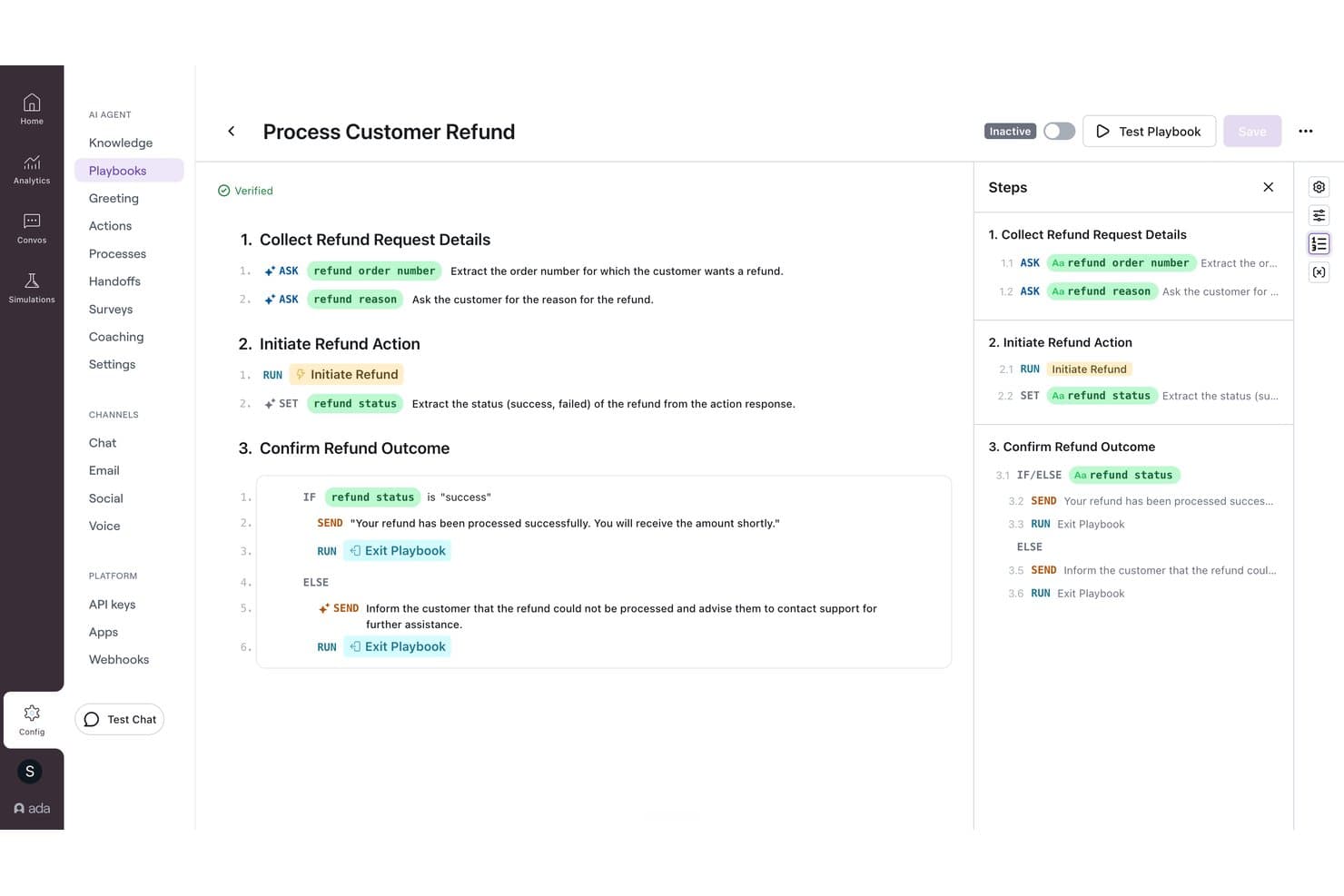
Ada offers a visual playbook builder that automates customer refund workflows with conditional logic and step-by-step AI-driven actions. Ada is an enterprise AI customer service platform that deploys AI agents across voice, chat, email, and messaging channels using a multi-LLM reasoning engine, with native helpdesk integrations and built-in human handoff capabilities.
Who Is Ada Best For?
Ada is a strong fit for large enterprises managing hundreds of thousands of customer interactions annually across multiple support channels.
Why I Picked Ada
Ada earns its spot on my shortlist because of the level of control it gives CX teams over how the AI agent behaves. I particularly like the Playbooks system, which lets managers refine AI responses by reviewing underperforming conversations and applying feedback without touching any code. Ada's Reasoning Engine also orchestrates models from OpenAI, Anthropic, and Amazon Bedrock, with Zero Data Retention agreements across all providers, which matters a lot when handling sensitive customer data at scale.
Ada Key Features
- Omnichannel deployment: Configure AI agents across voice, chat, email, SMS, WhatsApp, Messenger, and in-app channels from a single platform.
- Knowledge API ingestion: Integrate your own documentation systems using the Knowledge API for dynamic answer retrieval.
- Enterprise compliance: Includes SOC 2, GDPR, HIPAA, and PCI DSS certifications to support regulated industries.
- Role-based access controls: Manage agent, admin, and reviewer permissions for secure, scalable team management.
Ada Integrations
Ada offers native integrations with Zendesk, Salesforce, ServiceNow, Freshworks, Genesys, Dixa, Gladly, Kustomer, NICE CXone, Twilio Flex, and Amazon Connect. An API is available for custom integrations.
Pros and Cons
Pros:
- Omnichannel deployment across voice and messaging channels
- Multi-LLM engine with Zero Data Retention
- Granular AI behavior control via Playbooks
Cons:
- Reporting granularity lags behind some competitors
- Complex initial setup for smaller support teams
Learn more about Ada: Best for major marketplace integration
- 14-day free trial + free demo available
- From $39/user/month (billed annually)
Visit WebsiteCustomer Rating:4.4/5
eDesk chat widget lets customers start conversations and access help links easily. eDesk is an AI-powered customer service platform built for e-commerce businesses that need to manage high volumes of support across multiple channels and marketplaces.
Who Is eDesk Best For?
eDesk is a strong fit for e-commerce businesses selling across multiple online marketplaces who need a centralized hub for customer support.
Why I Picked eDesk
eDesk earns its spot on my shortlist because of how well it handles customer support across major marketplaces like Amazon, eBay, and Walmart from a single inbox. I like that it automatically pulls in order data alongside each customer message, so my team isn't switching between tabs to look up purchase details before responding. The AI-suggested replies are trained on ecommerce-specific contexts, so the responses fit marketplace interactions rather than generic support scenarios. I also find the automated order-status responses especially useful for cutting down repetitive "where's my order?" tickets at scale.
eDesk Key Features
- AI sentiment detection: Automatically identifies the emotional tone of incoming messages to help prioritize urgent or frustrated customer tickets.
- Live chat widget: Lets you deploy a chat window directly on your storefront to handle real-time customer conversations.
- Smart inbox: Groups related messages from the same customer across channels into a single conversation thread.
- Performance reporting: Tracks agent response times, resolution rates, and customer satisfaction scores in a built-in dashboard.
eDesk Integrations
Integrations include Amazon, eBay, Walmart, Shopify, WooCommerce, BigCommerce, Mirakl, and Etsy.
Pros and Cons
Pros:
- Integrates rich order data for enhanced customer service
- AI-powered automations improve response efficiency
- Designed to handle high volumes of ecommerce inquiries
Cons:
- Reporting customization is limited for complex analysis
- Primarily built for ecommerce, less flexible for other industries
Learn more about eDesk: 10Best for AI-powered voice and call transcription
Aircall
- Free trial available
- From $30/license/month (billed annually)
Visit WebsiteCustomer Rating:4.3/5
Aircall offers a unified inbox with real-time call handling, CRM insight cards, and AI-powered conversation summaries for support teams. Aircall is a cloud-based call center platform that combines AI Voice Agents, AI Messaging Agents for SMS and WhatsApp, call transcription, and real-time conversation intelligence for customer service teams.
Who Is Aircall Best For?
Aircall is a strong fit for contact center teams and customer support operations where voice is the primary service channel.
Why I Picked Aircall
Aircall earns its spot on my shortlist because of how its AI handles voice conversations end-to-end. I love that call transcription hits at least 85% accuracy, and AI Assist automatically surfaces key topics, sentiment, and talk-to-listen ratios after every call, with no manual review needed. AI Voice Agents can autonomously resolve frequent inbound questions and hand callers to a live agent with full conversation context already captured.
Aircall Key Features
- Smart call routing: Directs calls to agents based on skill, availability, or customer history across distributed teams.
- Salesforce Service Cloud Voice integration: Embeds voice, transcription, and AI call summaries in the Salesforce console.
- Analytics+: Offers unlimited call history, advanced filtering, and live call monitoring for managers.
- Softphone apps: Provides desktop, web, Android, and iOS apps so agents can handle calls from any device.
Aircall Integrations
Aircall offers 250+ native integrations, including Salesforce, HubSpot, Zendesk, Intercom, Freshdesk, Microsoft Teams, Shopify, Slack, Pipedrive, Zoho CRM, and an API for custom integrations.
Pros and Cons
Pros:
- Real-time sentiment detection flags at-risk callers
- AI Voice Agents autonomously resolve inbound calls
- AI transcription accuracy consistently reaches 85%
Cons:
- Not a standalone chatbot for self-service
- Weak web chat and messaging AI
Other AI Chatbots For Customer Service
Here are some other conversational AI platforms that didn’t make it into my shortlist of the best chatbot software, but are still worth taking a closer look at:
- 11My AskAIBest for quick deployment
- 12Comm100Best for AI automation in regulated industries
- 13ChatbaseBest for AI agents trained on your own data
- 14Gradient LabsBest for connecting chatbots to private data
- 15Robin Autonomous ITBest for automating ticket resolution workflows
- 16CrafterQBest for sentiment-driven response handling
- 17WeavBest for integrating chatbots into mobile apps
- 18StonlyBest for personalized knowledge sharing
- 19HiverBest for AI-driven automation
- 20ZendeskBest with no-code workflow automation
- 21HoratioBest for multilingual customer support
- 22Zoho DeskBest for AI-driven customer interactions
- 23Zoho SalesIQBest for visitor tracking insights
- 24TidioBest for automating customer inquiries
- 25ConversicaBest for real-time customer issue resolution
- 26monday serviceBest for customizable service dashboards
- 27FrontBest with automated quality assurance
- 28IntercomBest for advanced AI customer queries
- 29KommunicateBest for multilingual support
- 30CoSupport AIBest for automating customer inquiries
- 31ChatfuelBest with WhatsApp-first lead qualification
- 32Assembled AIBest for intelligent case routing
- 33DriftBest for real-time customer engagement
- 34ForethoughtBest for handling customer inquiries
- 35GuruBest for AI-driven knowledge access
- 36IBM Watson AssistantBest for understanding conversation context
- 37UshurBest for real-time customer interactions
- 38QuidgetBest for automating routine inquiries
- 39SAAS FirstBest for 24/7 AI customer support
- 40CompassBest for real-time AI chat assistance
Related CX Software Reviews
If you still haven't found what you're looking for here, check out these related customer experience management tools that we've tested and evaluated.
- Customer Service Software
- Help Desk Software
- Call Center Software
- Customer Messaging Platform
- Digital Experience Platform
- Sentiment Analysis Tools
What is an AI Chatbot for Customer Service?
An AI chatbot for customer service is software that uses natural language processing and large language models to automate support across web chat, mobile apps, and messaging channels. These systems connect directly to backend databases and customer relationship management tools to understand user intent and answer multi-step questions.
Unlike legacy rule-based tools, modern AI agents analyze context to handle workflows like checking account statuses or processing plan changes. When a request exceeds set parameters, the software transfers the complete conversation history directly to your support team.
How to Choose an AI Chatbot for Customer Service
Selecting an AI chatbot requires evaluating how well the software connects to your tech stack and manages support operations. Focus on features that impact resolution speed and team efficiency.
| Key Factors | What To Consider |
|---|---|
| Key FactorsBusiness Goals | What To ConsiderFast answers: Pick software with direct knowledge base syncs that ingest help docs to answer repetitive FAQs. Driving complex tasks: Select tools with webhook connections that update account records, process refunds, or alter subscription plans. Supporting global users: Choose platforms featuring automatic translation, multi-timezone routing, and coverage across chat and email. |
| Key FactorsIntegrations & Knowledge Base Import | What To ConsiderVerify direct connections to your CRM, ticketing tools, and internal databases. The bot needs to ingest help articles and API logs to process actions like plan updates. |
| Key FactorsSetup & Maintenance | What To ConsiderEvaluate the effort required to train model rules, update knowledge sources, and manage ongoing performance without engineering resources. |
| Key FactorsConversation Routing | What To ConsiderVerify how the system handles complex requests. The bot should pass complete conversation context to live support agents during escalations. |
| Key FactorsSecurity And Compliance | What To ConsiderEnsure the platform meets standards like SOC 2 and GDPR. You must protect customer data during automated interactions. |
How I Evaluate AI Chatbots for Customer Service
Every tool here needs to go beyond scripted decision trees—I look for AI that actually resolves customer issues without a human stepping in. I split my evaluation into core functionality every solution must have to qualify, and differentiating factors that separate the best fit from the rest.
Core Functionality (Table Stakes For This List)
When I'm selecting tools for my list, I rank each one on a scale from 0 (does not offer the functionality) to 5 (excels in this area) for each core functionality listed below. Then, I calculate the tool's total score into a percentage. Each tool needs to achieve a minimum total score of 65% to be considered for inclusion.
- Conversational AI Engine: I evaluate whether the bot handles multi-turn conversations with real contextual understanding—like a customer asking about a return and then following up about a refund without restating the order number.
- Knowledge Base Integration: Each tool should pull verified answers from your existing help center, docs, or URLs rather than generating responses from scratch, so I check how sources are ingested and kept in sync.
- Omnichannel Deployment: I look at which channels the bot supports—website widget, mobile, WhatsApp, Messenger, SMS—and whether conversation context carries over when a customer switches between them.
- Human Agent Handoff: A smooth escalation path matters, so I evaluate whether the bot passes the full conversation transcript, customer details, and detected intent to the agent who picks up the case.
- Helpdesk & CRM Integrations: The bot needs to plug into platforms like Zendesk, Salesforce, Freshdesk, or Intercom, so I check for native connectors and two-way data sync that keeps ticket and customer records current.
- Analytics & Reporting: I look for dashboards that track containment rate, resolution rate, and CSAT—metrics that help support directors and operations managers tie bot performance back to real business outcomes.
Once I have a list of tools that meet the criteria, I consider what sets each platform apart.
Differentiating Factors (What Sets Vendors Apart)
Here's how I compare and contrast different vendors:
Standout Features
Agent assist is a feature I pay close attention to—when a bot can surface relevant articles and draft replies for agents mid-conversation, resolution times drop fast. I also evaluate no-code bot builders, since CX teams need to update flows and test new responses without filing dev tickets. Sentiment detection adds real value too, flagging frustrated customers and adjusting tone or routing to a senior agent before the experience deteriorates.
Beyond Features
Pricing structure matters here—I check whether vendors charge per resolution, per conversation, or per seat, because a bot handling thousands of monthly tickets can get expensive on the wrong model. AI guardrails deserve equal attention; I look at whether the platform lets you restrict topics, set confidence thresholds, and prevent hallucinations. Data security rounds out my evaluation, especially whether conversation data is used to train models and what compliance certifications the vendor holds.
Trends in AI Chatbots for Customer Service
The latest trends in AI chatbot technology are propelled by the need to solve specific challenges in customer service operations. Below, I explore the key trends shaping the future of AI chatbots.
- Emotionally Intelligent Responses: Advanced natural language processing (NLP) capabilities enable chatbots to understand and respond to the emotional tone of customer inquiries. This evolution addresses the need for more empathetic and contextually relevant customer interactions, leading to higher satisfaction rates.
- Voice-Enabled Conversational Interfaces: The integration of voice recognition allows users to interact with chatbots using natural speech, making technology more accessible and aligning with the use of voice-assisted devices.
- AI Ethics and Bias Mitigation: Ethical AI practices can counteract bias in chatbot interactions. This reflects a growing awareness of and response to the ethical implications of AI, ensuring chatbots treat all users fairly and without prejudice.
- Hyper-Automation of Customer Service Processes: Beyond just simple queries, AI chatbots are being used to automate complex customer service workflows. This includes integrating with backend systems to perform tasks such as order processing, appointment scheduling, and issue resolution without human intervention.
- Continuous Learning and Adaptation: Chatbots that can learn from each interaction and adapt their responses over time are in high demand. This feature ensures that the service provided by chatbots becomes more accurate and efficient, reflecting the need for continuous improvement in customer service quality.
Features of AI Chatbot for Customer Service
When selecting an AI chatbot for customer service, keep an eye out for the following key features:
- 24/7 availability: Handle customer inquiries at any time of day or night, making sure your customers always get support—even during holidays or after business hours.
- Omni-channel support: Interact with users across multiple platforms such as websites, social media, and messaging apps, so you can meet customers wherever they prefer to engage.
- Instant response times: Provide quick, real-time answers to common questions, helping customers resolve issues without the traditional waiting game.
- Seamless escalation: Effortlessly hand off conversations to human agents when things get complicated, so customers never feel stuck talking to a robot when they need a real person.
- Customizable workflows: Tailor conversation flows to fit your business’s unique services, letting you personalize the chatbot’s approach for better user experiences.
- User-friendly interface: Give both your team and your customers an intuitive, easy-to-navigate experience that doesn’t require a PhD in technology to operate.
- Secure data handling: Protect customer data with built-in security features like encryption and compliance with privacy standards, keeping everyone’s information safe.
- Detailed analytics: Track key metrics like response times, customer satisfaction scores, and chat volumes, so you can continuously improve your service.
Common AI Chatbot for Customer Service AI Features
Beyond the standard AI chatbot for customer service features listed above, many of these solutions are incorporating AI with features like:
- Natural language processing: Understand conversational language, so the chatbot can interpret customer questions—even if they’re asked in quirky or unexpected ways.
- Sentiment analysis: Detect how customers are feeling in real time, allowing the chatbot to adjust its tone or escalate issues based on customer emotions.
- Predictive suggestions: Anticipate what customers might need based on their behavior and previous chats, delivering relevant support without being asked.
- Automated learning and improvement: Continuously learn from each interaction, so the chatbot gets smarter and more effective at answering questions over time.
- Context retention: Remember details from previous interactions, so customers don’t have to repeat themselves and can pick up conversations right where they left off.
Benefits of AI Chatbots for Customer Service
By automating interactions and providing timely, intelligent responses, AI chatbots have transformed the way companies approach customer service, as well as how customers interact with businesses. Here are five primary advantages of implementing this technology:
- Instant Response: They deliver real-time responses to customer inquiries, significantly reducing the time customers spend waiting for answers and improving overall satisfaction.
- Scalability: AI chatbots can handle an increasing number of inquiries without the need for additional resources, allowing businesses to efficiently manage spikes in customer service demands.
- Cost Efficiency: By automating routine inquiries, chatbots reduce the workload on human agents and lower operational costs associated with customer support.
- Personalized Experiences: AI chatbots can tailor conversations based on customer data, offering personalized recommendations and support that enhance the customer journey.
- Reduction in Human Error: Automating responses to frequently asked questions and routine inquiries not only speeds up the service but also minimizes the chances of incorrect information being relayed to customers.
AI chatbots for customer service embody a significant leap toward creating more dynamic, efficient, and customer-centric business operations. With their ability to adapt, learn, and provide value at every touchpoint, these chatbots are not just a trend but a fundamental component of modern customer service strategies.
Costs & Pricing for AI Chatbots for Customer Service
The market for customer service AI chatbots offers a variety of plan options to cater to different business needs and budgets. Here, we break down the common plan options and their pricing to help you make an informed decision.
| Plan Type | Average Price | Common Features |
|---|---|---|
| Plan TypeFree | Average Price$0 | Common FeaturesBasic chatbot functionalities, Limited interactions per month, Community support, Basic analytics |
| Plan TypeStarter | Average Price$20 - $50/ month | Common FeaturesBasic plus: Customizable chatbot designs, More interactions per month, Email support |
| Plan TypeProfessional | Average Price$100 - $500/ month | Common FeaturesStarter plus: Integration capabilities, Advanced analytics, Priority support |
| Plan TypeEnterprise | Average Price$1000+/month | Common FeaturesProfessional plus: Custom development options, AI model training, 24/7 support, Unlimited interactions |
Each plan caters to different stages of business growth, from those just exploring AI chatbot solutions to large enterprises requiring sophisticated, tailor-made functionalities. When selecting a plan, consider not only the current needs of your business but also future growth, ensuring that the chosen solution can scale as your customer service demands evolve.
AI Chatbot for Customer Service FAQs
Here are the answers to the questions I receive most often about AI, the best AI chatbots, and customer service in general.
How do I choose the right AI chatbot for my support channels?
Start by listing your current support channels (chat, email, social) and inquiry types. Look for AI chatbots that support your channels and integrate with your crm or helpdesk. Assess vendor SLAs, multilingual support, and flow builder flexibility. Ask for industry case studies rather than generic demos, and check compliance with standards like gdpr and HIPAA to protect customer data.
What integrations should I look for in customer service chatbots?
Prioritize api integrations with your crm, helpdesk, live chat, and knowledge base. Also check for shared inbox, calendar, ticketing, and ecommerce connections. Clean integration ensures your AI agents track an order tracking request, personalize interactions, and automate workflows effectively without extra hassle for your team.
How can I ensure my AI chatbot delivers personalized customer experiences?
Train your AI-powered chatbots using crm data and feedback. Create detailed intent libraries with NLU and natural language processing to map product recommendations based on purchase history. Review bot transcripts regularly to fine-tune answers. Advanced conversational AI recognizes returning customers across messaging apps to tailor greetings and offer relevant support.
How long does it take to implement an AI chatbot in a typical customer service environment?
Most AI chatbot implementations take 2–8 weeks depending on your support volume and integration needs. Simple FAQ bots can go live in days, while complex, multi-channel deployments may need testing and training. Involve both your CX and IT teams early to speed up onboarding and cut down on surprises.
How do AI and machine-learning-based chatbots differ from rule-based chatbots?
AI chatbots use natural language processing and machine learning to understand and respond to customer queries, even if questions are phrased in new ways. Rule-based bots follow pre-set decision trees and only recognize specific keywords or phrases. For CX leaders, AI chatbots are better at handling variety, while rule-based bots are simpler but less flexible.
How can I measure the ROI of using an AI-based chatbot for customer service?
Measure ROI by tracking support ticket deflection, reduction in response times, and agent workload before and after chatbot deployment. Also measure customer satisfaction and NPS scores. Use cost savings (fewer agents, shorter handling times) and improved retention as key financial indicators for your business case.
How to create a chatbot for customer service?
To build an enterprise customer service chatbot, start by connecting your CRM and knowledge bases to an enterprise-grade conversational AI platform. Next, map high-volume customer intent workflows and set strict fallback rules to route agents for complex inquiries. Finally, test responses for intent accuracy, establish security parameters for data privacy, and deploy across your primary digital channels.
Can I use ChatGPT for customer service?
Yes, you can use the OpenAI API or enterprise LLM instances to power your customer service stack, provided you connect them to your proprietary business data via retrieval-augmented generation (RAG). However, plain consumer-facing ChatGPT lacks real-time integrations with your databases and ticketing systems, creating data security risks. Uncontrolled LLM outputs can also generate hallucinations, lead to inaccurate account details, and damage brand trust without strict safety guardrails.
How are AI chatbots used in customer service?
CX teams deploy AI chatbots to resolve routine tier-one tickets, handle account balance inquiries, and guide self-service troubleshooting around the clock. Advanced implementations use sentiment analysis to detect frustrated customers and immediately escalate high-priority accounts to live agents. These systems also summarize past ticket context for human representatives, decreasing average handle time across omnichannel contact centers.