

Verktøy for AI-drevet kundeinnsikt er plattformer som bruker kunstig intelligens til å evaluere brukeratferd, analysere interaksjoner og tolke tilbakemeldinger, slik at du raskere kan oppdage trender, utfordringer og muligheter. Hvis du leter etter måter å omgjøre rå kundedata til tydelig og handlingsrettet innsikt på, hjelper disse verktøyene deg med å gå bort fra gjetting – og gir teamet ditt et klarere bilde av hva som betyr mest for kundene dine.
I denne listen finner du mine anbefalinger av de beste verktøyene for AI-drevet kundeinnsikt i 2026, slik at du kan sammenligne de beste alternativene og velge det som passer målene, arbeidsflyten og budsjettet ditt.
Why Trust Our Software Recommendations
6,700+
Reviews
20
Industry experts
16+
Evaluation factors
14
Years
Our team has been testing and reviewing software since 2012. As CX leaders ourselves, we know how difficult—and important—it is to choose the right software.
For this guide, we evaluated tools using hands-on testing and independent research, scoring tools using our selection criteria.
Our reviews reflect our human editorial judgment, not a sales pitch.
 Gui DrusinaCreative Director
 Tim FisherVP of AI
Sammenligningstabell: Verktøy for AI-drevet kundeinnsikt
Denne sammenligningstabellen oppsummerer prisopplysningene for mine beste utvalgte verktøy for AI-drevet kundeinnsikt.
| Tool | Best For | Trial Info | Price | ||
|---|---|---|---|---|---|
| 1 | Best for enterprise-scale VoC programs | Free demo available | Pricing upon request | Website | |
| 2 | Best for survey insight integration | Free demo available | From €7,000/year (billed annually) | Website | |
| 3 | Best for product feedback monitoring in CPG brands | Free demo available | Pricing upon request | Website | |
| 4 | Best for rapid root cause detection | 30-day free trial | Pricing upon request | Website | |
| 5 | Best for advanced conversation analytics | Free demo available | Pricing upon request | Website | |
| 6 | Best for linking text analytics to outcomes | Free demo available | Pricing upon request | Website | |
| 7 | Best for real-time feedback ingestion at scale | Free demo available | Pricing upon request | Website | |
| 8 | Best for fully automated theme discovery | Free demo available | From $25,000/year (billed annually) | Website | |
| 9 | Best for configurable taxonomy and language | Free demo available | Pricing upon request | Website | |
| 10 | Best for unified analysis across feedback channels | Free demo available | Pricing upon request | Website |


Anmeldelser av de beste verktøyene for AI-drevet kundeinnsikt
Nedenfor finner du mine detaljerte sammendrag av de beste verktøyene for AI-drevet kundeinnsikt som kom med på kortlisten min. Anmeldelsene mine gir en detaljert gjennomgang av funksjonene, egenskapene og de beste bruksområdene for hver plattform, slik at du kan finne den som passer best for deg.
 Best for enterprise-scale VoC programs
- Free demo available
- Pricing upon request
Visit WebsiteCustomer Rating:4.4/5
Chattermill's dashboard shows feedback volume, top themes, and how each theme affects your key metrics. Chattermill is an AI customer feedback analysis platform that pulls unstructured feedback from 65+ sources and applies aspect-based sentiment analysis, automated theme discovery, and natural-language querying to surface issue-level insights.
Who Is Chattermill Best For?
Chattermill is built for enterprise CX and VoC teams that process high volumes of feedback across multiple channels and need insights tied to business metrics like NPS, retention, and revenue.
Why I Picked Chattermill
I picked Chattermill because it's built for enterprise VoC programs that handle large feedback volumes across many channels. Its Lyra AI engine attaches sentiment to specific parts of the customer experience instead of labeling a whole review as positive or negative. With Lyra Agent, you can ask questions in plain language, like "what's driving the NPS drop in our mobile app?", and get answers backed by real customer quotes. Proactive Insights and Anomaly Detection also run in the background, so your team can catch emerging issues before they escalate.
Chattermill Key Features
Beyond its AI analysis, Chattermill includes several features that help you act on what your customers are telling you.
- Impact analysis: Links feedback themes to NPS, CSAT, retention, and revenue so you can size and prioritize issues.
- Multilingual analysis: Analyzes feedback in 100+ languages, so global teams can review every market in one place.
- Alert routing: Sends real-time alerts to Slack, Jira, or email when unusual feedback patterns appear.
- Role-based access control: Lets you scope permissions by department, region, or product line with custom Admin and Reader roles.
Chattermill Integrations
Integrations include Zendesk, Intercom, Qualtrics, SurveyMonkey, Trustpilot, Salesforce, Slack, Jira, Snowflake, and Databricks.
Pros and Cons
Pros:
- Sends real-time alerts to Slack or Jira
- Covers global feedback in 100+ languages
- Connects feedback themes to business metrics
Cons:
- Initial setup may require manual configuration
- High feedback volume required for access
Learn more about Chattermill: Best for survey insight integration
- Free demo available
- From €7,000/year (billed annually)
Visit WebsiteCustomer Rating:4.4/5
Netigate offers a customer data overview dashboard displaying App Feedback, NPS scores, and impact metrics alongside a mobile survey interface. Netigate is an AI-powered experience management platform that collects and analyzes customer and employee feedback from surveys, digital channels, support tools, and public reviews using generative AI text analytics and automated theme detection.
Who Is Netigate Best For?
Netigate is a strong fit for enterprise teams in Europe running large-scale, multi-touchpoint VoC programs that require GDPR-compliant feedback infrastructure.
Why I Picked Netigate
I picked Netigate as one of the best because Ask AI genuinely changes how you work with survey data at scale. You can type a plain-language question and instantly surface patterns across thousands of open-text responses, without manually coding themes. The automated topic detection links each identified theme to a metric like NPS or CSAT. That connection makes it clear which survey topics are actually driving score changes.
Netigate Key Features
- Multi-channel feedback ingestion: Collects responses from email, SMS, app, web, and public review sources in one unified platform.
- APIs and native integrations: Connects directly with tools like Salesforce, HubSpot, Zendesk, and Microsoft Dynamics via built-in integrations and API access.
- Role-based access controls: Lets organizations assign permissions and manage access for teams, departments, or regions.
- GDPR-first data infrastructure: Stores all customer data in secure, EU-based servers and ensures full GDPR compliance for enterprise users.
Netigate Integrations
Netigate offers native integrations with Salesforce, HubSpot, Microsoft Dynamics, Zendesk, Freshdesk, Intercom, Dixa, Jira, ServiceNow, Genesys, and more. An open API is available for custom integrations.
Pros and Cons
Pros:
- Supports multi-language and multinational programs
- GDPR-first infrastructure for enterprise compliance
- AI surfaces key survey themes automatically
Cons:
- Dashboard customization options are somewhat limited
- Emotion analysis is less granular than peers
Learn more about Netigate: Best for product feedback monitoring in CPG brands
- Free demo available
- Pricing upon request
Visit WebsiteCustomer Rating:4.7/5
Birdie offers an AI-powered customer insights exploration dashboard that surfaces themes like account access issues from tickets, complaints, and social media data. Birdie is an AI customer intelligence platform that unifies feedback from surveys, support tickets, reviews, and social channels, then applies NLP-powered analytics, sentiment detection, and automated theme discovery to surface actionable insights.
Who Is Birdie Best For?
Birdie suits growth-stage and enterprise product and CX teams that handle large volumes of customer interactions across multiple feedback channels.
Why I Picked Birdie
I picked Birdie as one of the best because its AI-Powered Taxonomy learns the specific language consumers use around your products, mapping feedback from review platforms like PowerReviews and social channels like TikTok and Reddit into a single intelligence layer. I particularly like the Emerging Themes & Signals feature, which surfaces rising product complaints before they escalate. That early detection matters most when a formulation or packaging issue starts gaining traction across channels simultaneously.
Birdie Key Features
- Skye AI Analyst: Lets you query customer data in plain language and receive AI-generated summaries with source citations.
- Agent QA scoring: Automatically evaluates 100% of customer interactions across chat, email, and voice for quality assurance.
- Initiatives and action plans: Assigns insights to owners and timelines, linking customer signals to specific projects.
- Role-based custom dashboards: Allows teams to create tailored data visualizations without code or SQL knowledge.
Birdie Integrations
Birdie offers 80+ native integrations, including Zendesk, Intercom, Salesforce Gong, BigQuery, Freshdesk, Amplitude, Telegram, and more, with an API available for custom integrations.
Pros and Cons
Pros:
- Executive dashboards require no coding or SQL
- Skye AI enables conversational natural language queries
- Multimodal feedback analysis including social media
Cons:
- Workflow automations are less advanced than competitors
- Data taxonomy customization can require expert setup
Learn more about Birdie: Best for rapid root cause detection
- 30-day free trial
- Pricing upon request
Visit WebsiteCustomer Rating:4.6/5
SentiSum offers a unified metrics dashboard displaying Zendesk contacts, CSAT scores, NPS sentiment, top contact themes, negative NPS drivers, and main reasons for contact with volume breakdowns. SentiSum is an AI-native voice-of-customer platform that automatically analyzes unstructured feedback from support tickets, surveys, reviews, and social channels using NLP-powered tagging, sentiment detection, and generative querying.
Who Is SentiSum Best For?
SentiSum is a strong fit for CX and VoC teams at mid-market to enterprise companies handling high volumes of multi-channel customer feedback.
Why I Picked SentiSum
I picked SentiSum as one of the best because of how Kyo handles root cause detection. I can ask it "What's driving our refund requests this week?" and get an explanation backed by cited customer conversations, not just a chart to interpret. Specialized AI agents like the Early Warning Agent run hourly anomaly checks, so issues like a sentiment spike after a pricing change surface automatically, with context already attached.
SentiSum Key Features
- Multilingual feedback analysis: Analyze customer feedback and conversations in multiple languages without extra configuration.
- Unified signal ingestion: Connect and ingest data from help desks, surveys, reviews, and social platforms in one dashboard.
- Custom taxonomy training: Train the AI using your specific brand terms, support processes, and industry needs.
- Configurable insights delivery: Deliver insights directly into Slack, Salesforce, Zendesk, or Microsoft Teams for stakeholder access.
SentiSum Integrations
SentiSum offers native integrations with Zendesk, Salesforce, Genesys, AWS Connect, Intercom, Dixa, Gorgias, Gladly, Freshdesk, Help Scout, Typeform, and more, with an API available for custom integrations.
Pros and Cons
Pros:
- Domain-trained models for brand-specific tagging
- Multilingual analysis across support and survey data
- Identifies emerging issues with hourly anomaly alerts
Cons:
- Lacks contact center speaker-level analysis
- Exporting insights can have range limits
Learn more about SentiSum: Best for advanced conversation analytics
- Free demo available
- Pricing upon request
Visit WebsiteCustomer Rating:3.7/5
Verint offers an AI-powered CCaaS Analysis dashboard displaying key metrics like Average Handle Time, Forecasted AHT, Call Volume, and Hold Time across multiple communication channels. Verint is an enterprise AI platform that combines speech analytics, text analytics, sentiment and emotion detection, and generative AI to analyze unstructured customer conversations across voice and digital channels.
Who Is Verint Best For?
Verint is a strong fit for enterprise contact center teams in industries like financial services, insurance, and utilities that run high volumes of customer interactions across voice and digital channels.
Why I Picked Verint
Verint earns its spot on my shortlist because its conversation analytics go deeper than most tools I've tested. The Exact Transcription Bot delivers speaker-separated transcripts at over 90% accuracy, which my team uses as the foundation for everything from sentiment scoring to generative AI summaries via the Genie Bot. What I find most useful is CX Intelligence's ability to explain not just what's happening in customer conversations, but why.
Verint Key Features
- IVA Studio workflow builder: Drag-and-drop interface lets you design custom workflows for AI-driven customer conversations.
- CX Data Hub: Aggregates customer interaction data from voice, chat, messaging, and digital channels into one unified analytics platform.
- AI-powered anomaly detection: Automatically surfaces trends and irregularities across customer interactions without manual coding.
- Role-based dashboards: Provides configurable dashboards and reporting for different stakeholders across the organization.
Verint Integrations
Verint’s enterprise AI platform offers native integrations with Salesforce, Microsoft, Workday, ServiceNow, and more, with additional integrations available via API for custom workflows.
Pros and Cons
Pros:
- Customizable dashboards for different teams
- Real-time trend and anomaly detection
- Multilingual sentiment and emotion analysis
Cons:
- Self-service options are limited for SMBs
- Requires dedicated onboarding and training
Learn more about Verint: Best for linking text analytics to outcomes
- Free demo available
- Pricing upon request
Visit WebsiteCustomer Rating:4.7/5
InMoment offers a Contact Center Scorecard dashboard displaying NPS, QA scores, agent performance, and complaint analytics for retail operations. InMoment is one of the top AI tools for customer experience analytics, ingesting unstructured feedback from surveys, reviews, calls, and support tickets to deliver text analytics, sentiment and emotion detection, and predictive insights.
Who Is InMoment Best For?
InMoment is a strong fit for mid-to-large enterprise CX and insights teams running mature voice-of-the-customer programs across multiple feedback channels.
Why I Picked InMoment
InMoment earns its spot on my shortlist because of how it connects text analytics directly to business outcomes. I love the Impact Scores feature, which quantifies how specific experience factors drive metrics like CSAT or retention. The Impact Simulator lets my team model the effect of CX changes before committing resources. Intent Detection also flags whether a customer is trending toward churn or repurchase, adding a predictive layer that goes beyond standard sentiment scoring.
InMoment Key Features
- Multichannel data ingestion: Collects and unifies feedback from surveys, calls, chats, emails, social reviews, and tickets.
- Anomaly detection alerts: Proactively notifies users of sudden spikes or shifts in customer sentiment or behavior.
- Customizable dashboards: Offers configurable role-based views and templates for different teams and insights needs.
- Self-serve text analytics: Enables users to analyze open-ended comments and conversations without heavy manual configuration.
InMoment Integrations
InMoment offers native integrations with Salesforce, Dynamics 365, Zendesk, Google My Business, Trustpilot, Tableau, Power BI, Adobe, and Marketo. Zapier is supported, and an API is available for custom integrations.
Pros and Cons
Pros:
- Predictive impact modeling for CX drivers
- Automated anomaly detection with proactive alerts
- Granular emotion and intent analysis capabilities
Cons:
- Steep setup process for advanced analytics
- Dashboard customization can be unintuitive
Learn more about InMoment: Best for real-time feedback ingestion at scale
- Free demo available
- Pricing upon request
Visit WebsiteCustomer Rating:4.6/5
Medallia's Contact Center Suite provides key metrics including Net Promoter Score, Agent Satisfaction, Ease of Doing Business, and First Call Resolution on an overview dashboard. Medallia is an AI-powered experience management platform that ingests customer feedback signals across voice, digital, social, and survey channels, then applies NLP, sentiment analysis, and predictive analytics to surface themes, drivers, and actionable insights.
Who Is Medallia Best For?
Medallia is built for large enterprises running complex, multi-touchpoint CX programs with dedicated VoC teams and the infrastructure to support an enterprise-grade deployment.
Why I Picked Medallia
I picked Medallia as one of the best because its real-time signal ingestion spans voice, digital, IoT, social, and surveys simultaneously. In practice, that means my team doesn't have to stitch together feedback from separate tools. Themes with GenAI automatically surface emerging topics without any manual tagging, and Root Cause Assist identifies the drivers behind those themes without waiting on analyst intervention.
Medallia Key Features
- Conversational query interface: Ask natural language questions about customer data and get synthesized, AI-generated answers.
- Customizable analytics dashboards: Tailor interactive dashboards to visualize AI-driven insights by team, role, or department.
- Multilingual text and speech analysis: Analyze feedback and detect sentiment, emotion, and intent across multiple languages and formats.
- Automated real-time alerting: Receive instant notifications for unusual spikes in complaints, sentiment shifts, or emerging issues as they happen.
Medallia Integrations
Medallia offers native integrations with Five9, Zendesk, ServiceNow, Jira, Salesforce, Workday, Genesys, Slack, Microsoft Dynamics 365, and includes an API for custom integrations.
Pros and Cons
Pros:
- Automated discovery of new CX themes
- Multilingual text and speech analytics
- Real-time omnichannel feedback ingestion
Cons:
- Slow dashboard performance with large datasets
- Report customization often requires Medallia consultants
 Best for fully automated theme discovery
- Free demo available
- From $25,000/year (billed annually)
Visit WebsiteCustomer Rating:4.8/5
Thematic analyzes customer feedback by grouping responses into themes and subthemes, displaying volume, sentiment, and NPS impact in an interactive dashboard. Thematic is an AI-powered customer intelligence platform that ingests unstructured feedback from surveys, support tickets, reviews, and chat to automate complex data analysis, discover themes, detect sentiment, and generate predictive scoring.
Who Is Thematic Best For?
Thematic is a strong fit for enterprise VoC and CX insights teams that manage high volumes of feedback across multiple channels and need a single, governed source of customer intelligence.
Why I Picked Thematic
Thematic earns its spot on my shortlist because its Theming Agent discovers themes from the bottom up, without any predefined taxonomy. When I analyze thousands of NPS verbatims, I'm not locked into categories set up months ago. Thematic surfaces what customers actually said and traces every theme back to the exact phrases that created it. I also rate the Scoring Agent, which predicts NPS and churn propensity directly from unstructured text, without waiting on new survey cycles.
Thematic Key Features
- Role-based dashboards: Provide tailored views with filtering, drill-down, and access controls for different teams across your organization.
- Natural language query interface: Lets you ask questions about customer feedback in plain English and receive synthesized answers.
- Multi-language support: Automatically analyzes customer feedback across 13 languages for global organizations.
- One-click integrations: Connects with survey tools, CX platforms, CRMs, and support systems to ingest feedback data without custom setup.
Thematic Integrations
Thematic offers native integrations with Salesforce, Qualtrics, SurveyMonkey, Zendesk, Intercom, Freshdesk, Looker, Tableau, Power BI, and Jotform. An API is available for custom integrations.
Pros and Cons
Pros:
- Predicts NPS and churn from text
- Explains every theme with verbatim source quotes
- Fully automated theme discovery without setup
Cons:
- Minimum data volume required for onboarding
- No built-in survey or feedback collection
Learn more about Thematic: Best for configurable taxonomy and language
- Free demo available
- Pricing upon request
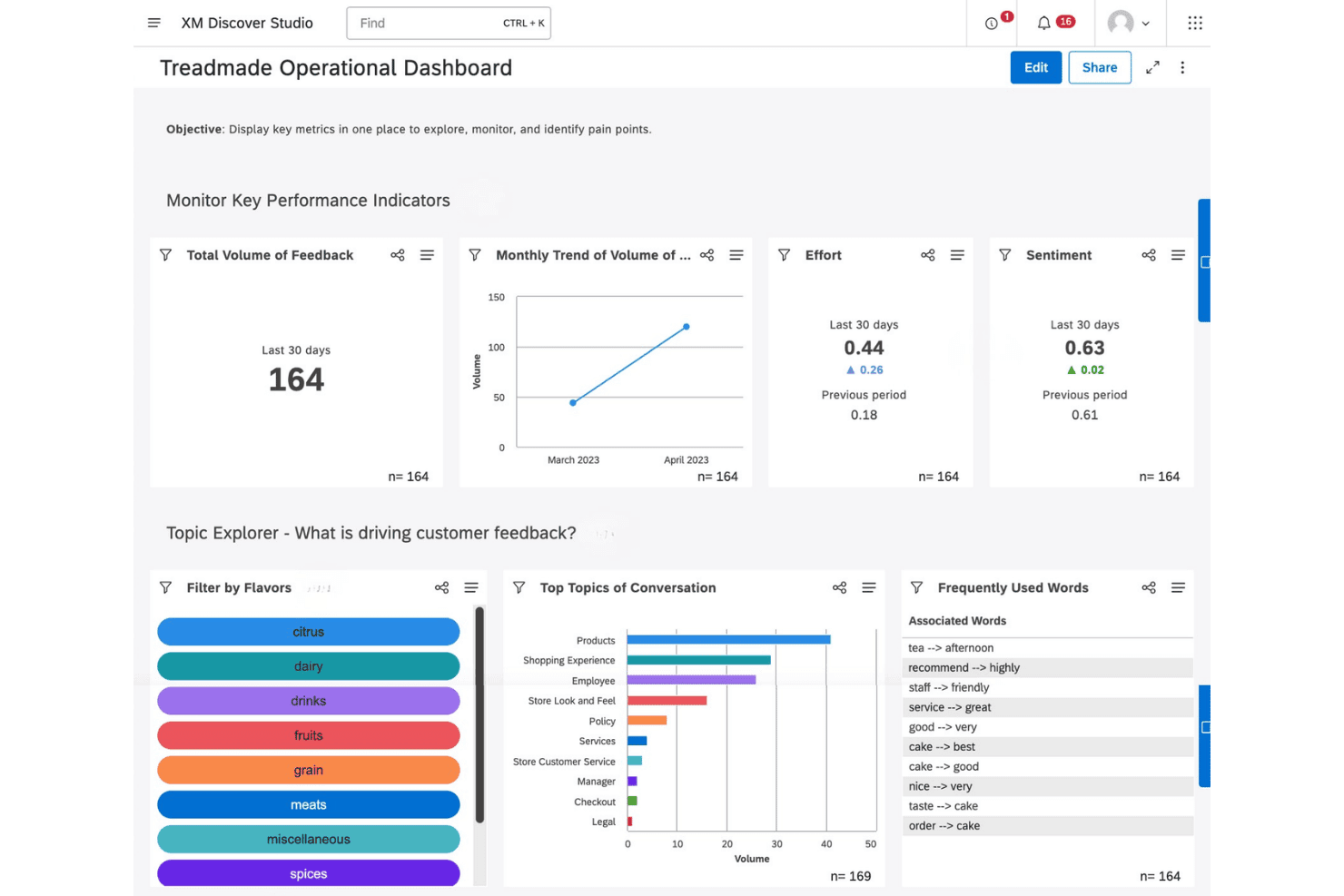
Qualtrics XM Discover offers an operational dashboard with KPIs, topic exploration, and customer feedback analysis tools. Qualtrics XM Discover is a conversational analytics platform that uses NLP and machine learning to analyze unstructured feedback from calls, chats, surveys, reviews, and social media, detecting sentiment, emotion, intent, and effort across omnichannel customer interactions.
Who Is Qualtrics XM Discover Best For?
It's a strong fit for enterprise CX and VoC teams that manage high volumes of multi-channel customer interactions and need deep, customizable analytics at scale.
Why I Picked Qualtrics XM Discover
I picked Qualtrics XM Discover as one of the best because the Designer module lets my team build and refine custom taxonomies that map directly to our product vocabulary, rather than forcing us into a rigid prebuilt category structure. On top of that, the platform ships with 150+ industry-specific NLU models that detect emotion, effort, and intent at the phrase level, across multiple languages. That combination means I can configure how the AI reads and classifies feedback to match exactly how our customers actually talk.
Qualtrics XM Discover Key Features
- Omnichannel data connectors: Ingests customer interactions from calls, chat, email, surveys, reviews, and social platforms.
- Real-time sentiment and emotion detection: Surfaces emotion, intent, and effort signals directly within conversation transcripts.
- Automated anomaly alerts: Detects and notifies teams of spikes in complaints, sudden sentiment shifts, or emerging issues.
- Customizable executive dashboards: Enables detailed, role-based views of insights and conversational trends with real-time updates.
Qualtrics XM Discover Integrations
Qualtrics XM Discover offers native integrations with Qualtrics, Zendesk, Tableau, ServiceNow, Twilio, Jira, Five9, Freshdesk, Tethr, and more. An API is available for custom integrations.
Pros and Cons
Pros:
- Real-time anomaly and trend detection
- Detects emotion, intent, and effort signals
- Custom taxonomy builder for nuanced analysis
Cons:
- Taxonomy management can require ongoing analyst effort
- Lengthy onboarding process for configuration
Learn more about Qualtrics XM Discover: Best for unified analysis across feedback channels
- Free demo available
- Pricing upon request

Chattermill offers an AI-powered feedback insights dashboard that displays sentiment distribution and trending customer themes across categories like meals, recipes, and brand. Chattermill is an AI-native customer experience intelligence platform that uses its proprietary Lyra AI engine to analyze unstructured feedback from surveys, support tickets, reviews, social media, and voice across a unified analytics layer.
Who Is Chattermill Best For?
It's a strong fit for enterprise CX and e-commerce teams at high-volume organizations collecting at least 5,000 pieces of customer feedback per month across multiple channels.
Why I Picked Chattermill
Chattermill earns its spot on my shortlist because of how it handles feedback from radically different sources without losing analytical depth. I love that Lyra AI applies aspect-based sentiment tagging consistently across Zendesk tickets, Reddit posts, and NPS survey responses alike, so I'm comparing like-for-like signals no matter the channel. Real-time anomaly detection then fires alerts the moment a sentiment shift emerges across that unified data pool, which means I'm catching issues as they develop rather than after the fact.
Chattermill Key Features
- Lyra AI insights engine: Analyzes feedback using proprietary models tuned specifically for customer experience data.
- Role-based dashboards: Allows different teams to access tailored views and drill down into insights relevant to their function.
- Real-time alerting: Sends instant notifications about feedback anomalies or emerging issues to Slack, email, or Jira.
- 50+ language sentiment analysis: Processes unstructured feedback in over 50 languages for multilingual, global organizations.
Chattermill Integrations
Chattermill offers native integrations with Zendesk, Intercom, Salesforce, Jira, Gong, Codex, Spriklr, Databricks, Freshdesk, Qualaroo, and more. An API is available for custom integrations.
Pros and Cons
Pros:
- Real-time alerts on emerging feedback trends
- Aspect-based sentiment detection across 50+ languages
- Unifies all feedback channels in one platform
Cons:
- Lacks automated action recommendation workflows
- Dashboard customization is limited by default
Learn more about Chattermill:
Andre verktøy for AI-drevet kundeinnsikt
Her er noen flere verktøy for AI-drevet kundeinnsikt som ikke kom med på kortlisten min, men som likevel er verdt å se nærmere på:
- 11Sprinklr InsightsBest for ongoing social and digital listening
- 12KapicheBest for analyst-configurable feedback analytics
- 13EnterpretBest for customizable AI model tuning
- 14Zonka FeedbackBest for actionable feedback workflows
- 15Observe.AIBest for agent performance insights from calls
- 16Lumen by TalkwalkerBest for visual analytics on cross-channel data
- 17ForstaBest for advanced market research capabilities
- 18VoxpopmeBest for video-driven qualitative analysis
- 19unitQBest for quality monitoring in digital products
How I Evaluate AI Customer Insights Tools
To make this list, a tool needs to deliver real AI value—like surfacing churn signals or complaint trends your team wouldn't catch manually. I split my evaluation into two layers: core functionality every tool must offer, and differentiating factors that set one vendor apart from another.
Core Functionality (Table Stakes for This List)
When I'm selecting tools for my list, I rank each one on a scale from 0 (does not offer the functionality) to 5 (excels in this area) for each core functionality listed below. Then, I calculate the tool's total score into a percentage. Each tool needs to achieve a minimum total score of 65% to be considered for inclusion.
- AI Text Analytics: I look for NLP that goes beyond keyword matching to extract meaningful themes from open-ended survey responses, app reviews, and support tickets.
- Sentiment & Emotion Detection: The tool should classify more than just positive or negative—I evaluate whether it can pick up on intent, frustration, or urgency within customer interactions.
- Multi-Source Data Ingestion: Pulling in feedback from surveys, chat, email, social, and review sites matters. I check how many native integrations a tool offers and whether it supports real-time data streaming.
- Automated Theme Discovery: I look at whether the tool can surface emerging complaint patterns or trending topics on its own, without requiring my team to build and maintain manual tag libraries.
- Predictive & Generative Insights: Beyond descriptive dashboards, I evaluate whether the platform can flag likely churn drivers or generate AI summaries that help CX leaders prioritize next steps.
- Insight Visualization & Reporting: Dashboards need to be more than static charts. I check for drill-down capabilities, role-based views, and the ability to share findings with product or leadership teams.
Once I have a list of tools that meet the criteria, I consider what sets each platform apart.
Differentiating Factors (What Sets Vendors Apart)
Here's how I compare and contrast different vendors:
Standout Features
Automated theme discovery is a key differentiator. I look for tools that use unsupervised AI clustering to surface unknown pain points—things your team hasn't tagged or anticipated. A conversational query interface also matters, since it lets non-technical users ask questions like "why are enterprise customers churning?" and get sourced answers without building custom reports. Real-time alerting rounds this out by flagging sudden spikes in complaints or sentiment shifts before they escalate into larger issues.
Beyond Features
Integrations with your existing stack matter a lot here. I check whether a tool connects natively to platforms like Salesforce, Zendesk, or Intercom, so insights flow into the workflows your team already uses. AI transparency is another factor I evaluate closely—I want to see source citations that trace a theme or sentiment score back to the original customer quote. Time-to-value also varies widely; some platforms need months of taxonomy setup while others offer pre-built templates that get teams running in days.
Slik velger du verktøy for AI-drevet kundeinnsikt
Det er lett å gå seg vill i lange funksjonslister og kompliserte prismodeller. For å hjelpe deg med å holde fokus mens du går gjennom din unike prosess for valg av programvare, får du her en sjekkliste over faktorer du bør ha i bakhodet:
| Faktor | Hva du bør vurdere |
|---|---|
| FaktorSkalerbarhet | Hva du bør vurdereVil verktøyet håndtere økt mengde tilbakemeldinger, flere brukere og nye kilder etter hvert som programmet vokser? Spør om databegrensninger, bruk på tvers av team og lokalisering. |
| FaktorIntegrasjoner | Hva du bør vurdereKan det kobles direkte til CRM-systemene, brukerstøttesystemet eller analyseverktøyene dine? Sjekk integrasjonskatalogen og spør om støtte for API eller webhook hvis det er nødvendig. |
| FaktorTilpasningsmuligheter | Hva du bør vurdereKan du tilpasse kategorier, kontrollpaneler og taksonomier slik at de passer til unike arbeidsflyter? Spør hvordan endringer gjøres, og hvem som administrerer dem – leverandøren eller teamet ditt. |
| FaktorBrukervennlighet | Hva du bør vurdereEr grensesnittet intuitivt nok for kolleger uten teknisk bakgrunn? Prøv direktedemonstrasjoner med nøkkelbrukere, og se etter verktøytips, veiledning under oppstart og tydelige menyer. |
| FaktorImplementering og oppstart | Hva du bør vurdereHvor mye tid og innsats kreves for å ta løsningen i bruk? Finn ut om det finnes maler, dedikert hjelp under oppstart eller en bratt læringskurve for teamet ditt. |
| FaktorKostnad | Hva du bør vurdereHvordan er prisene strukturert – per bruker, datamengde eller analysert tilbakemelding? Ta høyde for fremtidig teamvekst, slik at du ikke blir overrasket av skjulte kostnader eller begrensninger. |
| FaktorSikkerhetstiltak | Hva du bør vurdereOppfyller leverandøren kravene dine til personvern og datasikkerhet? Spør om sertifiseringer, kryptering, tilgangskontroller og hvor dataene lagres, hvis det er relevant. |
| FaktorTilgjengelig brukerstøtte | Hva du bør vurdereHvilke kanaler kan du bruke for å få hjelp – direktechat, e-post eller telefon? Bekreft åpningstidene for brukerstøtte, SLA-løfter og om det koster ekstra med førsteklasses brukerstøtte. |
Hva er verktøy for AI-drevet kundeinnsikt?
Verktøy for AI-drevet kundeinnsikt er plattformer som bruker kunstig intelligens til å analysere ustrukturerte kundetilbakemeldinger, oppdage mønstre og avdekke handlingsrettede trender på tvers av kanaler. Disse verktøyene går lenger enn grunnleggende analyse ved å oppdage følelser, intensjon og nye problemer, slik at ledere med ansvar for kundeopplevelsen kan ta informerte beslutninger og prioritere forbedringer raskt.
Funksjoner
Når du velger AI-verktøy for kundeinnsikt, bør du se etter følgende viktige funksjoner:
- AI-tekstanalyse: Bruker naturlig språkbehandling til automatisk å identifisere, kategorisere og trekke ut temaer fra store mengder åpne tilbakemeldinger fra kunder.
- Sentiment- og følelsesdeteksjon: Gjenkjenner nyanserte følelser som tilfredshet, frustrasjon, hvor presserende noe er og lojalitet i spørreskjemasvar, chatutskrifter og anmeldelser.
- Datainnhenting fra flere kilder: Samler tilbakemeldinger fra spørreundersøkelser, anmeldelser, chat, e-post, sosiale medier og supportsaker i ett samlet kontrollpanel.
- Automatisk oppdagelse av temaer: Identifiserer nye og fremvoksende trender, problemer eller kundebehov uten at det kreves manuell merking eller forhåndsdefinerte taksonomier.
- Varsling i sanntid: Varsler teamene umiddelbart om uvanlige økninger i klager, endringer i sentiment eller nye problemer, slik at de kan handle før problemene eskalerer.
- Prediktiv innsikt: Foreslår sannsynlige årsaker til kundefrafall, tilfredshet eller anbefalinger, og gir et bedre grunnlag for proaktive beslutninger basert på historiske data og sanntidsdata.
- Tilpassbare kontrollpaneler: Gjør det mulig for brukere å visualisere innsikt med tilpassede diagrammer, filtre og rapporter, slik at det blir enkelt å dele funn på tvers av team og med ledelsen.
- Rollebaserte tilgangskontroller: Sikrer at bare autoriserte personer får tilgang til bestemte kundedata eller handlingsrettet innsikt, og støtter mål for sikkerhet og samsvar.
Fordeler
Implementering av AI-verktøy for kundeinnsikt gir flere fordeler for teamet og virksomheten din. Her er noen av fordelene du kan se frem til:
- Smartere beslutningstaking: AI-drevet analyse avdekker handlingsrettede mønstre og årsaker bak kundesentiment, slik at teamene kan ta raskere, kunnskapsbaserte beslutninger.
- Helhetlig kundeinnsikt: Samling av tilbakemeldinger fra flere kanaler gir teamet et helhetlig bilde, eliminerer datasiloer og avdekker trender du ellers kanskje ikke ville oppdaget.
- Proaktiv problemløsning: Sanntidsvarsler om endringer i sentiment eller nye klager hjelper deg med å oppdage potensielle kriser før de blir omfattende problemer.
- Personlig tilpasset engasjement: Innsikt fra deteksjon av følelser og intensjoner gjør det mulig å gi mer tilpassede og empatiske svar på ulike kundebehov.
- Økt teameffektivitet: Automatiserte analyser og kontrollpaneler reduserer den manuelle innsatsen som kreves for å kategorisere, merke og tolke tilbakemeldinger, og frigjør CX-ressurser.
- Forbedret kundebevaring og lojalitet: Prediktiv innsikt bidrar til å identifisere risiko for kundefrafall og drivere for tilfredshet, og legger grunnlaget for mer effektive strategier for kundebevaring og produktforbedringer.
Kostnader og priser
Valg av AI-verktøy for kundeinnsikt krever en forståelse av de ulike prismodellene og abonnementene som er tilgjengelige. Kostnadene varierer basert på funksjoner, teamstørrelse, tillegg og mer. Tabellen nedenfor oppsummerer vanlige abonnementer, gjennomsnittsprisene deres og typiske funksjoner som er inkludert i løsninger for AI-verktøy for kundeinnsikt:
Sammenligningstabell for abonnementer for AI-verktøy for kundeinnsikt
| Abonnementstype | Gjennomsnittspris | Vanlige funksjoner |
|---|---|---|
| AbonnementstypeGratisabonnement | Gjennomsnittspris$0 | Vanlige funksjonerGrunnleggende analyse, begrenset datainnhenting, grunnleggende sentimentdeteksjon og begrensede kontrollpaneler. |
| AbonnementstypePrivatabonnement | Gjennomsnittspris$20–$80/bruker/måned | Vanlige funksjonerImport av tilbakemeldinger fra flere kanaler, enkle kontrollpaneler, standard AI-tekstanalyse og kundestøtte via e-post. |
| AbonnementstypeBedriftsabonnement | Gjennomsnittspris$100–$300/bruker/måned | Vanlige funksjonerAvansert oppdagelse av temaer, integrasjoner med CRM-systemer, sanntidsvarsler, rollebasert tilgang og tilpassbare kontrollpaneler. |
| AbonnementstypeAbonnement for store virksomheter | Gjennomsnittspris$400+/bruker/måned | Vanlige funksjonerUbegrensede integrasjoner, prediktiv innsikt, avansert sikkerhet, tilpasset opplæring, dedikert kundestøtte og verktøy for samsvar. |
Vanlige spørsmål om AI-verktøy for kundeinnsikt
Her er noen svar på vanlige spørsmål om AI-verktøy for kundeinnsikt:
Hvordan håndterer AI-verktøy for kundeinnsikt ustrukturert tilbakemelding?
AI-verktøy for kundeinnsikt bruker naturlig språkbehandling til å analysere åpne svar, chatlogger og anmeldelser. De oppdager automatisk temaer og sentiment, slik at teamet ditt kan forstå kundenes behov uten manuell merking eller koding.
Kan disse verktøyene integreres med mitt eksisterende CRM-system eller brukerstøttesystem?
Ja, de fleste AI-verktøy for kundeinnsikt tilbyr innebygde integrasjoner med populære CRM-systemer og kundestøtteplattformer som Salesforce, Zendesk og HubSpot. Sjekk integrasjonskatalogen til hver leverandør for å bekrefte kompatibilitet med den nåværende systemporteføljen din.
Hva slags datasikkerhet bør jeg forvente fra disse plattformene?
Du bør forvente sikkerhetstiltak i tråd med bransjestandarder, inkludert kryptering, tilgangskontroller, samsvar med SOC 2 eller GDPR og tydelige retningslinjer for hvor data lagres. For sensitiv informasjon bør du undersøke om plattformen oppfyller HIPAA- eller CCPA-kravene etter behov.
Trenger jeg tekniske ferdigheter for å bruke AI-verktøy for kundeinnsikt?
Nei, de fleste verktøyene er utformet med intuitive oversikter og spørsmål på naturlig språk, noe som gjør dem tilgjengelige for brukere uten teknisk bakgrunn. Opplæring og hjelp med innføringen er ofte tilgjengelig for mer avanserte funksjoner.
Hvor raskt kan jeg forvente å få nyttig innsikt?
Du kan vanligvis begynne å oppdage viktige trender i løpet av noen dager hvis du velger en plattform med rask datainnhenting og forhåndsbygde taksonomier. Enkelte bedriftsplattformer krever mer oppsett, men tilbyr større tilpasningsmuligheter for komplekse behov.