

Det kan være krevende for alle team å håndtere kundeinteraksjoner. Som kundeopplevelsesansvarlig står du overfor den konstante utfordringen med å opprettholde effektiv kundestøtte samtidig som du håndterer flere oppgaver. Automatisert helpdeskprogramvare kan lette denne byrden ved å håndtere rutinehenvendelser og frigjøre tid for teamet ditt, slik at dere kan fokusere på komplekse problemer.
Jeg har testet og vurdert ulike programvarealternativer for å hjelpe deg med å velge det riktige. Målet mitt er å gi en ærlig og upartisk vurdering av den beste tilgjengelige helpdeskprogramvaren. I denne artikkelen finner du en gjennomgang av mine beste anbefalinger, der hver av dem har funksjoner som dekker ulike behov.
Mot slutten vil du ha en klar oppfatning av hvilken programvare som best kan støtte teamets mål.
Why Trust Our Software Recommendations
6,700+
Reviews
20
Industry experts
16+
Evaluation factors
14
Years
Our team has been testing and reviewing software since 2012. As CX leaders ourselves, we know how difficult—and important—it is to choose the right software.
For this guide, we evaluated tools using hands-on testing and independent research, scoring tools using our selection criteria.
Our reviews reflect our human editorial judgment, not a sales pitch.
 Gui DrusinaCreative Director
 Tim FisherVP of AI
Sammendrag av den beste automatiserte helpdeskprogramvaren
Denne sammenligningstabellen oppsummerer prisopplysningene for mine beste utvalgte automatiserte helpdeskprogrammer, slik at du kan finne det beste alternativet for budsjettet og virksomhetens behov.
| Tool | Best For | Trial Info | Price | ||
|---|---|---|---|---|---|
| 1 | Best for automating repetitive tasks | Free plan available | From $25/user/month (billed annually) | Website | |
| 2 | Best for conversation-based AI ticket handling | Free plan + free demo available | From $150/month (billed annually) | Website | |
| 3 | Best with enterprise-grade security | 7-day free trial + free plan + free demo available | From $32/month (billed annually) | Website | |
| 4 | Best for Shopify order management in chat | Free plan available; 7-day free trial | From $24.17/month (billed annually) | Website | |
| 5 | Best for quick setup | Free plan + free demo available | From $29/user/month | Website | |
| 6 | Best for real-time chat | 14-day free trial and free demo available | From $19/user/month (billed annually) | Website | |
| 7 | Best for small businesses | Free plan + free demo available | From $39.99/month | Website | |
| 8 | Best for scalability | Free demo available | From $39/user/month (billed annually) | Website | |
| 9 | Best for CRM integration | Free demo + 14-day free trial | From CAD $10/user/month (billed annually) | Website | |
| 10 | Best for multi-channel support | Free demo available | From $39/user/month | Website |


Vurdering av den beste automatiserte helpdeskprogramvaren
Nedenfor finner du mine detaljerte sammendrag av den beste automatiserte helpdeskprogramvaren som kom med på kortlisten min. Vurderingene mine gir en detaljert gjennomgang av de viktigste funksjonene, fordelene og ulempene, integrasjonene og de ideelle bruksområdene for hvert verktøy, slik at du kan finne det beste alternativet for deg.
 Best for automating repetitive tasks
- Free plan available
- From $25/user/month (billed annually)
Visit WebsiteCustomer Rating:4.5/5
Help Scout’s dashboard displays shared inboxes across teams, centralizing customer conversations in one workspace. Help Scout is designed for businesses looking to enhance their customer support with automated help desk software. Its unique combination of AI-driven tools and human support features makes it ideal for teams aiming to streamline communication while maintaining a personal touch. By addressing common challenges like delayed response times and inefficient customer interactions, Help Scout helps you deliver exceptional service and improve overall customer satisfaction.
Why I Picked Help Scout
I picked Help Scout because of its standout feature, the Workflows tool, which automates repetitive tasks and organizes incoming messages based on specific criteria. This functionality significantly improves response times and overall efficiency in handling customer inquiries. Additionally, the AI integration provides instant responses to common questions, enabling your team to focus on more complex issues. These features make Help Scout a compelling choice for automated help desk software, especially for businesses keen on optimizing their support processes.
Help Scout Key Features
In addition to its robust automation capabilities, Help Scout offers several other features that enhance its value as automated help desk software.
- Shared Inbox: This feature allows your team to collaborate on customer inquiries in a single, organized space.
- Knowledge Base: A self-service tool that empowers customers to find answers on their own, reducing the volume of support tickets.
- Live Chat: Provides real-time communication with customers, improving engagement and satisfaction.
- Analytics: Delivers insights into your team's performance and customer interactions, helping you make informed improvements.
Help Scout Integrations
Integrations include Slack, HubSpot, Shopify, Salesforce, Mailchimp, Jira, Trello, QuickBooks, Stripe, and Google Workspace.
Pros and Cons
Pros:
- Built-in knowledge base powers accurate automated replies
- Smooth handoff preserves conversation context for agents
- AI Answers resolves common tickets without agent involvement
Cons:
- AI effectiveness depends heavily on knowledge base quality
- Not a standalone chatbot outside Help Scout ecosystem
Learn more about Help Scout: Best for conversation-based AI ticket handling
- Free plan + free demo available
- From $150/month (billed annually)
Visit WebsiteCustomer Rating:4.5/5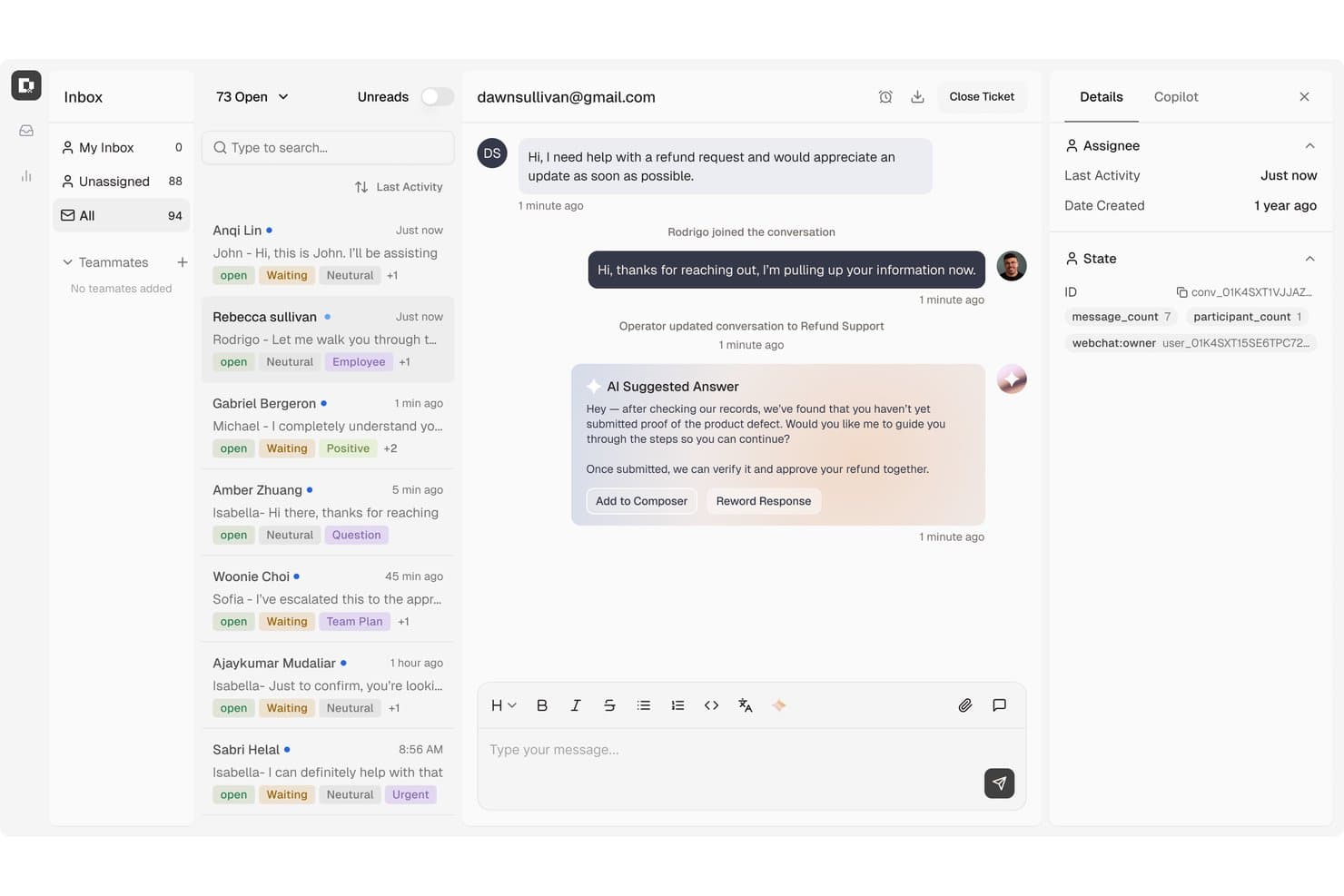
Botpress surfaces AI-suggested replies to speed up agent responses. Botpress Desk is an AI-powered help desk platform that handles ticket classification, routing, and resolution through conversational AI agents, with support for channels like webchat, email, WhatsApp, and voice, plus native connections to Zendesk and Intercom.
Who Is Botpress Best For?
Botpress Desk is a strong fit for CX teams that want AI agents to handle ticket resolution end-to-end, especially if they're already using Zendesk or Intercom and want to layer conversational AI on top without replacing their existing setup.
Why I Picked Botpress
I picked Botpress as one of the best because it handles ticket resolution through actual conversation, not just routing. Its AI agents classify tickets by issue type, language, and customer tier, then take action, like pulling live order data or issuing refunds under defined conditions, without a human touching the queue. I also like that it connects to existing Zendesk or Intercom setups via OAuth, so teams don't have to rip out what's already working to get AI-driven resolution running.
Botpress Key Features
- AI draft replies: Agents can generate AI-written draft responses directly in the ticket composer before sending.
- CSAT scoring: Each ticket captures an effective CSAT score, prioritizing explicit customer ratings over AI-inferred ones.
- SLA notifications: Configurable alerts fire at personal, team, and workspace levels when SLAs are approaching or breached.
- Help Center with custom domain: Teams can publish a public-facing self-service portal, with custom domain support available on Plus and above.
Botpress Integrations
Botpress offers 190+ native integrations, including Zendesk, Intercom, HubSpot, Salesforce, Shopify, Stripe, Slack, WhatsApp, and Twilio. It also provides Chat, Admin, Files, Tables, and Runtime APIs for custom integrations, plus Zapier.
Pros and Cons
Pros:
- Visual flows support tailored support automation
- Agents get reply drafts and customer context
- AI classifies, prioritizes, and routes tickets
Cons:
- Flow debugging can slow support changes
- Complex conversations need prompt testing
Learn more about Botpress: Best with enterprise-grade security
- 7-day free trial + free plan + free demo available
- From $32/month (billed annually)
Visit WebsiteCustomer Rating:4.4/5
Chatbase homepage highlighting its AI agent builder for creating and deploying automated customer support experiences. Chatbase is an AI-powered help desk platform for businesses that want to automate customer support, streamline repetitive inquiries, and deliver fast, accurate responses across multiple channels.
Who Is Chatbase Best For?
Chatbase suits support teams at growing companies that want to automate customer interactions and scale service without expanding headcount.
Why I Picked Chatbase
I picked Chatbase as one of the best because I need automated help desk software that prioritizes enterprise-grade security. I like that Chatbase offers advanced data encryption, audit logs, and compliance controls for sensitive customer data. My team is able to confidently deploy AI chatbots in regulated industries without worrying about data exposure.
Chatbase Key Features
- Custom AI chatbot builder: Create and train chatbots using your own data sources and knowledge base.
- Multi-channel deployment: Deploy chatbots on your website, WhatsApp, Facebook Messenger, and other platforms.
- Conversation analytics: Track chatbot interactions and performance with built-in analytics dashboards.
- API access: Integrate Chatbase with your existing systems and workflows using robust API endpoints.
Chatbase Integrations
Integrations include Zendesk, Notion, Slack, Stripe, Salesforce, Cal.com, Calendly, WhatsApp, Messenger, and Make. An API is also available for custom integrations.
Pros and Cons
Pros:
- Conversation analytics with exportable reports
- Supports multiple languages for global teams
- Multi-channel deployment across web and messaging apps
Cons:
- Branding features locked behind paid plans
- No built-in live agent handoff
Learn more about Chatbase: Best for Shopify order management in chat
- Free plan available; 7-day free trial
- From $24.17/month (billed annually)
Visit WebsiteCustomer Rating:4.7/5
Tidio inbox view showing live chat conversations, ticket management, and customer details panel in a unified support dashboard. Tidio brings together live chat, AI-powered chatbots, and multichannel messaging to help businesses automate and manage customer support from one platform. It’s a strong fit for ecommerce stores, small businesses, and teams looking to streamline customer conversations and ticketing. If you need to handle high volumes of inquiries while maintaining a personal touch, Tidio offers tools to automate responses and keep your support organized.
Who Is Tidio Best For?
Tidio is a good fit for small to midsize ecommerce businesses and support teams that want to automate customer interactions and manage inquiries across multiple channels.
Why I Picked Tidio
For ecommerce teams running on Shopify, Tidio stands out by letting agents manage orders and customer requests directly within the chat interface. The Shopify integration allows support reps to view order details, update order statuses, and issue refunds or cancellations without leaving the conversation. I picked Tidio because this level of in-chat order management reduces context switching and helps agents resolve customer issues faster. It’s especially useful for stores that want to keep support and order operations tightly connected in one place.
Tidio Key Features
Some other features in Tidio that help automate and organize customer support include:
- AI-powered chatbots: Build and deploy chatbots that can answer common questions, collect information, and route tickets automatically.
- Multichannel messaging: Manage conversations from live chat, email, Messenger, and Instagram in a single unified inbox.
- Ticketing system: Track, assign, and resolve customer issues with a built-in ticketing workflow.
- Proactive messaging: Set up automated messages to engage visitors based on their behavior or trigger specific workflows.
Tidio Integrations
Integrations include Shopify, Zendesk, Intercom, WordPress, Instagram, Messenger, HubSpot, Salesforce, WhatsApp, and Microsoft Dynamics.
Pros and Cons
Pros:
- Proactive messaging based on visitor behavior
- Multichannel inbox centralizes customer conversations
- AI-powered chatbots automate repetitive support tasks
Cons:
- Branding removal is only available on higher tiers
- Occasional delays in live chat notifications
Learn more about Tidio: Best for quick setup
- Free plan + free demo available
- From $29/user/month
Visit WebsiteCustomer Rating:4.6/5
HelpDesk manages tickets and multi-channel customer support workflows. HelpDesk is a help desk and ticketing program designed for small businesses and enterprises across industries such as IT, SaaS, retail, and sales. It focuses on service level agreement (SLA) ticket management, team collaboration, and multi-channel support to improve customer service operations.
Why I picked HelpDesk: This tool is ideal for teams needing a quick setup with minimal hassle. Its features include automatic ticket sorting and prioritization, which saves time for your team. The simple user interface ensures your team can start using it immediately without a steep learning curve. HelpDesk's emphasis on efficiency and ease of use aligns with its quick setup advantage.
Standout Features and Integrations:
Features include automatic language detection, catering to diverse customer bases, similar ticket tracking to reduce repetitive tasks, and AI-powered tag suggestions for better ticket organization. Its strong security measures ensure your data stays protected.
Integrations include Slack, Zapier, Shopify, LiveChat, HubSpot, Salesforce, and more.
Pros and Cons
Pros:
- Strong data security system
- Centralized ticket management
- Supports fast resolution times
Cons:
- Confusing LiveChat branding split
- No multi-language support
Learn more about HelpDesk: Best for real-time chat
- 14-day free trial and free demo available
- From $19/user/month (billed annually)
Visit WebsiteCustomer Rating:4.4/5
Intercom enables real-time customer messaging and engagement. Intercom is a customer communication platform designed for businesses that want to foster customer engagement through real-time chat. It serves companies by providing tools for messaging, customer support, and lead generation, helping teams connect with users efficiently.
Why I picked Intercom: Intercom is ideal for teams that prioritize real-time communication with customers. Its live chat widget allows your team to engage users instantly on your website or app. The platform's automation capabilities help manage repetitive inquiries, freeing up your team for more complex tasks. Intercom's focus on real-time chat and automation makes it perfect for businesses aiming to improve customer interaction.
Standout Features and Integrations:
Features include a customizable messenger to match your brand, proactive messaging to reach out to users at the right time, and a built-in help center for self-service. The platform also offers targeted messaging to engage specific user segments effectively.
Integrations include Salesforce, Slack, HubSpot, Shopify, Google Analytics, and more.
Pros and Cons
Pros:
- High fees for AI bot resolutions
- Targeted messaging options
- Effective automation tools
- Unified platform includes chats, bots, and more
Cons:
- Support can be slow to respond
 Best for small businesses
- Free plan + free demo available
- From $39.99/month
Visit WebsiteCustomer Rating:4.7/5
HelpDesk manages tickets and multi-channel customer support workflows. ProProfs Help Desk is ticketing and support software designed for small businesses to manage customer inquiries efficiently. It centralizes support requests and encourages team collaboration, making it easier for your team to track and resolve issues.
Why I picked ProProfs Help Desk: This tool is tailored for small businesses, offering features that support efficient ticket management without overwhelming complexity. The shared inbox feature helps your team collaborate, while automated ticket assignments ensure common issues are directed to the right person. Customer satisfaction surveys gather essential feedback to help you improve your service. ProProfs stands out for its balance of simplicity and functionality, catering well to smaller teams.
Standout Features and Integrations:
Features include AI-driven support for faster ticket resolution times, centralized ticket management from various channels, and team collaboration tools such as shared inboxes. Automation for ticket assignments and performance reporting is also a key feature.
Integrations include Salesforce, Atlassian Jira, BigCommerce, Slack, and more.
Pros and Cons
Pros:
- Flexible customization options
- Suitable for small- to medium-sized businesses
- Team collaboration tools
Cons:
- No social media ticket support
- Lacks advanced reporting tools
Learn more about ProProfs Help Desk: Best for scalability
- Free demo available
- From $39/user/month (billed annually)
Visit WebsiteCustomer Rating:4.4/5
SolarWinds Service Desk simplifies IT service management. SolarWinds Service Desk software is a cloud-based ITSM system aimed at IT teams looking to improve service delivery and support operations. It focuses on incident management, change management, and asset management to streamline IT processes.
Why I picked SolarWinds Service Desk: This tool excels in scalability, making it suitable for growing organizations. Its asset management capabilities allow you to keep track of all IT assets efficiently. The change management feature helps your team manage IT changes without disruptions. SolarWinds Service Desk is designed to support expanding teams with its scalable infrastructure and extensive ITSM tools.
Standout Features and Integrations:
Features include a service catalog that centralizes all service requests, a knowledge base to empower end-users with self-service options, and automated workflows to increase efficiency. The software also provides detailed reporting to help you track performance metrics.
Integrations include Microsoft Azure, Active Directory, Google Workspace, Slack, and more.
Pros and Cons
Pros:
- Detailed asset management
- Extensive monitoring for hybrid IT
- Scalable for growing organizations
Cons:
- High pricing for small businesses
- Frequent security patch requirements
Learn more about SolarWinds Service Desk: Best for CRM integration
- Free demo + 14-day free trial
- From CAD $10/user/month (billed annually)
Visit WebsiteCustomer Rating:4.4/5
HubSpot Service Hub unifies customer service data. HubSpot Service Hub is a customer service platform designed for businesses wanting to strengthen their customer support through integrated CRM capabilities. It offers tools for help desk ticketing, customer feedback, and knowledge base management to improve service quality and efficiency.
Why I picked HubSpot Service Hub: HubSpot Service Hub excels in integrating CRM features that provide a unified view of customer interactions. Its ticketing system connects with customer data, allowing your team to deliver personalized support. The feedback tools help you gather valuable insights to refine your service approach. HubSpot's strength in CRM integration makes it ideal for teams looking to align support with sales and marketing efforts.
Standout Features and Integrations:
Features include a broad knowledge base that empowers customers to find answers independently, live chat, email, and bots to engage with users in real time, and customer feedback surveys to collect actionable insights. The platform also offers a customer portal for tracking tickets and interactions.
Integrations include Salesforce, Shopify, Google Gmail, Microsoft Outlook, Slack, and more.
Pros and Cons
Pros:
- Unified customer portal
- Actionable feedback tools
- All-in-one ecosystem including CRM integration
Cons:
- Advanced features require high tiers
- Very expensive as your team grows
Learn more about HubSpot Service Hub: 10Best for multi-channel support
Deskpro
- Free demo available
- From $39/user/month
Visit WebsiteCustomer Rating:4.5/5
Deskpro consolidates customer conversations across channels. Deskpro is a help desk system designed for organizations that require efficient multi-channel support. It serves businesses by consolidating customer interactions across email, chat, phone, SMS, and social media, helping teams manage all communications in one place.
Why I picked Deskpro: Deskpro excels in providing multi-channel support, making it ideal for teams dealing with diverse communication channels. Its unified interface lets your team handle emails, live chat, and social media from a single platform. This reduces the complexity of managing multiple tools and keeps everything organized. Deskpro's ability to integrate various channels into one system ensures that no customer request goes unnoticed.
Standout Features and Integrations:
Features include customizable workflows to tailor processes to your team's needs, an advanced reporting suite to track performance metrics, and a customer portal for self-service options. It also offers a knowledge base to help customers find answers independently.
Integrations include Salesforce, Slack, Microsoft Teams, Jira, and more.
Pros and Cons
Pros:
- Strong self-service portal
- Unified communication interface
- Efficient multi-channel management
Cons:
- Interface can feel dated and cluttered
- Complex initial setup and configuration
Learn more about Deskpro:
Annen automatisert helpdeskprogramvare
Her er noen flere alternativer for automatisert helpdeskprogramvare som ikke kom med på kortlisten min, men som likevel er verdt å undersøke:
- 11SysAidBest for IT Teams
- 12ZendeskBest for customer engagement
- 13HeskBest for budget-friendly needs
- 14HappyFox Help DeskBest for custom workflows
- 15RisottoBest for multi-lingual support
- 16HiverBest for managing shared inboxes in Gmail
- 17Desk365Best for Microsoft Teams users
- 18AgentforceBest for enterprise solutions
- 19Leena AIBest for HR service delivery
- 20HelpSpotBest for self-hosting
- 21LiveAgent Best for live chat support
- 22Zoho DeskBest for cross-functional teams
- 23MoveworksBest for IT support automation
- 24AiseraBest for AI-powered ticketing
- 25Help ScoutBest for email-based support
- 26SparrowDeskBest for AI agents for startups
- 27Freshdesk Best for AI-powered multi-language support
- 28Rezolve.aiBest for AI-driven automation
How I Evaluate Automated Help Desk Software
I break my evaluation into two layers: the non-negotiables—automated ticket routing, AI chatbots, omnichannel intake—and the differentiators that reveal which tool fits which team.
Core Functionality (Table Stakes For This List)
When I'm selecting tools for my list, I rank each one on a scale from 0 (does not offer the functionality) to 5 (excels in this area) for each core functionality listed below. Then, I calculate the tool's total score into a percentage. Each tool needs to achieve a minimum total score of 65% to be considered for inclusion.
- Automated Ticket Management: I look at how each tool handles incoming requests—whether it can auto-categorize a billing dispute vs. a technical issue and route it to the right team without manual sorting.
- AI Chatbots & Virtual Agents: I evaluate whether the bot can actually resolve common questions like order status or password resets on its own, not just collect info and hand off every conversation.
- Omnichannel Support Intake: Each platform should pull conversations from email, live chat, social, and ideally voice into one queue so agents aren't toggling between disconnected inboxes.
- Workflow Automation & Macros: I check for trigger-based automations—things like auto-escalating a ticket that's breached its first-response SLA or applying a macro to bulk-tag and respond to a known outage.
- Self-Service Knowledge Base: A good knowledge base does more than host articles. I look for AI-suggested articles during ticket creation and within chat, which helps deflect tickets before they reach an agent.
- Reporting & SLA Automation: I evaluate whether the tool tracks SLA compliance in real time and surfaces metrics like first-response time, resolution rate, and bot containment alongside CSAT scores in a single dashboard.
Once I have a list of tools that meet this criteria, I consider what sets each platform apart.
Differentiating Factors (What Sets Vendors Apart)
Here's how I compare and contrast different vendors:
Standout Features
Sentiment and intent detection is a key differentiator—I look for tools that can flag a frustrated customer mid-conversation and auto-escalate before the situation spirals. Generative AI agents assist matters too, especially when it drafts contextual replies that agents can edit and send rather than starting from scratch. I also evaluate proactive support automation—things like triggering a check-in message when a customer's usage drops or an outage hits their account.
Beyond Features
Integration depth matters—I check whether a platform connects natively to your CRM and ecommerce stack so agents see order history or account details without switching tabs. AI training and continuous improvement is another area I evaluate closely, particularly whether agent corrections to bot responses feed back into the model over time. I also consider implementation speed, including whether the vendor offers pre-trained AI models and migration tools that help teams move off a legacy help desk and see measurable deflection gains within the first few months.
Slik velger du automatisert helpdeskprogramvare
Det er lett å gå seg vill i lange funksjonslister og kompliserte prismodeller. For å hjelpe deg med å holde fokus mens du går gjennom den unike prosessen med å velge programvare, har jeg laget en sjekkliste over faktorer du bør ha i mente:
| Faktor | Hva du bør vurdere |
|---|---|
| FaktorSkalerbarhet | Hva du bør vurdereVil programvaren vokse sammen med virksomheten din? Vurder brukerbegrensninger og utvidelsesmuligheter for å unngå at du vokser fra verktøyet. |
| FaktorIntegrasjoner | Hva du bør vurdereKan den kobles til de eksisterende systemene dine? Se etter integrasjon med CRM-, e-post- og kommunikasjonsplattformer. |
| FaktorTilpasningsmuligheter | Hva du bør vurdereKan du tilpasse programvaren til arbeidsflytene dine? Sørg for at den tilbyr justerbare innstillinger og maler. |
| FaktorBrukervennlighet | Hva du bør vurdereEr grensesnittet intuitivt for teamet ditt? Test det med en gratis prøveperiode for å vurdere læringskurven og brukervennligheten. |
| FaktorImplementering og innføring | Hva du bør vurdereHvor raskt kan du komme i gang? Se etter ressurser som veiledninger og kundestøtte for en smidig overgang. |
| FaktorKostnad | Hva du bør vurderePasser prisen inn i budsjettet ditt? Sammenlign abonnementer og funksjoner for å sikre god verdi uten skjulte gebyrer. |
| FaktorSikkerhetstiltak | Hva du bør vurdereEr tiltak for databeskyttelse på plass? Se etter kryptering, regelmessige oppdateringer og samsvar med regelverket. |
| FaktorTilgjengelig kundestøtte | Hva du bør vurdereHvor lett tilgjengelig er kundestøtten? Sørg for at de tilbyr flere kanaler og rask service for å hjelpe teamet ditt. |
Hva er automatisert helpdeskprogramvare?
Automatisert brukerstøtteprogramvare er et verktøy utviklet for å administrere og automatisere kundestøtteoppgaver, for eksempel håndtering av supportsaker og løsning av problemer. IT-fagfolk, kundeserviceteam og brukerstøtteledere bruker vanligvis disse verktøyene for å forbedre effektiviteten og svartidene. Funksjoner som automatisering av supportsaker, kunnskapsbaser og integrasjonsmuligheter bidrar til å håndtere store mengder supportsaker, sikre raske svar og opprettholde organiserte arbeidsflyter. Alt i alt gir disse verktøyene betydelig verdi ved å redusere manuelt arbeid og forbedre kundetilfredsheten.
Funksjoner
Når du velger automatisert brukerstøtteprogramvare, bør du se etter følgende viktige funksjoner:
- Håndtering av supportsaker: Organiserer og følger opp kundehenvendelser effektivt, slik at du sikrer raske svar og kortere løsningstid.
- Kunnskapsbase: Gir kundene et selvbetjeningsalternativ for å finne svar på vanlige spørsmål, noe som reduserer arbeidsbelastningen for brukerstøtten.
- Automatiseringsverktøy: Automatiserer gjentakende oppgaver som sortering av supportsaker, eskalering, lukking av supportsaker og oppgavetildeling, slik at medarbeiderne får mer tid til komplekse problemer.
- Støtte for flere kanaler: Gjør det mulig å kommunisere med kunder på tvers av ulike plattformer, for eksempel e-post, chat og sosiale medier, og samler interaksjonene på ett sted.
- Tilpassbare arbeidsflyter: Gjør det mulig å tilpasse prosessene etter virksomhetens spesifikke behov, noe som forbedrer effektiviteten og resultatene.
- Integrasjonsmuligheter: Kobler seg til eksisterende systemer som CRM-systemer, prosjektstyrings- og kommunikasjonsverktøy, og fremmer funksjonalitet og dataflyt.
- Analyse og rapportering: Gir innsikt i ytelse og kundeinteraksjoner, slik at teamene kan ta datadrevne beslutninger.
- Sikkerhetstiltak: Sikrer databeskyttelse og overholdelse av regelverk, og beskytter sensitiv kundeinformasjon.
- Chat i sanntid: Tilrettelegger for umiddelbar kommunikasjon med kunder, noe som forbedrer engasjement og tilfredshet.
- Selvbetjeningsportal: Gir brukerne mulighet til å håndtere rutinemessige spørsmål selv, noe som reduserer antallet innkommende supportsaker.
Fordeler
Implementering av automatisert brukerstøtteprogramvare gir flere fordeler for teamet og virksomheten din. Her er noen av fordelene du kan se frem til:
- Bedre effektivitet: Automatiseringsverktøy, som automatiske svar og varsler, reduserer manuelle oppgaver, slik at teamet kan fokusere på komplekse problemer og øke produktiviteten.
- Raskere svartider: Funksjoner for håndtering av supportsaker og chat i sanntid sikrer at kundehenvendelser blir besvart raskt, noe som bidrar til økt tilfredshet.
- Bedre organisering: Støtte for flere kanaler og integrasjonsmuligheter samler kommunikasjonen og holder interaksjonene oversiktlige og tilgjengelige.
- Bedre kundeopplevelse: Selvbetjeningsportaler og kunnskapsbaser gjør det mulig for kundene å finne løsninger på egen hånd, noe som øker tilfredsheten.
- Datadrevne beslutninger: Analyse og rapportering gir innsikt i ytelsen og hjelper deg med å gjøre velinformerte justeringer av brukerstøttestrategien.
- Kostnadsbesparelser: Ved å automatisere gjentakende oppgaver og redusere behovet for omfattende bemanning bidrar disse verktøyene til å senke driftskostnadene.
- Økt sikkerhet: Robuste sikkerhetstiltak beskytter sensitiv kundeinformasjon, bygger tillit og sikrer overholdelse av regelverket.
Kostnader & priser
Valg av automatisert brukerstøtteprogramvare krever en forståelse av de ulike prismodellene og abonnementene som er tilgjengelige. Kostnadene varierer basert på funksjoner, teamstørrelse, tillegg og mer. Tabellen nedenfor oppsummerer vanlige abonnementer, gjennomsnittsprisene deres og typiske funksjoner som er inkludert i løsninger for automatisert brukerstøtteprogramvare:
Sammenligningstabell for abonnementer for automatisert brukerstøtteprogramvare
| Abonnementstype | Gjennomsnittspris | Vanlige funksjoner |
|---|---|---|
| AbonnementstypeGratisabonnement | Gjennomsnittspris$0 | Vanlige funksjonerGrunnleggende håndtering av supportsaker, e-poststøtte og en begrenset kunnskapsbase. |
| AbonnementstypePersonlig abonnement | Gjennomsnittspris$12-$39/bruker/måned | Vanlige funksjonerAvansert håndtering av supportsaker, grunnleggende automatisering og chatstøtte. |
| AbonnementstypeBedriftsabonnement | Gjennomsnittspris$20-$90/bruker/måned | Vanlige funksjonerStøtte for flere kanaler, tilpasningsmuligheter samt analyse og rapportering. |
| AbonnementstypeStorbedriftsabonnement | Gjennomsnittspris$80+/bruker/måned | Vanlige funksjonerFull automatisering, avanserte sikkerhetsfunksjoner og dedikert kontoadministrasjon. |
Vanlige spørsmål om automatisert brukerstøtteprogramvare
Her er noen svar på vanlige spørsmål om automatisert brukerstøtteprogramvare:
Hva er forskjellen mellom skybasert og lokalt installert brukerstøtteprogramvare?
Skybasert brukerstøtteprogramvare ligger på leverandørens servere og åpnes via internett, mens lokalt installert programvare installeres på bedriftens egne servere. Skybaserte løsninger gir enklere skalering og oppdateringer, men du er avhengig av leverandøren når det gjelder datasikkerhet. Lokale løsninger gir deg full kontroll over dataene dine, men krever mer IT-ressurser til vedlikehold og oppdateringer. Ta hensyn til teamets tekniske kapasitet og behov for datasikkerhet når du velger mellom de to alternativene.
Kan automatisert brukerstøtteprogramvare integreres med eksisterende systemer?
Ja, det meste av automatisert brukerstøtteprogramvare kan integreres med eksisterende systemer som CRM, e-post- og kommunikasjonsverktøy. Sjekk programvarens integrasjonsmuligheter for å sikre at den kan kobles til verktøyene teamet allerede bruker. Dette kan bidra til å effektivisere arbeidsflyter og forbedre datakonsistensen på tvers av plattformer. Se etter API-er eller ferdigbygde integrasjoner som forenkler tilkoblingsprosessen.
Hvordan kan jeg sikre datasikkerheten med automatisert brukerstøtteprogramvare?
Sikre datasikkerheten ved å velge programvare med sterk kryptering og samsvar med personvern- og databeskyttelsesregelverk som GDPR eller HIPAA. Spør leverandørene om sikkerhetsprotokollene deres, inkludert sikkerhetskopiering av data, brukerautentisering og planer for håndtering av hendelser. Vurder å gjennomføre en sikkerhetsrevisjon eller rådføre deg med IT-teamet ditt for å evaluere programvarens sikkerhetstiltak før du kjøper den.
Er det mulig å tilpasse automatisert brukerstøtteprogramvare etter behovene våre?
Ja, mange automatiserte brukerstøtteverktøy tilbyr tilpasningsmuligheter, slik at du kan tilpasse arbeidsflyter, supportsaksskjemaer og brukergrensesnitt etter behovene dine. Se etter verktøy som lar deg justere innstillinger, opprette egendefinerte felt og bruke maler. Tilpasning kan gjøre teamet mer effektivt ved å tilpasse programvaren til de eksisterende prosessene deres. Test tilpasningsfunksjonene under en gratis prøveperiode for å sikre at de oppfyller kravene dine.
Hva skjer videre:
Hvis du undersøker automatisert brukerstøtteprogramvare, kan du ta kontakt med en SoftwareSelect-rådgiver for gratis anbefalinger.
Du fyller ut et skjema og tar en kort prat der de går gjennom detaljene i behovene dine. Deretter får du en kortliste over programvare du kan vurdere. De støtter deg også gjennom hele kjøpsprosessen, inkludert prisforhandlinger.