

Why Trust Our Software Recommendations
6,700+
Reviews
20
Industry experts
16+
Evaluation factors
14
Years
Our team has been testing and reviewing software since 2012. As CX leaders ourselves, we know how difficult—and important—it is to choose the right software.
For this guide, we evaluated tools using hands-on testing and independent research, scoring tools using our selection criteria.
Our reviews reflect our human editorial judgment, not a sales pitch.
 Gui DrusinaCreative Director
 Tim FisherVP of AI
Sammenligningstabell for programvare for taleanalyse i kontaktsentre
Denne sammenligningstabellen oppsummerer prisdetaljene for mine beste valg av programvare for taleanalyse i kontaktsentre:
| Tool | Best For | Trial Info | Price | ||
|---|---|---|---|---|---|
| 1 | Best for analytics built into your phone system | 14-day free trial | From $25/user/month (billed annually) | Website | |
| 2 | Best for real-time conversation compliance | Free demo available | Pricing upon request | Website | |
| 3 | Best for omnichannel customer sentiment analysis | Free demo available | Pricing upon request | Website | |
| 4 | Best for multichannel AI-based transcript analysis | Free demo available | Pricing upon request | Website | |
| 5 | Best for proactive topic and trend discovery | Free plan available | From $85/user/month | Website | |
| 6 | Best for AI-driven agent coaching insights | Free demo available | Pricing upon request | Website | |
| 7 | Best for native omnichannel analytics integration | Free trial available | From $75/user/month (billed annually) | Website | |
| 8 | Best for cloud-native real-time analytics at scale | Free demo available | From $110/agent/month (proactive AI extra) | Website | |
| 9 | Best for customizable QA scorecards and dashboards | Free demo available | Pricing upon request | Website | |
| 10 | Best for advanced emotion and sentiment detection | Free demo available | Pricing upon request | Website |


Anmeldelser av programvare for taleanalyse i kontaktsentre
Nedenfor finner du mine detaljerte sammendrag av den beste programvaren for taleanalyse i kontaktsentre som kom med på kortlisten min. Anmeldelsene mine gir et detaljert innblikk i funksjonene, egenskapene og de beste bruksområdene for hver plattform, slik at du kan finne den beste løsningen for deg.
 Best for analytics built into your phone system
- 14-day free trial
- From $25/user/month (billed annually)
Visit WebsiteCustomer Rating:4.4/5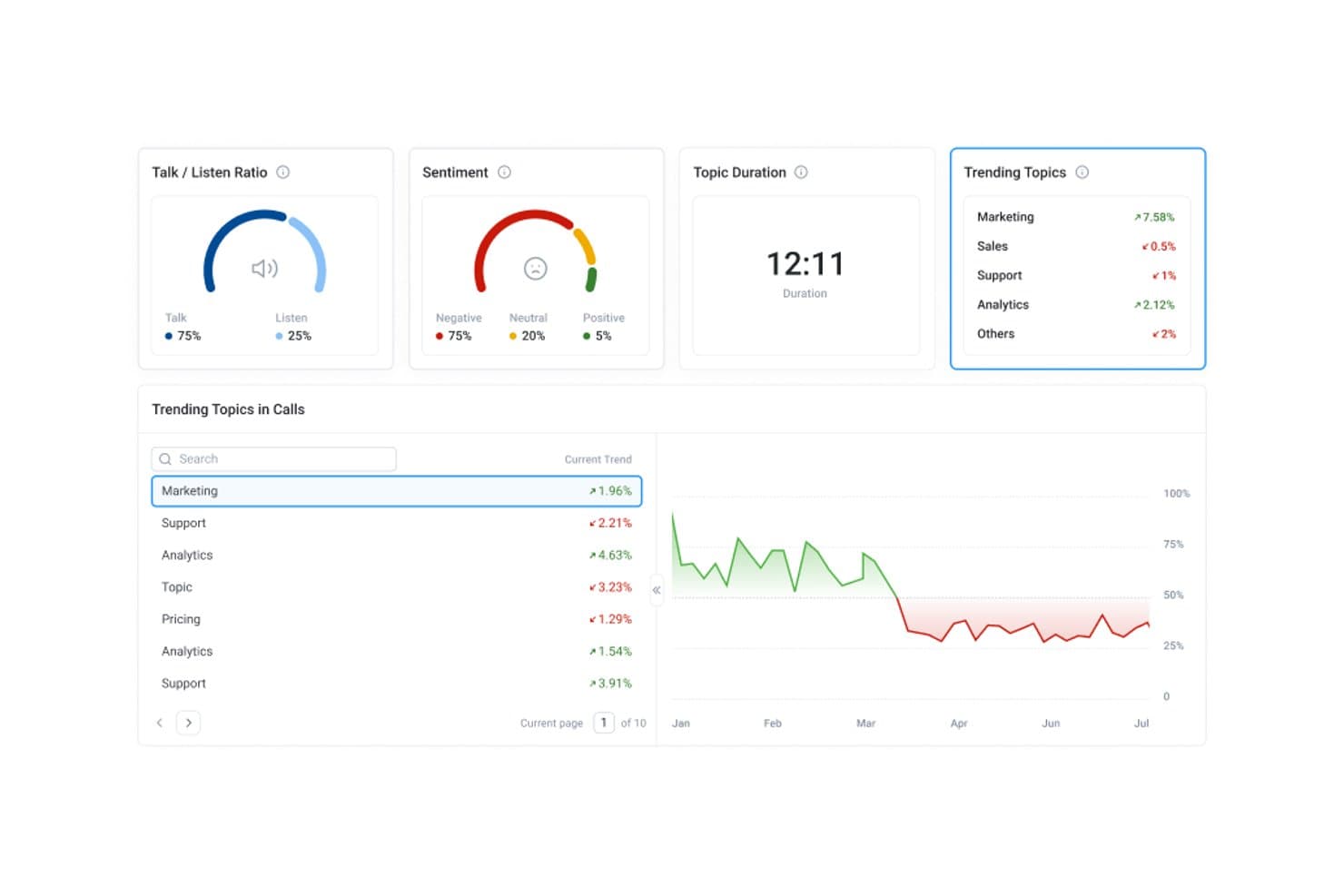
CloudTalk's conversation intelligence shows trending topics, sentiment, and talk ratios for each call. CloudTalk is a cloud-based call center phone system that includes speech analytics, like call transcription, sentiment analysis, topic extraction, and AI call scoring, as part of its telephony platform.
Who Is CloudTalk Best For?
CloudTalk suits SMB and mid-market sales and support teams that want a cloud phone system and don't want to manage a separate speech analytics tool on top of it.
Why I Picked CloudTalk
I picked CloudTalk because it builds speech analytics directly into the phone system your team already uses to make and take calls. Call transcription, sentiment analysis, and topic extraction run on your calls without a separate data pipeline, and AI insights write back to your CRM after every call. I especially like AI Call Scoring, which lets you build custom QA scorecards and automatically score your full call volume instead of reviewing a small sample by hand.
CloudTalk Key Features
CloudTalk also offers tools that help supervisors turn call insights into coaching.
- Live call monitoring and whisper coaching: Supervisors can listen in on active calls and coach agents in real time without the customer hearing.
- AI Trending Topics: Surfaces and tracks recurring themes across your call volume over time.
- Multilingual call analysis: Supports transcription and analysis in 50+ languages for distributed or international teams.
- Call summaries and notes: Generates AI summaries, notes, and tags for each call so agents spend less time on after-call work.
CloudTalk Integrations
Integrations include HubSpot, Salesforce, Zendesk, Freshdesk, Intercom, Microsoft Dynamics 365, Gong, Playvox, Nicereply, and Zapier.
Pros and Cons
Pros:
- AI call scoring for every conversation
- Real-time coaching with live listen and whisper
- Speech analytics built into phone platform
Cons:
- Cannot analyze third-party platform audio
- No real-time agent assist features
 Best for real-time conversation compliance
- Free demo available
- Pricing upon request
Visit WebsiteCustomer Rating:4.7/5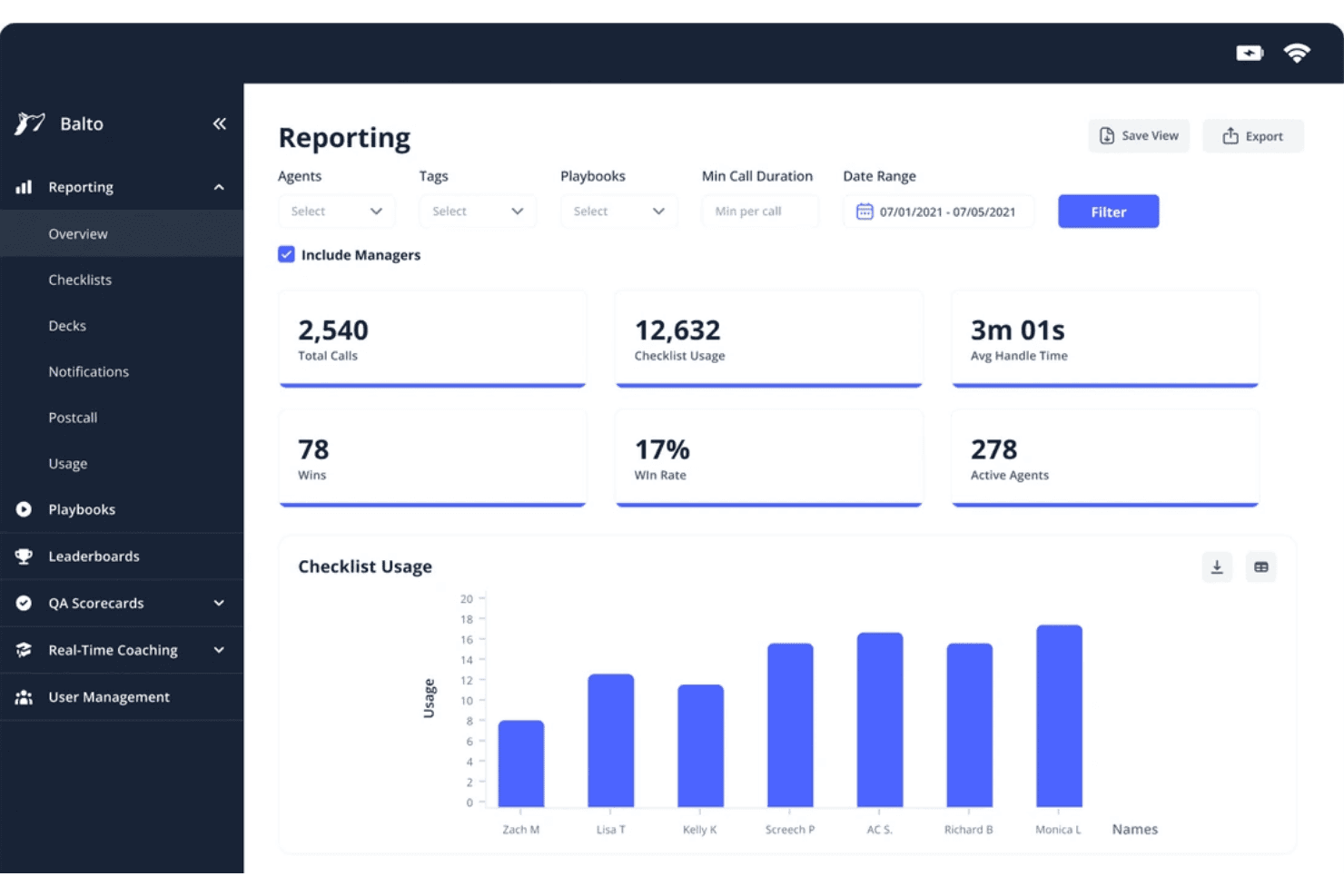
Balto's reporting dashboard tracks call metrics and agent checklist usage. Balto is a real-time contact center AI platform that combines live agent guidance, automated QA, compliance monitoring, and conversation analytics across 100% of voice interactions.
Who Is Balto Best For?
Balto is a strong fit for contact centers in regulated industries like insurance, financial services, and healthcare, where in-call compliance and real-time oversight are non-negotiable.
Why I Picked Balto
Balto earns its spot as one of the best on my shortlist because it's the only platform I've worked with that intercepts compliance risk while a call is still live. I like how the compliance module triggers on-screen agent guidance and supervisor alerts the moment a required disclosure is missed or a risky phrase is detected. I also rely on the Auto-QA module, which scores 100% of calls against configurable scorecards, so my team isn't dependent on random sampling to catch violations.
Balto Key Features
- Multilingual transcription: Transcribes calls in 20+ languages and captures searchable transcripts across diverse accents.
- AI-driven topic discovery: Uses machine learning to categorize and trend call topics and emerging drivers.
- Real-time agent guidance: Delivers contextual prompts, escalation cues, and knowledge base answers as conversations unfold.
- Automated call notes: Generates accurate, configurable summaries and action items for each call without manual input.
Balto Integrations
Balto offers native integrations with Genesys, Five9, NICE CXone, Amazon Connect, Talkdesk, Zoom Contact Center, Salesforce, HubSpot, and more. An API is available for custom integrations.
Pros and Cons
Pros:
- Generates automated call summaries directly into connected CRMs
- Triggers live supervisor alerts during critical conversation moments
- Delivers in-call agent prompts within sub-200ms latency
Cons:
- Requires pre-uploaded custom playbooks for dynamic prompt triggers
- Lacks deep native capabilities for non-voice channels
Learn more about Balto: Best for omnichannel customer sentiment analysis
- Free demo available
- Pricing upon request
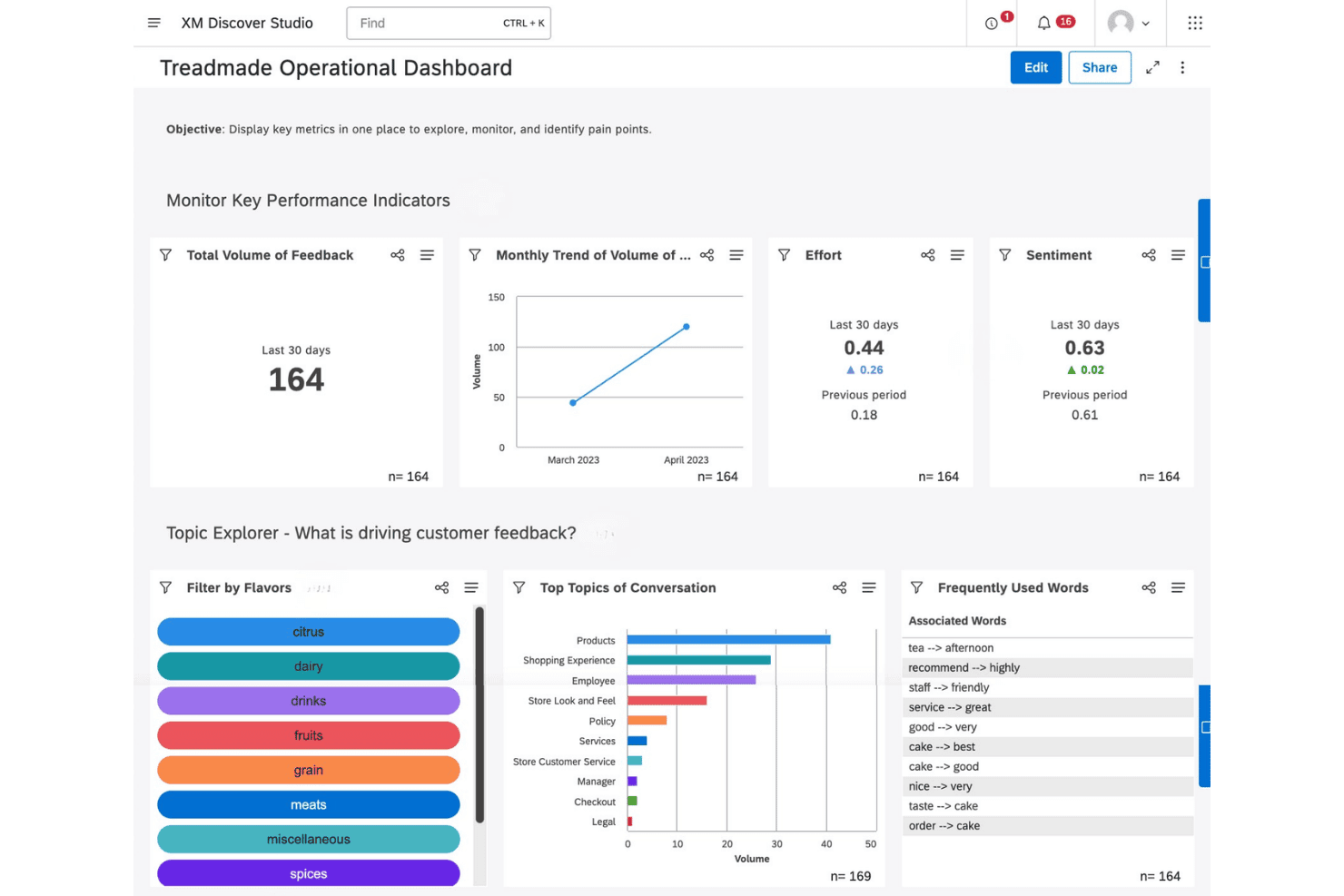
Qualtrics XM Discover offers an operational dashboard with KPIs, topic exploration, and customer feedback analysis tools. Qualtrics XM Discover is a conversational analytics platform that applies NLU-based sentiment, emotion, intent, and effort scoring across call transcripts, chat, email, and other customer interaction channels at enterprise scale.
Who Is Qualtrics XM Discover Best For?
It's a strong fit for enterprise contact center and VoC teams that need to analyze interactions across multiple channels from a single platform.
Why I Picked Qualtrics XM Discover
Qualtrics XM Discover earns its spot on my shortlist because of the depth of its sentiment engine. The platform scores emotion, effort, and intent at the sentence level, not just the call level, which means I can pinpoint exactly where a conversation turned negative. Pair that with Emerging Themes Detection across calls, chat, email, and reviews simultaneously, and I get a genuinely omnichannel view of what's driving customer dissatisfaction.
Qualtrics XM Discover Key Features
- Multichannel connectors: Import and analyze data from calls, chat, email, social media, and review sites in one platform.
- Custom attribute mapping: Map conversation data fields to custom attributes for deeper segmentation and reporting.
- Configurable metric and verbatim alerts: Set up rule-based triggers to notify teams about key events or issues in real time.
- Role-specific dashboards: Create and share dashboards tailored for agents, supervisors, or QA analysts, highlighting the metrics most relevant to each role.
Qualtrics XM Discover Integrations
Qualtrics XM Discover offers native integrations with Genesys Cloud, NICE CXone, Salesforce, Amazon Connect, and Zendesk. An API is available for custom integrations.
Pros and Cons
Pros:
- Strong emotion and acoustic analysis capabilities
- Unsupervised topic discovery without pre-built queries
- Sentence-level sentiment scoring across all channels
Cons:
- Limits dataset interaction uploads to strict monthly quotas
- Consumes annual interaction caps with automatic data purge
Learn more about Qualtrics XM Discover: Best for multichannel AI-based transcript analysis
- Free demo available
- Pricing upon request
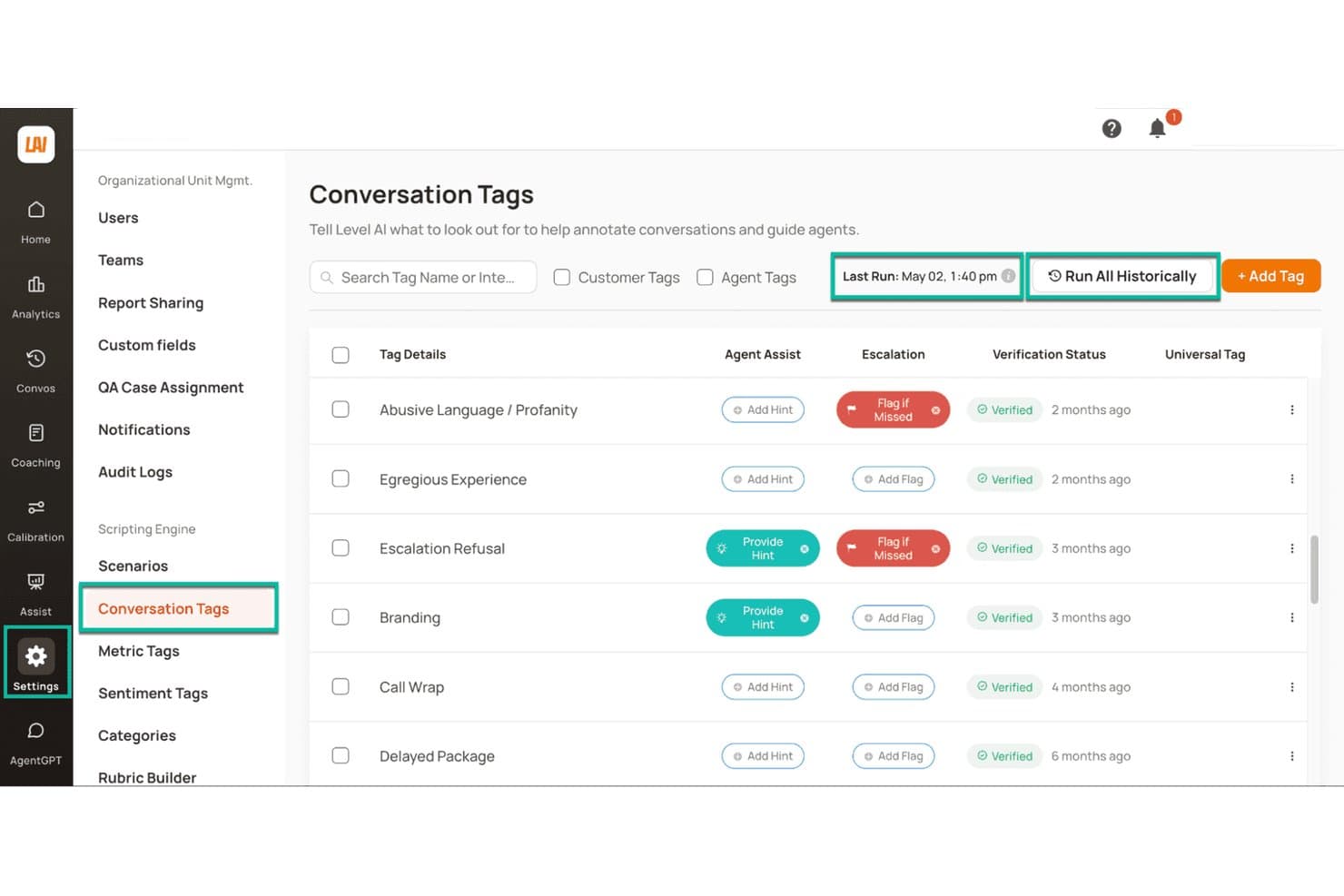
Level AI offers customizable conversation tags for call annotation. Level AI is a contact center conversation intelligence platform that analyzes voice, chat, and email interactions through AI-based transcription, 8-emotion detection, automated QA scoring across 100% of calls, and real-time agent guidance.
Who Is Level AI Best For?
Level AI is a strong fit for mid-market and enterprise contact centers running high volumes of voice, chat, and email interactions across QA, VoC, and operations teams.
Why I Picked Level AI
I picked Level AI as one of the best because it runs the same AI analysis pipeline across voice, chat, and email transcripts. Where most speech analytics tools focus on calls alone, Level AI's 8-emotion detection and iCSAT scoring (which blends sentiment, customer effort, and resolution into a single score) work consistently across every channel. That means I can compare interaction quality across call and chat without switching tools or reconciling separate scoring methodologies.
Level AI Key Features
- Blended QA scoring: Combine automated InstaScore with manual QA audits and calibration tools on the same conversation set.
- Persona-based dashboards: Pre-built reports for roles like QA, coaching, and voice of the customer with drill-down views.
- AI workers for analytics: Purpose-built natural language analyst bots surface custom insights from any conversation dataset.
- PCI and HIPAA redaction: Real-time sensitive data masking for transcripts and screen recordings to support compliance needs.
Level AI Integrations
Level AI offers native integrations with Salesforce, Zendesk, Five9, Genesys, NICE CXone, Amazon Connect, and Slack. An API is available for custom integrations.
Pros and Cons
Pros:
- AI surfaces emerging call drivers without manual queries
- iCSAT scoring without requiring post-call surveys
- Emotion detection spans voice, chat, and email
Cons:
- Semantic AI depth restricted to select primary languages
- Initial QA scorecard configuration requires significant setup time
Learn more about Level AI: Best for proactive topic and trend discovery
- Free plan available
- From $85/user/month
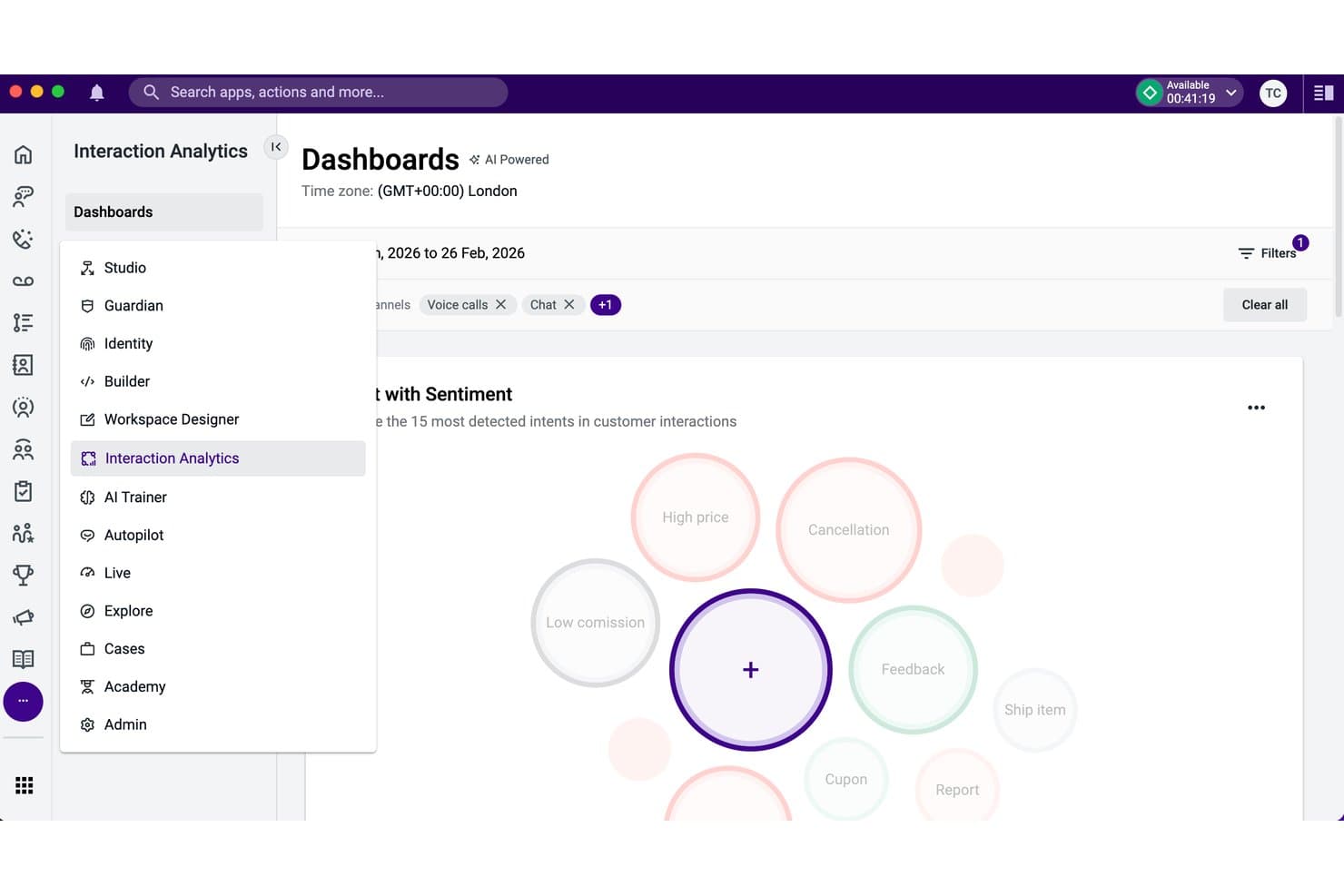
Talkdesk Interaction Analytics offers an AI-powered intent bubble dashboard. Talkdesk Interaction Analytics is an AI-powered speech analytics tool that transcribes 100% of contact center calls and automatically identifies topics, sentiment, and emerging customer trends without manual configuration.
Who Is Talkdesk Interaction Analytics Best For?
It's a strong fit for mid-to-large contact centers where CX and VoC teams need to analyze high call volumes without relying on manual sampling or pre-configured topic lists.
Why I Picked Talkdesk Interaction Analytics
I've included Talkdesk Interaction Analytics in my top picks because it finds topics you didn't know to look for. Most speech analytics tools require you to define keyword lists upfront, but Interaction Analytics uses unsupervised AI to surface emerging patterns across 100% of calls automatically. I also like Automation Mining, which reconstructs agent workflows from conversation and screen recording data to flag automation opportunities before you commit to deploying anything.
Talkdesk Interaction Analytics Key Features
- Transcription cards: Automatically create searchable text records and conversation insights for every customer call.
- Mood insights: Detect and track shifts in customer and agent sentiment throughout each interaction.
- Ring group analysis: Display ring group assignments for every call, including multiple group participation.
- Configurable data retention: Set custom retention periods for call transcripts and analytic data according to compliance needs.
Talkdesk Interaction Analytics Integrations
Talkdesk Interaction Analytics offers native integrations with Salesforce, Microsoft Teams, Slack, Zendesk, and ServiceNow. An API is available for custom integrations.
Pros and Cons
Pros:
- Automates PII redaction on voice transcripts
- Transcribes interactions in over 30 languages
- Uncovers emerging call topics automatically without setup
Cons:
- PII redaction capabilities restricted to English text
- Bundled only in top tier pricing plans
Learn more about Talkdesk Interaction Analytics: Best for AI-driven agent coaching insights
- Free demo available
- Pricing upon request
Visit WebsiteCustomer Rating:4.6/5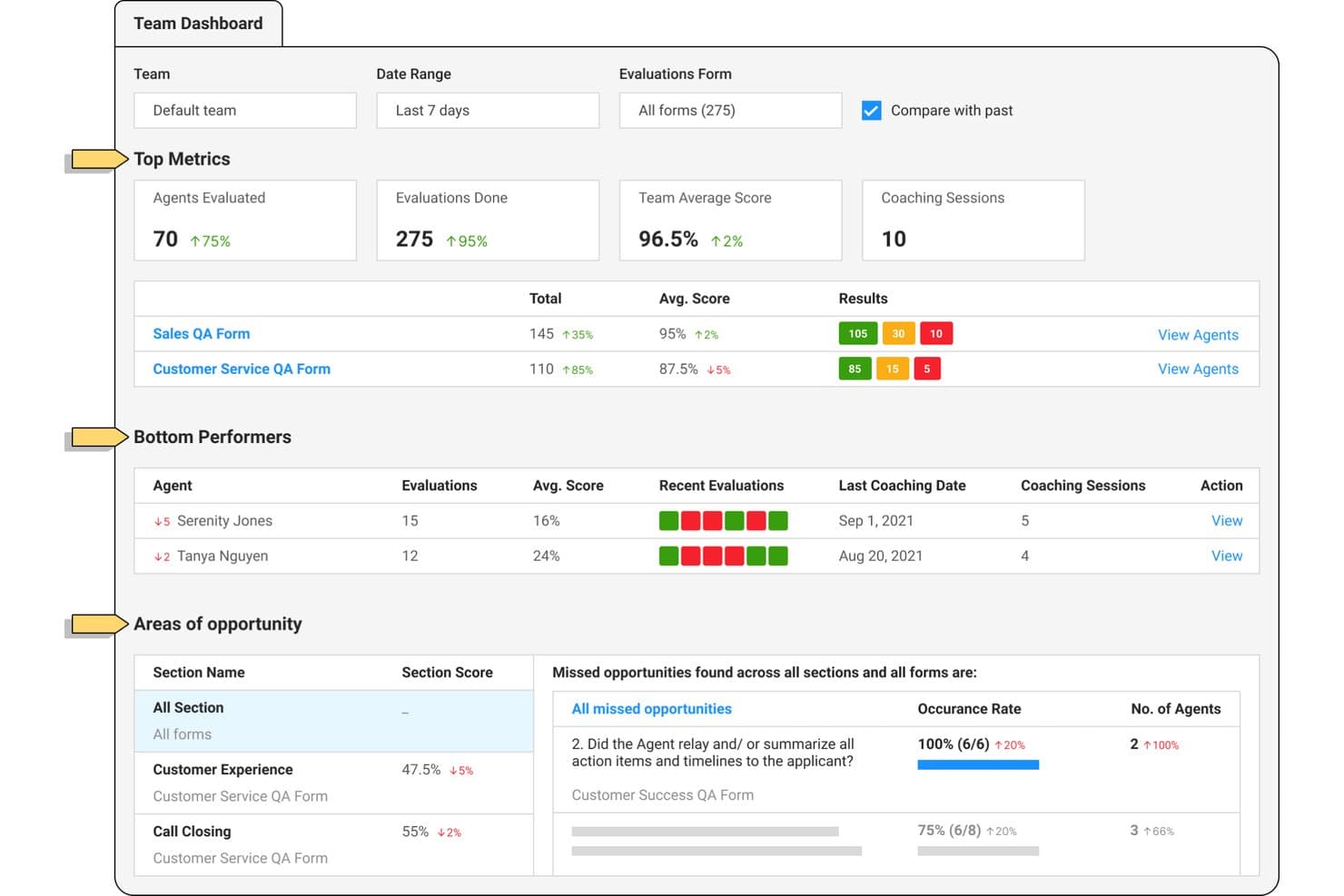
Observe.AI offers a team dashboard for agent performance and coaching. Observe.AI is a contact center AI platform that transcribes and analyzes 100% of voice and digital interactions using automated QA scoring, sentiment analysis, topic detection, and agent coaching workflows.
Who Is Observe.AI Best For?
It's a strong fit for mid-market and enterprise contact centers with dedicated QA teams that need to score and coach agents at scale.
Why I Picked Observe.AI
I picked Observe.AI as one of the best because its Auto QA engine scores 100% of interactions, not just a sample, with evidence-linked transcript moments behind every score. What I find most valuable is how those QA signals feed directly into structured coaching workflows, so agents receive targeted feedback tied to specific conversation moments. The calibration tools between AI and human evaluators also keep scoring consistent across the entire QA team.
Observe.AI Key Features
- Transcription and redaction: Transcribes voice and digital interactions with automatic masking of PII and sensitive data.
- Custom keyword and topic detection: Identifies and trends emerging themes across every call using flexible category creation.
- Omnichannel case stitching: Combines customer conversations from voice, chat, and email into unified case records.
- Audit trails and bias controls: Maintains detailed logs of QA scoring decisions and provides tools to manage evaluator and AI bias.
Observe.AI Integrations
Observe.AI provides native integrations with ActiveCampaign, Adobe Commerce, ADP Workforce Now, Epic, Five9, GitHub, Paylocity, and more. An API is available for custom integrations.
Pros and Cons
Pros:
- Real-time agent assist during live calls
- Coaching workflows tied to specific call moments
- Auto QA scores 100% of call volume
Cons:
- Sentiment signals may misread conversational context
- Transcript accuracy can drop on unclear calls
Learn more about Observe.AI: Best for native omnichannel analytics integration
- Free trial available
- From $75/user/month (billed annually)
Visit WebsiteCustomer Rating:4.4/5
Genesys Cloud CX offers a multi-panel agent UI with simultaneous email interaction, customer journey timeline, canned responses, and AI-powered wrap-up codes in a single workspace. Genesys Cloud CX is an AI-powered contact center platform that unifies voice transcription, sentiment analysis, topic detection, automated QA scoring, and real-time agent guidance across voice and digital channels in a single native environment.
Who Is Genesys Cloud CX Best For?
Genesys Cloud CX is a strong fit for enterprise contact centers that need speech analytics, QA, and omnichannel routing managed within a single platform.
Why I Picked Genesys Cloud CX
Genesys Cloud CX earns its spot as one of the best on my shortlist because speech and text analytics live natively inside the same platform that handles routing, WEM, and digital messaging. When I run Topic Miner across voice calls, the sentiment and topic trends connect directly to interaction data from chat, email, and social. I also like that customer sentiment and acoustic analysis are both native, so there's no stitching together a third-party speech tool with a separate QA layer.
Genesys Cloud CX Key Features
- Agent empathy analysis: Detects and classifies agent behaviors that impact customer experience during calls.
- Customizable QA scorecards: Lets you design and manage call evaluation forms to fit your contact center's specific needs.
- Content search with topic and sentiment filters: Enables quick location of calls with specific phrases, topics, or sentiment trends for targeted reviews.
- Low-latency real-time transcription: Provides near-instant voice-to-text conversion for live monitoring or post-call analysis.
Genesys Cloud CX Integrations
Genesys Cloud CX offers native integrations with Salesforce, Zendesk, Microsoft Teams, Zoom, Oracle, ServiceNow, SAP, HubSpot, and has native integrations across the Microsoft ecosystem, including Microsoft 365 and Azure. An API is available for custom integrations.
Pros and Cons
Pros:
- AI-driven topic discovery without pre-built queries
- Real-time agent guidance during live calls
- Speech analytics and QA are fully native
Cons:
- Full analytics feature access consumes AI tokens
- Core speech analytics limited to higher tiers
Learn more about Genesys Cloud CX: Best for cloud-native real-time analytics at scale
- Free demo available
- From $110/agent/month (proactive AI extra)
Visit WebsiteCustomer Rating:4.3/5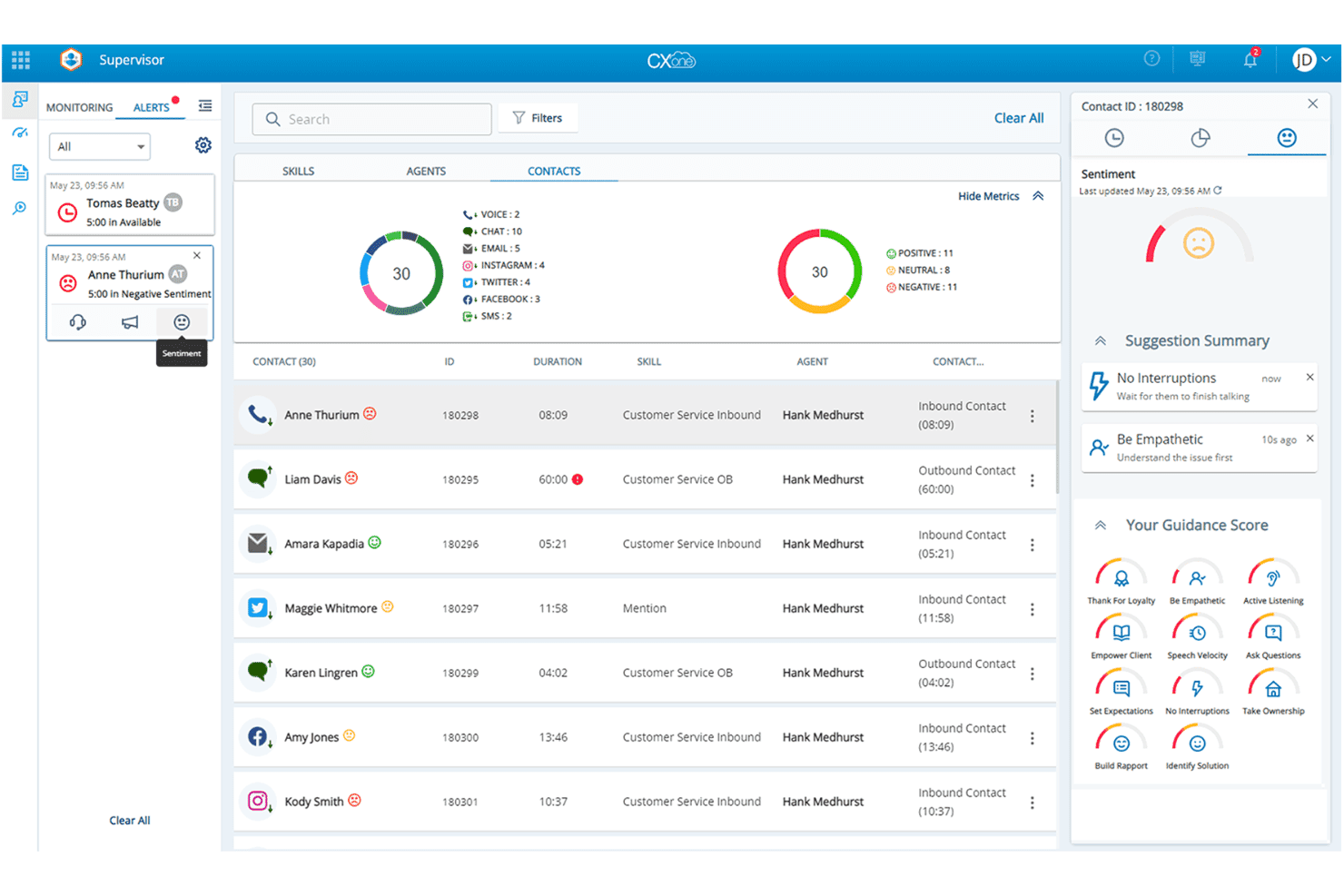
NICE CXone offers a supervisor dashboard with real-time contact monitoring, sentiment analysis, and AI-powered agent guidance scores. NiCE CXone is an AI-first contact center platform with built-in speech analytics, automated call scoring, real-time agent guidance, sentiment detection, and topic analysis across voice and digital interactions.
Who Is NiCE CXone Best For?
NiCE CXone is a strong fit for mid-market to enterprise contact centers that need analytics at high interaction volumes across voice and digital channels.
Why I Picked NiCE CXone
NiCE CXone earns its spot on my shortlist because of how it handles real-time speech analysis at genuine enterprise scale. I love that CXone Copilot processes live conversations and surfaces next-best-action guidance to agents mid-call, not after the fact. The platform's Enlighten AI also combines acoustic signals like volume and pitch with linguistic models simultaneously, which gives its sentiment detection a depth most tools don't match.
NiCE CXone Key Features
- Automated speech-to-text transcription: Converts live or recorded calls into searchable text across 30+ languages with high accuracy and redaction options.
- AI-driven topic modeling: Uses unsupervised algorithms to surface emerging conversation trends and root causes without manual keyword setup.
- Configurable QA scorecards: Lets teams auto-score all calls using customizable forms that reflect internal quality and compliance standards.
- Multi-channel analytics coverage: Analyzes calls, chat, email, and other contact center channels in one unified analytics workspace.
NiCE CXone Integrations
NiCE CXone offers native integrations with Salesforce, Zendesk, Microsoft Dynamics 365, ServiceNow, Oracle, and Zoom, and provides an API for custom integrations.
Pros and Cons
Pros:
- Built for high-volume enterprise call centers
- Scores 100% of calls without sampling
- Real-time agent guidance fires mid-call
Cons:
- Complex routing logic can increase admin workload
- Advanced AI capabilities are spread across higher tiers
Learn more about NiCE CXone: Best for customizable QA scorecards and dashboards
- Free demo available
- Pricing upon request
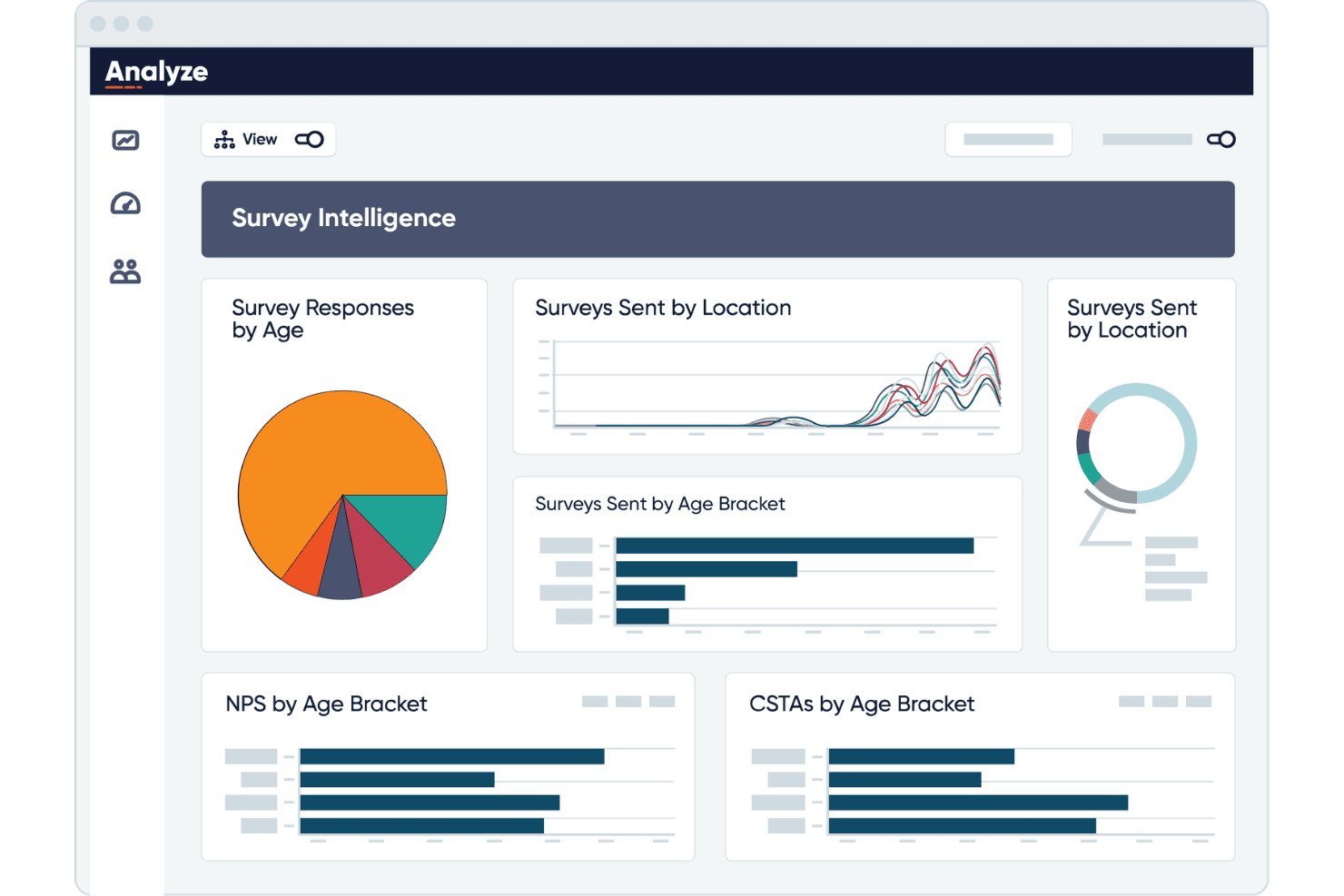
CallMiner visualizes survey data by age, location, and NPS scores. CallMiner Eureka is a conversation intelligence platform that uses AI to transcribe, score, and analyze 100% of voice and digital customer interactions across omnichannel contact center environments.
Who Is CallMiner Best For?
CallMiner is a strong fit for mid-size to enterprise contact centers with 60+ agents in regulated industries like financial services and healthcare.
Why I Picked CallMiner
CallMiner earns its spot as one of the best on my shortlist because its Coach and Visualize modules give QA teams genuinely configurable control over how calls get scored and reported. I like that you can build scorecards around specific behaviors, like compliance language or empathy markers, and surface those scores in drag-and-drop dashboards. The Solution Catalogue adds pre-built scoring templates you can customize, cutting the time it takes to stand up a QA program at scale.
CallMiner Key Features
- Real-time agent assist: Provides live speech analysis and on-screen prompts to agents during customer calls.
- Predictive topic discovery: Uses unsupervised AI to automatically surface emerging call drivers and complaint trends.
- PII/PCI automated redaction: Automatically removes sensitive information from audio recordings and transcripts for compliance.
- Multi-language transcription: Supports call transcription and analysis in multiple languages and dialects, including speaker separation.
CallMiner Integrations
CallMiner offers native integrations with Genesys, Amazon Connect, Five9, NICE, Salesforce, and more. An API is available for custom integrations.
Pros and Cons
Pros:
- Pre-built industry query libraries speed deployment
- Acoustic emotion detection beyond text analysis
- Scores 100% of calls automatically
Cons:
- UI feels dated compared to newer competitors
- Initial implementation typically takes several months
Learn more about CallMiner: Best for advanced emotion and sentiment detection
- Free demo available
- Pricing upon request
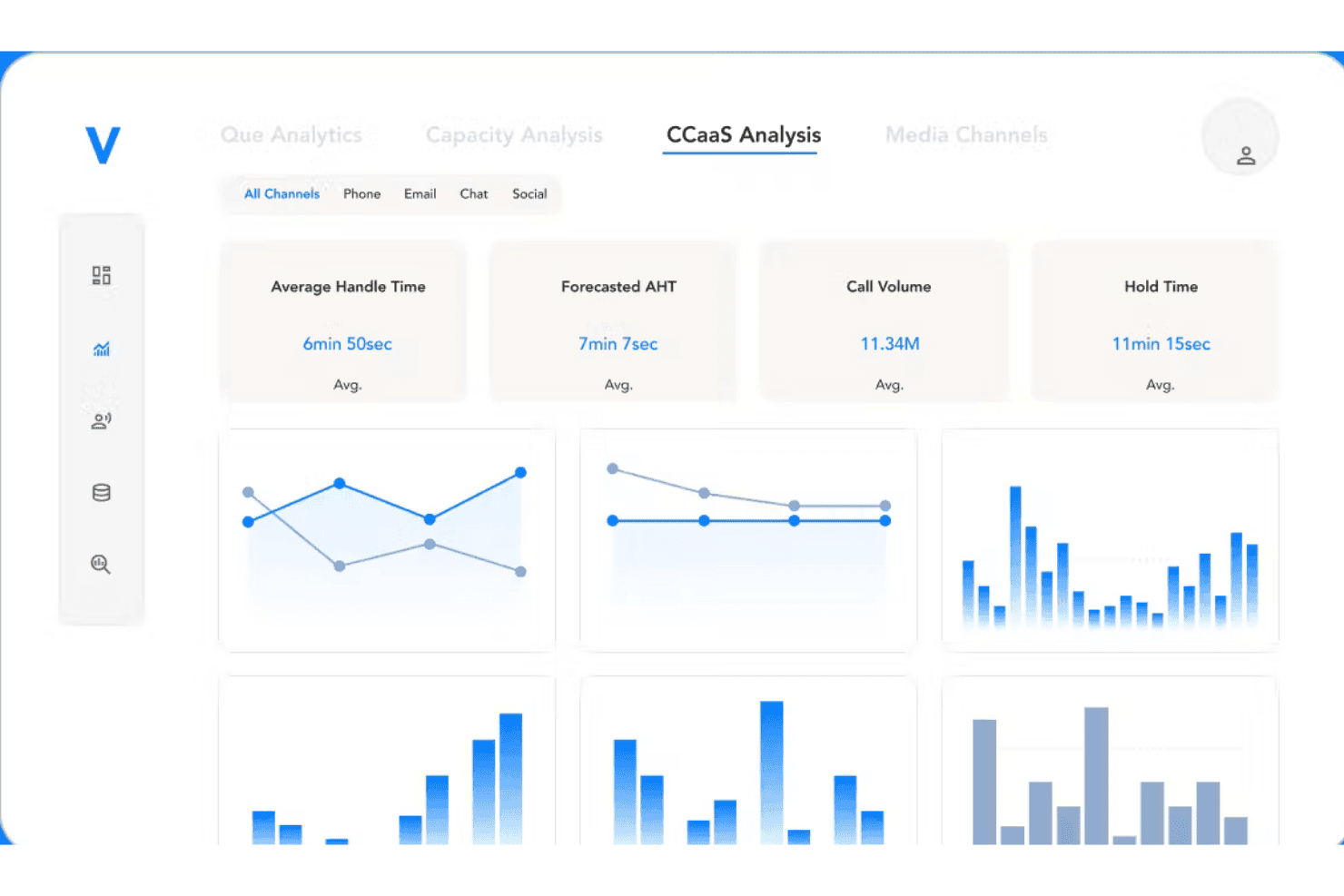
Verint Speech Analytics tracks call volume, handle time, and channel metrics in one dashboard. Verint Speech Analytics is an enterprise-grade call center speech analytics platform that applies a suite of AI-powered bots to automatically transcribe, categorize, score, and surface sentiment insights across 100% of voice and digital customer interactions.
Who Is Verint Speech Analytics Best For?
It's a natural fit for large enterprise contact centers in industries like insurance, healthcare, and financial services that have dedicated analytics teams.
Why I Picked Verint Speech Analytics
Verint Speech Analytics earns its spot on my shortlist because of how deeply the Sentiment Bot is woven into the platform. It scores every call using both acoustic and linguistic signals, meaning it picks up on tone and word choice together, not just surface-level keywords. I also like that the unified visual player layers emotion scores, transcripts, and QA evaluations in a single view, so I can immediately pinpoint exactly where a call turned negative.
Verint Speech Analytics Key Features
- Exact Transcription Bot: Converts all call audio to searchable text with market-leading accuracy and automated redaction of sensitive information.
- Genie Bot: Lets you query unstructured voice data using generative AI for immediate answers to business questions.
- Unified visual player: Shows transcripts, emotions, topics, screen recordings, and QA evaluations in a synchronized, interactive view.
- Salesforce Service Cloud integration: Connects analytics insights with CRM records to enrich case management and performance tracking.
Verint Speech Analytics Integrations
Verint Speech Analytics offers native integrations with Genesys Cloud CX, Amazon Connect, and more. An API is available for custom integrations.
Pros and Cons
Pros:
- Combines root cause analysis across call subsets
- Performs software-based speaker separation on mono call recordings
- Auto-categorizes call topics without upfront manual tagging
Cons:
- Scorecards and eLearning coaching require separate add-on modules
- Requires Verint Text Analytics for non-voice messaging channels
Learn more about Verint Speech Analytics:
Annen programvare for taleanalyse i kontaktsentre
Her er noen flere alternativer for programvare for taleanalyse i kontaktsentre som ikke kom med på kortlisten min, men som likevel er verdt å se nærmere på:
- 11Five9 Interaction AnalyticsBest for reporting across voice and digital
- 12Amazon Connect CustomerBest for integration with AWS infrastructure
- 13CrestaBest for live agent assist next-action guidance
- 14MaestroQABest for custom quality assurance analytics
- 15DialpadBest for live transcript search during calls
- 16ConvinBest for real-time coaching recommendations
- 17AmplifAIBest for AI-driven agent performance insights
- 18Enthu.AIBest for automated QA with configurable workflows
- 19CallFinderBest for PCI and HIPAA-compliant speech redaction
- 20Medallia SpeechBest for multi-language transcription & sentiment
How I Evaluate Call Center Speech Analytics Software
I evaluate these platforms in two layers: the core functionality QA teams and CX leaders depend on, and the differentiators—like emotion detection depth or real-time agent assist—that set tools apart.
Core Functionality (Table Stakes For This List)
When I'm selecting tools for my list, I rank each one on a scale from 0 (does not offer the functionality) to 5 (excels in this area) for each core functionality listed below. I then calculate the tool's total score into a percentage, using 65% as a benchmark to help assess its overall fit for the list.
- Speech-to-Text Transcription: I check for accuracy across accents and telephony-grade audio, plus speaker separation that correctly distinguishes agent from customer turns.
- Sentiment & Emotion Analysis: Beyond basic positive/negative flags, I look for turn-level scoring that captures shifts in tone mid-call—like frustration building before an escalation.
- Topic & Keyword Detection: AI-driven topic discovery matters here, especially the ability to surface emerging call drivers without requiring analysts to build queries from scratch.
- Automated Call Scoring & QA: I evaluate whether the platform can score 100% of calls against configurable scorecards, replacing the old model of supervisors sampling a handful per week.
- Agent Coaching Insights: Strong tools connect conversation data to coaching workflows, flagging behaviors like long hold times or missed compliance phrases for targeted follow-up.
- Real-Time Analysis & Alerts: I look for live agent guidance that surfaces prompts mid-call—such as compliance reminders or next-best-action suggestions when sentiment drops.
Once I have a list of tools that meet the criteria, I consider what sets each platform apart.
Differentiating Factors (What Sets Vendors Apart)
Here's how I compare and contrast different vendors:
Standout Features
Real-time agent assist is a major differentiator—I look for platforms that push live prompts and compliance reminders to agents mid-call, not just flag issues after the fact. Generative AI call summaries also save significant after-call work by auto-drafting dispositions and extracting follow-up actions. Predictive topic discovery stands out when it surfaces emerging call drivers and churn signals without analysts needing to build queries first.
Beyond Features
Integration depth matters—I check whether a platform connects bi-directionally with your existing CCaaS and CRM so transcripts carry full customer context into tools like Salesforce or Zendesk. Compliance is equally important, especially automated PII and PCI redaction for teams in regulated industries like healthcare or finance. I also evaluate multilingual transcription accuracy, since contact centers serving diverse populations need reliable results across accents and telephony-grade audio quality.
Slik velger du programvare for taleanalyse i et kontaktsenter
Lurer du på hvordan du kan snevre inn utvalget til den beste taleanalyseløsningen for drifts-, samsvars- og rapporteringsbehovene i kontaktsenteret ditt?
| Hvis prioriteten din er … | Se etter … |
|---|---|
| Hvis prioriteten din er …Automatisert og nøyaktig kvalitetssikring i stor skala | Se etter …100 % automatisk poenggiving med evalueringsskjemaer som kan tilpasses |
| Hvis prioriteten din er …Samsvar og risikoreduksjon i sanntid | Se etter …Direkte assistanse for agenter og varsler under samtaler |
| Hvis prioriteten din er …Grundig analyse av nye kundeopplevelsesproblemer | Se etter …Prediktiv oppdagelse av emner og analyse av bakenforliggende årsaker |
| Hvis prioriteten din er …Sømløs integrasjon med CCaaS-/CRM-verktøy | Se etter …Toveiskoblinger for det sentrale kontaktsenteret ditt |
| Hvis prioriteten din er …Høy nøyaktighet ved transkribering | Se etter …Støtte for flere språk, lav feilrate for ord og håndtering av aksenter |
Slik vurderer du kortlisten din
- Be om en demonstrasjon fra virkeligheten: Se plattformen transkribere og gi poeng til minst fem varierte samtaler som gjenspeiler samtalevolumet og aksentene dine.
- Opprett en sak for integrasjonstesting: Send inn en forespørsel om å koble verktøyet til CCaaS- eller CRM-løsningen din, og krev dokumentasjon på at transkripsjonsfeltene vises i en etterfølgende plattform.
- Be om en pakke med samsvarsdokumentasjon: Be om dokumentasjon for SOC 2 Type II, PCI eller HIPAA, og vurder funksjonene for automatisk sladding selv.
- Test samtalescenarier med flere språk eller mye støy: Gjennomfør minst ti samtaler med ulike aksenter eller dårlig lyd for å kontrollere den oppgitte nøyaktigheten.
- Avveining du bør vurdere: Finn ut om du trenger maksimal veiledning i sanntid og grundig analyse av bakenforliggende årsaker, eller strømlinjeformet rapportering i grupper med grunnleggende arbeidsflyter for samsvar.
Hva er programvare for taleanalyse i kontaktsentre?
Programvare for taleanalyse i kundesentre transkriberer og analyserer automatisk talesamtaler mellom kunder og agenter for å hente ut innsikt om kvalitet, stemning og samsvar. Denne programvaren er utviklet for å hjelpe team med å identifisere kundebekymringer, følge med på agentatferd og avdekke trender med mindre manuell gjennomgang. Ved å konvertere samtaler til søkbare data muliggjør den kvalitetssikring, optimalisering av kundeopplevelsen og mer datadrevet veiledning av ansatte i driften av kontaktsentre.
Funksjoner
Her er de viktigste funksjonene all god programvare for taleanalyse i kundesentre bør ha:
- Automatisk transkripsjon fra tale til tekst: Bruker automatisk talegjenkjenning til å fange opp talte samtaler i sanntid eller etter samtalen, og gjør taledata om til søkbar, strukturert tekst for analyse og rapportering.
- Gjenkjenning av stemning og følelser: Bruker språkbehandling og stemmesignaler til å vurdere kundens og agentens sinnsstemning, slik at det blir enklere å tolke tilbakemeldinger fra kunder og fange opp frustrasjon eller tilfredshet under samtaler.
- Identifisering av temaer og nøkkelord: Bruker språkforståelse til å kategorisere samtaler basert på tilbakevendende temaer, uttrykk, kundeintensjoner eller problemer på tvers av store datamengder.
- Automatisk kvalitetspoenggiving: Evaluerer samtaler opp mot tilpassbare vurderingsskjemaer og støtter konsekvent kvalitetsoppfølging uten å være helt avhengig av manuelle vurderinger fra ledere.
- Veiledning av agenter i sanntid: Gir agentene direkte forslag, påminnelser eller veiledning under samtaler, noe som bidrar til å forbedre løsningen ved første kontakt og agentenes samlede prestasjoner.
- Verktøy for samsvar og maskering: Maskerer automatisk sensitiv informasjon, som kredittkortnumre eller personopplysninger, fra opptak og transkripsjoner for å støtte krav til personvern.
- Dashbord for samtaletrender: Visualiserer taleanalyse og trender, for eksempel årsaker til samtaler, gjennomsnittlig behandlingstid, endringer i stemning eller behov for veiledning over tid.
- Flerspråklig støtte: Gjør det mulig å analysere samtaler på flere språk, slik at team og kunder i ulike regioner og med ulik språklig bakgrunn kan ivaretas.
- Integrasjonsmuligheter: Kobler seg til ledende CCaaS-, CRM- eller arbeidsstyringssystemer for å berike samtaleposter med kundeinnsikt og muliggjøre rapportering i en lukket prosess.
- Analyse av grunnårsaker: Bruker kunstig intelligens til å avdekke de underliggende årsakene til gjentatte henvendelser, eskaleringer, kundefrafall eller negative kundeopplevelser.
Fordeler
Implementering av programvare for taleanalyse i kundesentre gir flere fordeler for teamet og virksomheten din. Her er noen av fordelene du kan se frem til:
- Full samtaledekning for kvalitetssikring: Automatisk poenggiving av 100 % av samtalene sikrer at kvalitets- og samsvarsstandarder konsekvent oppfylles i hele virksomheten.
- Raskere identifisering av grunnårsaker: AI-drevet temagjenkjenning og dashbord for trender avdekker de underliggende årsakene til gjentatte henvendelser og nye kundeproblemer.
- Handlingsrettet veiledning av agenter: Tilbakemeldinger i sanntid og målrettet innsikt i prestasjonsstyring hjelper ledere med å lage mer relevante veiledningsplaner for hver agent.
- Forbedret kundeopplevelse: Stemningsanalyse kan avdekke misnøye, mens trender i kundetilfredshetspoeng hjelper team med å forstå den helhetlige kundeopplevelsen.
- Sikret samsvar og personvern: Automatiske maskeringsverktøy beskytter sensitiv kundeinformasjon i transkripsjoner og opptak, og støtter regulatoriske krav.
- Mer effektiv drift: Taleanalyse kan avdekke mønstre som påvirker måltall som gjennomsnittlig behandlingstid og løsning ved første kontakt, og hjelper team med å identifisere forbedringsområder.
- Bedre integrasjon med kjernesystemer: Sømløse tilkoblinger til CCaaS- og CRM-plattformer beriker samtaleposter med kundekontekst og gjør rapporteringen mer omfattende.
Kostnader og priser
Ved valg av programvare for taleanalyse i kundesentre er det nødvendig å forstå de ulike prismodellene og tilgjengelige abonnementene. Kostnadene varierer ut fra funksjoner, teamstørrelse, tillegg og mer. Tabellen nedenfor oppsummerer vanlige abonnementer, gjennomsnittsprisene deres og typiske funksjoner som er inkludert i programvareløsninger for taleanalyse i kundesentre:
Sammenligningstabell for abonnementer for programvare for taleanalyse i kundesentre
| Plantype | Gjennomsnittspris | Vanlige funksjoner |
|---|---|---|
| PlantypeGratisabonnement | Gjennomsnittspris$0 | Vanlige funksjonerBegrenset transkripsjon, grunnleggende søk etter nøkkelord, enkel sentimentanalyse og begrenset lagring. |
| PlantypePersonlig abonnement | Gjennomsnittspris$30–$60/bruker/måned | Vanlige funksjonerHøyere transkripsjonsgrenser, grunnleggende kvalitetssikringspoengkort, sentiment- og emneanalyse samt e-poststøtte. |
| PlantypeBedriftsabonnement | Gjennomsnittspris$80–$150/bruker/måned | Vanlige funksjonerAutomatisert kvalitetssikring, emnetrender, støtte for flere språk, integrasjoner med CCaaS og CRM samt avansert analyse. |
| PlantypeStorbedriftsabonnement | Gjennomsnittspris$200–$300/bruker/måned | Vanlige funksjonerTilpassede arbeidsflyter, sanntidsstøtte for agenter, prediktiv analyse, dedikert onboarding og forbedrede verktøy for samsvar. |
Vanlige spørsmål
Her er noen svar på vanlige spørsmål om programvare for taleanalyse i callsentre:
Hvor nøyaktig er programvare for taleanalyse i callsentre ved ulike aksenter og samtaler med mye støy?
Nøyaktigheten avhenger av talegjenkjenningsmodellene til hver plattform, men mange håndterer nå en rekke aksenter og telefonilyd takket være akustiske modeller som er tilpasset bransjen, samt støyreduksjon. Test transkripsjonskvaliteten ved hjelp av ekte opptak fra teamet ditt for å etablere realistiske forventninger.
Kan du bruke programvare for taleanalyse i callsentre sammen med den eksisterende CCaaS- eller CRM-løsningen din?
Ja, de fleste løsninger tilbyr koblinger til populære CCaaS- og CRM-plattformer, slik at du kan berike samtaletranskripsjoner, utløse arbeidsflyter og holde kontaktoppføringer oppdatert uten manuelle opplastinger eller omveier.
Er det mulig å automatisere kvalitetssikring og samsvarsovervåking for alle samtaler?
Ja, moderne plattformer automatiserer kvalitetssikringsevalueringer og samsvarskontroller ved hjelp av tilpassbare poengkort, redigerer sensitiv informasjon og vurderer 100 % av samtalene med hensyn til kvalitets- og risikofaktorer.
Hvilke personvernproblemer er forbundet med programvare for taleanalyse i callsentre?
Personvern er avgjørende – se etter automatisk redigering av personopplysninger eller betalingsdata, alternativer for datalagring basert på region og sterke tilgangskontroller for å oppfylle globale krav til samsvar.
Hvordan støtter programvare for taleanalyse i callsentre team som betjener flere språk?
Mange plattformer tilbyr flerspråklig transkripsjon og analyse med støtte for de viktigste verdensspråkene. Dette hjelper deg med å overvåke agentenes prestasjoner og kundenes sentiment i alle regionene teamet ditt betjener.