Programvare for callsentre hjelper supportteam med å håndtere store mengder taleinteraksjoner raskere, mer strukturert og med bedre kontroll. Den er utviklet for å redusere ventetider, forbedre samtaleruting og gi agentene verktøyene de trenger for å løse problemer raskt.
Med omfattende erfaring med å evaluere CX-verktøy basert på funksjonalitet, brukervennlighet og avkastning på investeringen har jeg identifisert den beste programvaren for callsentre for konsekvent håndtering av inn- og utgående samtaler i stor skala. Dette hjelper deg med å finne den riktige programvaren for callsentre for teamet ditt, slik at du kan levere bedre kundeservice uten å tilføre kompleksitet.
Why Trust Our Software Recommendations
6,700+
Reviews
20
Industry experts
16+
Evaluation factors
14
Years
Our team has been testing and reviewing software since 2012. As CX leaders ourselves, we know how difficult—and important—it is to choose the right software.
For this guide, we evaluated tools using hands-on testing and independent research, scoring tools using our selection criteria.
Our reviews reflect our human editorial judgment, not a sales pitch.
 Gui DrusinaCreative Director
 Tim FisherVP of AI
Sammenligningstabell for programvare til callsentre
Denne sammenligningstabellen oppsummerer prisopplysningene for mine beste utvalgte programvaresystemer for callsentre:
| Tool | Best For | Trial Info | Price | ||
|---|---|---|---|---|---|
| 1 | Best for phone, SMS, video, & email customer support | Free demo available | From $15/user/month (billed annually) | Website | |
| 2 | Best for call monitoring features | Free trial available | From $30/license/month (billed annually) | Website | |
| 3 | Best for automation-driven processes | Free demo available | From $30/user/month (billed annually) | Website | |
| 4 | Best for global call centers | 14-day free trial | From $25/user/month (billed annually) | Website | |
| 5 | Best for a scalable and versatile solution | Free demo available | From $25/month (billed annually) | Website | |
| 6 | Best with enterprise-grade security and compliance | Free demo available | From $110/agent/month (proactive AI extra) | Website | |
| 7 | Best for managing high call volumes | Free demo available | From $119/seat/month | Website | |
| 8 | Best with unified journey management | Free demo available | From $75/user/month (billed annually) | Website | |
| 9 | Best for easy deployment and administration | Free demo available | Pricing upon request | Website | |
| 10 | Best with deep CRM integration capabilities | Free demo available | Pricing upon request | Website |


Anmeldelser av den beste programvaren for callsentre
Jeg har laget detaljerte sammendrag av mine beste valg av programvare for callsentre og forklart hvorfor jeg inkluderte hvert system på denne listen.
 Best for phone, SMS, video, & email customer support
- Free demo available
- From $15/user/month (billed annually)
Visit WebsiteCustomer Rating:4.5/5
Track, manage, and prioritize customer tickets in Nextiva’s support software. If your team needs a unified platform for voice, video, and call center operations, Nextiva brings these channels together in one place. It’s a strong fit for growing businesses that want to manage customer calls, team messaging, and collaboration from a single dashboard. Nextiva helps you centralize communications and streamline customer interactions without juggling multiple tools.
Who is Nextiva Best For?
Nextiva supports customer experience and IT leaders at small to mid-sized businesses that want to manage phone, SMS, video, and email support in one system. It fits service-oriented organizations operating across the U.S. that need a unified communications platform for distributed teams.
Why I Picked Nextiva
Nextiva stands out for its unified communications approach, which is especially valuable for businesses that want to manage all customer interactions in one place. The platform combines voice, video, SMS, and team chat, so your agents can switch between channels without losing context. I appreciate how Nextiva’s call center dashboard brings together call routing, queue management, and real-time monitoring. This setup helps teams handle high volumes of customer inquiries while keeping internal collaboration seamless.
Nextiva Key Features
Some other features in Nextiva that are especially useful for call center teams include:
- Auto Attendant: Set up automated greetings and call routing for incoming calls.
- Call Recording: Record and store calls for quality assurance and training.
- Analytics and Reporting: Access detailed call metrics and performance dashboards.
- CRM Integration: Connect customer data from your CRM directly to the call center interface.
Nextiva Integrations
Integrations are not publicly listed.
Pros and Cons
Pros:
- Visual call flow designer for IVR setup
- Built-in team messaging and video meetings
- Voicemail transcription available for missed calls
Cons:
- International calling rates can be unpredictable
- Call recording limited to Enterprise plan
 Best for call monitoring features
- Free trial available
- From $30/license/month (billed annually)
Visit WebsiteCustomer Rating:4.3/5
Track call performance in real-time through Aircall’s analytics dashboard. If you need a call center platform that connects quickly with your existing CRM and helpdesk tools, Aircall is worth a look. It’s built for fast-moving sales and support teams that want to launch new phone lines and integrations without IT delays. Aircall helps you centralize customer conversations and automate call logging, so your team can focus on the next interaction.
Who is Aircall Best For?
Customer support managers, contact center leaders, and sales operations teams at small to mid-sized organizations that need live call monitoring and coaching as part of their phone system. It suits companies operating distributed support or sales teams that require centralized visibility into call activity and real-time supervision across channels.
Why I Picked Aircall
What stands out about Aircall is how quickly you can get a new call center up and running, even if your team is distributed or remote. The platform’s fast setup process lets you create new numbers and onboard agents in minutes, which is ideal for businesses that need to scale or pivot quickly. I appreciate how Aircall’s deep CRM integrations automatically sync call data and notes, so your team always has the latest customer context at their fingertips. These features make Aircall a strong choice for teams that want to minimize downtime and keep customer records unified across channels.
Aircall Key Features
Some other features in Aircall that are especially useful for call center teams include:
- Call Whispering: Supervisors can listen in and provide guidance to agents during live calls without the customer hearing.
- Shared Call Inbox: Teams can view, assign, and manage missed calls and voicemails from a central dashboard.
- Power Dialer: Automatically dials through lists of numbers to speed up outbound calling campaigns.
- Warm Transfer: Agents can speak with a colleague before transferring a call, ensuring smoother handoffs.
Aircall Integrations
Integrations include Salesforce, HubSpot, Intercom, Zendesk, Pipedrive, Microsoft Dynamics, Slack, Shopify, Freshdesk, and Zoho CRM.
Pros and Cons
Pros:
- Excellent customer support
- Accessible on multiple devices
- Deep communication insights
Cons:
- No built-in workforce management tools
- Loudspeaker functionality is unpredictable
 Best for automation-driven processes
- Free demo available
- From $30/user/month (billed annually)
Visit WebsiteCustomer Rating:5/5
Visualize call center performance in a centralized dashboard. RingCentral Contact Center offers a cloud-based platform that integrates AI-driven insights and automation to enhance customer interactions. It appeals to industries ranging from retail to healthcare, where efficient customer service is paramount. By providing omnichannel support across voice, messaging, and social media, RingCentral helps businesses streamline communication and optimize agent performance, thus addressing challenges such as managing high call volumes and improving customer satisfaction.
Who is RingCentral Contact Center Best For?
Customer service and support managers, contact center leaders, and operations teams at mid-sized to large organizations that need a unified platform to manage omnichannel customer interactions with automation, routing, and analytics. It suits companies that handle high volumes of inbound and outbound support or sales activity and require centralized oversight of performance, workforce management, and CRM-integrated workflows.
Why I Picked RingCentral Contact Center
I picked RingCentral Contact Center for its strong focus on automation-driven processes, which is essential for any modern call center operation. With features like Interactive Voice Response (IVR) and Intelligent Virtual Agents (IVAs), you can automate routine customer interactions, reducing wait times and allowing your team to focus on more complex issues. This not only enhances customer satisfaction but also optimizes operational efficiency, ensuring your call center runs smoothly. Additionally, the use of AI-powered conversation intelligence provides real-time insights, helping your agents deliver personalized support and improving overall service quality.
RingCentral Contact Center Key Features
In addition to its automation-driven processes, RingCentral Contact Center offers a variety of key features that enhance its utility as a call center software.
- Omnichannel Support: Engage with customers through multiple channels including voice, chat, email, and social media, ensuring a seamless customer experience.
- Workforce Management: Optimize your team's schedules and monitor performance with tools designed to enhance productivity and service quality.
- Analytics and Reporting: Gain insights into your call center's performance with detailed analytics and reporting tools, helping you make informed decisions.
- Security and Compliance: Protect sensitive data and ensure compliance with industry regulations through advanced security features.
RingCentral Contact Center Integrations
Integrations include Salesforce, HubSpot, Zendesk, Slack, Microsoft Teams, Google Workspace, ServiceNow, Microsoft Dynamics 365, Oracle, and SugarCRM.
Pros and Cons
Pros:
- Built-in workforce and quality management tools
- Omnichannel support across voice, chat, and social
- AI-powered routing for complex customer journeys
Cons:
- Initial customization requires significant effort and resources
- Limited support for polycom phones
Learn more about RingCentral Contact Center: Best for global call centers
- 14-day free trial
- From $25/user/month (billed annually)
Visit WebsiteCustomer Rating:4.4/5
Monitor customer service representatives’ activity from CloudTalk’s dashboard. CloudTalk is designed for teams that need advanced call routing and analytics across multiple locations or remote setups. It’s a strong fit for businesses managing distributed support or sales teams who want to track performance and optimize workflows. The platform helps you handle high call volumes while keeping every interaction organized and measurable.
Who is CloudTalk Best For?
CloudTalk supports operations leaders and IT teams at mid-sized to enterprise organizations running global call centers. It is well-suited to companies with distributed sales and support teams that require centralized call management across multiple countries and regions.
Why I Picked CloudTalk
I chose CloudTalk because its advanced call routing and analytics are especially useful for teams working across different locations or time zones. The platform offers skills-based routing, so calls reach the right agent based on expertise, and real-time analytics dashboards that let you monitor call activity as it happens. I also like that you can set up custom call flows to match your team’s structure, which helps keep distributed operations running smoothly. These features make CloudTalk a strong option for businesses that need to coordinate and measure performance across remote or multi-site call centers.
CloudTalk Key Features
Some other features in CloudTalk that stand out for call center teams include:
- Voicemail Drop: Agents can leave pre-recorded voicemail messages with one click, saving time on repetitive follow-ups.
- Call Recording: Automatically record calls for quality assurance, training, and compliance purposes.
- Interactive Voice Response (IVR): Set up multi-level IVR menus to guide callers to the right department or information.
- Click-to-Call: Initiate calls directly from your CRM or helpdesk with a single click, reducing manual dialing errors.
CloudTalk Integrations
Integrations include Salesforce, HubSpot, Zendesk, Pipedrive, Zoho CRM, Intercom, Freshdesk, Microsoft Teams, Monday, and Shopify.
Pros and Cons
Pros:
- Stable call quality
- User-friendly interface
- Simple rep management
Cons:
- Needs better API support
- Updates can cause issues
 Best for a scalable and versatile solution
- Free demo available
- From $25/month (billed annually)
Visit WebsiteCustomer Rating:4.8/5
Keep track of your team's time and tasks to ensure your call center is running as efficiently as possible through the system. If your team needs to manage international calling and messaging from one platform, Squaretalk is built for you. This cloud-based call center software is especially useful for businesses with remote or distributed agents who need local numbers and automated workflows across multiple countries. Squaretalk helps simplify global communication and compliance for customer support and sales teams working at scale.
Who is Squaretalk Best For?
Squaretalk suits customer support and sales teams at growing small to mid-sized companies that need a scalable communications platform. It works well for organizations operating across multiple regions that require flexible voice infrastructure and centralized management of distributed teams.
Why I Picked Squaretalk
Squaretalk caught my attention because it’s designed for teams that need global voice and messaging capabilities from a single platform. I picked it for this list since it offers local phone numbers in over 100 countries and supports automated call distribution, which is essential for managing remote or distributed agents. The platform’s cloud-based telephony infrastructure helps businesses simplify international calling and stay compliant with local regulations. If your call center needs to reach customers worldwide without juggling multiple systems, Squaretalk’s unified approach is a strong fit.
Squaretalk Key Features
I also found several other features that support call center operations:
- Smart Dialer: Automatically dials numbers from call lists and skips busy or unanswered calls to keep agents focused on live conversations.
- Call Recording: Records inbound and outbound calls for quality assurance and compliance purposes.
- IVR Designer: Lets you create custom interactive voice response menus using a drag-and-drop interface.
- Real-Time Analytics Dashboard: Shows live call metrics and agent performance data for supervisors to monitor activity.
Squaretalk Integrations
Integrations include Zoho, Salesforce, Freshworks, Pipedrive, Lynx, Programmable Messaging, Programmable Voice Access, and Call Me Back widget.
Pros and Cons
Pros:
- User-friendly and intuitive interface
- Extensive reporting and analytics features
- High security standards
Cons:
- No mobile application
- Limited customization options
Learn more about Squaretalk: Best with enterprise-grade security and compliance
- Free demo available
- From $110/agent/month (proactive AI extra)
Visit WebsiteCustomer Rating:4.3/5
NiCE CXone offers an AI-powered agent workspace with real-time chat summaries, sentiment tracking, and automated contact notes to streamline customer interactions. NiCE CXone is an AI-powered cloud contact center platform that unifies inbound and outbound voice, digital channels, workforce engagement management, and interaction analytics on a single platform.
Who Is NiCE CXone Best For?
It's a strong fit for enterprise contact centers in regulated industries like healthcare, banking, insurance, and government that need rigorous compliance built into their platform.
Why I Picked NiCE CXone
NiCE CXone earns its spot as one of the best on my shortlist because of how deeply compliance is woven into the platform itself. I like that recording and compliance tools aren't an add-on here; they're included at every pricing tier, which matters in regulated industries where audit trails are non-negotiable. Features like complete Teams recording coverage and HIPAA-ready infrastructure mean I'm not patching together a compliance stack from third-party tools.
NiCE CXone Key Features
- Omnichannel agent desktop: Manage voice, chat, email, SMS, and social messages in one unified interface.
- AI-powered IVR: Deploy conversational IVR flows using natural language understanding and automation.
- Workforce engagement management: Forecast, schedule, record, and manage agent performance on a single cloud platform.
- Real-time analytics dashboard: Monitor live queue activity, agent status, and contact center KPIs with custom reporting tools.
NiCE CXone Integrations
NiCE CXone offers native integrations with Salesforce, Zendesk, Microsoft Dynamics 365, ServiceNow, Microsoft Teams, Oracle Service Cloud, and Zoom. An API is available for custom integrations.
Pros and Cons
Pros:
- Extensive certifications for regulated industries
- Built-in workforce management and scheduling tools
- AI-powered routing across all digital channels
Cons:
- Reporting customization requires technical expertise
- Complex implementation requires IT involvement
Learn more about NiCE CXone: Best for managing high call volumes
- Free demo available
- From $119/seat/month
Visit WebsiteCustomer Rating:4.1/5
Create custom call flows from the admin dashboard. Five9 offers a cloud-based contact center platform designed for organizations that want to blend AI automation with live agent support. It’s a strong choice for teams looking to unify voice, chat, email, and social channels while using analytics to optimize performance. Five9 helps businesses automate routine interactions and deliver more personalized service at scale.
Who is Five9 Best For?
Five9 supports contact center and operations leaders at mid-sized to enterprise organizations that manage high inbound and outbound call volumes. It fits companies in service-driven and regulated industries that require centralized oversight and workforce management across regional or global operations.
Why I Picked Five9
What drew me to Five9 is its focus on combining AI-powered automation with deep analytics for contact centers. The platform’s intelligent virtual agents handle routine customer inquiries, freeing up live agents for more complex issues. I also like that Five9’s analytics suite provides real-time and historical insights into agent performance and customer interactions. This approach helps teams continuously improve service quality and efficiency while managing high volumes across multiple channels.
Five9 Key Features
Some other features that make Five9 a strong option for call center teams include:
- Predictive Dialer: Automatically dials numbers and connects answered calls to available agents.
- Omnichannel Routing: Routes customer interactions from voice, chat, email, and social media to the right agent.
- CRM Integrations: Connects natively with Salesforce, ServiceNow, Microsoft Dynamics, and other leading CRMs.
- Call Recording and Monitoring: Records calls and allows supervisors to monitor live interactions for quality assurance.
Five9 Integrations
Integrations include Salesforce, ServiceNow, Microsoft Dynamics 365, Oracle, Zendesk, Oracle NetSuite, Zoom, Microsoft Teams, Slack, and Mitel.
Pros and Cons
Pros:
- Predictive dialer increases outbound call efficiency
- Includes gamification to improve agent performance
- Extensive documentation
Cons:
- Feature add-ons can be expensive
- Integration analytics are limited to their top-level paid plan
Learn more about Five9: Best with unified journey management
- Free demo available
- From $75/user/month (billed annually)
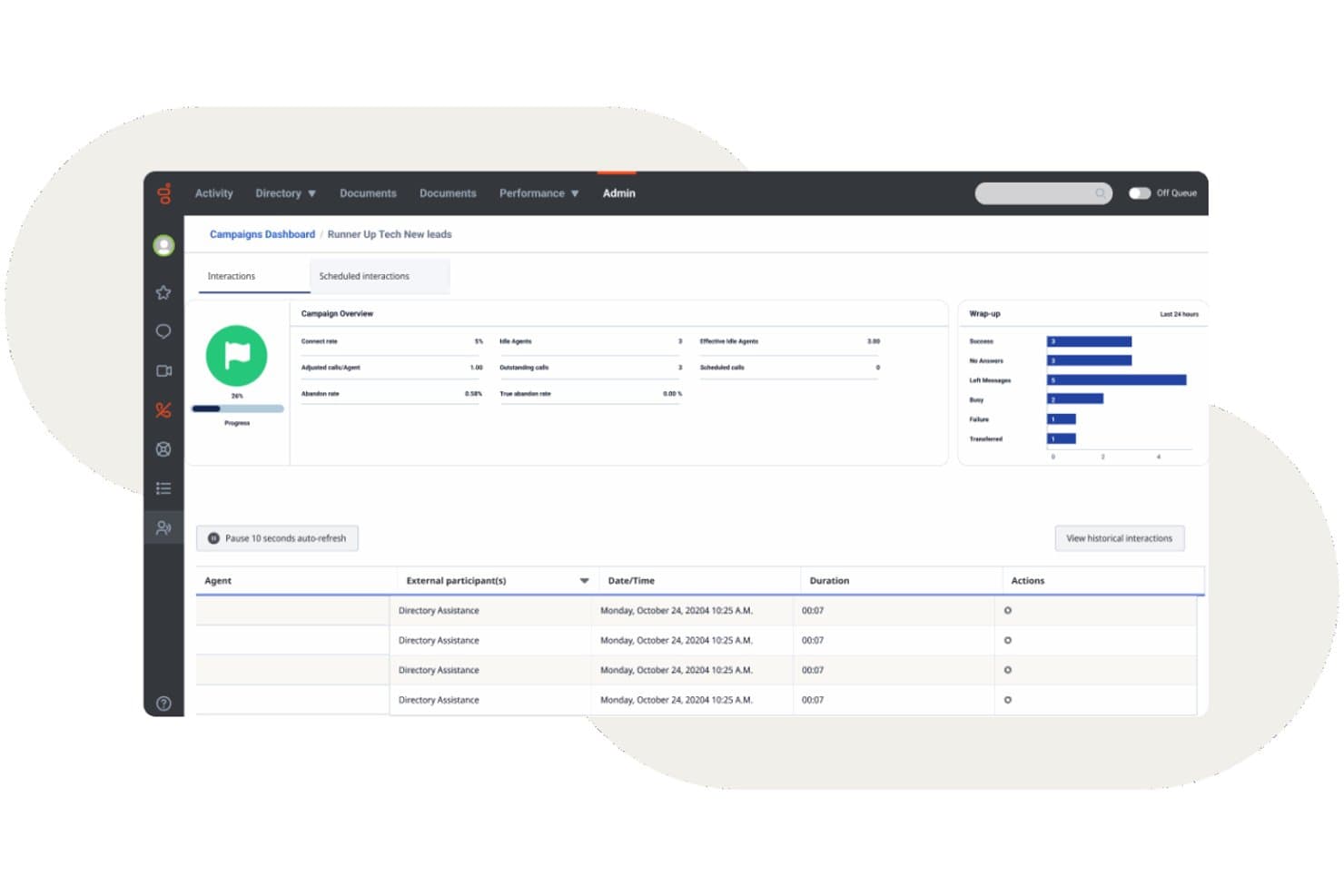
Genesys Cloud CX offers an outbound campaigns dashboard with real-time interaction tracking, wrap-up metrics, and agent activity logs. Genesys Cloud CX is a cloud-native contact center platform that combines omnichannel routing, AI-powered IVR, outbound dialling, workforce engagement management, and real-time analytics across voice and digital channels.
Who Is Genesys Cloud CX Best For?
Genesys Cloud CX is a strong fit for mid-size to enterprise contact centers that need a single platform to manage high interaction volumes across voice and digital channels.
Why I Picked Genesys Cloud CX
I've included Genesys Cloud CX in my top picks because its journey management capabilities go beyond standard routing. The platform's Journey Flows give me a real-time visual map of how customers move across every touchpoint, so I can spot drop-off points and reroute interactions before they escalate. Paired with Predictive Engagement, it actively identifies at-risk customers mid-web-session and triggers a proactive chat or callback before they abandon.
Genesys Cloud CX Key Features
- Omnichannel routing: Route voice, chat, email, SMS, and social interactions to agents in a single workspace.
- Workforce engagement management: Manage forecasting, scheduling, and time-off with AI-powered WEM tools.
- Speech and sentiment analytics: Analyze transcriptions, keywords, and sentiment for 100% of agent-customer conversations.
- CRM integration ecosystem: Connect natively with Salesforce, ServiceNow, Microsoft Dynamics, and hundreds of other business tools.
Genesys Cloud CX Integrations
Genesys Cloud CX offers native integrations with Salesforce, ServiceNow, Zendesk, Microsoft Teams, Microsoft Dynamics 365, Zoom, Jira, Slack, Active Directory, and Google Workspace. An API is available for custom integrations.
Pros and Cons
Pros:
- Speech analytics scores 100% of call interactions
- Built-in workforce management with native forecasting
- AI-powered predictive routing across all channels
Cons:
- Advanced reporting requires significant configuration time
- Initial setup often requires professional help
Learn more about Genesys Cloud CX: Best for easy deployment and administration
- Free demo available
- Pricing upon request

GoTo Connect offers a unified interface combining messaging, voicemail, camera preview, and meeting join capabilities for call center agents. GoTo Connect is a cloud-based contact center and phone system that combines VoIP calling, omnichannel customer engagement, intelligent call routing, and real-time agent monitoring in a single platform.
Who Is GoTo Connect Best For?
GoTo Connect is a strong fit for small to mid-sized businesses that need a full-featured contact center without a large IT team to manage it.
Why I Picked GoTo Connect
GoTo Connect earns its spot on my shortlist because of how quickly a team can go from signup to live calls. The unified Admin hub lets me manage users, dial plans, and call queues from a single interface, and the visual dial plan builder makes configuring complex call flows something I can do without writing a single line of code. I've also found Admin GoPilot genuinely useful for flagging configuration issues before they reach callers.
GoTo Connect Key Features
- Omnichannel platform: Connect with customers through voice, SMS, chat, email, WhatsApp, and social media from a single dashboard.
- Real-time analytics: Monitor call queues, agent activity, and performance data with configurable live dashboards.
- Call disposition and wrap-up: Assign outcomes to calls and manage required post-call notes directly in the agent interface.
- AI-powered call summaries: Automatically generate interaction summaries and sentiment analysis after customer calls.
GoTo Connect Integrations
GoTo Connect offers native integrations with Salesforce, Zendesk, ServiceNow, Microsoft Teams, Miro, and Gmail. An API is available for custom integrations.
Pros and Cons
Pros:
- Unified admin hub manages users and queues
- Visual dial plan editor simplifies call routing
- Quick setup without dedicated IT support
Cons:
- Reporting less customizable than enterprise platforms
- Limited predictive dialer for outbound campaigns
Learn more about GoTo Connect: Best with deep CRM integration capabilities
- Free demo available
- Pricing upon request

Vonage Contact Center offers an omnichannel agent desktop with AI-suggested responses, next best action guidance, and real-time interaction metrics across voice and chat. Vonage Contact Center is a cloud-based contact center platform that combines inbound and outbound calling, IVR, skills-based routing, call recording, omnichannel support, and real-time analytics with native CRM integrations.
Who Is Vonage Contact Center Best For?
Mid-market to enterprise teams already standardized on Salesforce, ServiceNow, or Microsoft Dynamics 365 who need a contact center that connects directly to their CRM.
Why I Picked Vonage Contact Center
Vonage Contact Center earns its spot on my shortlist because of how deeply it embeds into Salesforce, ServiceNow, and Microsoft Dynamics 365. I love that when an agent picks up a call, customer history surfaces instantly via screen pops, with bi-directional CRM sync logging the interaction automatically. Vonage even joined Salesforce's BYOC for CCaaS pilot, meaning its omnichannel and AI capabilities run natively inside Service Cloud Voice.
Vonage Contact Center Key Features
- Skills-based routing: Route inbound calls to agents based on skill sets, availability, or priority rules.
- Disaster recovery and emergency call routing: Automatically reroute calls in the event of outages or emergencies to maintain business continuity.
- Omnichannel engagement: Handle voice, web chat, SMS, and more from a single interface for all agents.
- Speech analytics add-on: Gain insights from call transcriptions, keyword detection, and sentiment analysis across interactions.
Vonage Contact Center Integrations
Vonage Contact Center offers native integrations with Salesforce, ServiceNow, Microsoft Dynamics 365, Zendesk, and Microsoft Teams. An API is available for custom integrations.
Pros and Cons
Pros:
- Real-time screen pops surface full caller context
- Omnichannel queues unify voice and digital channels
- Deep native Salesforce embedding for agents
Cons:
- Complex initial configuration requires professional services support
- Historical reporting has limited customization options
Learn more about Vonage Contact Center:
Annen programvare for callsentre
Her er noen flere alternativer som ikke kom med på listen over den beste programvaren for callsentre:
- 11TalkRouteBest for handling multiple calls
- 12Bright PatternBest for omnichannel communication
- 13TalkdeskBest for answering customers’ questions
- 14TwilioBest for highly customizable contact centers
- 15DialpadBest multichannel solution with advanced AI functionality
- 16Zoho VoiceBest for integrated telephony in CRM
- 17CallHippoBest for AI-powered customer interactions
- 18Freshdesk Contact CenterBest for an affordable virtual contact center
- 19Webex Contact CenterBest with built-in AI agent coaching and insights
- 20Creatio CRMBest for personalizing communication
- 21LiveAgentBest for integrated helpdesk and ticketing tools
- 22ZendeskBest for unifying communication channels
- 238x8Best for omnichannel communication
- 24VerintBest for workforce optimization
- 25Avaya Best for enhancing business outcomes
- 26AWS ConnectBest for onboarding new representatives
- 27Intermedia UniteBest for all-in-one cloud contact center
- 28Aspect SoftwareBest for high-performance contact center solution
How I Evaluate Call Center Software
I evaluate every platform against a baseline—skills-based routing, IVR, call recording, live monitoring—before weighing the differentiators that determine whether a tool fits your operation.
Core Functionality (Table Stakes For This List)
When I'm selecting tools for my list, I rank each one on a scale from 0 (does not offer the functionality) to 5 (excels in this area) for each core functionality listed below. Then, I calculate the tool's total score into a percentage. Each tool needs to achieve a minimum total score of 75% to be considered for inclusion.
- Automatic Call Distribution: I check whether the platform supports skills-based and priority routing, since a basic round-robin queue falls apart fast when you're handling technical support and billing on the same number.
- IVR System: A good IVR lets callers self-serve for order status or account balances before ever reaching an agent, so I look for multi-level menus with a visual call flow editor.
- Inbound & Outbound Calling: I evaluate whether the platform handles both directions natively—teams running renewal campaigns and fielding support calls need blended queues, not two separate tools.
- Call Recording & Monitoring: Supervisors need more than playback; I look for live listen, whisper, and barge so team leads can coach agents during difficult calls in real time.
- Real-Time & Historical Analytics: Dashboards that show queue depth, wait times, and agent status in real time matter just as much as historical SLA and CSAT reporting for post-shift reviews.
- CRM & Business Tool Integration: I evaluate whether the platform connects with systems like Salesforce, HubSpot, or Zendesk to surface caller context through screen pops and log interactions automatically.
Once I have a list of tools that meet this criteria, I consider what sets each platform apart.
Differentiating Factors (What Sets Vendors Apart)
Here's how I compare and contrast different vendors:
Standout Features
AI agent assist is a major differentiator. I look for platforms that surface knowledge articles and suggested responses mid-call, cutting handle time during complex troubleshooting. Workforce management matters just as much for teams juggling seasonal spikes, where built-in forecasting and adherence tracking replace spreadsheet guesswork. Speech and sentiment analytics round out the picture—automated scoring across all interactions gives QA leads a far more complete view than random sample reviews.
Beyond Features
Compliance and security are top of mind—I check for PCI DSS and SOC 2 certifications, especially when agents handle payment info over the phone. Pricing transparency matters too, since hidden telephony or overage charges can blow up budgets after go-live. I also evaluate uptime SLAs and carrier redundancy, because even brief outages during peak hours mean missed calls and lost revenue. Finally, implementation timelines vary wildly across vendors, and a faster time-to-value is a real advantage for teams migrating from a legacy system.
Slik velger du programvare for et callsenter
Prøver du å velge riktig programvare for callsentre? Begynn med å knytte de viktigste CX-prioriteringene dine til funksjoner som løser reelle utfordringer i kontaktsentre:
| Hvis prioriteten din er … | Se etter … |
|---|---|
| Hvis prioriteten din er …Rask respons på tvers av kanaler | Se etter …En samlet innboks som dekker telefon, chat og e-post |
| Hvis prioriteten din er …Nøyaktig ruting av komplekse problemer | Se etter …Ferdighetsbasert og datadrevet fordeling |
| Hvis prioriteten din er …Innsikt i agentenes resultater | Se etter …Dashbord i sanntid og detaljert overvåking |
| Hvis prioriteten din er …Fleksibel tilgang til kundedata | Se etter …Omfattende integrasjoner med CRM- og forretningsverktøy |
| Hvis prioriteten din er …Global eller regulert drift | Se etter …Innebygd samsvar med PCI DSS, GDPR og HIPAA |
Slik vurderer du kortlisten din
- Test reelle omnikanalpåstander: Kjør en prøve på én dag der du ruter tre typer henvendelser (telefon, chat, e-post) for å se om agentene får full kontekst hver gang.
- Valider integrasjonsdybden: Avtal en direktedemonstrasjon som går gjennom skjermoppslag i Salesforce eller HubSpot og toveis synkronisering – be om en video som du kan se gjennom senere.
- Vurder analysekvaliteten: Eksporter en 48-timers rapport fra dashbordet og sammenlign måltallene med resultatene fra den eldre plattformen din for samtalevolum, sentiment og behandlingstid.
- Bekreft samsvarsdekningen: Be leverandøren om aktuelle bekreftelsesbrev eller sikkerhetsdokumentasjon for PCI DSS, HIPAA og GDPR.
- Velg fleksibilitet eller leverandørbinding: Finn ut om omfattende innebygde funksjoner (begrenset tilpasning) eller åpne API-er (egen integrasjon, mer arbeid) passer best til teamets kompetanse og behov.
Hva er programvare for callsentre?
Programvare for callsentre er en digital plattform som håndterer kundekommunikasjon på tvers av telefon, chat, e-post og andre kanaler i ett grensesnitt. Den hjelper team med å håndtere innkommende og utgående henvendelser, rute samtaler til riktige agenter og overvåke servicekvaliteten. Disse plattformene omfatter ofte verktøy for samtalefordeling, interaktivt stemmesvar (IVR), samtaleopptak, analyse og integrasjoner med CRM-systemer for å støtte effektive og konsistente kundeopplevelser.
Programvare for callsentre kontra kontaktsentre: Hva er forskjellen?
Etter min erfaring handler valget mellom disse to systemene om hvorvidt du leder et telefonfokusert team eller samler kundereiser på tvers av flere kanaler for å forhindre datasiloer.
- Programvare for callsentre: Fokuserer hovedsakelig på talebasert kommunikasjon (innkommende og utgående samtaler, VoIP, IVR, samtaleruting og telefonstøtte). Fungerer best for team som bruker tale som sin primære kanal og trenger høy lydkvalitet.
- Programvare for kontaktsentre (CCaaS): Tilbyr én plattform som samler telefonstøtte med digitale kanaler som direktechat, e-post, SMS, meldingsapper og sosiale medier. Fungerer best for voksende SaaS-bedrifter som vil samle historikken over samhandling på tvers av kanaler og planleggingen av agenter.
I denne gjennomgangen dekker jeg både callsentersystemer med tale som utgangspunkt og kontaktsenterplattformer for større virksomheter, slik at du får alternativer uavhengig av driftsomfanget ditt.
Typer programvare for callsentre
- Skybasert programvare for callsentre: Kjører på leverandørens skyinfrastruktur og støtter eksterne eller geografisk spredte team med lave innledende kostnader.
- Lokalt installert programvare for callsentre: Kjører på fysisk maskinvare som er installert hos deg, og gir dedikert kontroll over serversikkerhet og datalagring.
- Programvare for innkommende callsentre: Håndterer innkommende kundehenvendelser ved hjelp av menyer for interaktivt stemmesvar, automatisk samtalefordeling og regler for kompetansebasert ruting.
- Programvare for utgående callsentre: Støtter salgsfremstøt og oppfølging av kontoer ved hjelp av automatiske, prediktive, kraftige og progressive oppringere.
- Programvare for kombinerte callsentre: Samler køer for innkommende samtaler og oppringere for utgående samtaler i ett grensesnitt, og flytter agenter dynamisk basert på samtalevolumet i sanntid.
- Omnikanalprogramvare for kontaktsentre: Samler telefonsamtaler, direktechat, tekstmeldinger og e-posttråder i én sammenhengende kundetidslinje.
Trender innen programvare for callsentre
- Agentisk KI og automatiserte arbeidsflyter: Programvareleverandører går videre fra enkle samtaleboter til implementering av autonome KI-agenter. Disse systemene vurderer kontekst, utfører oppgaver i flere trinn, oppdaterer CRM-oppføringer og fullfører rutinemessige arbeidsflyter uten menneskelig innblanding.
- Agentstøtte i sanntid: Programvareapplikasjoner lytter til pågående samtaler for å transkribere lyd, analysere kundesentiment og hente artikler fra kunnskapsbasen umiddelbart. Denne veiledningen i sanntid hjelper kundebehandlere med å løse komplekse kundeproblemer raskere.
- Automatisert kvalitetssikring: Plattformene bruker nå maskinlæringsmodeller til å analysere 100 prosent av kundeinteraksjonene. Automatisk poenggiving for overholdelse av manus, samsvarsregler og tone erstatter manuell stikkprøvekontroll i ledernes veiledning.
- Tilpasning uten kode: Verktøyene har dra-og-slipp-verktøy for samtaleforløp, rutingsregler og integrasjoner. Driftsteam kan raskt endre køregler og automatiseringer uten hjelp fra utviklere.
- Samlede datalag: Systemene samler historikk fra tale, chat, tekst og e-post i én kundetidslinje. Denne enhetlige strukturen gir hybride og fjernbaserte kundestøtteteam full oversikt over alle kontaktpunkter.
- Omnikanal og klar for fjernarbeid som standard: Etter hvert som kundenes forventninger øker, fortsetter kontaktsenterplattformene å samle tale, chat, e-post og sosiale medier i ett grensesnitt – samtidig som de tilbyr full fjerntilgang, pålitelighet i skyen og innebygde verktøy for bemanningsstyring.
Funksjoner i kontaktsenterprogramvare
Når du velger kontaktsenterprogramvare, bør du se etter følgende nøkkelfunksjoner:
- Automatisk samtalefordeling: Ruter innkommende samtaler til den best egnede kundebehandleren eller avdelingen, noe som sikrer kortere ventetid for innringere og bedre produktivitet hos kundebehandlerne.
- Interaktivt talesvar: Lar innringere samhandle med en selvbetjeningsmeny ved hjelp av tale eller tastatur, slik at de raskt kan komme til riktig avdeling eller løse enkle forespørsler uten å involvere en kundebehandler.
- Samtaleopptak: Tar automatisk opp samtaler for opplæring, kvalitetskontroll og tvisteløsning, slik at du kan gjennomgå interaksjoner, veilede kundebehandlere og ivareta samsvar.
- Rapportering og analyse i sanntid: Gir deg oversikter og detaljerte rapporter om nøkkeltall som samtalevolum, kundebehandlernes prestasjoner og kundetilfredshet – noe som gjør det enklere å forbedre driften.
- Støtte for alle kanaler: Lar kundene kontakte deg via telefon, e-post, chat eller sosiale medier, slik at teamet ditt kan håndtere alle samtaler på ett sted og gi konsekvent hjelp.
- CRM-integrasjon: Kobler seg til verktøyene dine for kunderelasjonshåndtering, slik at kundebehandlere får tilgang til viktig kundeinformasjon og historikk under samtaler for å kunne tilby mer personlig støtte.
- Samtaleovervåking: Gjør det mulig for ledere å lytte til pågående samtaler, hviske veiledning til kundebehandlere eller overta samtaler ved behov – perfekt for veiledning og kvalitetssikring.
- Samtalekø: Plasserer innringere i virtuelle køer med anslåtte ventetider og oppdateringer, noe som reduserer frustrasjon og jevner ut perioder med mange samtaler.
- Bemanningsstyring: Hjelper deg med å planlegge skift, forutse etterspørsel og følge med på kundebehandlernes tilgjengelighet, slik at bemanningsnivået samsvarer med samtalevolumet.
- Utgående oppringing: Automatiserer oppgaver som oppfølginger, undersøkelser eller salgssamtaler, slik at kundebehandlerne bruker mindre tid på å ringe opp og mer tid på å snakke med kundene.
Vanlige KI-funksjoner i kontaktsenterprogramvare
I tillegg til standardfunksjonene i kontaktsenterprogramvare som er nevnt ovenfor, innlemmer mange av disse løsningene KI med funksjoner som:
- KI-støtte for kundebehandlere: Viser forslag i sanntid, artikler fra kunnskapsbasen og de beste neste handlingene under pågående samtaler, slik at kundebehandlerne kan svare raskere og mer presist på kundenes spørsmål.
- Tale- og sentimentsanalyse: Bruker KI til å analysere samtaleopptak og pågående samtaler for tone, følelser og nøkkelord, slik at ledere får innsikt i trender innen kundetilfredshet og kundebehandlernes prestasjoner.
- Prediktiv samtaleruting: Bruker KI til å koble innringere med den best tilgjengelige kundebehandleren basert på historiske resultater, ferdigheter og kundeprofiler, med mål om å forbedre andelen saker som løses ved første kontakt.
- Automatisert kvalitetssikring: Bruker KI til å gjennomgå og vurdere samtaler for samsvar, overholdelse av manus og mellommenneskelige ferdigheter, noe som reduserer behovet for manuell kvalitetssikringskontroll og fremskynder tilbakemeldingssyklusene.
- Virtuelle agenter og chatboter: Håndterer rutinemessige forespørsler og oppgaver ved hjelp av samtalebasert KI, frigjør menneskelige kundebehandlere til mer komplekse problemer og tilbyr støtte døgnet rundt på tvers av kanaler.
Fordeler med kontaktsenterprogramvare
Implementering av kontaktsenterprogramvare gir flere fordeler for teamet og virksomheten din. Her er noen av fordelene du kan se frem til:
- Forbedret kundetilfredshet: Effektiv samtaleruting og støtte på tvers av kanaler sikrer at kundene raskt blir satt over til riktig medarbeider.
- Økt produktivitet i teamet: AI-drevet innsikt, funksjoner som smarte ringesystemer eller klikk-for-å-ringe, og avansert bemanningsstyring hjelper teamet med å fokusere på oppgaver med høy prioritet og optimalisere arbeidsflyten.
- Bedre datahåndtering: Integrasjon med eksisterende verktøy holder kundeinformasjonen organisert og tilgjengelig, og reduserer feil i håndteringen av data.
- Økt fleksibilitet: Muligheter for fjernarbeid gjør det mulig for teamet å levere jevn kundeservice fra alle steder og tilpasse seg skiftende arbeidsmiljøer.
- Handlingsrettet innsikt: Sanntidsanalyse og tilpassbare kontrollpaneler gir verdifulle data som kan veilede beslutningstaking og forbedre driften.
- Kostnadsbesparelser: Automatisert planlegging og effektiv ressursallokering bidrar til å redusere driftskostnadene samtidig som tjenestekvaliteten opprettholdes.
- Styrket datasikkerhet: Sikkerhetstiltak beskytter sensitiv kundeinformasjon, sikrer samsvar med regelverk og bygger tillit.
Kostnader og priser for programvare for kontaktsentre
Valg av programvare for kontaktsentre krever en forståelse av de ulike prismodellene og abonnementene som er tilgjengelige. Kostnadene varierer basert på funksjoner, teamstørrelse, tillegg og mer. Tabellen nedenfor oppsummerer vanlige abonnementer, gjennomsnittsprisene deres og typiske funksjoner som er inkludert i programvareløsninger for kontaktsentre:
Sammenligningstabell for abonnementer for programvare for kontaktsentre
| Abonnementstype | Gjennomsnittspris | Vanlige funksjoner |
|---|---|---|
| AbonnementstypeGratisabonnement | Gjennomsnittspris$0-$15/bruker/måned | Vanlige funksjonerInkluderer grunnleggende samtaleruting, begrensede IVR-alternativer, grunnleggende rapportering og enkel CRM-integrasjon. |
| AbonnementstypePersonlig abonnement | Gjennomsnittspris$15-$35/bruker/måned | Vanlige funksjonerLegger til ubegrenset ringing, samtaleopptak, forbedrede analysedashbord og integrasjoner med populære CRM-systemer. |
| AbonnementstypeBedriftsabonnement | Gjennomsnittspris$35-$70/bruker/måned | Vanlige funksjonerTilbyr avansert IVR, ferdighetsbasert ruting, AI-assistanse for medarbeidere, samtaleovervåking, tilpasset rapportering og meldinger på tvers av kanaler. |
| AbonnementstypeVirksomhetsabonnement | Gjennomsnittspris$70-$150/bruker/måned | Vanlige funksjonerTilbyr bemanningsstyring, prediktiv analyse, døgnåpen brukerstøtte, strenge samsvarskontroller og tilpassede SLA-er. |
Vanlige spørsmål om kundesenterprogramvare
\u003cspan data-slate-fragment=\u0022JTVCJTdCJTIyY2hpbGRyZW4lMjIlM0ElNUIlN0IlMjJ0ZXh0JTIyJTNBJTIySGVyZSUyMGFyZSUyMHNvbWUlMjBhbnN3ZXJzJTIwdG8lMjBjb21tb24lMjBxdWVzdGlvbnMlMjBhYm91dCUyMGVjb21tZXJjZSUyMGN1c3RvbWVyJTIwc2VydmljZSUyMHNvZnR3YXJlJTNBJTIyJTdEJTVEJTJDJTIydHlwZSUyMiUzQSUyMnAlMjIlMkMlMjJpZCUyMiUzQSUyMmQ5UlZLQzFSTzMlMjIlN0QlNUQ=\u0022\u003eHer er noen svar på vanlige spørsmål om kundesenterprogramvare:\u003c/span\u003e
Hva er de løpende kostnadene for kundesenterprogramvare?
Løpende kostnader for \u003cspan data-term-id=\u002259766844\u0022\u003eskybasert \u003c/span\u003e\u003cspan data-term-id=\u002259766798\u0022\u003ekontaktsenterprogramvare\u003c/span\u003e eller et \u003cspan data-term-id=\u002259766801\u0022\u003eVoIP\u003c/span\u003e-\u003cspan data-term-id=\u002259766805\u0022\u003etelefonsystem\u003c/span\u003e avhenger av teamets størrelse og behov. Utgiftene omfatter abonnementer, agentlisenser og tillegg som \u003cspan data-term-id=\u002259766799\u0022\u003earbeidsstyring\u003c/span\u003e, \u003cspan data-term-id=\u002259766808\u0022\u003esamtaleopptak\u003c/span\u003e, \u003cspan data-term-id=\u002259766833\u0022\u003eprestasjonsstyring\u003c/span\u003e, \u003cspan data-term-id=\u002259766835\u0022\u003etaleanalyse\u003c/span\u003e og \u003cspan data-term-id=\u002259766810\u0022\u003ekvalitetsstyring\u003c/span\u003e. Når du tar med \u003cspan data-term-id=\u002259766845\u0022\u003erapportering og analyse\u003c/span\u003e, \u003cspan data-term-id=\u002259766836\u0022\u003ekøstyring\u003c/span\u003e, oppdateringer og kundestøtte, sikrer du at \u003cspan data-term-id=\u002259766846\u0022\u003eutgående kundesenter\u003c/span\u003e forblir sikkert over tid.
Kan kundesenterprogramvare støtte eksterne eller distribuerte kundesenterteam?
Moderne \u003cspan data-term-id=\u002259766830\u0022\u003eskybaserte \u003c/span\u003e\u003cspan data-term-id=\u002259766794\u0022\u003ekundesenterløsninger\u003c/span\u003e og plattformer for \u003cspan data-term-id=\u002259766838\u0022\u003ekontaktsenter som tjeneste\u003c/span\u003e (\u003cspan data-term-id=\u002259766812\u0022\u003eCCaaS\u003c/span\u003e) gir distribuerte team sikker tilgang via \u003cspan data-term-id=\u002259766829\u0022\u003eenhetlig kommunikasjon\u003c/span\u003e. Disse verktøyene er ideelle for et \u003cspan data-term-id=\u002259766815\u0022\u003evirtuelt kundesenter\u003c/span\u003e og øker \u003cspan data-term-id=\u002259766814\u0022\u003eagentenes produktivitet\u003c/span\u003e gjennom \u003cspan data-term-id=\u002259766842\u0022\u003eintelligent ruting\u003c/span\u003e, \u003cspan data-term-id=\u002259766834\u0022\u003esamtalekøer\u003c/span\u003e, \u003cspan data-term-id=\u002259766831\u0022\u003esamtaleovervåking\u003c/span\u003e og \u003cspan data-term-id=\u002259766839\u0022\u003evarm viderestilling\u003c/span\u003e. Innebygd \u003cspan data-term-id=\u002259766853\u0022\u003estyring av medarbeiderengasjement\u003c/span\u003e hjelper ledere med å støtte agenter uansett hvor de befinner seg.
Hvordan kan jeg integrere kundesenterprogramvare med CRM-systemet eller brukerstøtten jeg allerede har?
Du kan vanligvis integrere kundesenterprogramvare med CRM-systemet eller brukerstøtten ved hjelp av innebygde koblinger, API-er eller tredjepartsplattformer som Zapier. Begynn med å undersøke om kundesenterløsningen tilbyr direkte integrasjoner med populære CRM-systemer som Salesforce, monday CRM eller HubSpot. Hvis ikke, kan du se etter API-dokumentasjon eller mellomvareløsninger. Integrasjon gjør det mulig å synkronisere kundedata og supportsaker automatisk, slik at agentene får bedre kontekst og behovet for manuell dataregistrering reduseres.
Hvordan kan kundesenterprogramvare forbedre førstegangsløsningen (FCR) for teamet mitt?
Kundesenterprogramvare forbedrer førstegangsløsningen ved å gi agentene sanntidstilgang til kundehistorikk, kunnskapsbaser og samtaleskript. Funksjoner som intelligent samtaleruting eller ferdighetsbasert ruting sender innringere til den best tilgjengelige agenten. Overvåkingsverktøy lar deg oppdage vanlige problemer og kunnskapshull, slik at du kan veilede teamet. Prøv å utnytte automatisk opprettelse av saker, notatskriving og til og med KI-drevne forslag for å hjelpe agentene med å løse problemer i den første samtalen.
Hva er forskjellen mellom omnikanal- og flerkanals-kundesenterprogramvare?
Omnikanal-kundesenterprogramvare kobler sammen alle kommunikasjonskanalene dine – telefon, e-post, chat og sosiale medier – slik at agentene ser hele kundehistorikken på ett sted. Flerkanalsløsninger lar deg tilby kundestøtte i flere kanaler, men hver kanal administreres separat. Med omnikanal får kundene en smidigere opplevelse, og agentene kan bytte mellom kanaler uten å miste konteksten. Dette gir raskere og mer personlig kundestøtte.
Hvilke KPI-er for samtaleovervåking og analyse bør jeg følge med på?
Fokuser på måltall som knytter operasjonell effektivitet til kundesentiment. Viktige KPI-er omfatter KI-drevne sentimentskårer, førstegangsløsning (FCR), andel henvendelser som løses gjennom selvbetjening og kostnad per interaksjon. Ved å følge med på disse sikrer du høy tjenestekvalitet og kan samtidig dokumentere tydelig avkastning på investeringen overfor toppledelsen.
Hvordan håndterer kundesenterløsninger datasikkerhet og personvern?
Moderne løsninger sikrer virksomhetens data gjennom ende-til-ende-kryptering, automatisk maskering av personidentifiserende opplysninger og betalingskortdata i opptak og transkripsjoner, samt strenge rollebaserte tilgangskontroller. De beste plattformene opprettholder også strenge samsvarssertifiseringer, blant annet SOC 2 Type II, ISO 27001, GDPR og HIPAA.