


Unwrap vs. Qualtrics: Comparison & Expert Reviews For 2026

We review tools independently, and commissions help fund our testing. See our transparency policy, our methodology, or suggest a tool.
Before landing here, you were likely trying to make sense of growing volumes of customer feedback and figuring out why it still feels hard to turn that input into clear, actionable insight. You may have tested tools that promise clarity but leave you juggling dashboards, manual analysis, or unanswered questions.
This comparison breaks down Unwrap vs. Qualtrics as customer intelligence software, helping you understand how each platform approaches feedback, insights, and day-to-day use so you can confidently choose what fits your team’s workflow.
Unwrap

4.8/5
- 30-day free trial
- From $2,000/month (billed annually)
SentiSum
4.6/5
- 30-day free trial
- Pricing upon request
Why Trust Our Software Recommendations
6,700+
Reviews
20
Industry experts
16+
Evaluation factors
14
Years
Our team has been testing and reviewing software since 2012. As CX leaders ourselves, we know how difficult—and important—it is to choose the right software.
For this guide, we evaluated tools using hands-on testing and independent research, scoring tools using our selection criteria.
Our reviews reflect our human editorial judgment, not a sales pitch.
 Gui DrusinaCreative Director
 Tim FisherVP of AI
| Unwrap | SentiSum | |
|---|---|---|
| Free Trial | 30-day free trial | 30-day free trial |
| Pricing | From $2,000/month (billed annually) | Pricing upon request |
Unwrap vs. Qualtrics Pricing & Hidden Costs
Unwrap offers custom pricing based on feedback volume and integrations rather than per-seat plans. Additional costs may apply as usage grows or more integrations are added.
Qualtrics uses custom, suite-based pricing shaped by selected products and usage levels. Extra costs can come from add-ons, advanced features, or higher response volumes.
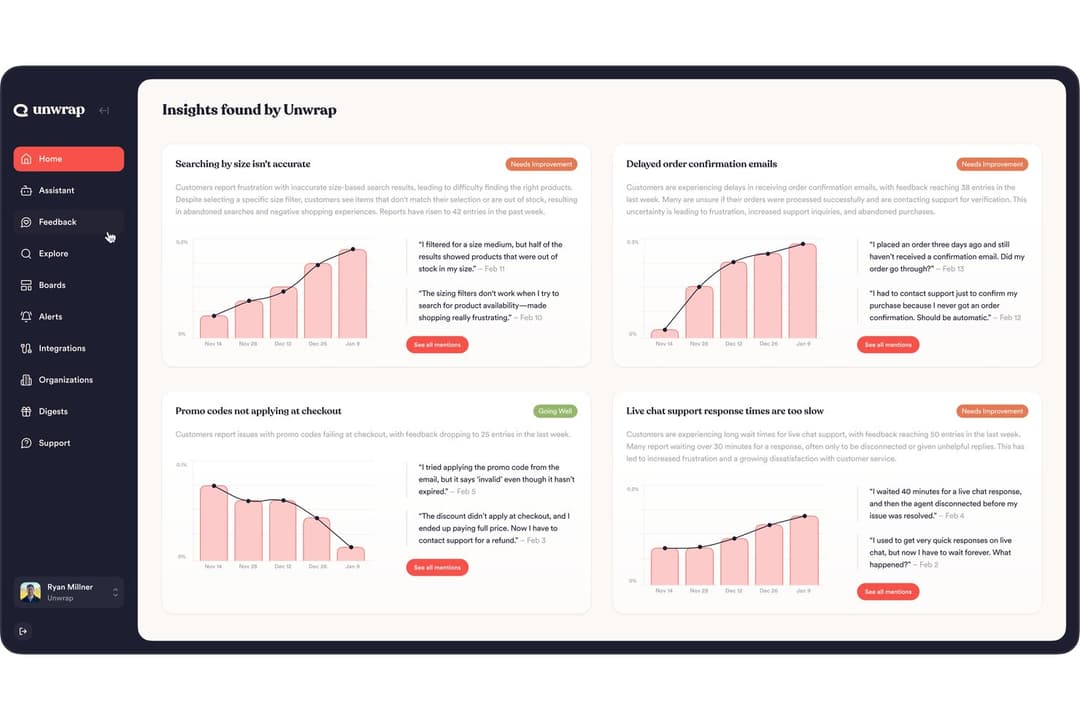
If you look at both platforms’ features, you’ll notice Unwrap has automatic feedback tagging and proactive insights and alerts, meaning you can surface trends and customer issues without tagging or digging through dashboards.
Qualtrics, meanwhile, offers advanced survey logic and omnichannel feedback collection, which gives teams more control over how feedback is collected and analyzed across experience programs.
So, you can think of Unwrap as being focused on speed and action, while Qualtrics is built for structured research and long-term experience management.
| Unwrap | SentiSum | |
|---|---|---|
| API | Yes | Yes |
| Data Export | Yes | Yes |
| Data Import | Yes | Yes |
| Data Visualization | Yes | Yes |
| Feedback Management | Yes | Yes |
| Multi-User | Yes | Yes |
| Process Reporting | Yes | Yes |
| Workflow Management | Yes | Yes |
| Integration | Unwrap | Qualtrics |
| Slack | ✅ | ✅ |
| Salesforce | ✅ | ✅ |
| Zendesk | ✅ | ✅ |
| Intercom | ✅ | ✅ |
| Jira | ✅ | ✅ |
| App Store Connect | ✅ | ❌ |
| Google Play | ✅ | ❌ |
| Microsoft Teams | ❌ | ✅ |
| API | ✅ | ✅ |
| Zapier | ✅ | ✅ |
Both tools integrate with core platforms like Slack, Salesforce, Zendesk, Jira, APIs, and Zapier. Unwrap also focuses on app-store feedback sources, while Qualtrics leans toward enterprise collaboration tools like Microsoft Teams.
| Factor | Unwrap | Qualtrics |
| Data privacy | Automatic PII redaction and strict access controls protect customer data by default. | Supports data privacy compliance as a data controller and data processor, with tools for managing data subject rights. |
| Compliance | SOC 2 Type II and GDPR compliance are standard across the platform. | Supports GDPR, ISO standards, and industry-specific compliance needs. |
| Authentication | SSO and activity monitoring help manage large teams securely. | Enterprise-grade SSO and role-based access are deeply configurable. |
| AI transparency | Clear controls over how AI analyzes and uses your data. | Advanced analytics with configurable models and governance tools. |
Overall, both platforms cover data privacy, compliance, authentication, and AI usage. Unwrap highlights automatic PII redaction, default access controls, SOC 2 Type II and GDPR compliance, and SSO. Qualtrics has data privacy support, GDPR and ISO standards, configurable access, and governed analytics.
| Factor | Unwrap | Qualtrics |
| Interface | Unwrap has a clean, easy-to-use interface that feels polished and straightforward. | A solid platform with an intuitive, easy-to-use interface. |
| Setup | Integrations can be set up quickly with only a few clicks. | Setup can be complex due to modular products and options. |
| Daily Use | Insights are automatically surfaced and delivered through proactive alerts and trend detection. | Use it daily to monitor and manage multiple customer experience programs across the organization. |
| Learning Curve | Integrations are smooth and easy to incorporate into everyday workflows. | Steeper learning curve, especially outside research teams. |
Unwrap provides a clean interface, quick setup, and automated insight delivery, while Qualtrics focuses on managing multiple customer experience programs with a more complex setup and learning process.
Unwrap
- Proactive insight discovery without manual tagging
- Early issue detection through alerts and trend monitoring
- Verifiable, traceable insights that link each theme back to the original feedback.
- Limited value for low feedback volume teams
- Takes longer to get started than instant sign-up alternatives
- Customization depth is intentionally limited
SentiSum
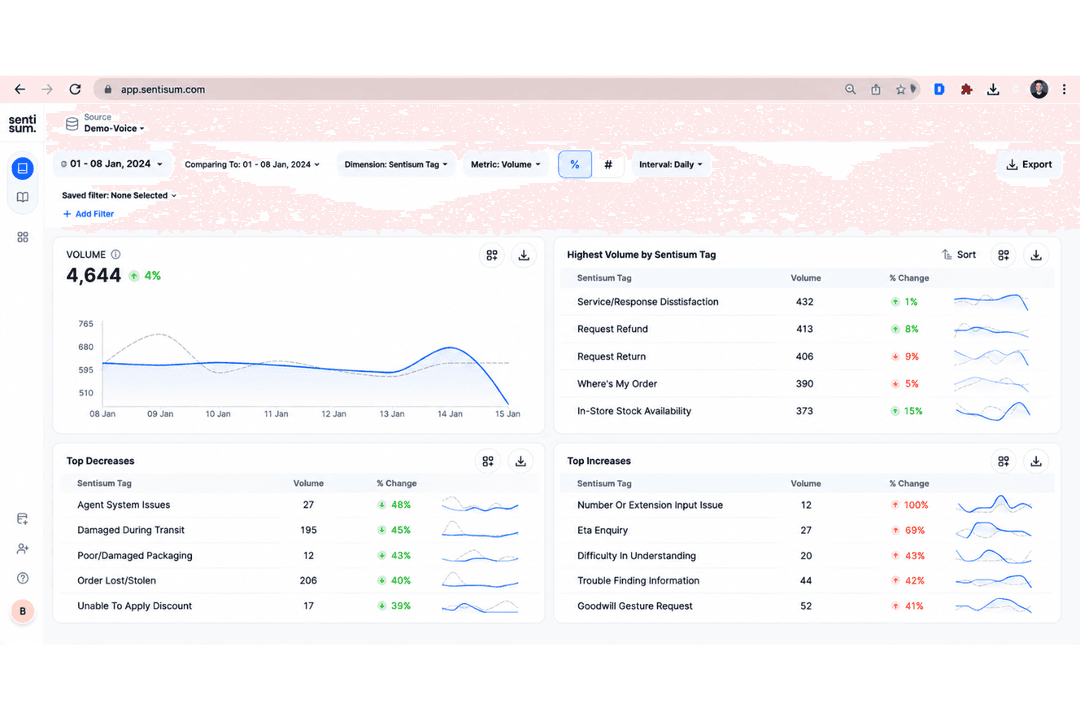
- Accurately auto-tags high volumes of unstructured customer feedback
- Identifies granular sentiment drivers without manual setup
- Real-time trend detection highlights urgent issues quickly
- Dashboard reporting options are basic compared to peers
- Lacks configurable analytics for deeper, custom insights
- Pricing may be high for small or early-stage teams
Unwrap
- Product ManagersUnwrap helps product managers identify recurring customer pain points and feature requests at scale, making roadmap prioritization easier and more evidence-based.
- Customer Experience (CX) TeamsCX teams use Unwrap to automatically surface trends and sentiment shifts across customer feedback, helping them address issues before they escalate.
- Support LeadershipSupport leaders rely on Unwrap to detect systemic issues from support tickets and reviews, allowing them to reduce repeat problems and improve service quality.
- Survey & Research TeamsUnwrap’s AI-powered surveys help research teams collect richer, more actionable qualitative feedback without increasing survey fatigue.
- Executives & Strategic LeadersExecutives use Unwrap to stay informed on customer sentiment and emerging issues through clear summaries instead of raw data dashboards.
- Enterprise OrganizationsLarge organizations benefit from Unwrap’s ability to analyze massive volumes of multi-channel feedback while supporting cross-team visibility and governance.
SentiSum
- Ecommerce RetailersSentiSum auto-tags thousands of support tickets daily and reveals customer topics instantly, making it ideal for fast-paced online stores.
- Customer Support TeamsThe platform’s simple dashboard clarifies top customer issues so support teams can prioritize training and processes.
- SaaS CompaniesFrequent integration needs, high ticket volumes, and broad digital communication channels fit SentiSum’s strengths in API support and instant insight.
- Operations LeadersOperations departments that want trend visibility across teams can use SentiSum’s actionable analytics without needing a data scientist.
- B2B Service ProvidersFirms that manage complex client accounts get value from customizable tagging and insight sharing, especially when working with integrations like Salesforce Service Cloud.
- Companies Scaling FastRapidly growing businesses benefit from SentiSum’s quick onboarding, templates, and automation without a lengthy setup process.
Who Should Use Unwrap, and Who Should Use Qualtrics?
Unwrap is a strong fit if you handle large volumes of customer feedback and need fast, shared insight across product, CX, support, and leadership. It supports this with automatic feedback tagging and proactive insights and alerts that surface trends without manual analysis or heavy setup.
Qualtrics is a better fit if you run structured customer, employee, or market research programs that require consistency and long-term analysis. Its advanced survey logic and omnichannel feedback collection support controlled data collection across complex experience management initiatives.
For clarity, you’ll find Unwrap works best if you need fast, actionable feedback insights, while Qualtrics is better suited if you’re running structured research and long-term experience programs.
| Unwrap | SentiSum | |
|---|---|---|
| AI-Powered Automation | Unwrap Uses a natural-language assistant to help users explore feedback and ask questions. | SentiSum Uses AI agents to automatically detect issues and explain why sentiment changes. |
| Analytics Approach | Unwrap Emphasizes proactive discovery of trends and insights through alerts and exploration. | SentiSum Focuses on AI-driven explanation of sentiment and root causes in real time. |
| Continuous Feedback | Unwrap Covers a wide range of sources, including reviews, surveys, app stores, and support data. | SentiSum Goes deeper into support tickets and conversational data for detailed analysis. |
| Pricing Model | Unwrap Custom pricing based on feedback volume and integrations without per-seat pricing. | SentiSum Quote-based pricing often tiered by usage, channels, and feature access. |
| Workflow Setup | Unwrap Designed for sharing insights across teams like CX, product, and leadership, explaining patterns. | SentiSum Designed for operational teams to act quickly within support and CX workflows. |
| Analytics | Both use AI to analyze unstructured customer feedback and surface meaningful insights. |
|---|---|
| Multi-Source Feedback | Both platforms ingest feedback from multiple channels to provide a unified view of customer sentiment, though each platform has different feedback source depths. |
| Multichannel Support | Both are built to share insights with CX, product, and leadership teams. |
| Real-Time Insights | Both aim to surface issues early so teams can take action before problems escalate. |
| Scalability | Both are designed to handle large volumes of customer feedback for growing and enterprise organizations. |