

As plataformas de integração de novos clientes com IA são ferramentas de software que utilizam inteligência artificial para automatizar, personalizar e melhorar o processo de acolhimento de novos clientes e de orientação dos mesmos para que obtenham valor. Se está à procura das melhores plataformas de integração de novos clientes com IA, é provável que pretenda reduzir o trabalho manual, proporcionar experiências consistentes e ajudar os clientes a alcançar o sucesso mais rapidamente — sem comprometer a qualidade ou a supervisão. Escolher a plataforma certa pode ajudar a sua equipa a gerir volumes maiores, adaptar a integração às necessidades de cada cliente e medir o que está a funcionar. Nesta lista, encontrará opções de confiança que respondem aos desafios reais da integração de novos clientes e apoiam os seus objetivos de satisfação e retenção de clientes.
Why Trust Our Software Recommendations
6,700+
Reviews
20
Industry experts
16+
Evaluation factors
14
Years
Our team has been testing and reviewing software since 2012. As CX leaders ourselves, we know how difficult—and important—it is to choose the right software.
For this guide, we evaluated tools using hands-on testing and independent research, scoring tools using our selection criteria.
Our reviews reflect our human editorial judgment, not a sales pitch.
 Gui DrusinaCreative Director
 Tim FisherVP of AI
Tabela de comparação de plataformas de integração de novos clientes com IA
Esta tabela de comparação resume os detalhes de preços das minhas principais escolhas de plataformas de integração de novos clientes com IA:
| Tool | Best For | Trial Info | Price | ||
|---|---|---|---|---|---|
| 1 | Best for link-based client onboarding portals | 14-day free trial | From €59/user/month | Website | |
| 2 | Best for client onboarding workspaces | Free plan + free demo available | From $350/month (billed annually) | Website | |
| 3 | Best for contextual user onboarding experiences | 14-day free trial | From $299/month | Website | |
| 4 | Best for no-code onboarding experiences | Free trial available | Pricing upon request | Website | |
| 5 | Best for transparent onboarding project tracking | Free demo available | Pricing upon request | Website | |
| 6 | Best for in-app onboarding guidance and analytics | Free plan + 30-day free trial + free demo available | Pricing upon request | Website | |
| 7 | Best for onboarding task tracking and automation | Free demo + free trial available | From $15,000/month | Website | |
| 8 | Best for AI-driven onboarding workflows | Free demo available | Pricing upon request | Website | |
| 9 | Best for visual onboarding pipelines | 14-day free trial + free demo available | From $18/seat/month (billed annually) | Website | |
| 10 | Best for AI onboarding support for success teams | Free plan + free demo available | From $40/month (billed annually) | Website |


Avaliações de plataformas de integração de novos clientes com IA
Apresentamos abaixo os meus resumos detalhados das melhores plataformas de integração de novos clientes com IA que entraram na minha lista. As minhas avaliações analisam detalhadamente as funcionalidades, capacidades e integrações de cada plataforma para o ajudar a encontrar a melhor opção para si.
 Best for link-based client onboarding portals
- 14-day free trial
- From €59/user/month
Visit WebsiteCustomer Rating:4.9/5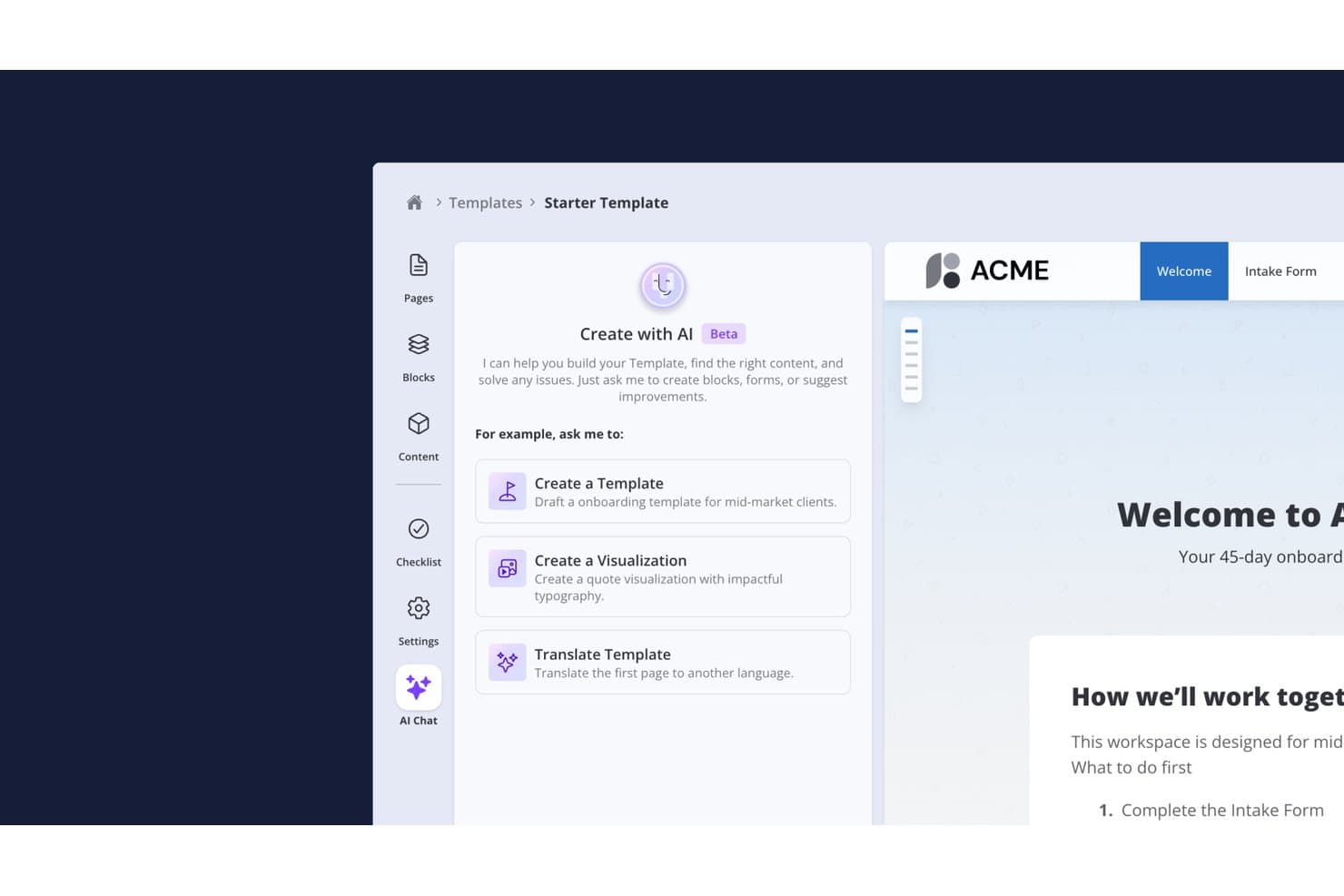
Valuecase lets users build onboarding templates with an AI chat assistant. Valuecase is an AI customer onboarding platform that lets teams build branded, login-free client portals with task plans, milestone tracking, conditional forms, live chat, and AI-driven workflow automation.
Who Is Valuecase Best For?
Valuecase is a strong fit for B2B SaaS and professional services teams whose customer onboarding relies on shared workspaces, structured task plans, and a frictionless client experience that doesn't require customer logins.
Why I Picked Valuecase
Valuecase earns its spot on my shortlist because its link-based client portal model removes the single biggest friction point in onboarding: getting customers to log in. Each Space ships as a shareable URL, so customers can review tasks, complete conditional forms, and track milestones without creating an account. I also like that the built-in AI agent auto-generates full onboarding playbooks from uploaded documents and writes CRM status updates back to HubSpot or Salesforce on a weekly schedule, keeping your internal team informed without any manual reporting.
Valuecase Key Features
- Conditional branching forms: Forms adapt in real time based on customer responses, so each client only answers questions relevant to their setup.
- Gantt chart and milestone tracker: Visual project timelines let both your team and the customer see exactly where onboarding stands at any given point.
- AI-generated content blocks: The AI agent builds task plans, accordion blocks, pricing tables, and custom HTML visualizations directly from uploaded documents or prompts.
- CRM status auto-sync: The AI agent writes weekly onboarding status updates back to HubSpot or Salesforce automatically, without any manual input from your team.
Valuecase Integrations
Valuecase offers six native integrations with HubSpot, Salesforce, Slack, Microsoft Teams, Gmail, and Google Calendar. It also supports API access and webhooks from Growth, plus Make.com and Zapier.
Pros and Cons
Pros:
- AI-driven playbooks from uploaded documents
- Login-free portals simplify customer collaboration
- AI automates onboarding tasks and content
Cons:
- Advanced analytics require higher-tier plans
- No in-app customer-facing AI chatbot
Learn more about Valuecase: 2Best for client onboarding workspaces
Dock
- Free plan + free demo available
- From $350/month (billed annually)
Visit WebsiteCustomer Rating:4.9/5
Dock centralizes onboarding, timelines, and client collaboration. Dock offers collaborative workspaces designed for onboarding and managing client projects. It’s a strong fit for customer success and onboarding teams at SaaS companies or agencies that want to centralize resources, timelines, and communication in one place. If you’re looking to give customers a transparent, interactive onboarding experience, Dock helps you organize every step and asset in a single shared hub.
Who Is Dock Best For?
Dock is a strong choice for customer success and onboarding teams at SaaS companies and agencies that manage client-facing projects.
Why I Picked Dock
I picked Dock because its collaborative workspaces are purpose-built for onboarding and client project management. The platform lets you create shared hubs where customers and internal teams can access onboarding checklists, project timelines, and key resources in one place. I appreciate how Dock supports real-time collaboration, so both sides can comment, upload files, and track progress together. This approach helps onboarding teams deliver a more transparent and interactive experience, which is especially valuable for SaaS companies and agencies managing multiple client projects.
Dock Key Features
Some other features that make Dock useful for onboarding teams include:
- Custom branding options: Add your company logo, colors, and domain to personalize each workspace for your clients.
- Task assignment and tracking: Assign tasks to team members or clients and monitor completion directly within the workspace.
- Template library: Use pre-built workspace templates for common onboarding and project scenarios to speed up setup.
- Document sharing and version control: Upload, share, and manage documents with built-in version history to keep everyone aligned.
Dock Integrations
Integrations include Salesforce, HubSpot, Gong, Zoom, Microsoft Teams, Chorus, Fathom, Avoma, Loom, and more.
Pros and Cons
Pros:
- Document sharing with version control features
- Template library for repeatable onboarding flows
- Collaborative workspaces for clients and teams
Cons:
- Bugs and slow loading can disrupt workflows
- Lacks in-app chat or messaging tools
Learn more about Dock: Best for contextual user onboarding experiences
- 14-day free trial
- From $299/month
Visit WebsiteCustomer Rating:4.7/5
Userpilot creates personalized in-app onboarding and adoption flows. If you want to create personalized onboarding experiences without coding, Userpilot is worth a look. It’s designed for product teams and customer success managers who need to guide users inside web apps with targeted in-app flows. Userpilot helps you address onboarding friction and drive feature adoption with contextual, behavior-based prompts.
Who Is Userpilot Best For?
Userpilot suits product and customer success teams at SaaS companies that want to build and optimize in-app onboarding without developer resources.
Why I Picked Userpilot
What stands out to me about Userpilot is how you can build onboarding flows and in-app experiences without writing any code. This is especially useful for product and customer success teams that want to launch personalized onboarding quickly, without waiting on developer resources. I like that you can trigger tooltips, checklists, and modals based on user behavior, so onboarding feels relevant and timely. The visual editor makes it easy to design and update onboarding content as your product evolves.
Userpilot Key Features
Some other features that make Userpilot valuable for onboarding teams include:
- A/B testing for onboarding flows: Test different onboarding experiences to see which content or sequence drives better user engagement.
- Resource center widget: Add a customizable in-app help center so users can access guides, FAQs, and support without leaving your product.
- User segmentation: Target onboarding content to specific user groups based on attributes, behaviors, or lifecycle stage.
- Event-based analytics: Track user actions and onboarding milestones to measure the impact of onboarding flows and identify drop-off points.
Userpilot Integrations
Integrations include HubSpot, Salesforce, Segment, Google Tag Manager, Zendesk, Google Analytics, Intercom, Amplitude, Mixpanel, Heap, and more.
Pros and Cons
Pros:
- Event-based analytics for onboarding tracking
- A/B testing for onboarding experiences
- No-code builder for onboarding flows
Cons:
- Limited customization for advanced UI elements
- Segmentation logic becomes hard to manage at scale
Learn more about Userpilot: Best for no-code onboarding experiences
- Free trial available
- Pricing upon request
Visit WebsiteCustomer Rating:4.7/5
Appcues builds no-code onboarding flows and user engagement. If you want to design onboarding flows without relying on developers, Appcues is worth a look. It’s built for product teams and SaaS businesses that need to launch in-app onboarding, announcements, and surveys quickly. Appcues helps you guide users, collect feedback, and drive adoption—all from a no-code platform.
Who Is Appcues Best For?
Appcues fits SaaS product teams and growth managers at startups and mid-sized companies that want to launch and iterate onboarding flows without engineering support.
Why I Picked Appcues
I picked Appcues because its no-code onboarding flow builder is purpose-built for teams that want to launch and update in-app experiences without developer involvement. The drag-and-drop editor lets you design onboarding checklists, tooltips, and modals directly in your product, so you can quickly adapt to user needs. I also like that Appcues offers targeting and triggering options, so you can show the right onboarding content to the right users at the right time. These features make it a strong fit for SaaS teams that need to move fast and iterate on onboarding without waiting for engineering resources.
Appcues Key Features
Some other features that make Appcues useful for onboarding teams include:
- A/B testing: Run experiments on onboarding flows to compare performance and optimize user engagement.
- Event-based targeting: Trigger onboarding content based on specific user actions or milestones within your product.
- In-app surveys: Collect user feedback directly within your onboarding flows to identify friction points.
- Multi-language support: Deliver onboarding experiences in multiple languages to serve a global user base.
Appcues Integrations
Integrations include Segment, HubSpot, Salesforce, Intercom, Zendesk, Mixpanel, Amplitude, FullStory, Google Analytics, Slack, and more.
Pros and Cons
Pros:
- Mobile onboarding flows are supported natively
- Feedback tools are built directly into the platform
- A/B testing measures onboarding adoption impact
Cons:
- Pricing scales quickly with monthly active users
- Analytics require exporting data for deeper insights
Learn more about Appcues: Best for transparent onboarding project tracking
- Free demo available
- Pricing upon request
Visit WebsiteCustomer Rating:4.7/5
GUIDEcx tracks onboarding projects, tasks, and stakeholder communication. If you’re looking for a platform to automate and track client onboarding projects, GUIDEcx is worth considering. It’s designed for customer success and implementation teams that need to coordinate tasks, timelines, and communication with both internal and external stakeholders. GUIDEcx helps reduce onboarding delays and keeps everyone accountable throughout the process.
Who Is GUIDEcx Best For?
GUIDEcx is a strong fit for customer success and implementation teams at B2B companies that manage complex client onboarding projects.
Why I Picked GUIDEcx
What stands out about GUIDEcx is its focus on automated project plans and client onboarding tracking. The platform lets you build detailed onboarding workflows with automated task assignments, reminders, and progress tracking, so nothing falls through the cracks. I like that GUIDEcx gives both internal teams and clients visibility into every step of the onboarding process, which helps keep everyone aligned and accountable. These features make it a strong choice for organizations that need to manage complex, multi-step onboarding projects with multiple stakeholders.
GUIDEcx Key Features
In addition to automated project plans and onboarding tracking, GUIDEcx offers several other features that support customer onboarding teams:
- Role-based permissions: Control access and visibility for internal and external users based on their roles in each project.
- Customizable templates: Build and reuse onboarding project templates tailored to your organization’s processes.
- Automated notifications: Send timely email and in-app notifications to keep stakeholders informed of updates and deadlines.
- Client-facing dashboards: Give clients real-time visibility into project status, tasks, and next steps through dedicated dashboards.
GUIDEcx Integrations
Integrations include Salesforce, HubSpot, Microsoft Teams, and more.
Pros and Cons
Pros:
- Role-based permissions for secure collaboration
- Client-facing dashboards for real-time project visibility
- Automated onboarding workflows with task dependencies
Cons:
- Reporting lacks cross-project rollups without manual work
- Bulk editing tasks across multiple projects is inefficient
Learn more about GUIDEcx: Best for in-app onboarding guidance and analytics
- Free plan + 30-day free trial + free demo available
- Pricing upon request
Visit WebsiteCustomer Rating:4.4/5
Pendo personalizes onboarding, collects feedback, and analyzes user journeys. Pendo is designed for teams that want to deliver personalized onboarding experiences directly within their digital products. It’s a strong fit for SaaS companies and product managers who need to guide users, collect feedback, and analyze onboarding journeys in one place. If you’re looking to reduce onboarding friction and understand where users get stuck, Pendo offers targeted solutions.
Who Is Pendo Best For?
Pendo suits product managers and SaaS teams at mid-sized to large companies that want to improve in-app onboarding and user engagement.
Why I Picked Pendo
I chose Pendo because its in-app guidance and analytics are purpose-built for optimizing customer onboarding. The platform lets you create targeted onboarding walkthroughs and tooltips that appear directly within your product, so users get help exactly when they need it. I also appreciate how Pendo’s analytics reveal where users drop off or struggle during onboarding, making it easier to refine your flows. These capabilities make Pendo a strong choice for teams that want to continuously improve onboarding based on real user behavior.
Pendo Key Features
Some other features that make Pendo useful for onboarding teams include:
- Resource center: Create a centralized hub within your app where users can access onboarding guides, FAQs, and support resources.
- Feedback collection: Gather user feedback directly in-app through surveys and polls to identify onboarding pain points.
- Segmentation: Target onboarding content to specific user groups based on behavior, role, or account type.
- Mobile onboarding support: Deliver onboarding flows and guidance within mobile apps, not just web applications.
Pendo Integrations
Integrations include HubSpot, Intercom, Jira, Marketo, Okta, Salesforce, Segment, Zendesk, Slack, Tableau, BigQuery, Catalyst, Figma, G2, and more.
Pros and Cons
Pros:
- Resource center centralizes onboarding and support content
- Analytics reveal onboarding drop-off points clearly
- In-app guides can be personalized by user segment
Cons:
- MAU-based pricing scales quickly at volume
- Feature tagging setup is finicky with dynamic UIs
 Best for onboarding task tracking and automation
- Free demo + free trial available
- From $15,000/month
Visit WebsiteCustomer Rating:4.5/5
OnRamp automates personalized onboarding journeys and workflows. If you need to automate and personalize complex onboarding journeys, OnRamp is worth a look. It’s designed for teams in SaaS, fintech, and other digital-first industries that want to deliver tailored onboarding at scale. OnRamp helps you coordinate tasks, content, and communications so new customers get a guided, consistent experience.
Who Is OnRamp Best For?
OnRamp fits mid-sized to large SaaS and fintech companies that need to automate and personalize customer onboarding workflows.
Why I Picked OnRamp
What drew me to OnRamp is its focus on automated onboarding journeys with AI-powered personalization. For teams that need to deliver tailored onboarding experiences at scale, OnRamp lets you build dynamic workflows that adapt to each customer’s needs and behaviors. I appreciate how the platform uses AI to recommend next steps, trigger communications, and surface relevant content automatically. This approach helps reduce manual work for onboarding teams while ensuring every customer gets a guided, relevant experience.
OnRamp Key Features
Some other features that make OnRamp stand out for onboarding teams include:
- Task assignment and tracking: Assign onboarding tasks to customers or internal team members and monitor progress in real time.
- Customizable onboarding templates: Build and reuse onboarding templates tailored to different customer segments or products.
- Embedded knowledge base: Provide customers with access to relevant help articles and resources directly within the onboarding flow.
- Automated reminders and notifications: Set up automated reminders to keep customers and teams on track throughout the onboarding process.
OnRamp Integrations
Integrations include Salesforce, HubSpot, Marketo, ActiveCampaign, Gong, Mailchimp, Stripe, Slack, Zoom, Jira, and more.
Pros and Cons
Pros:
- Aligns sales and CS teams around shared onboarding goals
- Real-time onboarding visibility tracks progress
- Customer portal guides users through structured workflows
Cons:
- Workflow design depends on structured internal processes
- Requires tight CRM/tool integration, adding setup overhead
Learn more about OnRamp: Best for AI-driven onboarding workflows
- Free demo available
- Pricing upon request
Visit WebsiteCustomer Rating:4.3/5
Relevance AI automates onboarding with AI-driven workflows and personalization. If you want to automate onboarding with flexible AI workflows, Relevance AI is worth considering. It’s built for teams that need to design, deploy, and iterate on onboarding journeys without heavy coding. Relevance AI helps you connect data, automate decisions, and personalize onboarding steps for each customer.
Who Is Relevance AI Best For?
Relevance AI suits product and operations teams at SaaS companies that want to automate and personalize onboarding workflows without coding.
Why I Picked Relevance AI
What stands out about Relevance AI is its no-code approach to building AI-powered onboarding workflows. I picked it because you can visually design onboarding journeys, automate decision points, and personalize steps for each customer—all without writing code. The platform’s drag-and-drop workflow builder and AI-driven logic blocks make it possible to quickly iterate and adapt onboarding processes as your needs change. This flexibility is especially valuable for teams that want to experiment with onboarding flows or scale their onboarding without relying on engineering resources.
Relevance AI Key Features
In addition to its no-code workflow builder, here are some other features that make Relevance AI useful for onboarding teams:
- Customer data connectors: Connects to various data sources to pull in customer information for more personalized onboarding.
- Automated customer messaging: Sends automated emails, in-app messages, or notifications based on onboarding progress or triggers.
- Analytics dashboard: Provides real-time insights into onboarding funnel performance and customer engagement.
- Role-based access controls: Lets you manage permissions and access for different team members working on onboarding projects.
Relevance AI Integrations
Integrations include Ably, Abyssale, ADP, AdRoll, Adyen, Agrello, Ahrefs, Basecamp, Slack, BitBucket, Brevo, Breezy HR, and more.
Pros and Cons
Pros:
- Built-in analytics for onboarding performance
- Visual workflow builder for onboarding journeys
- AI-driven onboarding adapts to user behavior
Cons:
- Reporting lacks advanced segmentation features
- Branding options are restricted on lower plans
Learn more about Relevance AI: Best for visual onboarding pipelines
- 14-day free trial + free demo available
- From $18/seat/month (billed annually)

monday CRM manages onboarding workflows with automation and tracking. If you need a flexible platform to manage customer onboarding, monday CRM offers a highly visual and customizable approach. It’s a good fit for teams that want to tailor onboarding workflows to their unique processes and track every step in one place. monday CRM helps you centralize communication, automate repetitive tasks, and keep onboarding projects moving forward.
Who is monday CRM Best For?
monday CRM suits customer-facing teams at small to midsize businesses that need customizable onboarding workflows and project tracking.
Why I Picked monday CRM
What drew me to monday CRM is how deeply you can customize onboarding workflows and automate repetitive steps. The platform lets you build onboarding pipelines with custom stages, fields, and automations that match your team’s exact process. I appreciate that you can trigger actions—like assigning tasks, sending reminders, or updating statuses—based on specific onboarding milestones. This level of flexibility makes monday CRM a strong choice for teams that need to adapt onboarding to different customer segments or products.
monday CRM Key Features
Some other features that make monday CRM useful for onboarding teams include:
- Document management: Store, share, and organize onboarding documents directly within each customer record.
- Timeline and Gantt views: Visualize onboarding progress and dependencies with interactive timeline and Gantt chart options.
- Automated reminders: Set up automated reminders for key onboarding tasks and deadlines to keep projects on track.
- Collaboration boards: Use shared boards to assign tasks, comment, and communicate with team members throughout the onboarding process.
monday CRM Integrations
Integrations include Slack, Microsoft Teams, GitHub, QuickBooks, Salesforce, Stripe, Pipedrive, LinkedIn, and more.
Pros and Cons
Pros:
- Multiple project views including timeline and Gantt
- Built-in document storage for onboarding materials
- Customizable onboarding pipelines for different segments
Cons:
- Cross-project visibility is fragmented
- No native AI-driven onboarding automation
Learn more about monday CRM: 10Best for AI onboarding support for success teams
Trupeer
- Free plan + free demo available
- From $40/month (billed annually)

Trupeer automates onboarding and tracks customer health with AI. Trupeer is designed for customer success and onboarding teams that want to automate and personalize onboarding journeys using AI. It’s especially useful for SaaS companies and service providers looking to track customer health and engagement from day one. If you need a platform that combines onboarding workflow automation with actionable customer insights, Trupeer brings both into a single workspace.
Who Is Trupeer Best For?
Trupeer is a strong fit for customer success and onboarding teams at SaaS companies that want to automate onboarding journeys and monitor customer health.
Why I Picked Trupeer
What drew me to Trupeer is its focus on using AI to create personalized onboarding journeys while surfacing real-time customer health insights. I see real value in how the platform automatically adapts onboarding steps based on customer engagement and risk signals, so teams can intervene early when needed. Trupeer’s customer health scoring and journey analytics give onboarding and success teams a clear view of where each customer stands. For anyone looking to combine AI-driven automation with actionable onboarding intelligence, Trupeer stands out as a purpose-built solution.
Trupeer Key Features
Some other features that make Trupeer useful for onboarding teams include:
- Automated task assignment: Assigns onboarding tasks to team members based on workflow rules and customer segments.
- Playbook library: Offers a collection of pre-built onboarding playbooks that can be customized for different customer types.
- Customer portal: Provides customers with a dedicated portal to track onboarding progress and access resources.
- Milestone tracking: Lets teams set, monitor, and report on key onboarding milestones for each customer.
Trupeer Integrations
Integrations include Make, monday.com, SurveyMonkey, Pipedrive, Slite, Coda, Freshdesk, Gitbook, Confluence, and more.
Pros and Cons
Pros:
- Customer-facing portal for onboarding progress tracking
- Automated task assignment based on customer segment
- Playbook library for onboarding workflow templates
Cons:
- Chrome-only extension restricts platform flexibility
- Cannot re-record specific segments without restarting workflows
Learn more about Trupeer:
Outras plataformas de integração de novos clientes com IA
Eis algumas opções adicionais de plataformas de integração de novos clientes com IA que não entraram na minha lista, mas que ainda vale a pena consultar:
- 11MoxoBest for collaborative client onboarding portals
- 12TaskRayBest with Salesforce-native data security
- 13DoceboBest for AI-powered onboarding and training
- 14TalentLMSBest for onboarding training course automation
- 15ChurnZeroBest for onboarding automation and health tracking
- 16EnboarderBest for engaging employees in onboarding journeys
- 17RocketlaneBest for onboarding project management
- 18Salesforce Best for onboarding automation within CRM
- 19ArrowsBest for collaborative onboarding checklists
- 20MindStudioBest for AI onboarding content creation
- 21EverAfterBest for personalized onboarding portals
- 22FusebaseBest for AI-powered client onboarding workflows
- 23Arahi AIBest for collaborative onboarding checklists
How I Evaluate AI Customer Onboarding Platforms
Every tool on this list has to deliver AI that actually moves the needle—shortening onboarding cycles, flagging at-risk accounts, or personalizing journeys without manual effort. I split my evaluation into core functionality every platform must have to qualify and differentiating factors that separate a good fit from a great one.
Core Functionality (Table Stakes For This List)
When I'm selecting tools for my list, I rank each one on a scale from 0 (does not offer the functionality) to 5 (excels in this area) for each core functionality listed below. Then, I calculate the tool's total score into a percentage. Each tool needs to achieve a minimum total score of 65% to be considered for inclusion.
- AI-Driven Workflow Automation: I look for AI that triggers tasks, assigns owners, and moves accounts through milestones—like auto-launching a data migration step once a kickoff call is completed.
- Personalized Onboarding Journeys: Each tool should tailor onboarding paths using AI, adapting content and pacing based on customer segment, product tier, or real-time user behavior.
- Conversational AI Guidance: I evaluate whether the platform provides an AI assistant or chatbot that walks new users through setup and answers product questions in-app, not just a static FAQ.
- Predictive Onboarding Analytics: The platform should surface AI-generated risk scores and adoption forecasts, helping teams spot accounts likely to stall before they actually disengage.
- Customer-Facing Onboarding Portal: I check for a shared workspace where customers can track progress, access documents, and collaborate with your team—tools like GUIDEcx and Rocketlane handle this differently but both offer it.
- CRM & Product Data Integrations: Native connections with CRMs, product analytics tools, and communication platforms matter here, since the AI layer depends on unified data to deliver accurate recommendations.
Once I have a list of tools that meet the criteria, I consider what sets each platform apart.
Differentiating Factors (What Sets Vendors Apart)
Here's how I compare and contrast different vendors:
Standout Features
Generative content creation is a big differentiator. I look for platforms that auto-draft onboarding emails, training guides, or task descriptions based on account context, saving CS teams hours of repetitive writing. Sentiment and health scoring also matters—the best tools analyze customer replies and engagement signals to flag frustration before it escalates. I evaluate whether platforms offer a no-code playbook builder too, which lets onboarding managers design and adjust AI-driven flows without waiting on engineering.
Beyond Features
I evaluate how quickly a platform gets teams live and whether it provides pre-built playbooks or templates to shorten that ramp-up. Implementation complexity varies widely—some vendors require weeks of AI model training on your data, while others are ready within days. Data security and AI governance also carry real weight here, especially around how vendors handle customer PII within their AI models and whether they support SOC 2 compliance and training data opt-outs. Scalability matters too. I check whether the tool supports both high-touch and tech-touch motions as your customer base grows.
Como escolher plataformas de integração de novos clientes com IA
É fácil perder-se em longas listas de funcionalidades e estruturas de preços complexas. Para o ajudar a manter o foco enquanto analisa o seu processo único de seleção de software, apresentamos uma lista de verificação com os fatores a ter em conta:
| Fator | O que considerar |
|---|---|
| FatorEscalabilidade | O que considerarA plataforma suportará o seu volume de integrações à medida que a sua base de clientes cresce ou muda? Considere os limites de utilizadores, a capacidade dos fluxos de trabalho e os aumentos de preço nos escalões superiores. |
| FatorIntegrações | O que considerarA ferramenta liga-se nativamente ao seu CRM, aos sistemas de apoio, análise ou comunicação? Verifique se existem integrações diretas, e não apenas soluções alternativas através de API ou Zapier. |
| FatorPersonalização | O que considerarPode adaptar os percursos de integração, os modelos e as notificações aos seus processos e à sua identidade visual? Tenha atenção aos fluxos de trabalho rígidos ou às opções de edição limitadas. |
| FatorFacilidade de utilização | O que considerarCom que rapidez podem a sua equipa e os seus clientes aprender a utilizar a plataforma? Procure uma navegação clara, necessidades mínimas de formação e painéis intuitivos. |
| FatorImplementação e integração | O que considerarQue recursos, tempo e apoio são necessários para começar a utilizar a plataforma? Informe-se sobre o apoio à migração, os especialistas em integração e o tempo habitual até obter valor. |
| FatorCusto | O que considerarOs escalões de preços são transparentes e previsíveis à medida que cresce? Tenha em conta custos ocultos, suplementos necessários e termos do contrato antes de assumir um compromisso. |
| FatorMedidas de segurança | O que considerarA plataforma cumpre os seus padrões de privacidade e segurança dos dados? Procure encriptação, controlos de acesso e conformidade com regulamentos como o RGPD ou o SOC 2. |
| FatorDisponibilidade do apoio | O que considerarQue canais de apoio e tempos de resposta são disponibilizados? Considere se precisa de ajuda 24 horas por dia, 7 dias por semana, apoio dedicado à integração ou recursos de autosserviço para a sua equipa. |
O que são as plataformas de integração de novos clientes com IA?
As plataformas de integração inicial de clientes com IA são soluções de software de integração inicial que utilizam inteligência artificial para automatizar, personalizar e gerir a forma como novos utilizadores e novos clientes começam a utilizar um produto ou serviço. Estas plataformas utilizam agentes de IA para orientar os utilizadores ao longo de um processo de integração inicial passo a passo, disponibilizar tutoriais, atribuir tarefas e desencadear ações de acompanhamento atempadas. Fornecem informações baseadas em dados e acompanham métricas importantes para ajudar as equipas a otimizar o desempenho da integração inicial, reduzir a perda de clientes e melhorar a satisfação dos clientes. Como parte de um conjunto mais abrangente de ferramentas de integração inicial, ajudam as organizações a simplificar o percurso de integração inicial e a garantir que os utilizadores obtêm valor mais rapidamente.
Funcionalidades
Ao selecionar plataformas de integração inicial de clientes com IA, tenha em atenção as seguintes funcionalidades principais:
- Gestão automatizada de fluxos de trabalho: Automatiza a atribuição e o acompanhamento das tarefas de integração inicial, garantindo que cada cliente segue um processo estruturado sem intervenção manual.
- Percursos de integração inicial personalizados: Utiliza a IA para adaptar os passos e os conteúdos da integração inicial às necessidades, ao setor ou aos padrões de utilização de cada cliente, proporcionando uma experiência mais relevante.
- Pontuação da saúde do cliente: Analisa continuamente os dados de interação e atividade para fornecer indicadores em tempo real do progresso do cliente e de potenciais riscos.
- Acompanhamento de marcos: Permite às equipas definir, monitorizar e comunicar os principais marcos da integração inicial, facilitando a identificação de estrangulamentos ou atrasos.
- Orientação na aplicação: Disponibiliza guias interativos, sugestões ou listas de verificação dentro do produto para ajudar os utilizadores a concluir os passos da integração inicial diretamente na aplicação.
- Análise e relatórios: Fornece painéis e relatórios sobre o progresso da integração inicial, as taxas de conclusão e a interação dos clientes, para orientar melhorias do processo.
- Notificações e lembretes automatizados: Envia alertas atempados aos clientes e às equipas internas sobre tarefas futuras, prazos ou ações necessárias.
- Portais destinados aos clientes: Oferece aos clientes um espaço dedicado para consultarem o estado da sua integração inicial, acederem a recursos e comunicarem com a sua equipa de integração inicial.
- Bibliotecas de manuais e modelos: Disponibiliza fluxos de trabalho e modelos de integração inicial pré-criados que podem ser personalizados para diferentes segmentos de clientes ou produtos.
- Capacidades de integração: Liga-se a ferramentas de CRM, apoio e comunicação para sincronizar dados e simplificar a integração inicial em vários sistemas.
Benefícios
A implementação de plataformas de integração inicial de clientes com IA proporciona vários benefícios à sua equipa e à sua empresa. Eis alguns dos benefícios que pode esperar:
- Obtenção mais rápida de valor: Os fluxos de trabalho automatizados e a orientação na aplicação ajudam os clientes a concluir rapidamente os passos da integração inicial, permitindo-lhes começar a ver resultados mais cedo.
- Experiências de integração inicial consistentes: Os manuais normalizados e o acompanhamento de marcos garantem que todos os clientes recebem um processo de integração inicial fiável e de elevada qualidade.
- Melhoria da interação dos clientes: Os percursos personalizados e os lembretes automatizados mantêm os clientes envolvidos e motivados durante todo o processo de integração inicial.
- Deteção precoce de riscos: A pontuação da saúde do cliente e a análise em tempo real evidenciam potenciais problemas antes de estes afetarem a retenção.
- Redução da carga de trabalho manual: A automatização de tarefas repetitivas e de notificações permite à sua equipa concentrar-se em atividades de maior valor.
- Informações acionáveis: Os relatórios detalhados e a análise proporcionam visibilidade sobre o desempenho da integração inicial e as áreas a melhorar no processo.
- Melhor colaboração entre equipas: As capacidades de integração e os portais destinados aos clientes facilitam o alinhamento das equipas internas e dos clientes durante a integração inicial.
Custos e preços
A seleção de uma plataforma de integração inicial de clientes com IA exige uma compreensão dos vários modelos e planos de preços disponíveis. Os custos variam consoante as funcionalidades, o tamanho da equipa, os complementos, entre outros fatores. A tabela abaixo resume os planos comuns, os seus preços médios e as funcionalidades normalmente incluídas nas soluções de plataformas de integração inicial de clientes com IA:
Tabela de comparação de planos para plataformas de integração inicial de clientes com IA
| Tipo de plano | Preço médio | Funcionalidades comuns |
|---|---|---|
| Tipo de planoPlano gratuito | Preço médio$0 | Funcionalidades comunsAutomatização básica de fluxos de trabalho, modelos de integração limitados, acesso para um único utilizador e suporte por e-mail. |
| Tipo de planoPlano pessoal | Preço médio$10-$25/utilizador/mês | Funcionalidades comunsAtribuição automatizada de tarefas, acompanhamento de marcos, análise básica e integrações limitadas. |
| Tipo de planoPlano empresarial | Preço médio$30-$60/utilizador/mês | Funcionalidades comunsJornadas de integração personalizáveis, pontuação do estado de saúde dos clientes, relatórios avançados e colaboração entre vários utilizadores. |
| Tipo de planoPlano para empresas | Preço médio$70-$150/utilizador/mês | Funcionalidades comunsSuporte dedicado à integração, acesso à API, segurança avançada, integrações personalizadas e suporte garantido por SLA. |
Perguntas frequentes sobre plataformas de integração de clientes com IA
Eis algumas respostas a perguntas comuns sobre plataformas de integração de clientes com IA:
Como é que as plataformas de integração de clientes com IA personalizam o processo de integração?
As plataformas de integração de clientes com IA utilizam dados dos perfis dos clientes, dos seus comportamentos e das interações anteriores para adaptar os passos, os conteúdos e a comunicação do processo de integração. Isto ajuda a garantir que cada cliente recebe orientações e recursos relevantes com base nas suas necessidades e objetivos específicos.
Estas plataformas podem integrar-se com ferramentas de CRM ou de suporte existentes?
Sim, a maioria das plataformas de integração de clientes com IA oferece integrações com ferramentas populares de CRM, suporte e comunicação. Isto permite sincronizar os dados dos clientes, automatizar fluxos de trabalho entre sistemas e manter uma visão unificada da jornada do cliente.
Que medidas de segurança devo procurar numa plataforma de integração com IA?
Procure funcionalidades como encriptação de dados, controlos de acesso baseados em funções, registos de auditoria e conformidade com normas como o RGPD ou a SOC 2. Estas salvaguardas ajudam a proteger informações sensíveis dos clientes e garantem que a sua organização cumpre os requisitos regulamentares.
Quanto tempo demora a implementar uma plataforma de integração de clientes com IA?
O tempo de implementação varia consoante a plataforma e a complexidade, mas a maioria das soluções pode ser configurada no prazo de algumas semanas. Fatores como a migração de dados, as necessidades de integração e a formação da equipa podem afetar o calendário, por isso, peça aos fornecedores informações sobre os prazos habituais de integração e o suporte disponível.
As plataformas de integração de clientes com IA são adequadas para pequenas empresas?
Sim, muitas plataformas oferecem planos escaláveis e interfaces fáceis de utilizar que funcionam bem para pequenas empresas. Procure soluções com preços flexíveis, configuração simples e funcionalidades essenciais que correspondam às suas necessidades atuais de integração, sem complexidade desnecessária.