

10 Best monday CRM Alternatives for Sales Teams in 2026

Top monday CRM Alternatives Shortlist


A strong monday CRM alternative offers flexible pipeline management, easy integration with your existing tools, and features that fit your team’s sales process. If you’re searching for monday CRM alternatives, you’re likely looking for a platform that matches your workflow, supports your customer experience goals, and scales with your business. This list will help you compare leading options, understand what sets each apart, and choose a CRM that aligns with your team’s needs.
What Is monday CRM?
monday CRM is a customer relationship management platform built on the monday.com Work OS that helps teams manage sales pipelines, track tasks, and organize customer data in one place. It combines core CRM features with work management tools like task lists, calendar view, and customizable workflows, making it a flexible option for teams that want more than a traditional CRM.
Designed for ease of use, monday CRM supports small teams and growing businesses with visual pipeline management, automation, and collaboration tools. While it offers scalable plans with advanced features in higher-tier options, some teams exploring monday.com alternatives may look for deeper capabilities like Gantt charts, dependencies, or time tracking for complex projects or software development workflows.
monday CRM Alternatives Comparison Table
This comparison table summarizes pricing details for my top monday CRM alternative selections:
| Tool | Best For | Trial Info | Price | ||
|---|---|---|---|---|---|
| 1 | Best for built-in AI sales insights | 21-day free trial | From $9/user/month (billed annually) | Website | |
| 2 | Best for marketing automation integration | Free plan available | From $7/user/month | Website | |
| 3 | Best for simple contact management | 15-day free trial | From $19.99/month per 1,000 contacts | Website | |
| 4 | Best with Microsoft 365 ecosystem compatibility | Free plan available | From $14/user/month (billed annually) | Website | |
| 5 | Best for visual sales pipeline management | 14-day free trial available | From $14/user/month (billed annually) | Website | |
| 6 | Best with enterprise resource planning integration | Free demo available | Pricing upon request | Website | |
| 7 | Best for project management features | 14-day free trial available | From $29/user/month (billed annually) | Website | |
| 8 | Best for team collaboration tools | 14-day free trial | From $13/user/month (billed annually) | Website | |
| 9 | Best for small business pipelines | 15-day free trial | From $7/user/month (billed annually) | Website | |
| 10 | Best with Google Workspace integration | Free trial available | From $59/user/month (billed annually) | Website |
Why Trust Our Software Recommendations
Our team has been testing and reviewing software since 2012. As CX leaders ourselves, we know how difficult—and important—it is to choose the right software.
For this guide, we evaluated tools using hands-on testing and independent research, scoring tools using our selection criteria.
Our reviews reflect our human editorial judgment, not a sales pitch.
monday CRM Alternatives Reviews
Below are my detailed summaries of the monday CRM alternatives that made it onto my shortlist. My reviews offer a detailed look at the features, integrations, and best use cases of each platform to help you find the best one for you.

Best for built-in AI sales insights
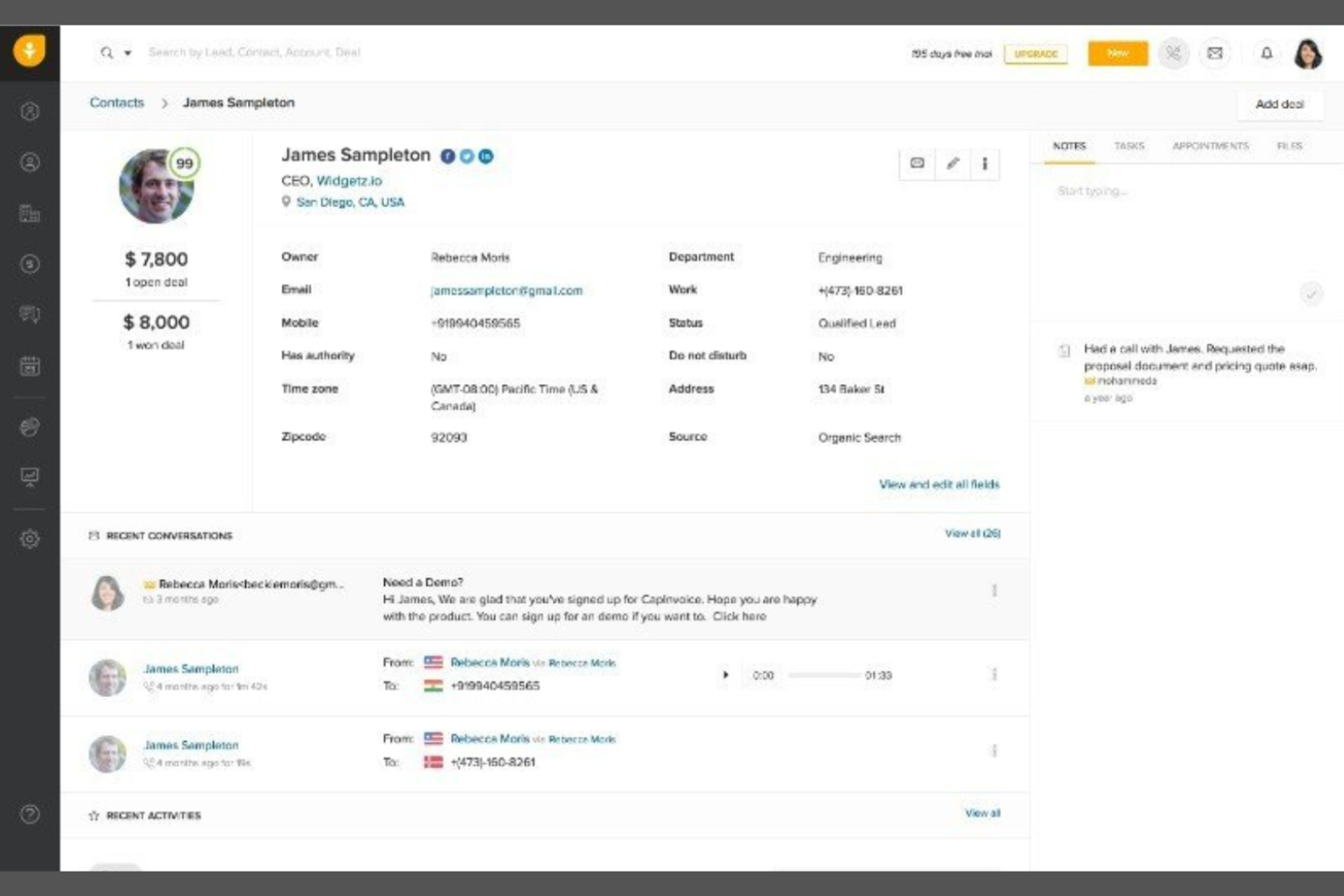
Sales teams looking for built-in AI to guide their outreach may want to consider Freshsales. This CRM is designed for businesses that want predictive insights, automated lead scoring, and sales activity recommendations without relying on third-party add-ons. Unlike monday CRM, Freshsales puts AI-driven sales intelligence at the center of its platform, helping teams prioritize leads and close deals faster.
Why Freshsales Is a Good monday CRM Alternative
What sets Freshsales apart from monday CRM is its focus on built-in AI sales insights that help teams work smarter. I picked Freshsales because it offers AI-powered lead scoring and deal insights right out of the box, so you can quickly identify which prospects are most likely to convert. The platform also provides sales activity suggestions and predictive forecasting, which helps sales reps prioritize their daily outreach. If you want a CRM that actively guides your team’s sales process with actionable intelligence, Freshsales is a strong alternative.
Freshsales Key Features
Some other features in Freshsales help teams manage customer relationships and sales activities more efficiently:
- Built-in phone and email: Make calls and send emails directly from the CRM without switching tools.
- Visual sales pipeline: Track deals through customizable pipeline stages using a drag-and-drop interface.
- Contact and account management: Store, organize, and view all customer details and interactions in one place.
- Workflow automation: Set up automated tasks, reminders, and follow-ups to keep sales processes moving.
Freshsales Integrations
Integrations include Mailchimp, PandaDoc, HubSpot, QuickBooks, Xero, Stripe, Freshservice, Freshdesk, and Trello.
Pros and Cons
Pros:
- Automation supports recurring tasks and follow-ups
- Built-in communication tools streamline outreach workflows
- AI-powered scoring helps prioritize leads and track progress
Cons:
- Mobile experience can be inconsistent
- Reporting features lack depth for advanced analysis
Best for marketing automation integration

If you’re looking for a CRM that connects sales and marketing in one place, HubSpot CRM is worth considering. This platform stands out for its built-in marketing automation and deep integration with HubSpot’s marketing tools. It’s a strong fit for teams that want to align sales and marketing activities without juggling multiple systems.
Why HubSpot CRM Is a Good monday CRM Alternative
What sets HubSpot CRM apart is its strong marketing automation capabilities, which go beyond what monday CRM offers. I picked HubSpot CRM for teams that want to automate email campaigns, lead nurturing, and customer segmentation directly within their CRM. The platform’s workflow automation lets you trigger actions based on customer behavior, helping you deliver timely, personalized communication. For businesses that need sales and marketing to work hand-in-hand, HubSpot CRM brings these functions together in a single platform.
HubSpot CRM Key Features
Some other features in HubSpot CRM help teams manage customer relationships more efficiently:
- Contact and company records: Store and organize detailed information about every contact and company in your database.
- Deal tracking: Visualize and update the status of deals as they move through your sales pipeline.
- Meeting scheduling: Let customers book meetings directly with your team using integrated calendar links.
- Task management: Assign, track, and prioritize tasks related to contacts, deals, or companies within the CRM.
HubSpot CRM Integrations
Integrations include Gmail, Outlook, Slack, Mailchimp, Shopify, Asana, Google Ads, Intercom, Zoom, and Microsoft Dynamics 365.
Pros and Cons
Pros:
- Email tracking and templates for outreach consistency
- Visual sales pipeline with drag-and-drop stages
- Built-in marketing automation for campaign workflows
Cons:
- Workflow limits apply on entry-level paid plans
- Reporting customization is limited in lower tiers
Best for simple contact management
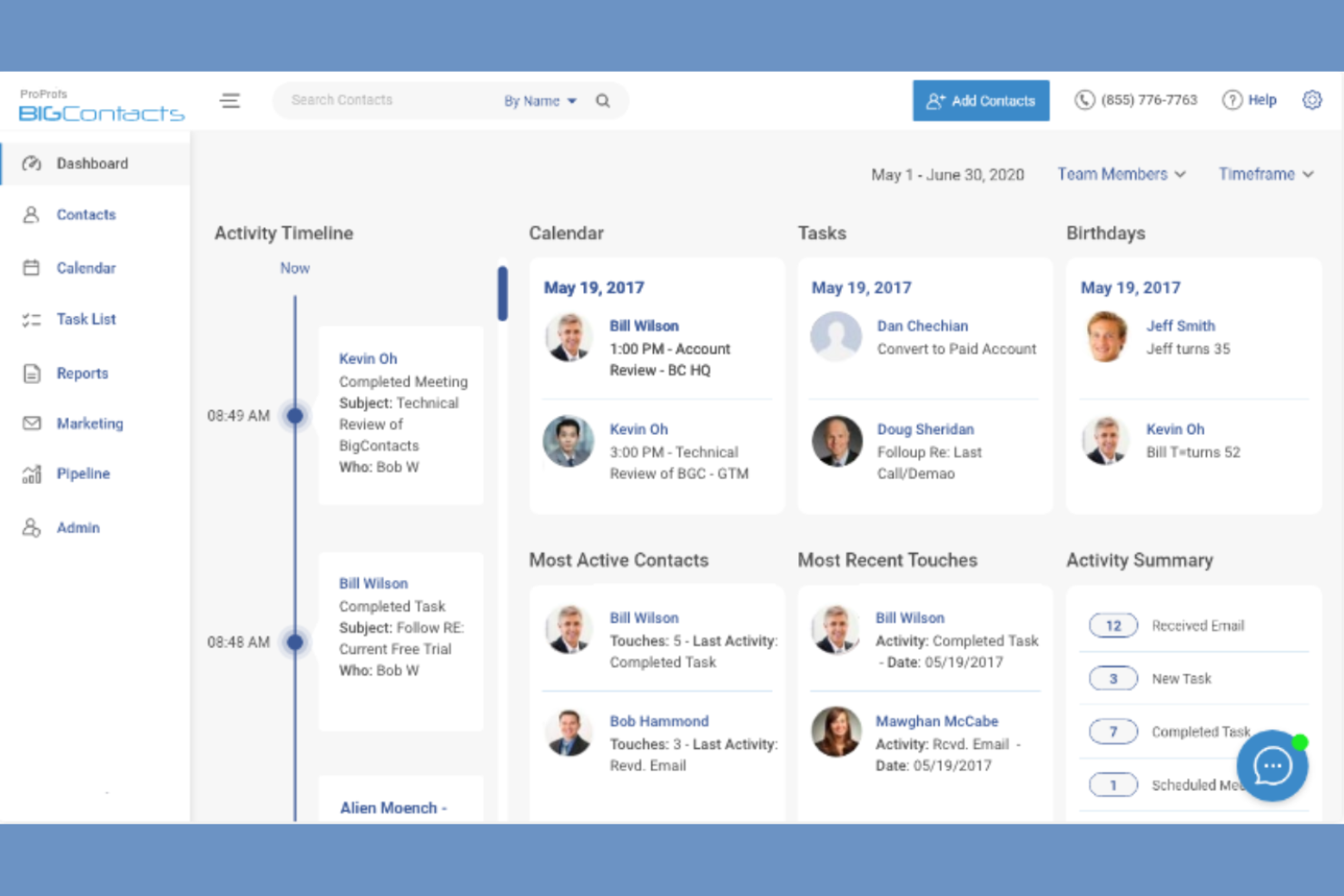
If you want a CRM focused on straightforward contact management, BIGContacts is worth a look. This platform is designed for small businesses and teams that need an easy way to organize contacts, track interactions, and manage follow-ups without extra complexity. Unlike monday CRM, BIGContacts keeps its feature set simple, making it easier for users who don’t need advanced automation or project management tools.
Why BIGContacts Is a Good monday CRM Alternative
For teams that want a CRM focused on contact management without extra layers, BIGContacts is a strong fit. I picked BIGContacts because it centers on organizing contacts, tracking every interaction, and setting automated reminders for follow-ups. The platform’s customizable contact fields and detailed activity timelines help you keep all relationship details in one place. If your main goal is to manage contacts and communication history, BIGContacts offers a simpler alternative to monday CRM’s broader project-focused approach.
BIGContacts Key Features
Some other features that make BIGContacts appealing for simple CRM needs include:
- Email marketing tools: Send bulk emails and track campaign performance directly from the platform.
- Task and calendar management: Schedule tasks, appointments, and meetings with built-in calendar tools.
- Document storage: Attach and organize files within each contact record for easy access.
- Custom reporting: Build and export reports on contacts, activities, and sales pipelines.
BIGContacts Integrations
Integrations include ActiveCampaign, Skype, Mailchimp, HubSpot, QuickBooks, Outlook, Google Contacts, Shopify, Zendesk, and FreshBooks.
Pros and Cons
Pros:
- Custom fields support organized contact tracking
- Automated reminders help manage to-do lists and follow-ups
- User-friendly interface simplifies contact and task management
Cons:
- Reporting lacks depth for performance insights
- Limited features for tracking complex sales pipelines

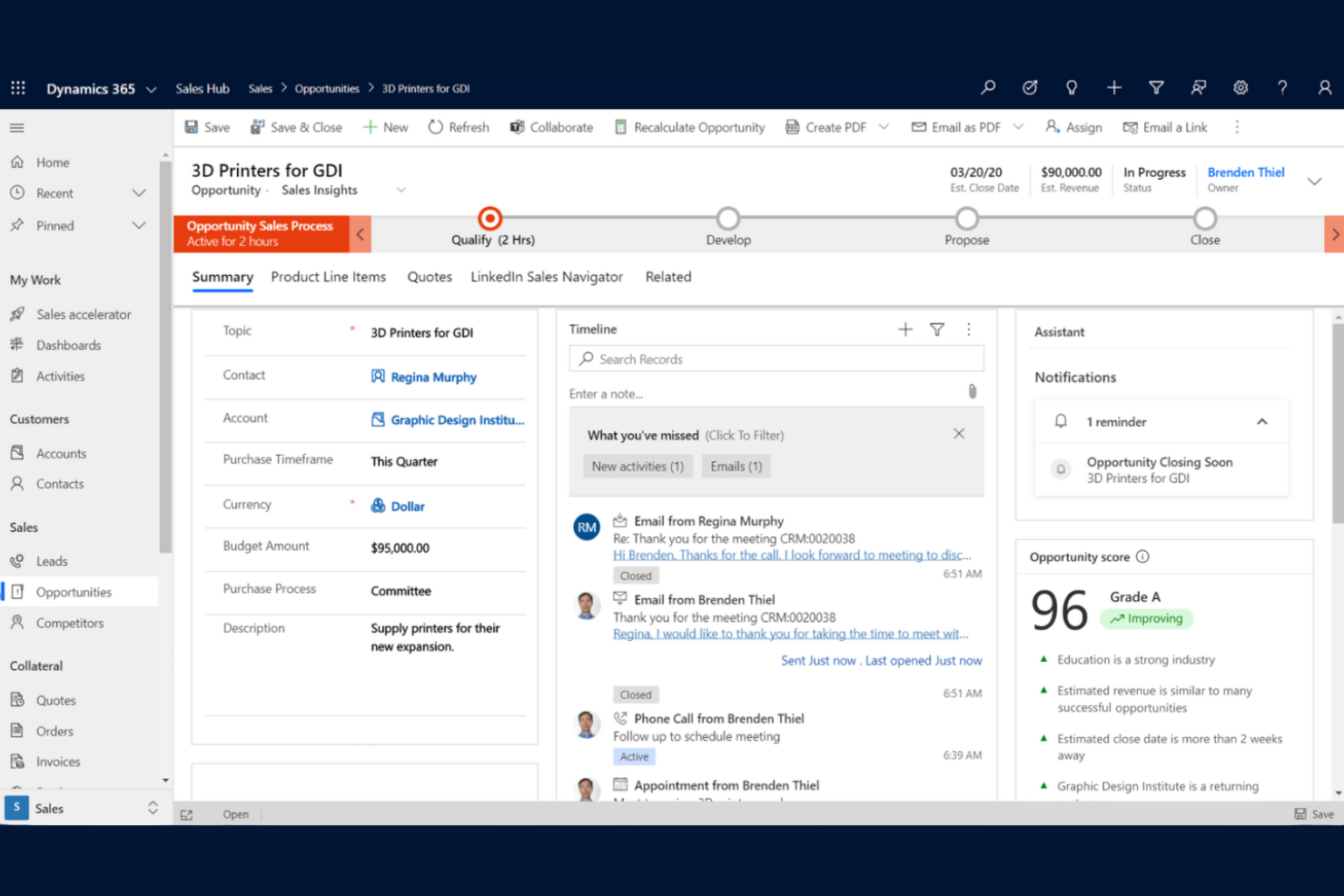
For organizations already using Microsoft 365, Microsoft Dynamics 365 Sales offers a CRM that fits right into your existing workflows. This platform is especially useful for sales teams that rely on Outlook, Teams, and Excel to manage customer relationships and sales activities. Unlike monday CRM, Dynamics 365 Sales provides deep integration with Microsoft’s productivity tools, making it easier to sync data and automate tasks across your business.
Why Microsoft Dynamics 365 Sales Is a Good monday CRM Alternative
For teams that depend on Microsoft 365 tools, Dynamics 365 Sales stands out as a CRM that works natively within that ecosystem. I picked Dynamics 365 Sales because it lets you manage leads, contacts, and opportunities directly from Outlook and Teams, so your sales data stays connected to your daily communication and collaboration tools. The platform also syncs with Excel for advanced reporting and forecasting, which is helpful for teams that already use spreadsheets to analyze sales performance. If your business is already invested in Microsoft 365, Dynamics 365 Sales offers a level of integration and workflow continuity that monday CRM can’t match.
Microsoft Dynamics 365 Sales Key Features
Some other features in Dynamics 365 Sales help teams manage customer relationships and sales processes more thoroughly:
- AI-driven sales insights: Get predictive lead scoring and opportunity analysis to prioritize sales activities.
- Customizable dashboards: Build visual dashboards to track KPIs and monitor sales performance in real time.
- Mobile app access: Manage contacts, deals, and activities from anywhere using the dedicated mobile app.
- Automated workflow designer: Set up custom sales process automations with built-in workflow tools.
Microsoft Dynamics 365 Sales Integrations
Integrations include Microsoft Teams, Outlook, Excel, Power BI, SharePoint, LinkedIn Sales Navigator, OneDrive, Power Automate, Azure, and Microsoft 365.
Pros and Cons
Pros:
- Custom dashboards support complex workflows and reporting
- AI insights help track progress and prioritize opportunities
- Deep Microsoft 365 alignment supports all-in-one work management
Cons:
- Requires technical setup for advanced configurations
- Steep learning curve for new users

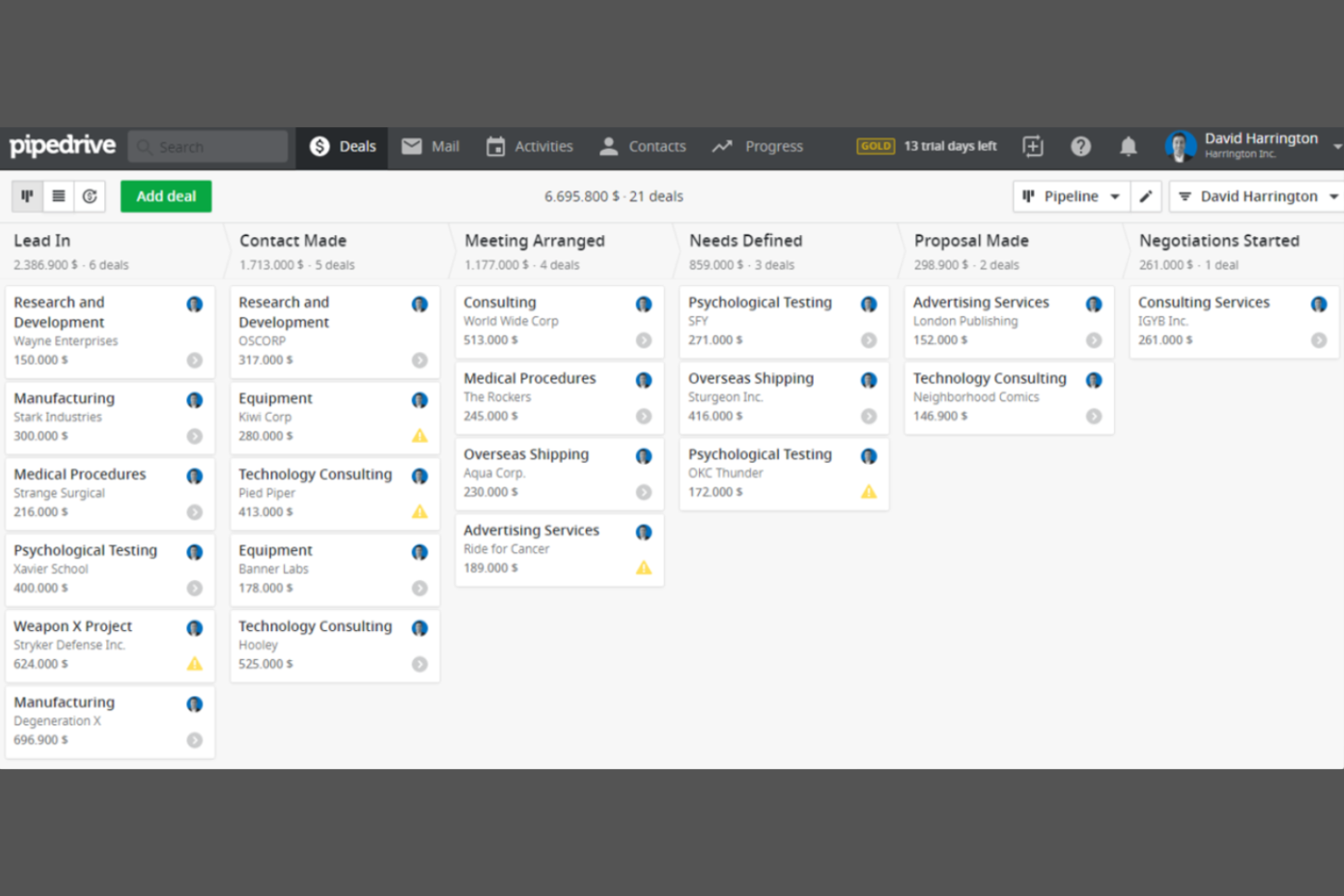
Sales teams looking for a clear, visual way to track deals often turn to Pipedrive. This CRM is designed for businesses that want to manage their sales pipeline with drag-and-drop boards and customizable stages. Unlike monday CRM, Pipedrive puts visual pipeline management at the center of its workflow, making it easier to spot bottlenecks and prioritize deals.
Why Pipedrive Is a Good monday CRM Alternative
If your team needs a CRM that puts visual sales pipeline management front and center, Pipedrive is worth considering. I picked Pipedrive because its drag-and-drop pipeline boards let you organize deals by stage and quickly update progress. The platform also offers customizable pipeline stages and color-coded deal indicators, making it easy to spot stalled deals or high-priority opportunities. For sales-focused teams that want a clear, visual overview of their pipeline, Pipedrive offers a more specialized approach than monday CRM.
Pipedrive Key Features
Some other features in Pipedrive help teams manage sales activities and customer data more thoroughly:
- Email integration: Connect your email account to send, receive, and track messages directly within Pipedrive.
- Activity scheduler: Schedule calls, meetings, and tasks with built-in reminders to keep sales activities on track.
- Lead inbox: Collect and organize incoming leads in a dedicated space before adding them to your pipeline.
- Sales reporting: Generate detailed reports on sales performance, activities, and pipeline health.
Pipedrive Integrations
Integrations include PandaDoc, Leadfeeder, JustCall, LinkPort, Outfunnel, Slack, QuickBooks, Trello, Zoom, and Gmail.
Pros and Cons
Pros:
- Custom reports provide visibility into pipeline performance
- Activity scheduler helps track tasks and follow-ups clearly
- Visual pipeline supports intuitive interface for tracking deals
Cons:
- Mobile app lacks some desktop functionality
- No built-in project management software features

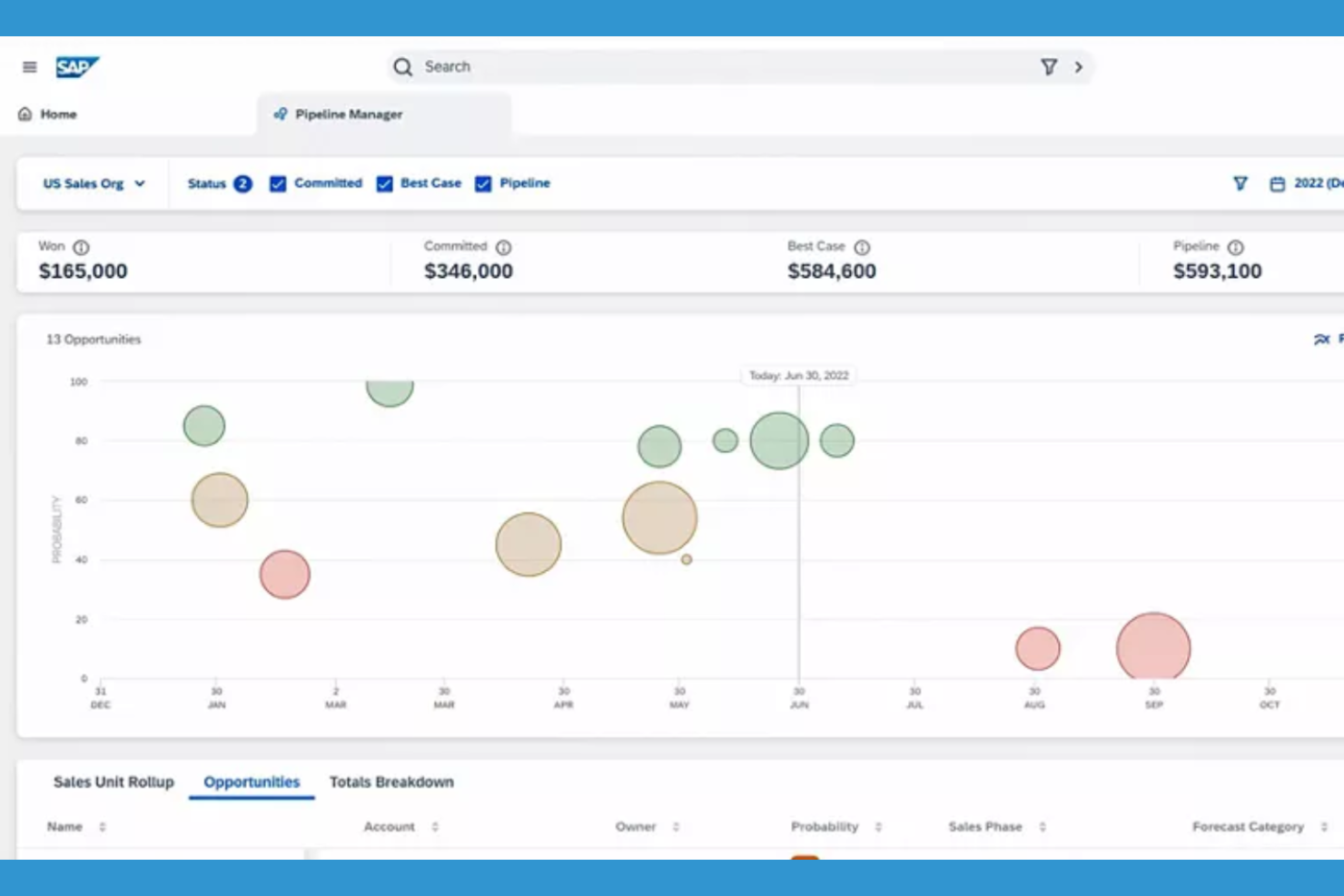
For organizations that need deep integration between CRM and enterprise resource planning, SAP Sales Cloud offers a unified approach. This platform is designed for large enterprises and manufacturers that want to connect sales, inventory, and supply chain data in real time. Unlike monday CRM, SAP Sales Cloud stands out for its ability to sync customer interactions with core business operations across global teams.
Why SAP Sales Cloud Is a Good monday CRM Alternative
If you’re looking for a CRM that connects directly with enterprise resource planning systems, SAP Sales Cloud is a strong choice. I picked SAP Sales Cloud because it lets you manage sales processes alongside inventory, order management, and supply chain data in one platform. The tool’s real-time data syncing and advanced forecasting features help large organizations keep customer information aligned with business operations. For teams that need more than just sales tracking, SAP Sales Cloud offers a level of operational integration that monday CRM doesn’t provide.
SAP Sales Cloud Key Features
Some other features that make SAP Sales Cloud appealing to enterprise teams include:
- Mobile sales app: Access customer data, update opportunities, and manage tasks from any device.
- CPQ (Configure, Price, Quote) tools: Generate complex quotes and proposals directly within the platform.
- Territory and quota management: Assign sales territories and set quotas to align with business goals.
- AI-driven opportunity scoring: Use predictive analytics to prioritize deals most likely to close.
SAP Sales Cloud Integrations
Integrations include SAP S/4HANA, SAP ERP Central Component, SAP CPQ, SAP Commerce Cloud, SAP Service Cloud, Microsoft Outlook, Microsoft Teams, Google Workspace, Docusign, and Adobe Sign.
Pros and Cons
Pros:
- Advanced forecasting helps track progress across large teams
- Built-in CPQ supports detailed sales workflows
- Strong fit for complex projects tied to enterprise operations
Cons:
- Interface can feel outdated
- Steep learning curve for non-enterprise users

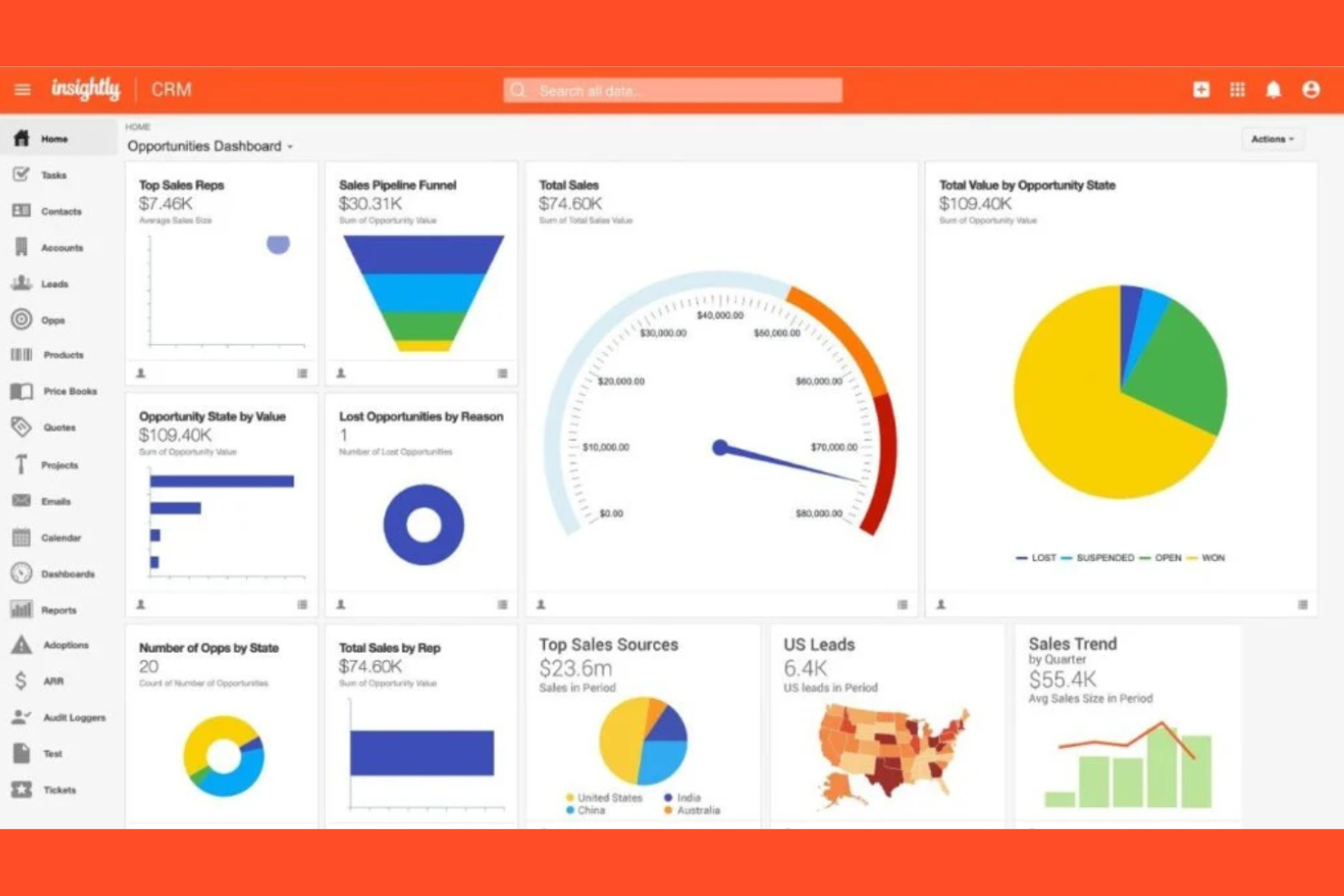
If you need a CRM that also helps manage projects from start to finish, Insightly CRM is worth a look. This platform is designed for teams that want to track sales, projects, and post-sale delivery in one place—especially useful for service-based businesses and agencies. Unlike monday CRM, Insightly CRM combines customer management with built-in project management tools, so you can move seamlessly from closing a deal to delivering the work.
Why Insightly CRM Is a Good monday CRM Alternative
Insightly CRM stands out for teams that need project management features built directly into their CRM. I picked Insightly CRM because it lets you convert won opportunities into projects, so you can track delivery and execution without switching platforms. The tool includes task management, milestone tracking, and project pipelines, making it easy to manage both customer relationships and ongoing work in one place. If your business needs to bridge the gap between sales and project delivery, Insightly CRM offers a unified approach that monday CRM doesn’t match.
Insightly CRM Key Features
In addition to its project management capabilities, Insightly CRM offers several other features that support customer relationship management:
- Custom fields and page layouts: Tailor records and views to match your team’s unique processes and data needs.
- Email tracking and templates: Monitor email opens and clicks, and use pre-built templates for consistent communication.
- Lead routing: Automatically assign leads to the right team members based on rules you set.
- Relationship linking: Connect contacts, organizations, and opportunities to visualize complex customer networks.
Insightly CRM Integrations
Integrations include Gmail, Outlook, QuickBooks Online, Xero, Mailchimp, Slack, Dropbox, Docusign, Microsoft Teams, and Unbounce.
Pros and Cons
Pros:
- Custom objects support complex projects and workflows
- Project pipelines help track tasks, milestones, and due dates
- Combines CRM with project management software capabilities
Cons:
- Mobile app lacks full feature access
- Limited advanced reporting for tracking project data
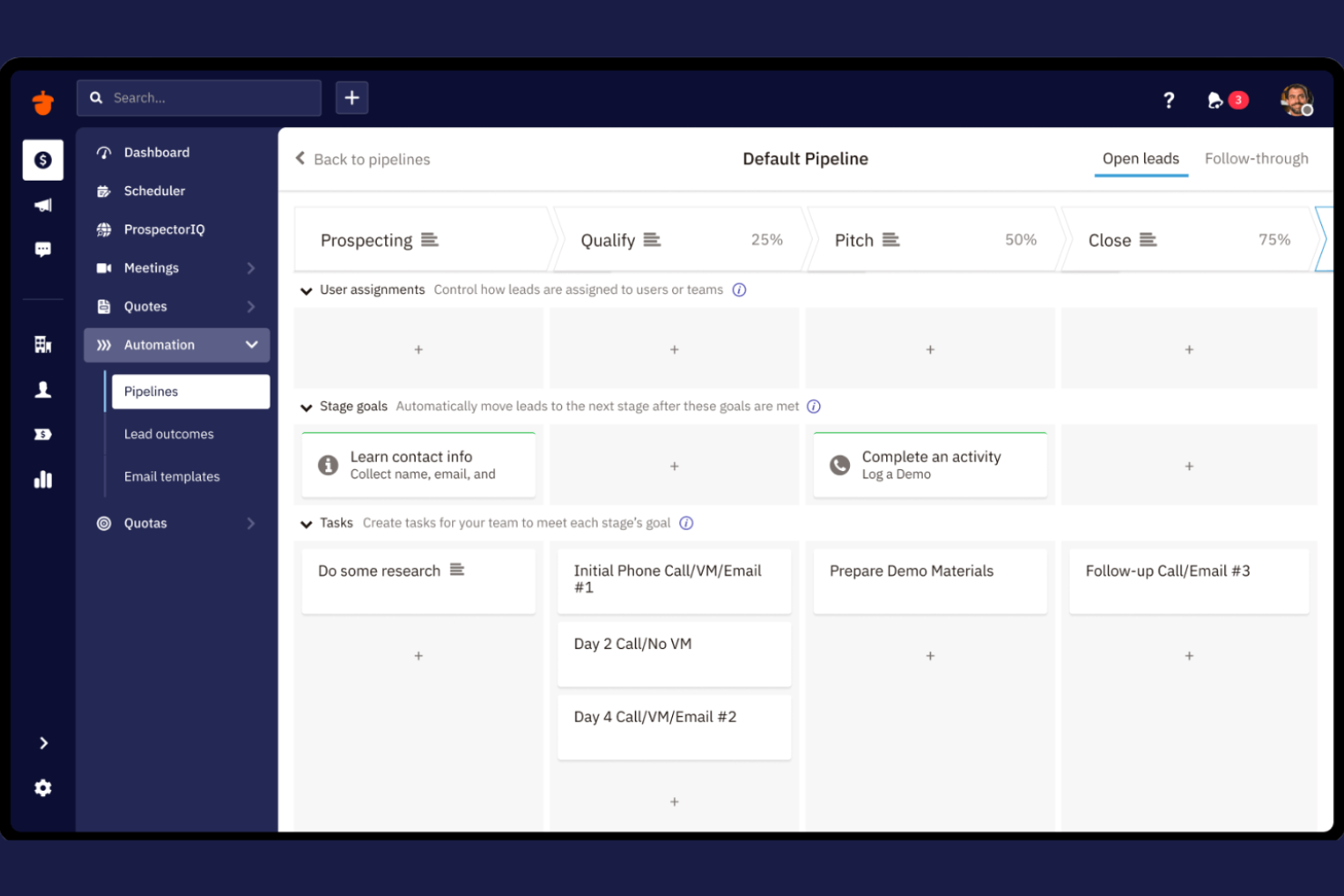
If your team needs a CRM that emphasizes collaboration, Nutshell CRM is designed with shared work in mind. It’s a strong fit for sales teams and service groups that want to manage pipelines, share notes, and coordinate tasks in one place. Unlike monday CRM, Nutshell CRM puts team communication and group activity tracking at the center of its platform.
Why Nutshell CRM Is a Good monday CRM Alternative
Nutshell CRM stands out for teams that want built-in collaboration tools as part of their CRM workflow. I picked Nutshell CRM because it lets users assign tasks, share notes, and comment directly on deals or contacts, making teamwork more visible and actionable. The platform’s team activity feeds and shared pipelines help everyone stay aligned on customer progress and next steps. If your priority is keeping your team connected and coordinated, Nutshell CRM offers collaboration features that go beyond what monday CRM provides.
Nutshell CRM Key Features
Some other features that make Nutshell CRM appealing for teams include:
- Sales automation workflows: Automate repetitive sales tasks and follow-ups to keep deals moving forward.
- Customizable reporting dashboards: Build and share visual reports on sales performance and team activity.
- Email sequencing: Set up automated email sequences for outreach and nurturing prospects.
- Lead capture forms: Create and embed web forms to collect leads directly into your CRM.
Nutshell CRM Integrations
Integrations include Gmail and Google Calendar, Outlook, Google Sheets, Facebook Messenger, Dropbox Sign, Calendly, Dialpad, DocSend, Google Meet, and RevenueCloudFX.
Pros and Cons
Pros:
- Reporting dashboards provide visibility into team workload
- Built-in email sequencing supports marketing campaigns
- Collaboration tools help teams track tasks and shared activities
Cons:
- Limited advanced marketing automation features
- No support for complex project management workflows
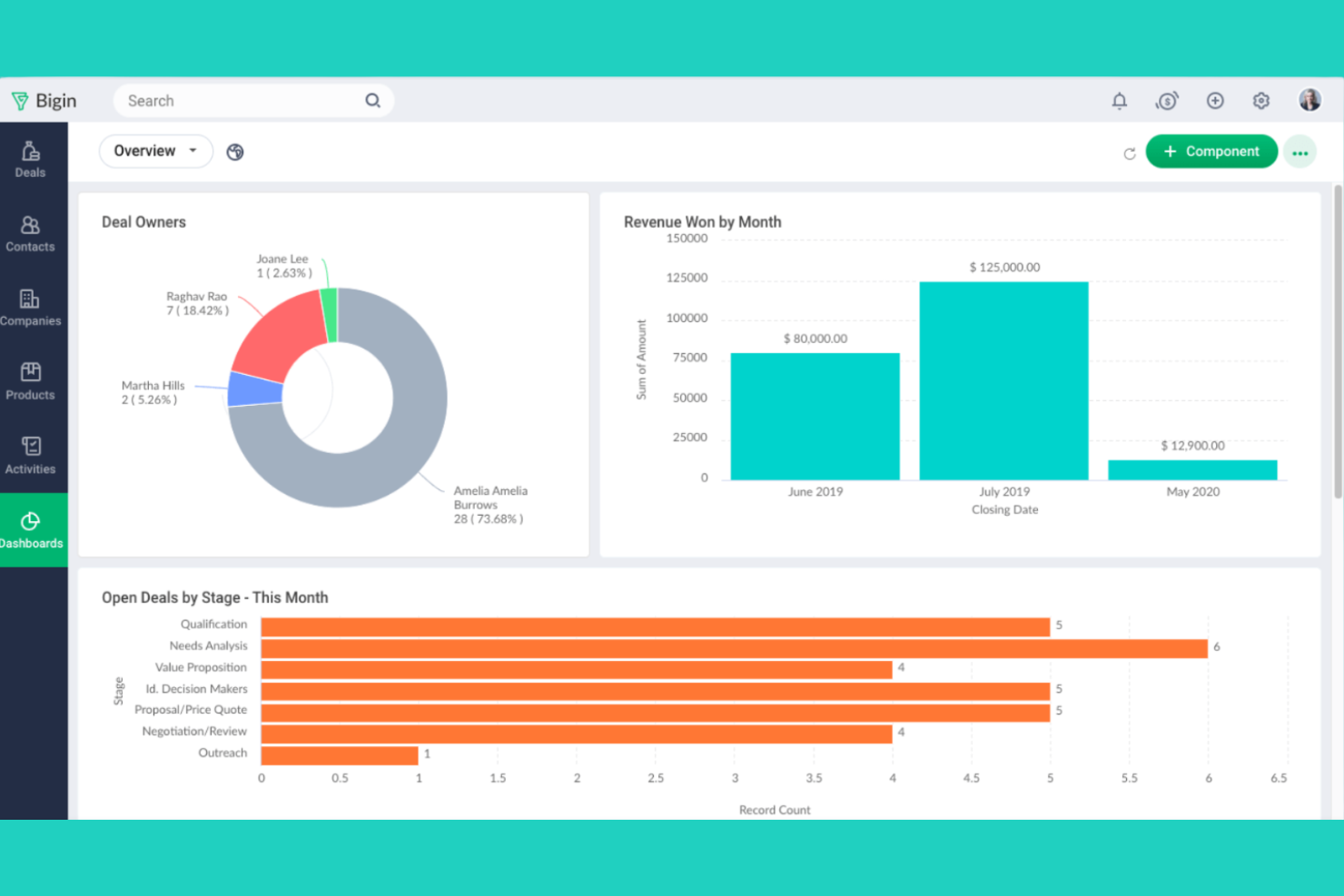
Zoho Bigin is built for small businesses that want a simple, pipeline-focused CRM without extra complexity. It’s especially useful for teams that need to track deals visually and straightforwardly manage customer interactions. Unlike monday CRM, Zoho Bigin keeps the focus on pipeline management and quick setup, making it easy for smaller teams to get started fast.
Why Zoho Bigin Is a Good monday CRM Alternative
For small businesses that want a CRM focused on pipeline management, Zoho Bigin offers a streamlined approach that’s hard to match. I picked Zoho Bigin because it lets users build multiple pipelines, customize stages, and move deals with a simple drag-and-drop interface. The tool also includes built-in telephony and email features, so teams can manage communications right alongside their sales process. If you’re looking for a CRM that keeps things simple and pipeline-centric, Zoho Bigin is a strong alternative to monday CRM.
Zoho Bigin Key Features
Some other features that make Zoho Bigin appealing for small business teams include:
- Workflow automation: Set up automated actions for repetitive tasks and follow-ups.
- Custom fields and modules: Tailor the CRM to fit unique business processes and data needs.
- Mobile app: Access pipelines, contacts, and activities from iOS and Android devices.
- Built-in analytics: Generate visual reports and dashboards to track sales performance.
Zoho Bigin Integrations
Integrations include Zoho Books, Zoho CRM, Zoho Desk, Google Workspace, Microsoft 365, Microsoft Teams, WhatsApp, Mailchimp, Shopify, and QuickBooks Online.
Pros and Cons
Pros:
- Multiple pipelines help organize workflows and deal stages
- Built-in communication tools support daily task tracking
- Simple pipeline design offers strong ease of use for startups
Cons:
- Basic reporting for tracking performance
- Limited scalability for complex sales processes

Copper
Best with Google Workspace integration
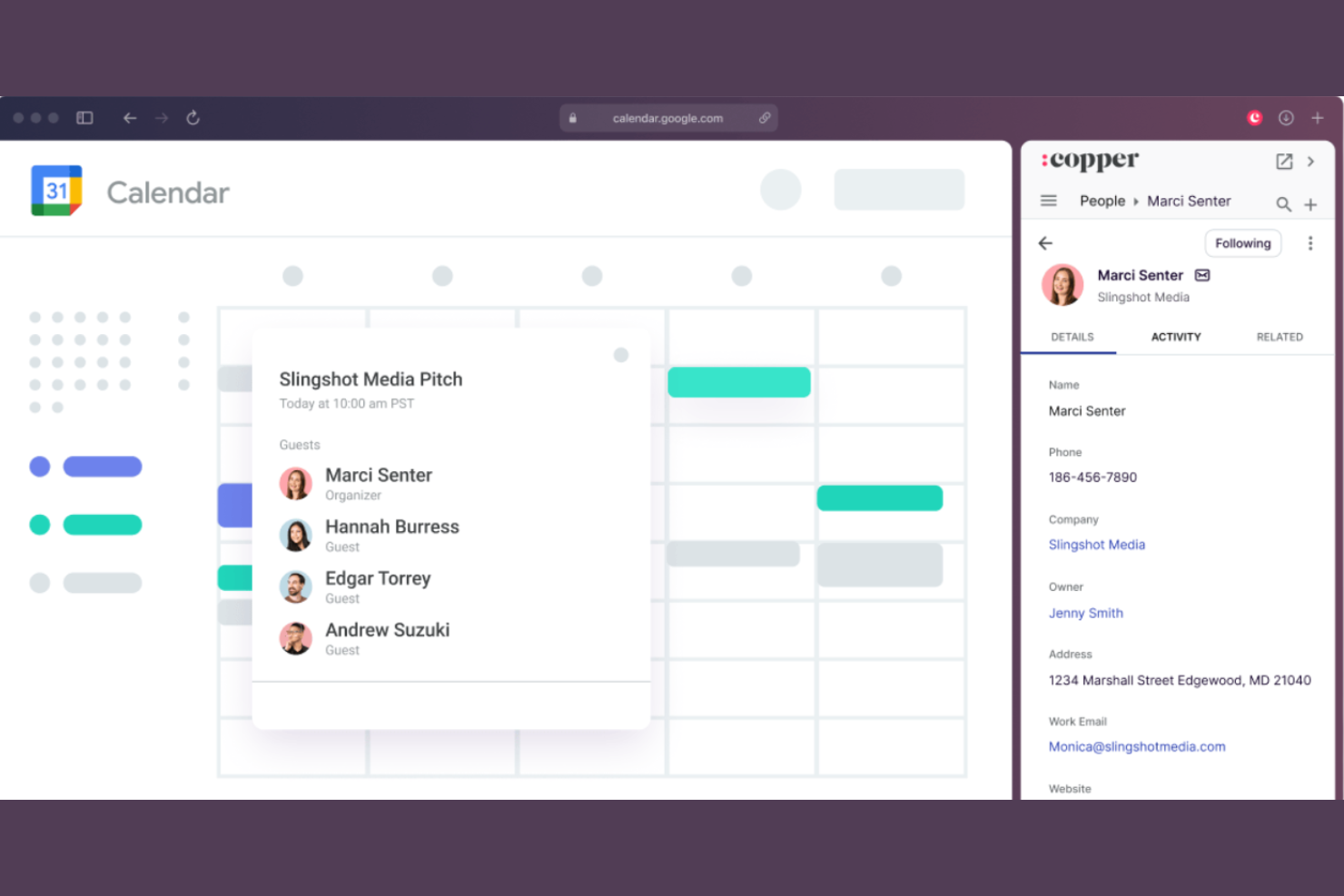
Copper is designed for teams that rely on Google Workspace and want a CRM that fits right into their existing workflows. It’s especially useful for businesses that manage customer relationships through Gmail, Google Calendar, and Google Drive. Unlike monday CRM, Copper offers deep, native integration with Google apps, so you can manage contacts, deals, and tasks without leaving your inbox.
Why Copper Is a Good monday CRM Alternative
If your team depends on Google Workspace, Copper offers a level of integration that monday CRM doesn’t match. I picked Copper because it automatically syncs emails, calendar events, and files from Gmail, Google Calendar, and Google Drive directly into your CRM records. The Chrome extension lets you manage leads and opportunities right from your inbox, so you don’t have to switch tabs. For businesses that want their CRM to feel like a natural extension of Google Workspace, Copper is a strong alternative.
Copper Key Features
Some other features that make Copper appealing for customer relationship management include:
- Pipeline management: Visualize and organize deals across customizable sales stages.
- Task automation: Set up automatic reminders and follow-up tasks for leads and opportunities.
- Contact enrichment: Automatically pull in social profiles and company details for contacts.
- Reporting dashboards: Access real-time sales and activity reports with customizable dashboards.
Copper Integrations
Integrations include Gmail, Google Calendar, Google Drive, Google Sheets, Mailchimp, LinkedIn, RingCentral, Docusign, QuickBooks, and JustCall.
Pros and Cons
Pros:
- Intuitive interface makes it easy to track tasks and deals
- Automatic data capture helps streamline contact management
- Deep Google Workspace integration supports all-in-one workflows
Cons:
- Reporting tools lack advanced depth
- Limited customization for complex workflows
Other monday CRM Alternatives
Here are some additional monday CRM alternatives options that didn’t make it onto my shortlist, but are still worth checking out:
- Salesforce CRM
With advanced customization options
- Zoho CRM
For multichannel communication tools
- Smartsheet
For spreadsheet-style project tracking
- Creatio CRM
With no-code process automation
- Airtable
For customizable workflow templates
- Salesmate CRM
For built-in calling and texting tools
- Capsule CRM
For managing sales opportunities
- ClickUp
For task and goal alignment features


How I Evaluate Monday CRM Alternatives
I consider each tool across two layers: the CRM table stakes every CX team needs to track contacts and run pipelines, and the differentiating factors that determine which tool actually fits best.
Core Functionality (Table Stakes For This List)
When I'm selecting tools for my list, I rank each one on a scale from 0 (does not offer the functionality) to 5 (excels in this area) for each core functionality listed below. Then, I calculate the tool's total score into a percentage. Each tool needs to achieve a minimum total score of 65% to be considered for inclusion.
- Contact & Account Management: I look for a centralized database where CX teams can store customer records, map account hierarchies, and view full interaction histories without switching tabs.
- Customizable Pipelines & Workflows: Each tool should let you build pipelines for processes like renewals, onboarding stages, or escalation paths with configurable stages and custom fields.
- Workflow Automation: I evaluate whether you can automate recurring CX tasks like sending follow-ups when a deal moves through stages or assigning accounts based on customer segment.
- Communication & Interaction Tracking: Every touchpoint matters, so I check for email sync, call logging, and meeting tracking tied directly to contact or account records.
- Reporting & Analytics Dashboards: The tool should offer customizable dashboards where you can track pipeline health, response times, or renewal rates with visualizations your team can act on.
- Third-Party Integrations: I check for native connections to helpdesk tools, email platforms, and communication apps, plus API access for building custom CX workflows.
Once I have a list of tools that meet this criteria, I consider what sets each platform apart.
Differentiating Factors (What Sets Vendors Apart)
Here's how I compare and contrast different vendors:
Standout Features
Customer health scoring is a big differentiator. I look for tools that assign risk levels based on engagement patterns and flag at-risk accounts before churn happens. AI-powered insights add another layer, especially when a platform can summarize past interactions or suggest next steps during renewal conversations. I also evaluate whether a tool offers an omnichannel inbox that pulls email, chat, and social messages into one view. That way, your team isn't bouncing between platforms to piece together a customer's history.
Beyond Features
How quickly a team can migrate from Monday CRM matters, so I check for pre-built templates, import tools, and guided onboarding that shorten time-to-value. CX tech stack compatibility is another priority. Your CRM needs to sync with helpdesk, survey, and communication tools your team already relies on. I also evaluate pricing transparency, specifically whether key features like automation or reporting are gated behind higher tiers that could force an upgrade as your CX team grows.
Why Look For a monday CRM Alternative?
While monday CRM is a good choice of customer relationship management platform, there are a number of reasons why some users seek out alternative solutions. You might be looking for a monday CRM alternative because…
- You need deeper integration with Google Workspace
- You want built-in calling or texting features
- You require more advanced sales automation tools
- You need customizable reporting and analytics
- You work in a region where monday CRM support is limited
If any of these sound like you, you’ve come to the right place. My list contains several customer relationship management platform options that are better suited for teams facing these challenges with monday CRM and looking for alternative solutions.
monday CRM Key Features
Here are some of the key features of monday CRM, to help you contrast and compare what alternative solutions offer:
- Visual sales pipeline boards
- Customizable deal and contact fields
- Automated workflow and task assignments
- Email integration and tracking
- Activity and communication logs
- Built-in document management
- Customizable dashboards and reporting
- Team collaboration and mention tools
- Lead capture forms and web-to-lead automation
- Mobile app for iOS and Android