

O software de integração de clientes ajuda a transformar novos utilizadores em clientes bem-sucedidos e duradouros — sem o caos de transferências manuais, etapas esquecidas ou percursos pouco claros. No entanto, nem todas as ferramentas de integração são iguais, e uma configuração inadequada pode comprometer até as melhores estratégias de experiência do cliente.
Trabalhei com equipas que estão a expandir experiências SaaS, de comércio eletrónico e orientadas para serviços, e uma coisa é clara: a integração não é apenas um momento pontual. É um percurso estruturado e repetível que define o tom de tudo o que se segue. Testei e analisei os melhores softwares de integração de clientes para ajudar a simplificar a ativação, reduzir a rotatividade e criar confiança desde o primeiro dia.
Porque pode confiar nas nossas recomendações de software
6,700+
Reviews
20
Industry experts
16+
Evaluation factors
14
Years reviewing software
A nossa equipa testa e analisa software desde 2012. Como líderes de experiência do cliente (CX), sabemos o quão difícil — e importante — é escolher o software certo.
Para este guia, avaliámos as ferramentas através de testes práticos e pesquisa independente, pontuando-as de acordo com os nossos critérios de seleção.
As nossas análises refletem o juízo da nossa equipa editorial, e não um discurso de vendas.
 Gui DrusinaCreative Director
 Tim FisherVP of AI
Tabela comparativa de soluções de software de integração de clientes
A tabela abaixo compara os detalhes de preços das minhas principais soluções de software de integração de clientes.
Sorted by: Default
| Tool | Starting Price | Website | |
|---|---|---|---|
Best for automated onboarding training | 4.7 out of 5 | Pricing upon request 14-day free trial + demo available | Website |
Best for connecting customer onboarding to enterprise systems | 4.7 out of 5 | Pricing upon request Free demo available | Website |
Best for login-free client onboarding spaces | 4.9 out of 5 | €59/user/month 14-day free trial | Website |
Best for AI-driven course creation | 4.6 out of 5 | $119/month Free plan + free demo available | Book Demo |
Best for AI workflows with human oversight | 4.4 out of 5 | Pricing upon request Free trial + free demo available | Website |
Best for interactive product tours | 4.7 out of 5 | $174/month 14-day free trial | Website |
Best for personalized learning paths | 4.6 out of 5 | Pricing upon request Free trial available | Website |
Best for step-by-step mutual success plans | 4.9 out of 5 | $350/month Free plan + free demo available | Website |
Best for creating how-to videos with AI | 4.9 out of 5 | $18/creator/month Free 7-day trial + free plan + free demo available | Website |
Best for tracking real-time user interactions | 4.8 out of 5 | $240/month 14-day free trial | Website |


Apresentação dos 20 melhores softwares de integração de clientes
Eis uma breve descrição de cada ferramenta de integração de clientes, destacando o melhor caso de utilização de cada ferramenta, algumas funcionalidades relevantes e capturas de ecrã que dão uma visão geral da interface de utilizador.
 Best for automated onboarding training
- 14-day free trial + demo available
- Pricing upon request
Visit WebsiteCustomer Rating:4.7/5
SkyPrep's management dashboard displays learner activity, upcoming events, and quick links. SkyPrep's customer onboarding software is designed for organizations aiming to enhance their training processes and build stronger customer relationships. It offers flexible content creation and automated enrollments, allowing your team to deliver engaging training experiences that improve product adoption and customer loyalty. Whether you're in a tech-driven industry or a service-oriented business, SkyPrep's intuitive platform helps efficiently manage and track onboarding journeys, ensuring your customers are well-equipped and confident in using your products or services.
Why I Picked SkyPrep
I picked SkyPrep for its strong focus on automating onboarding training, which is crucial for businesses looking to deliver consistent and engaging customer experiences. The platform's automated enrollments ensure that new customers are promptly assigned relevant courses, minimizing manual setup and allowing your team to focus on more strategic tasks. Additionally, SkyPrep's digital sign-offs provide a secure way to acknowledge understanding of policies and compliance, creating reliable records and reducing administrative burdens. With its robust tracking and performance insights, you can easily monitor customer progress and identify areas needing support, effectively closing knowledge gaps and enhancing retention.
SkyPrep Key Features
In addition to its strong automated onboarding capabilities, SkyPrep provides a variety of features to enhance your customer training experience.
- Learner Engagement: SkyPrep incorporates gamification and modern design elements to make learning interactive and engaging for your customers.
- Multi-tenant LMS: This feature allows you to manage separate platforms for different clients or branches under one account, maintaining organization and clarity.
- Virtual Classroom: SkyPrep offers tools for remote training, ensuring your customers can access training sessions from anywhere with ease.
- AI-Powered Features: The platform leverages artificial intelligence to enhance learning experiences and simplify content creation, making it more accessible for your team.
SkyPrep Integrations
Integrations include BambooHR, ADP, SAML 2.0, OKTA, G Suite, Office365, OpenSesame, Stripe, PayPal, and an API for custom integrations.
Pros and Cons
Pros:
- Comprehensive reporting tools facilitate tracking of learner progress
- Supports multiple content formats, enhancing the learning experience
- User-friendly interface simplifies navigation for all users
Cons:
- Limited offline access to training materials hinders flexibility
- Lack of a dedicated mobile app for on-the-go access
Learn more about SkyPrep: Best for connecting customer onboarding to enterprise systems
- Free demo available
- Pricing upon request
Visit WebsiteCustomer Rating:4.7/5
Continu is a customer onboarding and learning platform that delivers structured training and automates education journeys. Continu is a customer onboarding and learning platform designed to deliver structured training programs, automate onboarding journeys, and connect customer education with existing business systems.
Who Is Continu Best For?
Continu is a strong fit for mid-size to enterprise B2B companies that need to onboard customers, partners, or clients through structured training programs tied to their broader tech stack.
Why I Picked Continu
I picked Continu because of how tightly it integrates onboarding data with enterprise systems. Its Salesforce integration allows teams to track customer onboarding progress directly alongside account activity, making it easier to connect learning engagement with adoption and retention metrics. The platform also supports automated enrollment and content assignment, so new customers receive the right onboarding materials without manual provisioning.
Continu Key Features
- Learning tracks: Create structured onboarding paths that sequence videos, courses, and documents in a defined order.
- Journeys: Design step-by-step onboarding programs that guide customers through key activation milestones.
- Smart segmentation: Automatically assign content based on role, product tier, or customer segment.
- Continu Insights: Monitor onboarding progress and engagement through real-time dashboards.
Continu Integrations
Integrations include Salesforce, Workday, BambooHR, Slack, Google Workspace, Okta, and Zoom. An API is available for custom integrations.
Pros and Cons
Pros:
- Automated segmentation reduces manual onboarding setup
- Structured learning journeys support customer activation
- Strong Salesforce integration for visibility into onboarding progress
Cons:
- More robust for enterprise use than small teams
- Pricing not publicly transparent
Learn more about Continu: Best for login-free client onboarding spaces
- 14-day free trial
- From €59/user/month
Visit WebsiteCustomer Rating:4.9/5
Valuecase tracks customer onboarding progress across multiple client spaces. Valuecase is a customer onboarding platform built around login-free, branded client Spaces that combine task management, milestone tracking, forms, embedded content, and live chat in a single shared link.
Who Is Valuecase Best For?
Valuecase is a strong fit for B2B SaaS customer success and onboarding teams that want to give clients a polished, structured onboarding experience without requiring them to create an account.
Why I Picked Valuecase
I've included Valuecase in my top picks because it solves a friction point I care deeply about: customers actually showing up to their onboarding. Every Space is shared as a single link with no login required, so clients engage with their plan, tasks, and embedded content without creating an account. I also love that the AI can generate a full onboarding template from an uploaded PDF or meeting transcript, cutting setup time significantly. The built-in live chat ties conversations directly to specific tasks, keeping everything in one place instead of scattered across email threads.
Valuecase Key Features
- Gantt chart view: Visual timeline that maps all onboarding tasks and milestones across the full project duration, available on every plan.
- Conditional form logic: Forms adapt their question flow based on customer responses, letting you collect the right information from each customer segment.
- Cross-customer dashboard: A central view showing onboarding status, overdue items, and engagement metrics across your entire customer portfolio.
- Rule-based automation: If-this-then-that triggers send email reminders, unlock content stages, and update CRM fields based on customer activity or inactivity.
Valuecase Integrations
Valuecase offers native integrations with HubSpot, Salesforce, Slack, and Microsoft Teams. It also provides a public API, webhooks, Valuecase MCP, and connections through Zapier, Make, and Albato.
Pros and Cons
Pros:
- White-labeled Spaces consolidate tasks and communication
- AI generates full onboarding plans from uploads
- Customers access onboarding with no login barrier
Cons:
- Editing live Spaces lacks bulk update capability
- CRM integrations only available on higher plans
Learn more about Valuecase: Best for AI-driven course creation
- Free plan + free demo available
- From $119/month (billed annually)
Customer Rating:4.6/5
TalentLMS uses AI-driven tools to create and organize onboarding courses faster. Managing customer onboarding can be challenging, but TalentLMS helps teams handle it through structured training and learning paths. It supports businesses across different industries that need a simple way to onboard customers using clear, organized training content. With tools for course creation and reusable learning materials, TalentLMS helps teams deliver consistent onboarding experiences at scale.
Why I Picked TalentLMS
I picked TalentLMS for its ability to support customer onboarding through structured course creation and flexible training paths. It lets teams quickly create and adjust onboarding content to match different customer needs. Built-in assessments and certifications make it easier to track progress and confirm learning completion. Together, these features help teams deliver consistent and measurable onboarding training.
TalentLMS Key Features
In addition to iAI-driven course creation, TalentLMS offers:
- Skills-Based Training: This feature enables you to tailor onboarding experiences to specific competencies, ensuring that each customer receives training relevant to their needs.
- Mobile Accessibility: With support for mobile devices, your team can access training materials anytime, anywhere, facilitating continuous learning.
- Real-time Insights: Comprehensive reporting and analytics allow you to monitor learner progress and course performance, ensuring that your onboarding process is on track.
- Customization Options: From branding to white-labeling, TalentLMS provides various customization options to align the platform with your company’s identity.
TalentLMS Integrations
Integrations include Zoom, Salesforce, Shopify, WordPress, BambooHR, Zapier, GoToMeeting, Microsoft Teams, Google Analytics, and Slack.
Pros and Cons
Pros:
- Customizable features cater to various training needs, enhancing user experience
- Clear learner grouping features support complex training structures
- Built-in assessments support skills measurement and certification
Cons:
- Large multimedia files may require external hosting solutions
- Built-in collaboration tools are basic compared with dedicated learning communities
Learn more about TalentLMS: 5Best for AI workflows with human oversight
Moxo
- Free trial + free demo available
- Pricing upon request
Customer Rating:4.4/5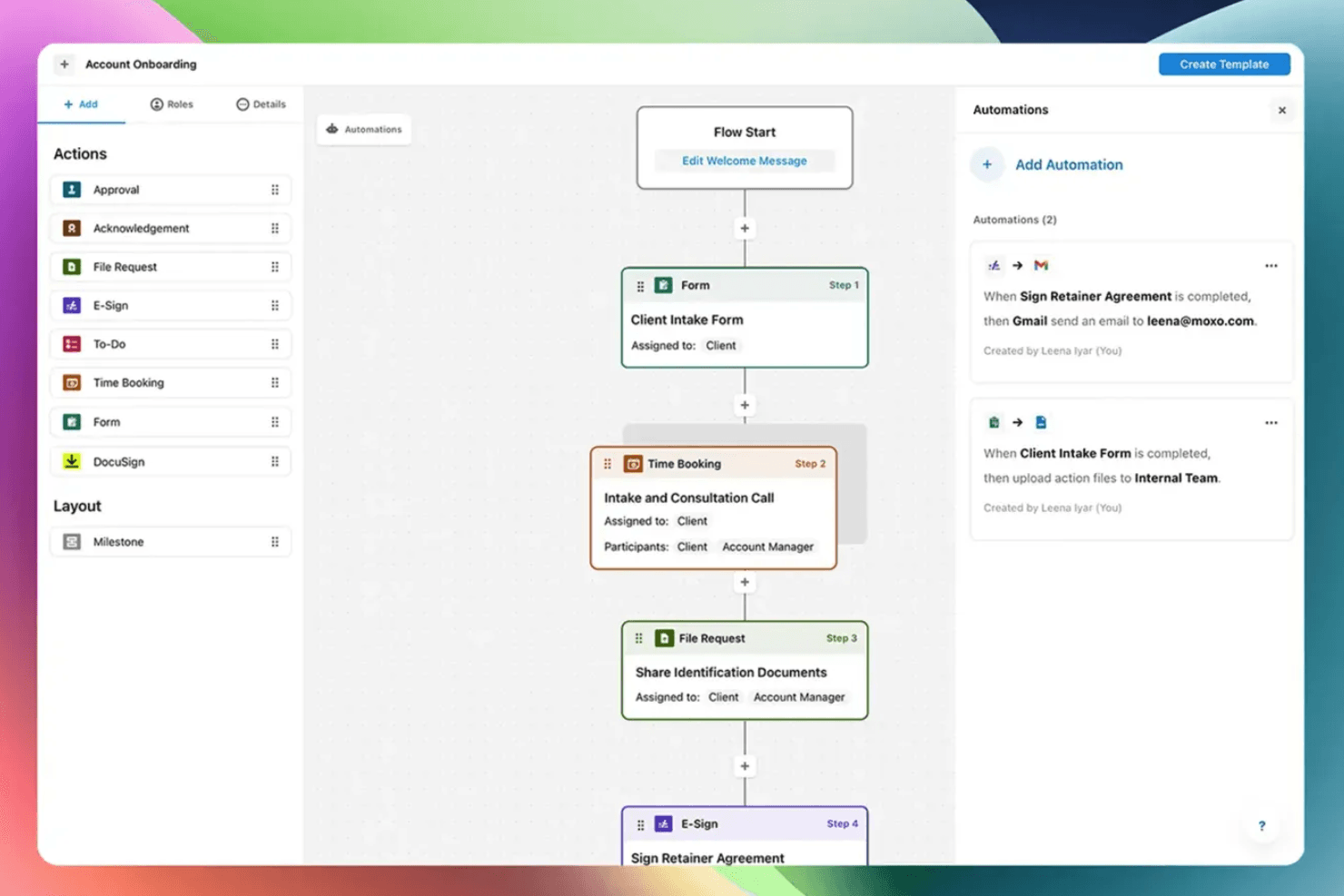
Moxo shows a workflow builder for account onboarding with automations. Moxo is a business process orchestration platform that coordinates workflows across humans, AI agents, and systems, with built-in branching, escalation handling, and human-in-the-loop controls.
Who Is Moxo Best For?
Moxo is a strong fit for operations and CX teams that need to coordinate multi-step business processes across a mix of human approvers and AI agents.
Why I Picked Moxo
I picked Moxo as one of the best because it handles something most onboarding tools sidestep: coordinating work across both AI agents and human approvers in a single flow. Its Flow Assistant lets you describe a process in plain language and build a branching, multi-step workflow from it, with escalation rules built in. I also like that supervisor agents monitor work in progress and flag anomalies before they ever reach a human step, keeping your team focused on decisions that actually need them.
Moxo Key Features
- Branded client portals: Organizations can set up separate portals for different audiences, configured with flows, AI chat, resources, and service requests.
- Document collection and e-signatures: Portals support document requests, file uploads, approvals, and e-signatures, with alerts when submissions need attention.
- Multi-agent system builder: Teams can build no-code multi-agent systems, combining Moxo agents with their own to handle routing, follow-ups, and task preparation.
- Audit trail: Moxo records who approved what, when, and what they saw for every flow, with a retention period designed for 7+ years.
Moxo Integrations
Moxo’s native integrations are not clearly documented. It supports custom integrations through REST API, webhooks, Web SDK, Headless SDK, MCP server, and Zapier.
Pros and Cons
Pros:
- Drag-and-drop builder with reusable templates
- Built-in chat, video, and screen sharing
- SOC 2 Type II and GDPR compliant infrastructure
Cons:
- Setup requires heavy configuration time up front
- No built-in task timer for tracking
Learn more about Moxo: Best for interactive product tours
- 14-day free trial
- From $174/month (billed annually)
Visit WebsiteCustomer Rating:4.7/5
UserGuiding allows for the creation of customizable, guided, step-by-step walkthroughs for users within an application. UserGuiding provides a no-code solution featuring interactive product tours, onboarding checklists, and in-app surveys. This platform is particularly appealing to small businesses and tech companies aiming to enhance user engagement without extensive technical expertise. By integrating with existing tools and prioritizing data security, UserGuiding simplifies the onboarding process while offering valuable insights through analytics, effectively addressing challenges in user adoption and product activation.
Why I Picked UserGuiding
I picked UserGuiding because it excels in creating interactive product tours that transform user onboarding. You can leverage its customizable tours and tooltips to guide users through their initial experiences, reducing frustration and enhancing engagement. The platform's segmentation feature allows you to deliver personalized content, ensuring that each user receives a tailored experience. These capabilities not only shorten the learning curve but also boost user satisfaction, making UserGuiding an ideal choice for streamlining onboarding processes.
UserGuiding Key Features
In addition to its interactive product tours, UserGuiding offers a comprehensive suite of features designed to enhance your customer onboarding process:
- Onboarding Checklists: These checklists guide users step-by-step through essential tasks, ensuring they don't miss critical actions during their initial interactions with your product.
- Tooltips and Hotspots: These features provide contextual guidance by highlighting specific parts of your application, helping users understand complex functionalities as they navigate.
- In-App Surveys: Gather immediate user feedback with customizable surveys that can be triggered at key points in the user journey, allowing you to adjust and improve the onboarding process in real-time.
- Resource Centers: This feature creates a centralized hub for tutorials, FAQs, and other helpful content, giving users easy access to the information they need to succeed with your product.
UserGuiding Integrations
Integrations include Amplitude, Salesforce, Intercom, Mixpanel, Segment, Slack, Google Analytics, Google Tag Manager, Woopra, and HubSpot.
Pros and Cons
Pros:
- Reduction in support tickets due to effective product walkthroughs
- Effective in creating interactive guides and tooltips
- User-friendly interface that simplifies onboarding processes
Cons:
- Slow roadmap for new feature introductions
- Limited customization options and control over data analytics
Learn more about UserGuiding: Best for personalized learning paths
- Free trial available
- Pricing upon request
Visit WebsiteCustomer Rating:4.6/5
Absorb comes with an accessible and intuitive interface all wrapped in a professionally designed, custom branded style. Absorb offers a tailored solution for those seeking to enrich their customer onboarding processes. This learning management system caters to businesses across various industries, focusing on delivering comprehensive education and enhancing customer satisfaction. By providing personalized learning paths, Absorb aims to reduce churn and boost customer retention, ensuring your clients fully understand and appreciate your offerings.
Why I Picked Absorb
I picked Absorb for its standout feature of personalized learning paths, which is crucial for effective customer onboarding. This system allows you to tailor training programs to individual learners, moving away from generic models and focusing on specific roles and needs. With tools like Absorb Create for course development and Absorb Analyze for performance tracking, you can craft a learning experience that boosts engagement and retention. By leveraging AI-driven customization, Absorb ensures that your onboarding process is not only efficient but also aligns with the unique learning styles of your audience.
Absorb Key Features
In addition to its personalized learning paths, Absorb offers a variety of features that make it a robust choice for customer onboarding software.
- eCommerce Module: Simplifies the sale of online courses, enabling your organization to monetize training content easily.
- Observational Checklists: Bridges the gap between online learning and real-world application by tracking skill verification in on-the-job training.
- Mobile Accessibility: Ensures that your team can access learning materials anytime and anywhere, accommodating diverse schedules and locations.
- SCORM Compliance: Supports various course formats, guaranteeing compatibility and consistency across different devices and platforms.
Absorb Integrations
Integrations include Salesforce, HubSpot, Zoom, WebEx, Workday, SAP SuccessFactors, BambooHR, ADP, Dayforce, ServiceNow, Google Workspace, and more.
Pros and Cons
Pros:
- Includes AI-powered tools for streamlined course creation
- Supports a wide range of content formats, including SCORM
- Integrates with HR systems
Cons:
- Limited customization options for admin dashboards
- Bulk enrollment processes need improvement
Learn more about Absorb: 8Best for step-by-step mutual success plans
Dock
- Free plan + free demo available
- From $350/month (billed annually)
Visit WebsiteCustomer Rating:4.9/5
Dock's onboarding features include tailored success plans to help customers feel more at ease. Dock offers a unique onboarding platform that caters to the needs of customer success and sales teams. By providing personalized onboarding hubs, Dock ensures that project plans, content, and forms are readily accessible in a collaborative environment, reducing the reliance on emails and meetings. Its seamless integration with tools like HubSpot and Salesforce makes it a versatile choice for businesses looking to create efficient onboarding experiences while tracking customer engagement and progress.
Why I Picked Dock
I picked Dock for its standout ability to create step-by-step mutual success plans, which is essential for customer onboarding. Dock's personalized onboarding portals allow you to share project plans and onboarding content in a collaborative space, removing the need for constant back-and-forth emails. With pre-built templates and self-serve resource hubs, your team can ensure a consistent and efficient onboarding process, focusing on customer engagement and retention. Dock's integration with CRM tools like HubSpot and Salesforce further enhances its utility, making it a versatile choice for teams looking to track and optimize the onboarding journey.
Dock Key Features
In addition to its ability to craft step-by-step mutual success plans, Dock offers a suite of features designed to optimize your customer onboarding process.
- Templated Workspaces: These allow your team to quickly launch personalized onboarding templates, ensuring a consistent and tailored experience for each customer.
- Survey Forms and File Uploads: You can collect necessary data efficiently, as Dock provides built-in forms and upload options to streamline information gathering.
- Dynamic Fields: By pulling customer data from CRMs, this feature personalizes the onboarding process, making it more relevant and engaging for your clients.
- Analytics and Reporting: Dock offers insights into customer engagement and onboarding progress, helping you track interactions and improve the customer experience.
Dock Integrations
Native integrations for Dock include HubSpot and Salesforce. Additionally, Dock provides an API for custom integrations.
Pros and Cons
Pros:
- Comprehensive reporting and analytics help track client engagement
- Built-in survey forms and file uploads streamline data collection
- Dock's dynamic fields personalize the onboarding experience effectively
Cons:
- Users find the initial setup time-consuming and complex
- The software may not offer sufficient customization for advanced needs
Learn more about Dock: Best for creating how-to videos with AI
- Free 7-day trial + free plan + free demo available
- From $18/creator/month (billed annually)
Visit WebsiteCustomer Rating:4.9/5
Guidde provides a simple interface for editing your how-to videos for customer onboarding. Guidde offers an AI-driven solution that elevates your customer onboarding experience by allowing you to create engaging video documentation swiftly. It's tailored for businesses aiming to improve onboarding processes with tools like Magic Mic for clear narration and Magic Capture for effortless workflow recording. This platform is perfect for industries focused on employee onboarding, customer education, and enterprise collaboration, helping to reduce support tickets and boost customer engagement.
Why I Picked Guidde
I picked Guidde because its unique AI-driven feature set specifically addresses the need to create engaging how-to videos quickly, a crucial aspect of customer onboarding. Its Magic Capture tool lets you record workflows effortlessly, while the Magic Mic provides AI-generated voiceovers that add clarity to your tutorials. By delivering concise video content precisely when needed, Guidde enhances user engagement and reduces the number of support requests, making it an ideal choice for teams looking to optimize their onboarding processes. This approach not only boosts customer confidence but also helps streamline your organization's training efforts.
Guidde Key Features
In addition to its AI-driven video creation capabilities, Guidde offers several features that enhance your customer onboarding process:
- Guidde Create: Converts your workflow captures into professional tutorials quickly, ensuring your team can provide clear and structured guidance.
- Broadcasting: Delivers tailored content to users at the right moment, enhancing learning and ensuring that information is received when it's most relevant.
- Enterprise Solutions: Centralizes processes to improve collaboration across your organization, allowing for more cohesive onboarding strategies.
- Customer Education: Focuses on building customer confidence through effective onboarding strategies, aimed at reducing support requests and improving user satisfaction.
Guidde Integrations
Integrations include Microsoft Dynamics 365, SAP, Dropbox, Notion, and Salesforce.
Pros and Cons
Pros:
- User-friendly interface simplifies the video documentation process
- Streamlines video creation, reducing training time significantly
- Seamlessly captures workflows, making complex processes easy to follow
Cons:
- The selection of AI voice options is not always natural-sounding
- Audio/narration alignment sometimes requires manual adjustments
Learn more about Guidde: 10Best for tracking real-time user interactions
Userflow
- 14-day free trial
- From $240/month (billed annually)
Visit WebsiteCustomer Rating:4.8/5
Userflow enables you to track how your users interact with your solution in real-time. For businesses aiming to improve customer engagement and streamline the onboarding process, Userflow offers a compelling solution. This no-code platform is particularly appealing to SaaS companies and product managers who wish to enhance user experience without relying on developer resources. With tools like in-app product tours, checklists, and surveys, Userflow tackles the challenge of efficient user onboarding and communication, making it an ideal choice for boosting user conversion and satisfaction.
Why I Picked Userflow
I picked Userflow because it excels at tracking how users interact with your solution in real-time, making it a reliable option for those seeking a customer data platform. The real-time tracking feature allows you to observe user behavior and engagement as it happens, providing immediate insights into how your customers are navigating your product. This is complemented by Userflow's Kanban-style builder, which enables you to create and test onboarding flows seamlessly within your applications. Additionally, the customizable in-app resource center ensures users have easy access to guided tours and knowledge bases, further enhancing the user experience and supporting efficient onboarding.
Userflow Key Features
In addition to the real-time tracking capabilities, Userflow offers several other features that enhance its appeal as a customer data platform.
- Behavior-Triggered Flows: These flows adapt based on real-time user actions, allowing you to customize the user experience dynamically as users interact with your product.
- Conditional Nudges: This feature highlights underutilized features by prompting users at strategic moments, ensuring they discover and make the most of all functionalities your application offers.
- Contextual Resource Center: Users can access a built-in resource center for on-demand help, including product tours and knowledge base searches, directly within your app.
- Automatic Language Detection: Userflow detects and adapts to the user's language preferences automatically, providing a localized and culturally relevant onboarding experience.
Userflow Integrations
Integrations include Segment, Amplitude, Mixpanel, Google Analytics, Intercom, HubSpot, Slack, Salesforce, Zendesk, and Pendo.
Pros and Cons
Pros:
- AI translation tool supports multilingual user bases
- Behavior-triggered flows personalize user experiences dynamically
- Userflow's no-code platform simplifies user onboarding processes
Cons:
- Reordering steps in flows can be cumbersome
- Lacks comprehensive native analytics dashboard
Learn more about Userflow:
Outras opções
Eis mais algumas opções que não entraram na lista principal.
- 11WhatfixBest for improving onboarding experience with integrated feedback
- 12IntercomBest for improving user experience with automation
- 13WalkMeBest code-free solution to create customer activity heatmaps
- 14PendoBest for driving user engagement with data
- 15DripBest for personalized onboarding experiences
- 16Under.ioBest for reducing manual processes in onboarding
- 17CompassBest for AI-driven chat assistance
- 18HopscotchBest no-code solution for sending in-app messages
- 19ChameleonBest self-serve onboarding for ticket deflection
- 20Document360Best for Pro Analytics insights
- 21RocketlaneBest for ready-made onboarding templates
- 22StonlyBest no-code solution for building self-serve help centers
- 23Product FruitsBest for interactive user tours
- 24TrupeerBest for video-based customer onboarding with AI
- 25Synergy LearningBest for LMS-powered onboarding journeys
- 26LiveAgentManage your help desk, ticketing, and knowledge base in one place
- 27IssuetrakBest for omnichannel ticket submission and support
- 28SkilljarCustomer education platform that helps you reduce customer support calls with automated step-by-step guides.
- 29MyHubBest for remote work document access
- 30UserpilotCustomer success platform that helps teams increase user adoption with behavior-driven experiences.
- 31AppcuesCloud-based software that helps you track, analyze, and optimize your onboarding tours without code.
- 32Guide CXBuild onboarding roadmaps with custom notifications
- 33NickelledCode-free solution that enables you to create walkthroughs and step-by-step guides.
- 34Precursive OBXFlexible customer support solution that enables you to map out your user journey.
O que é o software de integração de clientes?
O software de integração de clientes é uma plataforma que orienta os novos clientes durante as fases iniciais de utilização de um produto ou serviço. Simplifica as tarefas de integração, personaliza a experiência e ajuda os utilizadores a obter valor mais rapidamente.
How I Evaluate Customer Onboarding Software
I look at these tools in two layers: whether a CSM can actually manage a customer's onboarding from kick-off to go-live (acceptance criteria), then what sets one platform apart (differentiators).
Core Functionality (Table Stakes For This List)
When I'm selecting tools for my list, I rank each one on a scale from 0 (does not offer the functionality) to 5 (excels in this area) for each core functionality listed below. Then, I calculate the tool's total score into a percentage. Each tool needs to achieve a minimum total score of 65% to be considered for inclusion.
- Onboarding Workflow Templates: I check whether you can build reusable, sequenced templates for different customer segments, like an enterprise plan vs. a self-serve SMB track.
- Customer-Facing Portal: Each tool should give customers a branded space to view their plan, complete tasks, and upload files rather than chasing updates over email.
- Task & Milestone Tracking: I evaluate how tasks are assigned across both internal and client-side contacts, including due dates, dependencies, and milestone groupings.
- Progress Visibility & Reporting: Dashboards that show portfolio-level onboarding health, time-to-value trends, and bottlenecks matter more than basic project status views.
- Automation & Notifications: I look for trigger-based reminders, escalation rules, and status-change automations that keep projects moving without manual follow-up.
- CRM & CS Stack Integrations: The tool should sync onboarding data with platforms like Salesforce, HubSpot, or Gainsight so customer records stay current across systems.
Once I have a list of tools that meet this criteria, I consider what sets each platform apart.
Differentiating Factors (What Sets Vendors Apart)
Here's how I compare and contrast different vendors:
Standout Features
Onboarding-specific health scores are a big differentiator. Tools that combine task completion, milestone velocity, and login activity give CSMs an early signal when an account is stalling before a customer ever raises it. I also evaluate whether a platform offers in-app guided tours, which let customers walk through product setup steps without waiting for a scheduled call. An embedded communication hub ties it together by keeping emails, notes, and updates attached to each onboarding project instead of scattered across inboxes.
Beyond Features
Scalability matters a lot here. I check whether a platform can run high-touch enterprise onboarding with dedicated project plans alongside a tech-touch SMB motion using automated flows. Vendor support also makes a difference. Some offer dedicated specialists who help build your first playbooks, while others leave you with docs and a knowledge base. For teams handling sensitive customer data, I look at SOC 2 Type II certification, SSO support, and role-based access controls to confirm the tool fits enterprise security requirements.
Como escolher um software de integração de clientes
É fácil ficar preso a listas extensas de funcionalidades e estruturas de preços complexas. Para manter o foco enquanto percorre o seu processo específico de seleção de software, eis uma lista de verificação dos fatores a ter em conta:
| Fator | O que deve considerar |
|---|---|
| FatorEscalabilidade | O que deve considerarConsidere se o software pode crescer juntamente com a sua empresa. Precisará de uma solução capaz de lidar com um maior número de utilizadores e com maior complexidade sem perder desempenho. |
| FatorIntegrações | O que deve considerarCertifique-se de que o software se integra perfeitamente nos seus sistemas existentes, como ferramentas de CRM e análise, para simplificar os fluxos de trabalho e garantir a consistência dos dados. |
| FatorPersonalização | O que deve considerarProcure opções que lhe permitam adaptar as funcionalidades às necessidades específicas da sua empresa, garantindo que se ajustam facilmente aos seus processos e à sua identidade de marca. |
| FatorFacilidade de utilização | O que deve considerarEscolha um software que a sua equipa consiga aprender e utilizar rapidamente, sem formação extensiva, reduzindo o tempo necessário para obter valor e a frustração entre os utilizadores. |
| FatorOrçamento | O que deve considerarAvalie o custo tendo em conta as limitações do seu orçamento. Considere não só o preço inicial, mas também os custos contínuos, como as taxas de subscrição e possíveis complementos. |
| FatorMedidas de segurança | O que deve considerarCertifique-se de que estão implementadas medidas robustas de proteção de dados, incluindo encriptação e conformidade com as normas do setor, para proteger as informações dos seus clientes e da sua empresa. |
Tendências do software de integração de clientes em 2026
O software de integração de clientes está a evoluir para responder às necessidades empresariais em constante mudança. Eis as principais tendências a acompanhar.
Personalização orientada por IA
A personalização orientada por IA adapta a experiência de integração às necessidades de cada cliente. Esta tendência melhora o envolvimento e a satisfação ao fornecer conteúdos personalizados. Também aumenta a eficiência ao automatizar interações personalizadas.
Ferramentas interativas de integração
As ferramentas interativas de integração, como tutoriais gamificados e simulações, estão a tornar-se cada vez mais populares. Estas ferramentas tornam o processo de integração mais envolvente e agradável. Também ajudam os utilizadores a reter melhor a informação, tornando a formação de clientes mais fácil e eficaz.
Capacidades de integração perfeita
As capacidades de integração perfeita são essenciais para o software de integração de clientes. Esta tendência permite a troca fácil de dados entre diferentes sistemas. Garante uma experiência do cliente fluida e unificada.
Análise e relatórios avançados
A análise e os relatórios avançados proporcionam informações mais aprofundadas sobre o processo de integração. Esta tendência ajuda as empresas a identificar áreas a melhorar. Também permite tomar decisões baseadas em dados para obter melhores resultados.
Foco na privacidade e segurança dos dados
O foco na privacidade e segurança dos dados é fundamental em 2026. O software de integração de clientes está a incorporar medidas de segurança robustas. Esta tendência garante a conformidade com os regulamentos e cria confiança nos clientes.
Funcionalidades
Ao selecionar software de integração de clientes, procure as seguintes funcionalidades essenciais:
- Gestão automatizada de fluxos de trabalho: Esta funcionalidade organiza e simplifica cada etapa do processo de integração, garantindo que os novos clientes sabem sempre o que fazer a seguir. Gosto particularmente da forma como transforma um processo por vezes caótico numa máquina bem oleada que poupa imenso trabalho manual.
- Experiências de integração personalizáveis: Pode adaptar os percursos de integração às necessidades, preferências ou segmentos de cada cliente. Isto significa que cada cliente tem uma experiência relevante e útil — e não uma lista de verificação genérica —, sentindo-se verdadeiramente bem-vindo desde o primeiro dia.
- Acompanhamento de tarefas e lembretes: O acompanhamento integrado mantém todos informados, com listas de tarefas claras e lembretes enviados atempadamente diretamente aos seus clientes (e também à sua equipa). Diga adeus ao temido momento “Esquecemo-nos dessa etapa?”.
- Ferramentas de comunicação integradas: As mensagens, os modelos de email e o chat em tempo real fazem parte do pacote, facilitando a organização e o acesso às conversas com novos clientes. Pode responder a perguntas ou enviar-lhes um lembrete no momento certo — sem voltar a procurar na caixa de entrada.
- Gestão de documentos: Partilhe, armazene e solicite documentos importantes (como contratos ou formulários de conformidade) de forma segura a partir da plataforma. Agradeço não ter de lidar novamente com anexos de email nem de procurar em pastas.
- Painéis de progresso: Os painéis visuais e fáceis de ler permitem-lhe (a si e aos seus clientes) ver exatamente em que ponto estão, o que está concluído e o que se segue. É algo especialmente gratificante ver a barra de progresso avançar lentamente em direção à conclusão.
- Integração de assinaturas eletrónicas: Permita que os clientes concluam acordos ou assinem formulários digitalmente dentro da plataforma. Isto elimina os problemas associados à impressão e digitalização, mantendo tudo legal e rastreável.
- Recolha de feedback: Os inquéritos integrados e os pedidos de feedback captam as impressões e os pontos problemáticos dos clientes assim que terminam a integração, permitindo-lhe ajustar e melhorar o processo em tempo real. O seu próximo grupo de clientes beneficia imediatamente.
Funcionalidades comuns de IA do software de integração de clientes
Para além das funcionalidades padrão do software de integração de clientes acima indicadas, muitas destas soluções estão a incorporar IA com funcionalidades como:
- Análise de sentimento: A IA analisa as mensagens e os comentários dos clientes para avaliar o seu estado de espírito ou nível de frustração, alertando-o quando alguém possa precisar de atenção adicional—para que possa intervir com ajuda antes de um pequeno problema se tornar um fator decisivo.
- Verificação automatizada de documentos: Os sistemas baseados em IA analisam e autenticam rapidamente os documentos enviados (como documentos de identificação ou contratos), acelerando os tempos de aprovação e detetando erros que um ser humano poderia não identificar.
- Recomendações personalizadas de integração: A IA analisa os dados dos clientes para sugerir os passos, recursos ou funcionalidades de produto mais relevantes para cada pessoa, para que ninguém fique sujeito a uma experiência “igual para todos”.
- Pontuação preditiva do envolvimento: Ao processar dados sobre a atividade e o comportamento anterior dos clientes, a IA pode prever quais os novos utilizadores que poderão estar a enfrentar dificuldades ou em risco de desistir—dando à sua equipa a oportunidade de intervir antes que seja demasiado tarde.
- Robôs conversacionais de integração: Estes robôs inteligentes de conversação orientam os clientes durante a integração em tempo real, respondendo a perguntas e incentivando-os a avançar para o passo seguinte—pense neles como um orientador amigável que nunca dorme.
- Automatização inteligente de tarefas: A IA identifica tarefas administrativas repetitivas e automatiza-as, libertando o seu tempo e reduzindo a probabilidade de a sua equipa cometer erros.
Vantagens
O software de integração de clientes oferece inúmeras vantagens, tanto para os utilizadores como para as organizações. Eis as principais vantagens que pode esperar ao utilizar este tipo de software.
- Melhor retenção de clientes: Ao proporcionar uma experiência de integração simples e consistente, as empresas podem aumentar a satisfação dos clientes e reduzir as taxas de abandono.
- Maior eficiência: A automatização de tarefas repetitivas permite que as equipas se concentrem em atividades mais estratégicas, melhorando a produtividade geral.
- Maior envolvimento dos clientes: Os processos de integração personalizados garantem que os clientes se sintam valorizados e compreendidos, conduzindo a níveis de envolvimento mais elevados.
- Melhores informações sobre os dados: As análises e os relatórios abrangentes fornecem informações valiosas sobre o comportamento dos clientes e a eficácia da integração.
- Processos simplificados: As integrações com outras ferramentas e os fluxos de trabalho personalizáveis ajudam a criar um processo de integração coeso e eficiente.
Estas vantagens realçam a importância do software de integração de clientes na promoção da fidelização dos clientes e da eficiência operacional. Investir neste tipo de software pode conduzir a melhorias significativas tanto na experiência do cliente como no desempenho da empresa.
Custos e preços
Ao avaliar um software de integração de clientes, é essencial compreender as várias opções de planos e preços disponíveis. Os diferentes planos destinam-se a necessidades diferentes, desde pequenas empresas a grandes organizações. Abaixo, apresento as estruturas de preços e as funcionalidades normalmente associadas a estes planos, para o ajudar a tomar uma decisão informada.
| Tipo de plano | Preço médio | Funcionalidades comuns |
|---|---|---|
| Tipo de planoGrátis | Preço médio$0 | Funcionalidades comunsFerramentas básicas de integração, número limitado de utilizadores, relatórios básicos |
| Tipo de planoBásico | Preço médio$20/mês | Funcionalidades comunsFluxos de trabalho automatizados, modelos padrão, suporte por e-mail |
| Tipo de planoProfissional | Preço médio$50/mês | Funcionalidades comunsAnálises avançadas, fluxos de trabalho personalizáveis, integrações |
| Tipo de planoEmpresarial | Preço médio$100+/mês | Funcionalidades comunsSuporte dedicado, segurança avançada, personalização completa |
Perguntas frequentes sobre software de integração de clientes
Eis algumas perguntas a que quis responder sobre software de integração de clientes, utilizadores e clientes empresariais: