

Enquanto responsável pela experiência do cliente, enfrenta diariamente o desafio de manter a sua equipa eficiente, assegurando simultaneamente a satisfação dos clientes. O software de atendimento ao cliente móvel pode ser revolucionário, permitindo que a sua equipa responda de forma rápida e eficaz, independentemente do local onde se encontre.
Com base na minha experiência de testar e analisar software, constatei como a ferramenta certa pode fazer toda a diferença. Analisei e avaliei de forma independente várias opções para lhe apresentar as melhores. Neste artigo, apresentarei as minhas principais escolhas, oferecendo informações imparciais para o ajudar a encontrar a solução perfeita para as suas necessidades.
Why Trust Our Software Recommendations
6,700+
Reviews
20
Industry experts
16+
Evaluation factors
14
Years
Our team has been testing and reviewing software since 2012. As CX leaders ourselves, we know how difficult—and important—it is to choose the right software.
For this guide, we evaluated tools using hands-on testing and independent research, scoring tools using our selection criteria.
Our reviews reflect our human editorial judgment, not a sales pitch.
 Gui DrusinaCreative Director
 Tim FisherVP of AI
Tabela comparativa do melhor software de atendimento ao cliente móvel
Esta tabela comparativa resume os detalhes de preços das minhas principais escolhas de software de atendimento ao cliente móvel.
| Tool | Best For | Trial Info | Price | ||
|---|---|---|---|---|---|
| 1 | Best for turning emails into tasks | 30-day free trial + free demo available | From $14/user/month (billed annually) | Website | |
| 2 | Best for creating custom AI chatbots | 7-day free trial + free plan + free demo available | From $32/month (billed annually) | Website | |
| 3 | Best for small teams | 14-day free trial | Pricing upon request | Website | |
| 4 | Best for simplicity | Free plan + free demo available | From $29/user/month | Website | |
| 5 | Best for ITIL compliance | 30-day free trial | From $12/user/month | Website | |
| 6 | Best for multilingual support | 14-day free trial | From $24/user/month (billed annually) | Website | |
| 7 | Best with cross-team collaboration tools | 14-day free trial | From $25/user/month (billed annually) | Website | |
| 8 | Best for project integration | Free plan + 14-day free trial + free demo available | From $9.99/user/month (billed annually) | Website | |
| 9 | Best for scalability | 15-day free trial | From $49/month (billed annually) | Website | |
| 10 | Best for customizability | Free demo available | From $39/user/month | Website |


Análise do melhor software de atendimento ao cliente móvel
Apresentamos abaixo os meus resumos detalhados do melhor software de atendimento ao cliente móvel que integrou a minha lista restrita. As minhas análises oferecem uma visão detalhada das principais funcionalidades, vantagens e desvantagens, integrações e casos de utilização ideais de cada ferramenta, para o ajudar a encontrar a melhor opção para si.
 Best for turning emails into tasks
- 30-day free trial + free demo available
- From $14/user/month (billed annually)
Visit WebsiteCustomer Rating:4.8/5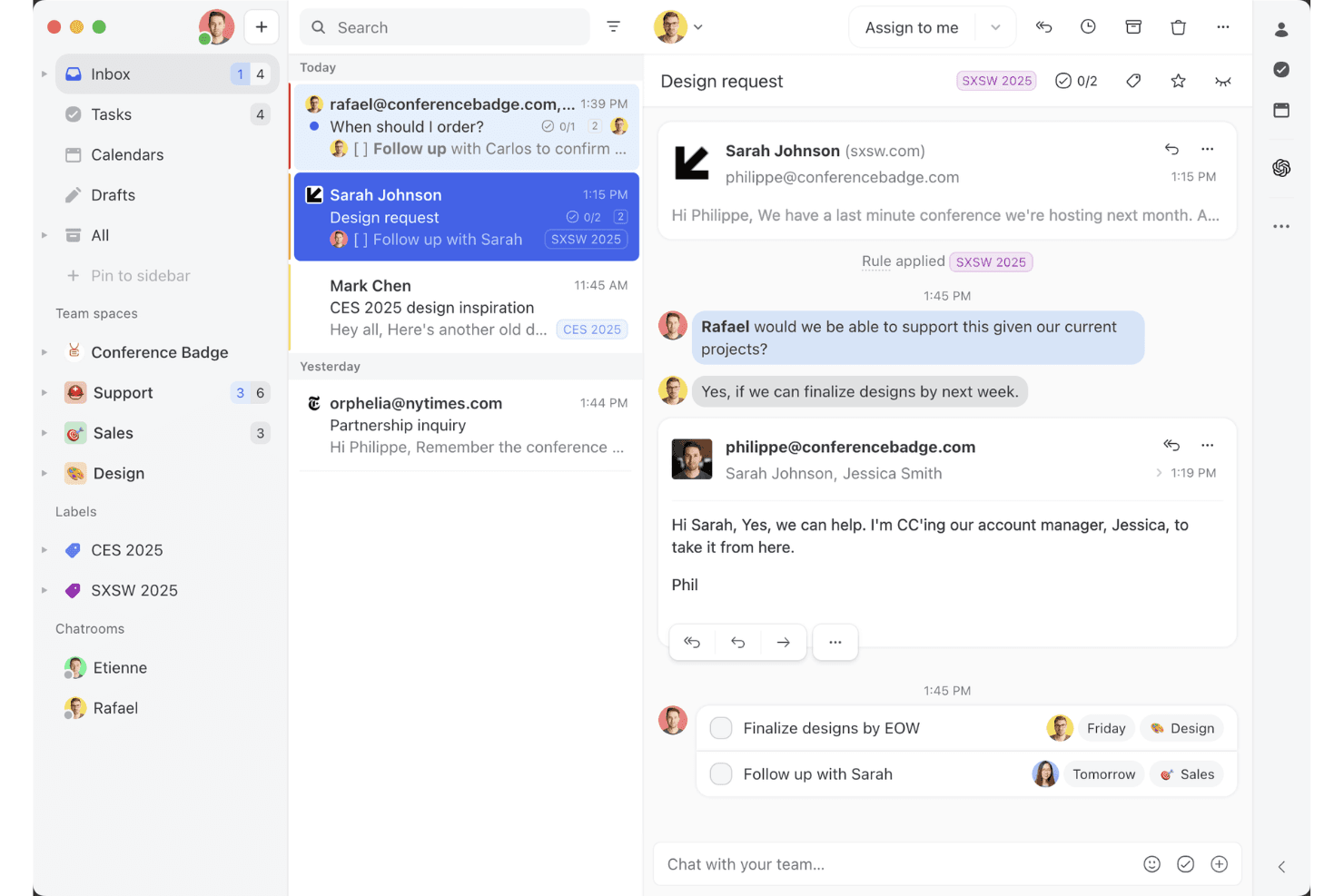
Missive’s shared inbox view shows how teams can collaborate on email threads, assign tasks, and manage client conversations in one workspace. Missive is a collaborative inbox and mobile help desk tool that unifies email, WhatsApp, SMS, Instagram, and live chat into a single interface, with built-in task creation, assignment rules, and team communication features.
Who Is Missive Best For?
Missive is a strong fit for remote and distributed customer service teams that need to manage email, WhatsApp, and social conversations from a single mobile inbox.
Why I Picked Missive
I picked Missive as one of the best because it genuinely turns your inbox into a task engine. When an email lands, you can instantly convert it into an assigned task with a due date, loop in teammates via internal comments, and route it through auto-assignment rules, all from the mobile app. I also love that it pulls email, WhatsApp Business, Instagram, and SMS into one unified mobile inbox, so nothing slips through when your team is working remotely.
Missive Key Features
- Multi-channel unified inbox: Consolidates email, WhatsApp Business, Instagram, Facebook Messenger, SMS, and live chat into a single mobile interface.
- Missive MCP Server: Connect external AI apps (like Claude or ChatGPT) to mcp.missiveapp.com to query your mobile inbox, check schedules, and draft responses—keeping human review required before sending.
- Auto-assignment rules: Automatically routes incoming conversations to agents using round-robin, least-busy, or sender-based logic.
- Configurable push notifications: Lets you set notification preferences per mailbox and event type, withtime-of-day snoozing for off-hours coverage.
- SLA reminders and escalation rules: Triggers automated alerts and escalations when conversations go unreplied past a set threshold.
Missive Integrations
Missive integrates with HubSpot, Salesforce, Pipedrive, Aircall, Dialpad, Asana, ClickUp, Trello, Twilio, and WhatsApp Business. It also offers a REST API, webhooks, Zapier, and its new MCP Server (mcp.missiveapp.com) for connecting external AI clients (available on Productive and Business plans, enabled by an admin).
Pros and Cons
Pros:
- Push notifications include SLA reminders and escalations
- Instantly turns emails into actionable tasks
- True omnichannel mobile inbox for all channels
Cons:
- Limited offline access and sync on mobile
- No native knowledge base for agents
Learn more about Missive: Best for creating custom AI chatbots
- 7-day free trial + free plan + free demo available
- From $32/month (billed annually)
Visit WebsiteCustomer Rating:4.4/5
Chatbase offers a mobile Playground interface where agents can be monitored for training status, last trained time, and model size. Chatbase is a no-code AI chatbot builder that lets you create custom AI agents trained on your own data—documents, URLs, and text—and deploy them across web and mobile customer support surfaces.
Who Is Chatbase Best For?
Chatbase is a good fit for small to mid-sized businesses and developers who want to add AI-powered support to their product without building a chatbot from scratch.
Why I Picked Chatbase
I picked Chatbase as one of the best because it gives you a complete no-code environment for building a custom AI support agent trained on your own business data. I especially like the model comparison feature, which lets you test different LLM configurations to find what works best for your specific support use case. The natural language instruction setup for escalation rules also means I can define when the AI hands off to a human without writing a single line of code.
Chatbase Key Features
- Omnichannel deployment: Deploy your AI agent across website chat, WhatsApp, Slack, and email from a single platform.
- Real-time data sync: Connect your agent to CRMs, order management tools, and helpdesk platforms to pull live customer data during conversations.
- Advanced reporting: Track agent performance with detailed analytics on customer interactions, resolution rates, and engagement data.
- Multilingual support: Detect and respond in 80+ languages automatically using built-in language detection and generative AI translation.
Chatbase Integrations
Chatbase offers native integrations with WhatsApp, Slack, Instagram, Facebook Messenger, Zendesk, Salesforce, Shopify, Stripe, Notion, Calendly, and Cal.com. It connects with Zapier and Make, and has an API for custom integrations.
Pros and Cons
Pros:
- Multiple AI model choices available
- Supports 80+ languages natively
- Deploys a trained agent in minutes
Cons:
- Credit-based messaging can spike costs
- No visual conversation flow builder
Learn more about Chatbase:

Cayzu streamlines customer inquiries for small to mid-sized businesses. Cayzu is a cloud-based help desk software aimed at small to medium-sized businesses. It helps your team manage customer inquiries efficiently through its mobile platform.
Why I picked Cayzu: It’s tailored for small teams that need an easy-to-use solution. Features like multi-brand support and a self-service portal make it versatile for growing businesses. Its user-friendly mobile app allows your team to handle help desk ticketing on the go. The ability to customize your dashboard and reports helps you keep track of your performance effortlessly.
Standout features & integrations:
Features include a self-service portal, canned responses, and multi-brand support. Your team can use the internal chat to communicate quickly. The software also offers customizable dashboards to fit your business needs.
Integrations include Slack, Dropbox, Google Drive, Facebook, X, Mailchimp, FreshBooks, Salesforce, HubSpot, and Zoho CRM.
Pros and Cons
Pros:
- Self-service portal available
- Customizable reports
- Mobile-friendly interface
Cons:
- Limited customization options
- Limited advanced features
Learn more about Cayzu: Best for simplicity
- Free plan + free demo available
- From $29/user/month
Visit WebsiteCustomer Rating:4.6/5
HelpDesk offers a simple, efficient support solution for small to mid-sized businesses. HelpDesk is a straightforward mobile help desk software tailored for small to medium-sized businesses seeking an easy-to-use solution. It helps teams manage customer inquiries efficiently without unnecessary complexity.
Why I picked HelpDesk: It offers a clean and intuitive interface, making it accessible for teams that prioritize ease of use. The software includes essential ticket management features, allowing your team to handle support requests quickly. Automation rules help streamline repetitive tasks, enhancing productivity. Its mobile app ensures that your team can stay connected and responsive, no matter where they are.
Standout features & integrations:
Features include automation rules, a clean interface, and essential ticket management. Your team can use the mobile app to stay connected and responsive. The software also offers a centralized inbox to manage all customer inquiries.
Integrations include Slack, Microsoft Teams, Zapier, Google Workspace, Shopify, Mailchimp, Salesforce, HubSpot, Trello, and Asana.
Pros and Cons
Pros:
- Centralized inbox for inquiries
- Automation rules for tasks
- Essential ticket management features
Cons:
- Requires internet for full access
- Limited advanced features with basic reporting capabilities
Learn more about HelpDesk:

Vision Helpdesk offers ITIL-based mobile IT service management for businesses. Vision Helpdesk is a mobile help desk solution designed for businesses that need IT service management. It supports ITIL processes, making it ideal for IT teams seeking structured service management.
Why I picked Vision Helpdesk: It offers ITIL-aligned features like incident management, problem management, and change management, which are crucial for IT departments. The satellite help desk feature lets you manage multiple companies or departments from a single platform. Its automation tools help streamline tasks and improve efficiency. The software's ability to create custom workflows ensures it can adapt to your specific business needs.
Standout features & integrations:
Features include incident management, problem management, and change management. Your team can use the satellite help desk feature to manage multiple departments. The software also offers automation tools to improve task efficiency.
Integrations include Slack, Microsoft Teams, Zapier, Jira, Salesforce, FreshBooks, QuickBooks, Trello, Asana, and Zoho Desk.
Pros and Cons
Pros:
- Satellite help desk feature
- Supports multiple departments
- ITIL-aligned processes
Cons:
- Limited offline functionality
- Can be complex for new users
Learn more about Vision Helpdesk: Best for multilingual support
- 14-day free trial
- From $24/user/month (billed annually)
Visit WebsiteCustomer Rating:4.5/5
HappyFox supports multilingual customer service with a mobile help desk solution. HappyFox is a mobile help desk solution designed for businesses that need to manage support across multiple languages. It serves teams looking to enhance customer service in diverse linguistic environments.
Why I picked HappyFox: It offers multilingual support, which is essential for businesses operating in international markets. The software allows your team to handle tickets in various languages, ensuring effective communication with global customers. Its mobile app lets you manage support tasks efficiently from anywhere. Customizable ticket categories and automation rules help streamline your workflow.
Standout features & integrations:
Features include customizable ticket categories, automation rules, and multilingual support. Your team can manage support tasks efficiently with the mobile app. The software also provides detailed reporting to track performance.
Integrations include Slack, Salesforce, Shopify, QuickBooks, Zapier, Microsoft Teams, Google Workspace, Jira, Trello, and Asana.
Pros and Cons
Pros:
- Detailed reporting tools
- Mobile app for global access
- Automation for streamlined tasks
Cons:
- Limited offline functionality
- Complex setup for new users and some features can feel overwhelming
 Best with cross-team collaboration tools
- 14-day free trial
- From $25/user/month (billed annually)
Visit WebsiteCustomer Rating:4.6/5
Front displays prioritized customer support tickets with labels such as SLA, VIP, and Urgent across multiple communication channels. Front brings together messaging, collaboration, and ticket management in a single mobile-friendly platform. It’s designed for teams that need to manage customer conversations across channels while staying connected on the go. If you’re looking for a help desk that blends shared inboxes with real-time teamwork, Front offers a flexible solution for fast-moving support teams.
Who Is Front Best For?
Front is a good fit for customer support and service teams in mid-sized to large businesses that need to manage high volumes of customer conversations across multiple channels.
Why I Picked Front
For mobile help desk teams that need to work together seamlessly, Front stands out with its cross-team collaboration tools. I picked Front because it lets agents loop in teammates with internal comments and shared drafts, so everyone stays on the same page without switching apps. The ability to assign conversations, tag colleagues, and manage shared inboxes directly from the mobile app means support doesn’t get siloed, even when teams are remote or distributed. These features help ensure that customer issues are resolved quickly and with input from the right people.
Front Key Features
Some other features in Front that support mobile help desk teams include:
- Mobile push notifications: Get real-time alerts for new messages, assignments, or mentions directly on your mobile device.
- Omnichannel inbox: Manage email, SMS, chat, and social media conversations from a single unified inbox.
- Analytics dashboard: Access conversation metrics and team performance data from anywhere, including on mobile.
- Automated routing rules: Set up rules to automatically assign or prioritize incoming requests based on custom criteria.
Front Integrations
Integrations include Salesforce, HubSpot, Asana, Slack, Shopify, Twilio, Zoom, Pipedrive, Trello, and Jira.
Pros and Cons
Pros:
- 160+ native integrations with business tools
- Internal comments enable quick team collaboration
- Real-time analytics for agent performance tracking
Cons:
- Advanced automation requires higher-tier plans
- No offline mode for mobile app use
Learn more about Front: Best for project integration
- Free plan + 14-day free trial + free demo available
- From $9.99/user/month (billed annually)
Visit WebsiteCustomer Rating:4.4/5
Teamwork.com integrates help desk and project management for streamlined workflows. Teamwork.com is a help desk software with a focus on integrating project management capabilities. It's ideal for teams that need to align customer support with project workflows.
Why I picked Teamwork.com: It offers a unique blend of help desk and project management features, making it suitable for collaborative teams. The software allows you to link tickets directly to projects, enhancing coordination. With features like time tracking and task management, your team can stay organized and efficient. It’s a great choice for businesses that need to bridge support and project tasks.
Standout features & integrations:
Features include time tracking, task management, and ticket linking. Your team can easily prioritize tasks with the help of customizable dashboards. The software also offers reporting tools to help you analyze team performance.
Integrations include Slack, HubSpot, QuickBooks, Zapier, Xero, Microsoft Teams, Google Drive, Dropbox, Trello, and Asana.
Pros and Cons
Pros:
- Links tickets to projects
- Supports time tracking
- Detailed reporting options
Cons:
- Requires internet connection with limited offline functionality
- Can be overwhelming for new users
Learn more about Teamwork.com: Best for scalability
- 15-day free trial
- From $49/month (billed annually)
Visit WebsiteCustomer Rating:4.6/5
BoldDesk provides scalable, flexible help desk solutions for businesses of all sizes. BoldDesk is a mobile help desk software designed for businesses of all sizes, offering scalable support solutions. It caters to teams that need a flexible platform to grow with their customer support needs.
Why I picked BoldDesk: It provides scalable features that adapt to your team's growth, making it ideal for expanding businesses. The software includes customizable workflows and extensive reporting tools to monitor performance. Its mobile app ensures that your team can manage support tickets efficiently from anywhere. With automation features, your team can reduce manual tasks and focus on delivering excellent customer service.
Standout features & integrations:
Features include customizable workflows, extensive reporting tools, and automation features. Your team can track performance with detailed analytics. The software also offers a mobile app to manage support tickets on the go.
Integrations include Slack, Microsoft Teams, Salesforce, Google Workspace, Zapier, Jira, Trello, Asana, Mailchimp, and Shopify.
Pros and Cons
Pros:
- Automation to reduce manual tasks
- Mobile app for ticket management
- Scales with business growth
Cons:
- May need training for optimal use
- Requires initial setup for customization
Learn more about BoldDesk: 10Best for customizability
Deskpro
- Free demo available
- From $39/user/month
Visit WebsiteCustomer Rating:4.5/5
Deskpro provides customizable, flexible help desk solutions for various industries. Deskpro is a versatile help desk software designed for businesses that need customizable support solutions. It serves teams across various industries by offering a flexible platform to manage customer interactions.
Why I picked Deskpro: It provides extensive customization options, allowing you to tailor workflows, ticket fields, and user interfaces to fit your needs. The software supports multiple channels, including email, chat, and social media, ensuring you can meet your end users wherever they are. With its mobile app, your team can handle support tickets on the go, staying responsive and efficient. Deskpro's ticket routing and reporting tools help you analyze performance and make data-driven decisions.
Standout features & integrations:
Features include customizable ticket fields, multiple communication channels, and advanced reporting tools. Your team can create custom workflows to streamline processes. The software also supports automation rules to reduce repetitive tasks.
Integrations include Slack, Microsoft Teams, Salesforce, Google Workspace, Jira, Trello, Asana, Zapier, Facebook, and Twitter.
Pros and Cons
Pros:
- Automation rules for efficiency
- Mobile app for ticket management
- Extensive customization options
Cons:
- Complex initial configuration and may need technical expertise
- Limited offline access
Learn more about Deskpro:
Outro software de atendimento ao cliente móvel
Eis algumas opções adicionais de software de atendimento ao cliente móvel que não integraram a minha lista restrita, mas que vale a pena conhecer:
- 11HubSpot Help DeskBest for CRM integration
- 12JitbitBest for quick setup
- 13HiverBest for Gmail users
- 14GivaBest for healthcare compliance
- 15TidioBest for AI-driven customer support
- 16ZendeskBest for on-the-go ticketing
- 17OneDeskBest for task management
- 18Help ScoutBest for email support
- 19Zoho DeskBest for SMBs
- 20ManageEngine ServiceDesk PlusBest for IT service management
- 21FreshdeskBest for omnichannel support
- 22SmarterTrack by SmarterTools Best for self-service portals
How I Evaluate Mobile Help Desk Software
I split my evaluation into baseline criteria—like native iOS/Android apps and real-time push alerts—and differentiators that separate tools built for field teams from basic desktop ports.
Core Functionality (Table Stakes For This List)
When I'm selecting tools for my list, I rank each one on a scale from 0 (does not offer the functionality) to 5 (excels in this area) for each core functionality listed below. Then, I calculate the tool's total score into a percentage. Each tool needs to achieve a minimum total score of 65% to be considered for inclusion.
- Native Mobile Apps: I check whether the vendor offers dedicated iOS and Android apps built for ticket work, not just a responsive browser view crammed onto a small screen.
- Full Ticket Management: Agents should be able to create, assign, escalate, and close tickets from the app—the same core workflows they'd handle at a desktop.
- Push Notifications & Alerts: I evaluate how granularly agents can configure push alerts, like filtering by SLA breach vs. new assignment vs. customer reply.
- Multi-Channel Inbox Access: Whether it's live chat, email, or social messages, I look for a unified mobile inbox so agents aren't toggling between apps mid-shift.
- Offline Access & Sync: Field technicians often work in areas with spotty signal, so I check if agents can view and update tickets offline with auto-sync on reconnect.
- Mobile Knowledge Base: I look for searchable KB access and canned responses inside the app, so agents can pull up troubleshooting steps while on a call or on-site.
Once I have a list of tools that meet the criteria, I consider what sets each platform apart.
Differentiating Factors (What Sets Vendors Apart)
Here's how I compare and contrast different vendors:
Standout Features
AI-powered suggestions make a real difference when agents are working from a phone—tools that surface relevant KB articles or recommend replies mid-ticket save time during high-volume shifts. I also look for native camera and GPS integration, which lets field technicians attach photos and geotag issues directly from the app. In-app collaboration features like @mentions and internal notes matter too, especially for shift handoffs where context between agents can't afford to get lost.
Beyond Features
Mobile security is one of the first things I evaluate—MDM compatibility and remote wipe capabilities matter when agents access customer data from personal or shared devices. I also check whether mobile access is bundled into base pricing or locked behind a premium tier, since some vendors treat mobile as an add-on that inflates per-agent costs for distributed teams. Low-bandwidth performance is worth looking into as well, particularly for field teams working in warehouses, basements, or rural areas where connectivity drops.
Como escolher um software de atendimento ao cliente móvel
É fácil ficar preso a listas extensas de funcionalidades e estruturas de preços complexas. Para o ajudar a manter-se concentrado enquanto percorre o seu processo específico de seleção de software, apresentamos uma lista de verificação com os fatores a ter em conta:
| Fator | O que deve considerar |
| Escalabilidade | Certifique-se de que o software consegue acompanhar o crescimento da sua empresa. Consegue gerir um maior volume de pedidos à medida que a sua equipa cresce? |
| Integrações | Verifique se estabelece ligação às ferramentas que a sua equipa já utiliza, como sistemas de CRM ou aplicações de mensagens. |
| Personalização | Procure opções que permitam adaptar os fluxos de trabalho e os painéis de controlo às suas necessidades e processos específicos. |
| Facilidade de utilização | Avalie a interface. É intuitiva para que a sua equipa a possa utilizar sem formação extensa? |
| Orçamento | Avalie se os preços estão alinhados com o seu plano financeiro. Existem custos ocultos ou funcionalidades premium? |
| Medidas de segurança | Verifique se estão implementadas medidas de proteção de dados. Está em conformidade com regulamentos como o RGPD? |
| Opções de suporte | Considere o nível de apoio ao cliente disponível. Existe suporte 24 horas por dia, 7 dias por semana, ou assistência dedicada? |
| Funcionalidade móvel | Certifique-se de que a aplicação móvel oferece todas as funcionalidades. A sua equipa consegue gerir tarefas eficazmente em mobilidade? |
Tendências no software de atendimento ao cliente móvel
Durante a minha pesquisa, recolhi inúmeras atualizações de produtos, comunicados de imprensa e registos de lançamentos de diferentes fornecedores de software de atendimento ao cliente móvel. Eis algumas das tendências emergentes que tenho acompanhado:
- Informações baseadas em IA: As ferramentas de assistência baseadas em IA estão a ser utilizadas para analisar as interações com os clientes e fornecer informações práticas. Isto ajuda as equipas a antecipar necessidades e a melhorar os tempos de resposta. Alguns fornecedores estão a incorporar IA para oferecer análises preditivas e análise de sentimentos.
- Reconhecimento de voz: Os comandos de voz estão a tornar-se mais comuns, permitindo que as equipas de assistência interajam com o software de assistência sem utilizar as mãos. Esta tendência é valiosa para os agentes no terreno que precisam de acesso rápido à informação sem escrever.
- Realidade aumentada (AR): A AR está a ser integrada para ajudar nos processos de assistência, sobretudo em áreas técnicas. As equipas de assistência podem utilizar a AR para orientar os clientes na resolução de problemas complexos, sobrepondo instruções às imagens do mundo real.
- Assistência omnicanal: Cada vez mais fornecedores oferecem uma verdadeira assistência omnicanal, integrando redes sociais, chat, SMS e e-mail numa única plataforma. Isto garante uma experiência consistente para o cliente em todos os canais de comunicação.
- Portais de autosserviço: As opções de autosserviço melhoradas estão a ganhar popularidade, permitindo que os clientes resolvam os problemas autonomamente. Os fornecedores estão a expandir as bases de conhecimento e a incorporar robôs de conversação para orientar os utilizadores na resolução de problemas comuns.
O que é um software de assistência móvel?
O software de assistência móvel é uma ferramenta que permite às equipas de assistência gerir pedidos e problemas dos clientes em dispositivos móveis. Estas ferramentas são normalmente utilizadas por representantes do serviço de apoio ao cliente, profissionais de TI e equipas de assistência que precisam de resolver os problemas dos clientes de forma eficiente enquanto estão em movimento. A gestão de pedidos, as notificações em tempo real e o acesso móvel ajudam a garantir tempos de resposta rápidos e uma comunicação eficaz. De um modo geral, estas ferramentas permitem às empresas manter níveis elevados de satisfação dos clientes, fornecendo serviços de assistência atempados e acessíveis.
Funcionalidades do software de assistência móvel
Ao selecionar um software de assistência móvel, tenha em atenção as seguintes funcionalidades essenciais:
- Gestão de pedidos: Organiza e acompanha os pedidos dos clientes, permitindo que as equipas de assistência resolvam os problemas de forma eficiente.
- Notificações em tempo real: Avisa a sua equipa sobre novos pedidos e atualizações, garantindo respostas rápidas.
- Acesso móvel: Permite que as equipas de assistência gerem tarefas a partir de qualquer lugar, melhorando a flexibilidade e a capacidade de resposta.
- Informações baseadas em IA: Fornece análises e previsões para ajudar a melhorar as estratégias de serviço ao cliente.
- Reconhecimento de voz: Permite o funcionamento sem utilizar as mãos, sendo útil para os agentes de assistência no terreno.
- Realidade aumentada: Ajuda na resolução de problemas complexos, sobrepondo instruções às imagens do mundo real.
- Assistência omnicanal: Integra vários canais de comunicação para proporcionar uma experiência consistente ao cliente.
- Portais de autosserviço: Permitem que os clientes resolvam os problemas autonomamente, reduzindo a carga de trabalho das equipas de assistência.
- Fluxos de trabalho personalizáveis: Permitem que as equipas adaptem os processos às suas necessidades específicas e melhorem a eficiência.
- Medidas de segurança: Protegem os dados sensíveis dos clientes e garantem a conformidade com os regulamentos.
Benefícios do software de assistência móvel
A implementação de um software de assistência móvel proporciona vários benefícios à sua equipa e à sua empresa. Eis alguns dos benefícios que pode esperar:
- Melhoria do tempo de resposta: As notificações em tempo real e o acesso móvel garantem que a sua equipa pode responder rapidamente aos pedidos dos clientes.
- Maior satisfação dos clientes: A assistência omnicanal e os portais de autosserviço oferecem aos clientes várias formas de obter ajuda, melhorando a sua experiência.
- Maior flexibilidade: O acesso móvel permite que a sua equipa trabalhe a partir de qualquer lugar, acomodando diferentes estilos e necessidades de trabalho.
- Melhor afetação de recursos: As informações baseadas em IA ajudam a sua equipa a concentrar-se nas áreas que necessitam de mais atenção, otimizando a utilização dos recursos.
- Maior eficiência: Os fluxos de trabalho personalizáveis e a automatização reduzem as tarefas manuais, permitindo que a sua equipa gere mais pedidos de forma eficaz.
- Maior segurança dos dados: As medidas de segurança protegem as informações dos clientes e garantem a conformidade com os regulamentos de privacidade.
- Redução da carga de trabalho: Os portais de autosserviço permitem que os clientes resolvam os problemas autonomamente, reduzindo a carga da sua equipa de assistência.
Custos e preços do software de assistência móvel
A seleção de um software de assistência móvel requer uma compreensão dos vários modelos de preços e planos disponíveis. Os custos variam consoante as funcionalidades, o tamanho da equipa, os complementos e outros fatores. A tabela abaixo resume os planos comuns, os respetivos preços médios e as funcionalidades normalmente incluídas nas soluções de software de assistência móvel:
Tabela de comparação de planos para software de assistência móvel
| Tipo de plano | Preço médio | Funcionalidades comuns |
| Plano gratuito | $0 | Gestão básica de pedidos de assistência, canais de suporte limitados e elaboração de relatórios essenciais. |
| Plano pessoal | $5-$25/ utilizador/mês | Gestão de pedidos de assistência, acesso móvel, integrações básicas e elaboração de relatórios padrão. |
| Plano empresarial | $30-$60/ utilizador/mês | Funcionalidades avançadas de gestão de pedidos, automatização, fluxos de trabalho personalizados e análise de dados. |
| Plano empresarial de grande dimensão | $70-$100/ utilizador/mês | Personalização completa, suporte prioritário, informações baseadas em IA e segurança abrangente. |
Perguntas frequentes sobre software de assistência móvel
Eis algumas respostas a perguntas comuns sobre software de assistência móvel:
Qual é a diferença entre o suporte de software e um serviço de assistência?
O suporte de software lida normalmente com problemas técnicos mais complexos e requer conhecimentos especializados, enquanto um serviço de assistência trata de questões básicas dos clientes e da resolução de problemas. Se a sua equipa lida frequentemente com problemas de software aprofundados, poderá precisar de ambos os serviços para garantir um suporte abrangente.
Qual é o problema mais comum num serviço de assistência informática?
Os problemas comuns incluem problemas relacionados com o e-mail, avarias de hardware e problemas de acesso a recursos partilhados. Estes desafios podem reduzir a eficiência da sua equipa, pelo que dispor de software de assistência fiável que atribua prioridades e acompanhe estes problemas pode ser crucial para manter a produtividade.
Como funciona um software de assistência?
O software de assistência permite à sua equipa aceitar, acompanhar e responder sistematicamente a pedidos de suporte. Inclui frequentemente funcionalidades como bases de conhecimento, portais de autoatendimento e ferramentas de elaboração de relatórios para simplificar o processo de suporte. Compreender as suas necessidades específicas ajudá-lo-á a escolher o software adequado.
Qual é o melhor software de assistência?
O melhor software de assistência depende dos requisitos da sua organização. Considere fatores como a gestão de pedidos, a facilidade de utilização e as capacidades de integração. Entre as opções populares encontram-se o Help Scout, para o serviço de apoio ao cliente, e o Zendesk, para grandes empresas, oferecendo cada um pontos fortes distintos.
Como pode um software de assistência móvel melhorar a eficiência da equipa?
O software de assistência móvel aumenta a eficiência ao permitir que a sua equipa gira tarefas de suporte em qualquer lugar. Funcionalidades como notificações em tempo real e acesso móvel garantem respostas rápidas, enquanto a automatização reduz o trabalho manual, ajudando a sua equipa a concentrar-se em tarefas mais importantes.
Um software de assistência pode integrar-se com outras ferramentas empresariais?
Sim, a maioria das soluções de software de assistência oferece integrações com outras ferramentas empresariais, como sistemas de CRM, aplicações de colaboração e software de gestão de projetos. Esta conectividade ajuda a sua equipa a manter um fluxo de trabalho unificado e garante a consistência dos dados dos clientes em todas as plataformas.