

O software empresarial para reserva de secretárias partilhadas permite automatizar e gerir reservas de secretárias em grandes organizações, otimizando a utilização flexível do escritório para dar às suas equipas acesso fácil aos espaços de trabalho, mantendo a logística sob controlo. Se procura a plataforma certa, precisa de funcionalidades que suportem o crescimento, permitam um trabalho flexível e forneçam informações claras sobre a utilização — sem acrescentar tarefas administrativas desnecessárias.
Neste guia, encontrará as principais ferramentas empresariais para reserva de secretárias partilhadas, que o ajudarão a criar um espaço de trabalho mais inteligente e adaptável em 2026.
Why Trust Our Software Recommendations
6,700+
Reviews
20
Industry experts
16+
Evaluation factors
14
Years
Our team has been testing and reviewing software since 2012. As CX leaders ourselves, we know how difficult—and important—it is to choose the right software.
For this guide, we evaluated tools using hands-on testing and independent research, scoring tools using our selection criteria.
Our reviews reflect our human editorial judgment, not a sales pitch.
 Gui DrusinaCreative Director
 Tim FisherVP of AI
Tabela comparativa de software empresarial para reserva de secretárias partilhadas
A tabela abaixo compara os preços das minhas principais escolhas de software empresarial para reserva de secretárias partilhadas.
| Tool | Best For | Trial Info | Price | ||
|---|---|---|---|---|---|
| 1 | Best with integrated health and safety compliance | Free demo available | From $500/month | Website | |
| 2 | Best for customizable interactive floor plans | Free demo available | Pricing upon request | Website | |
| 3 | Best for intuitive desk assignment automation | Free demo available | From $5/bookable resource/month (billed annually) | Website | |
| 4 | Best for mobile-first desk reservations | 7-day free trial + free demo available | From $1.79/user/month (billed annually) | Website | |
| 5 | Best for powerful analytics on workspace usage | Free demo available | Pricing upon request | Website | |
| 6 | Best for native Microsoft Teams integration | Free demo available | From $99/month | Website | |
| 7 | Best for instant QR code desk check-in | 30-day free trial + free demo available | From $13.50/month (billed annually) | Website | |
| 8 | Best for hardware-integrated desk booking | 30-day free trial available | From $51/month | Website | |
| 9 | Best for multilingual platform support | Free plan available; 14-day free trial; free demo available | From €1.7/user/month (billed annually) | Website | |
| 10 | Best for configurable workspace permissions | Free demo available | Pricing upon request | Website |


Avaliações do melhor software empresarial para reserva de secretárias partilhadas
Apresentamos abaixo os meus resumos detalhados do melhor software empresarial para reserva de secretárias partilhadas que integrou a minha seleção. As minhas avaliações analisam detalhadamente as funcionalidades, os melhores casos de utilização e as integrações de cada plataforma, para o ajudar a encontrar a melhor opção para si.
 1Best with integrated health and safety compliance
elia
- Free demo available
- From $500/month
Visit WebsiteCustomer Rating:4.7/5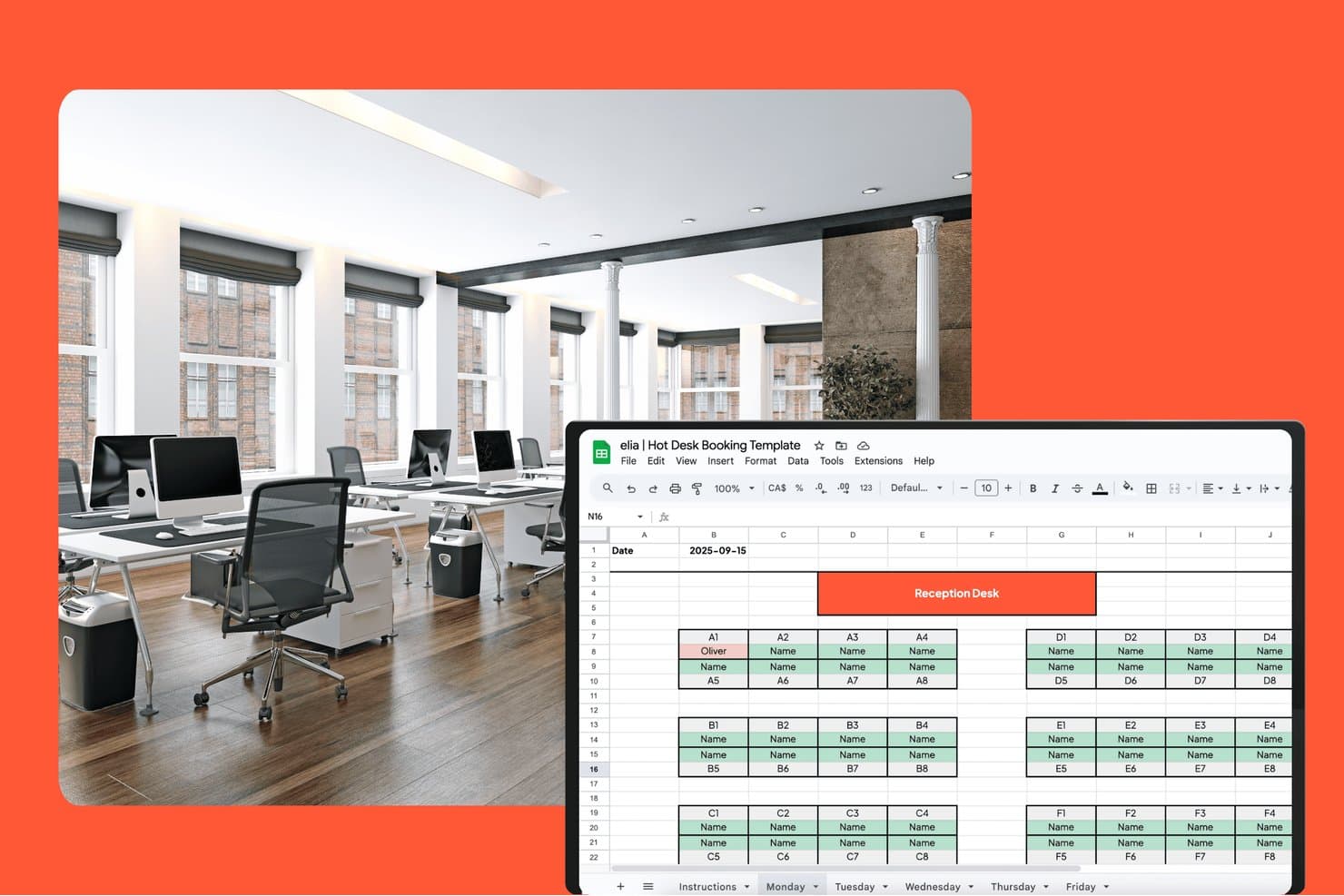
elia offers a Google Sheets-based hot desk booking template with a visual floor map layout showing desk assignments by zone for a selected date. elia is a modular workplace management platform that combines desk and meeting room booking, interactive floor plans, visitor management, occupancy analytics, and health and safety compliance tools in one system.
Who Is elia Best For?
elia suits workplace and facilities teams at mid-to-large organizations that manage hybrid offices and need built-in regulatory compliance alongside day-to-day space booking.
Why I Picked elia
I picked elia as one of the best because no other desk booking tool I've reviewed builds health and safety compliance into the core workflow the way it does. First responder tracking lets me see exactly who is on-site and where, in real time, which matters the moment something goes wrong. Incident reporting lives inside the same platform I use to manage bookings, so there's no switching between tools to log or review a workplace event.
elia Key Features
- Interactive floor plans: Employees can reserve desks and rooms directly from a visual floor map with filters for location and amenities.
- Neighborhood and team zones: Admins assign specific desk areas to teams or departments for easy coordination.
- Mobile app booking: Native iOS and Android apps let users book, check maps, or manage reservations from anywhere.
- Occupancy sensor integration: Real-time desk and room usage data flows in from connected sensor hardware.
elia Integrations
elia offers native integrations with Microsoft 365, Google Workspace, Google Calendar, Microsoft Teams, Outlook, and Slack. An API is available for custom integrations.
Pros and Cons
Pros:
- Automated visitor and first responder management
- Real-time occupancy tracking with sensors
- Built-in health and safety compliance features
Cons:
- Floor plans lack 3D or wayfinding options
- Limited third-party ecosystem connectivity
Learn more about elia: Best for customizable interactive floor plans
- Free demo available
- Pricing upon request
Visit WebsiteCustomer Rating:3.6/5
OfficeSpace offers customizable floor plans with desk assignments. OfficeSpace is a hybrid workplace management platform for enterprises that offers desk booking, interactive floor plan mapping, move management, usage analytics, and facility requests in one system.
Who Is OfficeSpace Best For?
OfficeSpace suits workplace experience teams in large enterprises that need to manage, update, and visualize complex floor plans across multiple global office locations.
Why I Picked OfficeSpace
OfficeSpace earns its spot on my shortlist because I rely on its interactive floor plans that I can fully customize for my locations and brand. I update zones, add social distancing, and assign room amenities directly on the floor plan every week.
OfficeSpace Key Features
- Desk booking with QR codes: Employees reserve, check in, and release desks by scanning QR codes.
- Move management tools: Manage, schedule, and track employee moves on a global scale.
- Automated desk assignment rules: Set custom logic to automatically assign desks based on user groups or protocols.
- Capacity and distancing controls: Configure capacity limits and spacing policies to comply with health guidelines.
OfficeSpace Integrations
OfficeSpace offers native integrations with Microsoft 365, Okta, Google Workspace, Slack, Cisco Webex, Brivo, ADP, Density, Oracle, Rippling, and more, and provides an API and webhooks for custom integrations.
Pros and Cons
Pros:
- Advanced move management for large-scale offices
- Real-time desk availability and occupancy tracking
- Customizable visual floor plans for each location
Cons:
- Mobile app UI feels somewhat outdated
- Some floor plan updates require admin intervention
Learn more about OfficeSpace: Best for intuitive desk assignment automation
- Free demo available
- From $5/bookable resource/month (billed annually)
Visit WebsiteCustomer Rating:4.8/5
Envoy offers automated desk assignments with attendance insights. Envoy is a workplace management platform for enterprise hot desk booking that elevates the employee experience by offering automated desk assignment, desk reservation, floor plan mapping, office analytics, visitor management, and employee scheduling.
Who Is Envoy Best For?
Envoy is a good fit for office managers and facilities teams in growing or large organizations that want to automate workspace coordination across multiple locations.
Why I Picked Envoy
I picked Envoy as one of the best because I use its desk assignment automation rules to match employees with available spots based on work schedules, office zones, or neighborhood preferences. I can visualize occupancy on real-time floor plans and set booking policies by team.
Envoy Key Features
- Interactive floor plans: Users can see desk availability and office zones visually.
- Mobile desk booking app: Employees reserve, check in, or release desks from their phones.
- Visitor management integration: Teams track, notify, and welcome office guests in one place.
- Desk amenities filter: Users can filter and reserve desks with specific equipment or features.
Envoy Integrations
Envoy offers 100+ integrations through its app directory, including Slack, Microsoft Teams, Google Calendar, Microsoft Outlook, Okta, Salesforce, Brivo, Kisi, Avigilon Alta, and DocuSign. It also connects with Zapier and provides an API for custom integrations.
Pros and Cons
Pros:
- Supports multi-location workspace management
- Interactive floor plans for workspace mapping
- Granular admin controls for large organizations
Cons:
- Mobile app sync lags for some users
- Advanced feature add-ons are expensive
Learn more about Envoy: Best for mobile-first desk reservations
- 7-day free trial + free demo available
- From $1.79/user/month (billed annually)
Visit WebsiteCustomer Rating:4.8/5
WorkInSync offers mobile-first desk booking and check-in tools. WorkInSync is an enterprise hot desk booking platform that offers mobile-driven desk reservations, space scheduling, floor plan visualization, health attestations, and visitor management for hybrid workplaces.
Who Is WorkInSync Best For?
WorkInSync is a great fit for facilities teams and corporate offices that need to prioritize mobile booking for their hybrid workforces.
Why I Picked WorkInSync
I picked WorkInSync as one of the best because I rely on its mobile-first reservation workflow to let my team book desks, check availability, and manage workplace attendance with just their phones. I use geofencing for auto check-in and quick QR code scans.
WorkInSync Key Features
- Interactive floor plans: Users can view and select specific desks and zones on a visual map.
- Occupancy analytics dashboard: Administrators see real-time usage, trends, and capacity reports for all workspaces.
- Multi-location management: Manage desk booking policies and inventory across multiple offices from a single system.
- Visitor management system: Register, track, and manage guest access and sign-ins within the platform.
WorkInSync Integrations
WorkInSync offers native integrations with Google Workspace, Microsoft Outlook, Cisco, Okta, OneLogin, SAP, Workday, Zoom, and more. An API is available for custom integrations.
Pros and Cons
Pros:
- Analytics dashboard for workspace utilization
- Visual floor plans for space selection
- Mobile check-in with geofencing and QR code
Cons:
- Web portal interface can lag occasionally
- Admin setup required for complex workflows
Learn more about WorkInSync: Best for powerful analytics on workspace usage
- Free demo available
- Pricing upon request
Visit WebsiteCustomer Rating:4.5/5
Robin offers workplace insights with desk and space usage metrics. Robin is an enterprise hot desk booking platform that centralizes workspace reservations, supports desk assignment management, enables neighborhood booking, and offers admin tools to oversee multi-location office environments.
Who Is Robin Best For?
Robin is a solid choice for workplace leaders at mid-sized or large companies who need detailed insights into how desks and office spaces are actually used.
Why I Picked Robin
I picked Robin as one of the best because I rely on its workspace analytics to break down detailed desk usage data by team, location, and day. I can easily spot office patterns and justify layout adjustments with real-time reporting dashboards.
Robin Key Features
- Interactive floor plans: Visual floor maps let users find and reserve desks in real time.
- Neighborhood booking: Group desks by team or function for flexible workspace assignment.
- Mobile desk booking app: Reserve, release, or check into desks from iOS and Android.
- Guest and visitor management: Register and track external visitors in the office.
Robin Integrations
Robin offers native integrations across the Microsoft ecosystem, including Microsoft Teams, Outlook, Exchange, Entra ID, Intune, and Microsoft 365, as well as Google Calendar and Google Workspace. It also integrates with Slack, Zoom, Okta, OneLogin, Rippling, and access control systems like Avigilon, Brivo, and Kisi. An API is available for custom integrations.
Pros and Cons
Pros:
- Multi-location workspace management within one platform
- Interactive floor plans for complex offices
- Granular desk-level admin permission controls
Cons:
- Some mobile users report slow sync
- Desk booking UI isn't fully intuitive
Learn more about Robin: Best for native Microsoft Teams integration
- Free demo available
- From $99/month
Visit WebsiteCustomer Rating:4.5/5
YAROOMS offers workspace booking directly within Microsoft Teams. YAROOMS is an enterprise hot desk booking software solution that provides advanced desk reservations, workspace resource management, visual floor plans, occupancy tracking, and centralized scheduling for workplace environments.
Who Is YAROOMS Best For?
YAROOMS is a strong match for organizations with a Microsoft Teams-driven workflow that want enterprise-level desk and room management.
Why I Picked YAROOMS
I picked YAROOMS as one of the best because I can book desks and rooms directly inside Microsoft Teams without switching platforms. I use its approvals and advanced permissions to control workspace access and keep all the booking activity synced with my Microsoft environment.
YAROOMS Key Features
- Interactive floor plans: Users select desks by clicking on dynamic office maps.
- Occupancy analytics: View live and historical desk usage data for optimization.
- Role-based access control: Set granular permissions by department or location.
- Visitor management system: Register and track office guests through the same platform.
YAROOMS Integrations
YAROOMS offers native integrations across the Microsoft ecosystem, including Microsoft Teams, Microsoft 365, Outlook, and Azure AD, along with Google Calendar, Google Meet, Slack, Zoom, MappedIn, and SAML 2.0 for SSO. A REST API is also available for custom integrations.
Pros and Cons
Pros:
- Built-in occupancy and resource usage analytics
- Visual office maps for workspace selection
- Desk and room bookings from Microsoft Teams
Cons:
- Mobile app features sometimes lag behind the web
- Per-user pricing scales up quickly
Learn more about YAROOMS: Best for instant QR code desk check-in
- 30-day free trial + free demo available
- From $13.50/month (billed annually)
Visit WebsiteCustomer Rating:4.7/5
Clearooms offers QR code desk check-in settings for attendance tracking. Clearooms is a workspace management platform for enterprises that offers desk and room booking, interactive floor plans, visitor management, calendar sync, and QR code-enabled check-in for shared office environments.
Who Is Clearooms Best For?
Clearooms fits facilities managers and admins who need a digital desk and meeting room booking platform with QR-based check-in for hybrid office environments.
Why I Picked Clearooms
I picked Clearooms because I can set up instant QR code desk check-in, so my team simply scans a desk’s code to reserve or check in on the spot. I use interactive floor plans and set booking rules to control who can book which desks.
Clearooms Key Features
- Visitor management: Allows reception staff to register and track all visitors entering the building.
- Calendar sync: Syncs desk bookings with Microsoft 365 and Google Calendar.
- Book on behalf: Admins can book desks or rooms on behalf of others.
- Custom roles and permissions: Lets admins set granular access controls for users and teams.
Clearooms Integrations
Clearooms has native integrations across the Microsoft ecosystem, and Jumpcloud, Okta, Slack, Salto, and more. An API is available for custom integrations.
Pros and Cons
Pros:
- Visual floor plan for desk selection
- Role-based access for admin control
- QR code check-in is built into every desk
Cons:
- No native visitor badge printing
- The mobile app can lag during peak check-in times
Learn more about Clearooms: 8Best for hardware-integrated desk booking
Joan
- 30-day free trial available
- From $51/month
Visit WebsiteCustomer Rating:4.5/5
Joan offers hardware-connected desk booking with live floor maps. Joan is an enterprise hot desk booking platform that provides digital workspace reservation, desk and room scheduling, hardware display integration, and workplace resource management.
Who Is Joan Best For?
Joan fits facilities teams and IT managers looking to coordinate office desk bookings with on-site hardware displays.
Why I Picked Joan
I picked Joan because I can connect custom e-paper desk displays directly to its desk booking platform, making reservations and check-ins visible at the desk. My team books, releases, and manages desks on the spot using Joan’s hardware integration.
Joan Key Features
- Mobile booking app: Employees can reserve desks and rooms from their smartphones.
- Calendar integration: Syncs with Outlook, Microsoft 365, or Google Calendar for direct booking.
- QR code check-in: Users confirm desk reservations by scanning a QR code at the desk.
- Analytics dashboard: Admins view workspace utilization and reservation reports in real time.
Joan Integrations
Joan offers native integrations across the Microsoft ecosystem, including Microsoft 365, Microsoft Teams, Outlook, Exchange, and Azure AD, along with Google Workspace, Google Calendar, Slack, Zoom, Cisco Webex, Okta, JumpCloud, and iCal. It also connects with Zapier and IFTTT, and has an API for custom integrations.
Pros and Cons
Pros:
- Mobile booking app with QR code check-in
- Real-time office and occupancy analytics
- Desk booking with dedicated e-paper hardware displays
Cons:
- Limited reporting customization options
- Setup requires proprietary hardware purchases
Learn more about Joan: Best for multilingual platform support
- Free plan available; 14-day free trial; free demo available
- From €1.7/user/month (billed annually)
Visit WebsiteCustomer Rating:4.7/5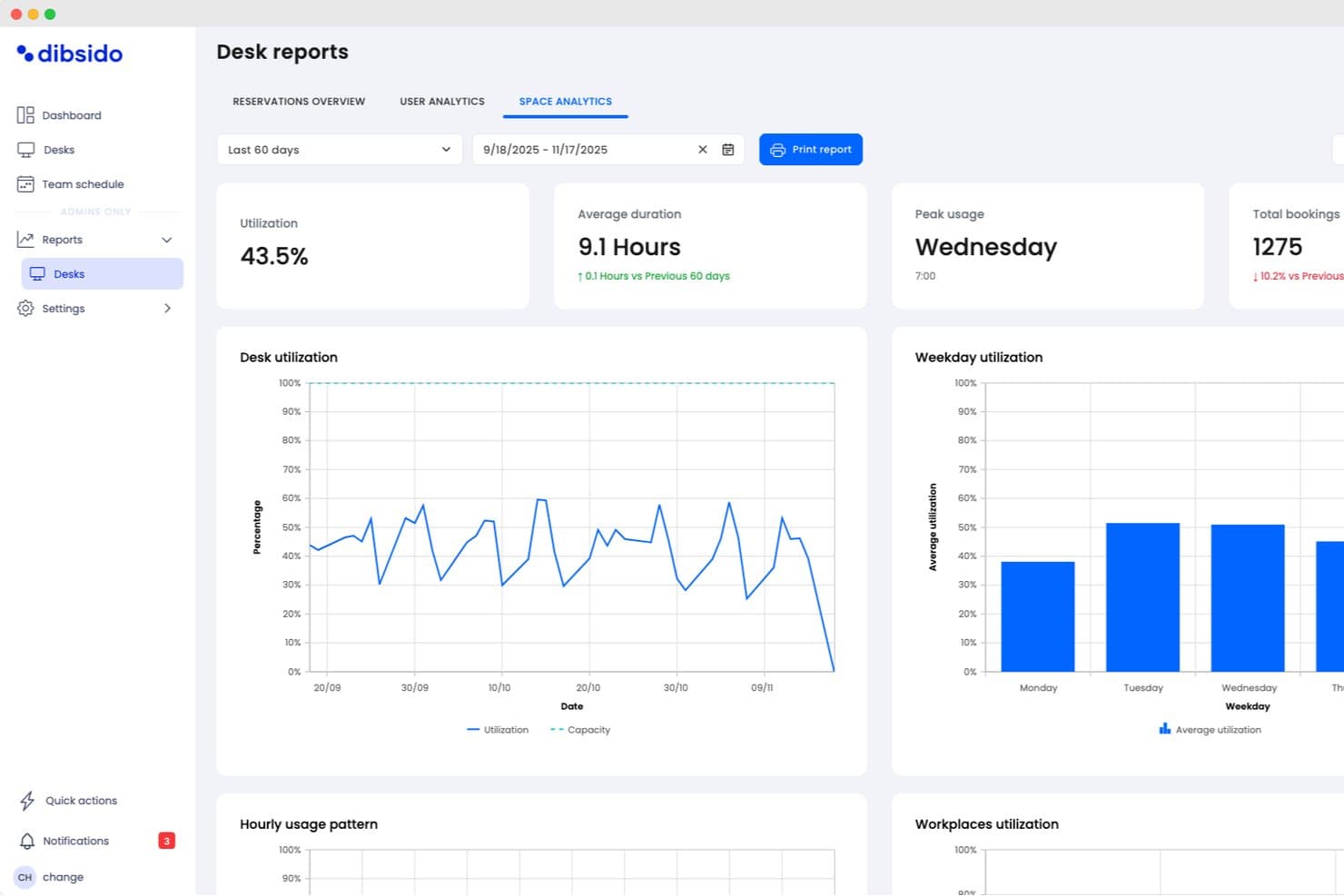
Dibsido offers detailed desk space analytics including utilization rates, average booking duration, peak usage days, and weekday utilization charts. Dibsido is a desk booking platform that covers hot desking, meeting rooms, and parking, with interactive floor maps, utilization analytics, and integrations with Microsoft Teams, Outlook, and Google Calendar.
Who Is Dibsido Best For?
Dibsido is a strong fit for distributed or European teams that need a multilingual booking platform their entire workforce can navigate in their own language.
Why I Picked Dibsido
I picked Dibsido as one of the best because its multilingual platform genuinely sets it apart: the interface runs in 11 European languages, so a distributed team spanning Germany, Poland, and Portugal can each navigate the platform in their own language without a workaround. I also love the hybrid office policy feature, which lets admins set required in-office days per group and automatically counts attendance, with sick days and travel adjusting the target. Pair that with Analytics 2.0's plain-language recommendations like "12 fewer desks needed" and you get real decision-making power.
Dibsido Key Features
- SAML 2.0 SSO and SCIM provisioning: Enterprise plan users get single sign-on via Entra ID, Okta, or Google, plus automated user provisioning with silent SCIM sync.
- Waiting list with fair ordering: Cancelled desk spots are automatically redistributed, with an option to prioritize users who've had fewer recent bookings.
- Hybrid office policy enforcement: Admins set required in-office days per team group, and the system counts attendance automatically while adjusting targets for sick days and travel.
- QR code booking shortcuts: QR codes can trigger instant desk reservations without requiring a separate check-in step, speeding up the on-site booking flow.
Dibsido Integrations
Dibsido offers native integrations with Microsoft Teams, Outlook, Copilot, Slack, Google Calendar, and Microsoft 365. Enterprise plans add API access for custom HRIS and internal-tool integrations, plus SAML SSO, SCIM, and Entra ID.
Pros and Cons
Pros:
- Reviewers praise quick setup and responsive support
- Analytics identifies underused desks and attendance gaps
- Fair ordering improves access to scarce desks
Cons:
- Frankfurt-only hosting limits residency options
- Enterprise security controls require the highest plan
Learn more about Dibsido:

Eptura offers work request creation and work order tracking. Eptura is an enterprise desk booking solution and software platform that centralizes workspace reservations, supports organization-wide space management, and enables advanced permission controls for complex workplace environments.
Who Is Eptura Best For?
Eptura is a solid pick for large organizations or enterprises that need granular control over workspace access across multiple locations or departments.
Why I Picked Eptura
I picked Eptura as one of the best because I can set highly granular workspace permissions for different team members by location, department, or user group. This lets my team manage multi-floor, multi-tenant offices without worrying about unauthorized desk reservations.
Eptura Key Features
- Interactive floor plans: Visualize available and occupied desks across entire office layouts.
- Mobile reservations: Book, check in, or release desks directly from the Eptura mobile app.
- Desk sensor integration: Connect with hardware sensors to automate desk status updates.
- Reporting dashboard: Access detailed data on space utilization and desk booking trends.
Eptura Integrations
Eptura offers more than 30 native integrations, including the Microsoft ecosystem, Zoom, Salesforce, Dropbox, Azure, AWS, Power BI, and Slack. It integrates with Zapier, and an API is also available for custom integrations.
Pros and Cons
Pros:
- Supports multi-location workspace management
- Interactive floor plans for large offices
- Advanced desk-level permission controls
Cons:
- Customer service response is often slow
- The admin dashboard can feel overwhelming
Learn more about Eptura:
Outro software empresarial para reserva de secretárias partilhadas
Eis algumas opções adicionais de software empresarial para reserva de secretárias partilhadas que não integraram a minha seleção, mas que vale a pena conhecer:
- 11GoBrightBest for real-time occupancy monitoring
- 12Mapiq Best for optimizing office utilization insights
- 13SkeddaBest for advanced scheduling automation
- 14deskbirdBest for customizable booking experiences
- 15KadenceBest for hybrid workplace coordination
- 16TacticBest for floor plan visual selection
- 17ArchieBest for mobile-first desk management
- 18Smartway2Best for automated booking workflows
- 19FlexwhereBest for instant QR code desk access
How I Evaluate Enterprise Hot Desk Booking Software
My evaluation has two layers: the core requirements—multi-site booking, SSO, floor maps—a tool must clear, and the differentiators that show how well it handles true enterprise scale.
Core Functionality (Table Stakes For This List)
When I'm selecting tools for my list, I rank each one on a scale from 0 (does not offer the functionality) to 5 (excels in this area) for each core functionality listed below. Then, I calculate the tool's total score into a percentage. Each tool needs to achieve a minimum total score of 65% to be considered for inclusion.
- Interactive Floor Maps: I check whether floor plans are clickable and dynamic, showing real-time desk availability, amenities, and teammate locations across multiple floors and buildings.
- Real-Time Booking Engine: Same-day, advance, and recurring reservations with check-in and auto-release are what I evaluate here, since no-show handling is a daily reality in hybrid offices.
- Enterprise Scalability & SSO: Each tool needs to support SSO/SAML, directory sync, and multi-site management so IT teams can deploy across dozens of global offices from one admin console.
- Calendar & Workplace Integrations: I look for two-way sync with Microsoft 365 and Google Workspace, plus native Slack or Teams bots that let employees book a desk without leaving their chat window.
- Space Utilization Analytics: Dashboards that surface occupancy rates, peak-day trends, and no-show percentages help workplace leaders right-size their real estate, so I evaluate reporting depth and exportability.
- Team & Neighborhood Management: The ability to assign desk zones by department and coordinate team days matters here, especially for CX teams that need to cluster on-site for collaborative sessions.
Once I have a list of tools that meet this criteria, I consider what sets each platform apart.
Differentiating Factors (What Sets Vendors Apart)
Here's how I compare and contrast different vendors:
Standout Features
IoT sensor integration is a major differentiator. Tools that pull data from under-desk sensors give workplace teams accurate occupancy numbers instead of relying on manual check-ins alone. I also evaluate whether a platform offers AI-powered desk recommendations that surface suggestions based on teammate schedules and past booking preferences. Beyond desks, I look for unified platforms covering meeting rooms, parking, and visitor management, since CX teams often coordinate on-site sessions that involve external guests.
Beyond Features
Enterprise security matters when desk booking data flows through SSO, HRIS, and access control systems. I check for SOC 2 Type II certification and data residency options, especially for organizations with offices across multiple regions. Implementation support is another factor I weigh heavily. Rolling out a new booking tool to thousands of hybrid employees requires CAD floor plan conversion and change management guidance. Pricing transparency also shapes my evaluation, since per-user and per-desk models scale very differently as headcounts fluctuate.
Como escolher software empresarial para reserva de secretárias partilhadas
É fácil perder-se em listas extensas de funcionalidades e estruturas de preços complexas. Para o ajudar a manter o foco enquanto analisa o seu processo específico de seleção de software, apresentamos uma lista de fatores a ter em conta:
| Fator | O que considerar |
|---|---|
| FatorEscalabilidade | O que considerarA plataforma suporta a dimensão atual e futura do seu escritório, os seus planos de crescimento e várias localizações, se necessário? |
| FatorIntegrações | O que considerarEstabelece ligação nativa aos seus calendários, sistemas de recursos humanos, gestão de identidades ou ferramentas de colaboração existentes? |
| FatorPersonalização | O que considerarPode configurar regras de reserva, conjuntos de permissões e elementos de marca para diferentes departamentos ou configurações de escritório? |
| FatorFacilidade de utilização | O que considerarCom que rapidez é que os funcionários conseguem aprender a utilizá-lo? A reserva de secretárias, o registo de entrada e as alterações integram-se facilmente nos fluxos de trabalho diários? |
| FatorImplementação e integração inicial | O que considerarQuanto tempo será necessário para configurar a disposição do escritório, formar os utilizadores e ficar totalmente operacional após a assinatura? |
| FatorCusto | O que considerarExistem taxas por lugar ou por módulo, custos de configuração ou compromissos anuais obrigatórios? Como se adequa isto ao seu orçamento? |
| FatorMedidas de segurança | O que considerarGarante a conformidade com o RGPD, o início de sessão único e a privacidade de dados exigida na sua região geográfica e pelas políticas da sua empresa? |
| FatorDisponibilidade do suporte | O que considerarPode aceder a um suporte fiável durante o horário comercial na sua região? Que canais são disponibilizados caso surjam problemas? |
O que é o software empresarial para reserva de secretárias partilhadas?
O software empresarial para reserva de secretárias partilhadas é uma plataforma digital concebida para permitir às organizações gerir reservas flexíveis de secretárias e a distribuição de espaços de trabalho em grande escala. Estes sistemas permitem aos funcionários reservar secretárias, consultar a disponibilidade em tempo real e seguir as políticas da empresa relativas à utilização dos espaços. Ajudam as equipas de gestão de instalações a otimizar a disposição dos escritórios, acompanhar a ocupação e apoiar ambientes de trabalho híbridos ou baseados em atividades, mantendo simultaneamente a segurança e o controlo administrativo.
Funcionalidades do software empresarial para reserva de secretárias partilhadas
Ao selecionar software empresarial de reserva de secretárias partilhadas, tenha em atenção as seguintes funcionalidades essenciais:
- Portal de reserva de secretárias: Disponibiliza uma interface Web ou móvel onde os colaboradores podem gerir a utilização partilhada de secretárias e reservar secretárias com base nas suas preferências de data, hora e localização.
- Plantas interativas: Permite aos utilizadores consultar detalhadamente a disposição do escritório e escolher visualmente secretárias disponíveis, em vez de o fazerem a partir de uma lista estática.
- Disponibilidade em tempo real: Atualiza instantaneamente o estado das secretárias e das salas, para que os utilizadores e administradores vejam sempre as opções mais atuais.
- Regras de reserva automatizadas: Permite aos administradores definir restrições e orientações para as reservas de secretárias, como a duração máxima da reserva, os períodos de reserva antecipada ou o acesso com base no departamento.
- Integração com calendários: Sincroniza as reservas com calendários empresariais, como o Microsoft 365 ou o Google Workspace, garantindo que as reservas ficam visíveis juntamente com outros compromissos.
- Registo de entrada e saída: Disponibiliza funcionalidades como códigos QR ou sensores de proximidade para verificar a ocupação, reduzir as faltas e libertar automaticamente as secretárias não utilizadas.
- Análise e relatórios: Regista a utilização das secretárias, as tendências de ocupação e o histórico de reservas, para apoiar o planeamento do espaço e as decisões imobiliárias.
- Controlo de acesso baseado em funções: Permite definir diferentes permissões para administradores, responsáveis de equipa e utilizadores, ajudando as organizações a proteger definições e dados sensíveis.
- Gestão de visitantes: Integra o registo e o acompanhamento de convidados no processo de reserva de secretárias, para que as equipas de receção saibam quem é esperado.
- Compatibilidade com aplicações móveis: Disponibiliza uma aplicação para reservas, orientação e notificações em qualquer lugar, apoiando os colaboradores que nem sempre estão nas suas secretárias.
Vantagens do software empresarial de reserva de secretárias partilhadas
A implementação de software empresarial de reserva de secretárias partilhadas proporciona várias vantagens para a sua equipa e para a sua empresa. Eis algumas das vantagens que pode esperar:
- Otimização da utilização do espaço: As plantas interativas e a disponibilidade em tempo real ajudam a otimizar a partilha de secretárias, a tirar o máximo partido das secretárias existentes e a evitar áreas de trabalho subutilizadas.
- Suporte para o trabalho híbrido: Os portais de reserva de secretárias e as regras de reserva automatizadas permitem acomodar colaboradores que alternam entre horários de trabalho remoto e presencial.
- Experiência de trabalho simplificada: A compatibilidade com aplicações móveis, as integrações com calendários e as funcionalidades de registo de entrada facilitam a reserva e a localização rápida de secretárias por parte dos colaboradores.
- Decisões mais informadas com base em dados: As funcionalidades de relatórios e análise dão às equipas responsáveis pelas instalações uma visão sobre as tendências de ocupação e ajudam a orientar o planeamento futuro do escritório.
- Maior controlo administrativo: As permissões baseadas em funções e as políticas automatizadas permitem alinhar o acesso às secretárias com as necessidades da empresa e os requisitos de conformidade.
- Redução de faltas e desperdício de recursos: Os sistemas de registo de entrada e saída garantem que os espaços reservados são efetivamente utilizados e libertam as secretárias que ficam sem utilização.
- Melhor gestão de visitantes: A integração de funcionalidades de gestão de visitantes ajuda as equipas de receção a acompanhar as chegadas e a proporcionar uma experiência de acolhimento simples.
Custos e preços do software empresarial de reserva de secretárias partilhadas
A seleção de software empresarial de reserva de secretárias partilhadas exige uma compreensão dos vários modelos de preços e planos disponíveis. Os custos variam consoante as funcionalidades, a dimensão da equipa, os extras, entre outros fatores. A tabela abaixo resume os planos mais comuns, os respetivos preços médios e as funcionalidades normalmente incluídas nas soluções de software empresarial de reserva de secretárias partilhadas:
Tabela comparativa de planos de software empresarial de reserva de secretárias partilhadas
| Tipo de plano | Preço médio | Funcionalidades comuns |
|---|---|---|
| Tipo de planoPlano gratuito | Preço médio$0 | Funcionalidades comunsReserva de secretárias para uma equipa pequena, acesso ao portal de reserva básico e suporte limitado. |
| Tipo de planoPlano pessoal | Preço médio$5-$10/utilizador/mês | Funcionalidades comunsReserva individual de secretárias, sincronização com calendários, acesso à aplicação móvel e relatórios simples. |
| Tipo de planoPlano empresarial | Preço médio$10-$25/utilizador/mês | Funcionalidades comunsPlantas interativas, disponibilidade em tempo real, controlos administrativos, análise avançada e suporte prioritário. |
| Tipo de planoPlano empresarial avançado | Preço médio$20-$40/utilizador/mês | Funcionalidades comunsIntegrações personalizadas, permissões baseadas em funções, gestão de visitantes, gestor de conta dedicado e suporte apoiado por SLA. |
Perguntas frequentes sobre software empresarial de reserva de secretárias
Eis algumas respostas a perguntas frequentes sobre software empresarial de reserva de secretárias:
Como é que o software empresarial de reserva de secretárias gere várias localizações de escritórios?
O software empresarial de reserva de secretárias suporta normalmente a gestão de localizações, permitindo configurar e gerir plantas de vários edifícios ou campus num único sistema. Isto permite que os funcionários reservem secretárias em qualquer localização, consoante o seu horário e as suas necessidades de deslocação.
O software de reserva de secretárias pode integrar-se com as ferramentas de calendário e comunicação que já utilizamos?
Sim, a maioria das soluções empresariais oferece integrações com ferramentas como o Microsoft 365, o Google Workspace e o Slack. Estas integrações ajudam a sincronizar as reservas de secretárias com os calendários das equipas e tornam o agendamento visível em todos os sistemas que já utiliza.
É possível automatizar regras de reserva, como limitar as reservas antecipadas?
Sim, os administradores podem normalmente configurar políticas de reserva para limitar a antecedência com que as secretárias podem ser reservadas, bloquear determinados dias ou aplicar regras específicas por departamento. Estes controlos ajudam a alinhar a utilização das secretárias com as políticas da empresa e a evitar conflitos de reserva.
Que tipos de análises estão disponíveis nestas plataformas?
A maioria das plataformas disponibiliza análises sobre a utilização das secretárias, a frequência das reservas, os períodos de maior ocupação e a disponibilidade dos espaços. Estas informações ajudam as equipas responsáveis pelas instalações a otimizar a disposição dos escritórios e a apoiar um planeamento do local de trabalho mais fundamentado.
Como é que estes sistemas apoiam os modelos de trabalho híbrido?
Estas plataformas facilitam a reserva de secretárias por parte dos trabalhadores híbridos nos dias em que estão no escritório. Com opções de reservas recorrentes ou pontuais e disponibilidade em tempo real, os funcionários podem coordenar os seus horários e garantir que têm um lugar disponível quando chegam.