

Com tantos softwares de assistência técnica interna diferentes disponíveis, encontrar a opção certa para as suas necessidades pode ser difícil. Sabe que pretende um software que o ajude a centralizar e resolver os seus pedidos e dúvidas de suporte interno, mas precisa de descobrir qual é o sistema mais adequado. Neste artigo, vou ajudá-lo a tornar esta escolha mais simples, partilhando as minhas opiniões sobre os melhores softwares de assistência técnica interna para acompanhar pedidos, simplificar a comunicação e melhorar a eficiência operacional.
Porque pode confiar nas nossas recomendações de software
6,700+
Reviews
20
Industry experts
16+
Evaluation factors
14
Years reviewing software
A nossa equipa testa e analisa software desde 2012. Como líderes de experiência do cliente (CX), sabemos o quão difícil — e importante — é escolher o software certo.
Para este guia, avaliámos as ferramentas através de testes práticos e pesquisa independente, pontuando-as de acordo com os nossos critérios de seleção.
As nossas análises refletem o juízo da nossa equipa editorial, e não um discurso de vendas.
 Gui DrusinaCreative Director
 Tim FisherVP of AI
Tabela comparativa de softwares de assistência técnica interna
Esta tabela comparativa resume os detalhes de preços das minhas principais escolhas de software de assistência técnica interna.
Score legend (out of 5)
- Excellent4.5–5
- Good4–4.4
- Average3–3.9
- Below average2–2.9
- Poor1–1.9
Sorted by: Default
| Tool | Starting Price | Website | |||||||
|---|---|---|---|---|---|---|---|---|---|
Best for IT support with integrated collaboration tools | 4.3 out of 5 | 5 | 5 | 4 | 4 | 4 | 4 | $19/user/month 14-day free trial | Book Demo |
Best for AI-first IT service management | 3.7 out of 5 | 4 | 4 | 3 | 3 | 4 | 4 | $59/user/month Free trial + free demo available | Book Demo |
Best for AI-driven ticketing and support | 3.3 out of 5 | 4 | 4 | 2 | 4 | 4 | 2 | $19/agent/month 14-day free trial + free demo available | Book Demo |
Best for customizing interdepartmental services | 4.0 out of 5 | 4 | 4 | 4 | 4 | 4 | 4 | $7/user/month Free plan + 15-day free trial + free demo available | Website |
Best for easy setup | 3.7 out of 5 | 4 | 4 | 3 | 4 | 4 | 3 | $25/user/month 7-day free trial + free demo available | Book Demo |
Best for ticket-capped, unlimited-agent pricing | 3.7 out of 5 | 4 | 4 | 3 | 4 | 3 | 4 | $29/user/month 14-day free trial + free demo available | Website |
Best for tying monitoring alerts to tickets | 4.3 out of 5 | 5 | 5 | 4 | 4 | 4 | 4 | $13/user/month 30-day free trial | Website |
Best for regulated IT service operations | 4.2 out of 5 | 5 | 5 | 4 | 3 | 4 | 4 | Pricing upon request Not available | Website |
Best for on-prem hosting and data residency options | 4.7 out of 5 | 5 | 5 | 4 | 5 | 4 | 5 | $1,499/year 30-day free trial + free demo available | Website |
Best for linking support to development work | 3.7 out of 5 | 4 | 4 | 3 | 3 | 4 | 4 | $20/user/month Free plan available | Website |


Análise dos melhores softwares de assistência técnica interna
Abaixo encontra os meus resumos detalhados dos melhores softwares de assistência técnica interna que fizeram parte da minha seleção. As minhas análises apresentam uma visão detalhada das principais funcionalidades, vantagens e desvantagens, integrações e casos de utilização ideais de cada ferramenta, para o ajudar a encontrar a opção mais adequada para si.
 Best for IT support with integrated collaboration tools
- 14-day free trial
- From $19/user/month (billed annually)
Customer Rating:4.6/5
Freshservice offers AI and automation that streamline manual tasks. This internal help desk software from Freshdesk strives to deliver customer-grade support for employees through integrated collaboration tools, AI ticket deflection, and comprehensive self-service portals.
The Freshservice AI is one feature that goes beyond the basics, with fast service delivery and incident management that encompasses logging, classification, prioritization, investigation, resolution, and closure. It even offers escalation tools as needed. Freshservice enables multichannel internal support for all teams.
The internal help desk tools are categorized separately from other Freshdesk services and can support small businesses and enterprise-level organizations at different tiers. They also offer a variety of add-ons, including SaaS management, project management, and business agents.
Freshservice Standout Features and Integrations
Features include change management, incident management, workspaces, knowledge management, employee onboarding, and asset management, IT service management comes with automated alert grouping, on-call management, and intelligent alert management rules.
Integrations include Jira, Detailr, Google Hangouts, Instagram, Office 365 Calendar, Skype, TeamViewer, Trello, WhatsApp, and YouTube. Freshservice offers free and paid app integrations.
Pros and Cons
Pros:
- Easy to use
- Flexible, customizable tools
- API and workflow automation
Cons:
- Lacks some agent-side features
- Slow user interface
Learn more about Freshservice: Best for AI-first IT service management
- Free trial + free demo available
- From $59/user/month (billed annually)
Customer Rating:4.5/5
SysAid’s self-service portal provides 24/7 access and quick links to IT, HR, facilities, and support requests. SysAid is a comprehensive IT Service Management (ITSM) and help desk software platform designed to support IT operations for organizations of various sizes. It provides a broad set of tools that help teams manage IT services, support requests, and infrastructure from a centralized system.
Why I picked SysAid: I picked SysAid because of its strong IT service automation capabilities, which help reduce the amount of manual work required from IT teams. Automation supports tasks such as ticket routing, prioritization, escalation, and workflow execution, allowing incidents and service requests to move through the system more efficiently. This gives IT teams more time to focus on higher-value or strategic work instead of repetitive support tasks.
SysAid also includes self-service functionality that helps end users resolve common issues on their own. Through a self-service portal and knowledge base, employees can find answers, submit requests, or reset issues without directly contacting the IT team, which can help reduce overall ticket volume.
SysAid Standout Features and Integrations
Features include asset management, change management, problem management, incident management, service request management, a knowledge base, reporting and analytics, service level management, remote control, patch management, network discovery and monitoring, IT benchmarking, workflow automation, a service catalogue, and mobile device management.
Integrations include Microsoft Active Directory, LDAP, Microsoft Azure, Microsoft 365, Google Workspace, Salesforce, Jira, Slack, Microsoft Teams, Zapier, Zoom, FreshBooks, QuickBooks, Dropbox, OneDrive, AWS, and VMware.
Pros and Cons
Pros:
- Self-service portal is available
- Comprehensive automation capabilities
- User-friendly interface
Cons:
- Reports could be more customizable
- Set up may require time
Learn more about SysAid: Best for AI-driven ticketing and support
- 14-day free trial + free demo available
- From $19/agent/month (billed annually)
Customer Rating:4.4/5
Freshdesk provides a centralized place manage, prioritize, and resolve internal tickets. Freshdesk (a product of Freshworks Inc.) is a help desk platform designed to support teams managing service requests at different scales, including both customer facing and internal support use cases. It provides structured tools that help teams organize requests, track progress, and maintain consistency across support operations.
Why I picked Freshdesk: I picked Freshdesk for how it supports ticket handling for teams managing high volumes of requests. The platform offers built in automation and Freddy AI, which can assist with tasks like categorizing and routing tickets, helping reduce manual effort for internal support teams.
This approach allows agents to spend more time on issues that require deeper investigation or collaboration, rather than repetitive administrative work.
Freshdesk Standout Features & Integrations
Features include customization options, reporting and analytics, self service portals, knowledge bases, SLA management, multi language support, collaboration tools, and a mobile app.
Integrations include Salesforce, Shopify, Slack, Mailchimp, Microsoft Teams, WhatsApp, and other third party tools commonly used across support and operations teams.
Pros and Cons
Pros:
- Automation and workflow management
- Self-service helpdesk
- Robust ticket management features
Cons:
- Multilingual knowledge base limited to higher-tier plans
- Lack of custom reports
Learn more about Freshdesk: Best for customizing interdepartmental services
- Free plan + 15-day free trial + free demo available
- From $7/user/month (billed annually)
Visit WebsiteCustomer Rating:4.4/5
Zoho Desk helps teams manage and automate support operations Zoho Desk is a cloud-based platform that helps teams manage customer support operations across departments. It gives your business a shared space to handle service requests, organize communication, and improve response management through automation and contextual data. It’s built to help teams stay coordinated and deliver faster, more personalized resolutions.
Why I picked Zoho Desk: You can tailor Zoho Desk to fit your team’s internal service processes, making it easy to align workflows between departments. The platform lets you automate repetitive actions with blueprints, customize ticket layouts, and define service-level agreements to match your internal policies. You can manage complex approval cycles, track performance through dashboards, and route requests based on department or agent skill. This flexibility helps your team handle cross-department tasks while maintaining visibility and consistency.
Standout features & integrations:
Features include shared ticket ownership for collaborative resolution, AI-powered response suggestions with Zia, and built-in help center customization tools. You can set up multi-brand help centers, create context-aware automation rules, and access performance analytics that show how your team’s service efforts align with internal goals.
Integrations include Zoho CRM, Zoho Books, Zoho Projects, Microsoft Teams, Slack, Google Workspace, Jira, Salesforce, Trello, Shopify, and Zapier.
Pros and Cons
Pros:
- Offers AI tools for faster replies
- Supports internal ticket routing
- Lets you customize workflows easily
Cons:
- AI tools require fine-tuning to stay accurate
- Advanced automation needs training
Learn more about Zoho Desk: Best for easy setup
- 7-day free trial + free demo available
- From $25/user/month (billed annually)
Customer Rating:4.7/5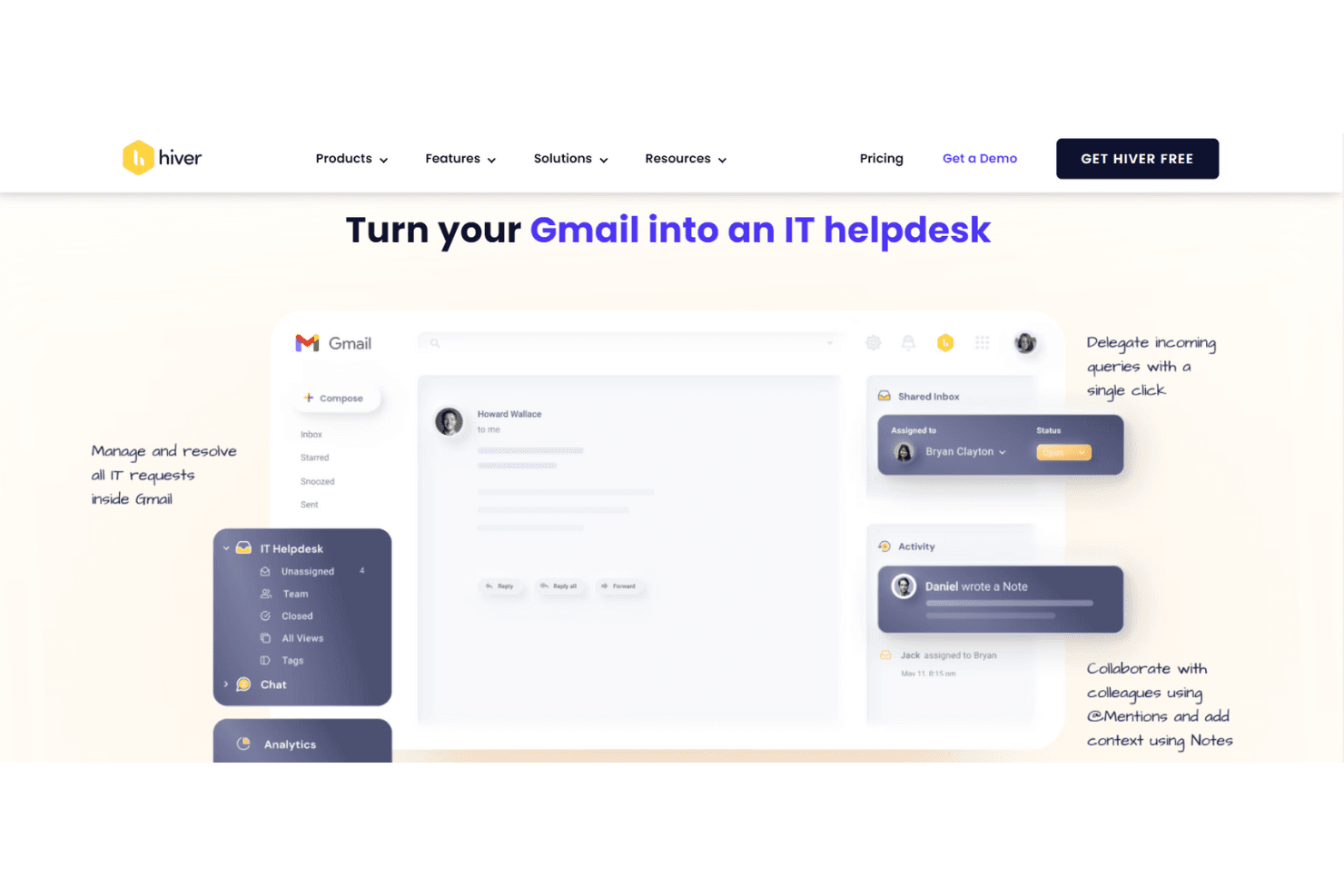
Hiver helps users turn their Gmail into a help desk. Hiver is an internal help desk platform that combines shared inbox management, ticketing, AI-powered automation, and a self-service help center to handle employee requests across HR, IT, finance, and operations teams.
Who Is Hiver Best For?
Hiver is a strong fit for HR and operations teams that need to move employee request handling out of email threads and into a structured, trackable workflow without a lengthy implementation.
Why I Picked Hiver
I've included Hiver in my top picks because getting it up and running genuinely doesn't require a lengthy implementation. HR and IT teams can connect their shared inboxes, configure rule-based automations, and start routing employee requests within the same day. I also like the AI Knowledge Builder, which detects gaps in your internal Help Center and drafts new articles from resolved tickets, so your self-service content improves automatically without someone managing it manually.
Hiver Key Features
- Shared inbox management: Assign employee requests to specific owners, track conversation status, and prevent duplicate replies across team inboxes.
- SLA automations: Set SLA policies and trigger automated actions based on SLA status to keep response and resolution times on track.
- CSAT surveys: Collect satisfaction ratings from employees after requests are resolved to surface recurring service gaps.
- Collision detection: Alerts agents when a teammate is already viewing or replying to the same conversation, preventing conflicting responses.
Hiver Integrations
Hiver offers native integrations with Slack, Jira, Asana, and PagerDuty, plus integrations with Linear and Zapier. Its APIs and webhooks support custom connections with other internal systems.
Pros and Cons
Pros:
- Quick setup suits email-based HR teams
- Automated routing reduces manual triage
- Clear request ownership prevents duplicate replies
Cons:
- Complex ITSM workflows may exceed its scope
- Ticketing remains an early-access feature
Learn more about Hiver: Best for ticket-capped, unlimited-agent pricing
- 14-day free trial + free demo available
- From $29/user/month
Visit WebsiteCustomer Rating:4.5/5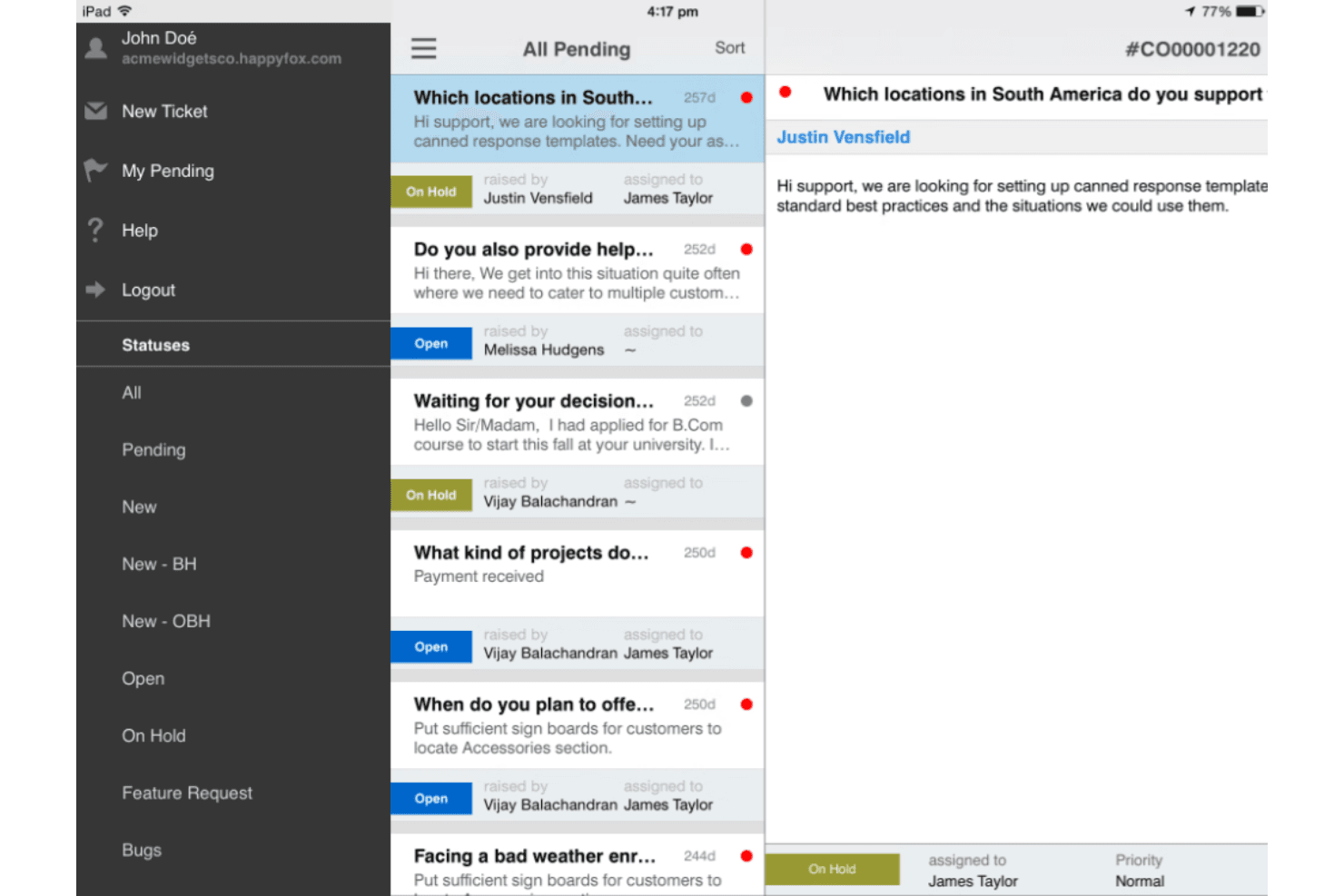
HappyFox ticketing dashboard with multi-chat and email view. HappyFox is a help desk platform that centralizes employee support requests across IT, HR, facilities, and operations into a structured ticketing system with automation, SLA management, and a self-service knowledge base.
Who Is HappyFox Best For?
HappyFox is a strong fit for mid-sized teams that want to support unlimited agents without paying per seat as ticket volume grows.
Why I Picked HappyFox
HappyFox earns its spot on my shortlist because of its ticket-capped, unlimited-agent pricing model, which removes the per-seat cost pressure that makes scaling internal support teams expensive. I like that the flat-rate plans (Growth, Scale, and Scale Plus) let you add agents freely while your ticket volume stays predictable, which works well when IT or HR teams grow mid-year. Smart Rules handle conditional routing across departments automatically, so tickets reach the right IT, HR, or facilities queue without manual triage.
HappyFox Key Features
- Omnichannel ticket intake: Converts employee requests from email, web forms, chat, and social media into structured, trackable tickets in one place.
- SLA management: Sets response and resolution targets per department and tracks compliance so IT and HR teams stay accountable to service commitments.
- Agent collision detection: Alerts agents when another team member is already working on a ticket, preventing duplicate replies or conflicting actions.
- Knowledge base with self-service portal: Lets employees search for answers and submit requests through a branded portal, reducing ticket volume before it reaches your team.
HappyFox Integrations
HappyFox lists 93 integrations, including Workday, BambooHR, Darwinbox, Microsoft Teams, Slack, Microsoft Intune, Google Endpoint Management, Jira, Okta, and Microsoft Entra ID. It also supports an embeddable API, webhooks, and Zapier for custom connections.
Pros and Cons
Pros:
- Private notes keep internal coordination with requests
- Rules automate assignment and escalation
- Configurable queues route employee requests by department
Cons:
- Search and large-queue handling frustrate some users
- Reporting filters and scheduling feel limited
 Best for tying monitoring alerts to tickets
- 30-day free trial
- From $13/user/month
Visit WebsiteCustomer Rating:4.4/5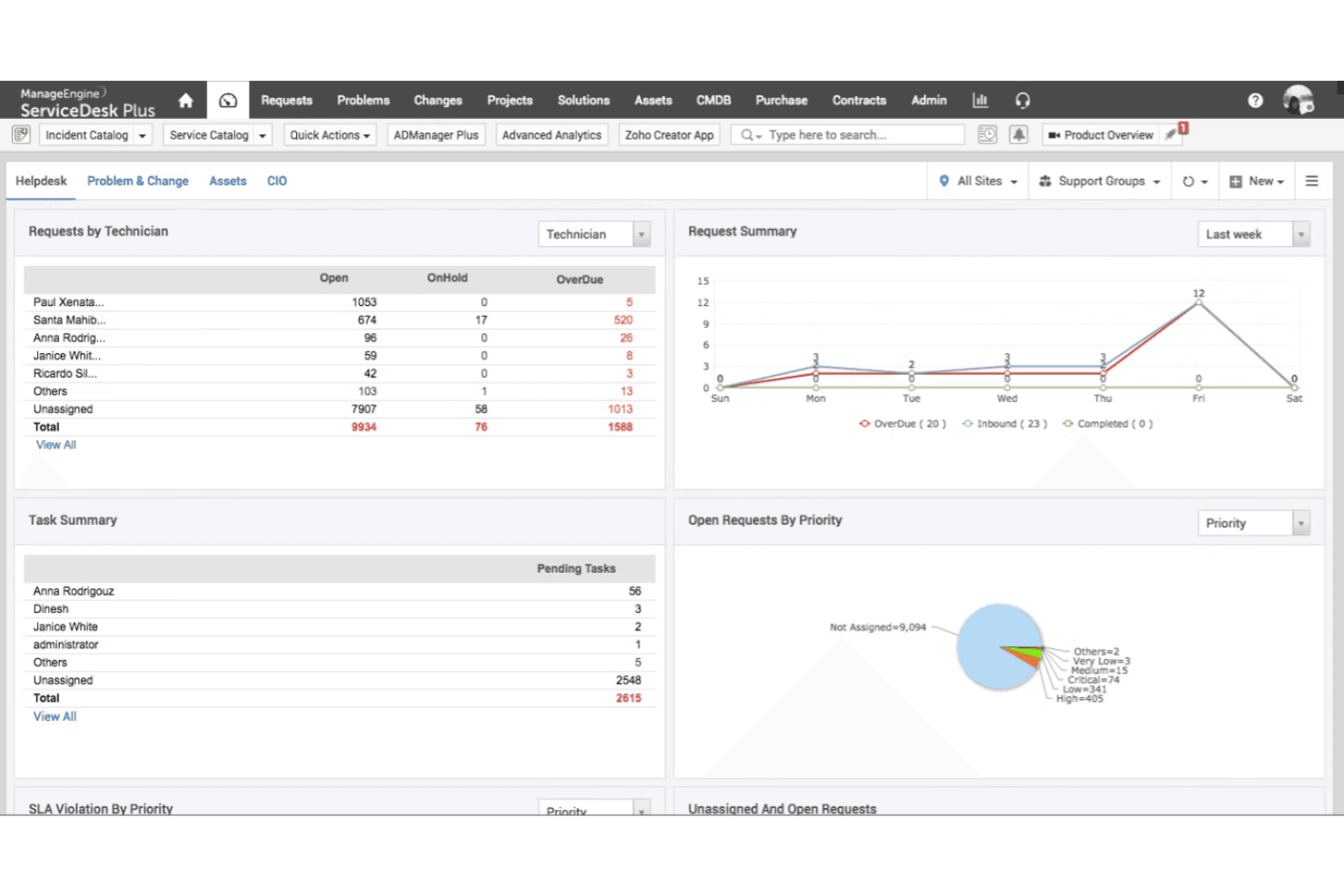
ServiceDesk Plus provides a holistic view in their dashboard for all relevant data in one place. ServiceDesk Plus is a full-stack ITSM platform from ManageEngine that covers incident, problem, change, and release management alongside IT asset tracking, a service catalog, and enterprise service management for departments like HR, facilities, and finance.
Who Is ServiceDesk Plus Best For?
ServiceDesk Plus is a strong fit for IT service desk teams that need to manage the full ITSM lifecycle—from incident and change management to asset tracking—across multiple departments.
Why I Picked ServiceDesk Plus
ServiceDesk Plus earns its spot on my shortlist because of how tightly it connects monitoring alerts to actionable tickets. I love that integrations with tools like OpManager, Site24x7, and PRTG automatically convert network anomalies and infrastructure alerts into tickets, so your team isn't manually triaging alerts during an outage. On top of that, AI-driven predictive triage via Zia categorizes and assigns those incoming tickets before a technician even opens them.
ServiceDesk Plus Key Features
- Enterprise service management: Extend IT service desk workflows to other departments, including HR, finance, facilities, and legal, each with their own configurations.
- Visual change workflows: Build staged change management workflows with custom statuses, notifications, field updates, and approvals on a drag-and-drop canvas.
- Self-service portal: Let employees submit requests, track ticket progress, access knowledge base articles, and chat with technicians without opening a ticket.
- SLA management and escalations: Set service-level targets and configure multi-level escalation rules to keep response and resolution times on track.
ServiceDesk Plus Integrations
ServiceDesk Plus offers native integrations with OpManager, Site24x7, PRTG, Microsoft Teams, Slack, Jira, WhatsApp, Endpoint Central, and Microsoft Entra ID. It also provides REST and Servlet APIs for custom integrations and supports Zapier.
Pros and Cons
Pros:
- Combines tickets with asset and change management
- Automates routing, escalations, and request lifecycles
- Centralizes employee requests beyond IT
Cons:
- Dense administration screens slow complex workflow changes
- Initial configuration can take substantial administrator time
Learn more about ServiceDesk Plus: Best for regulated IT service operations
- Not available
- Pricing upon request
Visit WebsiteCustomer Rating:4.4/5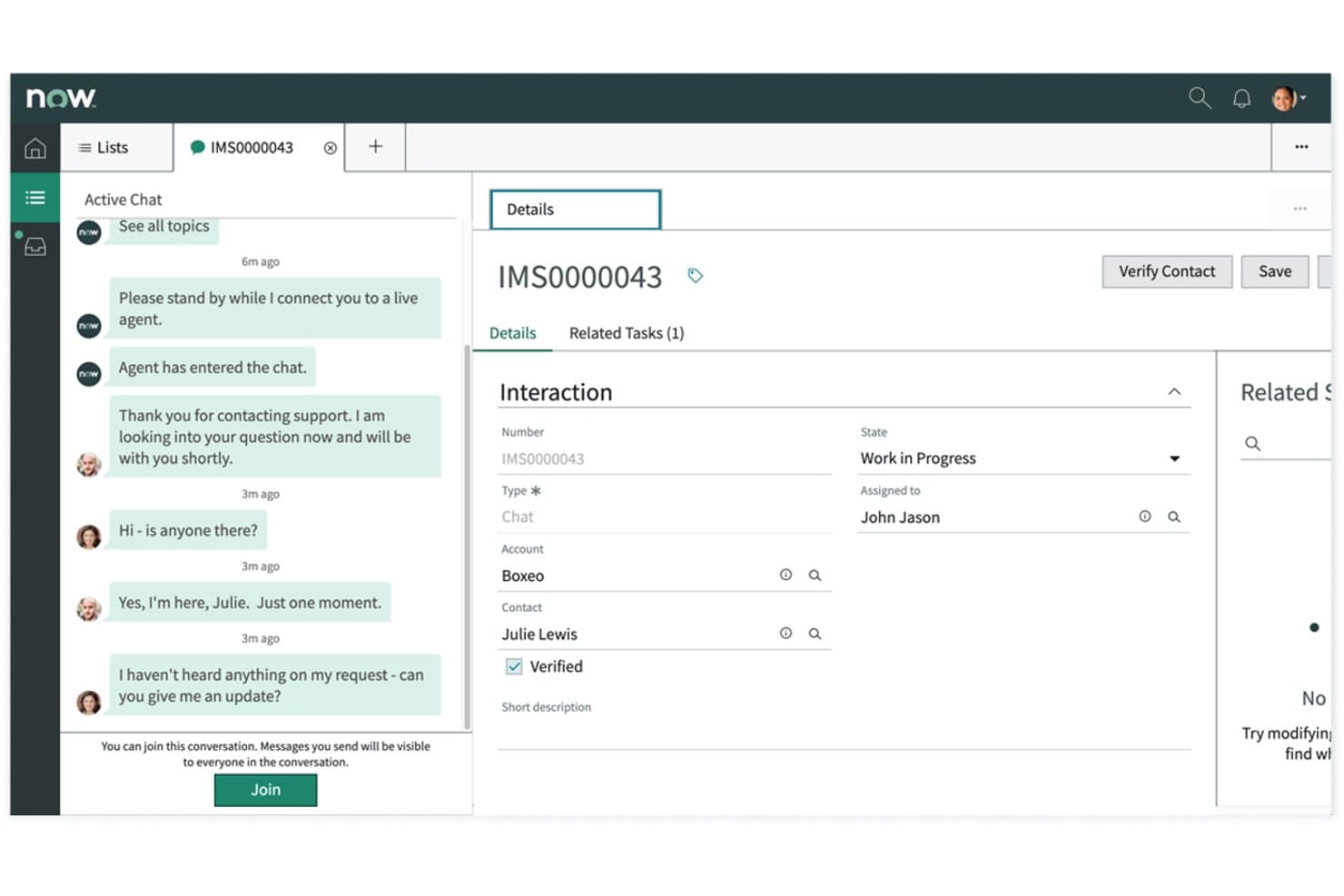
ServiceNow Agent Workspace handling a live support chat alongside its linked interaction record. ServiceNow is an enterprise IT service management platform that centralizes incident, change, problem, and service request management with AI-driven routing, a self-service portal, and workflow automation across IT and broader business operations.
Who Is ServiceNow Best For?
ServiceNow ITSM is a strong fit for enterprise IT teams in regulated industries that need a proven, audit-ready platform for managing complex incident, change, and service request workflows at scale.
Why I Picked ServiceNow
ServiceNow earns its spot on my shortlist because it's built from the ground up for the kind of audit-ready, process-governed IT operations that regulated industries actually require. I love that Change Management uses CMDB dependency mapping and automated risk scoring to assess impact before anything gets approved, which is exactly what teams in finance, healthcare, or government need. Predictive Intelligence then handles routing and categorization automatically, so agents aren't manually triaging every ticket.
ServiceNow Key Features
- Virtual Agent: A natural-language chatbot that lets employees submit requests, check ticket status, and resolve common issues without contacting an agent.
- Universal Request: A single submission form that accepts employee requests and automatically routes them to the right team without the employee needing to know who handles what.
- Major Incident Management: Dedicated workflows that coordinate stakeholder communication and response activities during critical service outages.
- Platform Analytics Advanced: Preconfigured and customizable dashboards that track MTTR, CSAT, first-contact resolution, and ticket volume across your IT operations.
ServiceNow Integrations
ServiceNow offers integrations with Microsoft Teams, Slack, Apache Kafka, Confluent Kafka, Active Directory, and SCCM. REST and scripted REST APIs, webhooks, and event-driven integrations support custom connectivity.
Pros and Cons
Pros:
- CMDB impact mapping supports governed change approvals
- AI routes incidents and requests automatically
- Shared ticket histories clarify ownership and progress
Cons:
- Advanced setup often needs experienced administrators
- Routine tickets can require too many clicks
Learn more about ServiceNow: Best for on-prem hosting and data residency options
- 30-day free trial + free demo available
- From $1,499/year (billed annually)
Visit WebsiteCustomer Rating:4.6/5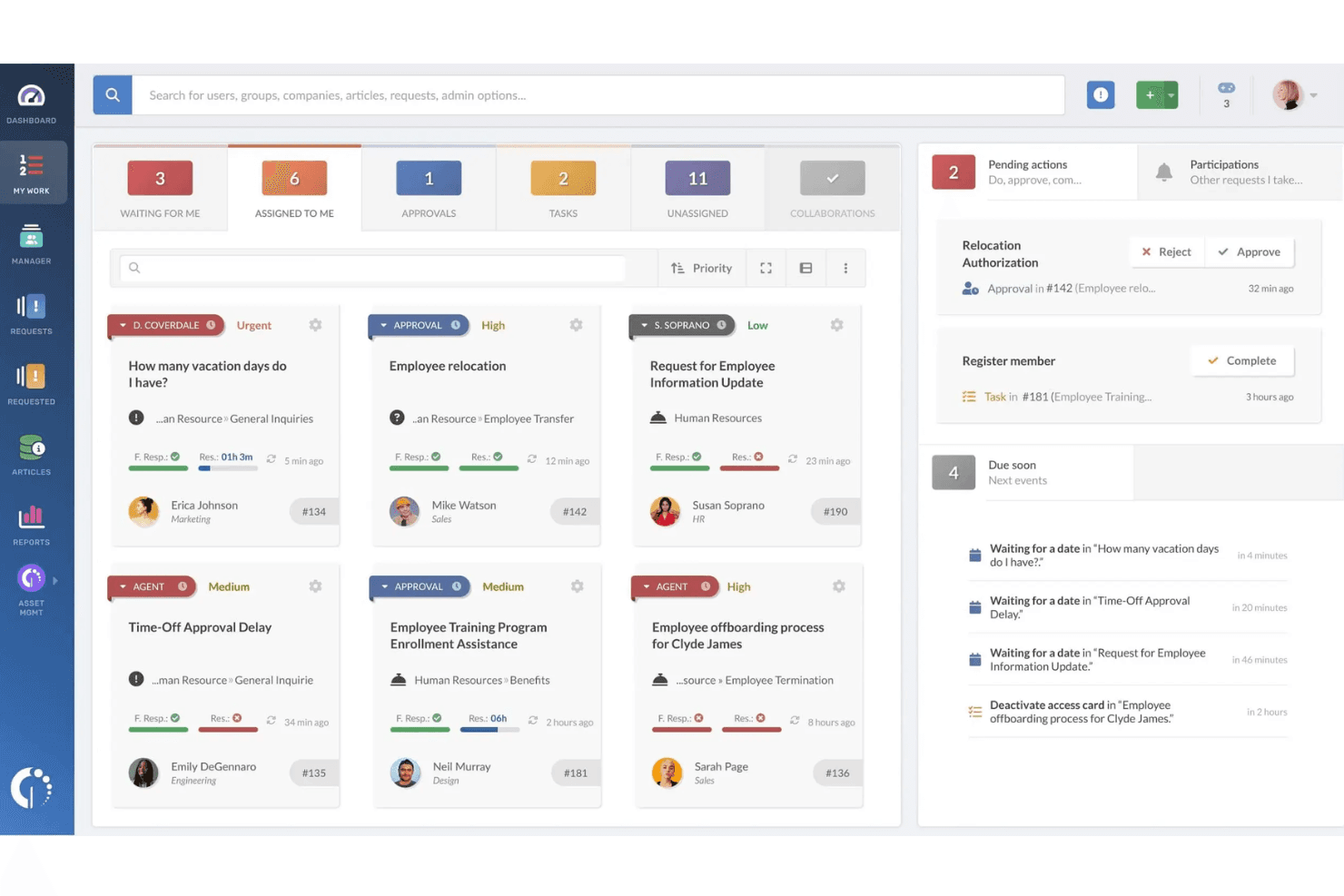
InvGate Service Management provides an organized dashboard for managing IT service requests, approvals, tasks, and incident tracking. InvGate Service Management is an ITIL-aligned internal help desk platform that combines multi-channel ticketing, no-code workflow automation, a self-service portal, and knowledge base management with AI-assisted categorization, routing, and deflection.
Who Is InvGate Service Management Best For?
InvGate Service Management is a strong fit for IT teams that need enterprise-grade service management with flexible deployment, including on-premise hosting for stricter data control requirements.
Why I Picked InvGate Service Management
I've included InvGate Service Management in my top picks because it's one of the few platforms that offers genuine on-premise hosting alongside cloud deployment, which matters when your organization has strict data residency or sovereignty requirements. At the Enterprise tier, you get data residency options, extended network restrictions, VPN connectivity, and custom backup schedules—controls that cloud-only tools simply can't match. I also like that this doesn't come at the cost of core service desk capability, since ITIL-aligned ticketing, no-code workflow automation, and AI-assisted routing are all present across plans.
InvGate Service Management Key Features
- Multi-channel ticket capture: Requests submitted via email, Microsoft Teams, WhatsApp, Slack, or the self-service portal all feed into a single unified queue.
- AI-assisted knowledge discovery: InvGate analyzes closed tickets to automatically generate knowledge snippets for agent review and moderation.
- No-code visual workflow builder: Teams can design multi-step service processes with conditional logic, parallel paths, and approval stages without writing any code.
- Custom dashboards and built-in metrics: Build role-specific dashboards using more than 150 built-in metrics to track service desk performance and SLA compliance.
InvGate Service Management Integrations
InvGate Service Management offers native integrations with Microsoft Teams and FileWave, plus integrations with Microsoft Entra ID, Active Directory, LDAP, and InvGate Asset Management. It supports REST and Analytics APIs, with Zapier integrations.
Pros and Cons
Pros:
- Links support tickets with asset history
- Routes tickets through approval workflows
- Centralizes IT, HR, and facilities requests
Cons:
- Permissions and setup require extra effort
- Dashboard filtering can feel limited
Learn more about InvGate Service Management: Best for linking support to development work
- Free plan available
- From $20/user/month
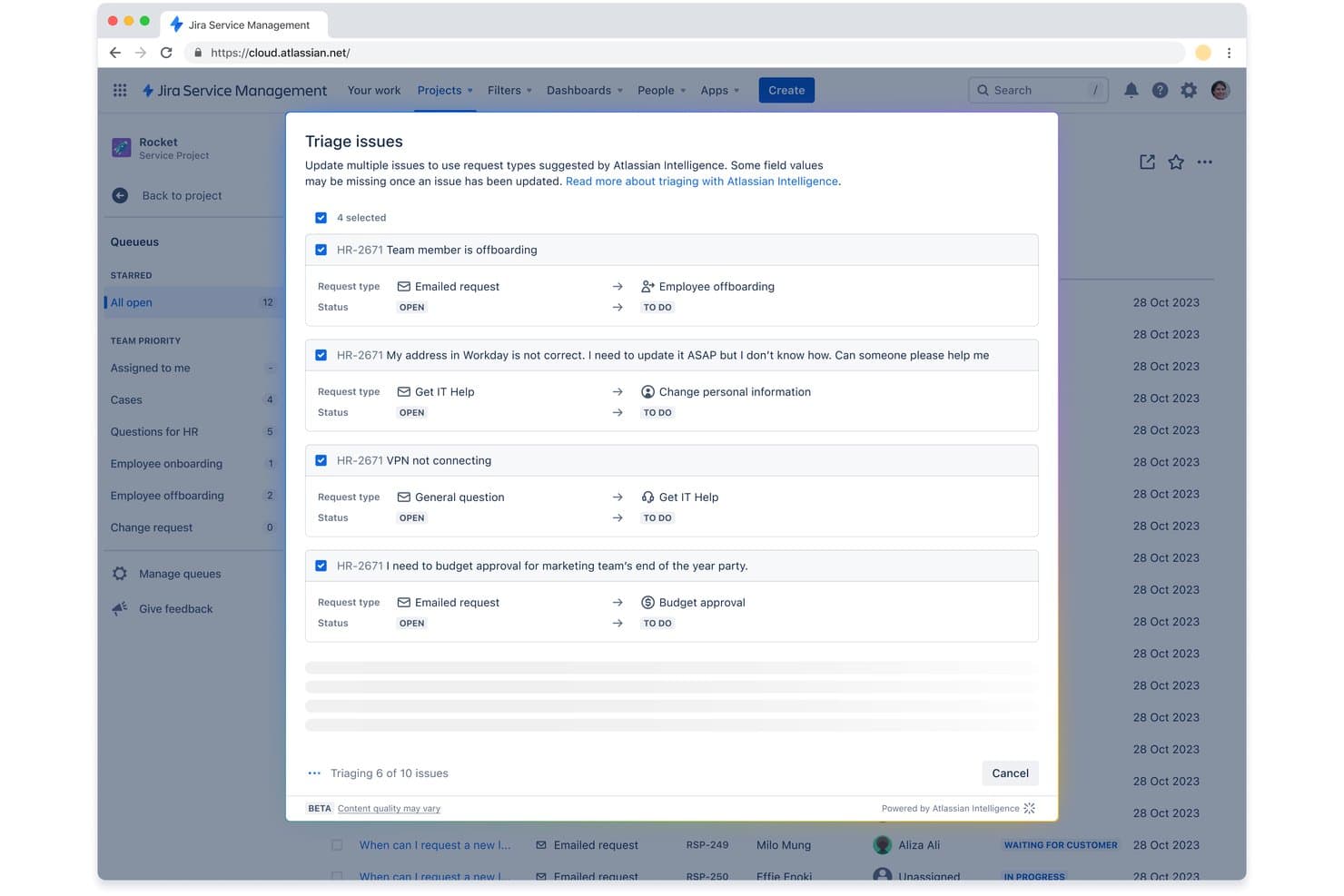
Jira Service Management's Triage issues view uses AI to route internal HR requests to the right request types. Jira Service Management is Atlassian's ITSM platform that connects IT, HR, and other internal service teams through shared request queues, SLA tracking, configurable workflows, and built-in incident, problem, and change management.
Who Is Jira Service Management Best For?
Jira Service Management is a strong fit for IT and operations teams that already work in the Atlassian ecosystem and need their support workflows to stay connected to development work.
Why I Picked Jira Service Management
I've included Jira Service Management in my top picks because it's the clearest choice when your support and dev teams need to stay in sync. When an employee ticket reveals a software bug, agents can link it directly to a Jira Software issue, so the fix gets tracked without anyone losing context across tools. I also like that change management workflows with AI-powered risk assessments come built in, so IT teams can coordinate deployments and approvals without switching platforms.
Jira Service Management Key Features
- Conversational ticketing: Employees can submit and manage requests directly in Slack or Microsoft Teams, with conversations syncing in real time to Jira Service Management.
- On-call scheduling: Teams can build on-call schedules with routing rules and escalation policies to make sure alerts reach the right person at the right time.
- Asset and configuration management: Agents can track asset inventory, ownership, and service dependencies to give incidents and requests the right context for faster resolution.
- Multi-department service projects: IT, HR, legal, and finance teams can each run separate projects with their own portals, request types, and workflows from one platform.
Jira Service Management Integrations
Jira Service Management offers native integrations with Slack and Microsoft Teams, plus access to over 1,000 Marketplace apps. Its REST API, webhooks, and Forge APIs support custom integrations and connections with development workflows.
Pros and Cons
Pros:
- SLAs and escalation rules guide response
- Department-specific portals keep requests separated
- Employees can track request status themselves
Cons:
- Queue routing and navigation can frustrate agents
- Layered workflows complicate initial setup
Learn more about Jira Service Management:
Outros softwares de assistência técnica interna
Eis algumas opções adicionais de software de assistência técnica interna que não fizeram parte da minha seleção, mas que ainda vale a pena conhecer:
- 11AtomicworkBest for outcome-priced ServiceNow automation
- 12HaloITSMBest for IT teams consolidating business tools
- 13ZendeskBest for employee requests and SaaS management
- 14SolarWinds Service DeskBest for SolarWinds alert-to-ticket workflows
- 15KayakoBest for self-service shaped by ticket data
- 16LiveAgentBest for AI with your own provider account
- 17IssuetrakBest for air-gapped support operations
- 18Jitbit HelpdeskBest for air-gapped IT teams
- 19OneDeskBest for turning tickets into planned work
- 20RezolveBest for voice support with identity checks
- 21TOPdeskBest for teams managing IT changes and problems
- 22HubSpot Service HubBest for teams already using HubSpot CRM
- 23monday serviceBest for carrying requests into project work
- 24GuruBest for permission-aware answers across tools
- 25HubSpot Help DeskBest for HubSpot users handling internal IT
How I Evaluate Internal Help Desk Software
I split my evaluation into three parts, with the most weight on core needs: route and track requests, and let employees submit and check status. Next, I consider differentiators like Slack-native ticketing or shift-aware routing. Finally, I weigh onboarding, support, and pricing value beyond the feature set.
Core Functionality (Table Stakes For This List)
When I'm selecting tools for my list, I score each one on a scale from 0 (does not offer the functionality) to 5 (excels in this area) for each core functionality listed below. I then convert the total into a percentage to help assess each tool's overall fit, with extra weight on any functionalities I’ve deemed essential.
- Ticket Management (Essential): I look for categorization, ownership, priority, and status tracking, so a facilities request or access issue stays visible through resolution.
- Employee Self-Service (Essential): I check whether employees can submit and track requests, update details, and find relevant guidance without chasing an agent in chat.
- Workflow Automation: I assess rules that route by request type or urgency, assign the right team, and escalate stalled tickets before service levels slip.
- Knowledge Base: I look for searchable, organized articles surfaced during request submission, such as setup steps that can answer repeat access questions.
- Department Support: I evaluate whether IT, HR, and facilities can use distinct queues, forms, permissions, and handoffs without splitting employee support.
- SLA Reporting: I check reports for response and resolution times, workload, and SLA status by team, so managers can spot backlogs affecting service.
Once I have a list of tools that meet the criteria, I consider what sets each platform apart.
Differentiating Factors (What Sets Vendors Apart)
Here's how I compare and contrast different vendors:
Standout Features
I look for Slack or Teams-native ticketing so agents can file and track requests without leaving the tool they already live in. AI-powered ticket deflection is another separator—I check whether the platform surfaces relevant knowledge articles before a ticket is created, which cuts repeat volume for IT and HR queues. I also evaluate shift-aware routing, since CX teams run around the clock and tickets need to reach whoever's actually working, not whoever's next in a static list.
Beyond Features
I check whether licensing scales with seasonal headcount swings, since contact centers routinely staff up and down. A per-agent model that penalizes short-term hires gets expensive fast. I also evaluate CX tech stack compatibility—native connectors to CCaaS and WFM platforms mean agents aren't copying ticket numbers between tabs. Finally, vendor-provided workflow templates for common IT and HR requests tell me how quickly a CX ops team can go live without building everything from scratch.
Como escolher um software de assistência técnica interna
É fácil perder-se em listas extensas de funcionalidades e estruturas de preços complexas. Para o ajudar a manter o foco enquanto trabalha no seu processo específico de seleção de software, eis uma lista de fatores a ter em conta:
| Fator | O que considerar |
|---|---|
| FatorEscalabilidade | O que considerarO software consegue acompanhar o crescimento da sua empresa? Considere quantos utilizadores consegue suportar e se consegue gerir eficientemente um número crescente de pedidos. |
| FatorIntegrações | O que considerarÉ compatível com as ferramentas que já utiliza, como sistemas de CRM ou de email? Procure integrações nativas para evitar configurações personalizadas dispendiosas. |
| FatorPersonalização | O que considerarPode adaptar o software aos seus fluxos de trabalho? Procure opções para ajustar os campos dos pedidos, os painéis e os relatórios de acordo com os seus processos. |
| FatorFacilidade de utilização | O que considerarA interface é intuitiva para a sua equipa? Evite ferramentas com uma curva de aprendizagem acentuada que possam atrasar a adoção e reduzir a produtividade. |
| FatorImplementação e integração inicial | O que considerarCom que rapidez pode começar? Avalie a disponibilidade de guias, tutoriais e suporte para facilitar a transição. |
| FatorCusto | O que considerarO preço está dentro do seu orçamento? Compare diferentes modelos de preços e esteja atento a custos ocultos, como suplementos ou encargos adicionais de suporte. |
| FatorMedidas de segurança | O que considerarCumpre as suas normas de segurança? Procure funcionalidades como encriptação de dados e controlos de acesso para proteger informações sensíveis. |
| FatorDisponibilidade do suporte | O que considerarQuão acessível é a ajuda quando precisa dela? Considere o horário de suporte do fornecedor, os tempos de resposta e os canais disponíveis, como chat ou telefone. |
O que é um software de assistência técnica interna?
O software de suporte informático interno é uma ferramenta que ajuda as empresas a gerir e resolver pedidos internos de suporte informático. Os profissionais de TI e as equipas de apoio ao cliente utilizam normalmente estas ferramentas para melhorar a eficiência e os tempos de resposta. As funcionalidades de gestão de pedidos, criação de bases de conhecimento e suporte multicanal ajudam a organizar os pedidos e a fornecer soluções rápidas. No geral, estas ferramentas aumentam a produtividade das equipas e garantem um suporte consistente dentro de uma organização.
Funcionalidades
Ao selecionar um software de suporte informático interno, tenha em atenção as seguintes funcionalidades principais:
- Gestão de pedidos: Organiza e atribui prioridades aos pedidos de suporte para garantir uma resolução atempada e um fluxo de trabalho eficiente.
- Base de conhecimento: Disponibiliza um repositório centralizado de informações e soluções para problemas comuns, reduzindo pedidos repetidos.
- Suporte multicanal: Permite gerir pedidos provenientes de vários canais de comunicação, como e-mail, chat e telefone, num único local.
- Fluxos de trabalho automatizados: Simplifica tarefas e processos repetitivos, libertando tempo para problemas mais complexos.
- Painéis personalizáveis: Oferece vistas e métricas adaptadas para monitorizar o desempenho e acompanhar as principais métricas de suporte.
- Capacidades de integração: Liga-se a sistemas existentes, como CRM ou e-mail, para proporcionar uma experiência integrada.
- Medidas de segurança: Protege dados sensíveis com funcionalidades como encriptação e controlos de acesso.
- Relatórios e análise: Fornece informações sobre as operações de suporte, ajudando as equipas a identificar tendências e a melhorar a qualidade do serviço.
- Portais de autoatendimento: Permitem que os utilizadores encontrem soluções de forma autónoma, reduzindo a carga sobre as equipas de suporte.
- Acessibilidade através de aplicações móveis: Permite que as equipas de suporte gerem e respondam a pedidos em mobilidade, garantindo a continuidade do serviço.
Vantagens
A implementação de um software de suporte informático interno proporciona várias vantagens à sua equipa e à sua empresa. Eis algumas que pode esperar:
- Maior eficiência: Automatiza tarefas repetitivas e organiza os pedidos, ajudando a sua equipa a resolver problemas mais rapidamente.
- Comunicação melhorada: Centraliza as interações provenientes de diferentes canais, garantindo que nada é esquecido e melhorando os tempos de resposta.
- Aumento da produtividade: Liberta os membros da equipa para se concentrarem em problemas complexos, disponibilizando opções de autoatendimento e bases de conhecimento para questões comuns.
- Maior segurança dos dados: Protege informações sensíveis com funcionalidades de segurança, como encriptação e controlos de acesso.
- Análise esclarecedora: Oferece informações baseadas em dados sobre as operações de suporte, permitindo tomar decisões fundamentadas e melhorar o serviço.
- Escalabilidade: Suporta equipas em crescimento e volumes de pedidos cada vez maiores, adaptando-se às necessidades da sua empresa ao longo do tempo.
- Maior autonomia dos utilizadores: Disponibiliza ferramentas como portais de autoatendimento, permitindo que os utilizadores resolvam problemas de forma autónoma e reduzindo a carga sobre a equipa de suporte.
Custos & Preços
A seleção de um software de suporte informático interno exige uma compreensão dos vários modelos de preços e planos disponíveis. Os custos variam consoante as funcionalidades, o tamanho da equipa, os complementos, entre outros fatores. A tabela abaixo resume os planos comuns, os respetivos preços médios e as funcionalidades normalmente incluídas nas soluções de software de suporte informático interno:
Tabela de comparação de planos de software de suporte informático interno
| Tipo de plano | Preço médio | Funcionalidades comuns |
|---|---|---|
| Tipo de planoPlano gratuito | Preço médio$0 | Funcionalidades comunsGestão básica de pedidos, relatórios limitados e suporte da comunidade. |
| Tipo de planoPlano pessoal | Preço médio$5-$25/utilizador/mês | Funcionalidades comunsGestão de pedidos, relatórios básicos, suporte por e-mail e uma base de conhecimento pequena. |
| Tipo de planoPlano empresarial | Preço médio$30-$60/utilizador/mês | Funcionalidades comunsRelatórios avançados, suporte multicanal, integrações e funcionalidades de automatização. |
| Tipo de planoPlano empresarial de grande escala | Preço médio$70-$150/utilizador/mês | Funcionalidades comunsPainéis personalizáveis, suporte prioritário, segurança avançada e análise abrangente. |
Perguntas frequentes sobre software de suporte interno
Eis algumas respostas a perguntas comuns sobre software de suporte interno:
Qual é a diferença entre software de suporte interno e externo?
O software de suporte interno foi concebido para gerir e apoiar pedidos e problemas de TI internos numa organização, enquanto o software de suporte externo se concentra no apoio e serviço ao cliente para pessoas externas à empresa. Os sistemas internos integram frequentemente ferramentas específicas da empresa e tratam os pedidos dos colaboradores, enquanto os sistemas externos são adaptados ao serviço ao cliente, incluindo frequentemente integrações com CRM e portais destinados aos clientes.
O software de suporte interno pode ser utilizado por equipas que não sejam de TI?
Sim, o software de suporte interno pode ser adaptado para utilização por equipas que não sejam de TI, como os recursos humanos ou a gestão de instalações. Estas equipas podem utilizar o software para gerir pedidos internos, como a integração de novos colaboradores ou a resolução de problemas de manutenção do escritório. A flexibilidade destas ferramentas permite que vários departamentos personalizem os fluxos de trabalho, garantindo um tratamento eficiente dos pedidos em toda a organização.
É necessário dar formação aos colaboradores sobre o novo software de suporte?
Sim, a formação é essencial ao implementar um novo software de suporte, para garantir que a sua equipa consegue utilizar a ferramenta de forma eficaz. Uma formação adequada ajuda os colaboradores a compreender como registar pedidos, gerir solicitações e utilizar funcionalidades como relatórios e análises. Investir tempo na formação desde o início pode conduzir a uma melhor adoção, tornando a sua equipa mais eficiente a longo prazo.