

O software de suporte técnico fornece às equipas de apoio as ferramentas necessárias para gerir eficazmente os problemas dos clientes — desde a receção até à resolução — através de e-mail, chat e outros canais essenciais. Quer esteja a gerir algumas dezenas de pedidos por dia ou a coordenar uma operação de apoio global, a ferramenta de suporte técnico certa pode simplificar os fluxos de trabalho, aumentar a produtividade da equipa, melhorar os tempos de resposta e elevar a experiência do cliente.
Testei e analisei estas soluções para lhe fornecer um guia imparcial das melhores ferramentas de suporte técnico disponíveis. Neste artigo, apresentarei as minhas principais escolhas, concentrando-me na forma como cada uma pode apoiar a sua equipa na prestação de um serviço excecional.
Porque pode confiar nas nossas recomendações de software
6,700+
Reviews
20
Industry experts
16+
Evaluation factors
14
Years reviewing software
A nossa equipa testa e analisa software desde 2012. Como líderes de experiência do cliente (CX), sabemos o quão difícil — e importante — é escolher o software certo.
Para este guia, avaliámos as ferramentas através de testes práticos e pesquisa independente, pontuando-as de acordo com os nossos critérios de seleção.
As nossas análises refletem o juízo da nossa equipa editorial, e não um discurso de vendas.
 Gui DrusinaCreative Director
 Tim FisherVP of AI
Tabela de comparação de software de suporte técnico
Esta tabela de comparação resume os detalhes de preços das minhas principais escolhas de software de suporte técnico:
Score legend (out of 5)
- Excellent4.5–5
- Good4–4.4
- Average3–3.9
- Below average2–2.9
- Poor1–1.9
Sorted by: Default
| Tool | Starting Price | Website | |||||||
|---|---|---|---|---|---|---|---|---|---|
Best for an advanced customer self-service portal | 4.0 out of 5 | 4 | 4 | 4 | 4 | 3 | 5 | $19/agent/month 14-day free trial + free demo available | Book Demo |
Best for automating repetitive IT requests | 3.0 out of 5 | 2 | 5 | 4 | 2 | 2 | 3 | $209/month/technician 30-day free trial available | Website |
Best for AI-driven IT service management | 3.5 out of 5 | 4 | 4 | 4 | 3 | 2 | 4 | $19/user/month 14-day free trial | Book Demo |
Best for creating no-code automations | 4.0 out of 5 | 4 | 4 | 4 | 3 | 5 | 4 | $25/user/month Free plan + 15-day free trial + free demo available | Website |
Best for IT help desk management | 3.3 out of 5 | 4 | 3 | 3 | 4 | 3 | 3 | Pricing upon request 14-day free trial | Website |
Best for AI-driven ticket management | 4.5 out of 5 | 5 | 5 | 5 | 4 | 4 | 4 | $7/user/month Free plan + 15-day free trial + free demo available | Website |
Best for AI-powered ecommerce inbox management | 3.8 out of 5 | 4 | 4 | 5 | 4 | 4 | 2 | $45/user/month 14-day free trial + free demo available | Website |
Best for phone calls alongside tickets and chats | 4.2 out of 5 | 4 | 4 | 5 | 4 | 4 | 4 | $15/user/month 30-day free trial available | Website |
Best with extensive third-party integrations | 3.7 out of 5 | 4 | 4 | 4 | 2 | 3 | 5 | $249/agent Free trial available | Website |
Best AI-powered customer service solution for companies | 4.7 out of 5 | 5 | 5 | 5 | 4 | 4 | 5 | $19/agent/month 14-day free trial + free demo available | Book Demo |


Análises do melhor software de suporte técnico
Para o ajudar a encontrar o melhor software de suporte técnico para si, forneci resumos detalhados das minhas 10 principais escolhas e expliquei por que motivo incluí cada sistema nesta lista.
Além disso, incluí abaixo opções adicionais para diferentes casos de utilização, para o ajudar a encontrar o software de suporte técnico adequado às suas necessidades.
 Best for an advanced customer self-service portal
- 14-day free trial + free demo available
- From $19/agent/month (billed annually)
Customer Rating:4.4/5
Freshdesk's powerful shared inbox puts detailed customer information and advanced features within easy reach for your agents. Freshdesk is a cloud-based help desk platform built for support teams in businesses of all sizes who need to manage customer inquiries across multiple channels and automate repetitive tasks.
Who Is Freshdesk Best For?
Freshdesk is a good fit for growing support teams that need a scalable help desk with multichannel ticket management and self-service tools built in from the start.
Why I Picked Freshdesk
Freshdesk earns its spot as one of the best on my shortlist because of how far its self-service portal goes beyond a basic knowledge base. I like that you can build fully branded portals where customers search articles, browse community forums, and submit tickets—all in one place. Article versioning and approval workflows mean my team can keep content accurate without publishing outdated answers. Freddy AI Agent automatically responds to incoming emails using knowledge base content, so customers get cited answers instantly without creating a ticket.
Freshdesk Key Features
- Omnichannel ticket management: Consolidate customer conversations from email, chat, phone, and social media into a single shared inbox.
- Automation rules: Set up ticket assignment, priority tagging, and follow-up actions based on conditions you define.
- Collision detection: Get real-time alerts when multiple agents are viewing or replying to the same ticket simultaneously.
- Custom reporting and dashboards: Build reports that track ticket volume, response times, and agent performance across your support team.
Freshdesk Integrations
Integrations include Playvox, Slack, MS Teams, Shopify, Salesforce, Jira, and connector apps for custom integrations using APIs and pre-built templates.
Pros and Cons
Pros:
- Supports SLA management
- Includes a thank you detector tool that prevents tickets from being reopened when a customer says "thanks"
- Supports canned responses to offer consistent responses to common questions
Cons:
- Intelligent AI-based features and chat-bots are limited to their top-level paid plan (Enterprise)
- Multilingual features are only available in their Pro or Enterprise plans
Learn more about Freshdesk: Best for automating repetitive IT requests
- 30-day free trial available
- From $209/month/technician (billed annually)
Visit WebsiteCustomer Rating:4.5/5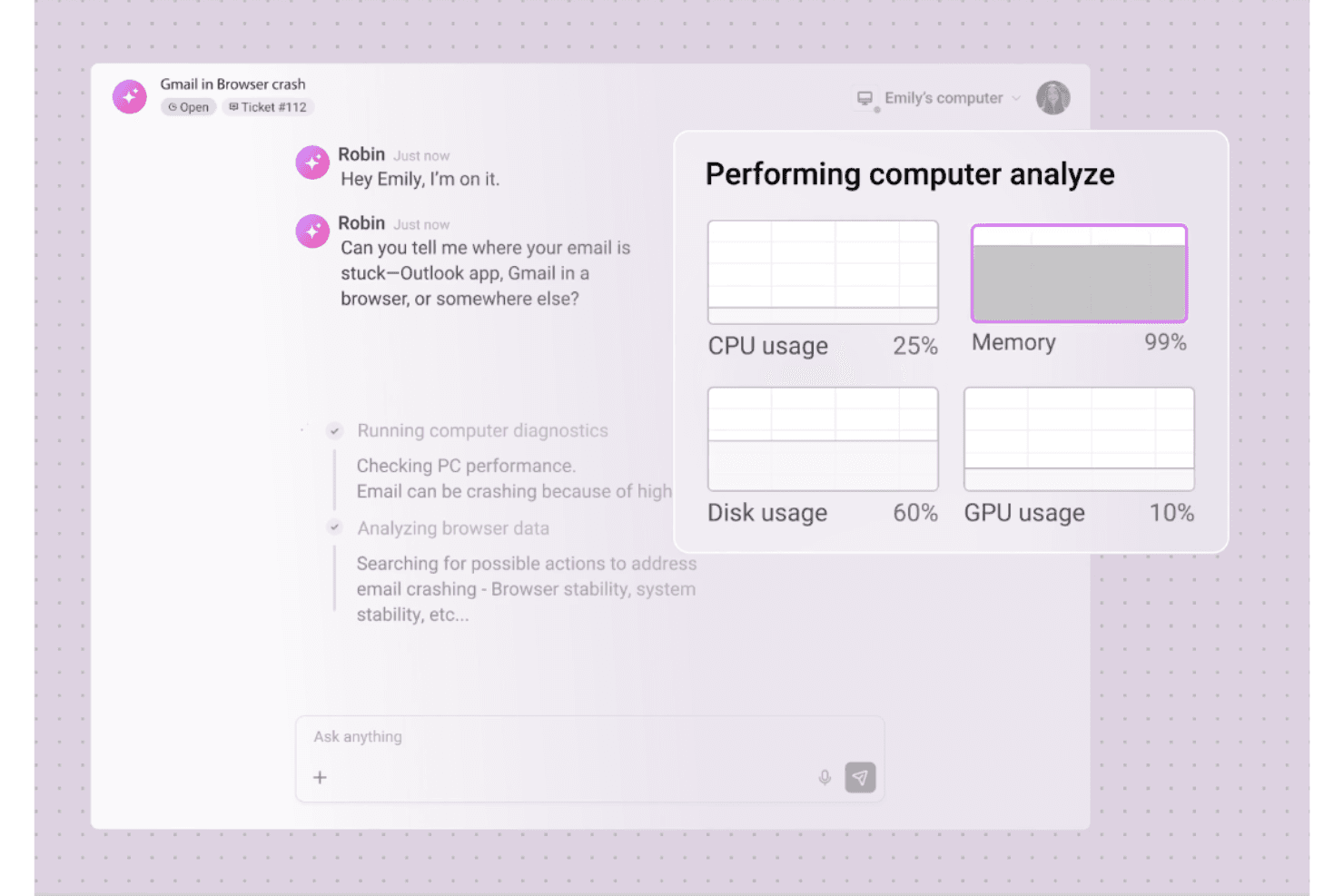
Robin performing autonomous computer analysis to identify high memory usage and system performance issues in real time. Robin Autonomous IT is an AI-powered IT support agent that handles employee device and cloud requests across channels like Slack, Microsoft Teams, and email—diagnosing issues, executing approved fixes, and escalating unresolved tickets with full context.
Who Is Robin Autonomous IT Best For?
Robin is a strong fit for IT operations teams that want to cut down on repetitive device and cloud requests without rebuilding their existing ITSM setup.
Why I Picked Robin Autonomous IT
I picked Robin as one of the best because it handles the repetitive IT requests that eat up technician time, like password resets, app installs, and account unlocks, without routing them through a human first. Robin diagnoses the issue, checks company policies, and executes the fix autonomously across Slack, Teams, or email. I especially like that when it can't resolve something, it escalates to a technician with full context, so nothing gets lost.
Robin Autonomous IT Key Features
- Multi-channel request intake: Accepts employee support requests through Microsoft Teams, Slack, email, and the Atera Customer Portal in one unified flow.
- Approval routing: Routes requests that require authorization to the appropriate stakeholder before Robin executes any action.
- Operational dashboard: Displays ticket assignment volume, resolution paths, and escalation patterns so IT teams can monitor Robin's activity.
- Playbooks: Runs predefined ticket workflows automatically when configured trigger conditions are met.
Robin Autonomous IT Integrations
Robin Autonomous IT offers integrations with Google, Azure AD, Okta, Slack, and Microsoft Teams. It supports MCP and custom API integrations, plus Zapier.
Pros and Cons
Pros:
- Dashboards expose resolution paths and escalations
- Escalations retain diagnostics and troubleshooting history
- Automates repetitive fixes before technician handoff
Cons:
- No native SLA policies or breach tracking
- Depends on separate system for ticket lifecycle
Learn more about Robin Autonomous IT: Best for AI-driven IT service management
- 14-day free trial
- From $19/user/month (billed annually)
Customer Rating:4.6/5
Freshservice has a robust ticket management system for filtering incidents and their statuses. Freshservice is a cloud-based help desk platform built for IT teams and service departments that need to manage requests, automate workflows, and deliver fast support across multiple channels.
Who Is Freshservice Best For?
Freshservice is a strong fit for mid-size to enterprise IT teams that need a structured, scalable platform for managing internal service requests and incidents.
Why I Picked Freshservice
Freshservice earns its spot on my shortlist because of how deeply AI is woven into the service desk workflow, not just bolted on. I particularly like Freddy AI Copilot, which lets agents draft responses, summarize long ticket threads, and generate knowledge base articles without leaving the ticket view. Freddy AI Agent also handles 24/7 self-service on Slack and Microsoft Teams, so my team isn't fielding repetitive requests around the clock. The AI-driven incident auto-routing also means tickets land with the right agent based on availability and workload, which cuts down on manual triage.
Freshservice Key Features
- SLA management: Set and track service level agreements with automated escalations when response or resolution deadlines are at risk.
- Self-service portal: Give employees a branded portal to submit tickets, track request status, and search the knowledge base without contacting an agent.
- Change management: Plan, review, and approve IT changes with built-in workflows, risk assessment, and a visual change calendar.
- Asset management: Discover, track, and manage hardware and software assets directly within the help desk, linking them to related tickets and incidents.
Freshservice Integrations
Integrations include Microsoft Teams, SecPod, Slack, TeamViewer, Jira, Azure AD, Workato, and over 1,200 additional enterprise apps through the Freshservice Marketplace.
Pros and Cons
Pros:
- Supports self-service tools and expert directories for efficient issue resolution
- Asset management functionality
- Robust automation capabilities
Cons:
- Freddy copilot is a paid add-on
- Reporting capabilities are a bit limited
Learn more about Freshservice: Best for creating no-code automations
- Free plan + 15-day free trial + free demo available
- From $25/user/month (billed annually)
Visit WebsiteCustomer Rating:4.5/5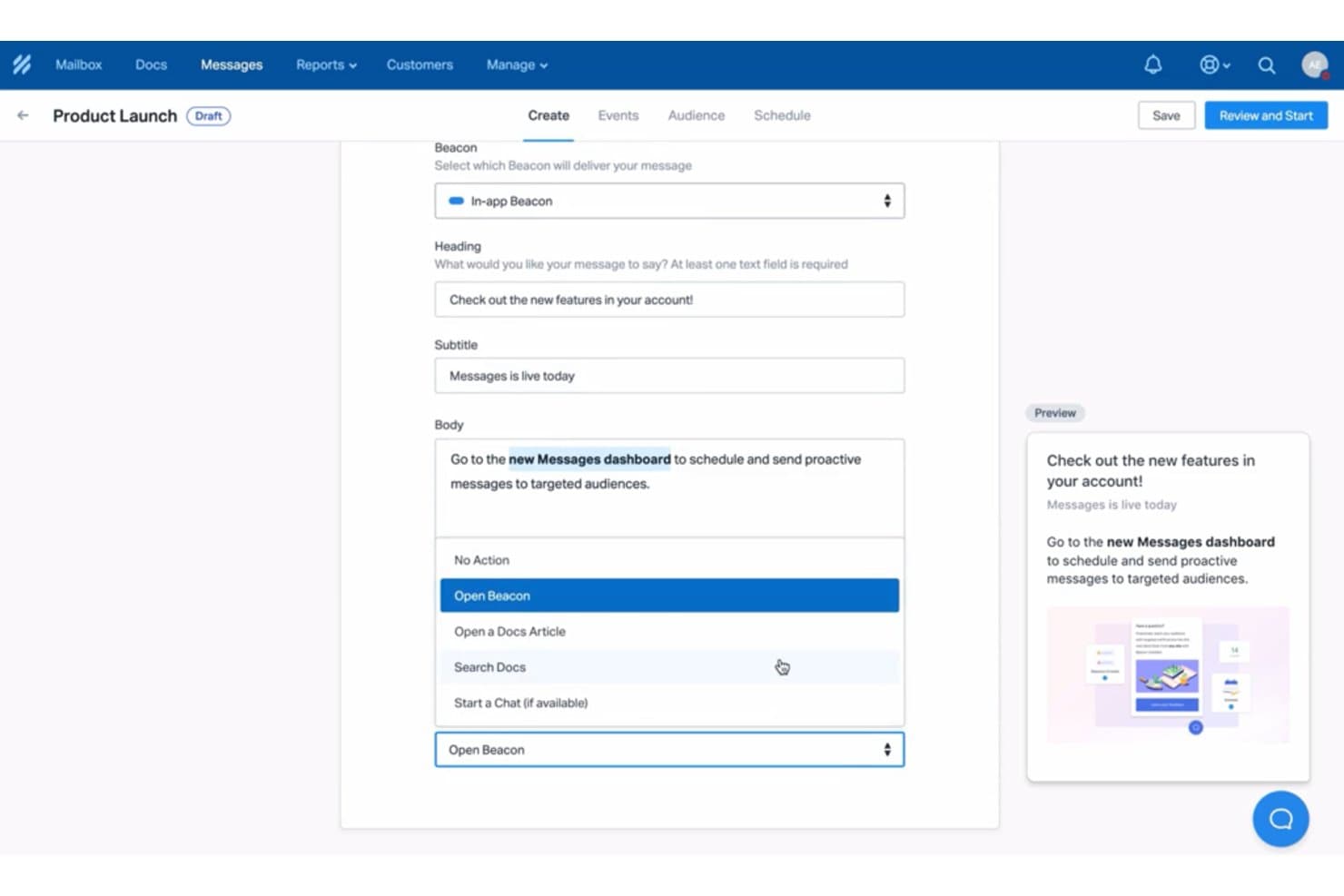
Proactively contact website visitors with messages targeted to the page they're viewing. Help Scout is a customer support platform that centralizes email, live chat, and social messaging into a shared inbox, with built-in workflow automation, a self-service knowledge base, and AI-assisted tools for support teams.
Who Is Help Scout Best For?
Help Scout is a strong fit for customer support teams at small to mid-sized businesses that want an email-first shared inbox with built-in automation and self-service tools.
Why I Picked Help Scout
I picked Help Scout as one of the best because its no-code workflow builder is genuinely one of the most practical I've seen in this category. You can set up automatic workflows using AND/OR condition logic across conversation details, customer properties, and channel data, then trigger multi-step actions like assigning, tagging, replying, or moving conversations, all without touching a line of code. I also like that manual workflows let you apply the same logic as a bulk action across selected conversations, which makes batch triage fast.
Help Scout Key Features
- Shared inbox: Manage customer conversations from email, live chat, and social messaging in one collaborative workspace, with full customer history visible on every thread.
- Collision detection: See in real time when a teammate is already viewing or replying to a conversation, so two agents don't send duplicate responses.
- Beacon support hub: Embed a customizable widget on your website or in-app that surfaces relevant help articles, a contact form, and live chat without sending customers to a separate page.
- Signal reporting: Track response times, resolution times, CSAT, and recurring conversation topics to monitor team performance and spot emerging support trends.
Help Scout Integrations
Help Scout has 113 marketplace integrations, including Salesforce, HubSpot, Jira, Slack, Shopify, Stripe, WhatsApp, and Aircall. It also offers a REST API, webhooks, OAuth 2, and Zapier for custom connectivity.
Pros and Cons
Pros:
- Collision detection prevents duplicate customer replies
- Bulk workflows speed up conversation management
- No-code workflows automate routine ticket triage
Cons:
- Reporting lacks depth for granular analysis
- Complex routing needs can outgrow workflows
Learn more about Help Scout: Best for IT help desk management
- 14-day free trial
- Pricing upon request
Visit WebsiteCustomer Rating:4.6/5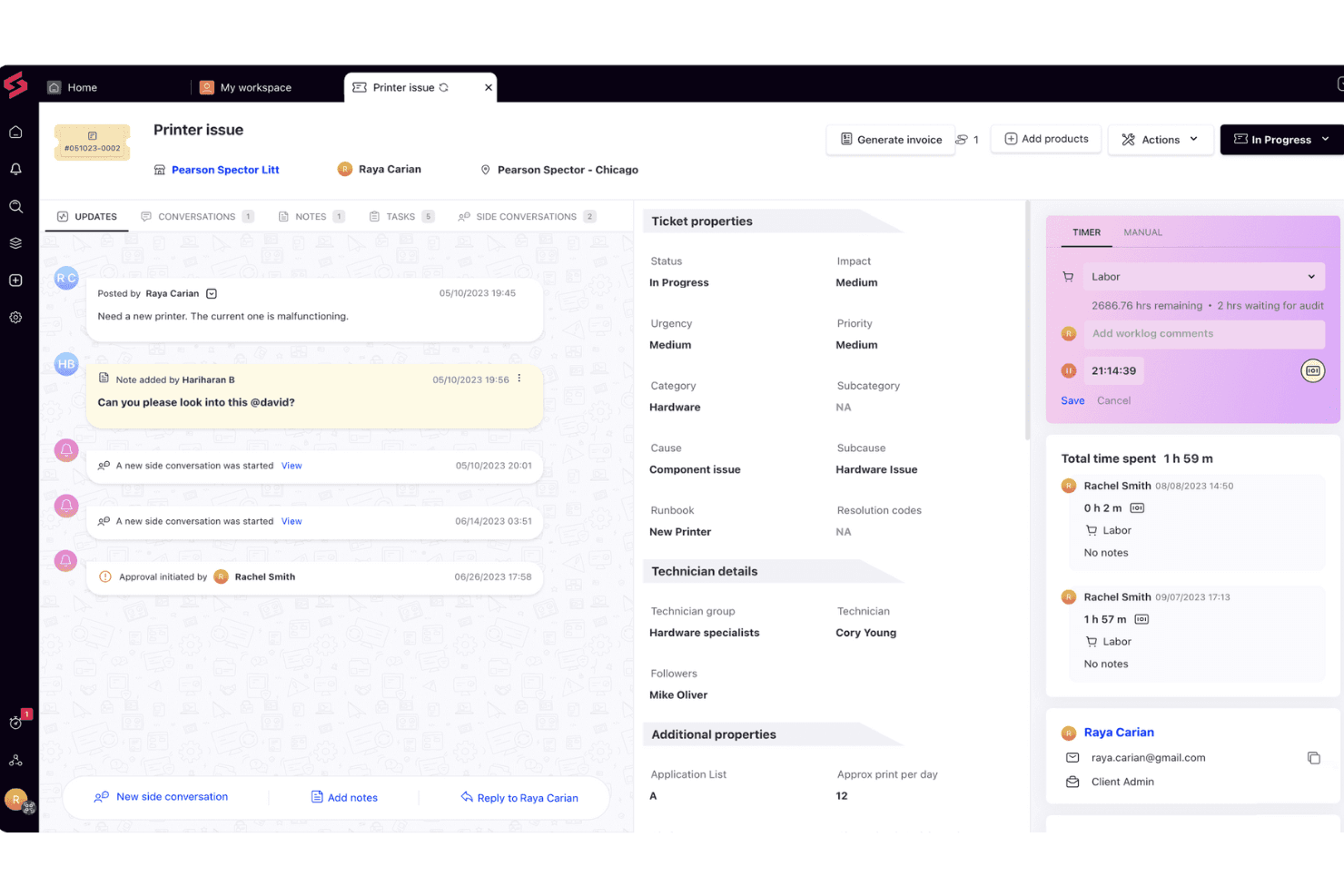
SuperOps helps MSPs provide better customer service with its service desk module for ticket management and client communication. SuperOps is an IT help desk and endpoint management platform that combines ticketing, SLA management, patch management, remote troubleshooting, and AI-driven automation in one unified system.
Who Is SuperOps Best For?
SuperOps is a strong fit for IT teams and managed service providers that need ticketing, endpoint management, and patch management working together in one place.
Why I Picked SuperOps
I picked SuperOps as one of the best because it's the only help desk tool on my list that ties ticket resolution directly to device context. When a slow-laptop ticket comes in, technicians can view endpoint health, run a remote script, and close the ticket without ever leaving the platform. I also love how its AI-driven Agentic OS can autonomously handle routine L1 requests like account lockouts, with every action audited and reversible under technician oversight.
SuperOps Key Features
- SLA management: Configure multi-condition SLA policies based on business hours or client hours, with timers that trigger on ticket creation or custom status changes.
- Round-robin and load-based ticket assignment: Automatically distribute incoming tickets to technicians based on rotation or current workload.
- Knowledge base with ticket deflection: Create and categorize articles with a rich-text editor, convert resolved tickets into articles, and surface them to users to reduce ticket volume.
- Custom dashboards and scheduled reports: Build custom dashboards, generate PDF reports, and schedule report delivery to track service desk performance over time.
SuperOps Integrations
SuperOps lists 38 marketplace integrations, including Microsoft Teams, Slack, Microsoft Intune, Okta, Freshservice, TeamViewer, Splashtop, ConnectWise Control, and Google Calendar. It also offers an API and MCP server for custom integrations.
Pros and Cons
Pros:
- Unified ticket and endpoint workflows reduce tool switching
- Reviewers praise responsive onboarding and support
- Tickets include device health and history
Cons:
- Mobile ticket search can be difficult
- Reviewers report limited ticket filtering options
Learn more about SuperOps: Best for AI-driven ticket management
- Free plan + 15-day free trial + free demo available
- From $7/user/month (billed annually)
Visit WebsiteCustomer Rating:4.4/5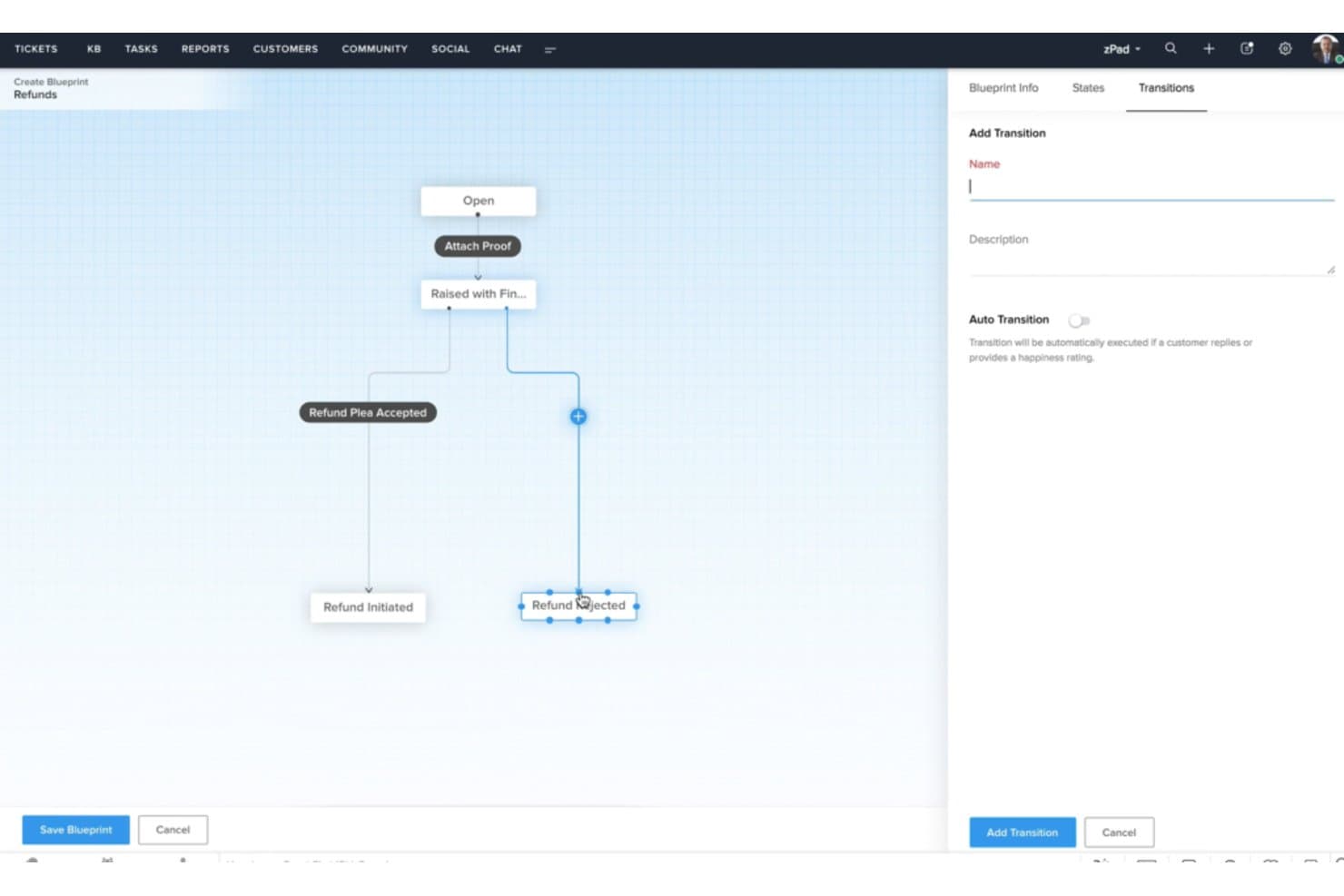
Create processes for common tasks with the visual blueprint builder. Zoho Desk is a help desk software platform that unifies omnichannel ticket management, AI-assisted workflows, self-service tools, and built-in analytics across customer support teams.
Who Is Zoho Desk Best For?
Zoho Desk is a strong fit for customer support teams that want AI-assisted ticket handling without paying enterprise-tier prices from day one.
Why I Picked Zoho Desk
Zoho Desk earns its spot on my shortlist because of how deeply AI is woven into the actual ticket lifecycle, not just bolted on as a chatbot. Zia's Support Specialist agent can draft replies from your knowledge base and hand the ticket off to a human when it lacks enough context, while field prediction learns from your existing ticket history to auto-tag and route incoming requests. I also like that sentiment analysis and ticket summarization are available to agents mid-conversation, so teams can prioritize without reading through long threads.
Zoho Desk Key Features
- Omnichannel ticket inbox: Pulls conversations from email, social media, WhatsApp, web forms, and telephony into a single unified queue.
- Blueprints automation builder: Lets you map out ticket-handling processes step by step using a drag-and-drop interface, with defined transitions and mandatory actions at each stage.
- Multilingual help center: Publishes knowledge base articles in more than 40 languages, so your team can support customers across different regions from one platform.
- Custom reports and dashboards: Lets you build tailored visualizations to track the metrics that matter to your team, beyond the 30+ built-in reports available out of the box.
Zoho Desk Integrations
Zoho Desk supports 360+ integrations, including native Zoho CRM, Zoho Analytics, Zoho SalesIQ, Zoho Assist, and Zoho BugTracker connections, plus marketplace integrations for Jira, Slack, and Microsoft Teams. It also offers REST APIs, SDKs, webhooks, custom functions, and Zapier.
Pros and Cons
Pros:
- AI reply suggestions support busy agents
- Omnichannel tickets consolidate customer conversations
- Ticket routing keeps queues organized
Cons:
- Advanced AI depends on setup and plan availability
- Workflow configuration takes time
Learn more about Zoho Desk: Best for AI-powered ecommerce inbox management
- 14-day free trial + free demo available
- From $45/user/month (billed annually)
Visit WebsiteCustomer Rating:4.4/5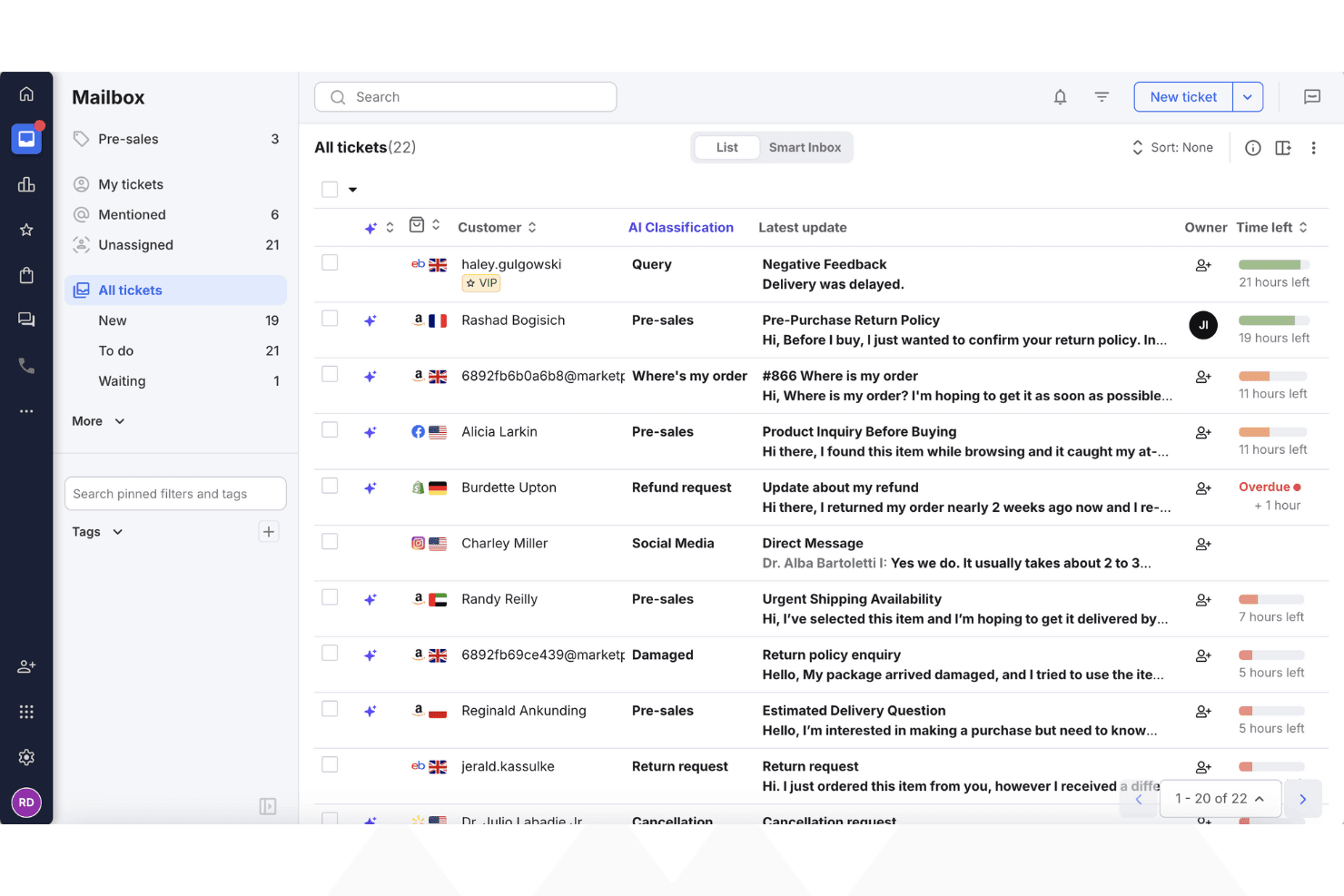
eDesk automates ecommerce inbox organization using AI-based ticket sorting. eDesk is a help desk platform built for ecommerce teams that consolidates customer messages, orders, and support tickets from marketplaces, webstores, email, chat, and social channels into a single inbox.
Who Is eDesk Best For?
eDesk is a strong fit for ecommerce support teams managing customer inquiries across multiple marketplaces, webstores, and social channels from a single inbox.
Why I Picked eDesk
I picked eDesk as one of the best because its AI Agent is purpose-built for ecommerce support, handling queries like order status, returns, and cancellations autonomously across connected marketplaces. I love that every ticket surfaces the relevant order data, tracking details, and customer history inline, so agents aren't switching between Amazon Seller Central or eBay tabs mid-conversation. The unified inbox pulling from 300+ channels, including Amazon, eBay, and TikTok Shop, makes it genuinely hard to miss a customer message.
eDesk Key Features
- Collision detection: Alerts agents when a teammate is already viewing or replying to the same ticket, preventing duplicate responses.
- SLA timers and escalation rules: Automatically tracks response and resolution deadlines and escalates tickets that are at risk of breaching set thresholds.
- CSAT surveys: Sends automated customer satisfaction surveys after ticket resolution to collect feedback on support quality.
- Bulk actions: Lets agents reply to, close, tag, or update multiple tickets simultaneously to move through high volumes faster.
eDesk Integrations
eDesk offers 300+ native marketplace and channel integrations, including Amazon, eBay, Shopify, Walmart, TikTok Shop, WooCommerce, BigCommerce, Instagram, Facebook, and WhatsApp Business. API and webhooks support custom integrations.
Pros and Cons
Pros:
- Macros and rules cut repetitive replies
- Marketplace messages share one working inbox
- Order context stays alongside customer tickets
Cons:
- Performance reports offer limited customization
- AI suggestions can miss product context
Learn more about eDesk: Best for phone calls alongside tickets and chats
- 30-day free trial available
- From $15/user/month (billed annually)
Visit WebsiteCustomer Rating:4.6/5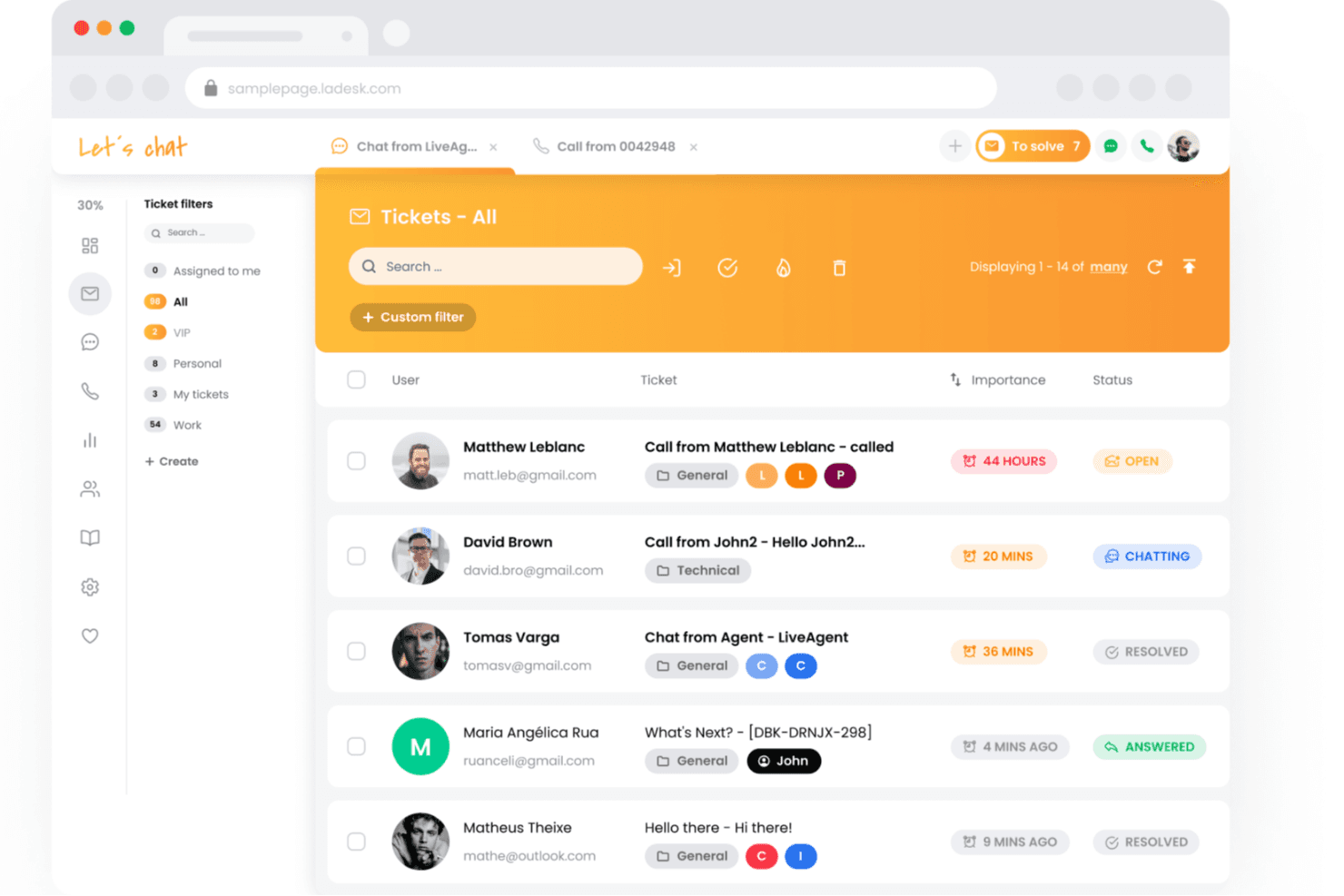
LiveAgent’s unified dashboard displaying multichannel support tickets in one place. LiveAgent brings together ticket management, live chat, and a customer portal for support teams and businesses that want to handle customer inquiries across email, chat, social, and phone from one place. Every plan, including Starter, includes AI agents and AI answer suggestions; customers connect their own OpenAI, Anthropic, Google Gemini or FlowHunt account and pay that provider directly, with no LiveAgent markup. From the Team plan, inbound and outbound calls with IVR, queues and call recording run in the same interface as tickets and chats, using the customer's own SIP provider for phone numbers.
Who Is LiveAgent Best For?
LiveAgent is a good fit for small to mid-sized businesses that need a multi-channel support setup without managing multiple disconnected tools.
Why I Picked LiveAgent
LiveAgent earns its spot on my shortlist because it's one of the few help desk tools that builds a fully functional knowledge base directly into the platform rather than treating it as an add-on. I like that you can create a branded self-service portal with articles, FAQs, and forums without needing a separate tool. When a customer submits a ticket, agents can pull from that same knowledge base to respond faster and more consistently. The built-in feedback widgets also let customers rate articles, so I can see what's actually helping and what needs updating.
LiveAgent Key Features
- Automated ticket distribution: Assigns incoming tickets to agents based on predefined rules like workload, priority, or department.
- SLA management: Tracks response and resolution deadlines, with alerts and a "To Solve" button that flags tickets at risk of breaching SLA targets.
- Hybrid ticket stream: Consolidates all customer interactions across channels into a single ticket thread, regardless of which channel the customer switches to.
- Agent performance reporting: Generates reports on individual agent activity, including tickets handled, response times, and work hours logged.
LiveAgent Integrations
Integrations include ActiveCampaign, Agile CRM, BigCommerce, Braintree, ClickUp, Clockify, Facebook, Facebook Lead Ads, CloudApp, and Everhour.
Pros and Cons
Pros:
- Includes the ability to merge or split help tickets as needed
- White glove implementation services
- Numerous third-party integrations are available
Cons:
- Social media channels are not available on the Starter plan
- An additional fee is required if you want to host more than one knowledge base (multi-knowledge base feature)
Learn more about LiveAgent: Best with extensive third-party integrations
- Free trial available
- From $249/agent
Visit WebsiteCustomer Rating:4.4/5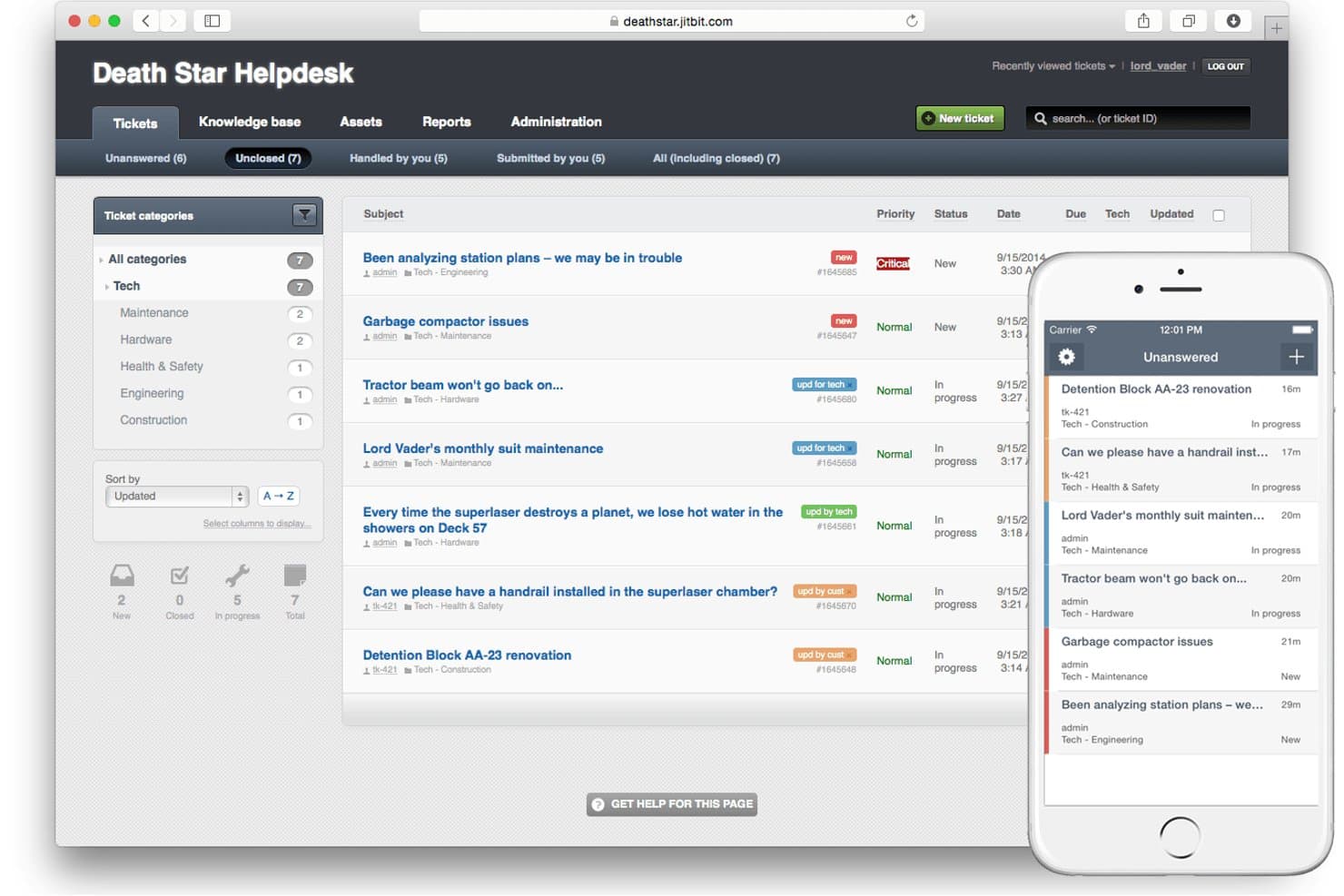
Jitbit Helpdesk ticket management dashboard showing categorized support tickets, priority levels, status tracking, and mobile access for streamlined help desk operations. Jitbit Helpdesk is a cloud-based help desk platform that combines email ticketing, live chat, knowledge base management, and workflow automation with a broad set of native integrations spanning dev tools, communication apps, and cloud storage.
Who Is Jitbit Helpdesk Best For?
Jitbit Helpdesk is a strong fit for IT and customer support teams at small to mid-sized businesses that rely on a wide stack of dev, communication, and productivity tools.
Why I Picked Jitbit Helpdesk
I picked Jitbit Helpdesk as one of the best because its native integration ecosystem covers more ground than most help desk tools at this price point. I'm particularly impressed by how it connects with dev workflows specifically: you can push a support ticket directly into Jira, GitHub, GitLab, or Azure DevOps with full context and a backlink, so nothing gets lost between support and engineering. The Slack integration goes further than a simple notification, letting agents take, reply to, and close tickets directly from a channel card.
Jitbit Helpdesk Key Features
- Ticket automation rules: Define conditions and actions to automatically assign, prioritize, and route incoming tickets based on keywords, sender, or sentiment.
- AI response drafting: Generates reply suggestions using your knowledge base, indexed documentation, and canned responses directly within the ticket editor.
- Multi-channel intake: Pulls support requests from email, live chat, and WhatsApp into a single unified ticket queue.
- Customizable analytics: Builds performance and demand reports you can tailor to track agent output and forecast future support volume.
Jitbit Helpdesk Integrations
Jitbit Helpdesk offers dozens of native integrations, including Slack, Microsoft Teams, Jira, GitHub, GitLab, Azure DevOps, WhatsApp, Google Drive, and Stripe. It also supports Zapier and REST API, webhooks, and MCP connections for custom integrations.
Pros and Cons
Pros:
- New agents can learn the interface quickly
- Rules automate assignments and notifications
- Email-to-ticket keeps request histories organized
Cons:
- Reporting and dashboards offer limited visibility
- Mobile apps trail the web experience
Learn more about Jitbit Helpdesk: 10Best AI-powered customer service solution for companies
Zendesk
- 14-day free trial + free demo available
- From $19/agent/month (billed annually)
Customer Rating:4.3/5
Zendesk serves up contextual data while you are chatting to a customer so that you know how long they’ve been with you and what other snags they’ve hit. Zendesk is a help desk platform built for teams who need to manage customer conversations across channels, automate repetitive tasks, and deliver fast, consistent support whether you’re a startup, enterprise, or anything in between.
Who Is Zendesk Best For?
Zendesk is a strong fit for customer support and service teams at companies of any size that need a scalable, multi-channel help desk solution.
Why I Picked Zendesk
I chose Zendesk because its AI capabilities are built into the core of the product rather than bolted on. The AI agents can autonomously resolve over 80% of customer interactions across any channel, which means my team spends less time on repetitive tickets and more time on complex issues that need a human. I also like the Copilot feature, which sits in the agent workspace and surfaces suggested replies, customer sentiment, and recommended next steps before an agent starts typing. Both tools launch with no technical setup — no model training or data science is needed to get started.
Zendesk Key Features
- Omnichannel ticket management: Consolidates customer conversations from email, chat, voice, social media, and messaging apps into a single agent workspace.
- Skills-based and intent-based routing: Automatically assigns incoming tickets to the right agent based on their skills, availability, and the customer's intent.
- Macros: Pre-written responses and actions that agents apply to tickets in one click to handle common issues consistently.
- Customizable reporting and analytics: Tracks ticket volume, agent performance, and channel trends with prebuilt dashboards and a drag-and-drop report builder.
Zendesk Integrations
Integrations include Slack, Shopify, Google Play Reviews, Harvest, ChannelReply, Trustpilot, Pipedrive, Sprout Social, Amazon, and eBay.
Pros and Cons
Pros:
- Supports localized content in over 40 languages
- Has a user-friendly interface with robust features
- Internal ticketing system combines email, chat, voice, and social messaging queries into one system
Cons:
- Analytics dashboard is pre-built (not customizable)
- Self-service portal isn't available in their basic plan
Learn more about Zendesk:
Outro software de suporte técnico
Eis mais algumas opções interessantes para a gestão do suporte técnico. Embora não tenham entrado na minha seleção das 20 melhores, continuam a valer a pena se precisar de mais opções:
- 11Agentforce Service (formerly Service Cloud)Best for creating personalized experiences with AI
- 12MissiveBest for collaborative email-based help desks
- 13Desk365Best for AI-powered ticketing
- 143CXBest for managing multiple communication methods
- 15WeavBest for customer interaction analytics
- 16BotpressBest for conversation-based AI ticket handling
- 17SparrowDeskBest for AI-driven customer support
- 18IntercomBest for in-product support and onboarding
- 19HappyFoxBest for customer support and internal IT
- 20Creatio AI CRMBest for support cases and field service
- 21IssuetrakBest for asset-linked service workflows
- 22Re:amazeBest for support teams with occasional agents
- 23Jira Service ManagementBest for linking support to engineering
- 24InvGate Service ManagementBest for smart ticket routing
- 25ManageEngine ServiceDesk PlusBest for free cloud or on-prem deployment
- 26GorgiasBest for managing Shopify orders from tickets
- 27HubSpot Service HubBest for support-led customer retention
- 28Deskpro DraftBest for customer and staff support together
- 29FrontBest for removing silos with a shared inbox
- 30monday serviceBest for no-code customization
- 31HeskBest for self-hosting or managed hosting
- 32SysAidBest help desk software for IT services
- 33ServiceNow IT Service ManagementBest for major incident and on-call response
- 34NinjaOneBest for endpoint management & alerting
- 35HiverBest for turning ticket fixes into help docs
- 36SolarWinds IT Service Desk SoftwareBest for comprehensive CMDB
- 37Applied Labs AIBest for testing AI support before launch
- 38Sprinklr Modern Care LiteBest for contact center staffing and quality
How I Evaluate Help Desk Software
I give the most weight to core functionality: capturing requests across channels, assigning tickets, and tracking resolution. Then I look for differentiators like AI ticket triage or built-in CSAT surveys. Finally, I consider onboarding, support, and whether pricing still fits as the team grows.
Core Functionality (Table Stakes For This List)
When I'm selecting tools for my list, I score each one on a scale from 0 (does not offer the functionality) to 5 (excels in this area) for each core functionality listed below. I then convert the total into a percentage to help assess each tool's overall fit, with extra weight on any functionalities I’ve deemed essential.
- Ticket Management (Essential): I look for clear ownership, status, priority, and history, plus bulk updates for queues with recurring requests.
- Multi-Channel Intake (Essential): Check that email, forms, and chat feed one queue while retaining context, such as the original message or chat transcript.
- Workflow Automation: I assess conditional routing and escalation rules, such as sending urgent access issues to the right team and flagging stalled tickets.
- Knowledge Base: Look for searchable, categorized articles and whether agents can surface relevant guidance when someone reports a repeat issue.
- Reporting & SLAs: I review response and resolution reporting, configurable targets, and whether managers can spot breaches by team or ticket type.
- Team Collaboration: Check for internal notes, shared ownership, colleague mentions, and ticket collision detection to prevent duplicate replies.
Once I have a list of tools that meet the criteria, I consider what sets each platform apart.
Differentiating Factors (What Sets Vendors Apart)
Here's how I compare and contrast different vendors:
Standout Features
AI-powered ticket triage is the first thing I check. I want to see how well a tool categorizes and summarizes incoming requests, since a queue of 200 Monday-morning tickets needs smart sorting before agents even start. Customer sentiment detection pairs well here—I look for tools that flag frustrated language so your team can prioritize at-risk accounts before a complaint escalates to a manager. I also evaluate native CSAT surveys, specifically whether scores tie back to individual tickets and agents rather than sitting in a disconnected dashboard.
Beyond Features
I check how per-agent pricing scales as teams grow, since a plan that fits five agents can double in cost at fifty. Integration depth matters just as much—I look for native connections to your CRM and communication tools like Salesforce or Slack so agents aren't copying context between tabs. I also evaluate onboarding support, because vendors that offer guided setup and migration assistance get teams productive weeks faster than those that hand you a knowledge base link and wish you luck.
Como escolher um software de suporte técnico
É fácil ficar assoberbado com funcionalidades abrangentes de suporte técnico e estruturas de preços complexas. Para o ajudar a manter o foco enquanto percorre o seu processo específico de seleção de software, eis uma lista de verificação sobre como escolher um software de suporte técnico para a sua empresa ou equipa:
| Fator | O que considerar |
|---|---|
| FatorEscalabilidade | O que considerarCertifique-se de que o software consegue acompanhar o crescimento da sua equipa. Procure soluções que permitam adicionar utilizadores ou funcionalidades à medida que a sua empresa cresce. |
| FatorIntegrações | O que considerarVerifique se estabelece ligação às ferramentas que já utiliza, como sistemas de CRM ou plataformas de e-mail, para simplificar o fluxo de trabalho. |
| FatorPersonalização | O que considerarEscolha um software que lhe permita adaptar os fluxos de trabalho e as interfaces às necessidades específicas da sua equipa. |
| FatorFacilidade de utilização | O que considerarOpte por interfaces fáceis de utilizar, que minimizem o tempo de formação e ajudem a sua equipa a ficar rapidamente familiarizada com a ferramenta. |
| FatorOrçamento | O que considerarTenha em conta tanto os custos iniciais como as despesas contínuas. Certifique-se de que se enquadra no seu plano financeiro a longo prazo. |
| FatorMedidas de segurança | O que considerarProcure funcionalidades de segurança robustas, como a encriptação de dados e a autenticação de utilizadores, para proteger informações sensíveis. |
| FatorSuporte ao cliente | O que considerarAvalie o nível de suporte oferecido, como serviço 24 horas por dia, 7 dias por semana, ou gestores de conta dedicados, para obter assistência quando surgirem problemas. |
| FatorFerramentas de relatórios | O que considerarCertifique-se de que o software disponibiliza funcionalidades de análise e criação de relatórios para ajudar a acompanhar o desempenho e identificar áreas de melhoria. |
Tendências no software de assistência
Na minha investigação, recolhi inúmeras atualizações de produtos, comunicados de imprensa e registos de lançamento de diferentes fornecedores de software de assistência. Eis algumas das tendências emergentes que estou a acompanhar:
- Informações baseadas em AI: o software de assistência com AI utiliza AI para fornecer informações mais aprofundadas sobre as interações com os clientes. Isto pode ajudar as empresas a prever as necessidades dos clientes e a automatizar respostas, melhorando a eficiência. A integração do Zoho com o ChatGPT melhora o seu chatbot de AI, o Zia, fornecendo sugestões de conteúdo inteligentes.
- Suporte omnicanal: fornecer suporte através de vários canais, como chat, e-mail e telefone, está a tornar-se uma prática padrão. Esta tendência permite às empresas contactar os clientes onde quer que estejam, garantindo que nenhuma interação passa despercebida. Muitas plataformas estão agora a facilitar a integração destes canais numa interface unificada.
- Portais de autosserviço: cada vez mais soluções de assistência estão a incorporar opções de autosserviço, onde os clientes podem encontrar respostas e soluções sem intervenção humana direta. Isto reduz a carga de trabalho das equipas de suporte e permite aos utilizadores resolver problemas por si próprios. Alguns fornecedores estão a integrar fóruns comunitários para facilitar a assistência entre pares.
- Personalização baseada em dados: as ferramentas de assistência utilizam os dados dos clientes para adaptar as experiências de suporte. Ao analisarem interações e preferências anteriores, as equipas de suporte podem oferecer uma assistência mais personalizada, melhorando a satisfação dos clientes. Esta tendência é particularmente forte nas plataformas que disponibilizam integrações com CRM.
- Escalabilidade para empresas em crescimento: à medida que as empresas crescem, precisam de soluções de assistência que possam acompanhar esse crescimento. Os fornecedores estão a concentrar-se na criação de planos de preços escaláveis e funcionalidades flexíveis que possam acomodar tanto equipas pequenas como grandes empresas. Isto garante que empresas de todas as dimensões possam beneficiar do mesmo nível de capacidades de suporte.
O que é o software de assistência?
O software de assistência é uma plataforma que ajuda as empresas a gerir, acompanhar e resolver pedidos de suporte de clientes ou colaboradores. Centraliza a comunicação, automatiza os fluxos de trabalho dos pedidos e permite às equipas de suporte responder de forma eficiente através de vários canais.
Funcionalidades do software de assistência
Ao selecionar software de assistência, esteja atento às seguintes funcionalidades principais:
- Gestão de pedidos: permite-lhe recolher, acompanhar e organizar todas as questões dos clientes como pedidos. Pode atribuí-los aos membros da equipa, definir prioridades e monitorizar o progresso, para que nada passe despercebido.
- Suporte multicanal: estabeleça contacto com os seus clientes por e-mail, chat, telefone e até redes sociais — tudo num só lugar. Isto significa que não precisa de alternar entre diferentes ferramentas para manter as conversas em curso.
- Base de conhecimento: crie uma biblioteca pesquisável de perguntas frequentes, guias práticos e dicas de resolução de problemas. Isto permite aos utilizadores resolver problemas comuns por si próprios, reduzindo a carga de trabalho da sua equipa de suporte.
- Ferramentas de automatização: utilize fluxos de trabalho, acionadores e respostas automáticas para tratar de tarefas repetitivas. Por exemplo, pode atribuir automaticamente pedidos ou enviar e-mails de confirmação, acelerando os processos e reduzindo o trabalho manual.
- Gestão de acordos de nível de serviço (SLA): defina e acompanhe os tempos de resposta e resolução, facilitando o cumprimento dos compromissos assumidos com os clientes e a identificação de estrangulamentos que é necessário corrigir.
- Relatórios e análises: obtenha informações sobre métricas como o volume de pedidos, os tempos de resposta e a satisfação dos clientes. Isto ajuda a identificar tendências e a melhorar continuamente o serviço.
- Capacidades de integração: ligue o seu software de assistência a sistemas CRM, ferramentas de gestão de projetos ou outras aplicações de que dependa. Desta forma, os seus fluxos de trabalho permanecem integrados e todos têm acesso à mesma informação.
- Fluxos de trabalho personalizáveis: adapte o software aos seus processos específicos, quer isso implique configurar campos, estados ou etapas de aprovação personalizados para os pedidos.
- Controlos de acesso dos utilizadores: decida quem pode ver e fazer o quê no sistema, para manter as informações sensíveis protegidas e garantir que todos se concentram nas tarefas certas.
- Portal do cliente: ofereça aos utilizadores um centro de autosserviço onde possam enviar pedidos, acompanhar o progresso e encontrar soluções — mantendo o suporte disponível 24 horas por dia, 7 dias por semana.
Funcionalidades comuns de AI no software de assistência
Além das funcionalidades padrão do software de assistência indicadas acima, muitas destas soluções estão a incorporar AI com funcionalidades como:
- Encaminhamento de pedidos com IA: Atribua automaticamente os pedidos ao agente mais adequado com base no tipo de problema, na urgência ou no conjunto de competências do agente. Isto significa resoluções mais rápidas e clientes mais satisfeitos.
- Chatbots inteligentes: Utilize bots baseados em IA para tratar instantaneamente de questões de rotina, 24 horas por dia, 7 dias por semana. A sua equipa de suporte dispõe de mais tempo para problemas complexos e os utilizadores obtêm respostas rápidas a qualquer hora.
- Sugestões de respostas automatizadas: O software pode sugerir respostas para os pedidos recebidos com base em artigos da base de conhecimento ou em soluções anteriores, acelerando os tempos de resposta e garantindo respostas consistentes.
- Análise de sentimentos: A IA analisa as mensagens para identificar o tom e a urgência, ajudando a dar prioridade aos pedidos que possam necessitar imediatamente de intervenção humana.
- Análise preditiva: A IA antecipa problemas comuns ou aumentos no volume de pedidos, alertando-o para que possa preparar antecipadamente os seus recursos de suporte.
Vantagens do software de suporte técnico
A implementação de software de suporte técnico proporciona várias vantagens à sua equipa e à sua empresa. Eis algumas das vantagens que pode esperar de um sistema de suporte técnico:
- Melhoria do suporte ao cliente: O software de suporte técnico permite uma gestão eficiente dos pedidos, garantindo que os problemas dos clientes são tratados de forma rápida e sistemática.
- Gestão centralizada da informação: Com todas as interações e dados dos clientes num único local, as equipas podem aceder rapidamente às informações necessárias, reduzindo os tempos de resposta e melhorando a qualidade do serviço.
- Melhoria da colaboração da equipa: Funcionalidades como vistas partilhadas dos pedidos e notas internas ajudam os membros da equipa a trabalhar em conjunto de forma eficaz, conduzindo a uma melhor resolução dos problemas.
- Informações baseadas em dados: As soluções de suporte técnico disponibilizam ferramentas de elaboração de relatórios que fornecem informações valiosas sobre as interações com os clientes e o desempenho da equipa, ajudando a identificar áreas a melhorar.
- Integração com outras ferramentas: Muitos sistemas de suporte técnico integram-se com CRM e outras ferramentas empresariais, simplificando os fluxos de trabalho e garantindo a consistência entre plataformas.
Custos e preços do software de suporte técnico
A seleção de software de suporte técnico requer uma compreensão dos vários modelos e planos de preços disponíveis. Os custos variam consoante as funcionalidades, a dimensão da equipa, os complementos, entre outros fatores. A tabela abaixo resume os planos comuns, os respetivos preços médios e as funcionalidades normalmente incluídas nas soluções de software de suporte técnico:
Tabela de comparação de planos de software de suporte técnico
| Tipo de plano | Preço médio | Funcionalidades comuns |
|---|---|---|
| Tipo de planoPlano gratuito | Preço médio$0 | Funcionalidades comunsSistema básico de gestão de pedidos, suporte limitado ao cliente e acesso ao fórum da comunidade. |
| Tipo de planoPlano pessoal | Preço médio$5-$25/user/month | Funcionalidades comunsSuporte por e-mail, elaboração de relatórios básicos, acesso à aplicação móvel e integrações limitadas. |
| Tipo de planoPlano empresarial | Preço médio$30-$60/user/month | Funcionalidades comunsElaboração de relatórios avançados, várias integrações, opções de personalização e automatização. |
| Tipo de planoPlano empresarial avançado | Preço médio$80-$150/user/month | Funcionalidades comunsGestor de conta dedicado, funcionalidades de segurança personalizadas, análise avançada e suporte premium. |
Software de suporte técnico: Perguntas frequentes
Tem perguntas gerais sobre o que o software de suporte técnico tem para oferecer ou sobre como escolher a melhor opção para a sua organização? Estas respostas às perguntas frequentes devem ajudá-lo a encontrar a direção certa:
O que devo ter em consideração ao migrar para um novo software de suporte técnico?
Ao migrar para um novo software de suporte técnico, planeie uma transferência de dados limpa, as necessidades de integração e a formação da equipa. Confirme se a nova ferramenta suporta a importação de pedidos, dados de utilizadores e campos personalizados do sistema antigo. Teste as integrações com as suas principais plataformas — como CRM, chat ou e-mail — antes de efetuar a mudança. Crie um calendário de implementação e formação para limitar o tempo de inatividade.
Como pode o software de suporte técnico melhorar o tempo de resposta e a satisfação dos clientes?
O software de suporte técnico acelera o tempo de resposta ao automatizar o encaminhamento de pedidos, dar prioridade aos pedidos urgentes e disponibilizar respostas predefinidas. Funcionalidades como os SLA e as notas internas mantêm a equipa organizada e responsável. Obterá maior satisfação dos clientes ao fechar os pedidos mais rapidamente e prestar um serviço mais consistente.
Quais são as integrações de suporte técnico mais importantes para as equipas de apoio ao cliente?
As integrações com e-mail, chat em direto, CRM e bases de conhecimento são as principais escolhas das equipas de apoio. A integração com o CRM permite aos agentes consultar o histórico do cliente sem mudar de separador. As aplicações de chat e mensagens permitem responder através de vários canais. A integração com uma base de conhecimento ajuda a automatizar o autoatendimento, reduzindo o volume de pedidos.
Como posso medir o desempenho da minha equipa de apoio com software de suporte técnico?
A maioria das plataformas de suporte técnico acompanha métricas como o tempo até à primeira resposta, o tempo de resolução, o volume de pedidos e os índices de satisfação dos clientes. Configure painéis com estes KPI para identificar tendências e orientar a sua equipa. Muitas ferramentas também permitem agendar relatórios e partilhar os resultados com as partes interessadas.
Qual é a diferença entre software de suporte técnico e software de atendimento ao cliente?
O software de suporte técnico centra-se na gestão e resolução de problemas dos clientes através de pedidos. O software de atendimento ao cliente pode incluir ferramentas de suporte técnico, mas também abrange funcionalidades mais amplas, como chat em direto, inquéritos de feedback e apoio multicanal. As soluções de suporte técnico são mais adequadas se a principal necessidade da sua equipa for a gestão centralizada de pedidos.
Que tipos de software de suporte técnico estão disponíveis?
Eis diferentes tipos de software de suporte técnico que pode explorar se procura algo adaptado a necessidades específicas ou a organizações de diferentes dimensões:
- Software de suporte técnico para pequenas empresas: Concebido para equipas mais pequenas, este software é acessível, fácil de utilizar e ajuda a gerir os pedidos dos clientes de forma eficiente.
- Software de suporte técnico por e-mail: Centra-se na organização das dúvidas dos clientes enviadas por e-mail, transformando-as em pedidos fáceis de gerir.
- Software de suporte técnico interno: Ajuda os funcionários a obter apoio informático ou de recursos humanos dentro da empresa, acompanhando e resolvendo os seus pedidos.
- Software de suporte técnico empresarial: Criado para grandes organizações, gere grandes volumes de pedidos e suporta fluxos de trabalho complexos.
- Bases de conhecimento de suporte técnico para atendimento ao cliente: Disponibiliza uma biblioteca central de artigos e guias para ajudar clientes e agentes a resolver problemas mais rapidamente.
- Software de suporte técnico na nuvem: Alojado online, permite às empresas gerir o apoio ao cliente sem instalar software nos seus dispositivos.
Como utiliza o software de suporte técnico a automatização e a IA?
O software de suporte técnico utiliza a automatização para simplificar o fluxo de trabalho da sua equipa, encaminhando automaticamente os pedidos para os departamentos certos, categorizando e dando prioridade aos pedidos, enviando atualizações de estado e acionando lembretes para problemas não resolvidos. As funcionalidades de IA podem sugerir artigos de ajuda relevantes aos clientes, completar automaticamente as respostas dos agentes e analisar o sentimento dos pedidos para detetar casos urgentes. Estas funções ajudam a sua equipa a concentrar-se em questões complexas enquanto as tarefas simples são executadas em segundo plano, aumentando a rapidez e mantendo os clientes satisfeitos.
O que são a conformidade com ITIL e ITSM nos sistemas de suporte técnico?
A conformidade com ITIL (Biblioteca de Infraestruturas de Tecnologias da Informação) e ITSM (Gestão de Serviços de Tecnologias da Informação) significa que o seu software de suporte técnico foi criado para seguir as melhores práticas globais de prestação de apoio informático. Isto abrange processos estruturados para o acompanhamento de incidentes, fluxos de trabalho de gestão de alterações, escalamento de problemas e gestão de ativos. Para os responsáveis pelas equipas de apoio, a conformidade com ITIL/ITSM garante consistência, maior qualidade do serviço e auditorias mais simples — especialmente se trabalhar com requisitos regulamentares ou empresariais rigorosos.
Que funcionalidades de segurança tem o software de suporte técnico?
Eis uma lista de funcionalidades de segurança comuns encontradas no software de suporte técnico:
- Controlo de acesso baseado em funções (RBAC): Garante que os utilizadores só acedem às informações e ferramentas relevantes para a sua função.
- Encriptação de dados: Protege os dados sensíveis durante a transmissão e o armazenamento através de protocolos de encriptação.
- Registos de auditoria: Mantém registos detalhados das ações realizadas no sistema para acompanhar alterações e detetar atividades não autorizadas.
- Autenticação de dois fatores (2FA): Acrescenta uma camada adicional de segurança ao exigir uma segunda etapa de verificação para iniciar sessão.
- Integrações de API seguras: Garante que as ligações de terceiros seguem normas de segurança para evitar fugas ou violações de dados.
- Atualizações de segurança regulares: Disponibiliza correções e atualizações frequentes para resolver vulnerabilidades e melhorar a proteção.
- Lista de permissões de IP: Limita o acesso ao sistema de suporte técnico a endereços IP específicos e aprovados, para um maior controlo.
O que procurar na personalização e na interface de utilizador do suporte técnico?
Ao avaliar a personalização e a interface de utilizador do suporte técnico, considere estas funcionalidades essenciais:
- Fluxos de trabalho personalizáveis: Capacidade de adaptar os processos de pedidos e suporte às necessidades específicas da sua equipa.
- Interface de utilizador com a marca da empresa: Opções para personalizar o portal com o logótipo, as cores e a identidade visual da sua empresa.
- Ferramentas de arrastar e largar: Simplificam os ajustes de disposição dos painéis e relatórios sem necessidade de programação.
- Campos dinâmicos: Permitem adaptar formulários e pedidos com campos relevantes para questões ou problemas específicos.
- Idioma e localização: Suporte para vários idiomas e definições regionais para equipas e clientes globais.
- Painéis específicos por função: Vistas personalizadas com base na função do utilizador, como agente, gestor ou cliente.
- Facilidade de navegação: Design intuitivo com menus claros, botões de acesso rápido e o mínimo de elementos desnecessários.