

Mura CMS-recension: Fördelar, nackdelar, funktioner och priser
Mura utmärker sig genom sin enkla anpassning, vilket gör plattformen till ett förstahandsval för team som behöver flexibla lösningar för hantering av kunddata.

We review tools independently, and commissions help fund our testing. See our transparency policy, our methodology, or suggest a tool.
Mura CMS is a customer data management software built around content-driven personalization, audience segmentation, and customer profile management. It's worth considering if your team needs more direct control over how customer data shapes experiences without requiring a large technical team to maintain it. I'd choose it over a platform like Sitecore when you want meaningful personalization capabilities without the enterprise licensing costs and implementation complexity that typically come with them.
Mura CMS Evaluation Summary

4.5/5
- Pricing upon request
- Free demo available
Varför du kan lita på våra programvarurekommendationer
6,700+
Reviews
20
Industry experts
16+
Evaluation factors
14
Years
Vårt team har testat och recenserat programvara sedan 2012. Som CX-ledare själva vet vi hur svårt — och viktigt — det är att välja rätt programvara.
För den här guiden utvärderade vi verktyg genom praktisk testning och oberoende research, och betygsatte verktygen enligt våra urvalskriterier.
Våra recensioner speglar vårt mänskliga redaktionella omdöme, inte ett säljbudskap.
 Gui DrusinaCreative Director
 Tim FisherVP of AI
Mura CMS Overview
In my opinion, Mura is a solid choice for teams needing a customizable, multi-channel customer data and web content management platform. While its onboarding could be smoother, Mura's flexibility and standout features make it appealing for businesses that require a bespoke solution. It may not be the most budget-friendly option, but for larger teams that can leverage its full capabilities, the investment is worthwhile. Mura also excels in customization and ease of use, which sets it apart from competitors.
Pros
- Easy to customize.
- Intuitive drag-and-drop interface for easy navigation and data management.
- Strong data and content management tools.
Cons
- New users might find the onboarding process a bit challenging.
- Steep learning curve for your team.
- Mura's customer support may not be as responsive as expected.
Is Mura CMS Right For Your Needs?
Who Would be a Good Fit for Mura CMS?
Mura CMS is a great fit for organizations that need a flexible, customizable platform to manage and deliver content across multiple channels. Its adaptable architecture makes it ideal for marketing teams, content managers, and developers who want control over workflows, layouts, and user permissions.
With its advanced content and data management features, Mura gives teams the tools to structure information effectively, maintain consistency, and support smarter decision-making. If your organization needs a powerful CMS that can be tailored to fit specialized workflows, Mura is a strong option.
- Marketing, SEO, and Content TeamsMura's customizable features help marketers and web developers optimize campaigns, landing pages, and social media content.
- Data AnalystsData analysts benefit from Mura's advanced real-time data management tools, providing them with more in-depth customer insights.
- Retail IndustryMura supports retail businesses with detailed customer data analysis to enhance sales strategies.
- E-commerce BusinessesE-commerce companies can leverage Mura's features for improved customer targeting and personalization.
- Large EnterprisesLarge enterprises can utilize Mura's scalable features to manage vast amounts of customer data.
Who Would be a Bad Fit for Mura CMS?
Mura might not be ideal for small startups or solo entrepreneurs who need a simple and budget-friendly data management platform. Its extensive features and customization options can be overwhelming for small teams that don't have the resources to fully utilize them. If your team lacks the technical expertise or time to manage a complex platform, Mura might not be the best fit. Additionally, if you're looking for a quick setup without a steep learning curve, Mura's onboarding process could pose challenges.
- Small StartupsSmall startups may find Mura's extensive features too complex and costly for their limited needs.
- Solo EntrepreneursSolo entrepreneurs might struggle with Mura's overwhelming customization options and prefer simpler solutions.
- Non-Technical TeamsNon-technical teams could face challenges with Mura's setup and management, requiring more straightforward alternatives.
- Budget-Conscious CompaniesCompanies focused on tight budgets might see Mura as too expensive for their financial constraints.
- Quick Setup SeekersTeams needing a quick and easy setup could find Mura's onboarding process time-consuming.
- Limited IT ResourcesOrganizations with limited IT resources may find Mura's platform demanding in terms of maintenance and support.
How We Test & Score Tools
We’ve spent years building, refining, and improving our software testing and scoring system. The rubric is designed to capture the nuances of software selection and what makes a tool effective, focusing on critical aspects of the decision-making process.
Below, you can see exactly how our testing and scoring works across seven criteria. It allows us to provide an unbiased evaluation of the software based on core functionality, standout features, ease of use, onboarding, customer support, integrations, customer reviews, and value for money.
Core Functionality (25% of final scoring)
The starting point of our evaluation is always the core functionality of the tool. Does it have the basic features and functions that a user would expect to see? Are any of those core features locked to higher-tiered pricing plans? At its core, we expect a tool to stand up against the baseline capabilities of its competitors.
Standout Features (25% of final scoring)
Next, we evaluate uncommon standout features that go above and beyond the core functionality typically found in tools of its kind. A high score reflects specialized or unique features that make the product faster, more efficient, or offer additional value to the user.
We also evaluate how easy it is to integrate with other tools typically found in the tech stack to expand the functionality and utility of the software. Tools offering plentiful native integrations, 3rd party connections, and API access to build custom integrations score best.
Ease of Use (10% of final scoring)
We consider how quick and easy it is to execute the tasks defined in the core functionality using the tool. High scoring software is well designed, intuitive to use, offers mobile apps, provides templates, and makes relatively complex tasks seem simple.
Onboarding (10% of final scoring)
We know how important rapid team adoption is for a new platform, so we evaluate how easy it is to learn and use a tool with minimal training. We evaluate how quickly a team member can get set up and start using the tool with no experience. High scoring solutions indicate little or no support is required.
Customer Support (10% of final scoring)
We review how quick and easy it is to get unstuck and find help by phone, live chat, or knowledge base. Tools and companies that provide real-time support score best, while chatbots score worst.
Customer Reviews (10% of final scoring)
Beyond our own testing and evaluation, we consider the net promoter score from current and past customers. We review their likelihood, given the option, to choose the tool again for the core functionality. A high scoring software reflects a high net promoter score from current or past customers.
Value for Money (10% of final scoring)
Lastly, in consideration of all the other criteria, we review the average price of entry level plans against the core features and consider the value of the other evaluation criteria. Software that delivers more, for less, will score higher.
Core Features
Data Collection: Mura allows your team to pull in data from multiple sources, giving you a complete picture of customer interactions. This makes it much easier to keep everything organized and streamline your overall data management.
Data Segmentation: You can easily categorize and segment your customer data, allowing targeted marketing and personalized customer experiences. This enhances your team's ability to strategize effectively.
Data Analysis: Mura provides tools for analyzing customer data, helping your team uncover valuable insights and trends. These insights help your team make more informed decisions.
Data Security: Mura makes sure your customer data is secure with robust security measures. This gives your team much-needed peace of mind when handling sensitive information.
User Permissions: You can control data access within your team by setting user permissions, which means only authorized personnel can view or modify data. This feature plays a critical role in supporting secure data management.

Ease of Use
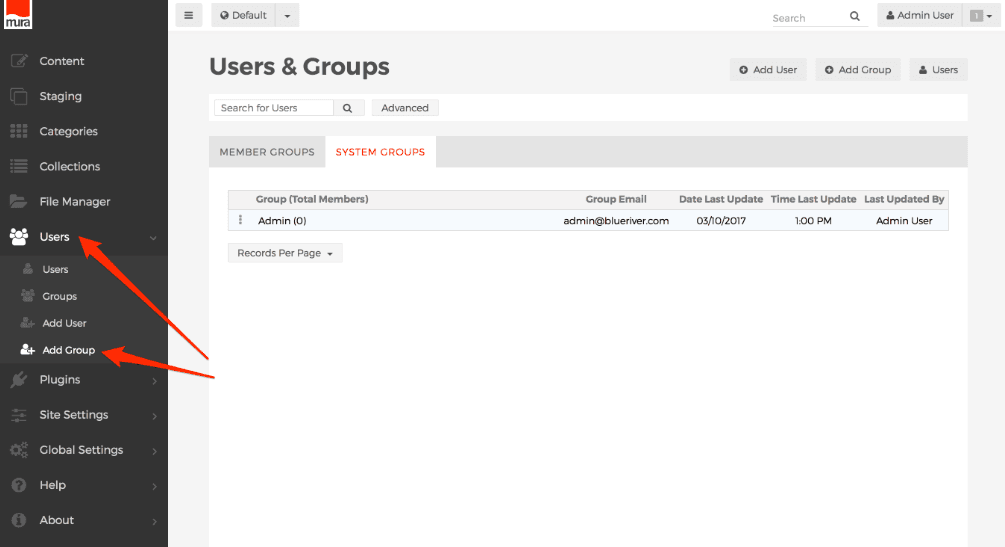
According to user reviews, Mura shines in user-friendliness with its intuitive interface that makes data management straightforward for your team. Its customizable dashboards and straightforward navigation mean you won’t need extensive training to get started. Compared to many platforms, Mura offers simplicity without sacrificing functionality, making it accessible for teams with basic technical knowledge while still meeting more advanced needs.
Integrations
Mura integrates with platforms like ChatGPT, Google Analytics, Epic, Mailchimp, Mouseflow, Salesforce, and more.
Mura also offers an API, allowing your team to connect with third-party integration tools for extended functionality on other platforms, like WordPress.

Mura CMS Specs
- A/B Testing: No
- Energy Production Estimates: No
- Geo-filtering: No
- Inventory Tracking: No
- Materials Library: No
- Media Streaming: No
- SCORM: No
- SEO: No
- Shading Analysis: No