


Unwrap vs. Chattermill: Comparison & Expert Reviews For 2026

We review tools independently, and commissions help fund our testing. See our transparency policy, our methodology, or suggest a tool.
If you’re comparing Unwrap vs. Chattermill, chances are you’re already collecting plenty of customer feedback but struggling to turn it into something clear, actionable, and worth acting on. Raw comments, survey responses, and support tickets pile up quickly, and choosing the wrong platform can mean more dashboards, more setup, and still unclear answers.
This guide breaks down how Unwrap and Chattermill actually compare as customer intelligence platforms, so you can understand how each option approaches feedback analysis and decide which one fits the way your team works and makes decisions.
Unwrap

4.8/5
- 30-day free trial
- From $2,000/month (billed annually)
Chattermill

0/5
- Free demo available
- Pricing upon request
Why Trust Our Software Recommendations
6,700+
Reviews
20
Industry experts
16+
Evaluation factors
14
Years
Our team has been testing and reviewing software since 2012. As CX leaders ourselves, we know how difficult—and important—it is to choose the right software.
For this guide, we evaluated tools using hands-on testing and independent research, scoring tools using our selection criteria.
Our reviews reflect our human editorial judgment, not a sales pitch.
 Gui DrusinaCreative Director
 Tim FisherVP of AI
| Unwrap | Chattermill | |
|---|---|---|
| Free Trial | 30-day free trial | Free demo available |
| Pricing | From $2,000/month (billed annually) | Pricing upon request |
Unwrap vs. Chattermill Pricing & Hidden Costs
Unwrap uses custom pricing based on feedback volume and integrations, not user seats, with all plans including features like SSO, GDPR compliance, API access, real-time alerts, and PII removal. Costs can increase as feedback volume or connected sources grow.
Chattermill uses tiered custom plans based on data sources and analysis depth. Costs may rise when moving to higher tiers or adding more data sources.
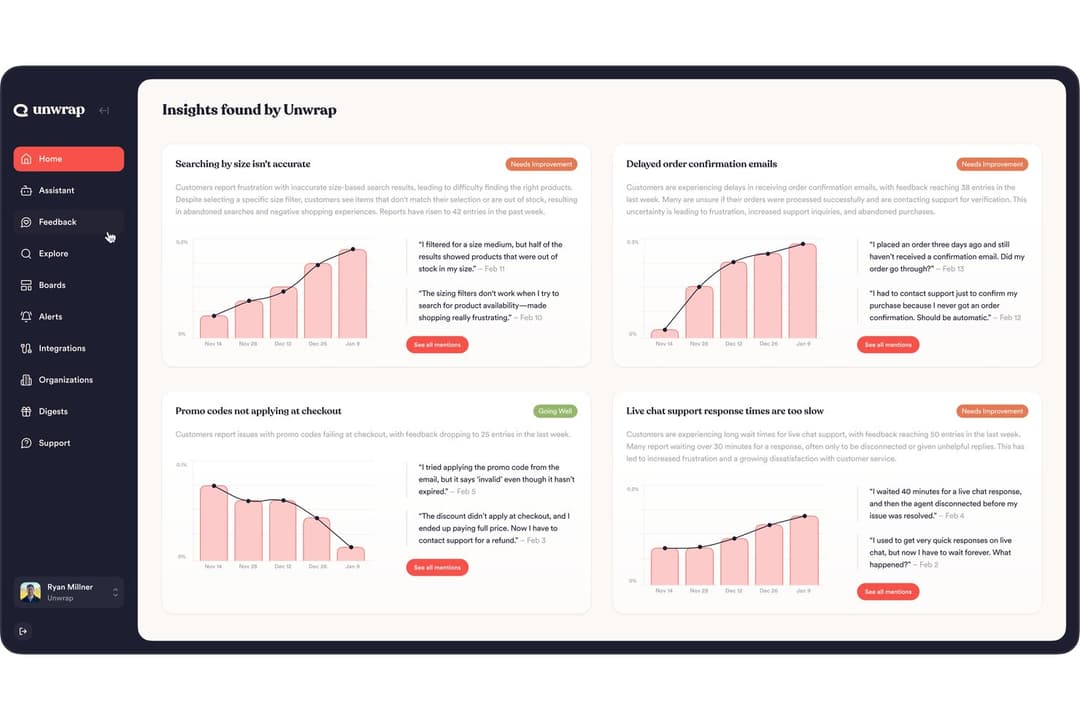
Unwrap focuses on bringing insights to teams quickly. SupportIQ analyzes support conversations to show which resolutions actually work, while proactive trend detection automatically surfaces emerging issues without manual searching. It also unifies feedback across channels with dashboards, auto-tagging, AI querying, and real-time alerts.
Chattermill is built around structured Voice of Customer programs. Its impact analysis links feedback themes to business metrics, and workflows and alerts help teams turn insights into action across the organization. It also supports unified multi-channel feedback, dashboards, and AI-driven sentiment analysis for deeper exploration.
| Unwrap | Chattermill | |
|---|---|---|
| API | Yes | Yes |
| Contact Management | Yes | No |
| CRM Integration | Yes | Yes |
| Customer Management | Yes | Yes |
| Data Export | Yes | Yes |
| Data Import | Yes | Yes |
| Data Visualization | Yes | Yes |
| Google Apps Integration | Yes | No |
| Lead Management | No | Yes |
| Marketing Automation | Yes | No |
| Multi-User | Yes | Yes |
| Integration | Unwrap | Chattermill |
| Zendesk | ✅ | ✅ |
| Salesforce | ✅ | ✅ |
| Intercom | ✅ | ✅ |
| App Store Connect | ✅ | ✅ |
| Google Play | ✅ | ✅ |
| Trustpilot | ❌ | ✅ |
| Qualtrics | ✅ | ✅ |
| Slack | ✅ | ✅ |
| API | ✅ | ✅ |
| Zapier | ✅ | ✅ |
Unwrap and Chattermill support the same core integrations across support, CRM, product feedback, surveys, and internal tools, making it easy to centralize customer feedback from multiple sources without integration gaps.
| Factor | Unwrap | Chattermill |
| Data Privacy | Offers GDPR compliance and automatic PII redaction to protect sensitive info. | Complies with GDPR, CCPA, and is SOC 2 Type II and ISO 27001 certified for enterprise security. |
| Compliance Standards | SOC 2 Type II certification and enterprise-grade protections. | Meets ISO 27001:2022 and industry security standards. |
| Reliability | Uses SOC 2 Type II security controls to support secure, scalable feedback analysis. | Uses documented monitoring and environment controls to support reliable, enterprise-scale feedback processing. |
In general, both Unwrap and Chattermill meet core security and compliance standards, including GDPR and SOC 2 Type II, with Chattermill additionally holding ISO 27001 certification.
| Factor | Unwrap | Chattermill |
| User Interface | The UI is easy to navigate and visually polished, making the platform pleasant to use. | The interface makes it easy for new users across teams to get up to speed. |
| Setup | Complete platform onboarding with full access to Unwrap in about three weeks. | Chattermill includes a dedicated onboarding specialist with 1:1 support during the first 30 days. |
| Learning Curve | Integration is seamless and easy to adopt in daily use. | Simplifies gathering and making sense of unstructured feedback. |
Unwrap is easy to navigate with a smooth onboarding experience. Chattermill is also easy for new users to get started with dedicated onboarding support and tools for working with unstructured feedback.
Unwrap
- Proactive insight discovery without manual tagging
- Early issue detection through alerts and trend monitoring
- Verifiable, traceable insights that link each theme back to the original feedback.
- Limited value for low feedback volume teams
- Takes longer to get started than instant sign-up alternatives
- Customization depth is intentionally limited
Chattermill
- Combines feedback from surveys, support, social, speech, and product sources.
- Support ongoing Voice of Customer initiatives across CX, support, and product teams.
- Enterprise-grade security and governance
- Configuring multiple data sources, dashboards, and taxonomies can require more time compared to lighter feedback tools.
- The breadth of features and analytics views may feel busy for teams.
- Pricing can increase as feedback volume grows, more data sources are added, or advanced analytics are required.
Unwrap
- Product ManagersUnwrap helps product managers identify recurring customer pain points and feature requests at scale, making roadmap prioritization easier and more evidence-based.
- Customer Experience (CX) TeamsCX teams use Unwrap to automatically surface trends and sentiment shifts across customer feedback, helping them address issues before they escalate.
- Support LeadershipSupport leaders rely on Unwrap to detect systemic issues from support tickets and reviews, allowing them to reduce repeat problems and improve service quality.
- Survey & Research TeamsUnwrap’s AI-powered surveys help research teams collect richer, more actionable qualitative feedback without increasing survey fatigue.
- Executives & Strategic LeadersExecutives use Unwrap to stay informed on customer sentiment and emerging issues through clear summaries instead of raw data dashboards.
- Enterprise OrganizationsLarge organizations benefit from Unwrap’s ability to analyze massive volumes of multi-channel feedback while supporting cross-team visibility and governance.
Chattermill
- Customer Experience (CX) TeamsChattermill works well for CX teams running structured Voice of Customer programs that track sentiment and themes across multiple feedback channels.
- Customer Support TeamsSupport teams use Chattermill to analyze large volumes of tickets and interactions to identify recurring issues and service gaps.
- Product TeamsProduct teams rely on Chattermill to unify feedback from surveys, support, and reviews to inform roadmap and prioritization decisions.
- Enterprise OrganizationsChattermill fits enterprises that need strong governance, role controls, and compliance while sharing insights across departments.
- Industry-Specific TeamsTeams in industries like retail, finance, travel, subscriptions, and utilities use Chattermill to monitor ongoing customer sentiment tied to operations.
- Teams Focused on Impact AnalysisChattermill is suited for teams that want to connect customer feedback insights to business outcomes through dashboards, workflows, and impact tracking.
Who Should Use Unwrap, and Who Should Use Chattermill?
If you want insights to surface quickly without heavy digging, Unwrap emphasizes features like SupportIQ and proactive trend detection to bring important patterns to your attention, while still supporting dashboards and deeper analysis when needed.
If you’re running customer feedback as a structured, ongoing program, Chattermill leans into dashboards, workflows, and impact analysis to help you organize insights over time and act on them across teams, while still supporting real-time analysis.
The choice really just depends on whether you want insights to surface automatically or prefer working within a more structured setup to organize insights over time.
| Unwrap | Chattermill | |
|---|---|---|
| Data Security | Unwrap Publicly lists GDPR compliance and SOC 2 Type II controls. | Chattermill Publicly lists GDPR, SOC 2 Type II, and ISO 27001:2022 certification. |
| Industry Positioning | Unwrap Positions itself broadly across use cases and teams without strong industry-specific framing. | Chattermill Explicitly markets solutions by industry, such as retail, finance, travel, subscriptions, and utilities. |
| Onboarding | Unwrap Offers guided onboarding designed to get teams operational quickly with minimal friction. | Chattermill Provides a dedicated onboarding specialist and structured setup, which can involve more configuration upfront. |
| Project Structure | Unwrap Optimized for fast insight consumption and action across teams with lighter configuration. | Chattermill Built to support long-running, structured Voice of Customer programs across multiple teams. |
| Real-Time Insights | Unwrap Prioritizes proactive alerts and surfaced trends to help teams act quickly on emerging issues. | Chattermill Emphasizes structured, AI-driven analysis across unified feedback sources to support deeper insight exploration. |
| Compliance | Both support GDPR compliance and enterprise security controls suitable for larger organizations. |
|---|---|
| Continuous Feedback | Both unify feedback from multiple sources, such as surveys, reviews, support tickets, and product feedback. |
| Cross-Platform Access | Both are designed for use by CX, product, support, and leadership teams to align around customer insights. |
| Feedback Analysis | Both platforms use AI to analyze large volumes of unstructured customer feedback and surface themes, trends, and sentiment. |
| Scalability | Both platforms are built to handle growing feedback volumes and scale alongside organizational needs. |