

Dijital deneyim platformları (DXP), ekiplerin tüm müşteri temas noktalarında tutarlı ve kişiselleştirilmiş deneyimler sunmasına yardımcı olur. Parçalı araçları, tutarsız mesajları veya müşteri davranışlarına ilişkin sınırlı görünürlüğü yönetmekte zorlanıyorsanız yalnız değilsiniz. Müşteri beklentileri yükseldikçe, geniş ölçekte özel deneyimler sunma baskısı da artıyor.
Doğru dijital deneyim platformu, teknoloji yığınınızı sıfırdan yeniden oluşturmadan operasyonlarınızı kolaylaştırmanıza, etkileşimi artırmanıza ve gerçek zamanlı olarak uyum sağlamanıza yardımcı olabilir. Bu kılavuzda, içerikleri, verileri ve kanalları birleştirmenizi sağlayan en iyi araçları inceledim. İster modüler, birleştirilebilir DXP'leri ister geleneksel çözümleri değerlendiriyor olun, bu pratik bilgiler doğru platformu seçmenize yardımcı olacak; böylece ekibiniz ilk izlenimden müşteriyi elde tutmaya kadar kesintisiz yolculukları yönetebilecek.
Why Trust Our Software Recommendations
6,700+
Reviews
20
Industry experts
16+
Evaluation factors
14
Years
Our team has been testing and reviewing software since 2012. As CX leaders ourselves, we know how difficult—and important—it is to choose the right software.
For this guide, we evaluated tools using hands-on testing and independent research, scoring tools using our selection criteria.
Our reviews reflect our human editorial judgment, not a sales pitch.
 Gui DrusinaCreative Director
 Tim FisherVP of AI
Dijital Deneyim Platformları Karşılaştırma Tablosu
Bu karşılaştırma tablosu, en iyi dijital deneyim platformu seçimlerim için fiyatlandırma ayrıntılarını özetlemektedir:
Score legend (out of 5)
- Excellent4.5–5
- Good4–4.4
- Average3–3.9
- Below average2–2.9
- Poor1–1.9
Sorted by: Default
| Tool | Starting Price | Website | |||||||
|---|---|---|---|---|---|---|---|---|---|
Best for interactive product tours | 2.3 out of 5 | 3 | 2 | 3 | 2 | 1 | 3 | $174/month 14-day free trial | Website |
Best for automating responses | 2.3 out of 5 | 2 | 2 | 2 | 4 | 2 | 2 | $25/user/month Free plan + 15-day free trial + free demo available | Website |
Best for modern CMS tooling with SDKs and migration | 4.3 out of 5 | 4 | 5 | 4 | 4 | 5 | 4 | $29/month Free plan available | Website |
Best for unified PIM, DAM, and CMS delivery | 4.2 out of 5 | 4 | 5 | 5 | 4 | 4 | 3 | Pricing upon request Free demo available | Website |
Best for B2B multi-site portals at enterprise scale | 4.0 out of 5 | 4 | 4 | 5 | 4 | 4 | 3 | Pricing upon request Free plan available | Website |
Best with agentic AI for content governance | 4.2 out of 5 | 3 | 5 | 5 | 4 | 5 | 3 | Pricing upon request Free demo available | Website |
Best for built-in monitoring and performance tools | 4.3 out of 5 | 4 | 5 | 5 | 4 | 4 | 4 | Pricing upon request Free demo available | Website |
Best for experimentation-led personalization at scale | 4.8 out of 5 | 5 | 5 | 4 | 5 | 5 | 5 | Pricing upon request Free demo available | Website |
Best for AI-powered insights | 4.5 out of 5 | 4 | 5 | 5 | 4 | 5 | 4 | Pricing upon request Free demo available | Website |
Best for multi-site portals with SSO and DAM | 4.3 out of 5 | 4 | 5 | 5 | 4 | 4 | 4 | Pricing upon request Free demo + expert consultation available | Website |


En İyi Dijital Deneyim Platformu İncelemeleri
Bu listede yer alan her dijital deneyim platformu (DXP) kurumsal aracının kısa açıklaması aşağıdadır:
 Best for interactive product tours
- 14-day free trial
- From $174/month (billed annually)
Visit WebsiteCustomer Rating:4.7/5
UserGuiding allows you to manage and customize your resource centers in one place. UserGuiding is a product adoption software that helps you enhance digital experiences with its range of features. Whether you're looking to offer interactive product tours or collect user feedback, UserGuiding has tools designed to make your software more engaging and user-friendly.
Why I Picked UserGuiding: One of the reasons I picked UserGuiding as a great digital experience platform is its ability to create interactive product tours. These tours guide your users through the necessary steps in your software, making it easier for them to understand and use your product. This can lead to higher user satisfaction and increased adoption rates. Additionally, UserGuiding offers onboarding checklists to ensure users don't miss any critical steps when they first start using your product. This feature helps in reducing the learning curve for new users and ensures a smoother onboarding process.
Another standout feature is the in-app surveys, which allow you to collect valuable user feedback without them having to leave your software. This makes it easier for you to gather insights and make data-driven decisions to improve your product. UserGuiding also provides analytics, so you can track user engagement and identify areas for improvement. This data can be crucial in tailoring your digital experiences to better meet the needs of your users.
Standout Features & Integrations:
Features include hotspots, which provide additional UI information to guide users, and tooltips for user education that can be placed anywhere in your application. Another valuable feature is the AI assistant that offers 24/7 support, helping users whenever they encounter issues. These features work together to create a more engaging and supportive user experience.
Integrations include Amplitude, Webhook, Salesforce, Intercom, Mixpanel, Segment, Slack, Google Analytics, Google Tag Manager, Woopra, and HubSpot.
Pros and Cons
Pros:
- Intuitive interface that simplifies the process of creating user guides and onboarding experiences
- User segmentation capabilities allow for personalized user experiences
- Easy creation of interactive walkthroughs without coding
Cons:
- Basic checklist functionality
- Limited advanced editing features
Learn more about UserGuiding: Best for automating responses
- Free plan + 15-day free trial + free demo available
- From $25/user/month (billed annually)
Visit WebsiteCustomer Rating:4.5/5
Help Scout’s dashboard displays shared inboxes across teams, centralizing customer conversations in one workspace. For businesses seeking a digital experience platform that emphasizes customer interaction and support, Help Scout offers a compelling solution. Designed with customer-centric teams in mind, it provides tools that facilitate seamless communication, whether you're managing a small business or a larger enterprise. Help Scout addresses challenges in customer service by offering features that enhance team collaboration, automate routine tasks, and provide insightful analytics to improve customer interactions.
Why I Picked Help Scout
I picked Help Scout for its unique approach to integrating AI into customer support, which is a critical aspect of a digital experience platform. The AI Answers feature automates responses to frequent inquiries, allowing your team to focus on complex issues. Additionally, the Inbox Assistant aids in crafting precise responses in real-time, ensuring your communication remains efficient and effective. These tools not only enhance the speed of service but also elevate the quality of customer interactions by leveraging AI's adaptability and learning capabilities.
Help Scout Key Features
In addition to AI-driven solutions, I also found several other features that make Help Scout stand out:
- Shared Inbox: Consolidates all customer communications in one place, allowing your team to collaborate efficiently.
- Beacon: An embeddable widget offering live chat, knowledge base access, and contact forms directly on your website or app.
- Docs: A built-in knowledge base that empowers customers to find answers independently, reducing the burden on your support team.
- Workflow Automation: Automates repetitive tasks and processes, freeing up your team to focus on more strategic initiatives.
Help Scout Integrations
Integrations include HubSpot, Salesforce, Jira, Slack, Shopify, Zapier, Mailchimp, WooCommerce, Magento, and Pipedrive, and an API is available for custom integrations.
Pros and Cons
Pros:
- Built-in knowledge base powers accurate automated replies
- Smooth handoff preserves conversation context for agents
- AI Answers resolves common tickets without agent involvement
Cons:
- AI effectiveness depends heavily on knowledge base quality
- Not a standalone chatbot outside Help Scout ecosystem
Learn more about Help Scout: Best for modern CMS tooling with SDKs and migration
- Free plan available
- From $29/month
Visit WebsiteCustomer Rating:4.8/5
Organize and track all your assets in one database. Contentstack is a headless content management system designed for enterprises looking to deliver content across multiple channels. It caters to developers and marketers seeking a flexible platform to create and manage digital experiences.
Why I picked Contentstack: It excels as a headless CMS, allowing you to deliver content anywhere through its API-first approach. You can manage content in a decoupled manner, giving developers the freedom to work with their choice of front-end frameworks. The platform offers collaborative features that allow your team to work together efficiently. Contentstack also provides robust support and documentation, making it easier to implement and scale.
Standout features & integrations:
Features include the ability to create modular content blocks that allow easy content reuse across different pages. You can use built-in workflows to streamline content approval processes. The live preview feature lets you see changes in real time before publishing.
Integrations include Salesforce, Marketo, Google Analytics, Optimizely, Adobe Analytics, Slack, Vercel, Netlify, Zapier, and Shopify.
Pros and Cons
Pros:
- Real-time collaboration tools
- Modular content blocks
- Flexible API-first approach
Cons:
- Initial setup requires technical knowledge
- Limited out-of-the-box templates
- Complex for simple sites
Learn more about Contentstack: Best for unified PIM, DAM, and CMS delivery
- Free demo available
- Pricing upon request
Visit WebsiteCustomer Rating:4.5/5
Tabs divide your work—from CSV files to Import Reports. Pimcore is an open-source digital experience platform geared towards businesses needing effective data management. It serves enterprises looking to unify and manage data, content, and customer experience in one place.
Why I picked Pimcore: It excels in data management by providing a versatile platform that combines product information management (PIM) and master data management (MDM). Your team can handle complex data structures with ease using its flexible data models. Pimcore's digital asset management (DAM) ensures that all your media files are organized and accessible. Its API-driven architecture allows you to connect and synchronize data across various systems.
Standout features & integrations:
Features include a user-friendly content management system that lets you create and manage digital content efficiently. You can utilize its built-in e-commerce framework to manage online store functionalities. The platform also offers customer data management tools to personalize customer interactions and improve engagement.
Integrations include Adobe Experience Manager, Salesforce, Magento, Google Analytics, Microsoft Dynamics, SAP, Zendesk, Oracle, HubSpot, and Mailchimp.
Pros and Cons
Pros:
- Comprehensive asset management
- Open-source flexibility
- Versatile data management tools
Cons:
- High resource consumption
- Limited out-of-the-box templates
- Requires technical expertise for setup
Learn more about Pimcore: Best for B2B multi-site portals at enterprise scale
- Free plan available
- Pricing upon request
Visit WebsiteCustomer Rating:4.5/5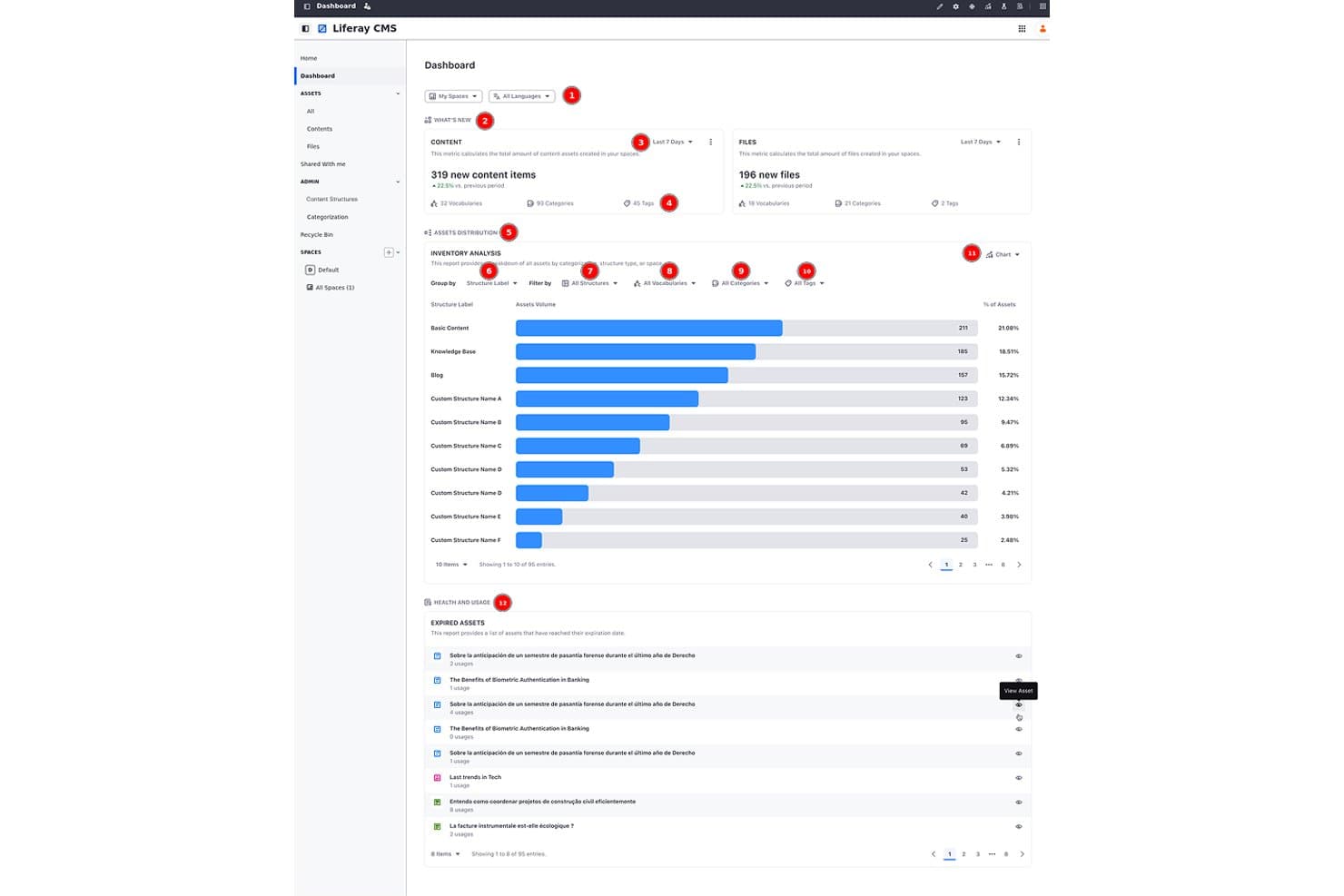
Liferay tracks content assets, files, and structure analytics on one dashboard. Liferay DXP is an open-source digital experience platform that combines headless CMS, DAM, multi-site management, B2B commerce, customer data unification, and AI-driven personalization into a single composable suite.
Who Is Liferay Best For?
Liferay DXP is a strong fit for enterprise teams managing complex B2B portals, intranets, or multi-site networks across multiple brands or regions.
Why I Picked Liferay
Liferay earns its spot on my shortlist because its multi-site governance is genuinely enterprise-grade. I've seen it handle scenarios like AGIA Affinity's launch of 300+ client sites in nine months, serving 30 million members, using site templates, style books, and bulk publishing with rollback. The Liferay Data Platform unifies CRM, behavioral, and account data into a single account record, feeding real-time personalization across every site in the network.
Liferay Key Features
- AI Hub agent builder: A low-code, drag-and-drop interface for building AI agents that connect to any LLM, including ChatGPT, Gemini, or Claude, via the Model Context Protocol.
- Headless CMS with Spaces: An API-first content repository that organizes content into Spaces, delivering it across web, mobile, and portals via REST, GraphQL, and SOAP.
- Liferay Data Platform: A B2B-focused data layer that unifies CRM, behavioral, and account-based marketing data into a single account record to power real-time segmentation.
- Integrated CDN with edge security: A built-in content delivery network with global edge caching, WAF presets, bot mitigation, and automatic cache purging on publish.
Liferay Integrations
Liferay DXP offers documented integrations with Salesforce, Google Drive, Office 365, MuleSoft, and SAP. REST, GraphQL, SOAP, and Marketplace integrations support custom connectivity across commerce, CRM, and enterprise systems.
Pros and Cons
Pros:
- AI agents connect to preferred LLMs
- Account-level data powers B2B personalization
- Proven governance for hundreds of branded sites
Cons:
- Self-hosted upgrades add ongoing operational work
- Advanced segmentation depends on Analytics Cloud
Learn more about LifeRay: Best with agentic AI for content governance
- Free demo available
- Pricing upon request
Visit WebsiteCustomer Rating:4.5/5
Adobe Experience Manager dashboard showing task workflows as a team reviews and manages content, including review, translation, and publishing tasks. Adobe Experience Manager is a digital experience platform for enterprises and large organizations that need to manage, personalize, and deliver content across web, mobile, and emerging channels while maintaining brand consistency and operational efficiency.
Who Is Adobe Experience Manager Best For?
Large enterprises and marketing teams that need to deliver consistent, personalized digital experiences across multiple channels and devices.
Why I Picked Adobe Experience Manager
I picked Adobe Experience Manager as one of the best because its agentic AI features help my team automate content governance at scale. I use built-in AI to flag outdated assets, enforce brand guidelines, and streamline approvals across multiple sites. In practice, that means we can keep our digital content compliant and consistent without manual oversight.
Adobe Experience Manager Key Features
- Headless CMS: Manage and deliver content to any channel or device using APIs.
- Digital asset management: Organize, store, and distribute images, videos, and documents from a central library.
- Personalization engine: Target content and experiences to specific audiences based on user data and behavior.
- Form builder: Create, publish, and manage interactive forms for web and mobile without coding.
Adobe Experience Manager Integrations
Integrations include Adobe Workfront, Adobe GenStudio for Performance Marketing, Adobe Express, Adobe Creative Cloud, Adobe Firefly, Adobe Analytics, Frame.io, Adobe Commerce, OneDrive, and Dropbox.
Pros and Cons
Pros:
- Agentic AI tools for automated content governance
- Native support for digital signage management
- Advanced personalization and targeting options
Cons:
- Updates and patches can disrupt workflows
- Requires Adobe ecosystem for full functionality
Learn more about Adobe Experience Manager: Best for built-in monitoring and performance tools
- Free demo available
- Pricing upon request
Visit WebsiteCustomer Rating:4.3/5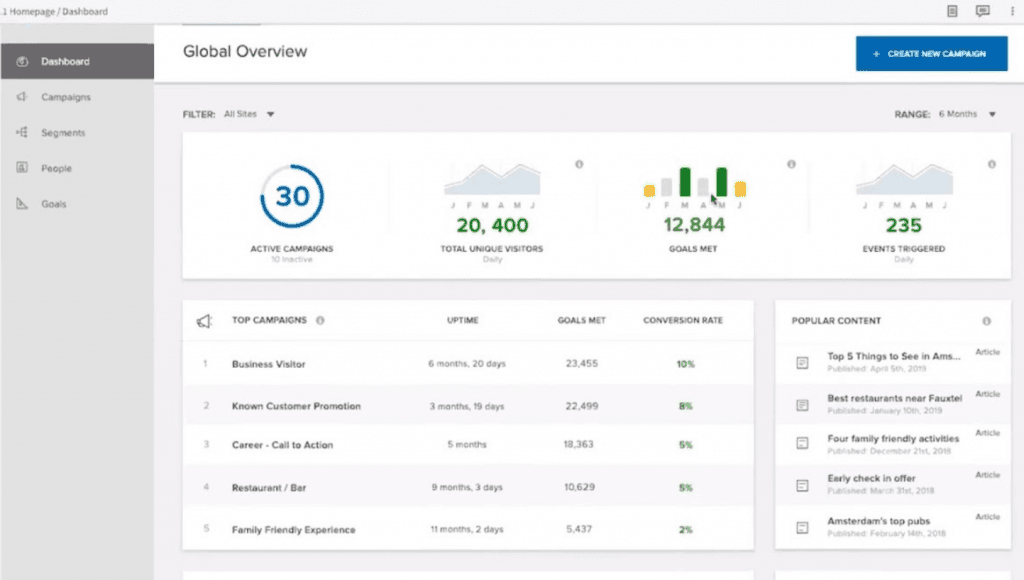
A Global Overview gives a sneak peek of all your active campaigns and visitors. Acquia is a Drupal-based digital experience platform that combines content management, asset management, multi-site governance, customer data, personalization, and built-in infrastructure monitoring across web and digital channels.
Who Is Acquia Best For?
Acquia is a strong fit for enterprise IT and digital operations teams managing large, multi-site Drupal portfolios who need built-in performance visibility without bolting on separate monitoring tools.
Why I Picked Acquia
I picked Acquia as one of the best because no other platform in this category bundles infrastructure observability this deeply into the product itself. Stack Metrics gives you real-time and historical charts across your load balancer, application, and database layers, and New Relic APM Pro comes included in every Cloud Platform tier rather than as a paid add-on. I also like that Acquia AI can cross-reference access logs, error logs, and slow-query logs against live platform metrics to surface fix suggestions before issues escalate.
Acquia Key Features
- Drupal Canvas drag-and-drop builder: A visual page builder that lets marketers assemble pages from an approved component library without writing code.
- Acquia CDP identity resolution: Links anonymous visitor behavior to known customer profiles by pulling in data from CRM, ecommerce, email, and offline sources.
- Site Factory multi-site console: A single dashboard for deploying updates, cloning sites, and managing role-based governance across an entire Drupal site portfolio.
- Conversion Optimization A/B testing: Runs A/B, multivariate, and split-URL tests using Bayesian statistics, with an AI co-pilot that generates test ideas from behavioral data.
Acquia Integrations
Acquia Exchange lists 190 integrations, including Salesforce, Shopify, Adobe Marketo, and Adobe Commerce. Acquia DAM adds nearly 300 connectors, including Adobe Creative Cloud and Workfront, while REST APIs support custom integrations.
Pros and Cons
Pros:
- Edge monitoring pairs delivery with security
- Multi-site governance supports large Drupal portfolios
- Built-in APM spans infrastructure layers
Cons:
- Drupal operations require specialized expertise
- Stack Metrics charts remain partly unavailable
Learn more about Acquia: Best for experimentation-led personalization at scale
- Free demo available
- Pricing upon request
Visit WebsiteCustomer Rating:4.2/5
Optimizely lets users build automated competitive intelligence workflows. Optimizely is a DXP that combines a headless CMS, AI-driven personalization, A/B experimentation, customer data management, and commerce into one connected suite.
Who Is Optimizely Best For?
Optimizely is a strong fit for enterprise marketing and digital teams that run continuous A/B experiments and need personalization tied directly to real data.
Why I Picked Optimizely
Optimizely earns its spot on my shortlist because no other platform ties experimentation to personalization as tightly as it does. I love that A/B tests aren't just for optimization—they're the delivery mechanism for personalized experiences, with Optimizely's Stats Engine measuring each variation before rollout. The Data Platform builds identity-resolved profiles with predictive scores (propensity to buy, churn risk, LTV) that feed real-time CMS personalization, so every experience is grounded in actual customer behavior, not assumptions.
Optimizely Key Features
- Visual Builder: A drag-and-drop page editor that lets marketers create and customize content layouts without triggering a code deployment.
- Optimizely Graph: A GraphQL API that delivers content across web, app, commerce, and other channels from a single headless layer.
- Agent Platform (Opal): A suite of 50+ AI marketing agents with a no-code workflow builder that runs on triggers or schedules with built-in human approval steps.
- Configured Commerce: A B2B commerce portal with account-specific pricing, quoting, and AI-driven merchandising integrated directly into the CMS.
Optimizely Integrations
Optimizely offers marketplace integrations across 700+ technology partners, including Salesforce, Marketo, Vercel, commercetools, and Google Cloud. Its GraphQL and REST APIs, webhooks, and commerce connections support custom integrations with CRM, ERP, and PIM systems.
Pros and Cons
Pros:
- Headless delivery supports many channels
- Predictive profiles inform real-time experiences
- A/B tests guide personalization rollouts
Cons:
- CMS 13 migration carries feature gaps
- Full value often requires custom development
Learn more about Optimizely:

CoreMedia's Studio Workspace provides tools for content creation and editing CoreMedia is a composable digital experience platform designed to enhance user engagement through personalized content delivery and robust integration capabilities. It provides a flexible and scalable solution that caters to various business needs, ensuring a tailored digital experience for users.
Why I Picked CoreMedia: I picked CoreMedia because of its AI-powered insights that offer real-time analytics and performance dashboards directly in the content management system. This feature allows you to make data-driven decisions and optimize customer engagement effectively. Additionally, its hyper-personalization capability ensures that you can deliver relevant experiences tailored to individual user preferences across multiple channels.
CoreMedia also excels in omnichannel engagement, facilitating consistent interactions through various touchpoints like websites, apps, and social media. This ensures that your customers experience a unified journey, no matter where they interact with your brand. These features make CoreMedia a standout choice for businesses looking to enhance their digital experience strategies.
Standout Features & Integrations:
Features include smart content management that allows for in-context previews and workflow management, ensuring compliance with built-in digital asset management. It also supports real-time conversations through video shopping, chatbots, and live chat, providing valuable insights into user engagement. Inspirational commerce connects the buying journey with built-in integrations for major platforms, enabling shoppable content that boosts conversions.
Integrations include HubSpot, Zendesk, Eventbrite, Salesforce, SAP, LinkedIn, Twitter, YouTube, Cloudflare, Google, ZoomInfo, and Byside.
Pros and Cons
Pros:
- Enables tailored content presentation without performance issues
- Facilitates teamwork and allows multiple contributors
- Allows customizable content publishing workflows
Cons:
- Lack of preview feature
- The interface is more developer-oriented
Learn more about CoreMedia: Best for multi-site portals with SSO and DAM
- Free demo + expert consultation available
- Pricing upon request
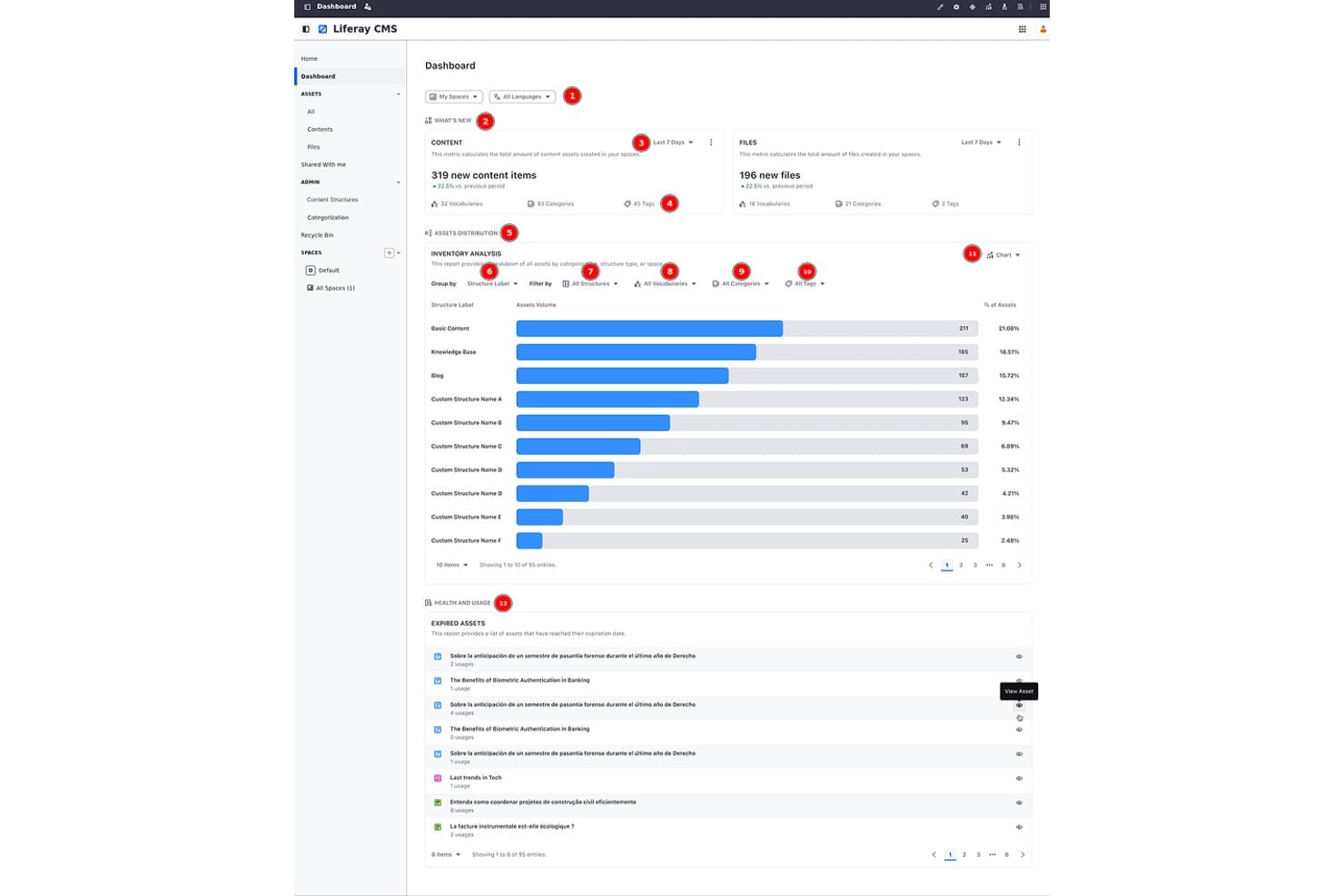
Liferay tracks content assets, files, and structure analytics on one dashboard. Liferay Digital Experience Platform is an enterprise DXP that combines headless CMS, DAM, multi-site management, personalization, and B2B/B2C commerce into a single, API-first platform.
Who Is Liferay Digital Experience Platform Best For?
Liferay DXP is a strong fit for enterprises in regulated industries—like financial services and the public sector—that need to manage dozens or hundreds of portals across brands, regions, or business units.
Why I Picked Liferay Digital Experience Platform
Liferay DXP earns its spot on my shortlist because of how it handles multi-site governance at scale, with site hierarchies, style books, and bulk publishing that let central teams push updates across hundreds of portals while giving local teams delegated control. I especially like the built-in DAM, which syncs asset updates automatically across every site the moment you make a change. Add SSO support across those portals, and you've got a genuinely unified identity layer that most platforms bolt on as an afterthought.
Liferay Digital Experience Platform Key Features
- AI content generation: The AI Creator tool connects to ChatGPT to generate text directly within web content, while AI Hub lets you build custom agents that trigger automatically on DXP events.
- A/B testing: Run tests on page elements measuring bounce rate or clicks, then publish the winning variant directly from the platform.
- Composable architecture: REST, SOAP, and GraphQL APIs let you connect DXP to external systems, with a REST API Builder for creating custom endpoints.
- Analytics and cohort analysis: Track user paths, custom events, search terms, and content performance, with data residency options across five global regions.
Liferay Digital Experience Platform Integrations
Liferay DXP offers native integrations with Salesforce, SugarCRM, Google Drive, Microsoft 365, OneDrive, MuleSoft, SharePoint, Alfresco, and Nuxeo. It also supports Marketplace integrations and REST, SOAP, and GraphQL APIs for custom connectivity.
Pros and Cons
Pros:
- Supports structured content and multilingual governance
- Syncs shared assets across sites automatically
- Governs hundreds of sites with local control
Cons:
- Customizations can complicate upgrades and maintenance
- Complex administration slows nontechnical teams
Learn more about Liferay Digital Experience Platform:
Dijital Deneyim Platformları Ne Zaman Kullanılmalı?
Dijital deneyim platformu (DXP), içerik yönetimini, müşteri verilerini ve kanallar arası sunumu tek bir bağlantılı sistemde bir araya getirir. Sonuç: ekibinizin her şeyi manuel olarak birleştirmesine gerek kalmadan, her temas noktasında tutarlı ve kişiselleştirilmiş deneyimler. Aşağıdaki senaryolardan herhangi biri size tanıdık geliyorsa daha yakından incelemeye değer:
- İçeriğiniz aynı anda çok fazla yerde bulunuyor: Bir web sitesini, mobil uygulamayı ve bölgesel mikro siteleri ayrı araçlar ve elektronik tablolar üzerinden yönetiyorsunuz; bunları tutarlı tutmak tam zamanlı bir işe dönüşüyor. DXP, içerik ve yayınlamayı merkezileştirerek güncellemelerin her yere aynı anda ulaşmasını sağlar ve ekibinizin koordinasyon için harcadığı zamanı önemli ölçüde azaltır.
- Çok kanallı yapıya geçiyorsunuz ancak deneyim kopuk hissettiriyor: Bir müşteri uygulamanıza göz atıyor, ardından sitenizi ziyaret ediyor ve sanki iki farklı marka varmış gibi hissediyor. DXP, içerik ve müşteri verilerini kanallar arasında senkronize ederek bir kişinin hangi kanaldan geldiğinden bağımsız olarak yolculuğun kesintisiz kalmasını sağlar.
- Kişiselleştirme yol haritanızda yer alıyor ancak sürekli erteleniyor: Müşteri verilerine sahipsiniz, ancak bunlara geniş ölçekte dayanarak harekete geçecek altyapınız yok. DXP, kişiselleştirmeyi sunum motorunuza entegre eder; böylece doğru içerik doğru segmente otomatik olarak ulaşır.
- Bir kampanyayı hayata geçirmek 3+ hafta sürüyor: Ekibiniz yaratıcı varlıkları hazırlamış durumda, ancak içeriği bölgeler genelinde yayına almak için geliştirici talepleri, onaylar ve takvimi uzatan karşılıklı yazışmalar gerekiyor. DXP, pazarlamacılara darboğazlar olmadan yayın yapma kontrolü verir.
- Yeni pazarlara açılıyorsunuz ve yerelleştirme karmaşa hâline geldi: Çevrilmiş içerikleri ve bölgesel farklılıkları ayrı CMS örnekleri üzerinden yönetmek, sürüm kontrolünde kaos yaratır. DXP, çok dilli ve çok bölgeli sunumu tek bir yerden yöneterek her pazarın marka kimliğine uygun kalmasını sağlar.
Diğer Dijital Deneyim Yönetimi Yazılımları
En iyi listeye giremeyen birkaç DX aracı daha.
- 11Kentico XperienceBest for agentic AI within an all-in-one DXP
- 12OpenText Experience CloudBest for enterprise CCM and web CMS at scale
- 13ContentfulBest for composable, API-first content at scale
- 14CenshareBest for centralized content management
- 15Magnolia CMSBest open CaaS solution to connect with CMS
- 16SitefinityBest for AI-powered content creation
- 17Sitecore Experience PlatformBest for personalized content delivery
- 18CrownpeakBest for personalized digital experiences
- 19Salesforce Experience CloudBest for CRM-native customer and partner portals
- 20JahiaBest for multi-site governance with built-in CDP
How I Evaluate Digital Experience Platforms
I split my evaluation into three parts, with the most weight on core functionality: delivering content across web and mobile and personalizing journeys by customer behavior. Then I consider standout features, such as a visual experience builder or AI content generation. Finally, I look beyond features at onboarding, support, and pricing as teams scale.
Core Functionality (Table Stakes For This List)
When I'm selecting tools for my list, I score each one on a scale from 0 (does not offer the functionality) to 5 (excels in this area) for each core functionality listed below. I then convert the total into a percentage to help assess each tool's overall fit, with extra weight on any functionalities I’ve deemed essential.
- Omnichannel Content Delivery (Essential): I look for one place to manage content across web, mobile, and other touchpoints, such as keeping service information consistent across a site and app.
- Experience Personalization (Essential): I assess whether teams can tailor pages, content, or offers by behavior or customer segment across key touchpoints.
- Content & Asset Management: I check for structured authoring, reusable content, version history, and workflows that help teams coordinate updates across channels.
- Customer Data Integration: I look at how customer profiles, behavioral signals, or CRM data inform experiences, such as tailoring a portal to a customer’s needs.
- Third-Party Integrations: I consider available integrations and APIs for connecting commerce, CRM, marketing, and analytics systems in the customer journey.
- Multi-Site Management: I evaluate whether teams can manage multiple sites, brands, or locales centrally while sharing assets and components where appropriate.
Once I have a list of tools that meet the criteria, I consider what sets each platform apart.
Differentiating Factors (What Sets Vendors Apart)
Here's how I compare and contrast different vendors:
Standout Features
A visual experience builder is the first thing I look for—marketers need to build and adjust landing pages or support portals without filing dev tickets every time. I also evaluate whether a platform offers predictive next-best-action capabilities, since recommending the right help article or onboarding step in real time can measurably improve self-service outcomes. Composable architecture matters too, because teams that can swap components independently avoid costly re-platforming as customer needs shift.
Beyond Features
I evaluate how quickly a platform reaches production—some SaaS options offer sandbox environments and starter templates that cut deployment to weeks, while enterprise suites like Adobe Experience Manager or Sitecore often need months of integrator support. Total cost of ownership matters just as much, since a per-seat model that looks affordable at launch can spike once you add personalization tiers or new regional sites. I also check whether role-based permissions let CX teams publish content independently while IT retains governance control.
Dijital Deneyim Platformları Nedir?
Dijital deneyim platformları, işletmelerin dijital kanallar genelinde müşteri etkileşimleri oluşturmasına, yönetmesine ve optimize etmesine yardımcı olan araçlardır. Müşteri yolculuğu boyunca tutarlı ve kişiselleştirilmiş deneyimler sunulmasını sağlamak için içerikleri, verileri ve sunum sistemlerini merkezileştirirler.
Dijital Deneyim Platformları Nasıl Seçilir?
Size özgü yazılım seçimi sürecinizi yürütürken odağınızı korumanıza yardımcı olmak için, bir DXP seçerken göz önünde bulundurmanız gereken faktörlerin kontrol listesini burada bulabilirsiniz:
| Faktör | Nelere Dikkat Edilmeli? |
|---|---|
| FaktörÖlçeklenebilirlik | Nelere Dikkat Edilmeli?Platformun, artan trafiği ve içeriği sorun yaşamadan işleyerek işletmenizle birlikte büyüyebildiğinden emin olun. |
| FaktörEntegrasyonlar | Nelere Dikkat Edilmeli?Sistemlerinizin bağlantılı kalmasını sağlamak için CRM, ERP ve analiz araçları gibi mevcut araçlarla uyumluluk arayın. |
| FaktörÖzelleştirilebilirlik | Nelere Dikkat Edilmeli?Platformun özellikleri ve arayüzleri markanıza, iş akışlarınıza ve müşteri yaşam döngünüze uyacak şekilde düzenlemenize izin verip vermediğini kontrol edin. |
| FaktörKullanım Kolaylığı | Nelere Dikkat Edilmeli?Platform sezgisel olmalı, eğitim süresini en aza indirmeli ve ekibinizin kullanıcı benimsemesini artırmalıdır. |
| FaktörBütçe | Nelere Dikkat Edilmeli?Gizli ücretler ve dahil edilen özelliklerin değeri de dahil olmak üzere maliyeti bütçenizle karşılaştırarak değerlendirin. |
| FaktörGüvenlik Önlemleri | Nelere Dikkat Edilmeli?Şifreleme, yedeklemeler ve düzenlemelere uyumluluk gibi veri koruma önlemlerini doğrulayın. |
| FaktörDestek Hizmetleri | Nelere Dikkat Edilmeli?Gerektiğinde size yardımcı olmak için sunulan müşteri desteğinin düzeyini değerlendirin. |
| FaktörPerformans | Nelere Dikkat Edilmeli?Kullanıcılara içeriği verimli bir şekilde sunabildiğinden emin olmak için platformun hızını ve güvenilirliğini değerlendirin. |
Dijital Deneyim Platformlarındaki Trendler
Araştırmam sırasında farklı dijital deneyim platformu sağlayıcılarından sayısız ürün güncellemesi, basın bülteni ve sürüm günlüğü derledim. Takip ettiğim yeni trendlerden bazıları şunlar:
- Başsız Mimari: Birçok platform, içeriği çeşitli kanallarda sunma konusunda daha fazla esneklik sağlamak için başsız CMS'yi benimsiyor. Bu mimari, geliştiricilerin tercih ettikleri ön yüz araçlarını kullanmasına olanak tanıyarak özelleştirme seçeneklerini ve performansı artırıyor.
- Yapay Zekâ Destekli Kişiselleştirme: Yapay zekâ, gerçek zamanlı verilere dayalı olarak kullanıcı deneyimlerini uyarlamak için kullanılıyor. Platformlar, kullanıcı davranışlarını analiz etmek ve kişiselleştirilmiş içerik sunmak için yapay zekâdan yararlanıyor; böylece etkileşimler daha ilgili ve ilgi çekici hâle geliyor.
- Birleştirilebilir DXP: Sağlayıcılar, kullanıcıların yetenekleri bir araya getirip eşleştirmesine olanak tanıyan birleştirilebilir mimarilere yöneliyor. Bu trend, daha hızlı uygulamayı ve daha fazla esnekliği destekleyerek işletmelerin pazar değişikliklerine hızla uyum sağlamasına olanak veriyor.
- Omnikanal Deneyim: Tüm temas noktalarında tutarlı bir deneyim sunmak giderek daha önemli hâle geliyor. Platformlar, kullanıcıların etkileşim biçimlerinden bağımsız olarak aynı marka mesajını ve hizmet kalitesini almasını sağlamak için çeşitli kanalları entegre etmeye odaklanıyor.
- Kullanıcı Deneyimi Analitiği: Kullanıcı etkileşimleri hakkında derinlemesine içgörüler sağlayan araçlara verilen önem giderek artıyor. Bu dijital deneyim analitiği araçları, işletmelerin kullanıcıların içerikleriyle nasıl etkileşim kurduğunu anlamasına ve iyileştirme alanlarını belirlemesine yardımcı olarak genel dijital stratejileri geliştiriyor.
Özellikler
Her iyi dijital deneyim platformunun sahip olması gereken temel özellikler şunlardır:
- İçerik yönetim sistemi: Dijital içeriği tek bir merkezi yerde düzenleyin, oluşturun ve güncelleyin. Bu, sitenizi hızla yenilemenize, kampanyalar başlatmanıza veya her seferinde her şeyi yeniden yapmak zorunda kalmadan blogları yönetmenize yardımcı olur.
- Kişiselleştirme araçları: Kullanıcı davranışına, konumuna veya profil verilerine dayalı özel deneyimler sunun. Bu, ziyaretçilerinizin düşüncelerini okuyormuşsunuz gibi hissetmesini sağlar; tam olarak ihtiyaç duydukları şeyi, ihtiyaç duydukları anda gösterirsiniz.
- Çok kanallı sunum: İster web sitenizde, ister bir uygulamada veya e-posta aracılığıyla olsun, kullanıcılarla bulundukları her yerde bağlantı kurun. Bu özellik, mesajlarınızın sorunsuz ve tutarlı olmasını, tek bir kanala sıkışıp kalmamasını sağlar.
- Başsız mimari: Bu yapı ön ucu ve arka ucu birbirinden ayırır. İçeriği farklı cihaz ve biçimlerde sunma konusunda esnekliğe sahip olursunuz.
- Entegrasyon olanakları: CRM'nize, pazarlama otomasyonunuza, analiz araçlarınıza veya diğer iş araçlarınıza kolayca bağlanın. Sistemler arasında geçiş yaparak daha az zaman kaybeder ve daha akıcı bir iş akışı oluşturabilirsiniz.
- Analiz ve raporlama: Kullanıcı davranışı, içerik performansı ve site metrikleriyle ilgili gerçek zamanlı verileri derinlemesine inceleyin. Gerçekte neyin işe yaradığına göre dijital stratejinizi ayarlamak, geliştirmek veya tamamen yenilemek için net içgörüler elde edin.
- Kullanıcı yolculuğu haritalama: Kullanıcıların ilk tıklamalarından ödeme aşamasına kadar dijital alanlarınızda nasıl ilerlediğini görselleştirin. Bu, müşterinizin yolculuğuna kuş bakışı bakmak gibidir; böylece yolculuktaki tüm pürüzleri giderebilirsiniz.
- Güvenlik ve uyumluluk: Gizlilik yasalarına ve düzenlemelerine uymanıza yardımcı olan özelliklerle hassas verileri ve müşteri bilgilerini sıkı biçimde koruyun. Hiç kimse kendi sorumluluğundaki bir güvenlik olayıyla karşılaşmak istemez.
- İş akışı ve iş birliği araçları: Roller atayarak, ilerlemeyi izleyerek ve içeriği tek bir platformda onaylayarak ekiplerin sorunsuz biçimde birlikte çalışmasını sağlayın; artık karmaşık e-posta zincirleri veya kaybolan dosyalarla uğraşmayın.
Yaygın Dijital Deneyim Platformu Yapay Zekâ Özellikleri
Yukarıda listelenen standart dijital deneyim platformu özelliklerinin yanı sıra, bu çözümlerin çoğu aşağıdaki gibi özelliklerle yapay zekâyı da bünyesinde barındırır:
- Otomatik içerik önerileri: Her ziyaretçiye uygun makaleler, ürünler veya teklifler önermek için yapay zekâyı kullanın. Böylece içeriğiniz, manuel tahminlere gerek kalmadan onlara özel hazırlanmış gibi görünür.
- Tahmine dayalı analiz: Yapay zekânın kullanıcı davranışlarını ve eğilimlerini gerçekleşmeden önce öngörmesini sağlayın; böylece hedefi tam on ikiden vuran kampanyalar ve stratejiler hazırlayabilirsiniz.
- Sohbet robotları ve sanal asistanlar: Soruları yanıtlamak veya kullanıcılara yol göstermek için yapay zekâ destekli anında yardım sunun; böylece siz çevrim dışıyken bile kitleniz her zaman destek alabilir.
- Dinamik kişiselleştirme: Yapay zekânın tercihleri ve eylemleri hakkında gerçek zamanlı olarak öğrendiklerine dayanarak site düzenlerini, içeriği veya eylem çağrılarını her ziyaretçi için otomatik olarak değiştirin.
- Duygu analizi: Geri bildirimleri, değerlendirmeleri veya sosyal medya paylaşımlarını analiz etmek için yapay zekâyı kullanarak kullanıcıların markanız veya içeriğiniz hakkında ne hissettiğini tespit edin; böylece sorunları hızla ele alabilir veya başarıları kutlayabilirsiniz.
Faydalar
Gartner'a göre kuruluşların %40'ı, uyumlu ve akıllı bir içerik koordinasyonu ve içerik operasyonları stratejisinin bulunmaması nedeniyle 2027 yılına kadar etkili dijital deneyimler sunma konusunda başarısız olacak.
Dijital deneyim platformlarının uygulanması ekibiniz ve işletmeniz için çeşitli faydalar sağlar. Yararlanmayı bekleyebileceğiniz birkaç fayda şunlardır:
- Gelişmiş etkileşim: Kişiselleştirme özellikleri, içeriği kullanıcılara göre uyarlamaya yardımcı olarak etkileşimi ve memnuniyeti artırır.
- Geliştirilmiş operasyonel verimlilik: İş akışı otomasyonu, içerik onayını ve yayınlamayı kolaylaştırarak zamandan ve emekten tasarruf sağlar.
- Veriye dayalı içgörüler: Dijital deneyim analizleri, kullanıcı davranışı ve müşteri ihtiyaçları hakkında değerli bilgiler sağlayarak daha iyi kararlar alınmasına yardımcı olur.
- Tutarlı marka kimliği: Çok kanallı destek, marka mesajınızın tüm platformlarda aynı kalmasını sağlar.
- Sunumda esneklik: Başsız mimari, içeriği çeşitli cihazlarda sorunsuz biçimde sunmanıza olanak tanır.
- Ölçeklenebilirlik: Artan trafiği ve içerik miktarını yönetebilme olanağı, işletmeniz büyürken onu destekler.
- Müşteri odaklı yaklaşım: Birden çok temas noktasındaki müşteri verilerinizin tek ve birleşik bir görünümüne sahip olmak, müşterilerinizin ihtiyaçlarını ön planda tutmanızı sağlar.
DXP'leri Uygulamadaki Zorluklar
DXP'leri uygulamanın zorlukları ve olası çözümleri şunlardır:
- Yüksek başlangıç maliyetleri: Dijital deneyim çözümleri teknoloji, altyapı ve uzmanlık alanlarında önemli yatırımlar gerektirebilir. Başlangıçtaki masrafları azaltmak için aşamalı bir uygulamayı değerlendirin ve yüksek etkili özelliklere öncelik verin.
- Karmaşık entegrasyon: DXP'yi mevcut sistemlere, araçlara ve veri tabanlarına bağlamak teknik açıdan zorlayıcı olabilir. Entegrasyonu kolaylaştırmak ve uyumluluk sorunlarını en aza indirmek için API'lerden ve ara katman çözümlerinden yararlanın.
- Dik öğrenme eğrisi: Personeli platformu kullanması ve yönetmesi için eğitmek zaman ve kaynak gerektirebilir. Ekibinizi güçlendirmek için kapsamlı eğitime yatırım yapın ve sürekli destek sağlayın. Kendi kendine hizmet sunan bir bilgi tabanı oluşturmak, ekiplerinizin yanıtları hızlı bir şekilde bulmasına yardımcı olabilir.
- Veri siloları: Birden fazla kaynaktan gelen verileri birleşik bir platformda toplamak, özellikle eski sistemlerde zor olabilir. Verileri etkili bir şekilde merkezileştirmek ve uyumlu hâle getirmek için bir müşteri veri platformu (CDP) uygulayın.
- Özelleştirme yükü: Bir DXP'yi belirli iş ihtiyaçlarına göre uyarlamak kapsamlı geliştirme çalışmaları gerektirebilir. Özelleştirme çalışmalarını basitleştirmek için modüler veya düşük kodlu seçeneklere sahip platformlara odaklanın.
- Bakım gereksinimleri: Sürekli güncellemeler, güvenlik yönetimi ve performans optimizasyonu iş yükünü artırır. Yönetilen hizmet sağlayıcılarla çalışın veya sundukları hizmetlere bakımı dâhil eden bir DXP sağlayıcısı seçin.
- Sağlayıcıya bağımlılık: Tescilli veya kapalı DXP'ler işletmeleri belirli sağlayıcılara bağımlı hâle getirebilir. Sağlayıcı değiştirme veya ek araçları entegre etme konusunda daha fazla özgürlük sunan açık ya da hibrit DXP'leri tercih edin.
- Ölçeklenebilirlik sorunları: Platform artan talebi karşılayacak şekilde oluşturulmamışsa işletmenin hızlı büyümesi platformu zorlayabilir. Kolay ölçeklenebilirlik sağlamak için bulut-yerel mimariye sahip bir DXP seçin.
- Gizlilik ve uyumluluk: DXP'nin GDPR veya CCPA'ya uygun olmasını sağlamak karmaşık olabilir. Bir hukuk uzmanıyla çalışın ve yerleşik uyumluluk özelliklerine sahip platformları seçin.
- Uyumsuz hedefler: Net hedefler olmadığında işletmeler DXP'nin yeteneklerini dijital stratejileriyle uyumlu hâle getirmekte zorlanır. Platformun iş ihtiyaçlarını karşılamasını sağlamak için net hedefler belirleyin ve paydaşları sürece erken aşamada dâhil edin.
Maliyetler ve Fiyatlandırma
Dijital deneyim platformlarını seçmek, mevcut çeşitli fiyatlandırma modellerinin ve planların anlaşılmasını gerektirir. Maliyetler özelliklere, ekip büyüklüğüne, eklentilere ve daha fazlasına göre değişir. Aşağıdaki tabloda dijital deneyim platformu çözümlerinde yaygın planlar, bunların ortalama fiyatları ve genellikle sunulan özellikler özetlenmektedir:
Dijital Deneyim Platformları için Plan Karşılaştırma Tablosu
| Plan Türü | Ortalama Fiyat | Yaygın Özellikler |
|---|---|---|
| Plan TürüÜcretsiz Plan | Ortalama Fiyat$0 | Yaygın ÖzelliklerSınırlı destek, temel içerik yönetimi ve minimum düzeyde analiz. |
| Plan TürüKişisel Plan | Ortalama Fiyat$5-$25/kullanıcı/ay | Yaygın ÖzelliklerGelişmiş içerik yönetimi, temel kişiselleştirme ve standart analiz. |
| Plan Türüİşletme Planı | Ortalama Fiyat$50-$150/kullanıcı/ay | Yaygın ÖzelliklerGelişmiş kişiselleştirme, iş akışı otomasyonu, çok kanallı destek ve API erişimi. |
| Plan TürüKurumsal Plan | Ortalama Fiyat$200-$500/kullanıcı/ay | Yaygın ÖzelliklerTam özelleştirme, ayrıcalıklı destek, kapsamlı analiz ve ölçeklenebilirlik seçenekleri. |
SSS
Dijital deneyim yazılımı hakkında insanların sıkça sorduğu bazı soruların yanıtlarını burada bulabilirsiniz.
İçerik Yönetim Sistemi ile Dijital Deneyim Platformu arasındaki fark nedir?
Dijital deneyim platformu (DXP), içerik yönetim sisteminden (CMS) daha fazlasını sunar. CMS web sitesi içeriğini yönetirken DXP, birleşik bir müşteri yolculuğu oluşturmak için web, mobil ve sosyal medya gibi birden fazla kanal ile temas noktasını birbirine bağlar. Daha kapsamlı müşteri deneyimi (CX) girişimlerini yönetiyorsanız DXP, temel bir CMS’nin sağlayamayacağı entegrasyon, analiz ve kişiselleştirme olanakları sunar.
DXP, e-ticaret kişiselleştirmesine nasıl yardımcı olabilir?
DXP’ler, kullanıcı davranışlarını izleyerek, kitleleri segmentlere ayırarak ve kanallar genelinde alakalı içerik ile teklifleri dinamik olarak sunarak e-ticaret kişiselleştirmesini mümkün kılar. Müşteri verilerini kullanarak mağazanızdaki ürün önerilerini, promosyonları ve iletişimi kişiye özel hâle getirebilir, etkileşimi ve satışları artırabilirsiniz.
Farklı dijital deneyim platformu türleri var mı?
Evet, dijital deneyim platformları monolitik (hepsi bir arada), birleştirilebilir (modüler), açık ve kapalı sistemler gibi çeşitli türlerde olabilir. Doğru tür; esneklik, diğer araçlarla entegrasyon ve CX stratejiniz için ölçeklenebilirlik ihtiyaçlarınıza bağlıdır.
Bulut tabanlı DXP'ler ve SaaS DXP'ler nedir?
Bulut tabanlı ve SaaS DXP’ler, şirket içinde kurmak yerine çevrimiçi olarak eriştiğiniz platformlardır. Bu seçenekler ekibinize daha kolay güncelleme, bakım ve ölçeklenebilirlik sunarken BT yükünü azaltır. CX liderleri için bu, daha hızlı dağıtımlar ve değişen müşteri ihtiyaçlarına daha iyi uyum sağlama anlamına gelir.
Açık ve kapalı DXP'ler arasındaki fark nedir?
Açık DXP’ler daha fazla aracı entegre etmenize ve teknoloji yığınınızı özelleştirmenize olanak tanırken kapalı DXP’ler daha az esnekliğe sahip, tek tedarikçili bir çözüm sunar. CX stratejiniz benzersiz entegrasyonlar gerektiriyorsa açık sistemler size yardımcı olur. Sadelik ve tedarikçi desteğini tercih ediyorsanız kapalı sistemler daha iyi olabilir.
Birleştirilebilir DXP nedir? Hibrit DX Platformundan farkı nedir?
Birleştirilebilir DXP, en iyi araçları seçmenize olanak tanıyan, birbirinin yerine kullanılabilen modüllerden oluşturulur. Hibrit DXP’ler, önceden oluşturulmuş özellikleri belirli düzeyde modülerlikle bir araya getirir. Birleştirilebilir DXP’ler, ölçek büyütürken veya yön değiştirirken CX liderlerine müşteri yolculuğu üzerinde daha fazla esneklik ve kontrol sağlar.
Dijital deneyim platformları çok kanallı müşteri yolculuklarını nasıl destekler?
DXP’ler müşteri verilerini ve temas noktalarını birleştirerek web, mobil, sosyal medya ve çevrimdışı kanallarda tutarlı deneyimler sunmanıza olanak tanır. Bu sayede mesajlar, marka ve hizmetler müşteri yolculuğunun her adımında uyumlu kalır.
Kuruluşum için DXP seçerken nelere dikkat etmeliyim?
Mevcut teknoloji yığınınızla entegre olan, kanal stratejinizi destekleyen ve güçlü kişiselleştirme ile analiz özellikleri sunan bir DXP arayın. Kullanılabilirlik, ölçeklenebilirlik ve tedarikçi desteği de uzun vadeli değer açısından önemlidir.
DXP'ler müşteri tutundurma ve sadakatini geliştirmeye nasıl yardımcı olur?
DXP’ler etkileşimleri kişiselleştirerek, kanallar genelindeki verileri birleştirerek ve kusursuz müşteri deneyimleri sunarak müşteri tutundurma oranını artırır. Etkileşimi izleyebilir, sorunlu noktaları belirleyebilir ve yolculukları hızlıca optimize edebilirsiniz; böylece daha güçlü ve uzun süreli müşteri ilişkileri kurabilirsiniz.