

Bir müşteri deneyimi yöneticisi olarak, müşteri memnuniyetini sağlarken ekibinizin verimli kalmasını sağlamanın günlük zorluğuyla karşı karşıyasınız. Mobil yardım masası yazılımı, ekibinizin nerede olursa olsun hızlı ve etkili bir şekilde yanıt vermesini sağlayarak oyunun kurallarını değiştirebilir.
Yazılımları test etme ve inceleme deneyimimde, doğru aracın nasıl büyük fark yaratabileceğini gördüm. Size en iyilerini sunmak için çeşitli seçenekleri bağımsız olarak inceledim ve değerlendirdim. Bu makalede, ihtiyaçlarınıza en uygun seçeneği bulmanıza yardımcı olmak için tarafsız bilgiler sunarak en iyi seçimlerimi paylaşacağım.
Why Trust Our Software Recommendations
6,700+
Reviews
20
Industry experts
16+
Evaluation factors
14
Years
Our team has been testing and reviewing software since 2012. As CX leaders ourselves, we know how difficult—and important—it is to choose the right software.
For this guide, we evaluated tools using hands-on testing and independent research, scoring tools using our selection criteria.
Our reviews reflect our human editorial judgment, not a sales pitch.
 Gui DrusinaCreative Director
 Tim FisherVP of AI
En İyi Mobil Yardım Masası Yazılımları Karşılaştırma Tablosu
Bu karşılaştırma tablosu, en iyi mobil yardım masası yazılımı seçimlerim için fiyatlandırma ayrıntılarını özetlemektedir.
Sorted by: Default
| Tool | Starting Price | Website | |
|---|---|---|---|
Best for turning emails into tasks | 4.8 out of 5 | $14/user/month 30-day free trial available | Website |
Best for creating custom AI chatbots | 4.4 out of 5 | $32/month 7-day free trial + demo available | Website |
Best for small teams | 4.8 out of 5 | $469/month 14-day free trial + demo available | Website |
Best for simplicity | 4.6 out of 5 | $29/user/month Free plan + free demo available | Website |
Best for ITIL compliance | 4.6 out of 5 | $12/user/month 30-day free trial available | Website |
Best for multilingual support | 4.5 out of 5 | $29/user/month 14-day free trial + free demo available | Website |
Best with cross-team collaboration tools | 4.6 out of 5 | $25/user/month 14-day free trial + free demo available | Website |
Best for project integration | 4.4 out of 5 | $9.99/user/month Free plan + 14-day free trial + free demo available | Website |
Best for scalability | 4.6 out of 5 | $49/month 15-day free trial | Website |
Best for customizability | 4.5 out of 5 | $39/user/month Free demo available | Website |


En İyi Mobil Yardım Masası Yazılımları İncelemesi
Aşağıda, kısa listeme giren en iyi mobil yardım masası yazılımlarına ilişkin ayrıntılı özetlerimi bulabilirsiniz. İncelemelerim, size en uygun aracı bulmanıza yardımcı olmak için her aracın temel özelliklerine, artılarına ve eksilerine, entegrasyonlarına ve ideal kullanım alanlarına ayrıntılı bir bakış sunmaktadır.
 Best for turning emails into tasks
- 30-day free trial available
- From $14/user/month (billed annually)
Visit WebsiteCustomer Rating:4.8/5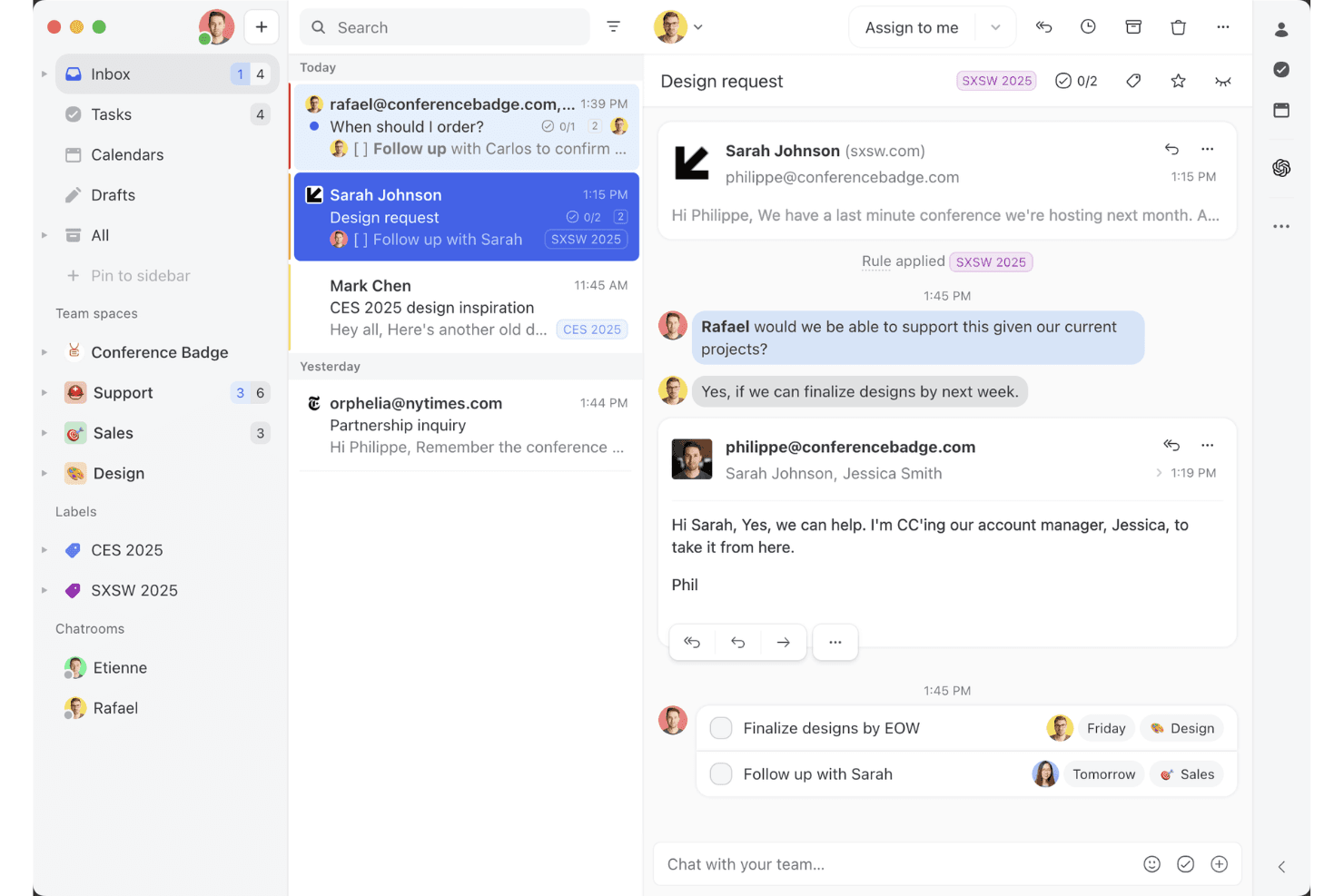
Missive’s shared inbox view shows how teams can collaborate on email threads, assign tasks, and manage client conversations in one workspace. Missive is a collaborative inbox and mobile help desk tool that unifies email, WhatsApp, SMS, Instagram, and live chat into a single interface, with built-in task creation, assignment rules, and team communication features.
Who Is Missive Best For?
Missive is a strong fit for remote and distributed customer service teams that need to manage email, WhatsApp, and social conversations from a single mobile inbox.
Why I Picked Missive
I picked Missive as one of the best because it genuinely turns your inbox into a task engine. When an email lands, you can instantly convert it into an assigned task with a due date, loop in teammates via internal comments, and route it through auto-assignment rules, all from the mobile app. I also love that it pulls email, WhatsApp Business, Instagram, and SMS into one unified mobile inbox, so nothing slips through when your team is working remotely.
Missive Key Features
- Multi-channel unified inbox: Consolidates email, WhatsApp Business, Instagram, Facebook Messenger, SMS, and live chat into a single mobile interface.
- Missive MCP Server: Connect external AI apps (like Claude or ChatGPT) to mcp.missiveapp.com to query your mobile inbox, check schedules, and draft responses—keeping human review required before sending.
- Auto-assignment rules: Automatically routes incoming conversations to agents using round-robin, least-busy, or sender-based logic.
- Configurable push notifications: Lets you set notification preferences per mailbox and event type, withtime-of-day snoozing for off-hours coverage.
- SLA reminders and escalation rules: Triggers automated alerts and escalations when conversations go unreplied past a set threshold.
Missive Integrations
Missive integrates with HubSpot, Salesforce, Pipedrive, Aircall, Dialpad, Asana, ClickUp, Trello, Twilio, and WhatsApp Business. It also offers a REST API, webhooks, Zapier, and its new MCP Server (mcp.missiveapp.com) for connecting external AI clients (available on Productive and Business plans, enabled by an admin).
Pros and Cons
Pros:
- Push notifications include SLA reminders and escalations
- Instantly turns emails into actionable tasks
- True omnichannel mobile inbox for all channels
Cons:
- Limited offline access and sync on mobile
- No native knowledge base for agents
Learn more about Missive: Best for creating custom AI chatbots
- 7-day free trial + demo available
- From $32/month (billed annually)
Visit WebsiteCustomer Rating:4.4/5
Chatbase offers a mobile Playground interface where agents can be monitored for training status, last trained time, and model size. Chatbase is a no-code AI chatbot builder that lets you create custom AI agents trained on your own data—documents, URLs, and text—and deploy them across web and mobile customer support surfaces.
Who Is Chatbase Best For?
Chatbase is a good fit for small to mid-sized businesses and developers who want to add AI-powered support to their product without building a chatbot from scratch.
Why I Picked Chatbase
I picked Chatbase as one of the best because it gives you a complete no-code environment for building a custom AI support agent trained on your own business data. I especially like the model comparison feature, which lets you test different LLM configurations to find what works best for your specific support use case. The natural language instruction setup for escalation rules also means I can define when the AI hands off to a human without writing a single line of code.
Chatbase Key Features
- Omnichannel deployment: Deploy your AI agent across website chat, WhatsApp, Slack, and email from a single platform.
- Real-time data sync: Connect your agent to CRMs, order management tools, and helpdesk platforms to pull live customer data during conversations.
- Advanced reporting: Track agent performance with detailed analytics on customer interactions, resolution rates, and engagement data.
- Multilingual support: Detect and respond in 80+ languages automatically using built-in language detection and generative AI translation.
Chatbase Integrations
Chatbase offers native integrations with WhatsApp, Slack, Instagram, Facebook Messenger, Zendesk, Salesforce, Shopify, Stripe, Notion, Calendly, and Cal.com. It connects with Zapier and Make, and has an API for custom integrations.
Pros and Cons
Pros:
- Multiple AI model choices available
- Supports 80+ languages natively
- Deploys a trained agent in minutes
Cons:
- Credit-based messaging can spike costs
- No visual conversation flow builder
Learn more about Chatbase: Best for small teams
- 14-day free trial + demo available
- From $469/month (billed annually)
Visit WebsiteCustomer Rating:4.8/5
Cayzu streamlines customer inquiries for small to mid-sized businesses. Cayzu is a cloud-based help desk software aimed at small to medium-sized businesses. It helps your team manage customer inquiries efficiently through its mobile platform.
Why I picked Cayzu: It’s tailored for small teams that need an easy-to-use solution. Features like multi-brand support and a self-service portal make it versatile for growing businesses. Its user-friendly mobile app allows your team to handle help desk ticketing on the go. The ability to customize your dashboard and reports helps you keep track of your performance effortlessly.
Standout features & integrations:
Features include a self-service portal, canned responses, and multi-brand support. Your team can use the internal chat to communicate quickly. The software also offers customizable dashboards to fit your business needs.
Integrations include Slack, Dropbox, Google Drive, Facebook, X, Mailchimp, FreshBooks, Salesforce, HubSpot, and Zoho CRM.
Pros and Cons
Pros:
- Self-service portal available
- Customizable reports
- Mobile-friendly interface
Cons:
- Limited customization options
- Limited advanced features
Learn more about Cayzu: Best for simplicity
- Free plan + free demo available
- From $29/user/month
Visit WebsiteCustomer Rating:4.6/5
HelpDesk offers a simple, efficient support solution for small to mid-sized businesses. HelpDesk is a straightforward mobile help desk software tailored for small to medium-sized businesses seeking an easy-to-use solution. It helps teams manage customer inquiries efficiently without unnecessary complexity.
Why I picked HelpDesk: It offers a clean and intuitive interface, making it accessible for teams that prioritize ease of use. The software includes essential ticket management features, allowing your team to handle support requests quickly. Automation rules help streamline repetitive tasks, enhancing productivity. Its mobile app ensures that your team can stay connected and responsive, no matter where they are.
Standout features & integrations:
Features include automation rules, a clean interface, and essential ticket management. Your team can use the mobile app to stay connected and responsive. The software also offers a centralized inbox to manage all customer inquiries.
Integrations include Slack, Microsoft Teams, Zapier, Google Workspace, Shopify, Mailchimp, Salesforce, HubSpot, Trello, and Asana.
Pros and Cons
Pros:
- Centralized inbox for inquiries
- Automation rules for tasks
- Essential ticket management features
Cons:
- Requires internet for full access
- Limited advanced features with basic reporting capabilities
Learn more about HelpDesk: Best for ITIL compliance
- 30-day free trial available
- From $12/user/month (billed annually)
Visit WebsiteCustomer Rating:4.6/5
Vision Helpdesk offers ITIL-based mobile IT service management for businesses. Vision Helpdesk is a mobile help desk solution designed for businesses that need IT service management. It supports ITIL processes, making it ideal for IT teams seeking structured service management.
Why I picked Vision Helpdesk: It offers ITIL-aligned features like incident management, problem management, and change management, which are crucial for IT departments. The satellite help desk feature lets you manage multiple companies or departments from a single platform. Its automation tools help streamline tasks and improve efficiency. The software's ability to create custom workflows ensures it can adapt to your specific business needs.
Standout features & integrations:
Features include incident management, problem management, and change management. Your team can use the satellite help desk feature to manage multiple departments. The software also offers automation tools to improve task efficiency.
Integrations include Slack, Microsoft Teams, Zapier, Jira, Salesforce, FreshBooks, QuickBooks, Trello, Asana, and Zoho Desk.
Pros and Cons
Pros:
- Satellite help desk feature
- Supports multiple departments
- ITIL-aligned processes
Cons:
- Limited offline functionality
- Can be complex for new users
Learn more about Vision Helpdesk: Best for multilingual support
- 14-day free trial + free demo available
- From $29/user/month
Visit WebsiteCustomer Rating:4.5/5
HappyFox supports multilingual customer service with a mobile help desk solution. HappyFox is a mobile help desk solution designed for businesses that need to manage support across multiple languages. It serves teams looking to enhance customer service in diverse linguistic environments.
Why I picked HappyFox: It offers multilingual support, which is essential for businesses operating in international markets. The software allows your team to handle tickets in various languages, ensuring effective communication with global customers. Its mobile app lets you manage support tasks efficiently from anywhere. Customizable ticket categories and automation rules help streamline your workflow.
Standout features & integrations:
Features include customizable ticket categories, automation rules, and multilingual support. Your team can manage support tasks efficiently with the mobile app. The software also provides detailed reporting to track performance.
Integrations include Slack, Salesforce, Shopify, QuickBooks, Zapier, Microsoft Teams, Google Workspace, Jira, Trello, and Asana.
Pros and Cons
Pros:
- Detailed reporting tools
- Mobile app for global access
- Automation for streamlined tasks
Cons:
- Limited offline functionality
- Complex setup for new users and some features can feel overwhelming
 Best with cross-team collaboration tools
- 14-day free trial + free demo available
- From $25/user/month (billed annually)
Visit WebsiteCustomer Rating:4.6/5
Front displays prioritized customer support tickets with labels such as SLA, VIP, and Urgent across multiple communication channels. Front brings together messaging, collaboration, and ticket management in a single mobile-friendly platform. It’s designed for teams that need to manage customer conversations across channels while staying connected on the go. If you’re looking for a help desk that blends shared inboxes with real-time teamwork, Front offers a flexible solution for fast-moving support teams.
Who Is Front Best For?
Front is a good fit for customer support and service teams in mid-sized to large businesses that need to manage high volumes of customer conversations across multiple channels.
Why I Picked Front
For mobile help desk teams that need to work together seamlessly, Front stands out with its cross-team collaboration tools. I picked Front because it lets agents loop in teammates with internal comments and shared drafts, so everyone stays on the same page without switching apps. The ability to assign conversations, tag colleagues, and manage shared inboxes directly from the mobile app means support doesn’t get siloed, even when teams are remote or distributed. These features help ensure that customer issues are resolved quickly and with input from the right people.
Front Key Features
Some other features in Front that support mobile help desk teams include:
- Mobile push notifications: Get real-time alerts for new messages, assignments, or mentions directly on your mobile device.
- Omnichannel inbox: Manage email, SMS, chat, and social media conversations from a single unified inbox.
- Analytics dashboard: Access conversation metrics and team performance data from anywhere, including on mobile.
- Automated routing rules: Set up rules to automatically assign or prioritize incoming requests based on custom criteria.
Front Integrations
Integrations include Salesforce, HubSpot, Asana, Slack, Shopify, Twilio, Zoom, Pipedrive, Trello, and Jira.
Pros and Cons
Pros:
- 160+ native integrations with business tools
- Internal comments enable quick team collaboration
- Real-time analytics for agent performance tracking
Cons:
- Advanced automation requires higher-tier plans
- No offline mode for mobile app use
Learn more about Front: Best for project integration
- Free plan + 14-day free trial + free demo available
- From $9.99/user/month (billed annually)
Visit WebsiteCustomer Rating:4.4/5
Teamwork.com integrates help desk and project management for streamlined workflows. Teamwork.com is a help desk software with a focus on integrating project management capabilities. It's ideal for teams that need to align customer support with project workflows.
Why I picked Teamwork.com: It offers a unique blend of help desk and project management features, making it suitable for collaborative teams. The software allows you to link tickets directly to projects, enhancing coordination. With features like time tracking and task management, your team can stay organized and efficient. It’s a great choice for businesses that need to bridge support and project tasks.
Standout features & integrations:
Features include time tracking, task management, and ticket linking. Your team can easily prioritize tasks with the help of customizable dashboards. The software also offers reporting tools to help you analyze team performance.
Integrations include Slack, HubSpot, QuickBooks, Zapier, Xero, Microsoft Teams, Google Drive, Dropbox, Trello, and Asana.
Pros and Cons
Pros:
- Links tickets to projects
- Supports time tracking
- Detailed reporting options
Cons:
- Requires internet connection with limited offline functionality
- Can be overwhelming for new users
Learn more about Teamwork.com: Best for scalability
- 15-day free trial
- From $49/month (billed annually)
Visit WebsiteCustomer Rating:4.6/5
BoldDesk provides scalable, flexible help desk solutions for businesses of all sizes. BoldDesk is a mobile help desk software designed for businesses of all sizes, offering scalable support solutions. It caters to teams that need a flexible platform to grow with their customer support needs.
Why I picked BoldDesk: It provides scalable features that adapt to your team's growth, making it ideal for expanding businesses. The software includes customizable workflows and extensive reporting tools to monitor performance. Its mobile app ensures that your team can manage support tickets efficiently from anywhere. With automation features, your team can reduce manual tasks and focus on delivering excellent customer service.
Standout features & integrations:
Features include customizable workflows, extensive reporting tools, and automation features. Your team can track performance with detailed analytics. The software also offers a mobile app to manage support tickets on the go.
Integrations include Slack, Microsoft Teams, Salesforce, Google Workspace, Zapier, Jira, Trello, Asana, Mailchimp, and Shopify.
Pros and Cons
Pros:
- Automation to reduce manual tasks
- Mobile app for ticket management
- Scales with business growth
Cons:
- May need training for optimal use
- Requires initial setup for customization
Learn more about BoldDesk: 10Best for customizability
Deskpro
- Free demo available
- From $39/user/month
Visit WebsiteCustomer Rating:4.5/5
Deskpro provides customizable, flexible help desk solutions for various industries. Deskpro is a versatile help desk software designed for businesses that need customizable support solutions. It serves teams across various industries by offering a flexible platform to manage customer interactions.
Why I picked Deskpro: It provides extensive customization options, allowing you to tailor workflows, ticket fields, and user interfaces to fit your needs. The software supports multiple channels, including email, chat, and social media, ensuring you can meet your end users wherever they are. With its mobile app, your team can handle support tickets on the go, staying responsive and efficient. Deskpro's ticket routing and reporting tools help you analyze performance and make data-driven decisions.
Standout features & integrations:
Features include customizable ticket fields, multiple communication channels, and advanced reporting tools. Your team can create custom workflows to streamline processes. The software also supports automation rules to reduce repetitive tasks.
Integrations include Slack, Microsoft Teams, Salesforce, Google Workspace, Jira, Trello, Asana, Zapier, Facebook, and Twitter.
Pros and Cons
Pros:
- Automation rules for efficiency
- Mobile app for ticket management
- Extensive customization options
Cons:
- Complex initial configuration and may need technical expertise
- Limited offline access
Learn more about Deskpro:
Diğer Mobil Yardım Masası Yazılımları
İşte kısa listeme giremeyen ancak yine de göz atmaya değer bazı ek mobil yardım masası yazılımı seçenekleri:
- 11HubSpot Help DeskBest for CRM integration
- 12JitbitBest for quick setup
- 13HiverBest for Gmail users
- 14GivaBest for healthcare compliance
- 15TidioBest for AI-driven customer support
- 16ZendeskBest for on-the-go ticketing
- 17OneDeskBest for task management
- 18Help ScoutBest for email support
- 19Zoho DeskBest for SMBs
- 20ManageEngine ServiceDesk PlusBest for IT service management
- 21FreshdeskBest for omnichannel support
- 22SmarterTrack by SmarterTools Best for self-service portals
How I Evaluate Mobile Help Desk Software
I split my evaluation into baseline criteria—like native iOS/Android apps and real-time push alerts—and differentiators that separate tools built for field teams from basic desktop ports.
Core Functionality (Table Stakes For This List)
When I'm selecting tools for my list, I rank each one on a scale from 0 (does not offer the functionality) to 5 (excels in this area) for each core functionality listed below. Then, I calculate the tool's total score into a percentage. Each tool needs to achieve a minimum total score of 65% to be considered for inclusion.
- Native Mobile Apps: I check whether the vendor offers dedicated iOS and Android apps built for ticket work, not just a responsive browser view crammed onto a small screen.
- Full Ticket Management: Agents should be able to create, assign, escalate, and close tickets from the app—the same core workflows they'd handle at a desktop.
- Push Notifications & Alerts: I evaluate how granularly agents can configure push alerts, like filtering by SLA breach vs. new assignment vs. customer reply.
- Multi-Channel Inbox Access: Whether it's live chat, email, or social messages, I look for a unified mobile inbox so agents aren't toggling between apps mid-shift.
- Offline Access & Sync: Field technicians often work in areas with spotty signal, so I check if agents can view and update tickets offline with auto-sync on reconnect.
- Mobile Knowledge Base: I look for searchable KB access and canned responses inside the app, so agents can pull up troubleshooting steps while on a call or on-site.
Once I have a list of tools that meet the criteria, I consider what sets each platform apart.
Differentiating Factors (What Sets Vendors Apart)
Here's how I compare and contrast different vendors:
Standout Features
AI-powered suggestions make a real difference when agents are working from a phone—tools that surface relevant KB articles or recommend replies mid-ticket save time during high-volume shifts. I also look for native camera and GPS integration, which lets field technicians attach photos and geotag issues directly from the app. In-app collaboration features like @mentions and internal notes matter too, especially for shift handoffs where context between agents can't afford to get lost.
Beyond Features
Mobile security is one of the first things I evaluate—MDM compatibility and remote wipe capabilities matter when agents access customer data from personal or shared devices. I also check whether mobile access is bundled into base pricing or locked behind a premium tier, since some vendors treat mobile as an add-on that inflates per-agent costs for distributed teams. Low-bandwidth performance is worth looking into as well, particularly for field teams working in warehouses, basements, or rural areas where connectivity drops.
Mobil Yardım Masası Yazılımı Nasıl Seçilir?
Uzun özellik listeleri ve karmaşık fiyatlandırma yapıları arasında kaybolmak kolaydır. Kendinize özgü yazılım seçimi süreciniz üzerinde çalışırken odaklanmanızı korumanıza yardımcı olmak için göz önünde bulundurmanız gereken faktörlerin bir kontrol listesini burada bulabilirsiniz:
| Faktör | Göz önünde bulundurulması gerekenler |
| Ölçeklenebilirlik | Yazılımın işletmenizle birlikte büyüyebildiğinden emin olun. Ekibiniz büyüdükçe artan talep hacmini karşılayabilir mi? |
| Entegrasyonlar | CRM sistemleri veya mesajlaşma uygulamaları gibi ekibinizin hâlihazırda kullandığı araçlarla bağlantı kurup kurmadığını kontrol edin. |
| Özelleştirilebilirlik | İş akışlarını ve panoları özel ihtiyaçlarınıza ve süreçlerinize uyarlama seçenekleri arayın. |
| Kullanım Kolaylığı | Arayüzü değerlendirin. Ekibiniz kapsamlı bir eğitim almadan arayüzde sezgisel bir şekilde gezinebilir mi? |
| Bütçe | Fiyatlandırmanın mali planınızla uyumlu olup olmadığını değerlendirin. Gizli maliyetler veya premium özellikler var mı? |
| Güvenlik Önlemleri | Veri koruma önlemlerinin uygulandığını doğrulayın. GDPR gibi düzenlemelere uyuyor mu? |
| Destek Seçenekleri | Sunulan müşteri desteğinin düzeyini göz önünde bulundurun. 7/24 destek veya özel yardım mevcut mu? |
| Mobil İşlevsellik | Mobil uygulamanın tüm işlevleri sunduğundan emin olun. Ekibiniz hareket hâlindeyken görevleri etkili bir şekilde yönetebilir mi? |
Mobil Yardım Masası Yazılımlarındaki Trendler
Araştırmam sırasında farklı mobil yardım masası yazılımı sağlayıcılarından sayısız ürün güncellemesi, basın bülteni ve sürüm günlüğü inceledim. Takip ettiğim yeni trendlerden bazıları şunlar:
- Yapay Zekâ Destekli İçgörüler: Yapay zekâ yardım masası araçları, müşteri etkileşimlerini analiz etmek ve uygulanabilir içgörüler sunmak için kullanılıyor. Bu, ekiplerin ihtiyaçları öngörmesine ve yanıt sürelerini iyileştirmesine yardımcı olur. Bazı tedarikçiler, tahmine dayalı analiz ve duygu analizi sunmak için yapay zekâyı sisteme dâhil ediyor.
- Ses Tanıma: Sesli komutlar giderek yaygınlaşıyor ve destek ekiplerinin yardım masası yazılımıyla ellerini kullanmadan etkileşim kurmasına olanak tanıyor. Bu eğilim, yazı yazmadan bilgilere hızlı erişmesi gereken saha temsilcileri için değerlidir.
- Artırılmış Gerçeklik (AR): AR, özellikle teknik alanlarda destek süreçlerine yardımcı olmak amacıyla sisteme dâhil ediliyor. Destek ekipleri, talimatları gerçek dünya görüntülerinin üzerine yerleştirerek müşterilere karmaşık sorun giderme adımlarında rehberlik etmek için AR'ı kullanabilir.
- Omnikanal Destek: Daha fazla tedarikçi, sosyal medya, sohbet, SMS ve e-postayı tek bir platformda birleştirerek gerçek omnikanal desteği sunuyor. Bu, tüm iletişim kanallarında tutarlı bir müşteri deneyimi sağlar.
- Kendi Kendine Hizmet Portalları: Geliştirilmiş kendi kendine hizmet seçenekleri ilgi görüyor ve müşterilerin sorunları kendi başlarına çözmelerini sağlıyor. Tedarikçiler, bilgi tabanlarını genişletiyor ve kullanıcıları yaygın sorunlarda yönlendirmek için sohbet robotlarını sisteme dâhil ediyor.
Mobil Yardım Masası Yazılımı Nedir?
Mobil yardım masası yazılımı, destek ekiplerinin müşteri taleplerini ve sorunlarını mobil cihazlarda yönetmesine olanak tanıyan bir araçtır. Bu araçlar genellikle hareket hâlindeyken müşteri sorunlarını verimli bir şekilde çözmesi gereken müşteri hizmetleri temsilcileri, BT profesyonelleri ve destek ekipleri tarafından kullanılır. Bilet yönetimi, gerçek zamanlı bildirimler ve mobil erişim, hızlı yanıt sürelerine ve etkili iletişime yardımcı olur. Genel olarak bu araçlar, zamanında ve erişilebilir destek hizmetleri sunarak işletmelerin yüksek müşteri memnuniyeti düzeylerini korumasını sağlar.
Mobil Yardım Masası Yazılımının Özellikleri
Mobil yardım masası yazılımı seçerken aşağıdaki temel özelliklere dikkat edin:
- Bilet yönetimi: Müşteri taleplerini düzenler ve takip eder, böylece destek ekiplerinin sorunları verimli bir şekilde çözmesini sağlar.
- Gerçek zamanlı bildirimler: Ekibinizi yeni biletler ve güncellemeler hakkında uyararak hızlı yanıt verilmesini sağlar.
- Mobil erişim: Destek ekiplerinin görevleri her yerden yönetmesini sağlayarak esnekliği ve yanıt verme becerisini artırır.
- Yapay zekâ destekli içgörüler: Müşteri hizmetleri stratejilerini geliştirmeye yardımcı olacak analizler ve tahminler sunar.
- Ses tanıma: Sahadaki destek temsilcileri için kullanışlı olan eller serbest kullanıma olanak tanır.
- Artırılmış gerçeklik: Talimatları gerçek dünya görüntülerinin üzerine yerleştirerek karmaşık sorunların giderilmesine yardımcı olur.
- Omnikanal destek: Tutarlı bir müşteri deneyimi sunmak için birden fazla iletişim kanalını birleştirir.
- Kendi kendine hizmet portalları: Müşterilerin sorunları bağımsız olarak çözmesini sağlayarak destek ekiplerinin iş yükünü azaltır.
- Özelleştirilebilir iş akışları: Ekiplerin süreçleri kendi özel ihtiyaçlarına göre uyarlamasını ve verimliliği artırmasını sağlar.
- Güvenlik önlemleri: Hassas müşteri verilerini korur ve düzenlemelere uyulmasını sağlar.
Mobil Yardım Masası Yazılımının Faydaları
Mobil yardım masası yazılımının uygulanması, ekibiniz ve işletmeniz için çeşitli faydalar sağlar. Yararlanabileceğiniz birkaç fayda şunlardır:
- Geliştirilmiş yanıt süresi: Gerçek zamanlı bildirimler ve mobil erişim, ekibinizin müşteri taleplerini hızlı bir şekilde ele almasını sağlar.
- Artan müşteri memnuniyeti: Omnikanal destek ve kendi kendine hizmet portalları, müşterilere yardım alabilecekleri birden fazla yol sunarak deneyimlerini iyileştirir.
- Geliştirilmiş esneklik: Mobil erişim, ekibinizin her yerden çalışmasına olanak tanıyarak farklı çalışma biçimlerine ve ihtiyaçlarına uyum sağlar.
- Daha iyi kaynak tahsisi: Yapay zekâ destekli içgörüler, ekibinizin en fazla ilgilenilmesi gereken alanlara odaklanmasına yardımcı olarak kaynak kullanımını optimize eder.
- Daha yüksek verimlilik: Özelleştirilebilir iş akışları ve otomasyon, manuel görevleri azaltarak ekibinizin daha fazla bileti etkili bir şekilde yönetmesini sağlar.
- Daha güçlü veri güvenliği: Güvenlik önlemleri, müşteri bilgilerini korur ve gizlilik düzenlemelerine uyulmasını sağlar.
- Azalan iş yükü: Kendi kendine hizmet portalları, müşterilerin sorunları kendi başlarına çözmesini sağlayarak destek ekibinizin üzerindeki yükü hafifletir.
Mobil Yardım Masası Yazılımının Maliyetleri ve Fiyatlandırması
Mobil yardım masası yazılımı seçmek, mevcut çeşitli fiyatlandırma modellerinin ve planların anlaşılmasını gerektirir. Maliyetler özelliklere, ekip büyüklüğüne, eklentilere ve daha fazlasına bağlı olarak değişir. Aşağıdaki tabloda mobil yardım masası yazılımı çözümlerinde yaygın olarak sunulan planlar, bunların ortalama fiyatları ve tipik özellikleri özetlenmiştir:
Mobil Yardım Masası Yazılımı için Plan Karşılaştırma Tablosu
| Plan Türü | Ortalama Fiyat | Yaygın Özellikler |
| Ücretsiz Plan | $0 | Temel talep yönetimi, sınırlı destek kanalları ve temel raporlama. |
| Kişisel Plan | $5-$25/ kullanıcı/ay | Talep yönetimi, mobil erişim, temel entegrasyonlar ve standart raporlama. |
| İşletme Planı | $30-$60/ kullanıcı/ay | Gelişmiş talep özellikleri, otomasyon, özel iş akışları ve analiz. |
| Kurumsal Plan | $70-$100/ kullanıcı/ay | Tam özelleştirme, öncelikli destek, yapay zeka içgörüleri ve kapsamlı güvenlik. |
Mobil Yardım Masası Yazılımı Hakkında Sıkça Sorulan Sorular
Mobil yardım masası yazılımı hakkında sık sorulan bazı soruların yanıtları:
Yazılım desteği ile yardım masası arasındaki fark nedir?
Yazılım desteği genellikle daha karmaşık teknik sorunlarla ilgilenir ve uzmanlık gerektirirken yardım masası temel müşteri sorularını ve sorun gidermeyi ele alır. Ekibiniz sık sık ayrıntılı yazılım sorunlarıyla ilgileniyorsa kapsamlı destek sağlamak için her iki hizmete de ihtiyacınız olabilir.
En yaygın BT yardım masası sorunu nedir?
Yaygın sorunlar arasında e-postayla ilgili problemler, donanım arızaları ve paylaşılan kaynaklara erişim sorunları bulunur. Bu zorluklar ekibinizin verimliliğini yavaşlatabilir; bu nedenle bu sorunlara öncelik veren ve bunları takip eden güvenilir bir yardım masası yazılımına sahip olmak üretkenliği korumada kritik öneme sahip olabilir.
Yardım masası yazılımı nasıl çalışır?
Yardım masası yazılımı, ekibinizin destek taleplerini sistematik bir şekilde almasına, takip etmesine ve yanıtlamasına olanak tanır. Destek sürecini kolaylaştırmak için genellikle bilgi tabanları, self servis portalları ve raporlama araçları gibi özellikler içerir. Özel ihtiyaçlarınızı anlamak, doğru yazılımı seçmenize yardımcı olur.
En iyi yardım masası yazılımı hangisidir?
En iyi yardım masası yazılımı kuruluşunuzun gereksinimlerine bağlıdır. Talep yönetimi, kullanım kolaylığı ve entegrasyon özellikleri gibi faktörleri göz önünde bulundurun. Popüler seçenekler arasında müşteri hizmetleri için Help Scout ve büyük işletmeler için Zendesk bulunur; bu çözümlerin her biri kendine özgü güçlü yönler sunar.
Mobil yardım masası yazılımı ekip verimliliğini nasıl artırabilir?
Mobil yardım masası yazılımı, ekibinizin destek görevlerini hareket hâlindeyken yönetmesine olanak tanıyarak verimliliği artırır. Gerçek zamanlı bildirimler ve mobil erişim gibi özellikler hızlı yanıtlar verilmesini sağlarken otomasyon manuel iş yükünü azaltır ve ekibinizin daha kritik görevlere odaklanmasına yardımcı olur.
Yardım masası yazılımı diğer işletme araçlarıyla entegre olabilir mi?
Evet, çoğu yardım masası yazılımı çözümü CRM’ler, iş birliği uygulamaları ve proje yönetimi yazılımları gibi diğer işletme araçlarıyla entegrasyonlar sunar. Bu bağlantı, ekibinizin birleşik bir iş akışını sürdürmesine yardımcı olur ve müşteri verilerinin platformlar arasında tutarlı olmasını sağlar.