

Yapay zekâlı paylaşımlı masa rezervasyon yazılımları, çalışanların modern ofislerde masa ve çalışma alanı rezervasyonlarını nasıl yaptığını otomatikleştirmek ve optimize etmek için yapay zekâ kullanır. Bu araçlar hibrit ekipler için tasarlanmıştır ve sabit oturma düzeninin yerine, çalışanların kalıcı bir masaya sahip olmak yerine ihtiyaç duyduklarında masa rezerve ettiği masa oteli sistemi gibi çözümler sunarak esnek çalışmayı destekler. Çifte rezervasyon gibi sorunların önlenmesine yardımcı olur, gerçek zamanlı uygunluk bilgisi sağlar ve daha akıllı planlama ile öneriler sunarak genel kullanıcı deneyimini iyileştirir. Bu rehberde, 2026 için en iyi yapay zekâ destekli masa rezervasyon araçlarını bulabilir, böylece özellikleri karşılaştırıp ekibinizin ihtiyaçlarına en uygun seçeneği belirleyebilirsiniz.
Why Trust Our Software Recommendations
6,700+
Reviews
20
Industry experts
16+
Evaluation factors
14
Years
Our team has been testing and reviewing software since 2012. As CX leaders ourselves, we know how difficult—and important—it is to choose the right software.
For this guide, we evaluated tools using hands-on testing and independent research, scoring tools using our selection criteria.
Our reviews reflect our human editorial judgment, not a sales pitch.
 Gui DrusinaCreative Director
 Tim FisherVP of AI
Yapay Zekâlı Paylaşımlı Masa Rezervasyon Yazılımları Karşılaştırma Tablosu
Bu karşılaştırma tablosu, yapay zekâlı paylaşımlı masa rezervasyon yazılımları arasından en iyi seçimlerim için fiyatlandırma ayrıntılarını özetler:
Sorted by: Default
| Tool | Starting Price | Website | |
|---|---|---|---|
Best for booking-linked office requests | 4.7 out of 5 | $500/month Free demo available | Book Demo |
Best for customizable desk booking rules | 4.7 out of 5 | €1.7/user/month Free plan available; 14-day free trial; free demo available | Website |
Best for multi-location workspace | 3.6 out of 5 | Pricing upon request Free demo available | Website |
Best for desk booking with visitor management | 4.8 out of 5 | $5/bookable resource/month Free demo available | Website |
Best for mobile desk booking insights | 4.6 out of 5 | $5/user/month Free trial + free demo available | Book Demo |
Best for desk booking with smart suggestions | 4.5 out of 5 | Pricing upon request Free demo available | Website |
Best for real-time desk tracking | 5.0 out of 5 | Pricing upon request 30-day free trial + free demo available | Website |
Best for Teams-integrated desk booking | Not rated | €30/user/year Free plan + free demo available | Website |
Best for hybrid desk booking analytics | Not rated | Pricing upon request Free demo available | Website |
Best for automated desk scheduling | 4.8 out of 5 | $249/month 30-day free trial + free demo available | Website |


Yapay Zekâlı Paylaşımlı Masa Rezervasyon Yazılımları İncelemeleri
Aşağıda, kısa listemde yer alan yapay zekâlı paylaşımlı masa rezervasyon yazılımlarına ilişkin ayrıntılı özetlerimi bulabilirsiniz. İncelemelerim, size en uygun seçeneği bulmanıza yardımcı olmak için her platformun özelliklerini, en uygun kullanım alanlarını ve entegrasyonlarını ayrıntılı şekilde ele alır.
 1Best for booking-linked office requests
elia
- Free demo available
- From $500/month
Visit WebsiteCustomer Rating:4.7/5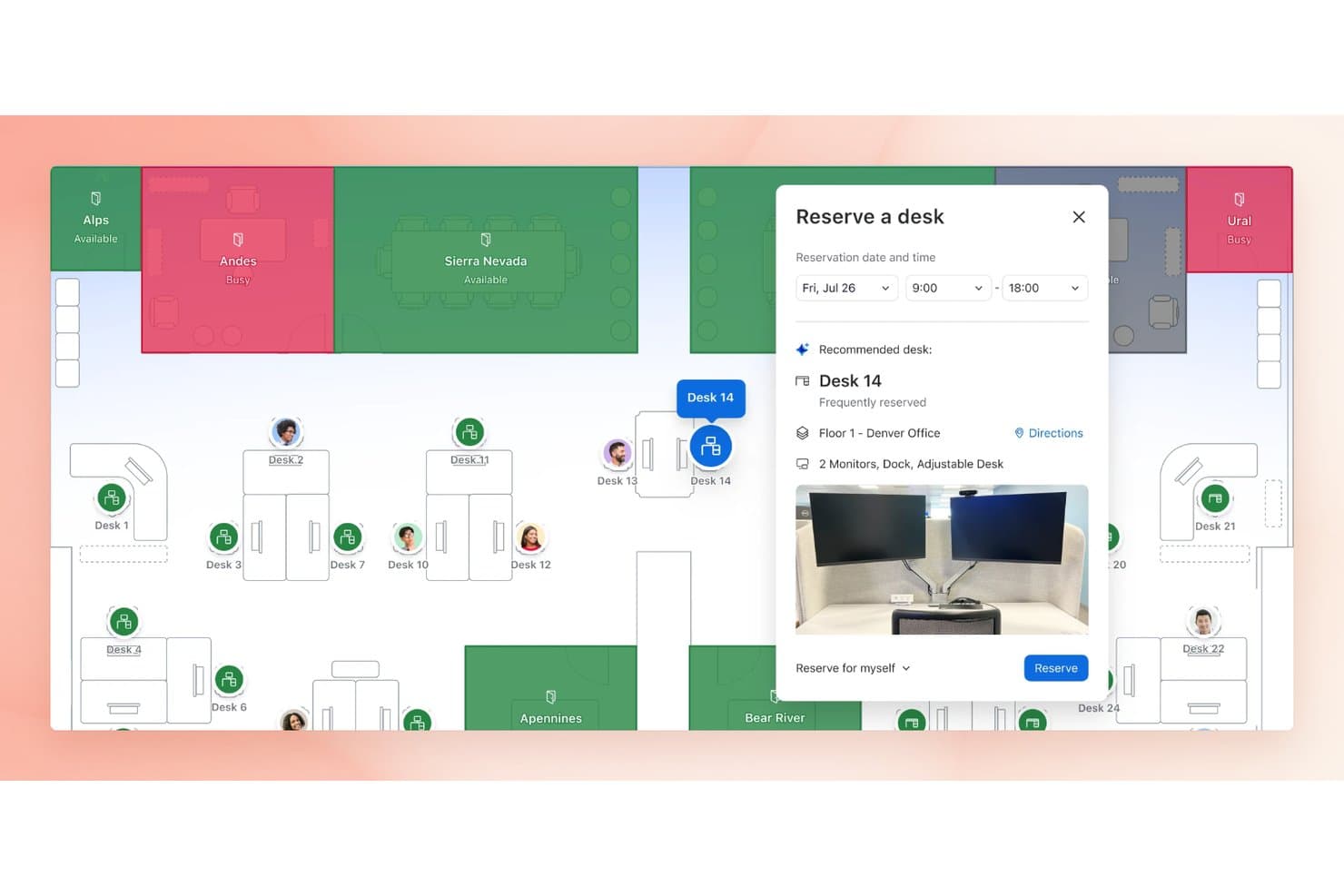
elia lets users reserve desks with AI-recommended options on a floor map. elia is a workplace operations platform that combines desk and room booking, interactive floor plan navigation, request management, visitor management, and hybrid office coordination.
Who Is elia Best For?
elia is a good fit for mid-market to enterprise hybrid teams that want employees to submit workplace requests directly from the same floor plan they use to book a desk.
Why I Picked elia
I picked elia as one of the best because I love how it connects service requests directly to desk and room bookings on the same interactive floor plan. In practice, that means my team can book a desk and immediately submit a catering or IT request tied to that exact location, without switching tools or manually providing context. The location-linked request workflow, paired with automated assignment and prioritization, is something I haven't seen built this tightly into a desk booking platform elsewhere.
elia Key Features
- Interactive floor plan booking: Employees can filter desks by equipment and teammate location, then reserve directly from a visual office map on web or mobile.
- Colleague visibility and attendance dashboard: A collaboration dashboard shows which teammates are booked in and where, helping employees coordinate office days.
- Occupancy heatmaps and usage dashboards: Visual heatmaps surface workspace preference trends and utilization patterns to support space-planning decisions.
- Workplace automation builder: Custom workflows with configurable triggers, conditions, and actions handle booking tasks, reminders, and notifications across Microsoft 365, Slack, and Google Workspace.
elia Integrations
elia offers native integrations across Microsoft 365, Microsoft Teams, Outlook, Google Workspace, Google Calendar, and Slack for bookings, notifications, and workplace workflows. Enterprise plans include API access and a custom integration builder.
Pros and Cons
Pros:
- Requests can link directly to desk bookings
- Colleague visibility helps coordinate office days
- Reviewers praise visual desk selection
Cons:
- Automatic desk no-show release isn't confirmed
- AI recommendations aren't documented for desk allocation
Learn more about elia: Best for customizable desk booking rules
- Free plan available; 14-day free trial; free demo available
- From €1.7/user/month (billed annually)
Visit WebsiteCustomer Rating:4.7/5
Dibsido desk booking screen shows daily seat selection with user assignments and availability. Dibsido is an AI-powered desk booking software that lets you manage workspace reservations, automate scheduling, and configure booking rules for shared office environments.
Who Is Dibsido Best For?
Dibsido is a good fit for small to midsize businesses that need flexible, AI-driven desk booking for hybrid or shared office spaces.
Why I Picked Dibsido
I picked Dibsido as one of the best because its AI-powered scheduling engine automatically assigns desks based on user preferences and availability. I like how I can set up custom booking rules for different teams or departments, which helps manage shared spaces. My team uses Dibsido’s real-time booking and check-in data to monitor desk usage and adjust our workspace planning on the fly.
Dibsido Key Features
- Recurring desk reservations: Set up repeating bookings so team members can automatically reserve their preferred desk on a regular schedule.
- Booking rules and restrictions: Define time limits, advance booking windows, and desk-specific permissions to control how and when spaces get reserved.
- Usage analytics dashboard: Track desk occupancy rates and booking patterns across your workspace to inform space planning decisions.
- Microsoft Teams and Slack integration: Desk booking with smooth integration via Teams and Slack and room booking via Teams.
Dibsido Integrations
Integrations include Slack, Microsoft 365, Google Workspace, two-way Google and Outlook Calendar sync, and SSO through Microsoft Entra ID, Google Workspace, and SAML.
Pros and Cons
Pros:
- Custom booking rules for teams or departments
- Supports multi-location and multi-floor offices
- Includes iOS and Android mobile apps on every plan
Cons:
- Lacks advanced workspace analytics features
- Fewer enterprise facilities controls
Learn more about Dibsido: Best for multi-location workspace
- Free demo available
- Pricing upon request
Visit WebsiteCustomer Rating:3.6/5
OfficeSpace offers a home dashboard with desk and room booking, weekly scheduling, floor plan preview, and workplace announcements. OfficeSpace is an AI-powered workplace management platform that combines hot desk and room booking, interactive floor plan management, space planning automation, and utilization analytics across multiple office locations.
Who Is OfficeSpace Best For?
OfficeSpace is a strong fit for enterprise workplace and facilities teams managing hybrid work across multiple office locations.
Why I Picked OfficeSpace
OfficeSpace earns its spot on my shortlist because of how well its AI Canvas handles desk booking across multiple offices at once. I particularly like the Space Planning Agent, which automates re-stacks and generates seating scenarios across locations without requiring manual admin work. The Workplace Experience Agent goes further, proactively nudging employees with desk suggestions before the most in-demand spots fill up.
OfficeSpace Key Features
- AI-powered booking recommendations: Suggests optimal desks based on preferences, past behavior, and team zones using AI Canvas.
- Automated smart check-in: Syncs with badge systems, WiFi, and sensors for fully automated attendance and no-show handling.
- Dynamic floor plan management: Offers interactive, real-time multi-location maps for easy desk selection and admin edits.
- Workplace system integrations: Natively connects to Microsoft Teams, Slack, Google Workspace, Okta, and HR platforms for smooth workflow integration.
OfficeSpace Integrations
OfficeSpace offers native integrations with Microsoft Teams, Slack, Google Workspace, Okta, ADP, Workday, and Cisco Meraki, and provides an API for custom integrations.
Pros and Cons
Pros:
- Real-time sensor data feeds occupancy analytics
- AI-driven space planning
- Strong multi-location floor plan management
Cons:
- Mobile app experience lags behind desktop
- Setup complexity for large multi-site deployments
Learn more about OfficeSpace: Best for desk booking with visitor management
- Free demo available
- From $5/bookable resource/month (billed annually)
Visit WebsiteCustomer Rating:4.8/5
Envoy interface shows floor plan seating with employee assignment, attendance insights, and desk allocation tools. Envoy is a workplace management platform for AI hot desk booking that offers desk reservations, interactive floor plans, employee scheduling, and workplace analytics.
Who Is Envoy Best For?
Envoy is a good fit for large enterprises and hybrid workplaces that need advanced desk booking and workplace analytics.
Why I Picked Envoy
I picked Envoy as one of the best because I rely on its smart desk booking that uses real-time occupancy data and workplace analytics to optimize space. I like how I can set booking rules, assign neighborhoods, and view interactive floor plans for my team. I also use its analytics dashboard to track workspace usage and inform office planning decisions.
Envoy Key Features
- Mobile booking app: Reserve desks and manage bookings from any smartphone.
- Desk check-in via QR code: Check in to a reserved desk by scanning a QR code on arrival.
- Visitor management integration: Manage guest access and track visitors alongside desk bookings.
- Automated health screening: Require employees to complete health checks before booking or entering the office.
Envoy Integrations
Envoy offers native integrations with Google Workspace, Microsoft 365, Slack, Zoom, Okta, and DocuSign, and provides an API for custom integrations.
Pros and Cons
Pros:
- Visitor management is included by default
- Mobile app supports desk booking and check-in
- AI assigns desks based on team schedules
Cons:
- No public API documentation for developers
- Limited offline functionality for mobile users
Learn more about Envoy: Best for mobile desk booking insights
- Free trial + free demo available
- From $5/user/month (billed annually)
Visit WebsiteCustomer Rating:4.6/5
deskbird scheduling view displays meeting room bookings with filters for capacity and equipment. deskbird is an AI-powered desk booking software platform that offers workspace scheduling, interactive floor plans, mobile booking, and workplace analytics for hybrid offices.
Who Is deskbird Best For?
deskbird is a good fit for hybrid workplace managers and HR teams at midsize companies coordinating flexible desk sharing and office attendance.
Why I Picked deskbird
I picked deskbird as one of the best because its AI-powered suggestions help my team find the right desks based on preferences and past behavior. I like how the platform’s workplace analytics give me detailed insights into space usage and attendance patterns. My team uses deskbird’s interactive floor plans to quickly book desks and coordinate in-office days.
deskbird Key Features
- Mobile booking app: Reserve desks and meeting rooms from your phone.
- Recurring bookings: Set up repeating desk reservations for regular schedules.
- Visitor management: Register and track office guests directly in the platform.
- Calendar integration: Sync bookings with Outlook and Google Calendar.
deskbird Integrations
deskbird offers native integrations with ADP Workforce Now, 7shifts, Dayforce, Deel, Factorial, Google Workspace, HiBob, and provides an API for custom integrations.
Pros and Cons
Pros:
- Real-time occupancy analytics for space optimization
- Offers week planning for hybrid work schedules
- AI suggests desks based on team preferences
Cons:
- Floor plan editing requires Deskbird support
- No built-in visitor management module
Learn more about deskbird: Best for desk booking with smart suggestions
- Free demo available
- Pricing upon request
Visit WebsiteCustomer Rating:4.5/5
Robin dashboard displays office attendance, room usage, visitor logs, and workplace feedback metrics. Robin is a desk booking and workplace management platform that offers AI-powered desk reservations, interactive office maps, space utilization analytics, and employee scheduling tools.
Who Is Robin Best For?
Robin is a good fit for workplace experience teams at mid-sized and large companies managing flexible office spaces.
Why I Picked Robin
I picked Robin as one of the best because I rely on its AI-powered desk booking that automatically suggests optimal seats based on team preferences and booking patterns. I like using the interactive office maps to visualize available desks and quickly reserve spots for my team. The workplace insights dashboard helps me monitor space usage and adjust our office layout as needs change.
Robin Key Features
- Desk check-in via QR code: Employees check in to their reserved desks by scanning a QR code.
- Calendar integrations: Syncs with Google Calendar and Microsoft Outlook for booking visibility.
- Neighborhoods: Group desks into zones for team-based seating arrangements.
- Visitor management: Tracks guest arrivals and manages visitor access within the office.
Robin Integrations
Robin offers native integrations with Google Workspace, Microsoft, Slack, Zoom, Okta, and Rippling, and provides an API for custom integrations.
Pros and Cons
Pros:
- Combines desk, room, and visitor management in one platform
- AI recommends desks based on booking history
- Supports recurring and future desk reservations
Cons:
- Desk booking rules can be rigid for flexible policies
- Space analytics require manual interpretation for decisions
Learn more about Robin: Best for real-time desk tracking
- 30-day free trial + free demo available
- Pricing upon request
Visit WebsiteCustomer Rating:5/5
DeskFlex dashboard tracks desk bookings with activity logs, usage stats, and floor map view. DeskFlex is a desk booking and workspace management platform that combines AI-powered scheduling, hardware integration, room reservations, visitor management, and real-time occupancy tracking for flexible office environments.
Who Is DeskFlex Best For?
DeskFlex is a good fit for facilities managers and IT teams in mid-sized to large organizations needing customizable desk booking with hardware integration.
Why I Picked DeskFlex
I picked DeskFlex as one of the best because I like how it combines software with hardware integration, letting my team use desk sensors and room displays for real-time availability. I use its customizable booking rules to match our office policies, and the visitor management feature helps us track external guests. I also appreciate the way DeskFlex supports advanced scheduling for recurring reservations.
DeskFlex Key Features
- Mobile booking app: Reserve desks and rooms directly from your smartphone.
- Outlook calendar integration: Sync bookings with Microsoft Outlook for unified scheduling.
- Contactless check-in: Use QR codes or RFID for touch-free desk access.
- COVID-19 compliance tools: Set social distancing rules and manage sanitation schedules.
DeskFlex Integrations
DeskFlex offers native integrations with Microsoft Outlook and Exchange, and provides an API for custom integrations.
Pros and Cons
Pros:
- Real-time desk status with interactive maps
- Supports Bluetooth beacons for desk check-in
- AI auto-assigns desks based on preferences
Cons:
- Few options for integrating with chat platforms
- Analytics cannot be exported for reporting
Learn more about DeskFlex: Best for Teams-integrated desk booking
- Free plan + free demo available
- From €30/user/year

Waldo workspace view maps desk bookings inside Microsoft Teams with user locations and schedules. Waldo is an AI-powered desk booking software for Microsoft Teams that offers workspace scheduling, interactive floor plans, and automated desk management features.
Who Is Waldo Best For?
Waldo is a good fit for Microsoft 365 organizations that want to manage desk booking directly within Microsoft Teams.
Why I Picked Waldo
I picked Waldo as one of the best because it’s built directly for Microsoft Teams, letting my team book desks and manage office attendance without leaving our main collaboration hub. I like how Waldo syncs with Microsoft 365 calendars and uses interactive floor plans for quick desk selection. My team is able to automate booking rules and approvals right inside Teams, which keeps everything in one familiar workflow.
Waldo Key Features
- AI-powered desk suggestions: The system recommends available desks based on user preferences and booking patterns.
- Visitor management: Register and track office guests directly within the platform.
- Health attestation workflows: Collect health declarations from users before they enter the office.
- Customizable booking policies: Set specific rules for who can book desks and when.
Waldo Integrations
Waldo has native integrations across the Microsoft ecosystem, including Microsoft Teams and Microsoft 365. An API is available for custom integrations.
Pros and Cons
Pros:
- Admins can set custom booking policies
- Supports automated desk release after no-shows
- Built directly into Microsoft Teams interface
Cons:
- Floor plan setup requires initial Waldo assistance
- Visitor management is not natively supported
Learn more about Waldo: Best for hybrid desk booking analytics
- Free demo available
- Pricing upon request

HybridHero dashboard lists team desk bookings with check-in times and workplace presence. HybridHero is an AI-powered hot desk booking software that combines workspace reservations, occupancy analytics, mobile app access, and visitor management for flexible office environments.
Who Is HybridHero Best For?
HybridHero is a good fit for facilities managers and workplace teams in midsize to large organizations managing flexible office spaces.
Why I Picked HybridHero
I picked HybridHero as one of the best because I like how its occupancy analytics help me understand workspace usage patterns in detail. My team uses the mobile app to book desks and manage reservations on the go, which keeps things flexible. I also appreciate the built-in visitor management for tracking guests alongside desk bookings.
HybridHero Key Features
- Interactive floor plans: Users can view and select available desks on a digital office map.
- Desk check-in via QR code: Employees check in to their reserved desks by scanning a QR code.
- Automated desk release: Unused desks are automatically released if not checked in within a set time.
- Team neighborhood booking: Teams can reserve blocks of desks together for collaborative work.
HybridHero Integrations
HybridHero offers native integrations with Microsoft Teams, Google Workspace, Okta, and Webhooks. An API is available for custom integrations.
Pros and Cons
Pros:
- Supports team neighborhood and block bookings
- Advanced reporting for workspace utilization trends
- Supports health and safety compliance features
Cons:
- Floor plan updates require HybridHero support
- Visitor management is a separate paid module
Learn more about HybridHero: 10Best for automated desk scheduling
Skedda
- 30-day free trial + free demo available
- From $249/month (billed annually)
Visit WebsiteCustomer Rating:4.8/5
Skedda booking panel shows time-based reservations with rules, limits, and user permissions. Skedda is a desk booking and space management platform designed for hybrid workplaces, offering interactive maps, automated scheduling rules, and self-service reservation tools for desks and meeting rooms.
Who Is Skedda Best For?
Skedda is a good fit for office managers and workplace teams at small to midsize businesses managing flexible desk and room bookings.
Why I Picked Skedda
I picked Skedda as one of the best because its interactive maps let my team see desk layouts and book spaces visually. I like how automated scheduling rules help us set booking limits and manage access for different groups. The platform’s self-service reservation tools mean I can let users handle their own bookings without constant admin involvement.
Skedda Key Features
- Single sign-on (SSO): Users can log in with Microsoft 365 or Google accounts.
- Custom booking policies: Set rules for who can book which desks and when.
- Check-in and cancellation controls: Require users to confirm bookings or automatically release unused desks.
- Usage analytics: Track desk occupancy and booking trends with built-in reporting tools.
Skedda Integrations
Skedda offers native integrations with Microsoft 365, Google Workspace, and Slack, and provides an API for custom integrations.
Pros and Cons
Pros:
- Supports recurring and group desk bookings
- SSO integration supports secure user access
- Rules-based booking automates desk assignment logic
Cons:
- Visitor management requires third-party integration
- No built-in AI for predictive desk assignment
Learn more about Skedda:
Diğer Yapay Zekâlı Paylaşımlı Masa Rezervasyon Yazılımları
İşte kısa listemde yer almayan ancak yine de göz atmaya değer bazı ek yapay zekâlı paylaşımlı masa rezervasyon yazılımı seçenekleri:
- 11ArchieBest for AI desk booking and analytics
- 12KadenceBest for smart desk scheduling
- 13DeskiBest for simple, flexible desk booking
- 14JoanBest for touchless desk check-ins
- 15OfficelyBest for Slack-based desk booking
- 16AppspaceBest for space and visitor management
- 17Eptura EngageBest for enterprise workplace experience
- 18SpacetiBest for AI booking across spaces
- 19KorbytBest for workplace communication and booking
- 20GableBest for hybrid workspace analytics
- 21CXAIBest for AI workplace automation
- 22MyDeskBest for sensor-based desk tracking
- 23ComeenBest for Google and Microsoft integrations
How I Evaluate AI Hot Desk Booking Software
I look for tools where the AI goes beyond a label—actually learning agent booking patterns, predicting no-shows, or auto-clustering teams by shift. From there, I split my evaluation into the baseline functionality a tool must have and the differentiating factors that set vendors apart.
Core Functionality (Table Stakes For This List)
When I'm selecting tools for my list, I rank each one on a scale from 0 (does not offer the functionality) to 5 (excels in this area) for each core functionality listed below. Then, I calculate the tool's total score into a percentage. Each tool needs to achieve a minimum total score of 65% to be considered for inclusion.
- AI-Powered Booking Recommendations: I check whether the tool learns from past behavior and team dynamics to suggest the right desk—not just the nearest open one.
- Automated Desk Assignment: The tool should auto-allocate desks based on shift patterns or team rules, so agents aren't scrambling for seats at the start of each rotation.
- Predictive Occupancy Analytics: I look for AI forecasting that flags low-demand days or predicts no-shows, giving CX leaders data to right-size their floor plans.
- Interactive Floor Plan Management: A visual, clickable map showing real-time availability matters here—I evaluate how easy it is to scan open desks across floors and locations.
- Calendar & Collaboration Integrations: Bookings should sync with tools like Google Calendar, Outlook, Slack, or Teams so agents can reserve a desk without leaving their workflow.
- Smart Check-In & No-Show Handling: I look for auto-release logic that frees unclaimed desks after a set window, whether check-in happens via QR code, geolocation, or an app prompt.
Once I have a list of tools that meet the criteria, I consider what sets each platform apart.
Differentiating Factors (What Sets Vendors Apart)
Here's how I compare and contrast different vendors:
Standout Features
Shift-based scheduling alignment matters a lot for CX teams. I evaluate whether the AI can match desk bookings to contact center shift rotations so agents land near their team leads and coaches. Team clustering takes this further by dynamically grouping agents into neighborhoods based on queue coverage or escalation paths. I also look for a conversational booking assistant that lets agents grab a desk through a quick Slack or Teams message instead of opening another app mid-shift.
Beyond Features
Workforce management integrations are a big deal for CX teams. I check whether the tool connects with platforms like NICE, Verint, or Genesys to sync agent schedules directly with desk availability. Multi-site scalability also matters—hybrid support teams often span multiple offices and time zones. Finally, I evaluate onboarding and change management support, since getting hundreds of contact center agents to adopt a new booking tool requires more than a help article. Guided setup and admin training make a real difference in adoption speed.
Yapay Zekâlı Paylaşımlı Masa Rezervasyon Yazılımı Nasıl Seçilir?
Uzun özellik listeleri ve karmaşık fiyatlandırma yapıları arasında kaybolmak kolaydır. Kendinize özgü yazılım seçim sürecinizi yürütürken odaklanmanıza yardımcı olmak için göz önünde bulundurmanız gereken faktörleri içeren bir kontrol listesi hazırladık:
| Faktör | Dikkat Edilmesi Gerekenler |
|---|---|
| FaktörÖlçeklenebilirlik | Dikkat Edilmesi GerekenlerYazılım, birden fazla konum veya hibrit çalışma modelleri de dâhil olmak üzere mevcut ve gelecekteki ofis büyüklüğünüzü destekleyebilecek mi? |
| FaktörEntegrasyonlar | Dikkat Edilmesi GerekenlerTakvimleriniz, kimlik sağlayıcılarınız ve iş birliği araçlarınızla yerel olarak bağlantı kurabiliyor mu? Geçici çözümler gerektirecek eksiklikler var mı? |
| FaktörÖzelleştirilebilirlik | Dikkat Edilmesi GerekenlerRezervasyon kurallarını, onay iş akışlarını ve ofis yerleşimlerini politikalarınıza ve alanınıza uyacak şekilde özelleştirebilir misiniz? |
| FaktörKullanım kolaylığı | Dikkat Edilmesi GerekenlerÇalışanlar ve yöneticiler arayüzü sezgisel bulacak mı, yoksa ek eğitim ve destek için yatırım yapmanız mı gerekecek? |
| FaktörUygulama ve kullanıma alma | Dikkat Edilmesi GerekenlerSistemi kullanıma sunmak, verileri taşımak ve ekibinizin güvenle masa rezervasyonu yapmasını sağlamak ne kadar sürecek? |
| FaktörMaliyet | Dikkat Edilmesi GerekenlerKullanımınız arttıkça fiyatlandırma kademeleri net ve öngörülebilir mi? Birikerek artan kullanıcı başına veya konum başına ücretlere dikkat edin. |
| FaktörGüvenlik önlemleri | Dikkat Edilmesi GerekenlerAraç, BT ve uyumluluk standartlarınızla uyumlu tek oturum açma, veri şifreleme ve gizlilik kontrolleri sunuyor mu? |
| FaktörDestek erişilebilirliği | Dikkat Edilmesi GerekenlerHangi destek kanalları sunuluyor ve bunlar çalışma saatlerinizde mi yoksa yalnızca belirli bölgelerde mi kullanılabiliyor? |
Yapay Zekâlı Paylaşımlı Masa Rezervasyon Yazılımı Nedir?
Yapay zekâ destekli esnek masa rezervasyon yazılımı, esnek oturma düzenine sahip ofislerde rezervasyonları otomatikleştirmek ve optimize etmek için yapay zekâ kullanan bir masa rezervasyon sistemidir. Kuruluşların ortak alanları daha verimli yönetmesine yardımcı olur; tahmin gereksinimini azaltır ve masa uygunluğunu gerçek zamanlı iş yeri ihtiyaçlarıyla uyumlu hâle getirir. Bu platformlar genellikle oda planlama, yol bulma ve dijital tabela gibi özellikleri de içererek çalışanların çalışma ortamında daha kolay yön bulmasını sağlar. Bazı araçlar, tercihlere ve kullanım alışkanlıklarına göre masa önermek için yapay zekâ asistanı da kullanır.
Yapay Zekâ Destekli Esnek Masa Rezervasyon Yazılımının Özellikleri
Yapay zekâ destekli esnek masa rezervasyon yazılımı seçerken aşağıdaki temel özelliklere dikkat edin:
- Yapay zekâ destekli masa atama: Kullanıcı tercihleri, ekip programları ve geçmiş rezervasyon verilerine göre en uygun masaları önermek için yapay zekâ kullanır.
- Etkileşimli kat planları: Kullanıcıların ofisin görsel haritası üzerinde uygun masaları görüp seçmesine olanak tanıyarak doğru yeri bulmayı ve rezerve etmeyi kolaylaştırır.
- Gerçek zamanlı uygunluk takibi: Masa durumunu anında günceller; böylece kullanıcılar hangi masaların boş, rezerve edilmiş veya kullanılamaz olduğunu her zaman görebilir.
- Takvim entegrasyonları: Rezervasyon işlemlerini kolaylaştırmak ve zamanlama çakışmalarını önlemek için Google Takvim veya Microsoft Outlook gibi araçlarla senkronize olur.
- Mobil uygulama erişimi: Çalışanların akıllı telefonlarından masa rezerve etmesine, giriş yapmasına veya masaların rezervasyonunu kaldırmasına olanak tanıyarak esnek ve hareket hâlindeki çalışmayı destekler.
- Ziyaretçi yönetimi: Misafirlerin gelişlerini takip eder ve ziyaretçiler veya yükleniciler için geçici masa atamalarını yönetir.
- Analiz ve raporlama: Alan planlama kararlarına yön vermek için masa kullanımı, doluluk eğilimleri ve rezervasyon alışkanlıkları hakkında içgörüler sunar.
- Mahalle veya ekip bölgeleri: Masaları departmanlar veya ekipler için bölgelere ayırarak oturma düzenini ve iş birliğini koordine etmeyi kolaylaştırır.
- Otomatik giriş ve rezervasyon kaldırma: Masa kullanımını doğrulamak ve kullanılmayan rezervasyonları otomatik olarak kaldırmak için QR kodları, sensörler veya coğrafi sınırlandırma kullanır.
- Yönetici denetimleri ve izinleri: Yöneticilerin rezervasyon kuralları belirlemesine, kullanıcı erişimini yönetmesine ve masa politikalarını kuruluşun ihtiyaçlarına göre yapılandırmasına olanak tanır.
Yapay Zekâ Destekli Esnek Masa Rezervasyon Yazılımının Faydaları
Yapay zekâ destekli esnek masa rezervasyon yazılımını uygulamak, ekibiniz ve işletmeniz için çeşitli faydalar sağlar. Yararlanabileceğiniz bazı avantajlar şunlardır:
- Alan kullanımının optimize edilmesi: Yapay zekâ destekli öneriler ve gerçek zamanlı takip, masaların verimli kullanılmasını sağlayarak ofis alanının boşa harcanmasını azaltır.
- Çalışan deneyiminin iyileştirilmesi: Etkileşimli kat planları ve mobil erişim, çalışanların ihtiyaçlarına uygun masaları bulmasını ve rezerve etmesini kolaylaştırır.
- Hibrit çalışmanın kolaylaştırılması: Otomatik masa atamaları ve takvim entegrasyonları, esnek programları ve ofis ile uzaktan çalışma arasındaki geçişleri destekler.
- Veriye dayalı karar alma: Analiz ve raporlama özellikleri, çalışma alanı kullanımı ve doluluk eğilimleri hakkında uygulanabilir içgörüler sunar.
- Ziyaretçi yönetiminin kolaylaştırılması: Yerleşik ziyaretçi takibi ve geçici masa atamaları, misafirleri ve yüklenicileri ağırlamayı kolaylaştırır.
- Yönetim iş yükünün azaltılması: Otomatik giriş, rezervasyon kaldırma ve yönetici denetimleri, tesis ve BT ekiplerinin manuel görevlerini en aza indirir.
- İş birliğinin geliştirilmesi: Ekip bölgeleri ve mahalle özellikleri, grupların birlikte oturmasına yardımcı olarak daha iyi iletişimi ve ekip çalışmasını destekler.
Yapay Zekâ Destekli Esnek Masa Rezervasyon Yazılımının Maliyetleri ve Fiyatlandırması
Yapay zekâ destekli esnek masa rezervasyon yazılımı seçmek, mevcut çeşitli fiyatlandırma modellerinin ve planların anlaşılmasını gerektirir. Maliyetler özelliklere, ekip büyüklüğüne, eklentilere ve diğer unsurlara göre değişir. Aşağıdaki tabloda, yapay zekâ destekli esnek masa rezervasyon yazılımı çözümlerinde yaygın olarak sunulan planlar, bu planların ortalama fiyatları ve tipik özellikleri özetlenmektedir:
Yapay Zekâ Destekli Esnek Masa Rezervasyon Yazılımı İçin Plan Karşılaştırma Tablosu
| Plan Türü | Ortalama Fiyat | Yaygın Özellikler |
|---|---|---|
| Plan TürüÜcretsiz Plan | Ortalama Fiyat$0 | Yaygın ÖzelliklerTemel masa rezervasyonu, sınırlı sayıda kullanıcı, basit kat planı ve e-posta desteği. |
| Plan TürüKişisel Plan | Ortalama Fiyat$5-$10/kullanıcı/ay | Yaygın ÖzelliklerBireysel rezervasyon, mobil uygulama erişimi, takvim entegrasyonu ve temel analizler. |
| Plan Türüİşletme Planı | Ortalama Fiyat$10-$25/kullanıcı/ay | Yaygın ÖzelliklerEkip bölgeleri, etkileşimli kat planları, yönetici denetimleri, ziyaretçi yönetimi ve standart raporlama. |
| Plan TürüKurumsal Plan | Ortalama Fiyat$25-$50/kullanıcı/ay | Yaygın ÖzelliklerGelişmiş analizler, özel entegrasyonlar, SSO, öncelikli destek ve özel işe alıştırma yardımı. |
AI Sıcak Masa Rezervasyon Yazılımı SSS
AI sıcak masa rezervasyon yazılımı hakkında sık sorulan soruların bazı yanıtları:
AI, geleneksel sistemlere kıyasla masa rezervasyonunu nasıl iyileştirir?
AI, en uygun mevcut masaları önermek için rezervasyon kalıplarını, ekip tercihlerini ve gerçek zamanlı doluluk durumunu analiz eder. Bu, manuel arama ihtiyacını azaltır, ekiplerin birlikte oturmasına yardımcı olur ve ofis alanının temel rezervasyon araçlarına kıyasla daha verimli kullanılmasını sağlar.
AI sıcak masa rezervasyon yazılımı mevcut takvim ve iş birliği araçlarımızla entegre olabilir mi?
Evet, çoğu çözüm Google Calendar, Microsoft Outlook ve Slack gibi araçlarla entegrasyon sunar. Bu sayede kullanıcılar masaları doğrudan aşina oldukları platformlardan rezerve edebilir ve programlar sistemler arasında senkronize kalır.
AI sıcak masa rezervasyon yazılımında hangi güvenlik önlemlerini aramalıyım?
SSO, veri şifreleme ve rol tabanlı erişim kontrolleri gibi özellikleri arayın. Bunlar hassas çalışan verilerinin korunmasına yardımcı olur ve yalnızca yetkili kullanıcıların rezervasyon ve yönetici işlevlerine erişebilmesini sağlar.
Birden fazla ofis konumunu tek bir sistemle yönetmek mümkün mü?
Evet, birçok AI sıcak masa rezervasyon platformu birden fazla konumun yönetimini destekler. Tek bir gösterge paneli üzerinden her ofis için ayrı kat planları, rezervasyon kuralları ve yönetici kontrolleri oluşturabilirsiniz.
Otomatik giriş ve serbest bırakma özellikleri nasıl çalışır?
Otomatik giriş ve serbest bırakma özellikleri, bir masanın gerçekten ne zaman kullanıldığını doğrulamak için QR kodları, sensörler veya coğrafi sınırlandırma kullanır. Bir rezervasyon için giriş yapılmazsa masa başkalarının rezerve edebilmesi için serbest bırakılır ve böylece kullanılabilirlik en üst düzeye çıkarılır.