

En iyi çağrı merkezi planlama yazılımı destek ekiplerinin öngörülemeyen çağrı hacimleri, manuel planlama darboğazları ve personel kullanımındaki verimsizlikler gibi zorlukların üstesinden gelmesine yardımcı olur. Bu araçlar talebi tahmin etmeyi, dengeli programlar oluşturmayı ve kapsama sürekliliğini korumayı kolaylaştırır; böylece temsilcileriniz kaliteli hizmet sunmaya odaklanabilir.
Teknoloji ve CX kesişimindeki deneyimimden yararlanarak her platformu tahmin doğruluğu, planlama esnekliği, otomasyon özellikleri, entegrasyonlar ve kullanılabilirlik açısından değerlendirdim. Bu rehberde, bu değerlendirmeye dayanarak en iyi çağrı merkezi planlama yazılımlarını ve her aracın hangi konularda başarılı olduğuna, ayrıca ekibinizin iş akışları ve operasyonel ihtiyaçları için doğru seçeneği nasıl belirleyebileceğinize ilişkin görüşlerimi paylaşıyorum.
Why Trust Our Software Recommendations
6,700+
Reviews
20
Industry experts
16+
Evaluation factors
14
Years
Our team has been testing and reviewing software since 2012. As CX leaders ourselves, we know how difficult—and important—it is to choose the right software.
For this guide, we evaluated tools using hands-on testing and independent research, scoring tools using our selection criteria.
Our reviews reflect our human editorial judgment, not a sales pitch.
 Gui DrusinaCreative Director
 Tim FisherVP of AI
Karşılaştırma Tablosu: Çağrı Merkezi Planlama Yazılımları
Bu karşılaştırma tablosu, en iyi çağrı merkezi planlama yazılımı seçimlerimin her biri hakkında temel ayrıntıları özetlemektedir.
Sorted by: Default
| Tool | Starting Price | Website | |
|---|---|---|---|
Best call center scheduling software for omnichannel routing | 5.0 out of 5 | $30/user/month Free demo available | Website |
Best for tying staffing to customer experience | 4.5 out of 5 | Pricing upon request Free demo available | Website |
Best call center scheduling software for international call centers | 4.2 out of 5 | $25/user/month Free plan + 14-day trial + free demo available | Website |
Best call center scheduling software for one-click schedules | 4.6 out of 5 | $5/user/month 30-day free trial + free demo available | Website |
Best call center scheduling software for creating SLA-proof scheduling | 4.7 out of 5 | $25/user/month | Website |
Best for call management flexibility | 4.4 out of 5 | $19/month 7-day free trial | Website |
Best call center scheduling software for reducing administrative efforts and improving the worker experience | 4.4 out of 5 | Pricing upon request Free demo available | Website |
Best for AI-powered scheduling | 4.7 out of 5 | $0.65/conversation Free demo available | Website |
Best for SMBs unified calling needs | 4.2 out of 5 | $39/user/month 15-day free trial available | Website |
Best call center scheduling software for accelerated schedule creation | 4.3 out of 5 | Pricing upon request Free demo available | Website |


En İyi Çağrı Merkezi Planlama Yazılımı İncelemeleri
En iyi çağrı merkezi planlama yazılımı seçenekleri arasından belirlediğim 10 seçeneği, birbirlerinden nasıl ayrıştıklarını anlamanıza yardımcı olmak için özetledim.
 Best call center scheduling software for omnichannel routing
- Free demo available
- From $30/user/month (billed annually)
Visit WebsiteCustomer Rating:5/5
RingCentral allows users to visualize contact center performance and make better business decisions. RingCentral Contact Center is a cloud-based solution designed for businesses that need effective tools for scheduling and managing calls across multiple channels. It’s perfect for teams aiming to optimize staffing and deliver consistent service across all customer touchpoints.
Why I picked RingCentral Contact Center:
RingCentral Contact Center excels in omnichannel routing, allowing you to connect customers to the right agent no matter the communication channel. It offers intelligent scheduling features to ensure your team is always prepared for peak demand. Real-time analytics provide insights into agent productivity and channel performance. In my experience, its focus on omnichannel efficiency makes it a strong choice for managing complex customer interactions.
Standout features & integrations:
Features include tools for workforce forecasting, skill-based routing to match customers with the right agents, and real-time dashboards to track performance. These features simplify scheduling while improving service quality.
Integrations include Salesforce, Zendesk, HubSpot, Microsoft Teams, Google Workspace, Slack, Zoho CRM, Freshdesk, Shopify, and ServiceNow.
Pros and Cons
Pros:
- Good call clarity
- Provides helpful customer support services
- User-friendly and customizable features
Cons:
- Limitations in message formatting and reaction options
- Occasional system glitches
Learn more about RingCentral Contact Center: Best for tying staffing to customer experience
- Free demo available
- Pricing upon request
Visit WebsiteCustomer Rating:4.5/5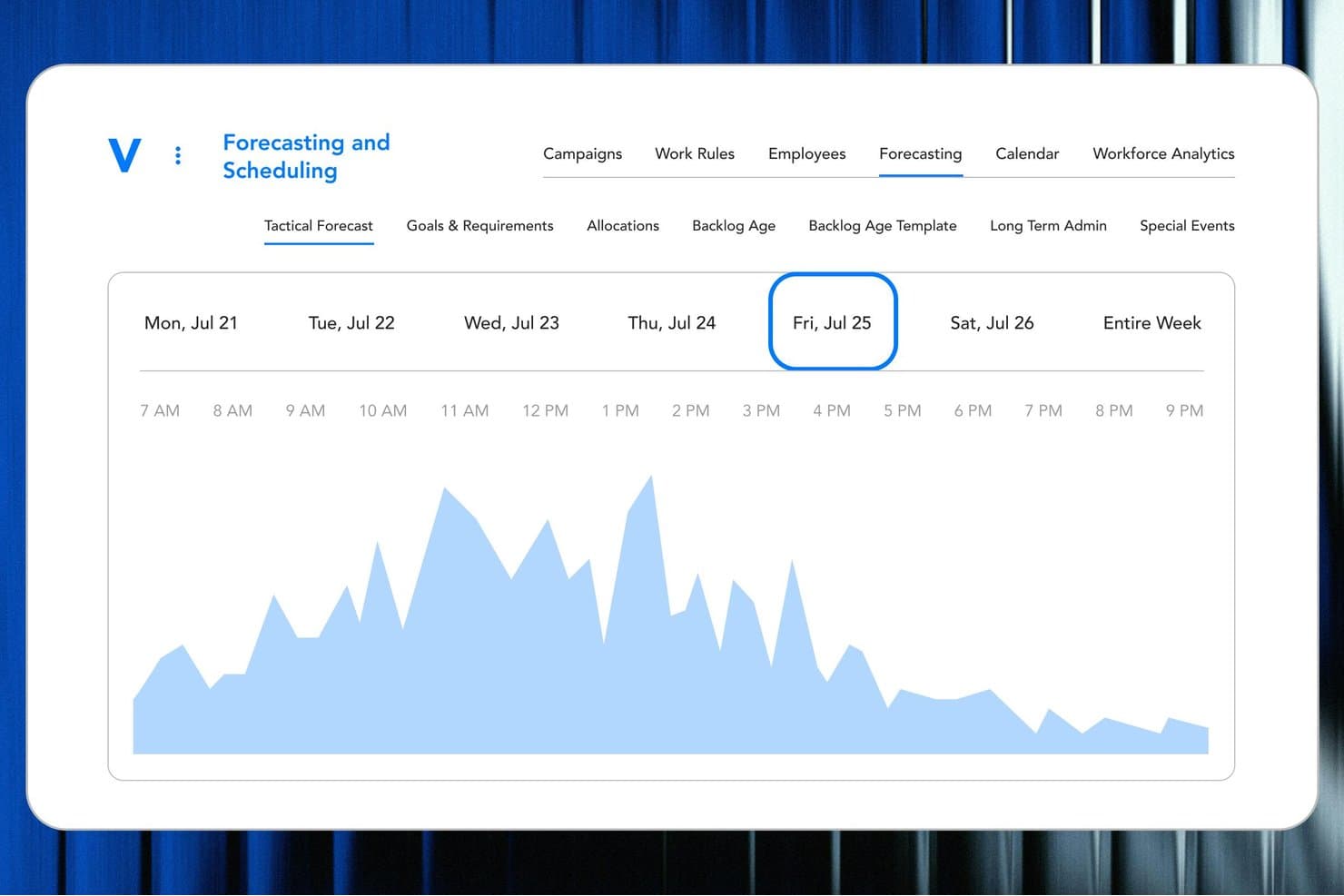
Verint lets users view hourly call volume forecasts by day of the week. Verint is an AI-powered call center scheduling platform that handles multichannel demand forecasting, automated shift scheduling, intraday management, real-time adherence tracking, and agent self-service through its MyVerint mobile app.
Who Is Verint Best For?
Verint is a strong fit for enterprise contact centers that need to connect staffing decisions directly to customer experience outcomes across multiple channels and sites.
Why I Picked Verint
Verint earns its spot on my shortlist because it's one of the few workforce management platforms that ties scheduling decisions directly to customer experience outcomes, not just headcount math. I love how its AI-driven forecasting pulls in multichannel demand across voice, chat, email, and SMS, then automatically selects the right forecasting model based on similar historical scenarios. Its Operations Assist feature detects intraday deviations and predicts service-level impact before problems escalate, which I find genuinely useful for staying ahead of coverage gaps.
Verint Key Features
- TimeFlex Bot: Lets agents change shift start and end times or swap days without manager approval, while automatically protecting service-level coverage.
- Cross-channel scheduling: Assigns agents across voice, chat, email, and SMS based on individual skills and real-time availability in a single scheduling workflow.
- MyVerint mobile app: Gives agents mobile access to their schedules and performance metrics, with the ability to request overtime, submit time-off requests, and message managers directly.
- Role-based scorecards: Displays individual and team KPI trends and goal progress in near real time, with automated coaching triggers when performance thresholds are crossed.
Verint Integrations
Verint offers marketplace integrations with Intradiem and Zoom Contact Center through CSI and Time Collection adapters. An API is available for custom integrations.
Pros and Cons
Pros:
- Reviewers praise schedule adjustments across work areas
- Automates shift swaps while protecting service coverage
- Forecasts voice, chat, email, and SMS demand
Cons:
- Complex reporting can make staffing analysis harder
- Conflicting events can require schedule regeneration
Learn more about Verint: Best call center scheduling software for international call centers
- Free plan + 14-day trial + free demo available
- From $25/user/month (billed annually)
Visit WebsiteCustomer Rating:4.2/5
CloudTalk offers solutions all over the world. CloudTalk is a cloud-based phone system designed to support the scheduling and operational needs of international call centers. It’s ideal for teams managing global operations and diverse time zones.
Why I picked CloudTalk:
CloudTalk offers tools tailored for international call centers, including scheduling features that account for time zone differences. You can manage agent availability across multiple regions and optimize shift plans to ensure global coverage. The platform also provides detailed performance analytics to help you refine your workforce management strategies. In my experience, CloudTalk is an excellent solution for handling the complexities of international call center scheduling.
Standout features & integrations:
Features include time zone-aware scheduling, tools for tracking global agent performance, and automatic shift notifications to keep teams aligned. These features simplify the complexities of managing international teams.
Integrations include Salesforce, HubSpot, Zendesk, Microsoft Teams, Slack, Google Workspace, Freshdesk, Pipedrive, Intercom, and Zoho CRM.
Pros and Cons
Pros:
- Easy to update staff information
- Highly customizable
- Great customer support
Cons:
- Advanced features have a steep learning curve
- Onboarding could be a little more active
 Best call center scheduling software for one-click schedules
- 30-day free trial + free demo available
- From AUD $5/user/month
Visit WebsiteCustomer Rating:4.6/5
The Deputy AI automatically factors in employee skills and availability for one-click schedules. Deputy is a workforce management platform designed to help businesses create and manage call center schedules with minimal effort. It’s ideal for teams looking for quick, efficient scheduling solutions.
Why I picked Deputy:
Deputy lets you build schedules with a single click, saving your team valuable time. It uses intelligent algorithms to create optimized schedules based on agent availability, preferences, and workload demands. Real-time notifications ensure that your team stays informed about any schedule changes. In my experience, Deputy’s ease of use and automation make it a standout choice for simplifying call center scheduling.
Standout features & integrations:
Features include one-click scheduling to minimize admin time, shift swapping tools for better flexibility, and real-time updates to keep agents informed. These features streamline your scheduling process while keeping your team in sync.
Integrations include Salesforce, Slack, Microsoft Teams, Google Workspace, HubSpot, Zendesk, Freshdesk, Zoho CRM, Shopify, and Xero.
Pros and Cons
Pros:
- Can handle multiple locations
- Comprehensive visibility and overviews
- Simple and easy to use
Cons:
- Missing some integrations
- Geofencing tool could use work
Learn more about Deputy: Best call center scheduling software for creating SLA-proof scheduling
- Plans start at $25/user/month
Visit WebsiteCustomer Rating:4.7/5
Assembled ensures SLAs are guaranteed with intuitive tools. Assembled is a workforce management platform designed to help call centers create schedules that align with service level agreements (SLAs). It’s ideal for teams focused on meeting operational benchmarks and delivering consistent service.
Why I picked Assembled:
Assembled ensures your schedules are SLA-compliant by using data-driven insights to balance staffing levels with forecasted demand. It allows you to track adherence and adjust schedules in real time to prevent SLA breaches. Customizable tools let you fine-tune shifts to meet specific performance targets. In my experience, Assembled excels at helping call centers maintain high standards while optimizing workforce efficiency.
Standout features & integrations:
Features include SLA-aware shift planning, real-time adherence tracking, and customizable reporting for performance analysis. These features ensure your team can consistently meet service benchmarks.
Integrations include Salesforce, Zendesk, Slack, Microsoft Teams, Google Workspace, HubSpot, ServiceNow, Freshdesk, Zoho CRM, and Intercom.
Pros and Cons
Pros:
- Automations save time
- Low barrier for entry
- User-friendly interface
Cons:
- Can’t export call logs
- Local numbers aren’t always available
Learn more about Assembled: Best for call management flexibility
- 7-day free trial
- From $19/month
Visit WebsiteCustomer Rating:4.4/5
TalkRoute’s flexible call management keeps teams connected with unlimited calling, multi-device access, and seamless remote operations. TalkRoute is a virtual phone system designed for business owners and their teams, enabling communication through calls, text messages, and video meetings within a single app. It supports features like call forwarding, text messaging, video conferencing, and voicemail management, accessible from various devices without additional hardware. The platform offers toll-free, vanity, and local phone numbers to meet diverse business communication needs.
Why I picked TalkRoute:
TalkRoute stands out for its call management capabilities, which are particularly beneficial for call centers. You can make and receive calls from your desktop, web, or mobile device without needing any extra equipment, and you get unlimited calling minutes. This setup can help your team handle high volumes of calls efficiently, without worrying about exceeding limits. Plus, by displaying your business number instead of personal numbers, it ensures privacy for your team. The ability to manage calls from various devices means your team can remain flexible and responsive, no matter where they are, ensuring smooth operations even in a remote work setup.
Standout features & integrations:
Features include call forwarding, call recording, custom greetings, various phone number options (toll-free, vanity, local), voicemail access through apps, customizable greetings, unlimited voicemail storage, SMS and MMS messaging, video conferencing for up to 100 participants, screen sharing, whiteboard feature, call routing adjustments.
Integrations include Zapier, Google Sheets, HubSpot, Slack, Gmail, Facebook Leads, Mailchimp, Shopify, Trello, WooCommerce, ActiveCampaign, and Pipedrive.
Pros and Cons
Pros:
- Suitable for businesses of all sizes with options to easily add users and extensions
- Remote service access via cell phone
- HIPAA compliance features
Cons:
- May not be suited for those with extensive international communication needs
- Requires a stable internet connection (potential drawback during outages)
Learn more about TalkRoute: Best call center scheduling software for reducing administrative efforts and improving the worker experience
- Free demo available
- Pricing upon request
Visit WebsiteCustomer Rating:4.4/5
Skills-based scheduling makes staff management easier. Talkdesk is a cloud-based contact center platform designed to streamline scheduling while enhancing the worker experience. It’s perfect for teams aiming to reduce admin workload and ensure employee satisfaction.
Why I picked Talkdesk:
Talkdesk simplifies scheduling with automated tools that eliminate manual tasks and provide visibility into agent availability. Its self-service options let employees manage their schedules, request time off, or swap shifts, improving engagement. Real-time data helps you optimize workforce management, balancing team needs with business goals. In my experience, Talkdesk effectively combines operational efficiency with a focus on employee experience.
Standout features & integrations:
Features include automated shift creation to save time, self-service scheduling tools for employees, and real-time analytics for workforce adjustments. These tools reduce admin overhead while ensuring a positive worker experience.
Integrations include Salesforce, Zendesk, HubSpot, Microsoft Teams, Google Workspace, Slack, Shopify, Zoho CRM, Freshdesk, and ServiceNow.
Pros and Cons
Pros:
- Comprehensive reporting on in-house teams
- Easy to track users
- Simple user interface
Cons:
- Occasional downtime for updates
Learn more about Talkdesk: Best for AI-powered scheduling
- Free demo available
- From $0.65/conversation
Visit WebsiteCustomer Rating:4.7/5
Assembled AI provides real-time shift swapping capabilities. If you're on the lookout for call center scheduling software that blends AI with human expertise, Assembled AI might just be what you need. Designed for businesses aiming to elevate their customer support operations, this platform addresses the challenges of optimizing staffing and managing operations. By integrating AI-driven scheduling and real-time analytics, Assembled AI helps ensure that your team is always ready to meet customer demands.
Why I Picked Assembled AI
I picked Assembled AI because it stands out with its AI-powered scheduling, which automates over 80% of scheduling tasks, freeing up your team to focus on customer interactions. The platform's machine learning-based forecasting is another significant feature, offering predictive insights that help align staffing with anticipated demand. Additionally, Assembled AI's real-time analytics provide actionable data, allowing you to make informed decisions that can enhance operational efficiency. These features collectively address the complexities of workforce management and ensure your call center runs smoothly.
Assembled AI Key Features
In addition to its standout scheduling capabilities, I also found several other features that add value to Assembled AI:
- Intelligent Case Routing: This feature ensures that customer queries are directed to the most suitable agent, improving response times and customer satisfaction.
- Multi-Channel Automation: Support is automated across various channels including chat, email, SMS, and voice, providing a unified customer experience.
- Workflow Optimization: By optimizing workflows, Assembled AI helps reduce the manual workload on agents.
- Security and Compliance: The platform is SOC 2, GDPR, and HIPAA compliant, ensuring that your data management adheres to the highest security standards.
Assembled AI Integrations
Integrations include Dixa, Five9, Google Calendar, Genesys, Gladly, Intercom, Notion, Observe.AI, Salesforce Service Cloud, and Zendesk.
Pros and Cons
Pros:
- Integrates with major support platforms
- Advanced forecasting and scheduling tools
- Strong AI and human orchestration
Cons:
- Limited appeal for low volume teams
- Custom workflows require configuration effort
Learn more about Assembled AI: Best for SMBs unified calling needs
- 15-day free trial available
- From $39/user/month
Visit WebsiteCustomer Rating:4.2/5
Comprehensive cloud telephony solution for efficient call center management. Zoho Voice is a cloud-based phone system tailored for small and medium-sized businesses that require seamless calling solutions integrated into their workflow. It’s ideal for teams looking for simplicity and efficiency in managing calls and schedules.
Why I picked Zoho Voice:
Zoho Voice unifies your call center scheduling and management with tools like automated call routing and shift planning. Its intuitive interface simplifies managing agent availability and assigning shifts. Integration with other Zoho apps ensures your team can handle calls and schedules from one platform. In my experience, Zoho Voice provides SMBs with an all-in-one solution for their calling and scheduling needs.
Standout features & integrations:
Features include call scheduling tools to match agent availability, automated routing to reduce wait times, and detailed call logs for performance tracking. These features help your team stay organized and efficient.
Integrations include Zoho CRM, Zoho Desk, Salesforce, Slack, Microsoft Teams, Google Workspace, HubSpot, Freshdesk, Zendesk, and Shopify.
Pros and Cons
Pros:
- Flexible scheduling options accommodate dynamic call center needs
- User-friendly interface enhances ease of use
- Seamless integration with Zoho suite streamlines operations
Cons:
- Limited customization for very specific scheduling needs
- Learning curve for advanced features
Learn more about Zoho Voice: 10Best call center scheduling software for accelerated schedule creation
Humanity
- Free demo available
- Pricing upon request
Visit WebsiteCustomer Rating:4.3/5
Humanity works on all devices, including phones, smart watches, and tablets. Humanity is a workforce management tool designed to help businesses create and manage schedules quickly and efficiently. It’s ideal for call centers seeking to minimize the time spent on scheduling tasks.
Why I picked Humanity:
Humanity enables you to create schedules in minutes with its drag-and-drop functionality and automated shift planning tools. It considers agent availability, preferences, and compliance rules, ensuring efficient scheduling with minimal manual input. Real-time notifications keep your team informed of any updates or changes. In my experience, Humanity’s speed and ease of use make it an excellent choice for fast-paced call center environments.
Standout features & integrations:
Features include drag-and-drop scheduling to save time, availability tracking to prevent conflicts, and automated compliance checks to adhere to labor laws. These features accelerate schedule creation while ensuring accuracy.
Integrations include Salesforce, Slack, Microsoft Teams, Google Workspace, HubSpot, Zendesk, Freshdesk, Zoho CRM, ADP, and Workday.
Pros and Cons
Pros:
- Amazing customer support
- Instant notifications for every change
- Easy to learn
Cons:
- Mobile app isn’t as developed as desktop
Learn more about Humanity:
Diğer Çağrı Merkezi Planlama Yazılımları
En iyi çağrı merkezi planlama yazılımı listesine giremeyen birkaç seçenek şunlardır:
- 11ShiftboardBest call center scheduling software for union and labor board compliance
- 12injixoBest call center scheduling software for real-time management of call center agents
- 13NICE Workforce ManagementBest call center scheduling software for customized plans and ultra-tailored implementation
- 14SlingBest call center scheduling software for management of multiple locations
- 15TixTimeBest call center scheduling software for avid Excel users
- 16LiveAgentBest for automated availabilities
- 17NextivaBest call center scheduling software for flexibility and forecasting
- 18ConnecteamBest call center scheduling software for all-in-one business operations
- 19ZendeskBest for integrated scheduling via WFM tools
- 20Workforce.comBest call center scheduling software for instantly optimized schedules
- 21When I WorkBest call center scheduling software for auto-scheduling shifts
- 22FindmyshiftBest call center scheduling software for a simple online employee scheduling platform
- 23ZoomShiftBest call center scheduling software for SMBs with hourly employees
İlgili CX Yazılımı İncelemeleri
Aradığınızı hâlâ bulamadıysanız, test edip değerlendirdiğimiz bu ilgili müşteri deneyimi yönetimi araçlarına göz atın.
- Müşteri Hizmetleri Yazılımı
- Yardım Masası Yazılımı
- Çağrı Merkezi Yazılımı
- Müşteri Mesajlaşma Platformu
- Dijital Deneyim Platformu
- Duygu Analizi Araçları
How I Evaluate Call Center Scheduling Software
I evaluate every platform through two lenses: baseline requirements—like automated scheduling, intraday adherence, and ACD integrations—and differentiators that separate the best-fit tools from the rest.
Core Functionality (Table Stakes For This List)
When I'm selecting tools for my list, I rank each one on a scale from 0 (does not offer the functionality) to 5 (excels in this area) for each core functionality listed below. Then, I calculate the tool's total score into a percentage. Each tool needs to achieve a minimum total score of 65% to be considered for inclusion.
- Call Volume Forecasting: I check whether the tool generates staffing forecasts from historical data, including how it handles spikes like seasonal campaigns or product launches.
- Automated Shift Scheduling: Each tool should build optimized schedules using demand forecasts, agent availability, and business rules rather than relying on manual template assembly.
- Intraday Management: I look for real-time adherence tracking and re-forecasting that lets planners react when, say, a sudden call surge hits mid-shift.
- Agent Self-Service: Agents should be able to view schedules, request PTO, and initiate shift swaps on their own instead of routing every change through a supervisor.
- Skills-Based Scheduling: I evaluate how well a tool accounts for multi-skilled agents, such as scheduling bilingual reps across both voice and chat queues simultaneously.
- ACD/Telephony Integration: The platform needs to connect with major CCaaS and ACD systems like Genesys, Five9, or Amazon Connect to pull call data and sync schedules.
Once I have a list of tools that meet the criteria, I consider what sets each platform apart.
Differentiating Factors (What Sets Vendors Apart)
Here's how I compare and contrast different vendors:
Standout Features
What-if scenario planning is a big one for me—it lets planners model outcomes like a hiring freeze or a new product launch before locking in schedules. I also look for AI-driven forecasting that improves over time rather than relying solely on static Erlang models. Omnichannel scheduling matters when your team handles chat and email alongside voice, since each channel has different handle times. A native mobile app rounds things out by giving remote and hybrid agents real-time access to swaps and notifications.
Beyond Features
I check whether a platform supports built-in labor law and compliance rules, since contact centers operating across multiple regions need scheduling logic that respects local regulations without manual workarounds. Integration depth matters too—I evaluate how well each tool connects with your existing CCaaS, HRIS, and payroll systems so schedule data flows both ways. Implementation timelines are worth asking about upfront, especially for large teams where historical data migration and forecast model training can stretch go-live dates significantly.
Çağrı Merkezi Planlama Yazılımı Nasıl Seçilir?
Çağrı merkezi planlama yazılımı, müşteri hacmini yeterli personel sayısıyla dengeleyebilir ve kişiselleştirilmiş planlama özellikleriyle çalışan memnuniyetini artırabilir. İhtiyaçlarınıza en uygun çağrı merkezi planlama yazılımını belirlemenize yardımcı olmak için öncelikle temel kullanıcılarınızı tanımlamanız ve onların karşılaştığı özel zorlukları belgeleyerek ortaya koymanız gerekir.
Çağrı merkezi planlama yazılımlarını kısa listeye alırken, deneme sürecinden geçirirken ve seçerken aşağıdakileri göz önünde bulundurun:
- Hangi sorunu çözmeye çalışıyorsunuz - Özellikleri ve çağrı merkezi planlama yazılımının sunması gereken işlevleri netleştirmek için gidermeye çalıştığınız çağrı merkezi planlama yazılımı özelliği açığını belirleyerek başlayın.
- Kimlerin kullanması gerekecek - Maliyeti ve gereksinimleri değerlendirmek için yazılımı kimlerin kullanacağını ve kaç lisansa ihtiyacınız olacağını göz önünde bulundurun. Erişime yalnızca müşteri hizmetleri ekibinin mi yoksa kuruluşun tamamının mı ihtiyaç duyacağını değerlendirmeniz gerekir. Bu netleştiğinde, herkes için kullanım kolaylığına mı yoksa çağrı merkezi planlama yazılımınızın deneyimli kullanıcıları için hıza mı öncelik verdiğinizi düşünmeye değer.
- Hangi diğer araçlarla birlikte çalışması gerekiyor - Hangi araçları değiştirdiğinizi, hangi araçların kullanılmaya devam edeceğini ve muhasebe, CRM veya İK yazılımı gibi hangi araçlarla entegre olmanız gerektiğini netleştirin. Araçların birbirleriyle entegre edilmesinin gerekip gerekmediğine veya alternatif olarak birden fazla aracı tek bir bütünleşik çağrı merkezi planlama yazılımıyla değiştirip değiştiremeyeceğinize karar vermeniz gerekir.
- Hangi sonuçlar önemli - Başarılı sayılabilmesi için yazılımın sunması gereken sonucu göz önünde bulundurun. Hangi yetkinliği kazanmak veya neyi geliştirmek istediğinizi ve başarıyı nasıl ölçeceğinizi düşünün. Örneğin, sonuçlardan biri performans hakkında daha fazla görünürlük elde etme becerisi olabilir. Çağrı merkezi planlama yazılımı özelliklerini gözünüz dönene kadar karşılaştırabilirsiniz; ancak elde etmek istediğiniz sonuçları düşünmüyorsanız, değerli zamanınızın büyük bir bölümünü boşa harcıyor olabilirsiniz.
- Kuruluşunuz içinde nasıl çalışır - Yazılım seçimini iş akışlarınız ve hizmet sunma yönteminizle birlikte değerlendirin. Nelerin iyi çalıştığını ve ele alınması gereken sorunlara yol açan alanları değerlendirin. Her işletmenin farklı olduğunu unutmayın — bir aracın popüler olması, kuruluşunuzda işe yarayacağı anlamına gelmez.
Çağrı Merkezi Planlama Yazılımındaki Trendler
Yoğun dönemler için personel eğilimlerini yönetmek, özellikle perakende, konaklama ve müşteri hizmetlerine yoğun şekilde odaklanan diğer sektörler gibi alanlarda iş gücü yönetiminin kritik bir bileşenidir. Çağrı merkezi planlama yazılımı alanında gelişen ve farkında olmanız gereken bazı trendlerin kısa bir özeti aşağıdadır:
- Tahmine Dayalı Planlama: Tahmine dayalı analizler, yoğun dönemlerdeki personel ihtiyaçlarınızı öngörmenize yardımcı olabilir; böylece personelinizi proaktif bir şekilde planlayabilirsiniz. Bu özellik, gelecekteki talebi tahmin etmek için önceki satış geçmişi ve müşteri trafiği gibi geçmiş verilerden yararlanır. Bu, yöneticilerin yoğun dönemleri karşılamak için doğru sayıda temsilcinin hazır bulunmasını sağlayan programlar oluşturmasına yardımcı olur; müşteri deneyimi düzeyini iyileştirir ve çalışanların stresini azaltır.
- Esnek Personel Modelleri: Modern yazılımlar, çağrı üzerine çalışma vardiyaları ve sıfır saatli sözleşmeler gibi daha esnek personel modellerini bünyesine katmaya başlıyor. Bu modeller, işletmelerin iş gücünü gerçek zamanlı talebe göre ayarlamasına olanak tanır; bu da müşteri faaliyetlerinde beklenmedik artışlar olduğunda faydalıdır. Ancak çağrı merkezi çalışanlarının memnuniyet ve elde tutma düzeylerini korumak için bu modellerin adil çalışma uygulamalarına uygun olduğundan emin olmak önemlidir.
- Diğer Sistemlerle Entegrasyon: Gelişmiş çağrı merkezi planlama yazılımları artık müşteri ilişkileri yönetimi (CRM) platformları, çağrı kuyruğu sistemleri ve performans izleme yazılımları gibi diğer araçlarla sorunsuz bir şekilde entegre oluyor. Bu entegrasyon, yöneticilerin programları optimize etmek, performans ölçümlerini izlemek ve tüm kanallarda tutarlı hizmet düzeyleri sağlamak için birleşik verileri kullanmasına olanak tanır.
- Gerçek Zamanlı İş Gücü Yönetimi: Gerçek zamanlı çalışan planlama yazılımları daha gelişmiş hale geliyor ve yöneticilerin personel ayarlamalarını anında yapmasına olanak tanıyor. Bu araçlar, müşteri çağrısı hacmi tahminleri aştığında yöneticileri uyarmak ve böylece personelde anında ayarlamalar yapılmasını sağlamak üzere tasarlanmıştır.
Bu trendleri bünyesinde barındıran modern bir çağrı merkezi yazılım çözümüne yatırım yapmak, mümkün olan en iyi müşteri deneyimini sunmak için temsilci planlama ihtiyaçlarınızı optimize etmenize ve aynı zamanda ekibiniz için daha iyi bir çalışan deneyimi oluşturmanıza yardımcı olur. Özellikle sektörünüzde müşteri ihtiyaçlarında mevsimsel dalgalanmalar varsa, sizin için en iyi seçeneğin hangi çağrı merkezi yazılımı olduğunu değerlendirirken bu trendleri daima göz önünde bulundurun.
Çağrı Merkezi Planlama Yazılımı Nedir?
Çağrı merkezi planlama yazılımı çağrı hacimlerini tahmin ederek ve her vardiyaya doğru sayıda temsilci atayarak iş gücü planlamasını otomatikleştirir. Bu araçlar program oluşturmayı kolaylaştırır, gerçek zamanlı ayarlamalara olanak tanır ve kapsamı iyileştirmek, bekleme sürelerini azaltmak ve genel temsilci ve müşteri deneyimini geliştirmek için vardiya değişimi gibi özellikleri destekler.
Çağrı Merkezi Planlama Yazılımının Özellikleri
Bir çağrı merkezi iş gücünü etkili bir şekilde yönetmek, müşteri çağrısı hacmini önceden tahmin etmeyi gerektirir. Neyse ki çağrı merkezi planlama yazılımı, çağrı hacmini tahmin etmek ve personel düzeylerini optimize etmek için geçmiş verilerden yararlanarak bu süreci kolaylaştırabilir. Bu tür yazılımlarda aranması gereken temel özellikler şunlardır:
- Geçmiş Verilerin Analizi: Yoğun saatleri ve günleri belirlemek için geçmiş çağrı hacmi eğilimlerini analiz eder. Bu, yoğun dönemlerde yeterli personelin hazır bulunmasını sağlamaya yardımcı olur.
- Tahmin Araçları: Gelecekteki çağrı hacmini tahmin etmek için geçmiş verileri ve sektör eğilimlerini kullanır. Bu, çağrı hacminde beklenen yoğunluklar için personeli proaktif bir şekilde planlamamı sağlar.
- Beceriye Dayalı Planlama: Temsilcileri uygun beceri setleriyle belirli çağrılarla eşleştirir. Bu, yoğun zamanlarda karmaşık talepleri karşılamak için doğru kişilerin hazır bulunmasını sağlar.
- Gerçek Zamanlı Trafik İzleme: Bu özellik, çağrı trafiği hakkında canlı güncellemeler sağlar. Personel seviyelerinde anında ayarlamalar yapılmasına olanak tanıyarak çağrı merkezinin çağrı hacmindeki beklenmedik değişikliklere etkili bir şekilde yanıt vermesini sağlar.
- Çalışan Becerilerini İzleme: Bu özellik, her temsilcinin becerilerini ve uzmanlık alanlarını kaydeder. Doğru temsilciyi doğru çağrılarla eşleştirerek daha yüksek müşteri memnuniyeti ve yoğun dönemlerde çağrıların daha verimli şekilde ele alınmasını sağlar.
- Vardiya Değiştirme İmkânları: Bu özellik, temsilcilerin yönetimin müdahalesi olmadan vardiyalarını kolayca değiştirmesine olanak tanır. Vardiya yönetimindeki esneklik, yoğun zamanlarda hizmet kalitesinden ödün vermeden kapsamanın sürdürülmesine yardımcı olur.
- Uyumluluk Yönetimi: Bu araç, tüm programların iş kanunlarına ve şirket politikalarına uygun olmasını sağlar. Uygunluk, yasal sorunların önlenmesine ve özellikle çalışma saatlerinin uzadığı dönemlerde kritik önem taşıyan adil çalışma koşullarının sağlanmasına yardımcı olur.
- Otomatik Planlama: Bu özellik, tahmin edilen çağrı hacimlerine göre vardiya düzenlerinin oluşturulmasını otomatikleştirir. Otomasyon zamandan tasarruf sağlar, hataları azaltır ve kaynakların daha etkili şekilde tahsis edilmesine yardımcı olarak çağrı merkezinin yoğun zamanlara iyi hazırlanmasını sağlar.
- Devamsızlık Yönetimi: Bu özellik, planlı ve plansız devamsızlıkları yönetir. Devamsızlıklara hızlı bir şekilde uyum sağlanması, beklenmedik personel eksikliklerinin yaşandığı günlerde bile çağrı merkezinin yeterli personelle çalışmaya devam etmesini sağlar.
- Talep Tahmini: Yoğun dönemler için doğru personel planlarını desteklemek üzere gelecekteki çağrı hacimlerini tahmin etmek için algoritmalar kullanır.
- Otomatik Planlama Özellikleri: Verimliliği artırmak ve manuel iş yükünü azaltmak için temsilcinin uygunluğu, becerileri ve tahmin edilen talep gibi faktörlere göre vardiyaları otomatik olarak atar.
- Vardiya ve Program Yönetimi: Vardiyaları yönetmek, değişiklikleri takip etmek ve her zaman dilimi için en uygun kapsamanın sağlanmasını garanti etmek üzere merkezi bir platform sunar.
- Gerçek Zamanlı İletişim Araçları: Program güncellemeleri veya acil değişiklikler için personelle kesintisiz iletişim kurulmasını sağlayan anlık mesajlaşma ve bildirimler gibi araçları içerir.
Bu özellikleri değerlendirerek süreci kolaylaştıran, personel seviyelerini optimize eden ve çağrı hacminin yoğun olduğu dönemlere hazırlıklı olmanızı sağlayan bir çağrı merkezi planlama yazılımı bulabilir, böylece daha verimli ve etkili bir çağrı merkezi operasyonuna sahip olabilirsiniz.
Çağrı Merkezi Planlama Yazılımının Faydaları
Çağrı merkezi planlama yazılımı, çağrı merkezinizin verimliliğini ve etkinliğini dönüştürebilecek çok sayıda fayda sunar. Çözümleri değerlendirirken göz önünde bulundurmanız gereken beş temel avantaj şunlardır:
- Geliştirilmiş Verimlilik: Otomatik planlama süreçleri manuel çabayı ve hataları azaltır. Bu fayda, yönetimin günlük planlama işlerine takılıp kalmak yerine stratejik görevlere ve iyileştirmelere odaklanması için daha fazla zaman sağlar.
- Artırılmış Müşteri Memnuniyeti: Optimize edilmiş personel seviyeleri, müşterilerin zamanında ve yeterli becerilere sahip temsilciler tarafından karşılanmasını sağlar. Bekleme süreleri azaldığında ve hizmet kalitesi iyileştiğinde, genel müşteri memnuniyeti doğal olarak artar; bu da marka itibarınıza ve müşteri sadakatine katkıda bulunur.
- Artan Esneklik: Vardiya değişimi ve gerçek zamanlı ayarlamalar gibi özellikler, temsilcilere programları üzerinde daha fazla kontrol sağlar. Bu esneklik, kişisel ihtiyaçlara uyum sağlayarak çalışan memnuniyetini ve elde tutma oranını artırmaya yardımcı olur; bu da iş gücünüzü istikrarlı hâle getirir.
- Maliyet Yönetimi: Yoğun çağrı zamanlarını tahmin ederek personel gereksinimlerini buna göre düzenleyen yazılım, gereğinden fazla veya yetersiz personel çalıştırmayı en aza indirmeye yardımcı olur. Personel ile talep arasındaki bu hassas eşleşme, iş gücü maliyetlerinin kontrol edilmesine ve çağrı merkezinin genel finansal performansının iyileştirilmesine yardımcı olur.
- Veriye Dayalı Kararlar: Kapsamlı raporlama ve analizlere erişim sayesinde yöneticiler, eğilimlere ve performans verilerine dayalı bilinçli kararlar alabilir. Bu özellik, planlama ve operasyonel uygulamalarda sürekli iyileştirmeler yapılmasını sağlayarak sonuçta daha iyi iş sonuçlarına katkıda bulunur.
Çağrı merkezi planlama yazılımına yatırım yapmak, hem temsilciler hem de kuruluşlar için herkesin kazançlı çıkacağı bir durum sunar. Süreçleri kolaylaştırarak, verimliliği artırarak ve müşteri memnuniyetini yükselterek günümüzün zorlu çağrı merkezi ortamının getirdiği güçlüklerle başa çıkmanızı sağlar.
Çağrı Merkezi Planlama Yazılımı Maliyetleri ve Fiyatlandırması
Çağrı merkezi planlama yazılımı, her biri farklı operasyonel ölçeklere ve işletme gereksinimlerine uyacak şekilde tasarlanmış çeşitli fiyatlandırma ve plan seçenekleriyle sunulur. Bu seçenekleri ve özelliklerini anlamak, kuruluşunuzun hedefleri ve bütçesiyle uyumlu bir yazılım paketi seçmek için çok önemlidir. Aşağıda karşılaşabileceğiniz tipik plan seçeneklerine ayrıntılı bir bakış yer almaktadır:
| Plan Türü | Ortalama Fiyat | Yaygın Özellikler |
|---|---|---|
| Plan TürüÜcretsiz | Ortalama Fiyat$0 | Yaygın ÖzelliklerTemel planlama, gerçek zamanlı izleme, sınırlı raporlama |
| Plan TürüTemel | Ortalama Fiyat$15-30 kullanıcı/ay | Yaygın ÖzelliklerGeliştirilmiş planlama özellikleri, uyumluluk takibi, temel analizler |
| Plan TürüProfesyonel | Ortalama Fiyat$30-50 kullanıcı/ay | Yaygın ÖzelliklerGelişmiş analizler, çok becerili planlama, entegrasyon seçenekleri |
| Plan TürüKurumsal | Ortalama FiyatÖzel fiyatlandırma | Yaygın ÖzelliklerÖzelleştirilebilir özellikler, tam entegrasyon, özel destek, gelişmiş tahminleme |
Çağrı merkezi planlama yazılımı seçerken operasyonunuzun büyüklüğünü, planlama ihtiyaçlarınızın karmaşıklığını ve ihtiyaç duyacağınızı öngördüğünüz destek düzeyini göz önünde bulundurun. Doğru yazılımın yalnızca mevcut ihtiyaçlarınızı karşılaması değil, aynı zamanda kuruluşunuzla birlikte büyüme kapasitesine sahip olması gerektiğini unutmayın.
Çağrı Merkezi Planlama Yazılımı Hakkında SSS
\u003cspan style=\u0022font-weight: 400\u0022\u003eÇağrı merkezi planlama yazılımının nasıl çalıştığını hâlâ merak mı ediyorsunuz? İşte, konuyu netleştirmenize yardımcı olacak, aldığımız popüler SSS’lerden bazı yanıtlar:\u003c/span\u003e
Çağrı merkezinde planlama nasıl yapılır?
İster bir çağrı merkezi ister müşteri hizmetleri temelli bir tesis olsun, bu kuruluşlara yönelik planlama yazılımı çeşitli faktörleri bütünleştiren programlar oluşturma esasına dayanır. Bu yazılımlar; müşteri taleplerini iş gücünden en verimli şekilde yararlanarak karşılamak için çağrı hacmi, temsilci beceri seti ve temsilci uygunluğuna göre program oluşturmayı otomatikleştirir.
Başka hangi çağrı merkezi yazılımlarını kullanmalıyım?
CX Lead, ihtiyaçlarınıza daha uygun olabilecek ve işletmenizi optimize etmenize yardımcı olacak birçok başka yazılım çözümüne genel bakış sunar. Şu listelere göz atın:
\u003cul\u003e
\t\u003cli\u003e\u003ca href=\u0022https://thecxlead.com/tools/best-call-center-workforce-management-software/\u0022\u003eÇağrı Merkezi İş Gücü Yönetimi Yazılımı\u003c/a\u003e\u003c/li\u003e
\t\u003cli\u003e\u003ca href=\u0022https://thecxlead.com/tools/best-customer-service-software/\u0022\u003eMüşteri Hizmetleri Yazılımı\u003c/a\u003e\u003c/li\u003e
\t\u003cli\u003e\u003ca href=\u0022https://thecxlead.com/tools/best-ai-customer-service-software/\u0022\u003eCX Profesyonelleri için Yapay Zekâ Müşteri Hizmetleri Yazılımı\u003c/a\u003e\u003c/li\u003e
\t\u003cli\u003e\u003ca href=\u0022https://thecxlead.com/tools/best-inbound-call-center-software/\u0022\u003eGelen Çağrı Merkezi Yazılımı\u003c/a\u003e\u003c/li\u003e
\t\u003cli\u003e\u003ca href=\u0022https://thecxlead.com/tools/best-call-center-software-for-small-business/\u0022\u003eKüçük İşletmeler için Çağrı Merkezi Yazılımı\u003c/a\u003e\u003c/li\u003e
\u003c/ul\u003e
Çağrı merkezi planlama yazılımında gerçek zamanlı iletişim araçları bulunur mu?
Evet, \u003cstrong\u003eçağrı merkezi planlama yazılımı\u003c/strong\u003e, iş birliğini geliştirmek ve sorunsuz program yönetimi sağlamak için genellikle \u003cstrong\u003egerçek zamanlı iletişim araçlarını\u003c/strong\u003e içerir. Bu araçlar genellikle şunlara olanak tanır:
\u003col\u003e
\t\u003cli\u003e\u003cstrong\u003eAnında Bildirimler\u003c/strong\u003e: Temsilcileri program değişiklikleri, vardiya güncellemeleri veya acil personel ihtiyaçları hakkında uyarır.\u003c/li\u003e
\t\u003cli\u003e\u003cstrong\u003eUygulama İçi Mesajlaşma\u003c/strong\u003e: Hızlı koordinasyon için yöneticilerle personel arasında doğrudan iletişim kurulmasını sağlar.\u003c/li\u003e
\t\u003cli\u003e\u003cstrong\u003eVardiya Değişikliği Talepleri\u003c/strong\u003e: Vardiya değişiklikleri için gecikme olmadan gerçek zamanlı onay veya yeniden atama yapılmasını kolaylaştırır.\u003c/li\u003e
\t\u003cli\u003e\u003cstrong\u003eToplu Güncellemeler\u003c/strong\u003e: Çağrı hacminde beklenmedik artışlar gibi kritik güncellemeler hakkında tüm ekip üyelerine toplu bildirim gönderir.\u003c/li\u003e
\u003c/ol\u003e
Bu araçlar yanıt sürelerini iyileştirir, iletişim hatalarını azaltır ve tüm personelin gerçek zamanlı operasyonel ihtiyaçlarla uyumlu olmasını sağlar.
Çağrı merkezi planlama yazılımı başka hangi sistemlerle entegre olur?
Çağrı merkezi planlama yazılımı, operasyonları kolaylaştırmak ve verimliliği artırmak için çeşitli sistemlerle entegre olur. Yaygın entegrasyonlar şunlardır:
\u003col\u003e
\t\u003cli\u003e\u003cstrong\u003eMüşteri İlişkileri Yönetimi (CRM)\u003c/strong\u003e: Kişiselleştirilmiş ve bilinçli etkileşimler için çağrı programlarını müşteri verileriyle ilişkilendirir.\u003c/li\u003e
\t\u003cli\u003e\u003cstrong\u003eİş Gücü Yönetimi (WFM)\u003c/strong\u003e: Optimize edilmiş kaynak tahsisi için programları daha kapsamlı iş gücü planlama araçlarıyla senkronize eder.\u003c/li\u003e
\t\u003cli\u003e\u003cstrong\u003eÇağrı Kuyruğu Sistemleri\u003c/strong\u003e: Bekleme sürelerini en aza indirmek ve hizmeti iyileştirmek için personel planlamasını gerçek zamanlı çağrı hacimleriyle uyumlu hâle getirir.\u003c/li\u003e
\t\u003cli\u003e\u003cstrong\u003eBordro Sistemleri\u003c/strong\u003e: Çalışılan saatleri takip eder ve doğru ücretlendirme için bordro hesaplamalarını otomatikleştirir.\u003c/li\u003e
\t\u003cli\u003e\u003cstrong\u003ePerformans Takip Araçları\u003c/strong\u003e: Programları performans eğilimleriyle uyumlu hâle getirmek için temsilci verimliliği ve çağrı sonuçları hakkında içgörüler sunar.\u003c/li\u003e
\t\u003cli\u003e\u003cstrong\u003eÖğrenme Yönetim Sistemleri (LMS)\u003c/strong\u003e: Eğitim oturumlarını ve temsilci gelişimini uygun vardiyalarla koordine eder.\u003c/li\u003e
\t\u003cli\u003e\u003cstrong\u003eYardım Masası Yazılımı\u003c/strong\u003e: Çok kanallı destek için personel planlamasının talep çözüm iş akışlarıyla uyumlu olmasını sağlar.\u003c/li\u003e
\t\u003cli\u003e\u003cstrong\u003eİletişim Platformları\u003c/strong\u003e: Gerçek zamanlı program güncellemeleri ve iş birliği için Slack veya Microsoft Teams gibi araçlarla entegre olur.\u003c/li\u003e
\u003c/ol\u003e
Bu entegrasyonlar, çağrı merkezi yönetimine birleşik bir yaklaşım sağlayarak verimliliği ve karar alma süreçlerini iyileştirir.