Çağrı merkezi yazılımı, destek ekiplerinin yüksek hacimli sesli iletişimleri daha hızlı, düzenli ve kontrollü bir şekilde yönetmesine yardımcı olur. Bekleme sürelerini azaltmak, çağrı yönlendirmesini iyileştirmek ve temsilcilere sorunları hızlıca çözmeleri için ihtiyaç duydukları araçları sağlamak üzere tasarlanmıştır.
Müşteri deneyimi araçlarını işlevsellik, kullanılabilirlik ve yatırım getirisi açısından değerlendirme konusundaki kapsamlı deneyimim sayesinde, gelen ve giden çağrıları tutarlı ve ölçeklenebilir bir şekilde yönetmek için en iyi çağrı merkezi yazılımlarını belirledim. Bu, ek bir karmaşıklık yaratmadan daha iyi müşteri hizmeti sunabilmeniz için ekibiniz adına doğru çağrı merkezi yazılımını bulmanıza yardımcı olacaktır.
Why Trust Our Software Recommendations
6,700+
Reviews
20
Industry experts
16+
Evaluation factors
14
Years
Our team has been testing and reviewing software since 2012. As CX leaders ourselves, we know how difficult—and important—it is to choose the right software.
For this guide, we evaluated tools using hands-on testing and independent research, scoring tools using our selection criteria.
Our reviews reflect our human editorial judgment, not a sales pitch.
 Gui DrusinaCreative Director
 Tim FisherVP of AI
Çağrı Merkezi Yazılımları Karşılaştırma Tablosu
En iyi çağrı merkezi yazılımı seçimlerim için fiyatlandırma ayrıntılarını bu karşılaştırma tablosunda özetledim:
Sorted by: Default
| Tool | Starting Price | Website | |
|---|---|---|---|
Best for call monitoring features | 4.3 out of 5 | $30/user/month Free trial available | Book Demo |
Best for automation-driven processes | 5.0 out of 5 | $30/user/month Free demo available | Website |
Best for a scalable and versatile solution | 4.8 out of 5 | $25/month Free demo available | Website |
Best for global call centers | 4.2 out of 5 | $25/user/month Free plan + 14-day trial + free demo available | Website |
Best for handling multiple calls | 4.4 out of 5 | $19/month 7-day free trial | Website |
Best with enterprise-grade security and compliance | 4.3 out of 5 | $110/agent/month Free demo available | Website |
Best for managing high call volumes | 4.1 out of 5 | $119/seat/month Free demo available | Website |
Best with unified journey management | Not rated | $75/user/month Free demo available | Website |
Best for easy deployment and administration | Not rated | Pricing upon request Free demo available | Website |
Best with deep CRM integration capabilities | Not rated | Pricing upon request Free demo available | Website |


En İyi Çağrı Merkezi Yazılımı İncelemeleri
En iyi çağrı merkezi yazılımı seçimlerimin ayrıntılı özetlerini sundum ve her sistemi bu listeye neden dahil ettiğimi açıkladım.
 Best for call monitoring features
- Free trial available
- From $30/user/month (billed annually)
Visit WebsiteCustomer Rating:4.3/5
Track call performance in real-time through Aircall’s analytics dashboard. If you need a call center platform that connects quickly with your existing CRM and helpdesk tools, Aircall is worth a look. It’s built for fast-moving sales and support teams that want to launch new phone lines and integrations without IT delays. Aircall helps you centralize customer conversations and automate call logging, so your team can focus on the next interaction.
Who is Aircall Best For?
Customer support managers, contact center leaders, and sales operations teams at small to mid-sized organizations that need live call monitoring and coaching as part of their phone system. It suits companies operating distributed support or sales teams that require centralized visibility into call activity and real-time supervision across channels.
Why I Picked Aircall
What stands out about Aircall is how quickly you can get a new call center up and running, even if your team is distributed or remote. The platform’s fast setup process lets you create new numbers and onboard agents in minutes, which is ideal for businesses that need to scale or pivot quickly. I appreciate how Aircall’s deep CRM integrations automatically sync call data and notes, so your team always has the latest customer context at their fingertips. These features make Aircall a strong choice for teams that want to minimize downtime and keep customer records unified across channels.
Aircall Key Features
Some other features in Aircall that are especially useful for call center teams include:
- Call Whispering: Supervisors can listen in and provide guidance to agents during live calls without the customer hearing.
- Shared Call Inbox: Teams can view, assign, and manage missed calls and voicemails from a central dashboard.
- Power Dialer: Automatically dials through lists of numbers to speed up outbound calling campaigns.
- Warm Transfer: Agents can speak with a colleague before transferring a call, ensuring smoother handoffs.
Aircall Integrations
Integrations include Salesforce, HubSpot, Intercom, Zendesk, Pipedrive, Microsoft Dynamics, Slack, Shopify, Freshdesk, and Zoho CRM.
Pros and Cons
Pros:
- Excellent customer support
- Accessible on multiple devices
- Deep communication insights
Cons:
- No built-in workforce management tools
- Loudspeaker functionality is unpredictable
 Best for automation-driven processes
- Free demo available
- From $30/user/month (billed annually)
Visit WebsiteCustomer Rating:5/5
Visualize call center performance in a centralized dashboard. RingCentral Contact Center offers a cloud-based platform that integrates AI-driven insights and automation to enhance customer interactions. It appeals to industries ranging from retail to healthcare, where efficient customer service is paramount. By providing omnichannel support across voice, messaging, and social media, RingCentral helps businesses streamline communication and optimize agent performance, thus addressing challenges such as managing high call volumes and improving customer satisfaction.
Who is RingCentral Contact Center Best For?
Customer service and support managers, contact center leaders, and operations teams at mid-sized to large organizations that need a unified platform to manage omnichannel customer interactions with automation, routing, and analytics. It suits companies that handle high volumes of inbound and outbound support or sales activity and require centralized oversight of performance, workforce management, and CRM-integrated workflows.
Why I Picked RingCentral Contact Center
I picked RingCentral Contact Center for its strong focus on automation-driven processes, which is essential for any modern call center operation. With features like Interactive Voice Response (IVR) and Intelligent Virtual Agents (IVAs), you can automate routine customer interactions, reducing wait times and allowing your team to focus on more complex issues. This not only enhances customer satisfaction but also optimizes operational efficiency, ensuring your call center runs smoothly. Additionally, the use of AI-powered conversation intelligence provides real-time insights, helping your agents deliver personalized support and improving overall service quality.
RingCentral Contact Center Key Features
In addition to its automation-driven processes, RingCentral Contact Center offers a variety of key features that enhance its utility as a call center software.
- Omnichannel Support: Engage with customers through multiple channels including voice, chat, email, and social media, ensuring a seamless customer experience.
- Workforce Management: Optimize your team's schedules and monitor performance with tools designed to enhance productivity and service quality.
- Analytics and Reporting: Gain insights into your call center's performance with detailed analytics and reporting tools, helping you make informed decisions.
- Security and Compliance: Protect sensitive data and ensure compliance with industry regulations through advanced security features.
RingCentral Contact Center Integrations
Integrations include Salesforce, HubSpot, Zendesk, Slack, Microsoft Teams, Google Workspace, ServiceNow, Microsoft Dynamics 365, Oracle, and SugarCRM.
Pros and Cons
Pros:
- Built-in workforce and quality management tools
- Omnichannel support across voice, chat, and social
- AI-powered routing for complex customer journeys
Cons:
- Initial customization requires significant effort and resources
- Limited support for polycom phones
Learn more about RingCentral Contact Center: Best for a scalable and versatile solution
- Free demo available
- From $25/month (billed annually)
Visit WebsiteCustomer Rating:4.8/5
Keep track of your team's time and tasks to ensure your call center is running as efficiently as possible through the system. If your team needs to manage international calling and messaging from one platform, Squaretalk is built for you. This cloud-based call center software is especially useful for businesses with remote or distributed agents who need local numbers and automated workflows across multiple countries. Squaretalk helps simplify global communication and compliance for customer support and sales teams working at scale.
Who is Squaretalk Best For?
Squaretalk suits customer support and sales teams at growing small to mid-sized companies that need a scalable communications platform. It works well for organizations operating across multiple regions that require flexible voice infrastructure and centralized management of distributed teams.
Why I Picked Squaretalk
Squaretalk caught my attention because it’s designed for teams that need global voice and messaging capabilities from a single platform. I picked it for this list since it offers local phone numbers in over 100 countries and supports automated call distribution, which is essential for managing remote or distributed agents. The platform’s cloud-based telephony infrastructure helps businesses simplify international calling and stay compliant with local regulations. If your call center needs to reach customers worldwide without juggling multiple systems, Squaretalk’s unified approach is a strong fit.
Squaretalk Key Features
I also found several other features that support call center operations:
- Smart Dialer: Automatically dials numbers from call lists and skips busy or unanswered calls to keep agents focused on live conversations.
- Call Recording: Records inbound and outbound calls for quality assurance and compliance purposes.
- IVR Designer: Lets you create custom interactive voice response menus using a drag-and-drop interface.
- Real-Time Analytics Dashboard: Shows live call metrics and agent performance data for supervisors to monitor activity.
Squaretalk Integrations
Integrations include Zoho, Salesforce, Freshworks, Pipedrive, Lynx, Programmable Messaging, Programmable Voice Access, and Call Me Back widget.
Pros and Cons
Pros:
- User-friendly and intuitive interface
- Extensive reporting and analytics features
- High security standards
Cons:
- No mobile application
- Limited customization options
Learn more about Squaretalk: Best for global call centers
- Free plan + 14-day trial + free demo available
- From $25/user/month (billed annually)
Visit WebsiteCustomer Rating:4.2/5
Monitor customer service representatives’ activity from CloudTalk’s dashboard. CloudTalk is designed for teams that need advanced call routing and analytics across multiple locations or remote setups. It’s a strong fit for businesses managing distributed support or sales teams who want to track performance and optimize workflows. The platform helps you handle high call volumes while keeping every interaction organized and measurable.
Who is CloudTalk Best For?
CloudTalk supports operations leaders and IT teams at mid-sized to enterprise organizations running global call centers. It is well-suited to companies with distributed sales and support teams that require centralized call management across multiple countries and regions.
Why I Picked CloudTalk
I chose CloudTalk because its advanced call routing and analytics are especially useful for teams working across different locations or time zones. The platform offers skills-based routing, so calls reach the right agent based on expertise, and real-time analytics dashboards that let you monitor call activity as it happens. I also like that you can set up custom call flows to match your team’s structure, which helps keep distributed operations running smoothly. These features make CloudTalk a strong option for businesses that need to coordinate and measure performance across remote or multi-site call centers.
CloudTalk Key Features
Some other features in CloudTalk that stand out for call center teams include:
- Voicemail Drop: Agents can leave pre-recorded voicemail messages with one click, saving time on repetitive follow-ups.
- Call Recording: Automatically record calls for quality assurance, training, and compliance purposes.
- Interactive Voice Response (IVR): Set up multi-level IVR menus to guide callers to the right department or information.
- Click-to-Call: Initiate calls directly from your CRM or helpdesk with a single click, reducing manual dialing errors.
CloudTalk Integrations
Integrations include Salesforce, HubSpot, Zendesk, Pipedrive, Zoho CRM, Intercom, Freshdesk, Microsoft Teams, Monday, and Shopify.
Pros and Cons
Pros:
- Stable call quality
- User-friendly interface
- Simple rep management
Cons:
- Needs better API support
- Updates can cause issues


Talkroute provides a unified communication platform that enables businesses to manage calls, text messages, voicemails, and meetings from a single interface. If you’re looking for a virtual phone system that works across devices, Talkroute is built for small businesses and remote teams that need flexible call handling. It’s especially useful for companies that want to route calls to multiple locations or mobile phones without extra hardware. Talkroute helps you manage business calls professionally, even if your team is always on the go.
Who is Talkroute Best For?
TalkRoute fits small business owners and customer-facing teams that need to manage multiple inbound calls without adding complex infrastructure. It serves early-stage to mid-sized companies across industries that want a straightforward virtual phone system to route calls across distributed staff in the U.S. or other supported regions.
Why I Picked Talkroute
Talkroute stands out for its virtual phone system with call routing designed for small teams that need flexibility. I picked it because you can direct calls to any phone, whether your team is in the office, remote, or using mobile devices, so you never miss a customer call. The platform also lets you set up custom greetings and voicemail boxes for each user, which helps small businesses look professional. If you want a solution that brings advanced call handling to a distributed or mobile team, Talkroute is built for that purpose.
Talkroute Key Features
In addition to its flexible call routing and professional voicemail options, I also found these features worth noting:
- Call Stacking: Lets multiple callers wait in a queue instead of getting a busy signal.
- Text Messaging: Allows you to send and receive SMS messages from your business number.
- Desktop and Mobile Apps: Gives you access to your phone system from any device.
- Call Reporting: Provides detailed call logs and analytics for tracking team activity.
Talkroute Integrations
Integrations are not publicly listed.
Pros and Cons
Pros:
- Call stacking keeps callers in a queue
- Easy setup process
- Consistent call quality and reliability
Cons:
- Some users may want more sophisticated functionalities
- Additional costs for extra phone numbers and users
Learn more about TalkRoute: Best with enterprise-grade security and compliance
- Free demo available
- From $110/agent/month (proactive AI extra)
Visit WebsiteCustomer Rating:4.3/5
NiCE CXone offers an AI-powered agent workspace with real-time chat summaries, sentiment tracking, and automated contact notes to streamline customer interactions. NiCE CXone is an AI-powered cloud contact center platform that unifies inbound and outbound voice, digital channels, workforce engagement management, and interaction analytics on a single platform.
Who Is NiCE CXone Best For?
It's a strong fit for enterprise contact centers in regulated industries like healthcare, banking, insurance, and government that need rigorous compliance built into their platform.
Why I Picked NiCE CXone
NiCE CXone earns its spot as one of the best on my shortlist because of how deeply compliance is woven into the platform itself. I like that recording and compliance tools aren't an add-on here; they're included at every pricing tier, which matters in regulated industries where audit trails are non-negotiable. Features like complete Teams recording coverage and HIPAA-ready infrastructure mean I'm not patching together a compliance stack from third-party tools.
NiCE CXone Key Features
- Omnichannel agent desktop: Manage voice, chat, email, SMS, and social messages in one unified interface.
- AI-powered IVR: Deploy conversational IVR flows using natural language understanding and automation.
- Workforce engagement management: Forecast, schedule, record, and manage agent performance on a single cloud platform.
- Real-time analytics dashboard: Monitor live queue activity, agent status, and contact center KPIs with custom reporting tools.
NiCE CXone Integrations
NiCE CXone offers native integrations with Salesforce, Zendesk, Microsoft Dynamics 365, ServiceNow, Microsoft Teams, Oracle Service Cloud, and Zoom. An API is available for custom integrations.
Pros and Cons
Pros:
- Extensive certifications for regulated industries
- Built-in workforce management and scheduling tools
- AI-powered routing across all digital channels
Cons:
- Reporting customization requires technical expertise
- Complex implementation requires IT involvement
Learn more about NiCE CXone: Best for managing high call volumes
- Free demo available
- From $119/seat/month
Visit WebsiteCustomer Rating:4.1/5
Create custom call flows from the admin dashboard. Five9 offers a cloud-based contact center platform designed for organizations that want to blend AI automation with live agent support. It’s a strong choice for teams looking to unify voice, chat, email, and social channels while using analytics to optimize performance. Five9 helps businesses automate routine interactions and deliver more personalized service at scale.
Who is Five9 Best For?
Five9 supports contact center and operations leaders at mid-sized to enterprise organizations that manage high inbound and outbound call volumes. It fits companies in service-driven and regulated industries that require centralized oversight and workforce management across regional or global operations.
Why I Picked Five9
What drew me to Five9 is its focus on combining AI-powered automation with deep analytics for contact centers. The platform’s intelligent virtual agents handle routine customer inquiries, freeing up live agents for more complex issues. I also like that Five9’s analytics suite provides real-time and historical insights into agent performance and customer interactions. This approach helps teams continuously improve service quality and efficiency while managing high volumes across multiple channels.
Five9 Key Features
Some other features that make Five9 a strong option for call center teams include:
- Predictive Dialer: Automatically dials numbers and connects answered calls to available agents.
- Omnichannel Routing: Routes customer interactions from voice, chat, email, and social media to the right agent.
- CRM Integrations: Connects natively with Salesforce, ServiceNow, Microsoft Dynamics, and other leading CRMs.
- Call Recording and Monitoring: Records calls and allows supervisors to monitor live interactions for quality assurance.
Five9 Integrations
Integrations include Salesforce, ServiceNow, Microsoft Dynamics 365, Oracle, Zendesk, Oracle NetSuite, Zoom, Microsoft Teams, Slack, and Mitel.
Pros and Cons
Pros:
- Predictive dialer increases outbound call efficiency
- Includes gamification to improve agent performance
- Extensive documentation
Cons:
- Feature add-ons can be expensive
- Integration analytics are limited to their top-level paid plan
Learn more about Five9: Best with unified journey management
- Free demo available
- From $75/user/month (billed annually)
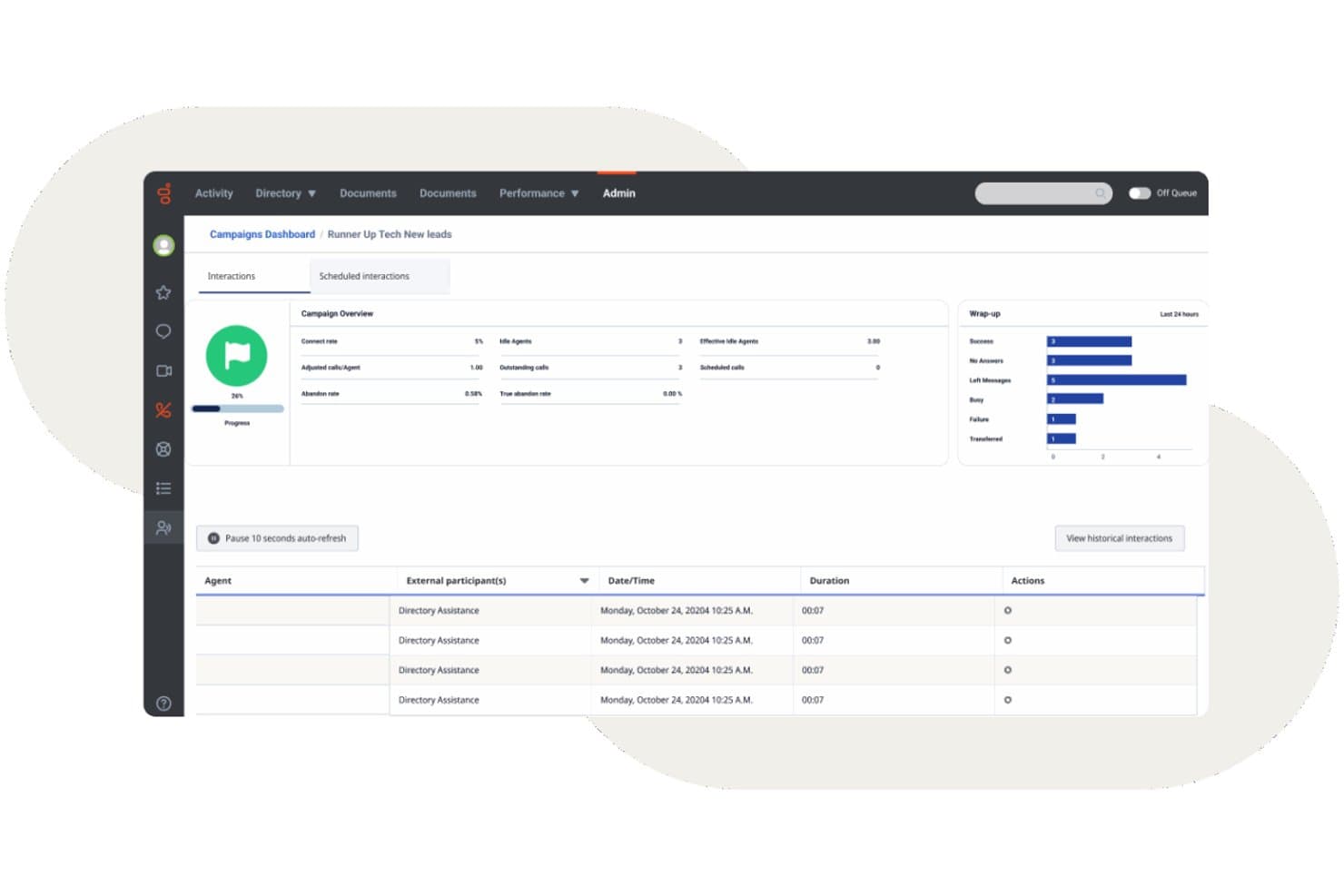
Genesys Cloud CX offers an outbound campaigns dashboard with real-time interaction tracking, wrap-up metrics, and agent activity logs. Genesys Cloud CX is a cloud-native contact center platform that combines omnichannel routing, AI-powered IVR, outbound dialling, workforce engagement management, and real-time analytics across voice and digital channels.
Who Is Genesys Cloud CX Best For?
Genesys Cloud CX is a strong fit for mid-size to enterprise contact centers that need a single platform to manage high interaction volumes across voice and digital channels.
Why I Picked Genesys Cloud CX
I've included Genesys Cloud CX in my top picks because its journey management capabilities go beyond standard routing. The platform's Journey Flows give me a real-time visual map of how customers move across every touchpoint, so I can spot drop-off points and reroute interactions before they escalate. Paired with Predictive Engagement, it actively identifies at-risk customers mid-web-session and triggers a proactive chat or callback before they abandon.
Genesys Cloud CX Key Features
- Omnichannel routing: Route voice, chat, email, SMS, and social interactions to agents in a single workspace.
- Workforce engagement management: Manage forecasting, scheduling, and time-off with AI-powered WEM tools.
- Speech and sentiment analytics: Analyze transcriptions, keywords, and sentiment for 100% of agent-customer conversations.
- CRM integration ecosystem: Connect natively with Salesforce, ServiceNow, Microsoft Dynamics, and hundreds of other business tools.
Genesys Cloud CX Integrations
Genesys Cloud CX offers native integrations with Salesforce, ServiceNow, Zendesk, Microsoft Teams, Microsoft Dynamics 365, Zoom, Jira, Slack, Active Directory, and Google Workspace. An API is available for custom integrations.
Pros and Cons
Pros:
- Speech analytics scores 100% of call interactions
- Built-in workforce management with native forecasting
- AI-powered predictive routing across all channels
Cons:
- Advanced reporting requires significant configuration time
- Initial setup often requires professional help
Learn more about Genesys Cloud CX: Best for easy deployment and administration
- Free demo available
- Pricing upon request

GoTo Connect offers a unified interface combining messaging, voicemail, camera preview, and meeting join capabilities for call center agents. GoTo Connect is a cloud-based contact center and phone system that combines VoIP calling, omnichannel customer engagement, intelligent call routing, and real-time agent monitoring in a single platform.
Who Is GoTo Connect Best For?
GoTo Connect is a strong fit for small to mid-sized businesses that need a full-featured contact center without a large IT team to manage it.
Why I Picked GoTo Connect
GoTo Connect earns its spot on my shortlist because of how quickly a team can go from signup to live calls. The unified Admin hub lets me manage users, dial plans, and call queues from a single interface, and the visual dial plan builder makes configuring complex call flows something I can do without writing a single line of code. I've also found Admin GoPilot genuinely useful for flagging configuration issues before they reach callers.
GoTo Connect Key Features
- Omnichannel platform: Connect with customers through voice, SMS, chat, email, WhatsApp, and social media from a single dashboard.
- Real-time analytics: Monitor call queues, agent activity, and performance data with configurable live dashboards.
- Call disposition and wrap-up: Assign outcomes to calls and manage required post-call notes directly in the agent interface.
- AI-powered call summaries: Automatically generate interaction summaries and sentiment analysis after customer calls.
GoTo Connect Integrations
GoTo Connect offers native integrations with Salesforce, Zendesk, ServiceNow, Microsoft Teams, Miro, and Gmail. An API is available for custom integrations.
Pros and Cons
Pros:
- Unified admin hub manages users and queues
- Visual dial plan editor simplifies call routing
- Quick setup without dedicated IT support
Cons:
- Reporting less customizable than enterprise platforms
- Limited predictive dialer for outbound campaigns
Learn more about GoTo Connect: Best with deep CRM integration capabilities
- Free demo available
- Pricing upon request

Vonage Contact Center offers an omnichannel agent desktop with AI-suggested responses, next best action guidance, and real-time interaction metrics across voice and chat. Vonage Contact Center is a cloud-based contact center platform that combines inbound and outbound calling, IVR, skills-based routing, call recording, omnichannel support, and real-time analytics with native CRM integrations.
Who Is Vonage Contact Center Best For?
Mid-market to enterprise teams already standardized on Salesforce, ServiceNow, or Microsoft Dynamics 365 who need a contact center that connects directly to their CRM.
Why I Picked Vonage Contact Center
Vonage Contact Center earns its spot on my shortlist because of how deeply it embeds into Salesforce, ServiceNow, and Microsoft Dynamics 365. I love that when an agent picks up a call, customer history surfaces instantly via screen pops, with bi-directional CRM sync logging the interaction automatically. Vonage even joined Salesforce's BYOC for CCaaS pilot, meaning its omnichannel and AI capabilities run natively inside Service Cloud Voice.
Vonage Contact Center Key Features
- Skills-based routing: Route inbound calls to agents based on skill sets, availability, or priority rules.
- Disaster recovery and emergency call routing: Automatically reroute calls in the event of outages or emergencies to maintain business continuity.
- Omnichannel engagement: Handle voice, web chat, SMS, and more from a single interface for all agents.
- Speech analytics add-on: Gain insights from call transcriptions, keyword detection, and sentiment analysis across interactions.
Vonage Contact Center Integrations
Vonage Contact Center offers native integrations with Salesforce, ServiceNow, Microsoft Dynamics 365, Zendesk, and Microsoft Teams. An API is available for custom integrations.
Pros and Cons
Pros:
- Real-time screen pops surface full caller context
- Omnichannel queues unify voice and digital channels
- Deep native Salesforce embedding for agents
Cons:
- Complex initial configuration requires professional services support
- Historical reporting has limited customization options
Learn more about Vonage Contact Center:
Diğer Çağrı Merkezi Yazılımları
İşte en iyi çağrı merkezi yazılımları listesine giremeyen birkaç seçenek daha:
- 11Bright PatternBest for omnichannel communication
- 12TalkdeskBest for answering customers’ questions
- 13TwilioBest for highly customizable contact centers
- 14DialpadBest multichannel solution with advanced AI functionality
- 15Zoho VoiceBest for integrated telephony in CRM
- 16CallHippoBest for AI-powered customer interactions
- 17Freshdesk Contact CenterBest for an affordable virtual contact center
- 18Webex Contact CenterBest with built-in AI agent coaching and insights
- 19Creatio AI CRMBest for personalizing communication
- 20LiveAgentBest for integrated helpdesk and ticketing tools
- 21NextivaBest for phone, SMS, video, & email customer support
- 22ZendeskBest for unifying communication channels
- 238x8Best for omnichannel communication
- 24VerintBest for workforce optimization
- 25Avaya Best for enhancing business outcomes
- 26AWS ConnectBest for onboarding new representatives
- 27Intermedia UniteBest for all-in-one cloud contact center
- 28Aspect SoftwareBest for high-performance contact center solution
How I Evaluate Call Center Software
I evaluate every platform against a baseline—skills-based routing, IVR, call recording, live monitoring—before weighing the differentiators that determine whether a tool fits your operation.
Core Functionality (Table Stakes For This List)
When I'm selecting tools for my list, I rank each one on a scale from 0 (does not offer the functionality) to 5 (excels in this area) for each core functionality listed below. Then, I calculate the tool's total score into a percentage. Each tool needs to achieve a minimum total score of 75% to be considered for inclusion.
- Automatic Call Distribution: I check whether the platform supports skills-based and priority routing, since a basic round-robin queue falls apart fast when you're handling technical support and billing on the same number.
- IVR System: A good IVR lets callers self-serve for order status or account balances before ever reaching an agent, so I look for multi-level menus with a visual call flow editor.
- Inbound & Outbound Calling: I evaluate whether the platform handles both directions natively—teams running renewal campaigns and fielding support calls need blended queues, not two separate tools.
- Call Recording & Monitoring: Supervisors need more than playback; I look for live listen, whisper, and barge so team leads can coach agents during difficult calls in real time.
- Real-Time & Historical Analytics: Dashboards that show queue depth, wait times, and agent status in real time matter just as much as historical SLA and CSAT reporting for post-shift reviews.
- CRM & Business Tool Integration: I evaluate whether the platform connects with systems like Salesforce, HubSpot, or Zendesk to surface caller context through screen pops and log interactions automatically.
Once I have a list of tools that meet this criteria, I consider what sets each platform apart.
Differentiating Factors (What Sets Vendors Apart)
Here's how I compare and contrast different vendors:
Standout Features
AI agent assist is a major differentiator. I look for platforms that surface knowledge articles and suggested responses mid-call, cutting handle time during complex troubleshooting. Workforce management matters just as much for teams juggling seasonal spikes, where built-in forecasting and adherence tracking replace spreadsheet guesswork. Speech and sentiment analytics round out the picture—automated scoring across all interactions gives QA leads a far more complete view than random sample reviews.
Beyond Features
Compliance and security are top of mind—I check for PCI DSS and SOC 2 certifications, especially when agents handle payment info over the phone. Pricing transparency matters too, since hidden telephony or overage charges can blow up budgets after go-live. I also evaluate uptime SLAs and carrier redundancy, because even brief outages during peak hours mean missed calls and lost revenue. Finally, implementation timelines vary wildly across vendors, and a faster time-to-value is a real advantage for teams migrating from a legacy system.
Çağrı Merkezi Yazılımı Nasıl Seçilir?
Doğru çağrı merkezi yazılımını seçmeye mi çalışıyorsunuz? En önemli müşteri deneyimi önceliklerinizi, gerçek dünyadaki iletişim merkezi zorluklarını ele alan özelliklerle eşleştirerek başlayın:
| Önceliğiniz ... ise | Şunları arayın... |
|---|---|
| Önceliğiniz ... iseHızlı çok kanallı yanıt | Şunları arayın...Telefon, sohbet ve e-postayı kapsayan birleşik gelen kutusu |
| Önceliğiniz ... iseKarmaşık sorunlar için doğru yönlendirme | Şunları arayın...Beceri tabanlı ve veriye dayalı dağıtım |
| Önceliğiniz ... iseTemsilci performansına ilişkin görünürlük | Şunları arayın...Gerçek zamanlı panolar ve ayrıntılı izleme |
| Önceliğiniz ... iseEsnek müşteri verisi erişimi | Şunları arayın...Derin CRM ve iş aracı entegrasyonları |
| Önceliğiniz ... iseKüresel veya düzenlemeye tabi operasyonlar | Şunları arayın...PCI DSS, GDPR ve HIPAA için yerleşik uyumluluk |
Kısa Listeniz Nasıl Değerlendirilir?
- Gerçek çok kanallı iletişim iddialarını test edin: Temsilcilerin her seferinde tüm bağlama erişip erişemediğini görmek için üç tür talebi (telefon, sohbet, e-posta) yönlendiren bir günlük deneme gerçekleştirin.
- Entegrasyon kapsamını doğrulayın: Salesforce veya HubSpot ekran açılır pencerelerini ve çift yönlü senkronizasyonu uygulamalı olarak inceleyen canlı bir demo planlayın; daha sonra incelemek üzere bir video kaydı isteyin.
- Analiz doğruluğunu değerlendirin: 48 saatlik bir gösterge paneli raporu dışa aktarın ve çağrı hacmi, duygu durumu ve işlem süresi ölçümlerini eski platformunuzun çıktılarıyla karşılaştırın.
- Uyumluluk kapsamını onaylayın: Satıcıdan güncel PCI DSS, HIPAA ve GDPR uygunluk beyanı mektuplarını veya güvenlik belgelerini isteyin.
- Esnekliği veya bağımlılığı seçin: Önceden oluşturulmuş kapsamlı özelliklerin (sınırlı özelleştirme) mi yoksa açık API'lerin (kendi entegrasyonunuzu oluşturma, daha fazla çaba) mi ekibinizin beceri setine ve ihtiyaçlarına daha uygun olduğuna karar verin.
Çağrı Merkezi Yazılımı Nedir?
Çağrı merkezi yazılımı; telefon, sohbet, e-posta ve diğer kanallardaki müşteri iletişimlerini tek bir arayüz üzerinden yöneten dijital bir platformdur. Ekiplerin gelen ve giden etkileşimleri yönetmesine, görüşmeleri doğru temsilcilere yönlendirmesine ve hizmet kalitesini izlemesine yardımcı olur. Bu platformlar genellikle çağrı dağıtımı, etkileşimli sesli yanıt (IVR), çağrı kaydı, analiz ve verimli, tutarlı müşteri deneyimlerini desteklemek üzere CRM sistemleriyle entegrasyon araçlarını içerir.
Çağrı Merkezi ve İletişim Merkezi Yazılımı: Farkı Nedir?
Deneyimlerime göre bu iki sistem arasındaki seçim, telefon odaklı bir ekibi mi yönettiğinize yoksa veri silolarını önlemek için çok kanallı müşteri yolculuklarını mı birleştirdiğinize bağlıdır.
- Çağrı Merkezi Yazılımı: Öncelikle ses tabanlı iletişime (gelen/giden çağrılar, VoIP, IVR, çağrı yönlendirme, telefon desteği) odaklanır. Birincil kanal olarak sese dayanan ve yüksek ses kalitesine ihtiyaç duyan ekipler için en uygunudur.
- İletişim Merkezi Yazılımı (CCaaS): Telefon desteğini canlı sohbet, e-posta, SMS, mesajlaşma uygulamaları ve sosyal medya gibi dijital kanallarla birleştiren tek bir platform sunar. Kanallar arası etkileşim geçmişlerini ve temsilci planlamasını merkezileştirmek isteyen, büyüyen SaaS işletmeleri için en uygunudur.
Bu incelemede, operasyonel ölçeğiniz ne olursa olsun size seçenek sunmak için hem ses öncelikli çağrı merkezi sistemlerini hem de kurumsal iletişim merkezi platformlarını ele alıyorum.
Çağrı Merkezi Yazılımı Türleri
- Bulut Tabanlı Çağrı Merkezi Yazılımı: Satıcı tarafından barındırılan bulut altyapısında çalışır ve düşük başlangıç maliyetiyle uzaktan veya dağınık ekipleri destekler.
- Şirket İçi Çağrı Merkezi Yazılımı: Tesisinize kurulan fiziksel donanım üzerinde çalışır ve sunucu güvenliği ile veri depolama üzerinde özel kontrol sunar.
- Gelen Çağrı Merkezi Yazılımı: Etkileşimli sesli yanıt menülerini, otomatik çağrı dağıtımını ve beceriye dayalı yönlendirme kurallarını kullanarak gelen müşteri taleplerini yönetir.
- Giden Çağrı Merkezi Yazılımı: Tahmine dayalı, güçlü ve aşamalı otomatik arama sistemlerini kullanarak satış erişim kampanyalarını ve müşteri hesabı takiplerini yürütür.
- Karma Çağrı Merkezi Yazılımı: Gelen çağrı kuyruklarını ve giden arama sistemlerini tek bir arayüzde birleştirir, canlı çağrı hacmine göre temsilcileri dinamik olarak görevlendirir.
- Çok Kanallı İletişim Merkezi Yazılımı: Sesli aramaları, canlı sohbeti, kısa mesajları ve e-posta yazışmalarını tek bir kesintisiz müşteri zaman çizelgesinde merkezileştirir.
Çağrı Merkezi Yazılımındaki Trendler
- Ajan tabanlı yapay zekâ ve otomatik iş akışları: Yazılım sağlayıcıları, temel konuşma botlarının ötesine geçerek otonom yapay zekâ ajanlarını kullanıma sunuyor. Bu sistemler bağlamı değerlendirir, çok adımlı görevleri yürütür, CRM kayıtlarını günceller ve insan müdahalesi olmadan rutin iş akışlarını tamamlar.
- Gerçek zamanlı ajan desteği: Yazılım uygulamaları, sesi yazıya dökmek, müşteri duyarlılığını analiz etmek ve bilgi tabanı makalelerini anında sunmak için canlı çağrıları dinler. Bu gerçek zamanlı yönlendirme, temsilcilerin karmaşık müşteri sorunlarını daha hızlı çözmesine yardımcı olur.
- Otomatik kalite güvencesi: Platformlar artık müşteri etkileşimlerinin %100'ünü analiz etmek için makine öğrenimi modellerini kullanıyor. Komut dosyasına uygunluk, uyumluluk kuralları ve üslup için otomatik puanlama, yönetici koçluğu amacıyla yapılan manuel örneklemenin yerini alıyor.
- Düşük kodlu özelleştirme: Araçlar, çağrı akışları, yönlendirme kuralları ve entegrasyonlar için sürükle ve bırak oluşturucular sunar. Operasyon ekipleri, geliştirici desteği olmadan kuyruk kurallarını ve otomasyonları hızlı bir şekilde değiştirebilir.
- Birleştirilmiş veri katmanları: Sistemler, sesli görüşme, sohbet, kısa mesaj ve e-posta geçmişlerini tek bir müşteri zaman çizelgesinde birleştirir. Bu birleştirilmiş yapı, hibrit ve uzaktan destek ekiplerine tüm etkileşim noktalarında eksiksiz görünürlük sağlar.
- Varsayılan olarak çok kanallı ve uzaktan çalışmaya hazır: Müşteri beklentileri arttıkça çağrı merkezi platformları, sesli görüşme, sohbet, e-posta ve sosyal medyayı tek bir arayüzde birleştirmeye devam ederken tam uzaktan erişilebilirlik, bulut güvenilirliği ve yerleşik iş gücü yönetimi araçları sunar.
Çağrı Merkezi Yazılımının Özellikleri
Çağrı merkezi yazılımı seçerken aşağıdaki temel özelliklere dikkat edin:
- Otomatik çağrı dağıtımı: Gelen çağrıları en uygun temsilciye veya departmana yönlendirerek arayanların daha kısa beklemesini ve temsilcilerin daha verimli çalışmasını sağlar.
- Etkileşimli sesli yanıt: Arayanların ses veya tuş takımı kullanarak self servis menüsüyle etkileşim kurmasını sağlar; böylece doğru departmana hızlıca ulaşmalarına veya bir temsilcinin yardımına ihtiyaç duymadan basit talepleri çözmelerine yardımcı olur.
- Çağrı kaydı: Çağrıları eğitim, kalite kontrolü ve anlaşmazlıkların çözümü amacıyla otomatik olarak kaydeder; böylece etkileşimleri inceleyebilir, temsilcilere koçluk yapabilir ve uyumluluğu koruyabilirsiniz.
- Gerçek zamanlı raporlama ve analiz: Çağrı hacmi, temsilci performansı ve müşteri memnuniyeti gibi temel ölçümler hakkında panolar ve ayrıntılı raporlar sunarak operasyonlarınızı geliştirmenizi kolaylaştırır.
- Çok kanallı destek: Müşterilerin size telefon, e-posta, sohbet veya sosyal medya üzerinden ulaşmasını sağlar; böylece ekibiniz tüm görüşmeleri tek bir yerden yönetebilir ve tutarlı bir destek sunabilir.
- CRM entegrasyonu: Müşteri ilişkileri yönetimi araçlarınıza bağlanarak temsilcilerin daha kişiselleştirilmiş destek sunmak için çağrılar sırasında önemli müşteri bilgilerine ve geçmişine erişmesini sağlar.
- Çağrı izleme: Yöneticilerin canlı çağrıları dinlemesini, temsilcilere fısıldayarak yönlendirme yapmasını veya gerektiğinde görüşmeleri devralmasını sağlar; bu özellik koçluk ve kalite güvencesi için idealdir.
- Çağrı kuyruğu: Arayanları tahmini bekleme süreleri ve güncellemelerle sanal sıralara yerleştirerek hayal kırıklığını azaltır ve yoğun çağrı dönemlerini daha sorunsuz hâle getirir.
- İş gücü yönetimi: Personel düzeylerini çağrı hacimleriyle uyumlu tutmak için vardiyaları planlamanıza, talebi tahmin etmenize ve temsilci uygunluğunu izlemenize yardımcı olur.
- Giden arama: Takip aramaları, anketler veya satış aramaları gibi görevleri otomatikleştirerek temsilcilerin numara çevirmeye daha az, müşterilerle konuşmaya daha fazla zaman ayırmasını sağlar.
Yaygın Çağrı Merkezi Yazılımı Yapay Zekâ Özellikleri
Yukarıda sıralanan standart çağrı merkezi yazılımı özelliklerinin yanı sıra bu çözümlerin birçoğu aşağıdaki özelliklerle yapay zekâyı bünyesine katıyor:
- Yapay zekâ ajan desteği: Canlı çağrılar sırasında gerçek zamanlı öneriler, bilgi tabanı makaleleri ve en uygun sonraki işlemleri sunarak temsilcilerin müşteri sorularına daha hızlı ve doğru yanıt vermesine yardımcı olur.
- Konuşma ve duyarlılık analizi: Çağrı kayıtlarını ve canlı görüşmeleri üslup, duygu ve anahtar kelimeler açısından analiz etmek için yapay zekâ kullanır; yöneticilere müşteri memnuniyeti ve temsilci performansı eğilimleri hakkında içgörüler sunar.
- Tahmine dayalı çağrı yönlendirme: İlk çağrıda çözüm oranlarını iyileştirmek amacıyla arayanları geçmiş sonuçlara, becerilere ve müşteri profillerine göre en uygun mevcut temsilciyle eşleştirmek için yapay zekâdan yararlanır.
- Otomatik kalite güvencesi: Çağrıları uyumluluk, komut dosyasına uygunluk ve sosyal beceriler açısından incelemek ve puanlamak için yapay zekâ uygular; manuel QA örneklemesine duyulan ihtiyacı azaltır ve geri bildirim döngülerini hızlandırır.
- Sanal temsilciler ve sohbet botları: Konuşma tabanlı yapay zekâ kullanarak rutin soruları ve görevleri ele alır; insan temsilcilerin daha karmaşık sorunlara odaklanmasını sağlar ve kanallar genelinde 7/24 destek sunar.
Çağrı Merkezi Yazılımının Faydaları
Çağrı merkezi yazılımını uygulamak, ekibiniz ve işletmeniz için çeşitli faydalar sağlar. İşte yararlanmayı bekleyebileceğiniz birkaç fayda:
- Müşteri memnuniyetinde iyileşme: Etkin çağrı yönlendirme ve çok kanallı destek, müşterilerin doğru temsilciye hızlı bir şekilde bağlanmasını sağlar.
- Ekip verimliliğinde artış: Yapay zekâ destekli içgörüler, akıllı çeviriciler veya tıkla ve ara gibi özellikler ve gelişmiş iş gücü yönetimi, ekibinizin yüksek öncelikli görevlere odaklanmasına ve iş akışını optimize etmesine yardımcı olur.
- Daha iyi veri yönetimi: Mevcut araçlarla entegrasyon, müşteri bilgilerinin düzenli ve erişilebilir tutulmasını sağlayarak veri işleme hatalarını azaltır.
- Artan esneklik: Uzaktan çalışma özellikleri, ekibinizin değişen çalışma ortamlarına uyum sağlayarak her konumdan tutarlı hizmet sunmasına olanak tanır.
- Eyleme dönüştürülebilir içgörüler: Gerçek zamanlı analizler ve özelleştirilebilir panolar, karar alma süreçlerine yön vermek ve operasyonları iyileştirmek için değerli veriler sunar.
- Maliyet tasarrufu: Otomatik planlama ve verimli kaynak tahsisi, hizmet kalitesini korurken operasyonel maliyetlerin azaltılmasına yardımcı olur.
- Güçlendirilmiş veri güvenliği: Güvenlik önlemleri, hassas müşteri bilgilerini koruyarak düzenlemelere uyumu sağlar ve güven oluşturur.
Çağrı Merkezi Yazılımının Maliyetleri ve Fiyatlandırması
Çağrı merkezi yazılımı seçimi, mevcut çeşitli fiyatlandırma modellerinin ve planlarının anlaşılmasını gerektirir. Maliyetler özelliklere, ekip büyüklüğüne, eklentilere ve diğer unsurlara göre değişir. Aşağıdaki tabloda çağrı merkezi yazılımı çözümlerinde yaygın olarak bulunan planlar, bunların ortalama fiyatları ve tipik özellikleri özetlenmektedir:
Çağrı Merkezi Yazılımı için Plan Karşılaştırma Tablosu
| Plan Türü | Ortalama Fiyat | Yaygın Özellikler |
|---|---|---|
| Plan TürüÜcretsiz Plan | Ortalama Fiyat$0-$15/kullanıcı/ay | Yaygın ÖzelliklerTemel çağrı yönlendirme, sınırlı IVR seçenekleri, temel raporlama ve basit CRM entegrasyonu içerir. |
| Plan TürüKişisel Plan | Ortalama Fiyat$15-$35/kullanıcı/ay | Yaygın ÖzelliklerSınırsız arama, çağrı kaydı, geliştirilmiş analiz panoları ve popüler CRM'lerle entegrasyon ekler. |
| Plan Türüİşletme Planı | Ortalama Fiyat$35-$70/kullanıcı/ay | Yaygın ÖzelliklerGelişmiş IVR, beceri tabanlı yönlendirme, yapay zekâ destekli temsilci yardımı, çağrı izleme, özel raporlama ve çok kanallı mesajlaşma sunar. |
| Plan TürüKurumsal Plan | Ortalama Fiyat$70-$150/kullanıcı/ay | Yaygın Özelliklerİş gücü yönetimi, tahmine dayalı analiz, 7/24 destek, sıkı uyumluluk kontrolleri ve özel SLA'lar sağlar. |