

Barındırılan VoIP, ekibinizin internet üzerinden arama yapıp almasını sağlayan, tüm yönetimi uzaktaki bir sağlayıcı tarafından gerçekleştirilen bulut tabanlı bir internet üzerinden ses protokolü telefon sistemidir. En iyi barındırılan VoIP çözümlerini arıyorsanız muhtemelen telefon donanımını kendiniz yönetmenin maliyeti veya zahmeti olmadan çağrı kalitesini artırmaya, güvenilirliği yükseltmeye ya da büyüyen hibrit bir iş gücünü desteklemeye çalışıyorsunuzdur.
Bu kılavuz, 2026 için en iyi barındırılan VoIP hizmeti seçeneklerini öne çıkarır; böylece işletmenizin ihtiyaçlarına uyan, üretkenliği artıran ve her görüşmenin sorunsuz ilerlemesini sağlayan bir hizmeti güvenle seçebilirsiniz.
Why Trust Our Software Recommendations
6,700+
Reviews
20
Industry experts
16+
Evaluation factors
14
Years
Our team has been testing and reviewing software since 2012. As CX leaders ourselves, we know how difficult—and important—it is to choose the right software.
For this guide, we evaluated tools using hands-on testing and independent research, scoring tools using our selection criteria.
Our reviews reflect our human editorial judgment, not a sales pitch.
 Gui DrusinaCreative Director
 Tim FisherVP of AI
Barındırılan VoIP Karşılaştırma Tablosu
Bu karşılaştırma tablosu, en iyi barındırılan VoIP seçimlerimin fiyatlandırma ayrıntılarını özetler:
Sorted by: Default
| Tool | Starting Price | Website | |
|---|---|---|---|
Best for AI-powered speech analytics | 4.2 out of 5 | $25/user/month Free plan + 14-day trial + free demo available | Website |
Best for AI-driven routing for enterprises | 4.4 out of 5 | $75/user/month Free demo available | Website |
Best for advanced workforce management tools | 4.3 out of 5 | $110/agent/month Free demo available | Website |
Best for small business simplicity | 3.0 out of 5 | $19.95/user/month Not available | Website |
Best for in-app features for hybrid teams | Not rated | Pricing upon request Free demo available | Website |
Best for built-in AI for call transcription | 4.3 out of 5 | Pricing upon request 14-day free trial + free demo available | Website |
Best for omnichannel contact capabilities | 4.1 out of 5 | $119/seat/month Free demo available | Website |
Best for global business communication needs | 4.2 out of 5 | £18/user/month 14-day free trial | Website |
Best for API options for voice integrations | 4.1 out of 5 | Pricing upon request Free plan available | Website |
Best for integration with video meetings | Not rated | $10.50/user/month Free demo available | Website |


En İyi Barındırılan VoIP İncelemeleri
Aşağıda, kısa listeme giren en iyi barındırılan VoIP seçeneklerinin ayrıntılı özetlerini bulabilirsiniz. İncelemelerim, size en uygun seçeneği bulmanıza yardımcı olmak için her platformun özelliklerine, en iyi kullanım alanlarına ve entegrasyonlarına ayrıntılı bir bakış sunar.
 Best for AI-powered speech analytics
- Free plan + 14-day trial + free demo available
- From $25/user/month (billed annually)
Visit WebsiteCustomer Rating:4.2/5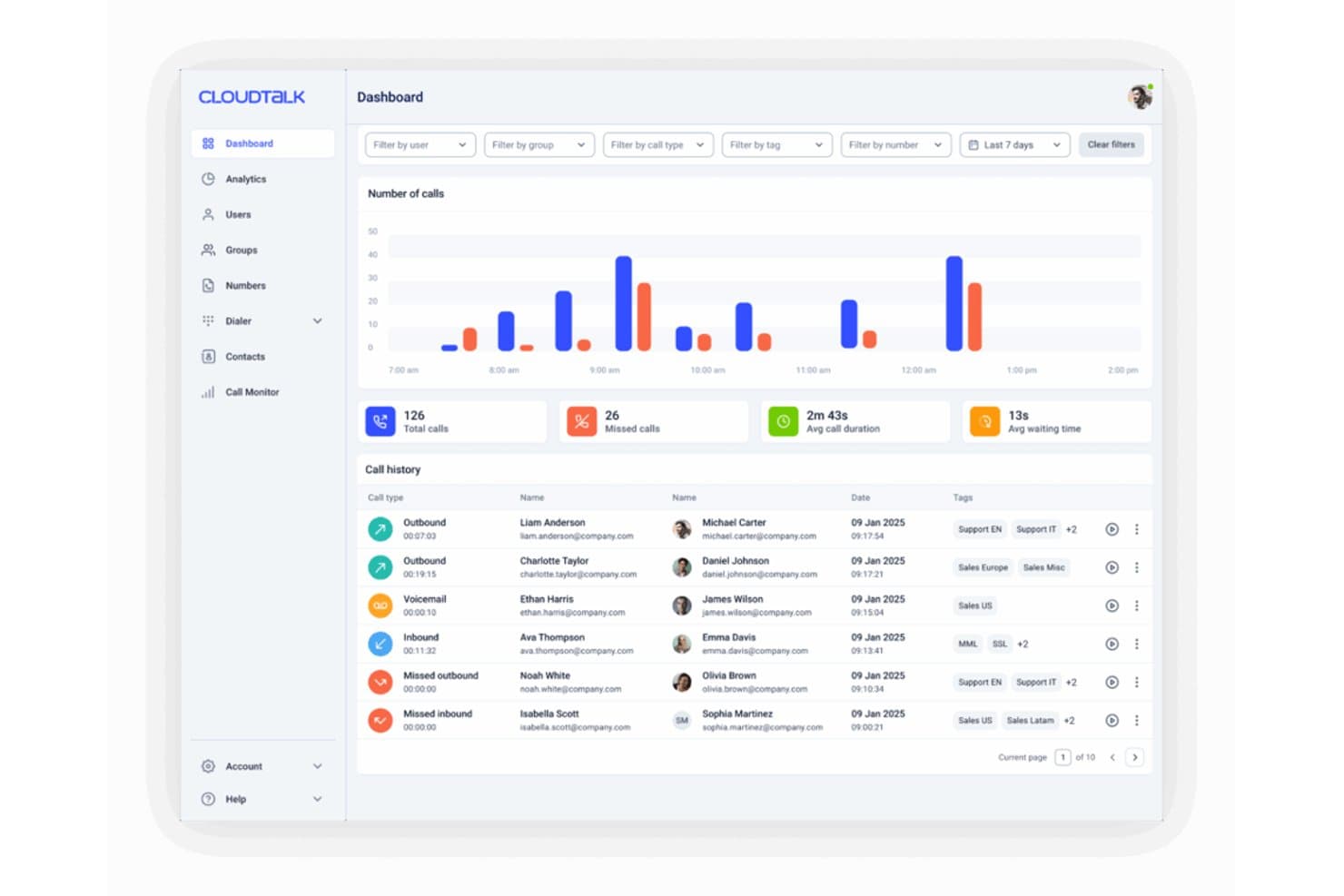
CloudTalk's dashboard displays real-time call metrics, call history, and hourly call volume charts for agent performance monitoring. CloudTalk is a cloud-hosted VoIP platform built for sales and support teams, offering business calling, IVR routing, dialers, CRM integrations, and AI-powered conversation analytics across 160+ countries.
Who Is CloudTalk Best For?
CloudTalk is a strong fit for growing SMBs and mid-market teams that run outbound sales or inbound support operations across distributed or remote setups.
Why I Picked CloudTalk
CloudTalk earns its spot on my shortlist because of how its AI Conversation Intelligence layer turns every call into structured coaching data. I like that it automatically surfaces talk/listen ratios, customer sentiment scores, and call scoring without anyone needing to manually review recordings. In practice, that means my team can pinpoint exactly where reps are losing deals or missing customer cues, and act on it the same day.
CloudTalk Key Features
- Visual call flow designer: Build and customize multi-level IVR menus and advanced routing with a drag-and-drop editor.
- Global number provisioning: Instantly purchase, port, and manage local, toll-free, and international numbers from over 160 countries.
- Native workflow integrations: Connect directly with Salesforce, HubSpot, Zendesk, and other CX platforms for real-time data sync and click-to-call.
- Real-time wallboards: Monitor call volume, agent status, and queue performance live with customizable dashboards.
CloudTalk Integrations
CloudTalk offers 95+ native integrations, including Salesforce, HubSpot, Zendesk, Pipedrive, Freshdesk, Intercom, Microsoft Teams, Zoho CRM, Google Workspace, Slack, and provides an open API for custom integrations.
Pros and Cons
Pros:
- Power dialer built in for outbound teams
- Global number coverage across 160+ countries
- AI call scoring surfaces coaching gaps automatically
Cons:
- Occasional call quality issues on international routes
- Reporting customization is limited on lower tiers
 Best for AI-driven routing for enterprises
- Free demo available
- From $75/user/month (billed annually)
Visit WebsiteCustomer Rating:4.4/5
Genesys Cloud CX offers a hosted VoIP dashboard for contact centers. Built for enterprise contact centers, Genesys Cloud CX is a hosted VoIP and omnichannel platform that covers inbound and outbound voice, digital channels, workforce management, and real-time analytics.
Who Is Genesys Cloud CX Best For?
Genesys Cloud CX is a highly cost-effective option well suited to contact center operations teams in regulated industries like financial services and healthcare that need granular control over call routing and compliance.
Why I Picked Genesys Cloud CX
Genesys Cloud CX earns its spot on my shortlist because its AI routing goes beyond agent skills matching. It factors in real-time performance data and predicted customer outcomes to make each individual routing decision. I also like Agent Assist, which surfaces relevant knowledge articles to agents mid-call, cutting handle time without putting customers on hold to search for answers manually.
Genesys Cloud CX Key Features
- Architect flow designer: Build and edit IVR call flows using a visual drag-and-drop interface without writing code.
- Workforce management: Create agent schedules, run forecasts, and manage shift adherence directly in the platform.
- Speech and text analytics: Automatically transcribe voice calls and flag interactions based on keywords or sentiment.
- Callback scheduling: Let callers request a scheduled callback instead of waiting in the queue.
Genesys Cloud CX Integrations
Genesys Cloud CX offers over 600+ integrations, including Salesforce, ServiceNow, Microsoft Dynamics, Power BI, Zoho CRM, Microsoft Teams, Zoom, Okta, and more. The platform is API-first, with over 3,000 public APIs available for custom integrations.
Pros and Cons
Pros:
- Native AWS ecosystem compatibility built in
- API-first architecture enables deep customization
- Flexible skill-based and queue-based routing
Cons:
- The email channel lacks on-premises-level flexibility
- Dashboard and reporting customization is limited
Learn more about Genesys Cloud CX: Best for advanced workforce management tools
- Free demo available
- From $110/agent/month (proactive AI extra)
Visit WebsiteCustomer Rating:4.3/5
NICE CXone offers a hosted VoIP dashboard for contact centers. NiCE CXone is a cloud-based contact center platform that combines hosted voice with omnichannel routing, AI-powered virtual agents, workforce management, and interaction analytics.
Who Is NiCE CXone Best For?
NiCE CXone is a strong fit for mid-to-large enterprise contact centers that need to upgrade their legacy PBX system to manage high agent headcounts across multiple channels and shifts.
Why I Picked NiCE CXone
I picked NiCE CXone as one of the best because its workforce management suite goes well beyond basic scheduling. I especially like the intraday management tools, which let me adjust agent schedules in real time based on live call volume. The automated forecasting engine pulls from historical interaction data to build shift plans across channels. Real-time adherence monitoring flags when agents deviate from their scheduled activity, so supervisors can act immediately.
NiCE CXone Key Features
- Omnichannel ACD routing: Automatically routes voice, chat, email, and digital interactions to the right agent based on skills, availability, and customer context.
- AI noise cancellation: Filters background noise from both agent and customer audio in real time during live calls.
- Interaction analytics: Transcribes and analyzes recorded calls to surface trends, sentiment, and compliance flags across your contact center.
- Native IVR and virtual agent: Lets you build self-service call flows and deploy AI-driven virtual agents to handle routine inquiries before escalating to live agents.
NiCE CXone Integrations
NiCE CXone offers 170+ pre-integrated apps, including Salesforce, and UCaaS integrations with Microsoft, RingCentral, Zoom, LogMeIn, and Unify. Many APIs and SDKs are available for custom integrations.
Pros and Cons
Pros:
- Real-time supervisor dashboards and queue visibility
- Supports voice across 150+ countries
- Built-in workforce scheduling and shift management
Cons:
- IVR scripting interface is Windows-only
- Audio quality issues like crackling sound have been reported
Learn more about NiCE CXone: Best for small business simplicity
- Not available
- From $19.95/user/month
Visit WebsiteCustomer Rating:3/5
Ooma Office offers a call queue dashboard for tracking wait times, queue activity, and agent availability. Built for small teams, Ooma Office is a cloud-based business phone system with calling, SMS, a virtual receptionist, video conferencing, and a mobile app that keeps your business number active on any device.
Who Is Ooma Office Best For?
Ooma Office is a natural fit for early-stage and growing small businesses that need a professional phone presence without the overhead of a complex enterprise system.
Why I Picked Ooma Office
Ooma Office earns its spot on my shortlist because the admin portal puts full call management in the hands of whoever runs the business, no IT background required. I configure business hours, set up extensions, and manage call routing entirely from a browser. I also appreciate that multi-party conference calling and music on hold are included at the entry tier, with no plan upgrades needed to access them.
Ooma Office Key Features
- Mobile app: Make and receive calls from your business number on iOS or Android, keeping your personal number separate.
- Call recording: Record inbound and outbound calls on demand and store them for later review or training.
- Video conferencing: Host video meetings directly through the Ooma Office desktop app without a separate video tool.
- Virtual fax: Send and receive faxes digitally through your Ooma account, with no physical fax machine required.
Ooma Office Integrations
Ooma Office offers native integrations with Salesforce, HubSpot, Zoho CRM, Microsoft Dynamics 365, Pipedrive, Clio, Freshdesk, QuickBooks, and more. It also connects with Zapier.
Pros and Cons
Pros:
- 24/7 live phone and chat support included
- Enhanced spam call blocking built in
- Setup takes about fifteen minutes total
Cons:
- Limited IP phone brand compatibility
- All users must share the same plan
Learn more about Ooma Office: Best for in-app features for hybrid teams
- Free demo available
- Pricing upon request

GoTo Connect offers a meeting scheduler for creating and managing one-time or reusable meetings. GoTo Connect is a cloud-based hosted VoIP platform that handles standard phone calls, video meetings, team messaging, and call management tools in a single app.
Who Is GoTo Connect Best For?
GoTo Connect is a strong fit for small to mid-sized businesses running distributed or hybrid teams that need calling, messaging, and meetings in one app.
Why I Picked GoTo Connect
I've included GoTo Connect in my top picks because it keeps calling, messaging, and meetings inside a single app your team can run on any device. What I find especially useful is the hot desking feature, which lets employees log in to any desk phone using their own credentials. Combined with one-click call-to-video meeting escalation, it means my team doesn't have to switch tools mid-conversation when a call needs to go visual.
GoTo Connect Key Features
- Voicemail transcription: Automatically converts voicemail messages to text so you can read them without listening.
- Call queues: Hold incoming calls in a queue and play position announcements while agents become available.
- Custom hold music: Upload your own audio files to play for callers placed on hold.
- Business SMS: Send and receive text messages from your business phone number directly in the app.
GoTo Connect Integrations
GoTo Connect offers native integrations through its marketplace, including tools like Salesforce, HubSpot, Microsoft Dynamics, Microsoft Teams, Freshdesk, Freshsales, Pipedrive, SugarCRM, and more. It also connects with Zapier and provides an API for custom integrations.
Pros and Cons
Pros:
- Centralized admin for multi-location management
- Built-in call flow editor with nodes
- AI receptionist handles calls automatically
Cons:
- Call group identification requires complex workarounds
- No Microsoft Teams presence syncing
Learn more about GoTo Connect: Best for built-in AI for call transcription
- 14-day free trial + free demo available
- Pricing upon request
Visit WebsiteCustomer Rating:4.3/5
Dialpad offers an AI-powered VoIP dashboard with live call transcription and collaboration. Dialpad is a strong fit for sales and support teams seeking productivity gains and cost savings through real-time call coaching, automatic transcription, and AI-generated call summaries built into their phone system.
Who Is Dialpad Best For?
Dialpad is a strong fit for sales and support teams that need real-time call coaching, automatic transcription, and AI-generated call summaries built into their phone system.
Why I Picked Dialpad
I picked Dialpad as one of the best because its built-in AI transcription runs on every call without add-ons or third-party tools. Every conversation is transcribed in real time, whether you are using a desktop or a mobile phone, and Dialpad's AI automatically surfaces action items and generates post-call summaries. I also rely on its live sentiment analysis, which flags call tone as it shifts so a supervisor can step in before a conversation goes sideways.
Dialpad Key Features
- IVR system: Build multi-level interactive voice response menus to route inbound callers to the right team or extension without agent involvement.
- Power dialer: Automatically dials down a contact list in sequence, so outbound sales reps move from call to call without manual redialing.
- Call pop: Display a caller's CRM record and history on screen the moment an inbound call arrives, before the agent picks up.
- Voicemail transcription: Convert voicemail messages to text so agents can read and prioritize callbacks without listening to each recording.
Dialpad Integrations
Dialpad integrates natively with tools like Microsoft 365, Salesforce, Zendesk, HubSpot, Zoho CRM, Clio, Copper, Google Workspace, and Microsoft Teams. It also connects with Zapier and has an open API for custom integrations.
Pros and Cons
Pros:
- AI coach suggests responses during live calls
- Small team setup takes under an hour
- Real-time transcription captures keywords and sentiment
Cons:
- SMS threads split across views on mobile
- Limited desk phone support favors softphones
 Best for omnichannel contact capabilities
- Free demo available
- From $119/seat/month
Visit WebsiteCustomer Rating:4.1/5
Five9 offers a supervisor dashboard for monitoring agent activity and call metrics. Five9 is a cloud-based call center and contact center platform built for enterprise teams, combining inbound and outbound voice calling, intelligent call routing, and global VoIP infrastructure across regional points of presence.
Who Is Five9 Best For?
Five9 fits contact center leaders in industries like financial services, healthcare, and retail who need seamless connectivity and carrier-grade voice reliability across multiple regions.
Why I Picked Five9
Five9 earns its spot on my shortlist because of how it handles omnichannel contact at scale. It supports voice, email, chat, SMS, social, video, and mobile within a single platform, so agents aren't toggling between disconnected tools to follow a customer's journey. I also like its intelligent routing, which matches customers to the most qualified agent regardless of channel. On the voice side, Five9 routes calls through the nearest regional point of presence, which keeps audio quality consistent whether your agents are in one country or spread across several.
Five9 Key Features
- Intelligent Virtual Agent (IVA): Automates routine customer inquiries using conversational AI, so live agents spend less time on repetitive interactions.
- Agent Assist: Surfaces real-time AI guidance and automated call summaries during live interactions, reducing after-call work for agents.
- Workforce Management (WFM): Forecasts staffing needs and schedules agents across your contact center to balance coverage with interaction volume.
- Interaction analytics: Analyzes recorded customer interactions across voice and digital channels to surface trends in customer behavior and agent performance.
Five9 Integrations
Five9 offers pre-built integrations with Salesforce, ServiceNow, Microsoft, Oracle, and Zendesk. Five9 also provides APIs and SDKs for custom integrations with internal systems like ERP, billing, and reporting platforms.
Pros and Cons
Pros:
- STIR/SHAKEN and TCPA compliance built in
- 99.999% uptime SLA for always-on availability
- Strong outbound dialing with high call volume
Cons:
- Minimum seat counts exclude smaller teams
- Weeks-long implementation with professional services required
Learn more about Five9: Best for global business communication needs
- 14-day free trial
- From £18/user/month
Visit WebsiteCustomer Rating:4.2/5
RingCentral offers an admin dashboard for managing users, calls, devices, and analytics. RingCentral is a cloud-based unified communications platform that brings together VoIP calling, SMS, team chat, video meetings, and AI-powered tools across a single system.
Who Is RingCentral Best For?
RingCentral is a strong fit for mid-to-large businesses that need a unified phone, messaging, and video system across multiple locations or countries.
Why I Picked RingCentral
RingCentral is one of my top picks because I love its Global Office feature, which handles long-distance communication smoothly by letting distributed teams share one phone system across 40+ countries with local number support. I've used the multi-site management tools to keep call routing, IVR menus, and user settings consistent across international offices from a single admin console. The built-in AI also handles real-time call transcription and post-call summaries, which I find genuinely useful when coordinating across time zones.
RingCentral Key Features
- Team messaging: Send direct messages and group chats within the same app as your voice calls.
- Video meetings: Host HD video conferences with screen sharing for up to 200 participants.
- Call recording: Record inbound and outbound calls automatically or on demand for quality review.
- Analytics dashboard: Track call volume, wait times, and agent performance across your entire phone system.
RingCentral Integrations
RingCentral offers over 500 integrations through its App Gallery, including Salesforce, Microsoft Teams, Google Workspace, Jira, HubSpot, Slack, Zendesk, Microsoft 365, Google Sheets, and Zoho CRM. It also provides APIs for voice, SMS, messaging, video, and analytics to support custom integrations, and it connects with Zapier.
Pros and Cons
Pros:
- Add numbers across locations and devices easily
- Multilingual IVR with automatic language support
- 99.995% uptime for call reliability
Cons:
- Complex call handling rules take time to configure
- CRM integrations locked behind higher-tier plans
Learn more about RingCentral: Best for API options for voice integrations
- Free plan available
- Pricing upon request
Visit WebsiteCustomer Rating:4.1/5
Vonage offers a hosted VoIP dashboard for monitoring call activity and reports. Built on a global carrier network, Vonage is a cloud communications platform with programmable voice APIs covering advanced features like WebRTC calling, PSTN routing, IVR, text-to-speech, and call recording.
Who Is Vonage Best For?
Vonage is best suited to SaaS companies and telecom-focused businesses that require reliable bandwidth to build voice features directly into their own customer-facing products.
Why I Picked Vonage
Vonage earns its spot on my shortlist because the breadth of its voice API options is genuinely unmatched for teams building custom VoIP-driven products. I rely on the number masking feature to anonymize caller identities in marketplace apps, and the branded calling display puts my company name and logo on the recipient's screen before they even pick up. Both features go well beyond what standard hosted VoIP packages offer out of the box.
Vonage Key Features
- WebRTC calling: Enables browser-based voice calls without requiring additional hardware or software downloads
- SIP trunking: Connects your existing PBX infrastructure to the Vonage network for inbound and outbound calling
- Call whisper: Plays a short audio message to the agent before the caller connects, providing context before pickup
- Voicemail detection: Automatically identifies when a call reaches an answering machine and triggers a separate response flow
Vonage Integrations
Vonage offers native integrations with Salesforce, Microsoft Teams, Microsoft Dynamics, Slack, Zendesk, and ServiceNow. Vonage's communications platform is fully programmable, with an API available for custom integrations across voice, video, messaging, and more.
Pros and Cons
Pros:
- Automatic speech recognition in 120 languages
- Phone numbers available in 80+ countries
- Developer APIs cover voice, SMS, and video
Cons:
- Android app has inconsistent call notifications
- Call recording sold as a paid add-on
Learn more about Vonage: Best for integration with video meetings
- Free demo available
- From $10.50/user/month

Zoom Phone offers a real-time analytics dashboard for monitoring call queues, service levels, and agent performance. Zoom Phone runs as the dedicated hosted VoIP layer inside the Zoom ecosystem, with features spanning call routing, auto attendants, call recording, voicemail transcription, and SMS.
Who Is Zoom Phone Best For?
Zoom Phone is a strong fit for IT and communications teams that already manage Zoom licenses and want to consolidate their phone system into the same platform they use for video.
Why I Picked Zoom Phone
I've included Zoom Phone in my top picks because the phone and video layers share the same presence engine. Before I dial anyone, I can see whether they're on a call, in a meeting, or available, all from the same status indicator. I also like that the Zoom admin portal manages phone settings, meeting configurations, and user licenses from one place, rather than across separate consoles.
Zoom Phone Key Features
- Call flip: Transfer an active call from your desktop to your mobile (or vice versa) mid-conversation without dropping the call.
- Multi-level auto attendant: Route inbound callers through custom IVR menus based on business hours, department, or extension.
- Voicemail transcription: Automatically transcribe voicemails into text, readable directly from the Zoom app or email inbox.
- Call recording: Record calls on demand or automatically, with recordings stored and accessible from the admin dashboard.
Zoom Phone Integrations
Zoom Phone offers native integrations with Salesforce, Slack, and Zendesk, as well as Microsoft Teams, Google Workspace, Bullhorn, Outreach, and more. It's available on Zapier, and the Zoom Phone API allows developers to integrate Zoom Phone functionality into their applications.
Pros and Cons
Pros:
- Flexible metered and unlimited calling plans
- AI Companion prioritizes voicemails and tasks
- Calls escalate to video with one click
Cons:
- Admin configuration can overwhelm smaller teams
- No built-in e-fax capability
Learn more about Zoom Phone:
Diğer Barındırılan VoIP Seçenekleri
Kısa listeme giremeyen ancak yine de göz atmaya değer bazı ek barındırılan VoIP seçenekleri şunlardır:
- 11NextivaBest for AI-driven team and customer analytics
- 12AircallBest for quick setup and onboarding
- 138x8Best for distributed remote teams
- 14RingoverBest for call collaboration tools
- 153CXBest for on-premise/cloud deployment flexibility
- 16JustCallBest for CRM integration options
- 17AVOXIBest for global virtual number coverage
- 18FreshworksBest for multi-level IVR for call routing
- 19Twilio FlexBest for customizable programmability
How I Evaluate Hosted VoIP
I split my evaluation into two layers: the core capabilities a CX team needs to handle inbound call routing and recording, and the differentiators that separate one platform from another.
Core Functionality (Table Stakes For This List)
When I'm selecting tools for my list, I rank each one on a scale from 0 (does not offer the functionality) to 5 (excels in this area) for each core functionality listed below. Then, I calculate the tool's total score into a percentage. Each tool needs to achieve a minimum total score of 65% to be considered for inclusion.
- Cloud-hosted PBX: I look for providers that fully manage the phone system in the cloud, so your team avoids maintaining on-site servers or session border controllers.
- VoIP calling: Each tool should support voice across desktop apps, mobile devices, and desk phones with flexible domestic and international calling plans.
- Call routing and IVR: Configurable call flows, multi-level auto-attendants, and queue management matter here, especially for teams handling high inbound volumes.
- CRM and helpdesk integrations: I check for native connections to tools like Salesforce, Zendesk, or HubSpot that surface customer history during a live call.
- Call recording and analytics: Automatic recording paired with dashboards for metrics like wait times, handle times, and call volume helps supervisors run QA reviews.
- Number management: Provisioning local, toll-free, and international numbers plus porting existing ones should all be handled within the platform's admin portal.
Once I have a list of tools that meet this criteria, I consider what sets each platform apart.
Differentiating Factors (What Sets Vendors Apart)
Here's how I compare and contrast different vendors:
Standout Features
Real-time analytics dashboards are where I see the biggest gaps between vendors. I look for live views into queue depth, agent status, and call quality metrics like MOS and jitter so managers can catch service issues before they spiral. Mobile and desktop softphones also matter for distributed teams because agents can take business calls on personal devices without exposing personal numbers. AI call intelligence adds another layer by generating transcriptions and sentiment scores that surface coaching opportunities across hundreds of daily interactions.
Beyond Features
The integration ecosystem is a major differentiator. I evaluate whether a provider offers native connectors to tools like Salesforce, Zendesk, or Microsoft Teams alongside open APIs for custom workflows like click-to-dial from internal apps. Implementation support also varies widely. Some vendors include pre-deployment network assessments and dedicated porting assistance, while others leave setup largely self-service. Pricing structure deserves scrutiny too. I compare per-user versus per-line models and check for hidden fees around porting, hardware, or add-on features that inflate the total cost.
Barındırılan VoIP Nasıl Seçilir?
Uzun özellik listeleri ve karmaşık fiyatlandırma yapıları içinde kaybolmak kolaydır. Kendinize özgü yazılım seçimi sürecinizde ilerlerken odaklanmanıza yardımcı olmak için göz önünde bulundurmanız gereken faktörlerin bir kontrol listesi aşağıdadır:
| Faktör | Dikkat Edilmesi Gerekenler |
| Ölçeklenebilirlik | Platform, maliyetli yükseltmeler veya sözleşme sınırlamaları olmadan mevsimsel yoğunlukları, ekip büyümesini ya da yeni konumları yönetebilir mi? |
| Entegrasyonlar | CRM ve yardım masanız için kullanıma hazır bağlayıcılar var mı, yoksa özel geliştirme ve bakım mı gerekecek? |
| Özelleştirilebilirlik | Destek ihtiyaçlarınız büyüdükçe çağrı akışlarını, IVR menülerini ve analizleri değişen iş akışlarına uyacak şekilde kolayca ayarlayabilir misiniz? |
| Kullanım kolaylığı | Aracı eklemek veya yönlendirmeyi değiştirmek gibi günlük yönetim işlemleri, teknik olmayan personelin yönetebileceği kadar basit mi? |
| Uygulama ve işe alıştırma | Satıcı kurulum, numara taşıma ve personel eğitimi için ne kadar rehberlik sağlıyor? Taşıma araçları veya kontrol listeleri var mı? |
| Maliyet | Aylık ücretlere neler dahil? Numara taşıma, uluslararası aramalar veya destek katmanları gibi gizli ücretlere dikkat edin. |
| Güvenlik önlemleri | Satıcılar şifreleme, yönetici denetimleri ve güvenli erişimi nasıl ele alıyor? SSO, MFA ve mevzuata uygunluk sertifikalarını sorun. |
| Destek erişilebilirliği | Satıcı telefon, sohbet veya e-posta yoluyla gerçekten 7/24 destek sunuyor mu? Acil yardıma yerel çalışma saatleri dışında erişilebiliyor mu? |
Barındırılan VoIP Nedir?
Barındırılan VoIP, bir sağlayıcının tüm ağ altyapısını yönettiği ve ekibinizin internet üzerinden iş aramaları yapmasını sağlayan bulut tabanlı bir telefon hizmetidir. Şirket içi donanıma ihtiyaç duymadan çağrı yönlendirme, IVR, çağrı kaydı ve analiz gibi özelliklere erişirsiniz. Dağıtık ekipleri, uzaktan çalışmayı ve diğer iş platformlarıyla entegrasyonu destekleyen esnek bir çözümdür.
Barındırılan VoIP Özellikleri
Barındırılan VoIP seçerken aşağıdaki temel özelliklere dikkat edin:
- Bulutta barındırılan PBX: Geleneksel şirket içi donanımın yerini alan ve güvenli bir çevrimiçi portal üzerinden merkezi yönetim sağlayan sanal telefon sistemi.
- Mobil ve masaüstü uygulamaları: Akıllı telefonlar ve bilgisayarlar için yazılımlar, ekibinizin iş ve kişisel hatları ayrı tutarak her yerden iş aramaları yapmasına ve almasına olanak tanır.
- Arama yönlendirme ve IVR: Gelen aramaları menüler, zamanlamalar veya ada göre çevirme dizinleri kullanarak doğru kişiye ya da departmana yönlendiren otomasyon.
- Arama kaydı: Kalite güvencesi, eğitim ve mevzuata uygunluk amacıyla gelen ve giden aramaları kaydeder; kolay oynatma ve depolama seçenekleri sunar.
- Sesli mesajdan e-postaya: Sesli mesajları ve dökümlerini otomatik olarak e-posta gelen kutunuza iletir; böylece hiçbir müşteri talebi gözden kaçmaz.
- Gerçek zamanlı analiz: Panolar, arama hacimleri, bekleme süreleri ve temsilci performansı dâhil olmak üzere canlı ve geçmiş arama verilerini göstererek kalıpları belirlemenize ve sorunları gidermenize yardımcı olur.
- İş araçlarıyla entegrasyonlar: CRM veya yardım masası sistemlerine doğrudan bağlanarak arama etkinliğini, kişi geçmişlerini ve notları senkronize eder ve müşteri bağlamını iyileştirir.
- Güvenli iletişim: Aramaları ve hassas bilgileri korumak için veri şifreleme, erişim denetimleri ve mevzuata uygunluk özellikleri sağlar.
- Numara yönetimi: İşletmenin ihtiyaçları değiştikçe yerel, ücretsiz veya uluslararası numaraların eklenmesini, taşınmasını ve atanmasını sağlar.
- Otomatik arama dağıtımı: Kaçırılan aramaları ve uzun bekleme sürelerini önlemek, ekip verimliliğini artırmak için gelen arama yükünü uygun temsilciler arasında dengeler.
Barındırılan VoIP'in Faydaları
Barındırılan VoIP'in uygulanması ekibiniz ve işletmeniz için çeşitli faydalar sağlar. Yararlanabileceğiniz avantajlardan bazıları şunlardır:
- Esnek uzaktan çalışma desteği: Ekipler, mobil ve masaüstü uygulamalarını kullanarak herhangi bir konumdan iş aramaları yapabilir ve alabilir.
- Azalan donanım maliyetleri: Tüm altyapı bulutta yönetilir; böylece geleneksel analog yapılandırmalara, şirket içi PBX ekipmanına ve sürekli bakıma duyulan ihtiyaç ortadan kalkar.
- Gelişmiş arama yönetimi: Arama yönlendirme, IVR ve otomatik dağıtım gibi özellikler, müşterilerin doğru kişiye hızlı bir şekilde ulaşmasını sağlar.
- Daha iyi içgörüler ve raporlama: Gerçek zamanlı analiz ve arama kaydı, hizmetin sürekli iyileştirilmesi ve mevzuata uygunluğun izlenmesi için veri sağlar.
- Kolay entegrasyonlar: Yerel bağlayıcılar ve API'ler, VoIP sisteminizi CRM, yardım masası ve diğer önemli iş araçlarına bağlamanıza olanak tanır.
- Gelişmiş güvenlik ve mevzuata uygunluk: Yerleşik şifreleme ve mevzuata uygunluk özellikleri, hassas verilerin korunmasına ve sektörel gerekliliklerin karşılanmasına yardımcı olur.
- Büyüdükçe ölçeklenebilir: Uzun kurulum süreçleri veya büyük yatırımlar olmadan kullanıcıları, numaraları veya özellikleri işletmenin ihtiyaçlarına göre ekleyebilir ya da kaldırabilirsiniz.
Barındırılan VoIP Maliyetleri ve Fiyatlandırması
Barındırılan VoIP'i seçmek, mevcut çeşitli fiyatlandırma modellerinin ve planların anlaşılmasını gerektirir. Maliyetler özelliklere, ekip büyüklüğüne, ek hizmetlere ve daha fazlasına göre değişir. Aşağıdaki tablo, barındırılan VoIP çözümlerindeki yaygın planları, ortalama fiyatlarını ve genellikle sunulan özellikleri özetlemektedir:
Barındırılan VoIP Planları Karşılaştırma Tablosu
| Plan Türü | Ortalama Fiyat | Yaygın Özellikler |
| Ücretsiz Plan | $0 | Sınırlı arama dakikaları, temel kullanıcı erişimi, sesli mesaj ve kullanıcılar arası arama. |
| Kişisel Plan | $5-$15/kullanıcı/ay | Yerel numara, mobil ve masaüstü uygulamaları, sesli mesajdan e-postaya ve arama geçmişi. |
| İşletme Planı | $20-$35/kullanıcı/ay | Sınırsız yurt içi arama, IVR menüleri, arama kaydı, entegrasyonlar, raporlama ve numara taşıma. |
| Kurumsal Plan | $40-$65/kullanıcı/ay | Küresel numaralar, gelişmiş analiz, arama izleme, özel SLA'ler, API'ler ve gelişmiş güvenlik denetimleri. |
Barındırılan VoIP SSS
Barındırılan VoIP hakkında sık sorulan sorulara bazı yanıtlar:
Barındırılan VoIP mevcut işletme telefon numaralarımla çalışabilir mi?
Evet, barındırılan VoIP sağlayıcılarının çoğu numara taşıma işlemini destekler; böylece geçiş yaparken mevcut işletme numaralarınızı koruyabilirsiniz. Bu işlem genellikle yeni sağlayıcınıza bir talep göndermenizi gerektirir ve tamamlanması birkaç gün sürebilir.
Barındırılan VoIP için internet bağlantısı gerekli mi?
Evet, barındırılan VoIP güvenilir bir internet bağlantısı gerektirir; çünkü tüm aramalar geleneksel telefon hatları yerine bulut üzerinden yönlendirilir. En iyi kalite için kesintisiz bir geniş bant bağlantısı önerilir.
Barındırılan VoIP aramaları için hangi güvenlik önlemleri alınır?
Barındırılan VoIP platformları, iletişimleri ve hassas verileri yetkisiz erişime karşı korumak için TLS ve SRTP gibi şifreleme protokollerinin yanı sıra çok faktörlü kimlik doğrulama gibi yönetici denetimlerini kullanır.
Kullanıcıları ve ayarları BT desteği olmadan yönetebilir miyim?
Evet, barındırılan VoIP sistemlerinin çoğu kullanımı kolay yönetici panelleri sunar; böylece teknik desteğe ihtiyaç duymadan kullanıcı ekleyebilir, numaralar atayabilir ve arama yönlendirmesini ayarlayabilirsiniz. Bu self servis yaklaşımı, ekibiniz büyüdükçe hızlıca uyum sağlamanıza yardımcı olur.
Barındırılan VoIP, CRM veya yardım masası araçlarıyla entegrasyonu destekler mi?
Evet, birçok çözüm Salesforce, HubSpot ve Zendesk gibi yazılımlarla yerel entegrasyonlar sunar; böylece arama kayıtlarını senkronize edebilir, müşteri ayrıntılarını görüntüleyebilir ve ekibiniz için tekrarlayan görevleri otomatikleştirebilirsiniz.