Help desk system features shape how your team handles customer requests, from ticket categorization and automation rules to self-service portals and AI agents. The right help desk software brings these capabilities together, helping agents resolve issues faster without losing customer context.
In this guide, I break down 12 features, how they work in everyday support operations, and where they deliver the most value. If you're building a formal vendor evaluation checklist, see our help desk software requirements guide for the criteria to assess before purchasing.
12 Help Desk Software Features I Always Look For
Here's what each feature does, how it works in real support workflows, and the practical benefits it brings to your team:
1. Ticketing Management
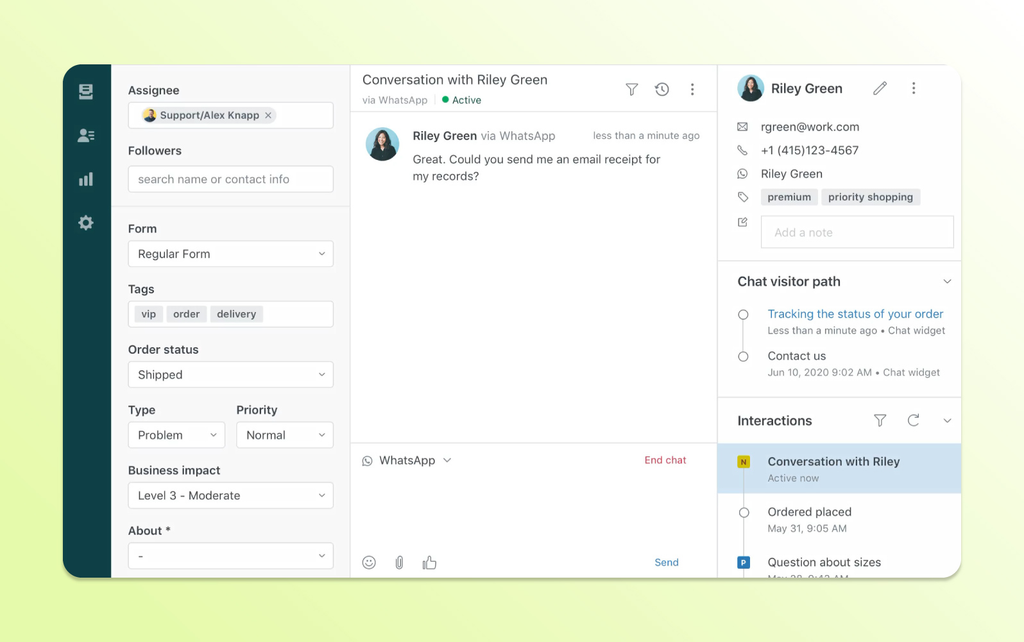
Ticketing management is the backbone of any help desk system. It captures every incoming request—from email, chat, or web form—and converts it into a structured, trackable ticket. Each ticket gets a unique identifier, so agents can track, prioritize, and manage issues without anything slipping through.
In my experience, the real value shows up in how tickets are organized. A solid ticketing system assigns ownership and keeps every customer issue in one place, which means agents spend less time hunting for context and more time resolving problems.
Here's what a solid ticketing system should handle out of the box:
- Omnichannel capture: Pulls requests from email, chat, web forms, and social into one queue—platforms like Zendesk and Freshdesk do this well.
- Automatic assignment: Routes tickets to the right agent or team based on topic, channel, or workload.
- Collision detection: Alerts agents when someone else is already working a ticket, so you don't send duplicate replies.
- Status and priority tracking: Keeps every ticket labeled and sorted so nothing ages out unnoticed.
- Ticket merging: Combines duplicate requests from the same customer into one thread.
2. Knowledge Base
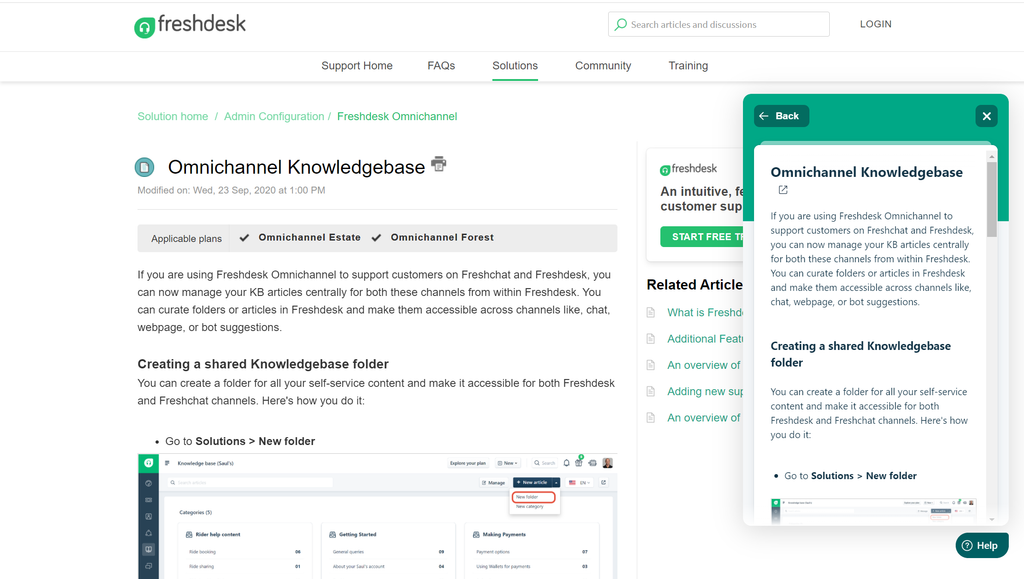
A knowledge base is a searchable library of FAQs, troubleshooting guides, and how-to articles that help customers resolve common problems independently.
When connected to a self-service portal, customers can also submit requests and track ticket statuses without contacting an agent. Agents can link relevant articles directly from their tickets, while customers get a central place to find answers and manage support requests.
I find this feature cuts ticket volume noticeably. When customers resolve common issues on their own, your agents stay focused on the requests that actually need human judgment.
A good knowledge base does more than store articles—it actively surfaces the right content at the right moment:
- Article suggestions: Platforms like Zendesk and Freshdesk can auto-suggest relevant articles to agents while they're composing a reply, so they're not digging through a library mid-conversation.
- Search analytics: Tracks what customers search for and which searches return no results—a direct signal for content gaps.
- Agent-facing vs. customer-facing: Some teams keep an internal knowledge base for agent procedures, separate from the public-facing help center.
- Feedback loops: Article thumbs-up/thumbs-down ratings tell you what's actually helping customers resolve issues.
Have an account? Log In
3. Omnichannel Support
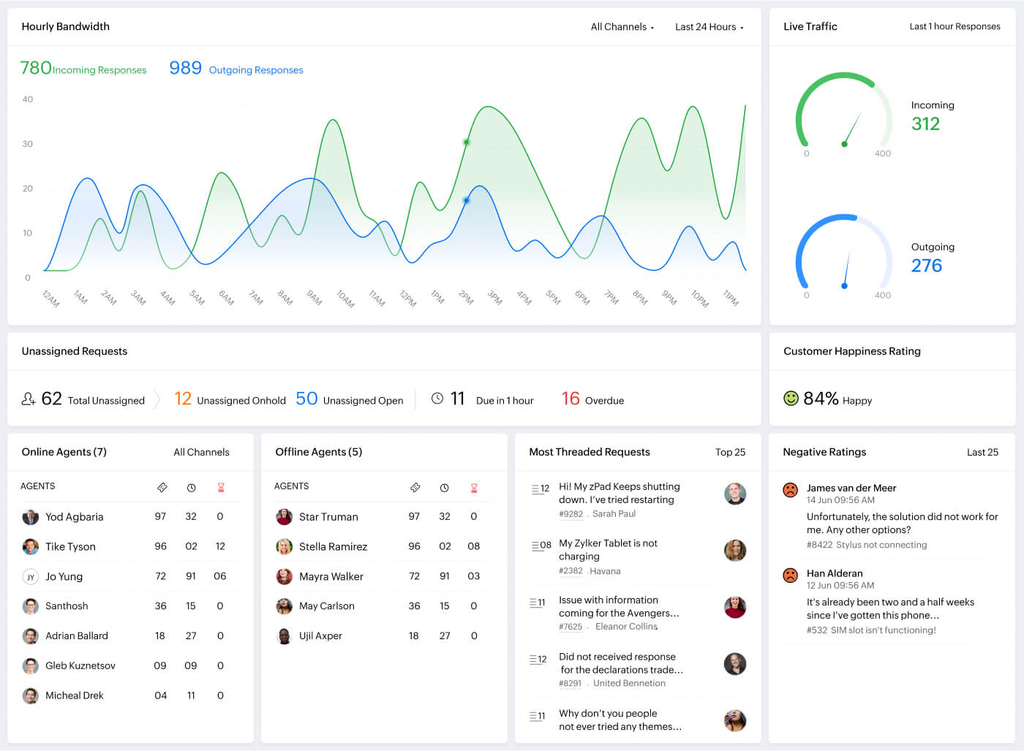
Omnichannel support pulls every customer conversation—email, chat, social, voice, and web forms—into a single queue. Agents see the full interaction history regardless of which channel a customer used, so context never resets mid-conversation.
In my experience, this is where a lot of teams get caught out. Without it, agents are constantly switching between tools and piecing together fragmented histories. When it works well, a customer can start on live chat and follow up by email without your agent missing a beat.
Here's what omnichannel support looks like in practice, across the channels where it matters most:
- Email: The default starting point—tickets are created automatically and tied to customer history.
- Live chat: Agents handle real-time conversations without losing the thread if a customer switches to email later.
- Social media: Platforms like Freshdesk and Zoho Desk pull in mentions and DMs so nothing gets missed in a separate inbox.
- Voice: Calls log alongside written interactions, giving agents full context before they pick up.
- Customer history: Every channel feeds one unified timeline, so agents aren't asking customers to repeat themselves.
4. SLA Management
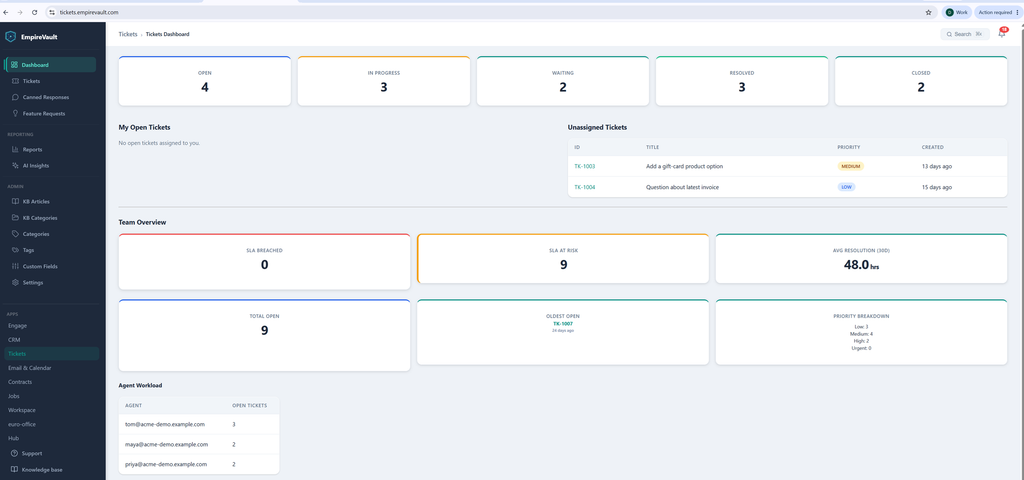
Service level agreements (SLAs) define the response and resolution time commitments your support team must meet. SLA management features apply these targets to incoming tickets based on factors such as priority or customer tier, then track approaching and missed deadlines so teams can address issues before commitments are breached.
When a ticket is about to breach its SLA, the system automatically alerts the right people—or reassigns the ticket—so nothing slips past your team unnoticed. That kind of automated accountability makes a real difference at volume.
Here's what SLA management looks like across the features that matter most:
- Policy configuration: Set different response and resolution windows by ticket priority, customer tier, or channel—Zendesk lets you build multiple SLA policies so enterprise accounts get faster commitments than standard ones.
- Breach alerts: Agents and supervisors get notified before a deadline hits, not after.
- Auto-escalation: Tickets near breach can be automatically reassigned to a senior agent or team lead.
- Reporting: Track breach rates over time to spot where your team is consistently falling behind.
5. Automated Workflow
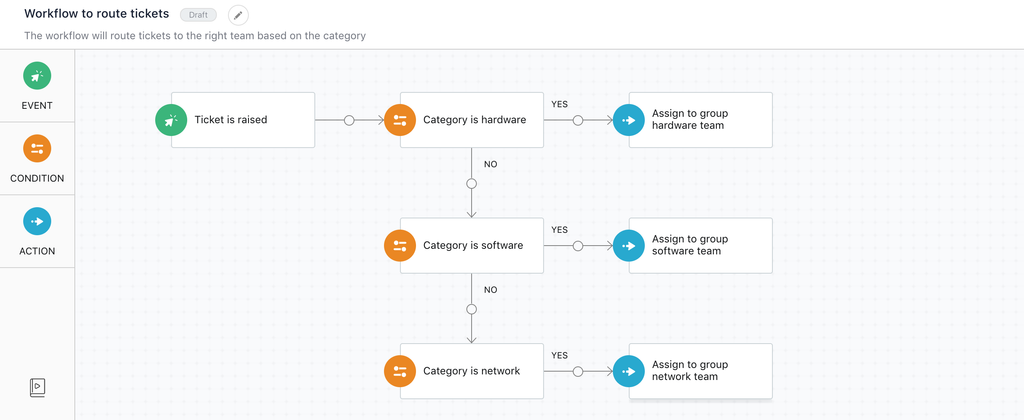
Automated workflows use automation rules to handle repetitive ticket actions based on triggers such as topic, priority, or time. For example, ticket categorization can identify billing requests and automatically route them to the right team.
These workflows also handle acknowledgments, status updates, and escalations, reducing manual triage and keeping support requests moving.
In practice, this is where I've seen teams reclaim the most time. When a ticket tagged "billing" auto-routes to the right team and fires a confirmation to the customer instantly, agents aren't burning time on housekeeping. They're actually solving problems.
The rules are usually straightforward to configure, and the payoff compounds fast as ticket volume grows.
Here's what automated workflows typically handle across a help desk setup:
- Ticket routing: Assigns tickets to the right agent or team the moment they come in—no manual triage needed.
- Auto-responses: Sends an instant acknowledgment to the customer so they know their request is in the queue.
- Canned responses and macros: Give agents reusable replies for common questions. Macros can also apply multiple ticket actions, such as adding tags, changing statuses, or assigning requests. Unlike automatic workflow rules, these tools are typically triggered by an agent.
- Follow-up triggers: Fires a check-in message if a ticket sits idle for a set period.
- Tag-based escalation: Flags tickets containing specific keywords—like "refund" or "outage"—and routes them to the right team immediately.
6. Reporting and Analytics
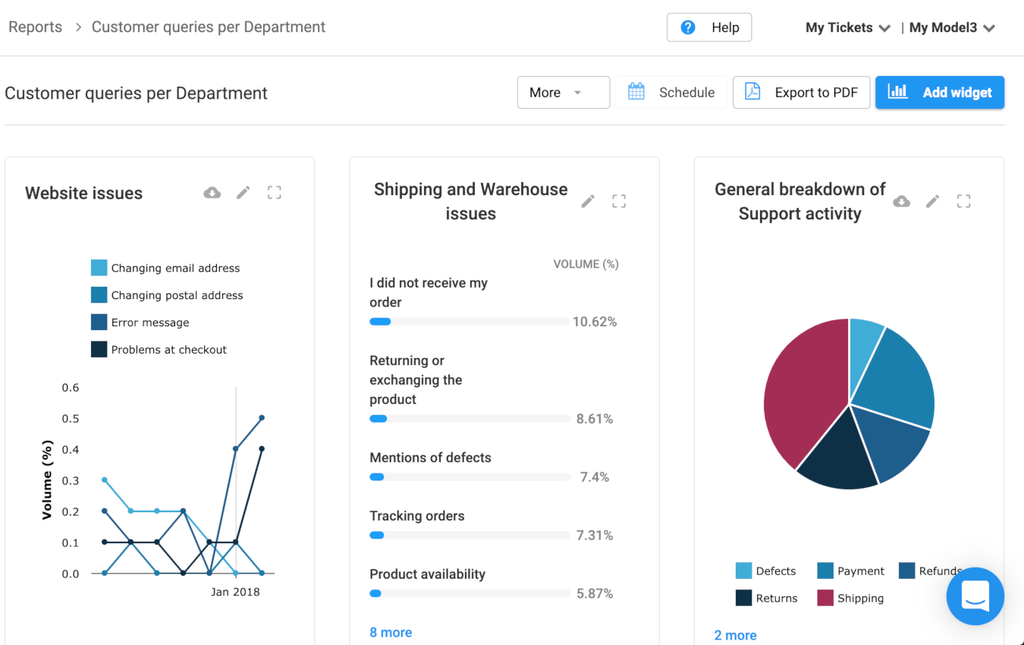
Reporting and analytics give you a clear view of how your support team is actually performing. The feature pulls data from across your ticketing system—resolution times, agent workload, customer satisfaction scores, first-reply times—and surfaces it in dashboards and exportable reports.
I find this is where most teams spot the patterns they'd otherwise miss. If your breach rate spikes on Mondays or one agent is handling twice the ticket volume of everyone else, the data tells you before it becomes a real problem.
Here's what reporting and analytics surface across a typical help desk setup:
- First-reply time: Measures how long customers wait before an agent responds—the clearest early signal of queue health.
- Resolution time: Tracks how long tickets stay open from creation to close.
- Agent workload: Shows ticket volume per agent, so you can spot imbalances before burnout sets in.
- CSAT scores: Ties customer satisfaction ratings directly to tickets and agents.
- Breach rate trends: Flags recurring SLA failures by day, team, or ticket type—Zendesk and Freshdesk both surface this in their dashboards.
7. Customer Feedback Tools
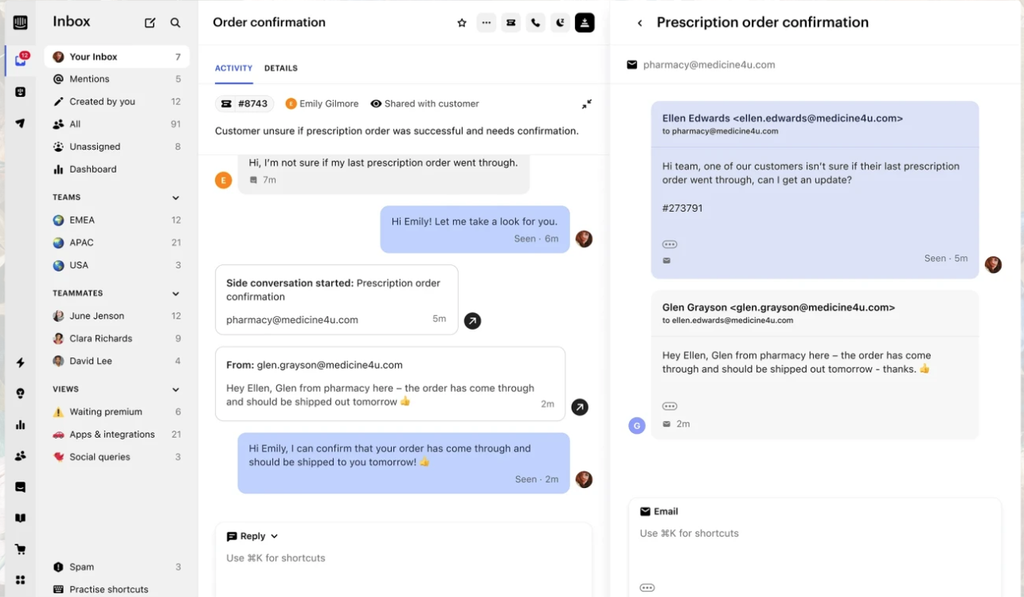
Customer feedback tools capture how customers feel about their support experience—typically through post-ticket CSAT surveys, star ratings, or short follow-up questions sent automatically after a conversation closes.
Inside a help desk platform, this data ties directly to individual tickets and agents. That's where I find it most useful: you're not just seeing an aggregate score, you're seeing which ticket types or agents are driving dissatisfaction. That specificity is what makes the feedback actionable rather than just decorative.
- CSAT surveys: Sent automatically after a ticket closes—Zendesk and Freshdesk both support this out of the box.
- Star ratings: A quick one-to-five scale gives customers a low-friction way to respond.
- Follow-up questions: Short open-text fields capture the "why" behind a low score.
- Agent-level scoring: Ties ratings to individual agents, not just overall team performance.
- Ticket-level tagging: Links negative feedback to specific ticket types, so you can spot recurring issues in billing, onboarding, or technical support.
8. Internal Collaboration
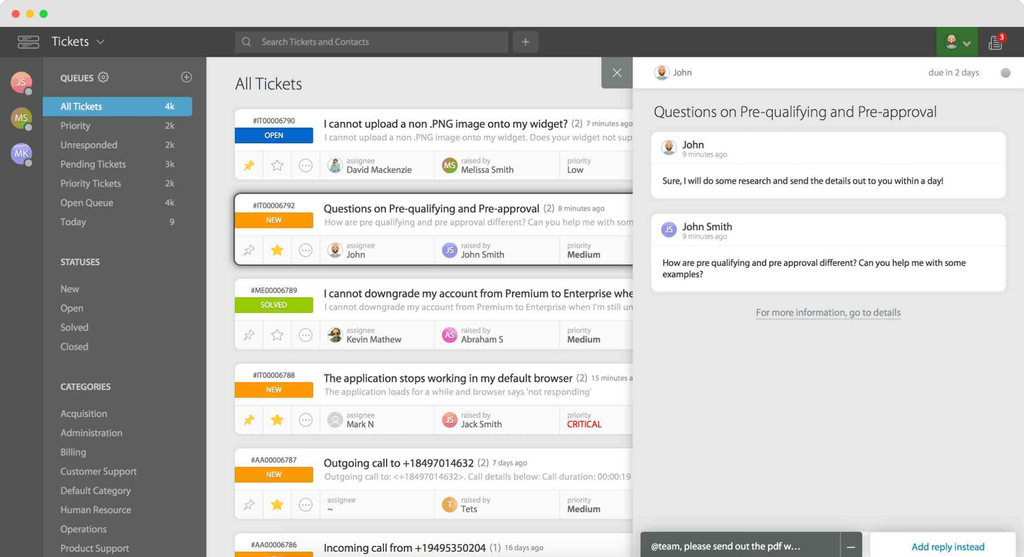
Internal collaboration lets agents work together on tickets without the customer seeing it. Through private notes, @mentions, and agent collision detection, teams can loop in the right person, share context, or flag a tricky ticket—all inside the thread.
I find this particularly valuable for complex issues that cross team lines. Without it, the alternative is Slack threads and forwarded emails that fragment context. When collaboration lives inside the ticket, the customer gets a faster, more consistent answer.
Here's what internal collaboration looks like inside a help desk ticket:
- Private notes: Leave context for teammates without the customer seeing it—useful when handing off a ticket mid-conversation.
- @mentions: Tag a specific agent or team lead directly in a thread. Freshdesk and Zendesk both support this so the right person gets pulled in fast.
- Agent collision detection: Alerts you when another agent has the ticket open, so two people don't send conflicting replies.
- Linked tickets: Connect related issues so agents working separate threads stay aware of each other's progress.
9. Third-Party Integrations
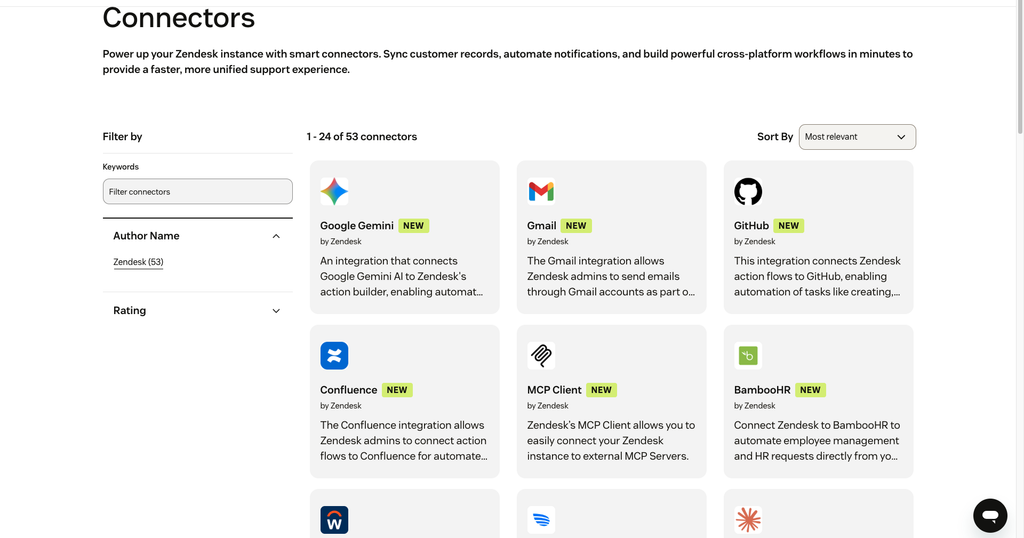
Third-party integrations connect your help desk to the other tools your team already uses—CRMs, project management platforms, communication apps, and more.
APIs connect your help desk with other tools to reduce duplicate work. When sharing personal data, check permissions and applicable GDPR requirements.
In my experience, this is what separates a help desk that fits your workflow from one that fights it. Zendesk's Jira integration lets agents create or link engineering issues from support tickets, keeping work connected to the help desk ticketing system.
Jira issue creation can also be automated through a configured action flow, while CRM integrations can surface Salesforce customer details within a ticket.
Here's what third-party integrations typically connect in a help desk setup:
- CRM sync: Pulls contact and account data from Salesforce or HubSpot directly into the ticket, so agents see purchase history and account tier without switching tabs.
- Engineering handoffs: Links Zendesk support tickets to Jira issues so agents can track engineering progress on bugs or feature requests without relying on separate follow-up emails.
- Communication tools: Slack integrations push ticket notifications to the right channel the moment a high-priority issue comes in.
- Billing systems: Connects platforms like Stripe so agents can verify subscription status inside the thread.
10. Asset Management
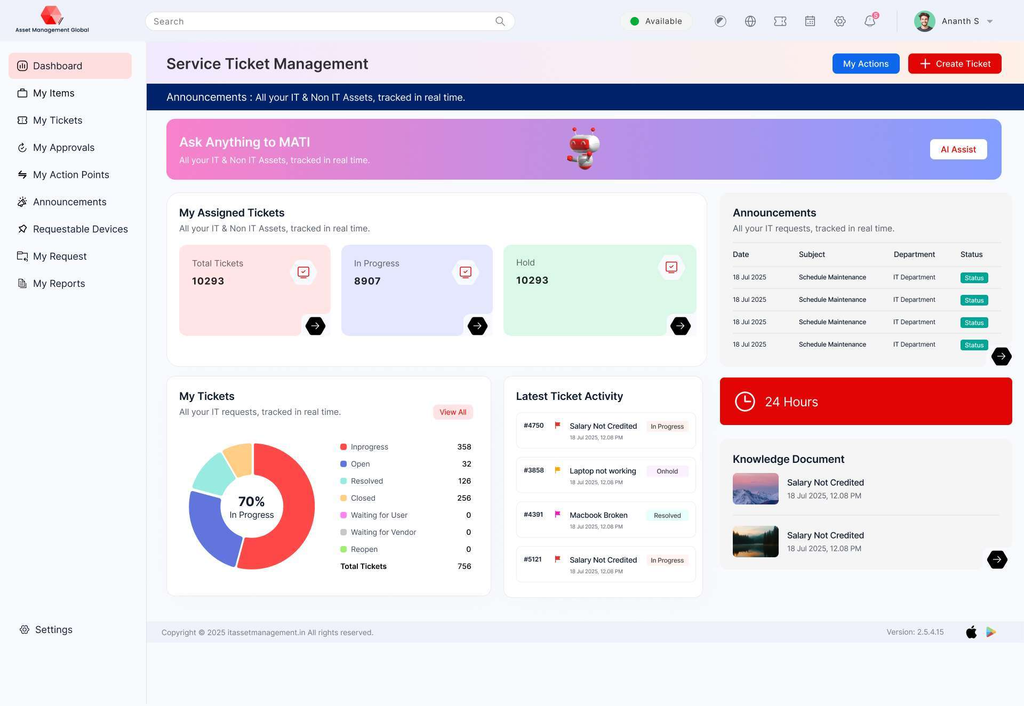
In IT service management (ITSM), asset management tracks devices, software licenses, and configurations, linking them to help desk tickets for easier troubleshooting.
When a ticket comes in, agents see what equipment the customer is using, its history, and its current status without leaving the thread.
I find this especially useful for IT-facing support teams. Without it, agents waste time switching between systems to piece together context. Tools like Freshservice and SysAid link assets directly to tickets, so troubleshooting starts with full visibility rather than a guessing game.
Here's what asset management surfaces inside a help desk ticket:
- Device history: Shows the full lifecycle of a piece of hardware—when it was issued, past issues, and any prior repairs.
- License tracking: Flags expired or at-risk software licenses before they become a support issue.
- Asset-to-ticket linking: Ties assets directly to open tickets, so agents in Freshservice or SysAid see the full picture immediately.
- Configuration visibility: Displays current device specs and software versions, so troubleshooting starts with accurate information rather than assumptions.
11. AI Chatbots
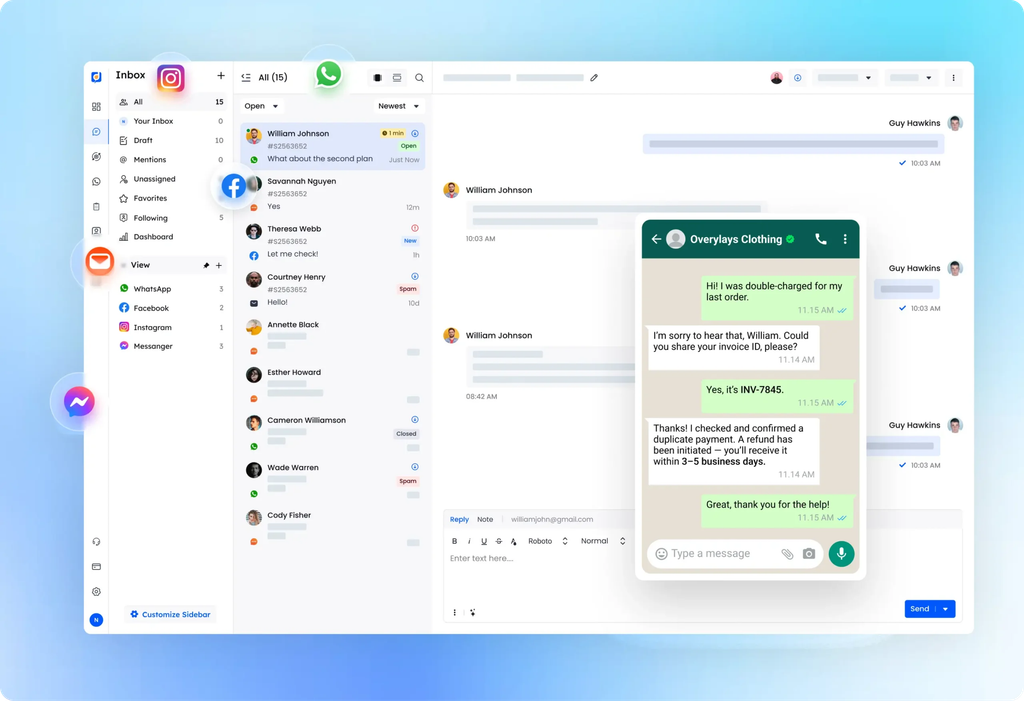
AI chatbots answer common customer questions using knowledge bases and approved support information. More advanced AI agents can also complete tasks, such as checking order statuses or updating tickets, when the necessary integrations and permissions are configured.
Agent-facing AI assistance serves a different purpose, helping human agents summarize conversations, draft replies, and categorize requests.
The real value comes from resolving routine issues without sacrificing accuracy or customer experience. When evaluating these features, check whether the system recognizes questions it cannot answer, escalates complex issues to a human agent, and preserves the conversation history during handoffs.
Here's what AI chatbots handle inside a help desk platform:
- Ticket deflection: Resolves repetitive questions—password resets, order status, refund policies—without agent involvement.
- Knowledge base pull: Surfaces relevant help articles automatically, so customers get answers before a ticket is even created.
- Agent-facing AI assistance: Suggests replies, summarizes ticket histories, and recommends categorization so human agents can review and respond faster.
- 24/7 coverage: Responds outside business hours without staffing gaps.
- Escalation routing: Hands off to a live agent when the issue exceeds what the bot can handle—Zendesk and Freshdesk both do this mid-conversation.
- Conversation history logging: Passes the full chat transcript to the agent, so customers never have to repeat themselves.
More Articles
12. Mobile Accessibility
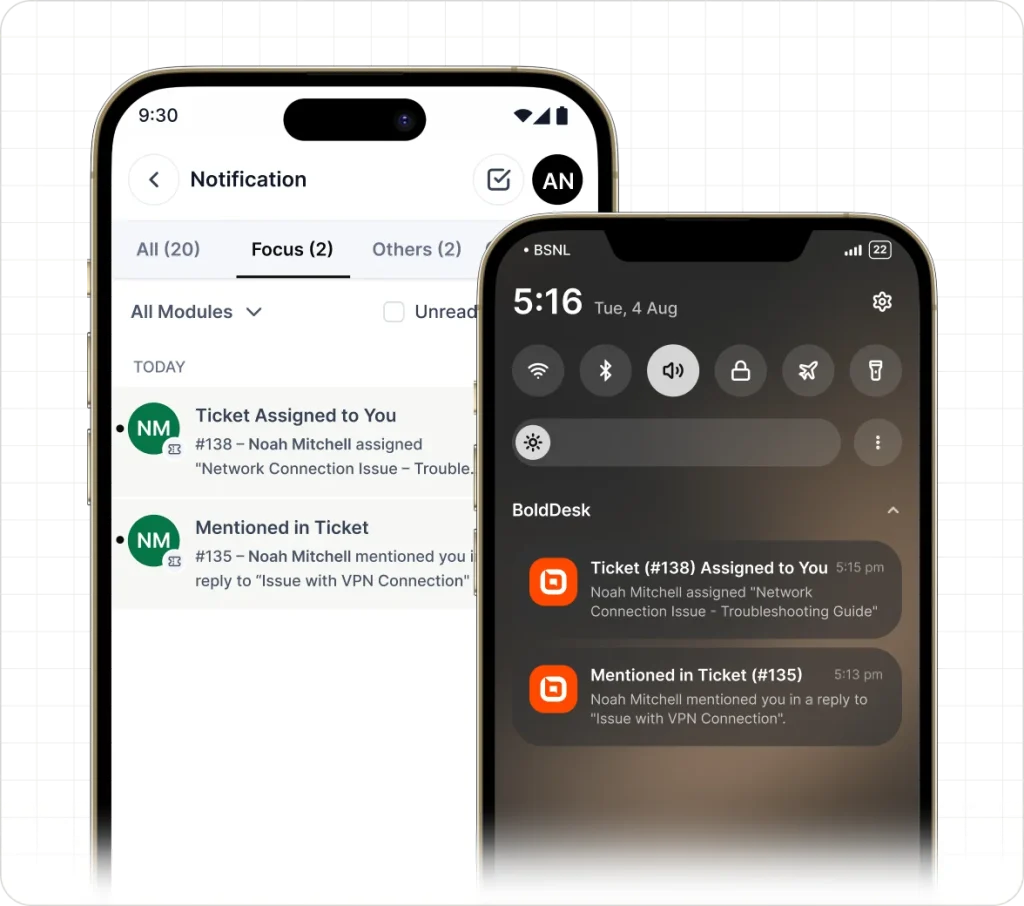
Mobile accessibility means your agents can view, respond to, and manage tickets from a phone or tablet—not just a desktop. Most help desk platforms offer dedicated mobile apps that mirror core functionality: ticket updates, @mentions, and priority flags all travel with your team.
I think this matters most for on-call support or field-facing teams. When something urgent comes in after hours, your agents shouldn't need a laptop to handle it. The difference between a mobile-ready help desk and one that isn't shows up fast during an incident.
Here's what mobile accessibility covers in a help desk platform:
- Ticket management: View, reply to, and update tickets from your phone without losing any core functionality.
- Push notifications: Get alerted the moment a high-priority ticket comes in, so urgent issues don't sit unanswered.
- @mention alerts: Tag a teammate or get tagged yourself directly from the mobile app—Zendesk and Freshdesk both handle this well.
- Status updates: Reassign, escalate, or close tickets on the go, keeping queues moving even when your team isn't at a desk.
Top 10 Help Desk Software
Here are our top picks for the best help desk software to help you with your search:
Now Choose the Right Tool for Your Team
If you know which features matter most to your support operation, the next step is finding a platform that actually delivers them—our breakdown of the best help desk software for small businesses covers the top options with pricing, feature comparisons, and what each one does best.