

LaunchDarkly-anmeldelse: Fordele, ulemper, funktioner og priser
LaunchDarkly skiller sig ud med sine muligheder for funktionsflagning, hvilket gør platformen til et oplagt valg for teams, der har brug for præcis kontrol over lanceringen af funktioner.

We review tools independently, and commissions help fund our testing. See our transparency policy, our methodology, or suggest a tool.
LaunchDarkly is an A/B test tool built around feature flag management. It's designed for engineering and product teams that run controlled experiments alongside gradual feature rollouts. I'd consider it over Optimizely if your team wants experimentation and feature release controls in one system, not split across separate platforms.
LaunchDarkly Evaluation Summary

4.5/5
- From $10/month (billed annually)
- Free plan + 14-day free trial + free demo available
Why Trust Our Software Recommendations
6,700+
Reviews
20
Industry experts
16+
Evaluation factors
14
Years
Our team has been testing and reviewing software since 2012. As CX leaders ourselves, we know how difficult—and important—it is to choose the right software.
For this guide, we evaluated tools using hands-on testing and independent research, scoring tools using our selection criteria.
Our reviews reflect our human editorial judgment, not a sales pitch.
 Gui DrusinaCreative Director
 Tim FisherVP of AI
LaunchDarkly Overview
In my opinion, LaunchDarkly is a solid choice for teams that need precise control over feature deployments. Its standout feature is real-time feature flagging, which is great for agile teams. While it offers competitive pricing and useful integrations, its onboarding and customer support could use some improvement. Compared to others, it excels in managing feature rollouts but might fall short in ease of use for non-technical users. If your team values flexibility and quick iterations in its feature flag management tool, LaunchDarkly is worth considering.
Pros
- You can roll out features instantly with real-time feature flagging.
- Your team gets better control over feature releases and experiments.
- It reduces risks by allowing gradual feature rollouts and quick rollbacks.
Cons
- Your team might find the learning curve a bit steep initially.
- You may notice limited customer support responsiveness compared to others.
- Some users feel the interface could be more intuitive for beginners.
Is LaunchDarkly Right For Your Needs?
Who Would be a Good Fit for LaunchDarkly?
LaunchDarkly suits tech companies and agile development teams needing to manage feature releases efficiently. If your team works in environments where rapid iteration and controlled rollouts are crucial, like software development or product management, LaunchDarkly's feature flagging and real-time control make it a strong fit. Its ability to deploy features gradually and roll back if needed offers safety and flexibility, especially for teams handling critical updates.
- Software DevelopmentLaunchDarkly lets your team deploy features safely and quickly, improving your development workflow.
- Product ManagementYou can use LaunchDarkly's real-time feature control to test new ideas without disrupting your users.
- Tech StartupsYour startup can benefit from LaunchDarkly's quick rollouts and rollback capabilities, minimizing risks.
- Agile TeamsIts feature flagging aligns with your agile methodologies, enabling rapid testing and iteration.
- E-commerceYou can test different features on your site without affecting the entire user base.
- SaaS CompaniesLaunchDarkly supports your need for continuous delivery and fast-paced feature updates.
Who Would be a Bad Fit for LaunchDarkly?
LaunchDarkly may not suit small businesses or teams with limited technical expertise, as the learning curve can be steep. If your work doesn’t involve frequent feature updates or doesn’t require precise control over feature rollouts, you might find LaunchDarkly's capabilities excessive. Teams that don’t have dedicated resources for onboarding and ongoing support might struggle with setup and maximizing its potential.
- Small Retail ShopsYour shop likely doesn't need the complex feature management that LaunchDarkly offers.
- Non-Technical TeamsWithout technical expertise, your team might find LaunchDarkly's interface and setup challenging.
- Freelance DevelopersFor solo developers, LaunchDarkly's features may feel overwhelming and unnecessary.
- Traditional IndustriesIndustries with slow innovation cycles don’t benefit from rapid feature flagging.
- Low-Volume WebsitesIf your website doesn’t require constant updates, LaunchDarkly's advanced features might be overkill.
- Non-Digital AgenciesAgencies focused on traditional media won’t leverage the benefits of LaunchDarkly's digital-centric tools.
How We Test & Score Tools
We’ve spent years building, refining, and improving our software testing and scoring system. The rubric is designed to capture the nuances of software selection and what makes a tool effective, focusing on critical aspects of the decision-making process.
Below, you can see exactly how our testing and scoring works across seven criteria. It allows us to provide an unbiased evaluation of the software based on core functionality, standout features, ease of use, onboarding, customer support, integrations, customer reviews, and value for money.
Core Functionality (25% of final scoring)
The starting point of our evaluation is always the core functionality of the tool. Does it have the basic features and functions that a user would expect to see? Are any of those core features locked to higher-tiered pricing plans? At its core, we expect a tool to stand up against the baseline capabilities of its competitors.
Standout Features (25% of final scoring)
Next, we evaluate uncommon standout features that go above and beyond the core functionality typically found in tools of its kind. A high score reflects specialized or unique features that make the product faster, more efficient, or offer additional value to the user.
We also evaluate how easy it is to integrate with other tools typically found in the tech stack to expand the functionality and utility of the software. Tools offering plentiful native integrations, 3rd party connections, and API access to build custom integrations score best.
Ease of Use (10% of final scoring)
We consider how quick and easy it is to execute the tasks defined in the core functionality using the tool. High scoring software is well designed, intuitive to use, offers mobile apps, provides templates, and makes relatively complex tasks seem simple.
Onboarding (10% of final scoring)
We know how important rapid team adoption is for a new platform, so we evaluate how easy it is to learn and use a tool with minimal training. We evaluate how quickly a team member can get set up and start using the tool with no experience. High scoring solutions indicate little or no support is required.
Customer Support (10% of final scoring)
We review how quick and easy it is to get unstuck and find help by phone, live chat, or knowledge base. Tools and companies that provide real-time support score best, while chatbots score worst.
Customer Reviews (10% of final scoring)
Beyond our own testing and evaluation, we consider the net promoter score from current and past customers. We review their likelihood, given the option, to choose the tool again for the core functionality. A high scoring software reflects a high net promoter score from current or past customers.
Value for Money (10% of final scoring)
Lastly, in consideration of all the other criteria, we review the average price of entry level plans against the core features and consider the value of the other evaluation criteria. Software that delivers more, for less, will score higher.
Core Features
Feature Flagging: LaunchDarkly lets your team control feature rollouts in real-time, reducing risks and improving flexibility. You can easily turn new features on or off without deploying new code.
Experimentation: Your team can run A/B tests to determine which features work best for users. This feature helps you make data-driven decisions quickly.
User Targeting: You can target specific user segments for feature releases, ensuring the right users see the right features. It’s great for personalized user experiences and quality assurance.
Progressive Delivery: LaunchDarkly supports gradual feature rollouts, helping your team catch issues early. This minimizes disruptions for your users.
Real-Time Updates: Your team can make immediate changes to features, which is ideal for fast-paced environments. Users see updates without delays.
Audit Logging: Track changes and access logs to understand who changed what and when. This feature helps maintain accountability in your team.

Ease of Use
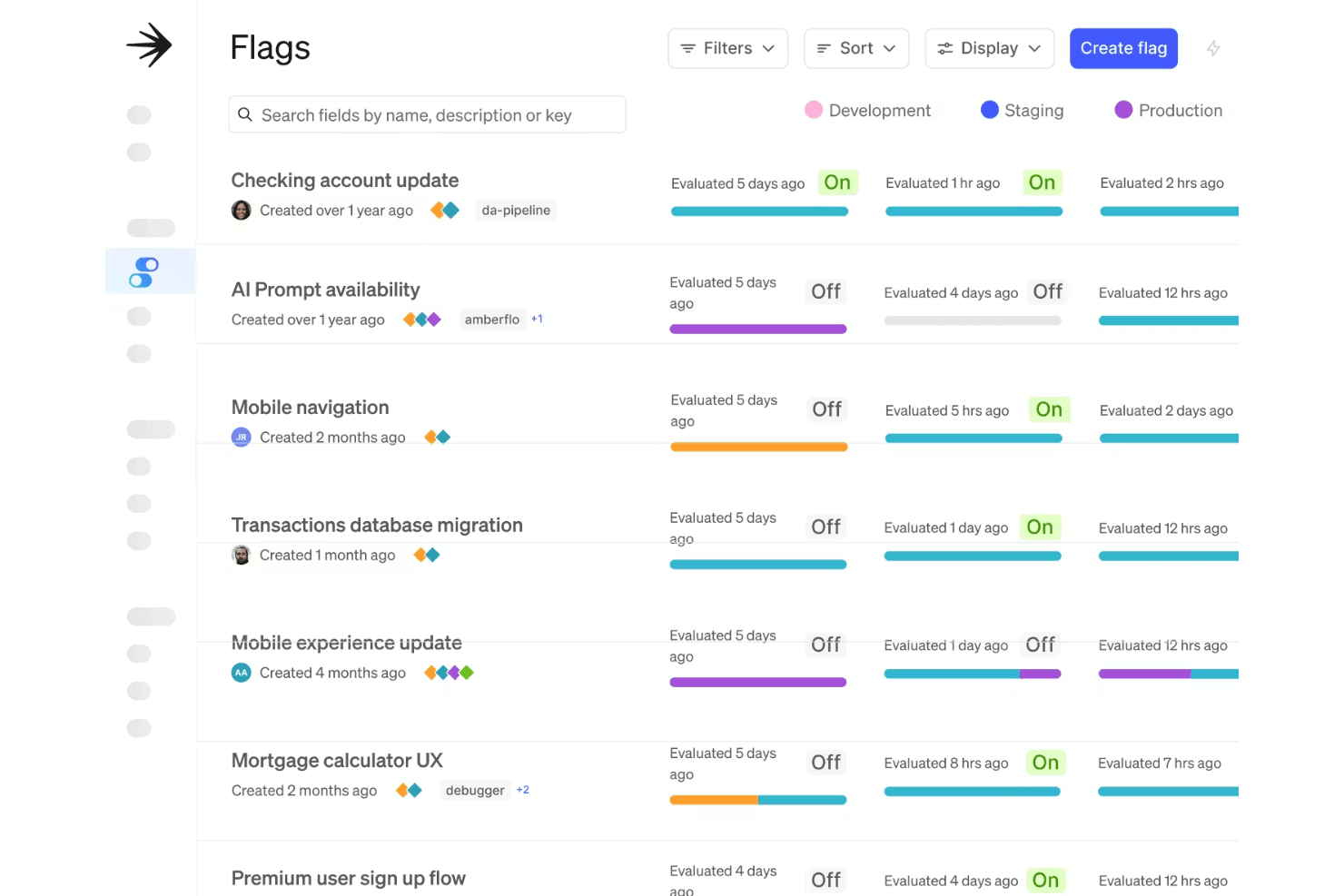
In my opinion, LaunchDarkly offers a user-friendly interface but might feel complex for non-technical users initially. Your team will appreciate its intuitive design once you get past the initial learning curve. The dashboard makes managing feature flags straightforward, but setup and navigation can be challenging at first. Compared to other tools like Statsig, it requires some getting used to, yet its real-time control and flexibility make it worthwhile for agile teams.
Integrations
LaunchDarkly integrates with AWS CloudWatch, Microsoft Teams, Azure DevOps, GitHub, Slack, Zendesk, Google Cloud, Jira Software, Bitbucket, Datadog, and Trello.
LaunchDarkly also offers an API and connects with third-party integration tools like Zapier for expanded functionality.

LaunchDarkly Specs
- A/B Testing: Yes
- API: Yes
- Automated Testing: Yes
- Browser Compatibility Testing: Yes
- Bug Tracking: Yes
- Calendar Management: Yes
- CI/CD Integration: Yes
- Dashboard: Yes
- Data Export: Yes
- Data Import: Yes
- Data Visualization: Yes
- Developer Tools: Yes
- External Integrations: Yes
- History/Version Control: Yes
- Manual Testing: Yes
- Multi-User: Yes
- Notifications: Yes
- Performance Testing: Yes
- Regression Testing: Yes
- Scheduling: Yes
- Status Notifications: Yes
- Third-Party Plugins/Add-Ons: Yes


