

Las plataformas de incorporación de clientes mediante IA son herramientas de software que utilizan inteligencia artificial para automatizar, personalizar y mejorar el proceso de dar la bienvenida a nuevos clientes y guiarlos hasta que obtengan valor. Si estás buscando las mejores plataformas de incorporación de clientes mediante IA, probablemente quieras reducir el trabajo manual, ofrecer experiencias coherentes y ayudar a los clientes a alcanzar el éxito más rápidamente, sin sacrificar la calidad ni la supervisión. Elegir la plataforma adecuada puede ayudar a tu equipo a gestionar mayores volúmenes, adaptar la incorporación a las necesidades de cada cliente y medir qué está funcionando. En esta lista encontrarás opciones de confianza que abordan los desafíos reales de la incorporación y respaldan tus objetivos de satisfacción y retención de clientes.
Por qué confiar en nuestras recomendaciones de software
6,700+
Reviews
20
Industry experts
16+
Evaluation factors
14
Years
Nuestro equipo lleva probando y evaluando software desde 2012. Como líderes de CX, sabemos lo difícil —y lo importante— que es elegir el software adecuado.
Para esta guía, evaluamos las herramientas mediante pruebas prácticas e investigación independiente, puntuando las herramientas según nuestros criterios de selección.
Nuestras reseñas reflejan nuestro criterio editorial humano, no un discurso de ventas.
 Gui DrusinaCreative Director
 Tim FisherVP of AI
Tabla comparativa de plataformas de incorporación de clientes mediante IA
Esta tabla comparativa resume los detalles de precios de mi selección de las principales plataformas de incorporación de clientes mediante IA:
| Tool | Best For | Trial Info | Price | ||
|---|---|---|---|---|---|
| 1 | Ideal para portales de incorporación de clientes basados en enlaces | Prueba gratuita de 14 días | Desde €59/usuario/mes (facturado anualmente) | Website | |
| 2 | Ideal para espacios de trabajo de onboarding de clientes | Plan gratuito + demo gratuita disponible | Desde $350/mes (facturado anualmente) | Website | |
| 3 | Ideal para experiencias de onboarding contextuales para usuarios | Prueba gratuita de 14 días + demo gratuita disponible | Desde $299/mes (facturado anualmente) | Website | |
| 4 | Mejor para experiencias de incorporación sin código | Prueba gratuita + demo gratis disponible | Precio bajo consulta | Website | |
| 5 | Ideal para el seguimiento transparente de proyectos de incorporación | Demostración gratuita disponible | Precios bajo petición | Website | |
| 6 | Ideal para orientación y analítica de incorporación dentro de la aplicación | Prueba gratuita de 30 días + plan gratuito + demo gratis disponible | Precios a consultar | Website | |
| 7 | El mejor para el seguimiento y automatización de tareas de incorporación | Demostración gratuita + prueba gratis disponible | Desde $15,000/mes | Website | |
| 8 | Ideal para flujos de onboarding impulsados por IA | Plan gratuito + prueba gratuita + demo gratuita disponible | Desde $19/mes | Website | |
| 9 | Ideal para pipelines visuales de onboarding | Prueba gratuita de 14 días + demo gratis disponible | Desde $18/asiento/mes (facturación anual) | Website | |
| 10 | Ideal para soporte de onboarding con IA para equipos de éxito del cliente | Plan gratuito + demo gratis disponible | Desde $40/mes (facturado anualmente) | Website |


Reseñas de plataformas de incorporación de clientes mediante IA
A continuación se incluyen mis resúmenes detallados de las mejores plataformas de incorporación de clientes mediante IA que llegaron a mi lista de seleccionadas. Mis reseñas ofrecen un análisis detallado de las características, capacidades e integraciones de cada plataforma para ayudarte a encontrar la mejor opción para ti.
 Ideal para portales de incorporación de clientes basados en enlaces
- Prueba gratuita de 14 días
- Desde €59/usuario/mes (facturado anualmente)
Visit WebsiteCustomer Rating:4.9/5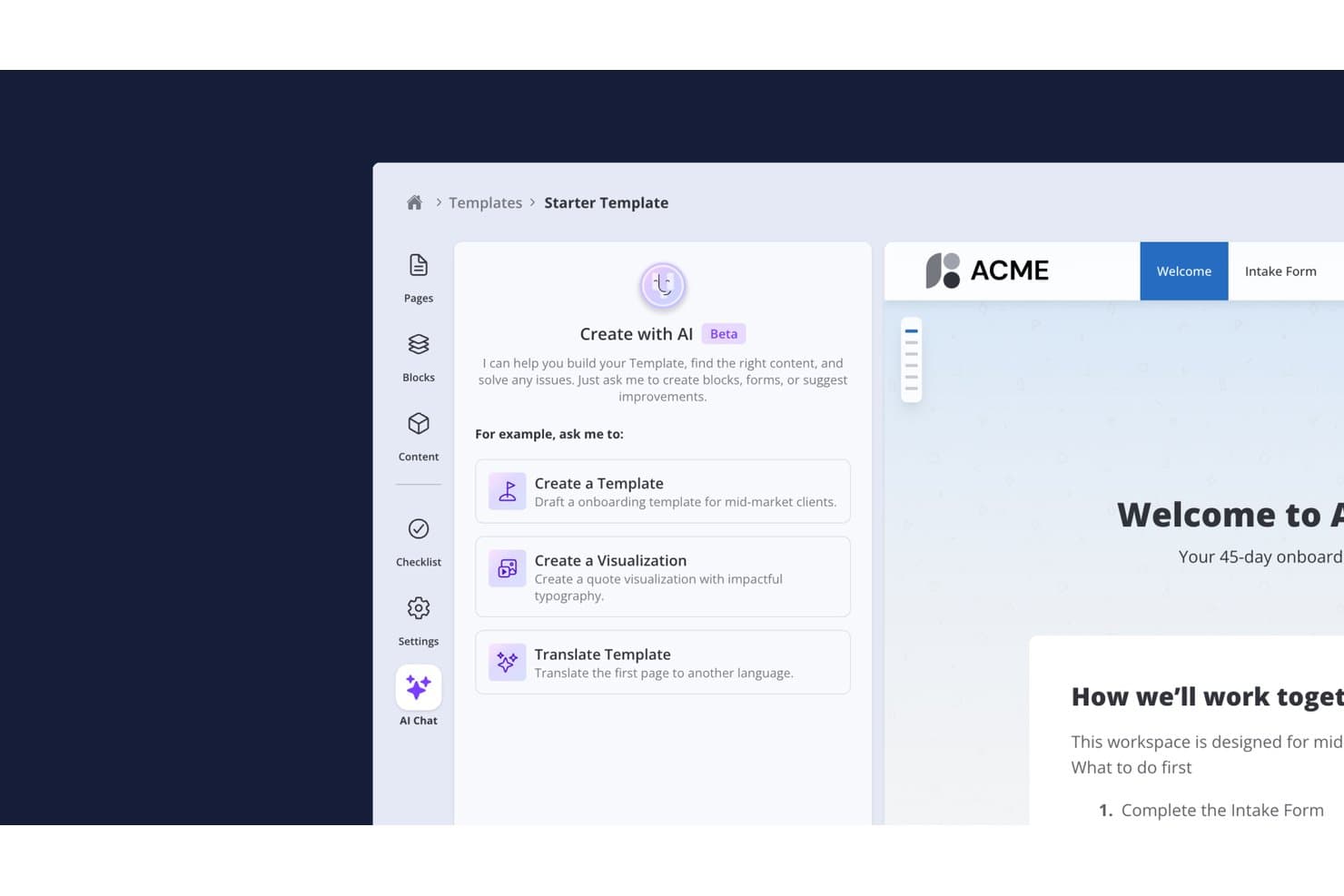
Valuecase permite a los usuarios crear plantillas de incorporación con un asistente de chat de IA. Valuecase es una plataforma de incorporación de clientes basada en IA que permite a los equipos crear portales de cliente con marca y sin necesidad de iniciar sesión, con planes de tareas, seguimiento de hitos, formularios condicionales, chat en directo y automatización de flujos de trabajo impulsada por IA.
¿Para quién es más adecuado Valuecase?
Valuecase es una opción especialmente adecuada para equipos de B2B SaaS y servicios profesionales cuya incorporación de clientes depende de espacios de trabajo compartidos, planes de tareas estructurados y una experiencia del cliente sin fricciones que no requiere que los clientes inicien sesión.
Por qué elegí Valuecase
Valuecase se gana un lugar en mi lista de favoritos porque su modelo de portal de cliente basado en enlaces elimina el mayor obstáculo de la incorporación: conseguir que los clientes inicien sesión. Cada espacio se ofrece como una URL que se puede compartir, por lo que los clientes pueden revisar tareas, completar formularios condicionales y hacer seguimiento de los hitos sin crear una cuenta. También me gusta que el agente de IA integrado genere automáticamente manuales completos de incorporación a partir de documentos cargados y escriba actualizaciones del estado en el CRM en HubSpot o Salesforce semanalmente, manteniendo informado al equipo interno sin necesidad de informes manuales.
Características principales de Valuecase
- Formularios con ramificación condicional: Los formularios se adaptan en tiempo real según las respuestas de los clientes, de modo que cada cliente solo responde a las preguntas relevantes para su configuración.
- Gráfico de Gantt y seguimiento de hitos: Las líneas de tiempo visuales del proyecto permiten tanto a tu equipo como al cliente ver exactamente en qué punto se encuentra la incorporación en cada momento.
- Bloques de contenido generados por IA: El agente de IA crea planes de tareas, bloques de acordeón, tablas de precios y visualizaciones HTML personalizadas directamente a partir de documentos cargados o instrucciones.
- Sincronización automática del estado en el CRM: El agente de IA escribe automáticamente actualizaciones semanales del estado de la incorporación en HubSpot o Salesforce, sin ninguna intervención manual de tu equipo.
Integraciones de Valuecase
Valuecase ofrece seis integraciones nativas con HubSpot, Salesforce, Slack, Microsoft Teams, Gmail y Google Calendar. También admite acceso a API y webhooks a partir del plan Growth, además de Make.com y Zapier.
Pros and Cons
Pros:
- La IA automatiza las tareas y el contenido de incorporación
- Los portales sin inicio de sesión simplifican la colaboración con los clientes
- Manuales impulsados por IA a partir de documentos cargados
Cons:
- No incluye un chatbot de IA orientado al cliente
- Los análisis avanzados requieren planes de nivel superior
Learn more about Valuecase: 2Ideal para espacios de trabajo de onboarding de clientes
Dock
- Plan gratuito + demo gratuita disponible
- Desde $350/mes (facturado anualmente)
Visit WebsiteCustomer Rating:4.9/5
Dock centraliza la incorporación, los cronogramas y la colaboración con clientes. Dock ofrece espacios de trabajo colaborativos diseñados para la incorporación y gestión de proyectos de clientes. Es una buena opción para equipos de éxito del cliente y de onboarding en empresas SaaS o agencias que buscan centralizar recursos, cronogramas y comunicación en un solo lugar. Si buscas proporcionar a los clientes una experiencia de onboarding transparente e interactiva, Dock te ayuda a organizar cada paso y recurso en un único centro compartido.
¿Para Quién Es Dock?
Dock es una excelente elección para equipos de éxito del cliente y onboarding en empresas SaaS y agencias que gestionan proyectos de cara al cliente.
Por Qué Elegí Dock
Elegí Dock porque sus espacios de trabajo colaborativos están diseñados específicamente para la incorporación y gestión de proyectos de clientes. La plataforma permite crear centros compartidos donde los clientes y los equipos internos pueden acceder a listas de comprobación de onboarding, cronogramas de proyectos y recursos clave en un solo lugar. Me gusta cómo Dock permite la colaboración en tiempo real, para que ambas partes puedan comentar, subir archivos y seguir el progreso conjuntamente. Este enfoque ayuda a los equipos de onboarding a ofrecer una experiencia más transparente e interactiva, lo cual es especialmente valioso para empresas SaaS y agencias que gestionan múltiples proyectos de clientes.
Funciones Clave de Dock
Otras funciones que hacen útil Dock para los equipos de onboarding incluyen:
- Opciones de personalización de marca: Añade el logo, colores y dominio de tu empresa para personalizar cada espacio de trabajo para tus clientes.
- Asignación y seguimiento de tareas: Asigna tareas a miembros del equipo o clientes y monitorea el cumplimiento directamente en el espacio de trabajo.
- Biblioteca de plantillas: Usa plantillas de espacio de trabajo predefinidas para escenarios comunes de incorporación y gestión de proyectos y agiliza la configuración.
- Compartición de documentos y control de versiones: Sube, comparte y gestiona documentos con historial de versiones incorporado para mantener a todos alineados.
Integraciones de Dock
Las integraciones incluyen Salesforce, HubSpot, Gong, Zoom, Microsoft Teams, Chorus, Fathom, Avoma, Loom y más.
Pros and Cons
Pros:
- Espacios de trabajo colaborativos para clientes y equipos
- Biblioteca de plantillas para flujos de onboarding repetibles
- Compartición de documentos con funciones de control de versiones
Cons:
- No cuenta con chat interno ni herramientas de mensajería
- Errores y lentitud pueden interrumpir los flujos de trabajo
Learn more about Dock: Ideal para experiencias de onboarding contextuales para usuarios
- Prueba gratuita de 14 días + demo gratuita disponible
- Desde $299/mes (facturado anualmente)
Visit WebsiteCustomer Rating:4.7/5
Userpilot crea flujos personalizados de onboarding y adopción dentro de la app. Si quieres crear experiencias de incorporación personalizadas sin programar, vale la pena echarle un vistazo a Userpilot. Está diseñado para equipos de producto y responsables de éxito del cliente que necesitan guiar a los usuarios dentro de aplicaciones web mediante flujos dirigidos dentro de la app. Userpilot te ayuda a superar fricciones en la incorporación y a impulsar la adopción de funciones con mensajes contextuales basados en el comportamiento.
¿Para quién es Userpilot?
Userpilot es ideal para equipos de producto y éxito del cliente en empresas SaaS que desean construir y optimizar la incorporación en la app sin depender de desarrolladores.
Por qué elegí Userpilot
Lo que más me llama la atención de Userpilot es cómo puedes crear flujos de incorporación y experiencias dentro de la app sin escribir nada de código. Esto es especialmente útil para los equipos de producto y éxito del cliente que quieren lanzar procesos de onboarding personalizados rápidamente, sin depender de desarrolladores. Me gusta que puedes activar mensajes informativos, listas de verificación y ventanas modales según el comportamiento del usuario, por lo que la incorporación resulta pertinente y oportuna. El editor visual facilita el diseño y la actualización del contenido de onboarding a medida que evoluciona tu producto.
Funciones clave de Userpilot
Otras funciones que hacen valioso a Userpilot para los equipos de onboarding incluyen:
- Pruebas A/B para flujos de onboarding: Prueba diferentes experiencias de incorporación para ver qué contenido o secuencia genera mayor interacción de los usuarios.
- Widget de centro de recursos: Añade un centro de ayuda personalizable dentro de la app para que los usuarios accedan a guías, preguntas frecuentes y soporte sin salir de tu producto.
- Segmentación de usuarios: Dirige el contenido de onboarding a grupos específicos de usuarios según atributos, comportamientos o etapa del ciclo de vida.
- Analítica basada en eventos: Haz seguimiento de las acciones de usuarios y los hitos del onboarding para medir el impacto de los flujos y detectar los puntos de abandono.
Integraciones de Userpilot
Las integraciones incluyen HubSpot, Salesforce, Segment, Google Tag Manager, Zendesk, Google Analytics, Intercom, Amplitude, Mixpanel, Heap y más.
Pros and Cons
Pros:
- Creador sin código para flujos de onboarding
- Pruebas A/B para experiencias de onboarding
- Analítica basada en eventos para seguimiento del onboarding
Cons:
- La lógica de segmentación se vuelve difícil de gestionar a gran escala
- Personalización limitada para elementos avanzados de la interfaz
Learn more about Userpilot: Mejor para experiencias de incorporación sin código
- Prueba gratuita + demo gratis disponible
- Precio bajo consulta
Visit WebsiteCustomer Rating:4.7/5
Appcues crea flujos de incorporación sin código y mejora la interacción del usuario. Si deseas diseñar flujos de incorporación sin depender de desarrolladores, Appcues es una opción que vale la pena considerar. Está diseñado para equipos de producto y empresas SaaS que necesitan lanzar incorporaciones dentro de la aplicación, anuncios y encuestas de manera rápida. Appcues te ayuda a guiar a los usuarios, recopilar comentarios y fomentar la adopción, todo desde una plataforma sin código.
¿Para quién es mejor Appcues?
Appcues es ideal para equipos de producto SaaS y responsables de crecimiento en startups y empresas medianas que desean lanzar e iterar flujos de incorporación sin apoyo del departamento de ingeniería.
Por qué elegí Appcues
Elegí Appcues porque su creador de flujos de incorporación sin código está hecho específicamente para equipos que quieren lanzar y actualizar experiencias dentro de la app sin la intervención de desarrolladores. El editor de arrastrar y soltar te permite diseñar listas de verificación de incorporación, mensajes de ayuda y ventanas modales directamente en tu producto, por lo que puedes adaptarte rápidamente a las necesidades de los usuarios. También me gusta que Appcues ofrezca opciones de segmentación y activación, para mostrar el contenido de incorporación adecuado a los usuarios correctos en el momento preciso. Estas funciones lo convierten en una excelente opción para equipos SaaS que necesitan avanzar rápido e iterar en la incorporación sin tener que esperar recursos de ingeniería.
Características clave de Appcues
Otras funciones que hacen que Appcues sea útil para equipos de incorporación incluyen:
- Pruebas A/B: Realiza experimentos sobre los flujos de incorporación para comparar el rendimiento y optimizar la participación de los usuarios.
- Segmentación basada en eventos: Activa el contenido de incorporación según acciones de usuario o hitos específicos dentro de tu producto.
- Encuestas dentro de la app: Recoge comentarios de los usuarios directamente en los flujos de incorporación para identificar puntos de fricción.
- Soporte multilingüe: Ofrece experiencias de incorporación en varios idiomas para atender a una base de usuarios global.
Integraciones de Appcues
Las integraciones incluyen Segment, HubSpot, Salesforce, Intercom, Zendesk, Mixpanel, Amplitude, FullStory, Google Analytics, Slack, y más.
Pros and Cons
Pros:
- Las pruebas A/B miden el impacto de la adopción de la incorporación
- Las herramientas de retroalimentación están integradas directamente en la plataforma
- Los flujos de incorporación en dispositivos móviles están soportados de forma nativa
Cons:
- Los análisis requieren exportar datos para obtener conclusiones más profundas
- El precio aumenta rápidamente con usuarios activos mensuales
Learn more about Appcues: Ideal para el seguimiento transparente de proyectos de incorporación
- Demostración gratuita disponible
- Precios bajo petición
Visit WebsiteCustomer Rating:4.7/5
GUIDEcx realiza un seguimiento de los proyectos de incorporación, las tareas y la comunicación con las partes interesadas. Si buscas una plataforma para automatizar y realizar un seguimiento de los proyectos de incorporación de clientes, GUIDEcx merece la pena considerar. Está diseñada para equipos de éxito del cliente e implementación que necesitan coordinar tareas, plazos y comunicación tanto con las partes interesadas internas como externas. GUIDEcx ayuda a reducir los retrasos en la incorporación y mantiene a todos responsables durante todo el proceso.
¿Para quién es más adecuado GUIDEcx?
GUIDEcx es una buena opción para equipos de éxito del cliente e implementación de empresas B2B que gestionan proyectos complejos de incorporación de clientes.
Por qué elegí GUIDEcx
Lo que destaca de GUIDEcx es su enfoque en los planes de proyecto automatizados y el seguimiento de la incorporación de clientes. La plataforma permite crear flujos de trabajo detallados de incorporación con asignaciones de tareas automatizadas, recordatorios y seguimiento del progreso, para que nada quede sin atender. Me gusta que GUIDEcx proporcione tanto a los equipos internos como a los clientes visibilidad de cada paso del proceso de incorporación, lo que ayuda a mantener a todos alineados y responsables. Estas funciones la convierten en una opción sólida para las organizaciones que necesitan gestionar proyectos de incorporación complejos y de varios pasos con múltiples partes interesadas.
Características principales de GUIDEcx
Además de los planes de proyecto automatizados y el seguimiento de la incorporación, GUIDEcx ofrece varias funciones adicionales que apoyan a los equipos de incorporación de clientes:
- Permisos basados en roles: Controla el acceso y la visibilidad de los usuarios internos y externos según sus roles en cada proyecto.
- Plantillas personalizables: Crea y reutiliza plantillas de proyectos de incorporación adaptadas a los procesos de tu organización.
- Notificaciones automatizadas: Envía notificaciones oportunas por correo electrónico y dentro de la aplicación para mantener a las partes interesadas informadas sobre las actualizaciones y los plazos.
- Paneles orientados al cliente: Ofrece a los clientes visibilidad en tiempo real del estado del proyecto, las tareas y los próximos pasos mediante paneles específicos.
Integraciones de GUIDEcx
Las integraciones incluyen Salesforce, HubSpot, Microsoft Teams y más.
Pros and Cons
Pros:
- Flujos de trabajo de incorporación automatizados con dependencias entre tareas
- Paneles orientados al cliente para obtener visibilidad del proyecto en tiempo real
- Permisos basados en roles para una colaboración segura
Cons:
- La edición masiva de tareas en varios proyectos es ineficiente
- Los informes carecen de consolidaciones entre proyectos sin trabajo manual
Learn more about GUIDEcx: Ideal para orientación y analítica de incorporación dentro de la aplicación
- Prueba gratuita de 30 días + plan gratuito + demo gratis disponible
- Precios a consultar
Visit WebsiteCustomer Rating:4.4/5
Pendo personaliza la incorporación, recopila comentarios y analiza los recorridos de usuario. Pendo está diseñado para equipos que desean ofrecer experiencias de incorporación personalizadas directamente dentro de sus productos digitales. Es una opción robusta para empresas SaaS y gerentes de producto que necesitan guiar a los usuarios, recopilar comentarios y analizar los recorridos de incorporación en un solo lugar. Si buscas reducir la fricción durante la incorporación y comprender dónde se quedan atascados los usuarios, Pendo ofrece soluciones específicas.
¿Para quién es mejor Pendo?
Pendo es ideal para gerentes de producto y equipos SaaS en empresas medianas o grandes que buscan mejorar la incorporación dentro de la aplicación y el compromiso del usuario.
Por qué elegí Pendo
Elegí Pendo porque su orientación y analítica dentro de la aplicación están diseñadas para optimizar la incorporación de clientes. La plataforma permite crear recorridos y consejos específicos para la incorporación que aparecen directamente en tu producto, para que los usuarios reciban ayuda justo cuando la necesitan. También valoro cómo las analíticas de Pendo muestran claramente dónde los usuarios abandonan o tienen dificultades durante la incorporación, facilitando la mejora de los flujos. Estas capacidades hacen de Pendo una gran opción para equipos que quieren mejorar continuamente la incorporación según el comportamiento real del usuario.
Características clave de Pendo
Otras funciones que hacen útil a Pendo para los equipos de incorporación incluyen:
- Centro de recursos: Crea un centro centralizado dentro de tu aplicación donde los usuarios pueden acceder a guías de incorporación, preguntas frecuentes y recursos de soporte.
- Recopilación de comentarios: Recoge opiniones de los usuarios directamente en la aplicación mediante encuestas y sondeos para identificar puntos problemáticos en la incorporación.
- Segmentación: Dirige el contenido de incorporación a grupos específicos de usuarios según su comportamiento, rol o tipo de cuenta.
- Soporte para incorporación móvil: Ofrece recorridos y orientación de incorporación dentro de aplicaciones móviles, no solo en aplicaciones web.
Integraciones de Pendo
Las integraciones incluyen HubSpot, Intercom, Jira, Marketo, Okta, Salesforce, Segment, Zendesk, Slack, Tableau, BigQuery, Catalyst, Figma, G2 y más.
Pros and Cons
Pros:
- Las guías dentro de la aplicación pueden personalizarse por segmento de usuario
- Las analíticas muestran claramente los puntos de abandono en la incorporación
- El centro de recursos centraliza el contenido de incorporación y soporte
Cons:
- La configuración de etiquetado de funciones es difícil con interfaces dinámicas
- El precio basado en MAU escala rápidamente con el volumen
 El mejor para el seguimiento y automatización de tareas de incorporación
- Demostración gratuita + prueba gratis disponible
- Desde $15,000/mes
Visit WebsiteCustomer Rating:4.5/5
OnRamp automatiza recorridos y flujos de trabajo de incorporación personalizados. Si necesitas automatizar y personalizar recorridos complejos de incorporación, vale la pena considerar OnRamp. Está diseñado para equipos en SaaS, fintech y otras industrias digitales que desean ofrecer procesos de incorporación personalizados a escala. OnRamp te ayuda a coordinar tareas, contenidos y comunicaciones para que los nuevos clientes reciban una experiencia guiada y coherente.
¿Para quién es mejor OnRamp?
OnRamp se adapta a empresas SaaS y fintech de tamaño mediano a grande que necesitan automatizar y personalizar los flujos de trabajo de incorporación de clientes.
Por qué elegí OnRamp
Lo que me atrajo de OnRamp es su enfoque en recorridos de incorporación automatizados con personalización impulsada por IA. Para los equipos que necesitan brindar experiencias de incorporación personalizadas a escala, OnRamp permite crear flujos de trabajo dinámicos que se adaptan a las necesidades y comportamientos de cada cliente. Me gusta cómo la plataforma utiliza IA para recomendar los siguientes pasos, activar comunicaciones y mostrar contenido relevante automáticamente. Este enfoque ayuda a reducir el trabajo manual de los equipos de incorporación mientras garantiza que cada cliente reciba una experiencia guiada y relevante.
Características clave de OnRamp
Otras funciones que hacen que OnRamp destaque para los equipos de incorporación incluyen:
- Asignación y seguimiento de tareas: Asigna tareas de incorporación a clientes o miembros internos del equipo y monitorea el progreso en tiempo real.
- Plantillas de incorporación personalizables: Crea y reutiliza plantillas de incorporación adaptadas a diferentes segmentos de clientes o productos.
- Base de conocimientos integrada: Proporciona a los clientes acceso a artículos de ayuda y recursos relevantes directamente dentro del flujo de incorporación.
- Recordatorios y notificaciones automáticos: Configura recordatorios automáticos para mantener a clientes y equipos al día durante el proceso de incorporación.
Integraciones de OnRamp
Entre las integraciones se incluyen Salesforce, HubSpot, Marketo, ActiveCampaign, Gong, Mailchimp, Stripe, Slack, Zoom, Jira y más.
Pros and Cons
Pros:
- El portal del cliente guía a los usuarios a través de flujos de trabajo estructurados
- La visibilidad en tiempo real del proceso de incorporación permite rastrear el progreso
- Alinea los equipos de ventas y CS en torno a objetivos compartidos de incorporación
Cons:
- Requiere integración estricta con CRM/herramientas, lo que agrega carga de configuración
- El diseño de los flujos de trabajo depende de procesos internos estructurados
Learn more about OnRamp: Ideal para flujos de onboarding impulsados por IA
- Plan gratuito + prueba gratuita + demo gratuita disponible
- Desde $19/mes
Visit WebsiteCustomer Rating:4.3/5
Relevance AI automatiza la incorporación con flujos de trabajo y personalización impulsados por IA. Si deseas automatizar la incorporación con flujos de trabajo flexibles impulsados por IA, Relevance AI es una opción a considerar. Está diseñado para equipos que necesitan crear, implementar e iterar en los procesos de onboarding sin necesidad de programar. Relevance AI te ayuda a conectar datos, automatizar decisiones y personalizar los pasos de incorporación para cada cliente.
¿Para quién es Relevance AI?
Relevance AI es ideal para equipos de producto y operaciones en empresas SaaS que buscan automatizar y personalizar flujos de onboarding sin codificación.
Por qué elegí Relevance AI
Lo que destaca de Relevance AI es su enfoque sin código para construir flujos de onboarding potenciados con IA. Lo elegí porque puedes diseñar visualmente los recorridos de onboarding, automatizar puntos de decisión y personalizar los pasos para cada cliente, todo sin escribir código. El generador visual de flujos de trabajo y los módulos lógicos impulsados por IA de la plataforma permiten iterar y adaptar rápidamente los procesos de incorporación a medida que cambian tus necesidades. Esta flexibilidad es especialmente valiosa para equipos que desean experimentar con los flujos de onboarding o escalar la incorporación sin depender de recursos de ingeniería.
Funciones clave de Relevance AI
Además de su generador de flujos de trabajo sin código, estas son otras funciones que hacen que Relevance AI sea útil para equipos de onboarding:
- Conectores de datos de clientes: Se conecta a varias fuentes de datos para extraer información del cliente y lograr una incorporación más personalizada.
- Mensajería automatizada para clientes: Envía correos electrónicos, mensajes dentro de la aplicación o notificaciones automáticas según el avance del onboarding o ciertos eventos.
- Panel de análisis: Ofrece información en tiempo real sobre el rendimiento del embudo de onboarding y la interacción del cliente.
- Controles de acceso por roles: Te permite gestionar los permisos y accesos de los diferentes miembros del equipo que trabajan en proyectos de onboarding.
Integraciones de Relevance AI
Las integraciones incluyen Ably, Abyssale, ADP, AdRoll, Adyen, Agrello, Ahrefs, Basecamp, Slack, BitBucket, Brevo, Breezy HR y más.
Pros and Cons
Pros:
- La incorporación basada en IA se adapta al comportamiento del usuario
- Generador visual de flujos para procesos de incorporación
- Análisis integrados para evaluar el rendimiento del onboarding
Cons:
- Las opciones de personalización de la marca están restringidas en los planes más económicos
- Los informes carecen de funciones avanzadas de segmentación
Learn more about Relevance AI: Ideal para pipelines visuales de onboarding
- Prueba gratuita de 14 días + demo gratis disponible
- Desde $18/asiento/mes (facturación anual)

monday CRM gestiona flujos de trabajo de onboarding con automatización y seguimiento. Si necesitas una plataforma flexible para gestionar la incorporación de clientes, monday CRM ofrece un enfoque altamente visual y personalizable. Es una buena opción para equipos que desean adaptar los flujos de trabajo de onboarding a sus procesos únicos y realizar el seguimiento de cada paso en un solo lugar. monday CRM te ayuda a centralizar la comunicación, automatizar tareas repetitivas y mantener los proyectos de incorporación en movimiento.
¿Para quién es mejor monday CRM?
monday CRM es ideal para equipos de atención al cliente en pequeñas y medianas empresas que necesitan flujos de trabajo de incorporación personalizables y seguimiento de proyectos.
Por qué elegí monday CRM
Lo que me atrajo de monday CRM es el nivel de personalización que permite en los flujos de trabajo de incorporación y la posibilidad de automatizar pasos repetitivos. La plataforma te permite crear pipelines de onboarding con etapas, campos y automatizaciones personalizadas que se adaptan exactamente al proceso de tu equipo. Me gusta que puedas activar acciones—como asignar tareas, enviar recordatorios o actualizar estados—según hitos específicos en la incorporación. Este nivel de flexibilidad convierte a monday CRM en una opción sólida para equipos que necesitan adaptar la incorporación a distintos segmentos de clientes o productos.
Funciones clave de monday CRM
Otras funciones que hacen que monday CRM sea útil para los equipos de onboarding incluyen:
- Gestión de documentos: Almacena, comparte y organiza documentos de incorporación directamente en cada registro de cliente.
- Vistas de línea de tiempo y Gantt: Visualiza el progreso y las dependencias del onboarding con opciones interactivas de línea de tiempo y diagramas de Gantt.
- Recordatorios automáticos: Configura recordatorios automáticos para tareas y plazos clave de la incorporación para mantener los proyectos en curso.
- Tableros de colaboración: Usa tableros compartidos para asignar tareas, comentar y comunicarte con los miembros del equipo a lo largo del proceso de onboarding.
Integraciones de monday CRM
Las integraciones incluyen Slack, Microsoft Teams, GitHub, QuickBooks, Salesforce, Stripe, Pipedrive, LinkedIn y más.
Pros and Cons
Pros:
- Pipelines de incorporación personalizables para diferentes segmentos
- Almacenamiento integrado de documentos para materiales de onboarding
- Múltiples vistas de proyecto, incluidas línea de tiempo y Gantt
Cons:
- Sin automatización nativa de onboarding basada en IA
- La visibilidad entre proyectos está fragmentada
Learn more about monday CRM: 10Ideal para soporte de onboarding con IA para equipos de éxito del cliente
Trupeer
- Plan gratuito + demo gratis disponible
- Desde $40/mes (facturado anualmente)

Trupeer automatiza la incorporación y rastrea la salud del cliente con IA. Trupeer está diseñado para equipos de éxito del cliente y de incorporación que desean automatizar y personalizar las experiencias de onboarding utilizando IA. Es especialmente útil para empresas SaaS y proveedores de servicios que buscan seguir la salud y el compromiso del cliente desde el primer día. Si necesitas una plataforma que combine la automatización de flujos de trabajo de onboarding con información práctica sobre los clientes, Trupeer reúne ambas funciones en un solo espacio de trabajo.
¿Para quién es mejor Trupeer?
Trupeer es ideal para equipos de éxito del cliente y de onboarding en empresas SaaS que desean automatizar los recorridos de incorporación y supervisar la salud del cliente.
Por qué elegí Trupeer
Lo que me atrajo de Trupeer fue su enfoque en el uso de IA para crear procesos de onboarding personalizados al tiempo que muestra información en tiempo real sobre la salud del cliente. Veo un gran valor en cómo la plataforma adapta automáticamente los pasos de incorporación según el compromiso del cliente y señales de riesgo, permitiendo que los equipos intervengan temprano cuando sea necesario. La puntuación de salud del cliente y la analítica de recorridos de Trupeer brindan a los equipos de onboarding y éxito una visión clara de la situación de cada cliente. Para quienes buscan combinar la automatización impulsada por IA con información práctica sobre el onboarding, Trupeer destaca como una solución hecha a medida.
Características clave de Trupeer
Otras funciones que hacen de Trupeer una opción útil para los equipos de onboarding incluyen:
- Asignación automática de tareas: Asigna tareas de onboarding a los miembros del equipo según las reglas de flujo de trabajo y los segmentos de clientes.
- Biblioteca de playbooks: Ofrece una colección de playbooks de onboarding prediseñados que pueden personalizarse para diferentes tipos de clientes.
- Portal para clientes: Proporciona a los clientes un portal dedicado para seguir el progreso de la incorporación y acceder a recursos.
- Seguimiento de hitos: Permite a los equipos establecer, monitorear e informar sobre hitos clave de la incorporación para cada cliente.
Integraciones de Trupeer
Las integraciones incluyen Make, monday.com, SurveyMonkey, Pipedrive, Slite, Coda, Freshdesk, Gitbook, Confluence y más.
Pros and Cons
Pros:
- Biblioteca de playbooks para plantillas de flujo de onboarding
- Asignación automática de tareas según segmento de cliente
- Portal orientado al cliente para seguimiento del progreso de onboarding
Cons:
- No se pueden volver a grabar segmentos específicos sin reiniciar los flujos de trabajo
- La extensión solo para Chrome restringe la flexibilidad de la plataforma
Learn more about Trupeer:
Otras plataformas de incorporación de clientes mediante IA
Estas son algunas opciones adicionales de plataformas de incorporación de clientes mediante IA que no llegaron a mi lista de seleccionadas, pero que aun así merece la pena consultar:
Wie ich KI-gestützte Customer Onboarding Plattformen bewerte
Jedes Tool auf dieser Liste muss KI liefern, die tatsächlich einen Unterschied macht – beispielsweise indem sie Onboarding-Zyklen verkürzt, gefährdete Accounts kennzeichnet oder Kundenreisen ohne manuellen Aufwand personalisiert. Ich teile meine Bewertung in Kernfunktionen, die jede Plattform erfüllen muss, und Unterscheidungsmerkmale, die einen guten von einem hervorragenden Anbieter trennen.
Kernfunktionen (Grundvoraussetzungen für diese Liste)
Bei der Auswahl bewerte ich jedes Tool auf einer Skala von 0 (bietet die Funktion nicht) bis 5 (ist in diesem Bereich führend) hinsichtlich jeder unten aufgeführten Kernfunktion. Anschließend rechne ich die Gesamtpunktzahl des Tools in einen Prozentsatz um. Jedes Tool muss eine Mindest-Gesamtbewertung von 65 % erreichen, um berücksichtigt zu werden.
- KI-gestützte Workflow-Automatisierung: Ich achte darauf, dass die KI Aufgaben triggert, Verantwortliche zuweist und Accounts durch Meilensteine führt – zum Beispiel indem sie nach einem Kickoff-Call automatisch einen Datenmigrationsschritt startet.
- Personalisierte Onboarding-Journeys: Jedes Tool sollte Onboarding-Pfade mithilfe von KI individuell gestalten und Inhalte sowie Tempo je nach Kundensegment, Produkttier oder Nutzerverhalten in Echtzeit anpassen.
- Konversationelle KI-Anleitung: Ich prüfe, ob die Plattform einen KI-Assistenten oder Chatbot bietet, der neue Nutzer durch das Setup führt und Produktfragen direkt in der Anwendung beantwortet, nicht nur per statischer FAQ.
- Vorausschauende Onboarding-Analysen: Die Plattform sollte KI-basierte Risikobewertungen und Prognosen zur Produktadoption bereitstellen, damit Teams Accounts erkennen, die vermutlich ins Stocken geraten, bevor sie tatsächlich abspringen.
- Kundenseitiges Onboarding-Portal: Ich achte auf einen gemeinsamen Arbeitsbereich, in dem Kunden den Fortschritt verfolgen, auf Dokumente zugreifen und mit dem Team zusammenarbeiten können – Tools wie GUIDEcx und Rocketlane lösen das unterschiedlich, bieten aber beide diese Möglichkeit.
- CRM- & Produktdaten-Integrationen: Native Anbindungen an CRMs, Produktanalyse-Tools und Kommunikationsplattformen sind hier wichtig, da die KI-Ebene auf einheitliche Daten angewiesen ist, um genaue Empfehlungen zu liefern.
Wenn ich eine Liste von Tools habe, die diese Kriterien erfüllen, prüfe ich, wodurch sich die einzelnen Plattformen unterscheiden.
Unterscheidungsmerkmale (Was Anbieter besonders macht)
So vergleiche und bewerte ich unterschiedliche Anbieter:
Herausragende Funktionen
Die Generierung von Inhalten ist ein großer Unterschiedsfaktor. Ich bevorzuge Plattformen, die Onboarding-E-Mails, Schulungsunterlagen oder Aufgabenbeschreibungen automatisch basierend auf dem Account-Kontext entwerfen und so Support-Teams viele Stunden monotoner Textarbeit ersparen. Auch Stimmungs- und Gesundheitsbewertungen sind wichtig – die besten Tools analysieren Kundenantworten und Interaktionssignale, um Frustration zu erkennen, bevor sie zum Problem wird. Weiterhin bewerte ich, ob die Plattform einen No-Code-Playbook-Builder anbietet, mit dem Onboarding-Manager KI-gesteuerte Abläufe gestalten und anpassen können, ohne auf die Entwicklung zu warten.
Mehr als Funktionen
Ich bewerte, wie schnell eine Plattform Teams produktiv macht und ob sie mit vorgefertigten Playbooks oder Vorlagen den Start beschleunigt. Die Implementierungskomplexität variiert stark – einige Anbieter benötigen Wochen, um KI-Modelle mit Ihren Daten zu trainieren, andere sind in wenigen Tagen einsatzbereit. Datensicherheit und KI-Governance spielen hier ebenfalls eine wichtige Rolle, besonders im Hinblick darauf, wie Anbieter mit Kundendaten in ihren KI-Modellen umgehen und ob sie SOC 2-Konformität sowie Opt-out-Möglichkeiten für Trainingsdaten unterstützen. Auch Skalierbarkeit ist entscheidend. Ich prüfe, ob das Tool sowohl High-Touch- als auch Tech-Touch-Prozesse unterstützt, wenn Ihr Kundenstamm wächst.
Cómo elegir plataformas de incorporación de clientes mediante IA
Es fácil perderse entre largas listas de características y estructuras de precios complejas. Para ayudarte a mantener la concentración mientras avanzas en tu proceso particular de selección de software, aquí tienes una lista de factores que debes tener en cuenta:
| Factor | Qué debes tener en cuenta |
|---|---|
| FactorEscalabilidad | Qué debes tener en cuenta¿La plataforma podrá gestionar el volumen de incorporación a medida que tu base de clientes crezca o cambie? Ten en cuenta los límites de usuarios, la capacidad de los flujos de trabajo y los saltos de precio en los niveles superiores. |
| FactorIntegraciones | Qué debes tener en cuenta¿La herramienta se conecta de forma nativa con tu CRM, sistemas de asistencia, análisis o comunicación? Comprueba que existan integraciones directas, no solo soluciones alternativas mediante API o Zapier. |
| FactorCapacidad de personalización | Qué debes tener en cuenta¿Puedes adaptar los recorridos de incorporación, las plantillas y las notificaciones a tus procesos y a tu identidad de marca? Presta atención a los flujos de trabajo rígidos o a las opciones de edición limitadas. |
| FactorFacilidad de uso | Qué debes tener en cuenta¿Con qué rapidez pueden tu equipo y tus clientes aprender a utilizar la plataforma? Busca una navegación clara, necesidades mínimas de formación y paneles intuitivos. |
| FactorImplementación e incorporación | Qué debes tener en cuenta¿Qué recursos, tiempo y asistencia se necesitan para empezar a utilizarla? Pregunta por la ayuda para la migración, los especialistas en incorporación y el tiempo habitual hasta obtener valor. |
| FactorCoste | Qué debes tener en cuenta¿Los niveles de precios son transparentes y predecibles a medida que creces? Ten en cuenta las tarifas ocultas, los complementos necesarios y las condiciones del contrato antes de comprometerte. |
| FactorMedidas de seguridad | Qué debes tener en cuenta¿La plataforma cumple tus estándares de privacidad y seguridad de datos? Busca cifrado, controles de acceso y cumplimiento de normativas como el RGPD o SOC 2. |
| FactorDisponibilidad de asistencia | Qué debes tener en cuenta¿Qué canales de asistencia y tiempos de respuesta se ofrecen? Considera si necesitas ayuda las 24 horas, asistencia dedicada para la incorporación o recursos de autoservicio para tu equipo. |
¿Qué son las plataformas de incorporación de clientes mediante IA?
Las plataformas de incorporación de clientes mediante IA son soluciones de software de incorporación que utilizan inteligencia artificial para automatizar, personalizar y gestionar cómo los nuevos usuarios y clientes comienzan a utilizar un producto o servicio. Estas plataformas utilizan agentes de IA para guiar a los usuarios durante la incorporación paso a paso, ofrecer tutoriales, asignar tareas y activar acciones de seguimiento oportunas. Proporcionan información basada en datos y realizan un seguimiento de las métricas clave para ayudar a los equipos a optimizar el rendimiento de la incorporación, reducir la pérdida de clientes y mejorar su satisfacción. Como parte de un conjunto más amplio de herramientas de incorporación, ayudan a las organizaciones a simplificar el proceso de incorporación y garantizar que los usuarios obtengan valor más rápidamente.
Características
Al seleccionar plataformas de incorporación de clientes mediante IA, presta atención a las siguientes características clave:
- Gestión automatizada de flujos de trabajo: Automatiza la asignación y el seguimiento de las tareas de incorporación, garantizando que cada cliente siga un proceso estructurado sin intervención manual.
- Procesos de incorporación personalizados: Utiliza la IA para adaptar los pasos y el contenido de incorporación a las necesidades, el sector o los patrones de uso de cada cliente, ofreciendo una experiencia más relevante.
- Puntuación de la salud del cliente: Analiza continuamente los datos de interacción y actividad para proporcionar indicadores en tiempo real del progreso del cliente y de los posibles riesgos.
- Seguimiento de hitos: Permite a los equipos definir, supervisar e informar sobre los hitos clave de la incorporación, lo que facilita la detección de cuellos de botella o retrasos.
- Orientación dentro de la aplicación: Ofrece recorridos interactivos, información sobre herramientas o listas de comprobación dentro del producto para ayudar a los usuarios a completar los pasos de incorporación directamente en la aplicación.
- Análisis e informes: Proporciona paneles e informes sobre el progreso de la incorporación, las tasas de finalización y la interacción de los clientes para orientar las mejoras del proceso.
- Notificaciones y recordatorios automatizados: Envía alertas oportunas a los clientes y a los equipos internos sobre próximas tareas, plazos o acciones necesarias.
- Portales para clientes: Ofrece a los clientes un espacio específico para consultar el estado de su incorporación, acceder a recursos y comunicarse con su equipo de incorporación.
- Bibliotecas de manuales y plantillas: Proporciona flujos de trabajo y plantillas de incorporación prediseñados que pueden personalizarse para distintos segmentos de clientes o productos.
- Capacidades de integración: Se conecta con herramientas de CRM, asistencia y comunicación para sincronizar datos y simplificar la incorporación entre sistemas.
Ventajas
La implementación de plataformas de incorporación de clientes mediante IA ofrece varias ventajas para tu equipo y tu empresa. Estas son algunas de las que puedes esperar:
- Menor tiempo hasta obtener valor: Los flujos de trabajo automatizados y la orientación dentro de la aplicación ayudan a los clientes a completar rápidamente los pasos de incorporación, para que empiecen a ver resultados antes.
- Experiencias de incorporación coherentes: Los manuales estandarizados y el seguimiento de hitos garantizan que cada cliente reciba un proceso de incorporación fiable y de alta calidad.
- Mayor interacción de los clientes: Los procesos personalizados y los recordatorios automatizados mantienen a los clientes implicados y motivados durante toda la incorporación.
- Detección temprana de riesgos: La puntuación de la salud del cliente y los análisis en tiempo real ponen de relieve posibles problemas antes de que afecten a la retención.
- Reducción de la carga de trabajo manual: La automatización de tareas y notificaciones repetitivas permite que tu equipo se centre en actividades de mayor valor.
- Información práctica: Los informes detallados y los análisis proporcionan visibilidad sobre el rendimiento de la incorporación y las áreas que deben mejorarse en el proceso.
- Mejor colaboración entre equipos: Las capacidades de integración y los portales para clientes facilitan que los equipos internos y los clientes se mantengan coordinados durante la incorporación.
Costes y precios
La selección de una plataforma de incorporación de clientes mediante IA requiere comprender los distintos modelos de precios y planes disponibles. Los costes varían en función de las características, el tamaño del equipo, los complementos y otros factores. La siguiente tabla resume los planes habituales, sus precios medios y las características que suelen incluir las soluciones de plataformas de incorporación de clientes mediante IA:
Tabla comparativa de planes para plataformas de incorporación de clientes mediante IA
| Tipo de plan | Precio medio | Características habituales |
|---|---|---|
| Tipo de planPlan gratuito | Precio medio$0 | Características habitualesAutomatización básica de flujos de trabajo, plantillas de incorporación limitadas, acceso para un solo usuario y asistencia por correo electrónico. |
| Tipo de planPlan personal | Precio medio$10-$25/usuario/mes | Características habitualesAsignación automatizada de tareas, seguimiento de hitos, análisis básicos e integraciones limitadas. |
| Tipo de planPlan empresarial | Precio medio$30-$60/usuario/mes | Características habitualesRecorridos de incorporación personalizables, puntuación del estado del cliente, informes avanzados y colaboración multiusuario. |
| Tipo de planPlan para empresas | Precio medio$70-$150/usuario/mes | Características habitualesAsistencia dedicada para la incorporación, acceso a la API, seguridad avanzada, integraciones personalizadas y asistencia respaldada por acuerdos de nivel de servicio. |
Preguntas frecuentes sobre plataformas de incorporación de clientes con IA
Estas son algunas respuestas a preguntas frecuentes sobre las plataformas de incorporación de clientes con IA:
¿Cómo personalizan el proceso de incorporación las plataformas de incorporación de clientes con IA?
Las plataformas de incorporación de clientes con IA utilizan datos de los perfiles de los clientes, sus comportamientos y sus interacciones anteriores para adaptar los pasos, el contenido y la comunicación de la incorporación. Esto ayuda a garantizar que cada cliente reciba orientación y recursos pertinentes en función de sus necesidades y objetivos específicos.
¿Pueden estas plataformas integrarse con las herramientas de CRM o asistencia existentes?
Sí, la mayoría de las plataformas de incorporación de clientes con IA ofrecen integraciones con herramientas populares de CRM, asistencia y comunicación. Esto permite sincronizar los datos de los clientes, automatizar los flujos de trabajo entre sistemas y mantener una visión unificada del recorrido del cliente.
¿Qué medidas de seguridad debo buscar en una plataforma de incorporación con IA?
Busca funciones como el cifrado de datos, los controles de acceso basados en roles, los registros de auditoría y el cumplimiento de estándares como el RGPD o SOC 2. Estas medidas de protección ayudan a salvaguardar la información confidencial de los clientes y garantizan que tu organización cumpla los requisitos normativos.
¿Cuánto se tarda en implementar una plataforma de incorporación de clientes con IA?
El tiempo de implementación varía según la plataforma y la complejidad, pero la mayoría de las soluciones pueden configurarse en unas pocas semanas. Factores como la migración de datos, las necesidades de integración y la formación del equipo pueden afectar al plazo, por lo que conviene preguntar a los proveedores por los tiempos habituales de incorporación y la asistencia disponible.
¿Son adecuadas las plataformas de incorporación de clientes con IA para pequeñas empresas?
Sí, muchas plataformas ofrecen planes escalables e interfaces fáciles de usar que funcionan bien para pequeñas empresas. Busca soluciones con precios flexibles, configuración sencilla y funciones esenciales que se ajusten a tus necesidades actuales de incorporación sin complejidad innecesaria.