

Reseña de SentiSum: ventajas, desventajas, funciones y precios explicados
Discover how SentiSum decodes customer conversations—see why I think its take on actionable insights makes it a standout among customer intelligence tools this 2026.

Revisamos las herramientas de manera independiente, y las comisiones ayudan a financiar nuestras pruebas. Consulta nuestra política de transparencia, nuestra metodología o sugiere una herramienta.
SentiSum is a customer intelligence platform that uses AI-driven tagging to turn support tickets, reviews, and survey responses into granular sentiment and topic insights. I'd reach for it when your CX team is drowning in unstructured feedback across Zendesk, Intercom, Trustpilot, and post-purchase surveys, and you need to know exactly which issues drive churn or CSAT drops. Compared to a broader analytics suite like Medallia, SentiSum is quicker to deploy and more focused on auto-tagging accuracy for support conversations, so smaller CX and product teams can act on themes without a dedicated insights analyst.
SentiSum Evaluation Summary
4.6/5
- Pricing upon request
- 30-day free trial
Por qué confiar en nuestras recomendaciones de software
6,700+
Reviews
20
Industry experts
16+
Evaluation factors
14
Years
Nuestro equipo lleva probando y evaluando software desde 2012. Como líderes de CX, sabemos lo difícil —y lo importante— que es elegir el software adecuado.
Para esta guía, evaluamos las herramientas mediante pruebas prácticas e investigación independiente, puntuando las herramientas según nuestros criterios de selección.
Nuestras reseñas reflejan nuestro criterio editorial humano, no un discurso de ventas.
 Gui DrusinaCreative Director
 Tim FisherVP of AI
SentiSum Overview
I think SentiSum is ideal if you want clear, actionable insights from messy support data without a steep learning curve. Its AI-driven tagging, natural language processing, and quick deployment set it apart for CX teams with limited analytics resources. The auto-tagging is accurate, onboarding is fast, and integrations cover essentials like Zendesk and Intercom. Pricing can stretch smaller budgets, but for teams prioritizing speed to insight over deep analytics customization, SentiSum is a smart pick. You’ll get real-time trend spotting and root cause analysis with minimal manual setup, though teams needing broader or more customizable reporting might want to compare options.
Pros
- Accurately auto-tags high volumes of unstructured customer feedback
- Identifies granular sentiment drivers without manual setup
- Real-time trend detection highlights urgent issues quickly
Cons
- Dashboard reporting options are basic compared to peers
- Lacks configurable analytics for deeper, custom insights
- Pricing may be high for small or early-stage teams
Is SentiSum Right For Your Needs?
Who Would be a Good Fit for SentiSum?
SentiSum works best for mid-sized and large businesses that prioritize fast, data-driven decisions in customer experience. Teams supporting high volumes of tickets across multiple channels get instant insight through automatic tagging and clear dashboards. Customer support, operations, and analytics leaders who want to quickly spot trends without deep analytics skills will find the setup and guided onboarding especially useful.
- Ecommerce RetailersSentiSum auto-tags thousands of support tickets daily and reveals customer topics instantly, making it ideal for fast-paced online stores.
- Customer Support TeamsThe platform’s simple dashboard clarifies top customer issues so support teams can prioritize training and processes.
- SaaS CompaniesFrequent integration needs, high ticket volumes, and broad digital communication channels fit SentiSum’s strengths in API support and instant insight.
- Operations LeadersOperations departments that want trend visibility across teams can use SentiSum’s actionable analytics without needing a data scientist.
- B2B Service ProvidersFirms that manage complex client accounts get value from customizable tagging and insight sharing, especially when working with integrations like Salesforce Service Cloud.
- Companies Scaling FastRapidly growing businesses benefit from SentiSum’s quick onboarding, templates, and automation without a lengthy setup process.
Who Would be a Bad Fit for SentiSum?
Teams with very lightweight analytics needs, tight budgets, or industry-specific compliance may not get enough value from SentiSum’s feature set. Smaller organizations with few support channels or teams that require deep custom analytics or language support outside major platforms may find a better fit elsewhere.
- Small StartupsThe high pricing and advanced analytics are overkill for teams handling only a few tickets a day.
- Nonprofits with Tight BudgetsNonprofits needing low-cost solutions may find SentiSum’s per-seat fees and custom plans too expensive for their needs.
- Highly Regulated IndustriesTeams in banking, legal, or healthcare might require deeper compliance controls or industry certifications than SentiSum offers.
- Single-Channel OperationsBusinesses handling all customer inquiries via a single channel (like only phone or email) won’t leverage SentiSum’s multi-platform integrations.
- DIY Analytics TeamsOrganizations with dedicated analysts who prefer to build custom queries may need a tool with deeper manual customization.
- Non-English-Primary MarketsCompanies needing analytics in less-common languages may find the platform’s language support limited compared to region-focused tools.
Cómo Probamos y Evaluamos Herramientas
Hemos pasado años construyendo, refinando y perfeccionando nuestro sistema de evaluación y puntuación de software. La rúbrica está diseñada para capturar los matices de la selección de software y lo que hace que una herramienta sea eficaz, centrándose en los aspectos críticos del proceso de toma de decisiones. A continuación, puedes ver exactamente cómo funcionan nuestras pruebas y puntuaciones en siete criterios. Esto nos permite ofrecer una evaluación imparcial del software basada en funcionalidad principal, características destacadas, facilidad de uso, incorporación, soporte al cliente, integraciones, opiniones de clientes y la relación calidad-precio.
Funcionalidad Principal (25% de la puntuación final)
El punto de partida de nuestra evaluación siempre es la funcionalidad principal de la herramienta. ¿Tiene las funciones básicas que un usuario esperaría? ¿Alguna de esas funciones principales está bloqueada en planes de precios más altos? Consideramos que una herramienta debe estar a la par de las capacidades básicas de sus competidores.
Características Destacadas (25% de la puntuación final)
A continuación, evaluamos aquellas características poco comunes y destacadas que superan la funcionalidad principal típica de herramientas de ese tipo. Una puntuación alta refleja funciones especializadas o únicas que hacen que el producto sea más rápido, eficiente o que aporte un valor adicional al usuario. También evaluamos lo fácil que es integrar la herramienta con otras que típicamente se utilizan en el ecosistema tecnológico para ampliar la funcionalidad y utilidad del software. Las herramientas que ofrecen abundantes integraciones nativas, conexiones de terceros y acceso a API para integraciones personalizadas obtienen la mejor puntuación.
Facilidad de Uso (10% de la puntuación final)
Consideramos lo rápido y sencillo que es ejecutar las tareas definidas en la funcionalidad principal usando la herramienta. El software que puntúa alto está bien diseñado, es intuitivo, ofrece aplicaciones móviles, proporciona plantillas y hace que tareas relativamente complejas parezcan sencillas.
Incorporación (10% de la puntuación final)
Sabemos lo importante que es la rápida adopción del equipo en una nueva plataforma, así que evaluamos lo fácil que es aprender y usar una herramienta con poca formación. Evaluamos cuán rápido un miembro del equipo puede configurarse y comenzar a usar la herramienta sin experiencia. Las soluciones mejor puntuadas requieren poco o ningún soporte.
Soporte al Cliente (10% de la puntuación final)
Revisamos lo rápido y sencillo que es salir de un atasco y encontrar ayuda por teléfono, chat en vivo o una base de conocimientos. Las herramientas y empresas que brindan soporte en tiempo real obtienen la mejor puntuación, mientras que los chatbots obtienen la peor.
Opiniones de Clientes (10% de la puntuación final)
Más allá de nuestras propias pruebas, consideramos el puntaje neto del promotor de los clientes actuales y anteriores. Revisamos la probabilidad de que elijan la herramienta nuevamente para la funcionalidad principal. Un software con alta puntuación refleja un alto puntaje neto del promotor por parte de clientes actuales o anteriores.
Relación Calidad-Precio (10% de la puntuación final)
Por último, considerando todos los demás criterios, analizamos el precio promedio de los planes de nivel inicial frente a las funciones principales y valoramos el resto de los criterios de evaluación. El software que ofrece más por menos obtiene una mayor puntuación.
Core Features
AI-Driven Auto-Tagging
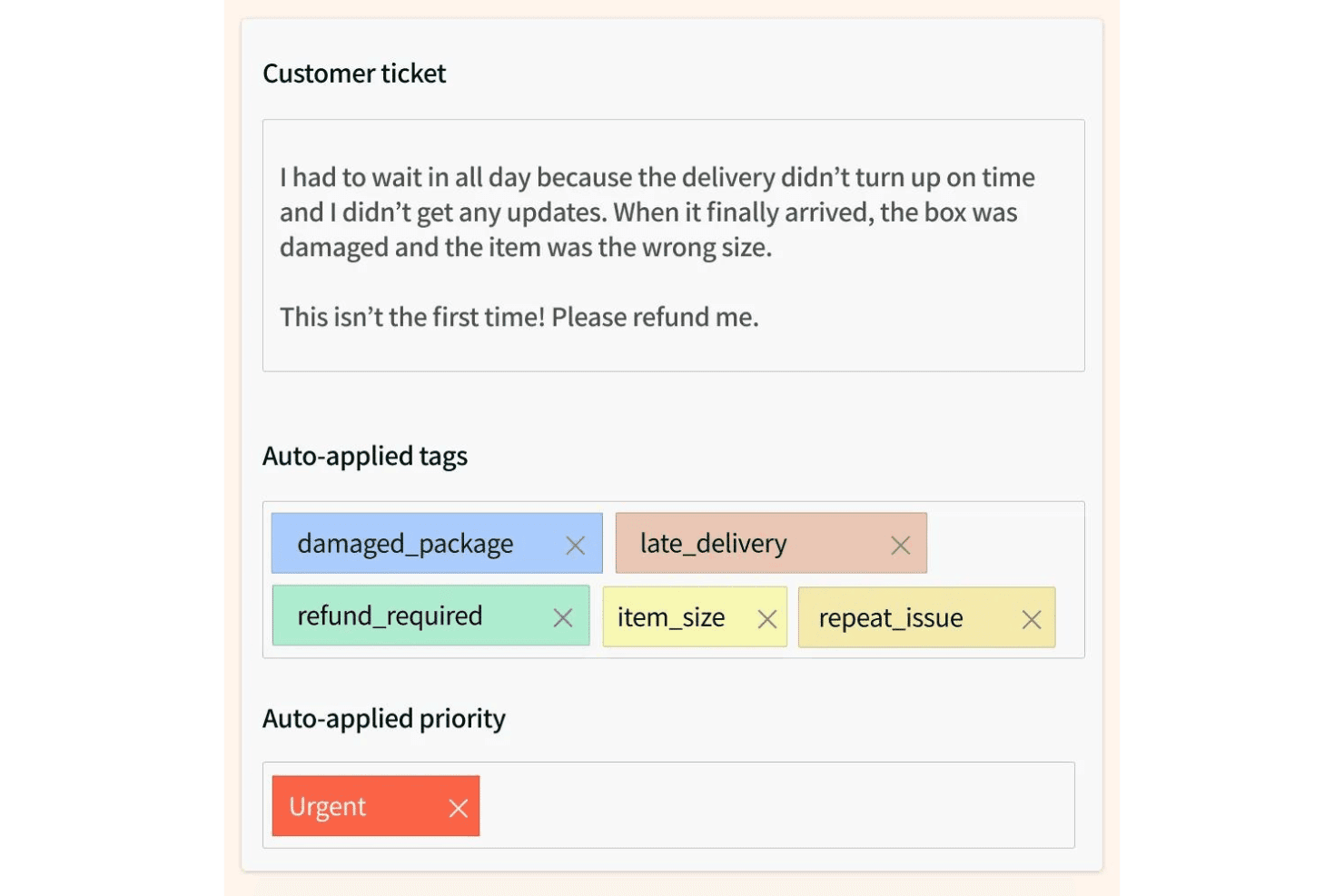
SentiSum uses trained AI models to automatically tag support tickets and feedback with granular topics and sentiment in real time. This cuts down manual work and highlights recurring pain points across thousands of conversations.
Sentiment Analysis Across Channels
SentiSum analyzes text from email, chat, reviews, and surveys to surface positive, neutral, and negative sentiment. This lets teams quickly spot shifts in customer mood by channel or topic.
Real-Time Trend Detection
The platform proactively highlights surges in complaint types or new issues as they appear. Teams get notifications about emerging themes so they can respond before problems escalate.
Root Cause Analysis
SentiSum helps teams trace negative customer sentiment or churn risk back to specific product bugs or service failures. You get clear explanations of what’s driving spikes in dissatisfaction.
Simple, Focused Dashboard
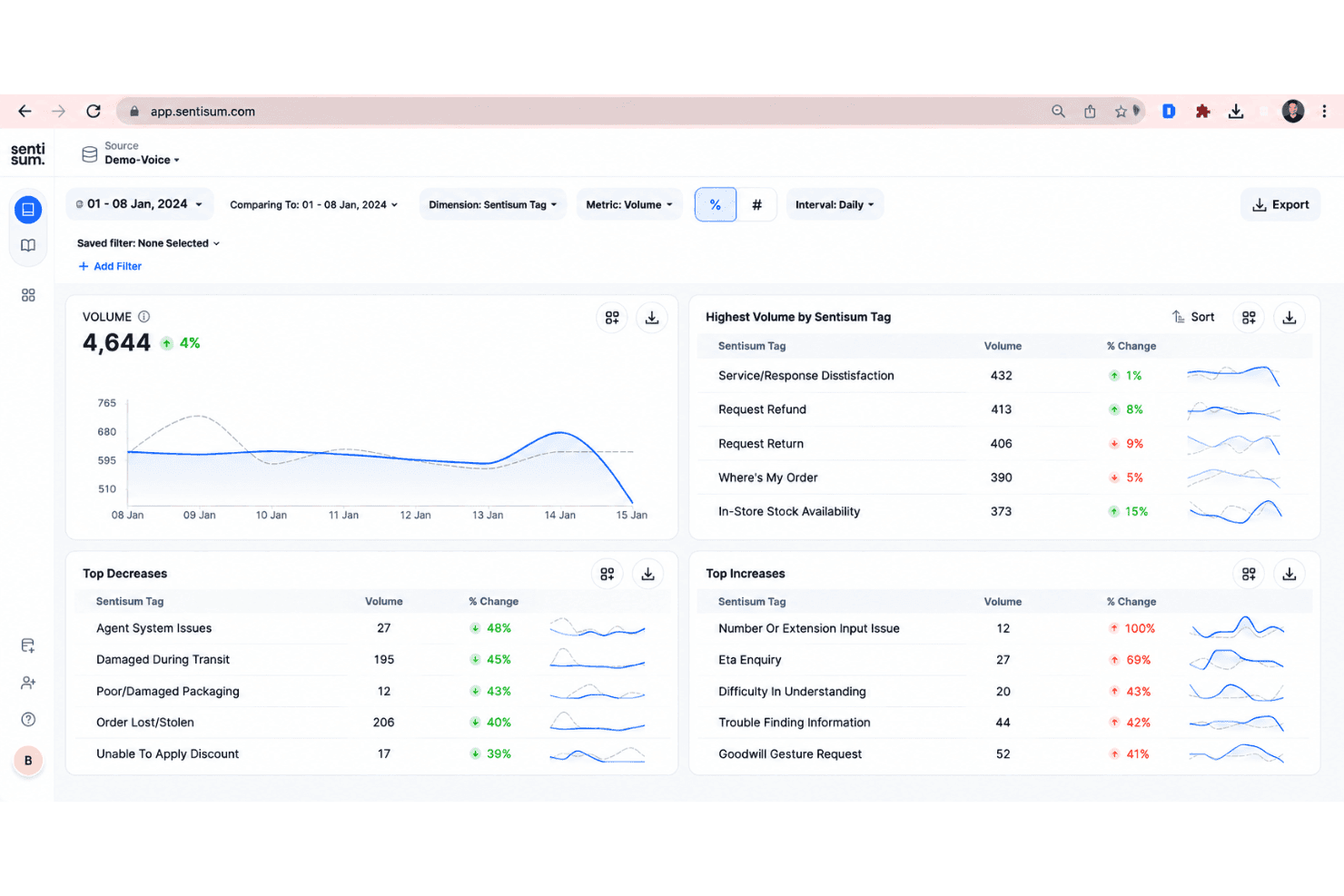
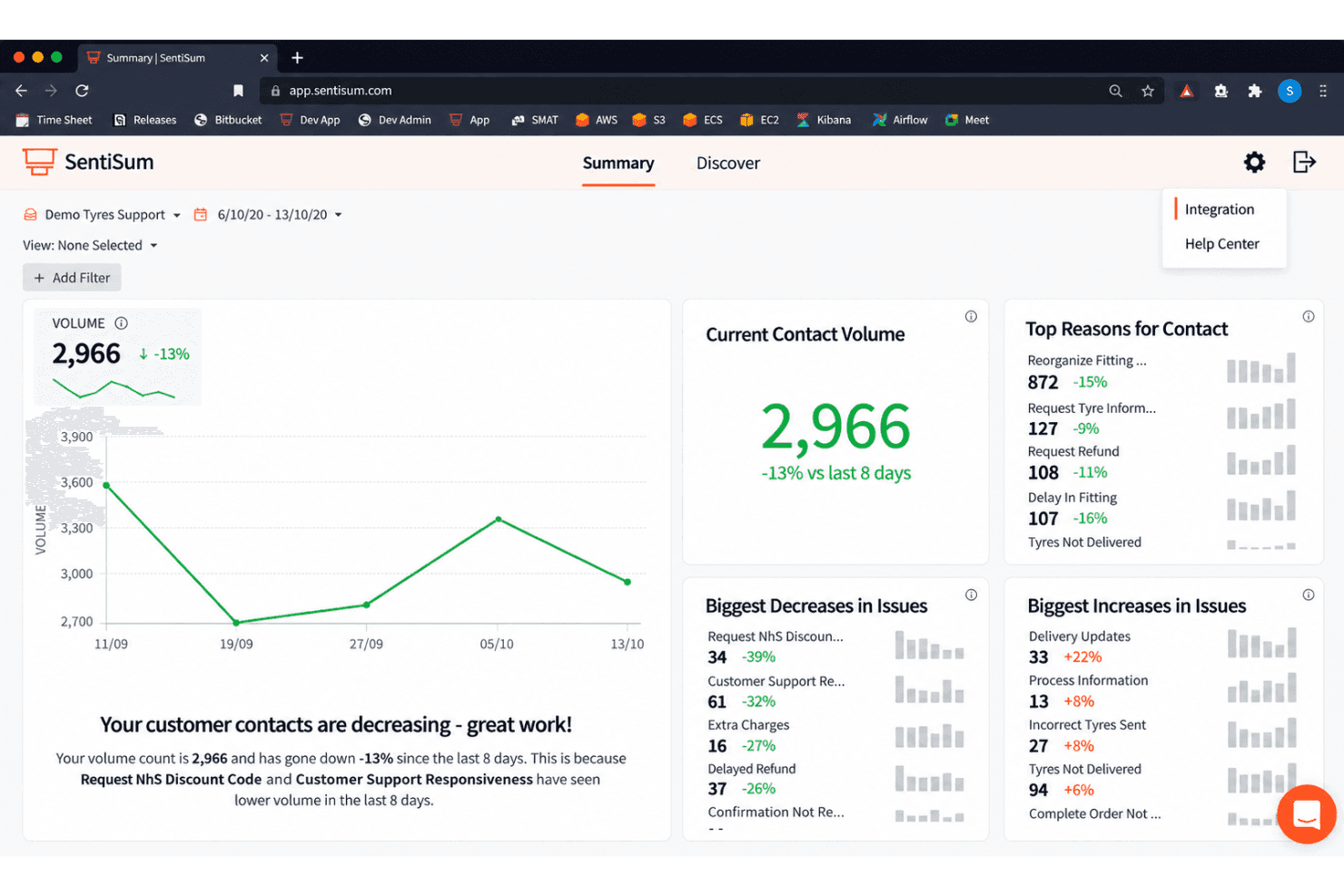
The reporting dashboard summarizes top issues, sentiment trends, and urgent insights in a clean, no-clutter layout. You don’t need analytics expertise to find actionable takeaways.
Fast Onboarding and Setup
SentiSum streamlines setup with built-in templates and instant integrations for common tools like Zendesk and Intercom. Most teams can start acting on insights within days instead of weeks.
Ease of Use
SentiSum is easy to navigate—even for teams with little analytics experience. The dashboard uses simple visuals and clear category breakdowns. Most users say setup takes just days, not weeks, and the auto-tagging works without heavy manual rules. Busy CX teams like that they get instant, actionable insights from tickets and reviews, and don’t have to dig for key trends or explanations, which saves time and reduces training needs.
Integrations
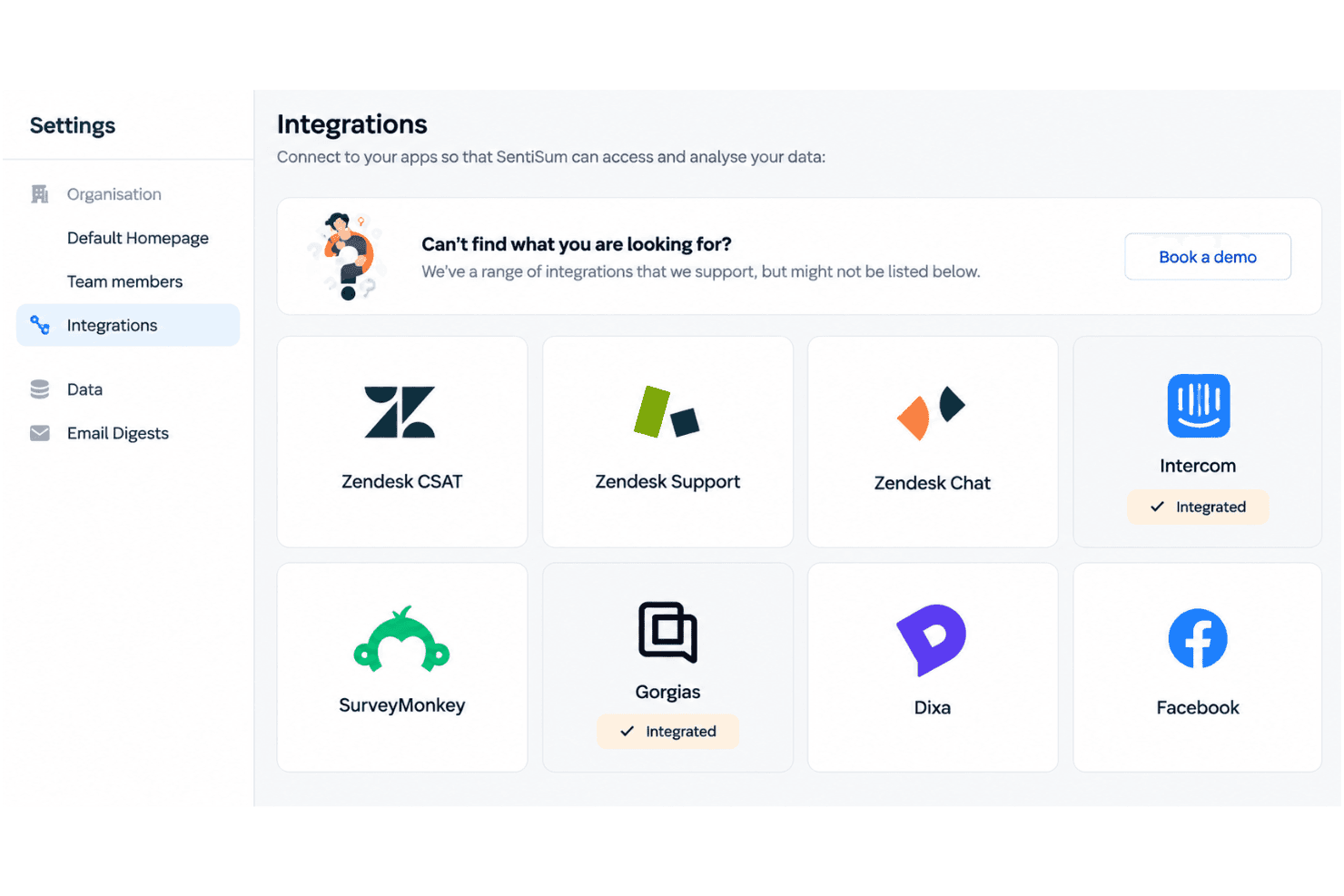
SentiSum integrates with Zendesk, Intercom, Freshdesk, Salesforce, SurveyMonkey, Gorgias, Dixa, Help Scout, Sprinklr, and AWS Connect, among others.
SentiSum also offers an API and connects with third-party integration tools.
SentiSum Specs
- A/B Testing: Yes
- AI Integration: Yes
- Analytics: Yes
- API: Yes
- Comparative Reporting: Yes
- Conversion Tracking: Yes
- Custom Reports: Yes
- Dashboard: Yes
- Dashboards: Yes
- Data Export: Yes
- Data Import: Yes
- Data Mining: Yes
- Data Visualization: Yes
- External Integrations: Yes
- Feedback Management: Yes
- Forecasting: Yes
- Historical Data Analysis: Yes
- Keyword Tracking: Yes
- Link Tracking: Yes
- Multi-Site: Yes
- Multi-User: Yes
- Notifications: Yes
- Process Reporting: Yes
- Real-time Alerts: Yes
- Referral Tracking: Yes
- Reports: Yes
- Scenario Planning: Yes
- SEO: Yes
- Time Series Modeling: Yes
- Visualization: Yes
- Workflow Management: Yes


