Reseña de Sentry: Ventajas, Desventajas, Características y Precios
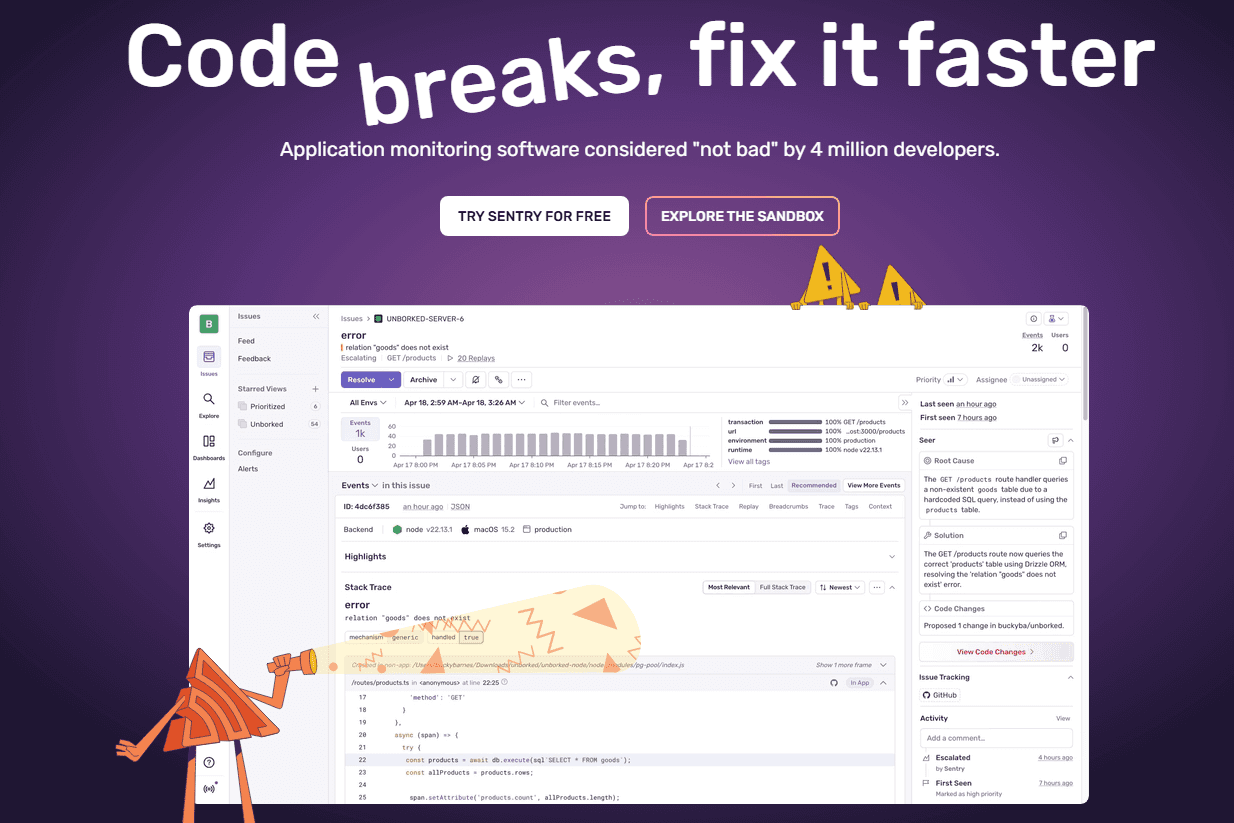
Sentry is a digital experience monitoring platform that helps you track and fix errors in real-time. It's ideal for tech-driven teams like software development, IT departments, and customer support units in industries such as e-commerce and SaaS. Sentry offers clear insights into application performance, enhancing your dev team's efficiency.
Sentry tackles complex issue tracking and performance bottlenecks, benefiting development and IT teams. In this Sentry review, I'll cover its features, pros and cons, use cases, and pricing, so you can decide if this software aligns with your monitoring and performance improvement goals.
Sentry Evaluation Summary
- From $26/month (billed annually)
- Free plan + free trial + free demo available
Por Qué Confiar en Nuestras Reseñas de Software
Llevamos probando y revisando software desde 2020. Como líderes de CX, sabemos lo crítico y difícil que es tomar la decisión correcta al seleccionar software. Invertimos en investigación a fondo para que nuestra audiencia tome mejores decisiones de compra de software. Hemos probado más de 2,000 herramientas para distintos casos de uso de CX y escrito más de 1,000 reseñas integrales de software. Descubre cómo mantenemos la transparencia y nuestra metodología para reseñas de software.
Sentry Overview
In my opinion, Sentry offers a solid platform for digital experience monitoring. It's packed with robust core features that cater well to large teams handling complex projects. However, the onboarding experience could be smoother, and its interface might not be immediately intuitive for all users. When it comes to customer support, Sentry provides decent assistance, but there's room for improvement in response times and support channels. Pricing may not fit smaller budgets, making it more suitable for mid to large enterprises that can fully leverage its capabilities. If your team needs comprehensive error tracking with detailed insights, Sentry is worth considering, but weigh it against your budget and the need against a potentially steeper learning curve.
pros
-
Real-time error tracking helps quickly identify and fix codebase issues.
-
User-friendly interface makes navigation easy and enhances ease of use.
-
Detailed error reports with full stack traces provide your team with actionable insights.
cons
-
Complex initial setup process when using Sentry for the first time.
-
Alert system can overwhelm with frequent notifications unless tuned correctly.
-
Limited customization options compared to some niche service providers.
-
SupportYourApp
Visit WebsiteThis is an aggregated rating for this tool including ratings from Crozdesk users and ratings from other sites.4.7 -
Tidio
Visit WebsiteThis is an aggregated rating for this tool including ratings from Crozdesk users and ratings from other sites.4.7 -
Freshdesk
Visit WebsiteThis is an aggregated rating for this tool including ratings from Crozdesk users and ratings from other sites.4.4
Cómo Probamos y Evaluamos Herramientas
Hemos pasado años construyendo, refinando y perfeccionando nuestro sistema de evaluación y puntuación de software. La rúbrica está diseñada para capturar los matices de la selección de software y lo que hace que una herramienta sea eficaz, centrándose en los aspectos críticos del proceso de toma de decisiones. A continuación, puedes ver exactamente cómo funcionan nuestras pruebas y puntuaciones en siete criterios. Esto nos permite ofrecer una evaluación imparcial del software basada en funcionalidad principal, características destacadas, facilidad de uso, incorporación, soporte al cliente, integraciones, opiniones de clientes y la relación calidad-precio.
Funcionalidad Principal (25% de la puntuación final)
El punto de partida de nuestra evaluación siempre es la funcionalidad principal de la herramienta. ¿Tiene las funciones básicas que un usuario esperaría? ¿Alguna de esas funciones principales está bloqueada en planes de precios más altos? Consideramos que una herramienta debe estar a la par de las capacidades básicas de sus competidores.
Características Destacadas (25% de la puntuación final)
A continuación, evaluamos aquellas características poco comunes y destacadas que superan la funcionalidad principal típica de herramientas de ese tipo. Una puntuación alta refleja funciones especializadas o únicas que hacen que el producto sea más rápido, eficiente o que aporte un valor adicional al usuario. También evaluamos lo fácil que es integrar la herramienta con otras que típicamente se utilizan en el ecosistema tecnológico para ampliar la funcionalidad y utilidad del software. Las herramientas que ofrecen abundantes integraciones nativas, conexiones de terceros y acceso a API para integraciones personalizadas obtienen la mejor puntuación.
Facilidad de Uso (10% de la puntuación final)
Consideramos lo rápido y sencillo que es ejecutar las tareas definidas en la funcionalidad principal usando la herramienta. El software que puntúa alto está bien diseñado, es intuitivo, ofrece aplicaciones móviles, proporciona plantillas y hace que tareas relativamente complejas parezcan sencillas.
Incorporación (10% de la puntuación final)
Sabemos lo importante que es la rápida adopción del equipo en una nueva plataforma, así que evaluamos lo fácil que es aprender y usar una herramienta con poca formación. Evaluamos cuán rápido un miembro del equipo puede configurarse y comenzar a usar la herramienta sin experiencia. Las soluciones mejor puntuadas requieren poco o ningún soporte.
Soporte al Cliente (10% de la puntuación final)
Revisamos lo rápido y sencillo que es salir de un atasco y encontrar ayuda por teléfono, chat en vivo o una base de conocimientos. Las herramientas y empresas que brindan soporte en tiempo real obtienen la mejor puntuación, mientras que los chatbots obtienen la peor.
Opiniones de Clientes (10% de la puntuación final)
Más allá de nuestras propias pruebas, consideramos el puntaje neto del promotor de los clientes actuales y anteriores. Revisamos la probabilidad de que elijan la herramienta nuevamente para la funcionalidad principal. Un software con alta puntuación refleja un alto puntaje neto del promotor por parte de clientes actuales o anteriores.
Relación Calidad-Precio (10% de la puntuación final)
Por último, considerando todos los demás criterios, analizamos el precio promedio de los planes de nivel inicial frente a las funciones principales y valoramos el resto de los criterios de evaluación. El software que ofrece más por menos obtiene una mayor puntuación.
Core Features
Real-Time Error Tracking: Sentry helps your team spot and fix errors as they happen, keeping your applications running smoothly. This immediate feedback loop ensures you can address issues before they impact users.
User-Friendly Interface: The intuitive design simplifies navigation and heavily softens the steep learning curve usually associated with monitoring platforms. This ease of use means you spend more time solving problems and less time figuring out the tool.
Detailed Error Reports: Sentry provides comprehensive error details, helping your team understand and resolve issues quickly. These insights are invaluable for maintaining high performance in your applications.
Performance Monitoring: Keep an eye on your application's performance to detect bottlenecks and improve user experience. Sentry's monitoring tools help you optimize your system's efficiency.
Alert Management: Customize alerts to keep your team informed without overwhelming them with notifications. This feature ensures you only get notified about the most critical issues.
Issue Grouping: Sentry groups related errors together, helping your team prioritize and tackle problems efficiently. This organization makes it easier to manage and resolve multiple issues at once.
SDK Support: Sentry offers a wide range of SDKs (Software Development Kits) for various languages and frameworks, ensuring seamless integration with your specific tech stack.
Ease of Use
Sentry stands out for its user-friendly interface that simplifies error tracking for your team. You can navigate the platform with ease, focusing on resolving issues rather than learning the tool. The intuitive design means your team can quickly access detailed error reports and performance data. Compared to other platforms, Sentry's straightforward setup and clear layout make it a preferred choice for teams looking to improve their application's reliability without a steep learning curve.
Integrations
Sentry integrates with GitHub, Bitbucket, GitLab, Azure DevOps, Heroku, Vercel, Trello, Asana, Slack, and Microsoft Teams. You can even link issues directly to your Jira board or code repo.
Sentry also offers an API for custom integrations and connects with third-party integration tools.
New Product Updates from Sentry
Sentry Adds Heatmaps to Application Metrics
Sentry added heatmaps to Application Metrics, allowing teams to visualize how metric values are distributed over time and use the same visualization in Custom Dashboards. This makes it easier to spot performance patterns, outliers, and sudden latency changes. Highlights include:
- Application Metrics Heatmaps: Visualizes metric value distributions over time to help teams identify patterns and performance anomalies.
- Custom Dashboard Support: Lets teams add heatmaps to dashboards for more flexible metric monitoring and analysis.
Visit Sentry’s official site for more details.
Sentry Adds gRPC Instrumentation for Dart and Flutter
Sentry has introduced the
sentry_grpc
package for Dart and Flutter, adding automated tracing, breadcrumbs, distributed tracing headers, and error capture for failed outgoing gRPC calls. These capabilities provide clearer visibility into service requests and make performance issues easier to investigate. Highlights include:
- gRPC Tracing: Tracks outgoing gRPC calls to help developers analyze request performance and identify latency issues.
- Automatic Error Capture: Records failed outgoing calls automatically to support faster troubleshooting.
- Distributed Tracing Headers: Connects gRPC requests across services for better end-to-end visibility.
- Breadcrumbs: Captures contextual details about outgoing calls to make errors easier to diagnose.
Visit Sentry’s official site for more details.
Sentry Adds Log Export in CSV and JSONL
Sentry introduces log export in CSV and JSONL to simplify exporting log data from Explore → Logs. Users can export the displayed columns or all columns in JSONL format, with larger exports generated in the background and delivered via email. Highlights include:
- CSV and JSONL Export: Export up to 10,000 log lines in CSV or JSONL format.
- Flexible Export Options: Export displayed columns or all columns when using JSONL.
- Background Export Processing: Large exports are generated in the background and delivered by email.
Visit Sentry's official site for more details.
Sentry Snapshots Enters Open Beta for CI Screenshot Diffing
Sentry Snapshots enters Open Beta, allowing teams to upload screenshots, compare changes, and detect visual differences during CI workflows. This update helps developers catch frontend issues before changes are released. Highlights include:
- Screenshot Diffing: Compare screenshots in pull requests to identify unintended visual changes across themes, languages, and viewports.
- Frontend Platform Support: Use visual testing workflows across any platform with a frontend.
Visit Sentry’s official site for more details.
Sentry Enhances AI Issue Grouping
Sentry has improved its AI issue grouping to make alerts and issue feeds less noisy while better separating distinct root causes. The upgrade reduces both incorrect merges and duplicate issues, helping teams triage faster and with more confidence. Highlights include:
- AI Issue Grouping: Uses an improved model to better determine whether errors belong together or need separate issues.
- Duplicate Issue Reduction: Reduces duplicate issues and incorrect merges to help teams focus on unique problems.
Visit Sentry’s official site for more details.
Sentry’s Hono SDK Reaches Stable
Sentry adds stable support for the @sentry/hono SDK with monitoring, tracing, profiling, metrics, and logging capabilities. This update provides Hono developers with a dedicated SDK built for framework-specific instrumentation. Highlights include:
- Error Monitoring: Capture unhandled exceptions, uncaught errors, and rejected requests in Hono apps.
- Performance Insights: Track requests using tracing, profiling, and connected application metrics.
- Dedicated SDK: Use the stable Hono package as the recommended replacement for the previous generic integration.
Visit Sentry’s official site for more details.
Sentry's Upgraded Command Palette Actions
Sentry’s Command Palette (Cmd+K) has been enhanced to help you move faster across projects and take action on issues without breaking focus. The update streamlines common workflows, especially for larger organizations managing many projects. Highlights include:
- Bulk Issue Actions: Archive, resolve, or assign multiple issues directly from the Command Palette.
- DSN Lookup: Find DSNs by project or identify projects using a DSN string.
- Seer Actions: Access guided Seer workflows directly from issue pages.
Visit Sentry’s official site for more details.
Sentry Adds AI-Detected Issues for Application Monitoring
Sentry’s AI issue detection is now generally available, helping teams find problems earlier by analyzing traces and logs and surfacing actionable issues automatically. This improves visibility across key reliability, performance, and security concerns without requiring manual digging. Highlights include:
- Generally Available AI-Detected Issues: Use AI-powered issue detection across more production monitoring workflows.
- Trace and Log Analysis: Analyze traces and logs to uncover hidden issues and identify problems faster.
- Expanded Issue Coverage: Detect issues across HTTP, database, runtime performance, security, and code health categories.
Visit Sentry's official site for more details.
Sentry Launches AI Conversations in Open Beta
Sentry launches Conversations in open beta, giving users a chat-style view of AI agent sessions grouped by conversation ID. The update helps teams better understand agent interactions, tool usage, and conversation flow across traces. Highlights include:
- Chat-Style Conversation View: Users can review AI agent sessions through organized timelines of messages, tool calls, and responses.
- Conversation-Based Grouping: Sentry groups spans using gen_ai.conversation.id to keep related agent interactions together across traces.
Visit Sentry's official site for more details.
Sentry Expands Seer AI Bug Fix Integrations
Sentry expands Seer’s AI automation capabilities with new GitHub Copilot and Claude integrations for automated bug resolution and pull request generation. These updates help engineering teams streamline debugging workflows, accelerate issue remediation, and reduce manual development effort. Highlights include:
- GitHub Copilot Integration: Send Seer root cause analysis directly to GitHub Copilot to generate bug fixes with issue context included.
- Claude Integration: Trigger Claude automatically to generate fixes and create pull requests after Seer identifies the root cause of an issue.
- Automated AI Debugging Workflows: Improve bug resolution speed with AI-assisted issue analysis and code generation across development workflows.
Visit Sentry’s official site for more details.
Sentry Specs
- AI Integration
- API
- Automated Testing
- Browser Compatibility Testing
- Bug Tracking
- Code Review
- Custom Reports
- Data Export
- Data Import
- Developer Tools
- External Integrations
- Malware Protection
- Multi-User
- Notifications
- Performance Testing
- Process Reporting
- Static Analysis
- Status Notifications
- Workflow Management