

Reseña de VWO: ventajas, desventajas, características y precios
VWO destaca por su interfaz intuitiva y sus datos útiles en tiempo real, lo que lo convierte en una opción sobresaliente para los equipos que necesitan una gestión eficaz de los datos de los clientes.

Revisamos las herramientas de manera independiente, y las comisiones ayudan a financiar nuestras pruebas. Consulta nuestra política de transparencia, nuestra metodología o sugiere una herramienta.
VWO is a customer data platform built for teams that need to unify customer data and run A/B tests, personalization, and targeting from a single interface. I'd consider it over a standalone CDP like Segment if your team wants to act on customer data directly through experimentation, rather than routing it through separate tools to do so.
VWO Evaluation Summary

4.3/5
- Pricing upon request
- 30-day free trial + free demo available
Por qué confiar en nuestras recomendaciones de software
6,700+
Reviews
20
Industry experts
16+
Evaluation factors
14
Years
Nuestro equipo lleva probando y evaluando software desde 2012. Como líderes de CX, sabemos lo difícil —y lo importante— que es elegir el software adecuado.
Para esta guía, evaluamos las herramientas mediante pruebas prácticas e investigación independiente, puntuando las herramientas según nuestros criterios de selección.
Nuestras reseñas reflejan nuestro criterio editorial humano, no un discurso de ventas.
 Gui DrusinaCreative Director
 Tim FisherVP of AI
VWO Overview
In my opinion, VWO offers a cutting-edge set of features that appeal to marketing teams and product managers looking for data-driven insights. Its ease of use and real-time analytics make it a good choice for teams that need quick, actionable data. However, onboarding and customer support may not meet everyone's expectations, which can be a concern for new users managing complex workflow requirements. VWO excels in providing a user-friendly interface and bi-directional integrations, but its pricing might be a hurdle for smaller businesses. It's best suited to organizations that can leverage its full suite of features and are prepared for an initial learning curve.
Pros
- An intuitive interface that's easy to navigate.
- Real-time analytics enable quick decision-making.
- Detailed user behavior tracking and structured testing ideas benefit product and marketing teams.
Cons
- Lengthy onboarding process.
- Occasionally slow customer support response times.
- Steep learning curve for advanced features.
Is VWO Right For Your Needs?
Who Would be a Good Fit for VWO?
VWO suits e-commerce businesses and digital marketing teams that need detailed user insights and real-time analytics. It's great for product managers who want to track user behavior, improve the customer experience, and maximize conversion rate optimization (CRO). If your team values an intuitive interface and data-driven decision-making, VWO is a strong option. Its ability to provide actionable insights makes it ideal for those focused on enhancing user engagement and CRO.
- E-Commerce TeamsVWO's user behavior tracking is invaluable for optimizing landing pages and checkout processes.
- Digital MarketingMarketing campaigns benefit from VWO's real-time analytics and A/B testing capabilities.
- Product ManagementVWO gathers insights on user interactions to improve product features.
- Software as a Service CompaniesVWO supports the ability to test different user flows and enhance customer retention.
- Midsized EnterprisesTeams can leverage VWO's detailed analytics without the complexity of larger platforms.
- UX DesignersVWO helps analyze and improve usability with its intuitive interface and detailed reports.
Who Would be a Bad Fit for VWO?
VWO may not suit small startups or teams with limited budgets due to its pricing and steep learning curve. If your team lacks time for onboarding or needs extensive customer support, VWO might not be ideal. It's also not the best choice for businesses that don't require detailed analytics or real-time data, as its capabilities might be underutilized.
- Small StartupsThose with a limited budget and resources might not appreciate VWO's pricing and extensive onboarding requirements.
- Nontechnical TeamsVWO's advanced features could overwhelm teams without technical expertise.
- Budget-Conscious CompaniesVWO's pricing might not fit the financial goals of companies where cost efficiency is a top priority.
- Occasional UsersVWO's feature set is best for teams needing regular, detailed data analysis, not infrequent use.
- Retail StoresPrimarily offline businesses might not benefit from VWO's detailed online analytics.
- Basic Analytics NeedsVWO's extensive capabilities may be unnecessary for teams that only need simple metrics.
Cómo Probamos y Evaluamos Herramientas
Hemos pasado años construyendo, refinando y perfeccionando nuestro sistema de evaluación y puntuación de software. La rúbrica está diseñada para capturar los matices de la selección de software y lo que hace que una herramienta sea eficaz, centrándose en los aspectos críticos del proceso de toma de decisiones. A continuación, puedes ver exactamente cómo funcionan nuestras pruebas y puntuaciones en siete criterios. Esto nos permite ofrecer una evaluación imparcial del software basada en funcionalidad principal, características destacadas, facilidad de uso, incorporación, soporte al cliente, integraciones, opiniones de clientes y la relación calidad-precio.
Funcionalidad Principal (25% de la puntuación final)
El punto de partida de nuestra evaluación siempre es la funcionalidad principal de la herramienta. ¿Tiene las funciones básicas que un usuario esperaría? ¿Alguna de esas funciones principales está bloqueada en planes de precios más altos? Consideramos que una herramienta debe estar a la par de las capacidades básicas de sus competidores.
Características Destacadas (25% de la puntuación final)
A continuación, evaluamos aquellas características poco comunes y destacadas que superan la funcionalidad principal típica de herramientas de ese tipo. Una puntuación alta refleja funciones especializadas o únicas que hacen que el producto sea más rápido, eficiente o que aporte un valor adicional al usuario. También evaluamos lo fácil que es integrar la herramienta con otras que típicamente se utilizan en el ecosistema tecnológico para ampliar la funcionalidad y utilidad del software. Las herramientas que ofrecen abundantes integraciones nativas, conexiones de terceros y acceso a API para integraciones personalizadas obtienen la mejor puntuación.
Facilidad de Uso (10% de la puntuación final)
Consideramos lo rápido y sencillo que es ejecutar las tareas definidas en la funcionalidad principal usando la herramienta. El software que puntúa alto está bien diseñado, es intuitivo, ofrece aplicaciones móviles, proporciona plantillas y hace que tareas relativamente complejas parezcan sencillas.
Incorporación (10% de la puntuación final)
Sabemos lo importante que es la rápida adopción del equipo en una nueva plataforma, así que evaluamos lo fácil que es aprender y usar una herramienta con poca formación. Evaluamos cuán rápido un miembro del equipo puede configurarse y comenzar a usar la herramienta sin experiencia. Las soluciones mejor puntuadas requieren poco o ningún soporte.
Soporte al Cliente (10% de la puntuación final)
Revisamos lo rápido y sencillo que es salir de un atasco y encontrar ayuda por teléfono, chat en vivo o una base de conocimientos. Las herramientas y empresas que brindan soporte en tiempo real obtienen la mejor puntuación, mientras que los chatbots obtienen la peor.
Opiniones de Clientes (10% de la puntuación final)
Más allá de nuestras propias pruebas, consideramos el puntaje neto del promotor de los clientes actuales y anteriores. Revisamos la probabilidad de que elijan la herramienta nuevamente para la funcionalidad principal. Un software con alta puntuación refleja un alto puntaje neto del promotor por parte de clientes actuales o anteriores.
Relación Calidad-Precio (10% de la puntuación final)
Por último, considerando todos los demás criterios, analizamos el precio promedio de los planes de nivel inicial frente a las funciones principales y valoramos el resto de los criterios de evaluación. El software que ofrece más por menos obtiene una mayor puntuación.
Core Features
A/B Testing: VWO enables structured split testing, letting your team test different versions of web pages to see what works best. This helps you make data-driven decisions to improve conversions.
Heatmaps: This feature enables you to visualize where users click and scroll on your site, helping you to better understand user behavior and optimize layout and content.
Session Recording: You can watch recordings of user interactions on your site to identify pain points, address issues, and improve the user experience.
Surveys: VWO allows you to gather direct feedback from users. You can use this feature to understand user needs and tailor your offerings accordingly.
Form Analytics: Using form analytics, you can analyze how users interact with forms on your site. This helps you identify where users disengage and improve form completion rates.
Personalization: VWO helps you to deliver tailored content to different user segments based on their behavior. It improves user engagement by providing relevant customer experiences.

Ease of Use
VWO is generally user-friendly, offering an intuitive interface and innovative visual editor that makes it easier for your team to navigate and execute tests without coding, while advanced users can access deeper functionality through VWO FullStack and server-side testing. These advanced features require a bit of a learning curve, but compared to other platforms, VWO strikes a good balance between ease of use and functionality. This makes it particularly suitable for teams that want comprehensive features without overwhelm.

Integrations
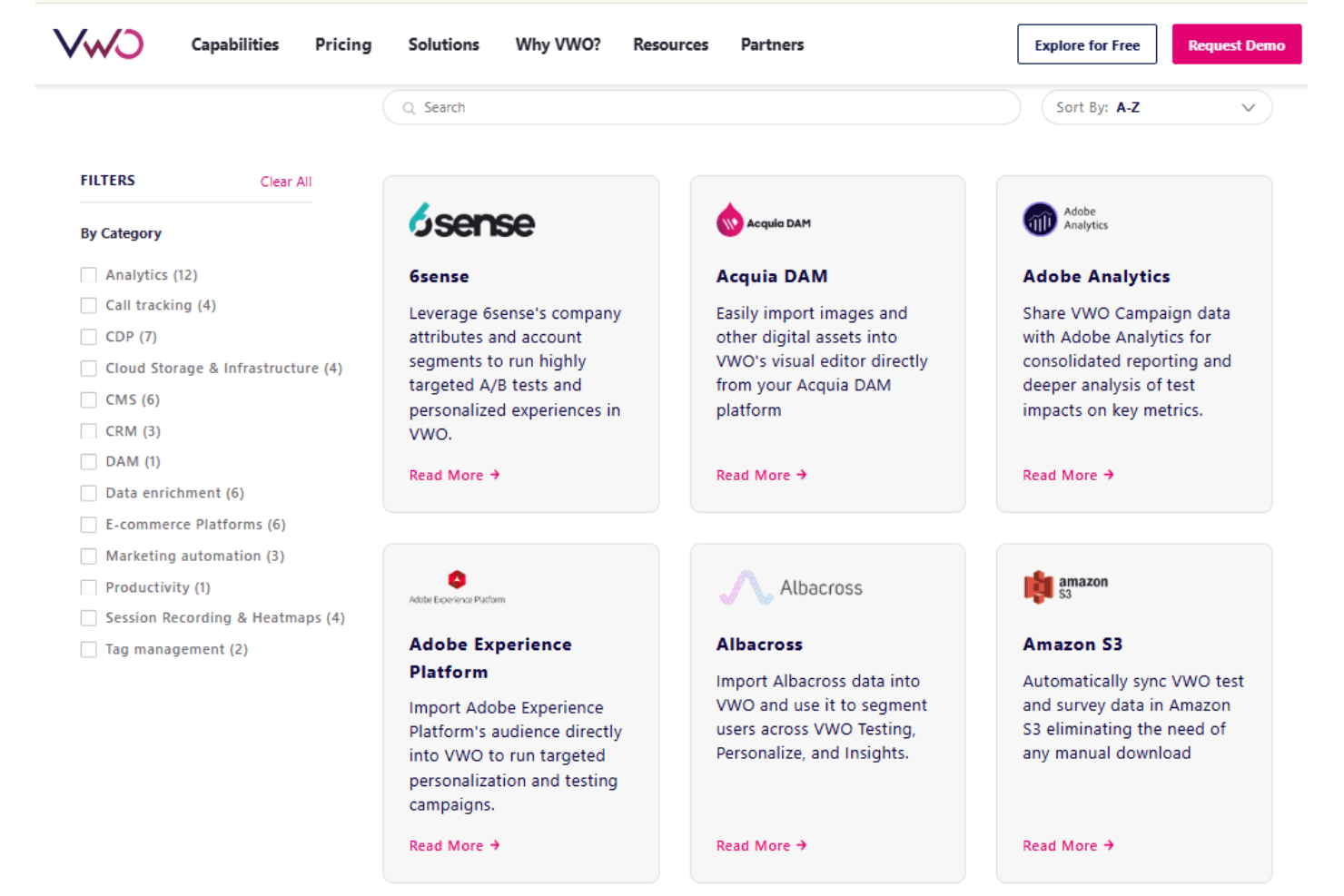
VWO integrates with Adobe Analytics, Adobe Experience Platform, Albacross, Amazon S3, Amplitude, BigCommerce, Google Analytics 4, HubSpot, Salesforce, Shopify, and more.
VWO also offers a client API for custom integrations and dashboards, and it connects with third-party integration tools.
VWO Specs
- A/B Testing: Yes
- AI Integration: Yes
- Analytics: Yes
- API: Yes
- Automated Testing: Yes
- Bug Tracking: Yes
- Campaign Management: Yes
- Conversion Tracking: Yes
- Custom Reports: Yes
- Dashboards: Yes
- Data Export: Yes
- Data Import: Yes
- Data Visualization: Yes
- Design Templates: Yes
- External Integrations: Yes
- Feedback Management: Yes
- Form Builder: Yes
- History/Version Control: Yes
- Multi-Site: Yes
- Multi-User: Yes
- Notifications: Yes
- Performance Testing: Yes
- Referral Tracking: Yes
- Regression Testing: Yes
- Release Management: Yes
- Reports: Yes
- Scenario Planning: Yes
- SEO: Yes
- Test Management: Yes
- Visualization: Yes
- Workflow Management: Yes


