

Reseña de WPForms: ventajas, desventajas, características y precios
WPForms destaca por ofrecer una creación de formularios fácil de usar, lo que lo convierte en una opción ideal para equipos que buscan recopilar datos de forma sencilla y sin complicaciones.

Revisamos las herramientas de manera independiente, y las comisiones ayudan a financiar nuestras pruebas. Consulta nuestra política de transparencia, nuestra metodología o sugiere una herramienta.
WPForms is a WordPress form builder plugin for site owners and teams who need to collect leads, registrations, payments, or survey responses without writing code. I'd mainly consider it if you're building on WordPress and want something more intuitive than Gravity Forms, which skews toward developers and requires significantly more configuration to get a basic form live.
WPForms Evaluation Summary
4.7/5
- From $49.50/year (billed annually)
- Free plan available
Por qué confiar en nuestras recomendaciones de software
6,700+
Reviews
20
Industry experts
16+
Evaluation factors
14
Years
Nuestro equipo lleva probando y evaluando software desde 2012. Como líderes de CX, sabemos lo difícil —y lo importante— que es elegir el software adecuado.
Para esta guía, evaluamos las herramientas mediante pruebas prácticas e investigación independiente, puntuando las herramientas según nuestros criterios de selección.
Nuestras reseñas reflejan nuestro criterio editorial humano, no un discurso de ventas.
 Gui DrusinaCreative Director
 Tim FisherVP of AI
WPForms Overview
I think WPForms works well for those who need a straightforward tool to manage customer data. The interface is user-friendly, making it suitable for teams new to customer data platforms. Users often regard it as one of the best form builders for WordPress sites, offering powerful features that make it stand out against other form plugins, such as Ninja Forms. Its pricing is fair, and a free version of WPForms is available, called WPForms Lite, but it may not provide the best value if you're looking for more advanced features. If your team values simplicity and cost-effectiveness, WPForms is worth it.
Pros
- You can cut down on junk entries with its built-in spam protection.
- You can build and publish forms fast with its simple drag-and-drop editor.
- Its ready-made form templates mean you don't have to build everything from scratch.
Cons
- You may not be able to build complex, data-heavy forms as efficiently as more powerful builders.
- You may have to dig through settings to control how entries are stored and managed.
- While support staff are helpful, the number of customer support channels is limited.
Is WPForms Right For Your Needs?
Who Would be a Good Fit for WPForms?
WPForms suits small to medium-sized businesses, nonprofits, and educational institutions looking to create custom forms for their WordPress website, including conversational forms and user registration forms, without coding. Its drag-and-drop builder and pre-built templates make it easy for you to set up surveys, payment forms, and contact forms. You can integrate WPForms with popular email marketing services, which can help your team capture leads effectively and grow your email list.
- Small BusinessesSmall business owners can benefit from WPForms' capabilities, allowing them to manage customer interactions, gather feedback efficiently, and improve SEO through customer engagement.
- NonprofitsWPForms lets you create donation forms with payment integrations, which is crucial for fundraising activities.
- Educational InstitutionsEducational institutions can use WPForms to collect student information and feedback through its customizable form builder.
- E-CommerceWPForms integrates with payment gateways, enabling e-commerce stores to set up order forms and streamline transactions.
- Marketing TeamsWPForms helps you capture leads with forms that integrate seamlessly with email marketing tools such as Constant Contact.
- Event PlannersYou can easily manage event registrations and collect attendee information using WPForms' user-friendly interface.
Who Would be a Bad Fit for WPForms?
WPForms might not be the best choice for businesses needing complex data analysis or advanced automation, as it lacks more extensive analytical features. Teams that heavily rely on automation for workflow processes or need in-depth data insights will find WPForms limiting. For instance, if your work involves data-heavy operations that require seamless integration with customer relationship management (CRM) systems or other specialized software, WPForms might not meet your needs.
- Large EnterprisesWPForms might not offer the extensive integration capabilities needed for large-scale operations.
- E-Commerce PlatformsYou might find WPForms lacking in features like inventory management and payment processing.
- Data AnalystsWPForms doesn't support advanced data analysis tools, limiting your ability to derive insights.
- IT DepartmentsIf you need robust data security and integration with IT systems, WPForms might not suffice.
Cómo Probamos y Evaluamos Herramientas
Hemos pasado años construyendo, refinando y perfeccionando nuestro sistema de evaluación y puntuación de software. La rúbrica está diseñada para capturar los matices de la selección de software y lo que hace que una herramienta sea eficaz, centrándose en los aspectos críticos del proceso de toma de decisiones. A continuación, puedes ver exactamente cómo funcionan nuestras pruebas y puntuaciones en siete criterios. Esto nos permite ofrecer una evaluación imparcial del software basada en funcionalidad principal, características destacadas, facilidad de uso, incorporación, soporte al cliente, integraciones, opiniones de clientes y la relación calidad-precio.
Funcionalidad Principal (25% de la puntuación final)
El punto de partida de nuestra evaluación siempre es la funcionalidad principal de la herramienta. ¿Tiene las funciones básicas que un usuario esperaría? ¿Alguna de esas funciones principales está bloqueada en planes de precios más altos? Consideramos que una herramienta debe estar a la par de las capacidades básicas de sus competidores.
Características Destacadas (25% de la puntuación final)
A continuación, evaluamos aquellas características poco comunes y destacadas que superan la funcionalidad principal típica de herramientas de ese tipo. Una puntuación alta refleja funciones especializadas o únicas que hacen que el producto sea más rápido, eficiente o que aporte un valor adicional al usuario. También evaluamos lo fácil que es integrar la herramienta con otras que típicamente se utilizan en el ecosistema tecnológico para ampliar la funcionalidad y utilidad del software. Las herramientas que ofrecen abundantes integraciones nativas, conexiones de terceros y acceso a API para integraciones personalizadas obtienen la mejor puntuación.
Facilidad de Uso (10% de la puntuación final)
Consideramos lo rápido y sencillo que es ejecutar las tareas definidas en la funcionalidad principal usando la herramienta. El software que puntúa alto está bien diseñado, es intuitivo, ofrece aplicaciones móviles, proporciona plantillas y hace que tareas relativamente complejas parezcan sencillas.
Incorporación (10% de la puntuación final)
Sabemos lo importante que es la rápida adopción del equipo en una nueva plataforma, así que evaluamos lo fácil que es aprender y usar una herramienta con poca formación. Evaluamos cuán rápido un miembro del equipo puede configurarse y comenzar a usar la herramienta sin experiencia. Las soluciones mejor puntuadas requieren poco o ningún soporte.
Soporte al Cliente (10% de la puntuación final)
Revisamos lo rápido y sencillo que es salir de un atasco y encontrar ayuda por teléfono, chat en vivo o una base de conocimientos. Las herramientas y empresas que brindan soporte en tiempo real obtienen la mejor puntuación, mientras que los chatbots obtienen la peor.
Opiniones de Clientes (10% de la puntuación final)
Más allá de nuestras propias pruebas, consideramos el puntaje neto del promotor de los clientes actuales y anteriores. Revisamos la probabilidad de que elijan la herramienta nuevamente para la funcionalidad principal. Un software con alta puntuación refleja un alto puntaje neto del promotor por parte de clientes actuales o anteriores.
Relación Calidad-Precio (10% de la puntuación final)
Por último, considerando todos los demás criterios, analizamos el precio promedio de los planes de nivel inicial frente a las funciones principales y valoramos el resto de los criterios de evaluación. El software que ofrece más por menos obtiene una mayor puntuación.
Core Features
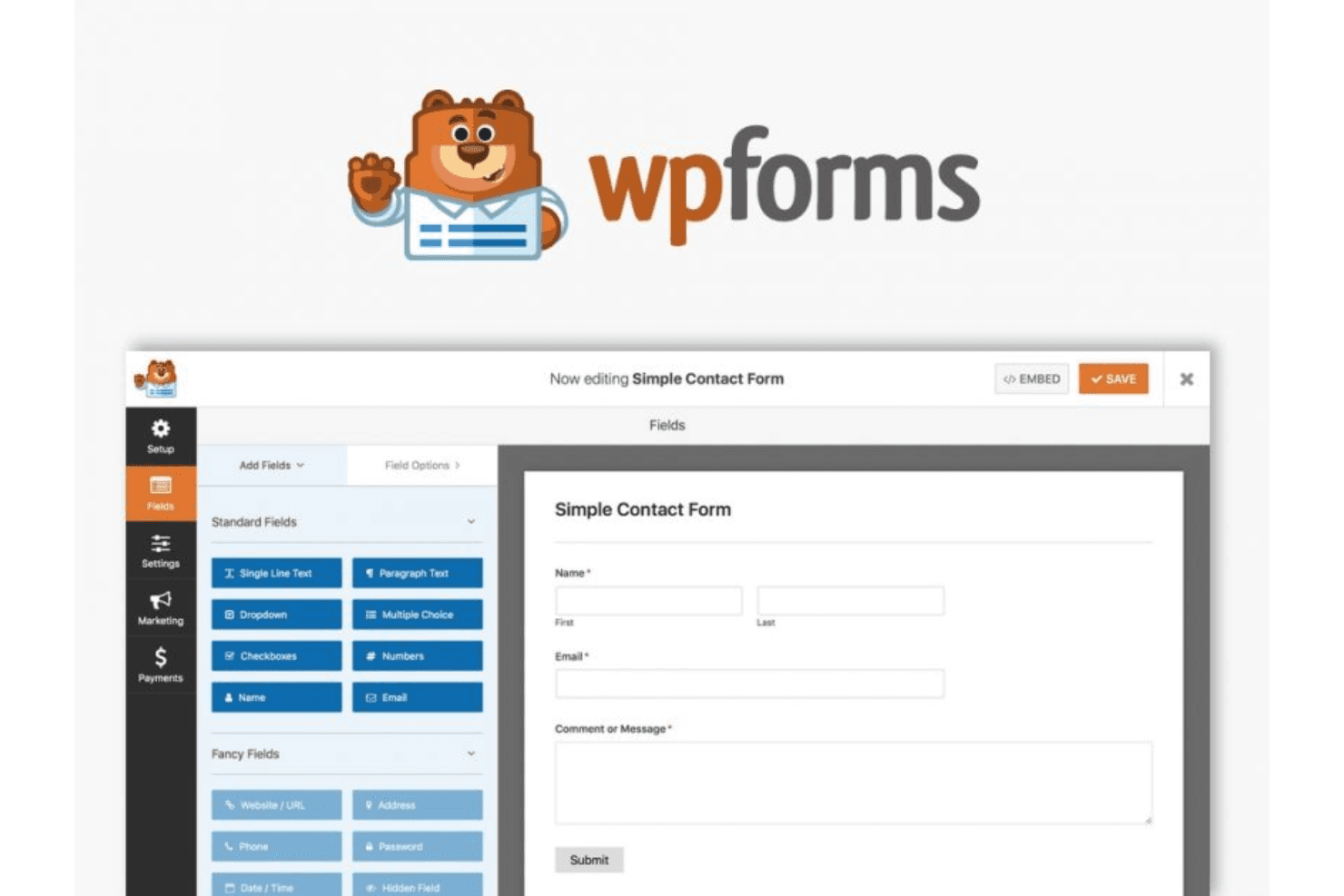
Form Builder: Create custom forms, from simple contact forms to complex surveys, with its simple drag-and-drop interface. You can add various form fields and customize them to fit your specific needs, adding checkboxes, mandatory fields, and more.
Conditional Logic: Show or hide fields based on user responses. This feature lets you create dynamic forms that adapt to the user's input, improving user experience.
Entry Management: Store and manage form submissions directly in your WordPress dashboard. You can view, edit, and organize entries, which simplifies data handling.
Spam Protection: Keep unwanted submissions at bay with built-in spam protection. You can use custom CAPTCHA and other tools to ensure your data stays clean and secure.
Multi-Page Forms: Break long forms into multiple pages to enhance user engagement. Users can navigate through sections easily, reducing form abandonment rates.
Payment Integration: Collect payments through forms through integration with popular payment processors, such as PayPal. This is ideal for businesses that need to handle transactions directly within forms.
Mobile-Responsive Designs: WPForms's mobile optimization allows you to create mobile-responsive designs to ensure users can easily access and fill out forms on any device.

Ease of Use
WPForms shines with its intuitive drag-and-drop interface, making it easy for you to build custom forms without technical skills. User reviews highlight its simplicity in creating forms, managing entries, and integrating with other platforms, making it accessible for teams of all sizes. Compared to more complex platforms, WPForms's features are user-friendly, letting you quickly gather and manage customer data. Its straightforward design ensures that your team can efficiently handle tasks without unnecessary complications.
Integrations
WPForms integrates with Stripe, Google Sheets, AWeber, Mailchimp, ActiveCampaign, Salesforce, Dropbox, Twilio, Slack, monday.com, WooCommerce, and many more.
WPForms also has an API and connects with third-party integration tools such as Zapier.

WPForms Specs
- 2-Factor Authentication: Yes
- A/B Testing: Yes
- Analytics: Yes
- API: Yes
- BitCoin: Yes
- Conversion Tracking: Yes
- Dashboard: Yes
- Data Export: Yes
- Data Import: Yes
- Data Visualization: Yes
- Design Templates: Yes
- External Integrations: Yes
- Inventory Tracking: Yes
- Keyword Tracking: Yes
- Marketing Automation: Yes
- Multi-User: Yes
- Notifications: Yes
- Order Management: Yes
- Payment Gateway Integration: Yes
- Payment Processor: Yes
- PayPal: Yes
- Product Catalog: Yes
- Review Monitoring: Yes
- SAP Integration: Yes
- Scheduling: Yes
- Stripe: Yes
- Third-Party Plugins/Add-Ons: Yes


