

Absorb LMS -arvostelu: hyvät ja huonot puolet, ominaisuudet ja hinnoittelu
Absorb LMS erottuu edukseen tehokkailla ylläpidon hallintatoiminnoillaan ja helppokäyttöisellä käyttöliittymällään, mikä tekee siitä erinomaisen vaihtoehdon skaalautuviin koulutusratkaisuihin.

We review tools independently, and commissions help fund our testing. See our transparency policy, our methodology, or suggest a tool.
Absorb is a customer onboarding software built around structured learning, making it a strong fit for teams that need to train customers on complex products at scale. It's worth considering when you've outgrown basic in-app walkthroughs and need a full customer education program with courses, certifications, and progress tracking. I'd lean toward Absorb over something like TalentLMS when your training programs are more sophisticated—it gives you a more polished experience and scales without requiring you to rebuild your setup as your customer base grows.
Absorb Evaluation Summary

4.6/5
- Pricing upon request
- Free demo available
Miksi luottaa ohjelmistosuosituksiimme
6,700+
Reviews
20
Industry experts
16+
Evaluation factors
14
Years
Tiimimme on testannut ja arvioinut ohjelmistoja vuodesta 2012 lähtien. CX-johtajina tiedämme itse, kuinka vaikeaa — ja tärkeää — oikean ohjelmiston valitseminen on.
Tätä opasta varten arvioimme työkaluja käytännön testauksen ja itsenäisen tutkimuksen avulla, pisteyttäen työkalut valintakriteeriemme perusteella.
Arvostelumme perustuvat inhimilliseen toimitukselliseen harkintaamme, eivät myyntipuheeseen.
 Gui DrusinaCreative Director
 Tim FisherVP of AI
Absorb Overview
In my opinion, Absorb LMS (learning management system) offers a strong blend of features and ease of use, making it a solid choice for industries like healthcare and education that require compliance-focused onboarding. Its standout features, like customizable learning paths, make it appealing for tailored training needs. However, its customer support could be more responsive, and some integrations might fall short compared to competitors. It's best suited for organizations that need efficient onboarding tools without extensive customization requirements. If you're deciding on a platform, consider Absorb LMS for its user-friendly interface and effective training capabilities.
Pros
- You can easily customize learning paths for different roles.
- The interface is intuitive, which improves user experience and helps your team get started quickly.
- Reporting features are strong, giving you detailed insights into training progress with configurable dashboards and real-time analytics.
Cons
- Some users find the initial setup process a bit complex.
- Limited flexibility in certain advanced features might not meet all your needs.
Is Absorb Right For Your Needs?
Who Would be a Good Fit for Absorb?
Absorb LMS is a great fit for healthcare, finance, and education sectors where compliance and frequent training are crucial. Your customer success managers will appreciate the customizable learning paths that cater to different roles and requirements. Its intuitive interface helps new users get started quickly, and the robust reporting features provide the insights you need to track progress efficiently through dashboards and real-time data. If you’re in an industry that requires regular compliance training updates and detailed training records, Absorb LMS can be a valuable tool.
- Healthcare TrainingAbsorb LMS is perfect for healthcare because it simplifies compliance tracking and offers customizable learning paths in various formats for a variety of roles.
- Finance SectorYour finance team will benefit from its detailed reporting features, ensuring all members meet regulatory training requirements.
- Educational InstitutionsAbsorb LMS supports diverse learning needs with its intuitive interface and flexible course management for online courses.
- Corporate TrainingIts ease of use makes it ideal for companies needing to onboard large numbers of employees efficiently through templates and easy course authoring.
- Human ResourcesHR departments can leverage its robust tracking features to monitor learner progress and compliance.
- Nonprofit OrganizationsAbsorb LMS offers customizable paths that help nonprofits tailor training for volunteers and staff with varied responsibilities.
Who Would be a Bad Fit for Absorb?
Absorb LMS might not be ideal for startups or small businesses with limited training resources, as its setup can be complex. If your team requires extensive customization or advanced features beyond standard offerings, you might find limitations. Businesses that rely on rapid, responsive customer support may find Absorb LMS lacking in that area. If your industry doesn't have stringent compliance needs, this LMS platform’s strengths in tracking and reporting might not justify its use.
- Small StartupsStartups might struggle with Absorb LMS due to its complex setup and limited support for extensive customization.
- Creative AgenciesCreative teams seeking highly customizable features may find Absorb LMS's capabilities too rigid for their dynamic needs.
- FreelancersFreelancers often don't require the detailed tracking and reporting features that Absorb LMS offers.
- Tech StartupsTech startups needing rapid support and frequent updates might find the customer support response times too slow.
- Small NonprofitsSmall nonprofits with tight budgets may find Absorb LMS's setup process and feature set more than they require.
How We Test & Score Tools
We’ve spent years building, refining, and improving our software testing and scoring system. The rubric is designed to capture the nuances of software selection and what makes a tool effective, focusing on critical aspects of the decision-making process.
Below, you can see exactly how our testing and scoring works across seven criteria. It allows us to provide an unbiased evaluation of the software based on core functionality, standout features, ease of use, onboarding, customer support, integrations, customer reviews, and value for money.
Core Functionality (25% of final scoring)
The starting point of our evaluation is always the core functionality of the tool. Does it have the basic features and functions that a user would expect to see? Are any of those core features locked to higher-tiered pricing plans? At its core, we expect a tool to stand up against the baseline capabilities of its competitors.
Standout Features (25% of final scoring)
Next, we evaluate uncommon standout features that go above and beyond the core functionality typically found in tools of its kind. A high score reflects specialized or unique features that make the product faster, more efficient, or offer additional value to the user.
We also evaluate how easy it is to integrate with other tools typically found in the tech stack to expand the functionality and utility of the software. Tools offering plentiful native integrations, 3rd party connections, and API access to build custom integrations score best.
Ease of Use (10% of final scoring)
We consider how quick and easy it is to execute the tasks defined in the core functionality using the tool. High scoring software is well designed, intuitive to use, offers mobile apps, provides templates, and makes relatively complex tasks seem simple.
Onboarding (10% of final scoring)
We know how important rapid team adoption is for a new platform, so we evaluate how easy it is to learn and use a tool with minimal training. We evaluate how quickly a team member can get set up and start using the tool with no experience. High scoring solutions indicate little or no support is required.
Customer Support (10% of final scoring)
We review how quick and easy it is to get unstuck and find help by phone, live chat, or knowledge base. Tools and companies that provide real-time support score best, while chatbots score worst.
Customer Reviews (10% of final scoring)
Beyond our own testing and evaluation, we consider the net promoter score from current and past customers. We review their likelihood, given the option, to choose the tool again for the core functionality. A high scoring software reflects a high net promoter score from current or past customers.
Value for Money (10% of final scoring)
Lastly, in consideration of all the other criteria, we review the average price of entry level plans against the core features and consider the value of the other evaluation criteria. Software that delivers more, for less, will score higher.
Core Features
Customizable Learning Paths: You can tailor training programs to fit different roles, ensuring your team gets relevant content. This flexibility helps meet specific compliance or skill development needs.
Intuitive Interface: The user-friendly design makes it easy for your team to navigate and access training materials. It reduces the learning curve and speeds up onboarding.
Robust Reporting: Detailed analytics give you insights into training progress and compliance. You can track who’s completed what, helping you keep your team on track.
Mobile Accessibility: Team members can access training on a mobile app , allowing learning on the go. This is perfect for remote or field-based employees.
Assessment Tools: Built-in quizzes and assessments let you evaluate your team’s understanding of the material. You can easily identify areas needing improvement and streamline remediation workflows.
Content Library: A diverse range of pre-built courses saves you time on course creation. You can quickly implement training without starting from scratch.
_screenshot.png&w=3840&q=75)
Ease of Use
Absorb’s learning platform is generally user-friendly, making it easy for your team to start training without much hassle. Its intuitive interface stands out, allowing users to navigate through courses effortlessly. While the initial setup might seem complex for some, once configured, the system runs smoothly. The mobile accessibility feature ensures your team can learn anywhere, which is a big plus. Overall, Absorb LMS strikes a good balance between functionality and ease of use, making it a solid choice for onboarding.

New Product Updates from Absorb
Absorb Expands Instructor-Led Course Session Management
Absorb redesigns instructor-led course session management so admins can create multiple classes within one session, generate recurring schedules, flag instructor and venue conflicts, and enroll learners during setup. The update also adds class-level notifications and a new instructor merge tag. Highlights include:
- Multi-Class Sessions: Create multiple classes within one session with separate schedules, instructors, venues, and break times.
- Recurring Classes: Generate recurring classes using repeat rules, selected days, and end dates or occurrence limits.
- Conflict Indicators: Flag instructor and venue scheduling conflicts before selection.
- Learner Enrollment: Enroll learners while setting up a session and save selections with the draft.
- Class Instructor Merge Tag: Add class-specific instructor details to supported session notifications.
- Class-Level Notifications: Update calendar attachments and notifications based on individual class changes.
Visit Absorb’s official site for more details.
 Opens new window
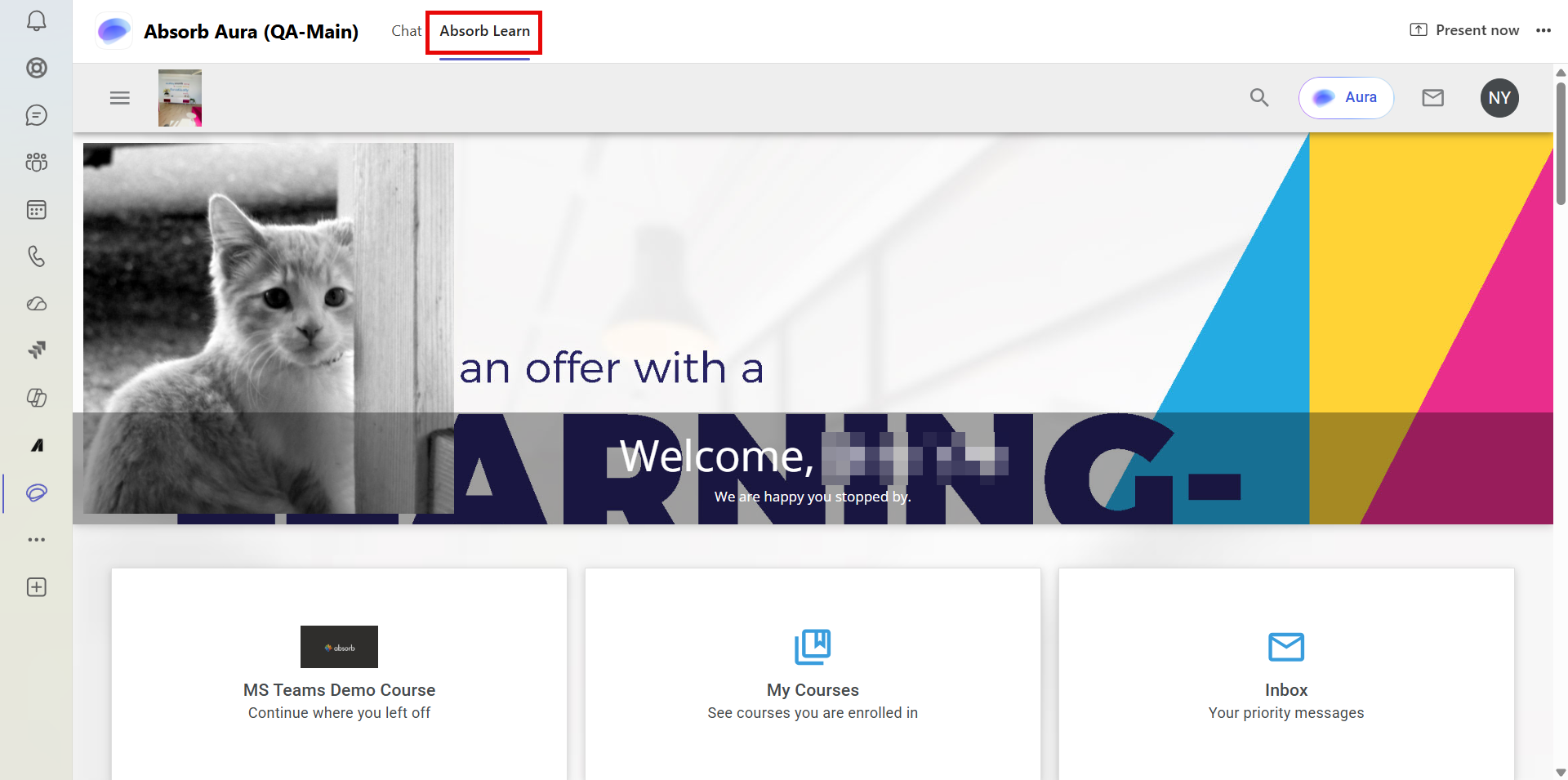
Absorb Adds Full Learner Experience to Microsoft Teams
Absorb Learn lets learners view their dashboard, browse the course catalog, enroll in and complete courses, resume training, and review transcripts inside Microsoft Teams. Training uses the same enrollment records as the browser-based LMS, so learners can switch between environments without losing progress. Highlights include:
- Absorb Learn Tab: Access the full Absorb learner experience directly inside Microsoft Teams.
- Course Catalog: Browse and search courses, including details such as duration, ratings, and prerequisites.
- Course Access: Enroll in, launch, and complete courses without leaving Teams.
- Progress Sync: Resume in-progress courses using the same enrollment records as the browser LMS.
- Transcripts: Review completed training and certificates from within Teams.
- Cross-Device Support: Use the experience across Teams desktop, web, and supported mobile devices.
Visit Absorb’s official site for more details.
 Opens new window
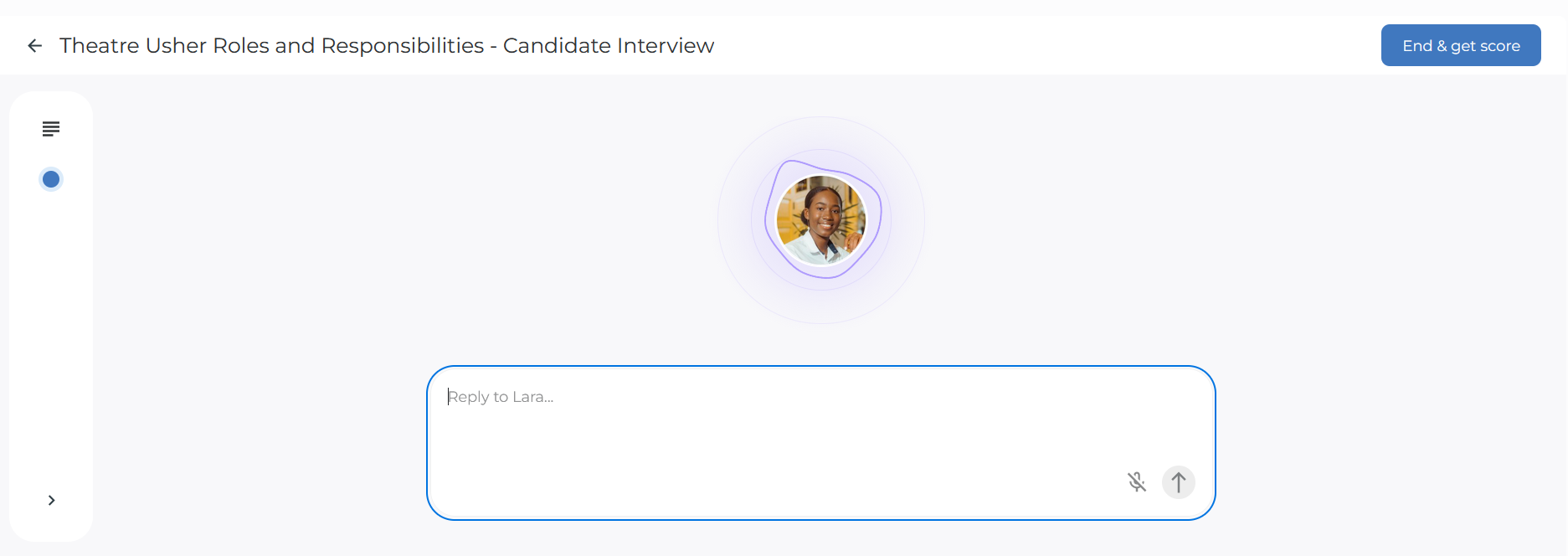
Absorb Adds Aura Rehearse for AI Conversation Practice
Absorb adds Aura Rehearse, which lets learners practice conversations with an AI persona, receive scored feedback, and request manual score reviews. The release also adds Rehearsal reporting and credit tracking while removing credit usage from Course Extraction, Aura Learner chats, and Aura Create chat interactions. Highlights include:
- Aura Rehearse: Practice conversations with an AI persona for scenarios such as customer calls and job interviews.
- Scored Feedback: Evaluate completed attempts against a defined rubric and provide written feedback.
- Manual Reviews: Let learners request one manual score review per attempt.
- Rehearsal Reporting: Track attempts, pass and fail results, average scores, and completion time.
- Credit Tracking: Monitor credit usage for text and voice Rehearsal attempts.
- Aura Credit Changes: Course Extraction, Aura Learner chats, and Aura Create chat interactions no longer consume credits.
Visit Absorb’s official site for more details.
Absorb Aura Adds Claude and ChatGPT Connections
Absorb Aura now integrates with Claude and ChatGPT via MCP, letting learners and admins bring LMS-aware Q&A into the AI tools they already use. This makes it faster to get answers about learning progress and LMS information without switching contexts. Highlights include:
- Claude and ChatGPT Connections: Access Absorb Aura directly from supported AI tools through MCP.
- Content Search: Search courses, resources, and available documents using natural-language questions.
- Learning Context: Find assigned, mandatory, due, or expiring courses without opening the LMS.
- Admin LMS Queries: Let admins ask questions about LMS data and configuration from their AI assistant.
- Permission-Aware Access: Apply each user’s existing Absorb roles and permissions to AI responses.
Visit Absorb’s official site for more details.
 Opens new window
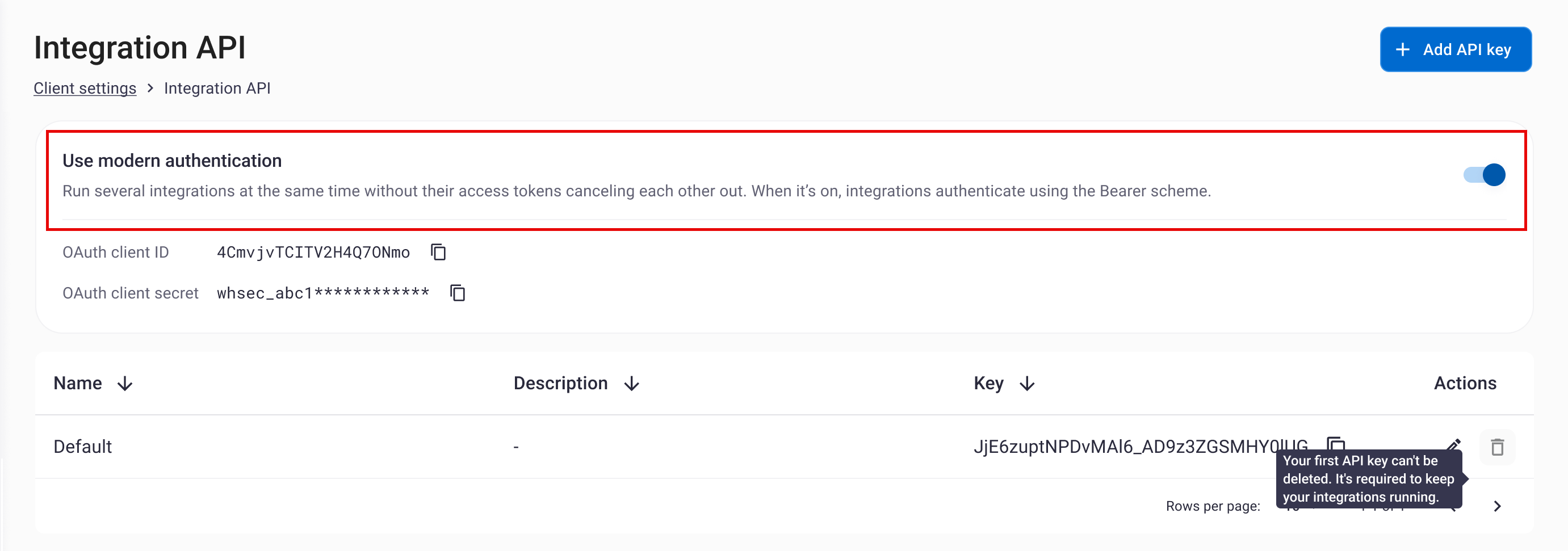
Absorb Adds Multiple API Keys and Modern Authentication
Absorb has introduced expanded Integration API management to better support organizations running multiple integrations. With multiple named keys and optional modern authentication, teams can keep concurrent integrations connected more reliably and with clearer administration. Highlights include:
- Multiple API Keys: Create and manage up to 10 named API keys per portal.
- Integration API Page: Manage keys and authentication settings directly in Client Settings.
- Modern Authentication: Use Bearer tokens to keep multiple integrations connected at the same time.
- Independent Credentials: Assign separate labeled keys to different integrations.
- Self-Service Management: Rename or delete keys without contacting Absorb Support.
Visit Absorb’s official site for more details.
 Opens new window
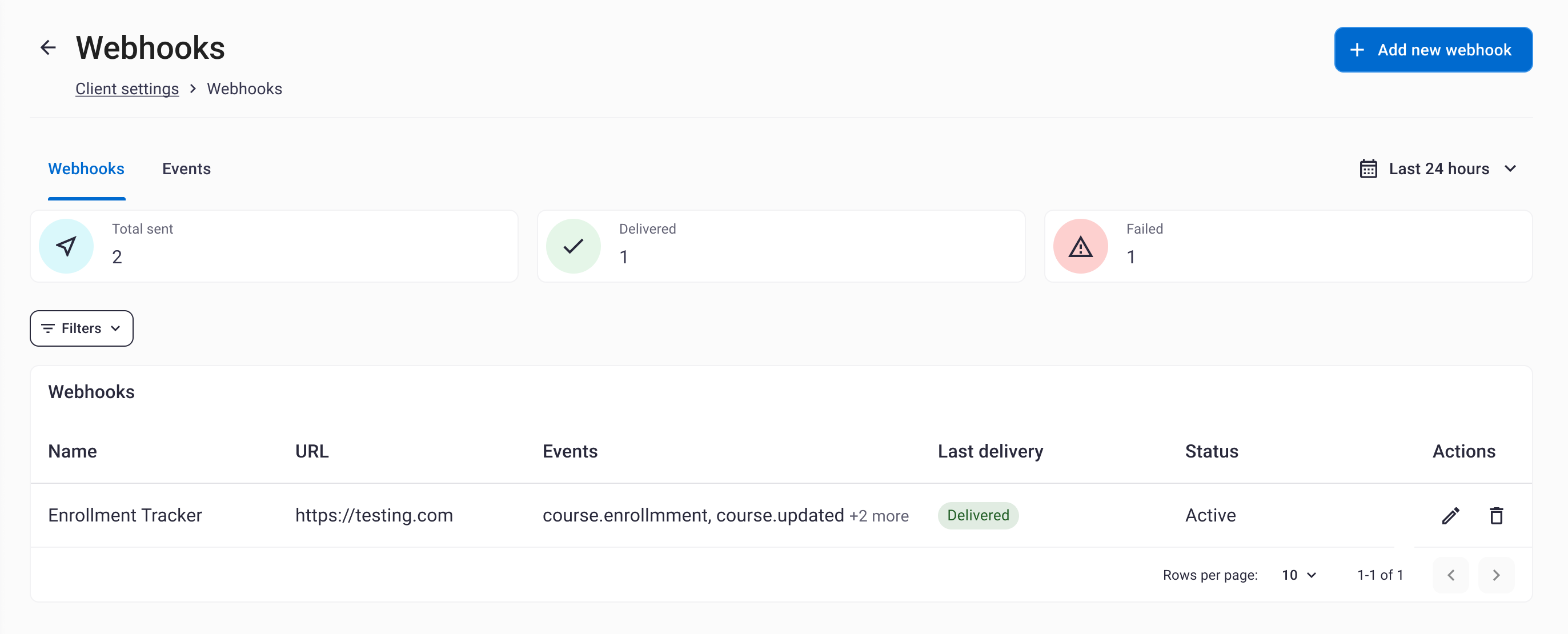
Absorb Adds Webhook Delivery Dashboard and Retry Tools
Absorb adds a new Webhooks page with an Events tab for reviewing delivery history, filtering results, inspecting failed payloads and errors, and retrying deliveries. These tools help admins monitor integrations and resolve webhook issues without contacting support. Highlights include:
- Delivery History: Review webhook delivery activity across the portal from one Events tab.
- Filtering Tools: Filter results by date range, event name, delivery status, or response code.
- Failure Details: Inspect error messages, payloads, event types, and response status codes.
- Manual Retry: Retry failed deliveries directly from the dashboard or event details.
- Per-Webhook Views: Open individual webhook pages with configuration details and scoped delivery history.
Visit Absorb’s official site for more details.
 Opens new window
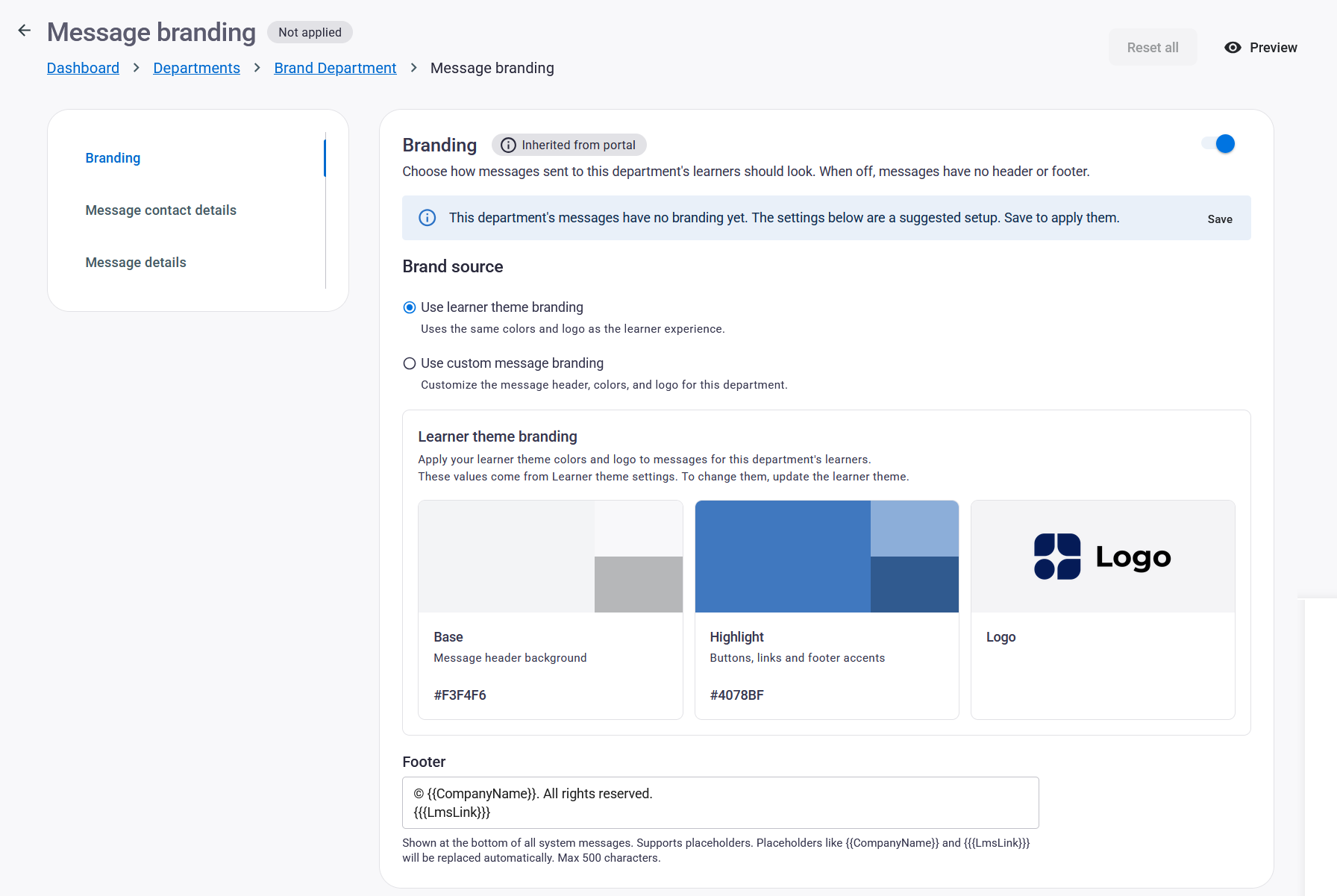
Absorb Adds Department-Level Message Branding
Absorb adds Department Message Branding so departments can override portal defaults for message branding, contact details, and sender identity. This helps multi-brand organizations tailor learner communications without changing the parent portal setup. Highlights include:
- Department Branding: Lets departments use custom colors and message header logos.
- Sender Identity: Supports department-specific sender details for learner communications.
- Contact Details: Lets departments manage their own communication information.
- Footer Text: Allows custom footer content with company-name placeholders.
- Admin Permission: Restricts setup to admins with the Manage Message Branding permission.
Visit Absorb’s official site for more details.
 Opens new window
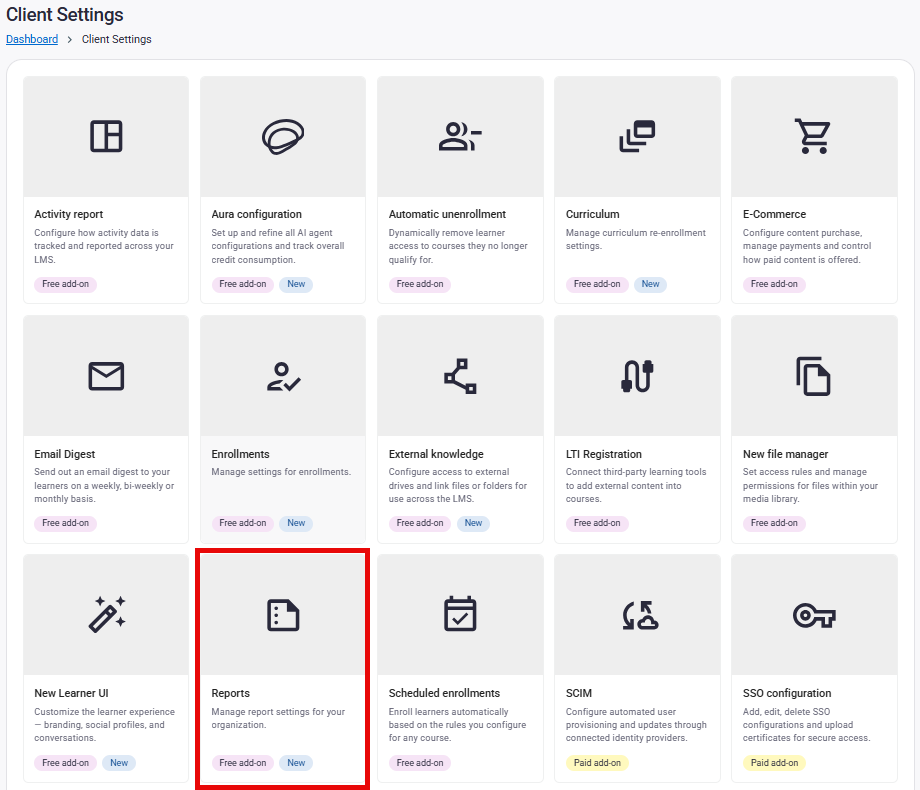
Absorb Adds Report Deep Links and Backdated Task Completions
Absorb lets admins share saved report layouts through permission-checked links and assign past completion dates when marking tasks Complete or Failed. These updates improve report access and task record accuracy. Highlights include:
- Report Deep Links: Opens saved report layouts with columns, filters, sorting, and pagination already applied.
- Permission Checks: Revalidates recipient access each time a shared report link is opened.
- Backdated Task Completions: Lets admins set a past completion date when marking tasks Complete or Failed.
Visit Absorb’s official site for more details.
 Opens new window
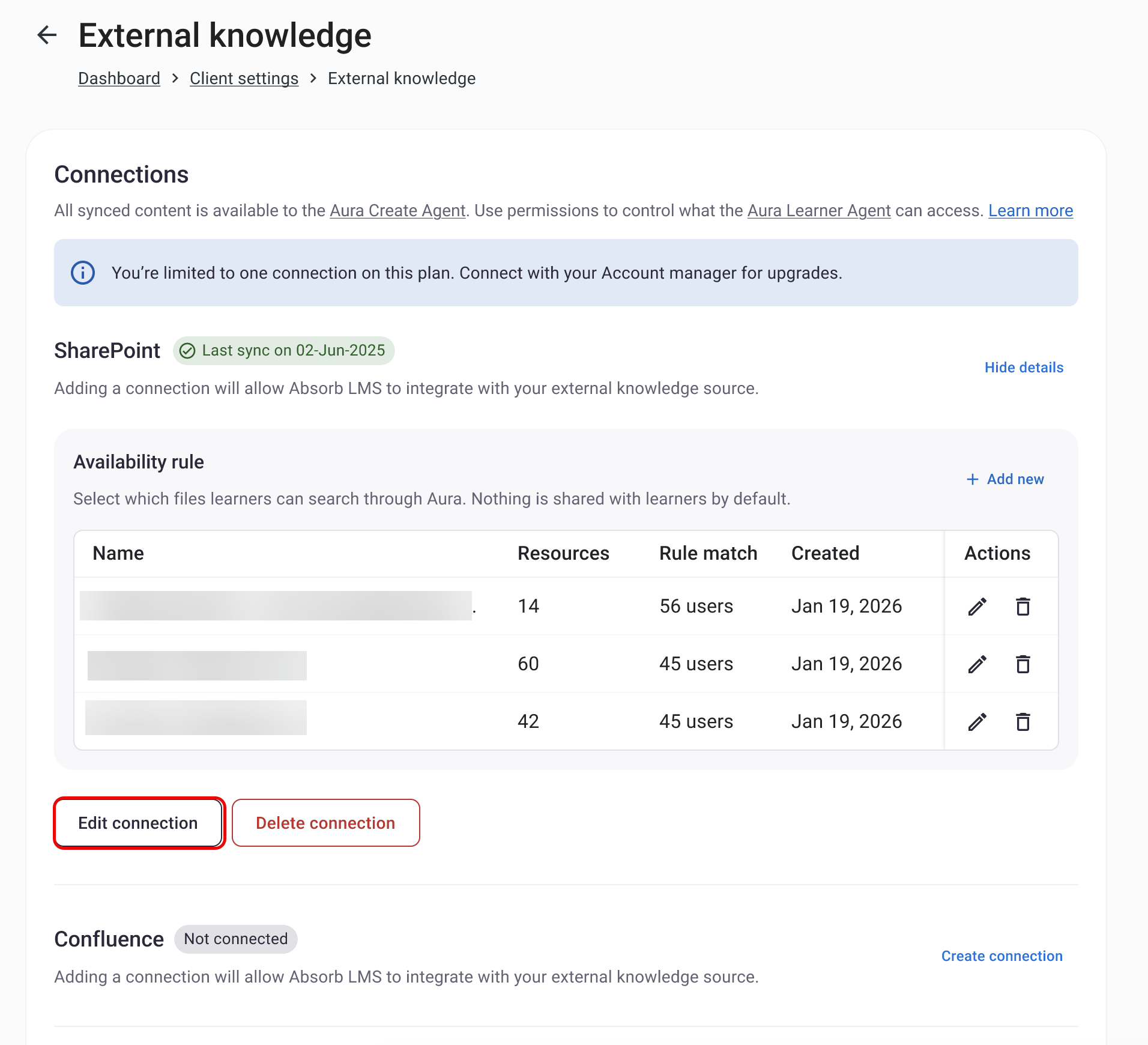
Absorb Aura Adds Department Controls for External Knowledge
Absorb Aura’s External Knowledge setup is now more flexible and easier to maintain. Teams can scope access by department and update connected content without rebuilding connections, helping keep knowledge current while preserving governance. Highlights include:
- Department Selector: Lets admins enable External Knowledge for selected departments and optional sub-departments.
- Edit Connections: Allows files and folders to be added or removed from existing connections.
- Availability Rules: Keeps existing connection settings and access rules when content is updated.
Visit Absorb’s official site for more details.
 Opens new window
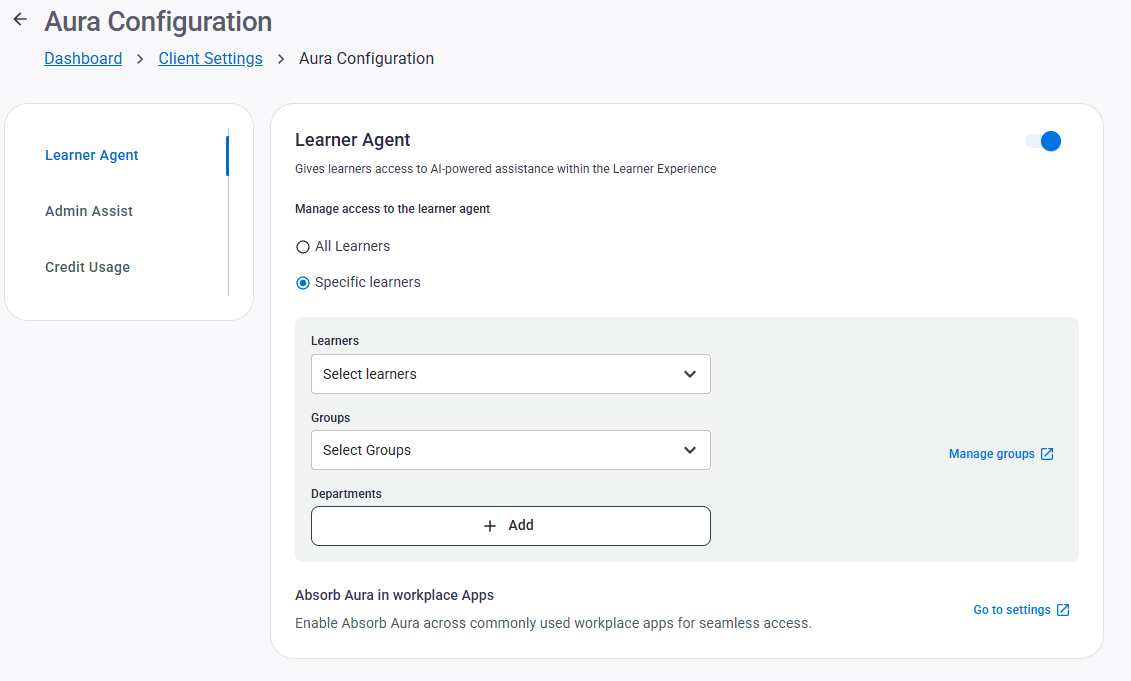
Absorb Adds Aura Access Controls and Usage Insights
Absorb adds department-based Learner Agent access, role-based permissions for Aura Chats, and new Admin Hub widgets for Aura usage. These updates help admins manage who can use Aura and track how learners engage with it. Highlights include:
- Department Selector: Lets admins enable the Aura Learner Agent for selected departments and optionally include sub-departments.
- Aura Chats Permissions: Allows admins to control Aura Chats report access by role.
- Aura Usage Widgets: Adds Total Chats, Unique Users, Average Chat Turns, and Chat Activity widgets to Admin Hub dashboards.
Visit Absorb’s official site for more details.
Absorb Specs
- API: Yes
- Class Management: Yes
- Comparative Reporting: Yes
- Corporate/Business: Yes
- Dashboards: No
- Data Export: Yes
- Data Import: Yes
- Data Visualization: Yes
- Document Comparison: No
- Employee Training: Yes
- External Integrations: Yes
- Feedback Management: No
- Gamification: Yes
- Gradebook: No
- Mobile App: Yes
- Multi-User: Yes
- Notifications: Yes
- Personal Learning: Yes
- Report & Compliance: Yes
- Report Cards: No
- Scheduling: Yes
- SCORM: Yes
- Student Registration: Yes
- Video Courses: Yes


