

Avis sur SentiSum : avantages, inconvénients, fonctionnalités et tarifs expliqués
Discover how SentiSum decodes customer conversations—see why I think its take on actionable insights makes it a standout among customer intelligence tools this 2026.

Nous évaluons les outils indépendamment ; les commissions aident à financer nos tests. Consultez notre politique de transparence et notre méthodologie.
SentiSum is a customer intelligence platform that uses AI-driven tagging to turn support tickets, reviews, and survey responses into granular sentiment and topic insights. I'd reach for it when your CX team is drowning in unstructured feedback across Zendesk, Intercom, Trustpilot, and post-purchase surveys, and you need to know exactly which issues drive churn or CSAT drops. Compared to a broader analytics suite like Medallia, SentiSum is quicker to deploy and more focused on auto-tagging accuracy for support conversations, so smaller CX and product teams can act on themes without a dedicated insights analyst.
SentiSum Evaluation Summary
4.6/5
- Pricing upon request
- 30-day free trial
Pourquoi faire confiance à nos recommandations de logiciels
6,700+
Reviews
20
Industry experts
16+
Evaluation factors
14
Years
Notre équipe teste et évalue des logiciels depuis 2012. En tant que leaders CX nous-mêmes, nous savons à quel point il est difficile — et important — de choisir le bon logiciel.
Pour ce guide, nous avons évalué les outils grâce à des tests pratiques et une recherche indépendante, en notant les outils selon nos critères de sélection.
Nos avis reflètent notre jugement éditorial humain, et non un argumentaire de vente.
 Gui DrusinaCreative Director
 Tim FisherVP of AI
SentiSum Overview
I think SentiSum is ideal if you want clear, actionable insights from messy support data without a steep learning curve. Its AI-driven tagging, natural language processing, and quick deployment set it apart for CX teams with limited analytics resources. The auto-tagging is accurate, onboarding is fast, and integrations cover essentials like Zendesk and Intercom. Pricing can stretch smaller budgets, but for teams prioritizing speed to insight over deep analytics customization, SentiSum is a smart pick. You’ll get real-time trend spotting and root cause analysis with minimal manual setup, though teams needing broader or more customizable reporting might want to compare options.
Pros
- Accurately auto-tags high volumes of unstructured customer feedback
- Identifies granular sentiment drivers without manual setup
- Real-time trend detection highlights urgent issues quickly
Cons
- Dashboard reporting options are basic compared to peers
- Lacks configurable analytics for deeper, custom insights
- Pricing may be high for small or early-stage teams
Is SentiSum Right For Your Needs?
Who Would be a Good Fit for SentiSum?
SentiSum works best for mid-sized and large businesses that prioritize fast, data-driven decisions in customer experience. Teams supporting high volumes of tickets across multiple channels get instant insight through automatic tagging and clear dashboards. Customer support, operations, and analytics leaders who want to quickly spot trends without deep analytics skills will find the setup and guided onboarding especially useful.
- Ecommerce RetailersSentiSum auto-tags thousands of support tickets daily and reveals customer topics instantly, making it ideal for fast-paced online stores.
- Customer Support TeamsThe platform’s simple dashboard clarifies top customer issues so support teams can prioritize training and processes.
- SaaS CompaniesFrequent integration needs, high ticket volumes, and broad digital communication channels fit SentiSum’s strengths in API support and instant insight.
- Operations LeadersOperations departments that want trend visibility across teams can use SentiSum’s actionable analytics without needing a data scientist.
- B2B Service ProvidersFirms that manage complex client accounts get value from customizable tagging and insight sharing, especially when working with integrations like Salesforce Service Cloud.
- Companies Scaling FastRapidly growing businesses benefit from SentiSum’s quick onboarding, templates, and automation without a lengthy setup process.
Who Would be a Bad Fit for SentiSum?
Teams with very lightweight analytics needs, tight budgets, or industry-specific compliance may not get enough value from SentiSum’s feature set. Smaller organizations with few support channels or teams that require deep custom analytics or language support outside major platforms may find a better fit elsewhere.
- Small StartupsThe high pricing and advanced analytics are overkill for teams handling only a few tickets a day.
- Nonprofits with Tight BudgetsNonprofits needing low-cost solutions may find SentiSum’s per-seat fees and custom plans too expensive for their needs.
- Highly Regulated IndustriesTeams in banking, legal, or healthcare might require deeper compliance controls or industry certifications than SentiSum offers.
- Single-Channel OperationsBusinesses handling all customer inquiries via a single channel (like only phone or email) won’t leverage SentiSum’s multi-platform integrations.
- DIY Analytics TeamsOrganizations with dedicated analysts who prefer to build custom queries may need a tool with deeper manual customization.
- Non-English-Primary MarketsCompanies needing analytics in less-common languages may find the platform’s language support limited compared to region-focused tools.
Comment nous testons et évaluons les outils
Nous avons passé des années à bâtir, affiner et améliorer notre système de test et de notation des logiciels. Notre grille d’évaluation est conçue pour saisir les subtilités des sélections logicielles et ce qui fait qu’un outil est efficace, en se concentrant sur les éléments essentiels du processus de décision. Vous trouverez ci-dessous le détail de notre méthodologie d’évaluation et de notation selon sept critères. Cela nous permet de fournir une évaluation impartiale des logiciels basée sur les fonctionnalités principales, les options uniques, la facilité d’utilisation, l’intégration, la prise en main, l’assistance, les avis clients et le rapport qualité/prix.
Fonctionnalité principale (25% de la note totale)
Le point de départ de notre évaluation concerne toujours la fonctionnalité principale de l’outil. Possède-t-il les fonctions que l’on attend normalement, et ces fonctions sont-elles accessibles pour toutes les offres ? Nous attendons qu’un outil soit au niveau des capacités minimales de ses concurrents.
Fonctionnalités différenciantes (25% de la note totale)
Nous évaluons ici les fonctionnalités qui se distinguent de la fonction de base habituellement présente dans ce type de logiciel. Un score élevé récompense des fonctions spécialisées qui rendent le produit plus efficace ou unique et offrent une valeur ajoutée à l’utilisateur. Nous évaluons également la capacité à s’intégrer facilement avec d’autres solutions courantes, ce qui accroît l’intérêt et l’utilité de l’outil. Les logiciels qui proposent de nombreuses intégrations natives, des connexions tierces ou une API pour les intégrations personnalisées obtiennent une meilleure note.
Facilité d’utilisation (10% de la note totale)
Nous mesurons la rapidité et la simplicité pour effectuer les tâches clés avec l’outil. On valorise le design intuitif, les applications mobiles, les templates préconçus et la capacité à simplifier les tâches complexes.
Accompagnement à la prise en main (10% de la note totale)
L’adoption rapide est essentielle. Nous examinons donc la facilité pour un nouvel utilisateur à prendre l’outil en main avec peu de formation. Nous vérifions la rapidité d’installation et d’utilisation sans expérience préalable. Les meilleurs logiciels exigent peu ou pas de support pour démarrer.
Assistance (10% de la note totale)
Nous évaluons la réactivité et la facilité d’obtenir de l’aide par téléphone, chat ou base de connaissances. Les outils offrant un support humain en temps réel ont le meilleur score ; les chatbots sont moins bien valorisés.
Avis clients (10% de la note totale)
En plus de notre expertises, nous prenons en compte le score NPS (Net Promoter Score) accordé par les utilisateurs actuels et passés. Nous analysons la probabilité qu’ils réutilisent l’outil. Les outils à score élevé possèdent un excellent NPS utilisateur.
Rapport qualité/prix (10% de la note totale)
Après examen des autres critères, nous considérons le prix moyen des offres principales par rapport aux fonctionnalités essentielles évaluées. Les solutions offrant plus pour un prix inférieur obtiennent un meilleur score.
Core Features
AI-Driven Auto-Tagging
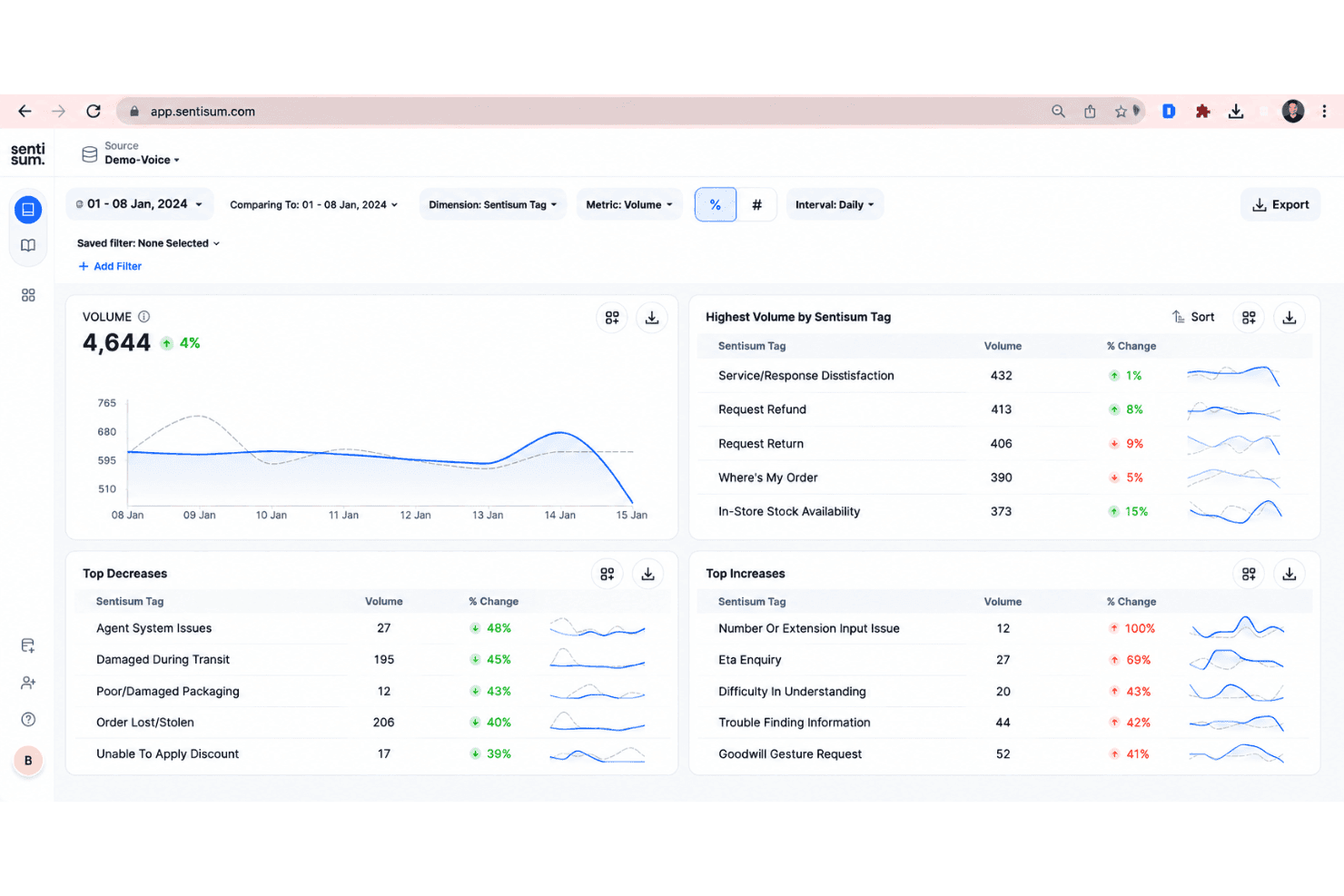
SentiSum uses trained AI models to automatically tag support tickets and feedback with granular topics and sentiment in real time. This cuts down manual work and highlights recurring pain points across thousands of conversations.
Sentiment Analysis Across Channels
SentiSum analyzes text from email, chat, reviews, and surveys to surface positive, neutral, and negative sentiment. This lets teams quickly spot shifts in customer mood by channel or topic.
Real-Time Trend Detection
The platform proactively highlights surges in complaint types or new issues as they appear. Teams get notifications about emerging themes so they can respond before problems escalate.
Root Cause Analysis
SentiSum helps teams trace negative customer sentiment or churn risk back to specific product bugs or service failures. You get clear explanations of what’s driving spikes in dissatisfaction.
Simple, Focused Dashboard
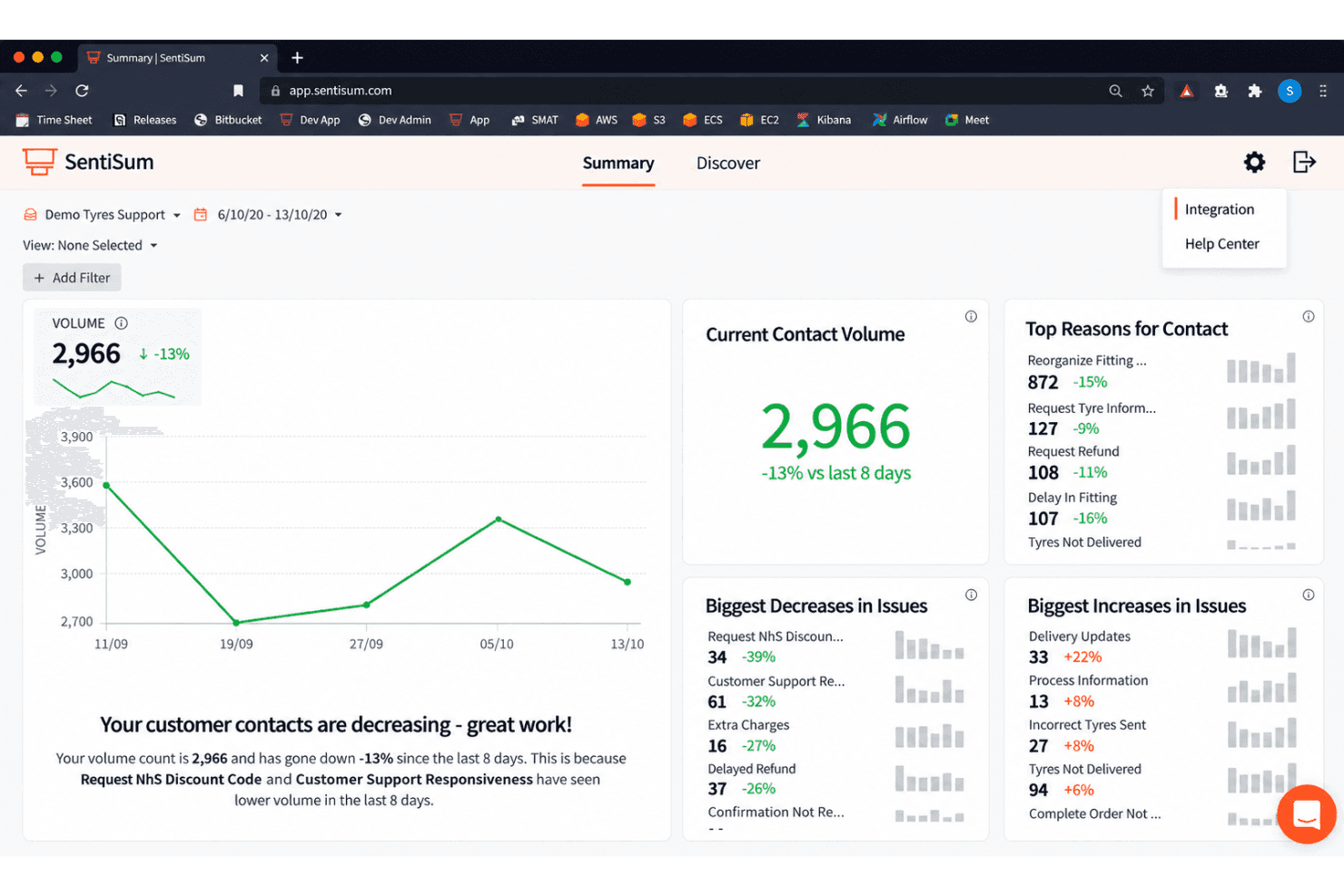
The reporting dashboard summarizes top issues, sentiment trends, and urgent insights in a clean, no-clutter layout. You don’t need analytics expertise to find actionable takeaways.
Fast Onboarding and Setup
SentiSum streamlines setup with built-in templates and instant integrations for common tools like Zendesk and Intercom. Most teams can start acting on insights within days instead of weeks.
Ease of Use
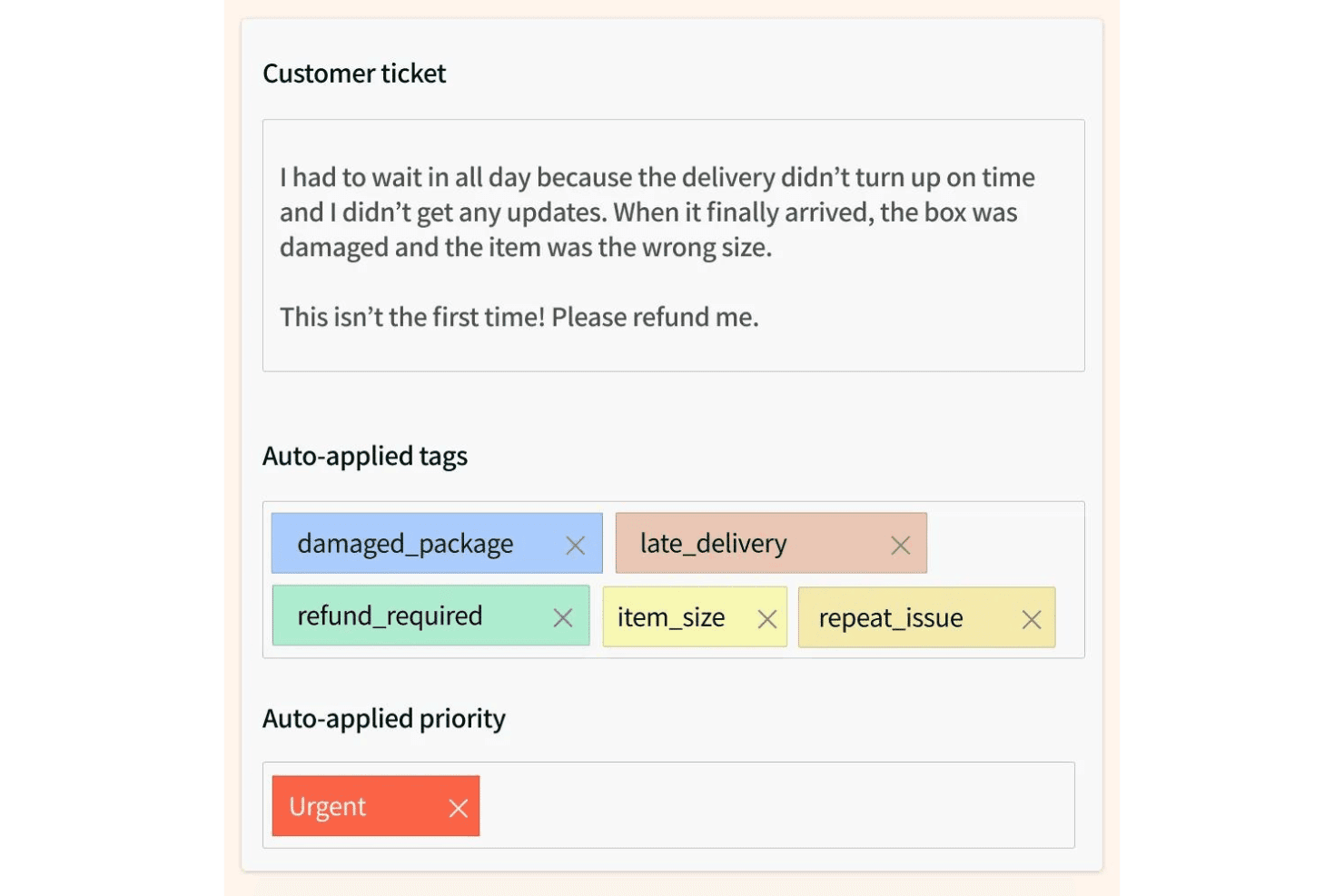
SentiSum is easy to navigate—even for teams with little analytics experience. The dashboard uses simple visuals and clear category breakdowns. Most users say setup takes just days, not weeks, and the auto-tagging works without heavy manual rules. Busy CX teams like that they get instant, actionable insights from tickets and reviews, and don’t have to dig for key trends or explanations, which saves time and reduces training needs.
Integrations
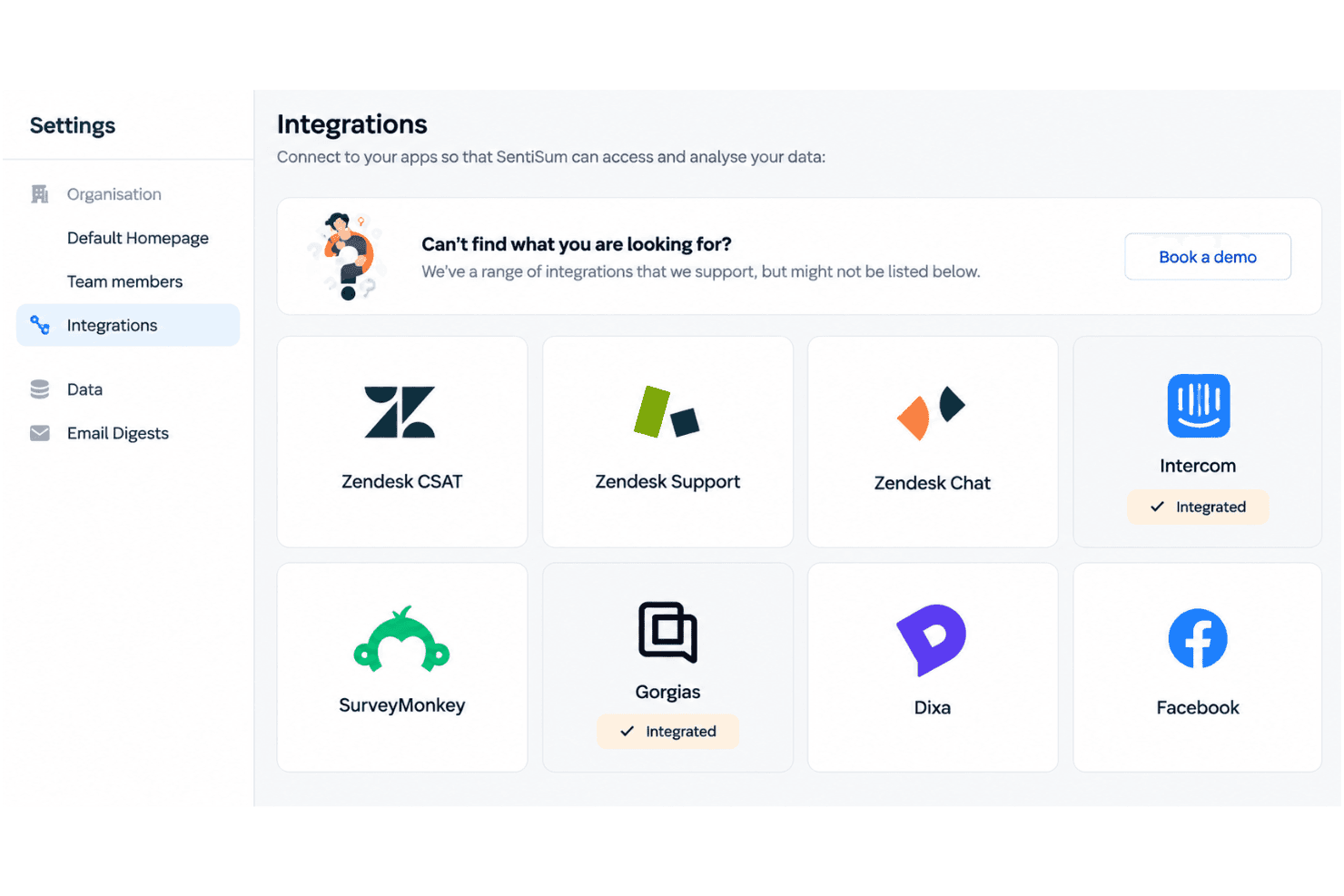
SentiSum integrates with Zendesk, Intercom, Freshdesk, Salesforce, SurveyMonkey, Gorgias, Dixa, Help Scout, Sprinklr, and AWS Connect, among others.
SentiSum also offers an API and connects with third-party integration tools.
SentiSum Specs
- A/B Testing: Yes
- AI Integration: Yes
- Analytics: Yes
- API: Yes
- Comparative Reporting: Yes
- Conversion Tracking: Yes
- Custom Reports: Yes
- Dashboard: Yes
- Dashboards: Yes
- Data Export: Yes
- Data Import: Yes
- Data Mining: Yes
- Data Visualization: Yes
- External Integrations: Yes
- Feedback Management: Yes
- Forecasting: Yes
- Historical Data Analysis: Yes
- Keyword Tracking: Yes
- Link Tracking: Yes
- Multi-Site: Yes
- Multi-User: Yes
- Notifications: Yes
- Process Reporting: Yes
- Real-time Alerts: Yes
- Referral Tracking: Yes
- Reports: Yes
- Scenario Planning: Yes
- SEO: Yes
- Time Series Modeling: Yes
- Visualization: Yes
- Workflow Management: Yes


