

Recensione di Freshcaller: vantaggi, svantaggi, funzionalità e prezzi
Freshcaller si distingue per la sua interfaccia intuitiva e le funzionalità scalabili, risultando ideale per le aziende alla ricerca di una soluzione flessibile per i centri di contatto.

Recensiamo gli strumenti in modo indipendente e le commissioni aiutano a finanziare i nostri test. Consulta la nostra politica di trasparenza, la nostra metodologia o suggerisci uno strumento.
Freshcaller is a cloud-based call center software built for teams that need to manage inbound and outbound calls with IVR, call routing, and call recording without a lengthy setup process. If your team is already in the Freshworks ecosystem, Freshcaller is worth a close look over Aircall—the native integration with Freshdesk connects your phone channel directly to your support workflow in a way that Aircall's third-party connector simply doesn't match.
Freshcaller Evaluation Summary
4.1/5
- From $15/user/month (billed annually)
- 14-day free trial
Perché fidarsi dei nostri consigli sui software
6,700+
Reviews
20
Industry experts
16+
Evaluation factors
14
Years
Il nostro team testa e recensisce software dal 2012. In quanto leader CX noi stessi, sappiamo quanto sia difficile — e importante — scegliere il software giusto.
Per questa guida, abbiamo valutato gli strumenti attraverso test pratici e ricerche indipendenti, assegnando un punteggio agli strumenti in base ai nostri criteri di selezione.
Le nostre recensioni riflettono il nostro giudizio editoriale umano, non un discorso di vendita.
Freshcaller Overview
From my perspective, Freshcaller shines as a call center software, particularly for businesses seeking a straightforward setup and intuitive interface. I think its affordable pricing and integration with Freshdesk Contact Center make it a strong contender, though it may lack some advanced features found in more expensive competitors.
Freshcaller is best for small to medium-sized teams that prioritize ease of use, efficient business communications and value for money. While its customer support is generally responsive, some users might find the lack of certain integrations limiting for their business needs. If you're deciding between Freshcaller and more complex systems, consider your team's specific needs and whether Freshcaller's simplicity aligns with your operational goals.
Pros
- You can easily set up and start using Freshcaller without much hassle.
- Its interface is user-friendly, making it simple for your team to navigate.
- It offers a range of useful call center features that improve your team's productivity.
Cons
- Your calls might drop or the system might crash occasionally.
- It sometimes loses data, which can be frustrating during important calls.
- The mobile app is basic and lacks some essential features.
Is Freshcaller Right For Your Needs?
Who Would be a Good Fit for Freshcaller?
Freshcaller is ideal for businesses aiming to streamline their call center operations without the need for physical phone hardware. It suits industries such as retail, hospitality, and logistics, where managing incoming call flows and volumes efficiently is crucial. Features like multi-level IVRs and automated routing ensure that calls reach the right team members, enhancing customer service. If your team needs robust integration with CRM tools like Salesforce or HubSpot, Freshcaller provides seamless compatibility, which can significantly boost productivity.
- Small BusinessesFreshcaller offers affordable plans with essential features, making it a practical choice for small businesses needing reliable call management without high costs.
- Retail & E-commerceWith its ability to handle high call volumes, reduce wait times and provide real-time insights and custom greetings, Freshcaller is perfect for retail and e-commerce sectors where customer satisfaction is key.
- Customer Support TeamsThe integration with CRM tools like Salesforce enhances customer interaction by providing agents with comprehensive customer data, leading to more personalized support and better help desk performance.
- NGOs/NFPsFreshcaller's cost-effective pricing and easy setup are beneficial for NGOs and non-profits that need efficient communication tools without straining their budget.
- Leisure & HospitalityIts automated routing and IVR capabilities ensure that guests and clients are connected to the appropriate departments swiftly, improving service quality.
- Logistics & TransportationReal-time dashboards and call monitoring help logistics companies maintain efficient communication channels, crucial for time-sensitive operations.
Who Would be a Bad Fit for Freshcaller?
If you're a large enterprise needing intricate call center operations, Freshcaller might not be for you. Its feature set is tailored more for small to medium-sized businesses, lacking the advanced capabilities that larger organizations might demand. For instance, if your team requires a complex phone system, call routing or in-depth analytics, Freshcaller may fall short. Additionally, if your business relies heavily on integrations with a wide array of other software or specific providers, Freshcaller’s limited integration options could be a stumbling block.
- Large EnterprisesFreshcaller lacks the advanced features and scalability required by large enterprises with complex call center operations.
- Tech-Savvy DepartmentsIf your department needs extensive customization and advanced integrations, Freshcaller’s limited options could be a hindrance.
- Highly Regulated IndustriesIndustries like finance or healthcare needing robust compliance features might find Freshcaller inadequate.
- Data-Driven RolesRoles that rely heavily on analytics and reporting may find Freshcaller's basic reporting insufficient.
- Global TeamsFreshcaller only offers support in the major languages. So if your team operates globally and requires support in more languages or toll-free numbers across regions, Freshcaller’s offerings might not meet your needs.
- Customer Support DepartmentsDepartments needing 24/7 support might struggle with Freshcaller's limited customer service availability.
Come Testiamo e Valutiamo gli Strumenti
Abbiamo passato anni a costruire, perfezionare e migliorare il nostro sistema di valutazione e testing dei software. Il nostro schema è progettato per cogliere tutte le sfumature nella selezione del software e per valutare ciò che rende uno strumento efficace, concentrandosi sugli aspetti critici nel processo decisionale. Qui sotto puoi vedere esattamente come funziona il nostro processo di testing e valutazione su sette criteri. Ci permette di offrire una valutazione imparziale del software basata su funzionalità principali, caratteristiche distintive, facilità d’uso, onboarding, supporto clienti, integrazioni, recensioni clienti e rapporto qualità/prezzo.
Funzionalità Principali (25% del punteggio finale)
Il punto di partenza della nostra valutazione sono sempre le funzionalità fondamentali dello strumento. Possiede le funzioni di base che un utente si aspetta? Alcune di queste funzionalità sono disponibili solo con piani più costosi? In sostanza, ci aspettiamo che uno strumento sia competitivo rispetto ai suoi concorrenti principali.
Caratteristiche Distintive (25% del punteggio finale)
Successivamente, valutiamo le funzionalità particolari e distintive che vanno oltre le funzionalità standard solitamente presenti in strumenti simili. Un punteggio elevato riflette funzionalità specializzate o uniche che rendono il prodotto più veloce, efficiente o che offrono valore aggiunto all’utente. Valutiamo anche quanto sia facile integrare lo strumento con altri strumenti tipicamente presenti nel tech stack, per ampliare le funzionalità e l’utilità del software. Ottengono il punteggio migliore gli strumenti che offrono numerose integrazioni native, connessioni di terze parti e accesso API per creare integrazioni personalizzate.
Facilità d’Uso (10% del punteggio finale)
Consideriamo quanto sia rapido e intuitivo eseguire le attività core usando lo strumento. Un software con un alto punteggio è ben progettato, intuitivo all’uso, offre app mobili, mette a disposizione modelli e semplifica attività relativamente complesse.
Onboarding (10% del punteggio finale)
Sappiamo quanto sia importante l’adozione rapida da parte del team per una nuova piattaforma, quindi valutiamo la facilità di apprendimento e utilizzo dello strumento con una formazione minima. Valutiamo quanto velocemente un membro del team può iniziare a usare lo strumento senza esperienza. Le soluzioni con punteggio elevato richiedono poco o nessun supporto.
Supporto Clienti (10% del punteggio finale)
Valutiamo quanto sia semplice ricevere assistenza via telefono, chat dal vivo o knowledge base. Gli strumenti e le aziende che offrono supporto in tempo reale ottengono il punteggio migliore, mentre i chatbot hanno il punteggio più basso.
Recensioni Clienti (10% del punteggio finale)
Oltre alla nostra valutazione interna, prendiamo in considerazione il net promoter score dei clienti attuali e passati. Analizziamo la probabilità che, potendo scegliere, selezionino di nuovo lo strumento per le sue funzionalità core. Un software con punteggio elevato riflette un alto net promoter score dai clienti attuali o passati.
Rapporto Qualità/Prezzo (10% del punteggio finale)
Infine, tenendo conto di tutti gli altri criteri, analizziamo il prezzo medio dei piani entry level rispetto alle funzionalità principali e consideriamo il valore delle altre metriche di valutazione. Il software che offre di più, a meno, otterrà un punteggio maggiore.
Core Features
Call Transfers
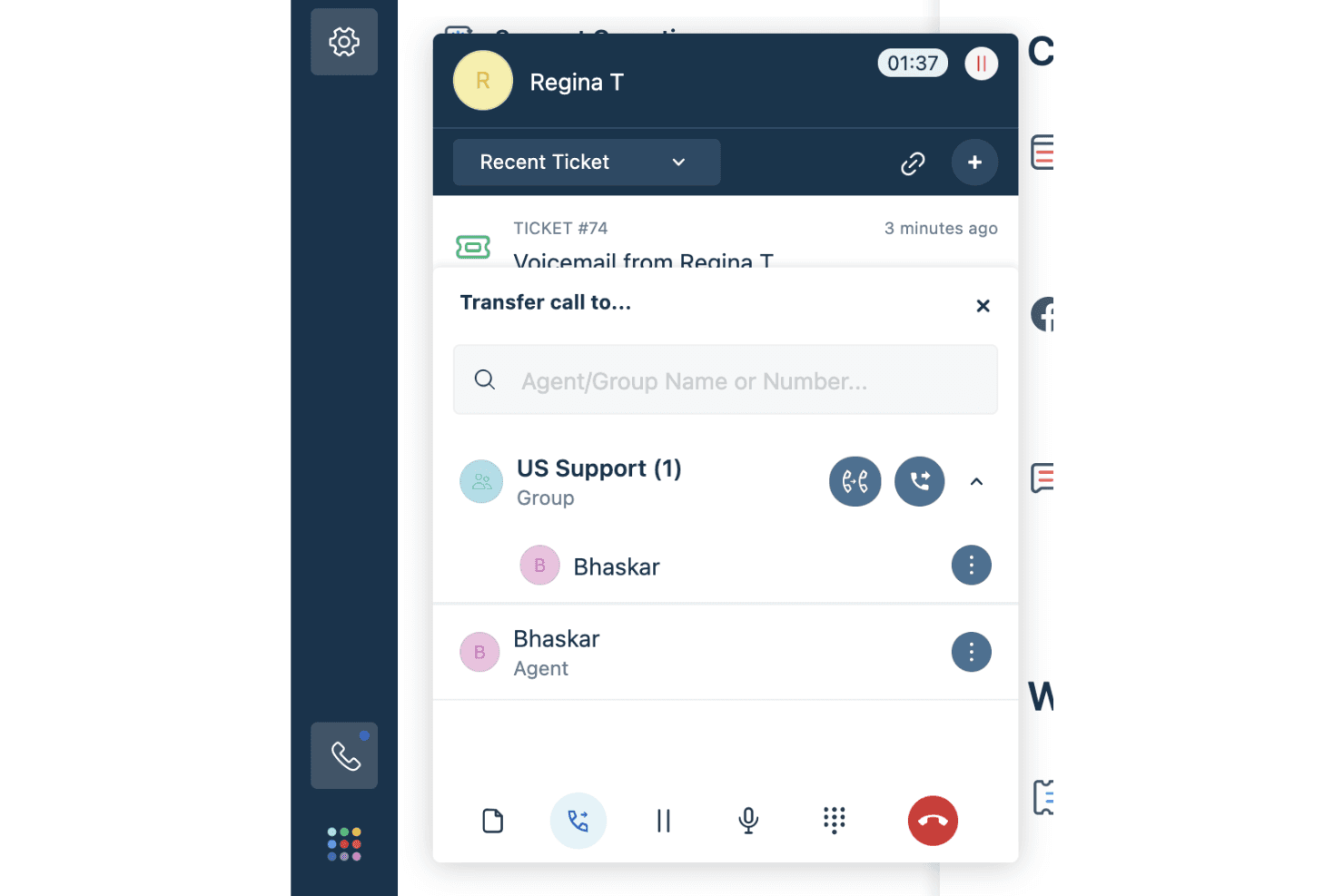
Freshcaller lets your team seamlessly transfer calls, whether cold or warm, ensuring that customers are directed to the right agent. This feature helps maintain continuity and reduces customer frustration by getting them the help they need promptly.
Call Conferencing
This feature allows multiple team members to join a call, facilitating collaborative problem-solving and improving customer satisfaction. You can bring in supervisors or other agents to resolve complex issues more effectively.
Call Forwarding
Never miss important calls with Freshcaller's call forwarding, which redirects calls to available agents or external numbers. This ensures that your team's availability is maximized, and customer queries are addressed without delay.
Hold and Mute Options
These in-call functionalities let your agents manage calls better by putting customers on hold or muting calls when needed. It helps in managing sensitive information or coordinating with team members without disrupting the customer interaction.
Shared Call Appearance
With this feature, your team can handle multiple calls from a single phone number, enhancing efficiency. It's particularly useful for managing high call volumes and ensuring that queries are addressed promptly.
Interactive Voice Response (IVR)
Freshcaller supports IVR systems, allowing you to set up automated call routing based on customer input. This speeds up query resolution and ensures that customers reach the right department quickly.
Ease of Use
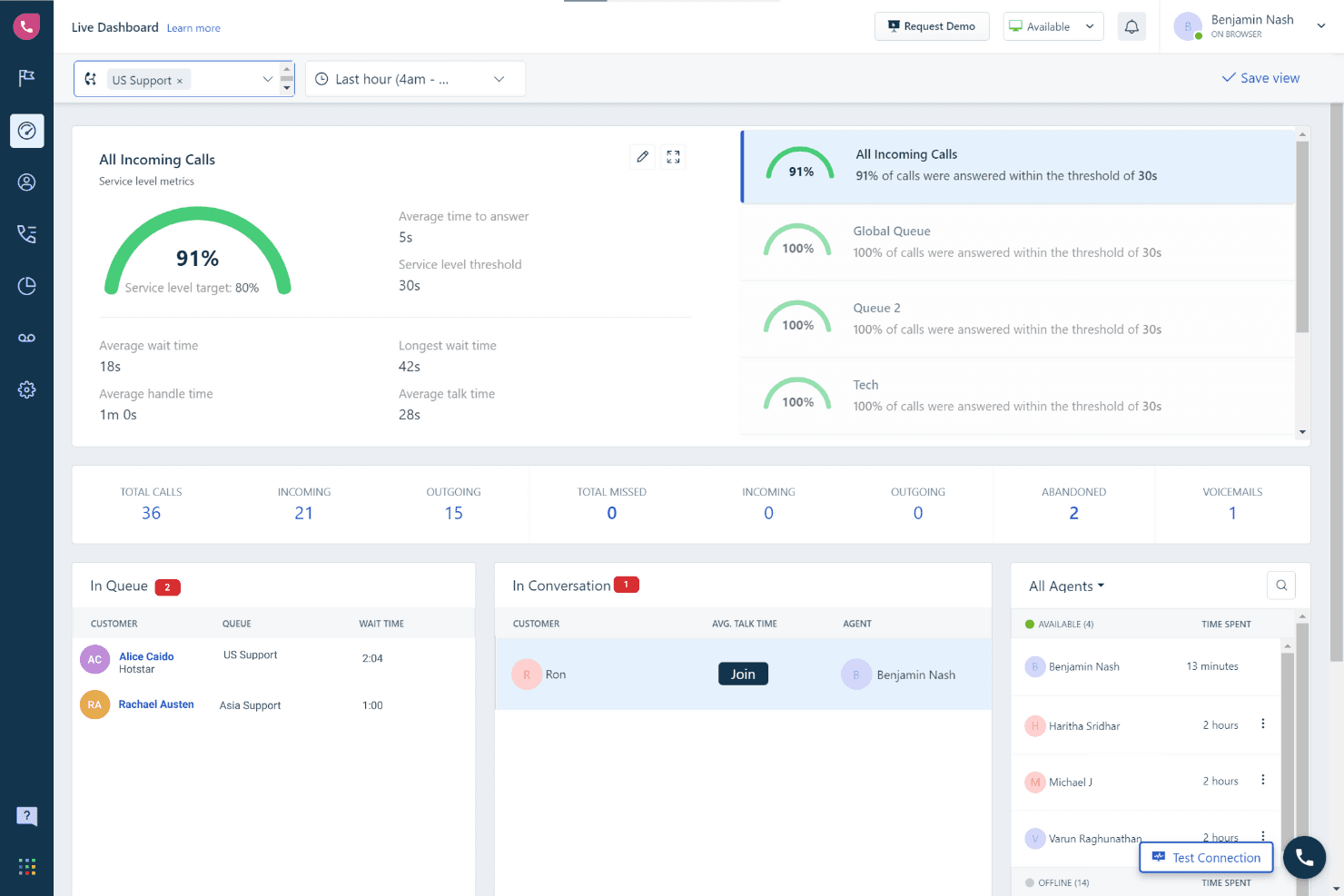
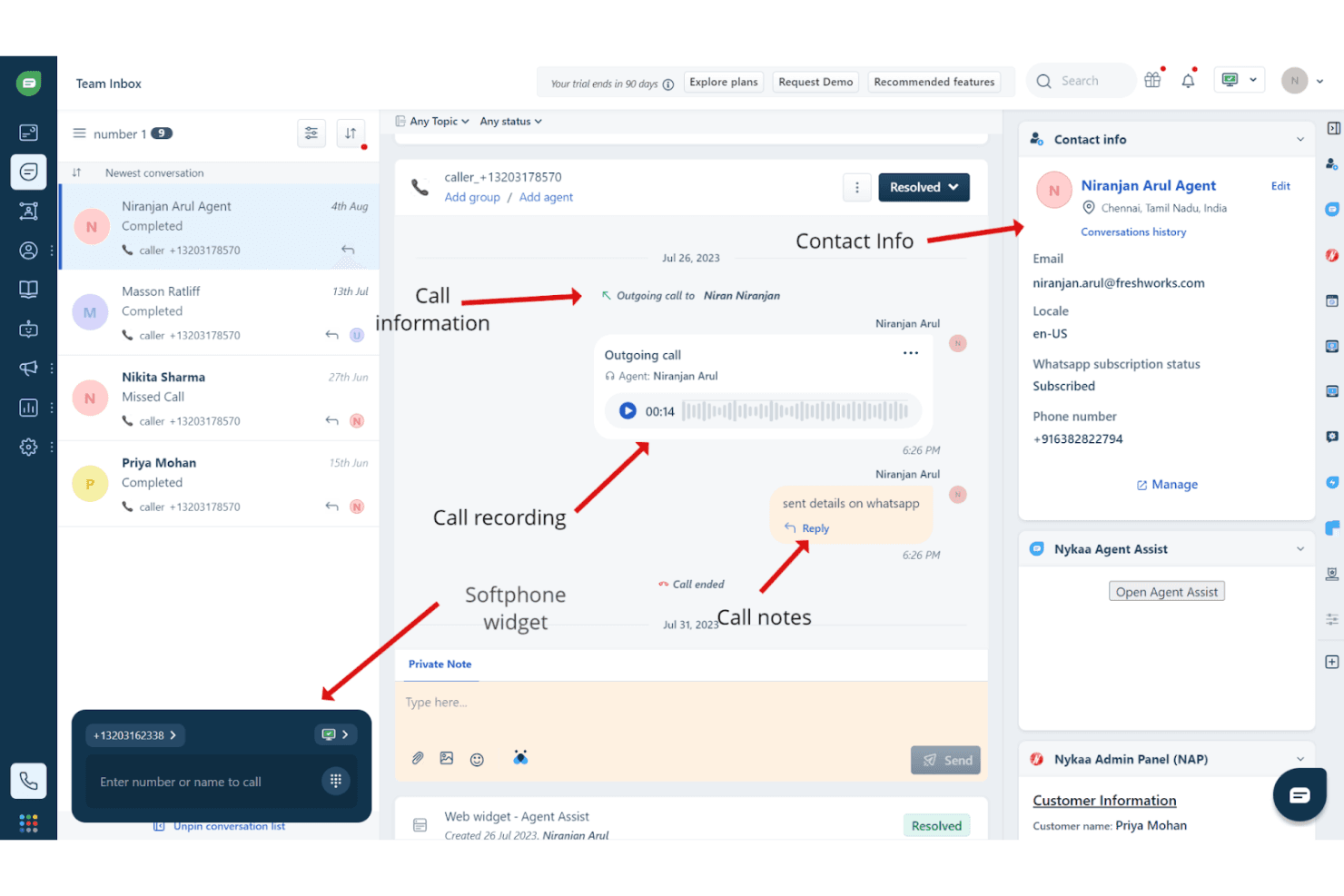
Freshcaller is praised for its intuitive navigation, making it easy for your team to move between features. Everything's neatly organized in the left navigation menu, which simplifies access. The software's design includes two main screens, helping users understand when they're viewing top-level information or delving into project details. This structure aids in quick learning and efficient use, setting Freshcaller apart from more complex call center software.
Integrations
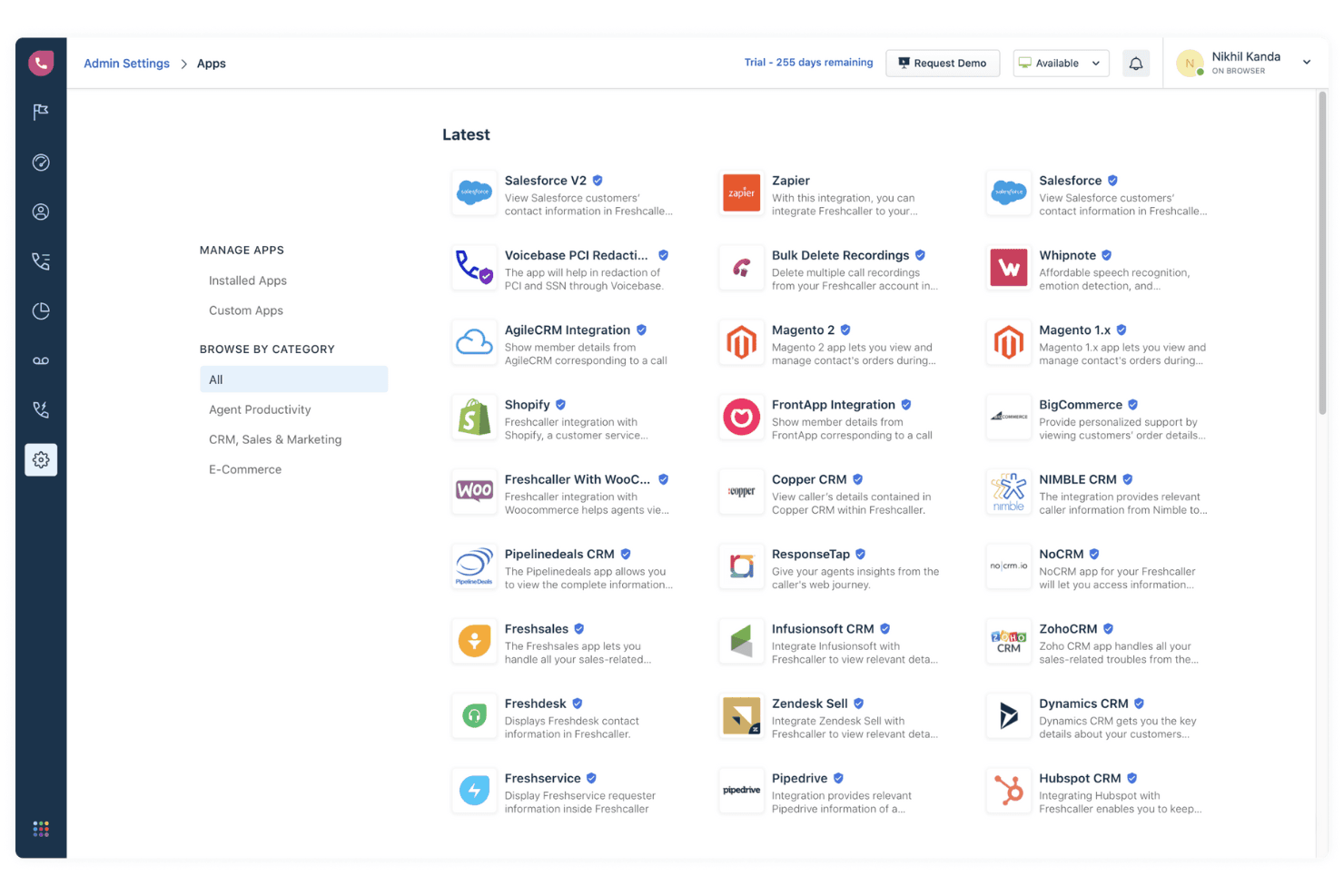
Freshcaller integrates with Freshdesk, Slack, HubSpot CRM, Shopify, Microsoft Teams, Zapier, Zoho CRM, Pipedrive, Google Calendar, and Trello. Freshcaller also provides an API for integration with various business operations, including user and team management, call handling, and data export. Additionally, Freshcaller connects with third-party integration tools like Zapier to enhance its connectivity with other applications.
Freshcaller Specs
- Analytics: No
- API: Yes
- Auto Dialer: Yes
- Automatic Call Distribution: Yes
- Batch Permissions & Access: No
- Calendar Management: No
- Call Disposition: Yes
- Call Logging: Yes
- Call Monitoring: No
- Call Recording: Yes
- Call Scripting: No
- Call Tracking: No
- Chat: No
- Click-to-Dial: No
- Comparative Reporting: No
- Contact Management: No
- Contact Sharing: No
- Custom Data Forms: No
- Customer Management: Yes
- Dashboard: Yes
- Data Export: No
- Data Import: No
- Data Visualization: Yes
- Email Integration: Yes
- Escalation Management: Yes
- External Integrations: Yes
- Interactive Voice Response: Yes
- Lead Management: No
- Lead Scoring: No
- Marketing Automation: No
- Multi-User: Yes
- Notifications: No
- Scheduling: Yes
- Softphone: Yes
- Supplier Management: No


