

Recensione di SentiSum: vantaggi, svantaggi, funzionalità e prezzi spiegati
Discover how SentiSum decodes customer conversations—see why I think its take on actionable insights makes it a standout among customer intelligence tools this 2026.

Recensiamo gli strumenti in modo indipendente e le commissioni aiutano a finanziare i nostri test. Consulta la nostra politica di trasparenza, la nostra metodologia o suggerisci uno strumento.
SentiSum is a customer intelligence platform that uses AI-driven tagging to turn support tickets, reviews, and survey responses into granular sentiment and topic insights. I'd reach for it when your CX team is drowning in unstructured feedback across Zendesk, Intercom, Trustpilot, and post-purchase surveys, and you need to know exactly which issues drive churn or CSAT drops. Compared to a broader analytics suite like Medallia, SentiSum is quicker to deploy and more focused on auto-tagging accuracy for support conversations, so smaller CX and product teams can act on themes without a dedicated insights analyst.
SentiSum Evaluation Summary
4.6/5
- Pricing upon request
- 30-day free trial
Perché fidarsi dei nostri consigli sui software
6,700+
Reviews
20
Industry experts
16+
Evaluation factors
14
Years
Il nostro team testa e recensisce software dal 2012. In quanto leader CX noi stessi, sappiamo quanto sia difficile — e importante — scegliere il software giusto.
Per questa guida, abbiamo valutato gli strumenti attraverso test pratici e ricerche indipendenti, assegnando un punteggio agli strumenti in base ai nostri criteri di selezione.
Le nostre recensioni riflettono il nostro giudizio editoriale umano, non un discorso di vendita.
 Gui DrusinaCreative Director
 Tim FisherVP of AI
SentiSum Overview
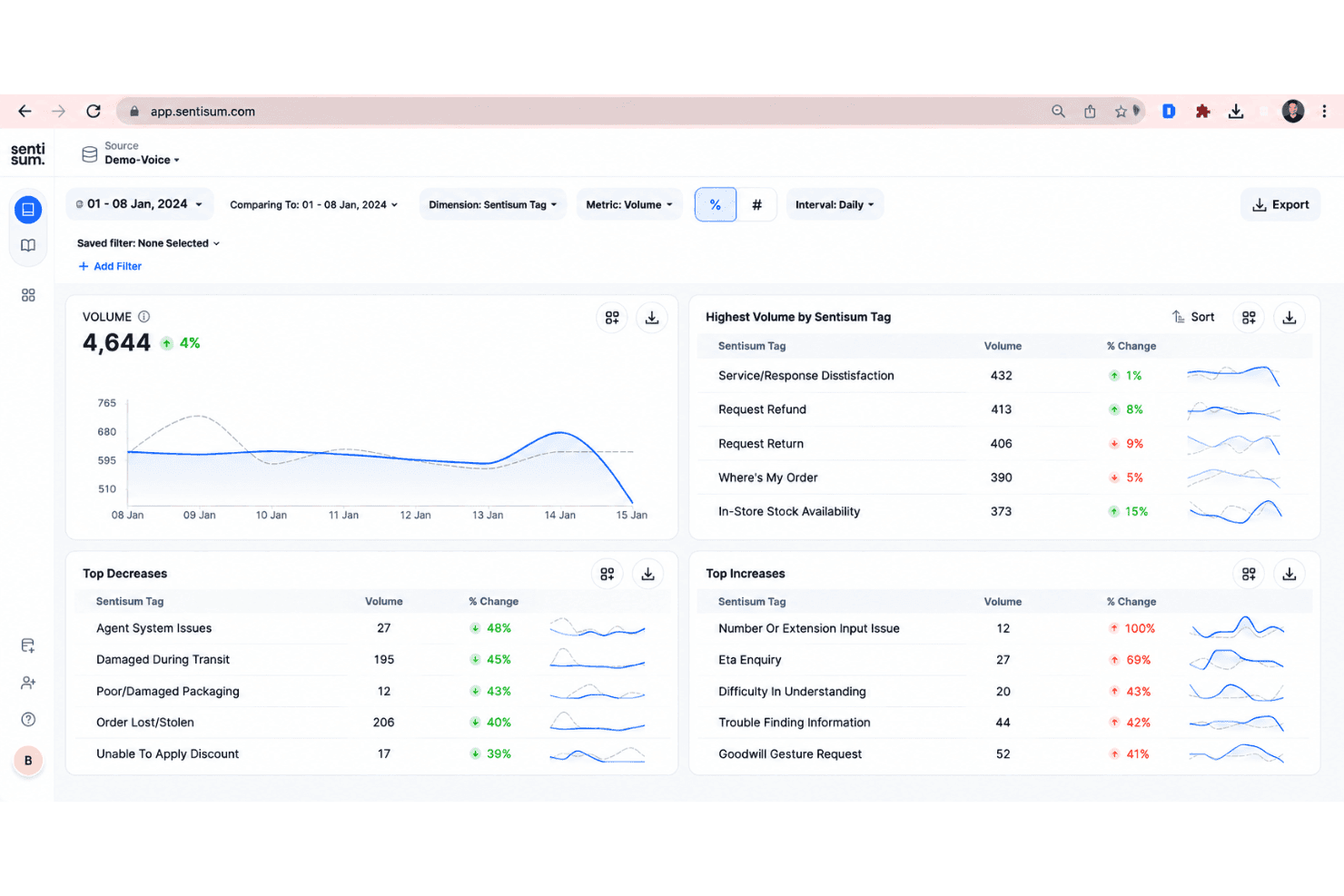
I think SentiSum is ideal if you want clear, actionable insights from messy support data without a steep learning curve. Its AI-driven tagging, natural language processing, and quick deployment set it apart for CX teams with limited analytics resources. The auto-tagging is accurate, onboarding is fast, and integrations cover essentials like Zendesk and Intercom. Pricing can stretch smaller budgets, but for teams prioritizing speed to insight over deep analytics customization, SentiSum is a smart pick. You’ll get real-time trend spotting and root cause analysis with minimal manual setup, though teams needing broader or more customizable reporting might want to compare options.
Pros
- Accurately auto-tags high volumes of unstructured customer feedback
- Identifies granular sentiment drivers without manual setup
- Real-time trend detection highlights urgent issues quickly
Cons
- Dashboard reporting options are basic compared to peers
- Lacks configurable analytics for deeper, custom insights
- Pricing may be high for small or early-stage teams
Is SentiSum Right For Your Needs?
Who Would be a Good Fit for SentiSum?
SentiSum works best for mid-sized and large businesses that prioritize fast, data-driven decisions in customer experience. Teams supporting high volumes of tickets across multiple channels get instant insight through automatic tagging and clear dashboards. Customer support, operations, and analytics leaders who want to quickly spot trends without deep analytics skills will find the setup and guided onboarding especially useful.
- Ecommerce RetailersSentiSum auto-tags thousands of support tickets daily and reveals customer topics instantly, making it ideal for fast-paced online stores.
- Customer Support TeamsThe platform’s simple dashboard clarifies top customer issues so support teams can prioritize training and processes.
- SaaS CompaniesFrequent integration needs, high ticket volumes, and broad digital communication channels fit SentiSum’s strengths in API support and instant insight.
- Operations LeadersOperations departments that want trend visibility across teams can use SentiSum’s actionable analytics without needing a data scientist.
- B2B Service ProvidersFirms that manage complex client accounts get value from customizable tagging and insight sharing, especially when working with integrations like Salesforce Service Cloud.
- Companies Scaling FastRapidly growing businesses benefit from SentiSum’s quick onboarding, templates, and automation without a lengthy setup process.
Who Would be a Bad Fit for SentiSum?
Teams with very lightweight analytics needs, tight budgets, or industry-specific compliance may not get enough value from SentiSum’s feature set. Smaller organizations with few support channels or teams that require deep custom analytics or language support outside major platforms may find a better fit elsewhere.
- Small StartupsThe high pricing and advanced analytics are overkill for teams handling only a few tickets a day.
- Nonprofits with Tight BudgetsNonprofits needing low-cost solutions may find SentiSum’s per-seat fees and custom plans too expensive for their needs.
- Highly Regulated IndustriesTeams in banking, legal, or healthcare might require deeper compliance controls or industry certifications than SentiSum offers.
- Single-Channel OperationsBusinesses handling all customer inquiries via a single channel (like only phone or email) won’t leverage SentiSum’s multi-platform integrations.
- DIY Analytics TeamsOrganizations with dedicated analysts who prefer to build custom queries may need a tool with deeper manual customization.
- Non-English-Primary MarketsCompanies needing analytics in less-common languages may find the platform’s language support limited compared to region-focused tools.
Come Testiamo e Valutiamo gli Strumenti
Abbiamo passato anni a costruire, perfezionare e migliorare il nostro sistema di valutazione e testing dei software. Il nostro schema è progettato per cogliere tutte le sfumature nella selezione del software e per valutare ciò che rende uno strumento efficace, concentrandosi sugli aspetti critici nel processo decisionale. Qui sotto puoi vedere esattamente come funziona il nostro processo di testing e valutazione su sette criteri. Ci permette di offrire una valutazione imparziale del software basata su funzionalità principali, caratteristiche distintive, facilità d’uso, onboarding, supporto clienti, integrazioni, recensioni clienti e rapporto qualità/prezzo.
Funzionalità Principali (25% del punteggio finale)
Il punto di partenza della nostra valutazione sono sempre le funzionalità fondamentali dello strumento. Possiede le funzioni di base che un utente si aspetta? Alcune di queste funzionalità sono disponibili solo con piani più costosi? In sostanza, ci aspettiamo che uno strumento sia competitivo rispetto ai suoi concorrenti principali.
Caratteristiche Distintive (25% del punteggio finale)
Successivamente, valutiamo le funzionalità particolari e distintive che vanno oltre le funzionalità standard solitamente presenti in strumenti simili. Un punteggio elevato riflette funzionalità specializzate o uniche che rendono il prodotto più veloce, efficiente o che offrono valore aggiunto all’utente. Valutiamo anche quanto sia facile integrare lo strumento con altri strumenti tipicamente presenti nel tech stack, per ampliare le funzionalità e l’utilità del software. Ottengono il punteggio migliore gli strumenti che offrono numerose integrazioni native, connessioni di terze parti e accesso API per creare integrazioni personalizzate.
Facilità d’Uso (10% del punteggio finale)
Consideriamo quanto sia rapido e intuitivo eseguire le attività core usando lo strumento. Un software con un alto punteggio è ben progettato, intuitivo all’uso, offre app mobili, mette a disposizione modelli e semplifica attività relativamente complesse.
Onboarding (10% del punteggio finale)
Sappiamo quanto sia importante l’adozione rapida da parte del team per una nuova piattaforma, quindi valutiamo la facilità di apprendimento e utilizzo dello strumento con una formazione minima. Valutiamo quanto velocemente un membro del team può iniziare a usare lo strumento senza esperienza. Le soluzioni con punteggio elevato richiedono poco o nessun supporto.
Supporto Clienti (10% del punteggio finale)
Valutiamo quanto sia semplice ricevere assistenza via telefono, chat dal vivo o knowledge base. Gli strumenti e le aziende che offrono supporto in tempo reale ottengono il punteggio migliore, mentre i chatbot hanno il punteggio più basso.
Recensioni Clienti (10% del punteggio finale)
Oltre alla nostra valutazione interna, prendiamo in considerazione il net promoter score dei clienti attuali e passati. Analizziamo la probabilità che, potendo scegliere, selezionino di nuovo lo strumento per le sue funzionalità core. Un software con punteggio elevato riflette un alto net promoter score dai clienti attuali o passati.
Rapporto Qualità/Prezzo (10% del punteggio finale)
Infine, tenendo conto di tutti gli altri criteri, analizziamo il prezzo medio dei piani entry level rispetto alle funzionalità principali e consideriamo il valore delle altre metriche di valutazione. Il software che offre di più, a meno, otterrà un punteggio maggiore.
Core Features
AI-Driven Auto-Tagging
SentiSum uses trained AI models to automatically tag support tickets and feedback with granular topics and sentiment in real time. This cuts down manual work and highlights recurring pain points across thousands of conversations.
Sentiment Analysis Across Channels
SentiSum analyzes text from email, chat, reviews, and surveys to surface positive, neutral, and negative sentiment. This lets teams quickly spot shifts in customer mood by channel or topic.
Real-Time Trend Detection
The platform proactively highlights surges in complaint types or new issues as they appear. Teams get notifications about emerging themes so they can respond before problems escalate.
Root Cause Analysis
SentiSum helps teams trace negative customer sentiment or churn risk back to specific product bugs or service failures. You get clear explanations of what’s driving spikes in dissatisfaction.
Simple, Focused Dashboard
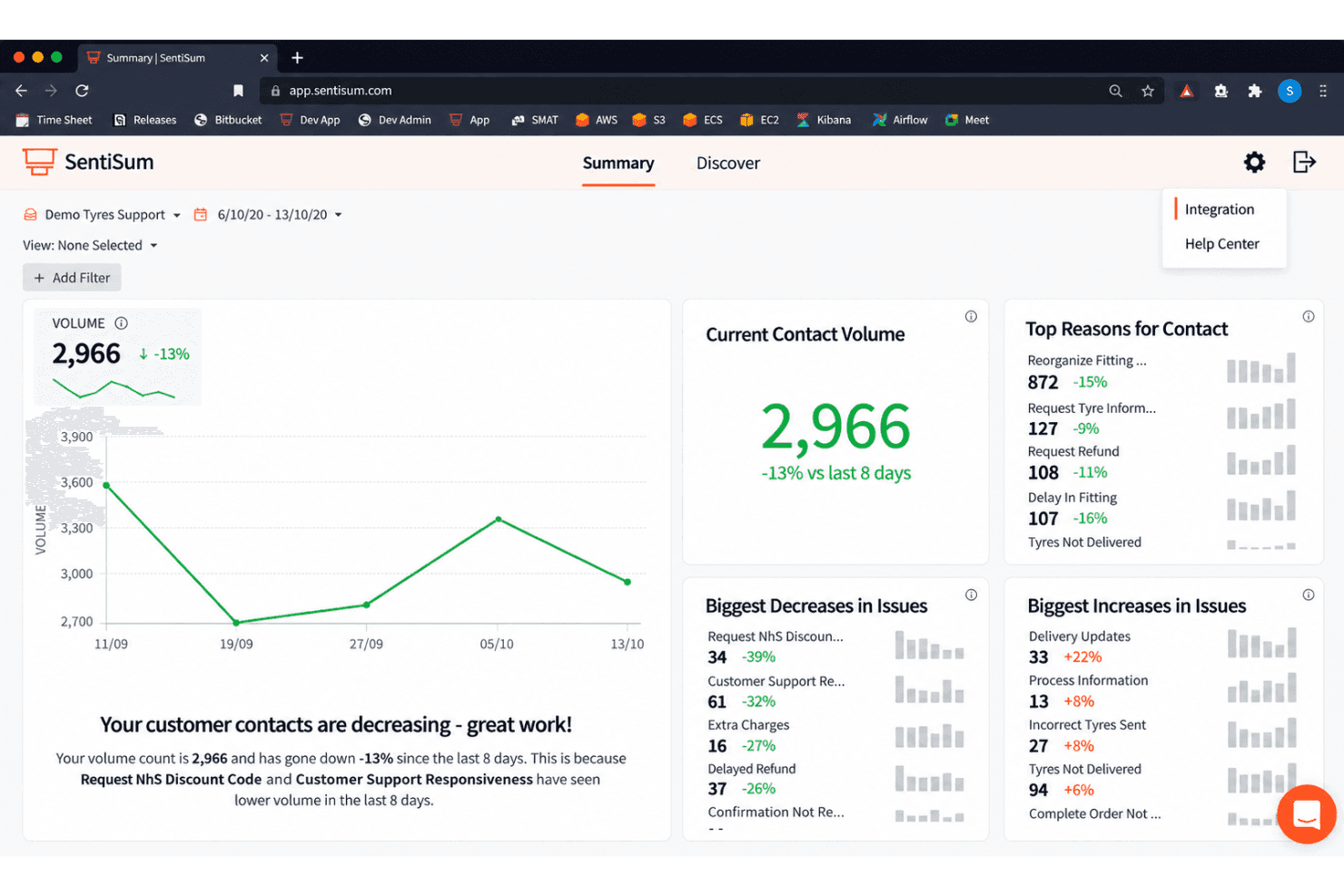
The reporting dashboard summarizes top issues, sentiment trends, and urgent insights in a clean, no-clutter layout. You don’t need analytics expertise to find actionable takeaways.
Fast Onboarding and Setup
SentiSum streamlines setup with built-in templates and instant integrations for common tools like Zendesk and Intercom. Most teams can start acting on insights within days instead of weeks.
Ease of Use
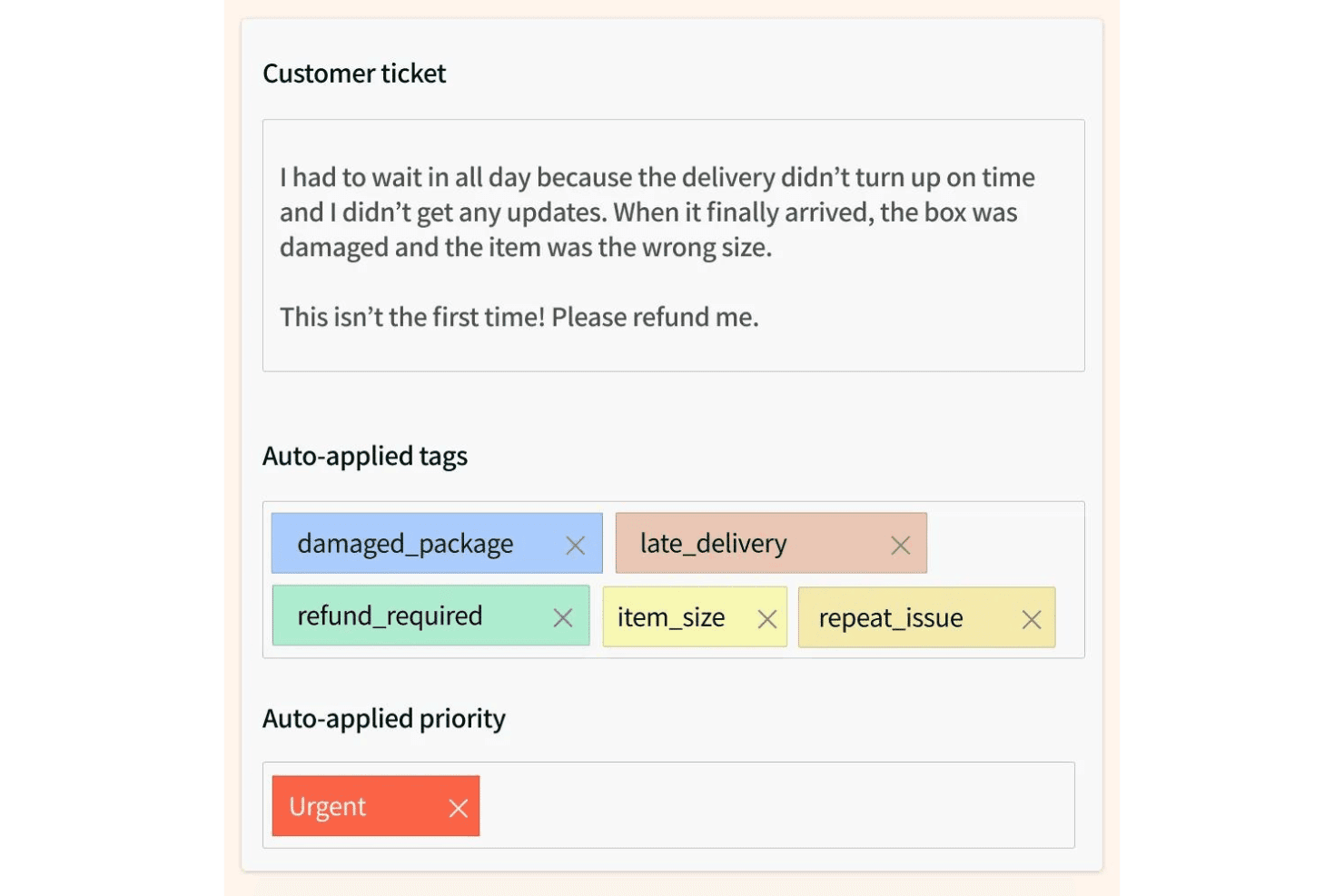
SentiSum is easy to navigate—even for teams with little analytics experience. The dashboard uses simple visuals and clear category breakdowns. Most users say setup takes just days, not weeks, and the auto-tagging works without heavy manual rules. Busy CX teams like that they get instant, actionable insights from tickets and reviews, and don’t have to dig for key trends or explanations, which saves time and reduces training needs.
Integrations
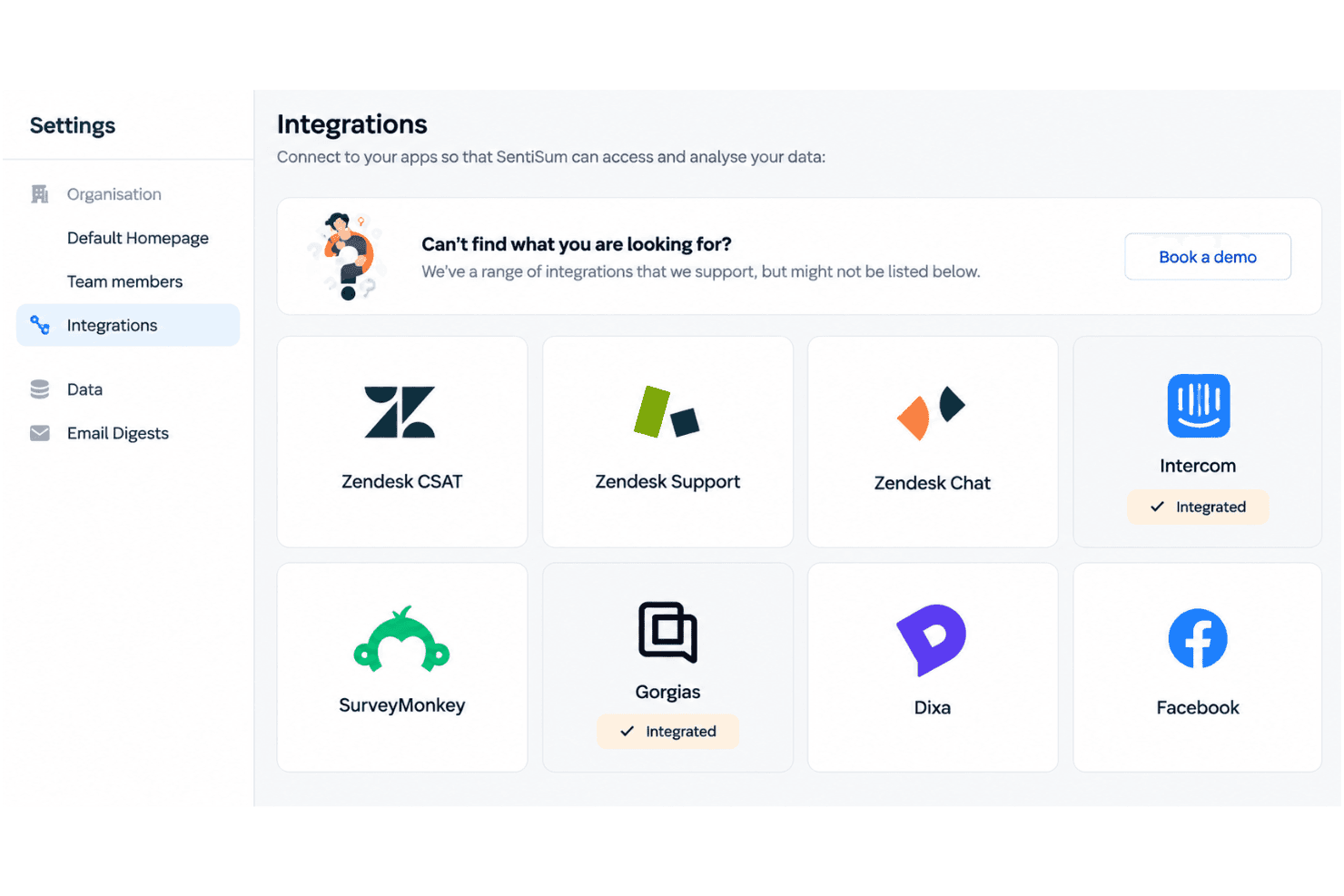
SentiSum integrates with Zendesk, Intercom, Freshdesk, Salesforce, SurveyMonkey, Gorgias, Dixa, Help Scout, Sprinklr, and AWS Connect, among others.
SentiSum also offers an API and connects with third-party integration tools.
SentiSum Specs
- A/B Testing: Yes
- AI Integration: Yes
- Analytics: Yes
- API: Yes
- Comparative Reporting: Yes
- Conversion Tracking: Yes
- Custom Reports: Yes
- Dashboard: Yes
- Dashboards: Yes
- Data Export: Yes
- Data Import: Yes
- Data Mining: Yes
- Data Visualization: Yes
- External Integrations: Yes
- Feedback Management: Yes
- Forecasting: Yes
- Historical Data Analysis: Yes
- Keyword Tracking: Yes
- Link Tracking: Yes
- Multi-Site: Yes
- Multi-User: Yes
- Notifications: Yes
- Process Reporting: Yes
- Real-time Alerts: Yes
- Referral Tracking: Yes
- Reports: Yes
- Scenario Planning: Yes
- SEO: Yes
- Time Series Modeling: Yes
- Visualization: Yes
- Workflow Management: Yes


