
Recensione di Site24x7: vantaggi, svantaggi, funzionalità e prezzi
Site24x7 eccelle nell'offrire un'interfaccia intuitiva e funzionalità di monitoraggio complete, risultando una scelta eccellente per migliorare la tua esperienza utente digitale.

Recensiamo gli strumenti in modo indipendente e le commissioni aiutano a finanziare i nostri test. Consulta la nostra politica di trasparenza, la nostra metodologia o suggerisci uno strumento.
Site24x7 is a digital experience platform for teams that need to monitor websites, applications, servers, networks, and cloud infrastructure from one place. I'd recommend it if you want broad, full-stack visibility without the pricing complexity that comes with Datadog. Site24x7 covers comparable monitoring ground at a lower cost per host, which makes it a more practical fit for mid-sized teams watching their observability spend.
Site24x7 Evaluation Summary

4.7/5
- From $3/device/month
- 30-day free trial
Perché fidarsi dei nostri consigli sui software
6,700+
Reviews
20
Industry experts
16+
Evaluation factors
14
Years
Il nostro team testa e recensisce software dal 2012. In quanto leader CX noi stessi, sappiamo quanto sia difficile — e importante — scegliere il software giusto.
Per questa guida, abbiamo valutato gli strumenti attraverso test pratici e ricerche indipendenti, assegnando un punteggio agli strumenti in base ai nostri criteri di selezione.
Le nostre recensioni riflettono il nostro giudizio editoriale umano, non un discorso di vendita.
 Gui DrusinaCreative Director
 Tim FisherVP of AI
Site24x7 Overview
In my opinion, Site24x7 stands out as a strong digital user experience platform for IT operations and digital marketing teams. Its real-time monitoring system and extensive feature set make it ideal for businesses needing comprehensive insights into their digital performance. While its user interface is user-friendly, onboarding could be smoother compared to competitors. However, Site24x7's customer support is reliable, and the platform's overall value is commendable for those willing to invest. It's best suited for medium to large enterprises that prioritize robust monitoring capabilities over budget constraints.
Pros
- You get real-time insights that help improve user experience.
- Your team can rely on reliable customer support for quick assistance.
- The user-friendly interface makes it easy for your team to navigate.
Cons
- Your onboarding process might feel less intuitive compared to other platforms.
- You might find some advanced features require a learning curve.
- Your team may notice occasional performance lags with large datasets.
Is Site24x7 Right For Your Needs?
Who Would be a Good Fit for Site24x7?
Site24x7 is great for IT teams, digital marketing departments, and e-commerce businesses that need detailed monitoring insights. If your team values real-time data to enhance user experience, Site24x7's robust monitoring features can help. With its user-friendly interface, you can easily navigate and access critical performance metrics. This observability platform is especially beneficial for medium to large enterprises looking to optimize digital performance and customer satisfaction via real user monitoring.
- IT DepartmentsSite24x7 provides your IT team with comprehensive monitoring tools to ensure uptime and performance.
- Digital MarketingYour marketing efforts benefit from real-time insights into campaign performance and end-user engagement.
- E-Commerce PlatformsSite24x7 helps your online store monitor traffic spikes and server performance efficiently.
- Large EnterprisesYour large-scale operations can leverage Site24x7’s extensive feature set for end-to-end monitoring.
- Customer Support TeamsSite24x7 gives your support team tools to quickly identify and troubleshoot user issues.
- Web DevelopmentYour web development projects can thrive with Site24x7’s detailed application monitoring and analytics.
Who Would be a Bad Fit for Site24x7?
Site24x7 may not suit small businesses or startups with limited budgets or teams that need basic monitoring services. If your team doesn't require in-depth monitoring or has limited technical expertise, Site24x7's advanced features could be overwhelming. Its onboarding process and learning curve might not align with your needs if you’re looking for a simpler, more intuitive platform.
- Small StartupsYour startup might find Site24x7's advanced features more than you need and not cost-effective.
- Non-Tech TeamsIf your team lacks technical skills, Site24x7's complexity might be challenging to navigate.
- Budget-Conscious OrganizationsIf your organization is on a tight budget, Site24x7's pricing might not align with your financial constraints.
- Basic Monitoring NeedsYour team with minimal monitoring requirements might find Site24x7's feature set excessive.
- FreelancersAs a freelancer, you might not need the extensive capabilities Site24x7 offers.
- Local BusinessesYour local business might not benefit from Site24x7 if you don't have a strong online presence to monitor.
Come Testiamo e Valutiamo gli Strumenti
Abbiamo passato anni a costruire, perfezionare e migliorare il nostro sistema di valutazione e testing dei software. Il nostro schema è progettato per cogliere tutte le sfumature nella selezione del software e per valutare ciò che rende uno strumento efficace, concentrandosi sugli aspetti critici nel processo decisionale. Qui sotto puoi vedere esattamente come funziona il nostro processo di testing e valutazione su sette criteri. Ci permette di offrire una valutazione imparziale del software basata su funzionalità principali, caratteristiche distintive, facilità d’uso, onboarding, supporto clienti, integrazioni, recensioni clienti e rapporto qualità/prezzo.
Funzionalità Principali (25% del punteggio finale)
Il punto di partenza della nostra valutazione sono sempre le funzionalità fondamentali dello strumento. Possiede le funzioni di base che un utente si aspetta? Alcune di queste funzionalità sono disponibili solo con piani più costosi? In sostanza, ci aspettiamo che uno strumento sia competitivo rispetto ai suoi concorrenti principali.
Caratteristiche Distintive (25% del punteggio finale)
Successivamente, valutiamo le funzionalità particolari e distintive che vanno oltre le funzionalità standard solitamente presenti in strumenti simili. Un punteggio elevato riflette funzionalità specializzate o uniche che rendono il prodotto più veloce, efficiente o che offrono valore aggiunto all’utente. Valutiamo anche quanto sia facile integrare lo strumento con altri strumenti tipicamente presenti nel tech stack, per ampliare le funzionalità e l’utilità del software. Ottengono il punteggio migliore gli strumenti che offrono numerose integrazioni native, connessioni di terze parti e accesso API per creare integrazioni personalizzate.
Facilità d’Uso (10% del punteggio finale)
Consideriamo quanto sia rapido e intuitivo eseguire le attività core usando lo strumento. Un software con un alto punteggio è ben progettato, intuitivo all’uso, offre app mobili, mette a disposizione modelli e semplifica attività relativamente complesse.
Onboarding (10% del punteggio finale)
Sappiamo quanto sia importante l’adozione rapida da parte del team per una nuova piattaforma, quindi valutiamo la facilità di apprendimento e utilizzo dello strumento con una formazione minima. Valutiamo quanto velocemente un membro del team può iniziare a usare lo strumento senza esperienza. Le soluzioni con punteggio elevato richiedono poco o nessun supporto.
Supporto Clienti (10% del punteggio finale)
Valutiamo quanto sia semplice ricevere assistenza via telefono, chat dal vivo o knowledge base. Gli strumenti e le aziende che offrono supporto in tempo reale ottengono il punteggio migliore, mentre i chatbot hanno il punteggio più basso.
Recensioni Clienti (10% del punteggio finale)
Oltre alla nostra valutazione interna, prendiamo in considerazione il net promoter score dei clienti attuali e passati. Analizziamo la probabilità che, potendo scegliere, selezionino di nuovo lo strumento per le sue funzionalità core. Un software con punteggio elevato riflette un alto net promoter score dai clienti attuali o passati.
Rapporto Qualità/Prezzo (10% del punteggio finale)
Infine, tenendo conto di tutti gli altri criteri, analizziamo il prezzo medio dei piani entry level rispetto alle funzionalità principali e consideriamo il valore delle altre metriche di valutazione. Il software che offre di più, a meno, otterrà un punteggio maggiore.
Core Features
Real-Time Monitoring: Site24x7 provides live data on your website and server performance, helping you react quickly to issues. Your team can use this to maintain high uptime and user satisfaction.
Application Performance Monitoring: It tracks your application’s health and performance, offering insights into bottlenecks. This helps your team improve app efficiency and user experience.
Server Monitoring: Site24x7 monitors your server's health and resources, alerting you to potential problems. You can ensure your server runs smoothly and avoid downtime.
Network Monitoring: It checks your network's performance, identifying any weak points. This feature helps you keep your network stable and secure from outages.
User Experience Monitoring: This feature tracks user interactions with your site, providing insights into user behavior. You can use this data to enhance your website's usability.
Website Monitoring: Site24x7 checks your website's availability and response times from different locations. Your team can ensure consistent global performance.

Ease of Use
Site24x7 offers a user-friendly interface that most teams find easy to navigate, making it accessible even for those without deep technical expertise. Its dashboards are intuitive, allowing you to customize views to focus on relevant data. However, some users feel there's a learning curve with advanced features, which might require initial guidance. Compared to other platforms, Site24x7 balances comprehensive monitoring with usability, making it a practical choice for diverse teams looking to improve digital performance. It also has a mobile app for Android and iOS.

Integrations
Site24x7 integrates with Slack, Zendesk, Jira Software Cloud and Zoho Cliq. Site24x7 also offers an API and connects with third-party tools like Zapier, allowing users to automate workflows across various applications.

New Product Updates from Site24x7
Site24x7 Adds Bulk Configuration Sync for MSP Accounts
Site24x7 now lets MSP administrators sync configuration profiles from one customer account to multiple customer accounts in a single action. This streamlines multi-tenant management and helps ensure standardized, consistent configurations across customers with less repetitive work. Highlights include:
- Bulk Profile Sync: Copy configuration profiles to multiple customer accounts at once.
- Customer Group Support: Apply changes across selected customer groups.
- Profile Removal: Remove synced profiles from multiple accounts in one action.
- Consistent Configurations: Keep settings aligned across managed customer environments.
- MSP Administration: Reduce repetitive profile management across accounts.
Visit Site24x7’s official site for more details.
Site24x7 Expands Event and Azure Load Balancer Observability
Site24x7’s Android and iOS apps now include the Event Correlation Problems module for reviewing correlated events, probable root causes, affected monitors, and technician assignments. Azure Load Balancer monitoring also adds visibility into backend pools, endpoints, load balancing rules, frontend IPs, and health probes. Highlights include:
- Mobile Event Correlation: Review correlated events and probable root causes from Android and iOS.
- Affected Monitors: See which monitors are impacted by a correlated problem.
- Technician Assignment: Assign technicians directly from the mobile app.
- Backend Pool Visibility: Monitor backend pools and endpoints within Azure Load Balancers.
- Load Balancer Components: Track load balancing rules, frontend IPs, and health probes.
- Root-Cause Isolation: Identify which Load Balancer component is contributing to downtime.
Visit Site24x7’s official site for more details.
Site24x7 Adds Log Forwarding for Long-Term Retention
Site24x7 now lets teams forward logs to external cloud storage or SIEM destinations and retain data beyond AppLogs retention limits. Users can also filter which log types are forwarded to support compliance and security workflows. Highlights include:
- Log Forwarding: Send AppLogs data to external cloud destinations.
- Long-Term Retention: Keep log data beyond Site24x7’s standard AppLogs retention period.
- SIEM Support: Route logs to SIEM platforms for security analysis.
- Log Filtering: Select relevant log types before forwarding.
- Compliance Workflows: Preserve required log data without relying on manual exports.
Visit Site24x7’s official site for more details.
 Opens new window
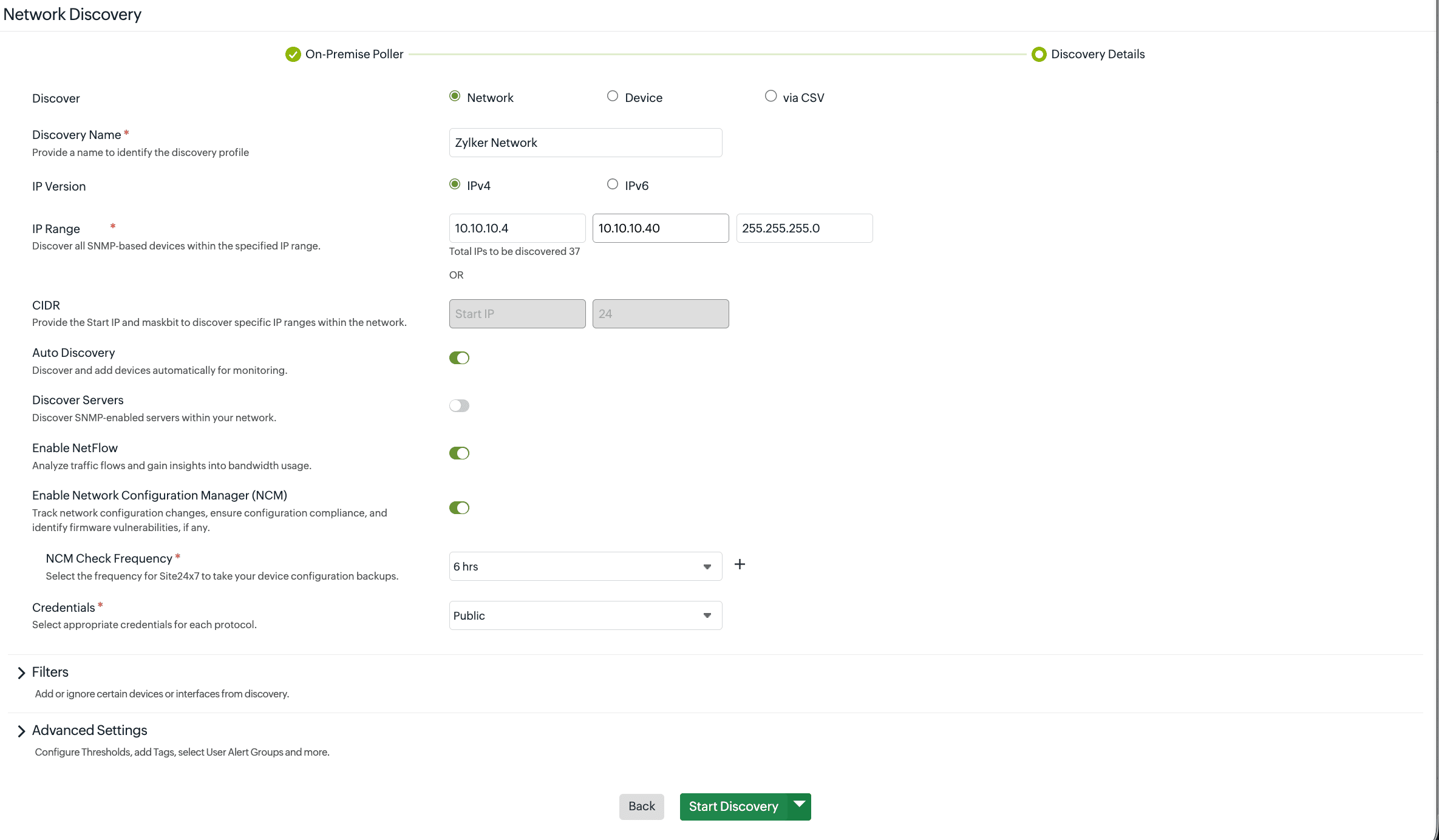
Site24x7 Adds Discovery Profiles for Network Devices
Site24x7 adds Discovery Profiles for IP range scans, single-device discovery, CSV imports, and NetFlow or Network Configuration Management setup. These updates reduce manual onboarding steps and centralize discovery results. Highlights include:
- Discovery Profiles: Manage device discovery and onboarding from a single profile.
- IP Range Scans: Discover multiple network devices across a defined IP range.
- Single-Device Discovery: Add devices individually by IP address or hostname.
- CSV Imports: Import device lists in bulk for faster onboarding.
- NetFlow and NCM Setup: Enable NetFlow and Network Configuration Management during discovery.
- Discovery Reports: Review discovered devices in a consolidated report.
Visit Site24x7’s official site for more details.
 Opens new window
Site24x7 Adds BGP Route Monitoring
Site24x7 adds BGP Route monitoring with global visibility into route changes, hijacks, leaks, flapping, AS path changes, and RPKI validation issues. These updates help teams identify routing anomalies earlier and respond before reachability is affected. Highlights include:
- Route Hijack Detection: Identify unauthorized route announcements affecting monitored IP prefixes.
- Route Leak Monitoring: Detect routing leaks that may disrupt internet reachability.
- AS Path Changes: Track changes in autonomous system paths across monitored routes.
- Route Flapping: Detect unstable routes that repeatedly appear and disappear.
- RPKI Validation: Monitor route validity using RPKI status.
- Global Vantage Points: Observe BGP routes from multiple locations for broader visibility.
Visit Site24x7’s official site for more details.
 Opens new window
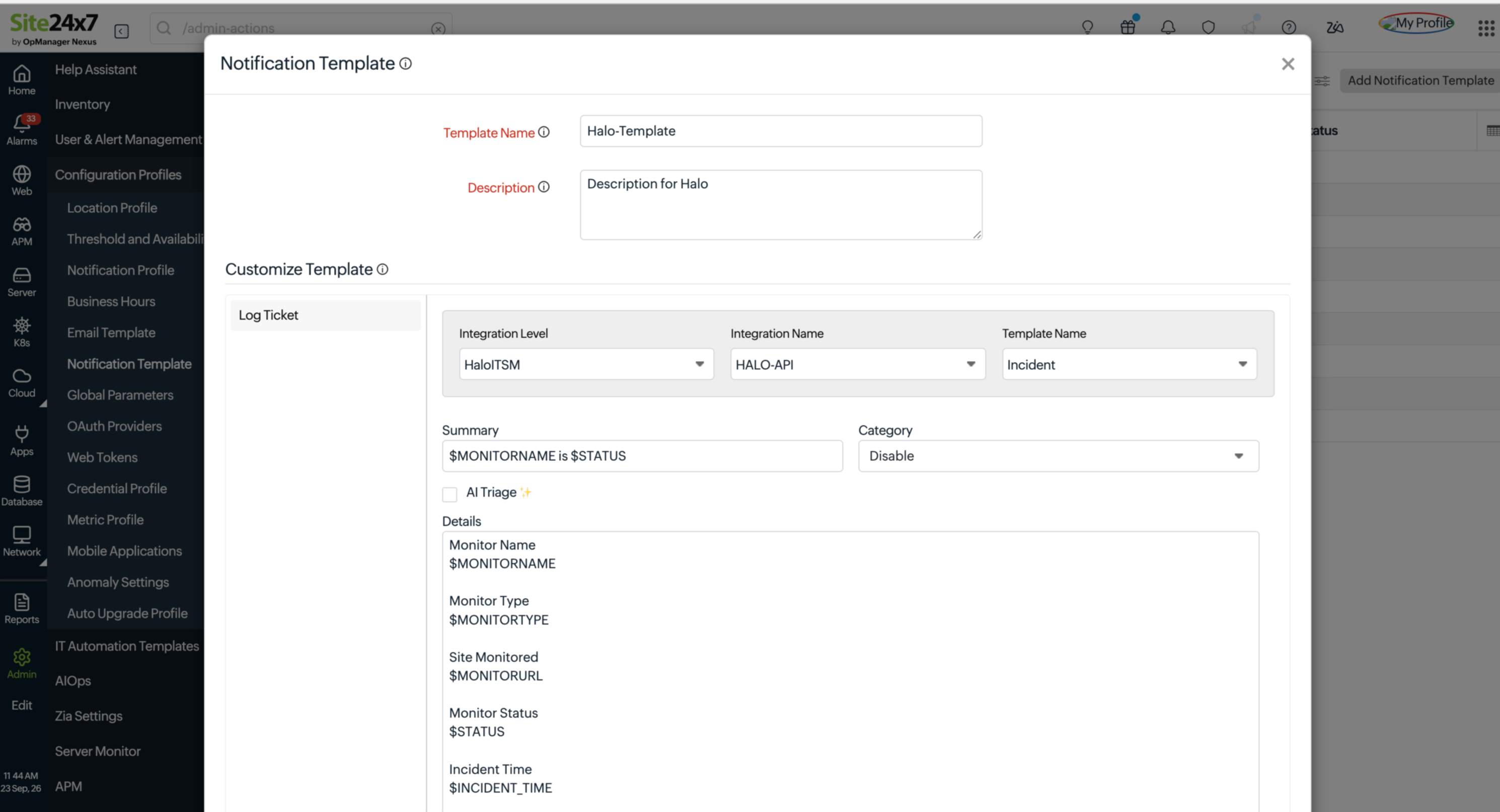
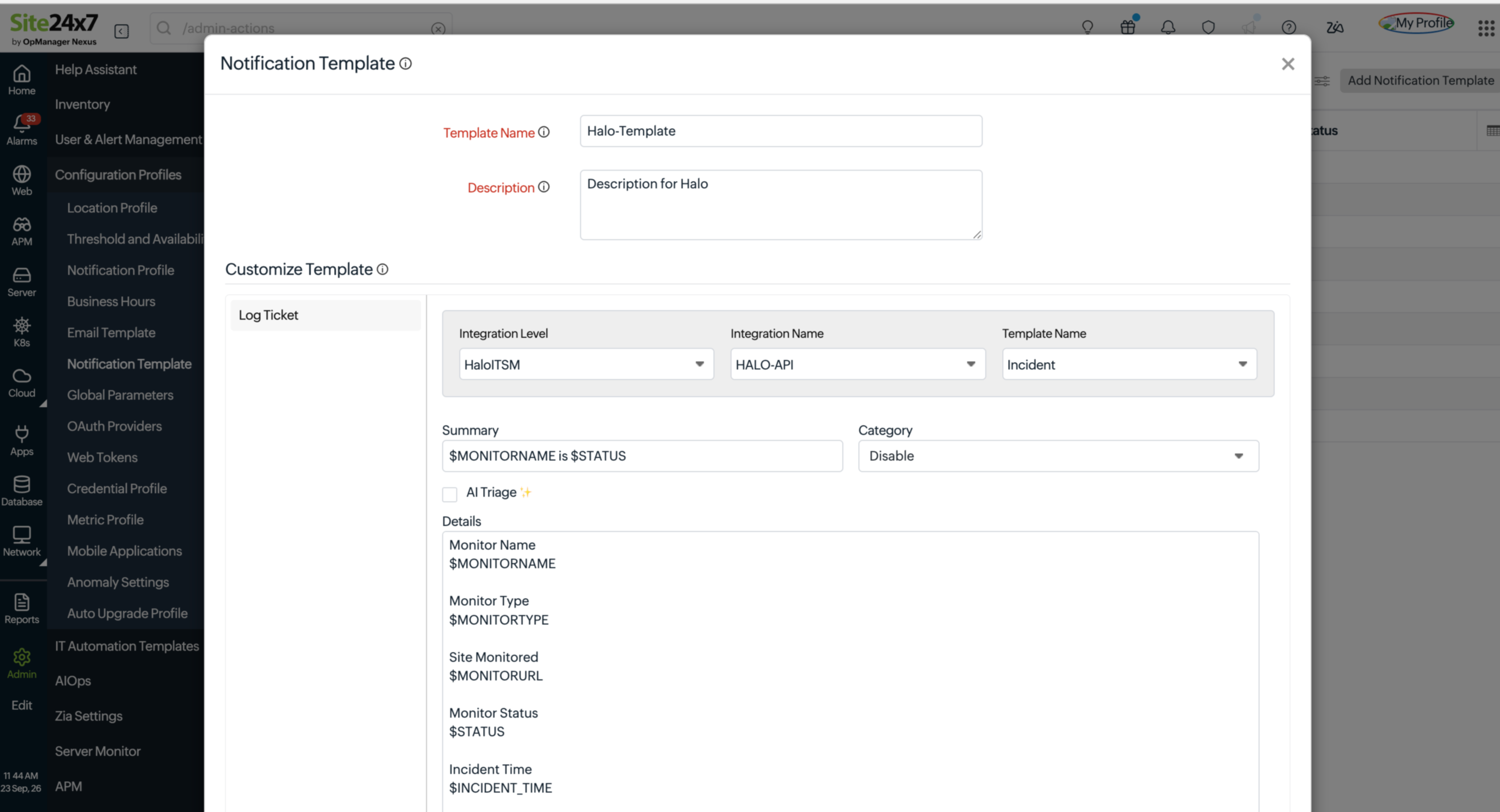
Site24x7 Adds Amazon MemoryDB and HaloITSM Integrations
Site24x7 adds Amazon MemoryDB monitoring for clusters, shards, nodes, and Multi-Region clusters, plus HaloITSM ticket creation from monitor alerts. These integrations give teams more visibility into MemoryDB performance while reducing manual alert handoffs. Highlights include:
- Amazon MemoryDB Monitoring: Track performance, replication, cache activity, backups, network health, and resource usage.
- Thresholds and Forecasting: Apply thresholds, anomaly detection, forecasting, and topology views to MemoryDB monitoring.
- HaloITSM Alert Ticketing: Create HaloITSM tickets automatically from selected Site24x7 monitor status changes.
- Ticket Status Updates: Add subsequent monitor status changes as comments on linked HaloITSM tickets.
- Linked Ticket Details: View related HaloITSM ticket information directly from Site24x7 Alarm Details.
Visit Site24x7’s official site for more details.
Site24x7 Adds Compliance Reports and Domain Squatting Detection
Site24x7 adds framework-based compliance reporting and Domain Squatting detection to Digital Risk Analyzer. Teams can compare domain compliance, review assertion results, download reports, and investigate look-alike domains from the same tool. Highlights include:
- Compliance Reports: Measure domain compliance against supported frameworks and download framework-specific reports.
- Domain Comparison: Compare compliance posture across domains and review detailed assertion results.
- Domain Squatting Detection: Find registered and unregistered look-alike domains and assess potential impersonation risks.
Visit Site24x7’s official site for more details.
Site24x7 Expands Amazon OpenSearch Monitoring
Site24x7 adds more than 80 Amazon OpenSearch metrics covering shards, EBS volumes, coordinator nodes, OpenSearch Dashboards, UltraWarm and cold storage, and vector search. These metrics help teams identify performance issues faster and monitor cluster behavior with more detail. Highlights include:
- Expanded OpenSearch Metrics: Monitor 80+ new metrics across core cluster components.
- Storage and Shard Visibility: Track shards, EBS volumes, UltraWarm, and cold storage performance.
- Vector Search Monitoring: Monitor vector search alongside coordinator nodes and OpenSearch Dashboards.
Visit Site24x7’s official site for more details.
Site24x7 Adds OCI Instance Pool Monitoring
Site24x7 has introduced dedicated monitoring for Oracle Cloud Infrastructure (OCI) instance pools, making it easier to track performance and health from a single view. This helps teams spot capacity and scaling issues faster and take action without switching tools. Highlights include:
- Instance Pool Monitoring: Track capacity, utilization, and infrastructure health across OCI instance pools.
- Autoscaling Visibility: Monitor autoscaling activity alongside running and provisioning instances.
- Alerts and Automated Actions: Configure alerts and trigger Start, Stop, Reset, or Soft Reset actions.
Visit Site24x7’s official site for more details.
Site24x7 Expands OCI Monitoring for PostgreSQL and API Gateways
Site24x7 now monitors OCI PostgreSQL systems and nodes alongside API Gateways, Deployments, and Routes. Teams can track database performance, API activity, backend behavior, and issues across both services. Highlights include:
- OCI PostgreSQL Monitoring: Tracks resource usage, queries, connections, storage, and replication.
- Database Alerts: Supports proactive alerts and automated remediation for PostgreSQL issues.
- API Gateway Monitoring: Covers OCI API Gateways, Deployments, and Routes.
- Traffic and Latency: Tracks API traffic, response activity, and latency.
- Backend Performance: Helps teams identify issues affecting API backends.
- Unified OCI Visibility: Brings database and API monitoring into the same Site24x7 environment.
Visit Site24x7’s official site for more details.
Site24x7 Specs
- AI Integration: No
- API: Yes
- Automated Testing: No
- Browser Compatibility Testing: No
- Bug Tracking: No
- Code Review: No
- Custom Reports: No
- Data Export: Yes
- Data Import: Yes
- Developer Tools: No
- External Integrations: Yes
- Malware Protection: No
- Multi-User: Yes
- Notifications: Yes
- Performance Testing: No
- Process Reporting: No
- Static Analysis: No
- Status Notifications: No
- Workflow Management: No


