

Recensione di WPForms: pro, contro, funzionalità e prezzi
WPForms eccelle nella creazione di moduli intuitivi, rappresentando una scelta ideale per i team che cercano una raccolta dati semplice e diretta, senza complicazioni.

Recensiamo gli strumenti in modo indipendente e le commissioni aiutano a finanziare i nostri test. Consulta la nostra politica di trasparenza, la nostra metodologia o suggerisci uno strumento.
WPForms is a WordPress form builder plugin for site owners and teams who need to collect leads, registrations, payments, or survey responses without writing code. I'd mainly consider it if you're building on WordPress and want something more intuitive than Gravity Forms, which skews toward developers and requires significantly more configuration to get a basic form live.
WPForms Evaluation Summary
4.7/5
- From $49.50/year (billed annually)
- Free plan available
Perché fidarsi dei nostri consigli sui software
6,700+
Reviews
20
Industry experts
16+
Evaluation factors
14
Years
Il nostro team testa e recensisce software dal 2012. In quanto leader CX noi stessi, sappiamo quanto sia difficile — e importante — scegliere il software giusto.
Per questa guida, abbiamo valutato gli strumenti attraverso test pratici e ricerche indipendenti, assegnando un punteggio agli strumenti in base ai nostri criteri di selezione.
Le nostre recensioni riflettono il nostro giudizio editoriale umano, non un discorso di vendita.
 Gui DrusinaCreative Director
 Tim FisherVP of AI
WPForms Overview
I think WPForms works well for those who need a straightforward tool to manage customer data. The interface is user-friendly, making it suitable for teams new to customer data platforms. Users often regard it as one of the best form builders for WordPress sites, offering powerful features that make it stand out against other form plugins, such as Ninja Forms. Its pricing is fair, and a free version of WPForms is available, called WPForms Lite, but it may not provide the best value if you're looking for more advanced features. If your team values simplicity and cost-effectiveness, WPForms is worth it.
Pros
- You can cut down on junk entries with its built-in spam protection.
- You can build and publish forms fast with its simple drag-and-drop editor.
- Its ready-made form templates mean you don't have to build everything from scratch.
Cons
- You may not be able to build complex, data-heavy forms as efficiently as more powerful builders.
- You may have to dig through settings to control how entries are stored and managed.
- While support staff are helpful, the number of customer support channels is limited.
Is WPForms Right For Your Needs?
Who Would be a Good Fit for WPForms?
WPForms suits small to medium-sized businesses, nonprofits, and educational institutions looking to create custom forms for their WordPress website, including conversational forms and user registration forms, without coding. Its drag-and-drop builder and pre-built templates make it easy for you to set up surveys, payment forms, and contact forms. You can integrate WPForms with popular email marketing services, which can help your team capture leads effectively and grow your email list.
- Small BusinessesSmall business owners can benefit from WPForms' capabilities, allowing them to manage customer interactions, gather feedback efficiently, and improve SEO through customer engagement.
- NonprofitsWPForms lets you create donation forms with payment integrations, which is crucial for fundraising activities.
- Educational InstitutionsEducational institutions can use WPForms to collect student information and feedback through its customizable form builder.
- E-CommerceWPForms integrates with payment gateways, enabling e-commerce stores to set up order forms and streamline transactions.
- Marketing TeamsWPForms helps you capture leads with forms that integrate seamlessly with email marketing tools such as Constant Contact.
- Event PlannersYou can easily manage event registrations and collect attendee information using WPForms' user-friendly interface.
Who Would be a Bad Fit for WPForms?
WPForms might not be the best choice for businesses needing complex data analysis or advanced automation, as it lacks more extensive analytical features. Teams that heavily rely on automation for workflow processes or need in-depth data insights will find WPForms limiting. For instance, if your work involves data-heavy operations that require seamless integration with customer relationship management (CRM) systems or other specialized software, WPForms might not meet your needs.
- Large EnterprisesWPForms might not offer the extensive integration capabilities needed for large-scale operations.
- E-Commerce PlatformsYou might find WPForms lacking in features like inventory management and payment processing.
- Data AnalystsWPForms doesn't support advanced data analysis tools, limiting your ability to derive insights.
- IT DepartmentsIf you need robust data security and integration with IT systems, WPForms might not suffice.
Come Testiamo e Valutiamo gli Strumenti
Abbiamo passato anni a costruire, perfezionare e migliorare il nostro sistema di valutazione e testing dei software. Il nostro schema è progettato per cogliere tutte le sfumature nella selezione del software e per valutare ciò che rende uno strumento efficace, concentrandosi sugli aspetti critici nel processo decisionale. Qui sotto puoi vedere esattamente come funziona il nostro processo di testing e valutazione su sette criteri. Ci permette di offrire una valutazione imparziale del software basata su funzionalità principali, caratteristiche distintive, facilità d’uso, onboarding, supporto clienti, integrazioni, recensioni clienti e rapporto qualità/prezzo.
Funzionalità Principali (25% del punteggio finale)
Il punto di partenza della nostra valutazione sono sempre le funzionalità fondamentali dello strumento. Possiede le funzioni di base che un utente si aspetta? Alcune di queste funzionalità sono disponibili solo con piani più costosi? In sostanza, ci aspettiamo che uno strumento sia competitivo rispetto ai suoi concorrenti principali.
Caratteristiche Distintive (25% del punteggio finale)
Successivamente, valutiamo le funzionalità particolari e distintive che vanno oltre le funzionalità standard solitamente presenti in strumenti simili. Un punteggio elevato riflette funzionalità specializzate o uniche che rendono il prodotto più veloce, efficiente o che offrono valore aggiunto all’utente. Valutiamo anche quanto sia facile integrare lo strumento con altri strumenti tipicamente presenti nel tech stack, per ampliare le funzionalità e l’utilità del software. Ottengono il punteggio migliore gli strumenti che offrono numerose integrazioni native, connessioni di terze parti e accesso API per creare integrazioni personalizzate.
Facilità d’Uso (10% del punteggio finale)
Consideriamo quanto sia rapido e intuitivo eseguire le attività core usando lo strumento. Un software con un alto punteggio è ben progettato, intuitivo all’uso, offre app mobili, mette a disposizione modelli e semplifica attività relativamente complesse.
Onboarding (10% del punteggio finale)
Sappiamo quanto sia importante l’adozione rapida da parte del team per una nuova piattaforma, quindi valutiamo la facilità di apprendimento e utilizzo dello strumento con una formazione minima. Valutiamo quanto velocemente un membro del team può iniziare a usare lo strumento senza esperienza. Le soluzioni con punteggio elevato richiedono poco o nessun supporto.
Supporto Clienti (10% del punteggio finale)
Valutiamo quanto sia semplice ricevere assistenza via telefono, chat dal vivo o knowledge base. Gli strumenti e le aziende che offrono supporto in tempo reale ottengono il punteggio migliore, mentre i chatbot hanno il punteggio più basso.
Recensioni Clienti (10% del punteggio finale)
Oltre alla nostra valutazione interna, prendiamo in considerazione il net promoter score dei clienti attuali e passati. Analizziamo la probabilità che, potendo scegliere, selezionino di nuovo lo strumento per le sue funzionalità core. Un software con punteggio elevato riflette un alto net promoter score dai clienti attuali o passati.
Rapporto Qualità/Prezzo (10% del punteggio finale)
Infine, tenendo conto di tutti gli altri criteri, analizziamo il prezzo medio dei piani entry level rispetto alle funzionalità principali e consideriamo il valore delle altre metriche di valutazione. Il software che offre di più, a meno, otterrà un punteggio maggiore.
Core Features
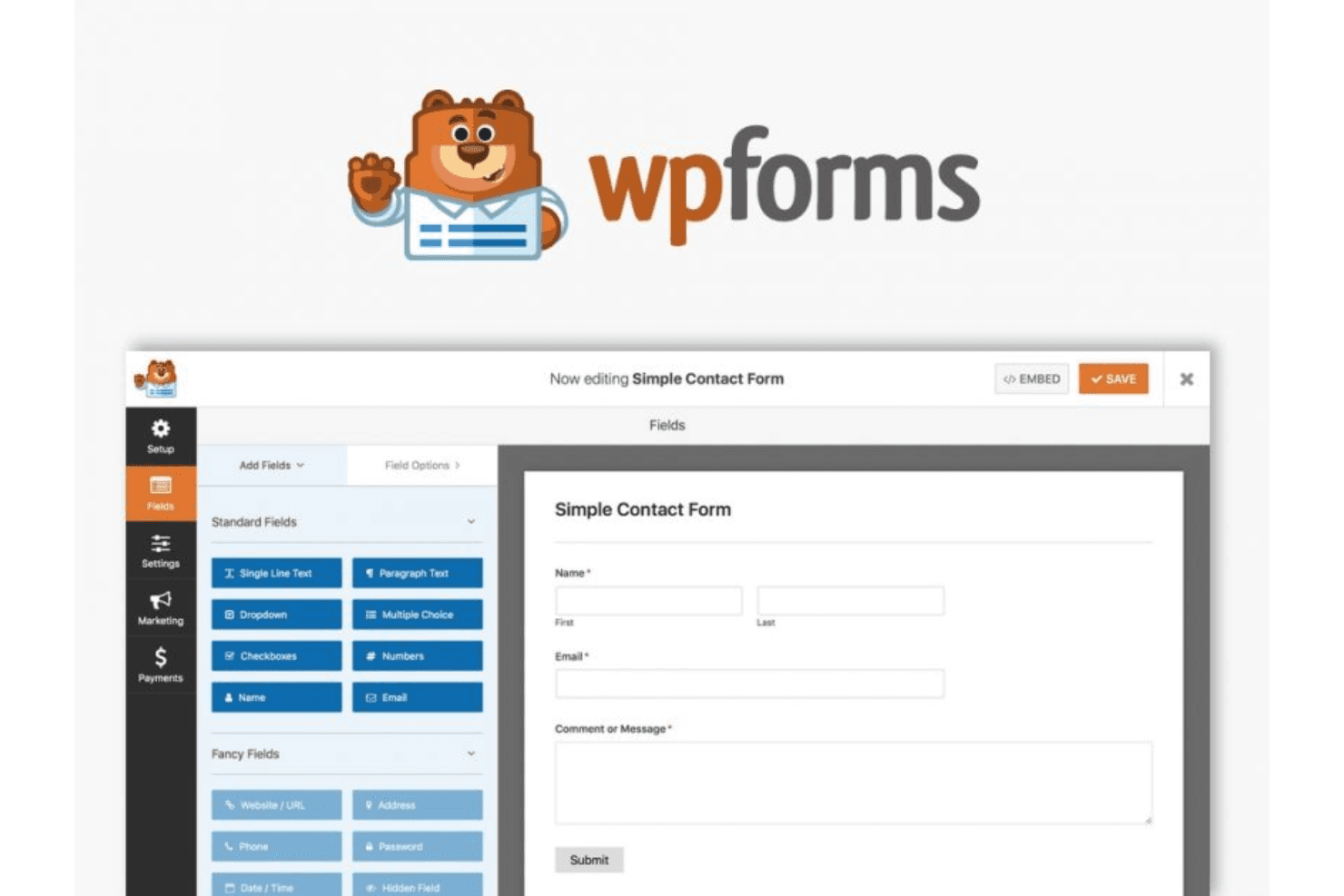
Form Builder: Create custom forms, from simple contact forms to complex surveys, with its simple drag-and-drop interface. You can add various form fields and customize them to fit your specific needs, adding checkboxes, mandatory fields, and more.
Conditional Logic: Show or hide fields based on user responses. This feature lets you create dynamic forms that adapt to the user's input, improving user experience.
Entry Management: Store and manage form submissions directly in your WordPress dashboard. You can view, edit, and organize entries, which simplifies data handling.
Spam Protection: Keep unwanted submissions at bay with built-in spam protection. You can use custom CAPTCHA and other tools to ensure your data stays clean and secure.
Multi-Page Forms: Break long forms into multiple pages to enhance user engagement. Users can navigate through sections easily, reducing form abandonment rates.
Payment Integration: Collect payments through forms through integration with popular payment processors, such as PayPal. This is ideal for businesses that need to handle transactions directly within forms.
Mobile-Responsive Designs: WPForms's mobile optimization allows you to create mobile-responsive designs to ensure users can easily access and fill out forms on any device.

Ease of Use
WPForms shines with its intuitive drag-and-drop interface, making it easy for you to build custom forms without technical skills. User reviews highlight its simplicity in creating forms, managing entries, and integrating with other platforms, making it accessible for teams of all sizes. Compared to more complex platforms, WPForms's features are user-friendly, letting you quickly gather and manage customer data. Its straightforward design ensures that your team can efficiently handle tasks without unnecessary complications.
Integrations
WPForms integrates with Stripe, Google Sheets, AWeber, Mailchimp, ActiveCampaign, Salesforce, Dropbox, Twilio, Slack, monday.com, WooCommerce, and many more.
WPForms also has an API and connects with third-party integration tools such as Zapier.

WPForms Specs
- 2-Factor Authentication: Yes
- A/B Testing: Yes
- Analytics: Yes
- API: Yes
- BitCoin: Yes
- Conversion Tracking: Yes
- Dashboard: Yes
- Data Export: Yes
- Data Import: Yes
- Data Visualization: Yes
- Design Templates: Yes
- External Integrations: Yes
- Inventory Tracking: Yes
- Keyword Tracking: Yes
- Marketing Automation: Yes
- Multi-User: Yes
- Notifications: Yes
- Order Management: Yes
- Payment Gateway Integration: Yes
- Payment Processor: Yes
- PayPal: Yes
- Product Catalog: Yes
- Review Monitoring: Yes
- SAP Integration: Yes
- Scheduling: Yes
- Stripe: Yes
- Third-Party Plugins/Add-Ons: Yes


