

Systemer for automatisering av AI-drevet kundeopplevelse er programvareplattformer som bruker kunstig intelligens til å automatisere, tilpasse og administrere kundeinteraksjoner på tvers av støtte-, service- og engasjementskanaler. Hvis du leter etter måter å håndtere større volumer, gi raskere svar og styrke relasjonene uten å slite ut teamet ditt, er disse løsningene laget for deg.
Jeg vet hvor utfordrende det er å balansere kvalitet med effektivitet og holde tritt med økende kundeforventninger. I denne veiledningen finner du de mest effektive og funksjonsrike alternativene, slik at du kan velge riktig AI-automatiseringssystem for teamets behov i 2026.
Why Trust Our Software Recommendations
6,700+
Reviews
20
Industry experts
16+
Evaluation factors
14
Years
Our team has been testing and reviewing software since 2012. As CX leaders ourselves, we know how difficult—and important—it is to choose the right software.
For this guide, we evaluated tools using hands-on testing and independent research, scoring tools using our selection criteria.
Our reviews reflect our human editorial judgment, not a sales pitch.
 Gui DrusinaCreative Director
 Tim FisherVP of AI
Sammenligningstabell for systemer for automatisering av AI-drevet kundeopplevelse
Denne sammenligningstabellen oppsummerer prisdetaljene for mine utvalgte toppsystemer for automatisering av AI-drevet kundeopplevelse:
| Tool | Best For | Trial Info | Price | ||
|---|---|---|---|---|---|
| 1 | Best with instant helpdesk integration | 30-day free trial | From $199/month | Website | |
| 2 | Best voice AI for modern contact centers | Free demo available | Pricing upon request | Website | |
| 3 | Best low-code CX automations for scaling teams | 14-day free trial + free demo available | From $29/user/month (billed annually) | Website | |
| 4 | Best outbound and predictive dialer capabilities | Free demo available | From $119/seat/month | Website | |
| 5 | Best for workflow automation in chat and messaging | Free demo available | Pricing upon request | Website | |
| 6 | Best for real-time sentiment detection on social | Free demo available | Pricing upon request | Website | |
| 7 | Best for unified omnichannel journey orchestration | Free trial available | From $75/user/month (billed annually) | Website | |
| 8 | Best analytics suite for actionable CX insights | Free demo available | From $110/agent/month (proactive AI extra) | Website | |
| 9 | Best for workforce automation and quality insights | Free demo available | Pricing upon request | Website | |
| 10 | Best generative agent copilot for support teams | 14-day free trial + free demo available | From $0.99/outcome | Website |


Anmeldelser av de beste systemene for automatisering av AI-drevet kundeopplevelse
Nedenfor finner du mine detaljerte sammendrag av de beste systemene for automatisering av AI-drevet kundeopplevelse som kom med på kortlisten. Anmeldelsene mine gir et detaljert innblikk i funksjonene, egenskapene og integrasjonene til hver plattform, slik at du kan finne den beste løsningen for deg.
 Best with instant helpdesk integration
- 30-day free trial
- From $199/month
Visit WebsiteCustomer Rating:4.5/5
My AskAI displays a chat interface on HubSpot with AI-powered responses, a session-end message, and a prompt to start a new chat. My AskAI is an AI customer service agent platform that deploys generative AI agents inside your existing help desk to handle support tickets, automate in-conversation actions, and surface conversational insights across chat and email channels.
Who Is My AskAI Best For?
It's a strong fit for support operations teams at SaaS and ecommerce companies that want AI-driven ticket deflection without replacing their existing help desk.
Why I Picked My AskAI
I picked My AskAI because it deploys a generative AI agent directly inside Zendesk, Intercom, or Gorgias without any migration. Beyond answering questions, it executes in-conversation tasks like refunds and order changes using plain-language instructions. I also love the Knowledge Improvement Studio, which scans past tickets to identify documentation gaps and auto-generates new knowledge snippets.
My AskAI Key Features
- Multi-language responses: AI agent detects language automatically and replies in over 95 supported languages.
- Real-time conversational insights: Generates analytics and alerts when new topics or patterns emerge in customer interactions.
- Automated Zendesk ticket tagging: Applies AI-powered tags to tickets for improved categorization and reporting.
- Internal Slack and Teams bots: Lets employees ask questions and get instant answers from internal knowledge sources via chat.
My AskAI Integrations
My AskAI offers native integrations with Zendesk, Intercom, Gorgias, Freshdesk, HubSpot, and Freshchat.
Pros and Cons
Pros:
- Executes in-conversation actions like refunds autonomously
- Auto-detects knowledge gaps from past tickets
- Deploys inside existing help desks instantly
Cons:
- Predictive customer intelligence features are limited
- No native voice bot or IVR capability
Learn more about My AskAI: Best voice AI for modern contact centers
- Free demo available
- Pricing upon request
Visit WebsiteCustomer Rating:4.4/5
Talkdesk offers a visual AI agent builder with an orchestrator, condition routing, and specialized sub-agents for FAQs, customer accounts, and orders. Talkdesk is a cloud-native CCaaS and CX automation platform that combines AI virtual agents, omnichannel engagement, interaction analytics, and workforce management into a unified contact center system.
Who Is Talkdesk Best For?
Talkdesk is a strong fit for mid-market and enterprise contact centers in regulated industries like financial services, healthcare, and retail.
Why I Picked Talkdesk
I've included Talkdesk in my top picks because its voice AI capabilities go well beyond basic IVR. Talkdesk Autopilot can autonomously handle end-to-end voice interactions, resolving customer issues without any agent involvement. I also find Talkdesk Identity genuinely useful, as it performs real-time voice biometrics authentication mid-call, eliminating manual verification steps. Talkdesk Navigator routes calls using natural conversation and live context rather than rigid menu trees.
Talkdesk Key Features
- Industry experience clouds: Pre-built workflows, dashboards, and automations for financial services, healthcare, retail, and other regulated sectors.
- Studio workflow designer: Low-code visual tool to customize customer journeys and automate cross-channel processes.
- Interaction and quality analytics: AI-powered transcription and analysis of every conversation for topic, intent, and agent performance insights.
- Native CRM integrations: Certified connectors for Salesforce, Microsoft Teams, Zendesk, ServiceNow, and HubSpot for unified customer context.
Talkdesk Integrations
Talkdesk offers 60+ native integrations, including Salesforce, HubSpot, Zendesk, Microsoft Teams, ServiceNow, Zoom, Slack, Microsoft Dynamics 365, Oracle Service Cloud, and SAP C4C. An API is available for custom integrations.
Pros and Cons
Pros:
- Low-code visual workflow designer
- Autopilot resolves customer issues without agent involvement
- Real-time voice biometric authentication
Cons:
- Enterprise setup requires dedicated IT resources
- Default reporting templates lack custom options
Learn more about Talkdesk: Best low-code CX automations for scaling teams
- 14-day free trial + free demo available
- From $29/user/month (billed annually)
Visit WebsiteCustomer Rating:4.4/5
Freshdesk Omni offers an AI-powered customer support inbox with bot conversation summaries, tone enhancement tools, and order details panel for streamlined agent workflows. Freshdesk Omni is an AI-powered omnichannel customer service platform that unifies email, chat, voice, and messaging into a single command center, with built-in AI agents, copilot assistance, and low-code workflow automations.
Who Is Freshdesk Omni Best For?
It's a strong fit for mid-size to enterprise support teams that need to scale customer service operations across multiple channels without heavy developer involvement.
Why I Picked Freshdesk Omni
I've included Freshdesk Omni in my top picks because its low-code automation layer lets scaling teams build and adjust CX workflows without needing engineering support. Freddy AI Agent resolves inquiries autonomously across chat, email, and messaging right out of the box. I also like that IntelliAssign and skill-based routing dynamically redistribute workloads as agent headcount grows, so you're not rebuilding your routing logic every time the team changes.
Freshdesk Omni Key Features
- Freddy AI Copilot: Provides live agent assistance by suggesting replies, surfacing knowledge, and drafting conversation summaries.
- Omnichannel command center: Centralizes tickets and conversations from chat, email, phone, and social in a single workspace.
- Sentiment and intent detection: Uses AI to analyze customer messages for urgency, emotion, and intent across channels.
- Extensive CX integrations: Connects natively to tools like HubSpot, Shopify, Jira, and telephony platforms through the Freshworks Marketplace.
Freshdesk Omni Integrations
Freshdesk Omni offers over 150 native integrations, including HubSpot, Shopify, Jira, Slack, MS Teams, Stripe, WhatsApp, Facebook Messenger, Instagram, and LINE. An API is available for custom integrations.
Pros and Cons
Pros:
- Omnichannel inbox retains full conversation context
- Low-code automation builder needs no developer support
- Handles multi-channel ticket resolution autonomously
Cons:
- Voice AI requires third-party telephony providers
- Advanced predictive features require external tools
Learn more about Freshdesk Omni: Best outbound and predictive dialer capabilities
- Free demo available
- From $119/seat/month
Visit WebsiteCustomer Rating:4.1/5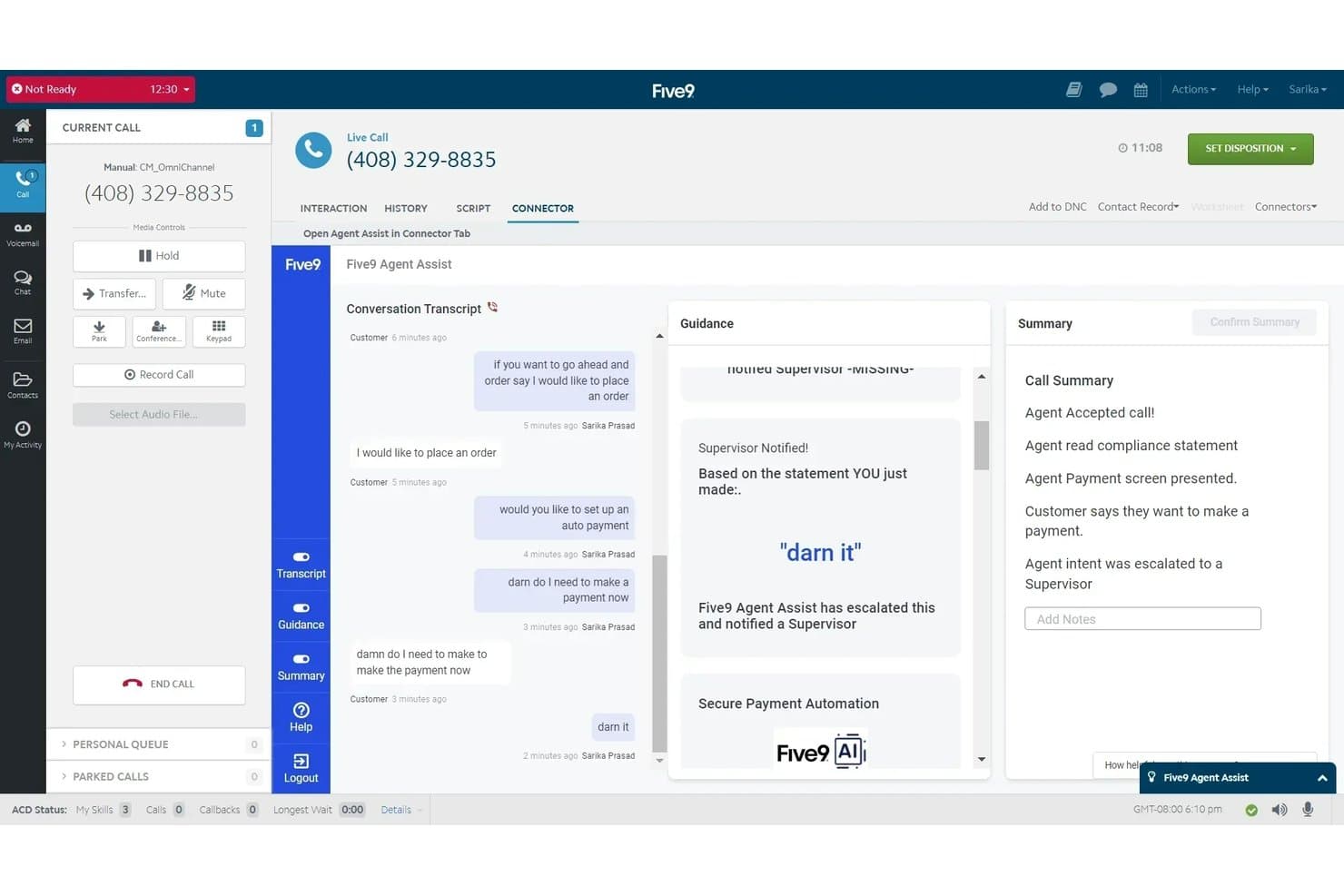
Five9 offers an AI-powered Agent Assist tool that provides real-time conversation transcripts, supervisor escalation alerts, and automated call summaries during live customer calls. Five9 is a cloud-based contact center platform that combines AI-powered virtual agents, omnichannel customer engagement, predictive dialling, workforce management, and real-time interaction analytics across voice, chat, email, SMS, and social channels.
Who Is Five9 Best For?
Five9 is built for mid-market and enterprise contact centers running high-volume inbound and outbound operations across multiple channels.
Why I Picked Five9
Five9 earns its spot as one of the best on my shortlist because its predictive dialer is genuinely AI-driven, not just automated. I like that it supports four distinct dialling modes (predictive, progressive, power, and preview), so outbound teams can match the dialling approach to the campaign type. The Proactive Notification feature uses predictive analytics to determine the optimal time to place outbound calls automatically, which increases live contact rates without adding manual effort.
Five9 Key Features
- AI-powered virtual agents: Handle customer interactions autonomously across multiple channels with natural language understanding.
- Omnichannel agent desktop: Unifies voice, chat, email, SMS, and social messages into a single agent interface.
- Real-time sentiment analytics: Surfaces customer sentiment, emotion, and intent throughout live conversations for agents and supervisors.
- Workforce engagement management: Includes built-in tools for quality monitoring, performance dashboards, and agent scheduling.
Five9 Integrations
Five9 offers native integrations with Salesforce, ServiceNow, Microsoft Dynamics, Oracle, Zendesk, Zoom, Microsoft Teams, RingCentral, AT&T Office@Hand, Verint, and Calabrio. An API is available for custom integrations.
Pros and Cons
Pros:
- Four distinct outbound dialling modes
- Real-time sentiment analytics surface insights mid-call
- Predictive dialer supports four distinct outbound modes
Cons:
- Minimum seat count excludes small team deployments
- Journey workflow sequences lack multi-day scheduling capability
Learn more about Five9: 5Best for workflow automation in chat and messaging
Ada
- Free demo available
- Pricing upon request
Visit WebsiteCustomer Rating:4.7/5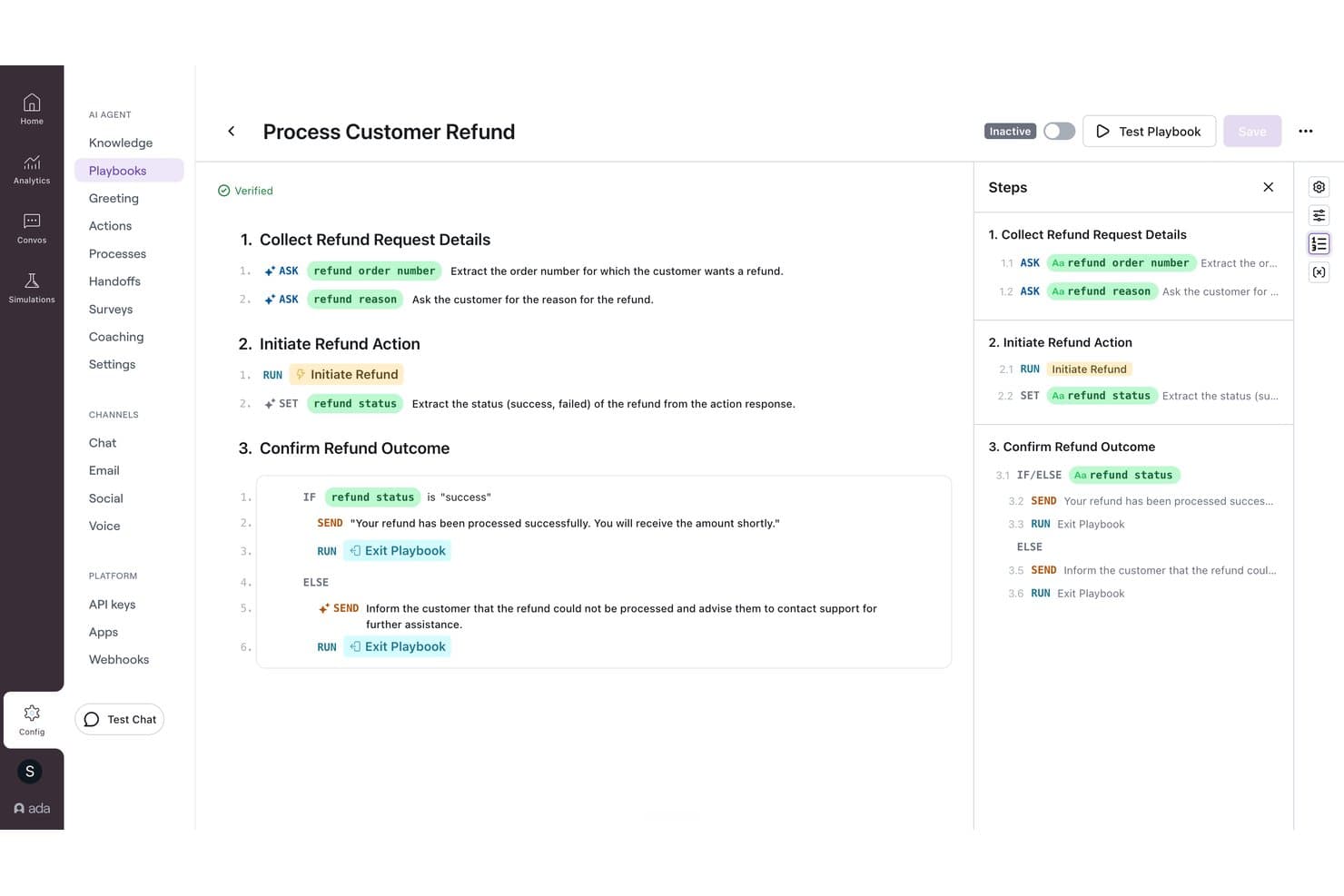
Ada offers a visual playbook builder that automates customer refund workflows with conditional logic and step-by-step AI-driven actions. Ada is an agentic customer experience platform that automates customer interactions across chat, voice, and email using generative AI agents, multi-step Playbooks, and omnichannel workflow orchestration.
Who Is Ada Best For?
Ada is a strong fit for enterprise contact centers in industries like financial services, travel, and insurance that handle high volumes of customer interactions across multiple service channels.
Why I Picked Ada
I've included Ada in my top picks because its Playbooks feature handles multi-step service logic that most chatbots can't. A single Playbook can retrieve an order, verify its shipping status, collect a new address, update the record, and confirm the change, all within one chat conversation. The Reasoning Engine, launched in early 2026, extends that same workflow logic into voice channels, so automation you build once runs consistently across web chat, WhatsApp, Instagram DMs, and phone.
Ada Key Features
- Voice AI agent: Handles inbound and outbound phone conversations using natural language understanding and automated call resolution.
- Multilingual support: Delivers conversations and workflow automation in over 50 languages with built-in translation.
- Native CX integrations: Connects directly with platforms like Salesforce, Zendesk, NICE CXone, and ServiceNow for unified customer data and escalation.
- Coaching feedback loop: Gathers feedback after each conversation to refine automations and improve AI agent performance over time.
Ada Integrations
Ada offers native integrations with Salesforce, Zendesk, NICE CXone, ServiceNow, Microsoft Dynamics, Genesys, Twilio Flex, Amazon Connect, Freshworks, Kustomer, and Contentful. An API is available for custom integrations.
Pros and Cons
Pros:
- High automation containment rates
- Consistent automation across voice and chat
- Playbooks automate complex multi-step conversations
Cons:
- No built-in predictive churn scoring model
- Reporting lacks depth for advanced analytics needs
Learn more about Ada: Best for real-time sentiment detection on social
- Free demo available
- Pricing upon request
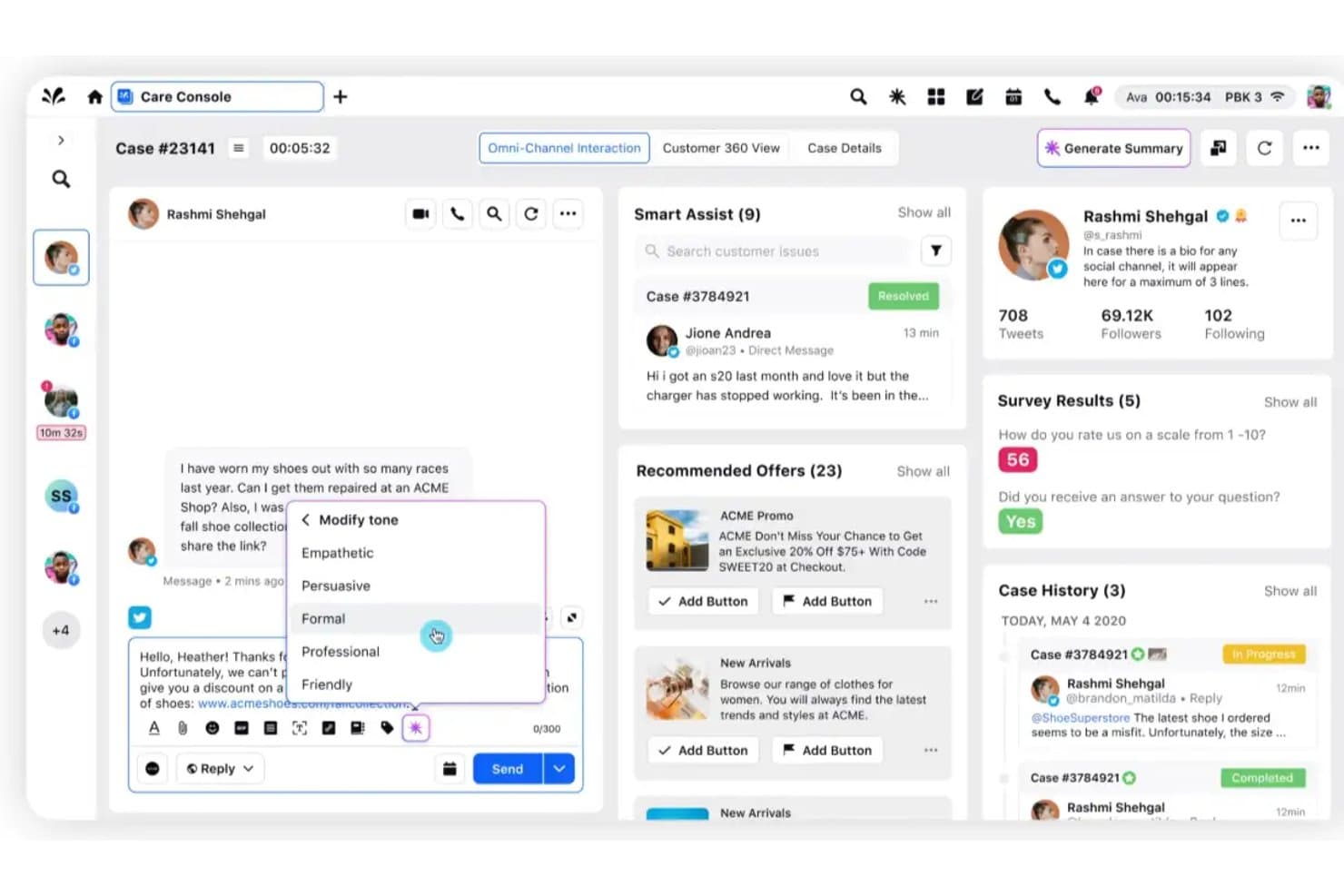
Sprinklr Service offers an AI-powered Care Console with tone modification, smart assist, and omni-channel interaction tools for customer support automation. Sprinklr Service is an AI-native contact center platform that unifies voice, chat, social, and email interactions with conversational AI, omnichannel routing, agent assist, automated quality management, and real-time conversational analytics.
Who Is Sprinklr Service Best For?
Sprinklr Service is a strong fit for large enterprise teams managing high-volume, multi-channel customer interactions across global markets.
Why I Picked Sprinklr Service
Sprinklr Service earns its spot on my shortlist because of how it handles social at a scale most platforms can't match. I picked it specifically for its real-time sentiment detection across 25+ social channels from a single unified dashboard. What I find genuinely impressive is that the AI classifies incoming queries by intent, urgency, and sentiment simultaneously, so my team can catch negative trends before they escalate into reputation issues.
Sprinklr Service Key Features
- Agent Copilot: AI-powered assistant that drafts case summaries, suggests replies, and automates repetitive tasks for agents.
- Unified agent desktop: Single interface for managing conversations across voice, chat, email, and 25+ social channels.
- AI quality management: Automatically evaluates 100% of customer interactions for compliance and coaching opportunities.
- Conversational IVR: Natural language voice bot that replaces traditional IVR menus and guides callers using spoken interactions.
Sprinklr Service Integrations
Sprinklr Service offers native integrations with Salesforce, Zendesk, Freshdesk, Dynamics 365, Jira, ServiceNow, Slack, Twilio, Trustpilot, and Reddit. An open API is available for custom integrations.
Pros and Cons
Pros:
- Unifies voice, chat, and social channels natively
- Evaluates every agent interaction for quality automatically
- Monitors sentiment across 25+ channels simultaneously
Cons:
- Dashboard reporting is difficult to customize
- Enterprise onboarding requires technical staff
Learn more about Sprinklr Service: Best for unified omnichannel journey orchestration
- Free trial available
- From $75/user/month (billed annually)
Visit WebsiteCustomer Rating:4.4/5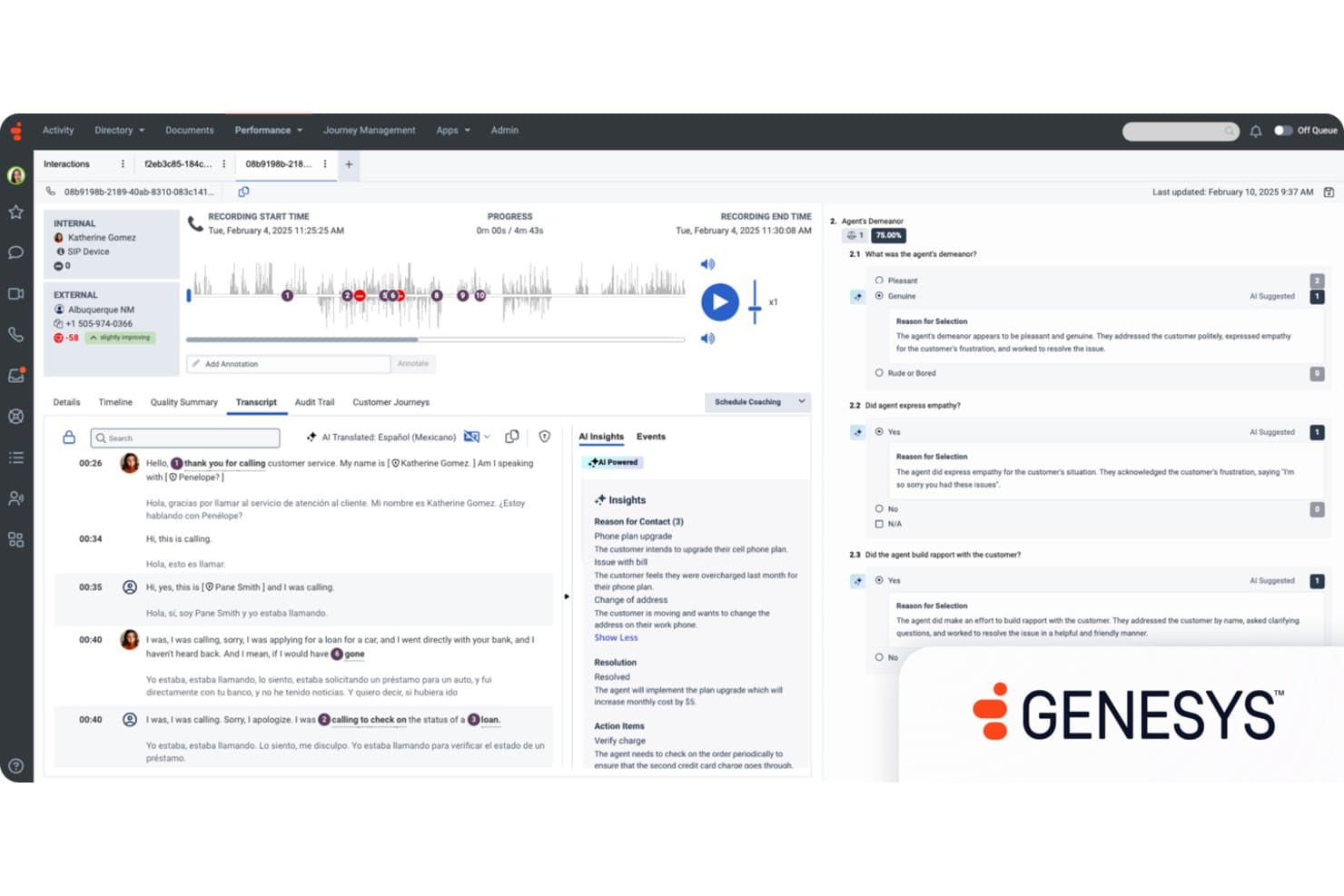
Genesys Cloud CX offers AI-powered quality evaluation with automated agent demeanor scoring, empathy detection, and real-time call transcript translation for customer experience management. Genesys Cloud CX is a cloud-native contact center platform that combines AI-powered virtual agents, omnichannel routing, workforce engagement management, predictive analytics, and journey orchestration across voice, chat, email, SMS, and social channels.
Who Is Genesys Cloud CX Best For?
Genesys Cloud CX is a strong fit for enterprise and mid-market contact centers managing high interaction volumes across multiple channels and agent teams.
Why I Picked Genesys Cloud CX
Genesys Cloud CX earns its spot on my shortlist because of how its single orchestration engine connects every channel, from voice to WhatsApp to SMS, without losing customer context mid-journey. I particularly like predictive routing combined with journey management, which lets my team build real-time flows that adapt to customer behaviour, not just queue logic. Architect and AI Studio make it possible to design and adjust those journeys without heavy developer involvement.
Genesys Cloud CX Key Features
- Agent Assist Copilot: AI supports agents in real time with reply suggestions, context, and knowledge surfacing.
- Sentiment and intent analytics: AI analyzes customer conversations to detect emotion, urgency, and intent across channels.
- Voice AI and conversational IVR: Natural language bots handle spoken interactions and transcribe calls for analytics.
- Generative knowledge management: AI generates, updates, and optimizes help articles from real agent and customer conversations.
Genesys Cloud CX Integrations
Genesys Cloud CX offers native integrations with Salesforce, ServiceNow, Zoom, Microsoft Teams, 8x8, Amazon Lex, and Google Dialogflow, and features over 450 marketplace integrations via the AppFoundry. An open API is available for custom integrations.
Pros and Cons
Pros:
- Predictive routing improves queue and agent matching
- Journey orchestration adapts in real time
- Unified contact center platform across channels
Cons:
- Custom reports require developer setup
- Initial Architect configuration is time-consuming
Learn more about Genesys Cloud CX: Best analytics suite for actionable CX insights
- Free demo available
- From $110/agent/month (proactive AI extra)
Visit WebsiteCustomer Rating:4.3/5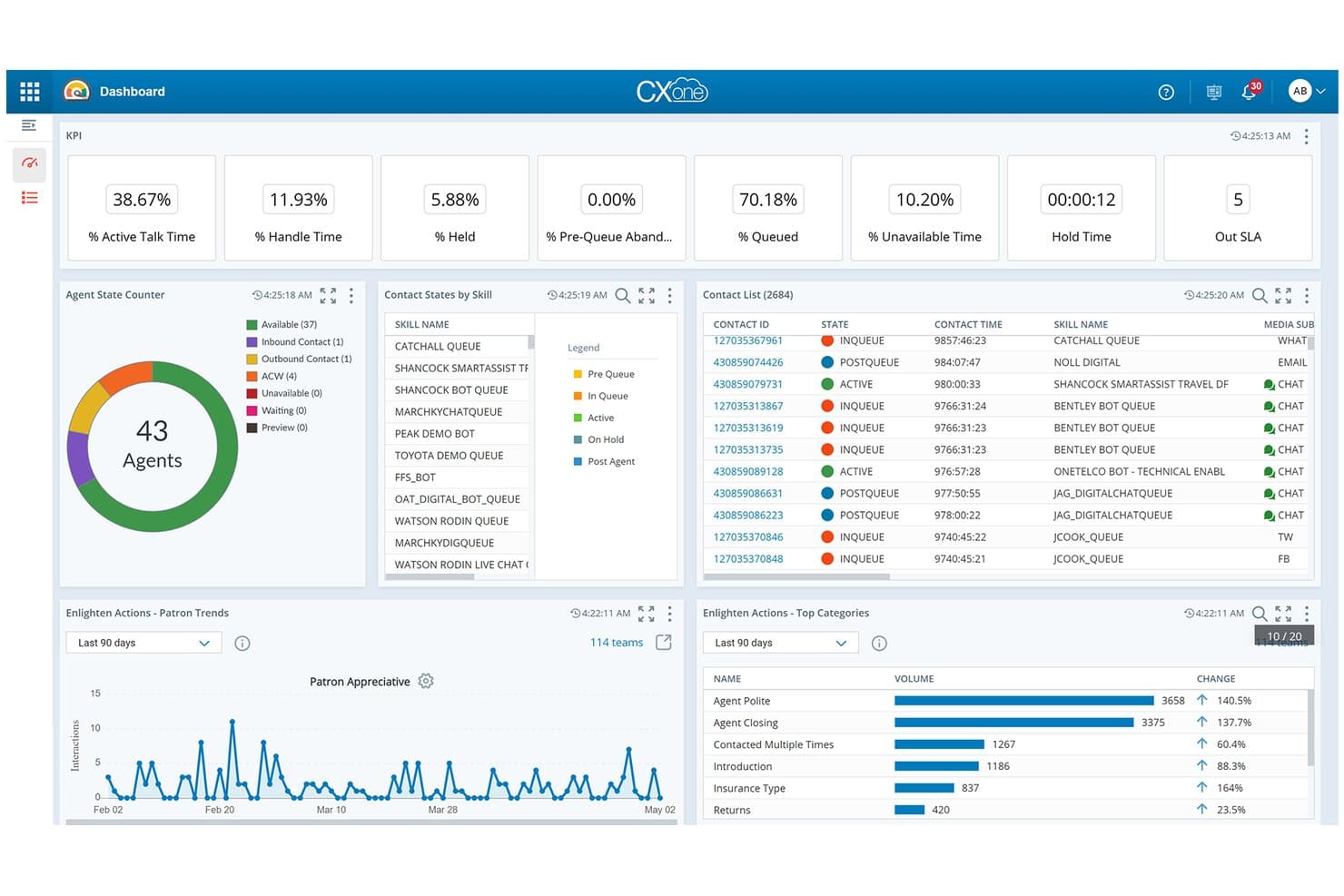
NiCE CXone offers a real-time AI-powered dashboard with KPI metrics, agent state tracking, contact lists, and Enlighten Actions analytics for automated customer experience management. NiCE CXone is an enterprise CCaaS platform that combines AI conversational automation, omnichannel orchestration, workforce engagement, and interaction analytics across voice, chat, email, and digital channels.
Who Is NiCE CXone Best For?
NiCE CXone is a strong fit for enterprise contact centers that need a unified platform to manage high interaction volumes across large agent teams.
Why I Picked NiCE CXone
I picked NiCE CXone as one of the best because its Interaction Analytics module goes well beyond standard sentiment scoring. It surfaces emotion, intent, and topic trends across every conversation, with Copilot for Supervisors delivering real-time sentiment alerts on live calls. I also like how agentic analytics connects those insights to root-cause analysis, so my team can act on patterns rather than just observe them.
NiCE CXone Key Features
- Omnichannel routing and queueing: Routes and manages customer interactions across voice, chat, email, SMS, and social channels from one platform.
- Voice AI & conversational IVR: Natural language voice bots replace traditional menus, handling spoken requests and capturing detailed interaction transcripts.
- Generative knowledge management: AI updates and creates knowledge base articles automatically from agent conversations and resolved tickets.
- Pre-built CRM and service integrations: Connects natively to systems like Salesforce, Microsoft Dynamics, and Zendesk for unified customer profiles.
NiCE CXone Integrations
NiCE CXone offers native integrations with Salesforce, Microsoft Dynamics, Oracle, Zendesk, ServiceNow, SAP, HubSpot, Freshdesk, Zoho CRM, and SugarCRM. An API is available for custom integrations.
Pros and Cons
Pros:
- AI agents handle complex multilingual voice interactions
- Real-time sentiment alerts during live calls
- Deep interaction analytics across all channels
Cons:
- Report customization has a steep configuration curve
- Implementation requires significant IT involvement
Learn more about NiCE CXone: Best for workforce automation and quality insights
- Free demo available
- Pricing upon request
Visit WebsiteCustomer Rating:3.7/5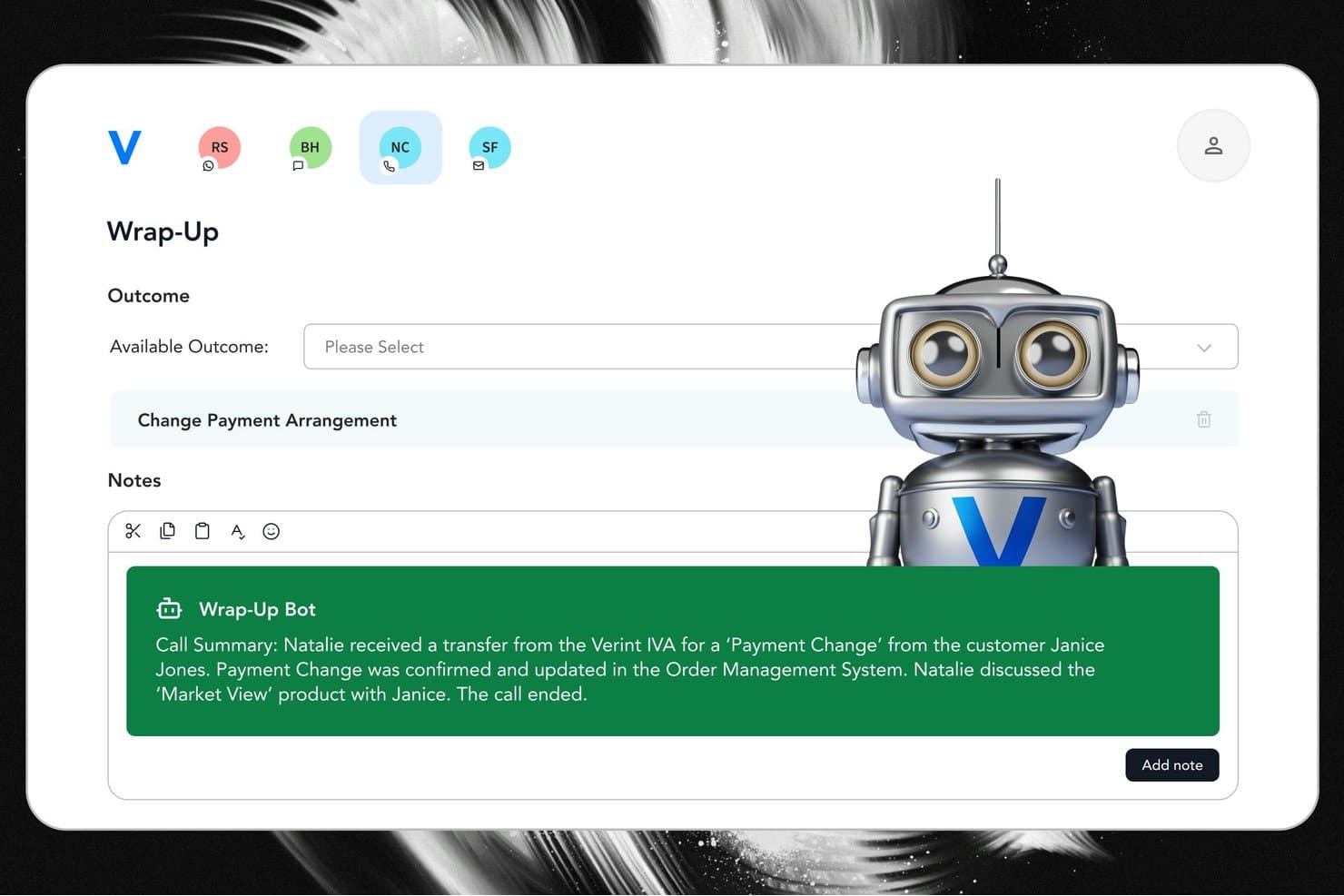
Verint offers an AI-powered Wrap-Up Bot that automatically generates call summaries and suggested outcomes to streamline agent after-call work. Verint is a CX automation platform that combines agentic AI, workforce management, quality automation, omnichannel orchestration, and speech and text analytics for contact center and customer engagement operations.
Who Is Verint Best For?
Verint is a strong fit for large enterprises in regulated industries like financial services, telecom, and healthcare that run high-volume contact center operations.
Why I Picked Verint
Verint earns its spot on my shortlist because of how it handles quality management at scale. I love that Automated Quality Management scores 100% of interactions automatically, removing manual sampling entirely. The Quality Bot then surfaces targeted coaching recommendations to supervisors based on those scores. Pair that with AI-powered workforce forecasting and scheduling, and I can see performance gaps and staffing inefficiencies in the same platform.
Verint Key Features
- Omnichannel agent workspace: Unifies voice, chat, SMS, and social messaging conversations in one interface for your CX teams.
- Real-time speech and text analytics: Captures 100% of multi-channel interactions and surfaces emotion, intent, and topic trends automatically.
- Predictive AI customer insights: Uses machine learning to score customer behaviour, churn risk, and next-best actions across journeys.
- CX Integration Studio: Provides 500+ prebuilt connectors for syncing with CRMs, help desks, telephony, and marketing automation platforms.
Verint Integrations
Verint offers native integrations with Salesforce, Microsoft 365, ServiceNow, Workday, and Oracle, and provides 500+ prebuilt connectors for CRM, help desk, and contact center platforms. An open API is available for custom integrations.
Pros and Cons
Pros:
- Speech analytics covers every channel simultaneously
- AI workforce forecasting built into the platform
- Scores 100% of interactions automatically
Cons:
- System deployment requires extended onboarding
- Advanced report building requires technical skills
Learn more about Verint: 10Best generative agent copilot for support teams
Fin.ai
- 14-day free trial + free demo available
- From $0.99/outcome
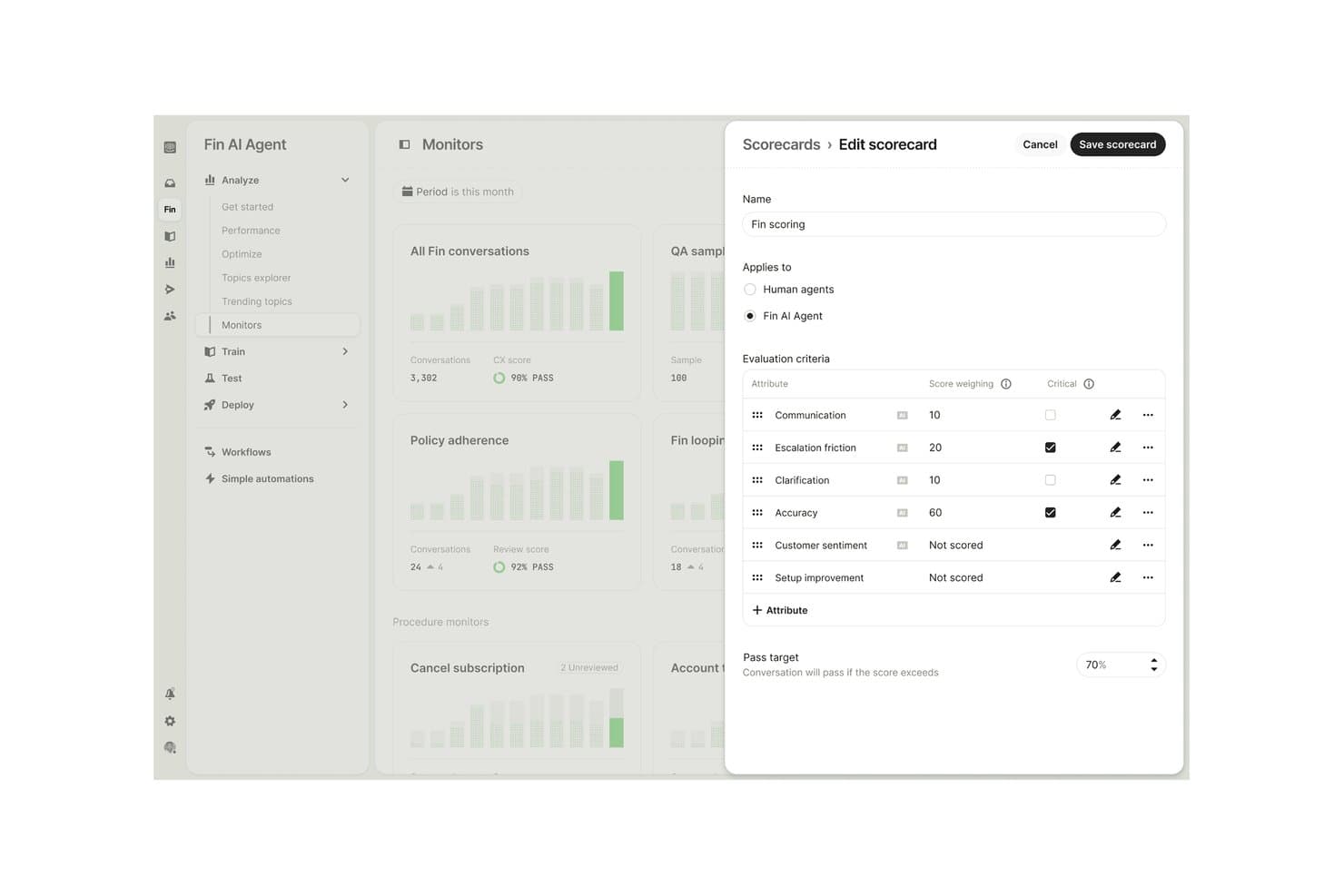
Fin.ai offers a customizable AI scorecard editor where users can define evaluation criteria, score weightings, and pass targets for Fin AI Agent conversations. Fin.ai is a generative AI agent platform that handles customer support interactions across chat, email, voice, SMS, and social channels using custom-trained AI models, multi-step conversational workflows, and integrated analytics.
Who Is Fin.ai Best For?
Fin.ai is a strong fit for mid-market and enterprise support teams that handle high conversation volumes and want AI-driven ticket resolution without migrating off their existing helpdesk.
Why I Picked Fin.ai
I've included Fin.ai in my top picks because its Procedures feature lets me build multi-step workflows that combine natural language instructions with deterministic business logic, so Fin handles complex support queries from start to finish. I also like that Fin Operator autonomously monitors performance and keeps the knowledge base current without manual oversight. The Analyze suite surfaces CX Scores, AI Topics, and Monitors so I can pinpoint exactly where Fin resolves well and where it needs adjustment.
Fin.ai Key Features
- Fin Voice: Lets you automate voice interactions and handle customer calls using Apex Flash for natural language conversations.
- Multilingual support: Enables interactions in over 45 languages along with tone and policy customization across channels.
- Analyze suite: Combines CX Score, AI Topics, Trends, Monitors, and custom AI Scorecards for conversation analytics.
- Omnichannel integration: Connects across helpdesks like Zendesk, Salesforce, HubSpot, Freshdesk, and messaging channels including WhatsApp, SMS, and social platforms.
Fin.ai Integrations
Fin.ai offers native integrations with Intercom, Zendesk, Salesforce, HubSpot, Freshdesk, Dixa, Front, Zoho, Sprinklr, Gorgias, Shopify, and Stripe, with an API platform available for custom integrations.
Pros and Cons
Pros:
- Generative AI handles complex multi-step workflows
- Self-maintaining knowledge base via Fin Operator
- High autonomous ticket resolution rates
Cons:
- Journey orchestration is limited to support channels
- Predictive intelligence limited to conversation-level intent
Learn more about Fin.ai:
Andre systemer for automatisering av AI-drevet kundeopplevelse
Her er noen flere alternativer for systemer for automatisering av AI-drevet kundeopplevelse som ikke kom med på kortlisten min, men som likevel er verdt å se nærmere på:
- 11Yellow.aiBest for multilingual conversational AI at scale
- 12Salesforce Agentforce ServiceBest for deep CRM and service integration
- 13ZendeskBest for automated omnichannel ticket deflection
- 14LivePersonBest for open, enterprise conversational AI stack
- 15MedalliaBest for AI action from real-time feedback
- 16Observe.AIBest for multi-agent CX lifecycle orchestration
- 17Kore.aiBest for pre-built AI agents across industries
- 18Qualtrics XMBest for unified experience profiles
- 19CrestaBest for coaching with live AI insights
- 20SierraBest for outcome-based conversational automation
How I Evaluate AI Customer Experience Automation Systems
Every platform here needs to deliver real AI value—actually reducing agent workload and personalizing journeys, not just adding a chatbot layer. I evaluate each one across two layers: the core functionality required to qualify and the differentiating factors that set leaders apart.
Core Functionality (Table Stakes For This List)
When I'm selecting tools for my list, I rank each one on a scale from 0 (does not offer the functionality) to 5 (excels in this area) for each core functionality listed below. Then, I calculate the tool's total score as a percentage. Each tool needs to achieve a minimum total score of 75% to be considered for inclusion.
- AI Conversational Automation: I look for bots that handle multi-turn conversations—like processing a return and upselling a replacement—without needing a live agent.
- Omnichannel Orchestration: Context persistence matters most here. A customer who starts on chat and calls back shouldn't have to repeat their issue.
- Predictive Customer Intelligence: I evaluate whether the platform can score churn risk or surface next-best-actions from real interaction data, not just static segments.
- Sentiment & Interaction Analytics: Each tool should detect emotion and intent in real time, so agents or workflows can adapt before a frustrated customer escalates.
- Automated Journey Workflows: I check for AI-triggered journeys that respond to live behaviour—like sending a proactive message when a user stalls during onboarding.
- CX Systems Integration: The platform should connect to your CRM, help desk, and contact center natively, keeping customer profiles unified across tools.
Once I have a list of tools that meet the criteria, I consider what sets each platform apart.
Differentiating Factors (What Sets Vendors Apart)
Here's how I compare and contrast different vendors:
Standout Features
Agent assist copilots are a big differentiator—I look for AI that suggests replies and drafts summaries mid-conversation, not just after the fact. Voice AI matters too, especially platforms that replace rigid IVR menus with natural language bots that can handle spoken requests like rebooking a delivery. I also evaluate generative knowledge management, where the system auto-creates and updates help articles from resolved tickets. This keeps self-service content fresh without manual effort from your team.
Beyond Features
AI model transparency is something I evaluate closely—can you set guardrails on tone and brand voice for customer-facing bot responses? That matters when a virtual agent handles thousands of conversations daily. Deployment model plays a role too. Platforms with pre-built intents and low-code workflow builders let CX ops teams launch faster without waiting on engineering. I also check data privacy controls like PII redaction and data residency options, especially for teams in regulated industries like healthcare or finance.
Slik velger du systemer for automatisering av AI-drevet kundeopplevelse
Det er lett å gå seg vill i lange funksjonslister og komplekse prismodeller. For å hjelpe deg med å holde fokus mens du arbeider deg gjennom den unike programvareutvelgelsesprosessen din, får du her en sjekkliste over faktorer du bør ha i tankene:
| Faktor | Hva bør du vurdere? |
|---|---|
| FaktorSkalerbarhet | Hva bør du vurdere?Kan plattformen håndtere topper i interaksjonsvolumet etter hvert som teamet eller virksomheten vokser – på tvers av alle planlagte kanaler? |
| FaktorIntegrasjoner | Hva bør du vurdere?Kobler systemet seg direkte til CRM-systemet, brukerstøttesystemet og taleløsningene dine, eller trenger du omfattende tilpasninger? |
| FaktorTilpasningsmuligheter | Hva bør du vurdere?Kan teamet ditt justere arbeidsflyter, botatferd og rapportering uten involvering fra utviklere? |
| FaktorBrukervennlighet | Hva bør du vurdere?Er grensesnittet intuitivt nok til at CX-ledere og agenter kan konfigurere, bruke og tilpasse det raskt på egen hånd? |
| FaktorImplementering og opplæring | Hva bør du vurdere?Hvor lang tid vil utrullingen ta, og hvilke ressurser eller hvilken leverandørbistand trenger du for å oppnå full verdi? |
| FaktorKostnad | Hva bør du vurdere?Skalerer prismodellen (per agent, per samtale, per løsning) forutsigbart i takt med den forventede bruken? |
| FaktorSikkerhetstiltak | Hva bør du vurdere?Er personvern, kryptering og rollebaserte tilgangskontroller i tråd med bransjekravene dine? |
| FaktorEtterlevelseskrav | Hva bør du vurdere?Oppfyller plattformen sertifiseringene (SOC 2, GDPR, HIPAA) som kreves for sektoren eller driftsregionene dine? |
Hva er systemer for automatisering av AI-drevet kundeopplevelse?
Systemer for automatisering av AI-drevet kundeopplevelse er programvareplattformer som bruker kunstig intelligens til å håndtere, tilpasse og analysere kundeinteraksjoner på tvers av flere kanaler. Disse systemene kan automatisere samtaler, forutsi intensjoner og veilede kunder gjennom kundereisene deres, slik at CX-team får verktøyene de trenger for å øke effektiviteten og levere mer tilpasset støtte i stor skala.
Funksjoner i systemer for automatisering av AI-kundeopplevelser
Når du velger systemer for automatisering av AI-kundeopplevelser, bør du se etter følgende nøkkelfunksjoner:
- Konversasjonsroboter med AI: Automatiser kundeinteraksjoner ved hjelp av chatboter og virtuelle agenter som kan forstå og svare på naturlig språk på tvers av kanaler.
- Omnikanalruting: Håndter kundesamtaler på tvers av chat, e-post, telefon, SMS og sosiale medier – med konsistent kontekst og historikk.
- Sentimentanalyse: Bruk AI til å oppdage kundenes følelser, hvor presserende henvendelser er og hensikten deres i sanntid, slik at teamene kan prioritere eller eskalere saker etter behov.
- Prediktiv analyse: Analyser samtale- og atferdsdata for å forutse kundenes behov og mulig kundefrafall, og anbefal de beste neste tiltakene.
- Automatisert arbeidsflytorkestrering: Bygg og utløse komplekse kundereiser med flere trinn, basert på atferd i sanntid, hendelser i kundelivssyklusen eller segmentering.
- Integrasjon med CX-systemer: Koble enkelt til CRM-, brukerstøtte- og kontaktsenterteknologi for å sikre en samlet kundeprofil og sammenkoblede arbeidsflyter.
- Verktøy for agentassistanse: Gi agenter forslag under samtalen, automatisk utfylte felt og relevant kunnskap for å redusere behandlingstiden og forbedre konsistensen.
- Innholdsadministrasjon for selvbetjening: Generer, oppdater og kontroller automatisk kunnskapsartikler for å avdekke mangler ved hjelp av innsikt fra tidligere kundeinteraksjoner.
- Sikkerhets- og samsvarskontroller: Beskytt sensitive kundedata ved hjelp av kryptering, rollebasert tilgang og samsvar med relevante bransjestandarder.
- Rapporterings- og analysedashbord: Visualiser kundeinteraksjoner, kanalresultater og automatiseringsutfall for å legge til rette for kontinuerlig forbedring og sporing av avkastning på investeringer.
Implementering av systemer for automatisering av AI-kundeopplevelser gir flere fordeler for teamet og virksomheten din. Her er noen av fordelene du kan se frem til:
Fordeler med systemer for automatisering av AI-kundeopplevelser
- Kortere svartider: Automatiserte roboter og intelligent ruting hjelper kundene med å få svar raskt, noe som reduserer ventetid og arbeidsbelastningen for agentene.
- Personlig tilpassede opplevelser: Prediktiv analyse og sentimentgjenkjenning tilpasser samtaler og oppfølging basert på hver kundes unike behov og atferd.
- Større konsistens: Omnikanalorkestrering og integrerte verktøy for agentassistanse sørger for at meldinger, tone og støtteprosesser er pålitelige i alle kanaler.
- Forbedret selvbetjening: AI-drevet innholdsadministrasjon holder kunnskapsbaser oppdaterte, slik at kundene kan finne svar på egen hånd døgnet rundt.
- Skalerbarhet for vekst: Automatiserte arbeidsflyter og integrasjoner med CX-teknologistakken gjør det mulig å håndtere større mengder interaksjoner uten å ofre tjenestekvaliteten.
- Handlingsrettet innsikt: Analyse og rapportering i sanntid synliggjør trender, utfordringer og resultater, noe som gjør det enklere å forbedre kundereiser og dokumentere avkastning på investeringer.
- Bedre datasikkerhet: Innebygde sikkerhetstiltak og samsvarskontroller reduserer risikoen og beskytter sensitiv kundeinformasjon etter hvert som du automatiserer flere prosesser.
Kostnader og priser for systemer for automatisering av AI-kundeopplevelser
Valg av systemer for automatisering av AI-kundeopplevelser krever en forståelse av de ulike prismodellene og abonnementene som er tilgjengelige. Kostnadene varierer basert på funksjoner, teamstørrelse, tillegg og mer. Tabellen nedenfor oppsummerer vanlige abonnementer, gjennomsnittsprisene deres og typiske funksjoner som er inkludert i løsninger for systemer for automatisering av AI-kundeopplevelser:
Sammenligningstabell for abonnementer for systemer for automatisering av AI-kundeopplevelser
| Abonnementstype | Gjennomsnittspris | Vanlige funksjoner |
|---|---|---|
| AbonnementstypeGratisabonnement | Gjennomsnittspris$0 | Vanlige funksjonerGrunnleggende konversasjonsroboter, begrenset kanalstøtte, grunnleggende rapportering og brukerstøtte fra fellesskapet. |
| AbonnementstypePersonlig abonnement | Gjennomsnittspris$20-$50/bruker/måned | Vanlige funksjonerAutomatisering på flere kanaler, begrensede integrasjoner, enkle arbeidsflyter, brukerstøtte via e-post og grunnleggende analyse. |
| AbonnementstypeForretningsabonnement | Gjennomsnittspris$60-$150/bruker/måned | Vanlige funksjonerAvanserte AI-roboter, omnikanalorkestrering, integrasjoner med CX-systemer, verktøy for agentassistanse og analyse. |
| AbonnementstypeVirksomhetsabonnement | Gjennomsnittspris$200+/bruker/måned | Vanlige funksjonerTilpassede arbeidsflyter, avansert sikkerhet, samsvarskontroller, dedikert introduksjon, prioritert brukerstøtte og API-tilgang. |
Vanlige spørsmål om systemer for automatisering av AI-kundeopplevelser
Her er noen svar på vanlige spørsmål om systemer for automatisering av AI-kundeopplevelser:
Hvordan skiller systemer for automatisering av kundeopplevelsen med KI seg fra tradisjonelle chatboter?
I motsetning til en enkel bot bruker KI-drevne systemer og virtuelle assistenter basert på generativ KI kunstig intelligens, maskinlæring og samtale-KI til å håndtere komplekse kundeinteraksjoner med flere samtalerunder. De analyserer intensjon, følelsesuttrykk og kundepreferanser i sanntid på tvers av omnikanal-berøringspunkter for å optimalisere svartider og heve kundetilfredsheten.
Kan systemer for automatisering av kundeopplevelsen med KI integreres med eksisterende CRM- eller brukerstøtteplattformer?
Ja, KI-drevne orkestreringsplattformer tilbyr åpne API-er og ferdigbygde koblinger for CRM-programvare, teknologi for kontaktsentre og verktøy for kunnskapsbaser. Ved å integrere disse systemene kobler du sammen dataøkosystemet ditt, samler kundedata, forenkler rutingen og hjelper KI-agenter med å bistå menneskelige agenter gjennom hele kundereisen for å ivareta unike kundebehov.
Hva er risikoene eller begrensningene ved å bruke automatisering i kundeopplevelsen?
Automatisering bør supplere – ikke erstatte – menneskelig kontakt. Fullstendig avhengighet av KI-modeller uten tilsyn kan føre til at komplekse saker rutes feil, eller at sensitive forespørsler får unøyaktige svar. For å opprettholde god servicekvalitet kreves overvåking fra ende til ende, prediktiv analyse og regelmessig finjustering utført av menneskelige agenter for å beskytte kundelojaliteten og innfri kundenes forventninger.
Hvor lang tid tar det å implementere et system for automatisering av kundeopplevelsen med KI?
Tidsrammene varierer etter bruksområde. Enkle oppsett som bruker ferdigbygde maler for vanlige spørsmål, rutineoppgaver og grunnleggende meldinger, tar noen uker. Tilpassede utrullinger i større virksomheter, som omfatter datadrevet beslutningstaking, avanserte kopilotverktøy og kompleks tilpasning av arbeidsflyter på tvers av kundestøttekanaler, kan ta flere måneder, men gir langsiktig driftseffektivitet og kostnadsbesparelser.
Passer disse systemene for små team, eller bare for store virksomheter?
De er nyttige for team i alle størrelser. Små team kan bruke skalerbare KI-agenter til å håndtere repetitive oppgaver og selvbetjeningsforespørsler, redusere ventetider og behandlingstid, samtidig som driftskostnadene senkes. Store virksomheter kan analysere kundeatferd, måledata og kundeinnsikt for å levere personlige opplevelser i stor skala, øke kundebevaringen og styrke tilliten i kunderelasjonene.