

De beste alternativene til MightyCall kombinerer pålitelig samtalekvalitet, avansert ruting, fleksible integrasjoner og enkle administrasjonsverktøy – slik at teamet ditt kan levere konsekvent og profesjonell kundestøtte. Hvis du ser etter et alternativ til MightyCall, ønsker du sannsynligvis mer kontroll over arbeidsflyter, bedre CRM-tilkoblinger eller telefonsystemer som passer måten teamene dine faktisk jobber på.
Denne veiledningen gir deg en nøktern gjennomgang av fremtredende VoIP-programvarealternativer og hjelper deg med å finne leverandørene som har funksjonene og fleksibiliteten virksomheten din trenger for å holde kundene fornøyde og samtalene i gang uten problemer.
Hva er MightyCall?
MightyCall er en skybasert VoIP-programvareplattform som tilbyr bedriftsbaserte telefonsystemer for små og mellomstore team. Den lar deg håndtere samtaler, tekstmeldinger og talepost hvor som helst, med funksjoner som samtaleruting, virtuelle numre og integrasjoner med populære forretningsverktøy. Team bruker MightyCall til å samle kommunikasjonen på ett sted, støtte fjernarbeid og sørge for at ingen kundesamtaler forblir ubesvarte.
Sammenligningstabell for alternativer til MightyCall
Denne sammenligningstabellen oppsummerer prisdetaljer for mine beste alternativer til MightyCall:
| Tool | Best For | Trial Info | Price | ||
|---|---|---|---|---|---|
| 1 | Best for advanced call routing customization | 14-day free trial | From $25/user/month (billed annually) | Website | |
| 2 | Best for self-service setup and onboarding | Free demo available | Pricing upon request | Website | |
| 3 | Best for unlimited global calling plans | Not available | From $24.99/user/month | Website | |
| 4 | Best for HIPAA-compliant healthcare communications | 7-day free trial + free demo | From $15/user/month (billed annually) | Website | |
| 5 | Best for open API and custom workflow integration | Free demo | From $19.99/month/line (billed annually) | Website | |
| 6 | Best for calls across multiple office locations | Free demo available | From $15/user/month (billed annually) | Website | |
| 7 | Best for real-time AI call transcription | 14-day free trial + free demo available | Pricing upon request | Website | |
| 8 | Best for hybrid team device flexibility | 14-day free trial + free demo | From $30/user/month (billed annually) | Website | |
| 9 | Best for sales and support automation | 14-day free trial | From $29/user/month (billed annually) | Website | |
| 10 | Best for native CRM and helpdesk integrations | 14-day free trial + free plan + free demo | From $15/user/month (billed annually) | Website |


Why Trust Our Software Recommendations
6,700+
Reviews
20
Industry experts
16+
Evaluation factors
14
Years
Our team has been testing and reviewing software since 2012. As CX leaders ourselves, we know how difficult—and important—it is to choose the right software.
For this guide, we evaluated tools using hands-on testing and independent research, scoring tools using our selection criteria.
Our reviews reflect our human editorial judgment, not a sales pitch.
 Gui DrusinaCreative Director
 Tim FisherVP of AI
Anmeldelser av de beste alternativene til MightyCall
Nedenfor finner du mine detaljerte sammendrag av de beste alternativene til MightyCall som kom med på kortlisten. Anmeldelsene mine gir en grundig gjennomgang av funksjonene, integrasjonene og prisene for hver programvareløsning, slik at du kan finne den som passer best for deg.
 Best for advanced call routing customization
- 14-day free trial
- From $25/user/month (billed annually)
Visit WebsiteCustomer Rating:4.4/5
CloudTalk offers a detailed call history view with contact logs, call types, timestamps, and an outbound call panel featuring recording playback, tags, and rating tools. CloudTalk is a cloud-based call center platform built for sales and customer support teams that need global phone coverage, deep CRM integrations, and serious inbound call management without the limitations of a basic business phone system.
Who Is CloudTalk Best For?
CloudTalk is a strong fit for growing support and sales teams that have outgrown a basic business phone system and need structured call handling across distributed agents.
Why CloudTalk Is a Good MightyCall Alternative
I picked CloudTalk as one of the best because its Visual Call Flow Designer gives you precise, layered control over how every inbound call moves through your system. I can configure condition-based routing that branches on caller input, time of day, agent skill set, or VIP status, all from a drag-and-drop canvas. MightyCall's routing is comparatively rigid, so when my team needs priority queues for high-value customers running alongside skill-based overflow rules, CloudTalk handles that without workarounds.
CloudTalk Key Features
- AI conversation intelligence: Automatically transcribes calls, generates summaries, and tags sentiment in real time.
- Shared SMS inboxes: Lets multiple team members collaborate on customer SMS conversations from a unified number.
- Live coaching tools: Managers can listen, whisper, or barge into live calls to support agent training and quality control.
- Native CRM integrations: Connects directly with Salesforce, HubSpot, Pipedrive, and Zendesk to log calls and sync contacts.
CloudTalk Integrations
CloudTalk offers 100+ native integrations, including Salesforce, HubSpot, Zendesk, Pipedrive, Intercom, Microsoft Teams, Freshdesk, Aircall, Zoho CRM, and Slack. It also supports Zapier and provides an API for custom integrations.
Pros and Cons
Pros:
- AI call intelligence and sentiment analysis
- Shared SMS inbox for team collaboration
- Visual drag-and-drop call flow designer
Cons:
- Occasional audio quality issues reported
- Mobile app stability complaints on iOS
 Best for self-service setup and onboarding
- Free demo available
- Pricing upon request

GoTo Connect offers a supervisor dashboard with real-time queue metrics, agent activity tracking, and call handling statistics for sales teams. GoTo Connect is a cloud-based phone system that bundles VoIP calling, video meetings, SMS, and AI-powered call routing for teams managing high volumes of inbound customer communication.
Who Is GoTo Connect Best For?
GoTo Connect is a strong fit for small to mid-sized businesses that need a multi-channel phone system without the complexity of enterprise-grade deployments.
Why GoTo Connect Is a Good MightyCall Alternative
I've included GoTo Connect in my top picks because the self-service setup experience is genuinely one of the best I've seen in this category. The unified admin portal lets you configure dial plans, ring groups, and auto attendants without involving a support rep, and the plug-and-play provisioning means new users are live fast. The AI Receptionist add-on handles 24/7 call intake automatically from day one.
GoTo Connect Key Features
- Multi-device compatibility: Access calls, meetings, and SMS from desktop, mobile, or browser-based softphones.
- Voicemail-to-email: Get voicemails delivered to your inbox with audio attachments for quick playback.
- Auto attendant builder: Set up unlimited, customizable call menus to route callers to the right agents or departments.
- Native Microsoft Teams integration: Extend and manage advanced calling features directly within the Teams interface.
GoTo Connect Integrations
GoTo Connect offers native integrations with Salesforce, HubSpot, Microsoft Teams, ServiceNow, ZenDesk, Outlook, and Google Workspace. An API is available for custom integrations.
Pros and Cons
Pros:
- Plug-and-play phone provisioning for new users
- AI Receptionist handles after-hours inbound calls
- Visual dial plan editor for non-technical admins
Cons:
- Some users report inconsistent mobile app reliability
- Call analytics are limited on lower plans
Learn more about GoTo Connect:

Net2Phone offers a unified dashboard displaying team members, departments, phone numbers, ring groups, and devices for streamlined business communication management. Net2Phone is a cloud-based unified communications platform built for SMBs and distributed customer-facing teams that need reliable inbound call handling, multi-level IVR, CRM integrations, and international calling—all in one system.
Who Is Net2Phone Best For?
It's a strong fit for small and mid-sized businesses with cross-border operations or remote teams that need to manage high volumes of international calls without per-minute billing.
Why Net2Phone Is a Good MightyCall Alternative
Net2Phone earns its spot on my shortlist because of its unlimited international calling to 40+ countries, which MightyCall simply doesn't offer natively. I've found the Professional plan particularly useful for teams running support across regions like the UK, Australia, and Latin America, where per-minute charges from other providers add up fast. I also like that AI call transcription and summarization are built into that same tier, so my team logs every international interaction without any manual work.
Net2Phone Key Features
- Multi-level auto attendant: Configure custom call menus to route callers to the right team or extension.
- Ring groups: Set up groups so multiple team members receive calls for a department or specialty line.
- Mobile twinning: Sync your desk and mobile phones so calls ring on both devices at once.
- Salesforce integration: Connect call data directly to Salesforce for direct call activity tracking and reporting.
Net2Phone Integrations
Net2Phone offers native integrations with Salesforce, Zoho, Slack, Microsoft Teams, Google Calendar, Google Contacts, and Zapier. An API is also available for custom integrations.
Pros and Cons
Pros:
- Multi-level IVR included on base plans
- AI voicemail transcription and call summarization
- Unlimited calling to 40+ international countries
Cons:
- No built-in sales or predictive dialers
- International SMS features not yet available
Learn more about Net2Phone: 4Best for HIPAA-compliant healthcare communications
Quo
- 7-day free trial + free demo
- From $15/user/month (billed annually)

Quo offers an analytics dashboard with CSV export options including customizable date ranges like Today, Last 7 days, and Last 12 months. Quo is an AI-powered business phone system that centralizes calls, texts, voicemails, and contacts into a shared team inbox, giving small businesses and distributed support teams a more collaborative alternative to traditional virtual phone systems.
Who Is Quo Best For?
Quo suits healthcare providers and small businesses that need HIPAA-compliant messaging alongside standard call handling in a single, team-friendly workspace.
Why Quo Is a Good MightyCall alternative
I've included Quo in my top picks because of how seriously it handles HIPAA compliance without making the experience clunky. You can request a BAA directly inside the app in under 15 seconds, and Quo automatically logs users out after 15 days of inactivity to meet HIPAA session management requirements. I also appreciate the Sona AI voice agent, which answers calls around the clock so patient inquiries never go unanswered.
Quo Key Features
- Team-shared phone numbers: Let your team handle calls and texts together in a single shared inbox for full visibility.
- Native CRM integrations: Connect Quo with Salesforce, HubSpot, Zoho, and Pipedrive to automatically log calls and sync contact data.
- Two-way business SMS and MMS: Communicate with customers using SMS and MMS from your business numbers, with support for templates and scheduled messages.
- Multi-device access: Place and receive business calls using Quo’s desktop app, browser, or mobile apps for flexibility wherever you work.
Quo Integrations
Quo offers native integrations with Salesforce, HubSpot, Zoho CRM, Pipedrive, Slack, Gong, HighLevel, Attio, Clio, Jobber, and connects with Zapier. An API is available for custom integrations.
Pros and Cons
Pros:
- Runs on desktop and mobile apps
- AI transcription and call summaries included
- HIPAA-compliant messaging and call handling
Cons:
- Occasional call quality complaints from users
- No desk phone hardware support
Learn more about Quo: Best for open API and custom workflow integration
- Free demo
- From $19.99/month/line (billed annually)

Vonage Business Communications offers a meeting transcription feature with speaker identification, video playback, and a searchable real-time transcript panel. Vonage Business Communications is a cloud-based VoIP platform built for businesses that need enterprise-grade call routing, multi-device calling, and deep CRM integrations without sacrificing the flexibility to build custom communication workflows.
Who Is Vonage Business Communications Best For?
It's a strong fit for mid-sized to enterprise teams with developer resources who need a customizable phone system that connects directly to their existing CRM and support stack.
Why Vonage Business Communications Is a Good MightyCall Alternative
I've included Vonage Business Communications in my top picks because its Communications APIs (formerly Nexmo) let you build custom call flows, routing logic, and trigger-based workflows that MightyCall simply can't match. I particularly like AI Studio, which gives non-developers a no-code way to design conversation flows tied to real business conditions. You can route a call differently based on CRM data, time of day, or customer tier without writing a single line of code.
Vonage Business Communications Key Features
- Self-serve number provisioning: Instantly claim local, toll-free, and vanity business numbers in multiple countries to support new teams and locations.
- Multi-device calling: Place and receive calls from desktop, mobile app, browser, or compatible desk phone with a single synced business identity.
- Broad CRM integrations: Connect Vonage to Salesforce, Microsoft Teams, ServiceNow, and Google Workspace to capture call data and boost agent productivity.
- Call recording and storage: Record business calls with options for cloud storage and playback, supporting compliance and team review needs.
Vonage Business Communications Integrations
Vonage Business Communications offers native integrations with Salesforce, Microsoft Teams, ServiceNow, and Google Workspace. An API is available for custom integrations.
Pros and Cons
Pros:
- Native CRM and support platform integrations
- Reliable call quality with uptime SLA
- Advanced IVR builder with conditional routing
Cons:
- Add-ons increase total platform cost
- SMS delivery can be unreliable
Learn more about Vonage Business Communications: Best for calls across multiple office locations
- Free demo available
- From $15/user/month (billed annually)
Visit WebsiteCustomer Rating:4.5/5
Nextiva offers an agent dashboard with real-time metrics including call totals, new patients, occupancy charts, handle times, and interaction history. Nextiva is a business phone system for growing companies that need one place to manage calls, messaging, and customer communications across teams, helping service leaders maintain consistent support as operations expand.
Who Is Nextiva Best For?
Nextiva suits service teams coordinating customer calls across multiple office locations and needing consistent communication workflows.
Why Nextiva Is a Good Mightycall Alternative
I picked Nextiva because its multi-location phone system helps my team manage calls across offices from one account. I use auto attendants and call groups to route customers to the right location or department. Centralized call management keeps service consistent when customers contact different offices.
Nextiva Key Features
- Business SMS: Send and receive customer texts from your business number.
- Voicemail transcription: Convert voicemail messages into readable text.
- Call recording: Record calls for coaching, review, or quality checks.
- Mobile and desktop apps: Handle business calls from computers and mobile devices.
Nextiva Integrations
Nextiva integrates with HubSpot, Salesforce, Zoho, Pipedrive, Microsoft Dynamics, Zendesk, ServiceNow, Microsoft Teams, Shopify, and Square. It also supports Zapier and provides open REST APIs for custom integrations.
Pros and Cons
Pros:
- Call recording and voicemail transcription aid coaching
- Desktop and mobile apps support remote teams
- Multi-level auto attendants route across locations
Cons:
- Customer support responsiveness varies by reviewer
- Some users report unreliable mobile app performance
 Best for real-time AI call transcription
- 14-day free trial + free demo available
- Pricing upon request
Visit WebsiteCustomer Rating:4.3/5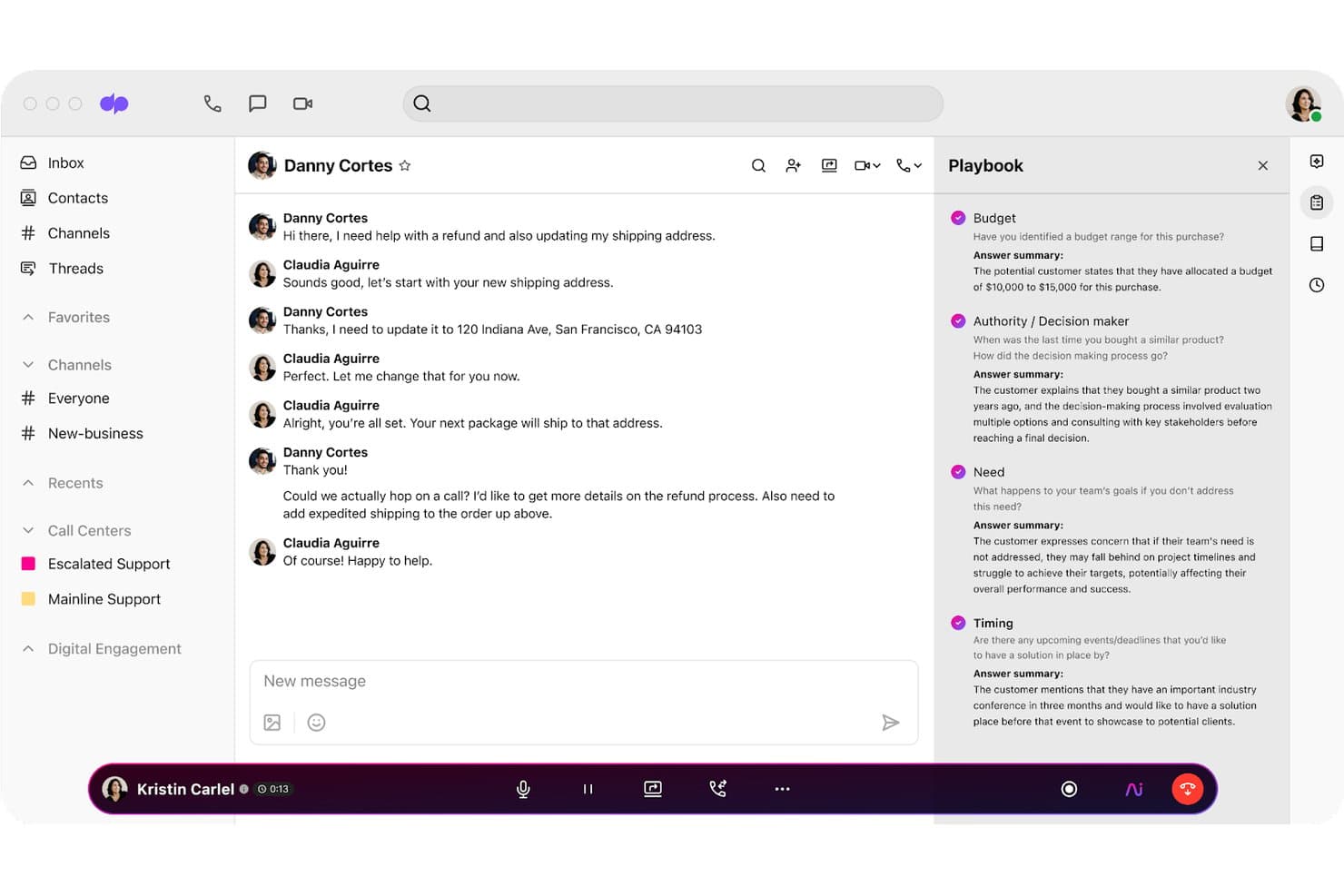
Dialpad offers an AI Playbook panel alongside live chat conversations, surfacing real-time BANT answer summaries to guide agents during customer interactions. Dialpad is an AI-native cloud communications platform that combines business calling, contact center, and messaging in one app—built for CX and support teams that need more intelligence from their phone system than basic VoIP routing can deliver.
Who Is Dialpad Best For?
Dialpad is a strong fit for mid-market customer support and inbound sales teams running distributed operations who need AI-assisted call handling without managing separate tools for each channel.
Why Dialpad Is a Good MightyCall Alternative
I picked Dialpad as one of the best because its real-time transcription runs live during the call, not after it ends, so agents can stay focused on the conversation rather than taking notes. AI Recaps then automatically surface key decisions and action items the moment a call closes. Supervisors also get live sentiment signals and automated call scoring in the same dashboard, so coaching doesn't have to wait until the next team meeting.
Dialpad Key Features
- Skill mining: Surfaces automation opportunities by analyzing historical conversation data for patterns and trends.
- Agent Studio: Lets teams design and deploy conversational AI agents using a no-code visual builder.
- Proving Ground: Offers a sandbox environment to test and refine virtual agent workflows before going live.
- Guardian governance: Monitors AI agent interactions in real time for compliance and risk controls.
Dialpad Integrations
Dialpad offers native integrations with Salesforce, HubSpot, Google Workspace, Zoho, Microsoft 365, Slack, Halo PSA, and Clio. An API is available for custom integrations.
Pros and Cons
Pros:
- Desktop, mobile, and browser calling supported
- Advanced real-time call routing options
- Live call transcription with AI Recaps
Cons:
- Maximum duration limits on meetings
- Lacks audio whisper supervisor mode
 Best for hybrid team device flexibility
- 14-day free trial + free demo
- From $30/user/month (billed annually)
Visit WebsiteCustomer Rating:4.3/5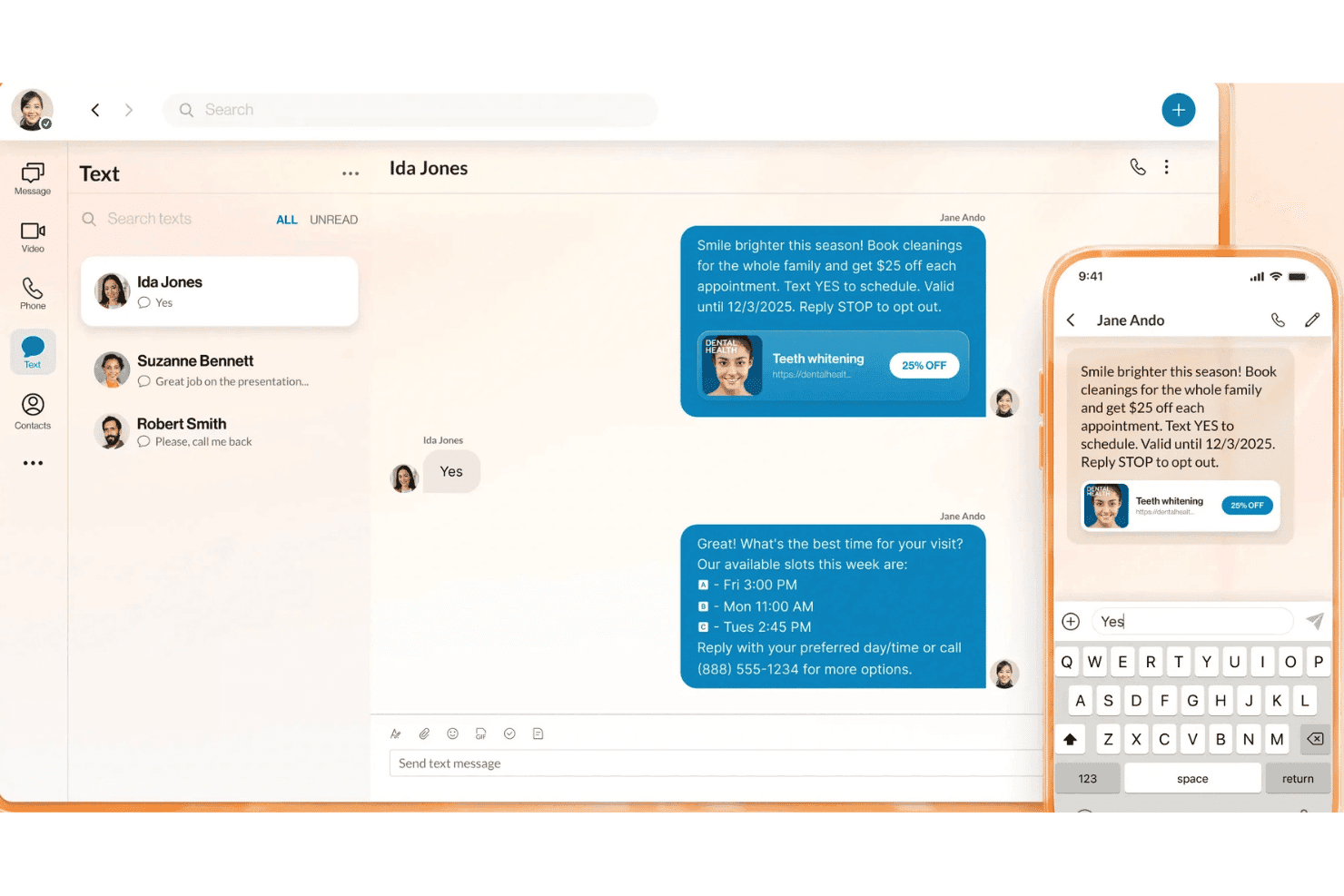
RingEx by RingCentral enables two-way SMS marketing conversations with automated scheduling replies and rich media message support. RingEX by RingCentral is a unified communications platform that combines business calling, SMS, video, and team messaging into one app for teams that need reliable, AI-powered phone service across desktop, mobile, and desk phones.
Who Is RingEX by RingCentral Best For?
RingEX is a strong fit for growing SMBs and mid-market teams that need enterprise-grade call routing, CRM integrations, and AI features without managing separate tools.
Why RingEX by RingCentral Is a Good MightyCall Alternative
I picked RingEX as one of the best MightyCall alternatives because of how it handles hybrid device setups. My team can take calls on a desk phone at the office, switch to the mobile app on the go, and pick up again on a desktop softphone, all under one business number. The BYOD support means I don't need to provision dedicated hardware for every user, and the call handoff across devices is genuinely smooth in practice.
RingEX by RingCentral Key Features
- Visual voicemail with AI transcription: Voicemails are automatically transcribed and sent to your email for quick review.
- Multi-level auto-attendant: Set up call menus and department routing without code or complex setup.
- Real-time analytics dashboard: Monitor call volume, user activity, and response times from a unified workspace.
- Native CRM integrations: Connect directly with Salesforce, HubSpot, and Zendesk to log calls and surface customer data.
RingEX by RingCentral Integrations
RingEX by RingCentral offers native integrations with Salesforce, HubSpot, Zendesk, ServiceNow, Google Workspace, Microsoft 365, and Dropbox, as well as an API for custom integrations.
Pros and Cons
Pros:
- Advanced AI-powered voicemail transcription
- Reliable global call quality and uptime
- Direct call handoff across all device types
Cons:
- Call queue setup can feel overly complex
- SMS deliverability impacted by third-party filtering
Learn more about RingEx by RingCentral: Best for sales and support automation
- 14-day free trial
- From $29/user/month (billed annually)
Visit WebsiteCustomer Rating:4.1/5
JustCall offers detailed call log filtering options including Callback, Queue, Forward, Transfer, Merge, and IVR call types within its Call Logs & Recordings interface. JustCall is a cloud-based business phone system built for customer-facing sales and support teams that need AI-powered calling, SMS automation, and deep CRM integrations in a single platform.
Who Is JustCall Best For?
JustCall fits growing SMBs and mid-market teams running high-volume outbound sales or inbound support operations who need integrated dialling, SMS, and CRM tools in one place.
Why JustCall Is a Good MightyCall Alternative
I picked JustCall as one of the best because it goes beyond basic VoIP with automation tools that work in real time, not just after the call ends. I particularly like the AI Copilot, which surfaces script compliance prompts and live objection handling cues as agents speak. The predictive dialer runs up to 10 simultaneous lines, and the AI Voice Agent handles outbound calls autonomously, logging dispositions and sending follow-up SMS without agent involvement.
JustCall Key Features
- Shared SMS inboxes: Multiple team members can manage and reply to customer texts from a unified inbox.
- Voicemail transcription: Voicemails are automatically transcribed and sent to agents for quick review.
- Native CRM integrations: Syncs call activity and contacts with platforms like HubSpot, Salesforce, and Zoho.
- Live call monitoring: Supervisors can listen in or join ongoing calls for training and quality assurance.
JustCall Integrations
JustCall offers over 100 native integrations, including HubSpot, Salesforce, Zendesk, Freshdesk, Intercom, Pipedrive, Zoho, monday.com, HighLevel, Slack, and Zapier. An API is available for custom integrations.
Pros and Cons
Pros:
- Real-time SMS, voice, and workflow automation
- Predictive dialer supports high-volume outbound calling
- AI-powered live call coaching and transcription
Cons:
- Voicemail and SMS campaign setup feels complex
- Reported call reliability issues during peak times
 Best for native CRM and helpdesk integrations
- 14-day free trial + free plan + free demo
- From $15/user/month (billed annually)
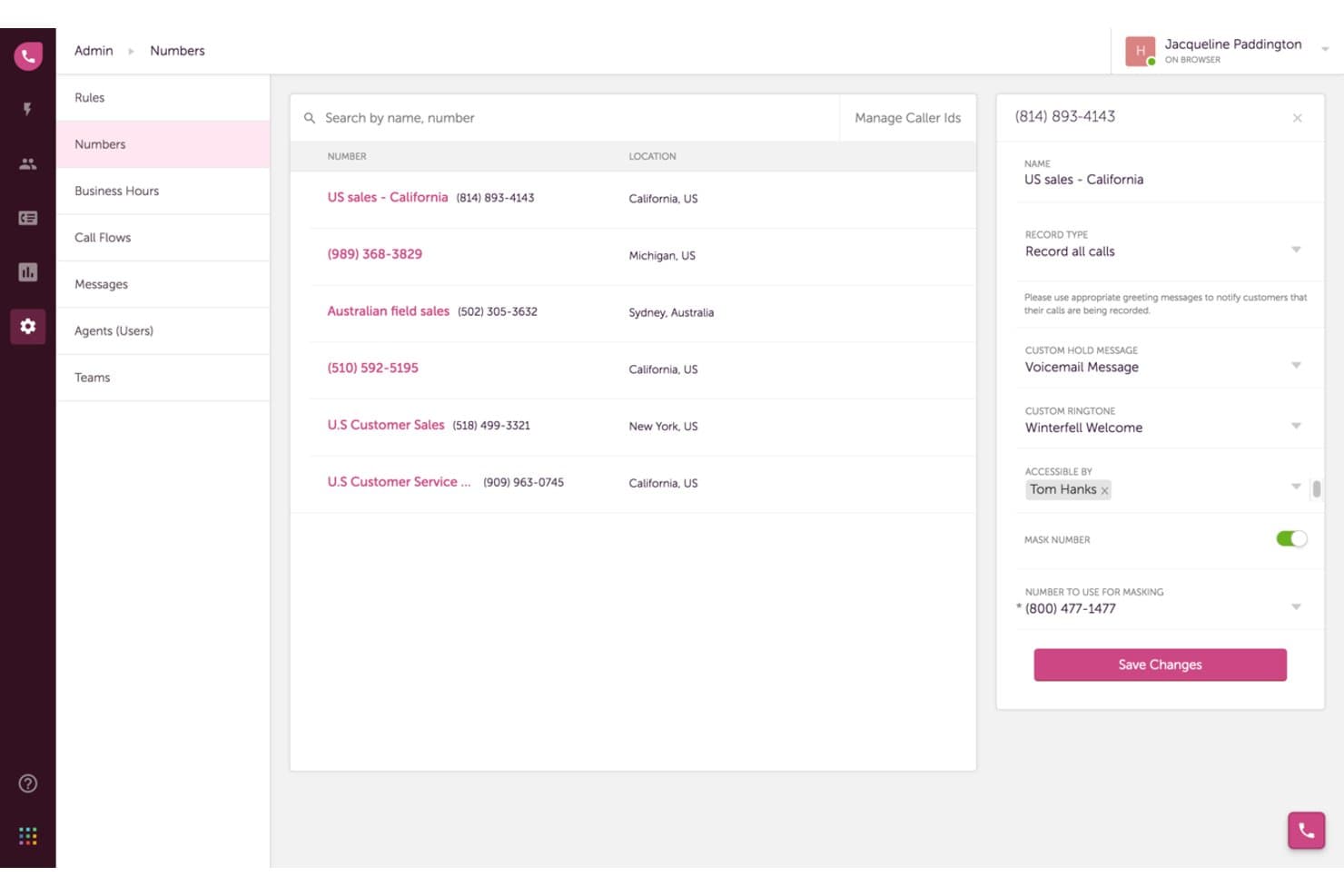
Freshworks Contact Center offers detailed phone number management with settings for call recording, custom hold messages, ringtones, number masking, and agent accessibility. Freshworks Contact Center is a cloud-based phone system built for customer support and inbound sales teams that want advanced call routing and IVR without having to stitch together separate tools to connect their phone system with their CRM or helpdesk.
Who Is Freshworks Contact Center Best For?
It's a strong fit for small to mid-sized teams already using Freshdesk or Freshsales who want their phone system built into the same ecosystem.
Why Freshworks Contact Center Is a Good MightyCall Alternative
I've included Freshworks Contact Center in my top picks because the connection between its phone system, Freshdesk, and Freshsales is genuinely built-in, not bolted on. When a call comes in, agents get a screen pop with full ticket history and CRM context without switching tabs. I also like that one-click call-to-ticket creation in Freshdesk means support leads can log and track every interaction without any manual work.
Freshworks Contact Center Key Features
- Bring your own carrier: Use existing telephony contracts by connecting your own carrier to the platform.
- Global virtual numbers: Provision local, toll-free, or international business numbers in over 90 countries.
- Advanced call monitoring: Supervisors can listen, barge, or whisper into live calls for quality assurance and training.
- Call recording and storage: Automatically record inbound and outbound calls and store recordings for later review and compliance needs.
Freshworks Contact Center Integrations
Freshworks Contact Center offers native integrations with Freshdesk, Freshsales, and other tools in the Freshworks ecosystem. An API is available for custom integrations.
Pros and Cons
Pros:
- Built-in real-time call monitoring tools
- Advanced call routing and IVR options
- Deep integration with Freshdesk and Freshsales
Cons:
- Limited support for physical desk phones
- SMS texting features are very limited
Learn more about Freshworks Contact Center:
Andre alternativer til MightyCall
Her er noen flere alternativer til MightyCall som ikke kom med på kortlisten, men som likevel er verdt å undersøke:
- 11AircallBest for collaborative call and SMS workflows
- 128x8Best for global phone number provisioning
- 13KixieBest for automated sales calling and dialing
- 14GrasshopperBest for side-by-side work and personal lines
- 15CallHippoBest for smart call forwarding rules
- 16TalkRouteBest for easy number porting from any carrier
- 17Phone.comBest for customizable call handling on a budget
- 18Ooma OfficeBest for plug-and-play small business setup
- 19Zoom PhoneBest for integrating calling with virtual meetings
- 20Google VoiceBest for businesses using Google Workspace
How I Evaluate MightyCall Alternatives
When a team needs to route calls, text customers, and log it all in their CRM, I check for those core capabilities as a baseline. Then I look at what differentiates each platform—like AI transcription or live coaching tools.
Core Functionality (Table Stakes for This List)
When I'm selecting tools for my list, I rank each one on a scale from 0 (does not offer the functionality) to 5 (excels in this area) for each core functionality listed below. Then, I calculate the tool's total score as a percentage. Each tool needs to achieve a minimum total score of 65% to be considered for inclusion.
- Virtual phone numbers: I check whether a platform offers local, toll-free, and vanity numbers with self-serve provisioning—so a support team can spin up a new line for a seasonal campaign without waiting on a rep.
- IVR and call routing: Multi-level auto-attendant menus and rules-based routing matter here. I look for things like time-of-day rules that send after-hours calls to a backup team or skills-based routing that connects billing questions to the right agents.
- Multi-device calling: Your agents should be able to pick up calls on a desktop app, mobile, or browser without losing features. I evaluate whether a platform supports mid-call handoff between devices, which is a real need for hybrid support teams.
- Voicemail and transcription: Beyond basic playback, I look for transcription quality and notification options. Platforms like Dialpad and RingEx offer AI-powered transcription, which saves agents time compared to listening to every recording.
- Business SMS and texting: Two-way texting from a business number is the baseline. I evaluate whether the platform supports shared inboxes, templates, or MMS—features that make a difference when multiple agents handle customer texts throughout the day.
- CRM and helpdesk integrations: I check for native connectors to tools like Salesforce, HubSpot, and Zendesk that log calls and surface caller context automatically. Open API access and Zapier support also factor in for teams with custom workflows.
Once I have a list of tools that meet the criteria, I consider what sets each platform apart.
Differentiating Factors (What Sets Vendors Apart)
Here's how I compare and contrast different vendors:
Standout Features
AI call intelligence is a big differentiator—I look for real-time transcription and post-call summaries that let supervisors review conversations without replaying full recordings. Live coaching tools like whisper and barge complement this well, giving team leads a way to guide agents during difficult calls. Shared SMS inboxes also stand out for teams where multiple agents handle customer texts, since assignment rules and templates keep responses consistent across the group.
Beyond Features
Pricing transparency matters a lot—I evaluate whether a vendor bundles calling and SMS into flat per-user pricing or charges per minute, which adds up fast for high-volume support teams. Call quality and uptime are just as important, so I check for published SLA commitments and carrier redundancy. For teams in regulated industries like healthcare or finance, I also look at compliance certifications like HIPAA and SOC 2, along with call recording consent controls and encrypted storage.
Hvorfor se etter et alternativ til MightyCall?
Selv om MightyCall er et godt valg av VoIP-programvare og telefontjeneste for små bedrifter, finnes det flere grunner til at enkelte brukere ser etter et alternativt bedriftsbasert telefonsystem eller en VoIP-telefonløsning fra en annen leverandør. Det kan hende du ser etter et alternativ til MightyCall fordi …
- Du trenger mer skalerbare og avanserte funksjoner, som samtaleruting, samtaleflyter og alternativer for automatisk sentralbord med IVR.
- Teamet ditt trenger dypere CRM-integrasjoner eller koblinger til brukerstøttesystemer
- Du ønsker høyere samtalekvalitet, bedre oppetid og bedre støtte for internasjonale telefonnumre
- Virksomheten din har vokst fra grunnleggende SMS-, nummervisnings- og talepostfunksjoner for den daglige forretningskommunikasjonen
- Du ser etter transparente prisplaner og prisnivåer uten uventede bruksbegrensninger eller skjulte tillegg
- Du trenger sanntidsovervåking av samtaler, direkte veiledning eller samtaleanalyse for et voksende kundestøtteteam
Hvis noe av dette høres kjent ut, har du kommet til rett sted. Listen min inneholder de beste alternativene til MightyCall blant skybaserte plattformer for forretningskommunikasjon, enhetlig kommunikasjon, kontaktsenterprogramvare og virtuelle telefonsystemer som er bedre egnet for oppstartsbedrifter som møter disse utfordringene med MightyCall og ser etter en alt-i-ett-VoIP-løsning.
Viktige funksjoner i MightyCall
Her er noen av de viktigste funksjonene i MightyCall, slik at du kan sammenligne hva alternative løsninger tilbyr:
- Virtuelle telefonnumre: Opprett lokale numre og gratisnumre umiddelbart med fleksibel nummerportering, slik at teamet ditt kan betjene kunder i nye regioner eller bruke dedikerte linjer for ulike team.
- IVR-menyer på flere nivåer: Sett opp samtaleruting og samtalekøer ved hjelp av interaktive automatiseringsmenyer som sender innringere til riktig agent i åpningstiden, forbedrer responstidene, forenkler opplæringen, reduserer læringskurven og løfter kundeopplevelsen.
- Talepost med transkripsjon: Ta vare på talemeldinger ved ubesvarte samtaler, lytt til dem når det passer deg, og få automatisk transkripsjon av talemeldinger sendt direkte til innboksen eller arbeidsområdet ditt for raskere oppfølging og sporing.
- Samtaler på mobil og datamaskin: Foreta og motta jobbsamtaler på alle enheter via mobilapp eller datamaskin med full telefonifunksjonalitet og et intuitivt, brukervennlig grensesnitt, slik at salgs- og kundestøtteteamene dine holder kontakten uansett hvor de jobber.
- Toveis tekstmeldinger for bedrifter: Send og motta SMS-meldinger ved hjelp av bedriftsnummeret ditt for å kommunisere direkte og raskt med kunder, selv når en direkte samtale, videokonferanse eller et videomøte ikke er mulig.
- Samtaleopptak: Ta opp utgående og innkommende samtaler for kvalitetssikring, opplæring og overholdelse av regelverk, og få deretter tilgang til samtaleoppsummeringer og gjennomgå opptak fra en sentral oversikt.
- Kontaktadministrasjon: Lagre, organisere og oppdatere kundeopplysninger direkte i kommunikasjonsplattformen, slik at agenter har kontekst og historikk om innringeren lett tilgjengelig for hver interaksjon og kan ivareta unike forretningsbehov.
- Verktøy for teamsamarbeid: Bruk funksjoner som viderekobling, delte talepostkasser og varm overføring, slik at teamene effektivt kan håndtere overleveringer og administrere arbeidsflyter for samtalehåndtering.
- Analyse og rapportering: Følg med på samtalevolum, ventetider, agentenes prestasjoner og sanntidsmålinger med innebygd samtaleanalyse for å overvåke tjenestenivåene i kundesenteret eller kontaktsenteret og optimalisere prosessene over tid.
- CRM-integrasjoner: Koble MightyCall til CRM-systemer, Zapier eller egendefinerte API-endepunkter for å loggføre samtaler automatisk, drive en AI-drevet oppringer og hente kundeinformasjon direkte inn i arbeidsflytene for samtaler.