

Med så mange ulike programmer for direktesamtaler på nettsteder kan det være ganske utfordrende å finne det beste alternativet. Du vil at kundene skal få svar på de spesifikke spørsmålene sine uten å måtte lete gjennom selvbetjeningsartikler eller vente på å komme i kontakt med en medarbeider på et kundesenter – og du trenger det rette verktøyet til jobben. Jeg hjelper deg! I dette innlegget gjør jeg valget enklere ved å dele mine personlige erfaringer med å evaluere dusinvis av verktøy for direktesamtaler, sammen med mine anbefalinger av den beste programvaren for direktesamtaler på nettsteder.
Why Trust Our Software Recommendations
6,700+
Reviews
20
Industry experts
16+
Evaluation factors
14
Years
Our team has been testing and reviewing software since 2012. As CX leaders ourselves, we know how difficult—and important—it is to choose the right software.
For this guide, we evaluated tools using hands-on testing and independent research, scoring tools using our selection criteria.
Our reviews reflect our human editorial judgment, not a sales pitch.
 Gui DrusinaCreative Director
 Tim FisherVP of AI
Sammenligningstabell for programvare for direktesamtaler på nettsteder
Denne sammenligningstabellen oppsummerer prisdetaljene for mine beste utvalgte programmer for direktesamtaler på nettsteder:
| Tool | Best For | Trial Info | Price | ||
|---|---|---|---|---|---|
| 1 | Best for AI-powered chat in regulated industries | 30-day free trial | From $31/agent/month (billed annually) | Website | |
| 2 | Best for AI-driven ticket routing and handoff | Free plan + free demo available | From $150/month (billed annually) | Website | |
| 3 | Best for AI-first live chat deflection | Free plan available; 14-day free trial | From $16/user/month | Website | |
| 4 | Best for omnichannel customer support | 30-day free trial | From $15/user/month (billed annually) | Website | |
| 5 | Best for large scale customer service automation | Free trial available | From $75/user/month | Website | |
| 6 | Best with easy chatbot creation from custom data | 7-day free trial + free plan + free demo available | From $32/month (billed annually) | Website | |
| 7 | Best for real-time chat automation | Free plan available | From $29/month (billed annually) | Website | |
| 8 | Best for AI-driven customer service | Free plan available; 7-day free trial | From $24.17/month (billed annually) | Website | |
| 9 | Best with customizable onboarding for large teams | 14-day free trial | From $25/user/month (billed annually) | Website | |
| 10 | Best for personalized customer messaging | 14-day free trial and free demo available | From $19/user/month (billed annually) | Website |


Anmeldelser av den beste programvaren for direktesamtaler på nettsteder
Nedenfor finner du mine detaljerte sammendrag av den beste programvaren for direktesamtaler på nettsteder som kom med på kortlisten min. Anmeldelsene mine gir et detaljert innblikk i de viktigste funksjonene, fordelene & ulempene, integrasjonene og ideelle bruksområdene for hvert verktøy, slik at du kan finne det beste alternativet for deg.
 Best for AI-powered chat in regulated industries
- 30-day free trial
- From $31/agent/month (billed annually)
Visit WebsiteCustomer Rating:4.4/5
Comm100 tracks chat and wait times with visual analytics dashboards. Comm100 is a live chat and omnichannel customer engagement platform that combines a customizable website chat widget, AI-powered automation, real-time visitor monitoring, and a unified agent inbox supporting 12+ communication channels.
Who Is Comm100 Best For?
Comm100 is a strong fit for teams in healthcare, financial services, government, and higher education that need AI-powered chat backed by enterprise-grade compliance certifications.
Why I Picked Comm100
Comm100 earns its spot on my shortlist because of how seriously it takes compliance without sacrificing AI capability. I've seen few live chat platforms match its certification stack: SOC 2 Type II, HIPAA, PCI DSS, and ISO 27001 all in one place, which matters enormously if you're supporting patients, students, or financial services clients. The AI Agent's anti-hallucination controls, which restrict responses strictly to verified knowledge sources, make it one I'd trust in regulated environments where a single wrong answer carries real risk.
Comm100 Key Features
- Real-time visitor monitoring: Tracks 30+ behavioral parameters—including browsing path, referral source, and cart value—so agents can see exactly who's on-site before starting a conversation.
- Omnichannel agent inbox: Consolidates 12+ channels (live chat, email, SMS, WhatsApp, Instagram, and more) into a single workspace so agents handle every conversation in one place.
- Skill-based chat routing: Automatically assigns and transfers chats based on agent skills, department, or visitor segment using a built-in ACD system.
- On-premise deployment: Lets organizations host the full platform—including AI—on their own infrastructure, which is rare in this category and essential for strict data residency requirements.
Comm100 Integrations
Comm100 offers native integrations with Salesforce, HubSpot, Microsoft Dynamics 365, Zendesk, ServiceNow, Shopify, Google Drive, SharePoint Online, and Confluence Cloud. It also supports REST API and webhooks for custom integrations.
Pros and Cons
Pros:
- Fully integrated with the AI suite
- Screen sharing, video and voice, and file transfer
- SOC 2 Type II, HIPAA, PCI DSS, and WCAG coverage
Cons:
- AI features might be overkill for smaller teams
- Costs can scale for more advanced features
Learn more about Comm100: Best for AI-driven ticket routing and handoff
- Free plan + free demo available
- From $150/month (billed annually)
Visit WebsiteCustomer Rating:4.5/5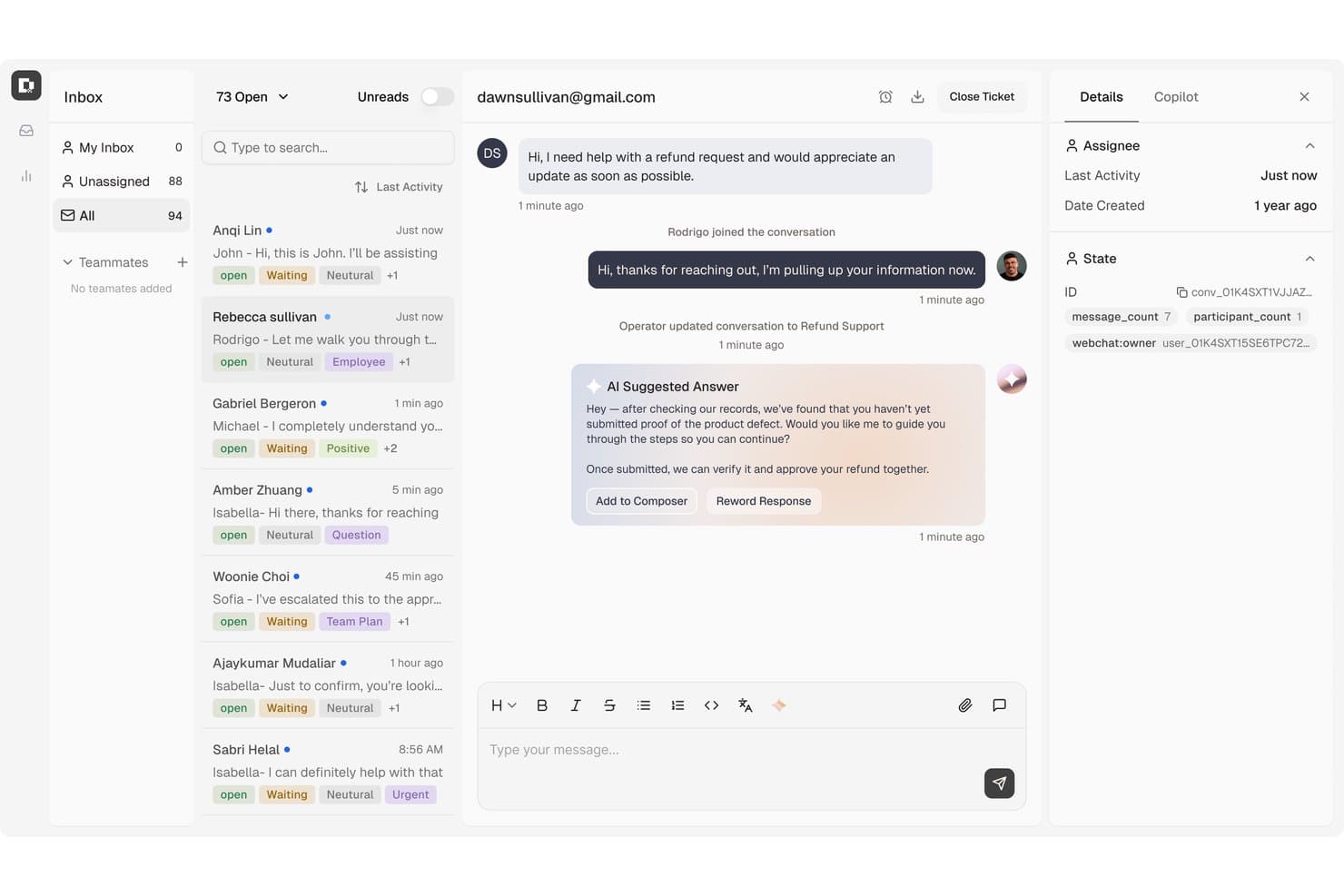
Botpress centralizes customer support tickets with AI-suggested replies. Botpress Desk is an AI-powered helpdesk and live chat platform that handles support tickets, routes conversations across webchat, email, WhatsApp, and social channels, and provides an agent workspace for human escalation and oversight.
Who Is Botpress Best For?
Botpress Desk is a strong fit for support teams that need AI to handle ticket triage, routing, and escalation across multiple channels before a human ever gets involved.
Why I Picked Botpress
I've included Botpress in my top picks because its AI-driven ticket routing is where it genuinely pulls ahead. When a conversation comes in, Botpress classifies the issue, assigns a priority, and routes it to the right team based on specialization, customer tier, and even agent language, before a human ever has to intervene. When escalation does happen, agents receive a full summary of the issue and steps already attempted, so they can pick up mid-conversation without asking the customer to repeat themselves.
Botpress Key Features
- Multi-channel inbox: Botpress Desk consolidates conversations from webchat, email, WhatsApp, Slack, Instagram, and Facebook Messenger into a single agent workspace.
- Whitelabel webchat widget: The webchat widget supports custom branding including colors, fonts, themes, avatars, and CSS-level styling adjustments.
- Zendesk and Intercom sync: Botpress connects to both platforms, syncing tickets, agents, teams, and custom fields without requiring a full migration.
- Routing analytics dashboard: A built-in dashboard tracks ticket classification accuracy, routing quality, and resolution rates across your support team.
Botpress Integrations
Botpress offers integrations with Zendesk and Intercom, plus marketplace integrations for HubSpot, Salesforce, Shopify, BigCommerce, and LiveChat. It also provides Chat, Admin, Files, Tables, and Runtime APIs, and supports Zapier.
Pros and Cons
Pros:
- Webchat supports detailed brand styling
- Reviewers praise flexible bot workflows
- AI routes chats with escalation context
Cons:
- Desk access requires a request
- Complex conversations need careful testing
Learn more about Botpress: Best for AI-first live chat deflection
- Free plan available; 14-day free trial
- From $16/user/month
Visit WebsiteCustomer Rating:4.6/5
SparrowDesk shows agents a unified live chat queue while guiding customers through AI-assisted conversations in real time. When your website chat fills up with repeat questions and impatient customers, SparrowDesk gives you a way to keep responses fast without burning out your team. It’s built for support leaders who want AI to handle the routine while agents focus on nuanced conversations in one shared inbox across live chat and email. With SparrowDesk, you can turn your website chat into a mix of instant AI answers, human support, and clear visibility into what your customers keep asking.
Why I Picked SparrowDesk
I picked SparrowDesk for because it treats your website widget as the front door to an AI-first helpdesk, not just another isolated channel. Luna, the built-in AI agent, can deflect and auto-resolve a large share of routine queries right inside chat, so your team spends more time on complex conversations instead of password resets and order updates. Your agents still work from a unified inbox that combines chat and email, with AI Copilot suggesting on-brand replies and summarizing long threads so they can move quickly without losing context.
And because live chat, shared inbox, and contact segmentation all sit in the same plan, it’s a strong fit if you want real-time conversations tightly connected to ticketing and customer history rather than bolted on as a separate tool.
SparrowDesk Key Features
In addition to its AI-led approach to live chat, SparrowDesk includes several other features that help your team handle real-time conversations at scale.
- Service Level Agreements (SLA): Establish clear response and resolution targets to ensure timely support.
- Business Hours: Define your team's working hours to manage customer expectations and ticket routing effectively.
- Quick-Action Macros: Automate common tasks with pre-set macros to increase productivity.
- Interactive Analytics: Gain insights into team performance and customer trends with real-time dashboards.
SparrowDesk Integrations
Native integrations are not currently listed by SparrowDesk. However, its platform capabilities suggest potential for custom integrations through APIs.
Pros and Cons
Pros:
- AI Copilot assists agents with smart draft suggestions.
- Multilingual support caters to a global audience.
- Omnichannel inbox centralizes communication across platforms.
Cons:
- Dependence on AI may not suit all customer service styles.
- Limited native integrations could hinder seamless connectivity.
Learn more about SparrowDesk: Best for omnichannel customer support
- 30-day free trial
- From $15/user/month (billed annually)
Visit WebsiteCustomer Rating:4.6/5
LiveAgent allows you to customize the live chat window to match the design of your website. LiveAgent is a customer support software that offers live chat functionality for websites, providing a simple and efficient way for teams to communicate with customers in real time.
Why I Picked LiveAgent: The platform stands out for its comprehensive omnichannel support, integrating live chat, ticketing, call center, social media, and knowledge base functionalities into one platform. The ability to consolidate all communication channels into a single interface makes it easier for support teams to manage and respond to customer inquiries efficiently and provide a unified customer experience.
Furthermore, the live chat feature provides real-time communication with website visitors. It includes a fast chat widget that can be easily implemented on any website. The live chat tool supports proactive chat invitations, canned responses, and chat history, enabling agents to engage with customers as quickly as possible.
Standout features & integrations:
Features include a call center, self-service customer support, reporting and analytics, multilingual support, and workflow automation. It also offers a ticketing system with automated ticket distribution, tagging, and custom fields.
Integrations include Actinic, ActiveCampaign, ChargeDesk, ClickUp, CS-Cart, Drupal, Expression Engine, Jira, Joomla, Klaus, Klaviyo, Nicereply, Opencart, Pipedrive, Post Affiliate Pro, Quriobot, Salesforce, and more.
Pros and Cons
Pros:
- Multichannel support
- Customizable interface for branding
- Advanced automation features
Cons:
- Could have more third-party integrations
- Ticket merging functionality could be improved
Learn more about LiveAgent: Best for large scale customer service automation
- Free trial available
- From $75/user/month
Visit WebsiteCustomer Rating:4.4/5
Service Cloud offers a unified service console that provides a single view of customer information, cases, and interactions. Salesforce Service Cloud is a comprehensive customer service solution designed to facilitate interactions between businesses and their customers. It is particularly adept at handling customer service needs for large organizations, with tools that enable service process automations, which streamlines workflows and improves service efficiency on a large scale.
Why I Picked Salesforce Service Cloud: I selected Salesforce Service Cloud for this list for its industry reputation and extensive features, which make it unmatched when it comes to automating large scale customer service processes. For example, Service Cloud leverages intelligent routing capabilities to automatically route customer inquiries to the most appropriate support agents or teams. It takes into account factors such as agent skills, availability, and workload to ensure efficient and effective case assignment.
Service Cloud also incorporates chatbot and artificial intelligence (AI) capabilities to automate customer interactions and provide instant support. AI-powered automation enables the system to understand customer intent, suggest relevant solutions, and provide personalized recommendations, enhancing the customer service experience.
Standout features & integrations:
Features include case management automations, SLA management, workflow and process automation, knowledge base creation tools, field service management, omni-channel support, and a unified service console.
Integrations include the wider Salesforce suite, Slack, Trello, Mailchimp, HubSpot CRM, Freshdesk, Twilio, Quickbase, Guru, and Helpshift.
Pros and Cons
Pros:
- Dynamic, intuitive user interface (UI)
- Scalable to support large organizations
- Centralizes customer interactions and data in one place
Cons:
- Dependency on other Salesforce products for maximum utility
- Complexity of features can require a learning curve
- Updates are limited and evolution is often slow
Learn more about Agentforce Service (formerly Service Cloud): Best with easy chatbot creation from custom data
- 7-day free trial + free plan + free demo available
- From $32/month (billed annually)
Visit WebsiteCustomer Rating:4.4/5
Chatbase live chat dashboard shows real customer conversations, chat logs with filters, AI response confidence scores, and detailed interaction history for website support. Chatbase is an AI-powered live chat software for websites that lets you build and deploy chatbots trained on your own data, supporting website widget integration and multilingual customer conversations.
Who Is Chatbase Best For?
Chatbase is a good fit for small to mid-sized businesses and SaaS teams that want to deploy AI chatbots on their websites without needing a developer.
Why I Picked Chatbase
Chatbase earns its spot on my shortlist because of how easy it makes building a chatbot from your own content. I've uploaded PDFs, pasted website URLs, and connected knowledge bases to create a chatbot that actually answers questions the way my team would. That's the core of what Chatbase does well: you train the bot on your specific data, and it handles customer conversations based on that context. I also like the AI agent actions feature, which lets the chatbot take steps like collecting leads or escalating to a human when it hits the edge of what it knows.
Chatbase Key Features
- Human handoff: Route conversations to a live agent when the AI reaches its limits or when the query needs a human response.
- Advanced reporting: Track conversation data, agent performance, and customer engagement through a built-in analytics dashboard.
- AI model comparison: Test and swap between different AI models to find the best configuration for your support use case.
- Omnichannel deployment: Deploy your chatbot across website chat, WhatsApp, Slack, and other channels from a single setup.
Chatbase Integrations
Chatbase offers native integrations with Make, Zendesk, Notion, Slack, Stripe, Salesforce, and more. An API is also available for custom integrations.
Pros and Cons
Pros:
- AI agent can perform lead capture actions
- Widget design fully customizable for branding
- Includes analytics to track chatbot performance
Cons:
- No built-in live agent handoff feature
- Branding removal requires highest-tier subscription
Learn more about Chatbase:

Weav shared inbox organizing support tickets by priority with filters and team assignment. Weav is an AI-powered live chat and customer support platform that combines a website chatbot widget, a unified human-and-AI inbox, and no-code agent training to handle and resolve customer queries automatically.
Who Is Weav Best For?
Weav is a good fit for small to mid-sized businesses that want to automate customer support on their website without building or maintaining complex chatbot infrastructure.
Why I Picked Weav
I've included Weav in my top picks because it lets you set up a fully automated live chat agent by simply syncing your website or uploading your support docs—no coding required. The AI trains directly on your content and starts resolving customer queries in real time through a chat widget on your site. I also like that when conversations exceed the AI's scope, Weav routes them to a human agent without any manual configuration.
Weav Key Features
- Unified inbox: Manage live chat and email conversations from a single agent dashboard.
- Response customization: Set the AI's tone, response length, and prohibited phrases for each chat interaction.
- Analytics dashboard: Track resolution rates, conversation volume, and agent activity in one view.
- REST API access: Connect Weav to external systems or build custom support flows using its API.
Weav Integrations
Weav offers native integrations with Stripe and Google Drive. It also supports custom actions, which let your AI agents call any third-party HTTPS API during a live conversation to fetch or update data in external systems. An API and real-time webhooks are available for custom integrations.
Pros and Cons
Pros:
- AI agents trained on your actual docs
- Pay-per-resolution pricing avoids per-seat costs
- Unlimited seats and AI agents included
Cons:
- No multichannel social media support yet
- Very limited native third-party integrations
Learn more about Weav: Best for AI-driven customer service
- Free plan available; 7-day free trial
- From $24.17/month (billed annually)
Visit WebsiteCustomer Rating:4.7/5
The Tidio AI Support dashboard displays analytics on conversations, resolution rates, and agent performance. Tidio is a live chat software designed to assist businesses in providing real-time customer support and boosting sales through their websites. It leverages AI to assist customer service teams in managing inquiries and support.
Why I Picked Tidio: The platform's standout feature, the Lyro AI Chatbot, can resolve customer inquiries autonomously and in multiple languages. Tidio excels as a tool for AI-driven customer service because it not only provides 24-hour support but also helps businesses scale their customer service operations with predictable costs and enhances user engagement through personalized experiences and automation.
Furthermore, the software enables businesses to manage various communication channels, including emails, live chats, and social media messages, from a single dashboard. Tidio also offers tools to track visitor activity, personalize communication, and respond quickly with features like canned responses and live typing previews.
Standout features & integrations:
Features include live chat and help desk, analytics, customizations, video calls, mobile and desktop apps, interactive customer journeys, and smart redirections.
Integrations include Shopify, WordPress, Squarespace, Weebly, WooCommerce, Google Analytics, Klaviyo, Zendesk, Salesforce, and more.
Pros and Cons
Pros:
- AI chatbot assistant
- Omnichannel communication
- Visitor tracking
Cons:
- May require additional resources to manage effectively
- Limitations with the free plan
Learn more about Tidio: Best with customizable onboarding for large teams
- 14-day free trial
- From $25/user/month (billed annually)
Visit WebsiteCustomer Rating:4.6/5
Front’s live chat lets you answer customers in real time and manage conversations alongside email and social messages in one shared inbox. Front brings together live chat, email, and other channels into a single collaborative inbox for customer-facing teams. If you’re looking for a solution that helps your team manage website conversations alongside other channels, Front offers a unified workspace with automation and integration options. It’s a strong fit for businesses that want to streamline customer communication and keep every interaction organized across departments.
Who Is Front Best For?
Front is a good fit for mid-sized to large customer support and operations teams that need to manage high volumes of website chat and other customer communications in a collaborative environment.
Why I Picked Front
For teams that need to onboard large groups quickly and effectively, Front stands out with its customizable onboarding options. I picked Front because it lets you tailor onboarding workflows, permissions, and training resources to match your team’s structure and processes. The platform supports role-based access and detailed user management, so you can set up new agents with the right tools and information from day one. This approach helps large organizations get their website live chat up and running without delays or confusion.
Front Key Features
Some other features in Front make it a strong choice for website live chat teams:
- Live chat widget: Add a customizable chat widget to your website to connect with visitors in real time.
- Shared inbox: Route and assign incoming chat messages to the right team members for faster responses.
- Omnichannel messaging: Manage conversations from email, SMS, social media, and website chat in one unified inbox.
- Analytics and reporting: Track chat volume, response times, and team performance with built-in analytics tools.
Front Integrations
Integrations include Salesforce, HubSpot, Slack, Jira, Asana, Aircall, ClickUp, FullContact, Gainsight, and Chatra.
Pros and Cons
Pros:
- Real-time analytics for chat performance tracking
- Shared inbox enables team collaboration on chats
- Supports advanced workflow automation for chat routing
Cons:
- Requires separate add-ons for SMS or WhatsApp
- No free-forever plan for small teams
Learn more about Front: 10Best for personalized customer messaging
Intercom
- 14-day free trial and free demo available
- From $19/user/month (billed annually)
Visit WebsiteCustomer Rating:4.4/5
Intercom's personalized customer messaging system offers automation capabilities, allowing businesses to set up automated messaging campaigns based on specific triggers or events. Intercom is a conversational relationship platform that excels in personalized customer messaging across various touchpoints. It allows businesses to send customized, automated messages based on user behavior, which aligns with its distinction as best for personalized customer messaging.
Why I Picked Intercom: Intercom was a definite choice for this list due to its ability to automate personalized messages based on individual behavior and preferences. Using customer data, such as behavior, demographics, or previous interactions, businesses can segment their audience and create tailored messages that resonate with specific customer segments. This targeted approach helps increase engagement and conversion rates by delivering personalized content to individual customers or defined groups.
Intercom also provides detailed analytics and reporting on message performance. Businesses can track metrics such as open rates, click-through rates, conversion rates, and customer engagement with the messages sent through the platform.
Standout features & integrations:
Features include behavioral targeting, customer segmentation, live chat and conversational support, in-app messaging and an automated messaging platform.
It integrates well with Slack, HubSpot, Salesforce, and other tools, allowing smooth workflows and increased productivity.
Pros and Cons
Pros:
- HIPAA compliance makes the platform ideal for medical professionals
- Attractive and intuitive user interface
- Software is updated frequently to meet customer expectations
Cons:
- Limited user support
- Advanced features come at an extra cost.
- Limited searchability
Annen programvare for direktesamtaler på nettsteder
Her er noen andre alternativer for programvare for direktesamtaler på nettsteder som ikke kom med på kortlisten min, men som likevel er verdt å se nærmere på:
- 11DriftBest for conversational marketing
- 12HubSpot Service HubBest for integrating with a comprehensive CRM
- 13SprinklrBest for social media customer engagement
- 14CrescendoBest for AI coaching integrated into customer chats
- 15Zendesk Support SuiteBest for centralized inquiry management
- 16Zoho DeskBest for integration with other Zoho products
- 17GladlyBest for unified customer communication
- 18QualifiedBest for website visitor identification
- 1914.aiBest intent-aware response engine
- 20SwiftCXBest for live AI assistance for customer chats
- 21HiverBest for managing high query volumes
- 22BirdeyeBest for customer feedback and reputation management
- 23LiveChatBest for custom-branded chats
- 24NextivaBest for voice-driven customer service
- 25Alhena AIBest for quick deployment and higher accuracy
- 26FreshdeskBest for a multi-channel customer support solution
- 27LivePersonBest for automating customer engagement with AI-powered chatbots
- 28SmartsuppBest for video recordings of customer activities on your website
- 29FreshchatBest for proactive customer engagement through live chat
- 30Help ScoutBest for small businesses looking for simple customer support software.
- 31UJETBest for providing a modern consumer support experience
- 32Re:amazeBest for centralizing customer communications from multiple channels
- 33VerloopBest for automated customer support and sales
- 34GorgiasBest for e-commerce customer support integration
- 35Genesys Cloud CXBest for personalized customer experiences across all channels
How I Evaluate Live Chat Software for Websites
I split my evaluation into baseline capabilities—real-time chat, routing, and proactive triggers—and the differentiators that separate tools worth recommending from those that fall short.
Core Functionality (Table Stakes For This List)
When I'm selecting tools for my list, I rank each one on a scale from 0 (does not offer the functionality) to 5 (excels in this area) for each core functionality listed below. Then, I calculate the tool's total score into a percentage. Each tool needs to achieve a minimum total score of 75% to be considered for inclusion.
- Real-Time Chat Widget: I evaluate how well the widget handles branding, pre-chat forms, file sharing, and mobile responsiveness so visitors get a consistent experience across devices.
- Agent Workspace & Inbox: A good workspace shows visitor details, chat history, and tags at a glance. I look for multi-chat handling and internal notes for agent collaboration.
- Routing & Assignment: I check whether chats route by department, skill, or availability. For example, billing questions should reach your payments team, not general support.
- Proactive Chat Triggers: Trigger setup matters. I look for behavior-based conditions like cart page dwell time or repeat visits that let your team engage visitors before they drop off.
- Chatbot & Automation: Whether it's a rule-based flow or an AI-powered bot, I evaluate how well automated responses handle FAQs and hand off to live agents when needed.
- CRM & Helpdesk Integrations: Chat data needs to flow into your existing stack. I check for native connections to platforms like Salesforce, HubSpot, Zendesk, and Freshdesk.
Once I have a list of tools that meet this criteria, I consider what sets each platform apart.
Differentiating Factors (What Sets Vendors Apart)
Here's how I compare and contrast different vendors:
Standout Features
Omnichannel messaging is a major differentiator. When a customer starts on website chat and follows up over WhatsApp, agents need the full conversation history in one inbox. I also evaluate AI reply assistance—tools that suggest responses or summarize long threads help agents handle higher volumes without dropping quality. Knowledge base integration matters, too. The best setups surface relevant help articles inside chat and bot flows, letting customers self-serve before an agent ever steps in.
Beyond Features
Pricing structure matters a lot here. Per-agent pricing can balloon quickly for growing teams, so I evaluate whether vendors offer volume-based or conversation-based models as alternatives. Security and compliance also weigh heavily—teams handling payment or health data need GDPR, HIPAA, or PCI-DSS coverage, plus SOC 2 certification. I also consider time-to-value. A tool with CMS plugins for Shopify or WordPress and pre-built bot templates gets your team live faster than one requiring heavy developer involvement.
Slik velger du programvare for direktesamtaler på nettsteder
Det er lett å gå seg vill i lange funksjonslister og kompliserte prisstrukturer. For å hjelpe deg med å holde fokus mens du går gjennom den unike prosessen din for valg av programvare, får du her en sjekkliste over faktorer du bør ha i bakhodet:
| Faktor | Hva du bør vurdere |
|---|---|
| FaktorSkalerbarhet | Hva du bør vurdereVil programvaren vokse sammen med virksomheten din? Vurder antallet brukere, mengden chatter og fremtidig ekspansjon. Se etter verktøy som håndterer økt etterspørsel uten ekstra kostnader. |
| FaktorIntegrasjoner | Hva du bør vurdereKobles den til de eksisterende systemene dine? Sørg for kompatibilitet med CRM, e-post og andre verktøy teamet ditt bruker daglig. Unngå verktøy som krever kompliserte omveier. |
| FaktorTilpasningsmuligheter | Hva du bør vurdereKan du tilpasse programvaren etter behovene dine? Sjekk om du kan justere chatmoduler, arbeidsflyter og brukertillatelser slik at de passer til prosessene dine. |
| FaktorBrukervennlighet | Hva du bør vurdereEr grensesnittet intuitivt for teamet ditt? Velg programvare som minimerer opplæringstiden og reduserer læringskurven for nye brukere. |
| FaktorImplementering og opplæring | Hva du bør vurdereHvor lang tid tar det å komme i gang? Velg et verktøy med tydelige ressurser for opplæring, raskt oppsett og støtte i overgangsfasen. |
| FaktorKostnad | Hva du bør vurderePasser prisen inn i budsjettet ditt? Sammenlign kostnadene med funksjonene som tilbys. Vurder de totale eierkostnadene, inkludert skjulte gebyrer og tillegg. |
| FaktorSikkerhetstiltak | Hva du bør vurdereEr dataene og kundeinteraksjonene dine sikre? Kontroller at løsningen overholder standarder for databeskyttelse, og se etter kryptering og personvernfunksjoner. |
| FaktorTilgjengelig kundestøtte | Hva du bør vurdereEr hjelp tilgjengelig når du trenger det? Se etter alternativer med kundestøtte døgnet rundt, responstider og mulighet for dedikerte kundeansvarlige. |
Hva er programvare for direktesamtaler på nettsteder?
Livechat-programvare for nettsteder er et verktøy som muliggjør kommunikasjon i sanntid mellom virksomheter og besøkende på nettstedet deres. Kundestøtteteam, salgsteam og markedsførere bruker vanligvis disse verktøyene til å engasjere besøkende, besvare spørsmål og konvertere potensielle kunder. Funksjoner som chatmoduler, automatiserte svar og integrasjonsmuligheter bidrar til kundeinteraksjon, effektiv kommunikasjon og sømløs arbeidsflytintegrasjon. Alt i alt forbedrer disse verktøyene kundeengasjementet og tjenesteleveransen.
Funksjoner
Når du velger livechat-programvare for nettsteder, bør du se etter følgende viktige funksjoner:
- Kommunikasjon i sanntid: Muliggjør umiddelbar interaksjon med besøkende, noe som øker kundeengasjementet og kundetilfredsheten.
- Chatmoduler: Tilpasningsbare grensesnitt som samsvarer med merkevaren din og integreres sømløst på nettstedet ditt.
- Automatiserte svar: Gir raske svar på vanlige spørsmål, slik at teamet ditt får mer tid til å håndtere komplekse henvendelser.
- Sporing av besøkende: Overvåker brukeratferd på nettstedet ditt og gjør det enklere å tilpasse interaksjoner basert på de besøkendes interesser.
- Integrasjonsmuligheter: Kobler seg til CRM, e-post og andre verktøy for å effektivisere arbeidsflyter og datahåndtering.
- Chatlogg og utskrifter: Tar vare på oppføringer over tidligere interaksjoner for å gi kontekst og forbedre fremtidig kommunikasjon.
- KI-drevne chatboter: Automatiserer samtaler og håndterer henvendelser når teamet ditt ikke er tilgjengelig, slik at du sikrer engasjement døgnet rundt.
- Støtte for flere kanaler: Håndterer kommunikasjon på tvers av flere plattformer, inkludert sosiale medier og e-post, fra ett grensesnitt.
- Videochat: Tilbyr muligheter for ansikt-til-ansikt-interaksjon for mer personlig kundeservice.
- Sikkerhetstiltak: Beskytter data og sikrer samsvar med personvernstandarder, slik at interaksjonene holdes sikre.
Fordeler
Implementering av livechat-programvare for nettsteder gir flere fordeler for teamet og virksomheten din. Her er noen av fordelene du kan se frem til:
- Forbedret kundeengasjement: Kommunikasjon i sanntid holder besøkende engasjert og gjør det mer sannsynlig at de blir kunder.
- Økt effektivitet: Automatiserte svar og KI-drevne chatboter håndterer rutinemessige henvendelser, slik at teamet ditt får mer tid til komplekse saker.
- Forbedret kundeservice: Chatlogg og utskrifter gir kontekst, noe som muliggjør mer personlig og effektiv støtte.
- Bedre dataintegrasjon: Integrasjonsmuligheter sikrer jevn dataflyt mellom chatprogramvaren og eksisterende systemer som CRM.
- Tilgjengelighet døgnet rundt: Støtte for flere kanaler og chatboter sørger for at virksomheten din alltid er tilgjengelig for å hjelpe kunder, uavhengig av tidssoner.
- Kostnadseffektiv støtte: Reduserer behovet for et stort kundestøtteteam ved å automatisere mange kundeinteraksjoner.
- Personlig tilpassede interaksjoner: Sporing av besøkende og tilpasningsbare chatmoduler gjør det mulig å skreddersy opplevelsen etter hver besøkendes behov.
Kostnader og priser
Valg av livechat-programvare for nettsteder krever en forståelse av de ulike prismodellene og abonnementene som er tilgjengelige. Prisene varierer fra gratis livechat-verktøy til betalte alternativer, og kostnadene varierer basert på funksjoner, teamstørrelse, tillegg og mer. Tabellen nedenfor oppsummerer vanlige abonnementer, gjennomsnittsprisene deres og typiske funksjoner som inngår i løsninger for livechat-programvare for nettsteder:
Sammenligningstabell for abonnementer for livechat-programvare for nettsteder
| Abonnementstype | Gjennomsnittspris | Vanlige funksjoner |
|---|---|---|
| AbonnementstypeGratisabonnement | Gjennomsnittspris$0 | Vanlige funksjonerGrunnleggende chatfunksjonalitet, begrensede integrasjoner og standardstøtte. |
| AbonnementstypePersonlig abonnement | Gjennomsnittspris$5-$25/bruker/måned | Vanlige funksjonerUbegrenset chatlogg, tilpasningsbare chatmoduler og grunnleggende rapportering. |
| AbonnementstypeBedriftsabonnement | Gjennomsnittspris$30-$60/bruker/måned | Vanlige funksjonerAvansert analyse, automatiseringsverktøy og støtte for flere kanaler. |
| AbonnementstypeVirksomhetsabonnement | Gjennomsnittspris$70+/bruker/måned | Vanlige funksjonerKI-drevne chatboter, full CRM-integrasjon og dedikert kontoadministrasjon. |
Vanlige spørsmål om programvare for direktechat på nettsteder
Her er svar på vanlige spørsmål om programvare for direktechat på nettsteder:
Hvordan vet jeg om programvare for direktechat passer for virksomheten min?
Ja, programvare for direktechat kan være nyttig for de fleste virksomheter, særlig de som har en tilstedeværelse på nettet. Vurder behovene dine for kundedialog og hvordan kommunikasjon i sanntid kan forbedre service og salg. Hvis du har et nettsted og kundene ofte stiller spørsmål eller trenger hjelp, kan programvare for direktechat øke engasjementet og tilfredsheten.
Er det vanskelig å konfigurere programvare for direktechat?
Nei, det er vanligvis enkelt å konfigurere programvare for direktechat. De fleste leverandører tilbyr brukervennlige grensesnitt og ressurser som veiledninger og guider for å hjelpe deg i gang. Avhengig av hvor komplekst nettstedet og behovene dine er, kan det hende du bare trenger minimal teknisk hjelp. Se etter programvare med god støtte under oppstarten for å gjøre prosessen enklere.
Hvordan kan programvare for direktechat påvirke teamets produktivitet?
Programvare for direktechat kan øke produktiviteten ved å automatisere rutinemessige henvendelser og la teamet fokusere på komplekse saker. Funksjoner som chatboter og automatiske svar reduserer svartiden og forbedrer effektiviteten. Ved å håndtere flere samtaler samtidig kan teamet betjene flere kunder på kortere tid.