

10 Best Free Live Chat Software in 2026

Best Free Live Chat Software Shortlist


Free live chat software lets your team chat with website visitors in real time using a chat widget or chat box without paying for a subscription. If you’re searching for the best live chat software that doesn’t cost a thing, you probably want to improve customer support, modernize customer interactions, help customers get answers fast, or test a live chat solution before you commit. This list gives you a closer look at the top free live chat tools and live chat apps available in 2026, and how they fit different business needs—so you can optimize your user experience and make a confident pick that suits your team’s goals and budget.
Why Trust Our Software Recommendations
Our team has been testing and reviewing software since 2012. As CX leaders ourselves, we know how difficult—and important—it is to choose the right software.
For this guide, we evaluated tools using hands-on testing and independent research, scoring tools using our selection criteria.
Our reviews reflect our human editorial judgment, not a sales pitch.
Free Live Chat Software Comparison Table
This comparison table summarizes pricing details for my top free live chat software selections:
| Tool | Best For | Trial Info | Price | ||
|---|---|---|---|---|---|
| 1 | Best for Shopify store customer chats | Free plan available; 7-day free trial | From $24.17/month (billed annually) | Website | |
| 2 | Best for lead capture with pre-chat forms | 15-day free trial + free plan available + free demo | From $39.99/operator/month (billed annually) | Website | |
| 3 | Best for real-time team visibility in live chat | 10-day free trial + free plan available | From $25/agent/month (billed annually) | Website | |
| 4 | Best for built-in help center | 14-day free trial + free plan available | From $45/month | Website | |
| 5 | Best for simple multichannel chat for small teams | 14-day free trial + free plan available | From $29/month (billed annually) | Website | |
| 6 | Best open-source platform with self-hosting | 15-day free trial + free plan available | From $19/agent/month (billed annually) | Website | |
| 7 | Best for unlimited agent seats without cost | Free plan available | From $29/month | Website | |
| 8 | Best all-in-one suite with CRM features | Free plan + 15-day free trial + free demo available | From $49/organization/month (billed annually) | Website | |
| 9 | Best for omnichannel chat with built-in calling | 14-day free trial + free plan available | From $28/agent/month (billed annually) | Website | |
| 10 | Best Microsoft Teams integration for live chat | 14-day free trial + free demo available | From $21/month (billed annually) | Website |
Free Live Chat Software Reviews
Below are my detailed summaries of the free live chat software that made it onto my shortlist. My reviews offer a detailed look at the functionality, advanced features, best use cases, and integrations of each live chat tool to help you find the best one for you.

Tidio
Best for Shopify store customer chats
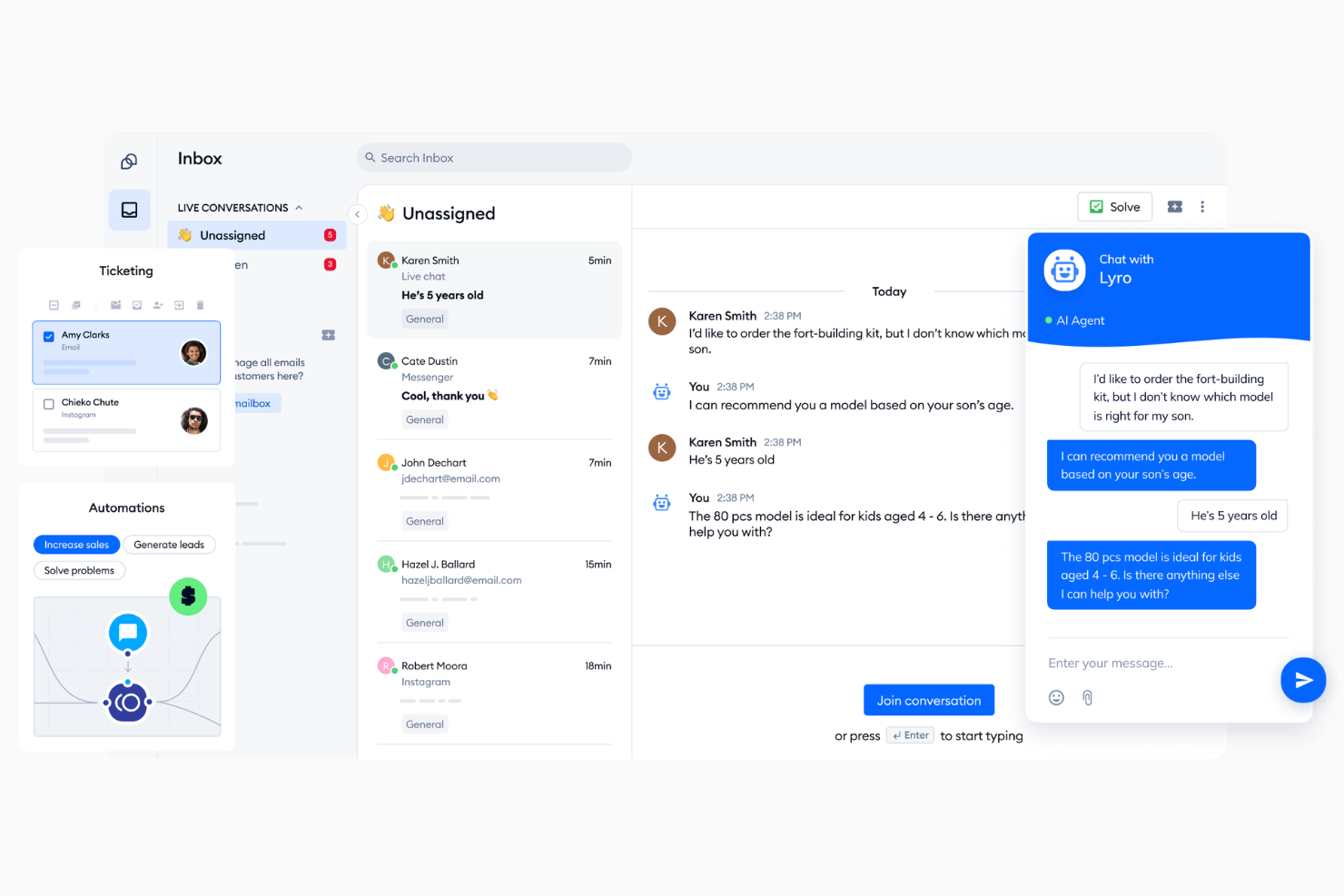
Tidio is a live chat and AI chatbot platform that combines a customizable chat widget, behaviour-based automation, and an omnichannel inbox to manage customer conversations across chat, email, and social media channels.
Who Is Tidio Best For?
Tidio is a strong fit for small to mid-sized ecommerce businesses that need a free, easy-to-deploy chat solution with built-in automation.
Why I Picked Tidio
I picked Tidio as one of the best because of how deeply it integrates with Shopify. I can see a customer's cart contents and full order history directly inside the inbox, which means I can recommend products or resolve shipping questions without switching tabs. I'm also able to cancel orders, issue refunds, and update shipping addresses from the same dashboard. Those Shopify-native actions inside the support inbox are genuinely hard to find in a free chat tool.
Tidio Key Features
- Lyro AI agent: An AI-powered bot that automatically handles customer questions using your support content.
- Flows builder: A no-code, drag-and-drop chatbot editor with 40+ pre-built templates for automating common chat scenarios.
- Live visitors list: A real-time view of every active visitor on your site, including the pages they're browsing.
- Omnichannel inbox: A unified inbox that pulls in messages from live chat, email, Instagram, WhatsApp, and Messenger.
Tidio Integrations
Integrations include Instagram, Messenger (Meta), Shopify, WhatsApp, WordPress, Zapier, Zendesk, ActiveCampaign, Adobe Commerce, and Agile CRM.
What's Free?
Tidio offers a free-forever plan that includes 50 billable conversations per month, up to 10 agent seats, and 100 Flows visitors reached. You also get a one-time allotment of 50 Lyro AI conversations, though that limit doesn't refresh unless you upgrade to a paid Lyro plan.
Pros and Cons
Pros:
- Lyro AI answers from your help docs
- Shopify order data visible inside chats
- Visual chatbot Flows builder included free
Cons:
- Analytics reporting lacks granular details
- Caps human operator seats at 10 on main plans

Best for lead capture with pre-chat forms
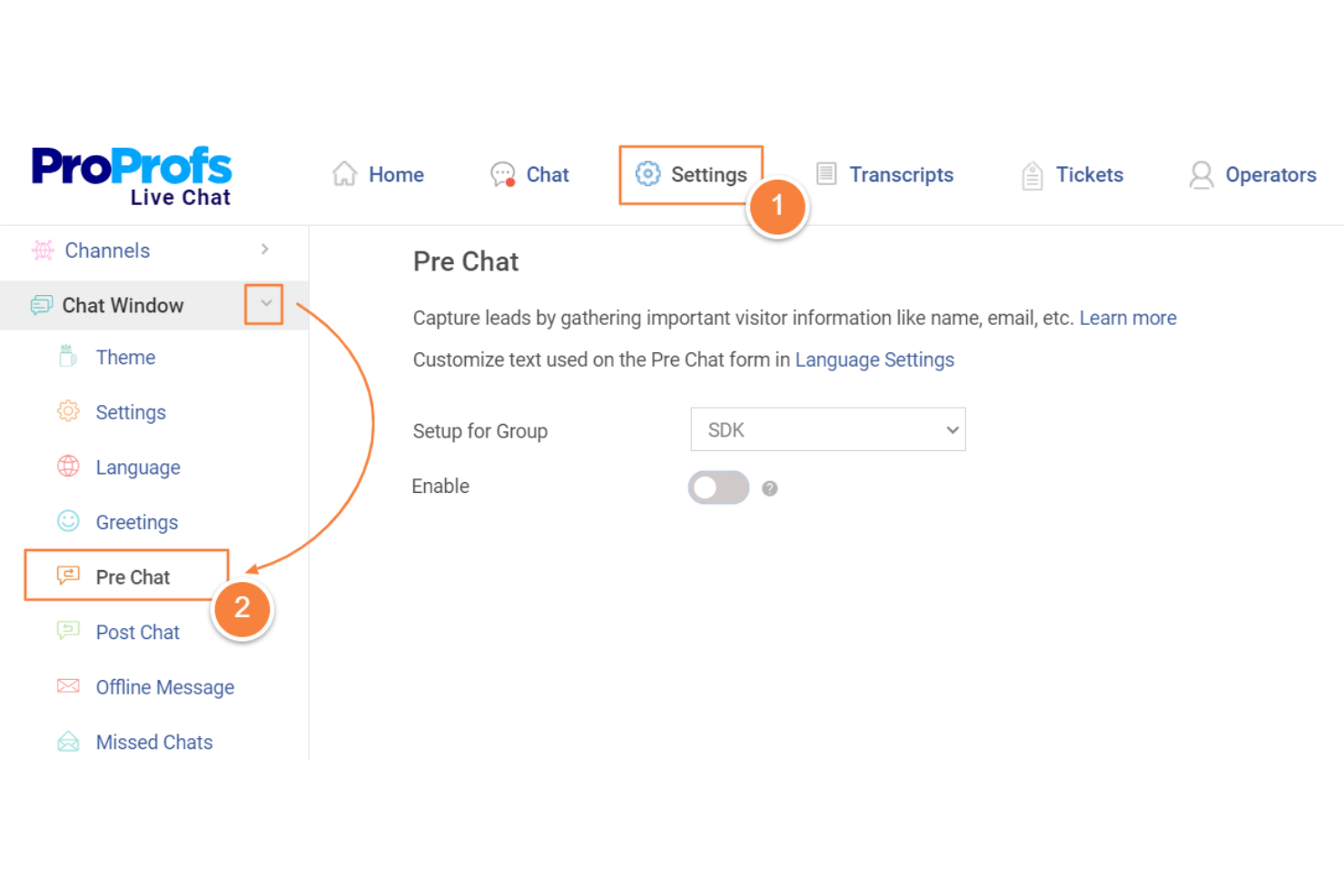
ProProfs Chat is a live chat software solution that lets you add chat to your website, capture visitor details with custom forms, manage multiple chats at once, and automate responses with chatbots.
Who Is ProProfs Chat Best For?
ProProfs Chat is a good fit for small to midsize businesses that need to capture leads and engage website visitors directly in real time.
Why I Picked ProProfs Chat
I chose ProProfs Chat because its pre-chat forms are easy to customize, helping my team grab lead info before the chat even begins. I can use simple rules to set up different questions for different visitors, making the forms feel more personal and relevant. Also, the automated lead routing sends every lead straight to the right team member, so we don't have to sort through them ourselves.
ProProfs Chat Key Features
- Chat transcripts and history: See past conversations directly from the dashboard for easy follow-up.
- Saved responses: Set up predefined replies for common questions to save typing time.
- Visitor monitoring: Track real-time visitor activity, including pages viewed and time spent on site.
- Chatbot builder: Design and deploy AI-powered chatbots to answer questions and assist visitors automatically.
ProProfs Chat Integrations
Integrations include WordPress, Shopify, Salesforce, Zoho CRM, Wix, Adobe Commerce, Mailchimp, BigCommerce, Drupal, and Microsoft Dynamics CRM.
What's Free?
ProProfs Chat offers a free-forever plan that supports one operator with unlimited chat history. Advanced features like social media integrations, AI chatbot automation, and multiple branding require paid plans.
Pros and Cons
Pros:
- Post-chat surveys for instant feedback
- Customizable pre-chat forms for leads
- Ready-to-use templates for common queries
Cons:
- Limited options for automated routing
- No social media messaging support
Chatra
Best for real-time team visibility in live chat
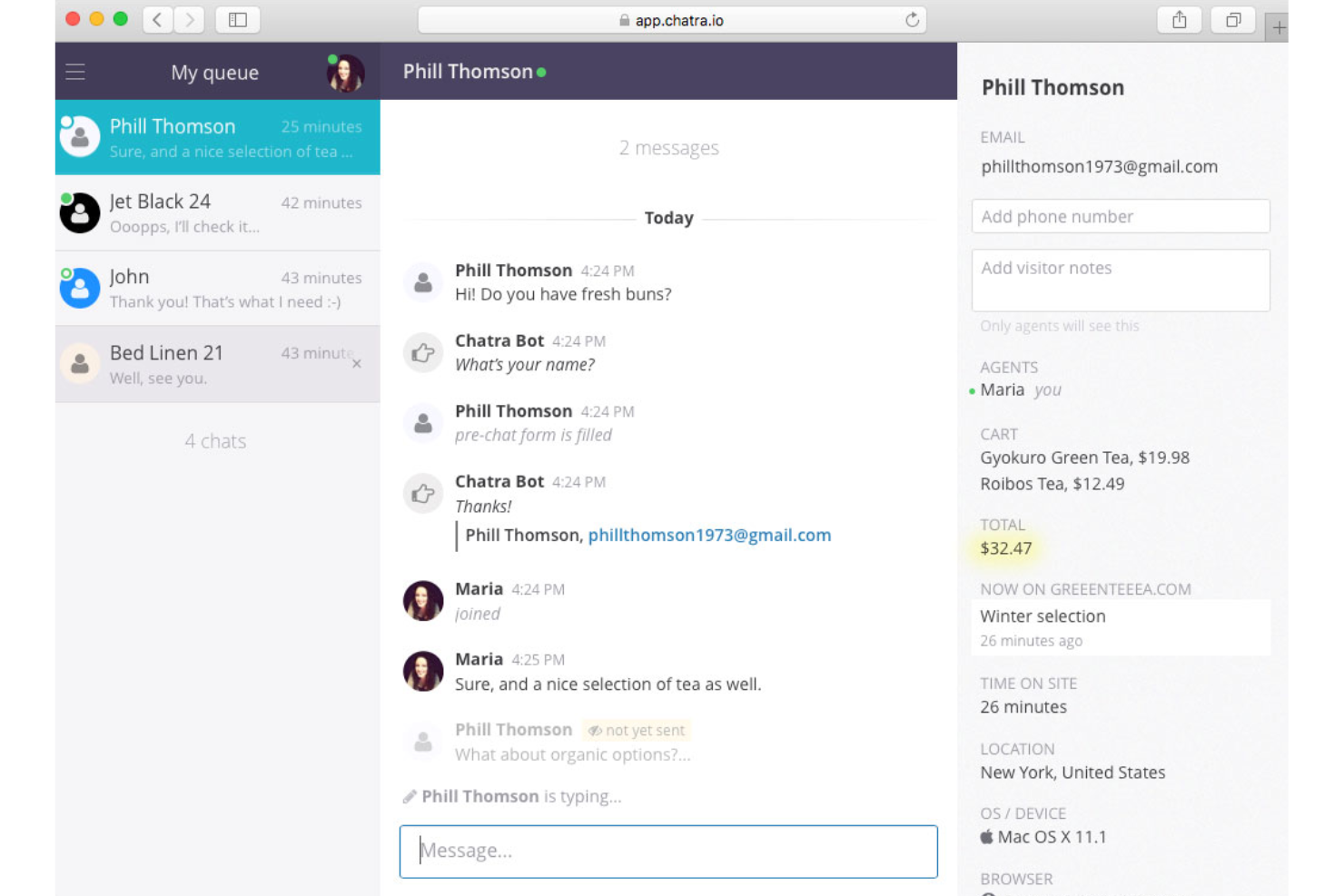
Chatra is a live chat software for websites that lets your team use private and group chats, see which agents are online, and lets visitors leave messages when agents are unavailable.
Who Is Chatra Best For?
Chatra is a solid choice for small to midsize teams that want collaborative live chat and quick team insights for web-based customer support.
Why I Picked Chatra
I picked Chatra as one of the best because it gives my team real-time visibility into who’s online and which teammates are actively engaged in chats. I find the agent-to-agent chat and group chat features make complex customer issues easier to resolve. I use the team presence indicators to manage agent workload and make sure no chats go unanswered.
Chatra Key Features
- Widget customization: Adjust colour schemes, chat position, and language settings for your website.
- Offline messaging: Allows visitors to leave messages when no agents are available.
- Typing insights: See what visitors are typing before they hit send.
- Multi-channel support: Respond to messages from Facebook and email within one dashboard.
Chatra Integrations
Integrations include WordPress, Shopify, WooCommerce, BigCommerce, Slack, Help Scout, and Zapier.
What's Free?
Chatra offers a free-forever plan for one agent with basic live chat features. Group chat, automation, and advanced integrations require paid plans.
Pros and Cons
Pros:
- Group chat for complex problems
- Intelligent routing to specific departments
- Typing previews of customer messages
Cons:
- Basic analytics for small teams
- Limited third-party app directory

Crisp
Best for built-in help center
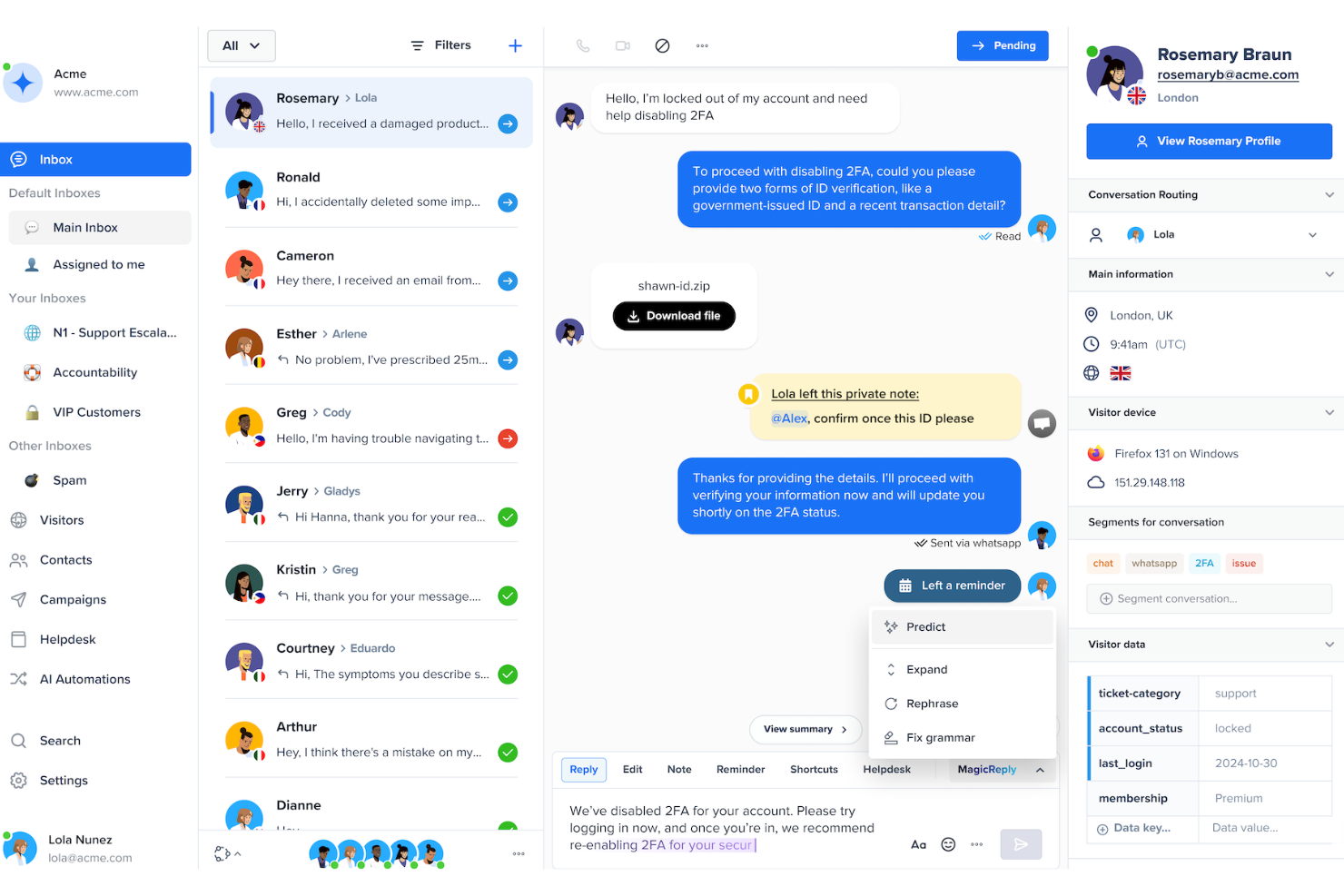
Crisp is a live chat software solution that combines real-time chat, chatbot automation, omnichannel messaging, a built-in knowledge base, and shared inbox functionality.
Who Is Crisp Best For?
Crisp is a good fit for small to midsize businesses that want to unify live chat, help center, and automated messaging within a single platform.
Why I Picked Crisp
I picked Crisp because it combines live chat, help center, and workflow automation in one place. My team uses its knowledge base for self-service while routing complex customer interactions to agents. The AI chatbots handle repetitive queries so the support team can focus on higher-value conversations.
Crisp Key Features
- Multi-channel inbox: Manage chats from email, Messenger, Instagram, and SMS alongside live chat in one dashboard.
- Co-browsing: View visitors’ screens and guide them through troubleshooting in real time.
- Visitor timeline: See a visitor’s past interaction and activity while you chat.
- Typing preview: View what visitors are typing before they hit send for faster response preparation.
Crisp Integrations
Integrations include Slack, HubSpot, Zapier, Shopify, WordPress, Facebook Messenger, Instagram, Twilio SMS, Telegram, and Salesforce.
What's Free?
Crisp offers a free-forever plan with up to 2 agent seats and unlimited conversations. The free plan includes basic live chat, shared inbox, mobile and desktop apps, with some integrations limited to paid plans.
Pros and Cons
Pros:
- Easy-to-use interface
- Supports co-browsing and screen sharing
- Combines live chat and help center
Cons:
- No built-in video call
- High price jump for automation

Chaport
Best for simple multichannel chat for small teams
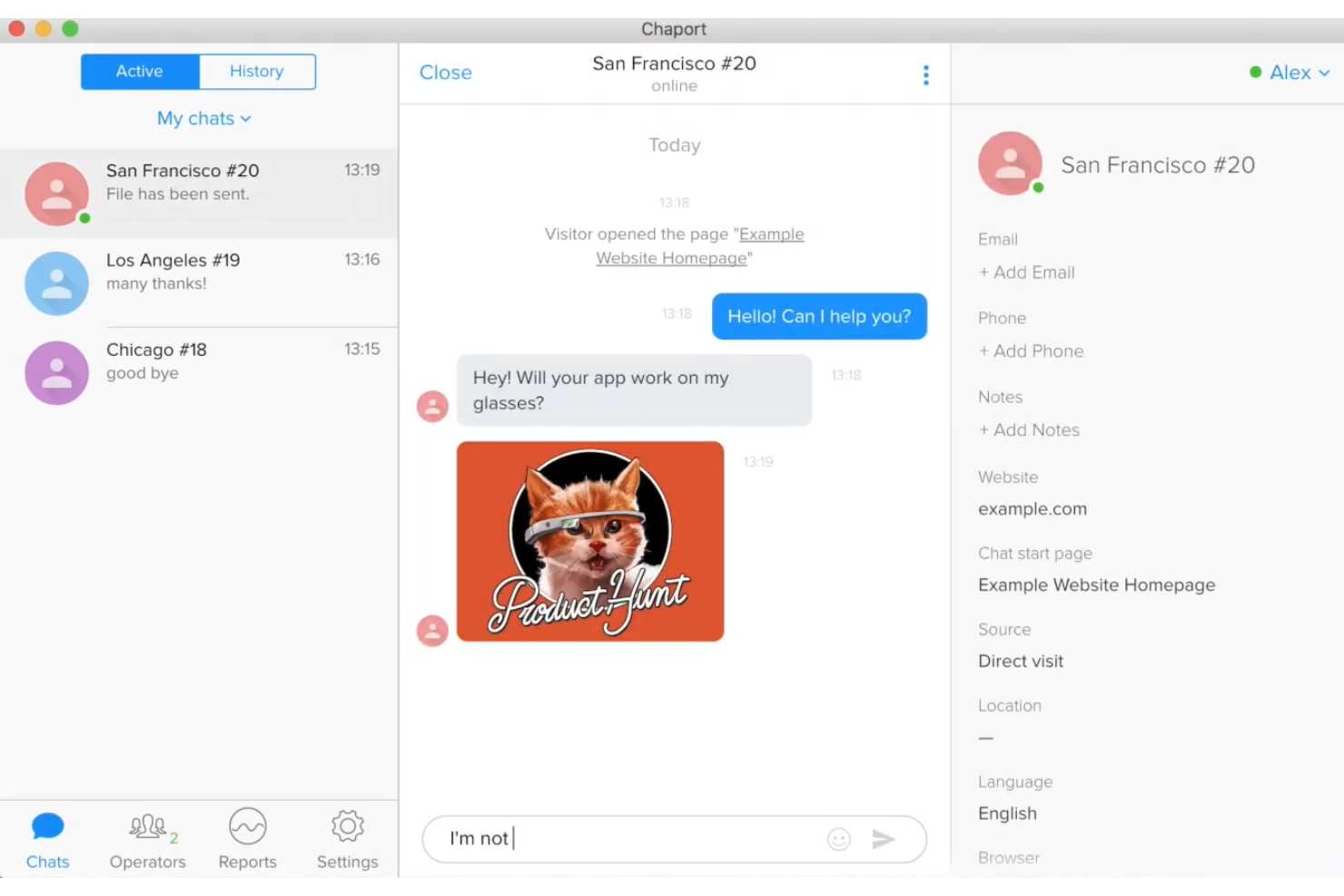
Chaport is a simple live chat software for small teams that brings together website chat, social media messaging, chatbot automation, and knowledge base management in one user-friendly dashboard.
Who Is Chaport Best For?
Chaport is a good fit for small businesses, startups, and customer support teams who want an easy way to handle customer conversations across multiple channels.
Why I Picked Chaport
I picked Chaport as one of the best live chat apps because it's one of the only live chat tools where my team can cover web chat, Facebook, and Telegram from a single dashboard. I like how it includes AI chatbots and a searchable knowledge base, which helps improve customer interactions without overwhelming the support team.
Chaport Key Features
- Knowledge base: Create help articles and FAQs to reduce incoming chat volume.
- Pre-chat forms: Gather customer data before starting a chat session.
- Visitor typing insights: See what visitors are typing in real time before they hit send.
- Offline messaging: Capture and manage messages when no agents are online.
Chaport Integrations
Integrations include Facebook, Telegram, Viber, WordPress, Joomla!, Shopify, Google Analytics, Bubble, and Zapier.
What's Free?
Chaport offers a free-forever plan with unlimited chats and websites. The free plan includes basic live chat tools and a 60-day chat history, with restrictions on advanced widget customization and integrations.
Pros and Cons
Pros:
- Unified inbox for multiple websites
- Automatic chat invites based on behaviour
- Supports visitor information preview
Cons:
- No built-in voice or video calling
- Limited reporting in the free plan

Chatwoot
Best open-source platform with self-hosting

Chatwoot is an open-source live chat platform that lets you manage customer conversations across website chat, email, social media, and messaging platforms with collaborative team inbox features.
Who Is Chatwoot Best For?
Chatwoot is a strong fit for technical teams or companies seeking a fully open-source, self-hosted live chat and omnichannel inbox solution.
Why I Picked Chatwoot
I picked Chatwoot because I like having full control over my live chat system, from deployment to data security, thanks to its open-source and self-hosted capabilities. I can customize everything, even down to the UI and integrations, without relying on external SaaS vendors. My team uses features like omnichannel inbox and rule-based automation to handle conversations across WhatsApp, Facebook, Telegram, and more, all on our infrastructure.
Chatwoot Key Features
- Saved Replies: Send quick, pre-written replies to common questions directly from the chat window.
- Contact management: Store detailed customer profiles and conversation history for every contact.
- Customized Widget: Customize the appearance and branding of the chat widget to fit your site’s style.
- Conversation assignment: Assign chats to specific team members for better workflow organization.
Chatwoot Integrations
Integrations include Slack, Linear, Google Translate, LeadSquared, and Dialogflow.
What's Free?
Chatwoot offers a free-forever self-hosted plan with 2 agents and 500 conversations. Some advanced features and built-in integrations are only available on paid plans.
Pros and Cons
Pros:
- Labelling system for conversation sorting
- Self-hosting for complete data privacy
- Full control over chat system setup
Cons:
- Limited templates for automated bots
- Requires technical knowledge to host

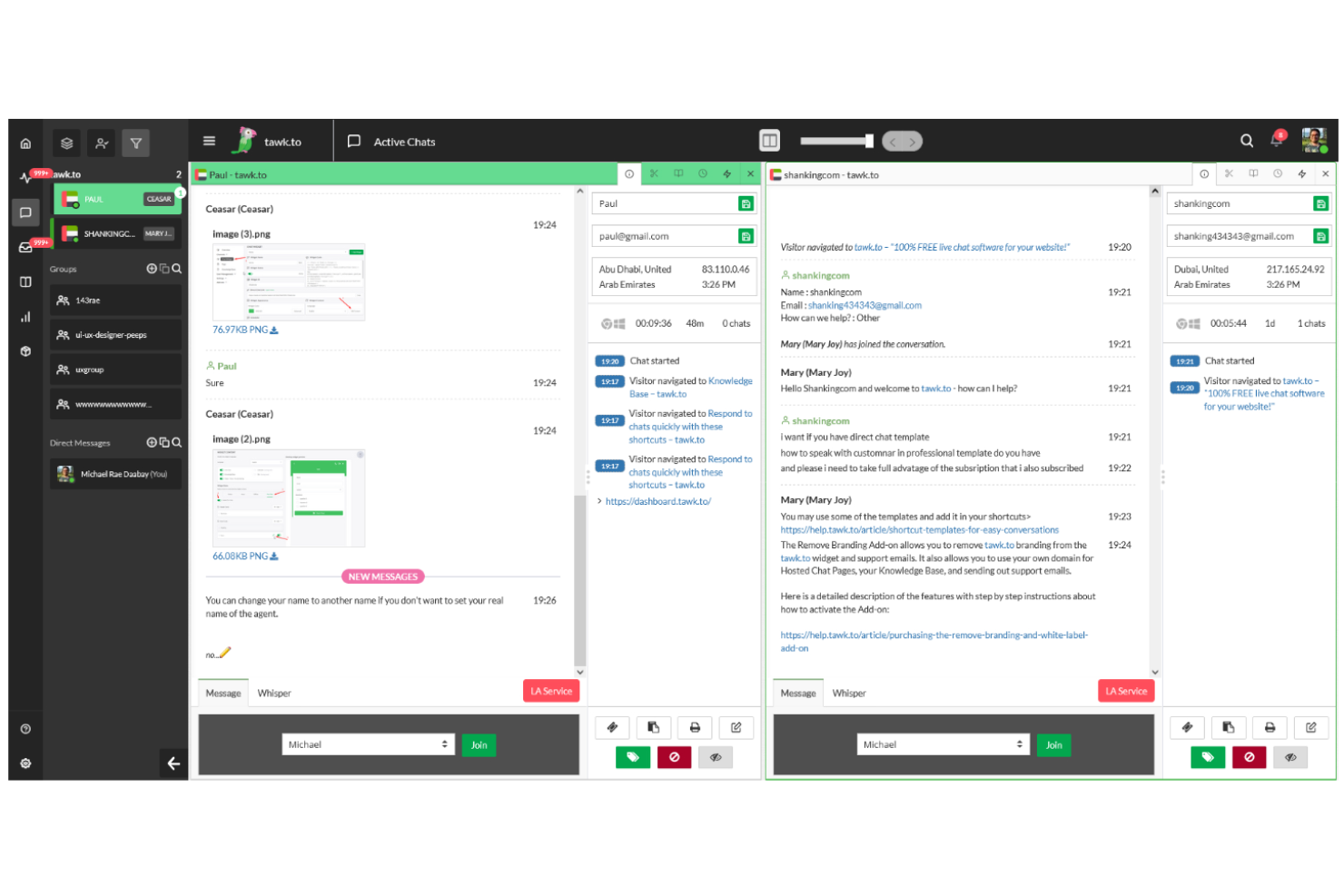
tawk.to is a free live chat software that comes with an easy-to-install chat widget, real-time chat tracking, and tools for routing chat conversations, managing canned responses, and coordinating multiple support agents in one dashboard.
Who Is tawk.to Best For?
tawk.to suits customer support teams and small businesses that need to handle high chat volume while adding agents without increasing costs.
Why I Picked tawk.to
I picked tawk.to because I can add unlimited agents without extra cost, which is rare for free live chat software. I like that my support team can easily monitor website visitors, assign chats, and manage saved responses, all without restricting team members or increasing price. In my experience, this makes scaling live support far simpler when you have growing customer engagement or heavy chat traffic.
tawk.to Key Features
- Real-time visitor tracking: See what visitors are doing on your site and start proactive chat at the right moment.
- Automated triggers: Set up automated greetings or messages based on visitor behaviour.
- Mobile app support: Reply to chats and monitor activity from iOS and Android devices.
- Widget customization: Adjust chat widget colours, positions, and branding with flexible customization options.
tawk.to Integrations
Integrations include Shopify, WooCommerce, WordPress, Zapier, Slack, and Google Analytics, with API access for custom workflows and integrations.
What's Free?
tawk.to offers a free-forever plan with unlimited agents and unlimited chat history. The free version includes all core chat platform features but displays tawk.to branding on the chat window.
Pros and Cons
Pros:
- Built-in help center for customers
- Real-time monitoring of website visitors
- Free forever for unlimited agents
Cons:
- Advanced AI features require paid add-ons
- Payment is required to remove branding

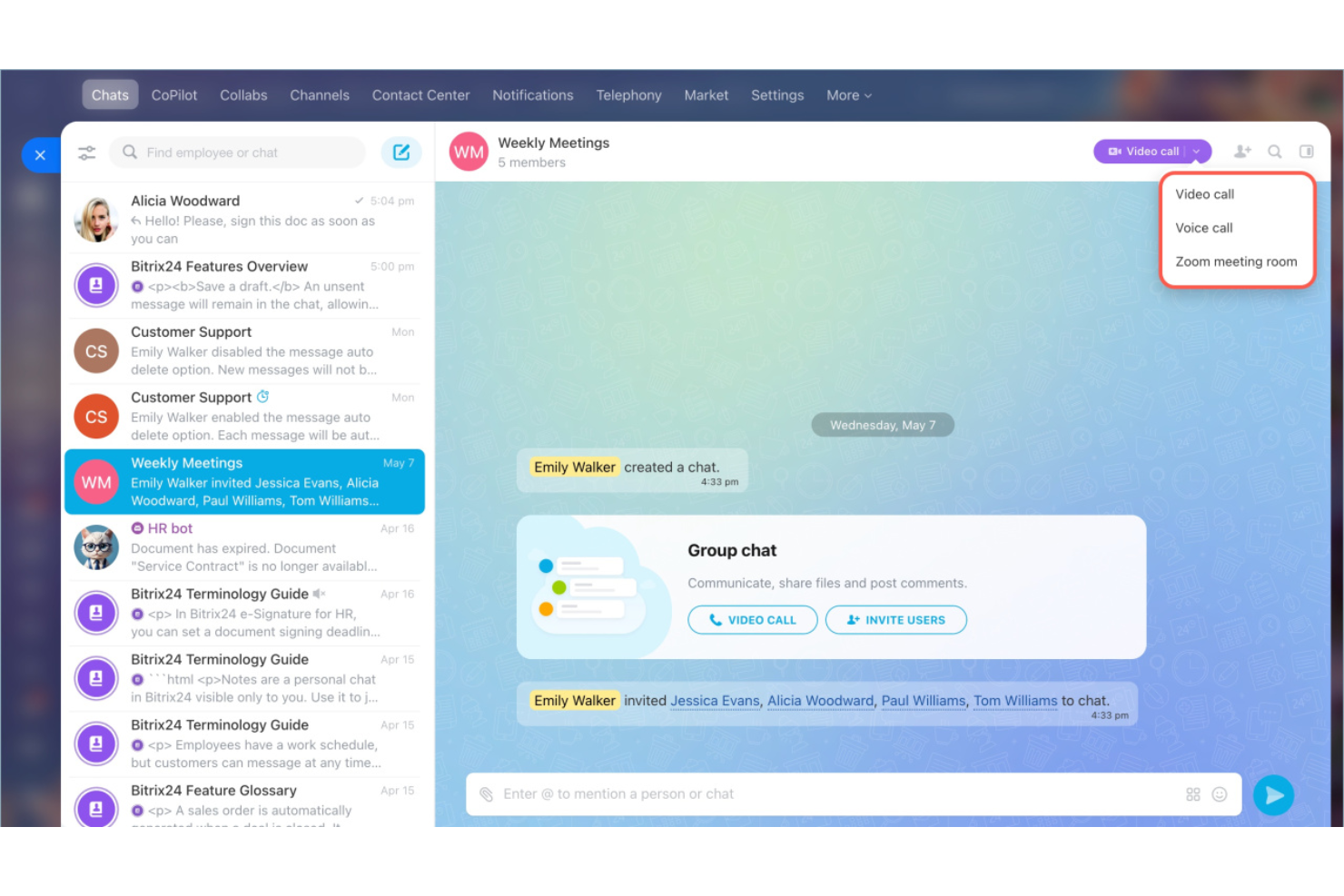
Bitrix24 is a business management platform that includes free live chat, CRM, project management, and sales tools, so you can manage customer support and sales in one place.
Who Is Bitrix24 Best For?
Sales and support teams at small to midsize businesses that want to manage live chat, sales, and customer communication in one place.
Why I Picked Bitrix24
I picked Bitrix24 as one of the best because it gives me live chat alongside a full-featured CRM, so I can track every conversation and follow up with leads without switching platforms. I like having chat, email, phone, and social messaging in the same workspace. The built-in lead management and workflow automation help my team move from first message to closed deal without jumping between systems.
Bitrix24 Key Features
- In-app chat widget: Add live chat to your website to engage visitors instantly.
- Chatbot builder: Automate responses for common questions using customizable bots.
- Visitor tracking: Monitor site visitor activity and see their browsing history in real time.
- Multi-channel inbox: Respond to chats, emails, and social messages from a single dashboard.
Bitrix24 Integrations
Integrations include WhatsApp, Telegram, Zapier, QuickBooks, Trello, Asana, Jira, WooCommerce, RingCentral, and Twilio.
What's Free?
Bitrix24 offers a free-forever plan with unlimited users and 5 GB of online storage. It includes a knowledge base and unlimited storage for files, but restricts chat history to 30 days and restricts access to automation.
Pros and Cons
Pros:
- Internal social network for teams
- Project management with chat tasks
- Full CRM for sales pipelines
Cons:
- Navigation can be complex
- Steeper learning curve
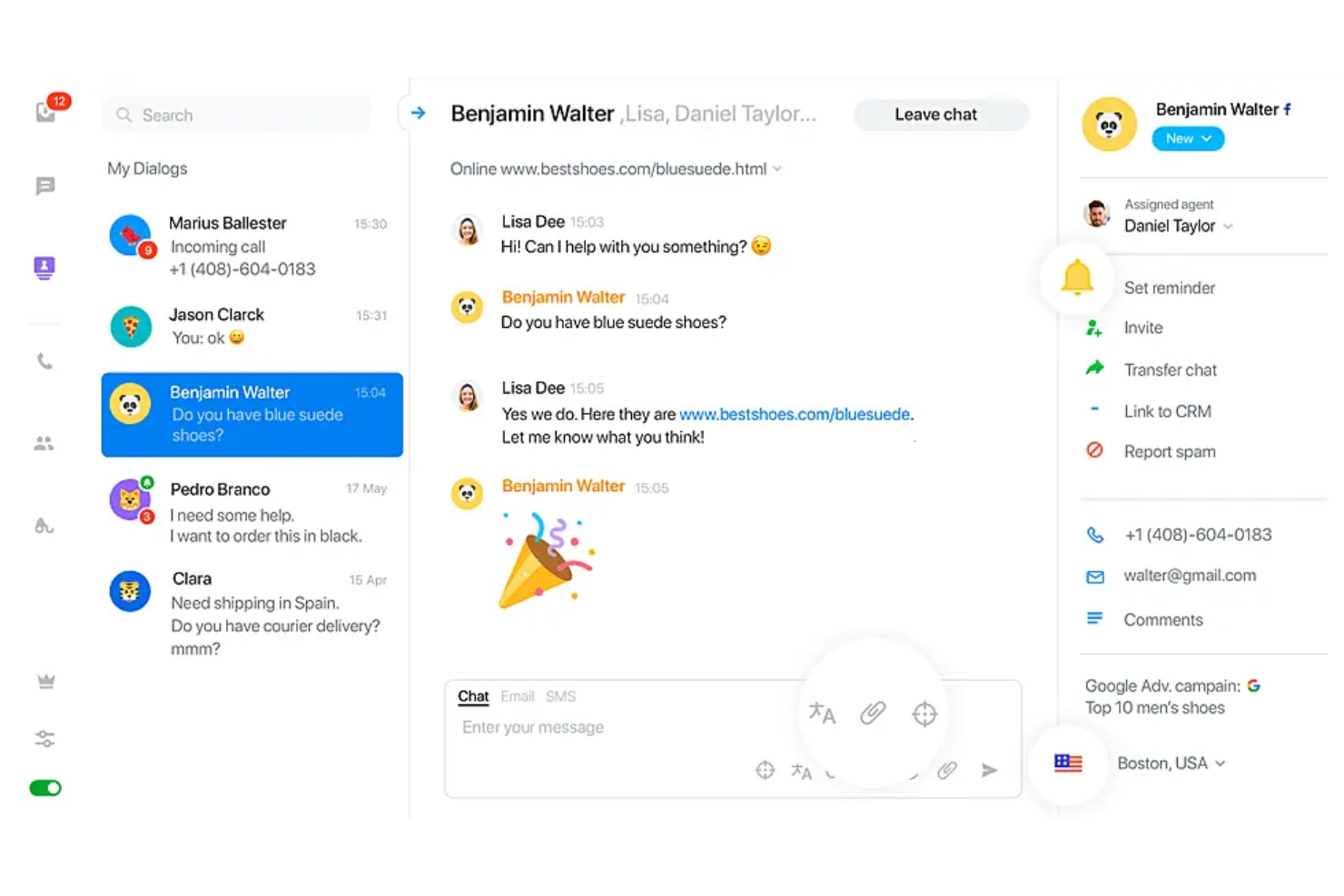
JivoChat is a live chat software for websites and apps that combines web chat, phone calls, social media, and messages in one place.
Who Is JivoChat Best For?
JivoChat suits customer service teams in small and midsize businesses that want to manage chat, calls, and messaging channels from a single platform.
Why I Picked JivoChat
I picked JivoChat as one of the best because it combines chat, phone, and social channels in a single inbox. I can handle calls alongside chat and email in the same dashboard, which is rare among free chat software. I like how my team can answer messages from WhatsApp, Instagram, and Facebook alongside website chat, without switching tabs.
JivoChat Key Features
- Canned responses: Save quick replies for fast answers to common questions.
- Visitor monitoring: Track who is on your site in real time.
- Chat transfer: Move chats between team members without losing context.
- Multi-language support: Offer chat in several languages for global customers.
JivoChat Integrations
Integrations include Facebook Messenger, WhatsApp, Instagram, Viber, Slack, Shopify, Pipedrive, amoCRM, Bitrix24, Wix, and Zapier, with API access for custom integrations.
What's Free?
JivoChat offers a free-forever plan for up to five agents and unlimited websites. It includes omnichannel support across Telegram, Viber, and Facebook, but limits chat history to two months and restricts access to advanced CRM integrations.
Pros and Cons
Pros:
- Callback requests for phone support
- Corporate phone system inside the app
- Manage social media channels in one place
Cons:
- Limited control over automatic chat pop-ups
- Fees for advanced phone features

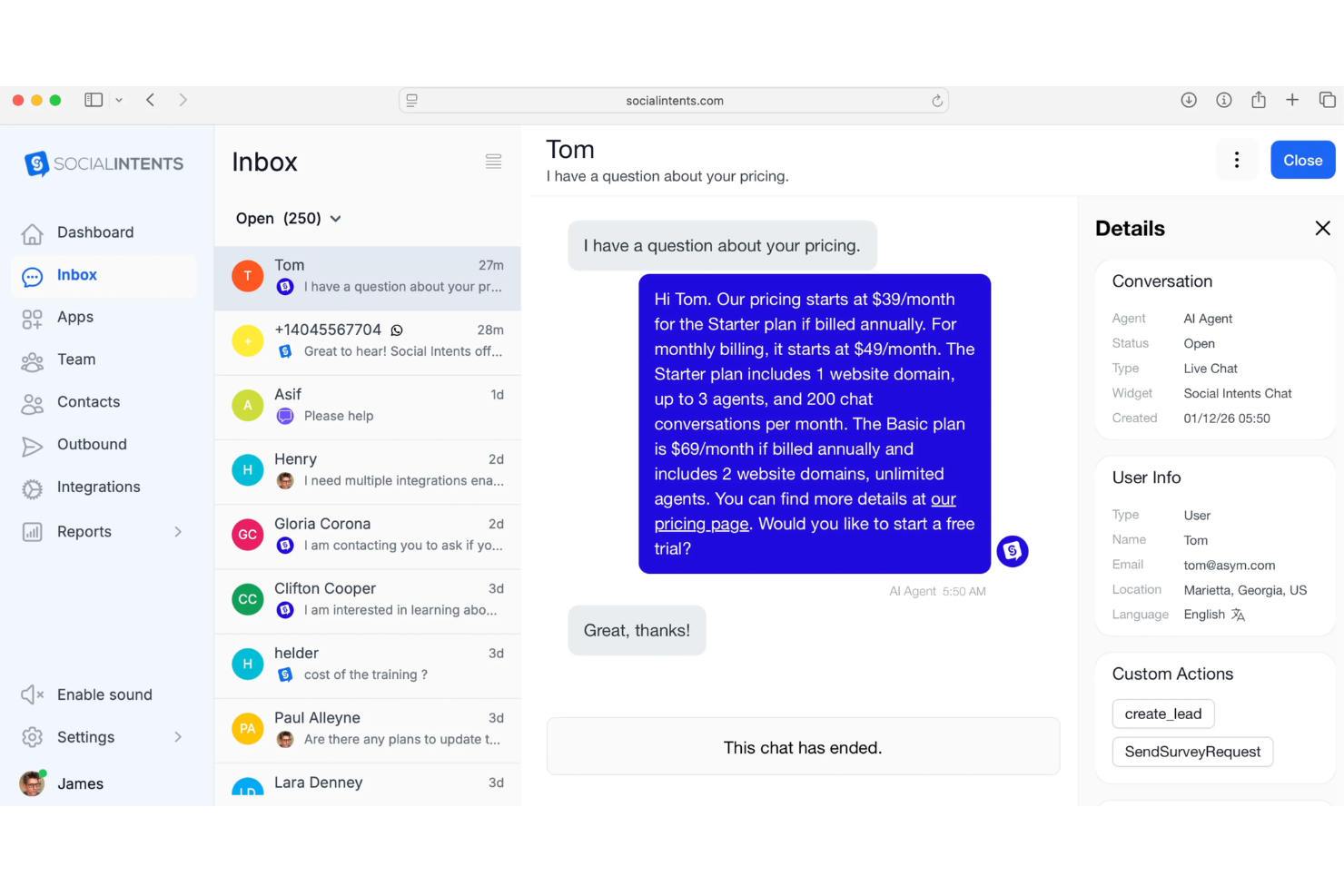
Social Intents is a live chat software solution that connects website visitors or users from chat widgets directly to Microsoft Teams, offering features like automated chat routing, canned responses, and multi-channel messaging, all managed within Teams.
Who Is Social Intents Best For?
Teams already using Microsoft Teams who want to manage live chats from their website or other channels inside their existing collaboration environment.
Why I Picked Social Intents
I picked Social Intents as one of the best because it uniquely connects live chat directly to Microsoft Teams, so my team can chat with website visitors without ever leaving Teams. I like how chat routing, canned responses, and multi-channel chat all happen in the Teams interface. In my experience, this is the smoothest way to merge live chat with internal collaboration when you’re already relying on Microsoft Teams daily.
Social Intents Key Features
- Chatbot integration: Connect AI chatbots to automate chat responses.
- Pre-chat forms: Collect visitor information before starting a chat.
- Email and SMS notifications: Send real-time notifications to agents outside Teams.
- Custom branding: Allow customization of chat widgets to match your brand.
Social Intents Integrations
Integrations include WordPress, Shopify, Microsoft Teams, Slack, Salesforce, HubSpot, Zendesk, BigCommerce, Adobe Commerce, and Wix.
What's Free?
Social Intents offers a 14-day free trial with full access to all features. There is no free-forever plan, and a paid subscription is required after the trial.
Pros and Cons
Pros:
- Direct sync with HubSpot leads
- Manage conversations inside Slack channels
- Chat directly from Microsoft Teams
Cons:
- Limited visual widget customization
- No standalone desktop app
Other Free Live Chat Software
Here are some additional free live chat software options that didn’t make it onto my shortlist but are still worth checking out:
- Smartsupp
For chat with visitor session recordings
- Hiver
For live chat inside Google Workspace
- Zendesk
For managing omnichannel support
- Olark
For accessible live chat for all users
- Freshchat
For multilingual customer messaging
- HelpCrunch
For customizing live chat and messaging
- LiveAgent
For chat with built-in ticketing system
- LiveChat
For real-time website sales engagement
- ThriveDesk
For automated WooCommerce support


How I Evaluate Free Live Chat Software
First, I define what counts as free. For live chat software, that means a free-forever plan—not a trial—since support teams need an always-on chat channel, not a temporary one. From there, I evaluate two layers: the baseline functionality a tool must have to make the list, and the differentiators that set one vendor apart from another.
Core Functionality (Table Stakes For This List)
In addition to my free offer requirements, I also use a scoring system to select tools for my list. Here's how it works:
I rank each one on a scale from 0 (does not offer the functionality) to 5 (excels in this area) for each core functionality listed below. Then, I calculate the tool's total score into a percentage. Each tool needs to achieve a minimum total score of 65% to be considered for inclusion.
- Real-Time Chat Widget: I check whether the widget is embeddable, mobile-responsive, and customizable enough to match a brand's look—think logo, colors, and welcome message.
- Agent Inbox & Routing: How chats reach agents matters. I look for a shared inbox with at least basic auto-assignment so multiple reps can handle volume across shifts.
- Visitor Context & History: I evaluate whether agents can see details like the visitor's current page, location, and past conversations before they even type a reply.
- Canned Responses & Triggers: Saved replies for common questions like "Where's my order?" and proactive triggers based on visitor behavior help lean teams scale their capacity.
- File & Media Sharing: I look for in-chat file exchange—customers often need to send screenshots of errors or receive PDFs—so both sides should be able to share attachments.
- Offline Message Capture: When agents are away, the widget should collect visitor details and messages. I check whether those submissions route into the inbox or generate email alerts.
Once I have a list of tools that meet the criteria, I consider what sets each platform apart.
Differentiating Factors (What Sets Vendors Apart)
Here's how I compare and contrast different vendors:
Standout Features
A built-in chatbot—even a basic rule-based flow—can deflect repetitive questions like shipping policies or password resets, freeing agents for higher-value conversations. I also look for mobile agent apps, since small teams often need to reply from their phones between tasks. Post-chat CSAT ratings paired with basic analytics on response times and chat volume help CX leads spot gaps and build a case for additional resources.
Beyond Features
Agent seat limits shape whether a free plan works for a real team or just a solo operator—I check how many reps can be online at once during peak hours. Conversation and history caps matter just as much, since a busy ecommerce site can burn through a monthly chat limit in days. I also evaluate native integrations with tools like HubSpot, Shopify, or WordPress, because a chat widget that lives in isolation creates extra manual work for teams already stretched thin.
It’s easy to get bogged down in long feature lists and complex pricing structures. To help you stay focused as you work through your unique software selection process, here’s a checklist of factors to keep in mind:
| Factor | What to Consider |
|---|---|
| Scalability | Will the free plan support your expected chat volume and team size as your business grows? |
| Integrations | Does it connect natively with your CRM, helpdesk, or ecommerce tools—now and in the future? |
| Customizability | Can you easily tailor chat widget appearance and workflow to align with your brand and website? |
| Ease of use | Will your team ramp up quickly and manage chats without extensive training or technical skills? |
| Implementation and onboarding | How quickly can you start using the tool, and what resources (guides, setup support) are available? |
| Cost | Are there any hidden costs, user or chat limits, or upgrade triggers beyond the free plan? |
| Security safeguards | Will your customers’ chat data be stored securely, and does the tool offer necessary data controls? |
| Support availability | What help options (chat, email, knowledge base) come with the free plan and during onboarding? |
What Is Free Live Chat Software?
Free live chat software lets you add real-time messaging to your website at no cost, so you can communicate instantly with visitors or customers. It typically includes a web-based chat widget and a dashboard for managing conversations. Free plans usually include core chat features, but may limit user counts, chat volume, or integrations.
Features of Free Live Chat Software
Let’s go over the features commonly found in live chat software and which ones are usually included in free vs. paid plans.
Typically Free Live Chat Software Features
- Live chat widget: Lets you embed a chatbox on your website so visitors can start real-time conversations with your team.
- Basic conversation history: Stores recent chats so agents can review past conversations and provide consistent support.
- Agent notifications: Alerts agents when new messages or chats arrive, helping them respond quickly to customer inquiries.
- Chat transfer: Allows support agents to hand off conversations to other team members if needed.
- Limited chat routing: Directs incoming chats to available or assigned agents within basic parameters set by the business.
- User management: Lets you invite multiple team members and assign basic roles within the chat system.
- Visitor information display: Shows basic visitor information, like location or referral source to agents during chats.
- Customizable appearance: Enables simple edits to the chat widget’s colours, branding, or greeting message to fit your website.
Typically Paid Live Chat Software Features
- Advanced automation and chatbots: Use AI or rules-based bots to answer repetitive queries or route chats without human involvement.
- Omnichannel messaging: Integrates messaging across web, social media, email, and SMS into a single inbox for unified management.
- Detailed analytics and reporting: Provides granular data on chat volume, agent response times, and customer satisfaction for performance tracking.
- Proactive chat triggers: Automatically invite visitors to chat based on their behaviours, such as time on page or exit intent.
- Multi-language support: Lets you serve chat interfaces and canned responses in multiple languages to support global audiences.
- Integration with CRM and helpdesk: Syncs chat data, contacts, and transcripts automatically into broader customer service or sales platforms.
- Advanced user permissions: Offers granular role-based access controls for managing agent and admin privileges.
- File sharing and media support: Allows users to send and receive attachments, screenshots, or videos directly in the chat window.
- Video or voice calls: Enables real-time voice or video calls through the chat widget for more personal support.
- Custom workflows and APIs: Let businesses build rules, automations, or connections to other software for tailored experiences.
Benefits of Free Live Chat Software
Implementing free live chat software provides several benefits for your team and your business. Here are a few you can look forward to:
- Real-time customer engagement: Talk directly with customers the moment they visit your site using the embedded chat widget.
- Lower support costs: Serve more customers with fewer resources by handling multiple chats simultaneously instead of phone calls or emails.
- Fast team onboarding: Get new agents up to speed quickly with intuitive dashboards, user management, and training resources.
- Improved customer satisfaction: Offer immediate answers to questions, resolve concerns quickly, and keep conversation history for context.
- Easy website integration: Add chat to your site without complex technical requirements or the need for coding expertise.
- Unlimited user access: Invite your whole team to participate in chat support, since most free plans offer generous agent limits.
- Access to core features risk-free: Try out basic live chat functionality and determine what works for your business without financial commitment.
Costs and Pricing of Live Chat Software
I realize you came to this article looking for the best live chat software options that are available for free. However, since free plans only offer limited features, there's a good chance you'll need to scale your plan up in the future.
The table below summarizes common plans, their average prices, and typical features included in live chat software:
Plan Comparison Table for Live Chat Software
| Plan Type | Average Price | Common Features |
|---|---|---|
| Free Plan | $0 | Basic live chat widget, core user management tools, limited chat history, simple customization, and essential notifications. |
| Personal Plan | $5-$15/user/month | Chat transcripts, chat transfer between agents, light reporting, visitor insights, and basic integration options. |
| Business Plan | $20-$40/user/month | Advanced automation, omnichannel support, detailed analytics, chatbot tools, expanded customization, and CRM integrations. |
| Enterprise Plan | $50-$100/user/month | Custom workflows, priority support, enhanced security, API access, advanced user roles, and compliance features. |
Free Live Chat Software FAQs
Here are some answers to common questions about free live chat software:
Is free live chat software really free to use?
Yes, most free live chat software offers a no-cost plan you can use as long as you want. However, these plans usually come with limits on support agents, chat volume, or advanced features, which may impact customer satisfaction and require upgrading as your business grows. While the initial price is zero, you might eventually need an add-on or a paid tier to scale to larger operations.
Can I use free live chat software on multiple websites?
Some free plans let you install the chat widget on more than one website, but many limit usage to a single domain. Always check the platform functionality and pricing details so you’re not surprised by restrictions after setup. If you are looking to optimize your reach, some tools offer generous multi-site functionality even on basic tiers.
How secure is free live chat software?
Most free tools include basic encryption and customer data protection. If you handle sensitive data, look for options with GDPR compliance, secure data storage, and clear privacy policies to protect all customer interactions. Whether you use a smaller live chat tool, ensuring your CRM integration is secure is vital for maintaining trust during real-time conversations
How easy is it to set up live chat on a website?
Most live chat solutions are no-code and user-friendly. You can usually install a chat box by adding a script to your website or using a plugin for platforms. Setup typically takes under an hour, but configuring workflows, routing, and automation can take longer depending on your needs. For startups, using canned responses and frequently asked questions within the chat window can help your support team manage chat conversations more efficiently.
Will free live chat software slow down my website?
Most live chat apps are designed to have minimal impact on site speed, so they have minimal impact on user experience and the overall customer experience. Performance can vary, so it’s a good idea to test the chat platform after installation to ensure your website visitors can still navigate quickly. A well-optimized live chat solution ensures that real-time chat doesn’t hinder your conversions.